WAF bypass
A reflected XSS parameter was placed inside a script tag, but Bitrix's built-in WAF replaced the whole script with a stub. By inserting a null byte before the closing quote, the WAF's comparison failed and the malicious script executed.
 Published on blog.deteact.com
Бывает, что при проведении XSS отражённого типа параметры попадают прямо в тело тега script. Обычно это означает, что эксплуатация тривиальна: не помешает кодирование скобок, не помешают многие фаерволы, в том числе ныне почивший Chrome XSS Auditor. Но в CMS Bitrix на этот случай есть свой встроенный проактивный…
The full write-up lives on its author's site
It belongs to its author, so we link to it rather than copy it. The other two tabs are our own rewrites, checked against it.
Reflected XSS is usually straightforward when the injection point sits inside a <script> block: bracket encoding and most web application firewalls, including the now retired Chrome XSS Auditor, do not get in the way. Bitrix CMS ships its own proactive filter (WAF) for exactly this case, and its logic for XSS protection is similar to that of XSS Auditor. This write-up describes a Mail.ru Bug Bounty finding where that filter was bypassed with a single null byte. The issue was later assigned CVE-2020-13758.
Context
While fuzzing a Mail.ru service during a Bug Bounty programme, the researcher found an entry point where a GET parameter was reflected directly into the body of a <script>...</script> tag. The application was built on Bitrix and had the WAF module enabled. Any attempt to insert interesting code ended with the whole script being replaced by the stub <!-- deleted by Bitrix WAF -->.
Setup
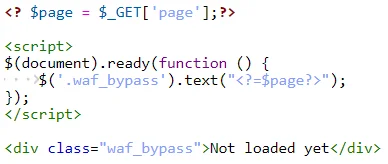
To reproduce and analyse the behaviour, the researcher deployed a test application on Bitrix CMS with the WAF module active and added the following code to one of the pages, /waf-bypass.php:
Finding it
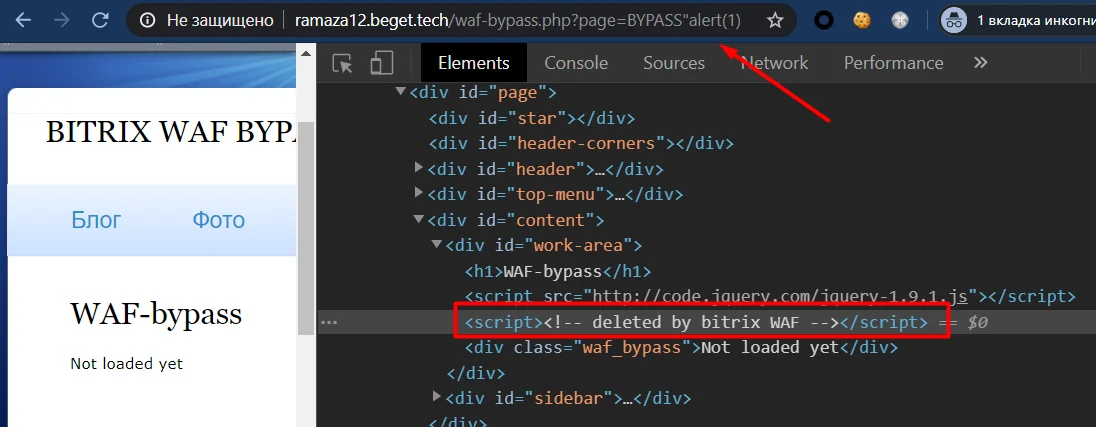
The first observation was the WAF stub: instead of the reflected script, the response contained <!-- deleted by Bitrix WAF -->. Passing a closing quote and a call to alert (or any other function) into the vulnerable page parameter caused the WAF to cut out the entire script:
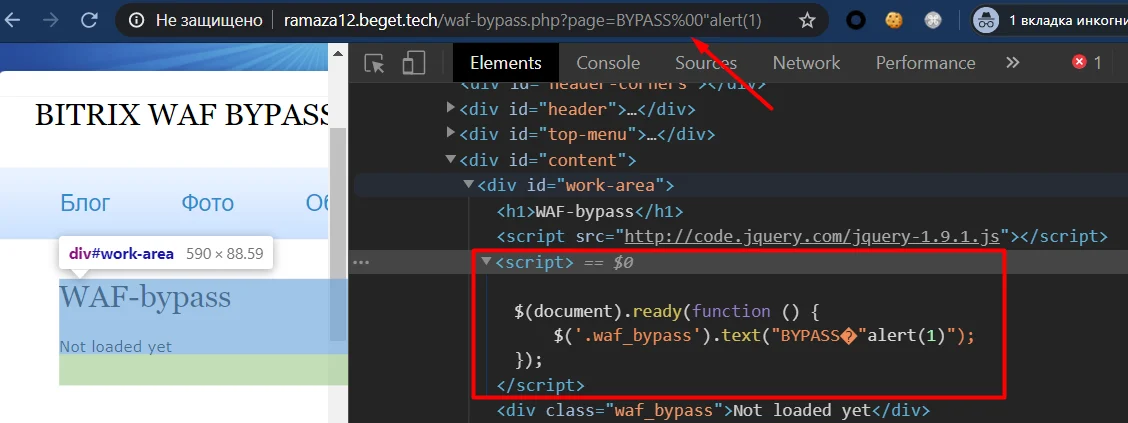
During fuzzing it turned out that bypassing the protection is very simple: placing a null byte (%00) before the closing quote lets the code through the WAF:
Exploitation
Step 1: confirm the reflection and the WAF reaction
Send a payload that closes the string and calls a function in the page parameter. The WAF removes the whole script and leaves the stub <!-- deleted by Bitrix WAF --> in its place.
Step 2: insert a null byte before the closing quote
Add %00 immediately before the closing quote. The WAF no longer recognises the reflected content as dangerous and the script is passed through.
Step 3: use the full exploitation vector
The resulting request is:
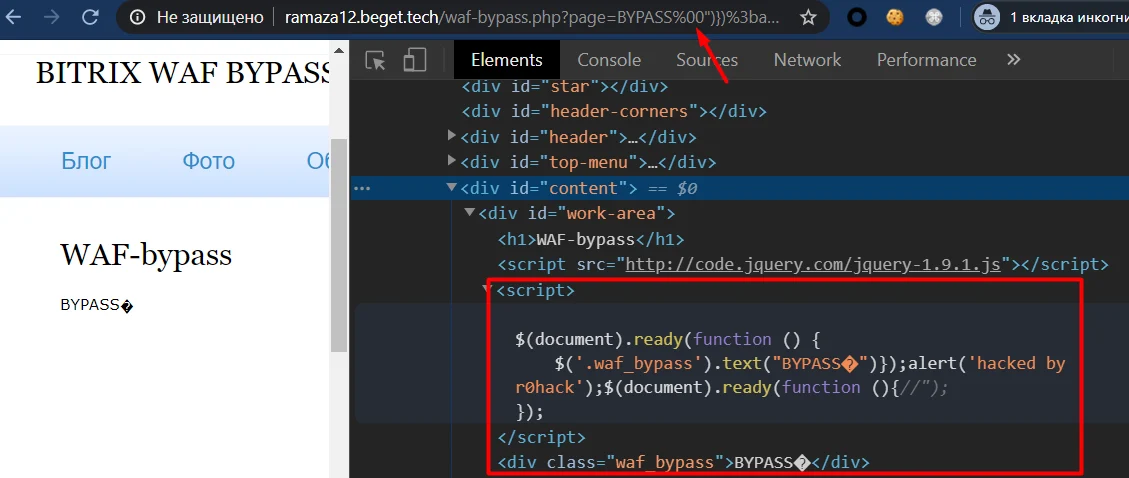
/waf-bypass.php?page=BYPASS%00")});alert(1);$(document).ready(function%20(){%2f%2f
The resulting request is shown above; the report does not break the payload down further. The trailing %2f%2f is //, which comments out the remainder of the original script so the rest of the page code does not break the syntax.
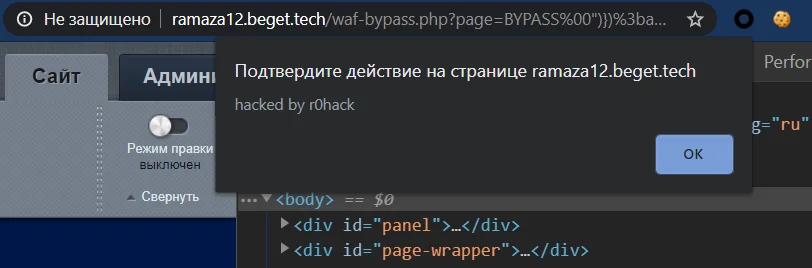
This is what the result looks like on the page:
Root cause
The flaw is in the post-filtering module that protects against XSS. The module works like XSS Auditor: it looks in the page body for script tags with active content that was passed in user parameters.
For some reason the module strips the null byte from parameter values. As a result, when the page body is compared with the parameters, no match is found: the body contains \x00, while the parameters do not.
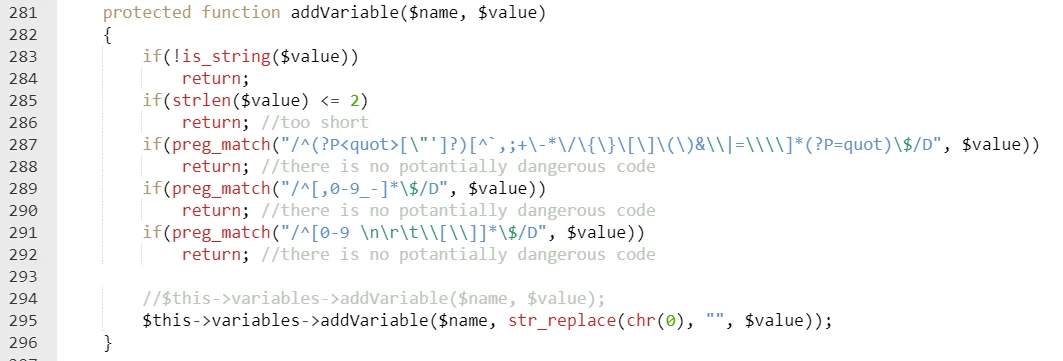
The vulnerable line is in ./bitrix/modules/security/classes/general.post_filter.php/post_filter.php, where the addVariable method strips the null byte with chr(0):
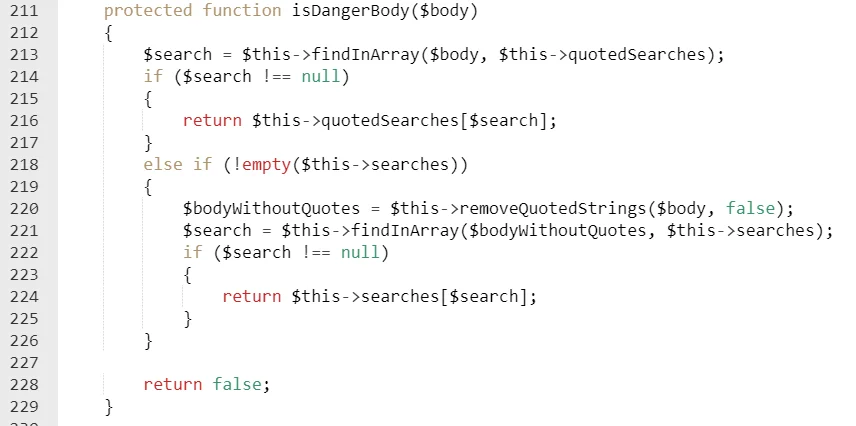
The search for user data in the script body happens in the isDangerBody function. There, the untouched $body value and the array of parameters, from which the null byte has been removed, are passed to findInArray:
Impact
The report demonstrates the bypass with alert(1) on a test Bitrix page; it does not show exploitation against the Mail.ru service itself. The report does not describe any further actions beyond alert(1), so the practical consequences depend on what the application allows an authenticated or unauthenticated user to do in that origin.
Fix
To fix the error in the WAF itself, remove the str_replace call from the addVariable function. As a precaution, add a check for the presence of a null byte in the content, since the Bitrix developers presumably added that str_replace call for a reason.
More broadly, the report stresses that WAFs can almost always be bypassed and can contain bugs of their own. Firewalls should not be relied on alone: a secure development process and regular application penetration tests are needed.
- Null byte before the closing quote in other reflected parameters. Try
%00immediately before the character that closes the string in any parameter reflected into a<script>body. A positive result is that the WAF stub disappears and the payload executes. - Null byte in other positions inside the payload. Place
%00before other syntax characters that the filter matches on. A positive result is the same: the filter fails to correlate the parameter with the page body. - Other control characters that may be stripped by the filter. If the filter normalises or removes a character from parameters but not from the body, the same mismatch can occur. A positive result is a reflected payload that survives filtering.
- Commenting out the remainder of the script. When injecting into an existing script, close the surrounding structures and end the payload with
//so the original code does not cause a syntax error. A positive result is that the injected call runs without breaking the page.
What happened, in plain words
A security researcher was testing a website belonging to Mail.ru as part of a Bug Bounty programme. A Bug Bounty is a scheme where a company publicly invites people to try to break its systems and pays them for reporting real problems instead of exploiting them. The researcher found a spot on the site where something typed into the address bar of a browser ended up being copied straight into a piece of JavaScript code that the page runs. That kind of mistake is called reflected cross-site scripting, or reflected XSS. In the simplest case it lets an attacker run their own JavaScript in someone else's browser when that person opens a crafted link.
Normally that would be easy to exploit. But Mail.ru's site was built on a content management system called Bitrix, and Bitrix ships with a built-in protective filter, a web application firewall (WAF). The filter noticed the injected code and replaced the whole script with a harmless placeholder. The researcher then found that slipping one invisible character, a null byte, into the input made the filter look the other way. The problem was later given the identifier CVE-2020-13758. A CVE is a public catalogue number for a known vulnerability, so that everyone can refer to the same issue unambiguously.
This article walks through the same steps the researcher took, explaining each concept from scratch.
Background: what all the pieces are
Before the steps, here is what the main terms mean.
- JavaScript is the programming language that web pages run inside your browser. It is what makes menus open, forms validate and content change without reloading the page.
- A
<script>tag is the piece of HTML that tells the browser "the JavaScript between these tags should be executed". A page can have several of them. - A GET parameter is the part of a web address after the question mark. In
example.com/search?q=cats, the parameter is namedqand its value iscats. When you type something into a search box and press Enter, the browser usually puts it into a GET parameter. - Reflection means the server takes a value you sent and copies it back into the page it returns. If the server copies it into a
<script>block without cleaning it, your text becomes part of the program the browser runs. - A WAF (web application firewall) is a filter that sits in front of or inside a web application and inspects incoming requests. If a request looks like an attack, the WAF blocks it or rewrites it. Think of it as a security guard at the door who checks bags: useful, but not impossible to fool.
- Fuzzing means sending lots of slightly different, often strange inputs to a system and watching how it reacts, looking for behaviour that differs from the normal case. It is how the researcher found the bypass.
- A null byte is a single byte with the value zero. In a URL it is written as
%00. It is invisible in normal text, and different pieces of software sometimes treat it differently, which is exactly what made this bug possible. - A CMS (content management system) is software for building and running websites, such as WordPress or Bitrix. Bitrix is a popular CMS, especially in Russia, and it includes a security module that provides the WAF in question.
The starting point
While fuzzing a Mail.ru service during the Bug Bounty programme, the researcher found an entry point where a GET parameter was reflected directly into the body of a <script>...</script> tag. The application was built on Bitrix and had the WAF module enabled. Any attempt to insert interesting code ended with the whole script being replaced by the stub <!-- deleted by Bitrix WAF -->.
That stub is an HTML comment. Browsers ignore comments, so the page still loads, but the injected code is gone. The filter had done its job.
Setting up a test copy
To study the behaviour without poking at Mail.ru's live systems, the researcher deployed a test application on Bitrix CMS with the WAF module active and added the following code to one of the pages, /waf-bypass.php:
The page reflects the page parameter into the script body, which is the same condition as the Mail.ru entry point. In other words, the test page is a small replica of the vulnerable situation: whatever you put into page in the address bar gets pasted into the JavaScript that the page sends back to your browser.
Why build a replica at all? Because you cannot safely experiment on someone else's production site, and because a small page you control lets you see exactly what the filter does to your input. It is the difference between testing a lock on your own door and trying keys on a stranger's house.
Finding the bypass
The first observation was the WAF stub: instead of the reflected script, the response contained <!-- deleted by Bitrix WAF -->. Passing a closing quote and a call to alert (or any other function) into the vulnerable page parameter caused the WAF to cut out the entire script:
To read this, you need to know two small things about JavaScript. Strings of text are written between quotes, so "hello" is a string. And alert(1) is a built-in browser function that pops up a small dialog box with the number 1 in it. Security researchers use alert(1) as a harmless proof: if the box appears, your JavaScript ran.
So the payload tried to do two things: close the string that the page had opened, and then call alert. The WAF recognised this pattern and deleted the whole script. That is the same idea as the retired Chrome XSS Auditor, a feature that older versions of Chrome used to detect reflected scripts and refuse to run them.
During fuzzing it turned out that bypassing the protection is very simple: placing a null byte (%00) before the closing quote lets the code through the WAF:
The filter no longer recognises the reflected content as dangerous. The reason is explained in the next section, but the practical lesson is already visible: the guard was comparing two strings, and the null byte made the two strings differ.
Exploitation, step by step
Step 1: confirm the reflection and the WAF reaction
Send a payload that closes the string and calls a function in the page parameter. The WAF removes the whole script and leaves the stub <!-- deleted by Bitrix WAF --> in its place.
Why do this first? Because you need to know that the parameter really is reflected into the script, and that the WAF really is watching. If the parameter were escaped or placed somewhere harmless, there would be nothing to bypass. Confirming the baseline behaviour is what makes the later difference meaningful.
Step 2: insert a null byte before the closing quote
Add %00 immediately before the closing quote. The WAF no longer recognises the reflected content as dangerous and the script is passed through.
Why does position matter? The filter works by taking the values you sent and searching for them inside the page it is about to return. If the value it searches for is not exactly the same as what appears in the page, the search fails, and the filter concludes there is nothing dangerous. Putting the null byte right before the closing quote is enough to break that comparison.
Step 3: use the full exploitation vector
The resulting request is:
/waf-bypass.php?page=BYPASS%00")});alert(1);$(document).ready(function%20(){%2f%2f
Line by line, in plain words:
/waf-bypass.phpis the path of the test page on the server.?page=starts the GET parameter namedpage, which the page reflects into its script.BYPASS%00is filler text followed by the null byte. The wordBYPASSis just a label; the important part is%00.")});closes the string, the function call and the surrounding brackets that the original page had opened, so that what follows is treated as new JavaScript rather than as part of the old expression.alert(1);is the proof payload: it pops up a dialog with 1 in it.$(document).ready(function%20(){%2f%2freopens a jQuery block. jQuery is a popular JavaScript library, and$(document).ready(...)means "run this code once the page has finished loading". Reopening it keeps the rest of the original script syntactically valid.%20is a URL-encoded space, and%2f%2fis//. In JavaScript,//starts a comment, so everything after it on that line is ignored. That comments out the remainder of the original script so the rest of the page code does not break the syntax.
This is what the result looks like on the page:
Why it works: the root cause
The flaw is in the post-filtering module that protects against XSS. The module works like XSS Auditor: it looks in the page body for script tags with active content that was passed in user parameters.
In other words, the filter does not try to understand JavaScript. It takes the values from your request, looks for them inside the HTML it is about to send back, and if it finds them inside a script, it assumes an attack and removes the script. It is a matching game, not a parser.
For some reason the module strips the null byte from parameter values. As a result, when the page body is compared with the parameters, no match is found: the body contains \x00, while the parameters do not. \x00 is just another way of writing the null byte.
The vulnerable line is in ./bitrix/modules/security/classes/general.post_filter.php/post_filter.php, where the addVariable method strips the null byte with chr(0):
chr(0) is a way of writing the character whose numeric code is zero, that is, the null byte itself. The method addVariable is where the filter stores each incoming parameter for later comparison, and it cleans the value before storing it.
The search for user data in the script body happens in the isDangerBody function. There, the untouched $body value and the array of parameters, from which the null byte has been removed, are passed to findInArray:
$body is the page content as it will be sent to the browser, null byte included. The array of parameters is the cleaned version, null byte removed. findInArray then searches for each cleaned parameter inside the untouched body. Because the two sides no longer match, the search finds nothing, and the filter lets the script through.
A simple comparison: imagine a guard who is given a list of banned words with one letter removed from each, and then checks a letter against that list. The letter will never match, even though it is clearly there. The null byte is the removed letter.
What an attacker could do with it
The report demonstrates the bypass with alert(1) on a test Bitrix page; it does not show exploitation against the Mail.ru service itself. "In the context of" means the script runs as if it came from Mail.ru itself, so it can read what the page can read and act as the logged-in user on that page.
The report does not describe any further actions beyond alert(1), so the practical consequences depend on what the application allows an authenticated or unauthenticated user to do in that origin. In plain terms: the proof shows the door is open, but the report does not walk through it.
How to fix it
To fix the error in the WAF itself, remove the str_replace call from the addVariable function. str_replace is a function that replaces one piece of text with another; here it is being used to delete the null byte. As a precaution, add a check for the presence of a null byte in the content, since the Bitrix developers presumably added that str_replace call for a reason.
More broadly, the report stresses that WAFs can almost always be bypassed and can contain bugs of their own. Firewalls should not be relied on alone: a secure development process and regular application penetration tests are needed. A secure development process means building security into how software is written, reviewed and released, rather than bolting a filter on at the end. Penetration tests are authorised attempts to break into an application, carried out by specialists, to find problems before real attackers do.
Variants worth testing
- Null byte before the closing quote in other reflected parameters. Try
%00immediately before the character that closes the string in any parameter reflected into a<script>body. A positive result is that the WAF stub disappears and the payload executes. - Null byte in other positions inside the payload. Place
%00before other syntax characters that the filter matches on. A positive result is the same: the filter fails to correlate the parameter with the page body. - Other control characters that may be stripped by the filter. If the filter normalises or removes a character from parameters but not from the body, the same mismatch can occur. A positive result is a reflected payload that survives filtering.
- Commenting out the remainder of the script. When injecting into an existing script, close the surrounding structures and end the payload with
//so the original code does not cause a syntax error. A positive result is that the injected call runs without breaking the page.
Glossary
- Bug Bounty: a programme where a company invites researchers to find and report security problems in exchange for a reward.
- CVE: a public catalogue number assigned to a known vulnerability so it can be referenced consistently.
- JavaScript: the programming language that web pages run in the browser.
<script>tag: the HTML element that tells the browser to execute the JavaScript written between its opening and closing tags.- GET parameter: the name and value pair after the question mark in a URL, such as
?page=.... - Reflection: when a server copies a value supplied by the user back into the page it returns.
- Reflected XSS: a vulnerability where user input is reflected into a page and executed as code in the victim's browser.
- WAF (web application firewall): a filter that inspects requests and responses and blocks or rewrites content that looks like an attack.
- Bitrix: a content management system for building websites, which includes a security module with a WAF.
- CMS (content management system): software for building and running websites.
- Fuzzing: sending many varied or unusual inputs to a system and observing how it reacts, in order to find unexpected behaviour.
- Null byte: a byte with the value zero, written
%00in a URL and\x00orchr(0)in code. - HTML comment: text between
<!--and-->that browsers ignore. alert(1): a built-in browser function that shows a dialog box, commonly used as harmless proof that JavaScript executed.- jQuery: a JavaScript library that simplifies common tasks;
$(document).ready(...)runs code once the page has loaded. - URL encoding: writing special characters in a URL as
%followed by two hexadecimal digits, such as%20for a space and%2ffor/. //comment: in JavaScript, two slashes make the rest of the line a comment that the browser ignores.str_replace: a function that replaces one piece of text with another, used here to delete the null byte.chr(0): a way of writing the character with numeric code zero, that is, the null byte.addVariable: the Bitrix method that stores incoming parameters for the filter's comparison.isDangerBody: the Bitrix function that checks the page body for user-supplied content inside scripts.findInArray: the function that searches for each parameter value inside the page body.$body: the page content as it will be sent to the browser, including the null byte.- XSS Auditor: a retired Chrome feature that detected reflected scripts and refused to run them.
- Secure development process: building security into how software is designed, written, reviewed and released.
- Penetration test: an authorised, structured attempt to break into an application in order to find vulnerabilities.




