Normal application flow
The password reset endpoint accepted a request with the one-time code removed, allowing an attacker to set a new password for any user's email address. The attacker could then log in as the victim, though the reset only completed after following a specific link.

In this year April 1, I quit my job due to some reason and so I can spend some times in Hackerone. I stopped finding bugs in 2018 because I have insecurity for my skills and I feels I don’t have enough skill set to deep dive into full-time bug hunting and so I tried to learn infra pentest, binary exploitation, source…
The full write-up lives on its author's site
It belongs to its author, so we link to it rather than copy it. The other two tabs are our own rewrites, checked against it.
Context
The target was the Mail.ru bug bounty program on HackerOne, and the vulnerable feature was the password reset flow of cups.mail.ru. The researcher describes the bug as an account takeover caused by a lack of access control in that reset functionality, and says it was found on 8 April, shortly after starting to dig into the program.
The normal flow is a multi-step wizard under /faq/restore-password/restore, driven by a step query parameter. The researcher walks through it as follows.
- The user clicks restore access and enters the email address associated with the account, at:
https://cups.mail.ru/faq/restore-password/restore?step=1
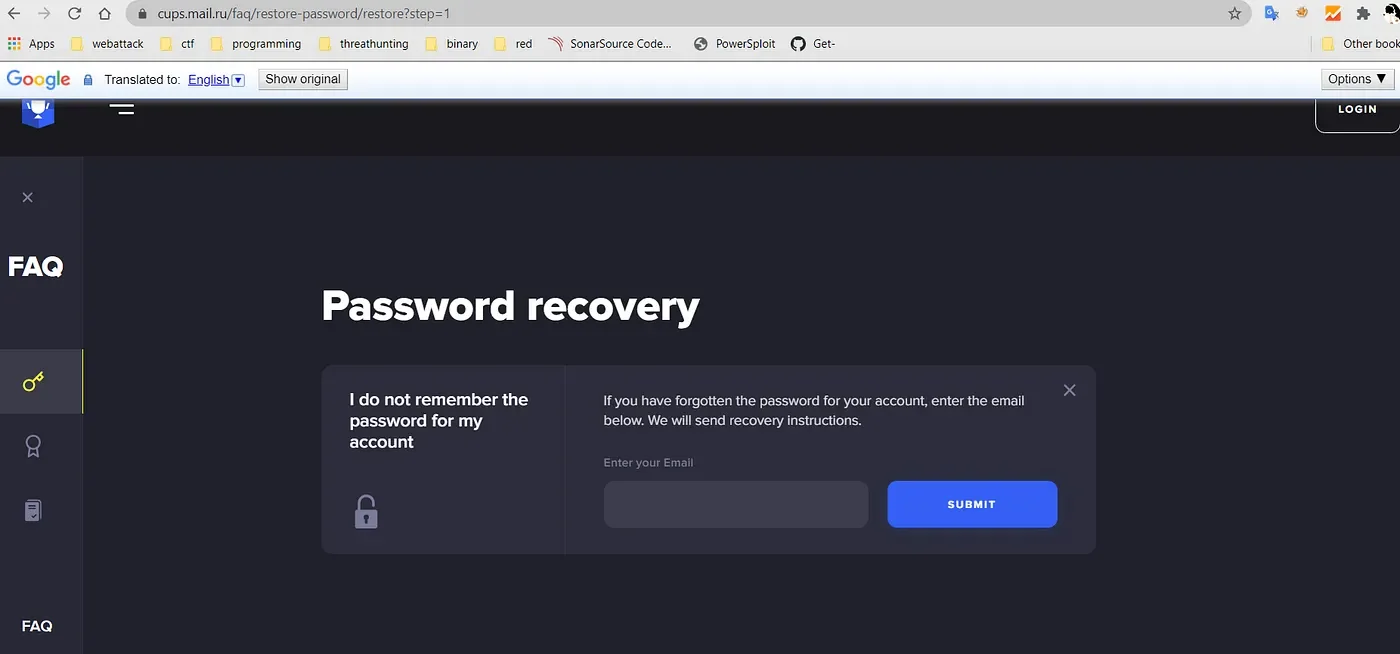
- A one time password reset code is sent to that email, and the browser is redirected to:
https://cups.mail.ru/faq/restore-password/restore?step=3
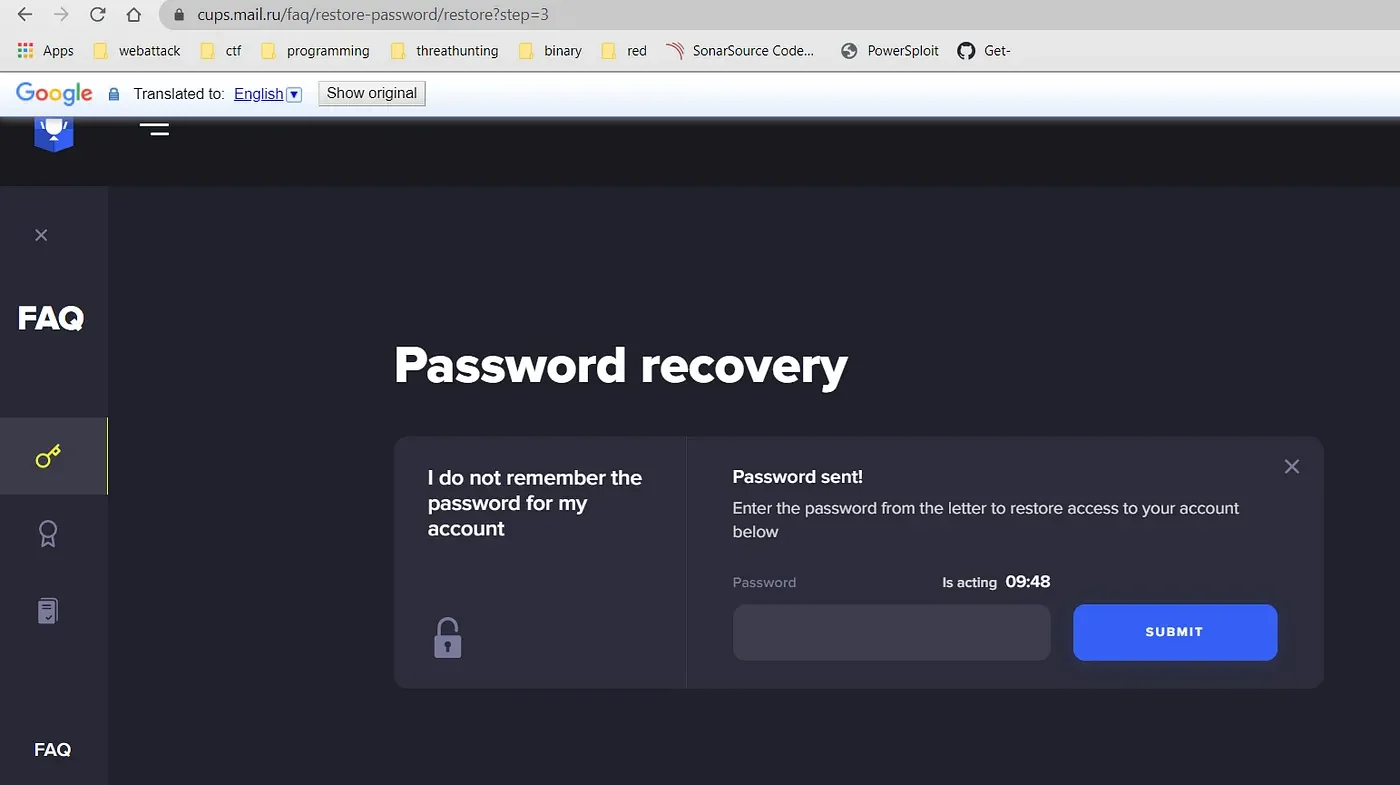
- The user enters the one time password. If it is correct, the browser is redirected to:
https://cups.mail.ru/faq/restore-password/restore?step=4
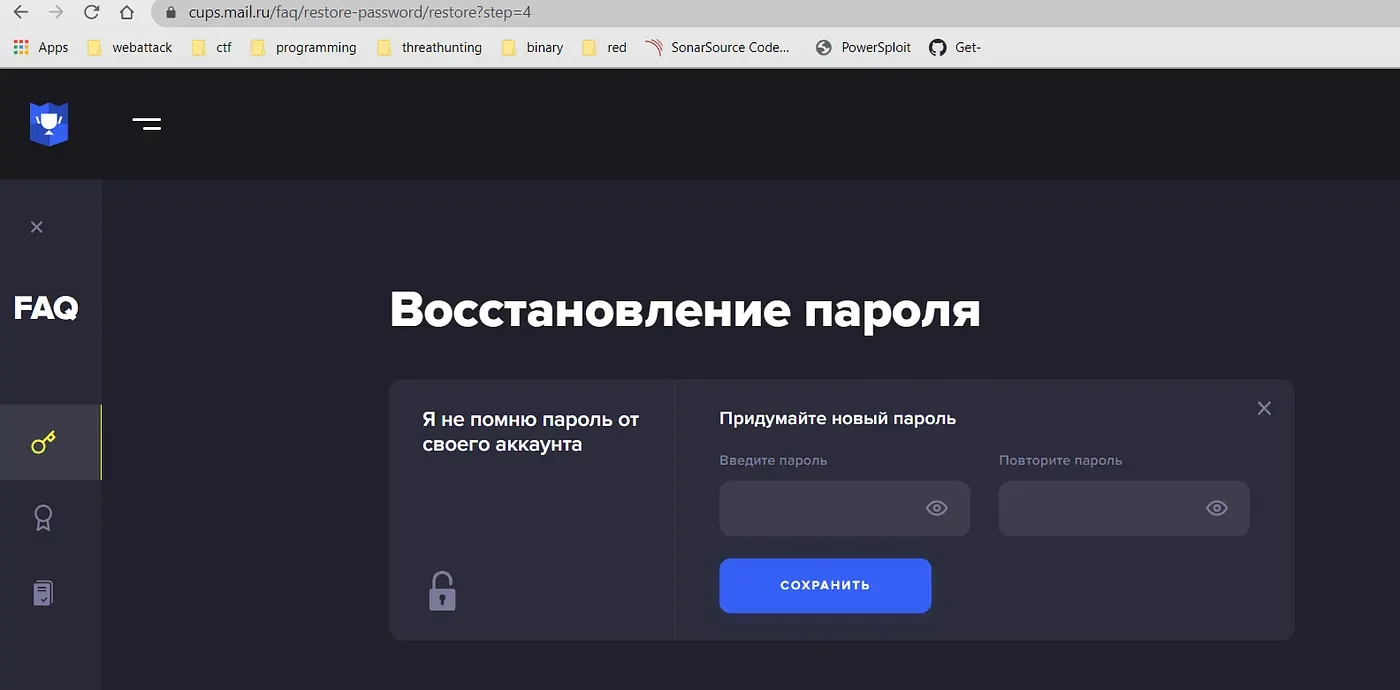
- On the final step the user sets a new password, and the request carries the password, the email address and the one time code:
{"password":"password","email":"[redacted]","code":"onetimepassword"}
Setup
The report does not describe any special tooling, accounts or roles. The researcher worked against the live Mail.ru program on HackerOne, using the ordinary browser flow and then modifying the final request. The only precondition visible in the write-up is a victim email address to target; no prior access to the victim account is described.
Finding it
The researcher's own framing is that the bug is "a little bit strange". The final reset request, sent at step=4, carries the email address and the new password alongside the one time code. That is the access control gap: the step parameter and the request body together decide whose password is changed, and the code is not bound to the account.
Exploitation
Step 1: go straight to the final step
The researcher visited the last step of the wizard directly:
https://cups.mail.ru/faq/restore-password/restore?step=4
Step 2: rewrite the request body
The original request body was:
{"password":"password","email":"[redacted]","code":"onetimepassword"}
and it was changed to:
{"password":"reset", "email": "[redacted]"}
The code parameter is removed and the email is replaced with the victim's address, while the password field carries the value the attacker wants to set. The request was then forwarded.
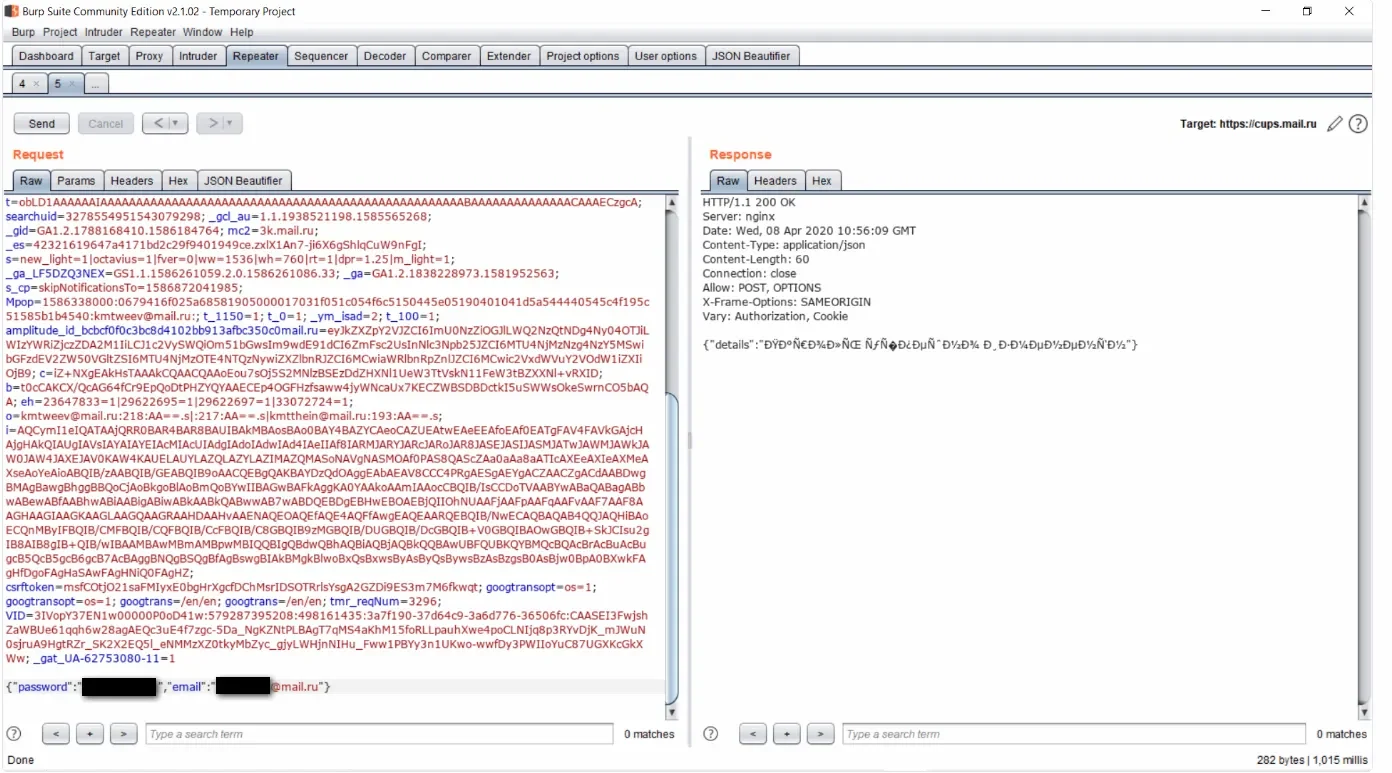
Step 3: the server accepts it
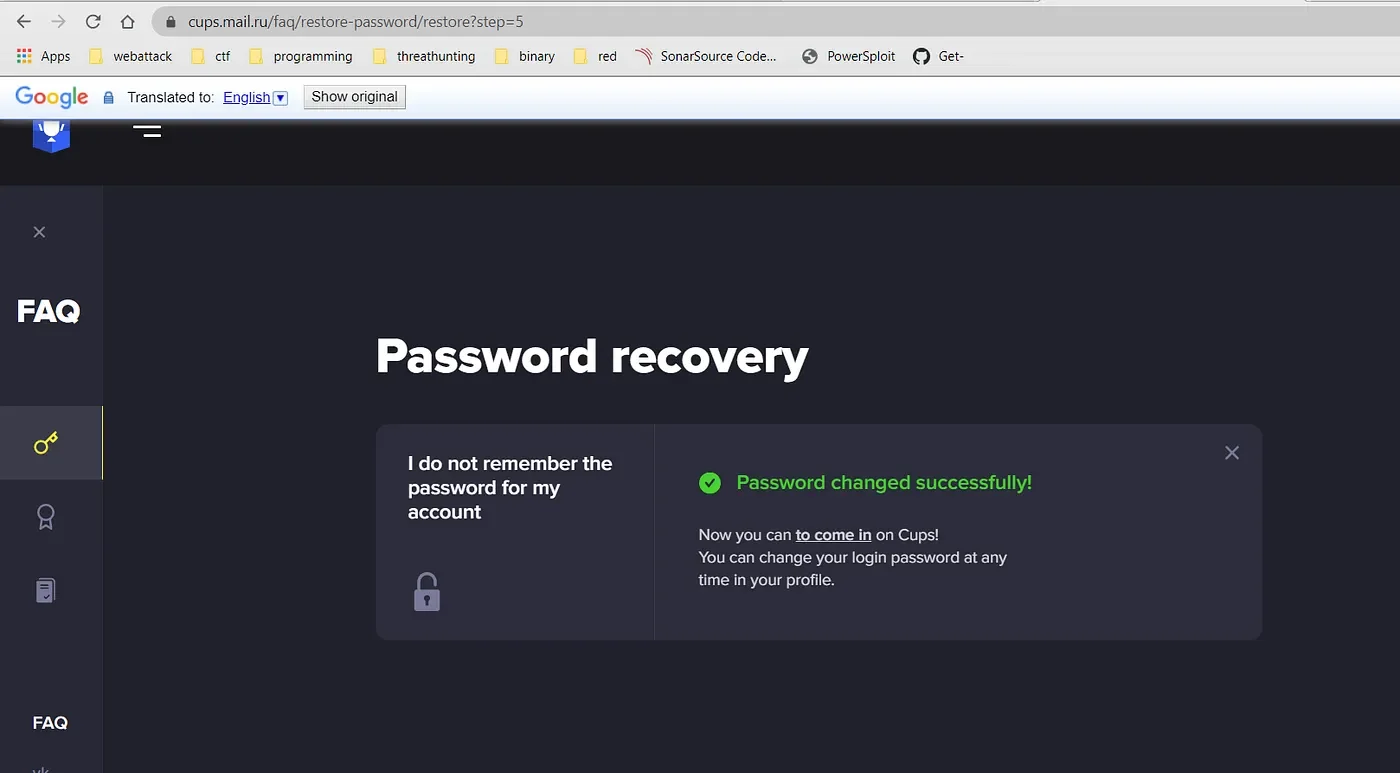
The response redirected to:
https://cups.mail.ru/faq/restore-password/restore?step=5
and the response said the password was reset successfully. The researcher's first attempt to log in with the victim email nevertheless failed, which prompted a retest.
Step 4: click the confirmation link
On the retest the researcher clicked the to come in link shown in the screenshot of the response, and this time the victim's password was reset successfully and the researcher could log in to the victim account.
Root cause
The researcher attributes the bug to a lack of access control in the password reset functionality. Removing code from the body did not cause the request to be rejected, so the server was not validating that the caller had proven control of the mailbox.
The second condition is less clear. The researcher states plainly that they still do not know how the back end implements the reset, and that in this scenario the server checked something, possibly the Referer, so that the reset only completed when the to come in link was clicked. In other words, the reset appeared to succeed in the response even when the login afterwards failed, and only following the link made the change take effect.
Impact
An attacker who knows a victim's email address can set a new password for that account and then log in as the victim, which is a full account takeover. The researcher states that they could reset every user's password through this functionality. The practical condition observed is that the attacker has to follow the to come in link in the response for the reset to take effect; without it the reset fails. The report does not describe any further access obtained with the taken-over account.
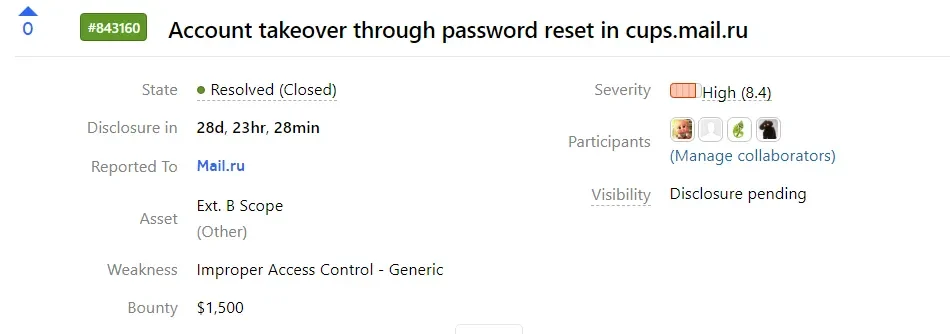
The researcher reported the bug to the Mail.ru bug bounty program and was rewarded $1500.
Fix
Variants to test
- Drop the code field from the final reset request and change the email to another account. A positive result is a success response and a working login with the new password.
- Jump directly to the last step of a multi-step reset wizard by editing the step parameter, then submit a new password for a different email. A positive result is that the server accepts the submission without any prior code issuance.
- Submit a code that was issued for your own address together with a victim's email. A positive result is that the reset applies to the victim, showing the code is not bound to the address.
- Compare the response body with the actual state change: submit the reset, then try to log in without following any link in the response, and again after following it. A positive result is a discrepancy where the response claims success but the change only lands under one of the two conditions, which points to a server-side check on something like the Referer.
- Reuse an already consumed code, or an expired one, against the same address. A positive result is that the reset still succeeds, showing the code is not invalidated or time checked.
What happened, in plain words
A security researcher was looking at a website run by Mail.ru, a large Russian internet company. The site is called cups.mail.ru. Like most sites with user accounts, it has a "forgot my password" feature: if you cannot log in, you ask the site to help you set a new password. The researcher found that this feature had a serious mistake. By changing one request that their browser sent, they could set a new password for any account, not just their own. That means they could log in as someone else. Security people call this an account takeover.
The researcher found it on 8 April, shortly after they started looking at Mail.ru's bug bounty program on HackerOne. A bug bounty program is a scheme where a company pays people to find and report security problems in its products instead of punishing them. HackerOne is a website where many such programs are listed.
The researcher reported the problem, and Mail.ru paid a reward of $1500.
Before going further, it helps to understand a few everyday ideas.
- A web request is the message your browser sends to a website when you click something or submit a form. It is like posting a letter: it has an address (the URL), and often a body (the contents, such as the values you typed into a form).
- A URL is the address of a page, for example
https://cups.mail.ru/faq/restore-password/restore?step=1. The part after the?is called the query string, and it carries small pieces of information, here a value calledstep. - JSON is a simple text format for sending structured data, like a shopping list with labels. It looks like
{"name":"value"}. Websites use it to send form contents to their servers. - A server is the computer that runs the website. Your browser (the client) asks it for pages and sends it data.
- An API is the part of a website that accepts these data messages and does something with them, without showing you a normal page. Think of a restaurant: the dining room is the website you see, and the kitchen door where orders are passed through is the API.
- A one time code (also called a one time password, or OTP) is a short code that is valid once, usually sent to your email or phone. It proves you control that mailbox or phone. It is like a cloakroom ticket: it is only good for the coat it was issued for.
- Access control means the rules that decide who is allowed to do what. A lack of access control means the site does not check properly whether you are allowed to perform an action.
The normal flow
The password reset on cups.mail.ru is a wizard: a sequence of pages, one step at a time. The site keeps track of which step you are on with the step value in the URL. The researcher walked through it as a normal user would.
- The user clicks "restore access" and types the email address linked to their account, on this page:
https://cups.mail.ru/faq/restore-password/restore?step=1
This is the starting page of the wizard. The step=1 in the URL tells the site to show the first screen, the one that asks for your email address. The screenshot shows this first screen.
- The site sends a one time reset code to that email address, and the browser is redirected to:
https://cups.mail.ru/faq/restore-password/restore?step=3
A redirect is the site telling your browser "go to this other address instead". Here the site moves you to the screen where you type the code. Notice that the wizard jumps from step 1 to step 3: the numbering is the site's own choice, and step 2 is simply not shown to the user. The screenshot shows the screen after the email has been submitted.
- The user types the one time code. If it is correct, the browser is redirected to:
https://cups.mail.ru/faq/restore-password/restore?step=4
This is the final screen, where you choose your new password. The screenshot shows the code entry screen and the redirect that follows a correct code.
- On this last step the user sets a new password. The request that the browser sends to the server contains three pieces of information: the new password, the email address, and the one time code.
{"password":"password","email":"[redacted]","code":"onetimepassword"}
Line by line:
{and}mark the start and end of one JSON object, a bundle of labelled values."password":"password"means the field namedpasswordholds the valuepassword. In real use this would be whatever new password the user typed."email":"[redacted]"means the field namedemailholds the account's email address. Here it is a placeholder address."code":"onetimepassword"means the field namedcodeholds the one time code that was sent to that email. Again, a placeholder value.
The important thing to notice is that the server receives all three values from the browser. The browser is the client, and anything the client sends can be changed by the person using it. That is the seed of the whole problem.
Setting up
The report does not describe any special tools, accounts or roles. The researcher used the ordinary browser flow against the live Mail.ru program on HackerOne, and then modified the final request. The only thing needed beforehand is the email address of the account you want to target. No prior access to the victim's account is described.
Finding the problem
The researcher calls the bug "a little bit strange". What they noticed is that the final request, the one sent at step=4, carries the email address and the new password alongside the one time code, and the server seems to trust those fields without checking that the code actually belongs to that email address.
That is the access control gap. To go back to the cloakroom comparison: the site accepts any ticket for any coat.
Exploiting it
Step 1: go straight to the final step
The researcher visited the last step of the wizard directly:
https://cups.mail.ru/faq/restore-password/restore?step=4
This line is just a URL typed into the browser. The ?step=4 part tells the site to show the fourth screen, the one where you set a new password.
Why do this? Because if the site lets you jump to the last screen without proving you own the mailbox, then the only thing standing between you and someone else's account is the request the last screen sends.
Step 2: rewrite the request body
The original request body was:
{"password":"password","email":"[redacted]","code":"onetimepassword"}
and it was changed to:
{"password":"reset", "email": "[redacted]"}
The request was then forwarded.
Line by line, comparing the two:
"password":"reset"sets the new password to the valuereset. This is the password the attacker wants the victim's account to have."email":"[redacted]"replaces the original email with the victim's address. This is the account whose password will be changed.- The
codefield is gone entirely. The attacker never received a code for the victim's address, so they simply remove the field and hope the server does not insist on it.
Why do this? Because the server was trusting the browser to say which account to reset. If the server does not check that the code belongs to the email, then changing the email in the request is enough to point the reset at someone else.
The screenshot shows the original request and the modified one side by side, with the code field removed and the email changed.
Step 3: the server accepts it
The response redirected to:
https://cups.mail.ru/faq/restore-password/restore?step=5
and the response said the password was reset successfully.
A redirect to step=5 means the site moved the browser on to the next screen, which in this wizard is the confirmation screen. The message said the reset had worked. But when the researcher tried to log in with the victim's email, it failed. That is odd: the site said one thing, and reality said another. So they tested again.
Step 4: click the confirmation link
On the retest, the researcher clicked the to come in link shown in the screenshot of the response. This time the victim's password really was reset, and the researcher could log in to the victim's account.
The screenshot shows the confirmation screen with the to come in link. The lesson here is that a website's success message is not proof that anything happened. You have to check the actual result, for example by trying to log in.
Why it worked
The researcher attributes the bug to a lack of access control in the password reset functionality. Removing code from the body did not cause the request to be rejected, so the server was not checking that the caller had proven control of the mailbox.
The second part is less clear. The researcher says plainly that they still do not know how the back end implements the reset. In this case the server checked something, possibly the Referer, so the reset only completed when the to come in link was clicked.
The Referer is a piece of information your browser automatically attaches to a request, saying which page you came from. Think of it as the "where did you hear about us?" line on a form. Sites sometimes use it as a rough check, but it is not a security control, because the browser sends it and the browser can be told to send something else.
So the reset appeared to succeed in the response even when the login afterwards failed, and only following the link made the change take effect.
What it means
An attacker who knows a victim's email address can set a new password for that account and then log in as the victim. That is a full account takeover. The researcher states that they could reset every user's password through this feature. In practice, the attacker has to follow the to come in link in the response for the reset to take effect; without it, the reset fails. The report does not describe any further access obtained with the taken-over account.
The researcher reported the bug to the Mail.ru bug bounty program and was rewarded $1500.
How to fix it
Things to try on similar sites
If you ever test a password reset feature, these are the variations worth trying. Only do this on sites that invite it, such as a bug bounty program, and never on a site without permission.
- Remove the code field from the final reset request and change the email to another account. A positive result is a success response and a working login with the new password.
- Jump directly to the last step of a multi-step reset wizard by editing the step value, then submit a new password for a different email. A positive result is that the server accepts the submission without any code ever being issued.
- Submit a code that was issued for your own address together with a victim's email. A positive result is that the reset applies to the victim, which shows the code is not tied to the address.
- Compare the response with the actual state change: submit the reset, then try to log in without following any link in the response, and again after following it. A positive result is a discrepancy where the response claims success but the change only lands under one of the two conditions, which points to a server-side check on something like the Referer.
- Reuse an already used code, or an expired one, against the same address. A positive result is that the reset still succeeds, which shows the code is not invalidated or time checked.
Glossary
- Account takeover: when an attacker gains control of someone else's account, for example by changing their password.
- Access control: the rules that decide who is allowed to do what on a site.
- API: the part of a website that accepts data messages from programs and browsers and acts on them, separate from the pages you see.
- Back end: the part of a website that runs on the server, which users do not see.
- Bug bounty program: a scheme where a company pays people to report security problems in its products.
- Client: the program on your side, usually your browser, that sends requests to a server.
- Code (one time code / one time password / OTP): a short value valid once, sent to your email or phone, used to prove you control that mailbox or phone.
- Endpoint: a specific address on a server that accepts requests and does something, such as the password reset address.
- JSON: a text format for sending labelled values, written as
{"name":"value"}. - Query string: the part of a URL after the
?, carrying small values such asstep=4. - Redirect: the server telling the browser to go to a different address.
- Referer: information your browser attaches to a request saying which page you came from.
- Request: the message a browser sends to a server, containing an address and often a body of data.
- Request body: the contents of a request, such as the values typed into a form.
- Server: the computer that runs a website and answers requests.
- URL: the address of a page or resource on the web.
- Wizard: a feature split into several screens, one step at a time.