Story of stealing mail conversation, contacts in mail.ru and myMail iOS applications via XSS
An SVG image file lacked validation, allowing JavaScript to execute when viewed in the mail.ru and myMail iOS applications. An attacker could steal the victim's email conversations, contacts and payment information from a local SQLite database.

In June 2020, I found a stored XSS bug that could allow an attacker to steal user email conversations, contacts in mail.ru and myMail iOS applications (version 12.2.1). Mail.ru is one of the biggest organization in Russian and registered over 100 Millions active accounts.
The full write-up lives on its author's site
It belongs to its author, so we link to it rather than copy it. The other two tabs are our own rewrites, checked against it.
Context
In June 2020 I found a stored XSS bug in the mail.ru and myMail iOS applications (version 12.2.1). The bug allowed an attacker to steal a user's email conversations and contacts. Mail.ru is one of the biggest organisations in Russia, with over 100 million active accounts.
The bug occurs due to a lack of validation in SVG image files, so JavaScript embedded in an SVG document executed. The application displayed SVG files without adequate validation, so JavaScript embedded in an SVG document executed.
Setup
- Target: mail.ru and myMail iOS applications, version 12.2.1.
- Test devices: a jailbroken iPhone 5, used to inspect the application's file structure, and a non-jailbroken iPhone, used to verify the final proof of concept.
- Attacker infrastructure: a server I controlled, used to receive the exfiltrated database.
- Precondition: the victim opens a crafted SVG attachment in the mail application. The report describes sending the SVG by mail to the user, who then views it.
Finding it
The bug occurs because of a lack of validation in SVG image files. A minimal example of the SVG XSS is:
<?xml version="1.0" standalone="no"?><!DOCTYPE svg PUBLIC "-//W3C//DTD SVG 1.1//EN" "http://www.w3.org/Graphics/SVG/1.1/DTD/svg11.dtd"><svg version="1.1" baseProfile="full" xmlns="http://www.w3.org/2000/svg"><polygon id="triangle" points="0,0 0,50 50,0" fill="#009900" stroke="#004400"/><script type="text/javascript">alert("XSS");</script></svg>
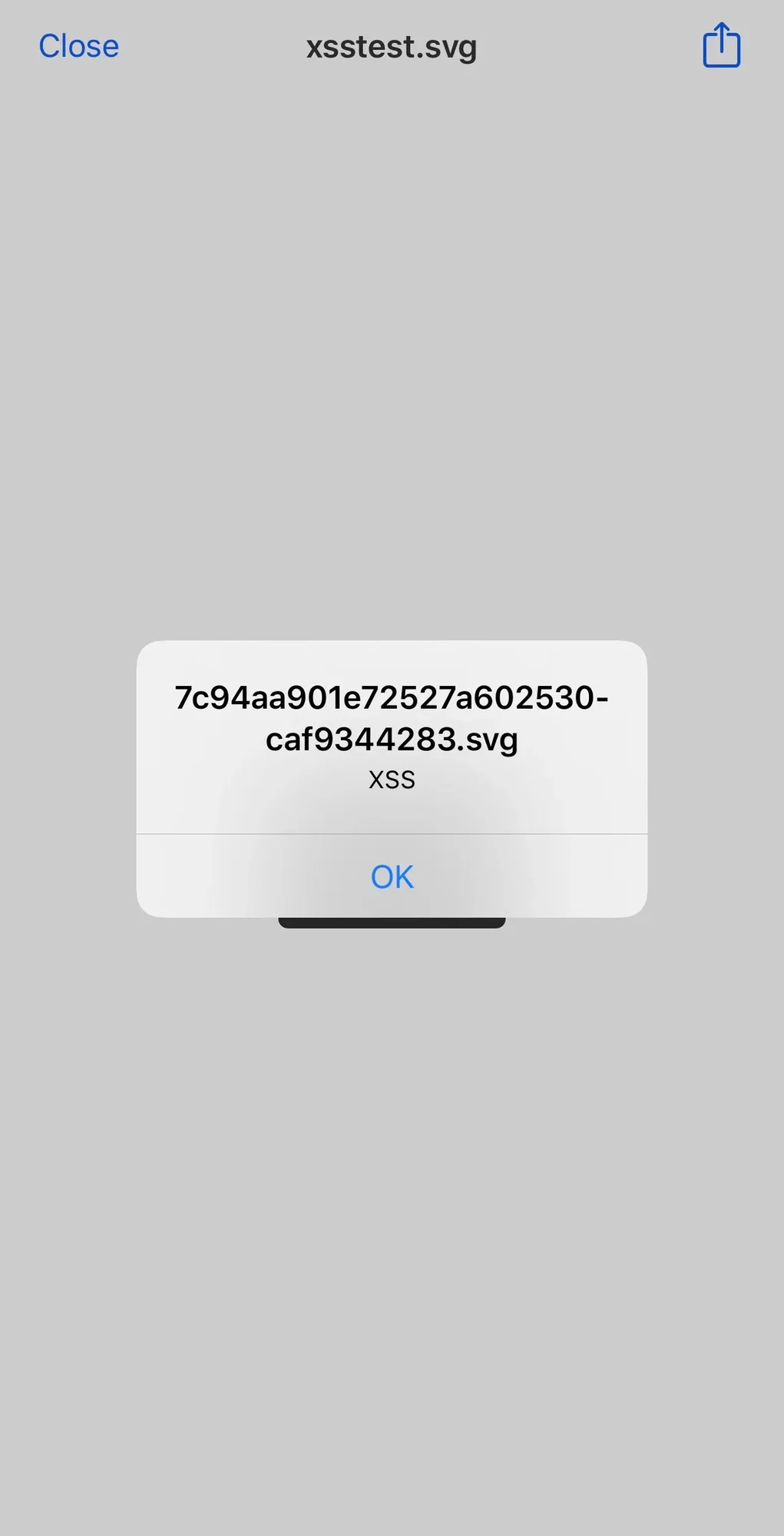
When a user viewed this SVG file, the XSS popped up.
I did not want to report the bug without showing an impact, and an XSS in an attachment is most likely to be closed as informative in a mail application. So I started digging around the application's file structure.
My first idea was to dump /etc/passwd as a proof of concept, but on iPhone /etc/passwd is just a sandbox feature, so I had to retrieve something else. Because I had a jailbroken iPhone 5, I could view every file and folder within the iPhone. Application data in the iOS file structure is stored in /private/var/mobile/Containers/Shared/AppGroup/ followed by a random folder.
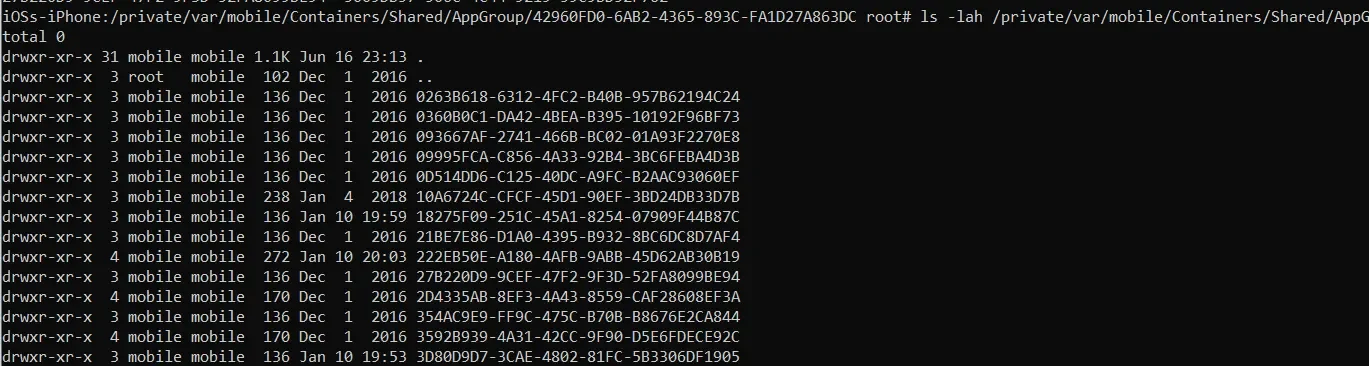
The folder names are not the same on every iPhone, although the folder itself and some files inside it remain the same. I therefore needed to obtain the folder path through the XSS. I used alert(location.href); in the SVG file and sent a mail to myself; after that I had the folder location.
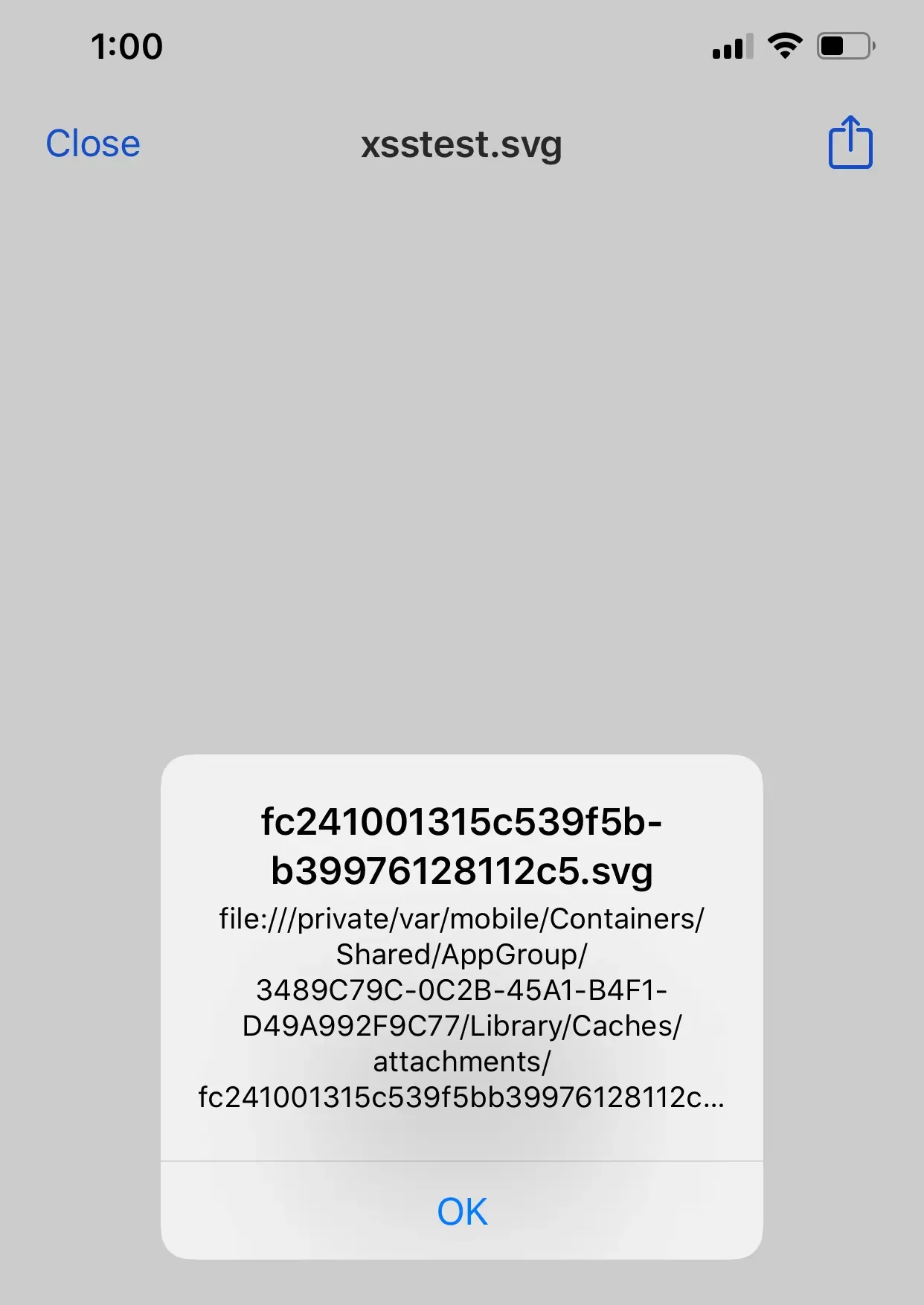
Browsing to that folder, I saw a few SQLite database files and some folders.
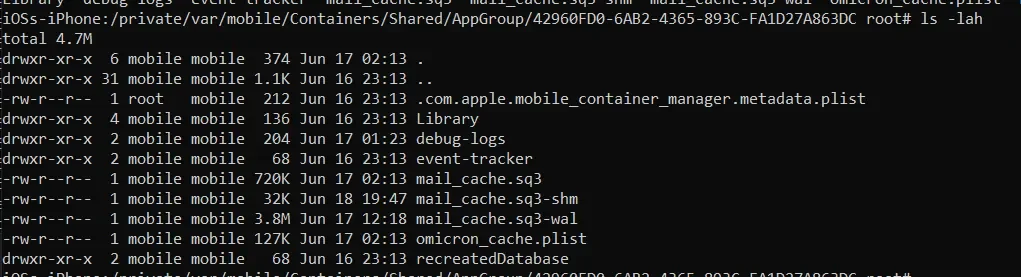
After downloading and viewing each file in that folder, I realised that mail_cache.sq3 contains email conversations, contacts, payment information and almost everything.
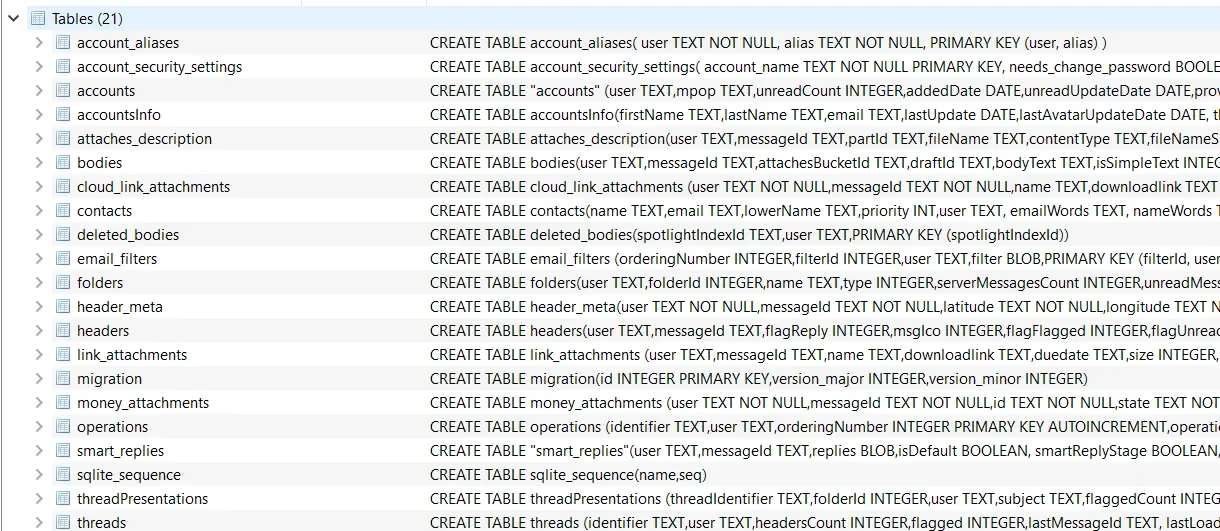
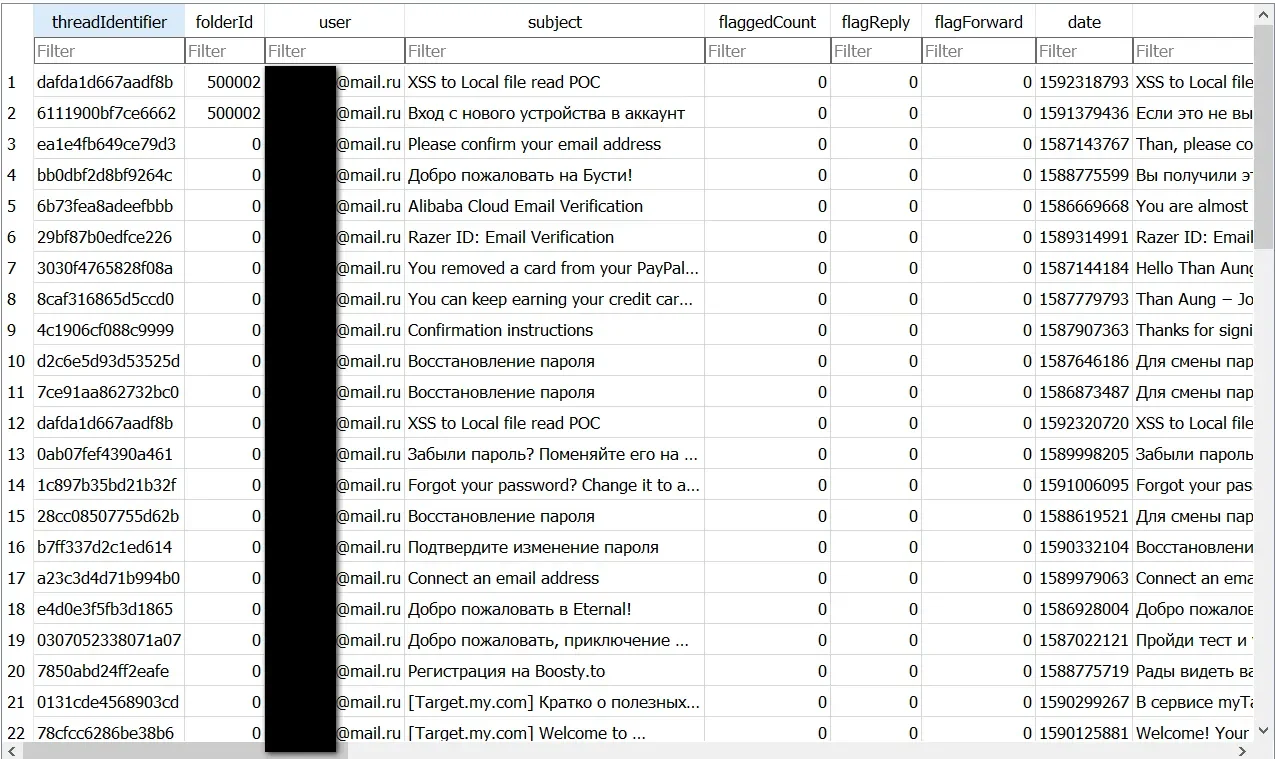
Email Conversations
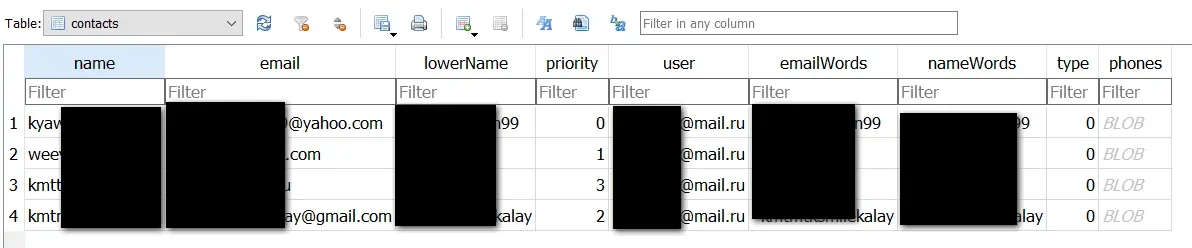
Contacts
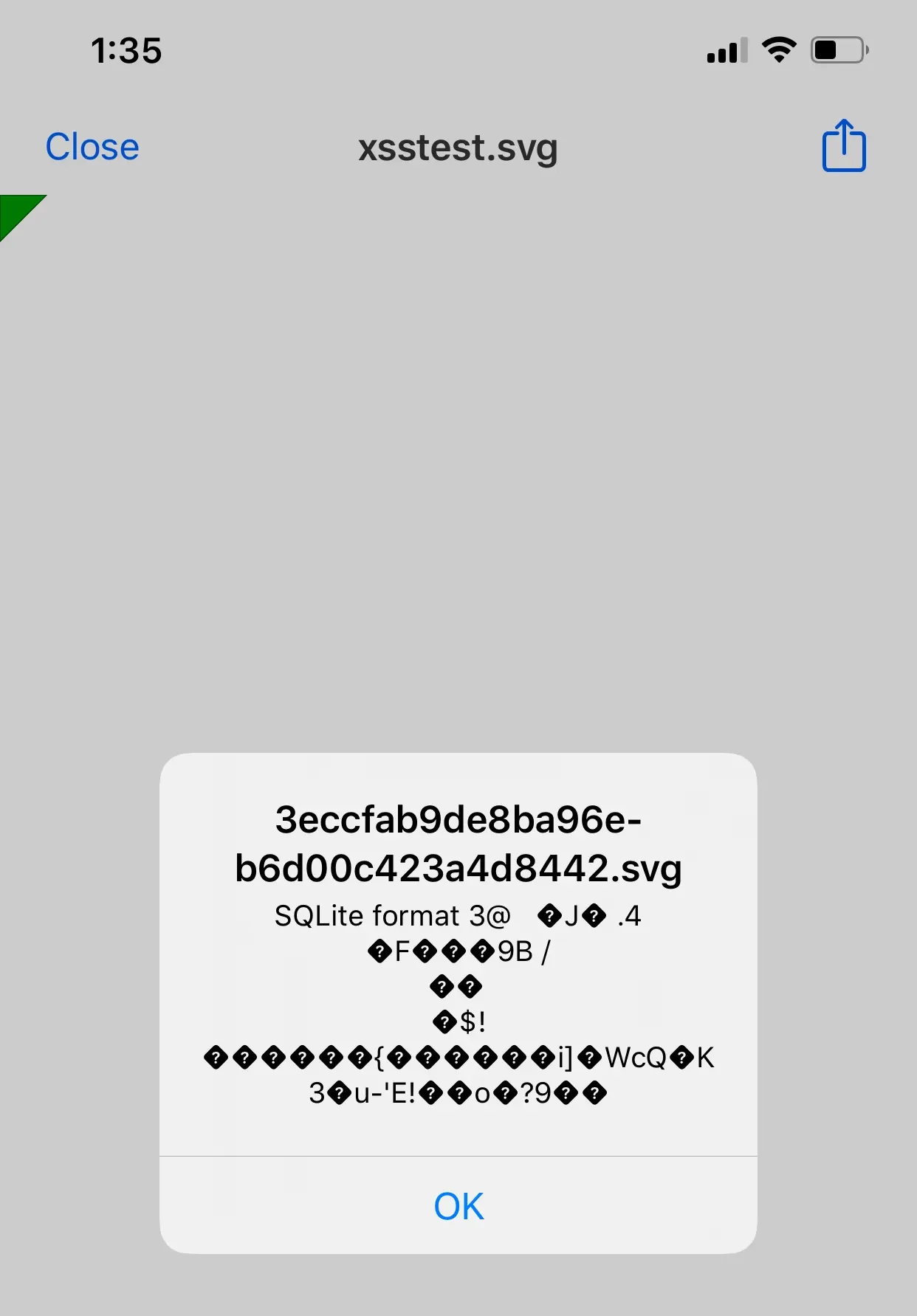
I chose to retrieve this SQLite database to my server. Getting this database would be enough to show the impact of the XSS bug, and I could report it with a solid proof of concept to mail.ru. I started writing my PoC script, viewed the crafted SVG file on my iPhone (which has no jailbreak), and could verify that the file exists by popping its contents.
Exploitation
Step 1: Confirm script execution in an SVG attachment
The minimal SVG above, with a <script type="text/javascript"> element calling alert("XSS"), executed when the file was viewed in the application. This established that SVG attachments were rendered in a context where JavaScript runs.
Step 2: Discover the application data folder
Because the AppGroup folder name is random per device, I used the XSS to read the current location:
alert(location.href);
I embedded this in the SVG file and sent a mail to myself. Viewing the attachment returned the folder location, which gave me the path to the application's data.
Step 3: Identify the valuable database
With the jailbroken iPhone 5 I browsed the folder and found SQLite database files and some folders. Downloading and viewing each file showed that mail_cache.sq3 holds email conversations, contacts, payment information and almost everything else of interest.
Step 4: Build a working exfiltration PoC
I wrote a PoC to upload the whole SQLite database to my server. The first attempts produced a lot of errors, and only small portions of the file reached my server. After fixing errors over four hours, I could upload the whole SQLite database file with the SVG file below.
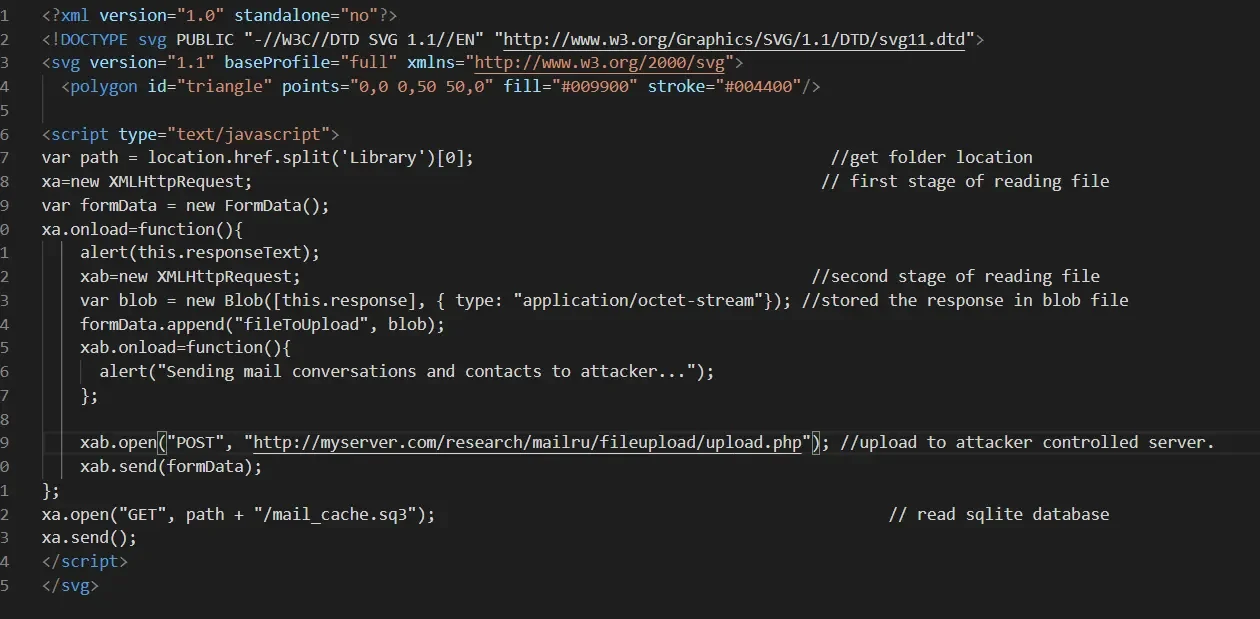
PoC script for dumping mail_cache.sq3
The script first reads the mail.ru folder location, then reads the mail_cache.sq3 file, and then uploads the whole file to the attacker-controlled server.
Step 5: Deliver to the victim
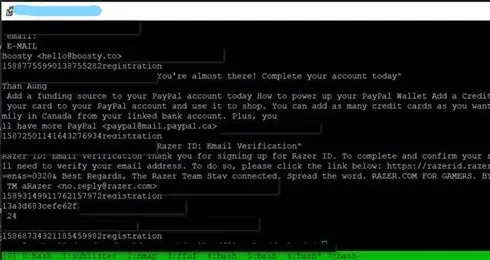
I sent this SVG file to a user who used the mail.ru and my.com applications. If the user viewed the attacker-crafted SVG file, their SQLite database, containing email conversations, contacts and so on, was sent to the attacker, who could then view those conversations and contacts.
Root cause
SVG is an XML format that can carry <script> elements, and the application rendered the attachment in a context where that script executed. The report does not describe the specific rendering component or any sanitisation that was present, so the exact defensive gap is not stated. The application's data, including mail_cache.sq3, sits in an AppGroup container, and I used alert(location.href); to learn the folder path.
Impact
An attacker who sends a crafted SVG file to a user of the mail.ru or my.com applications can, when the user views the attachment, execute JavaScript in the application context. My PoC script read the mail.ru folder location, read mail_cache.sq3 and uploaded the whole file to my server. That database contains email conversations, contacts, payment information and almost everything else, so the attacker can view the victim's email conversations and contacts. If the user viewed the attacker-crafted SVG file, the database was sent to the attacker.
Fix
The report does not describe the fix that was applied. The program manager stated that this is not a stored XSS vulnerability but Cross application scripting (CAS); my own understanding was that a vulnerability that can execute JavaScript in iOS is called XSS. After the bug was fixed, I asked for the report to be disclosed, and the program confirmed it would disclose the bug in a few weeks, which gave me permission to write about it.
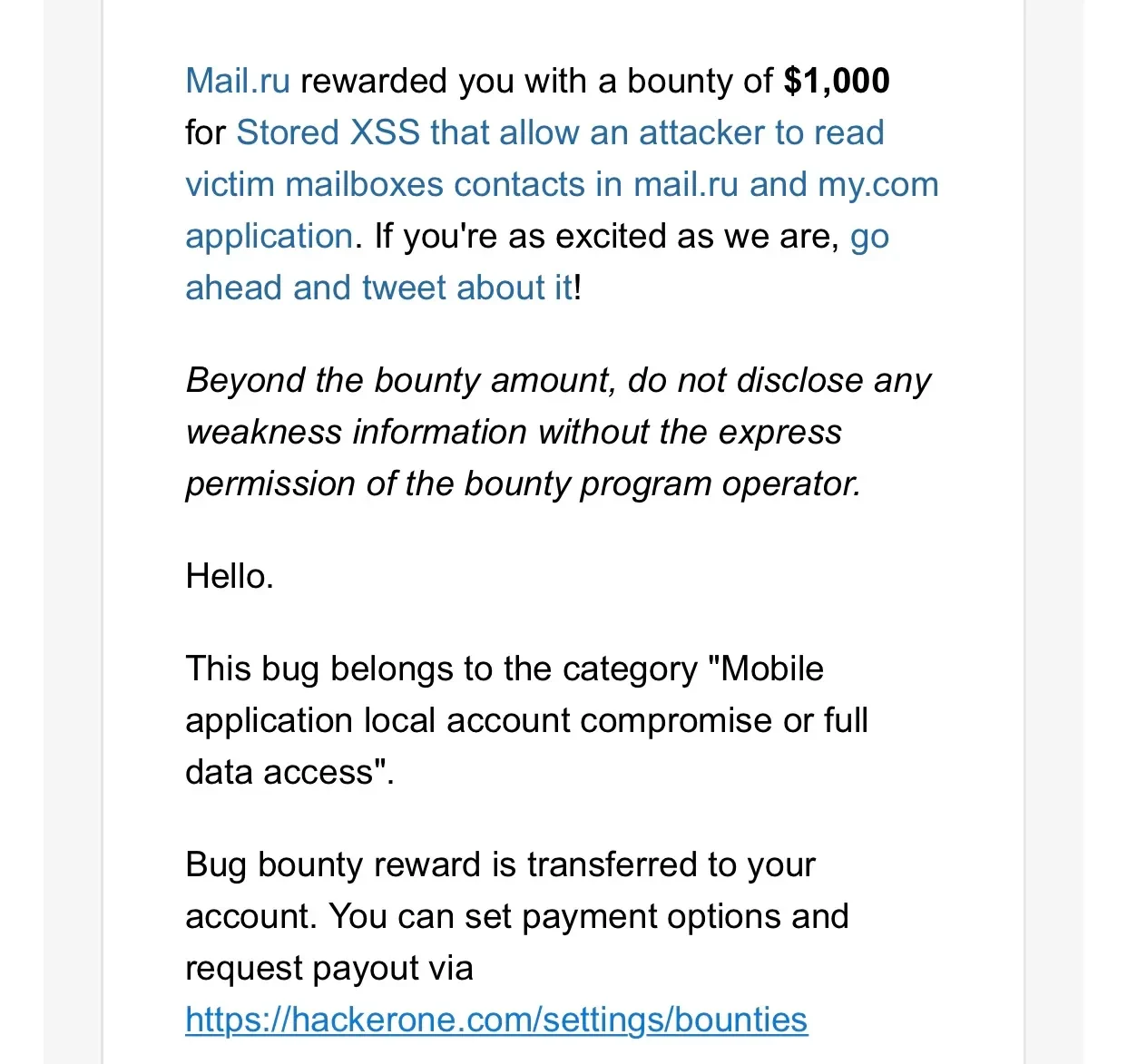
Mail.ru rewarded $1000 as a bounty.

Variants to test
- SVG attachments in other mail clients: send an SVG containing a
<script>element and check whether script executes when the attachment is previewed. A positive result is an alert pop-up. - Other XML-based image or document formats: test whether formats that can embed script are rendered in an executable context. A positive result is script execution on preview.
- Path disclosure through
location.href: check whether the rendered context exposes a file or container path that can be read from JavaScript. A positive result is a path that leads to application data. - Shared container storage: on iOS targets, look for AppGroup containers holding SQLite databases or caches with sensitive data, and check whether a script in the rendering context can read them. A positive result is a readable database containing user data.
- Exfiltration reliability: when building a PoC, verify that the whole file is transferred rather than a truncated portion, since partial uploads were the main obstacle in this report.
What happened, in plain words
In June 2020 I found a bug in two iPhone email applications: mail.ru and myMail, both at version 12.2.1. Mail.ru is one of the biggest organisations in Russia, with over 100 million active accounts. The bug let an attacker steal a user's email conversations and contacts.
The feature at fault is how the app displays SVG image attachments. SVG is a picture format, but unlike a JPEG or a PNG it is written as text in a markup language called XML, and XML can contain instructions that a computer runs. The app showed these SVG files without checking them properly, so instructions hidden inside the picture ran as code.
That kind of bug is called cross-site scripting, or XSS. The everyday comparison: imagine a photocopier that is supposed to copy a form, but if someone writes an instruction on the form in a special ink, the photocopier follows the instruction instead of just copying it. The form looks normal to a person, but the machine obeys it. Here the "form" is the SVG attachment and the "machine" is the mail app.
To make the report convincing I did not just show a pop-up. I wrote a PoC that found the app's data folder, read a database file inside it, and sent that file to a server I controlled. The victim only had to open the attachment.
The Story of the Bug
The bug occurs due to lack of validation in SVG image file. An example of SVG XSS is
<?xml version="1.0" standalone="no"?><!DOCTYPE svg PUBLIC "-//W3C//DTD SVG 1.1//EN" "http://www.w3.org/Graphics/SVG/1.1/DTD/svg11.dtd"><svg version="1.1" baseProfile="full" xmlns="http://www.w3.org/2000/svg"><polygon id="triangle" points="0,0 0,50 50,0" fill="#009900" stroke="#004400"/><script type="text/javascript">alert("XSS");</script></svg>
Line by line, in plain words:
<?xml version="1.0" standalone="no"?>tells the reader that this is an XML document, version 1.0. XML is a text format for structured data, a bit like a very strict outline where every item is wrapped in tags.<!DOCTYPE svg PUBLIC ...>says which official rulebook this document follows, here the SVG 1.1 definition. It is a declaration, not something a person sees.<svg version="1.1" baseProfile="full" xmlns="http://www.w3.org/2000/svg">opens the picture itself. Thexmlnspart says the tags belong to the SVG standard, so the app knows to treat this as an image.<polygon id="triangle" points="0,0 0,50 50,0" fill="#009900" stroke="#004400"/>draws a green triangle. This is the harmless part: it makes the file look like a normal picture.<script type="text/javascript">alert("XSS");</script>is the hidden instruction.scriptis a tag that means "run the following as code".alert("XSS")asks the app to show a small pop-up box with the text XSS. A pop-up is the simplest way to prove that code ran, because a picture cannot normally make one appear.</svg>closes the picture.
When a user viewed above SVG file, XSS is pop-up as shown in below.
The screenshot shows the XSS pop-up when the SVG file was viewed.
Finding valuable file
I stared hating to report without showing an impact and also XSS in attachment is most likely to close as informative in mail application. So, I stared digging around the application file structure.
Why this matters: a bug report that only says "a pop-up appeared" is often dismissed. Bug bounty programmes, the schemes where companies pay researchers for finding bugs, usually want to see what harm an attacker could actually do. So I needed to show real data leaving the phone.
First, I just thinking about dumping /etc/passwd as PoC but in iPhone /etc/passwd is just a sandbox feature and so I have to retrieve something. Luckily, I have jailbroken iPhone 5 and so I can view every file and folder within iPhone. Application data in iOS file structure stored in /private/var/mobile/Containers/Shared/AppGroup/followed by random folder as shown in below.
Some terms here, from zero:
/etc/passwdis a well-known file on Linux and Unix computers that lists user accounts. Researchers often read it as a harmless demonstration that they can reach files they should not. On an iPhone it is not the same thing, so it was not a useful target.- A jailbroken iPhone is one where the owner has removed Apple's restrictions, so they can browse the whole file system, including folders that normal apps cannot see. It is like having a master key to every room in a building.
- A sandbox is the opposite: each app on a normal iPhone runs in its own locked room and can only touch its own things. That is why the app's data lives in a special shared area rather than in a system file.
- An AppGroup is a shared container that several apps from the same company can read and write. Think of it as a shared locker that mail.ru and my.com both have a key to.
- The path
/private/var/mobile/Containers/Shared/AppGroup/is the shelf where those lockers sit. Each locker has a random name, which is the problem I ran into next.
The screenshot shows the AppGroup folder followed by a random folder name.
I asked myself, how I can know which folder contains mail.ru application data. The folders name will not be same in every iPhone(folder itself and some files inside that folder will remain the same) and I realised that I need to get folder path via XSS. So, I used alert(location.href); in SVG file and send a mail to myself, after that I got folder location.
alert(location.href); in plain words: location is a built-in object that describes where the currently displayed page or document lives, and href is its address. alert(...) shows that address in a pop-up. So this line makes the app tell me its own folder path. I could not hard-code the path in my attack file because it differs on every phone, so I had to ask the phone at run time.
After mailing the SVG to myself and opening it, I got the folder location.
Then I browse to that folder and saw few SQLite database files + some folders.
A SQLite database is a single file that stores data in tables, like a very small spreadsheet kept inside one document. Many phone apps use one to remember your messages, contacts and settings so they load quickly.
The folder contained a few SQLite database files and some folders.
After downloading and viewing each file in that folder, I realised that mail_cache.sq3 file contains email conversation, contacts, payment information and almost everything.
Email Conversations
Contacts
The screenshots are captioned Email Conversations and Contacts. This is why the file was worth stealing: it is a copy of the user's mailbox contents kept on the phone.
So, I choose to retrieve this SQLite database to my server. If I can get this database, it is enough to show the impact of this XSS bug and I can reported with a nice PoC to mail.ru. I start writing my PoC script, viewed crafted SVG file in my iPhone(which has no jailbreak) and yes I can verify the file exists by popping the contents of the file.
A PoC, or proof of concept, is a small working demonstration that the attack is real rather than theoretical. Testing on a phone without a jailbreak matters because it shows the attack works on an ordinary device, not only on one I had specially unlocked.
On the non-jailbroken iPhone I could verify the file exists by popping its contents.
Defeating errors and writing a workable PoC
So, I stared to write a PoC in order to upload whole SQLite database to my server but I got a lot of errors and only some small portions of the file is send to my server. After fixing errors over 4 hrs, I can upload whole SQLite database file to my server with below SVG file.
Why partial uploads are a problem: if only a fragment of the database arrives, the demonstration is weak, because a fragment may not contain the conversations and contacts that prove the impact. Getting the whole file across took about four hours of fixing mistakes.
PoC script for dumping mail_cache.sq3
The script firstly read mail.ru folder location, read the mail_cache.sq3 folder and then upload the whole file to attacker controlled server. Then I send this SVG file to user who used mail.ru and my.com applications. If user viewed attacker crafted SVG file, his SQLite database(containing email conversations, contacts ..etc.) will send to attacker and attacker can view email conversations, contacts ..etc as shown in below.
In plain words, the script does three jobs in order:
- Work out where the app keeps its data on this particular phone, using the same location trick as before.
- Open the
mail_cache.sq3file and read its contents. - Send those contents over the internet to a server the attacker controls, which is called exfiltration: moving stolen data out of the victim's device.
The attacker can view the email conversations and contacts from the database.
Conclusion
I quickly reported to the program and Mail.ru rewarded $1000 as a bounty. Thanks for your reward :).
The program manager said, this is not Stored XSS vulnerability and the bug is Cross application scripting (CAS). For my understanding, the vulnerability that can execute JavaScript in iOS is called XSS. May be I was wrong or ..
A quick note on the naming: stored XSS usually means a malicious script is saved on a server and served to users later. Here the script was saved inside a mail attachment and ran inside a phone app, which is why the programme preferred the term cross application scripting. The report does not settle the argument; it records both views.
After they fixed the bug, I request them to disclose about my report and they confirmed they will disclose the bug in few weeks so I have a permission to write about the bug in Medium :).
Disclosure means making the details of a fixed bug public so others can learn from it. I asked the programme for permission first, and they agreed to publish it after a few weeks.
Glossary
- XSS (cross-site scripting): a bug where text that should be treated as data is treated as code, so an attacker's instructions run inside someone else's application.
- Stored XSS: XSS where the malicious content is saved somewhere, such as an attachment, and runs when a victim later opens it.
- CAS (cross application scripting): the term the programme used for this bug, because the script ran inside a phone app rather than a website.
- SVG: an image format written as text in XML, which can contain script elements.
- XML: a strict text format for structured data, built from tags.
- Script: a set of instructions a computer runs, here JavaScript embedded in the SVG.
- JavaScript: the programming language that runs inside browsers and, in this case, inside the mail app's rendering view.
alert(): a JavaScript function that shows a pop-up box, used here to prove code ran.location.href: a JavaScript property holding the address or path of the current document.- PoC (proof of concept): a small working demonstration that an attack is real.
- Exfiltration: sending stolen data out of a victim's device to a server the attacker controls.
- SQLite database: a single file holding data in tables, used by many phone apps for messages, contacts and settings.
mail_cache.sq3: the SQLite database file in the app's folder that held email conversations, contacts and payment information.- AppGroup: an iOS shared container that several apps from the same company can access.
- Sandbox: the restriction that keeps each iPhone app inside its own area and away from other apps' data.
- Jailbreak: removing Apple's restrictions on an iPhone so the whole file system can be browsed.
- Bug bounty programme: a scheme where a company pays researchers for reporting security bugs.
- Bounty: the payment made for a valid report, here 1000 US dollars.
- Disclosure: publishing the details of a bug, usually after it has been fixed.
- Validation: checking that input, such as an uploaded file, is safe before using it.