Intro to Open-source Bug Bounty
A route in Mailtrain passed all query string parameters to the Express render function, allowing an attacker to use a layout parameter to read arbitrary files on the server. The author demonstrated directory traversal and local file read.
 Published on huntr.dev
Let’s keep it simple, most of the people who are reading this might have struggled a lot or is still fighting to find his/her first bug. Well I’ve a good news for you, it’s all about how you can earn some extra bucks with open-source bug bounty.
The full write-up lives on its author's site
It belongs to its author, so we link to it rather than copy it. The other two tabs are our own rewrites, checked against it.
Context
Mailtrain is a well known newsletter platform, and the target here is its open-source repository. The researcher found a directory traversal vulnerability in one of its route handlers while reading the code, and disclosed it through huntr.com, a bug bounty board for open-source projects. The write-up is framed as an introduction to open-source bug bounty hunting, so the target is the application source itself rather than a live production deployment.
The feature involved is report creation. Mailtrain exposes a route that renders a template for selecting a report template. The handler lives in routes/reports.js, and the relevant lines are:
78    router.get('/create', passport.csrfProtection, (req, res) => {
79      const reqData = req.query;
80
102       if (!reportTemplateId) {
103           res.render('reports/create-select-template', reqData);
104       }
105
115   });
Line 103 renders the create-select-template view. The second argument, reqData, is req.query: an object holding every query string parameter the client sent. In other words, whatever a user supplies as GET parameters is passed straight into the template render call.
Setup
No special tooling is described. The researcher read the Mailtrain source on GitHub, then set up Mailtrain locally to test the finding. Access to the /create route requires authentication, so the default credentials from the repository were used to log in. The view engine in use is hbs, which is visible in the source.
Finding it
The researcher's method was to read the code of all of Mailtrain's routes to map out available features. The routes/reports.js handler stood out because of the combination of two things: the view engine is hbs, and the entire query object is handed to res.render() without validation.
The reasoning came from a previously published write-up on the root cause of this class of issue. The summary given is: if an Express server uses hbs as its view engine for server-side rendering, and it allows user-constructed query string parameters to reach Express's render() function without validation, an attacker can use a parameter called layout to read arbitrary files on the web server.
On its own, the line looks harmless: it renders a template and passes the query parameters along. The vulnerability appears once you know that hbs treats certain parameters, layout among them, as rendering directives rather than plain template data.

Exploitation
Step 1: Confirm the route and the view engine
The handler at line 78 is a GET route protected by passport.csrfProtection, and it renders reports/create-select-template with reqData (the query object) as the template context. The source shows hbs is the view engine. Both conditions from the known root cause are present, so the researcher expected the route to be vulnerable.
Step 2: Run Mailtrain locally and authenticate
Mailtrain was set up locally. Because the route requires authentication, the default credentials from the repository were used to reach it.
Step 3: Supply the layout parameter
With a session in place, the researcher sent the layout parameter to the route and got the expected result.
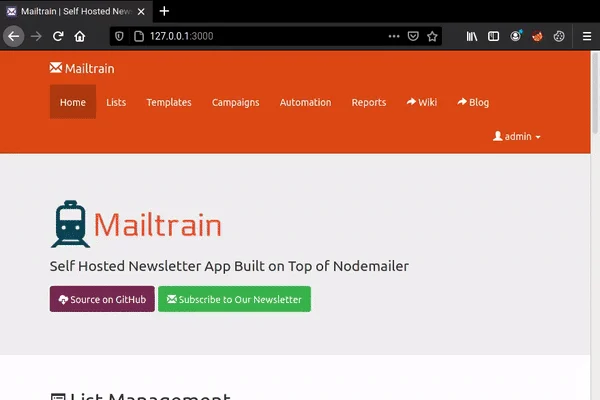
PoC 01

The response shows directory traversal, and reading local files was then straightforward. With that primitive in hand, reading local files was straightforward.
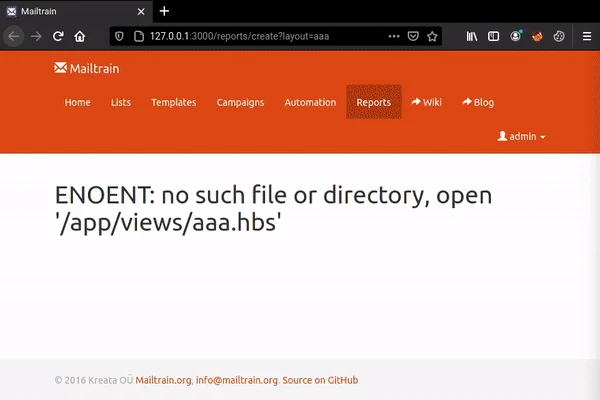
PoC 02
Root cause
The mistake is passing the whole query object into res.render():
const reqData = req.query;
...
res.render('reports/create-select-template', reqData);
hbs interprets some keys in the render context as rendering options rather than template variables. The layout key is one of them, and it can be used to read arbitrary files on the server. Because the value comes directly from the query string and is not validated, an attacker can point it at a path outside the views directory and have the server read that file.
Impact
An authenticated user can read arbitrary files from the web server through the layout parameter. The report does not go further than that: it does not enumerate which files were read, whether secrets or configuration were exposed, or whether the primitive could be extended to code execution. The researcher notes that a CVE was requested and that they were waiting to hear back from the CNA, so no CVE identifier is given.
Fix
The researcher disclosed the issue on huntr and opened a pull request with a fix. The fix is simple: instead of allowing all query string parameters to be passed through, allow only the parameters that are necessary.
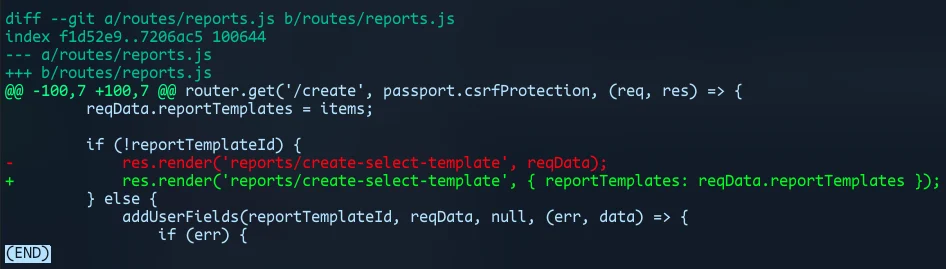
Change diff
Within a few days the Mailtrain maintainer reviewed and accepted the pull request, and the researcher got the money.
Variants to test
- Other
hbsrender calls with user-controlled context. Search Express applications forres.render(where the second argument isreq.query,req.bodyor an object built from them. A positive result is a response that reflects a file outside the views directory when alayoutparameter is supplied. - Other template engines with option-like context keys. The same pattern of passing raw user input as the render context can matter for engines that read directives from the context. A positive result is a change in which template or partial is loaded based on a query parameter.
- Routes that look harmless because they only render a form. The vulnerable line here only renders a template selection page. Any authenticated GET route that renders a view with unvalidated query data is worth the same test.
- Parameter allow-listing as the check. Where a fix has been applied, verify that only expected parameters reach the render call. A positive result is that extra parameters such as
layoutare ignored rather than honoured.
What happened, in plain words
A security researcher found a bug in Mailtrain, a free and open-source program for sending newsletters (the kind of email a shop or a blog sends to lots of subscribers at once). The bug let a logged-in user make the Mailtrain server read files from its own hard disk that the user was never meant to see. This kind of bug is called directory traversal: the program is tricked into walking out of the folder it should stay in and reading files somewhere else.
The researcher did not attack a live website. Instead, they read the program's source code (the human-written instructions that make up the program), spotted a suspicious line, downloaded the program to their own computer, ran it there, and confirmed the bug. They then reported it through huntr.com, a website where people report security problems in open-source projects and can get paid for it, and they also sent in a fix. The maintainer of Mailtrain (the person who looks after the project) accepted the fix a few days later, and the researcher was paid.
This article walks through the whole thing from the beginning, assuming you have never done any security work before. You only need to be comfortable using a browser and a computer.

First, some background: open-source bug bounties
Most people think a bug bounty means hacking a big company's website for money. There is another kind: open-source bug bounty. Open-source software is software whose code is published publicly, so anyone can read it, use it and improve it. Because the code is public, anyone can also look for security mistakes in it, and some platforms pay for those reports.
huntr.com is one such platform: a bug bounty board for open-source code. It helps the open-source community disclose (report) and fix security issues, and it pays people who do it. The researcher had been using it for a few months and had disclosed over 40 issues and fixed over 90, including npm packages (npm is the place where JavaScript programmers download reusable pieces of code, called packages) with 250k average downloads per week. Two CVE IDs were assigned for findings in the packages nested-object-assign and apexcharts.
A CVE ID is a unique public label given to a known security vulnerability, so that everyone in the world can refer to the same bug by the same name. The two mentioned are CVE-2021-23329 and CVE-2021-23327.
If you like reading code, or want to help secure open-source code (and earn some money doing it), huntr is the place to start.
The target: Mailtrain
The bug described here is a directory traversal vulnerability in the repository of Mailtrain, a well-known newsletter platform. A repository (often shortened to repo) is the public storage space where a project's code lives, usually on GitHub. GitHub is a website where programmers keep and share code.
How the researcher picks targets
The researcher usually chooses JavaScript and Node.js applications and packages. JavaScript is a programming language, mostly known for running inside web pages, but it can also run on a server. Node.js is a program that lets JavaScript run on a server, outside the browser. The advice given is to hunt in languages and frameworks you actually enjoy, because you will be reading a lot of code.
To find targets, the researcher uses GitHub, grep.app (a search engine that searches through public source code) and npmjs (the npm website). For example, to find web applications built with Express.js, you search GitHub for require('express') and use filters to get recently active projects.
Express.js (usually just Express) is a very popular toolkit for building web servers in Node.js. When you build a website with Express, you write small pieces of code called routes. A route is a rule that says: when someone asks for this particular address, run this piece of code. For example, a route might say: when someone visits /create, show them a form.
Reading the code
The researcher read the code of all of Mailtrain's routes to understand what features the program has. One of the route handlers is in the file routes/reports.js. Here are the relevant lines:
78    router.get('/create', passport.csrfProtection, (req, res) => {
79      const reqData = req.query;
80
102       if (!reportTemplateId) {
103           res.render('reports/create-select-template', reqData);
104       }
105
115   });
Let us go through this line by line, in plain words.
- Line 78:
router.get('/create', ...)means: when someone sends a GET request to the address/create, run the code that follows. A GET request is simply the kind of request your browser makes when you type an address or click a link: you are asking the server to give you something.passport.csrfProtectionis a security check that runs before the route's own code. CSRF stands for Cross-Site Request Forgery, an attack where a malicious website tricks your browser into sending a request to another site while you are logged in there. This check is meant to stop that.(req, res)are the two objects the code receives:reqholds everything about the incoming request (who asked, what they asked for, what data they sent), andresis used to build the answer that goes back. - Line 79:
const reqData = req.query;stores the request's query string in a variable calledreqData. The query string is the part of a web address after the question mark. Inexample.com/search?colour=blue, the query string iscolour=blue, andreq.querywould be an object like{ colour: 'blue' }. SoreqDatais an object containing every parameter the user put in the address. - Line 102:
if (!reportTemplateId)means: if no report template has been chosen yet, do the following. A template here is a ready-made page layout that gets filled in with data. - Line 103:
res.render('reports/create-select-template', reqData);tells Express to build a page using the template namedcreate-select-template, and to usereqDataas the data to fill it with. Rendering means turning a template plus some data into the finished web page the browser receives. - Line 115: closes the route.
If you are a little familiar with Express, you would say line 103 simply renders a template named create-select-template. And what about reqData? It is an object that has all the query string parameters passed to this route. So basically it is whatever a user gives as GET parameters.
But this simple line of code does not seem to be vulnerable to anything, right?
The idea that made it click
When the researcher saw this, a write-up they had read a few months earlier came to mind. That write-up explained the root cause of this class of issue. The summary given is:
If an Express server uses hbs as its view engine for server-side rendering, and it allows user-constructed query string parameters to be passed to Express's render() function without validation, an attacker can use a parameter called layout to read arbitrary files on the web server.
A few of those terms need unpacking.
- A view engine is the part of the server that takes a template and produces the final HTML page. HTML is the language web pages are written in.
hbsis one particular view engine, short for Handlebars. - Server-side rendering means the page is assembled on the server before being sent to your browser, rather than being built by JavaScript inside your browser.
- Validation means checking that the data a user sent is what you expected, and rejecting it if not. Without validation, the server trusts whatever the user typed into the address bar.
- A parameter is one named value in the query string, like
colourin?colour=blue. - Arbitrary files means any file the server process is allowed to read, not just the ones the feature was designed to show.
So the idea is: hbs does not treat every key in the data object as plain content to display. Some keys are treated as instructions about how to render the page, and layout is one of them. A layout is a surrounding frame for a page: a common header, footer and menu that wraps around the main content. If the user can set layout through the address bar, the user can tell the server which file to use as that frame, including a file outside the folder where templates are supposed to live.
Reading the source above, you can see that Mailtrain uses hbs. At that moment the researcher was sure it was vulnerable. To test it, they set up Mailtrain locally. Since access to this route requires authentication, the default credentials from the repository can be used.
Authentication means proving who you are, usually by logging in with a username and password. Default credentials are the username and password that ship with a project for testing, which everyone can see in the public code. They are fine on your own machine, but a serious problem if they are still active on a real server.
Testing it
With a little curiosity, the researcher gave the layout parameter and got what they expected.
PoC 01
PoC stands for proof of concept: a small demonstration that the bug is real, not just a theory. The screenshot is the first proof of concept for the layout parameter.
Yes, directory traversal. With that, reading local files was easy.
PoC 02
This second proof of concept follows the same trick. The point is not which file was chosen, but that the server went outside its template folder at all.
Reporting it and fixing it
The researcher quickly disclosed the issue on huntr and also opened a pull request with a fix. A pull request (PR) is a proposed change to a project's code: you show the maintainer what you would like to change, and they can review it and accept or reject it.
The fix is simple. Instead of allowing all query string parameters to be passed through, allow only what is necessary. In everyday terms: instead of letting a visitor fill in every field on a form and hand it straight to the person behind the counter, you write a short list of the fields you accept and ignore everything else.
Change diff
A diff is a side-by-side view of what changed in the code: lines removed on one side, lines added on the other. This one shows the change made to fix the issue.
Within a few days, the maintainer of Mailtrain reviewed and accepted it. And the researcher got the money.
A CVE was also requested for this bug, and the researcher was waiting to hear back from the CNA. The CNA is the organisation authorised to assign CVE IDs.
That is all for now. Stay safe.
Glossary
- API: a defined way for one piece of software to talk to another, like a service counter with set questions you can ask.
- Arbitrary files: any file the server process is permitted to read, not only the ones a feature was designed to show.
- Authentication: proving who you are, usually by logging in with a username and password.
- Bug bounty: a programme that pays people for finding and reporting security problems.
- CNA: the organisation authorised to assign CVE IDs.
- CSRF (Cross-Site Request Forgery): an attack where a malicious site tricks your logged-in browser into sending a request to another site.
- CVE ID: a unique public label for a known security vulnerability, so everyone can refer to the same bug by the same name.
- Default credentials: the username and password shipped with a project for testing, visible to anyone reading the code.
- Diff: a view of what changed in code, with removed lines on one side and added lines on the other.
- Directory traversal: a bug where a program is tricked into leaving the folder it should stay in and reading files elsewhere on the machine.
- Express.js: a popular toolkit for building web servers in Node.js.
- GET request: the kind of request a browser makes when you type an address or click a link, asking the server to give you something.
- GitHub: a website where programmers keep and share source code.
- hbs (Handlebars): a view engine that turns templates plus data into finished web pages.
- HTML: the language web pages are written in.
- JavaScript: a programming language, mostly known for running in web pages but also usable on servers.
- Layout: a surrounding frame for a page, such as a shared header, footer and menu.
- Maintainer: the person who looks after an open-source project and reviews changes to it.
- Node.js: a program that lets JavaScript run on a server, outside the browser.
- npm: the place where JavaScript programmers download reusable pieces of code, called packages.
- Open-source: software whose code is published publicly so anyone can read, use and improve it.
- Parameter: one named value in a query string, like
colourin?colour=blue. - PoC (proof of concept): a small demonstration that a bug is real rather than theoretical.
- Pull request (PR): a proposed change to a project's code that the maintainer can review and accept or reject.
- Query string: the part of a web address after the question mark, carrying named values.
- Rendering: turning a template plus data into the finished page the browser receives.
- Repository (repo): the public storage space where a project's code lives.
- Route: a rule in a web server saying which code runs for which address.
- Server-side rendering: building the page on the server before sending it to the browser.
- Template: a ready-made page layout that gets filled in with data.
- Validation: checking that data a user sent is what was expected, and rejecting it if not.
- View engine: the part of the server that turns a template into the final HTML page.



