Stored Cross-Site Scripting (XSS) in "Add Contact" Name Field – MainWP Plugin
The MainWP WordPress plugin stored unsanitised input from the Contact Name field and rendered it back into the page, so a script placed there ran in the browser of any admin who opened the client profile. An attacker could use this to act with the admin's session, including stealing cookies and changing the dashboard.

- Triaged in 27 hours
- Fixed in 9 days
- Paid in 9 days
- Disclosed after 43 days
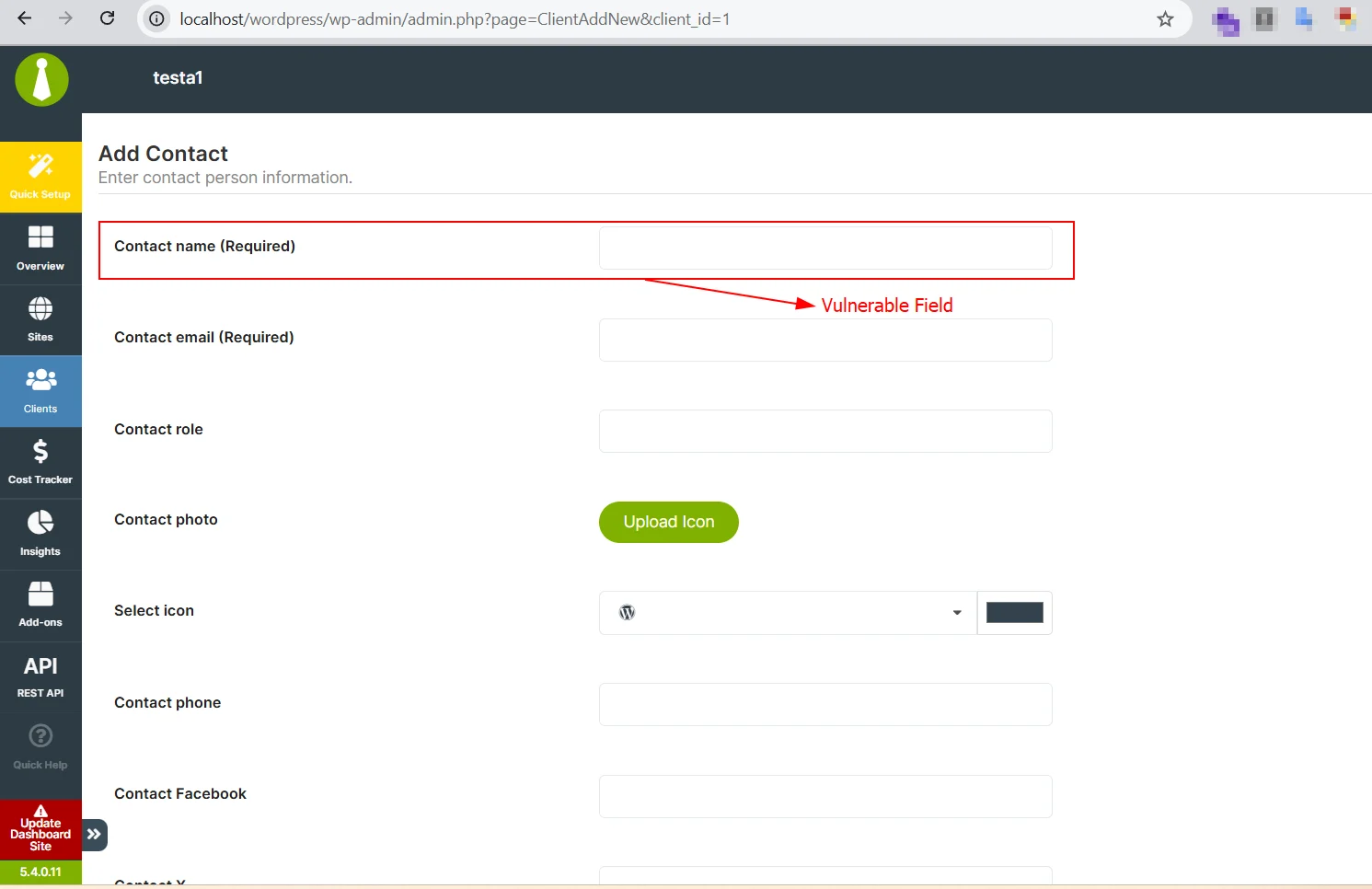
While testing the MainWP WordPress plugin (https://github.com/mainwp/mainwp), I discovered a stored XSS vulnerability in the Client Management feature, specifically in the "Add Contact" > Contact Name field.
The issue occurs because the application does not sanitize user input before rendering it back into the DOM. As a result, an attacker can inject malicious JavaScript payloads that are stored in the database and later executed in the browser of any user (typically admin) who views the infected client profile.
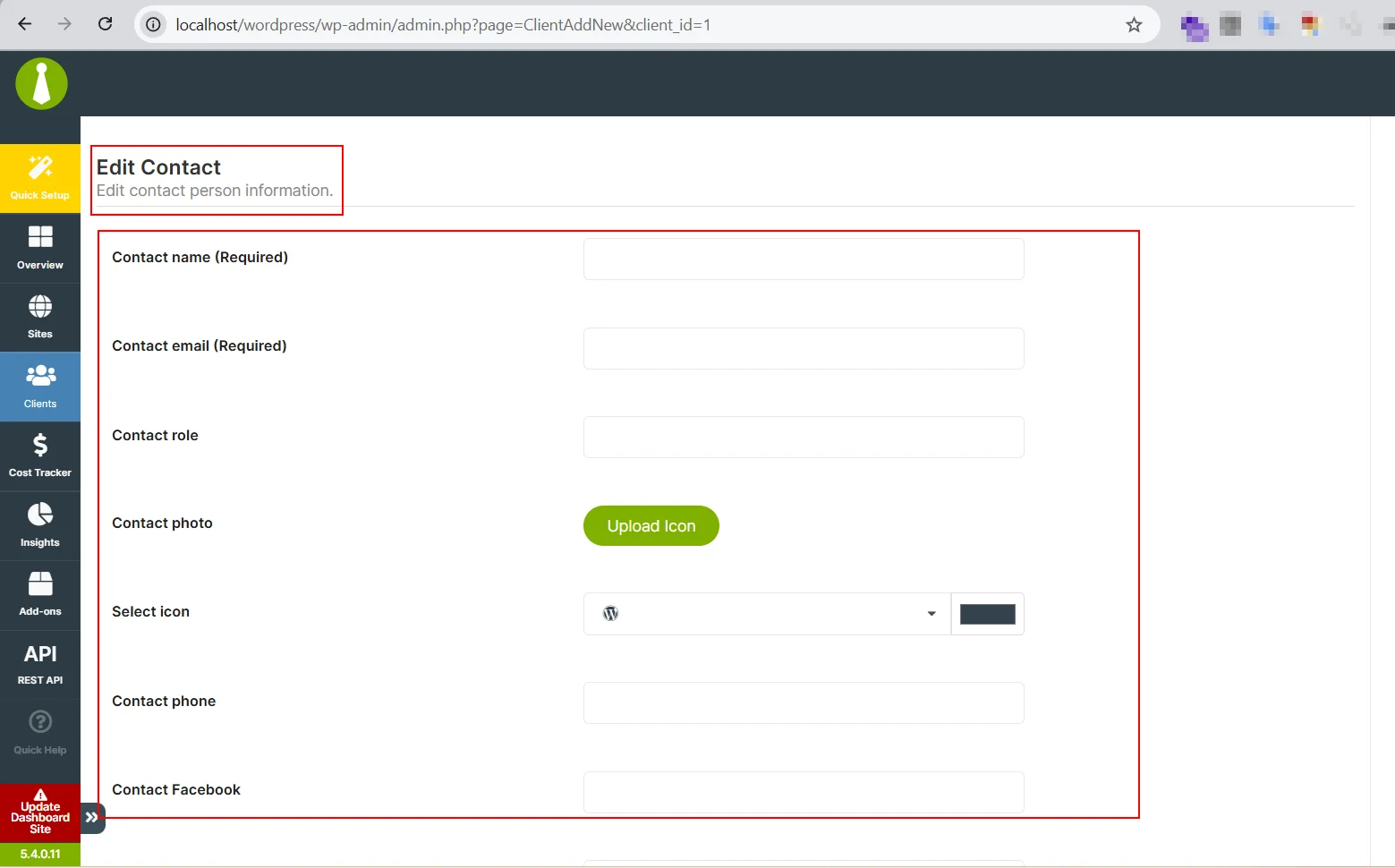
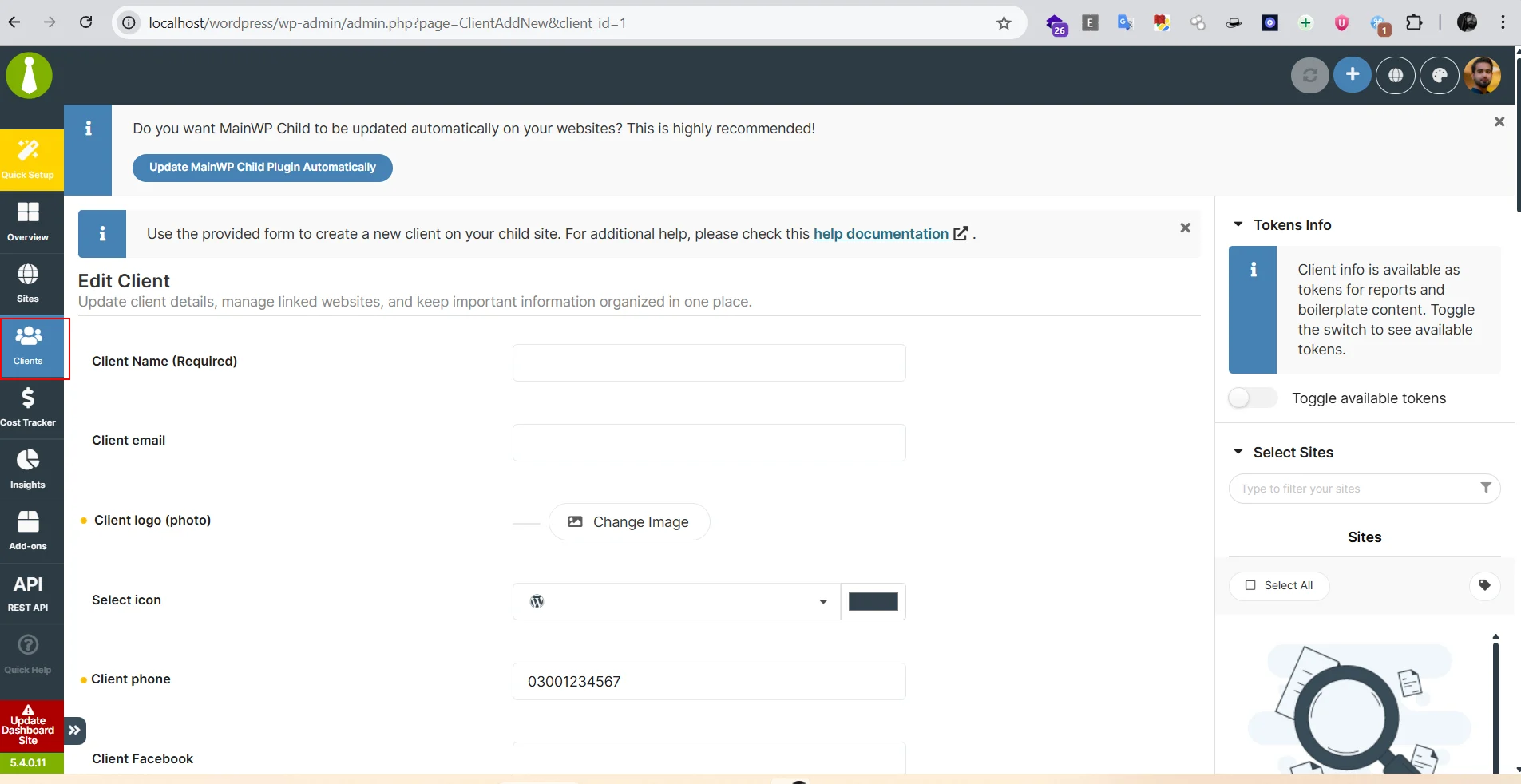
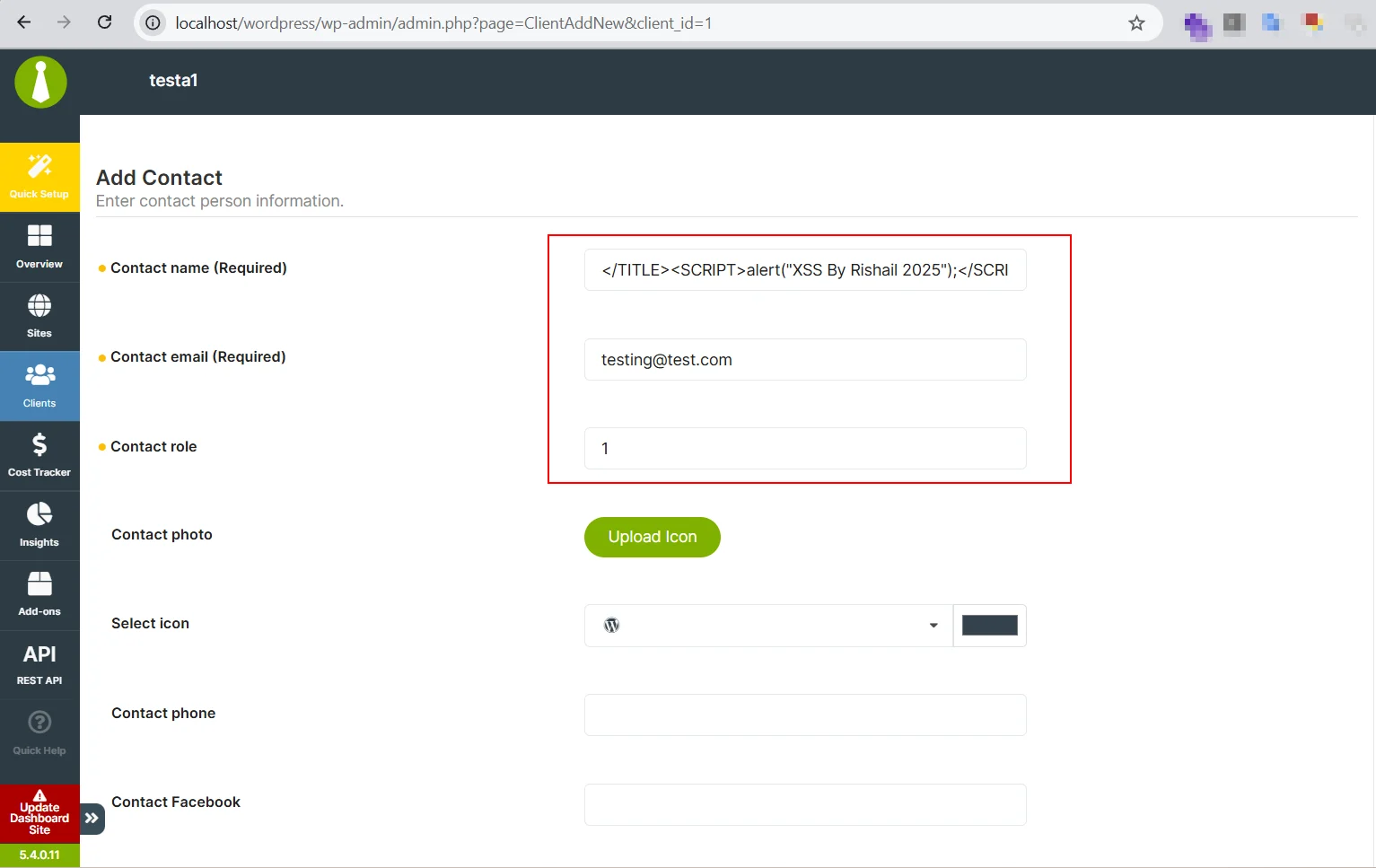
I crafted a payload and inserted it into the Contact Name field while editing a client:
</TITLE><SCRIPT>alert("XSS By Rishail 2025");</SCRIPT>
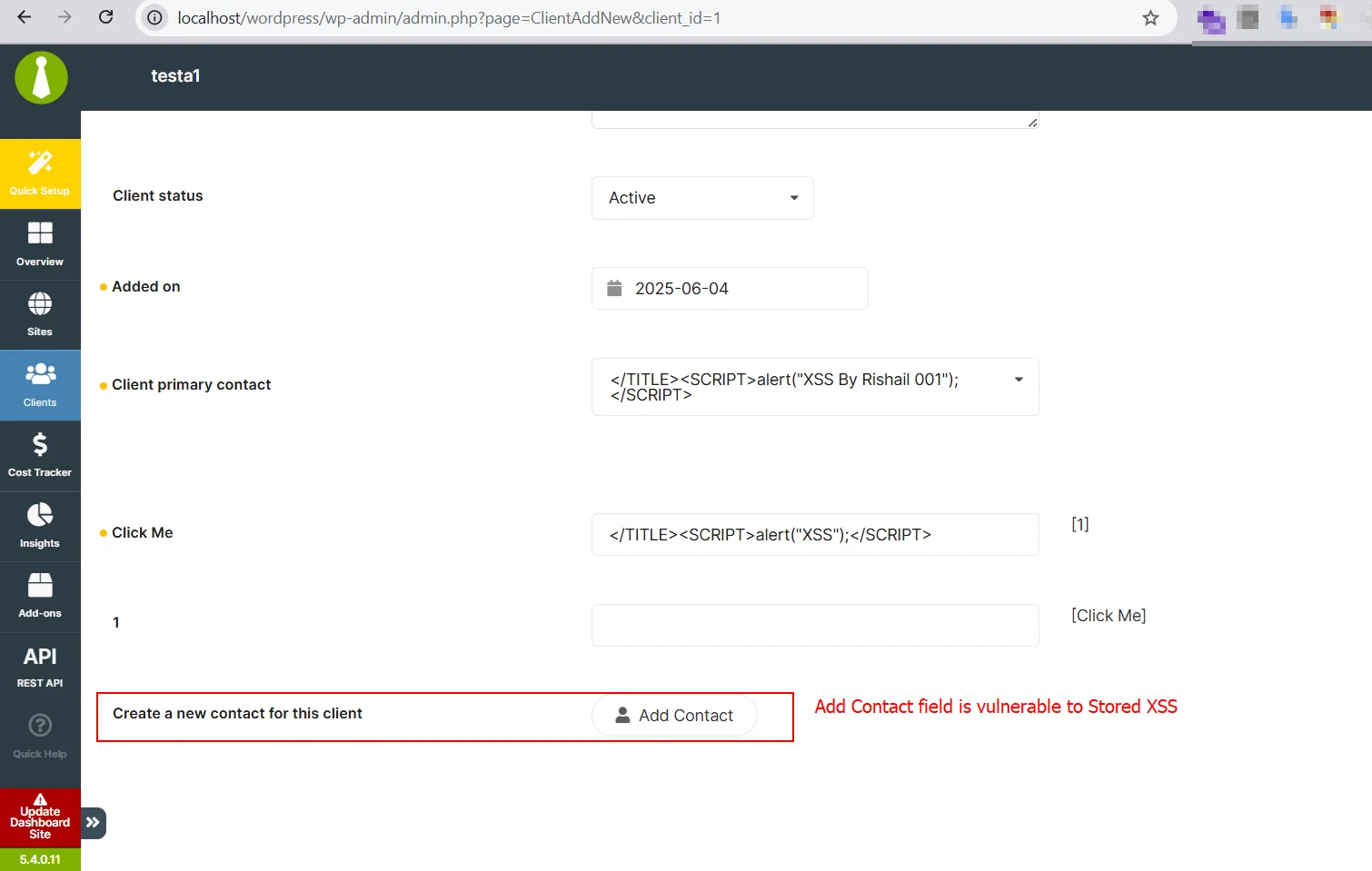
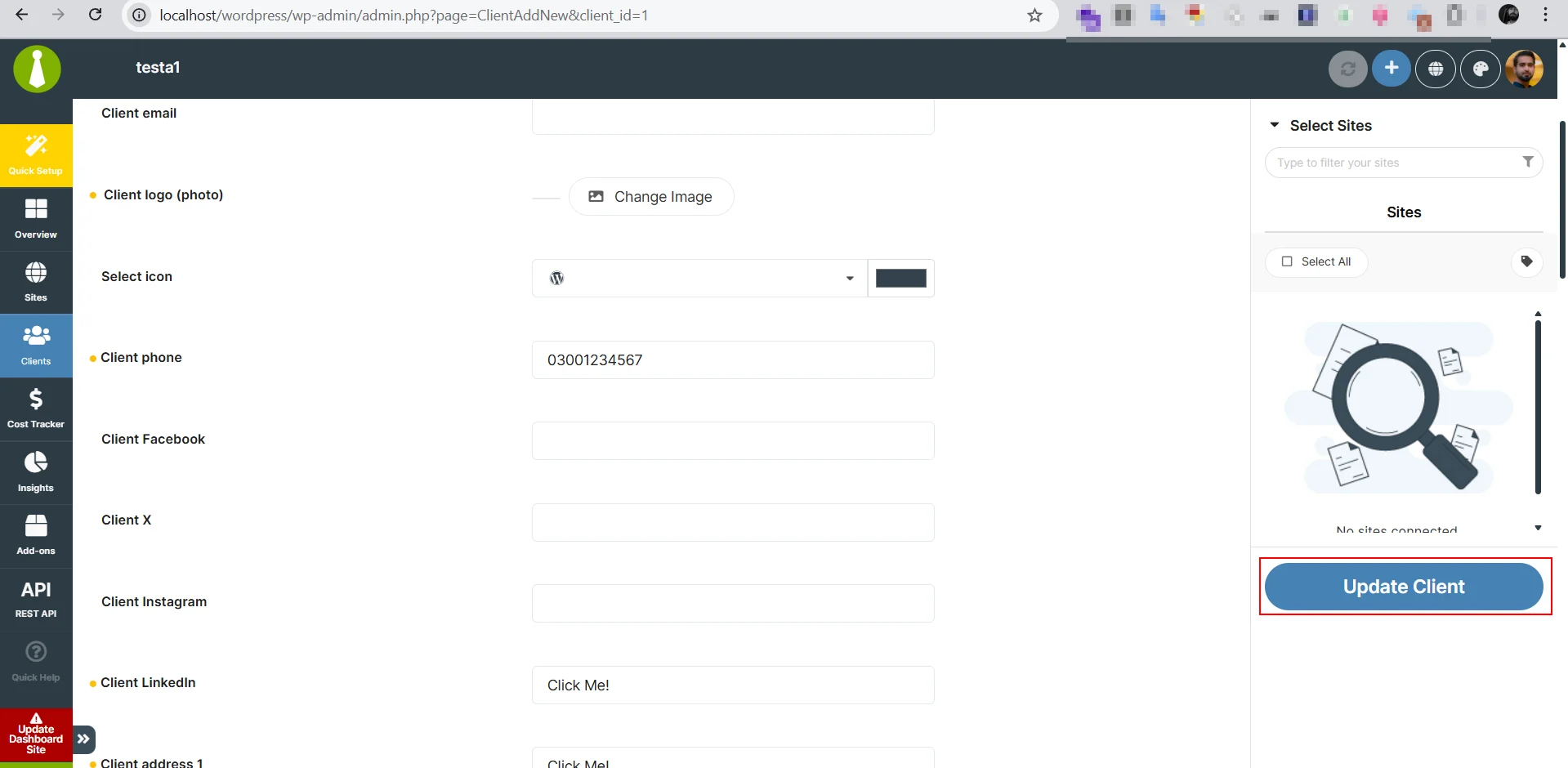
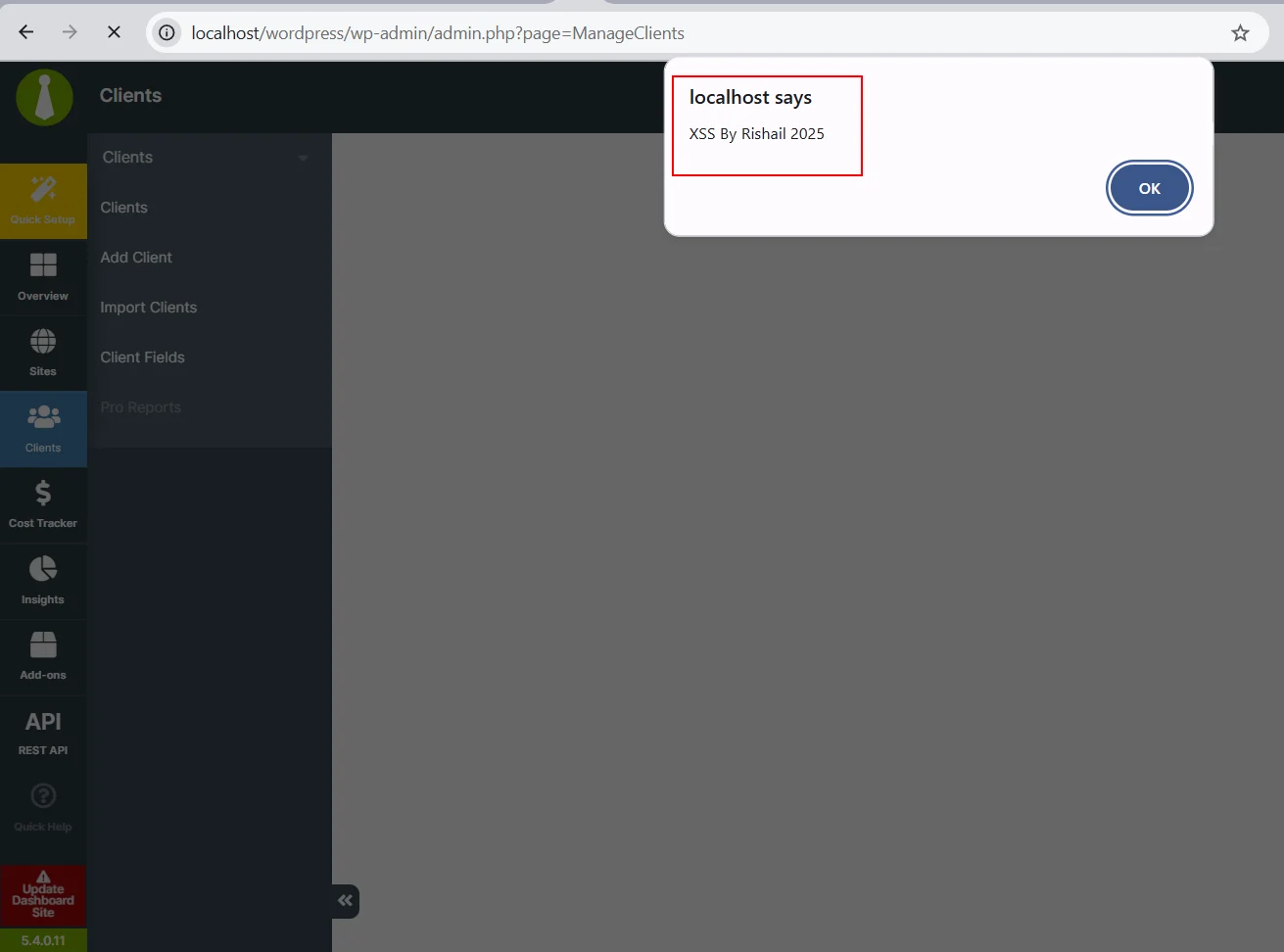
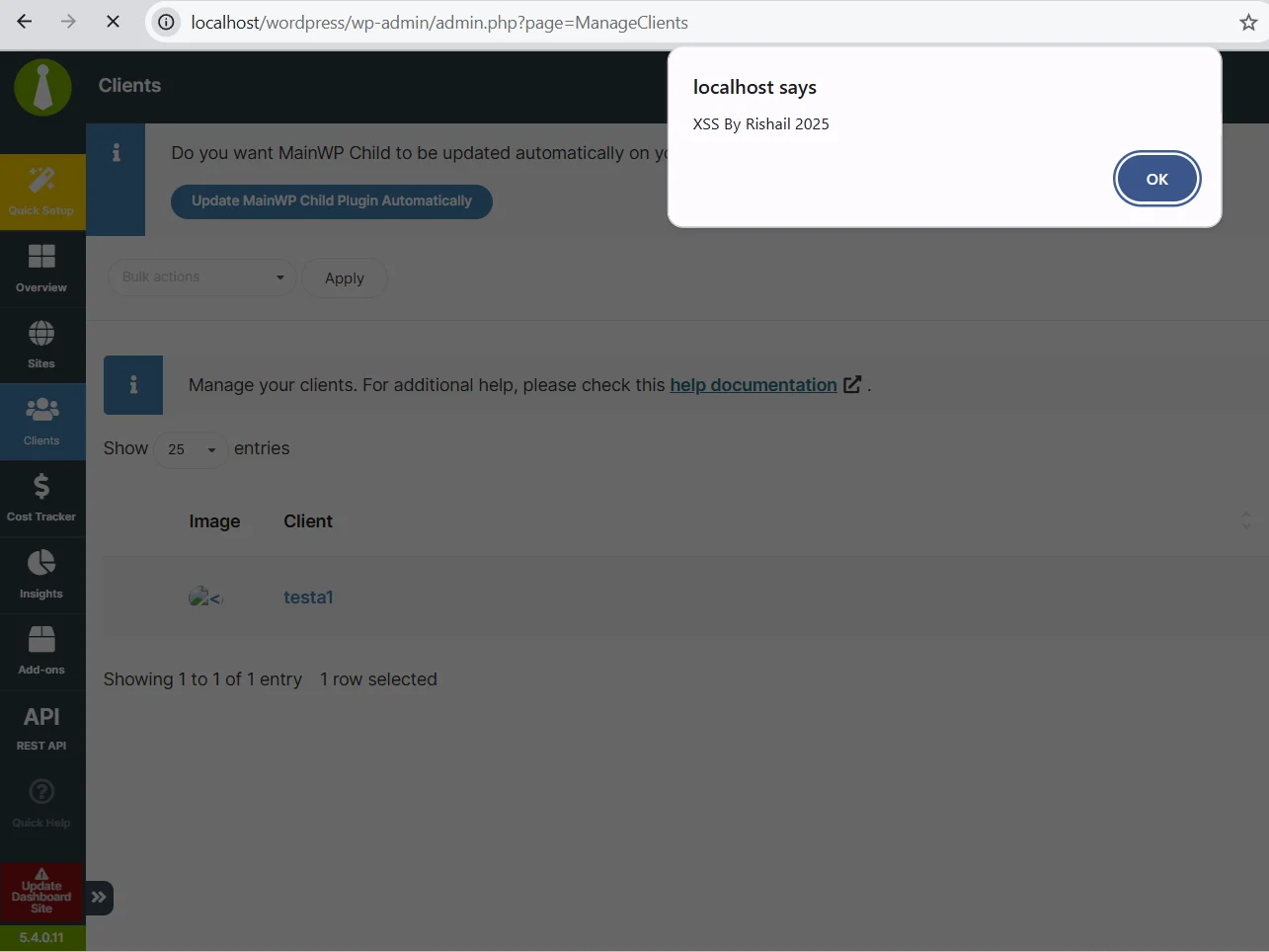
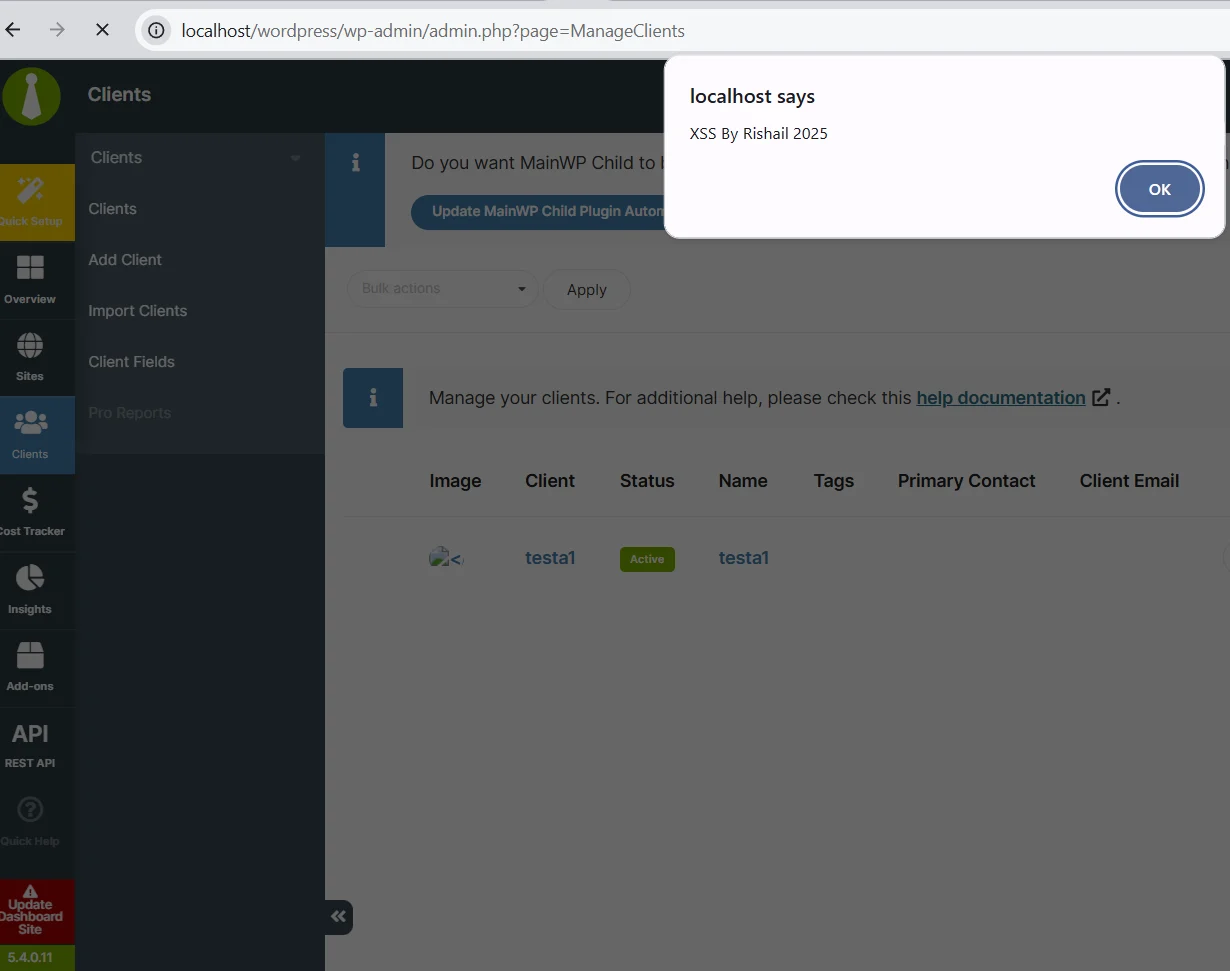
After saving the changes, the payload got stored as-is, and the JavaScript executed instantly upon reloading the client’s detail page — proving the XSS vulnerability.
Impact
This vulnerability allows an attacker to execute arbitrary JavaScript in the browser of any user who views the affected page, leading to full control of the user’s session and actions.
An attacker can exploit this to:
-
Steal administrator session cookies.
-
Perform unauthorized actions as an admin (e.g., add malicious clients or plugins).
If an attacker stores a malicious script in the Contact Name field, any admin who views or edits that client will unknowingly trigger the payload. This can result in full compromise of the MainWP Dashboard, allowing the attacker to manipulate connected WordPress sites, push fake updates, or leak sensitive client data — causing reputational and operational damage.
Attachments
Context
MainWP is a WordPress plugin that lets a single dashboard manage a fleet of connected WordPress sites. One of its features is Client Management, where the operator keeps a record per client. Each client record can hold contacts, and each contact has a Contact Name field. The Contact Name is entered by the operator and then rendered back into the dashboard interface whenever the client profile is viewed or edited.
The target of this report is the plugin source at https://github.com/mainwp/mainwp. The researcher found that the Contact Name field is stored and later rendered without sanitisation, which turns it into a stored cross-site scripting sink.
Setup
The report does not describe a particular lab, plugin version, browser or tooling. The precondition is simply a MainWP installation with the Client Management feature in use, and the ability to edit a client and its contacts. The payload is triggered by whoever loads the client detail page afterwards, which in normal operation is an administrator.
Finding it
The researcher was testing the Client Management feature and focused on the "Add Contact" flow, specifically the Contact Name field. The observation was that the application does not sanitise user input before rendering it back into the DOM. Because the value is persisted first, the injected markup is stored in the database and executed later, in the browser of any user who views the infected client profile.
That combination, persistence plus unsanitised rendering, is what makes this stored rather than reflected: the payload survives the save and fires on every subsequent view of the page.
Exploitation
Step 1: insert the payload into the Contact Name
While editing a client, the researcher added a contact and put the following value into the Contact Name field:
</TITLE><SCRIPT>alert("XSS By Rishail 2025");</SCRIPT>
The payload begins with a closing </TITLE> tag followed by a <SCRIPT> element containing an alert call, used here as proof of execution. The script body is a simple alert call, used here as proof of execution.
Step 2: save and reload the client detail page
After saving the changes, the payload was stored as-is. On reloading the client's detail page, the JavaScript executed instantly. That immediate execution on page load is the proof of the stored XSS: no further interaction with the contact was needed beyond viewing the client.
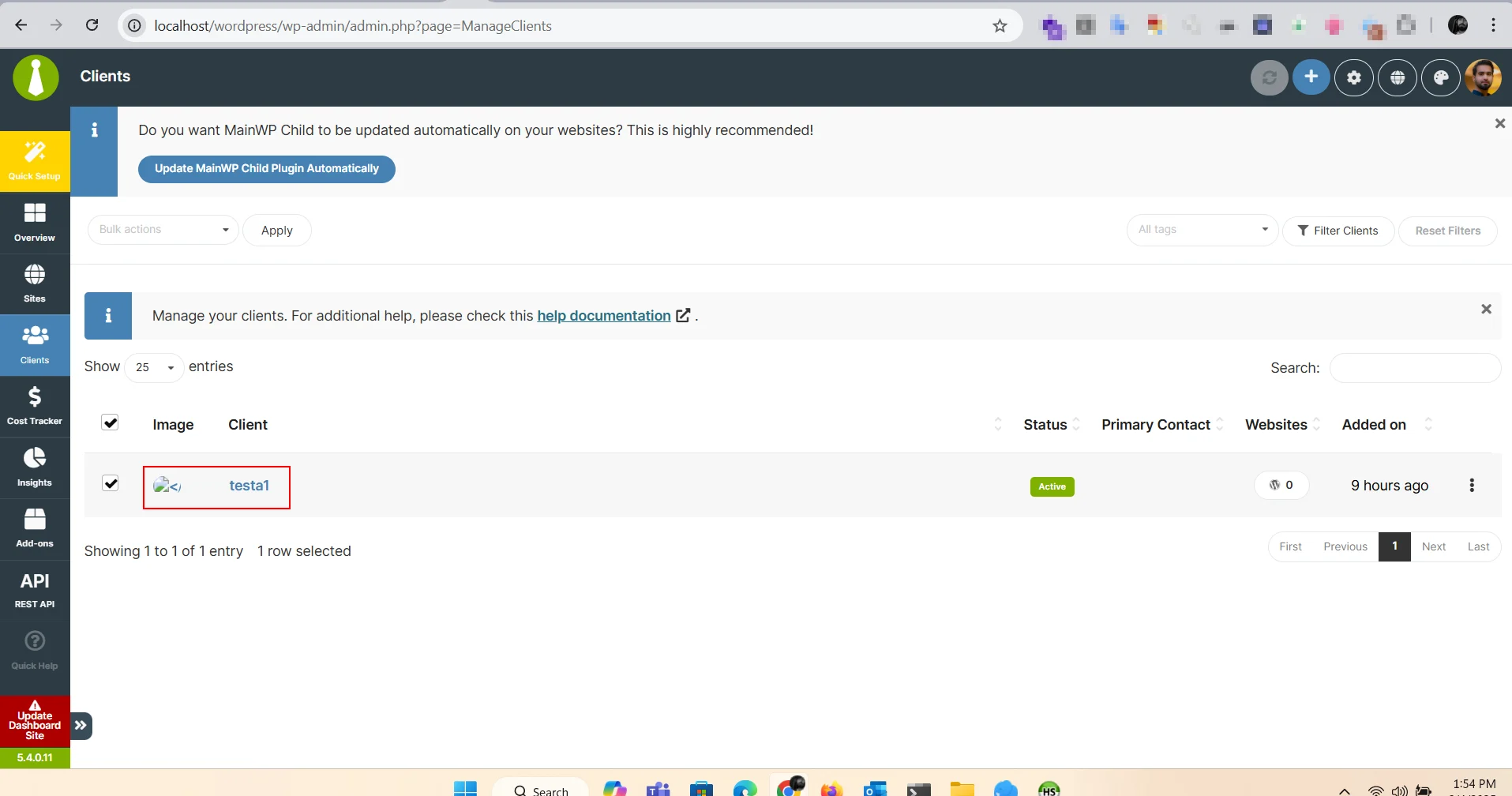
The report includes a screen recording of the proof of concept alongside screenshots of the steps:
Root cause
The report states the cause plainly: the application does not sanitise user input before rendering it back into the DOM. The Contact Name is accepted, persisted and then emitted into the page without encoding, so any markup it contains is interpreted by the browser. Because the value is stored, the unsafe rendering happens on every page load for every viewer, not just for the person who entered it.
The report does not describe the specific code path, the escaping functions that were missing, or any output-context handling that might have been expected. It also does not say whether a nonce, CSP or other client-side defence was present; the payload executed, so whatever defences existed did not stop it.
Impact
The report frames the impact as arbitrary JavaScript execution in the browser of any user who views the affected page, leading to full control of that user's session and actions. Concretely, an attacker can:
- Steal administrator session cookies.
- Perform unauthorised actions as an admin, for example adding malicious clients or plugins.
Because the payload lives in the Contact Name field, any admin who views or edits that client triggers it without knowing. The report describes the worst case as full compromise of the MainWP Dashboard, which would let the attacker manipulate connected WordPress sites, push fake updates, or leak sensitive client data, with reputational and operational damage as a result.
These outcomes depend on an administrator loading the infected client profile; the report does not claim exploitation without that view.
Fix
The change it implies is to sanitise or contextually encode the Contact Name on output, so that stored markup is rendered as text rather than parsed as HTML.
Variants to test
- Other free-text fields on the same client record rendered on the same detail page. A positive result is the same immediate execution on page load after saving.
- Fields that appear in list views and tables, not just detail pages, since a stored payload there fires for every admin browsing the list.
- Fields echoed into attributes or JavaScript blocks rather than element text, where a
</TITLE>style break-out is not needed and a quote or bracket break-out is. A positive result is execution without any user interaction beyond viewing the page.
Hunting notes
This kind of bug hides in administrative CRUD features where an operator-entered value is saved and then displayed back: contact records, client profiles, site names, tags and notes. During recon, the signal is a feature that stores free text and renders it on a page that privileged users load routinely, because that is where a stored payload gets the widest audience. The researcher demonstrated impact by showing execution on page load after a save, with no extra interaction, and by spelling out what an admin session compromise of the MainWP Dashboard would reach: the connected WordPress sites. That combination of a reliable trigger and a high-value session is what makes the report actionable.
The platform records the weakness as reflected XSS, while the report itself describes and demonstrates a stored issue in the Contact Name field.
What happened, in plain words
A security researcher was testing a WordPress plugin called MainWP. MainWP is a tool that lets one person manage many WordPress websites from a single control panel, called a dashboard. One of its features is Client Management: the operator keeps a record for each client, and each client record can hold contacts, with a name for each contact.
The researcher found that the Contact Name field accepts text and later shows that same text back on the page without cleaning it first. That means someone can type code into the field, save it, and the code will run in the browser of anyone who opens that client's page afterwards. This kind of bug is called stored cross-site scripting, or stored XSS.
To prove it, the researcher typed a small piece of JavaScript into the Contact Name field, saved it, and reloaded the client page. The script ran immediately. The report was disclosed on 17 July 2025, and the platform records a bounty of 50.00 USD.
The product and the feature
MainWP is a WordPress plugin. WordPress is a system for building websites, and a plugin is an add-on that gives WordPress extra abilities. MainWP's extra ability is central management: instead of logging in to each WordPress site separately, the operator logs in to one MainWP Dashboard and controls all the connected sites from there.
Client Management is one of the dashboard's features. Think of it like an address book for the people the operator works for. Each client has a record, and each record can hold contacts. A contact has a Contact Name field, which is simply a text box where the operator types a person's name.
The important part is what happens after typing. The name is saved, and later, whenever the operator opens that client's profile to view or edit it, the saved name is placed back into the page so it can be read. That round trip, from text box to database and back onto the page, is where the bug lives.
What cross-site scripting means
A web page is not just words on a screen. It is a document built from instructions, and the browser reads those instructions to decide what to draw. Some instructions say "show this text". Others say "run this program". The programs a browser runs inside a page are written in a language called JavaScript.
Normally the website decides which JavaScript runs, and the visitor's own typing is only ever shown as text. Cross-site scripting breaks that rule: it tricks the site into treating something a person typed as an instruction instead of as text. When the malicious instruction is saved on the server and shown to everyone who visits later, it is called stored XSS. When it only bounces back once, in the same request, it is called reflected XSS.
A useful comparison is a noticeboard in an office. If you pin a note that says "fire drill at noon", people read it as a note. If you pin a note that says "everyone reading this must hand over their keys", and the building staff treat every pinned note as an order, then your note becomes an instruction. Stored XSS is that second note: it stays on the board and affects everyone who reads it.
Why this matters: sessions and cookies
When you log in to a website, the site needs a way to remember that you are you on the next page load. It does this with a cookie: a small piece of data the site asks your browser to keep and send back with every request. One common cookie holds a session identifier, a long random value that acts like a temporary pass. Anyone who has that value can often act as you, without knowing your password.
That is why XSS is serious. If an attacker can run JavaScript in an administrator's browser, that script can read the administrator's cookies and send them somewhere else. The attacker then holds the pass and can do what the administrator can do. The report describes exactly this outcome: stealing administrator session cookies and performing unauthorised actions as an admin.
Setting the scene
The report does not describe a particular test lab, plugin version, browser or tool. The only precondition is a MainWP installation with Client Management in use, and the ability to edit a client and its contacts. The person who triggers the payload is whoever loads the client detail page afterwards, which in normal use is an administrator.
Finding the bug
The researcher was testing the Client Management feature and focused on the "Add Contact" flow, specifically the Contact Name field. The observation was that the application does not sanitise user input before rendering it back into the DOM.
Two terms in that sentence need unpacking. Sanitising means cleaning input so that anything dangerous is removed or neutralised before it is used. The DOM is the browser's live model of the page: the tree of elements the browser has built from the page's instructions, and the thing it actually draws. When a value is placed into the DOM without cleaning, the browser has no way to know it was meant as harmless text.
Because the value is saved first, the injected markup is stored in the database and executed later, in the browser of any user who views the infected client profile. That combination, persistence plus unsanitised rendering, is what makes this stored rather than reflected: the payload survives the save and fires on every subsequent view of the page.
Exploitation
Step 1: insert the payload into the Contact Name
While editing a client, the researcher added a contact and put the following value into the Contact Name field:
</TITLE><SCRIPT>alert("XSS By Rishail 2025");</SCRIPT>
Line by line, in plain words:
</TITLE>is a closing tag. Web pages are written in a markup language called HTML, where tags in angle brackets mark the start and end of elements. A closing tag like this one tells the browser that a title element, which had been opened earlier, ends here. The researcher included it as part of the payload that was saved and executed. Closing that element early means everything after it is no longer treated as title text.<SCRIPT>opens a script element. This is the browser's signal that what follows is JavaScript to run, not text to display.alert("XSS By Rishail 2025");is a JavaScript instruction that makes the browser show a pop-up box with the message inside the quotes. It does nothing harmful by itself. Researchers use it as proof: if the box appears, the browser really did run their code.</SCRIPT>closes the script element.
The payload combines a closing </TITLE> tag with a <SCRIPT> element containing an alert call, used as proof of execution. With it, the browser treats the following <SCRIPT> as a real instruction.
Step 2: save and reload the client detail page
After saving the changes, the payload was stored as-is. On reloading the client's detail page, the JavaScript executed instantly. That immediate execution on page load is the proof of the stored XSS: no further interaction with the contact was needed beyond viewing the client.
The report includes a screen recording of the proof of concept alongside screenshots of the steps:
Root cause
The report states the cause plainly: the application does not sanitise user input before rendering it back into the DOM. The Contact Name is accepted, saved and then written into the page without encoding, so any markup it contains is interpreted by the browser. Because the value is stored, the unsafe rendering happens on every page load for every viewer, not just for the person who entered it.
Encoding, in this context, means converting characters that have special meaning in HTML into a safe form that the browser displays as text. For example, a less-than sign could be turned into a code that means "show a less-than sign" rather than "start a tag". The report does not describe the specific code path, the escaping functions that were missing, or any output-context handling that might have been expected. It also does not say whether a nonce, CSP or other client-side defence was present; the payload executed, so whatever defences existed did not stop it.
Impact
The report frames the impact as arbitrary JavaScript execution in the browser of any user who views the affected page, leading to full control of that user's session and actions. Concretely, an attacker can:
- Steal administrator session cookies.
- Perform unauthorised actions as an admin, for example adding malicious clients or plugins.
Because the payload lives in the Contact Name field, any admin who views or edits that client triggers it without knowing. The report describes the worst case as full compromise of the MainWP Dashboard, which would let the attacker manipulate connected WordPress sites, push fake updates, or leak sensitive client data, with reputational and operational damage as a result.
These outcomes depend on an administrator loading the infected client profile; the report does not claim exploitation without that view.
Fix
The change it implies is to sanitise or contextually encode the Contact Name on output, so that stored markup is rendered as text rather than parsed as HTML, and to validate the value on input as a second layer. In everyday terms: clean the value when it is shown, so stored markup is displayed as text.
Variants to test
- Other free-text fields on the same client record rendered on the same detail page. A positive result is the same immediate execution on page load after saving.
- Fields that appear in list views and tables, not just detail pages, since a stored payload there fires for every admin browsing the list.
- Fields echoed into attributes or JavaScript blocks rather than element text, where a
</TITLE>style break-out is not needed and a quote or bracket break-out is. A positive result is execution without any user interaction beyond viewing the page.
Hunting notes
This kind of bug hides in administrative features where an operator-entered value is saved and then displayed back: contact records, client profiles, site names, tags and notes. During recon, the signal is a feature that stores free text and renders it on a page that privileged users load routinely, because that is where a stored payload gets the widest audience. The researcher demonstrated impact by showing execution on page load after a save, with no extra interaction, and by spelling out what an admin session compromise of the MainWP Dashboard would reach: the connected WordPress sites. That combination of a reliable trigger and a high-value session is what makes the report actionable.
The platform records the weakness as reflected XSS, while the report itself describes and demonstrates a stored issue in the Contact Name field.
Glossary
- XSS (cross-site scripting): a bug where a website treats something a person typed as a program instruction instead of as text, letting an attacker run JavaScript in someone else's browser.
- Stored XSS: XSS where the malicious value is saved on the server and runs for everyone who views the affected page later.
- Reflected XSS: XSS where the malicious value bounces straight back in the same response and does not persist.
- Payload: the piece of text or code an attacker submits to trigger a bug.
- Sanitise: clean input so that anything dangerous is removed or neutralised before use.
- Encode: convert characters with special meaning in HTML into a safe form the browser shows as text.
- DOM: the browser's live model of the page, the tree of elements it builds and draws.
- HTML: the markup language web pages are written in, using tags in angle brackets to mark elements.
- Tag: a marker in HTML such as
<SCRIPT>or</TITLE>that starts or ends an element. - JavaScript: the programming language browsers run inside web pages.
alert: a JavaScript instruction that shows a pop-up box; researchers use it to prove code ran.- Cookie: a small piece of data a site asks your browser to keep and send back with each request.
- Session: the site's record that you are logged in, usually tied to a cookie value.
- Session identifier: the long random value in a session cookie that acts like a temporary pass.
- Administrator: a user with full control over a site or dashboard.
- WordPress: a system for building and running websites.
- Plugin: an add-on that gives WordPress extra abilities.
- MainWP: a WordPress plugin that lets one dashboard manage many connected WordPress sites.
- Dashboard: the single control panel where the operator manages everything.
- Client Management: the MainWP feature that keeps a record per client, including contacts.
- Contact Name: the text field in a client's contact record where the operator types a person's name.
- CRUD: create, read, update and delete, the four basic operations on stored records.
- Recon: the early stage of testing where you look around a product to find features worth examining.
- Bounty: a payment a programme makes to a researcher who reports a valid bug.