XSS in L.mapbox.shareControl in mapbox.js

- Triaged in 20 days
- Fixed in 2 months
- Paid in 2 months
- Disclosed after 6 months
Summary by the program
On November 12th, 2015, enderun07 reported a stored cross-site scripting (XSS) issue in the share page of a v3 or v4 map hosted on api.mapbox.com. The vulnerability also affected version 2.2.3 and 1.6.5 and earlier of mapbox.js. Mapbox GL JS and Mapbox Studio styles were not affected by this issue.
If an attacker named a project in our classic map editor with a malicious payload for the title, the payload would execute when a victim viewed the share page of the map and clicked on the share control. The map share control is an arrow button under the zoom control that when clicked creates a modal dialog that allows a user to easily share a Mapbox map on Facebook, Twitter, Pinterest, or an external website.
Though enderun07 used the payload "'><img src=a onerror=confirm(2)>"><script>alert(1);</script><iframe onload=alert(97)>"><svg onload=alert(2);>"onmouseover="confirm(2);<input onfocus=prompt(1) autofocus>"--> </script><svg/onload=';alert(/XSSPOSED/);'>", we were able to replicate the issue with the shorter payload <img src=a >\"><iframe onload=alert('XSS')>.
A few factors limited the severity of this vulnerability. First, a victim had to visit the share page of the malicious map or an attacker-controlled website with a malicious mapbox.js map. Users visiting www.mapbox.com or a website using mapbox.js with a non-malicious map were not affected. Second, the user had to click on the share control of the map in order for any malicious code to execute. An attacker might have used social engineering to encourage a user to click on the share control of the malicious map. Third, the map share page on api.mapbox.com includes the title of the map, which would have contained the malicious payload in the top left-hand corner. Some users may have found the map title strange and would not have followed instructions to click on the share control.
We patched Mapbox servers on December 22nd, 2015 and released a public patch and Node Security advisory for mapbox.js on January 12th, 2016. The code for the patch is in pull request 1102 of mapbox.js.
We strongly encourage anyone with an application that loads untrusted TileJSON - an uncommon usage scenario - into a mapbox.js map to upgrade to v2.2.4 or v1.6.5 of mapbox.js.
The report
Hi Mapbox
I've found a xss vulnerability on mapbox sharing system.
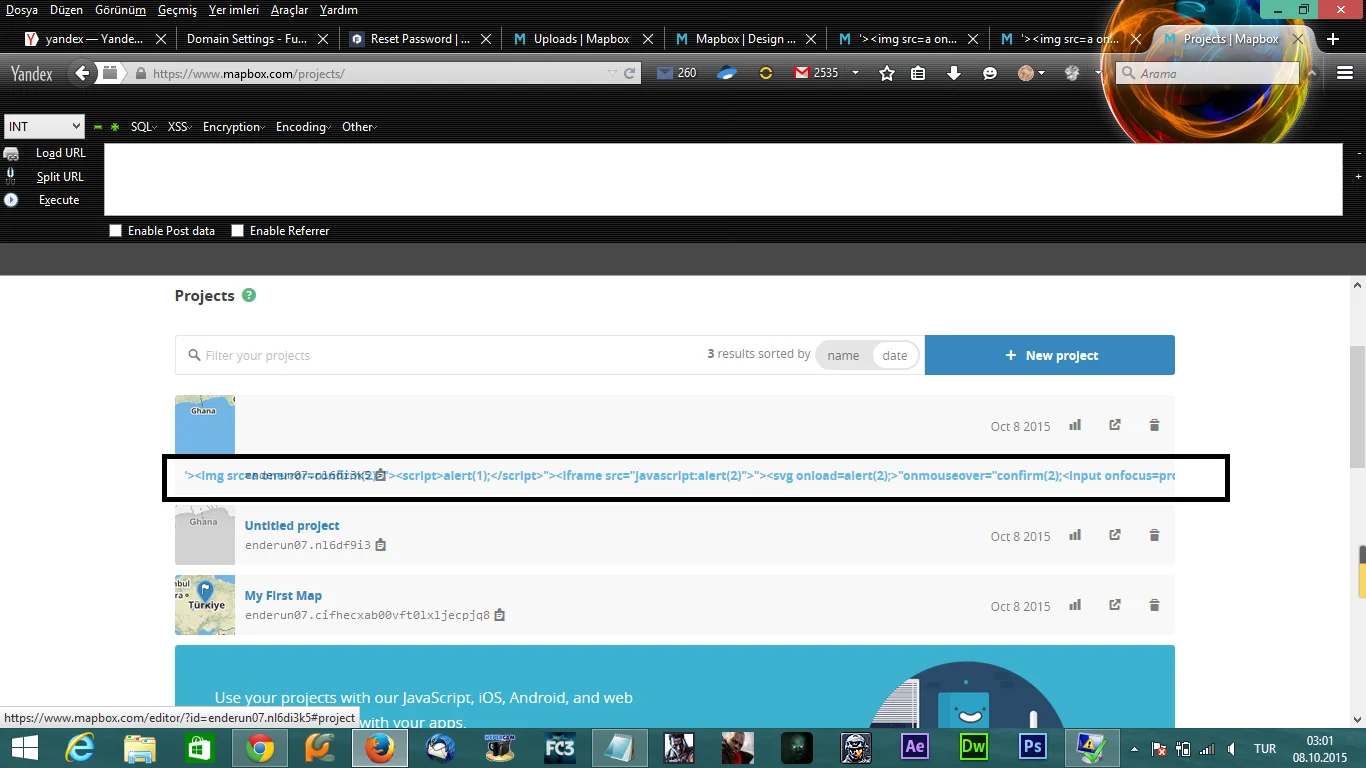
I've a project called with "'><img src=a onerror=confirm(2)>"><script>alert(1);</script><iframe onload=alert(97)>"><svg onload=alert(2);>"onmouseover="confirm(2);<input onfocus=prompt(1) autofocus>"--> </script><svg/onload=';alert(/XSSPOSED/);'>"
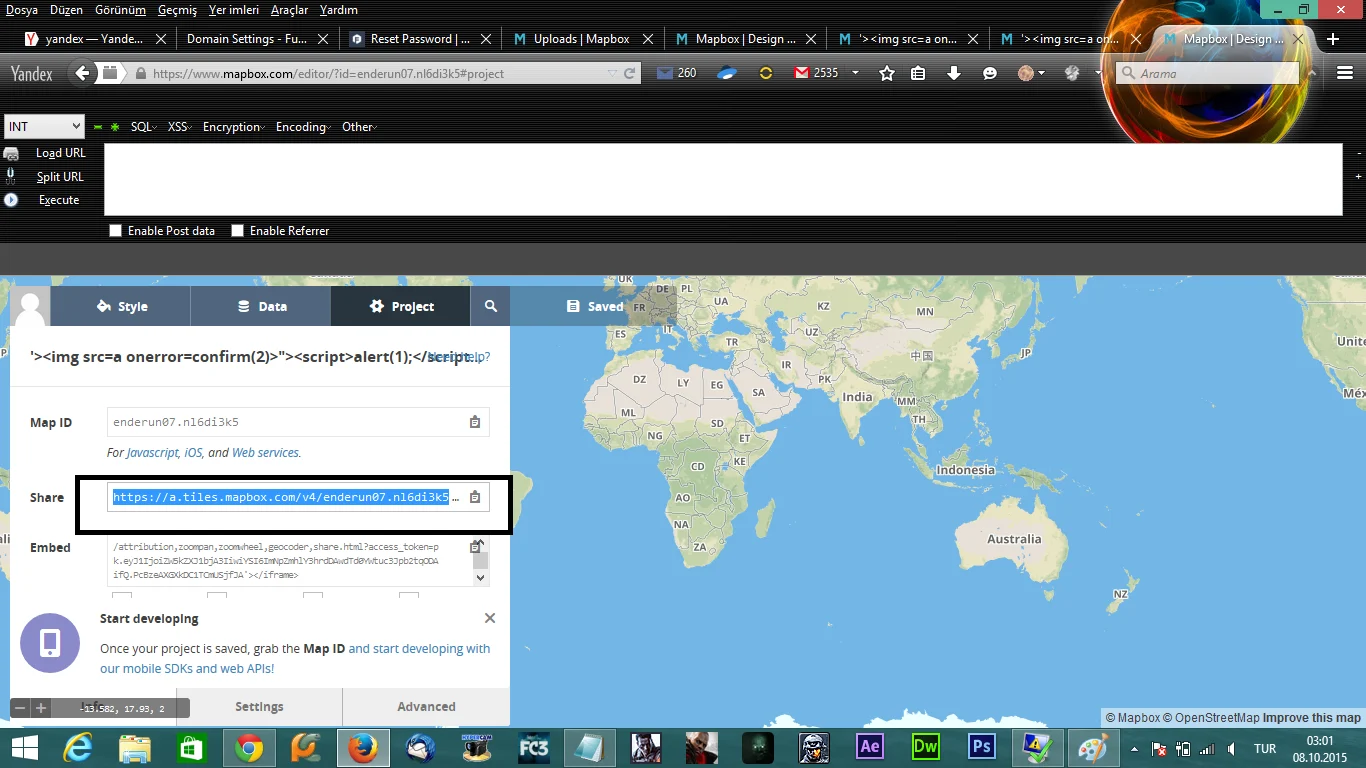
than click it and copy the share URL and go to URL
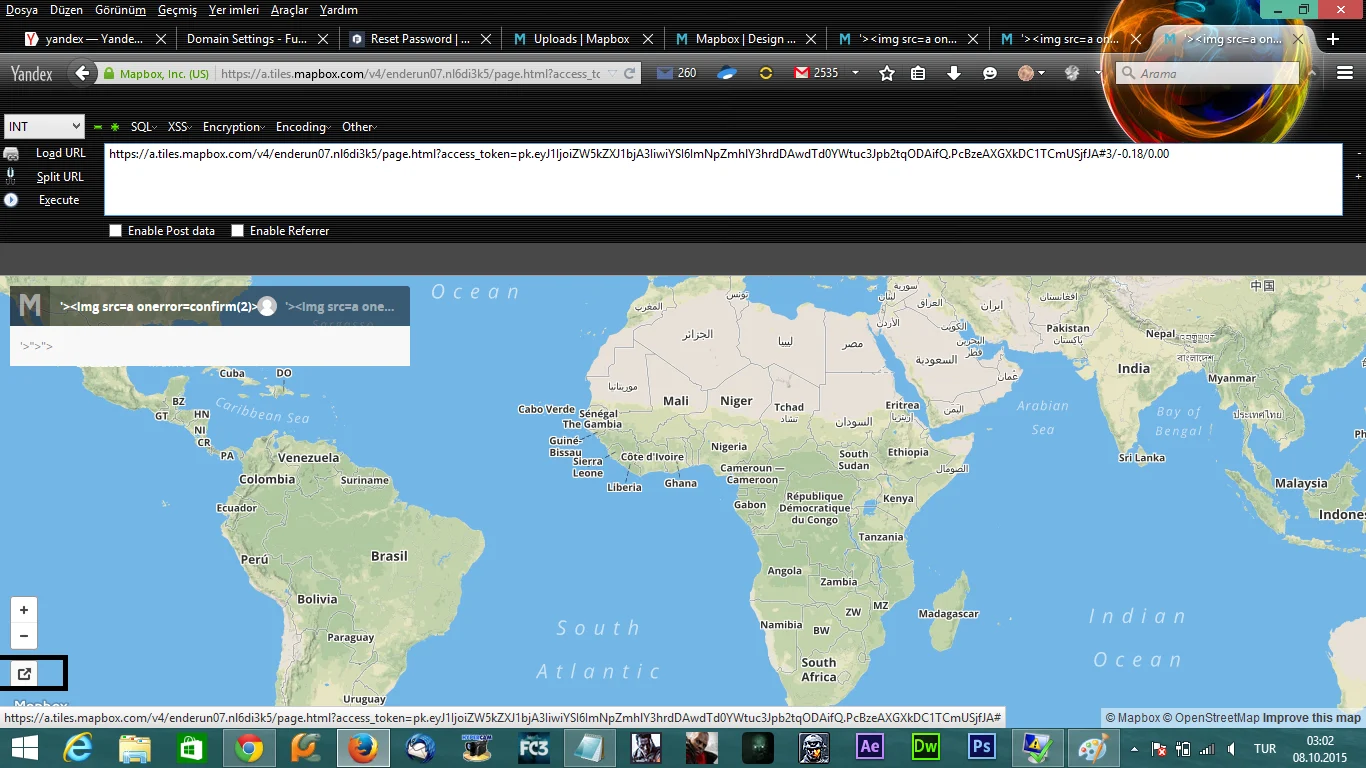
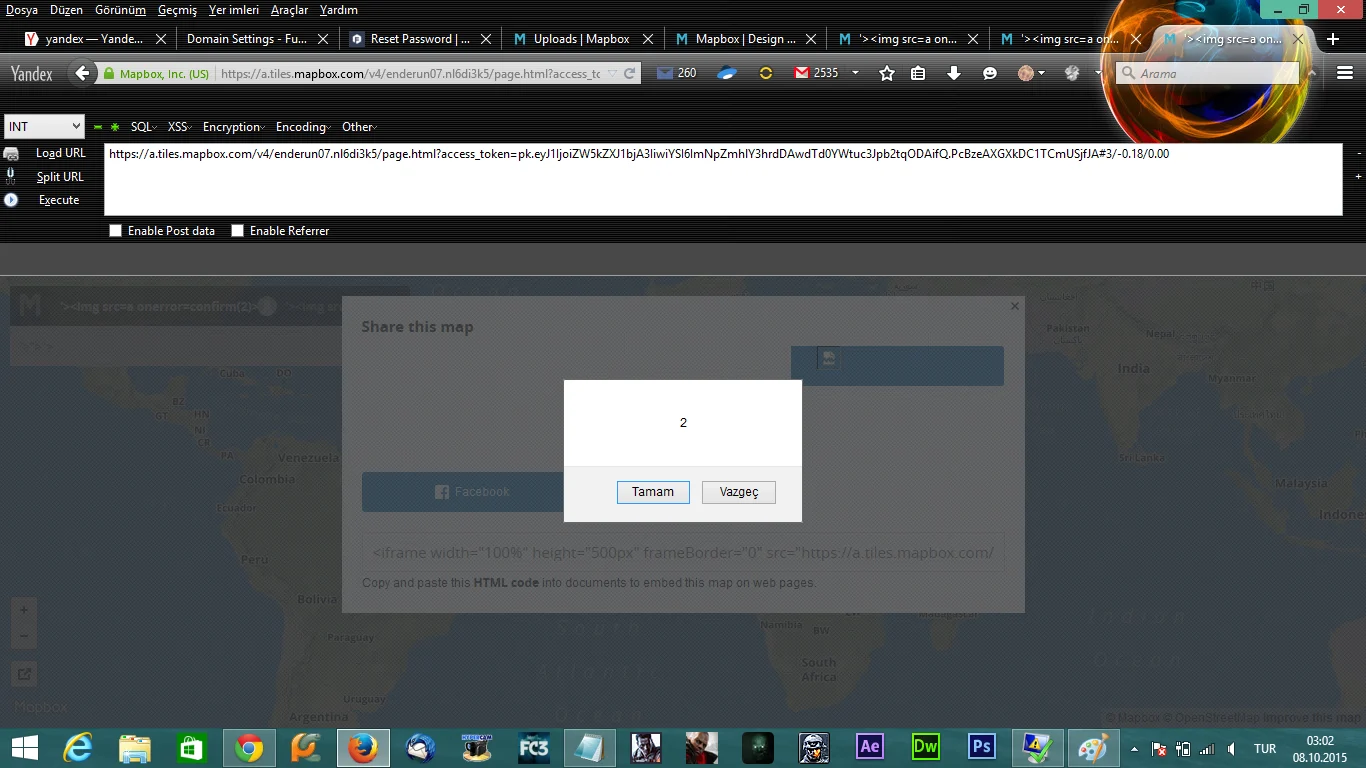
than click the the marked area than you will see the vulnerability
Attachments
Context
Mapbox hosts maps on api.mapbox.com, and each map has a share page. The share page includes a share control: an arrow button under the zoom control. Clicking it opens a modal dialog that lets a user share the map on Facebook, Twitter, Pinterest or an external website. The map title is rendered on the share page, in the top left-hand corner.
The affected component was the L.mapbox.shareControl in mapbox.js. According to the program's summary, the issue affected mapbox.js version 2.2.3 and 1.6.5 and earlier. Mapbox GL JS and Mapbox Studio styles were not affected. The bug was a stored cross-site scripting issue: a malicious map title was stored, and the payload executed when a victim viewed the share page of the map and clicked the share control.
Setup
The researcher needed a Mapbox account and a project in the classic map editor at https://www.mapbox.com/editor/. The project name (the map title) is the field that carries the payload. No special tooling is described; the test is done in a browser by visiting the share URL of the map and clicking the share control.
Finding it
The researcher found that the map sharing system did not safely handle the project name. A project named with an HTML/JavaScript payload produced a share page where the title was rendered in a way that allowed the payload to run once the share control was clicked. The researcher's own project name was the full payload:
'"><img src=a onerror=confirm(2)>"><script>alert(1);</script><iframe onload=alert(97)>"><svg onload=alert(2);>"onmouseover="confirm(2);<input onfocus=prompt(1) autofocus>"--> </script><svg/onload=';alert(/XSSPOSED/);'>"
This payload mixes several vectors: an img with an onerror handler, a script block, an iframe with onload, an svg with onload, an onmouseover handler, an input with autofocus and onfocus, and a second svg with an onload handler. The program later replicated the issue with a shorter payload:
<img src=a >"><iframe onload=alert('XSS')>
Exploitation
Step 1: Create a project with a malicious name
In the classic map editor, the researcher created a project whose name was the payload above. The project name becomes the map title shown on the share page.
Step 2: Copy the share URL
The researcher clicked the project and copied the share URL of the map.
Step 3: Visit the share URL and click the share control
Navigating to the share URL and clicking the marked area (the share control) triggered the payload. The share control is the arrow button under the zoom control; clicking it opens the share modal, and at that point the stored title is handled in a way that executes the injected code.
The attachments show the result of the test.
Root cause
The map title, which is attacker-controlled through the project name, was inserted into the share page and the share control's modal without adequate output encoding, so the markup in the title was interpreted as HTML and its event handlers and script ran. The program's summary does not describe the exact code path; the patch is in pull request 1102 of mapbox.js.
Impact
This was a stored XSS. An attacker who named a project with a malicious payload for the title could have the payload execute when a victim viewed the share page of the map and clicked the share control. The program noted several factors that limited severity:
- A victim had to visit the share page of the malicious map, or an attacker-controlled website with a malicious mapbox.js map. Users visiting
www.mapbox.comor a website using mapbox.js with a non-malicious map were not affected. - The user had to click the share control for any malicious code to execute. An attacker might have used social engineering to encourage a user to click it.
- The share page on
api.mapbox.comincludes the title of the map, which would have contained the malicious payload in the top left-hand corner. Some users may have found the map title strange and would not have followed instructions to click the share control.
Fix
Mapbox patched its servers on 22 December 2015 and released a public patch and a Node Security advisory for mapbox.js on 12 January 2016. The code for the patch is in pull request 1102 of mapbox.js. The program encouraged anyone with an application that loads untrusted TileJSON, described as an uncommon usage scenario, into a mapbox.js map to upgrade to v2.2.4 or v1.6.5 of mapbox.js.
Variants to test
Hunting notes
The researcher showed impact by creating a project with a payload, copying the share URL, and demonstrating execution when the share control was clicked, which the program replicated with a shorter payload.
What happened, in plain words
Mapbox is a service that lets people build and host maps. Each map you create gets its own page, called a share page, where other people can look at it and share it on social networks. That page has a small arrow button under the zoom buttons, called the share control. When you click it, a modal dialog appears with options to share the map on Facebook, Twitter, Pinterest or an external website.
A security researcher found that the name you give your map, which Mapbox calls the project name and shows as the map title, was not handled safely. If someone gave their map a name that contained HTML and JavaScript code, that code would be stored and then run in the browser of anyone who opened the share page and clicked the share control. This kind of bug is called stored cross-site scripting, or stored XSS.
To understand XSS, imagine a noticeboard where people pin notes. If the board copied whatever was written on a note onto the wall as instructions rather than as plain text, someone could pin a note that says "give this person the keys" and the wall would obey. In a web page, HTML is the language that describes what is shown, and JavaScript is code the browser runs. When a website puts user text into a page without neutralising it, the browser cannot tell the difference between the site's own instructions and the user's text, so it runs the user's code too.
The affected piece of software was L.mapbox.shareControl in mapbox.js, a JavaScript library that websites use to display Mapbox maps. According to the program's summary, the bug affected mapbox.js version 2.2.3 and 1.6.5 and earlier. Mapbox GL JS and Mapbox Studio styles were not affected. Mapbox fixed its servers on 22 December 2015 and published a patch and a Node Security advisory on 12 January 2016.
The pieces involved
Before following the steps, it helps to know what each part is.
- Mapbox: a company that hosts maps online. You create a map in their editor, and they serve it from their servers.
api.mapbox.com: the address of Mapbox's servers that deliver maps and share pages. An address like this is called a hostname.- Share page: a web page for one particular map, which you can send to other people so they can view and share it.
- Share control: the arrow button under the zoom control on the share page. Clicking it opens a modal dialog with sharing options.
- Modal dialog: a small window that appears on top of the page and usually has to be closed before you carry on.
- mapbox.js: a library, meaning a bundle of ready-made JavaScript code that a website can include so it does not have to write map code from scratch.
L.mapbox.shareControlis the part of that library that draws the share button and its dialog. - Mapbox GL JS and Mapbox Studio: other Mapbox products for building and styling maps. The summary says these were not affected.
- Classic map editor: the older web tool at
https://www.mapbox.com/editor/where you create and name a map project. - Project name / map title: the text you type to name your map. It is shown as the title on the share page, in the top left-hand corner.
- Stored XSS: a bug where malicious text is saved on the server (stored) and later shown to other people, running as code in their browsers.
- Payload: the piece of text an attacker supplies to try to make the bug happen. Here it is a mixture of HTML tags and JavaScript.
- HTML tag: a piece of markup in angle brackets, such as
<img>, that tells the browser to show something. - Event handler: an attribute such as
onerrororonloadthat tells the browser to run some JavaScript when something happens, for example when an image fails to load or a frame finishes loading. - TileJSON: a data format that describes map tiles (the small image pieces a map is made of). The advisory mentions loading untrusted TileJSON as an uncommon scenario.
- Bounty: money a company pays a researcher for reporting a security bug responsibly.
- Advisory: a public notice describing a security problem and its fix.
Setting up
The researcher needed a Mapbox account and a project in the classic map editor at https://www.mapbox.com/editor/. The project name, which becomes the map title, is the field that carries the payload. No special tools are described: the whole test happens in an ordinary browser by opening the share URL of the map and clicking the share control.
Why start here? Because the title is the one piece of text the researcher fully controls that ends up on the share page. If the page mishandles it, that is where the bug will show.
Finding it
The researcher found that the map sharing system did not safely handle the project name. A project named with an HTML and JavaScript payload produced a share page where the title was rendered in a way that let the payload run once the share control was clicked. The researcher's own project name was the full payload:
'"><img src=a onerror=confirm(2)>"><script>alert(1);</script><iframe onload=alert(97)>"><svg onload=alert(2);>"onmouseover="confirm(2);<input onfocus=prompt(1) autofocus>"--> </script><svg/onload=';alert(/XSSPOSED/);'>"
This is one long string, and it is worth walking through it piece by piece. It is not a program you would write on purpose; it is a collection of attempts, because the researcher did not know in advance which one the page would let through.
'">at the start: a single quote, a double quote and a closing angle bracket. These are attempts to close whatever attribute or tag the page had already opened around the title, so that what follows is treated as new markup rather than as text.<img src=a onerror=confirm(2)>: an image tag pointing at a file calleda, which does not exist. When the browser fails to load it, theonerrorhandler runsconfirm(2), which shows a small pop-up box with the number 2. A pop-up box is a simple way to prove code ran."><script>alert(1);</script>: another attempt to break out, followed by a script block that callsalert(1), a pop-up box showing 1.<iframe onload=alert(97)>: an inline frame (a box that loads another page) whoseonloadhandler runsalert(97)when it finishes loading.<svg onload=alert(2);>: an SVG image element (SVG is a format for drawing) with anonloadhandler that runsalert(2)."onmouseover="confirm(2);: an attempt to attach a handler that runs when the mouse moves over something.<input onfocus=prompt(1) autofocus>: a text input field that grabs focus automatically (autofocus) and, when it does, runsprompt(1), a pop-up box asking for input."--> </script>: more attempts to close quotes, an HTML comment and a script block, to escape whatever context the title landed in.<svg/onload=';alert(/XSSPOSED/);'>: a second SVG with anonloadhandler that runsalertwith the textXSSPOSED, a marker the researcher could recognise.
The program later replicated the issue with a shorter payload:
<img src=a >"><iframe onload=alert('XSS')>
Line by line: <img src=a > is an image tag pointing at a, which will fail to load. "> tries to close the surrounding quote and tag. <iframe onload=alert('XSS')> is an inline frame that runs alert('XSS') when it loads, showing a pop-up with the text XSS. The point of the shorter version is that it proves the same thing with far less noise, which makes it easier for the Mapbox team to confirm and fix.
Exploitation
Step 1: Create a project with a malicious name
In the classic map editor, the researcher created a project whose name was the payload above. The project name becomes the map title shown on the share page. The reason for doing this first is that the title has to be saved on Mapbox's servers before anyone else can see it, which is what makes this a stored bug rather than one that only affects the person typing.
Step 2: Copy the share URL
The researcher clicked the project and copied the share URL of the map. A URL is the address of a page, the thing you type in the address bar. Copying it gives a link that can be sent to a victim, which is how the stored payload would reach someone else.
Step 3: Visit the share URL and click the share control
Navigating to the share URL and clicking the marked area, the share control, triggered the payload. The share control is the arrow button under the zoom control. Clicking it opens the share modal, and at that point the stored title is handled in a way that runs the injected code. This step matters because the bug only fires on that click: simply opening the page is not enough.
The attachments show the result of the test.
Why it worked
The map title is controlled by whoever creates the map, through the project name. That title was inserted into the share page and into the share control's modal without adequate output encoding. Output encoding means converting special characters such as <, > and quotes into harmless equivalents so the browser shows them as text instead of treating them as markup. Because that did not happen, the markup in the title was interpreted as HTML, and its event handlers and scripts ran. The program's summary does not describe the exact code path; the patch is in pull request 1102 of mapbox.js.
Impact
This was a stored XSS. An attacker who named a project with a malicious payload for the title could have the payload run when a victim viewed the share page of the map and clicked the share control. The program noted several factors that limited severity:
- A victim had to visit the share page of the malicious map, or an attacker-controlled website with a malicious mapbox.js map. Users visiting
www.mapbox.comor a website using mapbox.js with a non-malicious map were not affected. - The user had to click the share control for any malicious code to run. An attacker might have used social engineering, meaning tricking someone into doing something, to encourage a user to click it.
- The share page on
api.mapbox.comincludes the title of the map, which would have contained the malicious payload in the top left-hand corner. Some users may have found the map title strange and would not have followed instructions to click the share control.
The fix
Mapbox patched its servers on 22 December 2015 and released a public patch and a Node Security advisory for mapbox.js on 12 January 2016. The code for the patch is in pull request 1102 of mapbox.js. The program encouraged anyone with an application that loads untrusted TileJSON, described as an uncommon usage scenario, into a mapbox.js map to upgrade to v2.2.4 or v1.6.5 of mapbox.js.
Other things worth trying
These are variations a beginner can try on their own test account, always on systems you are allowed to test.
How to look for this kind of bug
The researcher showed impact by creating a project with a payload, copying the share URL, and demonstrating execution when the share control was clicked, which the program replicated with a shorter payload.
Glossary
- API: a way for one piece of software to talk to another, like a waiter taking your order to the kitchen.
- Classic map editor: the older Mapbox web tool for creating and naming map projects.
- Event handler: an attribute such as
onerrororonloadthat runs JavaScript when something happens in the browser. - Hostname: the name part of a web address, such as
api.mapbox.com. - HTML: the language that describes the structure and content of a web page.
- Iframe: an inline frame, a box inside a page that loads another page.
- JavaScript: the programming language browsers run to make pages interactive.
- mapbox.js: a JavaScript library for displaying Mapbox maps on a website.
- Mapbox GL JS: another Mapbox library for displaying maps, not affected by this bug.
- Mapbox Studio: a Mapbox tool for styling maps, not affected by this bug.
- Modal dialog: a small window that appears on top of a page and usually has to be closed before you carry on.
- Node Security advisory: a public notice from the Node Security project about a vulnerability in a JavaScript package.
- Output encoding: converting special characters into harmless equivalents so the browser shows them as text rather than running them.
- Payload: the text an attacker supplies to try to trigger a bug.
- Project name / map title: the text you type to name a map, shown as the title on the share page.
- Recon: the early stage of looking around a target to find things worth testing.
- Share control: the arrow button under the zoom control that opens the share dialog.
- Share page: a web page for one particular map that can be sent to other people.
- Social engineering: tricking a person into doing something, such as clicking a button.
- Stored XSS: a bug where malicious text is saved on a server and later runs as code in other people's browsers.
- SVG: a format for drawing images using markup.
- TileJSON: a data format describing map tiles, the small image pieces a map is made of.
- URL: the address of a page, the thing you type in the address bar.
- XSS (cross-site scripting): a bug where a website lets an attacker's code run in another user's browser.