A New Attack Surface on MS Exchange Part 1 - ProxyLogon!
A pre-authentication server-side request forgery in Exchange's frontend proxy let an unauthenticated attacker make the server send requests to arbitrary backend URLs, bypassing authentication. Chained with a post-authentication arbitrary file write, it allowed remote code execution on the mail server.
 Published on devco.re
Tech Editorials #Advisory #CVE #RCE #Exchange #SSRF #Pwn2Own
The full write-up lives on its author's site
It belongs to its author, so we link to it rather than copy it. The other two tabs are our own rewrites, checked against it.
Context
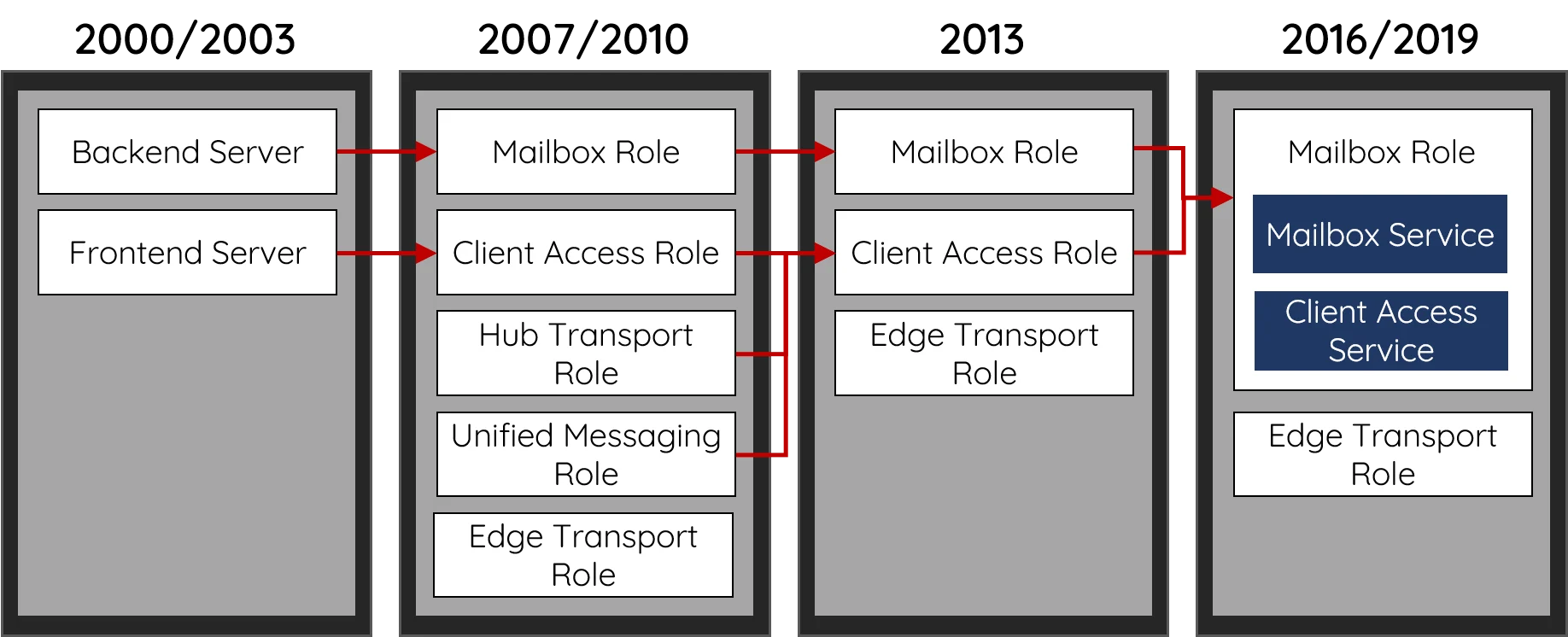
Microsoft Exchange is described in the report as one of the most common email solutions in the world, used by governments and enterprises for daily operations and security connectivity. The research focuses on the Client Access Service (CAS), a fundamental Exchange component. Microsoft's own documentation, quoted in the report, states that Mailbox servers contain the Client Access services that accept client connections for all protocols and are responsible for routing or proxying connections to the corresponding backend services on a Mailbox server.
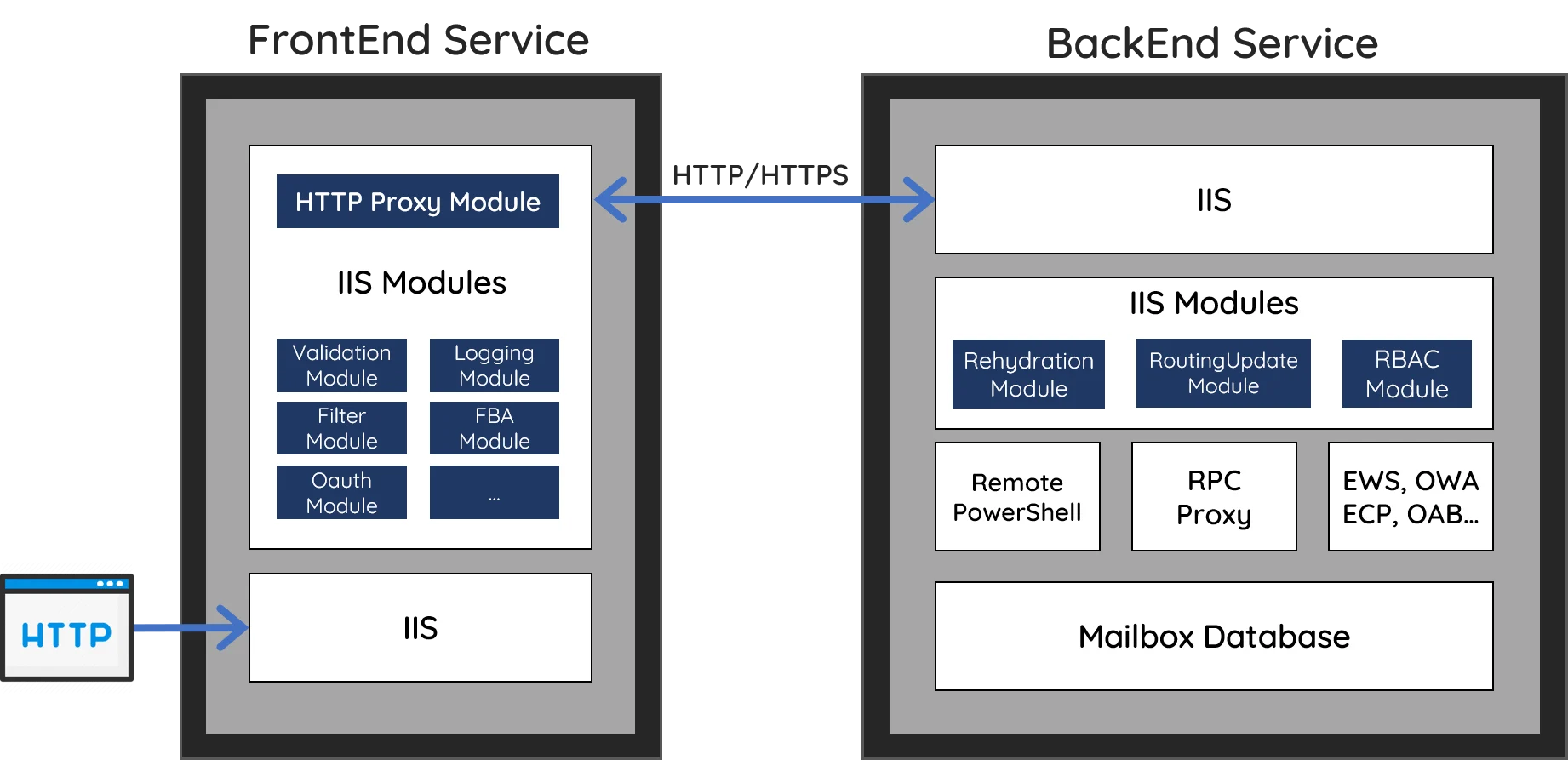
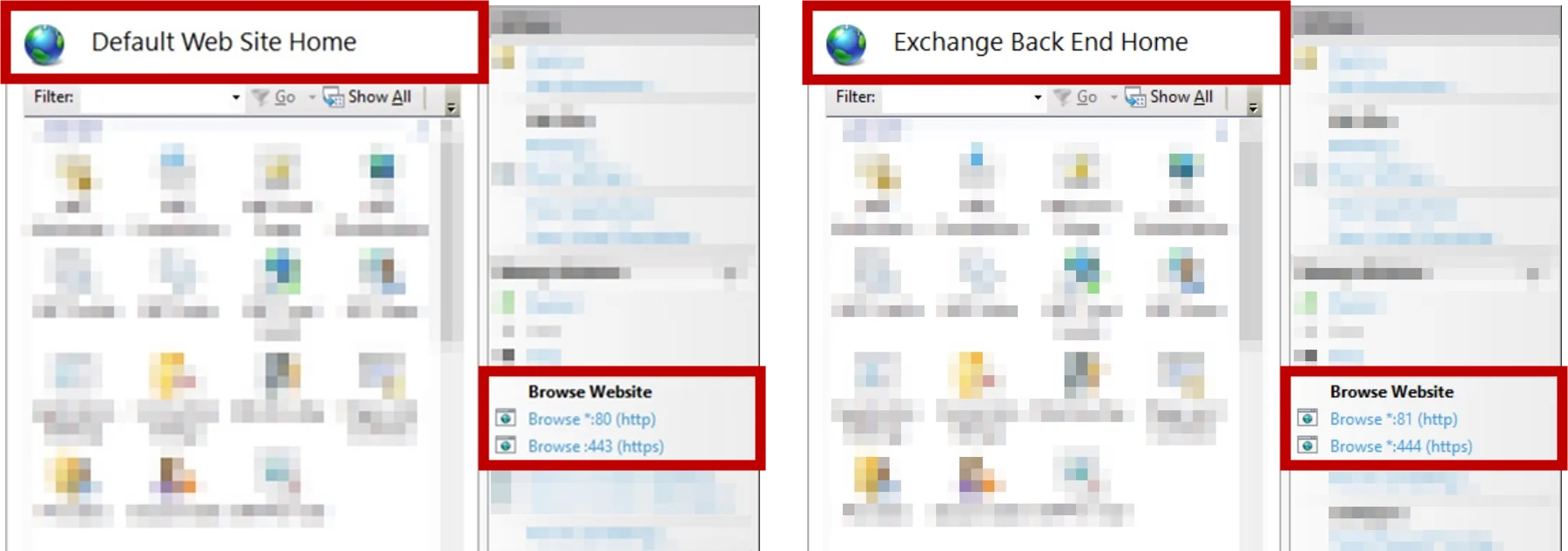
CAS accepts connections over HTTP, POP3, IMAP and SMTP and proxies them to the corresponding Backend Service. The author, a web security researcher, concentrated on the web implementation of CAS. That web layer is built on Microsoft IIS with two websites: the "Default Website" is the Frontend, binding ports 80 and 443, and the "Exchange Backend" listens on ports 81 and 444. All ports bind to [redacted], so anyone could reach both the Frontend and the Backend directly. The report raises this as a question and asks the reader to keep it in mind for later.
Exchange implements the Frontend and Backend logic through IIS modules. The Frontend contains a Proxy Module that picks up the HTTP request from the client, adds internal settings and forwards it to the Backend. The Backend applications include a Rehydration Module that parses Frontend requests, restores the client information and continues with the business logic.
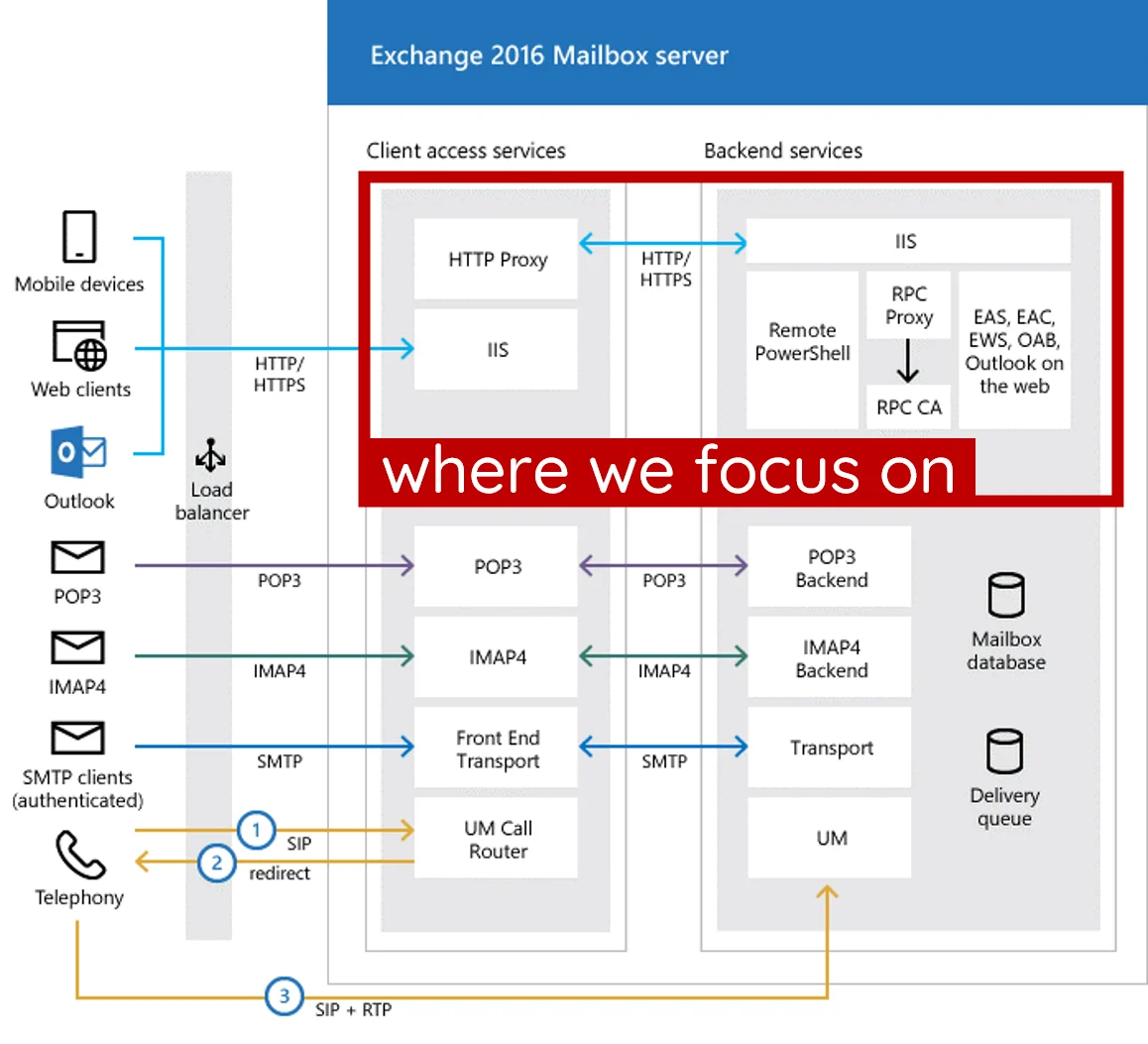
The report frames the whole ProxyLogon issue as a new attack surface rather than a single bug. The author states that the attack surface sits at an early stage of Exchange request processing: if the entrance of Exchange is 0 and the core business logic is 100, ProxyLogon is somewhere around 10. Because it is so early and so simple, the author expected other researchers to find the same thing, and tweeted about the worry of a bug collision after reporting to Microsoft.
Setup
The report does not describe a lab build, tooling or specific Exchange version numbers beyond the architecture discussion. The relevant preconditions it does describe are architectural:
- The Frontend proxies client requests to the Backend and communicates internal state through HTTP headers and cookies.
- The Frontend generates a Kerberos ticket for the Backend using the HTTP Service-Class, placing it in the
Authorizationheader, so that the Backend can validate that a request came from the Frontend. - The Backend checks that the incoming request is authenticated and that the caller holds the extended right
ms-Exch-EPI-Token-Serialization. By default only the Exchange Machine Account has this authorisation. - The Backend restores the login identity by deserialising the
X-CommonAccessTokenheader back into an Access Token and placing it in thehttpContextobject.
The report's disclosure table records the timeline: ProxyLogon (CVE-2021-26855 and CVE-2021-27065) was reported on 5 January 2021 and patched on 2 March 2021, credited to Orange Tsai, Volexity and MSTIC. The same table lists ProxyOracle (CVE-2021-31196, CVE-2021-31195), ProxyShell (CVE-2021-34473, CVE-2021-34523, CVE-2021-31207, the Pwn2Own 2021 bugs) and CVE-2021-33768. The report states that the ProxyShell chain was demonstrated at Pwn2Own 2021 to take over Exchange and earn a $200,000 bounty, and that the research won the Best Server-Side bug of the Pwnie Awards 2021.

Finding it
The author's starting point was the observation that CAS is essentially a well-written HTTP proxy, and that implementing a proxy is not easy. That led to the central question of the research:
Could I use a single HTTP request to access different contexts in Frontend and Backend respectively to cause some confusion?
If that were possible, the researcher expected to bypass Frontend restrictions to reach arbitrary Backends and abuse internal APIs, or to exploit inconsistencies between how the Frontend and Backend define dangerous HTTP headers.
To understand where such confusion could arise, the report walks through the Proxy Module. The module chooses a handler based on the current ApplicationPath: visiting /EWS uses EwsProxyRequestHandler, while /OWA triggers OwaProxyRequestHandler. All handlers inherit from ProxyRequestHandler and implement its core logic. The report splits ProxyRequestHandler into three sections.
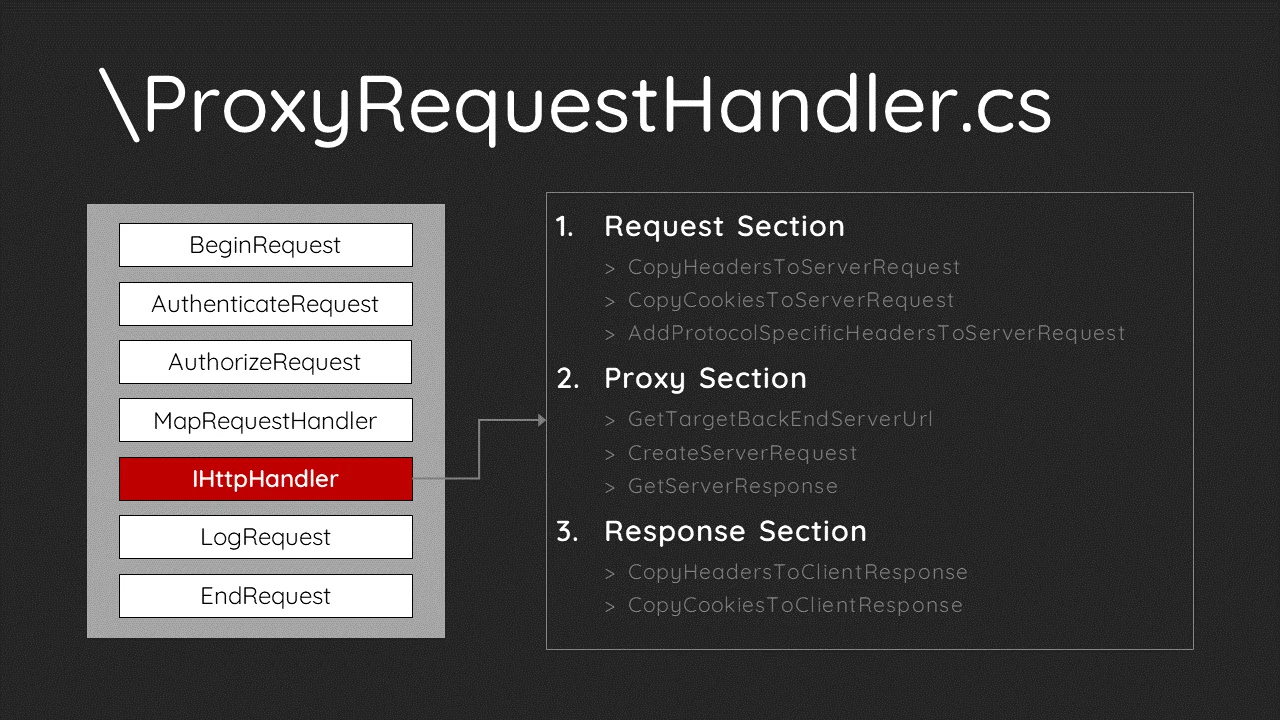
The request section
The request section parses the client HTTP request and decides which cookies and headers may be proxied to the Backend. Because Frontend and Backend rely on HTTP headers to synchronise information and proxy internal status, Exchange defines a blacklist so that internal headers are not misused. The report shows the blacklist:
protected virtual bool ShouldCopyHeaderToServerRequest(string headerName) {
  return !string.Equals(headerName, "X-CommonAccessToken", OrdinalIgnoreCase)
      && !string.Equals(headerName, "X-IsFromCafe", OrdinalIgnoreCase)
      && !string.Equals(headerName, "X-SourceCafeServer", OrdinalIgnoreCase)
      && !string.Equals(headerName, "msExchProxyUri", OrdinalIgnoreCase)
      && !string.Equals(headerName, "X-MSExchangeActivityCtx", OrdinalIgnoreCase)
      && !string.Equals(headerName, "return-client-request-id", OrdinalIgnoreCase)
      && !string.Equals(headerName, "X-Forwarded-For", OrdinalIgnoreCase)
      && (!headerName.StartsWith("X-Backend-Diag-", OrdinalIgnoreCase)
      || this.ClientRequest.GetHttpRequestBase().IsProbeRequest());
}
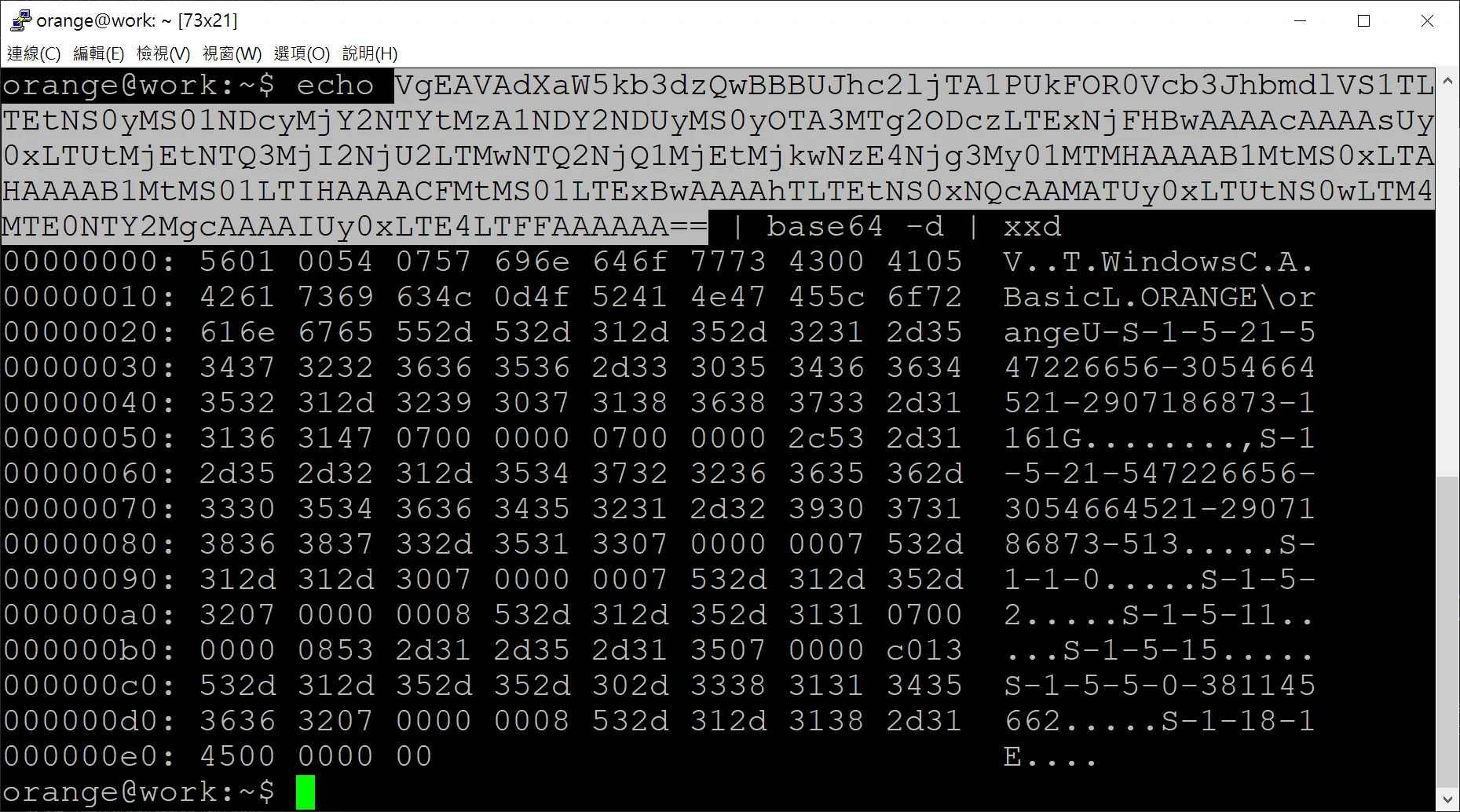
At the last stage of the request, the Proxy Module calls AddProtocolSpecificHeadersToServerRequest, implemented by the handler, to add the information to be communicated with the Backend. This section serialises the current login user's information into a new HTTP header, X-CommonAccessToken, which is forwarded to the Backend. For example, logging into Outlook Web Access (OWA) with the name Orange produces an X-CommonAccessToken that the Frontend proxies to the Backend.
The proxy section
The proxy section first uses GetTargetBackendServerURL to calculate which Backend URL the request should be forwarded to, then initialises a new HTTP client request with CreateServerRequest:
protected HttpWebRequest CreateServerRequest(Uri targetUrl) {
    HttpWebRequest httpWebRequest = (HttpWebRequest)WebRequest.Create(targetUrl);
    if (!HttpProxySettings.UseDefaultWebProxy.Value) {
        httpWebRequest.Proxy = NullWebProxy.Instance;
    }
    httpWebRequest.ServicePoint.ConnectionLimit = HttpProxySettings.ServicePointConnectionLimit.Value;
    httpWebRequest.Method = this.ClientRequest.HttpMethod;
    httpWebRequest.Headers["X-FE-ClientIP"] = ClientEndpointResolver.GetClientIP(SharedHttpContextWrapper.GetWrapper(this.HttpContext));
    httpWebRequest.Headers["X-Forwarded-For"] = ClientEndpointResolver.GetClientProxyChainIPs(SharedHttpContextWrapper.GetWrapper(this.HttpContext));
    httpWebRequest.Headers["X-Forwarded-Port"] = ClientEndpointResolver.GetClientPort(SharedHttpContextWrapper.GetWrapper(this.HttpContext));
    httpWebRequest.Headers["X-MS-EdgeIP"] = Utilities.GetEdgeServerIpAsProxyHeader(SharedHttpContextWrapper.GetWrapper(this.HttpContext).Request);

    // ...

    return httpWebRequest;
}
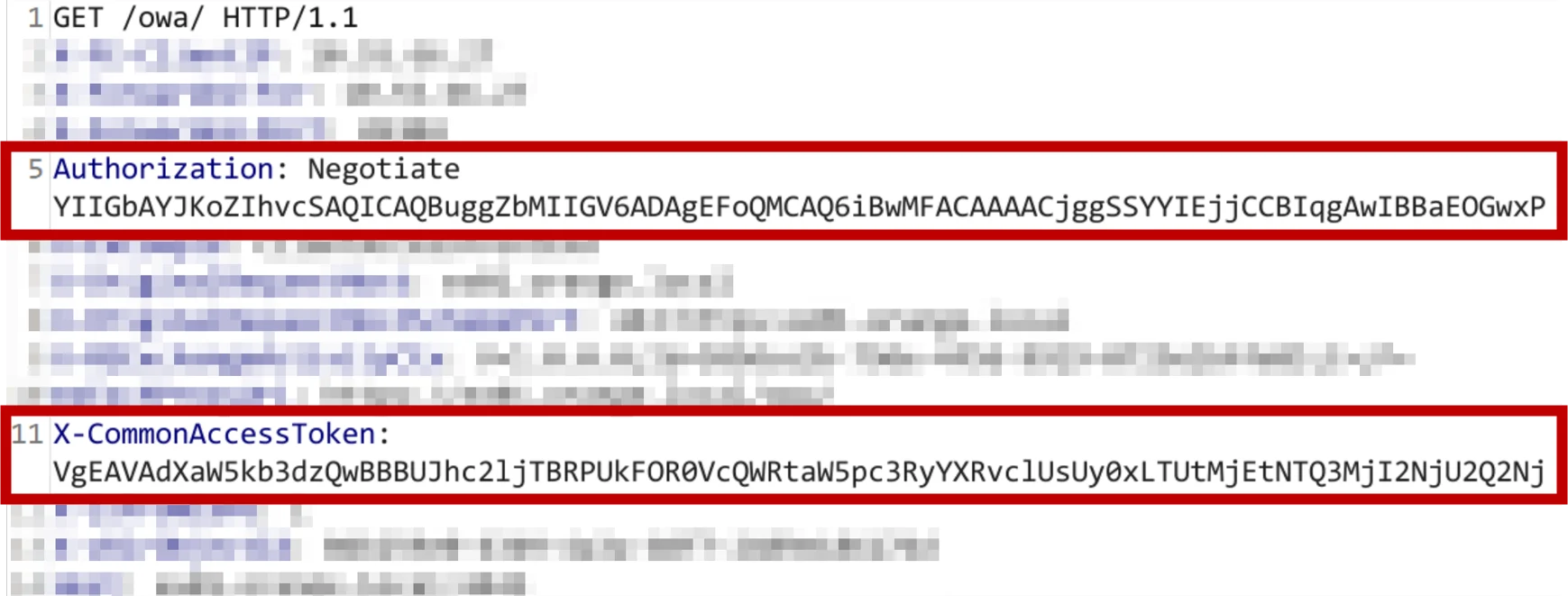
Exchange also generates a Kerberos ticket via the HTTP Service-Class of the Backend and puts it in the Authorization header, designed to prevent anonymous users from accessing the Backend directly:
if (this.ProxyKerberosAuthentication) {
    serverRequest.ConnectionGroupName = this.ClientRequest.UserHostAddress + ":" + GccUtils.GetClientPort(SharedHttpContextWrapper.GetWrapper(this.HttpContext));
} else if (this.AuthBehavior.AuthState == AuthState.BackEndFullAuth || this.
    ShouldBackendRequestBeAnonymous() || (HttpProxySettings.TestBackEndSupportEnabled.Value
    && !string.IsNullOrEmpty(this.ClientRequest.Headers["TestBackEndUrl"]))) {
    serverRequest.ConnectionGroupName = "Unauthenticated";
} else {
    serverRequest.Headers["Authorization"] = KerberosUtilities.GenerateKerberosAuthHeader(
        serverRequest.Address.Host, this.TraceContext,
        ref this.authenticationContext, ref this.kerberosChallenge);
}
internal static string GenerateKerberosAuthHeader(string host, int traceContext, ref AuthenticationContext authenticationContext, ref string kerberosChallenge) {
    byte[] array = null;
    byte[] bytes = null;
    // ...
    authenticationContext = new AuthenticationContext();
    string text = "HTTP/" + host;
    authenticationContext.InitializeForOutboundNegotiate(AuthenticationMechanism.Kerberos, text, null, null);
    SecurityStatus securityStatus = authenticationContext.NegotiateSecurityContext(inputBuffer, out bytes);
    // ...
    string @string = Encoding.ASCII.GetString(bytes);
    return "Negotiate " + @string;
}
So a client request proxied to the Backend carries several internal HTTP headers. The two most essential are X-CommonAccessToken, which indicates the mail user's login identity, and the Kerberos ticket, which represents legal access from the Frontend.
The response section
The response section receives the response from the Backend and decides which headers or cookies are allowed to be sent back to the Frontend.
The Backend Rehydration Module
The Backend first calls IsAuthenticated to check whether the incoming request is authenticated, then verifies whether the request holds the extended right ms-Exch-EPI-Token-Serialization. With the default setting only the Exchange Machine Account has that authorisation, which is why the Kerberos ticket generated by the Frontend passes the checkpoint while a low-authorised account cannot access the Backend directly. After the check, Exchange restores the login identity used in the Frontend by deserialising X-CommonAccessToken back into the original Access Token and putting it in the httpContext object:
private void OnAuthenticateRequest(object source, EventArgs args) {
    if (httpContext.Request.IsAuthenticated) {
        this.ProcessRequest(httpContext);
    }
}

private void ProcessRequest(HttpContext httpContext) {
    CommonAccessToken token;
    if (this.TryGetCommonAccessToken(httpContext, out token)) {
        // ...
    }
}

private bool TryGetCommonAccessToken(HttpContext httpContext, out CommonAccessToken token) {
    string text = httpContext.Request.Headers["X-CommonAccessToken"];
    if (string.IsNullOrEmpty(text)) {
        return false;
    }

    bool flag;
    try {
        flag = this.IsTokenSerializationAllowed(httpContext.User.Identity as WindowsIdentity);
    } finally {
        httpContext.Items["BEValidateCATRightsLatency"] = stopwatch.ElapsedMilliseconds - elapsedMilliseconds;
    }

    token = CommonAccessToken.Deserialize(text);
    httpContext.Items["Item-CommonAccessToken"] = token;

    //...
}

private bool IsTokenSerializationAllowed(WindowsIdentity windowsIdentity) {
   flag2 = LocalServer.AllowsTokenSerializationBy(clientSecurityContext);
   return flag2;
}

private static bool AllowsTokenSerializationBy(ClientSecurityContext clientContext) {
    return LocalServer.HasExtendedRightOnServer(clientContext,
        WellKnownGuid.TokenSerializationRightGuid);  // ms-Exch-EPI-Token-Serialization

}
Exploitation
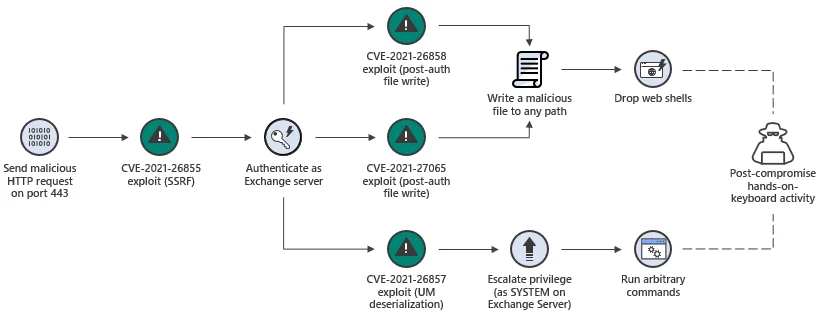
ProxyLogon chains two bugs: CVE-2021-26855, a pre-auth SSRF that leads to authentication bypass, and CVE-2021-27065, a post-auth arbitrary-file-write that leads to RCE.
Step 1: Find the cookie-controlled Backend target (CVE-2021-26855)
There are more than 20 handlers corresponding to different application paths in the Frontend. While reviewing the implementations, the author found that GetTargetBackEndServerUrl, the method responsible for calculating the Backend URL in the static resource handler, assigns the Backend target directly from a cookie:
protected virtual Uri GetTargetBackEndServerUrl() {
    this.LogElapsedTime("E_TargetBEUrl");
    Uri result;
    try {
        UrlAnchorMailbox urlAnchorMailbox = this.AnchoredRoutingTarget.AnchorMailbox as UrlAnchorMailbox;
        if (urlAnchorMailbox != null) {
            result = urlAnchorMailbox.Url;
        } else {
            UriBuilder clientUrlForProxy = this.GetClientUrlForProxy();
            clientUrlForProxy.Scheme = Uri.UriSchemeHttps;
            clientUrlForProxy.Host = this.AnchoredRoutingTarget.BackEndServer.Fqdn;
            clientUrlForProxy.Port = 444;
            if (this.AnchoredRoutingTarget.BackEndServer.Version < Server.E15MinVersion) {
                this.ProxyToDownLevel = true;
                RequestDetailsLoggerBase<RequestDetailsLogger>.SafeAppendGenericInfo(this.Logger, "ProxyToDownLevel", true);
                clientUrlForProxy.Port = 443;
            }
            result = clientUrlForProxy.Uri;
        }
    }
    finally {
        this.LogElapsedTime("L_TargetBEUrl");
    }
    return result;
}
The property BackEndServer.Fqdn of AnchoredRoutingTarget is assigned from the cookie directly, as shown in the static resource handler:
protected override AnchorMailbox ResolveAnchorMailbox() {
    HttpCookie httpCookie = base.ClientRequest.Cookies["X-AnonResource-Backend"];
    if (httpCookie != null) {
        this.savedBackendServer = httpCookie.Value;
    }
    if (!string.IsNullOrEmpty(this.savedBackendServer)) {
        base.Logger.Set(3, "X-AnonResource-Backend-Cookie");
        if (ExTraceGlobals.VerboseTracer.IsTraceEnabled(1)) {
            ExTraceGlobals.VerboseTracer.TraceDebug<HttpCookie, int>((long)this.GetHashCode(), "[OwaResourceProxyRequestHandler::ResolveAnchorMailbox]: AnonResourceBackend cookie used: {0}; context {1}.", httpCookie, base.TraceContext);
        }
        return new ServerInfoAnchorMailbox(BackEndServer.FromString(this.savedBackendServer), this);
    }
    return new AnonymousAnchorMailbox(this);
}
The cookie value becomes the Backend server, and the Frontend builds the target URL with the built-in UriBuilder. The author notes that only the Host part of the URL is controllable, but that manipulating a URL parser is exactly the kind of problem he has worked on before. Because C# did not verify the Host, the whole URL can be enclosed with special characters to reach arbitrary servers and ports:
https://[foo]@example.com:443/path#]:444/owa/auth/x.js
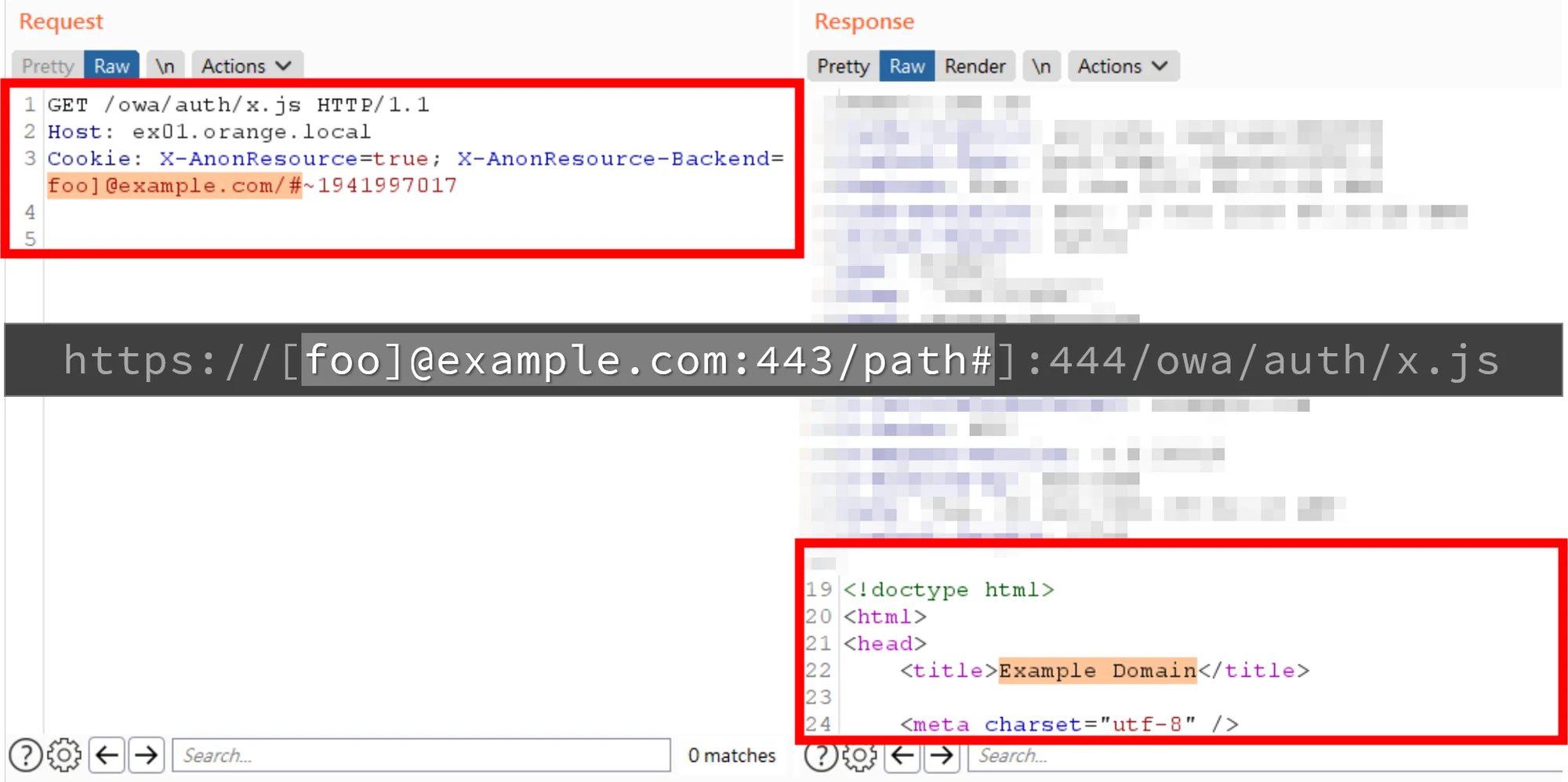
The result is described as a super SSRF that can control almost all HTTP requests and read all replies. The most impressive part, per the report, is that the Exchange Frontend generates a Kerberos ticket for the attacker, so even when attacking a protected, domain-joined HTTP service, the attacker can act with the authentication of the Exchange Machine Account.
Step 2: Reach the ECP Backend and forge the identity (CVE-2021-27065)
With the SSRF allowing unrestricted access to the Backend, the next task is to find an RCE bug to chain. The author uses a Backend internal API, /proxyLogon.ecp, to become the admin. The API is also the reason the chain is called ProxyLogon.
Because the Frontend handler for static resources is used to reach the Exchange Control Panel (ECP) Backend, the header msExchLogonMailbox, a special HTTP header in the ECP Backend, is not blocked by the Frontend. By leveraging this minor inconsistency, the attacker can specify themselves as the SYSTEM user and generate a valid ECP session with the internal API.
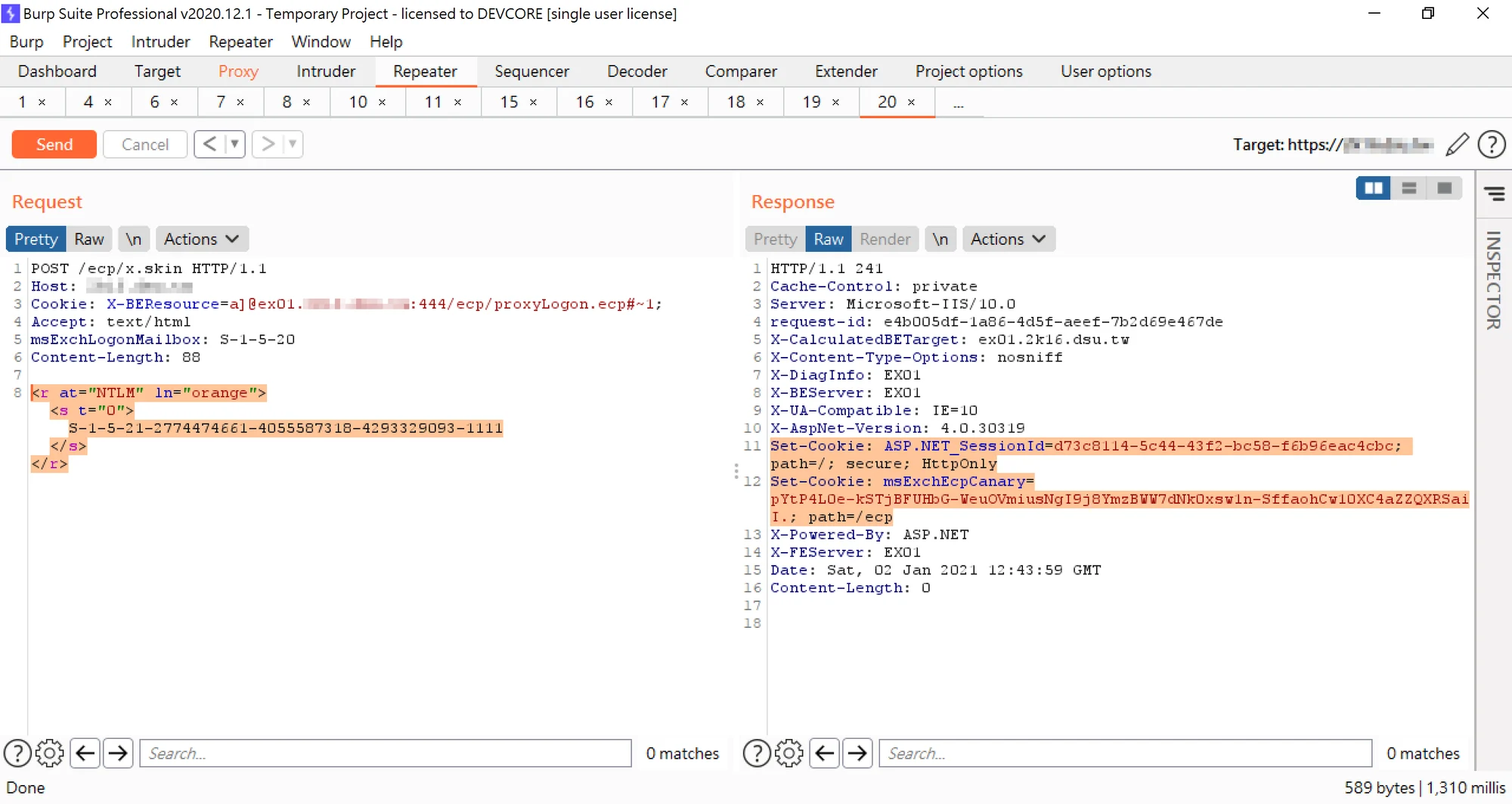
With the inconsistency between Frontend and Backend, all functions on ECP become reachable through header forgery and internal Backend API abuse.
Step 3: Turn ECP access into arbitrary file write
The ECP wraps Exchange PowerShell commands as an abstract interface through /ecp/DDI/DDIService.svc. DDIService defines several PowerShell executing pipelines in XAML so that they can be accessed over the web. While verifying the DDI implementation, the author found that the WriteFileActivity tag did not check the file path properly, leading to an arbitrary-file-write:
public override RunResult Run(DataRow input, DataTable dataTable, DataObjectStore store, Type codeBehind, Workflow.UpdateTableDelegate updateTableDelegate) {
    DataRow dataRow = dataTable.Rows[0];
    string value = (string)input[this.InputVariable];
    string path = (string)input[this.OutputFileNameVariable];
    RunResult runResult = new RunResult();
    try {
        runResult.ErrorOccur = true;
        using (StreamWriter streamWriter = new StreamWriter(File.Open(path, FileMode.CreateNew)))
        {
            streamWriter.WriteLine(value);
        }
        runResult.ErrorOccur = false;
    }

    // ...
}
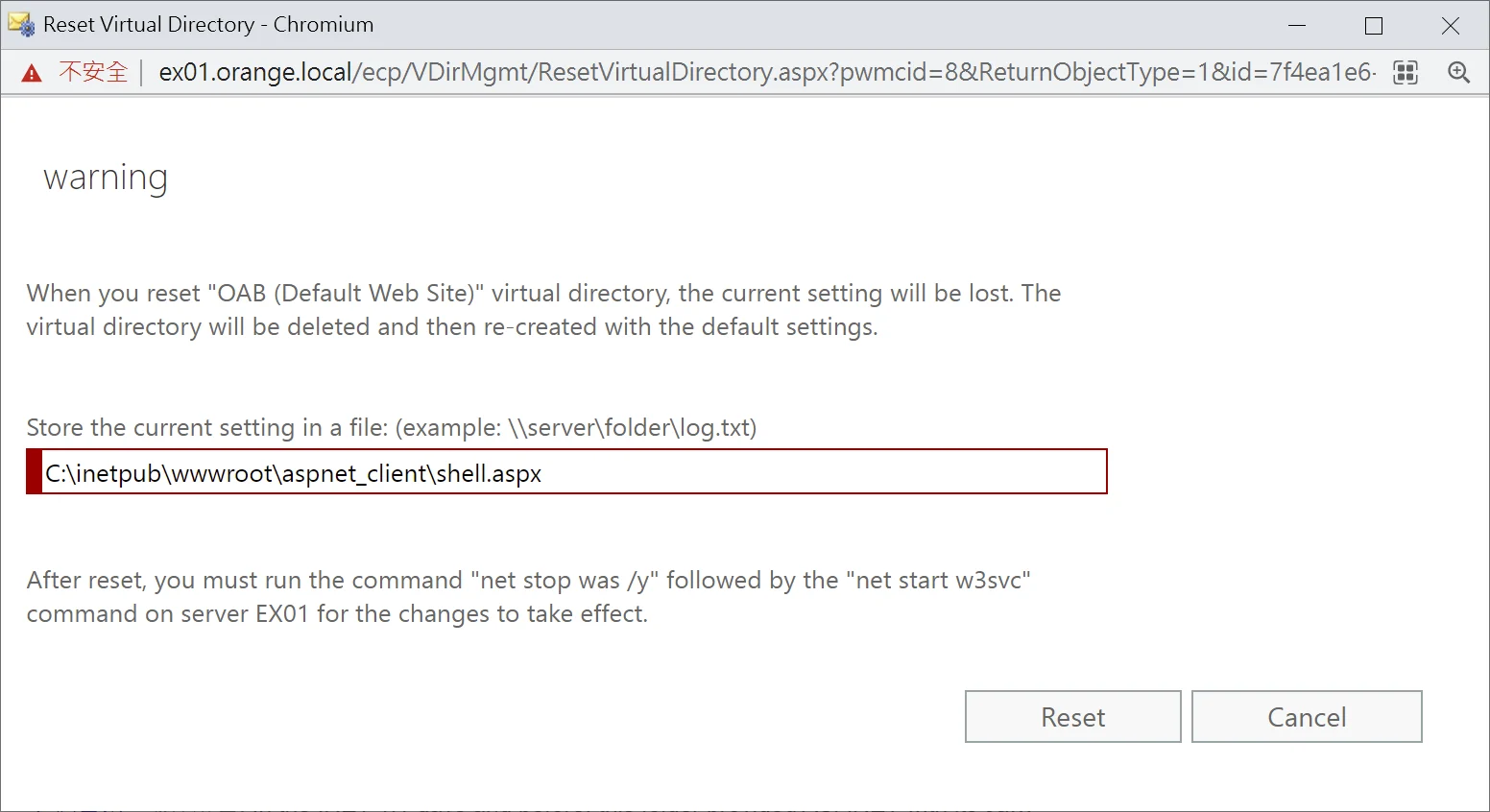
There are several paths to trigger the arbitrary-file-write. The report uses ResetOABVirtualDirectory.xaml as an example and writes the result of Set-OABVirtualDirectory to the webroot to become a webshell.
Step 4: Execute commands pre-auth
The chain is now complete: an unauthenticated attacker can execute arbitrary commands on Microsoft Exchange Server through an exposed 443 port. The report links a demonstration video.
Root cause
The report attributes the SSRF to a design debt. Exchange changes its architecture with every release, and Microsoft put great effort into ensuring architectural compatibility between new and old versions. The cookie is described as a quick solution and a design debt that lets the Frontend in the new architecture identify where an old Backend is. The Frontend then trusts the cookie value as the Backend host and builds the target URL with UriBuilder, which did not verify the Host, so special characters can be used to redirect the request to arbitrary servers and ports.
The authentication bypass comes from an inconsistency between Frontend and Backend: the Frontend handler for static resources does not block the ECP-specific header msExchLogonMailbox, so the Backend accepts a forged identity, including SYSTEM, and issues a valid ECP session through the internal API.
The RCE comes from the DDI implementation: WriteFileActivity takes the output file name from the request and opens it with File.Open(path, FileMode.CreateNew) without properly checking the path, so the content of a PowerShell command result can be written into the webroot.
The existing defences described in the report did not stop the chain. The Backend's IsAuthenticated check and the ms-Exch-EPI-Token-Serialization requirement are satisfied because the Frontend itself generates a Kerberos ticket for the proxied request. The header blacklist in ShouldCopyHeaderToServerRequest covers a fixed list of internal headers, but the ECP header msExchLogonMailbox was not blocked by the Frontend on the static resource path, which is the inconsistency the author exploits.
Impact
According to the report, ProxyLogon may be the most severe and impactful vulnerability in Exchange history. An unauthenticated attacker can execute arbitrary commands on Microsoft Exchange Server through an exposed 443 port. Because the Frontend generates a Kerberos ticket, the SSRF can also reach protected, domain-joined HTTP services with the authentication of the Exchange Machine Account. The report notes that more than four hundred thousand Exchange Servers were exposed on the Internet. and that controlling a mail server means controlling the lifeline of a company.
The report also records that Volexity found an APT group using the same SSRF, CVE-2021-26855, to access users' emails in early January 2021 and reported it to Microsoft, and that Microsoft released urgent patches in March. The APT group exploited the same SSRF in a very different way: the author's team completed the chain through CVE-2021-27065, while the APT group used EWS and two unknown vulnerabilities. This convinced the author that there was a bug collision on the SSRF.
The report states that the ProxyLogon PoC reported to MSRC appeared in the wild in late February, and that the team was curious after eliminating the possibility of leakage from their side. It links to discussion suggesting this was not the first time something like this had happened to Microsoft.
Fix
The report states that all the vulnerabilities mentioned were reported through the responsible vulnerability disclosure process and patched by Microsoft. The disclosure table gives the patch dates: CVE-2021-26855 and CVE-2021-27065 were patched on 2 March 2021. The report does not describe the content of the patches or the code changes Microsoft made, so the specific fixes are not stated in the original.
Variants to test
The report does not provide a checklist of variants, but its reasoning suggests concrete directions that follow directly from what it describes:
- Enumerate Frontend handlers by
ApplicationPath(the report names/EWSand/OWAand says there are more than 20 handlers) and check whether any handler resolves its Backend target from a client-controlled cookie or header. A positive result is a handler whose Backend host changes when you modify the cookie value. - Test URL parser confusion in any place where a host value is placed into
UriBuilder. The report's example ishttps://[foo]@example.com:443/path#]:444/owa/auth/x.js. A positive result is a request that reaches a host or port other than the intended Backend. - Compare the Frontend header blacklist with the headers the Backend treats as special. The report shows
msExchLogonMailboxwas not blocked on the static resource path. A positive result is a Backend response that reflects a forged identity, such as SYSTEM, through an internal API. - Review DDI XAML activities that write files, starting with
WriteFileActivityandResetOABVirtualDirectory.xaml. A positive result is a file created at an attacker-chosen path with attacker-influenced content. - Check whether the Frontend issues a Kerberos ticket for proxied requests to attacker-chosen hosts. A positive result is a request to a protected, domain-joined service that is accepted with the Exchange Machine Account's authentication.
What happened, in plain words
Microsoft Exchange is a mail server: the software a company runs so its staff can send and receive email, keep a calendar and share contacts. The report calls it one of the most common email solutions in the world, used by governments and enterprises. Because a mail server holds so much private information, it is a very attractive target: the report says that controlling a mail server means controlling the lifeline of a company.
In January 2021 a security researcher, Orange Tsai, reported a set of bugs in Exchange to Microsoft. The most famous of them was given the name ProxyLogon. The report says ProxyLogon may be the most severe and impactful vulnerability in the history of Exchange. A vulnerability is simply a mistake in software that lets someone make the program do something its makers did not intend.
ProxyLogon is not one bug but two, used one after the other:
- CVE-2021-26855, a pre-auth SSRF that leads to authentication bypass. "Pre-auth" means it works before you log in. "SSRF" (Server-Side Request Forgery) means you trick the server into making a request of your choosing, as if the server itself were asking. "Authentication bypass" means getting past the login check without valid credentials.
- CVE-2021-27065, a post-auth arbitrary-file-write that leads to RCE. "Post-auth" means it happens after you are logged in (here, after the first bug has effectively logged you in). "Arbitrary-file-write" means writing a file of your choosing to a place of your choosing. "RCE" (Remote Code Execution) means running your own commands on the victim's machine from afar.
The report frames this as a new attack surface, not just a single bug. An attack surface is all the places where an outsider can interact with a system; a new attack surface is a whole area of interaction that nobody had looked at before. The author says the problem sits at an early stage of how Exchange handles a request: if the entrance of Exchange is 0 and the core business logic is 100, ProxyLogon is somewhere around 10. Because it is so early and so simple, he worried that other researchers would find the same thing, and he tweeted about this worry of a bug collision (two people finding the same bug independently) after reporting to Microsoft.
The report also lists the timeline. ProxyLogon (CVE-2021-26855 and CVE-2021-27065) was reported on 5 January 2021 and patched on 2 March 2021, credited to Orange Tsai, Volexity and MSTIC. The same table lists ProxyOracle (CVE-2021-31196, CVE-2021-31195), ProxyShell (CVE-2021-34473, CVE-2021-34523, CVE-2021-31207, the Pwn2Own 2021 bugs) and CVE-2021-33768. The report says the ProxyShell chain was demonstrated at Pwn2Own 2021 to take over Exchange and earn a $200,000 bounty, and that the research won the Best Server-Side bug of the Pwnie Awards 2021.
The part of Exchange that matters: CAS
The research focuses on the Client Access Service, or CAS. CAS is a fundamental Exchange component. Microsoft's own documentation, quoted in the report, says that Mailbox servers contain the Client Access services that accept client connections for all protocols and are responsible for routing or proxying connections to the corresponding backend services on a Mailbox server.
In everyday terms, CAS is the reception desk of the mail server. Every visitor (a web browser, a mail app, a phone) arrives at the reception desk first. The reception desk does not do the real work; it checks who you are and sends you to the right office inside the building. Those offices are the Backend services, where the actual business logic lives.
CAS accepts connections over HTTP, POP3, IMAP and SMTP and proxies them to the corresponding Backend Service. HTTP is the language of the web (what your browser speaks). POP3 and IMAP are protocols for downloading and reading mail. SMTP is the protocol for sending mail. To proxy means to pass a request on to another computer on the client's behalf. The author, a web security researcher, concentrated on the web implementation of CAS, that is, the part that speaks HTTP.
That web layer is built on Microsoft IIS, Microsoft's web server software. Inside IIS there are two websites:
- the "Default Website" is the Frontend, binding ports 80 and 443;
- the "Exchange Backend" listens on ports 81 and 444.
A port is a numbered door on a computer; a request to a machine must name a door. Port 80 is the usual door for unencrypted web traffic and 443 the usual door for encrypted web traffic (HTTPS). All ports bind to [redacted], which means the server listens on every network address it has, so anyone could reach both the Frontend and the Backend directly. The report raises this as a question (wouldn't that be dangerous?) and asks the reader to keep it in mind for later.
Exchange implements the Frontend and Backend logic through IIS modules. A module is a piece of code that the web server runs on every request, like a checkpoint in a corridor. The Frontend contains a Proxy Module that picks up the HTTP request from the client, adds internal settings and forwards it to the Backend. The Backend applications include a Rehydration Module that parses Frontend requests, restores the client information and continues with the business logic. "Rehydration" here means rebuilding the original information (who the user is) from the compact form the Frontend sent.
Setup: what has to be true before the attack
The report does not describe a lab build, tooling or specific Exchange version numbers beyond the architecture discussion. The relevant preconditions it does describe are architectural:
- The Frontend proxies client requests to the Backend and communicates internal state through HTTP headers and cookies. A header is a small labelled line of text attached to a web request or response, such as
Content-Type: text/html. A cookie is a small piece of data a website asks your browser to store and send back on later requests, commonly used to remember who you are. - The Frontend generates a Kerberos ticket for the Backend using the HTTP Service-Class, placing it in the
Authorizationheader, so that the Backend can validate that a request came from the Frontend. Kerberos is an authentication system: a ticket is a cryptographic proof of identity issued by a trusted authority. TheAuthorizationheader is the standard place where a browser or client puts proof of who it is. - The Backend checks that the incoming request is authenticated and that the caller holds the extended right
ms-Exch-EPI-Token-Serialization. An extended right is a specific permission in a directory service. By default only the Exchange Machine Account has this authorisation. The Exchange Machine Account is the account the Exchange server itself uses when it talks to other machines. - The Backend restores the login identity by deserialising the
X-CommonAccessTokenheader back into an Access Token and placing it in thehttpContextobject. Deserialising means turning a stored or transmitted form of an object back into a live object in memory. An Access Token here is a data structure describing who the user is and what they may do.httpContextis the per-request bag of information the web server keeps while handling one request.
Finding it: the question that started the research
The author's starting point was the observation that CAS is essentially a well-written HTTP proxy, and that implementing a proxy is not easy. Anyone who has ever forwarded a message knows the difficulty: you must preserve who sent it, who it is for, and what it is allowed to do, without letting the recipient be fooled by labels the sender wrote. That led to the central question of the research:
Could I use a single HTTP request to access different contexts in Frontend and Backend respectively to cause some confusion?
In plain words: can one request be understood one way by the reception desk and a different way by the office inside, so that the two disagree about what is being asked? If that were possible, the researcher expected to bypass Frontend restrictions to reach arbitrary Backends and abuse internal APIs, or to exploit inconsistencies between how the Frontend and Backend define dangerous HTTP headers. An API (Application Programming Interface) is a defined set of requests a program accepts; an internal API is one meant only for other parts of the same system, not for outsiders.
To understand where such confusion could arise, the report walks through the Proxy Module. The module chooses a handler based on the current ApplicationPath: visiting /EWS uses EwsProxyRequestHandler, while /OWA triggers OwaProxyRequestHandler. A handler is the piece of code responsible for one kind of request. ApplicationPath is the part of the URL that names which application is being addressed. /EWS is the Exchange Web Services endpoint and /OWA is Outlook Web Access, the webmail interface. All handlers inherit from ProxyRequestHandler and implement its core logic. To inherit means to build on a common parent, so all handlers share the same skeleton. The report splits ProxyRequestHandler into three sections.
The request section: what gets copied from the client to the Backend
The request section parses the client HTTP request and decides which cookies and headers may be proxied to the Backend. Because Frontend and Backend rely on HTTP headers to synchronise information and proxy internal status, Exchange defines a blacklist so that internal headers are not misused. A blacklist here is a list of header names that must not be copied from the outside world into the internal request. The report shows the blacklist:
protected virtual bool ShouldCopyHeaderToServerRequest(string headerName) {
  return !string.Equals(headerName, "X-CommonAccessToken", OrdinalIgnoreCase)
      && !string.Equals(headerName, "X-IsFromCafe", OrdinalIgnoreCase)
      && !string.Equals(headerName, "X-SourceCafeServer", OrdinalIgnoreCase)
      && !string.Equals(headerName, "msExchProxyUri", OrdinalIgnoreCase)
      && !string.Equals(headerName, "X-MSExchangeActivityCtx", OrdinalIgnoreCase)
      && !string.Equals(headerName, "return-client-request-id", OrdinalIgnoreCase)
      && !string.Equals(headerName, "X-Forwarded-For", OrdinalIgnoreCase)
      && (!headerName.StartsWith("X-Backend-Diag-", OrdinalIgnoreCase)
      || this.ClientRequest.GetHttpRequestBase().IsProbeRequest());
}
Line by line:
protected virtual bool ShouldCopyHeaderToServerRequest(string headerName) {declares a method that takes a header name and answers yes or no (a bool) to the question "should this header be copied to the request sent to the Backend?".virtualmeans child classes may replace it.return !string.Equals(headerName, "X-CommonAccessToken", OrdinalIgnoreCase)returns true only if the header is notX-CommonAccessToken.OrdinalIgnoreCasemeans the comparison ignores upper and lower case, sox-commonaccesstokenis treated the same. The!means "not".- The following
&& !string.Equals(...)lines repeat the same test forX-IsFromCafe,X-SourceCafeServer,msExchProxyUri,X-MSExchangeActivityCtx,return-client-request-idandX-Forwarded-For.&&means "and", so every one of these must also be absent for the answer to be true. && (!headerName.StartsWith("X-Backend-Diag-", OrdinalIgnoreCase)adds a rule for any header whose name begins withX-Backend-Diag-: such a header is also refused.|| this.ClientRequest.GetHttpRequestBase().IsProbeRequest());is the exception: if the request is a probe request (a health or diagnostic check), theX-Backend-Diag-headers are allowed through.
At the last stage of the request, the Proxy Module calls AddProtocolSpecificHeadersToServerRequest, implemented by the handler, to add the information to be communicated with the Backend. This section serialises the current login user's information into a new HTTP header, X-CommonAccessToken, which is forwarded to the Backend. Serialising means turning a live object in memory into a form that can be stored or sent. For example, logging into Outlook Web Access (OWA) with the name Orange produces an X-CommonAccessToken that the Frontend proxies to the Backend.
The proxy section: building the request to the Backend
The proxy section first uses GetTargetBackendServerURL to calculate which Backend URL the request should be forwarded to, then initialises a new HTTP client request with CreateServerRequest:
protected HttpWebRequest CreateServerRequest(Uri targetUrl) {
    HttpWebRequest httpWebRequest = (HttpWebRequest)WebRequest.Create(targetUrl);
    if (!HttpProxySettings.UseDefaultWebProxy.Value) {
        httpWebRequest.Proxy = NullWebProxy.Instance;
    }
    httpWebRequest.ServicePoint.ConnectionLimit = HttpProxySettings.ServicePointConnectionLimit.Value;
    httpWebRequest.Method = this.ClientRequest.HttpMethod;
    httpWebRequest.Headers["X-FE-ClientIP"] = ClientEndpointResolver.GetClientIP(SharedHttpContextWrapper.GetWrapper(this.HttpContext));
    httpWebRequest.Headers["X-Forwarded-For"] = ClientEndpointResolver.GetClientProxyChainIPs(SharedHttpContextWrapper.GetWrapper(this.HttpContext));
    httpWebRequest.Headers["X-Forwarded-Port"] = ClientEndpointResolver.GetClientPort(SharedHttpContextWrapper.GetWrapper(this.HttpContext));
    httpWebRequest.Headers["X-MS-EdgeIP"] = Utilities.GetEdgeServerIpAsProxyHeader(SharedHttpContextWrapper.GetWrapper(this.HttpContext).Request);

    // ...

    return httpWebRequest;
}
Line by line:
protected HttpWebRequest CreateServerRequest(Uri targetUrl) {declares a method that takes the target address and returns a new outgoing web request object.HttpWebRequest httpWebRequest = (HttpWebRequest)WebRequest.Create(targetUrl);creates that outgoing request for the given address. The(HttpWebRequest)part is a cast, telling the language what kind of object to expect.if (!HttpProxySettings.UseDefaultWebProxy.Value) {checks a configuration setting: if the default system proxy is not to be used, then...httpWebRequest.Proxy = NullWebProxy.Instance;...set no proxy at all, so the request goes directly to the target.httpWebRequest.ServicePoint.ConnectionLimit = HttpProxySettings.ServicePointConnectionLimit.Value;sets how many connections may be opened at once to that destination.httpWebRequest.Method = this.ClientRequest.HttpMethod;copies the HTTP method (GET, POST and so on) from the client's request, so the Backend sees the same kind of request.- The four
httpWebRequest.Headers[...] = ...lines add internal headers describing the client: its IP address (X-FE-ClientIP), the chain of proxies it came through (X-Forwarded-For), its port (X-Forwarded-Port) and the edge server address (X-MS-EdgeIP). These are filled in by the server, not by the client. return httpWebRequest;hands the prepared request back to the caller.
Exchange also generates a Kerberos ticket via the HTTP Service-Class of the Backend and puts it in the Authorization header, designed to prevent anonymous users from accessing the Backend directly:
if (this.ProxyKerberosAuthentication) {
    serverRequest.ConnectionGroupName = this.ClientRequest.UserHostAddress + ":" + GccUtils.GetClientPort(SharedHttpContextWrapper.GetWrapper(this.HttpContext));
} else if (this.AuthBehavior.AuthState == AuthState.BackEndFullAuth || this.
    ShouldBackendRequestBeAnonymous() || (HttpProxySettings.TestBackEndSupportEnabled.Value
    && !string.IsNullOrEmpty(this.ClientRequest.Headers["TestBackEndUrl"]))) {
    serverRequest.ConnectionGroupName = "Unauthenticated";
} else {
    serverRequest.Headers["Authorization"] = KerberosUtilities.GenerateKerberosAuthHeader(
        serverRequest.Address.Host, this.TraceContext,
        ref this.authenticationContext, ref this.kerberosChallenge);
}
Line by line:
if (this.ProxyKerberosAuthentication) {if this request is already being proxied with Kerberos authentication, then...serverRequest.ConnectionGroupName = this.ClientRequest.UserHostAddress + ":" + GccUtils.GetClientPort(...);...group the outgoing connection under a name built from the client's address and port. A connection group is a way to keep related connections together.} else if (this.AuthBehavior.AuthState == AuthState.BackEndFullAuth || this.starts the next case: if the Backend expects full authentication, or...ShouldBackendRequestBeAnonymous() || (HttpProxySettings.TestBackEndSupportEnabled.Value...the request is meant to be anonymous, or a test setting is on...&& !string.IsNullOrEmpty(this.ClientRequest.Headers["TestBackEndUrl"]))) {...and the client supplied aTestBackEndUrlheader, then...serverRequest.ConnectionGroupName = "Unauthenticated";...mark the connection as unauthenticated.} else {in all other cases...serverRequest.Headers["Authorization"] = KerberosUtilities.GenerateKerberosAuthHeader(...put a freshly generated Kerberos ticket into theAuthorizationheader, using the target host, the trace context and the stored authentication state.serverRequest.Address.Host, this.TraceContext,passes the host name and tracing identifier.ref this.authenticationContext, ref this.kerberosChallenge);passes two variables by reference (ref), so the helper can update them for later use.}closes the branch.
internal static string GenerateKerberosAuthHeader(string host, int traceContext, ref AuthenticationContext authenticationContext, ref string kerberosChallenge) {
    byte[] array = null;
    byte[] bytes = null;
    // ...
    authenticationContext = new AuthenticationContext();
    string text = "HTTP/" + host;
    authenticationContext.InitializeForOutboundNegotiate(AuthenticationMechanism.Kerberos, text, null, null);
    SecurityStatus securityStatus = authenticationContext.NegotiateSecurityContext(inputBuffer, out bytes);
    // ...
    string @string = Encoding.ASCII.GetString(bytes);
    return "Negotiate " + @string;
}
Line by line:
internal static string GenerateKerberosAuthHeader(...)declares a helper that returns the header value as text.internalmeans only code inside the same assembly may call it;staticmeans it belongs to the class, not to an individual object.byte[] array = null;andbyte[] bytes = null;prepare two byte arrays (raw binary buffers).authenticationContext = new AuthenticationContext();creates a fresh authentication context, the object that holds the state of one authentication exchange.string text = "HTTP/" + host;builds the service name the ticket is for: the protocolHTTP/followed by the host. This is the "Service-Class" mentioned in the report.authenticationContext.InitializeForOutboundNegotiate(AuthenticationMechanism.Kerberos, text, null, null);tells the context to negotiate outbound authentication using Kerberos for that service name.SecurityStatus securityStatus = authenticationContext.NegotiateSecurityContext(inputBuffer, out bytes);performs the negotiation and writes the resulting ticket bytes intobytes.string @string = Encoding.ASCII.GetString(bytes);turns those bytes into text. The@lets the variable be namedstringeven though that is a keyword.return "Negotiate " + @string;returns the header value, which starts with the wordNegotiatefollowed by the ticket.
So a client request proxied to the Backend carries several internal HTTP headers. The two most essential are X-CommonAccessToken, which indicates the mail user's login identity, and the Kerberos ticket, which represents legal access from the Frontend.
The response section
The response section receives the response from the Backend and decides which headers or cookies are allowed to be sent back to the Frontend. This is the mirror image of the request section: just as some headers must not travel inwards, some must not travel outwards.
The Backend Rehydration Module: rebuilding who the user is
The Backend first calls IsAuthenticated to check whether the incoming request is authenticated, then verifies whether the request holds the extended right ms-Exch-EPI-Token-Serialization. With the default setting only the Exchange Machine Account has that authorisation, which is why the Kerberos ticket generated by the Frontend passes the checkpoint while a low-authorised account cannot access the Backend directly. After the check, Exchange restores the login identity used in the Frontend by deserialising X-CommonAccessToken back into the original Access Token and putting it in the httpContext object:
private void OnAuthenticateRequest(object source, EventArgs args) {
    if (httpContext.Request.IsAuthenticated) {
        this.ProcessRequest(httpContext);
    }
}

private void ProcessRequest(HttpContext httpContext) {
    CommonAccessToken token;
    if (this.TryGetCommonAccessToken(httpContext, out token)) {
        // ...
    }
}

private bool TryGetCommonAccessToken(HttpContext httpContext, out CommonAccessToken token) {
    string text = httpContext.Request.Headers["X-CommonAccessToken"];
    if (string.IsNullOrEmpty(text)) {
        return false;
    }

    bool flag;
    try {
        flag = this.IsTokenSerializationAllowed(httpContext.User.Identity as WindowsIdentity);
    } finally {
        httpContext.Items["BEValidateCATRightsLatency"] = stopwatch.ElapsedMilliseconds - elapsedMilliseconds;
    }

    token = CommonAccessToken.Deserialize(text);
    httpContext.Items["Item-CommonAccessToken"] = token;

    //...
}

private bool IsTokenSerializationAllowed(WindowsIdentity windowsIdentity) {
   flag2 = LocalServer.AllowsTokenSerializationBy(clientSecurityContext);
   return flag2;
}

private static bool AllowsTokenSerializationBy(ClientSecurityContext clientContext) {
    return LocalServer.HasExtendedRightOnServer(clientContext,
        WellKnownGuid.TokenSerializationRightGuid);  // ms-Exch-EPI-Token-Serialization

}
Line by line:
private void OnAuthenticateRequest(object source, EventArgs args) {is the event handler that runs when the web server reaches the authentication stage of a request.if (httpContext.Request.IsAuthenticated) {if the request is authenticated...this.ProcessRequest(httpContext);...process it further.private void ProcessRequest(HttpContext httpContext) {starts the processing method.CommonAccessToken token;declares a variable to hold the token.if (this.TryGetCommonAccessToken(httpContext, out token)) {tries to extract the token;outmeans the method fills the variable in.private bool TryGetCommonAccessToken(HttpContext httpContext, out CommonAccessToken token) {declares that extraction method.string text = httpContext.Request.Headers["X-CommonAccessToken"];reads the header value from the request.if (string.IsNullOrEmpty(text)) { return false; }if the header is missing or empty, give up.bool flag;declares a yes/no variable.try { flag = this.IsTokenSerializationAllowed(httpContext.User.Identity as WindowsIdentity); }checks whether the caller is allowed to serialise tokens, passing the caller's Windows identity.finally { httpContext.Items["BEValidateCATRightsLatency"] = stopwatch.ElapsedMilliseconds - elapsedMilliseconds; }always records how long the check took, for diagnostics.token = CommonAccessToken.Deserialize(text);turns the header text back into a live token object.httpContext.Items["Item-CommonAccessToken"] = token;stores it in the request's item bag so later code can use it.private bool IsTokenSerializationAllowed(WindowsIdentity windowsIdentity) {declares the permission check.flag2 = LocalServer.AllowsTokenSerializationBy(clientSecurityContext);asks the local server whether this security context may serialise tokens.return flag2;returns the answer.private static bool AllowsTokenSerializationBy(ClientSecurityContext clientContext) {declares the underlying check.return LocalServer.HasExtendedRightOnServer(clientContext, WellKnownGuid.TokenSerializationRightGuid);returns whether the caller holds the extended right identified byTokenSerializationRightGuid, which the comment names asms-Exch-EPI-Token-Serialization.
Exploitation: how the two bugs are chained
ProxyLogon chains two bugs: CVE-2021-26855, a pre-auth SSRF that leads to authentication bypass, and CVE-2021-27065, a post-auth arbitrary-file-write that leads to RCE. The first gets you in the door without a key; the second lets you leave a package inside that will later run by itself.
Step 1: Find the cookie-controlled Backend target (CVE-2021-26855)
There are more than 20 handlers corresponding to different application paths in the Frontend. While reviewing the implementations, the author found that GetTargetBackEndServerUrl, the method responsible for calculating the Backend URL in the static resource handler, assigns the Backend target directly from a cookie. A static resource handler serves things like images, scripts and style sheets.
protected virtual Uri GetTargetBackEndServerUrl() {
    this.LogElapsedTime("E_TargetBEUrl");
    Uri result;
    try {
        UrlAnchorMailbox urlAnchorMailbox = this.AnchoredRoutingTarget.AnchorMailbox as UrlAnchorMailbox;
        if (urlAnchorMailbox != null) {
            result = urlAnchorMailbox.Url;
        } else {
            UriBuilder clientUrlForProxy = this.GetClientUrlForProxy();
            clientUrlForProxy.Scheme = Uri.UriSchemeHttps;
            clientUrlForProxy.Host = this.AnchoredRoutingTarget.BackEndServer.Fqdn;
            clientUrlForProxy.Port = 444;
            if (this.AnchoredRoutingTarget.BackEndServer.Version < Server.E15MinVersion) {
                this.ProxyToDownLevel = true;
                RequestDetailsLoggerBase<RequestDetailsLogger>.SafeAppendGenericInfo(this.Logger, "ProxyToDownLevel", true);
                clientUrlForProxy.Port = 443;
            }
            result = clientUrlForProxy.Uri;
        }
    }
    finally {
        this.LogElapsedTime("L_TargetBEUrl");
    }
    return result;
}
Line by line:
protected virtual Uri GetTargetBackEndServerUrl() {declares the method that returns the Backend address.this.LogElapsedTime("E_TargetBEUrl");records a start timestamp for performance logging.Uri result;declares the variable that will hold the answer.try {begins a block whosefinallywill always run.UrlAnchorMailbox urlAnchorMailbox = this.AnchoredRoutingTarget.AnchorMailbox as UrlAnchorMailbox;tries to treat the routing target's anchor mailbox as a URL anchor mailbox. An anchor mailbox is the piece of information used to decide which Backend serves a user.if (urlAnchorMailbox != null) { result = urlAnchorMailbox.Url; }if it is one, use its URL directly.} else {otherwise...UriBuilder clientUrlForProxy = this.GetClientUrlForProxy();...start from the client's URL.UriBuilderis a helper that assembles a URL from parts.clientUrlForProxy.Scheme = Uri.UriSchemeHttps;force the scheme to HTTPS (encrypted web).clientUrlForProxy.Host = this.AnchoredRoutingTarget.BackEndServer.Fqdn;set the host to the Backend server's fully qualified domain name. This is the crucial line: the value comes from the routing target, which the next snippet shows is taken from a cookie.clientUrlForProxy.Port = 444;use port 444, the Backend's HTTPS port.if (this.AnchoredRoutingTarget.BackEndServer.Version < Server.E15MinVersion) {if the Backend is older than the E15 minimum version...this.ProxyToDownLevel = true;...mark that we are proxying to an older server...RequestDetailsLoggerBase<RequestDetailsLogger>.SafeAppendGenericInfo(this.Logger, "ProxyToDownLevel", true);...log it...clientUrlForProxy.Port = 443;...and use port 443 instead.result = clientUrlForProxy.Uri;build the final URL.finally { this.LogElapsedTime("L_TargetBEUrl"); }always record the end timestamp.return result;return the address.
The property BackEndServer.Fqdn of AnchoredRoutingTarget is assigned from the cookie directly, as shown in the static resource handler:
protected override AnchorMailbox ResolveAnchorMailbox() {
    HttpCookie httpCookie = base.ClientRequest.Cookies["X-AnonResource-Backend"];
    if (httpCookie != null) {
        this.savedBackendServer = httpCookie.Value;
    }
    if (!string.IsNullOrEmpty(this.savedBackendServer)) {
        base.Logger.Set(3, "X-AnonResource-Backend-Cookie");
        if (ExTraceGlobals.VerboseTracer.IsTraceEnabled(1)) {
            ExTraceGlobals.VerboseTracer.TraceDebug<HttpCookie, int>((long)this.GetHashCode(), "[OwaResourceProxyRequestHandler::ResolveAnchorMailbox]: AnonResourceBackend cookie used: {0}; context {1}.", httpCookie, base.TraceContext);
        }
        return new ServerInfoAnchorMailbox(BackEndServer.FromString(this.savedBackendServer), this);
    }
    return new AnonymousAnchorMailbox(this);
}
Line by line:
protected override AnchorMailbox ResolveAnchorMailbox() {declares the method that decides which Backend serves this request.overridemeans it replaces the parent's version.HttpCookie httpCookie = base.ClientRequest.Cookies["X-AnonResource-Backend"];reads the cookie namedX-AnonResource-Backendfrom the client's request.if (httpCookie != null) { this.savedBackendServer = httpCookie.Value; }if the cookie exists, save its value as the Backend server.if (!string.IsNullOrEmpty(this.savedBackendServer)) {if we now have a non-empty server value...base.Logger.Set(3, "X-AnonResource-Backend-Cookie");...note in the log that the cookie was used...if (ExTraceGlobals.VerboseTracer.IsTraceEnabled(1)) {...and if verbose tracing is on...ExTraceGlobals.VerboseTracer.TraceDebug<...>(...);...write a debug trace containing the cookie and context.return new ServerInfoAnchorMailbox(BackEndServer.FromString(this.savedBackendServer), this);...return an anchor mailbox built from the cookie's value. This is where attacker-supplied text becomes the Backend server.return new AnonymousAnchorMailbox(this);if there was no cookie, fall back to an anonymous anchor.
The cookie value becomes the Backend server, and the Frontend builds the target URL with the built-in UriBuilder. The author notes that only the Host part of the URL is controllable, but that manipulating a URL parser is exactly the kind of problem he has worked on before. Because C# did not verify the Host, the whole URL can be enclosed with special characters to reach arbitrary servers and ports:
https://[foo]@example.com:443/path#]:444/owa/auth/x.js
What this line is doing: it is a crafted URL in which the part that the parser treats as the host can be made to disagree with what a human reads. The [foo]@ part looks like a username before an @, the :443 looks like a port, the # starts what looks like a fragment, and the ]:444 tries to make the parser see a different host and port. The point is not that this exact string is a working exploit, but that a value placed into a URL builder without validation can be made to point somewhere else. The report presents it as the illustration of the parser confusion.
The result is described as a super SSRF that can control almost all HTTP requests and read all replies. The most impressive part, per the report, is that the Exchange Frontend generates a Kerberos ticket for the attacker, so even when attacking a protected, domain-joined HTTP service, the attacker can act with the authentication of the Exchange Machine Account. A domain-joined service is one that trusts the central directory of a Windows network; presenting a valid ticket from the Exchange machine makes that service believe the request is legitimate.
Step 2: Reach the ECP Backend and forge the identity (CVE-2021-27065)
With the SSRF allowing unrestricted access to the Backend, the next task is to find an RCE bug to chain. The author uses a Backend internal API, /proxyLogon.ecp, to become the admin. The API is also the reason the chain is called ProxyLogon.
Because the Frontend handler for static resources is used to reach the Exchange Control Panel (ECP) Backend, the header msExchLogonMailbox, a special HTTP header in the ECP Backend, is not blocked by the Frontend. ECP is the Exchange Control Panel, the web administration interface. By leveraging this minor inconsistency, the attacker can specify themselves as the SYSTEM user and generate a valid ECP session with the internal API. SYSTEM is the highest-privileged local account on a Windows machine.
With the inconsistency between Frontend and Backend, all functions on ECP become reachable through header forgery and internal Backend API abuse. Header forgery means writing a header that claims something untrue, such as an identity, and having the receiver believe it.
Step 3: Turn ECP access into arbitrary file write
The ECP wraps Exchange PowerShell commands as an abstract interface through /ecp/DDI/DDIService.svc. PowerShell is Microsoft's command-line automation language. DDIService defines several PowerShell executing pipelines in XAML so that they can be accessed over the web. XAML is an XML-based language for describing objects and workflows; here it describes which commands run and in what order. While verifying the DDI implementation, the author found that the WriteFileActivity tag did not check the file path properly, leading to an arbitrary-file-write:
public override RunResult Run(DataRow input, DataTable dataTable, DataObjectStore store, Type codeBehind, Workflow.UpdateTableDelegate updateTableDelegate) {
    DataRow dataRow = dataTable.Rows[0];
    string value = (string)input[this.InputVariable];
    string path = (string)input[this.OutputFileNameVariable];
    RunResult runResult = new RunResult();
    try {
        runResult.ErrorOccur = true;
        using (StreamWriter streamWriter = new StreamWriter(File.Open(path, FileMode.CreateNew)))
        {
            streamWriter.WriteLine(value);
        }
        runResult.ErrorOccur = false;
    }

    // ...
}
Line by line:
public override RunResult Run(...)declares the activity's main method, which returns a result object.DataRow dataRow = dataTable.Rows[0];takes the first row of the input data table.string value = (string)input[this.InputVariable];reads the content to write from the input, using the configured input variable name.string path = (string)input[this.OutputFileNameVariable];reads the destination file path from the input, using the configured output file name variable. This is the value that is not properly checked.RunResult runResult = new RunResult();creates the result object.try {begins the work.runResult.ErrorOccur = true;assumes an error until proven otherwise.using (StreamWriter streamWriter = new StreamWriter(File.Open(path, FileMode.CreateNew)))opens the file atpathfor writing, creating it new, and ensures it is closed afterwards.FileMode.CreateNewmeans the file must not already exist.streamWriter.WriteLine(value);writes the content into the file.runResult.ErrorOccur = false;marks success.// ...the rest of the method is omitted in the report.
There are several paths to trigger the arbitrary-file-write. The report uses ResetOABVirtualDirectory.xaml as an example and writes the result of Set-OABVirtualDirectory to the webroot to become a webshell. The webroot is the folder the web server serves files from; a webshell is a script placed there that, when requested in a browser, runs commands on the server. Set-OABVirtualDirectory is an Exchange PowerShell command that configures the Offline Address Book virtual directory; its output is the text that gets written.
Step 4: Execute commands pre-auth
The chain is now complete: an unauthenticated attacker can execute arbitrary commands on Microsoft Exchange Server through an exposed 443 port. The report links a demonstration video.
Root cause: why each piece was possible
The report attributes the SSRF to a design debt. Exchange changes its architecture with every release, and Microsoft put great effort into ensuring architectural compatibility between new and old versions. The cookie is described as a quick solution and a design debt that lets the Frontend in the new architecture identify where an old Backend is. The Frontend then trusts the cookie value as the Backend host and builds the target URL with UriBuilder, which did not verify the Host, so special characters can be used to redirect the request to arbitrary servers and ports.
The authentication bypass comes from an inconsistency between Frontend and Backend: the Frontend handler for static resources does not block the ECP-specific header msExchLogonMailbox, so the Backend accepts a forged identity, including SYSTEM, and issues a valid ECP session through the internal API.
The RCE comes from the DDI implementation: WriteFileActivity takes the output file name from the request and opens it with File.Open(path, FileMode.CreateNew) without properly checking the path, so the content of a PowerShell command result can be written into the webroot.
The existing defences described in the report did not stop the chain. The Backend's IsAuthenticated check and the ms-Exch-EPI-Token-Serialization requirement are satisfied because the Frontend itself generates a Kerberos ticket for the proxied request. The header blacklist in ShouldCopyHeaderToServerRequest covers a fixed list of internal headers, but the ECP header msExchLogonMailbox was not blocked by the Frontend on the static resource path, which is the inconsistency the author exploits.
Impact: what an attacker could do
According to the report, ProxyLogon may be the most severe and impactful vulnerability in Exchange history. An unauthenticated attacker can execute arbitrary commands on Microsoft Exchange Server through an exposed 443 port. Because the Frontend generates a Kerberos ticket, the SSRF can also reach protected, domain-joined HTTP services with the authentication of the Exchange Machine Account. The report notes that more than four hundred thousand Exchange Servers were exposed on the Internet. and that controlling a mail server means controlling the lifeline of a company.
The report also records that Volexity found an APT group using the same SSRF, CVE-2021-26855, to access users' emails in early January 2021 and reported it to Microsoft, and that Microsoft released urgent patches in March. An APT (Advanced Persistent Threat) group is a well-resourced attacker, often state-linked, that stays hidden for long periods. The APT group exploited the same SSRF in a very different way: the author's team completed the chain through CVE-2021-27065, while the APT group used EWS and two unknown vulnerabilities. This convinced the author that there was a bug collision on the SSRF.
The report states that the ProxyLogon PoC reported to MSRC appeared in the wild in late February, and that the team was curious after eliminating the possibility of leakage from their side. A PoC (proof of concept) is a small demonstration that a bug is real. MSRC is the Microsoft Security Response Center, the team that receives vulnerability reports. It links to discussion suggesting this was not the first time something like this had happened to Microsoft.
Fix: what Microsoft did
The report states that all the vulnerabilities mentioned were reported through the responsible vulnerability disclosure process and patched by Microsoft. Responsible disclosure means telling the vendor privately first and giving them time to fix before publishing details. The disclosure table gives the patch dates: CVE-2021-26855 and CVE-2021-27065 were patched on 2 March 2021. The report does not describe the content of the patches or the code changes Microsoft made, so the specific fixes are not stated in the original.
Variants to test: where to look next
The report does not provide a checklist of variants, but its reasoning suggests concrete directions that follow directly from what it describes:
- Enumerate Frontend handlers by
ApplicationPath(the report names/EWSand/OWAand says there are more than 20 handlers) and check whether any handler resolves its Backend target from a client-controlled cookie or header. A positive result is a handler whose Backend host changes when you modify the cookie value. - Test URL parser confusion in any place where a host value is placed into
UriBuilder. The report's example ishttps://[foo]@example.com:443/path#]:444/owa/auth/x.js. A positive result is a request that reaches a host or port other than the intended Backend. - Compare the Frontend header blacklist with the headers the Backend treats as special. The report shows
msExchLogonMailboxwas not blocked on the static resource path. A positive result is a Backend response that reflects a forged identity, such as SYSTEM, through an internal API. - Review DDI XAML activities that write files, starting with
WriteFileActivityandResetOABVirtualDirectory.xaml. A positive result is a file created at an attacker-chosen path with attacker-influenced content. - Check whether the Frontend issues a Kerberos ticket for proxied requests to attacker-chosen hosts. A positive result is a request to a protected, domain-joined service that is accepted with the Exchange Machine Account's authentication.
Glossary
- Access Token: a data structure describing who a user is and what they are allowed to do.
- API (Application Programming Interface): a defined set of requests a program accepts; an internal API is meant only for other parts of the same system.
- APT (Advanced Persistent Threat): a well-resourced attacker, often state-linked, that stays hidden for long periods.
- Arbitrary-file-write: the ability to write a file of your choosing to a place of your choosing.
- Attack surface: all the places where an outsider can interact with a system.
- Authentication bypass: getting past a login check without valid credentials.
- Authorization header: the standard HTTP header where a client puts proof of who it is.
- Backend: the part of a system that does the real work, behind the front door.
- Blacklist: a list of things that are refused.
- Bug collision: two people finding the same bug independently.
- CAS (Client Access Service): the Exchange component that accepts client connections and proxies them to the Backend.
- Cookie: a small piece of data a website asks your browser to store and send back on later requests.
- CVE: a public identifier for a known vulnerability.
- DDI: the Exchange web interface layer that exposes PowerShell commands over HTTP.
- Deserialise: turn a stored or transmitted form of an object back into a live object in memory.
- Design debt: a shortcut taken for compatibility or speed that later causes problems.
- Domain-joined: a machine or service that trusts a central Windows directory for authentication.
- ECP (Exchange Control Panel): the web administration interface of Exchange.
- EWS (Exchange Web Services): an Exchange endpoint for programmatic access.
- Extended right: a specific permission in a directory service.
- Frontend: the part of a system that faces the client and passes requests on.
- Handler: the piece of code responsible for one kind of request.
- Header: a small labelled line of text attached to a web request or response.
- HTTP: the language of the web.
- HTTPS: encrypted HTTP.
- IIS: Microsoft's web server software.
- IMAP: a protocol for reading mail from a server.
- Kerberos: an authentication system that issues cryptographic tickets proving identity.
- Module: a piece of code the web server runs on every request.
- MSRC: the Microsoft Security Response Center, which receives vulnerability reports.
- OWA (Outlook Web Access): the webmail interface of Exchange.
- POP3: a protocol for downloading mail from a server.
- Port: a numbered door on a computer that a request must name.
- Post-auth: happening after login.
- PowerShell: Microsoft's command-line automation language.
- PoC (proof of concept): a small demonstration that a bug is real.
- Pre-auth: happening before login.
- Proxy: to pass a request on to another computer on the client's behalf.
- RCE (Remote Code Execution): running your own commands on a victim's machine from afar.
- Rehydration: rebuilding the original information from the compact form that was sent.
- Responsible disclosure: telling the vendor privately first and giving them time to fix before publishing.
- Serialise: turn a live object in memory into a form that can be stored or sent.
- SMTP: the protocol for sending mail.
- SSRF (Server-Side Request Forgery): tricking a server into making a request of your choosing.
- SYSTEM: the highest-privileged local account on a Windows machine.
- UriBuilder: a programming helper that assembles a URL from parts.
- Vulnerability: a mistake in software that lets someone make it do something unintended.
- Webroot: the folder a web server serves files from.
- Webshell: a script placed in the webroot that runs commands on the server when requested.
- XAML: an XML-based language for describing objects and workflows.