Abusing Azure Hybrid Workers for Privilege Escalation – Part 2: An Azure PrivSec Story
A user holding only the Reader role on an Azure subscription could read Automation Account keys and use them to register their own machine as a Hybrid Worker node, then poll the internal job service to retrieve stored credentials and certificates. This gave a path from Reader to Contributor where Run As accounts were in use.
 Published on netspi.com
Technical / Cloud Pentesting
The full write-up lives on its author's site
It belongs to its author, so we link to it rather than copy it. The other two tabs are our own rewrites, checked against it.
Context
Azure Automation's core feature is Runbooks: pieces of code that run either on Azure's own infrastructure or on customer-owned Azure Virtual Machines (VMs). They are commonly used for scheduled tasks and for managing Azure resources, so they need to authenticate. The report describes three ways of doing that:
- Credentials stored in the Automation Account (AA) and read by the runbook.
- Run As accounts, which create a Service Principal authenticated with a certificate stored in the Automation Account.
- Managed Identities, which obtain a token at runtime and avoid stored credentials. This is the option Microsoft pushes users towards.
By default a runbook executes in a sandbox on Azure's infrastructure, which is constrained in processing power and execution time. Hybrid Worker Groups (HWGs) exist to lift that constraint: they let runbooks execute on the customer's own Azure VMs, for longer and on more powerful hardware. A VM is normally registered as a Hybrid Worker node by deploying a Virtual Machine Extension to it. There are two kinds of HWG, User and System; System groups are used for Update Management and lack the permissions relevant here, so the research focuses on User HWGs.
This is the second post in a two-part series. Part one covered a privilege escalation scenario by abusing Azure hybrid workers; this part goes deeper into an undocumented internal API used to poll information about the Automation Account (Runbooks, Credentials, Jobs).
The scope of the bug is limited to a single subscription. A subscription Reader account is required to exploit it, and it is not a cross-tenant issue.
Setup
The starting point is a registered Hybrid Worker node. The bug's scope is limited to a subscription, and a subscription Reader account is required to exploit it. The researcher also used the decompiled Hybrid Worker binary and Microsoft's Desired State Configuration (DSC) repository, whose scripts register a new Hybrid Worker node. The Get-AzPasswords script from the MicroBurst project is mentioned as a way to dump all three kinds of authentication, but only with Contributor access, so it is not the path used here.
Finding it
When a runbook is executed on the host, the HybridWorkerService process spawns the Orchestrator.Sandbox process. The researcher looked at the command line of that process.
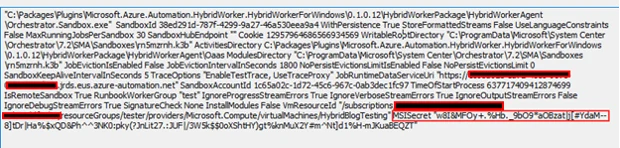
Attention then turned to MSISecret. At first glance it looked as though the Hybrid Worker node must be able to use it to request an MSI token externally, and reversing the binary confirmed this.
Every Automation Account has a "Job Runtime Data Service" endpoint, or JRDS, which Hybrid Workers use to poll for jobs and request credentials. The JRDS URL appears in the command line above. The full path used to request a token in the binary is shown below.

The same request in action:
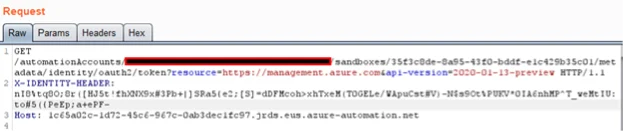
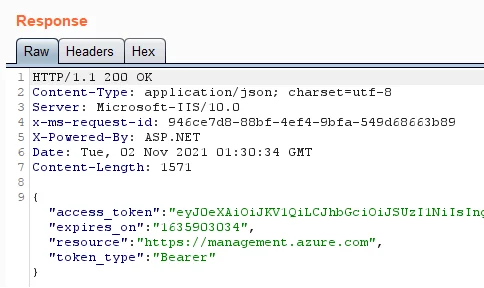
The MSI secret can only be obtained after receiving a job from the JRDS endpoint. That is done by polling the /sandboxes endpoint. HWGs hand out jobs first-come-first-serve, so whichever node polls first starts first. Nodes poll every 60 seconds by default, so polling constantly should almost always beat the other nodes and get a job together with a secret. This only works while runbook jobs are actively being run through the HWG.
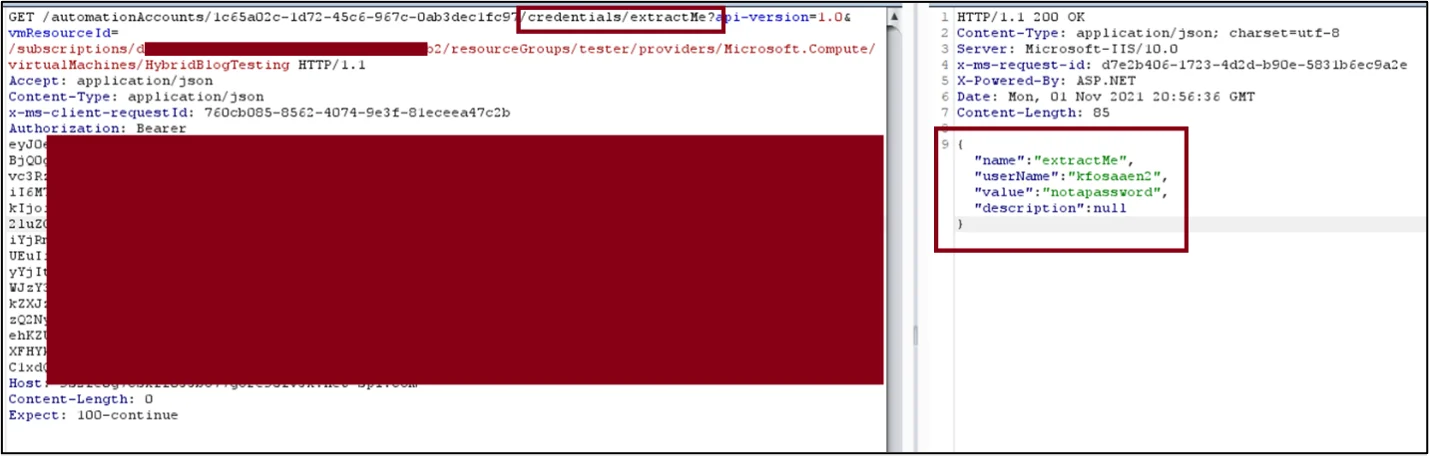
Since Managed Identity tokens can be requested, it followed that other forms of authentication could be requested too. A grep through the decompiled binary made this apparent, and a request to those endpoints returned results.
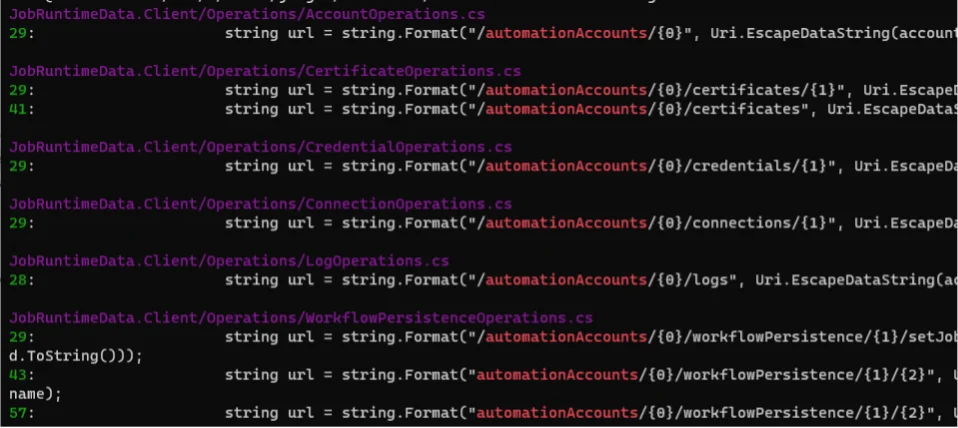
The JSON Web Token (JWT) in these requests belongs to the System Assigned Managed Identity of the Virtual Machine, not to a management token for Azure.
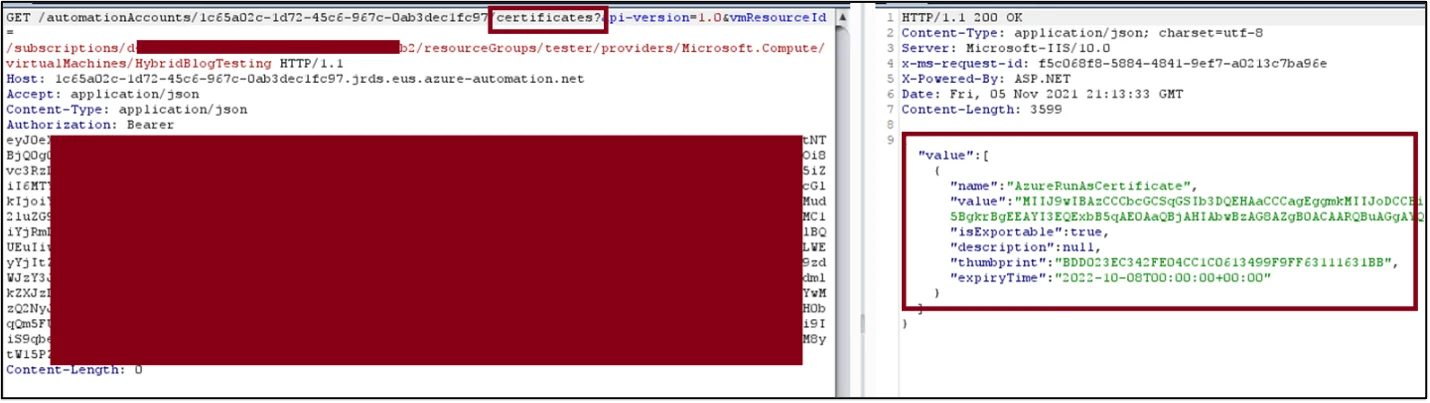
Requesting all certificates:
At this point the researcher considered the findings an escalation path from Virtual Machine Contributor to Subscription Contributor, provided Hybrid Worker nodes are in use, and reported them to Microsoft.
Exploitation
Step 1: Poll for a job and obtain the MSI secret
Poll the JRDS /sandboxes endpoint continuously rather than on the default 60-second interval. Because jobs are allocated first-come-first-serve, a fast poller will almost always win the job, and the job comes with an MSISecret that can be used to request an MSI token. This depends on runbook jobs actually being executed through the HWG at the time.
Step 2: Request other forms of authentication
The decompiled binary showed endpoints for authentication types beyond MSI. Requesting them returns credentials and certificates from the Automation Account, including all certificates.
Step 3: Register an attacker-controlled node with the AA key
After the first report was submitted, the researcher found a recently published blog covering some of the same ideas, whose thesis was lateral movement after an administrator pushed a certificate to a VM. That author also showed that a new Hybrid Worker node could be registered to an Automation Account using the Automation Account key and the Log Analytics Workspace key. The question was whether that route could raise the severity of the earlier findings.
Reading Automation Account keys requires only the Reader role. To exploit this, the researcher adapted source code from Microsoft's DSC repository, which contains scripts used to register a new Hybrid Worker node. Some environment checks were bypassed and the users and groups the process expects were created. The registration process is:
- Generate a new self-signed certificate or use an existing one.
- Create a payload with details such as HWG name, IP address and certificate thumbprint.
- Sign the payload with the AA key.
- Send a PUT request to the AA with all of the above.
Registration does not require Hybrid Worker Groups to already be in use: an arbitrary group name can be supplied and it will be created. Once registered, the certificate and key generated during the process give access to the same endpoints identified earlier. A Log Analytics workspace key is not needed for registration, because not all AAs are linked to a workspace.
Step 4: Full chain
From start to finish the exploit works as follows:
- An attacker with Reader access reads the victim Automation Account key.
- The attacker uses this key to register their own Virtual Machine, in their own tenant, as a Hybrid Worker node.
- The attacker dumps any credentials or certificates from the victim AA and uses them to authenticate.
This second issue was reported to MSRC in a separate report. The timeline for that case:
| Date | Event |
|---|---|
| October 25, 2021 | Initial report submitted |
| December 13, 2021 | Second report submitted with details of full privilege escalation |
| December 31, 2021 | $10k bounty awarded |
| March 14, 2022 | Patch applied |
Root cause
The combination meant a low-privileged Reader could mint a node and pull secrets. The report's conclusion is that the issue was not particularly technical or difficult to exploit and only abused the intended methods for registration and credential retrieval.
Impact
Any Azure user with the Subscription Reader role could dump saved credentials and certificates from Automation Accounts. Where Run As accounts were used, this gave a Reader to Contributor privilege escalation path. The first set of findings represented an escalation from Virtual Machine Contributor to Subscription Contributor if Hybrid Worker nodes were in use. The scope is limited to a subscription, a subscription Reader account is necessary, and it is not a cross-tenant issue.
Fix
Microsoft identified the vulnerable Azure Automation customers and notified them through the Azure portal, and a fix was rolled out to all customers. The Reader role was updated so that it no longer has the ListKeys permission on Automation Accounts and can no longer fetch Automation Account keys. Customers who need a Reader to fetch Automation Account keys are advised to switch to custom roles.
Microsoft also published guidance for deploying Hybrid Workers: install them using the Hybrid Runbook Worker Virtual Machine extension, without using the automation account keys, for registration. Microsoft recommends this platform because it uses a secure Azure AD based authentication mechanism and centralises control and management of identities and other resource credentials, and points to the security best practices for the Hybrid worker role.
Variants to test
- Poll the JRDS
/sandboxesendpoint faster than the default 60-second interval on a subscription with an active HWG. A positive result is winning a job ahead of the legitimate nodes and receiving anMSISecretwith it. - Grep the decompiled Hybrid Worker binary for authentication endpoints beyond MSI and request them with the VM's System Assigned MI JWT. A positive result is credentials or certificates being returned.
- Request all certificates from the AA through those endpoints. A positive result is the full certificate set of the Automation Account.
- With only Reader on a subscription, read the Automation Account key and register a node from your own tenant using an arbitrary group name. A positive result is successful registration and subsequent access to the credential endpoints.
- Repeat the registration without a Log Analytics workspace key. A positive result is that registration still succeeds, since not all AAs are linked to a workspace.
Conclusion
The issue allowed any user who could read Automation Account keys to extract any credentials or certificates from the affected Automation Account. It is a reminder that even low-privileged role assignments such as Reader can have unintended consequences in a cloud environment.


What happened, in plain words
Microsoft Azure is a cloud platform: instead of running software on your own computer, you rent computers and services from Microsoft and reach them over the internet. Inside Azure, everything is organised into a subscription, which is roughly a billing and permission container: a company's Azure account, with a list of who is allowed to do what inside it.
Azure has a feature called Azure Automation. Its main idea is runbooks: small pieces of code that Azure runs for you on a schedule or on demand, for example to start and stop virtual machines every evening, or to clean up old files. A virtual machine (VM) is just a computer in the cloud that you control.
Runbooks often need to log in to other things, so they need passwords, certificates or identities. Azure Automation stores those for them. The NetSPI researcher, Josh Magri, found that a user with the Reader role (which normally only means "you may look, not touch") could dump saved credentials and certificates from Automation Accounts. With the secrets in hand, the user could then act as a much more powerful account. That jump from a weak permission to a strong one is what security people call privilege escalation.
The findings were reported to Microsoft, and a fix was rolled out to all customers. A separate report covering the full privilege escalation earned a 10,000 USD bounty. The scope was limited to a single subscription: you needed a Reader account inside the subscription, and it was not a cross-tenant issue (one customer could not reach another customer's data).
This article is the second part of a two-part series. Part one walked through a privilege escalation scenario by abusing Azure hybrid workers. This part digs deeper and explains how the researcher used an undocumented internal API to poll information about the Automation Account: its runbooks, credentials and jobs.

Background: what Azure Automation and Hybrid Workers are
Before the attack makes sense, you need three ideas.
An API is a way for one program to talk to another over the network. Think of a restaurant: you do not walk into the kitchen, you order from a menu, and a waiter brings the dish. The menu is the API: a fixed list of requests you can make and the answers you get back. Most of what your browser does is calling APIs.
A token is a short piece of text that proves who you are, a bit like a wristband at a festival: you show it once at the entrance, then you can go in and out without queuing again. A JSON Web Token (JWT) is a particular format of token, a block of text with three parts separated by dots, which the server can check without looking you up in a database.
A certificate is a file used to prove identity in machine-to-machine conversations, the digital equivalent of a passport plus a signature. It comes as a pair: the certificate itself (public) and a private key (secret).
Now the product. Azure Automation's core feature is Runbooks: pieces of code that can be run on Azure's infrastructure or on customer-owned Azure Virtual Machines. They are often used to run scheduled tasks or manage Azure resources. To do that, the runbooks must authenticate, and the report describes three ways:
- Stored credentials. Users can store credentials in an Automation Account (AA) and access them from runbooks. An Automation Account is the container that holds your runbooks, schedules, credentials and settings.
- Run As accounts. These create a Service Principal (an identity for a program rather than a person) that authenticates with a certificate stored in the Automation Account.
- Managed Identities. These obtain a token at runtime, so no password or certificate has to be stored at all. This is the option Microsoft pushes users towards.
The MicroBurst project's Get-AzPasswords script supports dumping all three kinds of authentication, but only if you already have Contributor access (a strong permission that lets you change things). That is not the path used here, because the whole point was to start from something weaker.
By default a runbook executes in a sandbox on Azure's infrastructure. A sandbox is an isolated, restricted place to run code, like a fenced playground: safe, but small. It comes with constraints, namely processing power and execution time, so long-running or resource-intensive code may be ill-suited to run there.
To bridge that gap, Azure offers Hybrid Worker Groups (HWGs). They let users run runbooks on their own Azure Virtual Machines, so the code can run on more powerful machines for longer. Normally this is done by deploying a Virtual Machine Extension to the desired VM to register it as a Hybrid Worker node. A VM extension is a small add-on Microsoft installs into the VM for you. Once registered, the user can execute runbooks on those Hybrid Worker nodes.
There are two types of HWGs: User and System. System HWGs are used for Update Management (keeping operating systems patched) and do not have the permissions relevant here, so the research focuses on User HWGs.
The first set of issues: compromising credentials
The research began with a registered Hybrid Worker node. When you execute a runbook on the host, the HybridWorkerService process spawns the Orchestrator.Sandbox process. A process is a running program; one program starting another is normal, and the second one inherits instructions from the first. The command line of that second process is what the researcher looked at, because command lines often reveal addresses, names and secrets passed at startup.
Next, attention turned to MSISecret. MSI stands for Managed Service Identity, the same Managed Identity idea as above: an identity Azure gives to a resource so it can get tokens without a stored password. At first glance it appeared that the Hybrid Worker node must be able to use this secret to request an MSI token externally. Reversing the binary means taking a compiled program and turning it back into something readable, to see what it does; doing that confirmed the suspicion was true.
Every Automation Account has a Job Runtime Data Service endpoint, or JRDS. An endpoint is a specific address on the network where a service listens, like a specific counter at a train station. Hybrid Workers use the JRDS to poll for jobs and request credentials. Polling means asking repeatedly, "anything for me?", on a timer, the way you might refresh a parcel tracking page. The JRDS URL is supplied in the command line shown above. The full path used to request a token, as found in the binary, is shown below.
The same request in action:
The MSI secret can only be obtained after receiving a job from the JRDS endpoint. That is done by polling the /sandboxes endpoint. HWGs hand out jobs first-come-first-serve, so whichever node polls first starts first. Nodes poll every 60 seconds by default, so polling constantly should almost always beat the other nodes and get a job together with a secret. This only works while runbook jobs are actively being run through the HWG.
Since Managed Identity tokens can be requested, it followed that other forms of authentication could be requested too. A grep is a simple text search through files; running one over the decompiled binary made this apparent, and a request to those endpoints returned results.
The JSON Web Token in these requests belongs to the System Assigned Managed Identity of the Virtual Machine, not to a management token for Azure. In other words, it is the VM's own wristband, not a master key for the whole cloud account.
Requesting all certificates:
At this point the researcher was satisfied. The findings represented an escalation path from Virtual Machine Contributor (permission to manage VMs) to Subscription Contributor (permission to manage everything in the subscription), provided Hybrid Worker nodes are in use. They reported the findings to Microsoft.
Escalating the findings
After the first report was submitted, the researcher found a recently published blog that detailed some of the same ideas. Its thesis was obtaining lateral movement (moving from one machine or account to another inside a network, like walking from room to room once inside a building) after an administrator pushed a certificate to a Virtual Machine. That author also demonstrated that you could register a new Hybrid Worker node to an Automation Account using the Automation Account key and the Log Analytics Workspace key.
The question was whether that route could raise the severity of the earlier findings.
Reading Automation Account keys requires only the Reader role. To exploit this, the researcher adapted some source code from Microsoft's Desired State Configuration (DSC) repository. DSC is Microsoft's tooling for describing how a machine should be set up; its repository contained scripts used to register a new Hybrid Worker node. Some environment checks were bypassed and the users and groups the process expects were created.
The registration process looks like this:
- Generate a new self-signed certificate or use an existing one. Self-signed means the certificate is signed by its own creator rather than a public authority.
- Create a payload with some details: HWG name, IP address, certificate thumbprint, etc. A payload is the body of data you send in a request. A thumbprint is a short fingerprint of a certificate, used to identify it without sending the whole file.
- Sign the payload with the AA key. Signing means attaching proof, derived from the key, that the payload came from someone holding that key and was not altered on the way.
- Send a PUT request to the AA with all the above info. PUT is one of the standard HTTP methods; where GET means "read", PUT means "create or replace this thing at this address".
This also does not require Hybrid Worker Groups to already be in use: an arbitrary group name can be supplied and it will be created. After registering, the certificate and key generated during the process can be used to access the same endpoints identified earlier. A Log Analytics workspace key is not needed for registration, because not all AAs are linked to a workspace.
From start to finish, the exploit works as follows:
- An attacker with Reader access reads the victim Automation Account key.
- The attacker uses this key to register their own Virtual Machine, in their own tenant, as a Hybrid Worker node. A tenant is the directory that holds an organisation's users and applications in Azure.
- The attacker can dump any credentials or certificates from the victim AA and use them to authenticate.
This second issue was reported to MSRC (the Microsoft Security Response Center, Microsoft's bug intake team) in a separate report. The timeline for that case:
| Date | Event |
|---|---|
| October 25, 2021 | Initial report submitted |
| December 13, 2021 | Second report submitted with details of full privilege escalation |
| December 31, 2021 | 10,000 USD bounty awarded |
| March 14, 2022 | Patch applied |
Microsoft's response
After the findings were reported, Microsoft identified the Azure Automation customers vulnerable to this exploit and notified them through the Azure portal. A fix was rolled out to all customers.
Microsoft also updated its documentation with mitigation steps. The Reader role was changed so that it no longer has the ListKeys permission on Automation Accounts and can no longer fetch Automation Account keys. Customers who need a Reader to fetch Automation Account keys are advised to switch to custom roles, which are roles you define yourself with exactly the permissions you want.
Microsoft also provided guidance for deploying Hybrid Workers: install them using the Hybrid Runbook Worker Virtual Machine extension, without using the automation account keys, for registration. Microsoft recommends this platform because it uses a secure Azure AD based authentication mechanism and centralises control and management of identities and other resource credentials, and points to the security best practices for the Hybrid worker role.
Conclusion
The issue allowed any user who could read Automation Account keys to extract any credentials or certificates from the affected Automation Account. It was not particularly technical or difficult to exploit, and only abused the intended methods for registration and credential retrieval. It is a reminder that even low-privileged role assignments such as Reader can have unintended consequences in a cloud environment.
Glossary
- API: a fixed menu of requests one program can make to another over a network, and the answers it gets back.
- Automation Account (AA): the Azure container that holds runbooks, schedules, credentials and settings for Azure Automation.
- Azure: Microsoft's cloud platform, where you rent computers and services over the internet.
- Azure AD: Microsoft's directory service for identities (users, groups, applications) in the cloud.
- Bounty: money a vendor pays a researcher for reporting a security bug.
- Certificate: a file used to prove identity between machines, usually paired with a private key.
- Contributor: an Azure permission that allows changing resources, stronger than Reader.
- Credential: a secret used to log in, such as a username and password.
- Cross-tenant: affecting or reaching another organisation's directory; this bug was not cross-tenant.
- Custom role: a role you define yourself, with exactly the permissions you choose.
- Desired State Configuration (DSC): Microsoft tooling for describing how a machine should be configured.
- Endpoint: a specific network address where a service listens for requests.
- Grep: a command that searches text for a pattern.
- Hybrid Worker Group (HWG): a group of customer-owned machines that run Azure Automation runbooks instead of Azure's own sandbox.
- Hybrid Worker node: a single machine registered into a Hybrid Worker Group.
- Job: one execution of a runbook.
- JRDS (Job Runtime Data Service): the per-Automation-Account endpoint that Hybrid Workers poll for jobs and credentials.
- JSON Web Token (JWT): a text token in three dot-separated parts that a server can verify without a database lookup.
- Key: a shared secret string that proves permission, here to register a worker.
- Lateral movement: moving from one machine or account to another inside a network after the first compromise.
- ListKeys: the permission that allows reading an Automation Account's keys.
- Managed Identity / MSI: an identity Azure gives to a resource so it can obtain tokens at runtime without stored passwords.
- MSRC: the Microsoft Security Response Center, Microsoft's security bug intake team.
- Payload: the body of data sent in a request.
- Polling: asking a service repeatedly on a timer whether there is new work.
- Privilege escalation: turning a weak permission into a stronger one.
- Process: a running program on a computer.
- PUT: an HTTP method meaning create or replace the thing at this address.
- Reader: an Azure permission that allows viewing resources but not changing them.
- Reversing a binary: turning a compiled program back into a readable form to see what it does.
- Run As account: an Automation Account feature that creates a Service Principal authenticated by a stored certificate.
- Runbook: a piece of code Azure Automation runs on a schedule or on demand.
- Sandbox: an isolated, resource-limited place to run code.
- Self-signed certificate: a certificate signed by its own creator rather than a public authority.
- Service Principal: an identity for a program rather than a person.
- Signing: attaching proof, derived from a key, that data came from the key holder and was not altered.
- Subscription: the Azure container that holds resources and the permissions over them, roughly a billing account.
- Tenant: the directory holding an organisation's users and applications in Azure.
- Thumbprint: a short fingerprint identifying a certificate.
- Token: a short piece of text proving who you are, shown instead of logging in again.
- Virtual Machine (VM): a computer in the cloud that you control.
- Virtual Machine Extension: a small add-on Microsoft installs into a VM, used here to register it as a Hybrid Worker node.
- Virtual Machine Contributor: an Azure permission that allows managing virtual machines.



