Roles allowing to abuse Entra ID federation for persistence and privilege escalation
The article shows that several Entra ID roles beyond Global Administrator can create and verify a custom domain and convert it to federated mode, letting an attacker point authentication at an identity provider they control. With that, they could forge signed tokens to impersonate any user, including bypassing MFA, and keep persistence.
 Published on medium.com
Microsoft Entra ID (formerly known as Azure AD) allows delegation of authentication to another identity provider through the legitimate federation feature. However, attackers with elevated privileges can abuse this feature, leading to persistence and privilege escalation 💥.
The full write-up lives on its author's site
It belongs to its author, so we link to it rather than copy it. The other two tabs are our own rewrites, checked against it.
Context
Microsoft Entra ID (formerly Azure AD) can delegate authentication to another identity provider through its federation feature. By default, users submit their credentials to Entra ID on the login.microsoftonline.com domain, and Entra ID validates them, either on its own for cloud-only accounts or with help from the on-premises Active Directory. That help comes in two forms: password hash sync, where hashes of AD password hashes already synchronised from AD are used, or pass-through authentication, where the password is sent to AD for verification.
A tenant can instead use federation with a custom domain to establish trust with another domain for authentication and authorisation. Organisations mainly use it to delegate authentication for Active Directory users to their on-premises Active Directory Federation Services (AD FS). This is similar to the concept of trust in Active Directory, but a custom domain is not an Active Directory domain.
When a user types their email on the login page, Entra ID detects that the domain is federated and redirects the user to the URL of the corresponding identity provider (IdP). The IdP obtains and verifies the credentials, then redirects the user back to Entra ID with proof of authentication (or failure) in the form of a signed SAML or WS-Federation (WS-Fed) token.
If an attacker gains elevated privileges in Entra ID, they can abuse this mechanism to create a backdoor, either by creating a federated domain or by modifying an existing one, which lets them impersonate anyone and bypass MFA. The abuse potential was first described by Dr. Nestori Syynimaa in "Security vulnerability in Azure AD & Office 365 identity federation", which covers cloud-only users and MFA bypass, and further in "How to create a backdoor to Azure AD, part 1: Identity federation". The technique is used by threat actors: Microsoft Incident Response reported in October 2023 that Octo Tempest targets federated identity providers with tools such as AADInternals to federate existing domains or to spoof legitimate domains by adding and then federating new ones, then forges valid SAML tokens for any user of the target tenant with claims that MFA is satisfied, a technique known as Golden SAML.
The corresponding MITRE ATT&CK techniques are T1484.002 "Domain Policy Modification: Domain Trust Modification" for the initial operation where the attacker adds a secondary token-signing certificate, and T1606.002 "Forge Web Credentials: SAML Tokens" for forging a SAML token with the private key of the injected certificate and presenting it to Entra ID as a fake proof of identity.
This internal federation for members must not be confused with the separate federation feature for guests (external identities), "Federation with SAML/WS-Fed identity providers for guest users", configured through "Identity Providers for External Identities". This research is about internal federation only.
The question the article answers is which Entra roles, and ideally which exact Entra permissions, allow this abuse. The famous Global Administrator role is not the only one.
Setup
The researcher used a single Entra tenant with several Entra users, one per role under test, each with the role assigned. Several PowerShell scripts clean the environment if needed (so runs can be repeated), call the cmdlets corresponding to the API being tested, and check the result, giving reliable and reproducible test cases. The scripts are public at https://github.com/tenable/entra-id-federation-abuse-research-required-roles.
Three APIs offer more or less the same features, and the article names the APIs rather than the admin or hacking tools, because the API is what matters regardless of the tool calling it:
- Provisioning API / MSOnline (MSOL), used by the MSOnline V1 PowerShell module, whose cmdlets contain "Msol" (for example
Get-MsolUser). It lives athttps://provisioningapi.microsoftonline.com/provisioningwebservice.svc, is not publicly documented, and uses SOAP. The module was due to be deprecated in March 2024 but still worked, so it remained available to attackers. - Azure AD Graph API, used by the AzureAD PowerShell module, whose cmdlets contain "AzureAD" (for example
Get-AzureADUser). It is available athttps://graph.windows.net/, is publicly documented, and exposes REST endpoints. It was replaced by Microsoft Graph and must not be confused with it. - Microsoft Graph API / Microsoft Graph PowerShell SDK, the newest and currently recommended API, available at
https://graph.microsoft.com. Its SDK cmdlets contain "Mg" (for exampleGet-MgUser).
Entra ID follows the RBAC model: principals (user, group, service principal) are assigned roles on a scope (the whole tenant, a specific administrative unit, or a single object), and each role is defined by the Entra permissions it grants. Entra RBAC with Entra roles controls access to Entra ID resources (users, groups, devices, IdP configuration), and is distinct from Azure RBAC with Azure roles, which controls access to Azure cloud resources. Entra permissions such as microsoft.directory/domains/allProperties/allTasks are also distinct from Entra API permissions such as MS Graph's Directory.ReadWrite.All. As of December 2023 there were around 100 built-in Entra roles, and customers can create custom roles containing exactly the permissions they want, though only some permissions are supported in custom roles.
After reviewing the roles recommended by the documentation to configure federation and the list of Entra permissions, in particular those under microsoft.directory/domains/, the researcher selected these roles with their relevant permissions. The "privileged" tag marks roles Microsoft considers privileged as of November 2023, through the "Privileged roles and permissions in Microsoft Entra ID" feature. Notably, none of the permissions below is considered privileged.
Global Administrator (privileged)
microsoft.directory/domains/allProperties/allTasksmicrosoft.directory/domains/federationConfiguration/basic/updatemicrosoft.directory/domains/federationConfiguration/create
Security Administrator (privileged)
microsoft.directory/domains/federation/update
Hybrid Identity Administrator (privileged): by its description, meant to manage federation for internal users, among other features, which is the feature under study.
External Identity Provider Administrator: by its description, meant to manage federation for external users, which is not the subject here, but included just in case.
Domain Name Administrator
Partner Tier1 Support (privileged): deprecated for months and recently removed from the documentation, but still functioning as of November 2023 and therefore abusable, so included.
- none
Partner Tier2 Support (privileged): same deprecation situation, still functioning as of November 2023, so included.
Finding it
The starting observation is that federation configuration is a legitimate feature that requires elevated privileges, and the question is which privileges exactly. The researcher noticed that the behaviour of some actions differs between the three APIs, that an action forbidden for a role by one API can be allowed by another, and that some actions are only possible with older APIs. This inconsistency is what makes the role list wider than the documentation suggests.
A second observation came from the API surface itself: the MS Graph endpoint to list federation configurations is List internalDomainFederations, plural, and returns a collection (an array). That suggested trying to add a second federation configuration to an existing domain.
Exploitation
Step 1: create and verify a domain
Federation needs a custom domain name configured in Entra ID. Domains can be listed in the Entra admin center or the Azure Portal.
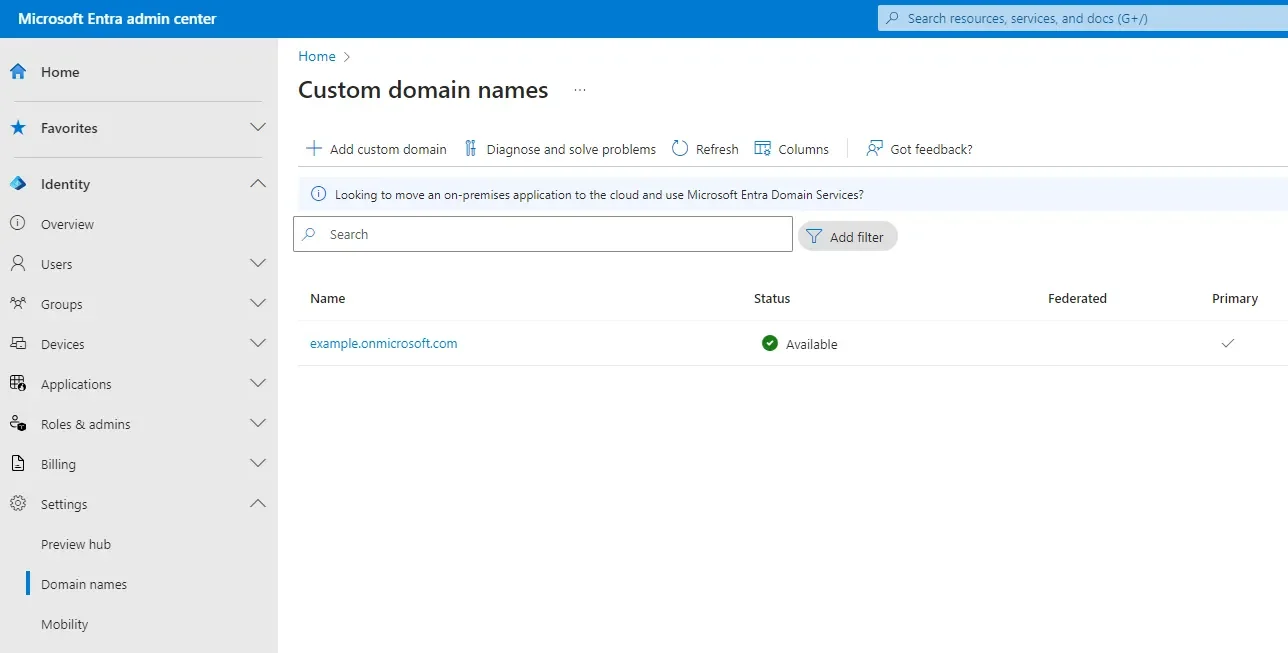
A domain is either "Managed" (the default, no check in the "Federated" column), where users submit credentials to Entra ID, or "Federated" (checked in the "Federated" column), where users are redirected to the federated IdP and Entra ID trusts the token it emits. Administrators can convert a domain between the two modes.
If no custom domain is available apart from the default <tenant>.onmicrosoft.com, the attacker must create one and verify it to prove ownership. These are two steps using different API endpoints and cmdlets. Creating a new domain is at the same time more visible, because a domain is added, and less visible, because the new domain is used only by the attacker and does not disrupt existing authentication for normal users. Mandiant noted this:
Note: To not interrupt production and authentication with an existing federated domain (and to remain undetected), an attacker may opt to register a new domain with the tenant.
Provisioning API: New-MsolDomain and Confirm-MsolDomain
Allowed for:
- Global Administrator
- Partner Tier2 Support
Denied for the following, with this error message right from the first creation step:
Access Denied. You do not have permissions to call this cmdlet
- Security Administrator
- Hybrid Identity Administrator
- External Identity Provider Administrator
- Domain Name Administrator
- Partner Tier1 Support
Azure AD Graph API: New-AzureADDomain and Confirm-AzureADDomain
Endpoints: create a domain and the verify action.
Allowed for:
- Global Administrator
- Domain Name Administrator
- Partner Tier2 Support
Insufficient privileges to complete the operation.
- Security Administrator
- Hybrid Identity Administrator
- Partner Tier1 Support
Contrary to the provisioning API, Domain Name Administrator is allowed to create and verify a domain here.
MS Graph API: New-MgDomain and Confirm-MgDomain
Endpoints: create domain and verify domain.
Allowed for:
- Global Administrator
- Domain Name Administrator
- Partner Tier2 Support
Denied for the following, with the same error message right from the first creation step:
Insufficient privileges to complete the operation.
- Security Administrator
- Hybrid Identity Administrator
- Partner Tier1 Support
Exactly the same results as with Azure AD Graph.
Step 2: convert the domain to federated mode, or add a federation configuration
The next step is to convert the target custom domain to Federated mode. Either the custom domain already exists in the default Managed mode, in which case converting it disrupts users who normally authenticate with it, or the attacker created and verified a new domain as above.
Conversion requires federation configuration information: for instance the certificate the federated IdP uses to sign the token that is the authentication proof, and the IssuerUri that uniquely identifies a federation service and links the token to a domain. Mandiant described the technique in 2020 ("This can be obtained by converting a managed domain to a federated domain") and in 2021 ("The threat actor must first compromise an account with permission to modify or create federated realm objects [...] Mandiant observed connections to a Microsoft 365 tenant with MSOnline PowerShell followed by the configuration of a new, attacker-controlled domain as federated"), as did Dr. Nestori Syynimaa in "How to create a backdoor to Azure AD, part 1: Identity federation".
Provisioning API: Set-MsolDomainAuthentication or AADInternals' ConvertTo-AADIntBackdoor
Allowed for:
- Global Administrator
- Partner Tier2 Support
Denied for the following, with this error message:
Access Denied. You do not have permissions to call this cmdlet
- Security Administrator
- Hybrid Identity Administrator
- Domain Name Administrator
- Partner Tier1 Support
Azure AD Graph API: not supported
No Azure AD Graph endpoint and no AzureAD PowerShell cmdlet was found for converting a domain to federated.
MS Graph API: New-MgDomainFederationConfiguration
Endpoint: Create internalDomainFederation.
Allowed for:
- Global Administrator
- Security Administrator
- Domain Name Administrator
- Partner Tier2 Support
Insufficient privileges to complete the operation.
- Hybrid Identity Administrator
- Partner Tier1 Support
Again the roles allowed differ between the provisioning API and MS Graph. Based on this observation the researcher suggested an update to the official Entra ID documentation page for the endpoint.
Step 3: try a second federation configuration
Because List internalDomainFederations is plural and returns a collection, the researcher tried adding a second federation configuration to an existing domain. It failed with:
Domain already has Federation Configuration set.
The documentation already hinted at this: "This API returns only one object in the collection [...] collection of one internalDomainFederation object in the response body."
Step 4: change an existing federation configuration
Another route is to change the federation configuration of an existing federated domain so that tokens can be crafted with the attacker's own token-signing certificate. This resembles Golden SAML, except that instead of stealing the key the attacker inserts theirs, and instead of presenting the forged token to a service they present it to the IdP. Mandiant described it in 2021: "The threat actor must first compromise an account with permission to modify or create federated realm objects."
The main way is to modify the current token-signing certificate stored in the signingCertificate attribute of the federation configuration, which has the drawback of temporarily breaking authentication and therefore being noticeable. A variant adds a secondary token-signing certificate through the nextSigningCertificate attribute instead. Mandiant described this too:
A threat actor could also modify the federation settings for an existing domain by configuring a new, secondary, token-signing certificate. This would allow for an attack (similar to Golden SAML) where the threat actor controls a private key that can digitally sign SAML tokens and is trusted by Azure AD.
The secondary certificate was meant to prepare a rollover when the main one expires, but both are accepted as token signers even when the first has not expired. Microsoft Security (MSRC) confirmed to the researcher that this is intended behaviour and working as expected, and the public documentation was updated accordingly:
nextSigningCertificate: Fallback token signing certificate that can also be used to sign tokens
This is also why Microsoft's "Emergency rotation of the AD FS certificates" article recommends renewing the token-signing certificate twice:
You're creating two certificates because Azure [Entra ID] holds on to information about the previous certificate. By creating a second one, you're forcing Azure [Entra ID] to release information about the old certificate and replace it with information about the second one. If you don't create the second certificate and update Azure [Entra ID] with it, it might be possible for the old token-signing certificate to authenticate users.
Provisioning API: Set-MsolDomainFederationSettings
Allowed for:
- Global Administrator
- Hybrid Identity Administrator
- Partner Tier2 Support
Insufficient privileges to complete the operation.
- Domain Name Administrator
- Security Administrator
- Partner Tier1 Support
Unlike Set-MsolDomainAuthentication above, Hybrid Identity Administrator is now allowed.
Azure AD Graph API: not supported
No Azure AD Graph endpoint and no AzureAD cmdlet was found for modifying federation configuration. The AzureADPreview module has New-AzureADExternalDomainFederation, but it deals with federation for external users, not the internal federation needed here.
MS Graph API: Update-MgDomainFederationConfiguration
Endpoint: Update internalDomainFederation.
Allowed for:
- Global Administrator
- Security Administrator
- Domain Name Administrator
- Partner Tier2 Support
Insufficient privileges to complete the operation.
- Hybrid Identity Administrator
- Partner Tier1 Support
Exactly the same results as creating a federated domain with New-MgDomainFederationConfiguration.
Remarks on inconsistency
The researcher has no insight into how Entra roles and permissions are implemented or used by Entra ID, but noticed something strange: some operations appear to be explicitly allowed to some roles rather than based on the exact permissions those roles contain. Security Administrator and Hybrid Identity Administrator contain exactly the same three permissions under microsoft.directory/domains/, yet the former is allowed to Create internalDomainFederation with the Graph API (New-MgDomainFederationConfiguration) and the latter is not. Similarly, Domain Name Administrator and Partner Tier2 Support both contain microsoft.directory/domains/allProperties/allTasks, yet the former is forbidden to call Set-MsolDomainAuthentication while the latter is allowed. Some roles are also forbidden by the old Provisioning API (MSOL) for operations the newer Azure AD Graph and MS Graph APIs allow, and the reverse.
Full chain
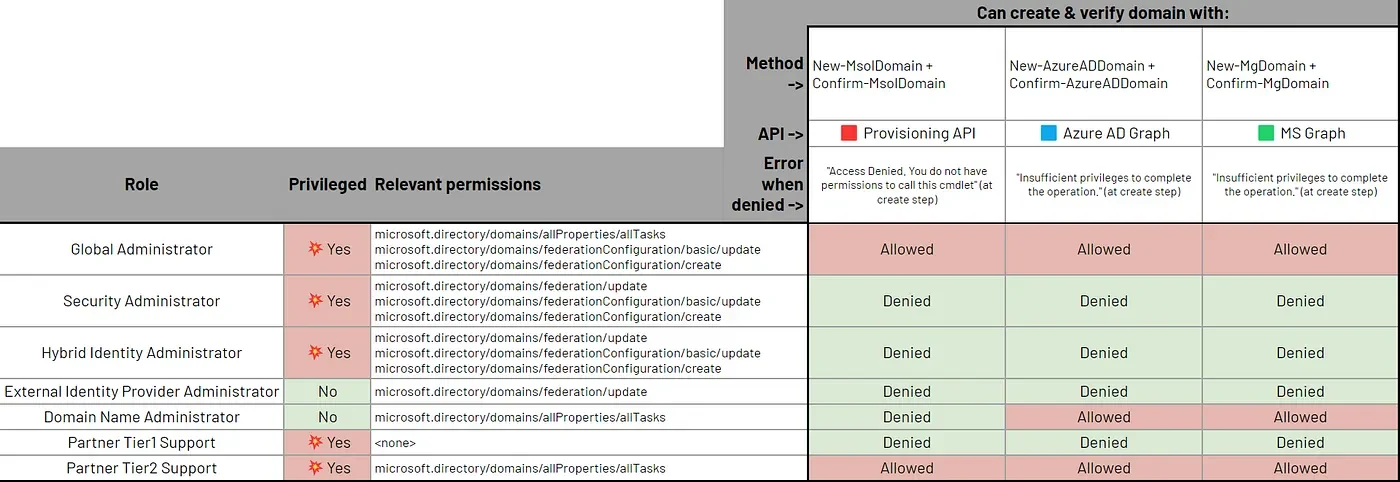
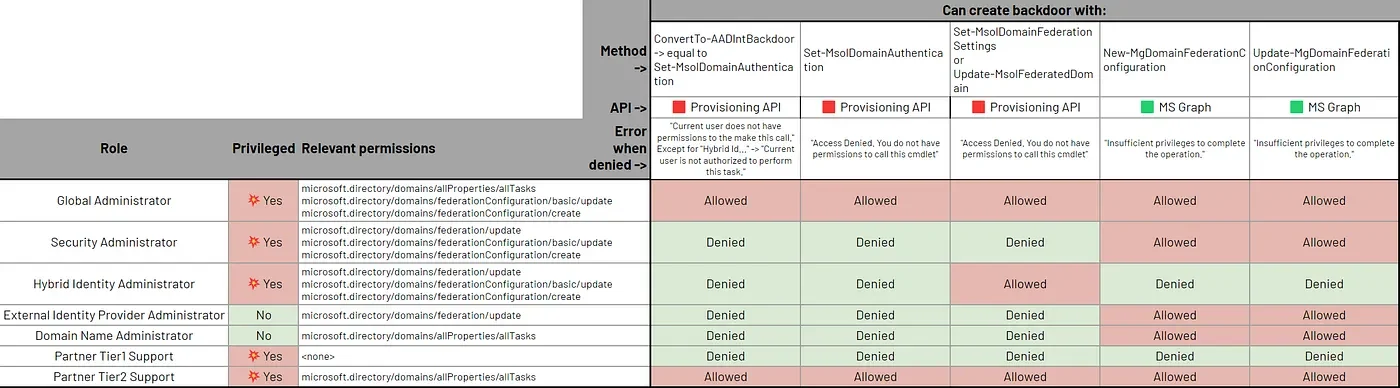
If a verified custom domain is not already present, the attacker needs one of:
- Global Administrator
- Domain Name Administrator
- Partner Tier2 Support
If a verified custom domain is already present, the attacker needs one of:
- Global Administrator
- Security Administrator
- Hybrid Identity Administrator
- Domain Name Administrator
- Partner Tier2 Support
Global Administrator is far from the only role that allows compromising Entra ID through federation abuse. In the researcher's opinion the most dangerous roles in these lists are External Identity Provider Administrator and Domain Name Administrator, because Microsoft does not identify them as privileged and they are therefore subject to less scrutiny and security effort. This likely comes from none of the Entra permissions that seem related to domains and federation configuration being identified as privileged. The researcher would have liked to identify the exact permission(s) by testing them one by one in a custom role, but only a subset of permissions is supported in custom roles and none of these is in that subset.
MSRC was contacted (VULN-113566) suggesting that microsoft.directory/domains/allProperties/allTasks and microsoft.directory/domains/federation/update be marked as privileged, but declined, considering their baseline correct even though some customers may interpret it differently.
An already existing custom domain also helps attackers because it skips creation and verification, which is stealthier and makes the attack possible with more roles. It does, however, cause temporary disruption for users who normally authenticate through the abused domain, which makes it less stealthy.
Root cause
The researcher noticed that some operations appear to be allowed to specific roles explicitly rather than derived from the permissions, without knowing how Entra ID implements this. Some operations appear to be allowed to specific roles explicitly rather than derived from the permissions, which is why two roles with identical domain permissions behave differently, and why the same operation is permitted by one API and refused by another. The permissions that appear related to domains and federation are not classified as privileged by Microsoft, so roles holding them (notably External Identity Provider Administrator and Domain Name Administrator) are not treated as sensitive. MSRC confirmed that both certificates are accepted as token signers even when the first has not expired.
Impact
An attacker holding any of the roles listed above can create and verify a new domain, or convert an existing managed domain to federated, and point it at an IdP they control. The report describes that attackers abusing federation can impersonate anyone, bypass MFA and persist, which is why these roles matter. If a verified custom domain already exists, more roles are sufficient, and the attack is stealthier because domain creation and verification are skipped, at the cost of temporary disruption for users of the abused domain. Modifying the primary signing certificate breaks authentication temporarily and is noticeable; adding a secondary certificate through nextSigningCertificate avoids that. The exposure depends on which roles are assigned and on whether a verified custom domain exists.
Fix
No code fix is described. The researcher suggested marking microsoft.directory/domains/allProperties/allTasks and microsoft.directory/domains/federation/update as privileged (MSRC VULN-113566), which Microsoft declined. Documentation was updated: the Create internalDomainFederation page was corrected after the researcher's suggestion, and the nextSigningCertificate description now reads "Fallback token signing certificate that can also be used to sign tokens".
Defensive recommendations from the article:
- Apply least privilege and be careful whom you assign the roles listed above; Global Administrator is not the only sensitive role.
- Audit and monitor federated domains and their federation configurations, especially if the organisation no longer uses federated authentication. Tenable Identity Exposure offers Indicators of Exposure for this: "Known Federated Domain Backdoor", "Federation Signing Certificates Mismatch", "Federated Domains List", "Unusual Federation Signing Certificate Validity Period" and "Unverified Domain". Microsoft's guide "Monitor changes to federation configuration in your Microsoft Entra ID" leaves the analysis of the configuration to you; changes to federated domains and their configurations are normally rare, so any event should be investigated.
- In case of a suspected or confirmed attack, seek incident response specialists with Entra ID expertise to establish the extent of the attack, including other means of persistence, and follow Microsoft's "Emergency rotation of the AD FS certificates" guide.
Variants to test
- Same operation across all three APIs. For each role under test, run the MSOL, Azure AD Graph and MS Graph cmdlets for the same action. A positive result is a role allowed by one API and denied by another, as seen with Domain Name Administrator on domain creation and with Hybrid Identity Administrator on federation configuration.
- Roles with identical permissions. Compare roles that share the same
microsoft.directory/domains/permissions, such as Security Administrator and Hybrid Identity Administrator, on Create internalDomainFederation. A positive result is different outcomes despite identical permissions. - Secondary signing certificate. On a federated domain, set
nextSigningCertificateto a certificate you control while the primary is still valid, then present a token signed with it. A positive result is Entra ID accepting the token. - Second federation configuration. Try adding a second configuration to a domain that already has one. A positive result would be acceptance instead of "Domain already has Federation Configuration set."
- Custom roles. If a permission related to domains or federation becomes supported in custom roles, grant it alone and repeat the steps. A positive result is a custom role sufficient for the end-to-end chain.
What happened, in plain words
Microsoft Entra ID is Microsoft's cloud service that keeps track of who your users are and checks their passwords when they sign in to Microsoft 365, Azure and other Microsoft services. It used to be called Azure AD. Like most login systems, it has a feature that lets an organisation say: "don't check passwords yourself, ask this other login server instead, and trust whatever it tells you." That feature is called federation.
The problem described here is that federation is a very powerful switch. Anyone who can flip it, or quietly change its settings, can tell Entra ID to trust a login server that they themselves control. From that moment they can mint a login proof for any user in the organisation, including the boss, without knowing any password and without passing multi-factor authentication (MFA, the extra code you type after your password). They can also leave that setup in place and come back later, which is called persistence.
The obvious suspect is the Global Administrator role, the "super admin" of Entra ID. The article's point is that it is not the only one. Several other built-in roles, some of which Microsoft does not even label as privileged, are enough to do the same thing. The researcher tested the roles against three Microsoft APIs and found that the answers do not always agree: a role refused by one interface can be accepted by another. That inconsistency is what widens the list of dangerous roles.
The feature works as designed, but the set of roles that can reach it is larger than most administrators assume, and the permissions involved are not flagged as sensitive.
Background you need first
What a tenant, a domain and a login flow are
A tenant is one organisation's own private copy of Entra ID. Every tenant gets a default name ending in onmicrosoft.com, for example <tenant>.onmicrosoft.com. Organisations usually add their own domain, such as example.com, so that users can sign in with their normal email address.
When you type your email on a Microsoft login page, Entra ID looks at the part after the @. If that domain is configured as Managed, Entra ID checks the password itself. If it is configured as Federated, Entra ID does not check the password: it sends your browser to another login server, called an identity provider (IdP), which checks it and then sends you back with a signed statement saying "yes, this is really them". That signed statement is a token.
A token is like a stamped, sealed letter of introduction. The stamp is a cryptographic signature made with a private key. Anyone can check the stamp with the matching public key, but only the holder of the private key can produce a valid stamp. If an attacker can make Entra ID trust a stamp from a key they own, they can write themselves letters of introduction for anybody.
What MFA is and why bypassing it matters
MFA (multi-factor authentication) means signing in with something you know (a password) plus something you have (a phone app, a hardware key, a code by SMS). It is the main defence against stolen passwords. If an attacker can produce a token that already says "MFA was satisfied", the victim's phone never rings. That is exactly what federation abuse allows, and it is why this matters so much.
What an API is
An API (application programming interface) is the set of doors and counters a program uses to talk to a service. Think of a bank: you do not walk into the vault, you go to a counter and fill in a form. The API is the counter, the forms are the requests, and the clerk's answer is the response. Administrators rarely call APIs by hand; they use tools such as PowerShell (a scripting shell on Windows) or a web portal, and those tools call the API underneath. The article deliberately names the APIs rather than the tools, because the API is what actually decides whether an action is allowed, no matter which tool asked.
What a role and a permission are
Entra ID uses RBAC (role-based access control). Instead of granting abilities to people one by one, you assign a role such as Global Administrator to a user, a group or a service principal (a non-human identity used by an application). Each role is a bundle of permissions, which are fine-grained abilities with names like microsoft.directory/domains/allProperties/allTasks. A role is like a job title in a company; the permissions are the individual keys on the keyring that come with that title.
Two warnings the article makes, both easy to trip over:
- Entra RBAC is not Azure RBAC. Entra roles control access to Entra ID objects (users, groups, devices, login configuration). Azure roles control access to Azure cloud resources (virtual machines, databases, storage). Same word, different systems.
- Entra permissions are not API permissions. An Entra permission like
microsoft.directory/domains/allProperties/allTasksis an internal ability inside Entra ID. An API permission like Microsoft Graph'sDirectory.ReadWrite.Allis what an application is allowed to ask the API for. They look similar and mean different things.
As of December 2023 there were around 100 built-in Entra roles, and organisations can also build custom roles, but only some permissions are supported inside custom roles.
The three APIs
Microsoft has shipped three generations of interfaces for managing Entra ID. All three still worked at the time of the research, which is part of the problem.
- Provisioning API, used by the MSOnline (MSOL) PowerShell module. Its commands contain "Msol", for example
Get-MsolUser. It lives athttps://provisioningapi.microsoftonline.com/provisioningwebservice.svc, is not publicly documented, and speaks SOAP (an older, XML-based message format). The module was scheduled for retirement in March 2024 but still worked, so attackers could still use it. - Azure AD Graph API, used by the AzureAD PowerShell module. Its commands contain "AzureAD", for example
Get-AzureADUser. It lives athttps://graph.windows.net/, is publicly documented, and speaks REST (ordinary web requests). It was replaced by Microsoft Graph and must not be confused with it. - Microsoft Graph API, used by the Microsoft Graph PowerShell SDK. This is the newest and currently recommended one, at
https://graph.microsoft.com. Its commands contain "Mg", for exampleGet-MgUser.
The roles under test
The researcher read the documentation about which roles are meant to configure federation, plus the list of permissions under microsoft.directory/domains/, and picked these roles. The "privileged" tag means Microsoft itself classifies the role as privileged as of November 2023, through a feature called "Privileged roles and permissions in Microsoft Entra ID". Notice that none of the individual permissions below is classified as privileged.
Global Administrator (privileged)
microsoft.directory/domains/allProperties/allTasksmicrosoft.directory/domains/federationConfiguration/basic/updatemicrosoft.directory/domains/federationConfiguration/create
Security Administrator (privileged)
microsoft.directory/domains/federation/update
Hybrid Identity Administrator (privileged): its description says it manages federation for internal users, among other things, which is exactly the feature being studied.
External Identity Provider Administrator: its description says it manages federation for external (guest) users, which is not the subject here, but it was included just in case.
Domain Name Administrator
Partner Tier1 Support (privileged): deprecated for months and recently removed from the documentation, but still working as of November 2023 and therefore still usable by attackers, so it was included.
- none
Partner Tier2 Support (privileged): same deprecation situation, still working as of November 2023, so included.
How the tests were run
The researcher used a single Entra tenant with several Entra users, one per role, each user holding exactly the role being tested. Several PowerShell scripts clean up the environment if needed (so the tests can be run again and again), call the commands for the API being tested, and then check the result. That gives reliable, repeatable test cases. The scripts are public at https://github.com/tenable/entra-id-federation-abuse-research-required-roles.
How the abuse works, step by step
The starting observation
Federation configuration is a legitimate feature that requires elevated privileges. The question is which privileges exactly. While reading the API documentation, the researcher noticed two things.
First, the three APIs do not behave identically. An action refused for a role by one API can be accepted by another, and some actions only work through the older APIs. That inconsistency is what makes the list of dangerous roles longer than the documentation suggests.
Second, the Microsoft Graph endpoint that lists federation configurations is called List internalDomainFederations, in the plural, and it returns a collection (an array, meaning a list that could in principle hold several items). That raised the question: could an attacker add a second federation configuration to a domain that already has one?
Step 1: create and verify a domain
Federation needs a custom domain name configured in Entra ID. You can see the list of domains in the Entra admin center or the Azure Portal.
The screenshot shows the domain list, with a "Federated" column. A domain is either:
- Managed, the default, with no check in the "Federated" column. Users type their password into Entra ID.
- Federated, with a check in the "Federated" column. Users are sent to the federated identity provider, and Entra ID trusts the token that provider issues.
Administrators can convert a domain between the two modes.
If the tenant has no custom domain other than the default <tenant>.onmicrosoft.com, the attacker must first create one and then verify it, proving they own it. These are two separate steps using different API endpoints and commands.
Creating a new domain is both more visible and less visible. It is more visible because a new domain appears in the tenant. It is less visible because that new domain is used only by the attacker and does not disturb the normal sign-in of existing users. Mandiant made this point:
Note: To not interrupt production and authentication with an existing federated domain (and to remain undetected), an attacker may opt to register a new domain with the tenant.
Provisioning API: New-MsolDomain and Confirm-MsolDomain
New-MsolDomain creates the domain, and Confirm-MsolDomain verifies it. The test asked: which roles can run these two commands?
Allowed for:
- Global Administrator
- Partner Tier2 Support
Denied for the following roles, with this error message right from the first creation step:
Access Denied. You do not have permissions to call this cmdlet
- Security Administrator
- Hybrid Identity Administrator
- External Identity Provider Administrator
- Domain Name Administrator
- Partner Tier1 Support
The error text is the API's way of saying "this role is not on the list for this command". It is a plain refusal, not a bug.
Azure AD Graph API: New-AzureADDomain and Confirm-AzureADDomain
The endpoints are "create a domain" and the "verify action". The commands are the AzureAD equivalents of the two above.
Allowed for:
- Global Administrator
- Domain Name Administrator
- Partner Tier2 Support
Insufficient privileges to complete the operation.
- Security Administrator
- Hybrid Identity Administrator
- Partner Tier1 Support
Notice the difference from the provisioning API: Domain Name Administrator is now allowed to create and verify a domain. Same role, same action, different API, different answer.
MS Graph API: New-MgDomain and Confirm-MgDomain
The endpoints are "create domain" and "verify domain".
Allowed for:
- Global Administrator
- Domain Name Administrator
- Partner Tier2 Support
Denied for the following roles, with the same error message right from the first creation step:
Insufficient privileges to complete the operation.
- Security Administrator
- Hybrid Identity Administrator
- Partner Tier1 Support
These are exactly the same results as with Azure AD Graph.
Step 2: convert the domain to federated mode, or add a federation configuration
The next step is to switch the target custom domain into Federated mode. There are two situations:
- The custom domain already exists in the default Managed mode. Converting it will disrupt users who normally sign in with it, because their sign-ins will suddenly be redirected to the attacker's server.
- The attacker created and verified a new domain as in step 1, which avoids that disruption.
Either way, the conversion needs federation configuration details. Two examples given are the certificate the identity provider uses to sign the token (the stamp on the letter of introduction), and the IssuerUri, a value that uniquely identifies a federation service and ties a token to a particular domain.
Mandiant described this technique in 2020 ("This can be obtained by converting a managed domain to a federated domain") and in 2021 ("The threat actor must first compromise an account with permission to modify or create federated realm objects [...] Mandiant observed connections to a Microsoft 365 tenant with MSOnline PowerShell followed by the configuration of a new, attacker-controlled domain as federated"). Dr. Nestori Syynimaa described it too, in "How to create a backdoor to Azure AD, part 1: Identity federation".
Provisioning API: Set-MsolDomainAuthentication or AADInternals' ConvertTo-AADIntBackdoor
Set-MsolDomainAuthentication is the Microsoft command that changes a domain's authentication mode. ConvertTo-AADIntBackdoor is the equivalent in AADInternals, a well-known tool by Dr. Nestori Syynimaa that wraps the same API.
Allowed for:
- Global Administrator
- Partner Tier2 Support
Denied for the following roles, with this error message:
Access Denied. You do not have permissions to call this cmdlet
- Security Administrator
- Hybrid Identity Administrator
- Domain Name Administrator
- Partner Tier1 Support
Azure AD Graph API: not supported
No Azure AD Graph endpoint and no AzureAD PowerShell command was found for converting a domain to federated. This generation of the API simply has no door for this action.
MS Graph API: New-MgDomainFederationConfiguration
The endpoint is "Create internalDomainFederation". This is the modern way to attach a federation configuration to a domain.
Allowed for:
- Global Administrator
- Security Administrator
- Domain Name Administrator
- Partner Tier2 Support
Insufficient privileges to complete the operation.
- Hybrid Identity Administrator
- Partner Tier1 Support
Again the allowed roles differ between the provisioning API and Microsoft Graph. Based on this observation, the researcher suggested an update to the official Entra ID documentation page for this endpoint.
Step 3: try a second federation configuration
Because the listing endpoint is called List internalDomainFederations, in the plural, and returns a collection, the researcher tried adding a second federation configuration to a domain that already had one. It failed with:
Domain already has Federation Configuration set.
The documentation had already hinted at this: "This API returns only one object in the collection [...] collection of one internalDomainFederation object in the response body." In other words, the plural name is misleading; a domain can only have one configuration.
Step 4: change an existing federation configuration
Another route is to change the federation configuration of a domain that is already federated, so that tokens can be minted with the attacker's own signing certificate. This is close to a Golden SAML attack. In Golden SAML, an attacker steals the private key that a service uses to sign tokens and then forges tokens with it. Here, instead of stealing the key, the attacker inserts their own, and instead of presenting the forged token to a service, they present it to the identity provider. Mandiant described the technique in 2021: "The threat actor must first compromise an account with permission to modify or create federated realm objects."
The main way is to replace the current signing certificate, stored in the signingCertificate attribute of the federation configuration. The drawback is that authentication breaks temporarily while the change is in effect, which makes it noticeable.
A quieter variant adds a secondary signing certificate through the nextSigningCertificate attribute, leaving the primary one untouched. Mandiant described this too:
A threat actor could also modify the federation settings for an existing domain by configuring a new, secondary, token-signing certificate. This would allow for an attack (similar to Golden SAML) where the threat actor controls a private key that can digitally sign SAML tokens and is trusted by Azure AD.
The secondary certificate was designed to prepare a rollover for when the main certificate expires. But both certificates are accepted as valid signers even while the first one is still valid. Microsoft Security (MSRC) confirmed to the researcher that this is intended behaviour and working as expected, and the public documentation was updated to say so:
nextSigningCertificate: Fallback token signing certificate that can also be used to sign tokens
This is also why Microsoft's "Emergency rotation of the AD FS certificates" article recommends renewing the signing certificate twice:
You're creating two certificates because Azure [Entra ID] holds on to information about the previous certificate. By creating a second one, you're forcing Azure [Entra ID] to release information about the old certificate and replace it with information about the second one. If you don't create the second certificate and update Azure [Entra ID] with it, it might be possible for the old token-signing certificate to authenticate users.
Provisioning API: Set-MsolDomainFederationSettings
Allowed for:
- Global Administrator
- Hybrid Identity Administrator
- Partner Tier2 Support
Insufficient privileges to complete the operation.
- Domain Name Administrator
- Security Administrator
- Partner Tier1 Support
Unlike Set-MsolDomainAuthentication above, Hybrid Identity Administrator is now allowed. Same API, different command, different answer.
Azure AD Graph API: not supported
No Azure AD Graph endpoint and no AzureAD command was found for modifying federation configuration. The AzureADPreview module has New-AzureADExternalDomainFederation, but that deals with federation for external users, not the internal federation needed here.
MS Graph API: Update-MgDomainFederationConfiguration
The endpoint is "Update internalDomainFederation".
Allowed for:
- Global Administrator
- Security Administrator
- Domain Name Administrator
- Partner Tier2 Support
Insufficient privileges to complete the operation.
- Hybrid Identity Administrator
- Partner Tier1 Support
These are exactly the same results as creating a federated domain with New-MgDomainFederationConfiguration.
The inconsistency, spelled out
The researcher has no insight into how Entra roles and permissions are implemented or used inside Entra ID, but noticed something strange: some operations appear to be allowed to specific roles by name rather than derived from the permissions those roles contain.
Two examples make it concrete:
- Security Administrator and Hybrid Identity Administrator contain exactly the same three permissions under
microsoft.directory/domains/. Yet the former is allowed to Create internalDomainFederation with the Graph API (New-MgDomainFederationConfiguration) and the latter is not. - Domain Name Administrator and Partner Tier2 Support both contain
microsoft.directory/domains/allProperties/allTasks. Yet the former is forbidden to callSet-MsolDomainAuthenticationwhile the latter is allowed.
On top of that, some roles are refused by the old Provisioning API (MSOL) for operations that the newer Azure AD Graph and MS Graph APIs allow, and the reverse also happens. If permissions were the only thing that mattered, none of this would happen.
The full chain
Putting the steps together, here is who can do the whole attack.
If a verified custom domain is not already present, the attacker needs one of:
- Global Administrator
- Domain Name Administrator
- Partner Tier2 Support
If a verified custom domain is already present, the attacker needs one of:
- Global Administrator
- Security Administrator
- Hybrid Identity Administrator
- Domain Name Administrator
- Partner Tier2 Support
Global Administrator is far from the only role that allows compromising Entra ID through federation abuse. In the researcher's opinion, the most dangerous roles in these lists are External Identity Provider Administrator and Domain Name Administrator, because Microsoft does not identify them as privileged, so they get less scrutiny and less security effort. This probably comes from none of the Entra permissions that look related to domains and federation being classified as privileged.
The researcher would have liked to pin down the exact permission or permissions by testing them one at a time in a custom role, but only a subset of permissions is supported in custom roles, and none of these is in that subset.
MSRC was contacted (VULN-113566) suggesting that microsoft.directory/domains/allProperties/allTasks and microsoft.directory/domains/federation/update be marked as privileged. Microsoft declined, considering its baseline correct even though some customers may interpret it differently.
An already existing custom domain also helps attackers because it skips creation and verification, which is stealthier and makes the attack possible with more roles. It does, however, cause temporary disruption for users who normally sign in through the abused domain, which makes it less stealthy.
Why this is possible at all
Some operations appear to be allowed to specific roles explicitly rather than derived from permissions, though the researcher does not know how Entra ID implements this. Some operations appear to be allowed to specific roles explicitly rather than derived from permissions, which is why two roles with identical domain permissions behave differently, and why the same operation is permitted by one API and refused by another.
The permissions that look related to domains and federation are not classified as privileged by Microsoft, so the roles holding them, notably External Identity Provider Administrator and Domain Name Administrator, are not treated as sensitive. MSRC confirmed that both certificates are accepted as token signers even when the first has not expired.
What an attacker gets out of it
An attacker holding any of the roles listed above can create and verify a new domain, or convert an existing managed domain to federated, and point it at an identity provider they control. The report describes that attackers abusing federation can impersonate anyone, bypass MFA and persist, which is why these roles matter. If a verified custom domain already exists, more roles are sufficient, and the attack is stealthier because domain creation and verification are skipped, at the cost of temporary disruption for users of the abused domain. Replacing the primary signing certificate breaks authentication temporarily and is noticeable; adding a secondary certificate through nextSigningCertificate avoids that. How exposed an organisation is depends on which roles are assigned and on whether a verified custom domain exists.
What was fixed and what you can do
No code fix is described. The researcher suggested marking microsoft.directory/domains/allProperties/allTasks and microsoft.directory/domains/federation/update as privileged (MSRC VULN-113566), which Microsoft declined. Documentation was updated: the Create internalDomainFederation page was corrected after the researcher's suggestion, and the nextSigningCertificate description now reads "Fallback token signing certificate that can also be used to sign tokens".
The defensive recommendations from the article:
- Apply least privilege and be careful whom you assign the roles listed above. Global Administrator is not the only sensitive role.
- Audit and monitor federated domains and their federation configurations, especially if the organisation no longer uses federated authentication. Tenable Identity Exposure offers Indicators of Exposure for this: "Known Federated Domain Backdoor", "Federation Signing Certificates Mismatch", "Federated Domains List", "Unusual Federation Signing Certificate Validity Period" and "Unverified Domain". Microsoft's guide "Monitor changes to federation configuration in your Microsoft Entra ID" leaves the analysis of the configuration to you; changes to federated domains and their configurations are normally rare, so any event should be investigated.
- In case of a suspected or confirmed attack, seek incident response specialists with Entra ID expertise to establish the extent of the attack, including other means of persistence, and follow Microsoft's "Emergency rotation of the AD FS certificates" guide.
Things worth testing yourself
- The same operation across all three APIs. For each role under test, run the MSOL, Azure AD Graph and MS Graph commands for the same action. A positive result is a role allowed by one API and denied by another, as seen with Domain Name Administrator on domain creation and with Hybrid Identity Administrator on federation configuration.
- Roles with identical permissions. Compare roles that share the same
microsoft.directory/domains/permissions, such as Security Administrator and Hybrid Identity Administrator, on Create internalDomainFederation. A positive result is different outcomes despite identical permissions. - Secondary signing certificate. On a federated domain, set
nextSigningCertificateto a certificate you control while the primary is still valid, then present a token signed with it. A positive result is Entra ID accepting the token. - Second federation configuration. Try adding a second configuration to a domain that already has one. A positive result would be acceptance instead of "Domain already has Federation Configuration set."
- Custom roles. If a permission related to domains or federation becomes supported in custom roles, grant it alone and repeat the steps. A positive result is a custom role sufficient for the end-to-end chain.
Glossary
- AD FS (Active Directory Federation Services): Microsoft's on-premises login server that organisations commonly use as the identity provider behind Entra ID federation.
- API (application programming interface): the set of requests a program can send to a service to read or change things, like the counters and forms at a bank.
- API permission: an ability granted to an application to call an API, for example Microsoft Graph's
Directory.ReadWrite.All. Different from an Entra permission. - Azure AD: the former name of Microsoft Entra ID.
- Azure AD Graph API: the middle-generation Microsoft API for Entra ID, at
https://graph.windows.net/, used by the AzureAD PowerShell module. - Azure RBAC / Azure roles: the permission system that controls access to Azure cloud resources such as virtual machines and storage. Different from Entra RBAC.
- Backdoor: a way an attacker sets up to get back into a system later without going through the normal login.
- Certificate (signing certificate): a cryptographic key pair used to stamp tokens so that others can verify they are genuine.
- Cloud-only account: a user account that exists only in Entra ID, with no on-premises Active Directory counterpart.
- Collection (array): a list that can hold several items, as opposed to a single value.
- Custom domain: an organisation's own domain name, such as
example.com, added to a tenant alongside the default<tenant>.onmicrosoft.com. - Custom role: a role an organisation builds itself from a chosen set of permissions. Only some permissions are supported in custom roles.
- Entra ID (Microsoft Entra ID): Microsoft's cloud identity service that stores users and checks sign-ins for Microsoft 365, Azure and other services.
- Entra permission: a fine-grained ability inside Entra ID, such as
microsoft.directory/domains/allProperties/allTasks. Different from an API permission. - Entra RBAC / Entra roles: the permission system that controls access to Entra ID objects such as users, groups, devices and login configuration.
- Federated domain: a domain whose sign-ins are delegated to an external identity provider, which Entra ID trusts.
- Federation: the feature that lets Entra ID trust another login server to vouch for users.
- Global Administrator: the most famous and powerful built-in Entra role, often called the super admin.
- Golden SAML: an attack where forged SAML tokens are signed with a stolen (or, here, injected) private key and accepted as genuine.
- Identity provider (IdP): the login server that checks credentials and issues a signed token saying who the user is.
- IssuerUri: a value that uniquely identifies a federation service and ties a token to a particular domain.
- Managed domain: a domain whose sign-ins are checked by Entra ID itself, the default mode.
- MFA (multi-factor authentication): signing in with a password plus a second factor such as a phone app or hardware key.
- Microsoft Graph API: the newest and currently recommended Microsoft API for Entra ID and other Microsoft cloud services, at
https://graph.microsoft.com. - MITRE ATT&CK: a public catalogue of attacker techniques, used to label and compare attacks.
- MSOL (MSOnline): the oldest PowerShell module for Entra ID, whose commands contain "Msol".
- MSRC: the Microsoft Security Response Center, Microsoft's security response team.
nextSigningCertificate: the secondary signing certificate in a federation configuration, meant for rollover but also accepted for signing tokens.- Persistence: an attacker's ability to keep coming back into a system after the initial compromise.
- PowerShell: a scripting shell on Windows used to run administrative commands.
- Privileged role: a role Microsoft classifies as sensitive through its "Privileged roles and permissions in Microsoft Entra ID" feature.
- Provisioning API: the oldest, undocumented Microsoft API for Entra ID, at
https://provisioningapi.microsoftonline.com/provisioningwebservice.svc, speaking SOAP. - RBAC (role-based access control): granting abilities through roles rather than to individuals one by one.
- REST: the ordinary style of web API where each action is a URL and an HTTP method.
- Role: a named bundle of permissions, like a job title with a keyring.
- SAML: a standard format for signed login statements (tokens) passed between identity providers and services.
- Scope: the boundary within which a role applies: the whole tenant, an administrative unit, or a single object.
- Service principal: a non-human identity used by an application.
- SOAP: an older, XML-based message format used by some APIs.
- Tenant: one organisation's private instance of Entra ID.
- Token: a signed statement, like a stamped letter of introduction, proving who a user is and what was checked.
- Token-signing certificate: the key pair used to stamp tokens so they can be verified.
- WS-Fed (WS-Federation): another standard format for signed login statements, alongside SAML.

