Race Condition vulnerability in Azure Video Indexer allowed trial account users use Advance / Premium feature
A race condition in Azure Video Indexer's trial account model creation endpoint allowed trial users to create unlimited animated character models, bypassing the one-model limit. An attacker could send many concurrent requests to gain premium features without paying.
 Published on blog.agilehunt.com
Don't leave your organization's security to chance. Contact us for a free consultation on how we can fortify your systems.
The full write-up lives on its author's site
It belongs to its author, so we link to it rather than copy it. The other two tabs are our own rewrites, checked against it.
Context
Azure Video Indexer offers a feature called "Animated Characters" that helps customers identify and group animated characters in videos. Access to this feature is tiered: a trial account is limited to a single model, while the advanced use of the feature is a paid capability. The researcher's interest was in whether that one-model limit could be circumvented, effectively giving a free trial account the premium behaviour without payment.
The affected endpoint is the animation model creation API:
https://api.videoindexer.ai/trial/accounts/$ACCOUNT_ID/Customization/AnimationModels?accesstoken=
Setup
- A trial account on Videoindexer.ai (the report uses an example account,
[redacted]). - A proxy tool in the browser to intercept and replay requests; the report names Burpsuite and mitmproxy, and uses Burp Intruder for the concurrent replay.
- No special role or privilege is required beyond the trial account itself.
The precondition is a trial account with no existing animation model, achieved in the report by deleting the model before racing.
Finding it
The researcher logged in with a trial account and navigated to the left tab Model customizations -> Animated Characters. The interface states plainly: "You can add one model on a trial account".
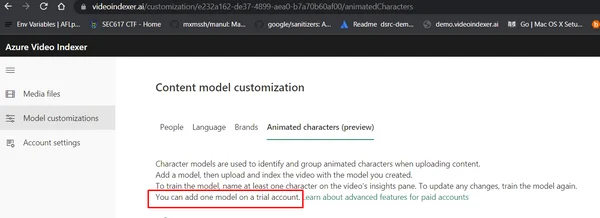
Adding a model showed that the validation restricting trial users to one model was implemented on both the client side and the server side.
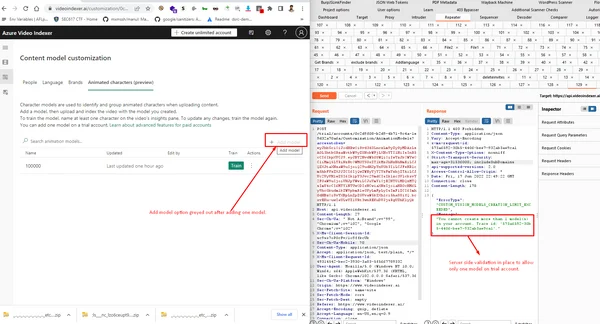
The question then became whether the server-side check could be raced.
Exploitation
Step 1: Log in with a trial account
Log in to Videoindexer.ai using any trial account.
Step 2: Open the feature
Navigate to the left tab Model customizations -> Animated Characters.
Step 3: Confirm the stated limit
The page states that only one model can be added on a trial account.
Step 4: Confirm server-side enforcement
Add a model and observe that the one-model validation is enforced on the client as well as the server side. This rules out a simple client-side bypass.
Step 5: Reset to a clean state
Start fresh by deleting the existing model from the trial account. Navigate again to Model customizations -> Animated Characters -> Add Model.
Step 6: Capture the creation request
Enable a proxy tool in the browser, enter a model name, and intercept the POST request. Send it to Burp Intruder and drop the original request.
POST /trial/accounts/0c2d9f08-b2d9-4b71-9c4a-1e9d32a70a6a/Customization/AnimationModels HTTP/1.1
Host: api.videoindexer.ai
Content-Length: 27
Sec-Ch-Ua: " Not A;Brand";v="99", "Chromium";v="102", "Google Chrome";v="102"
X-Ms-Client-Session-Id: sc9sx7oP0cFv/1o9ffkcUk
Sec-Ch-Ua-Mobile: ?0
Content-Type: application/json
Accept: application/json, text/plain, */*
X-Ms-Client-Request-Id: 49314542-bec2-3930-3a83-5f5667789332
User-Agent: Mozilla/5.0 (Windows NT 10.0; Win64; x64) AppleWebKit/537.36 (KHTML, like Gecko) Chrome/[redacted] Safari/537.36
Sec-Ch-Ua-Platform: "Windows"
Origin: https://www.videoindexer.ai
Sec-Fetch-Site: same-site
Sec-Fetch-Mode: cors
Sec-Fetch-Dest: empty
Referer: https://www.videoindexer.ai/
Accept-Encoding: gzip, deflate
Accept-Language: en-US,en;q=0.9
Connection: close

{"name":"Imfirstmodel"}
The path carries the account identifier and the Customization/AnimationModels resource; the JSON body carries only the model name. The affected URL carries an accesstoken query parameter.
Step 6 (as numbered in the report): Configure the concurrent replay
Configure Burp Intruder with the maximum concurrent requests set to 300, 500 or 600. Place the payload position on the value of the name parameter, which is Imfirstmodel in the example, so that the payload is repeated into the name (for example ImfirstmodelImfirstmodelImfirstmodel). In the payloads option any type can be used, numeric or alphanumeric. For testing purposes, send 500 to 1000 names concurrently, numeric or alphanumeric.
Step 7: Observe the result
The researcher's explanation is that the threads use the same shared memory to update the values of variables on the server side, so the concurrent requests bypass the security mechanism and authorisation in place through the race condition, and N models are added to a trial account.
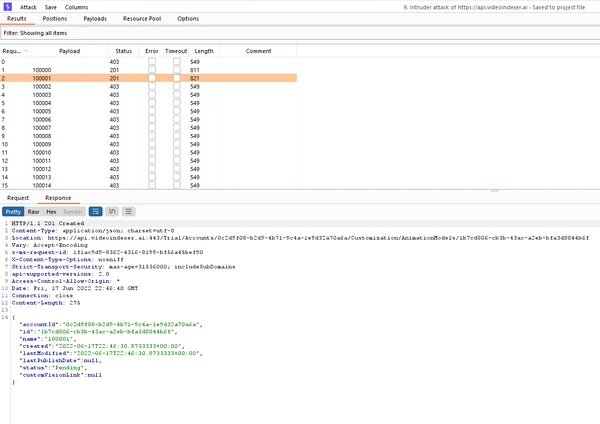
The Intruder results show many 201 responses, proving N model creations in a trial account while bypassing the business logic that restricts trial users.
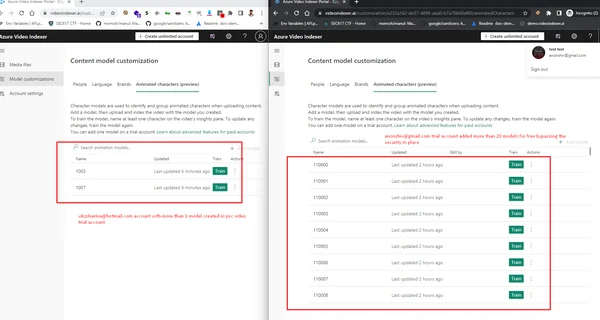
The trial account then holds many models at once, which the interface was never meant to allow.
Root cause
The report attributes the bypass to threads sharing memory to update variable values on the server side. When many creation requests arrive at the same time, they can all pass the check before any of them has committed its insert, so the limit is exceeded. The report describes this as threads sharing memory to update variable values on the server side. The client-side validation is irrelevant here because the server-side check exists; the weakness is that the server-side check is not atomic with respect to the write.
Impact
A trial user can add N models to a free trial account, using an advanced paid feature of Azure as described in the documentation. The report rates the risk as High / Important with Medium difficulty to exploit, and lists financial and reputational loss as the consequences. The condition is a trial account and the ability to send concurrent requests to the creation endpoint; no other privilege is needed.
Fix
The report records that the issue was confirmed on Aug 22, 2022 and changed to Develop status, with a fix and HOF in September, 2022. It does not describe the change itself.
Variants to test
- Other per-account quotas. Any feature with a "one per account" or "N per account" limit enforced by a read-then-write check is a candidate. A positive result is several
201responses beyond the stated limit for a single account. - Different concurrency levels. The report suggests setting 300, 500 or 600 concurrent requests and sending 500 to 1000 payloads. Try a range of concurrency settings; a positive result is a burst of successful creations rather than a single success followed by rejections.
- Numeric and alphanumeric payloads. The report says any payload type, numeric or alphanumeric, can be set. A positive result is the same pattern of many
201responses regardless of payload type. - Delete-then-recreate sequences. The report resets to a clean state by deleting the existing model before racing. Try the same reset on other quota-bound resources; a positive result is the quota being exceeded after the reset.
- Client and server validation together. Where a limit is enforced on both sides, confirm the server side is the one being raced, as the researcher did in Step 4. A positive result is that the client check is irrelevant and the server still accepts the excess creations.
What happened, in plain words
Azure Video Indexer is a Microsoft service that analyses videos. One of its features, called "Animated Characters", helps customers find and group animated characters in videos. Using that feature at full strength is a paid capability. A free trial account is allowed only one model, which is the saved setup that tells the service which characters to look for.
The one-model limit could be got around. The answer was yes. By sending many requests to create a model at almost exactly the same moment, a trial user could end up with many models instead of one, getting the paid behaviour without paying.
The kind of flaw is called a race condition. The everyday comparison is a checkout till with one cashier. The cashier checks the shelf, sees one item left, and walks over to fetch it. If two customers are served by two cashiers who both look at the shelf at the same moment, both see one item and both promise it to their customer. The check and the action were not done as one indivisible step. Here the server checks "does this account already have a model?" and then creates a new one. If many requests all do the check before any of them finishes creating, they all pass.

The pieces you need to understand first
Before the steps make sense, a few everyday ideas.
- A web page and an API. When you use a website, your browser shows you pages, but behind the scenes it also talks to a server through addresses called APIs. An API is like a restaurant menu and waiter: you do not walk into the kitchen, you ask for a specific dish by name and the kitchen prepares it. Here the dish is "create an animation model".
- A request. Every time your browser asks the server to do something, it sends a request. A request has a method (a verb such as GET to read or POST to create), a path (which thing you are acting on), headers (extra labels and information) and sometimes a body (the data you are sending).
- A token. A token is like a cloakroom ticket. When you log in, the server gives your browser a ticket, and you show that ticket with every later request so the server knows who you are. Without it, the server treats you as a stranger. In this report the ticket is called an access token and it travels in the address as
accesstoken. - A proxy. A proxy is a middleman that sits between your browser and the server. A tool like Burp Suite or mitmproxy lets you see each request, stop it before it leaves, change it, and send it again. It is like intercepting a letter, reading it, and posting copies.
- Burp Intruder. Intruder is a part of Burp Suite that takes one captured request and sends it many times, very fast, optionally changing one value each time. It is the tool used to make the requests arrive together.
- A status code. The server answers each request with a number.
201means "created": the server accepted the request and made a new thing. Seeing many201answers is proof that many things were created. - Client side and server side. The client is your browser; the server is the machine in the cloud. A check done in the browser (client side) can be bypassed by anyone who controls the browser. A check done on the server (server side) is the real defence. This report matters because the server check existed and was still beaten.
The address that was affected
The report names this address as the one involved:
https://api.videoindexer.ai/trial/accounts/$ACCOUNT_ID/Customization/AnimationModels?accesstoken=
Reading it from left to right: https:// means a secure web connection; api.videoindexer.ai is the server that handles program-style requests for Video Indexer; /trial/accounts/ says this is about a trial account; $ACCOUNT_ID is a placeholder for the unique identifier of the account; /Customization/AnimationModels is the resource that holds the animation models; and ?accesstoken= is where the cloakroom ticket goes.
What you need before starting
- A free trial account on Videoindexer.ai. The report uses an example account,
[redacted]. - A proxy tool set up in your browser so you can intercept and resend requests. The report names Burp Suite and mitmproxy, and uses Burp Intruder for the fast repeated sending.
- Nothing else. No special role, no administrator rights. A plain trial account is enough.
The starting condition is a trial account with no animation model, achieved in the report by deleting the existing one.
Finding the weakness
The researcher logged in with the trial account and opened the left-hand tab Model customizations -> Animated Characters. The page says plainly: "You can add one model on a trial account".
Next, adding a model showed that the one-model rule was enforced in two places: in the browser (client side) and on the server (server side). This is the important observation. If the rule lived only in the browser, anyone could ignore it by sending requests directly. The server also enforced the limit.
So the question became: can the server check be raced?
Doing it, step by step
Step 1: Log in with a trial account
Log in to Videoindexer.ai with any trial account. This gives your browser the access token it needs for later requests.
Step 2: Open the feature
Go to the left tab Model customizations -> Animated Characters. This is where models are listed and created.
Step 3: Confirm the stated limit
The page tells you that only one model can be added on a trial account. This is the rule you are testing.
Step 4: Confirm the server enforces it
Add a model and watch the behaviour. The one-model validation is enforced on the client as well as the server side. The purpose of this step is to rule out the easy explanation: you are not just beating a browser check, the server itself refuses a second model.
Step 5: Start from a clean state
Delete the existing model from the trial account, then go back to Model customizations -> Animated Characters -> Add Model. Why delete first? Because the limit is about how many models exist. Starting with zero means the next creation is the one that should be allowed, and any extra creations beyond it are the proof of the flaw.
Step 6: Capture the creation request
Turn on your proxy tool in the browser, type a model name, and intercept the POST request that the page sends. Send that request to Burp Intruder and drop the original, so the browser's own request never reaches the server and you control what is sent.
POST /trial/accounts/0c2d9f08-b2d9-4b71-9c4a-1e9d32a70a6a/Customization/AnimationModels HTTP/1.1
Host: api.videoindexer.ai
Content-Length: 27
Sec-Ch-Ua: " Not A;Brand";v="99", "Chromium";v="102", "Google Chrome";v="102"
X-Ms-Client-Session-Id: sc9sx7oP0cFv/1o9ffkcUk
Sec-Ch-Ua-Mobile: ?0
Content-Type: application/json
Accept: application/json, text/plain, */*
X-Ms-Client-Request-Id: 49314542-bec2-3930-3a83-5f5667789332
User-Agent: Mozilla/5.0 (Windows NT 10.0; Win64; x64) AppleWebKit/537.36 (KHTML, like Gecko) Chrome/[redacted] Safari/537.36
Sec-Ch-Ua-Platform: "Windows"
Origin: https://www.videoindexer.ai
Sec-Fetch-Site: same-site
Sec-Fetch-Mode: cors
Sec-Fetch-Dest: empty
Referer: https://www.videoindexer.ai/
Accept-Encoding: gzip, deflate
Accept-Language: en-US,en;q=0.9
Connection: close

{"name":"Imfirstmodel"}
Line by line, in plain words:
POST /trial/accounts/0c2d9f08-b2d9-4b71-9c4a-1e9d32a70a6a/Customization/AnimationModels HTTP/1.1is the request line. POST means "create something". The path says which account and which kind of thing: an animation model.HTTP/1.1is the version of the language being spoken.Host: api.videoindexer.aitells the server which site the request is for. One server can host many sites, so this is the address label.Content-Length: 27says how many bytes long the body is, so the server knows where the body ends.- The
Sec-Ch-Ua,Sec-Ch-Ua-MobileandSec-Ch-Ua-Platformlines describe the browser and operating system. They are labels the browser normally adds. X-Ms-Client-Session-Idis an identifier for the browser session. It is a value the page generated, not a password.Content-Type: application/jsonsays the body is written in JSON, a simple text format for structured data.Accept: application/json, text/plain, */*says which answer formats the client can understand.X-Ms-Client-Request-Idis a unique label for this one request, useful for tracing it in logs.User-Agentdescribes the browser and version that made the request.Origin: https://www.videoindexer.aisays which site the request came from. Servers use this for cross-site checks.Sec-Fetch-Site,Sec-Fetch-ModeandSec-Fetch-Destare extra labels the browser adds about the kind of request.Referersays which page you were on when the request was made.Accept-Encoding,Accept-LanguageandConnectiondescribe compression, language preference and whether to keep the connection open.- The blank line separates headers from body.
{"name":"Imfirstmodel"}is the body: a JSON object with one field, the model name. That is all the server needs to create a model.
The account identifier is in the path, and the affected URL carries an accesstoken query parameter. Without that token the server would not know whose account to create the model in.
Step 6 again, as numbered in the report: set up the fast repeated sending
Configure Burp Intruder with the maximum number of concurrent requests set to 300, 500 or 600. "Concurrent" means in flight at the same time, not one after another. Put the payload position on the value of the name field, which is Imfirstmodel in the example, so the payload is repeated into the name, for example ImfirstmodelImfirstmodelImfirstmodel. In the payloads option you can use any type, numeric or alphanumeric. For testing, send 500 to 1000 names concurrently, numeric or alphanumeric.
The point is to make many genuinely different creations arrive together.
Step 7: Watch the result
The researcher's explanation is that the threads use the same shared memory to update the values of variables on the server side. In everyday terms, several workers are looking at the same notebook at once, all read "zero models so far", and all write their own new model before anyone updates the count. That is how the concurrent requests bypass the security mechanism and authorisation in place, and N models end up in a trial account.
The Intruder results show many 201 responses. Each 201 means the server created a model. Many of them prove N model creations in a trial account, bypassing the business logic that restricts trial users.
The trial account then holds many models at once, which the interface was never meant to allow.
Why it works
The report attributes the bypass to threads sharing memory to update variable values on the server side. When many creation requests arrive at the same time, they can all pass the check before any of them has committed its insert, so the limit is exceeded. The report describes this as threads sharing memory to update variable values on the server side. The browser-side validation is irrelevant here because the server-side check exists; the weakness is that the server-side check is not atomic with respect to the write. "Atomic" means all-or-nothing, as one indivisible step.
What the impact is
A trial user can add N models to a free trial account, using an advanced paid feature of Azure as described in the documentation. The report rates the risk as High / Important with Medium difficulty to exploit, and lists financial and reputational loss as the consequences. The only conditions are a trial account and the ability to send concurrent requests to the creation endpoint; no other privilege is needed.
How it was fixed
The report records that the issue was confirmed on Aug 22, 2022 and changed to Develop status, with a fix and HOF in September, 2022. It does not describe the change itself.
Other places to look for the same pattern
- Other per-account quotas. Any feature with a "one per account" or "N per account" limit enforced by a read-then-write check is a candidate. A positive result is several
201responses beyond the stated limit for a single account. - Different concurrency levels. The report suggests setting 300, 500 or 600 concurrent requests and sending 500 to 1000 payloads. Try a range of concurrency settings; a positive result is a burst of successful creations rather than a single success followed by rejections.
- Numeric and alphanumeric payloads. The report says any payload type, numeric or alphanumeric, can be set. A positive result is the same pattern of many
201responses regardless of payload type. - Delete-then-recreate sequences. The report resets to a clean state by deleting the existing model before racing. Try the same reset on other quota-bound resources; a positive result is the quota being exceeded after the reset.
- Client and server validation together. Where a limit is enforced on both sides, confirm the server side is the one being raced, as the researcher did in Step 4. A positive result is that the client check is irrelevant and the server still accepts the excess creations.
Glossary
- API: the set of addresses a program uses to ask a server to do things, like a menu you order from.
- Access token: a ticket proving who you are, sent with requests after you log in.
- Animated Characters: the Video Indexer feature that finds and groups animated characters in videos.
- Atomic: done as one indivisible step, all or nothing, so nothing can slip in halfway.
- Body: the part of a request that carries data, such as the model name.
- Burp Intruder: the part of Burp Suite that resends one request many times, optionally changing a value each time.
- Burp Suite: a proxy tool for viewing, stopping and changing web requests.
- Client side: work done in your browser, which you control and can bypass.
- Concurrent: happening at the same time rather than one after another.
- Content-Type: a header saying what format the body is in, such as JSON.
- Endpoint: a specific address on a server that performs a specific action.
- Header: extra labelled information attached to a request, such as the browser type or the content format.
- HOF: the report's shorthand for a hall of fame listing, a public credit for a reported issue.
- HTTP: the language browsers and servers use to exchange requests and answers.
- JSON: a simple text format for structured data, using curly braces and quoted names.
- mitmproxy: another proxy tool, like Burp Suite, that sits between browser and server.
- Model: a saved setup telling the service which animated characters to look for.
- Origin: a header saying which site a request came from.
- POST: the request method meaning "create something".
- Proxy: a middleman between your browser and the server that lets you read and change requests.
- Race condition: a flaw where two actions happening at the same moment both pass a check that only one should pass.
- Request: a message your browser sends to a server asking it to do something.
- Server side: work done on the remote machine, which users cannot directly change.
- Status code: the number in the server's answer, such as
201for created. - Thread: one worker inside a program; several threads can run at the same time.
- Transaction: a group of database actions that succeed or fail together as one unit.
- Trial account: a free account with limits, here one animation model.
- User-Agent: a header describing the browser and operating system that made the request.