Clipchamp ( Microsoft Office Product) - Google IAP Authorization bypass allowed access to Internal Environment Leading to Zero Interaction Account takeover
API endpoints on Clipchamp's internal environments lacked back-end authorization checks, allowing an attacker to bypass Google IAP and obtain JWT tokens for any user, including internal employees. This enabled zero-interaction account takeover and access to sensitive data.
 Published on blog.agilehunt.com
During an in-depth security analysis of Clipchamp, Agilehunt identified a critical flaw that allowed attackers to bypass Google IAP authorization, granting unauthorized access to Clipchamp’s internal/test/smoke/beta environments.
The full write-up lives on its author's site
It belongs to its author, so we link to it rather than copy it. The other two tabs are our own rewrites, checked against it.
Context
Clipchamp is a Microsoft Office product. Its non-production environments, smoke, beta, test and demo, sit behind Google Identity-Aware Proxy (IAP), which is meant to restrict them to Clipchamp or Microsoft employees. The affected hosts listed in the report are:
app.smoke.clipchamp.comapp.beta.clipchamp.comapp.test.clipchamp.comapp.demo.clipchamp.com
Google IAP normally intercepts every request to these hosts and forces an interactive Google login, rejecting accounts outside the authorised organisation. The report's finding is that the API endpoints behind that proxy did not perform their own back-end authorisation checks, so the IAP gate could be stepped around and the API reached directly.
Setup
The researcher, Vikas Anil Sharma of Agilehunt, worked against the smoke environment, using https://app.smoke.clipchamp.com/ as the example host. No special accounts, tools or versions are described. The only precondition is network access to the affected hosts and knowledge of an email address belonging to a target user on the ClipChamp platform. The report rates the risk as Critical and the difficulty to exploit as Easy.
Finding it
Browsing to any of the affected URLs redirects to the Google IAP login. Supplying random credentials produces the block page: "Access blocked: Clipchamp Smoke can only be used within its organisation".
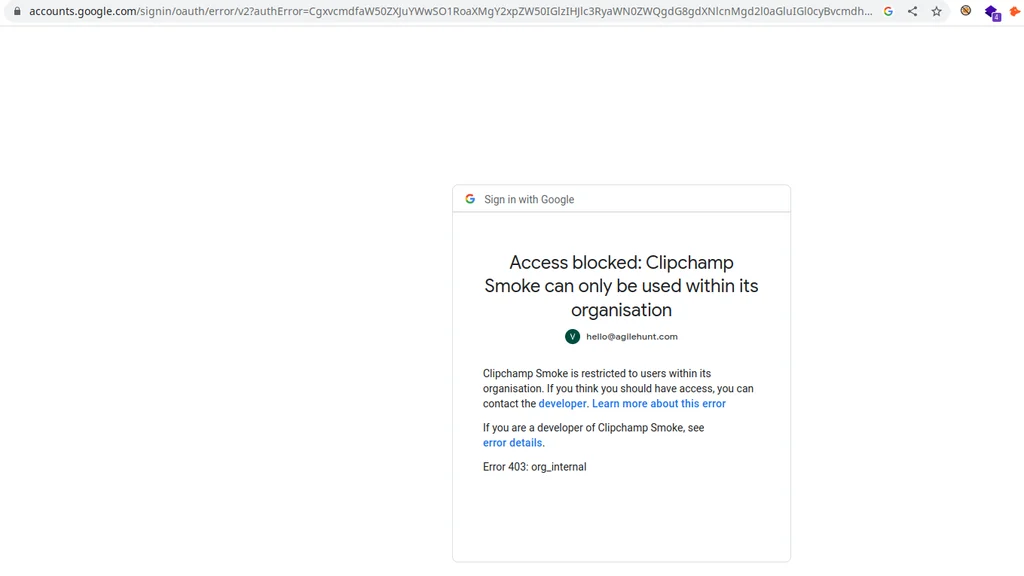
That page is the expected behaviour of IAP. What the researcher found was that the API endpoints behind the proxy could be called without passing through it, and that they returned JWT tokens for arbitrary users in their responses. The proxy was enforcing authentication at the front door, but the back end was not checking who was calling it.
Exploitation
Step 1: confirm the IAP gate
Navigate to one of the affected URLs, for example https://app.smoke.clipchamp.com/. The browser is redirected to the Google IAP login, and any random credentials give the "Access blocked" screen shown above. This establishes that the interactive path is protected.
Step 2: request a JWT for a victim email
Send a POST request with the email address of the user whose account you want, for example [redacted].
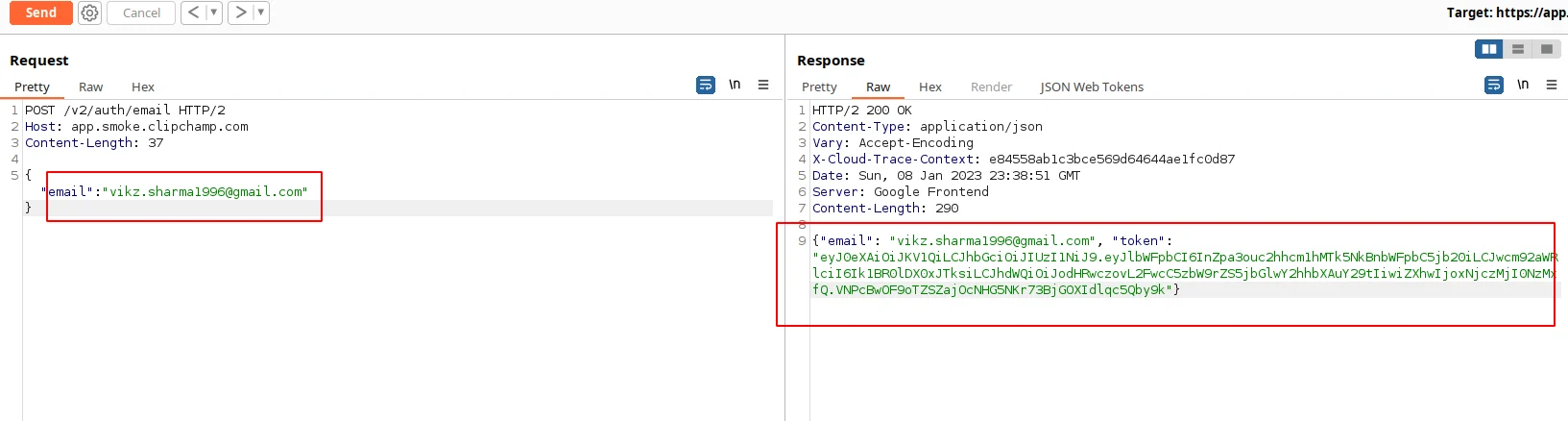
The response contains a JWT token for that user. The researcher describes this as bypassing the Google IAP authorisation: the internal environment leaks a JWT token for any user directly in the response.
Step 3: exchange the token for the master authorisation token
Take the JWT from Step 2 and pass it as the value of the code parameter in the request below.
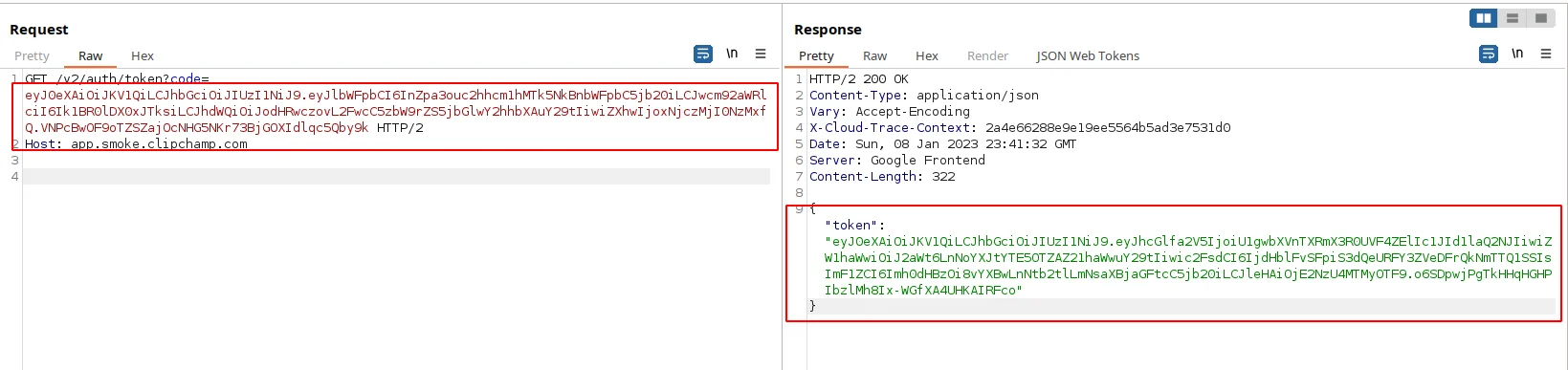
The response contains the master authorisation JWT for the victim account ([redacted]). This token works platform-wide and gives access to all API endpoints of Clipchamp, including /v2/user/, /v2/user/workspaces, projects and PII data.
Step 4: verify the token
Send the request below to confirm that the JWT obtained for the requested user is valid.
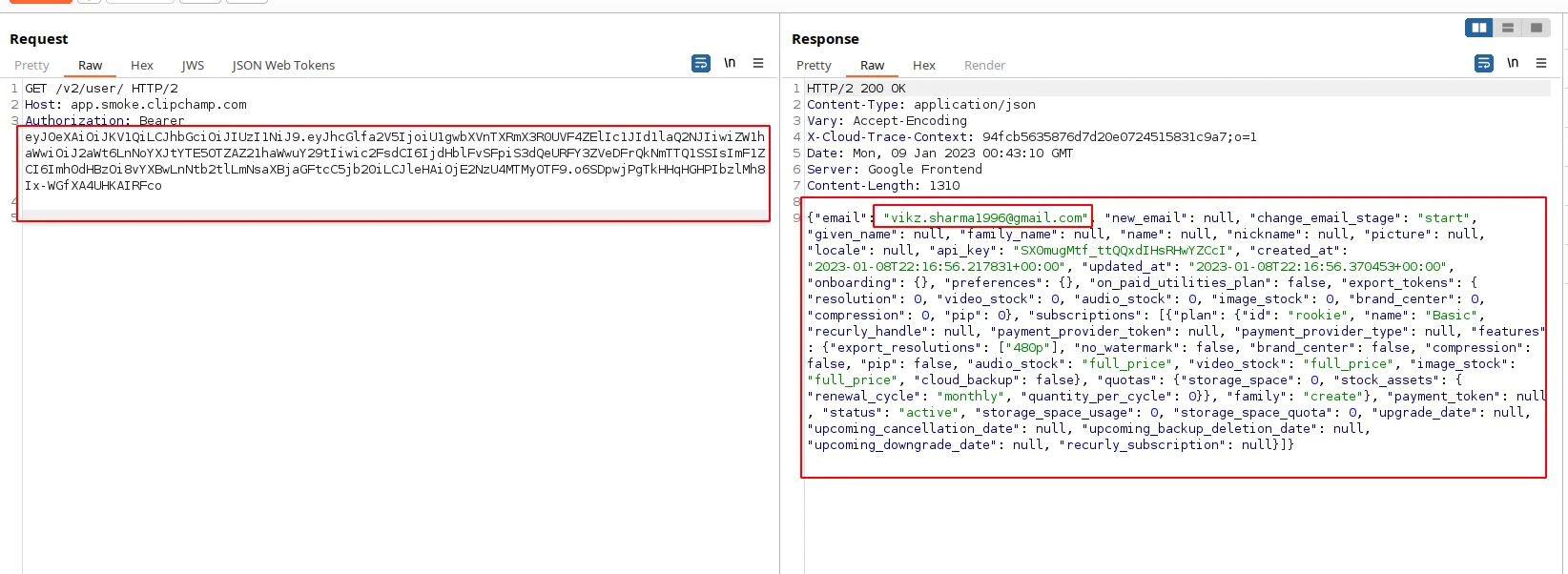
The response reveals all the details about the victim user.
Step 5: find an internal employee address
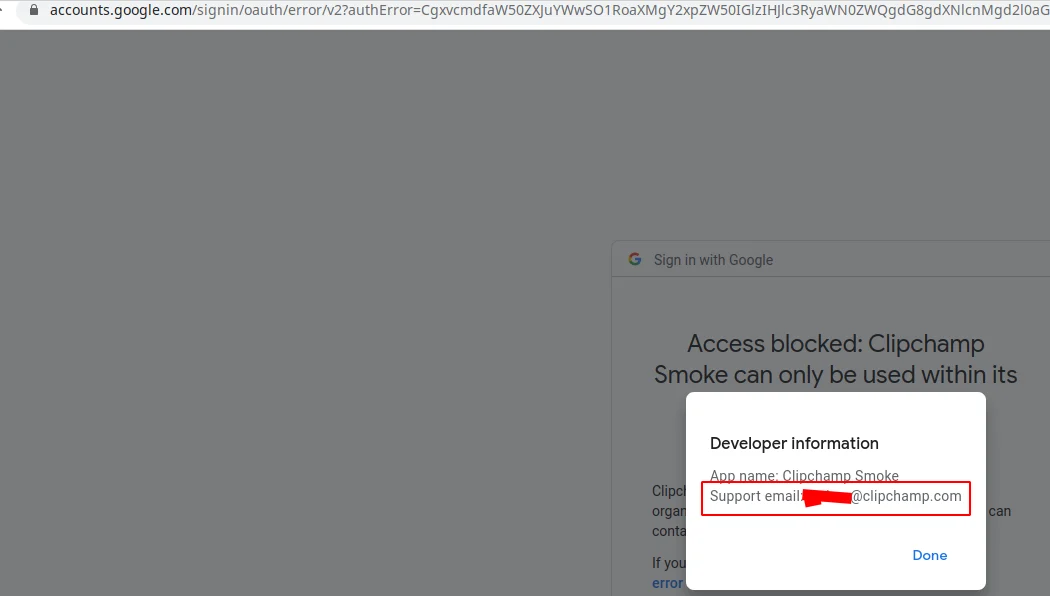
The Google IAP block page has a "Contact the Developer" button. Clicking it reveals the email address of a potential ClipChamp or Microsoft employee, given in the report as [redacted], described as an employee of Microsoft.
Step 6: request a token for the internal employee
Repeat Step 2, this time using the internal employee's address, [redacted], as the email parameter value.
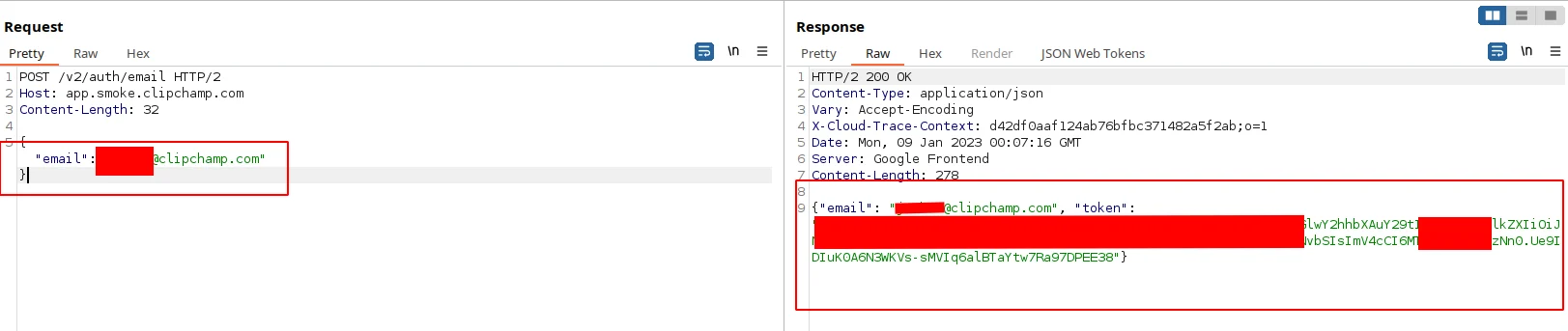
The response contains the magic login link JWT token for that potential Microsoft employee.
Step 7: exchange the employee token
Repeat Step 3, passing the JWT from Step 6, the token of an internal Microsoft employee, as the code parameter.

The response contains the master authorisation JWT for the victim account, in this case a Microsoft employee ([redacted]). As with the earlier account, it works platform-wide against all accessible endpoints: /v2/user/, /v2/user/workspaces, projects, PII data, add email, change email and other actions.
Step 8: validate against the internal platform
Send the request below with the Authorization: Bearer JWT received above.

The response returns information about an existing internal user, a potential Microsoft employee, through the internal platform. The account's created_at value is 2021-09-17T02:28:25.359582+00:00, which shows it was an existing account rather than one created by the test.
Root cause
The environments were protected by Google IAP, but the API endpoints lacked sufficient back-end authorisation checks. IAP authenticated the interactive user at the edge, but the API endpoints behind it did not perform their own back-end authorisation checks. Because those endpoints returned JWTs for arbitrary email addresses, and a second endpoint exchanged those tokens for a master authorisation token, the missing check turned into account takeover for any user whose email was known. The report does not describe the server-side code or the exact mechanism.
Impact
The report lists three consequences:
- Unauthorised actions or access to sensitive data within the vulnerable application or other connected systems.
- Access to internal user data, including confidential information, leading to financial and reputational damage.
- Potential further abuse to access accounts with premium features, causing significant financial loss.
The researcher calls it zero interaction account takeover. It applies to ordinary users and to internal Microsoft employees, and the employee account used in the test was pre-existing. The report does not give a bounty amount or a CVSS score.
Fix
The report's recommendation is to implement strict authorisation checks so that external access to internal networks and platforms is prevented completely. The timeline records the case opened on 9 January 2023, moved to Develop (fixing) the same day, an out of scope email on 20 January 2023, and the issue fixed and listed on the acknowledgement page on 7 March 2023.
Variants to test
- A positive result is any response carrying user data or tokens without an IAP session.
- A positive result is a token issued for an address you do not control.
- A positive result is a master token usable against other endpoints.
- A positive result is a real internal address that can be fed back into the token endpoints.
- A positive result is profile or PII data for an account you do not own.
What happened, in plain words
Clipchamp is a video editing product made by Microsoft. Like most large software companies, it runs several copies of its website: the normal public one that anyone can use, and private copies used for testing before changes go live. The report calls these private copies the smoke, beta, test and demo environments. Think of them as rehearsal rooms: the same show, but not open to the public.
To keep those rehearsal rooms private, Microsoft put a guard at the door called Google Identity-Aware Proxy, or Google IAP for short. An identity-aware proxy is a service that sits in front of a website and checks who you are before letting your request reach the site behind it. If you are not a Clipchamp or Microsoft employee, it turns you away. That is exactly what happened when the researcher tried to open the private site in a browser.
The problem was that the guard only stood at the front door. The website behind it also has an API: a set of addresses that programs (and the website's own pages) use to fetch and change data, rather than showing you a web page. The API endpoints did not check for themselves who was calling. Worse, one of them handed out a login token for any email address you asked for, and another turned that token into a full master token for the account. A token is a short piece of text that proves you are logged in, a bit like a wristband at an event: show it and you are let in without showing your ticket again. Because the API returned a token for an email address supplied in the request, an attacker could obtain a token for that address. The researcher calls this zero interaction account takeover, because the victim does nothing and is not even asked to click anything.
The researcher, Vikas Anil Sharma of Agilehunt, rated the risk as Critical and the difficulty to exploit as Easy. The report does not give a bounty amount or a CVSS score.
The affected addresses
The report lists four hosts, all private copies of the Clipchamp app:
app.smoke.clipchamp.comapp.beta.clipchamp.comapp.test.clipchamp.comapp.demo.clipchamp.com
A host is simply a name on the internet that points to a server, the part you type in the address bar. The researcher used the smoke one, https://app.smoke.clipchamp.com/, as the example throughout.
What you need before starting
The report describes no special accounts, tools or software versions. The only things needed are:
- A normal internet connection that can reach the affected hosts.
- The email address of the user whose account you want to reach on the ClipChamp platform.
A tool that can send HTTP requests is used in the steps. HTTP is the language browsers and servers speak to each other; a POST request is one kind of message, used to send data to the server (as opposed to simply asking for a page). What each step does is described in words around the screenshots, and that is what follows.
Step 1: confirm the front door is locked
Open one of the affected addresses in a browser, for example https://app.smoke.clipchamp.com/. The browser is redirected to the Google IAP login page. Typing any random credentials gives a block screen reading:
Access blocked: Clipchamp Smoke can only be used within its organisation
This step exists to show the normal, expected behaviour: the interactive path, the one a person uses in a browser, is protected. The screenshot shows that block page. The researcher needed this baseline so that the next steps could demonstrate that the protection could be stepped around.
Step 2: ask the API for a token for a chosen email
Send a POST request to the API with the email address of the user whose account you want, for example [redacted].
The screenshot shows the request being sent with that email as a parameter value. A parameter is a named piece of data in a request, like a field on a form: here, the field is the email address.
The response comes back containing a JWT token for that user. JWT stands for JSON Web Token: a compact, signed piece of text that a server can later check to decide who you are and what you may do. The researcher describes this as bypassing the Google IAP authorisation, because the internal environment leaked a token for any user directly in its response, without the caller ever passing the IAP login.
Why this matters: normally a server should only give you a token for your own account, after you have proved who you are. Here it gave one for an address the caller merely typed in.
Step 3: swap that token for the master token
Take the JWT received in Step 2 and pass it as the value of the code parameter in the request below, then send it.
The screenshot shows the token placed into the code field. The response contains the master authorisation JWT for the victim account ([redacted]). A master authorisation token is the broadest kind of token: it works platform-wide, not just for one page or one action. With it, the researcher could reach all API endpoints of Clipchamp, including /v2/user/, /v2/user/workspaces, projects and PII data. An endpoint is one specific address in an API that performs one job, such as returning a user's profile. PII means personally identifiable information: data that identifies a real person, such as a name, email address or phone number.
Why this step exists: the first token was a stepping stone. The second request turned it into the token that actually opens the account.
Step 4: check the token really works
Send the request below to confirm that the JWT obtained for the requested user is valid.
The screenshot shows the verification request. The response reveals all the details about the victim user. This step is a sanity check: before claiming an account takeover, the researcher proved the token was accepted and returned real account data.
Step 5: find an internal employee's email address
To show the impact went beyond ordinary users, the researcher wanted to prove that an internal employee account could be reached too. The Google IAP block page has a "Contact the Developer" button. Clicking it reveals the email address of a potential ClipChamp or Microsoft employee, given in the report as [redacted] and described as an employee of Microsoft.
The screenshot shows that contact address on the block page. The point is that the guard's own error page handed out a real internal address, which could then be fed back into the token endpoints from Steps 2 and 3.
Step 6: ask for a token for the employee
Repeat Step 2, this time using the internal employee's address, [redacted], as the email parameter value.
The screenshot shows the same kind of request as before, with the employee's address in place of the ordinary user's. The response contains the magic login link JWT token for that potential Microsoft employee. A magic login link is a link that logs you in without a password; the token behind it is just as powerful as a password.
Step 7: swap the employee token for the master token
Repeat Step 3, passing the JWT from Step 6, the token of an internal Microsoft employee, as the code parameter.
The screenshot shows the employee's token placed into the code field. The response contains the master authorisation JWT for the victim account, in this case a Microsoft employee ([redacted]). As with the earlier account, it works platform-wide against all accessible endpoints: /v2/user/, /v2/user/workspaces, projects, PII data, add email, change email and other actions. "Add email" and "change email" mean the attacker could attach a new address to the account or replace the existing one, which is a way to keep access even after a password reset.
Step 8: use the token against the internal platform
Send the request below with the Authorization: Bearer JWT received above.
The screenshot shows the request carrying the token in an Authorization: Bearer header. A header is extra information attached to a request, like the label on a parcel; Authorization: Bearer is the standard way of saying "here is my token, please treat me as the person it belongs to".
The response returns information about an existing internal user, a potential Microsoft employee, through the internal platform. The account's created_at value is 2021-09-17T02:28:25.359582+00:00, which shows it was an existing account rather than one created by the test. In other words, the researcher was reading a real employee's record, not a dummy account set up for the experiment.
Why it worked
The environments were protected by Google IAP, but the API endpoints lacked sufficient back-end authorisation checks. IAP checked the interactive user at the edge, but the API endpoints behind it did not perform their own back-end authorisation checks. Because those endpoints returned JWTs for arbitrary email addresses, and a second endpoint exchanged those tokens for a master authorisation token, the missing check turned into account takeover for any user whose email was known. The report does not describe the server-side code or the exact mechanism. A trust boundary is simply the line where one part of a system stops checking and assumes another part has already done so.
Impact
The report lists three consequences:
- Unauthorised actions or access to sensitive data within the vulnerable application or other connected systems.
- Access to internal user data, including confidential information, leading to financial and reputational damage.
- Potential further abuse to access accounts with premium features, causing significant financial loss.
The researcher calls it zero interaction account takeover. It applies to ordinary users and to internal Microsoft employees, and the employee account used in the test was pre-existing.
The fix
The report's recommendation is to implement strict authorisation checks so that external access to internal networks and platforms is prevented completely. In plain terms: the API should check for itself who is calling, instead of assuming that anyone who reached it has already passed the guard.
The timeline records the case opened on 9 January 2023, moved to Develop (fixing) the same day, an out of scope email on 20 January 2023, and the issue fixed and listed on the acknowledgement page on 7 March 2023.
Things worth trying elsewhere
- Call API hosts behind an identity-aware proxy directly, bypassing the proxy hostname. A positive result is any response carrying user data or tokens without an IAP session.
- Look for endpoints that accept an email or identifier and return a token or login link. A positive result is a token issued for an address you do not control.
- Look for a token exchange endpoint that takes a
codeparameter and returns a broader session token. A positive result is a master token usable against other endpoints. - Check the proxy's block page for a "Contact the Developer" link. A positive result is a real internal address that can be fed back into the token endpoints.
- Replay the resulting bearer token against user, workspace and project endpoints. A positive result is profile or PII data for an account you do not own.
Glossary
- API: a set of addresses a program uses to read or change data on a server, as opposed to pages meant for a human to look at.
- API endpoint: one specific address in an API that performs one job, such as returning a user's profile.
- Authentication: proving who you are, for example by logging in.
- Authorisation: deciding what a proven user is allowed to do.
- Authorization: Bearer: a request header that carries a token, telling the server to treat the caller as the person the token belongs to.
- Back-end: the server-side part of a system that stores and processes data, out of sight of the browser.
- Beta / smoke / test / demo environment: private copies of a product used for testing before changes reach the public version.
- Block page: the page a proxy shows when it refuses to let you through.
- Clipchamp: a video editing product made by Microsoft.
- Code parameter: a named field in a request, here used to carry a token to be exchanged.
- created_at: a field recording when an account was created.
- CVSS: a standard scoring system for the severity of a security flaw.
- Email parameter: a named field in a request carrying an email address.
- Endpoint: see API endpoint.
- Header: extra information attached to an HTTP request or response, such as an authorisation token.
- Host: a name on the internet that points to a server, the part you type in the address bar.
- HTTP: the language browsers and servers use to exchange requests and responses.
- Identity-aware proxy (IAP): a service that sits in front of a website and checks who you are before letting your request reach it.
- JWT (JSON Web Token): a compact, signed piece of text a server can check to decide who you are and what you may do.
- Magic login link: a link that logs you in without a password.
- Master authorisation token: the broadest kind of token, accepted across a whole platform rather than for one action.
- Parameter: a named piece of data in a request, like a field on a form.
- PII (personally identifiable information): data that identifies a real person, such as a name, email address or phone number.
- POST request: an HTTP message used to send data to a server.
- Premium features: paid capabilities of an account.
- Proxy: a service that stands between you and a server and forwards your requests, often applying checks on the way.
- Redirect: the server telling the browser to go to a different address.
- Token: a short piece of text that proves you are logged in, like a wristband at an event.
- Trust boundary: the line where one part of a system stops checking and assumes another part has already done so.
- Zero interaction account takeover: taking over an account without the victim doing anything or being asked to click anything.