Privilege Escalation in Microsoft Teams
A user with Member privileges could send a crafted API request to invite new users to a Microsoft Teams team, bypassing the intended restriction that only Owners can add members. This allowed the Member to escalate their access to Owner-level functionality and add unauthorised users to the organisation.
 Published on blog.agilehunt.com
Don't leave your organization's security to chance. Contact us for a free consultation on how we can fortify your systems.
The full write-up lives on its author's site
It belongs to its author, so we link to it rather than copy it. The other two tabs are our own rewrites, checked against it.
Context
Microsoft Teams is a collaboration product used widely across organisations, and the feature at the centre of this write-up is membership management inside a team. A team has an Owner, who can add members and guests, and Members, who in the normal product experience cannot. The researcher's claim is that a Member could reach the Owner-only functionality of adding a new member to the team, and that this breaks the business logic of the application.
The write-up was produced by Vikas Anil Sharma (@vikzsharma) of Agilehunt during work under Microsoft's Bug Bounty program. The report rates the risk as High and the difficulty as Easy, and describes the severity as Critical / High depending on how much confidential data is shared in the platform.
Setup
The proof of concept needs two accounts and one role assignment:
- An Owner account, which has added
[redacted]to the team with the Member role. - A Member account,
[redacted], which logs in toteams.microsoft.com. - A third address,
[redacted], which is the user the Member will try to add. Its inbox is checked to see whether the invitation arrives.
The Member's browser session supplies the material used in the request: the current cookies, the X-Skypetoken value and the Authorization: Bearer value. The request body itself was originally captured from the Owner account, which is how the Member knows the shape of the Owner-only call.
Finding it
When the Member logs in to teams.microsoft.com, the researcher observed that Member role users did not have the option in the interface to add members or guests. The interface therefore hides the capability, and the question was whether the API call the Owner uses to add a user would still work for a Member.
The affected URL given in the report is:
https://teams.microsoft.com/api/mt/part/amer-02/beta/teams/19:[redacted]/ID/inviteAndAddUser
Exploitation
Step 1: Assign the Member role
The Owner adds [redacted] to the team with the Member role. This establishes the precondition: a real, low-privileged account inside the team.
Step 2: Confirm the UI restriction
The Member logs in to teams.microsoft.com. The researcher observed that Member role users did not have the option to add members or guests. This is the expected behaviour, and it is what makes the next step interesting.
Step 3: Replay the Owner's request with the Member's credentials
The Member copies their current cookies, X-Skypetoken and Authorization: Bearer value into the request that adds a new Member role user. That request was taken from the Owner account for proof-of-concept purposes. The result is the following PUT:
PUT /api/mt/part/amer-02/beta/teams/19:[redacted]/ID-c2a5c50/inviteAndAddUser HTTP/1.1
Host: teams.microsoft.com
Connection: close
Content-Length: 106
x-ms-scenario-id: 393
x-ms-user-type: user
X-Client-UI-Language: en-us
x-ms-client-env: pckgsvc-prod-c2-asse-02
x-ms-client-type: web
X-Skypetoken: < Member Role Skype Token >
Authorization: Bearer < Member Role Authentication Bearer >
Content-Type: application/json
Accept: application/json
User-Agent: Mozilla/5.0 (X11; Linux x86_64) AppleWebKit/537.36 (KHTML, like Gecko) Chrome/81.0.4044.138 Safari/537.36
x-ms-client-version: 1415/1.0.0.2020061225
X-RingOverride: general
ConsistencyLevel: Organization;ScenarioId=signup
Origin: https://teams.microsoft.com
Sec-Fetch-Site: same-origin
Sec-Fetch-Mode: cors
Sec-Fetch-Dest: empty
Accept-Encoding: gzip, deflate
Accept-Language: en-US,en;q=0.9
Cookie: Member Role Cookies

{
  "emailAddress": "[redacted]",
  "displayName": "User-Added-by-Member-Role",
  "userType": "Member"
}
The important parts are the path, which targets the inviteAndAddUser endpoint for a specific team thread, and the two credential headers, X-Skypetoken and Authorization: Bearer, which carry the Member's identity rather than the Owner's. The JSON body names the address to invite, [redacted], a display name of User-Added-by-Member-Role, and a userType of Member. The Origin header is https://teams.microsoft.com, matching the same-origin fetch mode declared in the request.
Step 4: Read the response
The server answers with a 404:
HTTP/1.1 404 Not Found
Cache-Control: no-cache, no-store
Content-Type: application/json; charset=utf-8
Vary: Origin,Accept-Encoding
Access-Control-Allow-Credentials: true
Access-Control-Allow-Origin: https://teams.microsoft.com
X-ServerRequestId: [redacted]
X-MachineName: mtsvc00000I
Strict-Transport-Security: max-age=31536000; includeSubDomains
X-MSEdge-Ref: Ref A: [redacted] Ref B: HYD30EDGE0111 Ref C: 2020-06-29T16:04:18Z
Date: Mon, 29 Jun 2020 16:04:19 GMT
Connection: close
Content-Length: 131

{
  "errorCode": "UserNotFoundInSkypeTeam",
  "message": "An unexpected error (Type = UserNotFoundInSkypeTeam) occurred. Please try again."
}
The body reports UserNotFoundInSkypeTeam with the message that an unexpected error of that type occurred and to try again. On its face this looks like a failure.
Step 5: Check the target inbox anyway
The researcher ignored the 404 and checked the inbox of [redacted]. The user had still received the invitation to join the Teams.
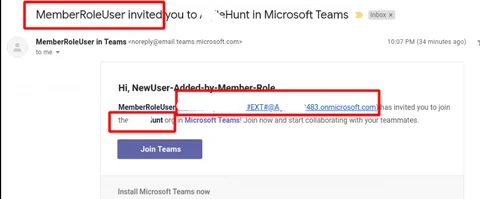
Step 6: Confirm the new user's access
The new user, invited by the Member role user, now has access to the Teams organisation without the Teams Owner's permission.
Root cause
The report does not describe the server-side code, so the mechanism can only be inferred. What the evidence shows is that the authorisation decision for inviteAndAddUser was not tied to the caller's role in the team: a request authenticated as a Member produced the same side effect as an Owner's request. The researcher observed that Member role users had no option to add members or guests in the interface.
The 404 with UserNotFoundInSkypeTeam is the second half of the problem. The invitation was delivered even though the response reported an error, so the response did not reflect the outcome. The response status and body did not reflect the outcome. The report does not say which of these is the case.
Impact
Using this vulnerability, a Member role user was able to escalate to the Owner-privileged functionality of adding new members to the Teams organisation. In the researcher's words this breaks the business logic of the application and allows anyone to see the organisational data in the Teams channels. The new user added this way gains access to the Teams organisation without the Owner's permission.
The severity is stated as Critical / High depending on what level of confidential data is being shared on the platform, because Member role users can add new members without the permission of the Teams organisation Owner.
Fix
Based on the finding, the fix would be to enforce the role check on the server for inviteAndAddUser, so that only an Owner (or whatever role the product intends) can add a member, regardless of what the client sends. The second fix is to make the response truthful: if the invitation is created, the call should not return a 404 with UserNotFoundInSkypeTeam, and if the call genuinely fails, no invitation should be sent.
Variants to test
- Other membership endpoints. Take any Owner-only call in a collaboration product (remove member, change role, add guest, create channel) and replay it with a Member's cookies,
X-Skypetokenand bearer token. A positive result is a state change visible to another account, not just a 200. - Error responses that hide success. Send an action request and then check the target's inbox, notifications or audit log even when the response is 4xx. A positive result is a side effect that the status code denies.
- Role downgrade after capture. Capture the request as an Owner, then perform it as a Member, as was done here. A positive result is the same effect with lower-privileged credentials.
userTypemanipulation. ChangeuserTypein the body fromMembertoGuestor another value and observe whether the server accepts it from a lower-privileged caller. A positive result is a user created with a type the caller should not be able to assign.- UI-only restrictions elsewhere. For each feature hidden from a role in the interface, look for the corresponding API call and try it directly. A positive result is any action the interface forbids but the API performs.
What happened, in plain words
Microsoft Teams is a chat and collaboration product that many organisations use to talk, share files and run projects. Inside Teams, people are grouped into a team, and every team has roles. An Owner is the person in charge: they can add new people to the team and remove them. A Member is an ordinary participant: they can read and post in the team, but the product does not give them the button to add other people.
The researcher Vikas Anil Sharma (@vikzsharma) of Agilehunt was looking at Teams under Microsoft's Bug Bounty program. A bug bounty program is a scheme where a company pays independent researchers for finding and reporting security problems, instead of those problems being sold to criminals. What he found was that a Member could still add a new person to the team, even though the button for it was missing from their screen. The trick was to send the request that the Owner's browser normally sends, but with the Member's own login details attached. The server returned an error, but the invitation went out anyway.
This kind of problem is called privilege escalation: a user with limited rights manages to do something that only a more powerful user should be able to do. The report rates the risk as High and the difficulty as Easy, and calls the severity Critical / High depending on how much confidential information is shared inside the affected Teams organisation.
The product and the feature
To follow the rest of this article you only need to understand three things about Teams:
- A team is a shared workspace. It has channels (topic-based conversations), files and people.
- Every person in a team has a role. The Owner can manage membership. A Member cannot, at least not through the normal interface.
- The Teams web application (the version you open in a browser at
teams.microsoft.com) talks to Microsoft's servers behind the scenes. Every button you press in the page causes the browser to send a message to a server and receive an answer.
That last point is the key idea. The page you see is only a picture. The real work happens in messages between your browser and the server, and those messages can be sent by other tools too, not only by the page.
What an API is
An API (Application Programming Interface) is the set of addresses and message formats a server accepts. A useful everyday comparison is a restaurant: the menu is the API. It lists what you can order and how to order it. The kitchen (the server) will prepare anything on the menu, no matter who asks, unless the staff also check whether you are allowed to order it. If the only thing stopping a child from ordering wine is that the children's menu does not print it, then an adult's menu, or a note written by hand, gets the wine through. That is exactly the shape of the bug described here.
In a web API, each operation has a URL (the address), a method such as GET or PUT (what kind of action), some headers (extra information about the request) and often a body (the data being sent).
What a cookie and a token are
When you log in to a website, the server needs a way to recognise you on the next request, because the web itself does not remember anything between requests. It does this by giving your browser a small piece of data to store and send back every time. That piece of data is a cookie. Think of it as the wristband you get at a festival: the staff at each door look at the wristband, not at your face.
A token works the same way but is usually carried in a header rather than a cookie. Teams uses two of them in the requests below:
X-Skypetoken, a custom header carrying a Skype/Teams session token.Authorization: Bearer ..., the standard way of presenting a token. The wordBearerliterally means "whoever bears (carries) this token is treated as the user".
Because these values are what identify you, anyone who copies them can act as you. That is why the researcher could take the Member's own values and put them into a request that was originally captured from the Owner's account.
What the vulnerability class means
The class here is broken access control, sometimes called broken authorisation. Authorisation is the server's decision about whether this user may perform this action. A well-built application checks it on the server, every time, for every request. A broken one checks it only in the browser, for example by hiding a button. Hiding a button is like removing the door handle: the door is still there, and anyone who knows how to push it gets in.
The setup
The proof of concept needs two accounts and one role assignment:
- An Owner account, which has added
[redacted]to the team with the Member role. - A Member account,
[redacted], which logs in toteams.microsoft.com. - A third address,
[redacted], which is the user the Member will try to add. Its inbox is checked to see whether the invitation arrives.
The Member's browser session supplies the material used in the request: the current cookies, the X-Skypetoken value and the Authorization: Bearer value. The request body itself was originally captured from the Owner account, which is how the Member knows the shape of the Owner-only call.
Why capture the Owner's request first? Because the Member's interface never shows the add-member action, so the Member has no way to see what that request looks like. By watching the Owner do it once, the researcher learns the address, the method, the headers and the body format. Then he can rebuild the same request with different credentials.
Finding it
When the Member logs in to teams.microsoft.com, the researcher observed that Member role users did not have the option in the interface to add members or guests. The interface therefore hides the capability, and the question was whether the API call the Owner uses to add a user would still work for a Member.
The affected URL given in the report is:
https://teams.microsoft.com/api/mt/part/amer-02/beta/teams/19:[redacted]/ID/inviteAndAddUser
Reading this address piece by piece:
https://teams.microsoft.comis the Teams web server./api/marks the part of the site that answers machine requests rather than serving pages./mt/part/amer-02/beta/looks like an internal routing prefix: a region (amer-02) and abetachannel. The report does not explain these segments further.teams/19:[redacted]/ID/identifies one specific team. The19:[redacted]form is how Teams names a team internally.HASHIDandIDstand in for the real values, which are not published.inviteAndAddUseris the operation: invite a person and add them to the team.
So the address says, in effect: "on the Teams API, for this particular team, run the invite-and-add operation".
Exploitation
Step 1: Assign the Member role
The Owner adds [redacted] to the team with the Member role. This establishes the precondition: a real, low-privileged account inside the team.
Why this step matters: to prove that a Member can do something, you first need a genuine Member. The account must be a normal participant, not an administrator, otherwise the test proves nothing.
Step 2: Confirm the UI restriction
The Member logs in to teams.microsoft.com. The researcher observed that Member role users did not have the option to add members or guests. This is the expected behaviour, and it is what makes the next step interesting.
Why this step matters: it establishes the baseline. If the Member could simply click a button, there would be no bug. The point is that the product intends to deny this action to Members, and the interface reflects that intention. The next step tests whether the server shares that intention.
Step 3: Replay the Owner's request with the Member's credentials
The Member copies their current cookies, X-Skypetoken and Authorization: Bearer value into the request that adds a new Member role user. That request was taken from the Owner account for proof-of-concept purposes. The result is the following PUT:
PUT /api/mt/part/amer-02/beta/teams/19:[redacted]/ID-c2a5c50/inviteAndAddUser HTTP/1.1
Host: teams.microsoft.com
Connection: close
Content-Length: 106
x-ms-scenario-id: 393
x-ms-user-type: user
X-Client-UI-Language: en-us
x-ms-client-env: pckgsvc-prod-c2-asse-02
x-ms-client-type: web
X-Skypetoken: < Member Role Skype Token >
Authorization: Bearer < Member Role Authentication Bearer >
Content-Type: application/json
Accept: application/json
User-Agent: Mozilla/5.0 (X11; Linux x86_64) AppleWebKit/537.36 (KHTML, like Gecko) Chrome/81.0.4044.138 Safari/537.36
x-ms-client-version: 1415/1.0.0.2020061225
X-RingOverride: general
ConsistencyLevel: Organization;ScenarioId=signup
Origin: https://teams.microsoft.com
Sec-Fetch-Site: same-origin
Sec-Fetch-Mode: cors
Sec-Fetch-Dest: empty
Accept-Encoding: gzip, deflate
Accept-Language: en-US,en;q=0.9
Cookie: Member Role Cookies

{
  "emailAddress": "[redacted]",
  "displayName": "User-Added-by-Member-Role",
  "userType": "Member"
}
Line by line, in plain words:
PUT /api/mt/part/amer-02/beta/teams/19:[redacted]/ID-c2a5c50/inviteAndAddUser HTTP/1.1is the request line.PUTis the method, used here for an action that changes something on the server. The path is the invite-and-add operation for one team.HTTP/1.1is the version of the web protocol being spoken.Host: teams.microsoft.comtells the server which site the request is for. One server can host many sites, so the request names the one it wants.Connection: closeasks the server to close the connection after answering, rather than keeping it open for more requests.Content-Length: 106says the body is 106 bytes long, so the server knows where the body ends.x-ms-scenario-id,x-ms-user-type,x-ms-client-env,x-ms-client-type,x-ms-client-version,X-RingOverrideandConsistencyLevelare extra headers that the Teams client normally sends. They describe the client and the scenario. The report does not explain what each one controls; they are copied from the captured request so the server sees a request that looks like the real client's.X-Client-UI-Language: en-ussays the client's interface language is US English.X-Skypetoken: < Member Role Skype Token >is the first credential. The placeholder stands for the Member's own token. This is the line that makes the request belong to the Member, not the Owner.Authorization: Bearer < Member Role Authentication Bearer >is the second credential, again the Member's own. Together with the token above, it is what the server uses to decide who is calling.Content-Type: application/jsonsays the body is JSON, a common text format for structured data.Accept: application/jsonsays the client would like a JSON answer.User-Agent: Mozilla/5.0 ... Chrome/81.0.4044.138 ...identifies the browser that supposedly sent the request. It is copied from the captured request.Origin: https://teams.microsoft.comsays which site the request came from. Browsers add this automatically, and servers use it for cross-origin checks.Sec-Fetch-Site: same-origin,Sec-Fetch-Mode: corsandSec-Fetch-Dest: emptyare modern browser headers that describe how the request was initiated.same-originmeans it claims to come from the same site.Accept-Encoding: gzip, deflatelists the compression formats the client can handle in the answer.Accept-Language: en-US,en;q=0.9lists the languages the client prefers.Cookie: Member Role Cookiesis the third credential: the Member's browser cookies. The placeholder stands for the real values.- The blank line separates the headers from the body.
- The body is JSON with three fields:
emailAddressis the address to invite ([redacted]),displayNameis the name the new user will show as (User-Added-by-Member-Role), anduserTypeis the role to give them (Member).
The important parts are the path, which targets the inviteAndAddUser endpoint for a specific team thread, and the two credential headers, X-Skypetoken and Authorization: Bearer, which carry the Member's identity rather than the Owner's. The JSON body names the address to invite, [redacted], a display name of User-Added-by-Member-Role, and a userType of Member. The Origin header is https://teams.microsoft.com, matching the same-origin fetch mode declared in the request.
Why this step matters: this is the actual test. Everything before it set the scene. If the server checks the caller's role, this request should be refused. If it does not, the request will succeed even though the Member's screen never offered the action.
Step 4: Read the response
The server answers with a 404:
HTTP/1.1 404 Not Found
Cache-Control: no-cache, no-store
Content-Type: application/json; charset=utf-8
Vary: Origin,Accept-Encoding
Access-Control-Allow-Credentials: true
Access-Control-Allow-Origin: https://teams.microsoft.com
X-ServerRequestId: [redacted]
X-MachineName: mtsvc00000I
Strict-Transport-Security: max-age=31536000; includeSubDomains
X-MSEdge-Ref: Ref A: [redacted] Ref B: HYD30EDGE0111 Ref C: 2020-06-29T16:04:18Z
Date: Mon, 29 Jun 2020 16:04:19 GMT
Connection: close
Content-Length: 131

{
  "errorCode": "UserNotFoundInSkypeTeam",
  "message": "An unexpected error (Type = UserNotFoundInSkypeTeam) occurred. Please try again."
}
Line by line:
HTTP/1.1 404 Not Foundis the status line.404is the standard code for "the thing you asked for was not found". On its face this says the request failed.Cache-Control: no-cache, no-storetells browsers and proxies not to keep a copy of this answer.Content-Type: application/json; charset=utf-8says the body is JSON encoded in UTF-8.Vary: Origin,Accept-Encodingtells caches that the answer may differ depending on those two request headers.Access-Control-Allow-Credentials: trueandAccess-Control-Allow-Origin: https://teams.microsoft.comare cross-origin rules. They say the Teams page is allowed to read this answer, credentials included.X-ServerRequestIdandX-MachineNameare internal identifiers for tracing the request on Microsoft's side.Strict-Transport-Security: max-age=31536000; includeSubDomainstells the browser to use HTTPS for this site for the next year (31,536,000 seconds).X-MSEdge-Refcarries edge-server reference values and a timestamp.Date: Mon, 29 Jun 2020 16:04:19 GMTis when the server produced the answer.Connection: closeconfirms the connection will be closed.Content-Length: 131says the body is 131 bytes.- The body has two fields:
errorCodeisUserNotFoundInSkypeTeam, andmessagesays an unexpected error of that type occurred and to try again.
The body reports UserNotFoundInSkypeTeam with the message that an unexpected error of that type occurred and to try again. On its face this looks like a failure.
Why this step matters: the response is the only thing a normal client, a log or a monitoring rule would look at. A 404 with an error code reads as "nothing happened". The next step checks whether that reading is true.
Step 5: Check the target inbox anyway
The researcher ignored the 404 and checked the inbox of [redacted]. The user had still received the invitation to join the Teams.
The image accompanies the check of the invited address's inbox, where the Teams invitation was found.
Why this step matters: this is where the bug becomes visible. The server said "not found", but the invitation exists. The status code and the real outcome disagree. A system that trusts the status code would believe nothing happened, while the new person is already in.
Step 6: Confirm the new user's access
The new user, invited by the Member role user, now has access to the Teams organisation without the Teams Owner's permission.
Why this step matters: receiving an email is not the same as having access. This step states that the invited account now has access to the Teams organisation. That is the real impact: a person the Owner never approved is now inside the team and can see what is shared there.
Root cause
What the evidence shows is that the authorisation decision for inviteAndAddUser was not tied to the caller's role in the team: a request authenticated as a Member produced the same side effect as an Owner's request. The researcher observed that Member role users had no option to add members or guests in the interface.
The 404 with UserNotFoundInSkypeTeam is the second half of the problem. The invitation was delivered even though the response reported an error, so the response did not reflect the outcome. The response status and body did not reflect the outcome.
In everyday terms: the door was locked only by a sign saying "staff only", and the till printed a receipt saying "no sale" while the goods still left the shop.
Impact
Using this vulnerability, a Member role user was able to escalate to the Owner-privileged functionality of adding new members to the Teams organisation. In the researcher's words this breaks the business logic of the application and allows anyone to see the organisational data in the Teams channels. The new user added this way gains access to the Teams organisation without the Owner's permission.
The severity is stated as Critical / High depending on what level of confidential data is being shared on the platform, because Member role users can add new members without the permission of the Teams organisation Owner.
Why the severity depends on the data: the bug does not by itself expose a password or a database. It lets an unapproved person into a room. How bad that is depends entirely on what is discussed in that room. A team used for lunch plans is a minor problem; a team used for incident response, finance or legal matters is a serious one.
Fix
Based on the finding, the fix would be to enforce the role check on the server for inviteAndAddUser, so that only an Owner (or whatever role the product intends) can add a member, regardless of what the client sends. The second fix is to make the response truthful: if the invitation is created, the call should not return a 404 with UserNotFoundInSkypeTeam, and if the call genuinely fails, no invitation should be sent.
In plain words: check the wristband at the door, not just on the poster, and make sure the receipt matches what actually left the shop.
Variants to test
These are the same ideas applied elsewhere. They are written for someone learning, so each one says what to try and what would count as a real result.
- Other membership endpoints. Take any Owner-only call in a collaboration product (remove member, change role, add guest, create channel) and replay it with a Member's cookies,
X-Skypetokenand bearer token. A positive result is a state change visible to another account, not just a 200. - Error responses that hide success. Send an action request and then check the target's inbox, notifications or audit log even when the response is 4xx. A positive result is a side effect that the status code denies.
- Role downgrade after capture. Capture the request as an Owner, then perform it as a Member, as was done here. A positive result is the same effect with lower-privileged credentials.
userTypemanipulation. ChangeuserTypein the body fromMembertoGuestor another value and observe whether the server accepts it from a lower-privileged caller. A positive result is a user created with a type the caller should not be able to assign.- UI-only restrictions elsewhere. For each feature hidden from a role in the interface, look for the corresponding API call and try it directly. A positive result is any action the interface forbids but the API performs.
Glossary
- API: the set of addresses and message formats a server accepts, like a menu in a restaurant.
- Authorisation: the server's decision about whether a particular user may perform a particular action.
- Bearer token: a token presented in the
Authorizationheader, where possession of the token is treated as proof of identity. - Body: the data part of a request or response, separate from the headers.
- Broken access control: a vulnerability where the server fails to check properly whether the caller is allowed to do what they are asking.
- Bug bounty program: a scheme where a company pays independent researchers for reporting security problems responsibly.
- Cookie: a small piece of data a site stores in your browser and receives back on later requests, used to recognise you.
- Cross-origin (CORS): rules that decide whether a page from one site may read answers from another site.
- CVSS: a standard scoring system for the severity of a vulnerability. The report gives no score.
- Endpoint: one specific address and operation on an API, such as
inviteAndAddUser. - Header: extra information attached to a request or response, such as the content type or a token.
- HTTP: the protocol browsers and servers use to exchange requests and responses.
- HTTPS: HTTP carried over an encrypted connection.
- JSON: a text format for structured data, made of names and values in braces.
- Member: an ordinary participant in a Teams team, without membership-management rights in the interface.
- Method: the kind of action in a request, such as
GET(read) orPUT(change). - Owner: the person in charge of a Teams team, able to add and manage members.
- Privilege escalation: a user with limited rights managing to perform an action reserved for a more powerful user.
- Proof of concept (PoC): a minimal demonstration that a vulnerability is real.
- Role: the set of permissions a user has in a team, such as Owner or Member.
- Same-origin: a request that claims to come from the same site it is sent to.
- Status code: a three-digit number in a response saying how the request went, such as 200 (OK) or 404 (Not Found).
- Token: a value that identifies a logged-in user, sent with requests instead of a password.
- UI (user interface): the part of a product a person sees and clicks.
- URL: the address of a resource on the web.
userType: the field in the request body that says which role the new user should get.X-Skypetoken: the custom header Teams uses to carry a session token.