Uncovering Web Cache Deception: A Missed Vulnerability in the Most Unexpected Places
The 404 error page for non-existent URLs returned the logged-in user's PII and was cached publicly, so an unauthenticated attacker could retrieve that cached data. The attacker could access names, phone numbers, email addresses, user IDs and encrypted IP addresses.
 Published on blog.agilehunt.com
This vulnerability involves a Web Cache Deception attack targeting the https://redacted.com/anynonexisting URL endpoint. By manipulating the caching mechanisms, unauthorized users can gain access to sensitive Personally Identifiable Information (PII), such as First Name, Last Name, Phone Number, Email Address, User…
The full write-up lives on its author's site
It belongs to its author, so we link to it rather than copy it. The other two tabs are our own rewrites, checked against it.
Context
This write-up describes a web cache deception issue found on a target referred to only as redacted.com. The affected asset is the site's 404 handling: any request to a path that does not exist, such as https://redacted.com/anynonexisting, returned an error page that included the authenticated user's Personally Identifiable Information (PII). The data listed in the report is First Name, Last Name, Phone Number, Email Address, User Id, and Encrypted IP Address.
Normally a 404 page is a static, generic error document. Here it was rendered with data belonging to the logged-in user, and the response was cacheable. That combination is what turns an error page into a cache deception vector: the cache stores a personalised response under a URL that an unauthenticated attacker can later request.
The author is Vikas Anil Sharma (@vikzsharma).

Setup
The report does not describe any special accounts, roles, tool versions or configuration beyond the following preconditions:
- A victim user who is already logged into the website.
- A browser session for the victim, plus a private session or Burp Suite for the attacker side.
- Burp Suite Intruder, used to keep the cached URL warm while a second request is made.
No credentials, cookies or tokens are reproduced in the report; the requests below are shown exactly as the author wrote them.
Finding it
During assessment of the target application, the author observed that the server had implemented restrictions to prevent web cache deception attacks on API and web endpoints whose responses contained session tokens or data. Those protections were not applied to the /404 page or to any non-existent URL. A request to any endpoint that does not exist returned PII in the response, and the response had no cache controls in place.
The author rates the risk as HIGH and the difficulty to exploit as Easy.
Exploitation
Step 1: Visit the cacheable URL as the victim
Assume you are a victim already logged into the website, and navigate to:
https://www.redacted.com/favicon.ico?agilehunt=13337
The path points at favicon.ico, a static-looking resource, with a query string carrying a unique marker (agilehunt=13337). The query string carries a unique marker (agilehunt=13337), making this URL distinct from others on the site.
Step 2: Confirm the response is public and cached
Observe that the response for the request has cache-control set to public, and that the response has been cached as HIT after visiting it twice.
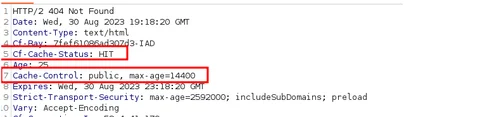
A public cache-control directive allows shared caches to store the response, and the HIT on the second visit shows the cache is actually serving the stored copy rather than going back to the origin.
Step 3: Confirm PII in the response
Upon verifying the response with the current authenticated user for this request, or by visiting any directory that does not exist, you will find PII information in the response.

The same data appears both on the crafted favicon.ico URL and on arbitrary non-existent paths, which is the key observation: the 404 handler is what produces the personalised body.
Step 4: Keep the cached URL warm
Any directory that does not exist throws a 404 Oops page, but the response contains the PII above, and the cache configuration is misconfigured. To verify the exploit, continuously send the request from Step 1 so that the response for that specific URL, which is cached on the server, can be tested using a tool like Burp Suite Intruder. Set the payload as null with 500 numbers.
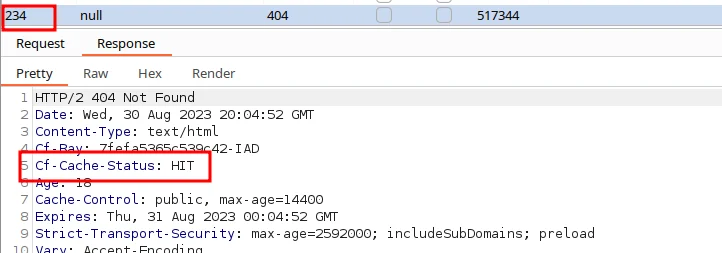
Repeatedly requesting the same URL keeps the response for that specific URL cached on the server while the attacker's request is made.
Step 5: Fetch the cached response without authentication
While running the request above concurrently, send a fresh request to:
https://www.redacted.com/favicon.ico?agilehunt=13337
via a Private Session browser or using Burp Repeater (Intruder is recommended for faster reproduction), without any cookies or authorization token. Observe that the request has no authentication token or cookies, but the response contains the cached PII data without any authentication.
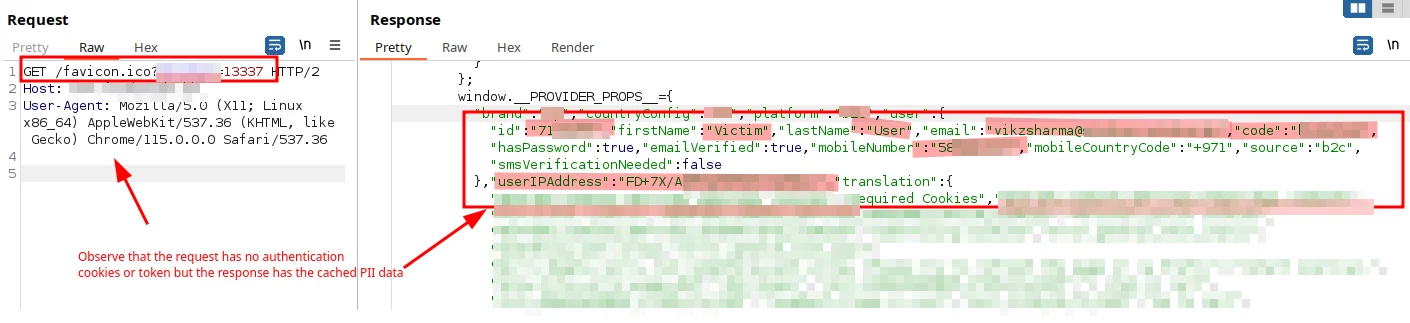
The unauthenticated request carries no credentials, yet the cache returns the stored copy of the victim's personalised 404 page. That is the deception: the cache keys on the URL, not on the identity of the requester.
Root cause
The server applied cache protections to API and web endpoints whose responses contained session tokens or data, but not to the /404 page or to non-existent URLs. The 404 handler rendered PII for the current user and the response was served with cache-control: public, so a shared cache stored it. Because the cache decides what to return from the URL alone, a later request without cookies or an authorization token received the stored personalised body. The report does not show the server-side code, so the exact mechanism by which the 404 page obtained the user's data is not stated.
Impact
Exploiting this vulnerability presents severe risks. Attackers can access and potentially misuse PII data, leading to privacy violations, identity theft, and other malicious activities. The obscured UserID value leakage also defeats the purpose of obfuscation, enabling attackers to chain this vulnerability, if found, with others such as IDOR attacks to gain unauthorised access to sensitive resources, manipulate data, and potentially cause significant harm.
The exposure depends on the victim visiting the crafted URL so that their personalised response is cached.
Fix
The report recommends the following, rather than describing changes that were made:
- Review and update cache controls. Ensure cache controls are properly configured on all web endpoints, including the
/404page. Implement cache policies that prevent sensitive PII data from being stored in the cache and served to unauthorised users. - Implement authentication checks. Implement authentication checks for all requests that could potentially access PII data. Only authenticated and authorised users should have access to sensitive information.
- Enhance error handling. Customise error handling for the
/404page and any other non-existent URL endpoints. Avoid displaying sensitive data in error responses and provide generic error messages instead.
Variants to test
- Static-looking paths with a unique query marker. Request a path such as
/favicon.icowith a random query value while authenticated, then request the same URL without cookies. A positive result is acache-control: publicresponse that returnsHITon a repeat visit and contains your account data when fetched unauthenticated. - Arbitrary non-existent paths. Request a random path that does not exist while authenticated. A positive result is a 404 page that echoes your PII, which shows the error handler itself is the source of the leak.
- Cache warm-up with Intruder. Send the crafted URL repeatedly with a null payload of 500 requests while a second, unauthenticated request is made. A positive result is the unauthenticated request returning the cached personalised body.
- A positive result is that the API endpoint refuses to cache while the error page still does, confirming the protection was applied unevenly.
- A positive result is access to another user's resource that the obfuscation was meant to prevent.
For background, the author points to the HackTricks cache deception page and the Black Hat 2017 paper by Gil on web cache deception attacks.
What happened, in plain words
A website had a special page that it showed whenever someone asked for a web address that does not exist. You have seen these: you mistype a link and get a page saying "404, not found" or "Oops, this page does not exist". Normally that page is the same for everybody and contains nothing personal.
On this website, that error page was not generic. When a logged-in user asked for a web address that did not exist, the error page came back with that user's personal details printed inside it: first name, last name, phone number, email address, user ID and an encrypted IP address. The report calls this kind of data PII, short for Personally Identifiable Information, meaning any data that can be tied to a real person.
On top of that, the server told the browser and any intermediate cache that the response was allowed to be stored and reused. A cache is a temporary storage place that keeps copies of responses so they can be served again quickly. Because the error page was stored in the cache, anyone who later asked for the same web address got the stored copy, personal details included, without logging in at all.
This class of bug is called web cache deception. The word "deception" is the point: a private, personalised page ends up stored under a public-looking address, and can then be read back as an anonymous visitor. The report rates the risk as HIGH and the difficulty to exploit as Easy.
The author is Vikas Anil Sharma (@vikzsharma).
The pieces you need to know first
Before walking through the steps, here are the few ideas the whole attack rests on. None of them require any security background.
- A web address (URL) is what you type in the browser bar, for example
https://www.redacted.com/favicon.ico?agilehunt=13337. The part after the?is called the query string. It is a set of name and value pairs that the browser sends along with the request. In this URL,agilehuntis the name and13337is the value. - A cookie is a small piece of data that a website asks your browser to keep and send back on every later request to that site. It is how a site remembers that you are logged in. Think of it as a wristband you get at an event: you show it at the door and you are let in without showing your ticket again.
- An authorisation token is a similar idea in a different form: a string of characters that a request carries to prove who is making it. Some apps put it in a cookie, some in a request header. Either way, if a request has no cookie and no token, the server has no idea who you are.
- An API is the part of a website that programs talk to, rather than people. When a page loads your profile details without reloading the whole page, it is usually asking an API behind the scenes. The report mentions API endpoints because the site had protected those, but not the error page.
- A cache is a copy of a response kept somewhere between you and the server, so the next person asking for the same thing gets the copy instead of making the server do the work again. A supermarket shelf works the same way: the stockroom (the server) is slow, the shelf (the cache) is fast, and the shelf is refilled from the stockroom.
cache-controlis a header, meaning a small label attached to a response, that tells caches what they are allowed to do with it. The valuepublicmeans shared caches are allowed to store the response and hand it to other people. That is fine for a logo image and dangerous for a page containing someone's phone number.HITandMISSare the two words a cache uses to describe what happened.HITmeans the cache had a stored copy and served it.MISSmeans it did not, so the request went to the server.- A 404 page is the response a server gives when the requested address does not exist. The number 404 is the standard status code for "not found".
- Burp Suite is a tool that lets you look at and change the requests your browser sends. Burp Repeater sends one request over and over so you can study the response. Burp Intruder sends the same request many times automatically, which is useful for keeping something busy in the background.
- A private session (sometimes called incognito) is a browser window that starts with no cookies. It is the easiest way to act like a stranger who has never logged in.
Setting the scene
The report does not describe any special accounts, roles, tool versions or configuration. The only preconditions it gives are:
- A victim user who is already logged into the website.
- A browser session for the victim, plus a private session or Burp Suite for the attacker side.
- Burp Suite Intruder, used to keep the cached URL warm while a second request is made.
"Keeping the URL warm" means sending requests to it often enough that the cache keeps its stored copy instead of throwing it away. Caches do not keep things forever; a URL that nobody asks for can be dropped. If the attacker wants the copy to still be there when they fetch it anonymously, someone has to keep asking for it.
No credentials, cookies or tokens appear in the report. The requests below are shown exactly as the author wrote them.
Finding it
While assessing the target application, the author noticed that the server had put restrictions in place to prevent web cache deception attacks on API and web endpoints whose responses contained session tokens or data. In other words, the team had thought about this class of bug and defended the obvious places.
Those protections were not applied to the /404 page or to any non-existent URL. A request to any endpoint that does not exist returned PII in the response, and the response had no cache controls in place. The defence existed, but it had a hole in it, and the hole was the error page.
Exploitation, step by step
Step 1: Visit the cacheable URL as the victim
Assume you are a victim already logged into the website, and navigate to:
https://www.redacted.com/favicon.ico?agilehunt=13337
Line by line:
https://is the normal secure web protocol. Nothing unusual here.www.redacted.comis the site. The report hides the real name behindredacted.com./favicon.icois the path.favicon.icois the little icon a website shows in the browser tab. It is a static file, the same for every visitor, which is exactly why caches are happy to store it. The attacker is borrowing that reputation.?agilehunt=13337is the query string.agilehuntis the name and13337is the value. The value is a unique marker, so this exact URL is different from every other URL on the site.
Why this step: the victim has to be the one who triggers the request, because only the victim's request carries the victim's cookie and therefore the victim's personal data. The attacker cannot produce that response themselves.
Step 2: Confirm the response is public and cached
Observe that the response for the request has cache-control set to public, and that the response has been cached as HIT after visiting it twice.
What this means:
cache-control: publicis the server giving permission for shared caches to store the response. A shared cache is one used by many people, not just your own browser. That is the dangerous part: a copy stored there can be handed to someone else.- Visiting the URL twice and seeing
HITon the second visit proves the cache is really serving its stored copy rather than going back to the server each time. If it saidMISSboth times, nothing was being stored and the attack would not work.
Why this step: before going further, the author needed to know two things, that the response may be stored and that it actually is stored. Both are visible in the response headers.
Step 3: Confirm PII in the response
Upon verifying the response with the current authenticated user for this request, or by visiting any directory that does not exist, you will find PII information in the response.
The same data appears both on the crafted favicon.ico URL and on arbitrary non-existent paths. That is the key observation: the 404 handler is what produces the personalised body. The favicon.ico path is just a convenient way to reach that handler while looking like a static file.
Why this step: this confirms the leak is not a one-off on a single URL. Any address that does not exist triggers the same error page, and that error page is built with the logged-in user's details.
Step 4: Keep the cached URL warm
Any directory that does not exist throws a 404 Oops page, but the response contains the PII above, and the cache configuration is misconfigured. To verify the exploit, continuously send the request from Step 1 so that the response for that specific URL, which is cached on the server, can be tested using a tool like Burp Suite Intruder. Set the payload as null with 500 numbers.
What is happening here:
- "Set the payload as null with 500 numbers" means Intruder is configured to send the request 500 times with no changing value. The point is not to guess anything; it is to generate steady traffic to the same URL.
- Each of those requests keeps the response for that specific URL cached on the server while the attacker's request is made.
Why this step: the repeated requests keep the response for that specific URL cached on the server while the attacker's request is made.
Step 5: Fetch the cached response without authentication
While running the request above concurrently, send a fresh request to:
https://www.redacted.com/favicon.ico?agilehunt=13337
via a Private Session browser or using Burp Repeater (Intruder is recommended for faster reproduction), without any cookies or authorization token. Observe that the request has no authentication token or cookies, but the response contains the cached PII data without any authentication.
Line by line:
- The URL is identical to the one in Step 1. That is deliberate: the cache looks up its stored copies by URL, so the same URL is what retrieves the same stored copy.
- "Without any cookies or authorization token" means the request carries no proof of identity. It is a stranger knocking on the door.
- The response still contains the victim's PII, because the cache answered from its stored copy and never asked the server whether this particular requester was allowed to see it.
Why this step: this is the proof. A request with no credentials receiving someone else's personal data is the vulnerability, demonstrated end to end.
Why it worked
The server applied cache protections to API and web endpoints whose responses contained session tokens or data, but not to the /404 page or to non-existent URLs. The 404 handler rendered PII for the current user, and the response was served with cache-control: public, so a shared cache stored it. Because the cache decides what to return from the URL alone, a later request without cookies or an authorization token received the stored personalised body.
Think of a cloakroom that hands out coats based on the ticket number only. If someone copies your ticket number, they get your coat, and the attendant never checks whether the coat is theirs. The cache is that attendant, and the URL is the ticket number.
The report does not show the server-side code, so the exact mechanism by which the 404 page obtained the user's data is not stated.
Impact
Exploiting this vulnerability presents severe risks. Attackers can access and potentially misuse PII data, leading to privacy violations, identity theft, and other malicious activities. The obscured UserID value leakage also defeats the purpose of obfuscation, enabling attackers to chain this vulnerability, if found, with others such as IDOR attacks to gain unauthorised access to sensitive resources, manipulate data, and potentially cause significant harm.
Two terms there are worth unpacking:
- Obfuscation means hiding a value so it is not obviously meaningful, for example turning a simple number into a long scrambled string. It is not real security; it just makes guessing harder.
- IDOR stands for Insecure Direct Object Reference. It is when an application lets you reach someone else's record simply by changing an identifier in a request, because it never checks that the record belongs to you. A leaked user ID is exactly the kind of identifier an IDOR bug needs.
The exposure depends on the victim visiting the crafted URL so that their personalised response is cached.
Fix
The report recommends the following, rather than describing changes that were made:
- Review and update cache controls. Ensure cache controls are properly configured on all web endpoints, including the
/404page. Implement cache policies that prevent sensitive PII data from being stored in the cache and served to unauthorised users. - Implement authentication checks. Implement authentication checks for all requests that could potentially access PII data. Only authenticated and authorised users should have access to sensitive information.
- Enhance error handling. Customise error handling for the
/404page and any other non-existent URL endpoints. Avoid displaying sensitive data in error responses and provide generic error messages instead.
In plain words: do not put personal data on an error page, do not let caches store anything personal, and check who is asking before handing over anything sensitive.
Variants to test
If you want to look for the same bug elsewhere, these are checks in the same spirit as the report. Each one describes what to send and what a positive result looks like.
- Static-looking paths with a unique query marker. Request a path such as
/favicon.icowith a random query value while authenticated, then request the same URL without cookies. A positive result is acache-control: publicresponse that returnsHITon a repeat visit and contains your account data when fetched unauthenticated. - Arbitrary non-existent paths. Request a random path that does not exist while authenticated. A positive result is a 404 page that echoes your PII, which shows the error handler itself is the source of the leak.
- Cache warm-up with Intruder. Send the crafted URL repeatedly with a null payload of 500 requests while a second, unauthenticated request is made. A positive result is the unauthenticated request returning the cached personalised body.
- A positive result is that the API endpoint refuses to cache while the error page still does, confirming the protection was applied unevenly.
- A positive result is access to another user's resource that the obfuscation was meant to prevent.
For background, the author points to the HackTricks cache deception page and the Black Hat 2017 paper by Gil on web cache deception attacks.
Glossary
- 404 page: the response a server returns when the requested address does not exist; 404 is the standard status code for "not found".
- API: the part of a website that programs talk to, rather than people, usually returning data instead of a full page.
- Authorisation token: a string a request carries to prove who is making it, often instead of or alongside a cookie.
- Burp Intruder: a Burp Suite tool that sends the same request many times automatically, optionally with changing values.
- Burp Repeater: a Burp Suite tool that sends a single request repeatedly so you can study the response.
- Burp Suite: a tool for inspecting and modifying the requests a browser sends.
- Cache: a temporary store of responses kept between you and the server so repeat requests can be answered quickly.
cache-control: a response header that tells caches what they may do with the response;publicallows shared caches to store it.- Cookie: a small piece of data a site asks your browser to keep and send back on later requests, commonly used to remember that you are logged in.
- Encrypted IP address: an IP address stored in scrambled form so it is not directly readable.
- Header: a small label attached to a request or response carrying information about it.
HIT: a cache response meaning the cache had a stored copy and served it.- IDOR: Insecure Direct Object Reference, where changing an identifier in a request lets you reach someone else's record because ownership is never checked.
MISS: a cache response meaning there was no stored copy, so the request went to the server.- Obfuscation: hiding a value so it is not obviously meaningful, without actually securing it.
- PII: Personally Identifiable Information, any data that can be tied to a real person, such as a name, phone number or email address.
- Private session: a browser window that starts with no cookies, useful for acting like a visitor who has never logged in.
- Query string: the part of a URL after the
?, made of name and value pairs sent along with the request. - Shared cache: a cache used by many people rather than a single browser, so a stored copy can be served to someone other than the person who caused it to be stored.
- URL: a web address, such as
https://www.redacted.com/favicon.ico?agilehunt=13337. - Web cache deception: tricking a cache into storing a private, personalised response under a public-looking URL, then retrieving it without authentication.