CVE-2020–1088 — Yet another arbitrary delete EoP
A privileged Windows service (WerSvc) deleted files in a user-controlled temporary folder without verifying the path, allowing an attacker to redirect the deletion to an arbitrary file via a mountpoint and symbolic link. An attacker could delete any file with SYSTEM privileges, such as system files.
 Published on medium.com
In January of 2020 I found and reported an Escalation of Privilege (EoP) vulnerability that allowed arbitrary deletion of files using the Windows Error Reporting service. It was fixed in the May 2020 Windows update.
The full write-up lives on its author's site
It belongs to its author, so we link to it rather than copy it. The other two tabs are our own rewrites, checked against it.
Context
Windows Error Reporting (WER) is split across several components. When an application crashes, WerFault.exe handles the error reporting for that application, running with the same privileges as the user who ran the crashed process. Separately, the Windows Error Reporting Service (WerSvc) runs as LocalSystem. WerFault.exe talks to WerSvc over raw ALPC calls, and the service implementation lives in %SystemRoot%\System32\WerSvc.dll.
CVE-2020-1088 is an arbitrary file delete vulnerability in that service. It belongs to the family of symbolic link redirection bugs in privileged Windows services. If you are new to the class, the author points to An introduction to privileged file operation abuse on Windows by @clavoillotte, and credits James Forshaw's continued work exposing the attack surface of privileged services.
WER had already produced a lot of similar bugs. In 2020 alone, 10 vulnerabilities were fixed in WER, and before that Gal De Leon gave the talk "Exploiting Errors in Windows Error Reporting" at BlueHatIL, showing more of them.
The vulnerable path is in CWerService::SvcCollectETWLogs, where ETW sessions are flushed. Sessions are read from two registry keys:
HKLM\Software\Microsoft\Windows\Windows Error Reporting\EtwSessionsHKLM\Software\Microsoft\Windows\Windows Error Reporting\DynamicEtwSessions

WerSvc!CWerService::SvcCollectETWLogs, Sessions from registry
The author is not sure when these keys get populated, but guesses one of the many Windows diagnostic settings does it. On the test machine there was a value named WPR_initiated_DiagTrackMiniLogger_OneTrace User Logger 20200113 1 Event Collector_0, most likely related to Windows Performance Recorder, hence the WPR prefix.

DynamicEtwSessions registry keys
Setup
The fix shipped in the May 2020 update, with the directory locking method described below arriving in the May 2020 edition of Windows 10 codenamed 2004. The vulnerable code path can be triggered by crashing an application.
Finding it
When an ETW session trace is initiated, a folder with a random GUID is created under %UserProfile%\AppData\local\Temp\, and inside it a file whose name matches the registry key. In the author's case the full path was:
%UserProfile%\AppData\local\Temp\{GUID}\WPR_initiated_DiagTrackMiniLogger_OneTrace User Logger 20200113 1 Event Collector_0.buf
Later, CEtwSession::FlushBuffered is called to flush the trace file in that temporary GUID folder. The interesting pseudo-code looks like this:
LPCWSTR fileName = sprintf("%s\\%s.buf.etl", path, lpFileName);LPCWSTR newFileName = sprintf("%s\\%s.etl", path, lpNewFileName);hFile = CreateFileW(fileName, ...)...if(!MoveFileW(fileName, newFileName)) { DeleteFileW(fileName);}
In other words, the service tries to rename the file from filename.buf.etl to filename.etl, and if the rename fails it deletes the file. The delete therefore happens in a folder fully controllable by the currently logged in user, performed by a service running with SYSTEM integrity.
Exploitation
The starting facts are:
- A random folder is created under
%UserProfile%\AppData\Local\Temp\{GUID}. - The file
WPR_initiated_DiagTrackMiniLogger_OneTrace User Logger 20200113 1 Event Collector_0.buf.etlis created under this folder. - The file is then renamed to the
.etlextension, and if this fails the.buf.etlfile is deleted. WerSvcdoes not impersonate the calling user, so the file actions are done with SYSTEM integrity.
Two constraints matter for the redirection:
- A file operation can be redirected in two simple ways: the parent folder can be turned into a mount point/junction, or the file can be turned into a hardlink. Mitigations for hardlinks were implemented in build 20H1, so they no longer work, and in any case this is an arbitrary delete vulnerability where hardlinks would not help.
- Because the parent folder must become a mount point, the name of the folder has to be known before the
.buf.etlfile is moved. - The
MoveFileWcall can be forced to fail by ensuring the directory is a mount point beforeMoveFileWis called.
The PoC works as follows.
Step 1: watch for the folder
Create a file watcher that looks for folder creations under %UserProfile%\AppData\Local\Temp.
Step 2: crash a process
Powershell.exe -Command "[Environment]::FailFast('Error')"
This triggers the WER code path, which creates the GUID folder and the .buf.etl file inside it.
Step 3: delete the trace file
Continuously try to delete the file %UserProfile%\AppData\Local\Temp\{GUID}\WPR_initiated_DiagTrackMiniLogger_OneTrace User Logger 20200113 1 Event Collector_0.buf.etl. Once the deletion succeeds, move to the next step. The author notes this could most likely be solved better with an OpLock, but it did not matter here because the PoC worked 100% of the time.
Step 4: turn the folder into a mount point
Create a mount point from %UserProfile%\AppData\Local\Temp\{GUID} to \RPC Control.
Step 5: plant the symbolic link
Create a symbolic link from \RPC Control\WPR_initiated_DiagTrackMiniLogger_OneTrace User Logger 20200113 1 Event Collector_0.buf.etl to \??\C:\Windows\System32\license.rtf.
The MoveFileW call can be forced to fail by ensuring the directory is a mount point before it is called, and the fallback DeleteFileW then deletes the target file with SYSTEM integrity.
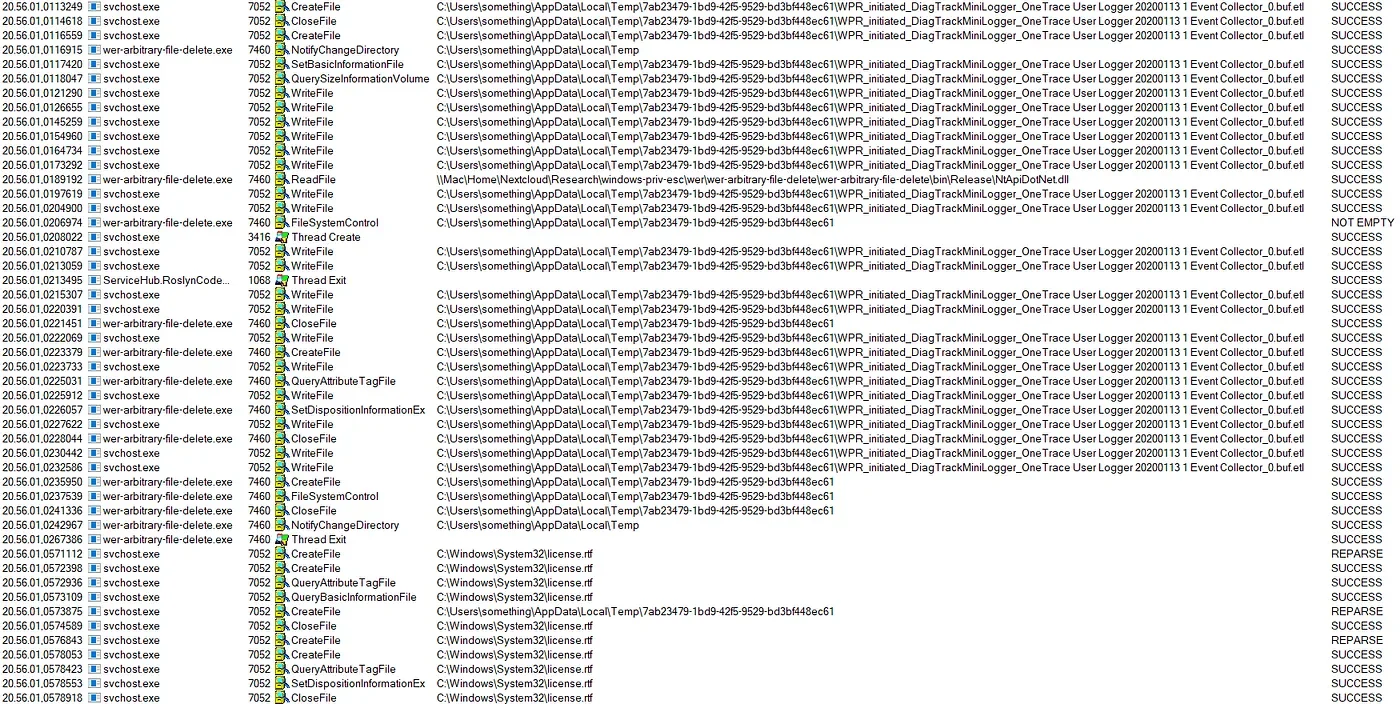
Successful exploitation of the vulnerability. SetDispositionInformationEx is the operation that deletes the file.
The Process Monitor screenshot shows C:\Windows\System32\license.rtf being deleted. A full PoC is available at the gist linked in the report.
Root cause
The service performs a delete on a path inside a directory the calling user controls, without impersonating that user. Because the delete runs as LocalSystem, a junction plus a symbolic link redirects it to any file the service can reach. The existing hardlink mitigation in 20H1 does not help, since the attack uses a mount point and a symlink rather than a hardlink.
Impact
An unprivileged logged-in user can cause WerSvc to delete a file of their choosing with SYSTEM integrity, for example C:\Windows\System32\license.rtf. The report describes this as a classic arbitrary file delete; it does not discuss which specific files would yield further privilege escalation beyond the delete itself.
Fix
A method was added to the WER codebase to check that file handles actually point to the expected path: UtilVerifyFilePath, used in the wrapper method for deleting a file, UtilDeleteFilePath. In CEtwSession::FlushBuffered, the call to DeleteFileW is replaced with a call to UtilDeleteFilePath:
LPCWSTR fileName = sprintf("%s\\%s.buf.etl", path, lpFileName);LPCWSTR newFileName = sprintf("%s\\%s.etl", path, lpNewFileName);hFile = CreateFileW(fileName, ...)...if(!MoveFileW(fileName, newFileName)) { UtilDeleteFilePath(fileName);}
The MoveFileW variant
The original snippet skipped a detail: MoveFileW is called before DeleteFileW, and that can be exploited too, to move a file of your choosing to an arbitrary folder. With a mount point from the GUID folder to \RPC Control, create two symbolic links: one from filename.etf.buf to a payload of your choice, for example %UserProfile%\payload.dll, and another from filename.etf to C:\Windows\System32\windowscoredeviceinfo.dll. That allows use of UsoDllLoader by Clément Labro to get a system shell.
The MoveFileW call is still present in the new code, but the move is not exploitable in the same way. In the May 2020 edition of Windows 10 codenamed 2004, a new method was added to the WER libraries, UtilVerifyAndLockDirectory(LPCWSTR path, HANDLE handle). It tries to create a random file in the given path and returns a handle to it, which should in theory lock the folder and prevent a user from tampering with it. The caller is responsible for closing the handle after all dangerous file operations.
Microsoft also changed the scope of the Windows Preview bug bounty program, so vulnerabilities involving file path redirection through junctions or mount points are no longer valid; the report says they are apparently working on broader mitigations for the whole bug class.
Variants to test
- Look for other uses of
UtilVerifyAndLockDirectoryinWersvc.dll. The author states this vulnerability was not the only one fixed in the May patch, and hints that searching for that method may reveal another one. A positive result is a code path that performs a privileged file operation on a user-controlled path without the directory being locked first. - Audit other privileged services that read paths from registry values and then create, move or delete files under them. A positive result is a service running as SYSTEM that acts on a path under
%UserProfile%\AppData\Local\Tempwithout impersonating the caller. - For each such operation, check whether the parent directory can be replaced with a junction to
\RPC Controland the file name replaced with a symlink to a target of your choice. A positive result is the privileged operation acting on the target rather than the intended file. - Check whether a rename followed by a delete on failure can be turned into a move primitive, as with the
MoveFileWvariant above. A positive result is a payload file being moved into a privileged directory such asC:\Windows\System32.
Disclosure timeline
- 2020-01-21: vulnerability reported to MSRC
- 2020-01-24: MSRC followed up asking for more information on how to reproduce
- 2020-02-03: vulnerability confirmed
- 2020-04-02: bounty awarded
- 2020-05-12: vulnerability fixed in the May Patch Tuesday and given CVE-2020-1088
What happened, in plain words
In January 2020, a security researcher found a flaw in Windows. By doing something completely ordinary, crashing a program, a logged-in user could make a Windows service running with the highest possible permissions delete a file of their choosing. The service is the one that handles error reports, Windows Error Reporting. The flaw was reported to Microsoft, fixed in the May 2020 Windows update, and given the identifier CVE-2020-1088. The researcher's name is Søren Fritzbøger.
This article walks through the whole story slowly, assuming you have never read a security write-up before. Every technical word is explained the first time it appears, and there is a glossary at the end.
The background you need
What a service is
On Windows, some programs run without anyone being logged in and without a visible window. They are called services. They start when the computer boots and keep running in the background. A service can be configured to run as a particular user account, and one account, called LocalSystem (often written SYSTEM), is the most powerful account on the machine. A program running as SYSTEM can read, change or delete almost any file on the computer, including files in C:\Windows\System32, the folder that holds the core of Windows itself.
A normal user, by contrast, can only change files in their own areas, such as their Documents folder or their temporary folder. The whole point of a privilege escalation vulnerability is to make a powerful program do something on your behalf that you could not do yourself.
What Windows Error Reporting is
When a program crashes, Windows usually shows a dialog saying the program has stopped working and offers to send information to Microsoft. That machinery is Windows Error Reporting, abbreviated WER. It is not one program but several pieces that cooperate:
WerFault.exeis the piece that runs when an application crashes. It runs with the same permissions as the user who started the crashed program, so it is not powerful.WerSvc, the Windows Error Reporting Service, runs as LocalSystem, so it is very powerful. Its code lives in the file%SystemRoot%\System32\WerSvc.dll.%SystemRoot%is a shorthand for the Windows folder, normallyC:\Windows.- The two talk to each other using a Windows internal messaging mechanism called ALPC (Advanced Local Procedure Call). You can think of ALPC as a private telephone line between two programs on the same computer.
What ETW is
ETW stands for Event Tracing for Windows. It is a built-in logging system: programs and Windows itself can record events (a program started, a file was read, an error happened) into trace files so that they can be analysed later. A single logging session is called an ETW session. Windows Performance Recorder, or WPR, is a Microsoft tool that uses ETW sessions to record performance data.
What the vulnerability class means
CVE-2020-1088 belongs to a family called symbolic link redirection in privileged services. The idea is simple once you see an everyday comparison.
Imagine a hotel receptionist with a master key who is asked to deliver a parcel to "room 12". If you can swap the sign on room 12's door for a sign pointing to the manager's office before the receptionist arrives, the receptionist will walk into the manager's office and leave the parcel there, using their master key. You never had a master key; you just changed a sign.
On Windows, two kinds of "signs" can be swapped:
- A junction (also called a mount point) is a folder that actually points somewhere else. Opening it takes you to the other location.
- A symbolic link is a file that points to another file. Opening it opens the target.
- A hardlink is a second name for the same file on the same disk. Windows added protections against abusing hardlinks in build 20H1 (a version of Windows 10), so they are no longer useful for this kind of attack.
If a powerful service works on a path inside a folder that you, a normal user, can modify, you can replace part of that path with a junction or a symbolic link so that the service ends up acting on a completely different file, one you were never allowed to touch.
The researcher credits earlier work that made this class of bug well known: an introduction article by @clavoillotte, and the continued research of James Forshaw into the attack surface of privileged Windows services. "Attack surface" simply means all the places where an attacker can try to interact with a program.
WER had already produced many such bugs. In 2020 alone, 10 vulnerabilities were fixed in WER, and before that Gal De Leon gave a talk titled "Exploiting Errors in Windows Error Reporting" at the BlueHatIL conference, showing more of them.
Where the bug lives
The vulnerable code is in a function called CWerService::SvcCollectETWLogs. A function is a named block of code that does one job; this one collects ETW logs. To know which sessions to collect, it reads two locations in the registry. The registry is Windows' central settings database, organised as folders (called keys) containing named values.
HKLM\Software\Microsoft\Windows\Windows Error Reporting\EtwSessionsHKLM\Software\Microsoft\Windows\Windows Error Reporting\DynamicEtwSessions
HKLM stands for HKEY_LOCAL_MACHINE, the part of the registry that applies to the whole computer.
WerSvc!CWerService::SvcCollectETWLogs, Sessions from registry
The researcher is not sure when these keys get filled in, but guesses that one of the many Windows diagnostic settings does it. On the test machine there was a value named WPR_initiated_DiagTrackMiniLogger_OneTrace User Logger 20200113 1 Event Collector_0, most likely related to Windows Performance Recorder, hence the WPR prefix.
DynamicEtwSessions registry keys
What happens when a trace is flushed
When an ETW session trace is started, Windows creates a folder with a random name (a GUID, which is a long random identifier like {3F2504E0-4F89-11D3-9A0C-0305E82C3301}) under %UserProfile%\AppData\local\Temp\. %UserProfile% is your own user folder, and AppData\Local\Temp is the temporary folder every user can freely write to. Inside that random folder, a file is created whose name matches the registry value. In the researcher's case the full path was:
%UserProfile%\AppData\local\Temp\{GUID}\WPR_initiated_DiagTrackMiniLogger_OneTrace User Logger 20200113 1 Event Collector_0.buf
Later, a function called CEtwSession::FlushBuffered is called to flush the trace file in that temporary folder. "Flush" here means writing buffered data out to disk and tidying up the file. The interesting pseudo-code looks like this:
LPCWSTR fileName = sprintf("%s\\%s.buf.etl", path, lpFileName);LPCWSTR newFileName = sprintf("%s\\%s.etl", path, lpNewFileName);hFile = CreateFileW(fileName, ...)...if(!MoveFileW(fileName, newFileName)) { DeleteFileW(fileName);}
Line by line, in plain words:
LPCWSTR fileName = sprintf("%s\\%s.buf.etl", path, lpFileName);builds the full path of the trace file by gluing together the folder path and the file name, and adding the extension.buf.etl.LPCWSTRis just the type name for a text string in Windows code.LPCWSTR newFileName = sprintf("%s\\%s.etl", path, lpNewFileName);builds a second path, the same folder and name but ending in.etl. This is the name the file should have after tidying up.hFile = CreateFileW(fileName, ...);opens (or creates) the trace file. The...stands for extra options the report does not show. The result,hFile, is a handle: a kind of ticket the program keeps to refer to the open file.if(!MoveFileW(fileName, newFileName)) {tries to rename the file from the.buf.etlname to the.etlname.MoveFileWreturns a true/false result; the!means "if this did not succeed".DeleteFileW(fileName);is the fallback: if the rename failed, delete the original file.
So the service tries to rename the file, and if the rename fails it deletes the file. The crucial point is that this delete happens inside a folder that the currently logged-in user fully controls, while the program doing the delete runs with SYSTEM integrity. "Integrity" here refers to Windows' integrity levels, a ranking of how much a process is trusted; SYSTEM is the highest.
How the exploit works
The researcher lists the facts known at this point:
- The vulnerable code path can be triggered by crashing an application.
- A random folder is created under
%UserProfile%\AppData\Local\Temp\{GUID}. - The file
WPR_initiated_DiagTrackMiniLogger_OneTrace User Logger 20200113 1 Event Collector_0.buf.etlis created under this folder. - The file is then renamed to the
.etlextension, and if this fails the.buf.etlfile is deleted. WerSvcdoes not impersonate the calling user, so the file actions are done with SYSTEM integrity.
Point 5 needs a word of explanation. "Impersonation" is a Windows feature where a powerful service temporarily acts as if it were the user who asked for something, so that permission checks apply to that user. Because WerSvc does not impersonate, every file operation it performs is checked against SYSTEM, not against you. That is exactly what makes the redirection useful to an attacker.
Two constraints matter for the redirection:
- A file operation can be redirected in two simple ways: the parent folder can be turned into a mount point/junction, or the file can be turned into a hardlink. Mitigations for hardlinks were implemented in build 20H1, so they no longer work, and in any case this is an arbitrary delete vulnerability where hardlinks would not help. (A hardlink is another name for the same file; deleting through it deletes the same file you already had access to, so it gains you nothing.)
- Because the parent folder must become a mount point, the name of the folder has to be known before the
.buf.etlfile is moved. - The
MoveFileWcall can be forced to fail by ensuring the directory is a mount point beforeMoveFileWis called.
The proof of concept, or PoC, is a small program that demonstrates the bug. It works as follows.
Step 1: watch for the folder
Create a file watcher that looks for folder creations under %UserProfile%\AppData\Local\Temp.
Why: the folder name is random, so the attacker cannot know it in advance. A file watcher is a program that asks Windows to notify it whenever something changes in a folder. As soon as the random folder appears, the attacker learns its name, which is needed for the next steps.
Step 2: crash a process
Powershell.exe -Command "[Environment]::FailFast('Error')"
This line starts PowerShell, Windows' built-in scripting tool, and tells it to run a single command. [Environment]::FailFast('Error') is a .NET method that makes the current program terminate immediately and abnormally, which is exactly what a crash is from Windows' point of view. The crash triggers the WER code path, which creates the GUID folder and the .buf.etl file inside it. No special rights are needed for this: any user can crash their own program.
Step 3: delete the trace file
Continuously try to delete the file %UserProfile%\AppData\Local\Temp\{GUID}\WPR_initiated_DiagTrackMiniLogger_OneTrace User Logger 20200113 1 Event Collector_0.buf.etl. Once the deletion succeeds, move to the next step.
The researcher notes this could most likely be solved better with an OpLock (an opportunistic lock, a way for a program to be told when another program touches a file), but it did not matter here because the PoC worked 100% of the time.
Step 4: turn the folder into a mount point
Create a mount point from %UserProfile%\AppData\Local\Temp\{GUID} to \RPC Control.
Why: \RPC Control is a special internal Windows location used for named objects. Making the random folder a mount point means that anything the service does inside that folder is silently redirected to \RPC Control, where the attacker can place symbolic links.
Step 5: plant the symbolic link
Create a symbolic link from \RPC Control\WPR_initiated_DiagTrackMiniLogger_OneTrace User Logger 20200113 1 Event Collector_0.buf.etl to \??\C:\Windows\System32\license.rtf.
Why: the service will look for the trace file by its usual name. Because of the mount point, that name now lives in \RPC Control, and because of the symbolic link, it points to license.rtf in the Windows system folder. The \??\ prefix is a Windows way of writing an absolute path.
The MoveFileW call can be forced to fail by ensuring the directory is a mount point before it is called, and the fallback DeleteFileW then deletes the target file with SYSTEM integrity. In other words, a normal user has just caused a SYSTEM-level service to delete a protected Windows file.
Successful exploitation of the vulnerability. SetDispositionInformationEx is the operation that deletes the file.
The screenshot is from Process Monitor, a Microsoft tool that records every file, registry and network operation on the machine. It shows C:\Windows\System32\license.rtf being deleted. SetDispositionInformationEx is the low-level Windows operation that actually marks a file for deletion. A full PoC is available at the gist linked in the report.
Why it worked
The service performs a delete on a path inside a directory the calling user controls, without impersonating that user. Because the delete runs as LocalSystem, a junction plus a symbolic link redirects it to any file the service can reach. The existing hardlink mitigation in 20H1 does not help, since the attack uses a mount point and a symlink rather than a hardlink.
What the impact is
An unprivileged logged-in user can cause WerSvc to delete a file of their choosing with SYSTEM integrity, for example C:\Windows\System32\license.rtf. The report describes this as a classic arbitrary file delete; it does not discuss which specific files would yield further privilege escalation beyond the delete itself.
How it was fixed
A method was added to the WER codebase to check that file handles actually point to the expected path: UtilVerifyFilePath, used in the wrapper method for deleting a file, UtilDeleteFilePath. A wrapper is a function that does some checks and then calls the real function; here, every delete goes through the wrapper first. In CEtwSession::FlushBuffered, the call to DeleteFileW is replaced with a call to UtilDeleteFilePath:
LPCWSTR fileName = sprintf("%s\\%s.buf.etl", path, lpFileName);LPCWSTR newFileName = sprintf("%s\\%s.etl", path, lpNewFileName);hFile = CreateFileW(fileName, ...)...if(!MoveFileW(fileName, newFileName)) { UtilDeleteFilePath(fileName);}
The only change is the last line: instead of deleting directly, the code now asks UtilDeleteFilePath to do it, and that function checks that the file handle points to the expected path.
The MoveFileW variant
The original snippet skipped a detail: MoveFileW is called before DeleteFileW, and that can be exploited too, to move a file of your choosing to an arbitrary folder. With a mount point from the GUID folder to \RPC Control, create two symbolic links: one from filename.etf.buf to a payload of your choice, for example %UserProfile%\payload.dll, and another from filename.etf to C:\Windows\System32\windowscoredeviceinfo.dll. That allows use of UsoDllLoader by Clément Labro to get a system shell.
A few words on that: a DLL is a library of code that programs load at runtime. If you can place a DLL with the right name in a folder Windows trusts, a privileged program may load it and run your code. UsoDllLoader is a known technique for turning that into a SYSTEM shell. A shell is a command prompt with the permissions of the account running it.
The MoveFileW call is still present in the new code, but the move is not exploitable in the same way. In the May 2020 edition of Windows 10 codenamed 2004, a new method was added to the WER libraries, UtilVerifyAndLockDirectory(LPCWSTR path, HANDLE handle). It tries to create a random file in the given path and returns a handle to it, which should in theory lock the folder and prevent a user from tampering with it. The caller is responsible for closing the handle after all dangerous file operations.
Microsoft also changed the scope of the Windows Preview bug bounty program, so vulnerabilities involving file path redirection through junctions or mount points are no longer valid; the report says they are apparently working on broader mitigations for the whole bug class. A bug bounty program is a scheme where a company pays researchers for reporting flaws.
Variants to test
- Look for other uses of
UtilVerifyAndLockDirectoryinWersvc.dll. The author states this vulnerability was not the only one fixed in the May patch, and hints that searching for that method may reveal another one. A positive result is a code path that performs a privileged file operation on a user-controlled path without the directory being locked first. - Audit other privileged services that read paths from registry values and then create, move or delete files under them. A positive result is a service running as SYSTEM that acts on a path under
%UserProfile%\AppData\Local\Tempwithout impersonating the caller. - For each such operation, check whether the parent directory can be replaced with a junction to
\RPC Controland the file name replaced with a symlink to a target of your choice. A positive result is the privileged operation acting on the target rather than the intended file. - Check whether a rename followed by a delete on failure can be turned into a move primitive, as with the
MoveFileWvariant above. A positive result is a payload file being moved into a privileged directory such asC:\Windows\System32.
Disclosure timeline
- 2020-01-21: vulnerability reported to MSRC (the Microsoft Security Response Center, the team that handles security reports)
- 2020-01-24: MSRC followed up asking for more information on how to reproduce
- 2020-02-03: vulnerability confirmed
- 2020-04-02: bounty awarded
- 2020-05-12: vulnerability fixed in the May Patch Tuesday and given CVE-2020-1088. Patch Tuesday is the second Tuesday of each month, when Microsoft releases security updates. CVE stands for Common Vulnerabilities and Exposures, a standard numbering scheme for publicly known flaws.
Glossary
- ALPC (Advanced Local Procedure Call): a Windows mechanism that lets two programs on the same computer exchange messages quickly.
- Arbitrary file delete: a flaw that lets an attacker delete any file the vulnerable program can reach, rather than only the file it was meant to touch.
- Attack surface: all the places where an outsider can interact with a program, and therefore all the places that could contain a flaw.
- Bug bounty program: a scheme where a company pays researchers for reporting security flaws.
- CVE: Common Vulnerabilities and Exposures, a standard identifier for a publicly known security flaw, such as CVE-2020-1088.
- DLL: a library of code that programs load at runtime; placing a malicious one where a privileged program looks can lead to code execution.
- ETW (Event Tracing for Windows): a built-in Windows logging system that records events into trace files.
- Exploit: a technique or program that turns a flaw into an actual effect, such as deleting a protected file.
- File watcher: a program that asks the operating system to notify it when files or folders change.
- GUID: a long random identifier, used here to name a temporary folder so it cannot be guessed.
- Handle: a ticket a program receives when it opens a file or another resource, used to refer to it afterwards.
- Hardlink: a second name for the same file on the same disk; deleting through it deletes the same file.
- HKLM (HKEY_LOCAL_MACHINE): the part of the Windows registry that holds settings for the whole computer.
- Impersonation: a Windows feature where a powerful service temporarily acts with the permissions of the user who made a request.
- Integrity level: a Windows ranking of how much a process is trusted; SYSTEM is the highest.
- Junction / mount point: a folder that actually points to another location on disk.
- LocalSystem (SYSTEM): the most powerful account on Windows, able to access almost every file.
- MSRC: the Microsoft Security Response Center, the team that handles security reports.
- OpLock (opportunistic lock): a Windows feature that lets a program be told when another program touches a file it is using.
- Patch Tuesday: the second Tuesday of each month, when Microsoft releases security updates.
- PoC (proof of concept): a small program that demonstrates a flaw works, without being a full attack tool.
- Privilege escalation: making a more powerful program do something on your behalf that you could not do yourself.
- Process Monitor: a Microsoft tool that records file, registry and network operations on a machine.
- Pseudo-code: simplified code written to explain an idea, not meant to compile or run.
- Registry: Windows' central settings database, organised as keys containing named values.
- Service: a program that runs in the background, often without a logged-in user, sometimes with high privileges.
- Shell: a command prompt with the permissions of the account running it.
- Symbolic link (symlink): a file that points to another file; opening it opens the target.
- SYSTEM: see LocalSystem.
- UsoDllLoader: a known technique for getting a SYSTEM shell by placing a DLL where a privileged program loads it.
- WER (Windows Error Reporting): the Windows machinery that handles crashed programs and offers to send reports to Microsoft.
- WPR (Windows Performance Recorder): a Microsoft tool that records performance data using ETW sessions.
- Wrapper: a function that performs checks and then calls the real function underneath.

