Gaining Unlimited access to graph AuditLogs endpoint using complex filters with non-privileged user account
The Graph API auditLogs signIns endpoint let a non-privileged user read privileged sign-in logs by supplying a complex filter using lambda operators with multiple OR conditions. An attacker with an ordinary account could therefore dump sensitive sign-in logs that normally require admin roles.
 Published on securecloud.blog
{{media:0}}
The full write-up lives on its author's site
It belongs to its author, so we link to it rather than copy it. The other two tabs are our own rewrites, checked against it.
Context
Microsoft Graph exposes an auditLogs endpoint, and under it the signIns collection, which holds sign-in records for a tenant. Reading other users' sign-in logs is normally an administrative operation: a regular user can read their own sign-in logs to look for unusual behaviour, which is standard and expected, but not the logs of the rest of the organisation.
The researcher was looking at various Azure-related portals. One of them did not offer an obvious exploitation path, but it prompted the question of whether a user could go beyond reading their own logs. The answer was yes: an unprivileged account could modify Graph search filters so that it reached logs that would normally require admin roles.
The affected service was the Graph API AuditLogs endpoint, and the endpoint and operation tested as vulnerable was /beta/auditLogs/signIns.
MSRC categorised the issue as Severity Important, Security Impact Information Disclosure.
Setup
The testing was done with a non-privileged user account against the Graph API. The report does not describe the tenant configuration, the tooling used to issue the calls, or any client version. The only precondition shown is that the caller is an ordinary user without the roles required to read tenant-wide sign-in logs.
Finding it
The starting point was the observation that the endpoint refused the request when a basic filter was used, but behaved differently once the filter became more complex. The researcher found that the /auditLogs endpoint could be called beyond the caller's own permissions when a complex filter was used.
Exploitation
Step 1: confirm the basic filter is refused
With a basic filter, the request is rejected with an authorisation error:
    code:'Authentication_RequestFromUnsupportedUserRole'
    innerError:{date: '2022-01-27T12:13:45', request-id: '05b046db-27ba-405c-8532-35ce96025018', client-request-id: '05b046db-27ba-405c-8532-35ce96025018'}
    message:'User is not in the allowed roles'
The error code Authentication_RequestFromUnsupportedUserRole and the message User is not in the allowed roles show that the caller is not entitled to the data. This is the expected behaviour for a non-privileged account.
Step 2: use lambda operators with multiple OR conditions
The same endpoint accepted the request when the filter used lambda operators together with several or conditions. The call the researcher used was:
var operation = `https://graph.microsoft.com/beta/auditLogs/signIns?&$filter=signInEventTypes/any(t: t eq 'interactiveUser' or t eq 'nonInteractiveUser' or userId eq 'fff4c705-62e2-4215-9dc8-90f208d15267' )`
This is a GET against /beta/auditLogs/signIns with a $filter built from the any lambda operator over the signInEventTypes collection. Inside the lambda, the condition matches interactiveUser or nonInteractiveUser event types, or a specific userId. The researcher notes that this filter shape, complex filtering with lambda operators and multiple OR conditions, is what gave the non-privileged user access to sensitive logs.
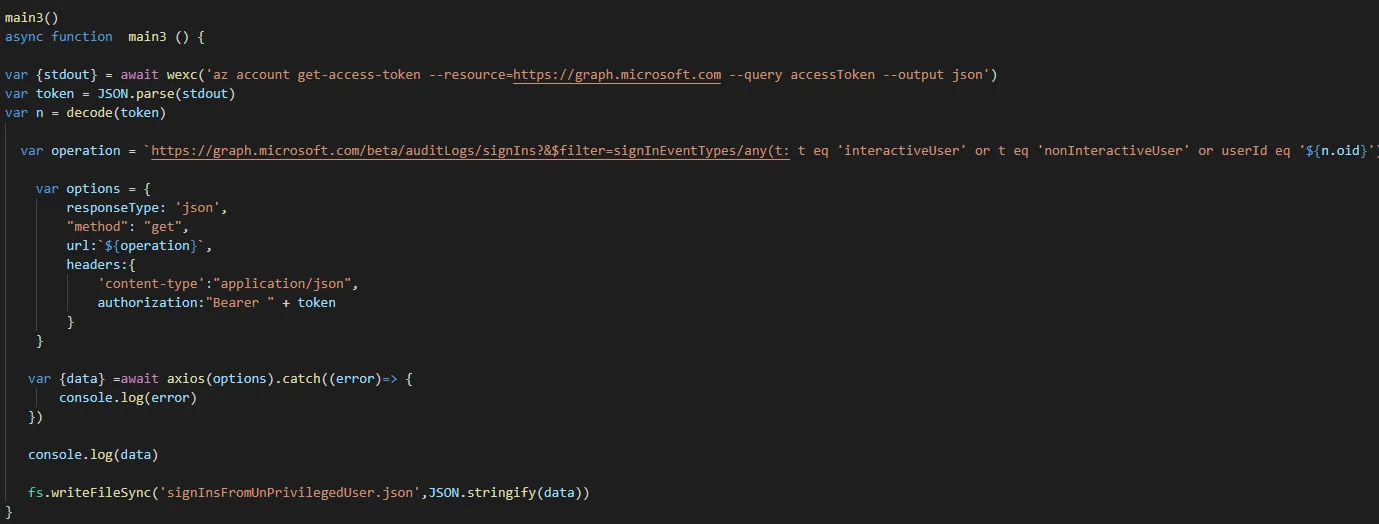
The image shows the Graph API call with the exploitable filter in use.
Step 3: read the result
The response was a full dump of sensitive sign-in logs, rather than the caller's own records.
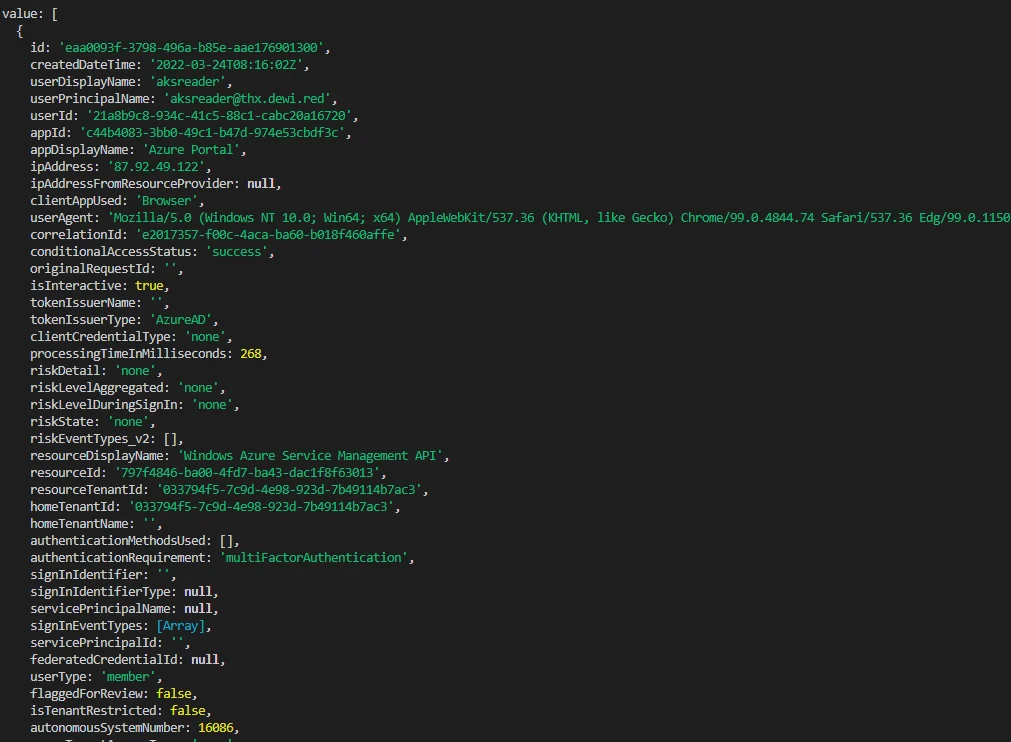
The image shows the result of the call: the full dump of sensitive sign-in logs returned to the unprivileged account.
Root cause
The report does not describe the internal implementation, so the precise reason the complex filter bypassed the check is not stated. In practice, the request was served once the query used lambda operators and multiple or conditions, while the basic-filter request was refused.
Impact
An unprivileged user could read sign-in logs that would normally require admin roles, by modifying the Graph search filters. In the researcher's test this produced a full dump of sensitive sign-in logs. The issue is an information disclosure, categorised by MSRC as Important. The report does not quantify how many records or tenants were affected, nor which fields of the sign-in logs were exposed.
Fix
MSRC confirmed the reported behaviour and then confirmed that a fix had been issued.
Timeline
| Date | Event |
|---|---|
| 02/2022 | Finding submitted to MSRC |
| 03/2022 | MSRC confirms the reported behaviour |
| 03/2022 | MSRC confirms that a fix has been issued for the described vulnerability |
Variants to test
- Other Graph collections behind role checks. Send a basic filter first to confirm the refusal, then a filter using
any/alllambda operators with severalorbranches. A positive result is data belonging to other users or the tenant being returned to the unprivileged account instead of theAuthentication_RequestFromUnsupportedUserRoleerror. - Mixed conditions inside the lambda. Combine event-type predicates with an identifier predicate such as
userId, as in the tested call. A positive result is the same authorisation error disappearing once the filter shape changes. - Compare filter shapes on the same endpoint. Keep the target data identical and vary only the filter syntax. A positive result is one shape being refused and another being served, which points at the authorisation check rather than at the caller's roles.
What happened, in plain words
Microsoft runs a cloud service called Azure, and inside it there is a service called Microsoft Graph. You can think of Graph as a very large reception desk: programs and websites ask it questions, and it fetches the answers from Microsoft's systems. One of the things it can fetch is a list of sign-in records, meaning a log of who signed in to which account, when, and from where.
Normally, an ordinary employee can look at their own sign-in records. That is useful: if you think someone else has been using your account, you can check the list for entries you do not recognise. But an ordinary employee should not be able to read everyone else's sign-in records. That is a job for an administrator, the person in an organisation who is trusted with the keys to everything.
The researcher found that an ordinary account could get around this rule. By writing a more complicated search request than usual, the account could make Graph hand over sensitive sign-in logs it should not have reached. Microsoft's security team, MSRC, confirmed the problem and fixed it.
This article walks through the finding from the beginning, explaining each idea as it comes up.
Background
What an API is
An API (Application Programming Interface) is a way for one piece of software to ask another piece of software for something. A useful everyday comparison is a restaurant. You do not walk into the kitchen and take food; you tell the waiter what you want, the waiter takes your order to the kitchen, and the kitchen sends the dish back. The menu is the list of things you are allowed to ask for, and the waiter is the API.
Microsoft Graph is Microsoft's waiter for its cloud services. Programs send it requests such as "give me the sign-in records", and Graph returns the data. Each request goes to a particular address, called an endpoint. An endpoint is like a specific counter in a large building: one counter deals with sign-in records, another with user accounts, and so on.
What a log is
A log is a running record of events. A building's visitor book is a good comparison: every time someone enters, their name and the time are written down. Sign-in logs are the visitor book of an account: each entry says that somebody signed in, and when.
The starting point
The researcher was looking at various portals related to Azure. A portal is simply a website you use to manage a service. One of these portals did not show any obvious way to break in, but it raised a question: could a user go beyond reading their own logs?
Users reading their own sign-in logs is normal and intended. The question was whether the boundary around that could be crossed.
Scope
The issue allowed an unprivileged user, meaning an account with no special rights, to change the search filters sent to Graph so that the account could reach logs that would normally require administrator roles. A role is a label attached to an account that says what it is allowed to do; an admin role is the powerful kind.
Affected service
The affected service was the Graph API AuditLogs endpoint. The specific endpoint and operation tested and found vulnerable was:
/beta/auditLogs/signIns
Reading this address from left to right: auditLogs is the part of Graph that deals with audit records, which are logs kept for accountability; signIns is the collection of sign-in records inside it. The beta part marks a version of the API that Microsoft labels as still being developed.
How Microsoft classified it
MSRC (Microsoft Security Response Center, the team that handles security reports about Microsoft products) categorised the issue as Severity Important, with Security Impact Information Disclosure. Severity is a rough measure of how serious a problem is. Information Disclosure means the flaw lets someone see data they should not be able to see, without necessarily changing anything.
Timeline
MSRC responded quickly and fixed the issue quickly.
| Date | Event |
|---|---|
| 02/2022 | Finding submitted to MSRC |
| 03/2022 | MSRC confirms the reported behaviour |
| 03/2022 | MSRC confirms that a fix has been issued for the described vulnerability |
Details
What a filter is
When you ask Graph for a list of records, you can attach a filter to say which records you want. Think of a library catalogue: instead of asking for every book, you ask for books by a particular author, or books published after a certain year. The filter is that condition. In Graph, the filter is written in a special syntax and travels in the request as a parameter called $filter.
What a lambda operator is
Some fields in a record are not a single value but a list of values. A sign-in record, for example, can carry a list of event types. To ask a question about a list, Graph offers lambda operators. A lambda operator lets you say "there exists at least one item in this list that matches my condition". The word any is the operator used for that. In everyday terms: instead of asking "is this person's name on the guest list", you ask "is there any name on the guest list that matches this person".
The researcher's finding was that Graph let a non-privileged user reach privileged logs when these advanced lambda operators were used, effectively calling the /auditLogs endpoint beyond the account's own permissions.
Step 1: confirm that a basic filter is refused
First, the researcher checked what happens with a simple request. It was rejected:
    code:'Authentication_RequestFromUnsupportedUserRole'
    innerError:{date: '2022-01-27T12:13:45', request-id: '05b046db-27ba-405c-8532-35ce96025018', client-request-id: '05b046db-27ba-405c-8532-35ce96025018'}
    message:'User is not in the allowed roles'
Line by line:
code:'Authentication_RequestFromUnsupportedUserRole'is the error code. It says the request came from a user whose role is not supported for this operation.innerError:{...}is extra detail wrapped inside the error. It carries adateand two identifiers,request-idandclient-request-id, which are unique labels for this particular request, useful for tracing it in logs.message:'User is not in the allowed roles'is the human-readable explanation: the account does not hold the role needed to see this data.
This step matters because it establishes the baseline. Before claiming that something is wrong, you need to know what correct behaviour looks like. Here, correct behaviour is a clear refusal, and that is exactly what a non-privileged account should get.
Step 2: use lambda operators with several OR conditions
The same endpoint accepted the request once the filter used lambda operators together with several or conditions. The call the researcher used was:
var operation = `https://graph.microsoft.com/beta/auditLogs/signIns?&$filter=signInEventTypes/any(t: t eq 'interactiveUser' or t eq 'nonInteractiveUser' or userId eq 'fff4c705-62e2-4215-9dc8-90f208d15267' )`
Line by line:
var operation =stores the address in a variable namedoperation, so it can be used later in the script.https://graph.microsoft.com/beta/auditLogs/signInsis the endpoint: the sign-in records collection in the beta version of Graph.?&$filter=starts the filter parameter. Everything after the equals sign is the condition that decides which records come back.signInEventTypes/any(t: ...)says: look inside the list of event types on each record, and accept the record if there is any itemtin that list for which the bracketed condition is true.t eq 'interactiveUser'means the item equalsinteractiveUser, a sign-in where a person actively typed their credentials.or t eq 'nonInteractiveUser'adds a second acceptable event type, a sign-in that happened in the background without a person typing anything.or userId eq 'fff4c705-62e2-4215-9dc8-90f208d15267'adds a third condition: the record's user identifier equals that particular value.- The closing
)ends the lambda expression.
The researcher notes that this shape of filter, complex filtering with lambda operators and multiple OR conditions, is what gave the non-privileged user access to sensitive logs. The reason for trying it is the same reason you rattle a door after being told it is locked: if the refusal depends on how the question is phrased, then phrasing the question differently is worth testing.
The image shows the Graph API call with the exploitable filter in use.
Step 3: read the result
The response was a full dump of sensitive sign-in logs, rather than the caller's own records. A dump here means the whole set of records came back in one go, not a single entry belonging to the caller.
The image shows the result of the call: the full dump of sensitive sign-in logs returned to the unprivileged account.
Root cause
A root cause is the underlying reason a flaw exists, as opposed to the symptom you see. The report does not describe the internal implementation, so the precise reason the complex filter bypassed the check is not stated. Authorisation is the decision about whether a particular account is allowed to do a particular thing; it is the bouncer at the door checking the list.
In practice, the request was served once the query used lambda operators and multiple or conditions, while the basic-filter request was refused.
Impact
Impact means what harm the flaw could cause. An unprivileged user could read sign-in logs that would normally require admin roles, by modifying the Graph search filters. In the researcher's test this produced a full dump of sensitive sign-in logs. The issue is an information disclosure, categorised by MSRC as Important. The report does not quantify how many records or tenants were affected, nor which fields of the sign-in logs were exposed.
Fix
MSRC confirmed the reported behaviour and then confirmed that a fix had been issued. The report does not describe what the fix changed.
Variants to test
A variant is a related version of the same idea, tried elsewhere to see whether the same mistake was made more than once.
- Other Graph collections behind role checks. Send a basic filter first to confirm the refusal, then a filter using
any/alllambda operators with severalorbranches. A positive result is data belonging to other users or the tenant being returned to the unprivileged account instead of theAuthentication_RequestFromUnsupportedUserRoleerror. - Mixed conditions inside the lambda. Combine event-type predicates with an identifier predicate such as
userId, as in the tested call. A positive result is the same authorisation error disappearing once the filter shape changes. - Compare filter shapes on the same endpoint. Keep the target data identical and vary only the filter syntax. A positive result is one shape being refused and another being served, which points at the authorisation check rather than at the caller's roles.
Glossary
- API: a defined way for one piece of software to ask another for data or actions, like a waiter taking your order to the kitchen.
- Endpoint: the specific address within an API that handles one kind of request, such as sign-in records.
- Microsoft Graph: Microsoft's API for its cloud services, used to read and manage data such as users and logs.
- Azure: Microsoft's cloud platform, where organisations run services and store data.
- Audit log: a record of events kept so that actions can be reviewed later, like a visitor book.
- Sign-in log: a record of an account signing in, including when it happened.
- Tenant: one organisation's own separate space inside a cloud service, with its own users and data.
- Role: a label on an account that determines what it is allowed to do; an admin role is a powerful one.
- Unprivileged user: an ordinary account with no special rights.
- Authorisation: the decision about whether an account is allowed to perform a particular action.
- Authentication: the process of proving who you are, for example by entering a password.
- Filter: a condition attached to a request that selects which records are returned.
$filter: the parameter in a Graph request that carries the filter condition.- Lambda operator: a filter operator such as
anythat asks a question about a list of values, for example whether any item in the list matches a condition. - OR condition: a condition that is satisfied when at least one of several alternatives is true.
- Information disclosure: a flaw that lets someone see data they should not be able to see.
- Severity: a rating of how serious a security issue is.
- MSRC: Microsoft Security Response Center, the team that receives and handles security reports about Microsoft products.
- Root cause: the underlying reason a flaw exists, rather than the visible symptom.
- Variant: a related version of the same flaw, tested in another place or shape.
- Dump: the full set of records returned at once, rather than a single entry.


