How Almost Sacrificing a University Group Project led to a Microsoft Bug Bounty
Message requests in GroupMe were not properly sanitised, allowing stored cross-site scripting. An attacker could execute JavaScript in a victim's browser to change the account email, disable two-factor authentication, and take over the account.
 Published on medium.com
Eric and Aditya got together to work on their group project for their business class at university. Their team for the project included other people, and the way which a lot of university and high school students communicate is through a platform called GroupMe.
The full write-up lives on its author's site
It belongs to its author, so we link to it rather than copy it. The other two tabs are our own rewrites, checked against it.
Context
GroupMe is a mobile and web group messaging app owned by Microsoft, with millions of registered users. The authors describe it as the platform many university and high school students use to coordinate, which is how they came across it while working on a group project for a business class at university.
The feature at the centre of the write-up is the message request. When someone sends a message to a user who is not yet in a chat with them, the recipient does not get a normal chat message. Instead they get a preview message, a message request, which they can either accept or deny. Only once the request is accepted does it become a full chat where both users can send messages back and forth.
That distinction between a message request and a full chat turns out to be the whole bug: the two paths sanitise input differently.
Setup
The team started with two accounts, one belonging to Eric and one to Aditya, and later created additional accounts so they could keep sending message requests without accepting them. The write-up does not name any tools, browser versions or intercepting proxy; the work is described in terms of sending messages between accounts and observing what the browser does.
The precondition for every test is that the victim account must not accept or deny the message request. As long as the request stays pending, the attacker can keep sending content into it.
Finding it
While looking around GroupMe, the pair got curious and, in their words, 25 minutes later an alert box appeared on their screens, proving a Stored Cross-Site Scripting (XSS) vulnerability. Alex, a close friend, then joined and the three of them escalated it.
The first concrete observation was accidental in ordering: Eric was able to pop an alert box on Aditya's browser, but after Aditya accepted the message request in order to reply with his own payload, the XSS no longer worked. Full chat messages, they found, are properly sanitised. Alex identified the reason the first attempt had worked: the payload had travelled as a message request, not as a full chat message, and the sanitisation on that path was different.
From there they created additional accounts and deliberately left the message requests unaccepted so they could keep testing.
Exploitation
Step 1: confirm that message requests are not sanitised
When HTML and JavaScript is sent through as a message request, it is improperly sanitised. As long as the user never accepts or denies the message request, an attacker is able to continuously send unsanitised HTML and JavaScript to the victim.
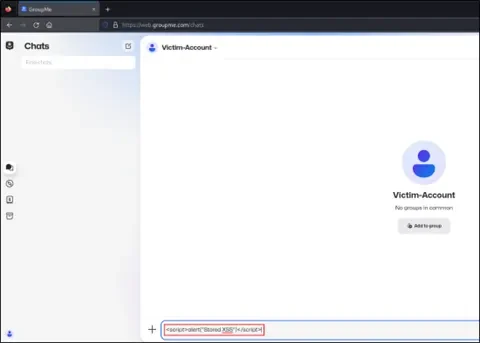
Figure 1: Sending the malicious JavaScript payload to the Victim-Account user
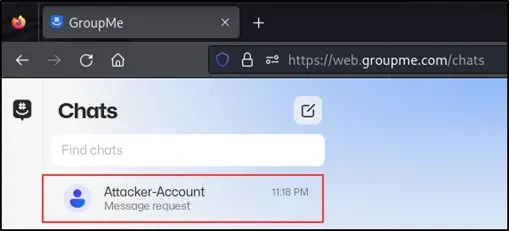
Figure 2: Receiving the malicious JavaScript payload message from the Attacker-Account user
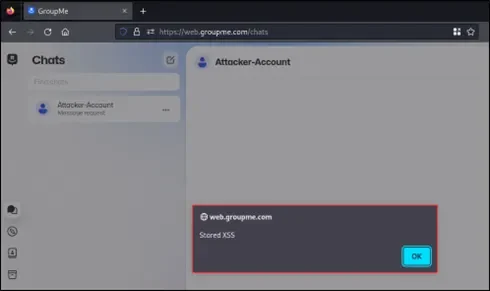
Figure 3: Malicious JavaScript is executed on the Victim-Account's Browser
The three figures are captioned as sending the payload, receiving it as a message request, and the JavaScript executing in the victim's browser. The report does not reproduce the exact payload string used for this first alert.
Step 2: two simple payloads
With the delivery path confirmed, they wrote two simple XSS payloads:
- Redirect victims to a different webpage, the signout page for example.
- Remove the accept box from the user's screen as soon as they read the message request, so that they could not mitigate the threat.
Neither payload is reproduced verbatim in the write-up. The second one is the interesting primitive: it denies the victim the very action (accepting or denying) that would end the attacker's ability to keep sending content.
Step 3: find a request that needs no password
Looking around GroupMe some more, they found that when users enable or disable 2-Factor Authentication (2FA), or change their email, the web request automatically carries the user's stored X-Access-Token and does not require the password to be entered for verification.
That is the pivot from XSS to account takeover. The token is sent automatically with those requests, and no password is required for verification.
Step 4: XSS to CSRF to takeover
They used an XSS payload to grab the user's token value and then performed CSRF by sending a POST request to the GroupMe web servers to change the account's email address and disable 2FA. With the email changed, they performed a password reset: the reset email goes to the address the attacker set, and the account is taken over.
The report does not include the raw POST request, its headers or the server's response.
Step 5: the master payload
Finally they combined everything into a single "master" XSS payload that, in one message, does all of the following and leads to instant account takeover:
- Remove the accept message box
- Change the user account's email address to one of their choosing
- Disable 2 factor authentication
- Sign the user out of their account
The master payload itself is not printed in the write-up.
Root cause
The mistake is a sanitisation gap between two code paths that handle the same kind of content. A message request is shown as a preview, and that path sanitised HTML and JavaScript improperly, unlike the full chat path. The authors demonstrated the difference directly: the same kind of payload worked while the request was pending and stopped working once the request was accepted and the conversation became a full chat.
Why the existing defences did not stop the escalation is only implied. The sensitive account endpoints (change email, toggle 2FA) trusted the stored X-Access-Token on its own and did not require the password to be re-entered, so any script running in the page could drive them.
Impact
An attacker who can send a message request to a target can execute JavaScript in that target's browser, provided the target has not accepted or denied the request. From there the attacker can change the account's email address, disable 2FA, sign the user out, and complete a password reset to the attacker-controlled address, which amounts to full account takeover. The master payload does all of this from one message as soon as the victim reads it.
The report does not state how many users were affected or whether any accounts were compromised in the wild.
Fix
The write-up lists mitigations rather than describing what Microsoft changed.
Stored Cross-Site Scripting:
- Input filtering: make sure any user input is filtered for only expected or valid input.
- Utilising response headers: use appropriate response headers to prevent HTTP / JavaScript from executing when it appears in HTTP responses.
- Content Security Policy: CSP limits the resources a page can load.
Cross-Site Request Forgery:
- CSRF tokens: a value generated by the back-end server, shared with and checked against the client when the client performs an action.
Variants to test
- Preview versus full-object rendering. Any product with a pending or preview state (message requests, connection invites, shared-file previews, comment moderation queues) is worth comparing against the accepted state. A positive result is a payload that executes while the object is pending and stops executing once it is accepted.
- Payloads that remove the dismissal control. Try script that hides or deletes the accept/deny UI. A positive result is a pending request the victim cannot clear, which keeps the injection window open indefinitely.
- Token-bearing endpoints without re-authentication. Enumerate account settings actions (email change, 2FA toggle, password change, session revocation) and replay them with only the stored access token. A positive result is a state change with no password prompt and no anti-CSRF token.
- Email change followed by password reset. If an email change succeeds without verification, request a password reset. A positive result is a reset mail arriving at the attacker-controlled address.
- Missing CSP on the vulnerable path. Check response headers on the preview rendering endpoint.
Credits
This bug was found by the three independent security researchers listed below:
- Alex Bryant | AlonTheSlay, https://www.linkedin.com/in/awb-alontheslay/
- Aditya Dindi | Pyrus, https://www.linkedin.com/in/adityadindi/
- Eric Esquivel | Agent007, https://www.linkedin.com/in/ericesquivel1/
Microsoft's Online Acknowledgement Page: https://msrc.microsoft.com/update-guide/acknowledgement/online
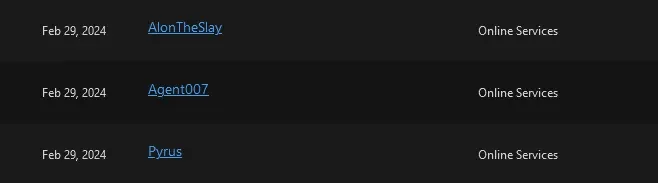
Figure 4: Our public acknowledgements
What happened, in plain words
Three security researchers, Alex Bryant, Aditya Dindi and Eric Esquivel, found a serious flaw in GroupMe, a group messaging app owned by Microsoft that many university and high school students use to coordinate their work. They came across it almost by accident while working on a group project for a business class at university.
In short: they could send a message to someone who was not yet a contact, and the app displayed that message without cleaning it up properly. That let them run their own small programs (JavaScript) inside the victim's browser. From there they could change the victim's email address, switch off two-factor authentication and trigger a password reset, which together means taking over the account completely.
This article walks through the whole story from zero. You only need to know how to use a browser. Every technical word is explained the first time it appears, and there is a glossary at the end.
The product and the feature
GroupMe is a mobile and web group messaging app owned by Microsoft, with millions of registered users. The authors describe it as the platform many university and high school students use to coordinate, which is how they came across it while working on a group project for a business class at university.
The feature at the centre of the write-up is the message request. When someone sends a message to a user who is not yet in a chat with them, the recipient does not get a normal chat message. Instead they get a preview message, a message request, which they can either accept or deny. Only once the request is accepted does it become a full chat where both users can send messages back and forth.
Think of it like a stranger knocking on your door and holding a note up to the window. You can read the note through the glass, and you can either open the door (accept) or wave them away (deny). Until you do one of those things, the note stays there and the person can keep holding up new notes.
That distinction between a message request and a full chat turns out to be the whole bug: the two paths sanitise input differently. Sanitising means cleaning up what a user typed before showing it to someone else, so that any code hidden inside it is defused and shown as harmless text instead of being run.
Setting up the test
The team started with two accounts, one belonging to Eric and one to Aditya, and later created additional accounts so they could keep sending message requests without accepting them. The write-up does not name any tools, browser versions or intercepting proxy; the work is described in terms of sending messages between accounts and observing what the browser does.
The precondition for every test is that the victim account must not accept or deny the message request. As long as the request stays pending, the attacker can keep sending content into it. This is the equivalent of the stranger at the window: as long as you never open or close the door, they can keep showing you notes.
Finding it
While looking around GroupMe, the pair got curious and, in their words, 25 minutes later an alert box appeared on their screens, proving a Stored Cross-Site Scripting (XSS) vulnerability. Alex, a close friend, then joined and the three of them escalated it.
An alert box is the small pop-up a browser shows when a web page runs the JavaScript command alert(). It is the classic harmless proof that you can run your own code in someone else's browser: instead of a pop-up saying "hello", a real attacker could run code that steals data or changes settings.
Cross-Site Scripting (XSS) is a type of attack where malicious JavaScript is injected into web applications and then executed in users' browsers. There are three types of XSS attacks: Reflected, DOM and Stored.
- Reflected XSS is a vulnerability where the injected JavaScript reaches the back-end server and gets returned to the user without being filtered or sanitised. Picture a shop assistant who repeats your order back to you word for word, including anything rude you slipped in.
- Stored XSS occurs when user input is stored on the target server and then a victim retrieves the stored data, at which point the malicious JavaScript is executed in their browser. This is the dangerous one here: the bad content sits on the server like a letter in a mailbox, waiting for the victim to open it.
- DOM XSS, or Document Object Model XSS, occurs when the injected JavaScript is used to change the page source through the DOM. The DOM is the browser's internal model of the page, the tree of elements it draws on screen; changing it with script changes what you see.
The first concrete observation was accidental in ordering: Eric was able to pop an alert box on Aditya's browser, but after Aditya accepted the message request in order to reply with his own payload, the XSS no longer worked. Full chat messages, they found, are properly sanitised. Alex identified the reason the first attempt had worked: the payload had travelled as a message request, not as a full chat message, and the sanitisation on that path was different.
A payload is simply the piece of content an attacker sends to trigger the flaw, in this case a short snippet of HTML or JavaScript.
From there they created additional accounts and deliberately left the message requests unaccepted so they could keep testing.
Exploitation
Step 1: confirm that message requests are not sanitised
When HTML and JavaScript is sent through as a message request, it is improperly sanitised. As long as the user never accepts or denies the message request, an attacker is able to continuously send unsanitised HTML and JavaScript to the victim.
HTML is the language that describes what a web page contains: headings, images, links, and so on. JavaScript is the programming language browsers run to make pages interactive. If a page shows user-supplied HTML and JavaScript without cleaning it, the browser cannot tell the difference between the site's own code and the attacker's code, so it runs both.
Figure 1: Sending the malicious JavaScript payload to the Victim-Account user
Figure 2: Receiving the malicious JavaScript payload message from the Attacker-Account user
Figure 3: Malicious JavaScript is executed on the Victim-Account's Browser
The three figures are captioned as sending the payload, receiving it as a message request, and the JavaScript executing in the victim's browser. The report does not reproduce the exact payload string used for this first alert.
Step 2: two simple payloads
With the delivery path confirmed, they wrote two simple XSS payloads:
- Redirect victims to a different webpage, the signout page for example.
- Remove the accept box from the user's screen as soon as they read the message request, so that they could not mitigate the threat.
Neither payload is reproduced verbatim in the write-up. The second one is the interesting primitive: it denies the victim the very action (accepting or denying) that would end the attacker's ability to keep sending content. In plain terms, the attacker removes the door handle so the victim cannot close the door.
Step 3: find a request that needs no password
Looking around GroupMe some more, they found that when users enable or disable 2-Factor Authentication (2FA), or change their email, the web request automatically carries the user's stored X-Access-Token and does not require the password to be entered for verification.
2-Factor Authentication (2FA) means logging in with two things: your password plus a second proof, such as a code from your phone. It is a second lock on the door.
A token is a long random string the server gives your browser after you log in, so that the server can recognise you on later requests without asking for your password every time. Think of it as a wristband at a festival: show it at the gate and you get in, no need to show your ticket again. The X-Access-Token here is the name of the header that carries that wristband.
A header is a small line of extra information sent alongside every web request or response, such as what type of content is being sent or who is asking. A web request is the message your browser sends to a server when you click something or a page loads; the server answers with a response.
That is the pivot from XSS to account takeover. The token is sent automatically with those requests, and no password is required for verification. An endpoint is a specific address on a server that performs a specific action, like "change email" or "turn off 2FA". Re-authentication means asking you to type your password again before a sensitive action, precisely so that a stolen wristband is not enough on its own.
Step 4: XSS to CSRF to takeover
They used an XSS payload to grab the user's token value and then performed CSRF by sending a POST request to the GroupMe web servers to change the account's email address and disable 2FA. With the email changed, they performed a password reset: the reset email goes to the address the attacker set, and the account is taken over.
Cross-Site Request Forgery (CSRF) is an attack where an attacker is able to perform and execute requests on behalf of the authenticated victim. The victim's browser already holds the wristband, so the server happily accepts instructions that the victim never intended to give. It is like someone using your signed blank cheque because you left it on the desk.
A POST request is a web request that sends data to the server to create or change something, as opposed to a GET request, which just asks to read a page. A password reset is the feature where you ask the site to email you a link to set a new password; if the email address belongs to the attacker, the attacker receives the link.
The report does not include the raw POST request, its headers or the server's response.
Step 5: the master payload
Finally they combined everything into a single "master" XSS payload that, in one message, does all of the following and leads to instant account takeover:
- Remove the accept message box
- Change the user account's email address to one of their choosing
- Disable 2 factor authentication
- Sign the user out of their account
The master payload itself is not printed in the write-up.
Why it worked
The mistake is a sanitisation gap between two code paths that handle the same kind of content. A message request is shown as a preview, and that path sanitised HTML and JavaScript improperly, unlike the full chat path. The authors demonstrated the difference directly: the same kind of payload worked while the request was pending and stopped working once the request was accepted and the conversation became a full chat.
Why the existing defences did not stop the escalation is only implied. The sensitive account endpoints (change email, toggle 2FA) trusted the stored X-Access-Token on its own and did not require the password to be re-entered, so any script running in the page could drive them.
A CSRF token is a value generated by the back-end server, shared with and checked against the client when the client performs an action. It is a one-time password for a single action, so a request forged from elsewhere does not carry the right value. A Content Security Policy (CSP) is a rule the server sends telling the browser which sources of script it may run; a strict policy would refuse to run the attacker's inline script even if it reached the page.
Impact
An attacker who can send a message request to a target can execute JavaScript in that target's browser, provided the target has not accepted or denied the request. From there the attacker can change the account's email address, disable 2FA, sign the user out, and complete a password reset to the attacker-controlled address, which amounts to full account takeover. The master payload does all of this from one message as soon as the victim reads it.
The report does not state how many users were affected or whether any accounts were compromised in the wild.
Fix
The write-up lists mitigations rather than describing what Microsoft changed.
Stored Cross-Site Scripting:
- Input filtering: make sure any user input is filtered for only expected or valid input.
- Utilising response headers: use appropriate response headers to prevent HTTP / JavaScript from executing when it appears in HTTP responses.
- Content Security Policy: CSP limits the resources a page can load.
Cross-Site Request Forgery:
- CSRF tokens: a value generated by the back-end server, shared with and checked against the client when the client performs an action.
Variants to test
- Preview versus full-object rendering. Any product with a pending or preview state (message requests, connection invites, shared-file previews, comment moderation queues) is worth comparing against the accepted state. A positive result is a payload that executes while the object is pending and stops executing once it is accepted.
- Payloads that remove the dismissal control. Try script that hides or deletes the accept/deny UI. A positive result is a pending request the victim cannot clear, which keeps the injection window open indefinitely.
- Token-bearing endpoints without re-authentication. Enumerate account settings actions (email change, 2FA toggle, password change, session revocation) and replay them with only the stored access token. A positive result is a state change with no password prompt and no anti-CSRF token.
- Email change followed by password reset. If an email change succeeds without verification, request a password reset. A positive result is a reset mail arriving at the attacker-controlled address.
- Missing CSP on the vulnerable path. Check response headers on the preview rendering endpoint.
Credits
This bug was found by the three independent security researchers listed below:
- Alex Bryant | AlonTheSlay, https://www.linkedin.com/in/awb-alontheslay/
- Aditya Dindi | Pyrus, https://www.linkedin.com/in/adityadindi/
- Eric Esquivel | Agent007, https://www.linkedin.com/in/ericesquivel1/
Microsoft's Online Acknowledgement Page: https://msrc.microsoft.com/update-guide/acknowledgement/online
Figure 4: Our public acknowledgements
Glossary
- 2-Factor Authentication (2FA): logging in with two separate proofs, usually a password plus a code from your phone.
- Alert box: the small pop-up a browser shows when a page runs the JavaScript
alert()command; a harmless way to prove code execution. - API: a defined set of addresses and rules a program uses to talk to a server, so one piece of software can ask another to do things.
- Back-end server: the computer behind a website that stores data and decides what to send back to your browser.
- Browser: the program you use to view web pages, such as Chrome, Firefox or Safari.
- Content Security Policy (CSP): a rule sent by the server telling the browser which sources of script and other resources it is allowed to load.
- Cookie: a small piece of data a website stores in your browser so it can recognise you on later visits.
- Cross-Site Request Forgery (CSRF): an attack where someone makes your browser send a request you did not intend, using the login you already have.
- Cross-Site Scripting (XSS): an attack where someone gets their own JavaScript to run inside another user's browser through a vulnerable web page.
- CSRF token: a value generated by the server and checked on each sensitive action, so a forged request without the right value is rejected.
- DOM (Document Object Model): the browser's internal tree of the page's elements, which script can read and change.
- DOM XSS: XSS where the injected script changes the page through the DOM rather than through the server's response.
- Endpoint: a specific address on a server that performs a specific action, such as changing an email address.
- Header: a line of extra information sent with a web request or response, such as the content type or an access token.
- HTML: the language that describes the structure and content of a web page.
- Input filtering: checking and cleaning what a user submits so only expected, valid content is accepted.
- JavaScript: the programming language browsers run to make pages interactive.
- Message request: GroupMe's preview message sent to someone you are not yet in a chat with, which they can accept or deny.
- Payload: the piece of content an attacker sends to trigger a vulnerability.
- POST request: a web request that sends data to the server to create or change something.
- Re-authentication: asking a user to prove their identity again, usually by retyping their password, before a sensitive action.
- Reflected XSS: XSS where the injected script is sent to the server and returned in the response without being cleaned.
- Sanitising: cleaning user-supplied content so any code inside it is neutralised and shown as plain text.
- Stored XSS: XSS where the malicious content is saved on the server and later shown to a victim, running in their browser.
- Token: a long random string a server gives your browser after login so it can recognise you on later requests without your password.
- Web request: the message your browser sends to a server when you load a page or click something; the server answers with a response.
- X-Access-Token: the name of the header GroupMe used to carry the user's stored access token.



