How I found DOM-Based XSS on Microsoft MSRC and How they fixed it
The MSRC blog search page took the 'query' URL parameter and inserted it into the page's HTML without sanitisation, allowing script execution. An attacker could craft a link that runs malicious JavaScript in a victim's browser when opened.
 Published on m3ez.medium.com
In this blog post, I am excited to share my experience of discovering a DOM-Based XSS vulnerability on the Microsoft Security Response Center (MSRC) website, and how the Microsoft Security Team quickly and efficiently resolved the issue by fixing the vulnerability.
The full write-up lives on its author's site
It belongs to its author, so we link to it rather than copy it. The other two tabs are our own rewrites, checked against it.
Context
The target is the Microsoft Security Response Center (MSRC) blog site at https://msrc.microsoft.com/blog/. On 9 February 2023 Microsoft launched a refreshed MSRC Blog Site, and the researcher read the announcement on the MSRC blog on 12 February 2023. The announcement said the site had been refreshed with a new look and improved site performance, search functionality, categories and tags, which signalled that new development work had gone into the site.
The feature of interest is the blog search. A visitor types a term into the search box, and the site navigates to a URL of the form https://msrc.microsoft.com/blog/search/?query=<term>. The page loads search.js, reads the query parameter and renders the search results, including a title for the results view.
The screenshot shows the new MSRC Blog Site as announced in the blog post.
Setup
No special accounts, roles or tooling are described. The researcher worked as an ordinary visitor: using the search box in a browser and reading the page's HTML source and the loaded JavaScript. The only precondition is that the search page is reachable and that the browser executes search.js.
The vulnerable build is identified in the report as:
Microsoft MSRC Blog version: 1.1.02231.103–9e425f97
The relevant assets are:
| Item | Value |
|---|---|
| Vulnerable URL | https://msrc.microsoft.com/blog/search/ |
| Vulnerable JavaScript | https://msrc.microsoft.com/blog/js/search.js |
| Vulnerable function | param |
| Vulnerable parameter | query |
Finding it
The researcher started with the search function and then looked at the page's HTML source. The source showed that search.js was loaded and that the search term was placed in the URL as a query parameter:
https://msrc.microsoft.com/blog/search/?query=m3ez
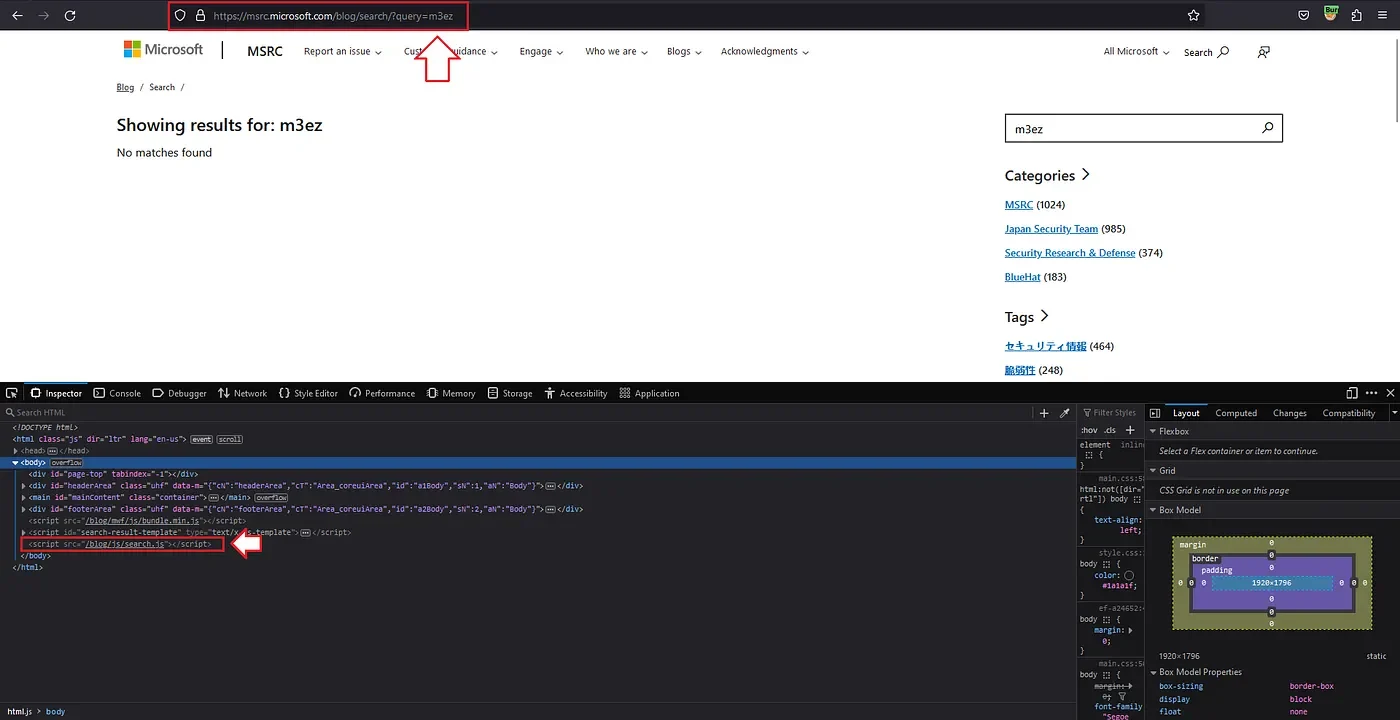
Because the term comes from the URL, it is attacker-controllable: anyone can craft a link with an arbitrary query value. The next question was what search.js does with that value, so the researcher read the file to find the root cause.
The analysis followed the data flow through the script:
-
At line 2296 the application checks whether a value exists in both the
inputBoxandsearchResultsbefore processing user input. -
At line 2297 the application calls the
paramfunction to retrieve the value of the query parameter and stores it insearchQuery.
search.js: 2389–2393
-
At line 2300 the application passes
searchQueryto theexecuteSearchfunction. -
Inside
executeSearch, the application callsparamagain and parses the result intosearchQueryTitle.innerHTML.
The last step is the problem. The value read from the URL is written straight into the innerHTML of a DOM element, with no sanitisation in between. innerHTML parses its input as HTML, so any markup in the query value becomes part of the document, and event-handler attributes on injected elements run script.
Exploitation
Step 1: confirm the parameter reaches the DOM
Request the search page with a harmless term and observe that the value appears in the results title:
https://msrc.microsoft.com/blog/search/?query=m3ez
The query value is read by param and assigned to searchQueryTitle.innerHTML inside executeSearch, so whatever is placed in the URL is rendered as HTML in the page.
Step 2: inject an element with an event handler
The report's testing payload is:
<img/src/onerror=alert(1)>
This is an img tag whose src attribute is empty (the / before src separates the tag name from the attribute), so the image fails to load and the onerror handler fires. The handler body is alert(1), which demonstrates script execution in the page's origin.
Step 3: deliver it through the URL
The example PoC URL is:
https://msrc.microsoft.com/blog/search/?query=<img/src/onerror=alert(1)>
When a victim opens this link, search.js reads the query value, assigns it to searchQueryTitle.innerHTML, the browser parses the injected img element, the load fails and onerror executes alert(1).
The report also shows a variant of the payload:
https://msrc.microsoft.com/blog/search/?query=<img/src/onerror=alert(`m3ez`)>*
A video PoC was recorded to demonstrate the vulnerability on the live site.
Root cause
The mistake is a classic DOM-based XSS sink. JavaScript takes data from an attacker-controllable source, here the query parameter of the URL, and passes it to a sink that supports dynamic code execution, here innerHTML. The report describes the flow precisely: the param function retrieves the user input and the result is set directly as the innerHTML of a DOM element without proper input sanitisation, so an attacker can inject and execute scripts in the victim's browser.
The report does not describe any server-side filtering or output encoding that would have caught the payload, and none would help here: the value never needs to reach the server, because the vulnerable assignment happens entirely in the browser. Any defence would have to sit in the client-side code, either by sanitising the value before it reaches innerHTML or by using a sink that does not parse HTML.
Impact
An attacker who can get a victim to open a crafted https://msrc.microsoft.com/blog/search/?query=... link can execute JavaScript in the victim's browser in the context of the MSRC blog site. The report frames the general consequence of DOM-based XSS as allowing attackers to hijack other users' accounts. The payloads shown only call alert, so the report does not demonstrate any specific action beyond script execution. Exploitation requires the victim to follow the crafted link.
Fix
After the report, the MSRC team acknowledged the issue and began investigating. They replaced the vulnerable param function with a new function called getSearchParamClean.
The new function uses the DOMPurify library to sanitise user input before it is used to set the innerHTML of a DOM element. This prevents XSS by removing malicious scripts from the input before it is displayed on the page.

The screenshot shows the getSearchParamClean function as implemented by the MSRC team.
To verify the fix, the researcher tried the injection again. The payload in the search query parameter is now sanitised and does not execute.
The report includes screenshots labelled before and after the fix.
Variants to test
DOM XSS of this shape is common wherever a client-side script reads a URL parameter and writes it into the page. Concrete things to try on other targets:
- Search pages that echo the term. Submit a search and inspect the resulting URL for parameters such as
query,q,searchors. Replace the value with<img/src/onerror=alert(1)>. A positive result is the handler firing without any server round trip, which confirms the value is written to a DOM sink client-side. - Read the loaded script. View the page source, list the JavaScript files it loads, and search them for
innerHTML,outerHTML,document.write,evalandinsertAdjacentHTML. Trace whether any of those sinks receive a value that came fromlocation.search,location.hashordocument.referrer. A positive result is an unbroken data flow from URL to sink with no sanitiser in between. - Try the hash fragment. Repeat the payload in the fragment (
#query=...). The fragment is never sent to the server, so a payload that executes from the fragment proves the vulnerability is entirely client-side and bypasses any server-side filtering. - Check the sanitised version. After a fix, resubmit the original payload and confirm it is neutralised. If the site now uses a sanitiser such as DOMPurify, try payloads that exercise its configuration, for example markup that survives sanitisation but still triggers script through an allowed attribute. A positive result is execution despite the sanitiser being present.
Disclosure timelines
| Date | Event |
|---|---|
| 12 February 2023 | Vulnerability discovered and reported through the MSRC portal |
| 14 February 2023 | MSRC ticket moved to Review/Repro |
| 15 February 2023 | MSRC rolled out a patch to fix the vulnerability |
| 23 February 2023 | Public release of the security advisory |
What happened, in plain words
A security researcher found a bug on the Microsoft Security Response Center (MSRC) blog website. The MSRC is the part of Microsoft that receives reports about security problems in Microsoft products, so its blog is where Microsoft announces news about security fixes. The bug was a type called DOM-based cross-site scripting, usually shortened to DOM XSS. In everyday terms: the website took a piece of text that a visitor could control (the search term in the address bar) and pasted it into the page as if it were part of the website's own code. If an attacker put a small piece of code in that text, the visitor's browser would run it. The researcher reported the bug to Microsoft on 12 February 2023, Microsoft fixed it on 15 February 2023, and the details became public on 23 February 2023.
This article walks through the whole story from zero. You only need a browser and a computer to follow it. Every technical word is explained the first time it appears, and there is a glossary at the end.
Background: what DOM-based XSS is
Before the story, a few ideas.
A web page is a document. When you open a website, your browser downloads a file written in a language called HTML. HTML describes the page's structure: headings, paragraphs, images, links. The browser reads the HTML and draws the page on your screen. The in-memory version of that page inside the browser is called the DOM (Document Object Model). Think of the DOM as the browser's working copy of the page: the HTML file is the recipe, the DOM is the cake that is actually on the table, and JavaScript can change the cake while you are looking at it.
JavaScript is the code that runs in your browser. Most modern websites load one or more JavaScript files. These files can read things (the address bar, the page content) and change things (insert text, load images, react to clicks). JavaScript is what makes a page interactive.
A URL parameter is a value carried in the address bar. Look at a search on many websites and you will see something like ?query=hello at the end of the address. The part after the ? is a list of name and value pairs. query is the name, hello is the value. The page's JavaScript can read this value and use it, for example to show "Search results for hello".
A sink is a place where data ends up and gets interpreted. Some places in a browser treat text as plain text: it is shown as-is. Other places treat text as instructions: they parse it as HTML, which means tags like <img> become real images and attributes like onerror become real code that can run. innerHTML is one of those instruction-parsing places. If you assign a string to element.innerHTML, the browser parses that string as HTML and builds real page elements from it. That is why innerHTML is called a sink: whatever goes in gets interpreted.
DOM-based XSS happens when JavaScript takes data from a place an attacker can control (like the URL) and passes it to a sink that interprets it as code (like innerHTML), without cleaning it first. The word sanitise means to clean input so that dangerous parts are removed or neutralised before use. If the cleaning step is missing, an attacker can put HTML in the URL and have the victim's browser run it.
Why does that matter? Because the code runs as if it came from the website itself. It can read what the page can read, act as the logged-in user, and change what the user sees. The report describes the general consequence as allowing attackers to hijack other users' accounts. In this specific case the researcher only demonstrated a harmless pop-up, but the mechanism is the same one that could be used for harm.
For more background, the report points to two references:
- DOM Based XSS | OWASP Foundation
- What is DOM-based XSS (cross-site scripting)? Tutorial & Examples | Web Security Academy (portswigger.net)
The target: the new MSRC blog
On 9 February 2023 Microsoft launched a refreshed MSRC Blog Site. The researcher read the announcement on the MSRC blog on 12 February 2023. The announcement said the site had been refreshed with a new look and improved site performance, search functionality, categories and tags. That matters because new features mean new code, and new code is where new bugs tend to appear. The search functionality was among the improved features, so it was worth a look.
The screenshot shows the new MSRC Blog Site as announced in the blog post.
The feature of interest is the blog search. A visitor types a term into the search box, and the site navigates to a URL of the form https://msrc.microsoft.com/blog/search/?query=<term>. The page loads a JavaScript file called search.js, reads the query parameter from the address bar, and renders the search results, including a title for the results view.
Setup: what you need to follow along
No special accounts, roles or tools are described. The researcher worked as an ordinary visitor: using the search box in a browser and reading the page's HTML source and the loaded JavaScript. The only precondition is that the search page is reachable and that the browser executes search.js.
To read a page's source in a browser, you can right-click and choose something like "View Page Source", or open the browser's developer tools. The source is the raw HTML the server sent. From there you can see which JavaScript files the page loads, and you can open those files to read them. That is all the researcher needed.
The vulnerable build is identified in the report as:
Microsoft MSRC Blog version: 1.1.02231.103–9e425f97
This is a version string: a label the site uses to identify which build of its code is running. The long number and the hexadecimal-looking suffix after the dash identify the exact release. Knowing the version matters because it tells you exactly which code was live when the bug was found, and it lets the vendor confirm which build needs fixing.
The relevant assets are:
| Item | Value |
|---|---|
| Vulnerable URL | https://msrc.microsoft.com/blog/search/ |
| Vulnerable JavaScript | https://msrc.microsoft.com/blog/js/search.js |
| Vulnerable function | param |
| Vulnerable parameter | query |
A function is a named block of code that does one job and can be called by name from elsewhere. The param function's job, as the name suggests, is to read a parameter (here, from the URL). The parameter is the name of the value in the URL, query. The URL is the address of the page. The JavaScript file is the code the page loads.
Finding it: how the researcher spotted the bug
The researcher started with the search function and then looked at the page's HTML source. The source showed that search.js was loaded and that the search term was placed in the URL as a query parameter:
https://msrc.microsoft.com/blog/search/?query=m3ez
Line by line: https://msrc.microsoft.com/blog/search/ is the search page. The ? starts the list of parameters. query=m3ez says the parameter named query has the value m3ez (the researcher's handle). When you search for something on this site, your term ends up in the address bar in exactly this shape.
Why does this matter? Because the term comes from the URL, it is attacker-controllable: anyone can craft a link with an arbitrary query value and send it to someone. If the page treats that value as HTML, the attacker controls what the page becomes. The next question was what search.js does with that value, so the researcher read the file to find the root cause.
The analysis followed the data flow through the script. Data flow simply means tracing where a value comes from, where it goes, and what happens to it on the way. The researcher followed the query value step by step:
- At line 2296 the application checks whether a value exists in both the
inputBoxandsearchResultsbefore processing user input.
Line numbers are just positions in the file, like page numbers in a book. The check means: only do the search work if both of those elements are present on this page. This is a guard, not the bug.
- At line 2297 the application calls the
paramfunction to retrieve the value of the query parameter and stores it insearchQuery.
search.js: 2389–2393
This line range is shown in the report alongside the param call. Calling param means asking it: what is the value of the query parameter in the address bar? The answer is stored in a variable called searchQuery. A variable is a named box in the code that holds a value so it can be used later. At this point searchQuery holds whatever the visitor typed, or whatever an attacker put in the URL.
- At line 2300 the application passes
searchQueryto theexecuteSearchfunction.
Passing a value to a function means handing it over so the function can work with it. executeSearch is the function that actually performs the search and updates the page. So the URL value is now inside the search routine.
- Inside
executeSearch, the application callsparamagain and parses the result intosearchQueryTitle.innerHTML.
The last step is the problem. The value read from the URL is written straight into the innerHTML of a DOM element, with no sanitisation in between. innerHTML parses its input as HTML, so any markup in the query value becomes part of the document, and event-handler attributes on injected elements run script. An event-handler attribute is an attribute on an HTML element that tells the browser what to do when something happens to that element, for example when an image fails to load. The browser runs the attribute's content as JavaScript.
Exploitation: proving it works
Step 1: confirm the parameter reaches the DOM
Request the search page with a harmless term and observe that the value appears in the results title:
https://msrc.microsoft.com/blog/search/?query=m3ez
Line by line: this is the same URL as before. The query value is read by param and assigned to searchQueryTitle.innerHTML inside executeSearch, so whatever is placed in the URL is rendered as HTML in the page. The harmless term proves the path works: the value travels from the address bar into the page. Now the question is what happens if the value is not harmless text but HTML.
Step 2: inject an element with an event handler
The report's testing payload is:
<img/src/onerror=alert(1)>
Line by line: <img starts an image element. The / before src separates the tag name from the attribute, so the browser reads src as an attribute name. src is the attribute that says where the image file is. Here it is empty, so there is no image to load. onerror=alert(1) is an event-handler attribute: it tells the browser that if the image fails to load, run the code alert(1). alert(1) is a built-in browser function that shows a small pop-up box with the number 1 in it. It does nothing harmful; it is the standard way to prove that code ran. The closing > ends the tag.
Why does this work? Because the image has no source, the load fails, the onerror handler fires, and the browser runs alert(1). The pop-up appears on the MSRC page, which proves that the attacker's code ran as part of the MSRC site.
Step 3: deliver it through the URL
The example PoC URL is:
https://msrc.microsoft.com/blog/search/?query=<img/src/onerror=alert(1)>
Line by line: this is the search page with the payload as the value of query. When a victim opens this link, search.js reads the query value, assigns it to searchQueryTitle.innerHTML, the browser parses the injected img element, the load fails and onerror executes alert(1). The victim does not have to type anything or click anything on the page: opening the link is enough.
The report also shows a variant using a template literal in the handler:
https://msrc.microsoft.com/blog/search/?query=<img/src/onerror=alert(`m3ez`)>*
A template literal is a JavaScript way of writing a string using backticks instead of quotes. Here the pop-up would show the text m3ez instead of the number 1. It is the same mechanism with a different message, which shows the payload is not limited to a fixed string.
A video PoC was recorded to demonstrate the vulnerability on the live site. A PoC, or proof of concept, is a minimal demonstration that a bug is real: just enough to show it works, without causing harm.
Root cause: why the bug existed
The mistake is a classic DOM-based XSS sink. JavaScript takes data from an attacker-controllable source, here the query parameter of the URL, and passes it to a sink that supports dynamic code execution, here innerHTML. The report describes the flow precisely: the param function retrieves the user input and the result is set directly as the innerHTML of a DOM element without proper input sanitisation, so an attacker can inject and execute scripts in the victim's browser.
A useful comparison: imagine a receptionist who takes a note from a stranger and reads it out loud to the whole office as if it were an instruction from the boss. The note is the URL value, the receptionist is innerHTML, and the missing step is checking whether the note is really from the boss before acting on it. Sanitising would be the check.
The report does not describe any server-side filtering or output encoding that would have caught the payload, and none would help here: the value never needs to reach the server, because the vulnerable assignment happens entirely in the browser. Server-side means on the web server, the computer that sends the page. Client-side means in the visitor's browser. Because the dangerous step happens in the browser, any defence would have to sit in the client-side code, either by sanitising the value before it reaches innerHTML or by using a sink that does not parse HTML.
Impact: what an attacker could do
An attacker who can get a victim to open a crafted https://msrc.microsoft.com/blog/search/?query=... link can execute JavaScript in the victim's browser in the context of the MSRC blog site. In the context of means the code runs as if it belonged to that site: it can do what the site's own code can do for that visitor. The report frames the general consequence of DOM-based XSS as allowing attackers to hijack other users' accounts. The payloads shown only call alert, so the report does not demonstrate any specific action beyond script execution. Exploitation requires the victim to follow the crafted link.
The fix: how Microsoft closed it
After the report, the MSRC team acknowledged the issue and began investigating. They replaced the vulnerable param function with a new function called getSearchParamClean.
The new function uses the DOMPurify library to sanitise user input before it is used to set the innerHTML of a DOM element. This prevents XSS by removing malicious scripts from the input before it is displayed on the page. A library is a bundle of ready-made code that a site can include instead of writing everything itself. DOMPurify is a well-known library whose job is to take a piece of HTML and remove the dangerous parts, keeping the harmless formatting.
The screenshot shows the getSearchParamClean function as implemented by the MSRC team.
To verify the fix, the researcher tried the injection again. The payload in the search query parameter is now sanitised and does not execute.
The report includes screenshots labelled before and after the fix. Checking the fix by replaying the original attack is standard practice: it confirms the change actually addresses the problem rather than just changing the code.
Variants to test: where else this shape appears
DOM XSS of this shape is common wherever a client-side script reads a URL parameter and writes it into the page. If you want to look for similar bugs on sites you are allowed to test, here are concrete things to try:
- Search pages that echo the term. Submit a search and inspect the resulting URL for parameters such as
query,q,searchors. Replace the value with<img/src/onerror=alert(1)>. A positive result is the handler firing without any server round trip, which confirms the value is written to a DOM sink client-side. "Echo" means the page shows your term back to you, for example in a results heading. - Read the loaded script. View the page source, list the JavaScript files it loads, and search them for
innerHTML,outerHTML,document.write,evalandinsertAdjacentHTML. These are all sinks: places where text can be interpreted as code. Trace whether any of those sinks receive a value that came fromlocation.search,location.hashordocument.referrer. Those are sources: places in the browser that hold values an attacker can influence.location.searchis the part of the URL after the?;location.hashis the part after#;document.referreris the address of the page that linked to this one. A positive result is an unbroken data flow from URL to sink with no sanitiser in between. - Try the hash fragment. Repeat the payload in the fragment (
#query=...). The fragment is never sent to the server, so a payload that executes from the fragment proves the vulnerability is entirely client-side and bypasses any server-side filtering. This is a useful check because it separates browser-side bugs from server-side ones. - Check the sanitised version. After a fix, resubmit the original payload and confirm it is neutralised. If the site now uses a sanitiser such as DOMPurify, try payloads that exercise its configuration, for example markup that survives sanitisation but still triggers script through an allowed attribute. A positive result is execution despite the sanitiser being present. This is about testing whether the sanitiser is configured correctly, not whether it exists.
Reporting it to Microsoft
To report the vulnerability, the researcher followed the steps outlined on the Microsoft Security Response Center website:
The researcher provided a detailed report outlining the vulnerability and a proof of concept (PoC) that demonstrated the attack. A good report explains what the bug is, where it lives, how to reproduce it, and what the impact could be. The PoC is the reproduction: the exact URL and the exact payload that make the bug happen.
You can find more information about how to report a vulnerability to Microsoft on the researcher's blog:
Summary of the vulnerability
The vulnerability was found in the Microsoft MSRC Blog, specifically in the search functionality at https://msrc.microsoft.com/blog/search/. The vulnerability was caused by the unsanitised user input received from the query parameter, which is used to set the innerHTML of a DOM element in the search results. This made it possible for an attacker to inject malicious scripts and execute them in the victim's browser, leading to a DOM-based XSS attack.
Vulnerable product:
Microsoft MSRC Blog version: 1.1.02231.103–9e425f97Vulnerable URL:
https://msrc.microsoft.com/blog/search/Vulnerable JavaScript:
https://msrc.microsoft.com/blog/js/search.jsVulnerable Function:
paramVulnerable Parameter:
queryTesting Payload:
<img/src/onerror=alert(1)>Example PoC URL:
https://msrc.microsoft.com/blog/search/?query=<img/src/onerror=alert(1)>
This block is the summary a triage team needs: which product and version, which page, which file, which function, which parameter, and the exact payload and URL to reproduce it. Each line answers a question the person fixing the bug will ask.
Disclosure timelines
Here are the timelines for the vulnerability disclosure:
| Date | Event |
|---|---|
| 12 February 2023 | Vulnerability discovered and reported through the MSRC portal |
| 14 February 2023 | MSRC ticket moved to Review/Repro |
| 15 February 2023 | MSRC rolled out a patch to fix the vulnerability |
| 23 February 2023 | Public release of the security advisory |
A ticket is the record a vendor keeps of a reported issue. "Review/Repro" means the team moved it to the stage where they review the report and try to reproduce the bug. A patch is a change to the code that fixes the problem. A security advisory is the public notice that describes the issue after it has been fixed.
Glossary
- Advisory (security advisory): a public notice from a vendor describing a security issue and its fix.
- Attacker-controllable: a value that anyone can set, for example a parameter in a URL you send to someone.
- Client-side: happening in the visitor's browser rather than on the web server.
- Data flow: the path a value takes through code, from where it comes from to where it ends up.
- DOM (Document Object Model): the browser's in-memory version of a page, which JavaScript can read and change.
- DOM-based XSS: a cross-site scripting bug where JavaScript takes attacker-controlled data (often from the URL) and writes it into a sink that interprets it as code, without sanitising it first.
- DOMPurify: a JavaScript library that cleans HTML by removing dangerous parts.
- Event-handler attribute: an HTML attribute such as
onerrorthat tells the browser to run code when something happens to an element. - Function: a named block of code that does one job and can be called by name.
- HTML: the language that describes the structure of a web page.
- innerHTML: a property of a DOM element; assigning text to it makes the browser parse that text as HTML.
- JavaScript: the programming language that runs in the browser and makes pages interactive.
- Library: a bundle of ready-made code a site can include instead of writing everything itself.
- Parameter (URL parameter): a name and value pair in the address bar, after the
?, for examplequery=m3ez. - Patch: a code change that fixes a bug.
- PoC (proof of concept): a minimal demonstration that a bug is real.
- Sanitise: to clean input so dangerous parts are removed or neutralised before use.
- Server-side: happening on the web server that sends the page.
- Sink: a place in the browser where text is interpreted, for example as HTML or as code.
- Source (in XSS): a place in the browser that holds a value an attacker can influence, such as
location.search. - Template literal: a JavaScript string written with backticks, which can contain expressions.
- Ticket: a vendor's record of a reported issue and its progress.
- URL: the address of a page or resource on the web.
- Variable: a named box in code that holds a value for later use.
- Version string: a label identifying which build of a piece of software is running.
- XSS (cross-site scripting): a class of bug where an attacker gets their code to run in another user's browser as part of a website.



