Reflected XSS Leads to 3,000$ Bug Bounty Rewards from Microsoft Forms
Microsoft Forms failed to properly validate the 'id' parameter, allowing an attacker to inject JavaScript that executes in a victim's browser. An attacker could craft a malicious link to take over authenticated accounts or perform state-changing actions.
 Published on infosecwriteups.com
In this blog post, I will discuss the details of a reflected cross-site scripting (XSS) vulnerability in Microsoft Forms.
The full write-up lives on its author's site
It belongs to its author, so we link to it rather than copy it. The other two tabs are our own rewrites, checked against it.
Context
Microsoft Forms is a web-based tool for creating surveys, quizzes and other forms. Users create a form, share it with others and collect the responses in one place. Each form is reached through a response page, and the page is addressed by an id value in the query string of the response page URL.
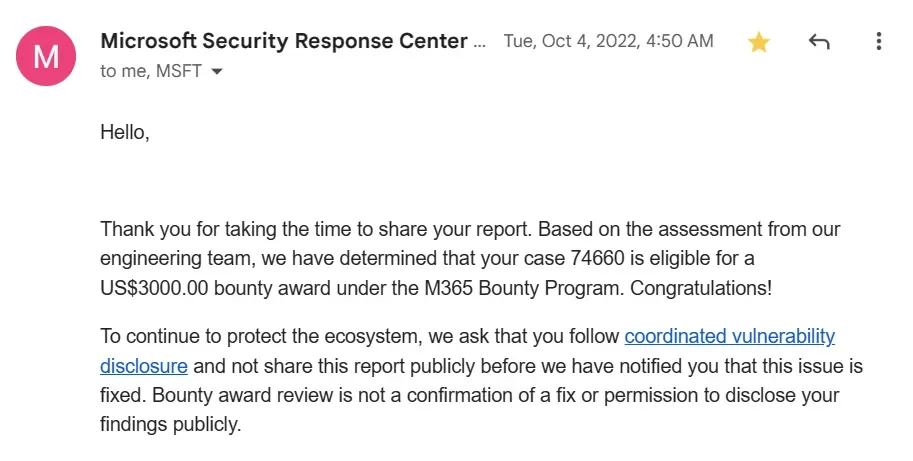
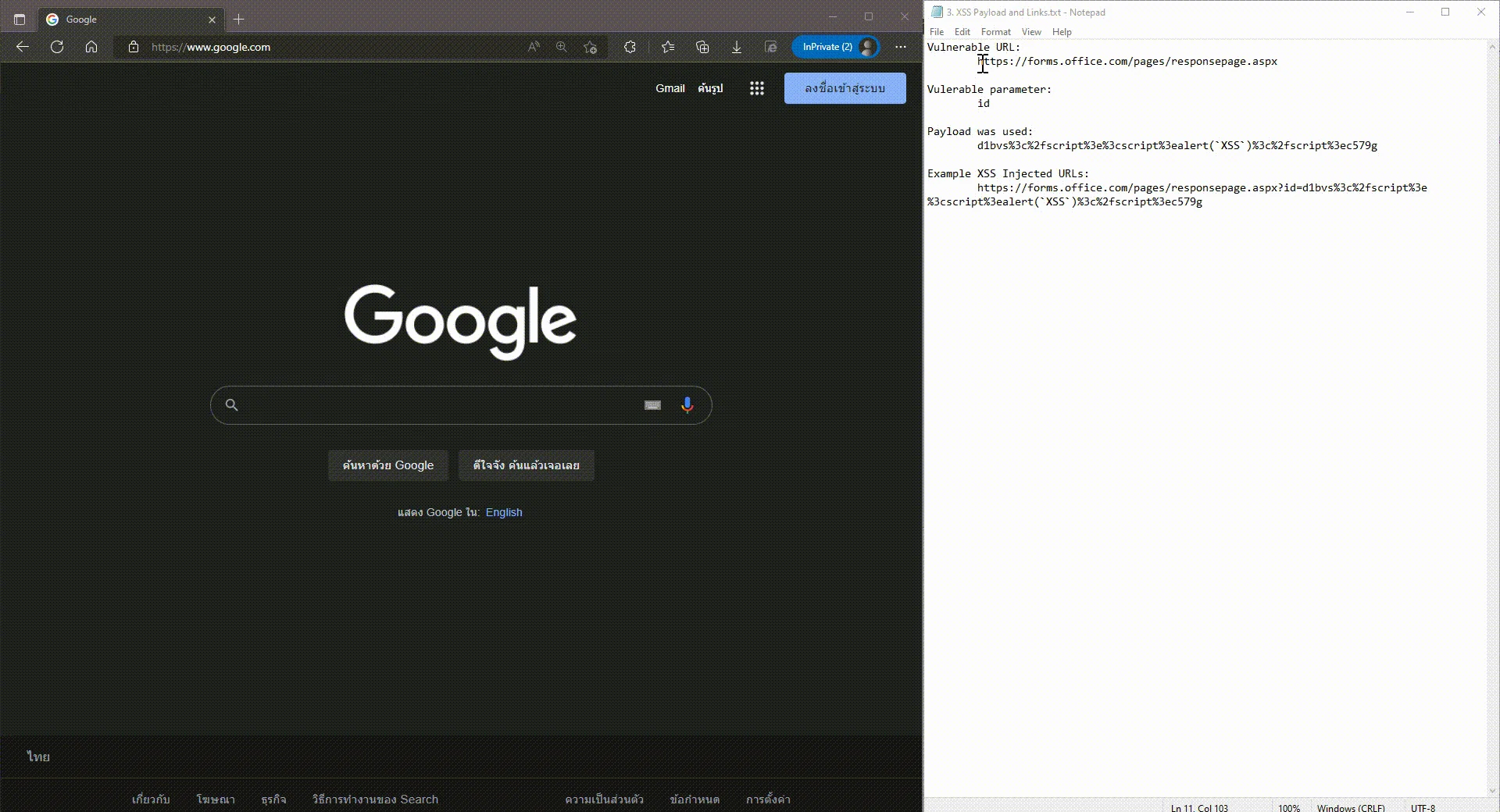
The vulnerability described here is a reflected cross-site scripting (XSS) issue in the way Microsoft Forms processes user input. The product is Microsoft Forms, the vulnerable URL is https://forms.office.com/pages/responsepage.aspx and the vulnerable parameter is id.
Setup
The report does not describe any special account, role or tooling. The researcher followed the MSRC reporting guidelines and submitted the finding through the MSRC portal. The references given for that process are the MSRC example report submissions, the Microsoft Bounty Programs page and the MSRC FAQ on reporting and submission guidelines.
No particular browser, version or configuration is stated. The only precondition visible in the proof of concept is that a victim opens a crafted link.
Finding it
The researcher states that the vulnerability lies in the way Microsoft Forms processes user input: the application fails to properly validate user input, which allows an attacker to inject malicious JavaScript into the id parameter. Because the parameter value is not properly validated, a crafted link can carry a payload that the victim's browser executes.
The report frames reflected XSS in general terms: the site includes untrusted user input in its pages without proper validation or encoding, the attacker crafts a link or form, and when the victim clicks or submits it the browser executes the malicious code as though it were part of the site.
Exploitation
An attacker crafts a link containing the malicious JavaScript and then persuades a user to open it, for example through phishing email or instant messaging. The proof of concept below demonstrates the mechanism.
Step 1: open the response page
https://forms.office.com/Pages/ResponsePage.aspx
This is the normal response page endpoint, without any form identifier.
Step 2: inject the payload into the id parameter
The payload used was:
d1bvs%3c%2fscript%3e%3cscript%3ealert(`XSS`)%3c%2fscript%3ec579g
The value is percent-encoded. Decoded, the %3c and %3e sequences become angle brackets and %2f becomes a slash, so the value contains a closing </script> tag, an opening <script> tag whose body calls alert with the string XSS, and a further closing </script> tag. The leading d1bvs and trailing c579g are arbitrary text placed around the injected markup. The payload is appended to the vulnerable URL from step 1 as the value of id:
https://forms.office.com/pages/responsepage.aspx?id=d1bvs%3c%2fscript%3e%3cscript%3ealert(`XSS`)%3c%2fscript%3ec579g
Step 3: open the crafted URL
The researcher opens the URL from step 2.
Step 4: the payload executes
When a user opens the injected link, the XSS payload is triggered and executed. The report shows this in a video:
Root cause
The report attributes the issue to missing validation of user input in the id parameter: the value is reflected into the response page without proper validation or encoding, so markup supplied in the query string becomes part of the page and is parsed as script. The report does not show the server-side code, so the exact sink is not stated.
Impact
The researcher lists the following consequences of a successful attack: taking over authenticated accounts, performing state-changing actions with authenticated users' sessions in the application, and using the vulnerable domain to host a phishing page.
Fix
The disclosure timeline records the case moving through MSRC review and development and ending with a public advisory:
| Date | Event |
|---|---|
| Sep 27, 2022 | Vulnerability discovered and reported through the MSRC portal |
| Sep 29, 2022 | MSRC team confirmed; ticket moved to Review/Repro |
| Oct 4, 2022 | Bounty awarded; case status changed from Review/Repro to Develop |
| Oct 21, 2022 | MSRC status changed to Pre-Release and Complete |
| Jan 22, 2023 | Public release of the security advisory |
Variants to test
- Other parameters on the same response page. Try values that break out of a script context, as the payload here does, in any parameter that is reflected into the page. A positive result is the injected script executing in the browser.
- Different reflection contexts. Where a value lands in an HTML attribute, in text or inside an existing script block, the breakout sequence differs. A positive result is markup or script being parsed rather than displayed as text.
- Encoding variations. The payload here relies on percent-encoding being decoded before the value reaches the page. Test whether double encoding or mixed encoding changes what the application reflects, and whether the decoded value still executes.
- Other Microsoft Forms endpoints that take an identifier. The report only covers
responsepage.aspxwithid; other pages that accept identifiers are worth checking for the same reflection pattern. A positive result is the same script execution from a crafted link.
What happened, in plain words
Microsoft Forms is a website for building surveys and quizzes. You create a form, share a link with other people, and their answers are collected in one place. Each form has its own response page, and the site knows which form you mean because the address contains an identifier: a short piece of text after id= in the link.
A security researcher found that this identifier was not checked properly. If you put special characters into the id value, the page copied them back into the page without cleaning them up. Some of those characters can tell a browser to run code. So a link could be built that, when opened, runs a small piece of JavaScript in the visitor's browser. This kind of flaw is called reflected cross-site scripting, or reflected XSS.
The researcher reported it to Microsoft through Microsoft's bug bounty programme, was paid a reward of 3,000 USD, and the case was later published as a security advisory. This article walks through the same steps for someone who has never done security testing before.
Background: what Microsoft Forms does
Microsoft Forms is a web-based tool for creating surveys, quizzes and other forms. A person creates a form, shares it with others, and the answers are collected in a central place. Each form is reached through a response page, and that page is addressed by an id value in the query string of the URL.
Two terms are worth unpacking before we go further.
- Query string: the part of a web address after the question mark. In
https://example.com/page?colour=blue, the query string iscolour=blue. It is a way of passing small pieces of information to the page. Think of it like the note you hand to a receptionist: the building is the same, but the note tells them which department you want. idparameter: one named slot inside the query string. Here the slot is calledidand its value is supposed to identify a particular form. A parameter is just a name and a value joined by=, and several of them are joined by&.
The vulnerability described here is a reflected cross-site scripting (XSS) issue in the way Microsoft Forms processes user input. The product is Microsoft Forms, the vulnerable URL is https://forms.office.com/pages/responsepage.aspx and the vulnerable parameter is id.
Setup: what you need before you start
The report does not describe any special account, role or tooling. The researcher followed the MSRC reporting guidelines and submitted the finding through the MSRC portal. MSRC stands for Microsoft Security Response Center: the team at Microsoft that receives reports of security problems, checks them, and coordinates fixes. The references given for that process are the MSRC example report submissions, the Microsoft Bounty Programs page and the MSRC FAQ on reporting and submission guidelines.
No particular browser, version or configuration is stated. The only precondition visible in the proof of concept is that a victim opens a crafted link.
Finding it: how the flaw works
The researcher states that the vulnerability lies in the way Microsoft Forms processes user input: the application fails to properly validate user input, which allows an attacker to inject malicious JavaScript into the id parameter. Because the parameter value is reflected into the response page, a crafted link can carry a payload that the victim's browser executes.
Let us slow down on the words in that paragraph, because each one matters.
- User input: anything a visitor sends to a website, such as text typed into a box or values placed in the address bar. The
idvalue in the URL is user input, because anyone can type whatever they like there. - Validation: checking that input is what it is supposed to be. If a field expects a number, validation rejects letters. If a field expects a short identifier, validation rejects angle brackets and other characters that have special meaning in a web page.
- Reflected: the site takes the input and echoes it straight back into the page it sends you. It is like a shop assistant repeating your name back to you: whatever you said comes back out. If you said something rude, the assistant repeats that too.
- JavaScript: the programming language that browsers run. It is what makes pages interactive, and it can also read and change what is on the page.
- Payload: the piece of input an attacker designs to do something when it is processed. In this case, the payload is a small snippet of JavaScript.
- XSS (cross-site scripting): a class of bug where a site lets an attacker's code run in another visitor's browser as if it came from the site itself. The browser trusts the site, so it trusts the code.
The report frames reflected XSS in general terms: the site includes untrusted user input in its pages without proper validation or encoding, the attacker crafts a link or form, and when the victim clicks or submits it the browser executes the malicious code as though it were part of the site.
Encoding here means turning characters into a safe representation. For example, the character < can be written as %3C in a URL. Encoding is not a fix by itself; it is a way of transporting characters that would otherwise be awkward in an address. The problem in this report is that the site placed the value into the page without proper validation or encoding.
Exploitation: the proof of concept, step by step
An attacker crafts a link containing the malicious JavaScript and then persuades a user to open it, for example through phishing email or instant messaging. Phishing means sending a message that looks trustworthy so the recipient clicks a link or hands over information. The proof of concept below demonstrates the mechanism.
Step 1: open the response page
https://forms.office.com/Pages/ResponsePage.aspx
This is the normal response page endpoint, without any form identifier.
Step 2: inject the payload into the id parameter
The payload used was:
d1bvs%3c%2fscript%3e%3cscript%3ealert(`XSS`)%3c%2fscript%3ec579g
Line by line, in plain words:
d1bvsis arbitrary text. It has no special meaning; it is there so the value looks like a plausible identifier at the start.%3cis the percent-encoded form of<, the character that opens an HTML tag.%2fis the percent-encoded form of/, the character used in a closing tag such as</script>.scriptis the name of the HTML element that holds JavaScript.%3eis the percent-encoded form of>, the character that closes an HTML tag.- So
%3c%2fscript%3edecodes to</script>, which ends a script block that the page already had open. %3cscript%3edecodes to<script>, which starts a new script block.alert(XSS)is the JavaScript that runs.alertis a built-in browser function that shows a small pop-up box with the text you give it. Seeing the box is proof that code ran.%3c%2fscript%3eagain decodes to</script>, closing the new script block.c579gis more arbitrary text at the end, again to make the value look like an identifier.
The value is percent-encoded. Decoded, the %3c and %3e sequences become angle brackets and %2f becomes a slash, so the value contains a closing </script> tag, an opening <script> tag whose body calls alert with the string XSS, and a further closing </script> tag. The leading d1bvs and trailing c579g are arbitrary text placed around the injected markup. The payload is appended to the vulnerable URL from step 1 as the value of id:
https://forms.office.com/pages/responsepage.aspx?id=d1bvs%3c%2fscript%3e%3cscript%3ealert(`XSS`)%3c%2fscript%3ec579g
Why this shape? The payload begins with a closing </script> tag. That only makes sense if the page has already opened a script block and placed the id value inside it. By closing that block early and opening a new one, the attacker makes the browser treat the injected text as a fresh piece of JavaScript rather than as data. The report does not show the server-side code, so the exact place where the value lands is not stated, but the payload's structure points to a script context.
Step 3: open the crafted URL
The researcher opens the URL from step 2. This is the moment of truth: if the page reflects the value without cleaning it, the browser will parse the injected tags and run the script.
Step 4: the payload executes
When a user opens the injected link, the XSS payload is triggered and executed. The report shows this in a video:
The report shows the payload being triggered and executed in a video. For a beginner, that pop-up is the whole proof: the page did not merely display the text, it executed it.
Root cause: why it happened
The report attributes the issue to missing validation of user input in the id parameter: the value is reflected into the response page without proper validation or encoding, so markup supplied in the query string becomes part of the page and is parsed as script. The payload's use of a closing </script> tag followed by a new <script> element suggests the value is placed inside an existing script context, where breaking out of the current element is enough to introduce new script.
A sink is the place in the code where data finally ends up, such as the HTML that gets sent to the browser. If the sink treats data as text, it is safe. If the sink treats data as markup or script, it is dangerous. The report tells us the outcome but not the exact line of code.
Impact: what an attacker could do
The researcher lists the following consequences of a successful attack: taking over authenticated accounts, performing state-changing actions with authenticated users' sessions in the application, and using the vulnerable domain to host a phishing page.
Some of those words need explaining.
- Authenticated account: an account where you have already proved who you are, usually by logging in. The site then treats your browser as you.
- Session: the period during which the site remembers that you are logged in. It is often kept in a cookie, a small piece of data the site stores in your browser and sends back with each request. Think of a cookie like a wristband at an event: it shows you were checked in at the door, and you do not have to show your ticket again.
- State-changing action: anything that alters data, such as submitting a form, changing a setting or sending a message. If an attacker's script runs while you are logged in, it can make those changes as you.
- Phishing page: a fake page that looks like a real one to trick people into entering information. Because the address here belongs to the real Microsoft Forms domain, a fake page hosted there would look more convincing.
Fix: what changed
The remediation implied by the finding is proper validation or encoding of the id parameter so that user input is not reflected into the page as executable markup. In everyday terms: the site should treat the id value as text, never as instructions, and should reject or neutralise characters such as < and > that have special meaning in a page.
The disclosure timeline records the case moving through MSRC review and development and ending with a public advisory:
| Date | Event |
|---|---|
| Sep 27, 2022 | Vulnerability discovered and reported through the MSRC portal |
| Sep 29, 2022 | MSRC team confirmed; ticket moved to Review/Repro |
| Oct 4, 2022 | Bounty awarded; case status changed from Review/Repro to Develop |
| Oct 21, 2022 | MSRC status changed to Pre-Release and Complete |
| Jan 22, 2023 | Public release of the security advisory |
A security advisory is the public notice a vendor publishes once a problem is fixed, so that customers and defenders know what happened. Review/Repro means the security team is checking the report and trying to reproduce the issue. Develop means a fix is being worked on. Pre-Release and Complete means the fix is ready and the case is closed.
Variants to test
If you want to practise the same idea on a site you are allowed to test, these are the directions the report points to. Always stay within a programme's rules and never test a site without permission.
- Other parameters on the same response page. Try values that break out of a script context, as the payload here does, in any parameter that is reflected into the page. A positive result is the injected script executing in the browser.
- Different reflection contexts. Where a value lands in an HTML attribute, in text or inside an existing script block, the breakout sequence differs. A positive result is markup or script being parsed rather than displayed as text.
- Encoding variations. The payload here relies on percent-encoding being decoded before the value reaches the page. Test whether double encoding or mixed encoding changes what the application reflects, and whether the decoded value still executes.
- Other Microsoft Forms endpoints that take an identifier. The report only covers
responsepage.aspxwithid; other pages that accept identifiers are worth checking for the same reflection pattern. A positive result is the same script execution from a crafted link.
Glossary
- API: a defined way for one piece of software to talk to another, like a service counter where you ask for something by name and get a structured answer back.
- Bounty: a reward a company pays to someone who reports a security problem responsibly.
- Cookie: a small piece of data a website stores in your browser and receives back with later requests, often used to remember that you are logged in.
- Cross-site scripting (XSS): a bug where a site lets an attacker's code run in another visitor's browser as if it came from the site.
- Develop (MSRC status): the stage where a fix is being worked on.
- Encoding: rewriting characters in a safe representation, such as
%3Cfor<in a URL. - Endpoint: a specific address on a website that does a particular job, such as a response page.
- HTML: the language that describes the structure of a web page, using tags such as
<script>. - JavaScript: the programming language browsers run to make pages interactive.
- MSRC: Microsoft Security Response Center, the team that receives and handles security reports at Microsoft.
- Parameter: a named slot in a URL's query string, written as
name=value. - Percent-encoding: writing characters as
%followed by two hexadecimal digits so they can travel safely in a URL. - Phishing: sending a message that looks trustworthy so the recipient clicks a link or hands over information.
- Pre-Release and Complete (MSRC status): the stage where the fix is ready and the case is closed.
- Query string: the part of a URL after the question mark, carrying small pieces of information to the page.
- Reflected: input that a site echoes straight back into the page it sends you.
- Review/Repro (MSRC status): the stage where the security team checks a report and tries to reproduce the issue.
- Security advisory: a public notice a vendor publishes once a problem is fixed.
- Session: the period during which a site remembers that you are logged in.
- Sink: the place in code where data finally ends up, such as the HTML sent to the browser.
- State-changing action: anything that alters data, such as submitting a form or changing a setting.
- User input: anything a visitor sends to a website, such as text typed into a box or values in the address bar.
- Validation: checking that input is what it is supposed to be and rejecting what is not.
- Vulnerable parameter: the specific input slot where the flaw can be triggered.




