Persistent XSS on Microsoft Bing.com by poisoning Bingbot indexing
Bing's video indexing system stored video metadata from external sites without sanitisation, and served it with a text/html content type, allowing an attacker to inject a script that executed when a user viewed the video details on Bing. The attacker could run arbitrary JavaScript in the context of Bing's web application.
 Published on infosecwriteups.com
In this blog post, I will discuss the details of a Persistent XSS on Bing.com by poisoning Bingbotfrom external websites.
The full write-up lives on its author's site
It belongs to its author, so we link to it rather than copy it. The other two tabs are our own rewrites, checked against it.
Context
Bing is Microsoft's search engine, offering web, video, image and map searches. Bingbot is Microsoft's web crawler, launched in October 2010, which follows external and internal links to discover new pages and update Bing's index with changes to existing ones. The data Bingbot collects is fed into Bing's search algorithms, which decide which sites, news articles, images or videos appear in the index and in search results.
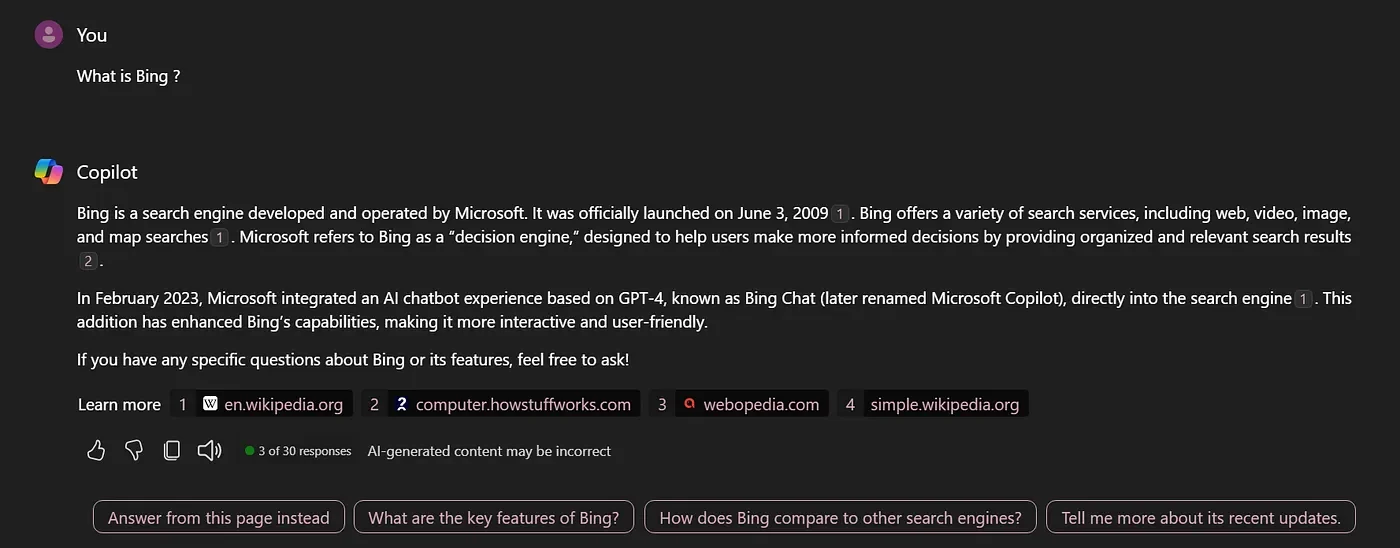
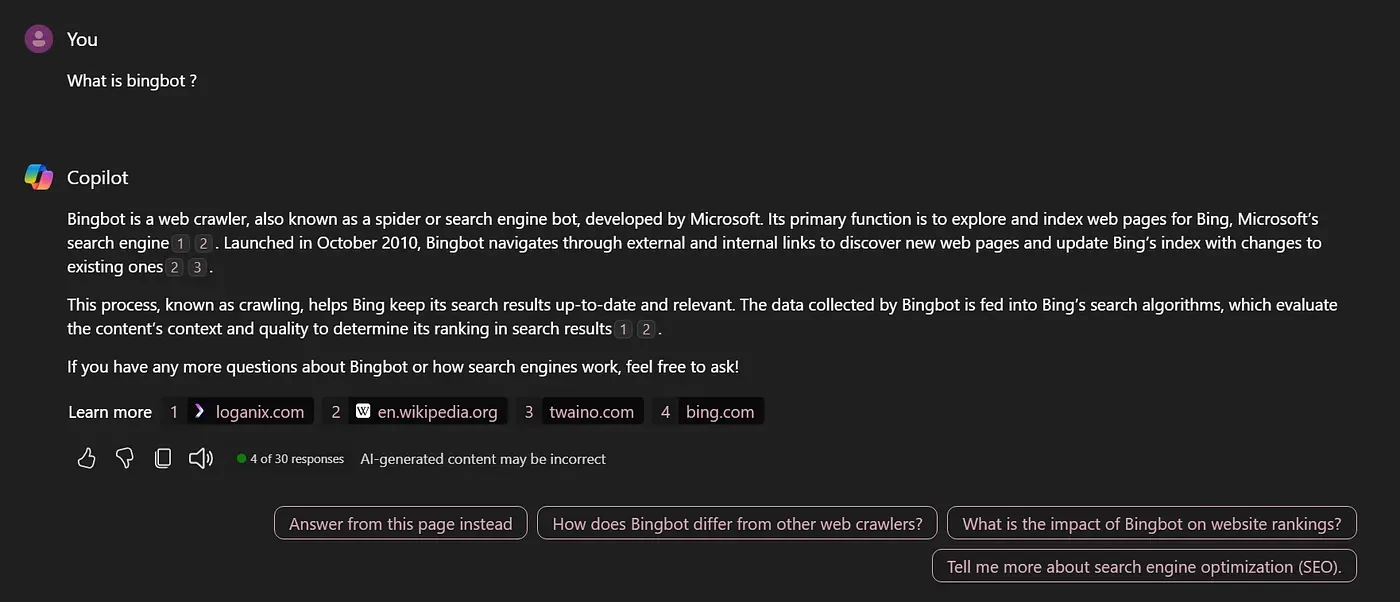
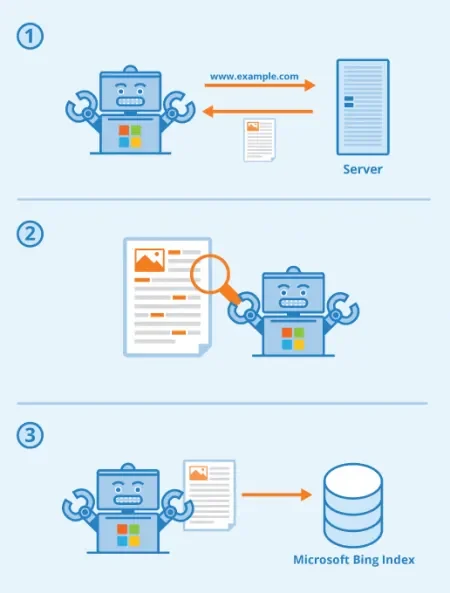
The feature at the centre of this report is Bing's video search and the video details view. When a user searches for videos, Bing processes the query and retrieves relevant content from its index, including metadata that Bingbot has collected from external websites: the video title, description and owner name. That metadata is displayed back to the user in the Bing web application.
Setup
The researcher needed only a way to publish a video on a third-party platform that Bingbot would crawl, and a Bing search to find it again. The platforms considered were:
- VK:
https://vk.com/video/@club226523289 - TikTok:
https://www.tiktok.com/@m3ez_xss - Instagram:
https://www.instagram.com/m3ez.ss - and other sites
YouTube was deliberately excluded. The reason given is that the vdasync response is JSON, and to execute JavaScript or HTML injection the researcher needed to be able to use <> (angle brackets), which YouTube does not permit. The same limitation was said to apply to Vimeo and Dailymotion.
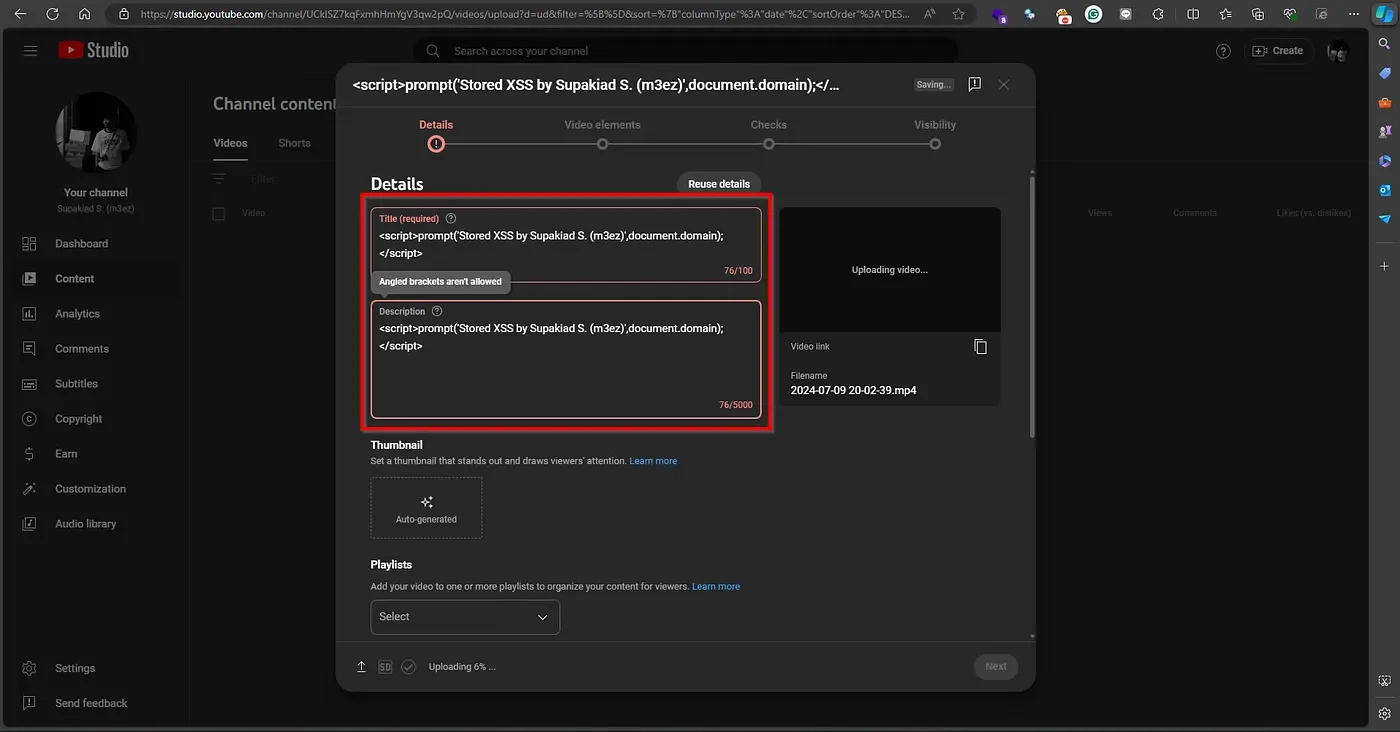
No special account, role or tooling is described beyond posting a video on VK and searching Bing. The precondition is timing: the researcher did not know how long a new video would take to appear in Bing search, and in the event it took a few days for the VK video to show up in Bing video search.
Finding it
While using Bing, the researcher noticed that when a user searches for an image on Bing image search and the result is a video, clicking to view it leads to the URL:
https://www.bing.com/videos/vdasync
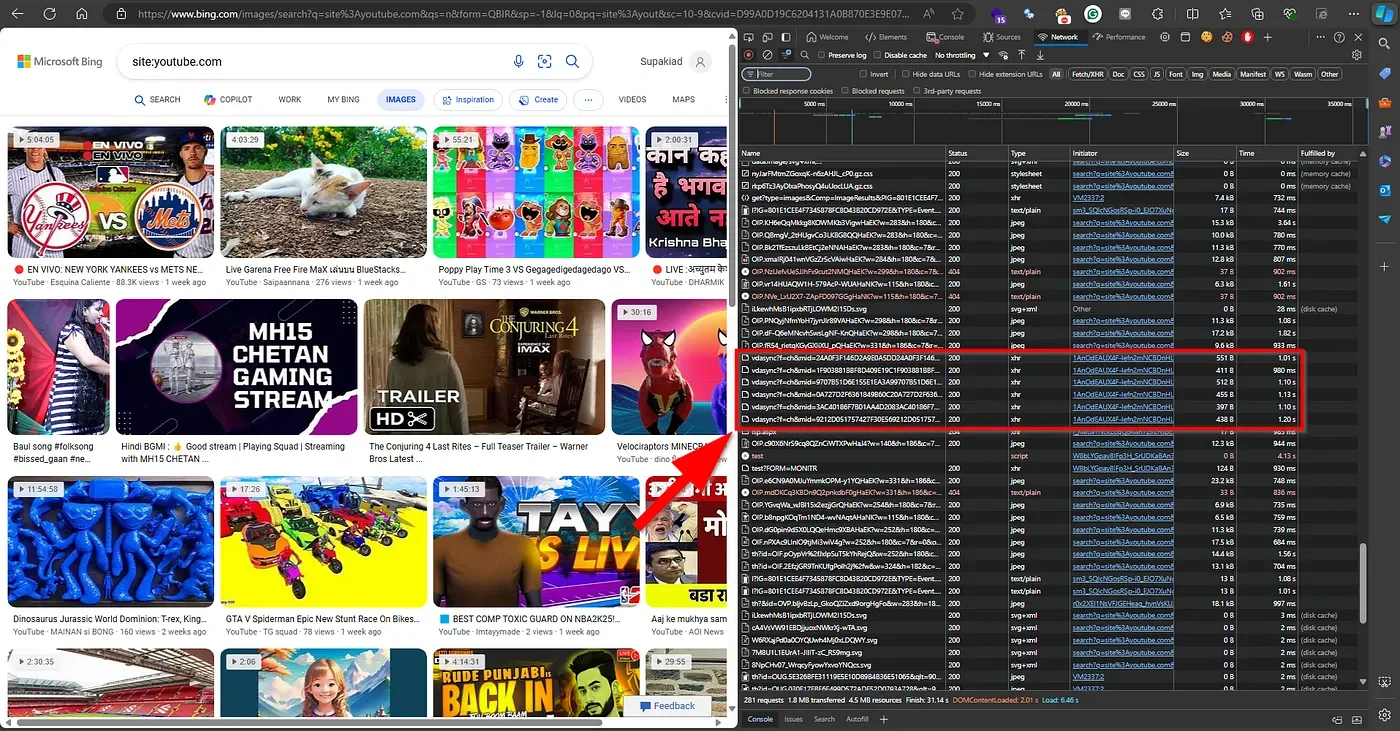
Viewing the details showed that the API returns metadata of the video that Bingbot has collected from other websites and stored in Bing's search system.
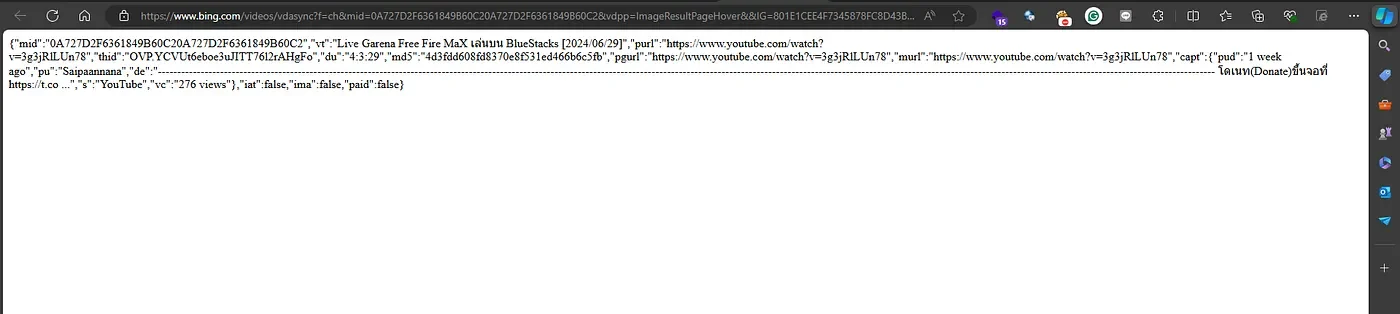
What made it look wrong was the response type. The URL returned:
Content-type: text/html; charset=utf-8
instead of application/json.
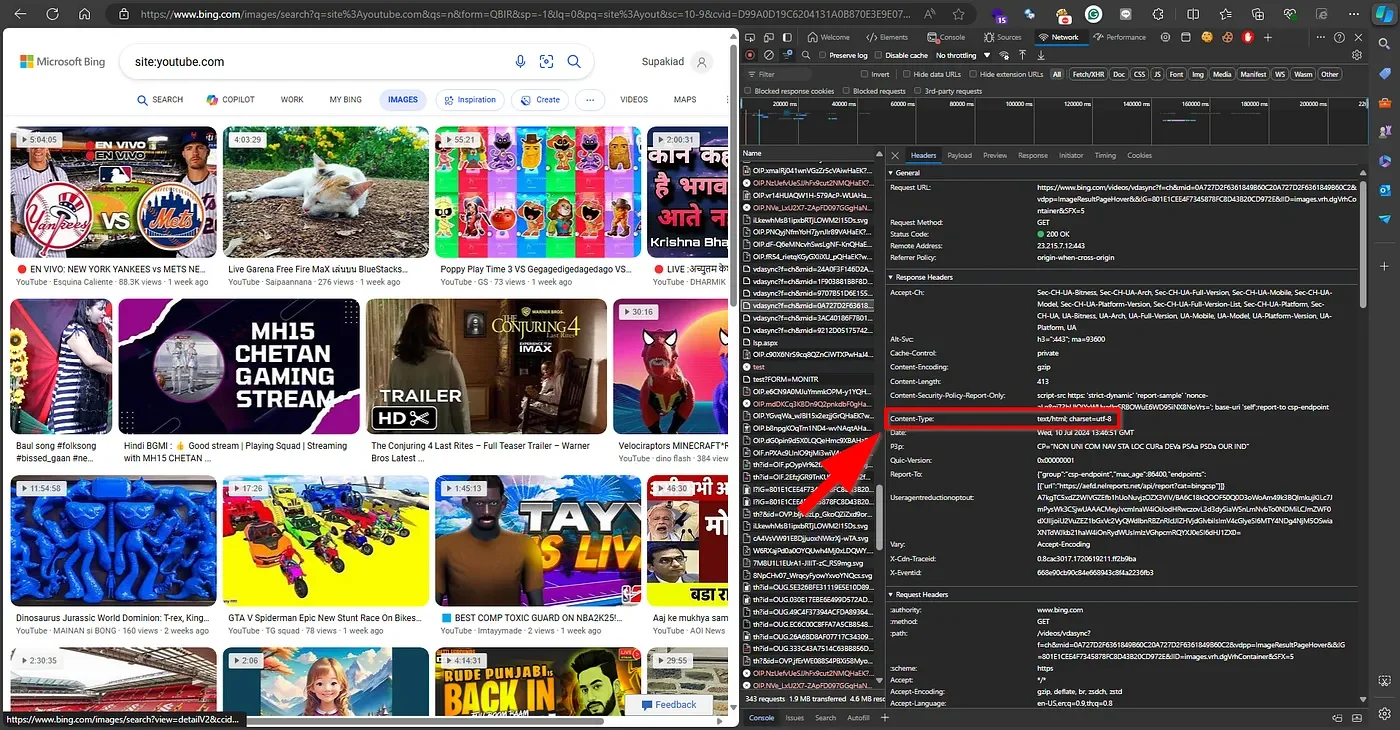
The researcher's reasoning was that the data is stored in a JSON pattern but served as text/html, so the browser interprets the data as HTML and any script embedded in the JSON data runs. That raised the question of whether the metadata itself could be controlled, with Bingbot retrieving it and storing it in the Bing website without sanitisation or encoding.
Exploitation
Step 1: publish a video with a payload in its metadata
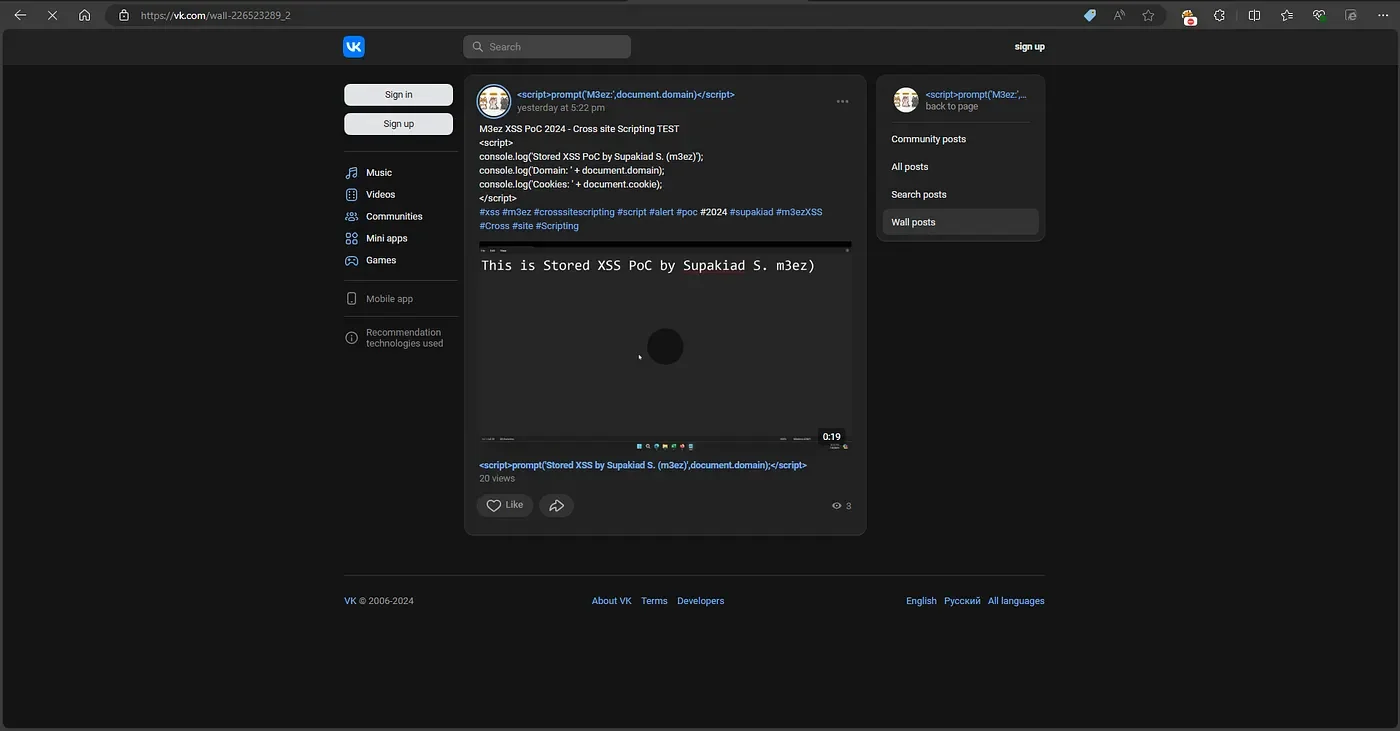
The researcher uploaded a video through vk.com and placed a script in the owner's name, video title or description. The payload used was:
<script>prompt('Stored XSS by Supakiad S. (m3ez)',document.domain);</script>
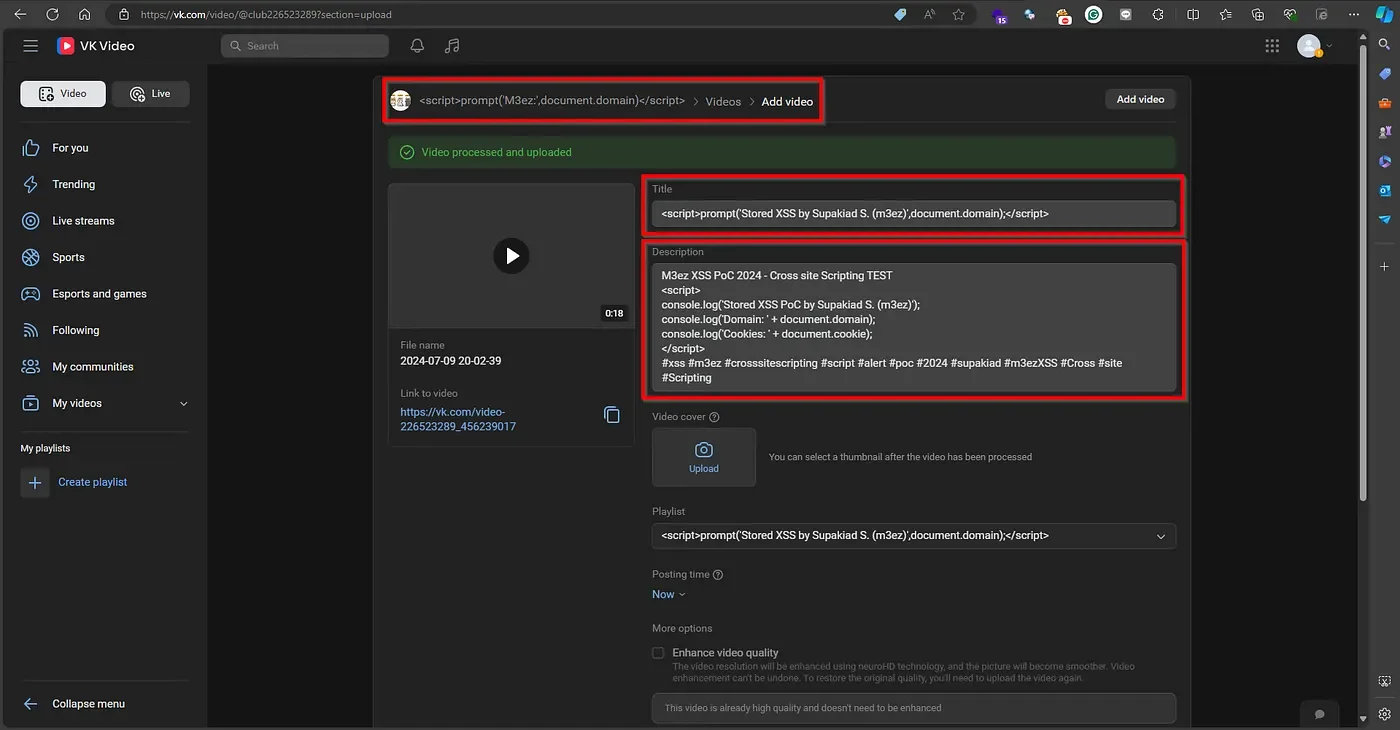
The video post was then published so that anyone could access it, including Bingbot, allowing the crawler to retrieve the video metadata.
Step 2: wait for Bingbot to index the metadata
The researcher waited until Bingbot crawled and retrieved the video from vk.com and saved the details, including the injected XSS script. In this case the video appeared in Bing video search after a few days.
Step 3: find the video in Bing video search
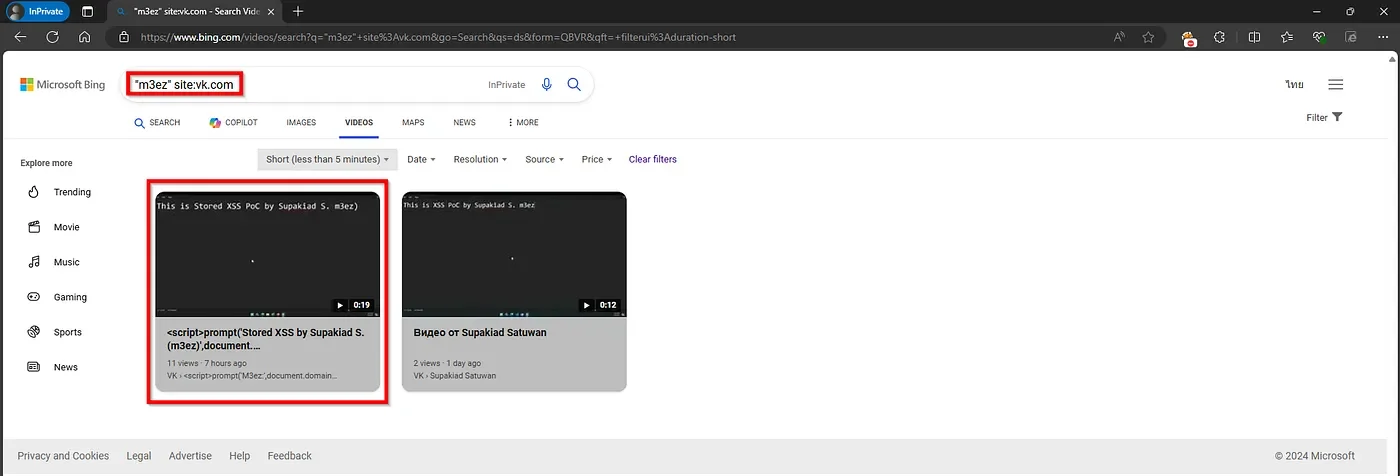
The next step was to search the Microsoft Bing Video web application. The keyword used was:
"m3ez" site:vk.com
Step 4: obtain the mid parameter
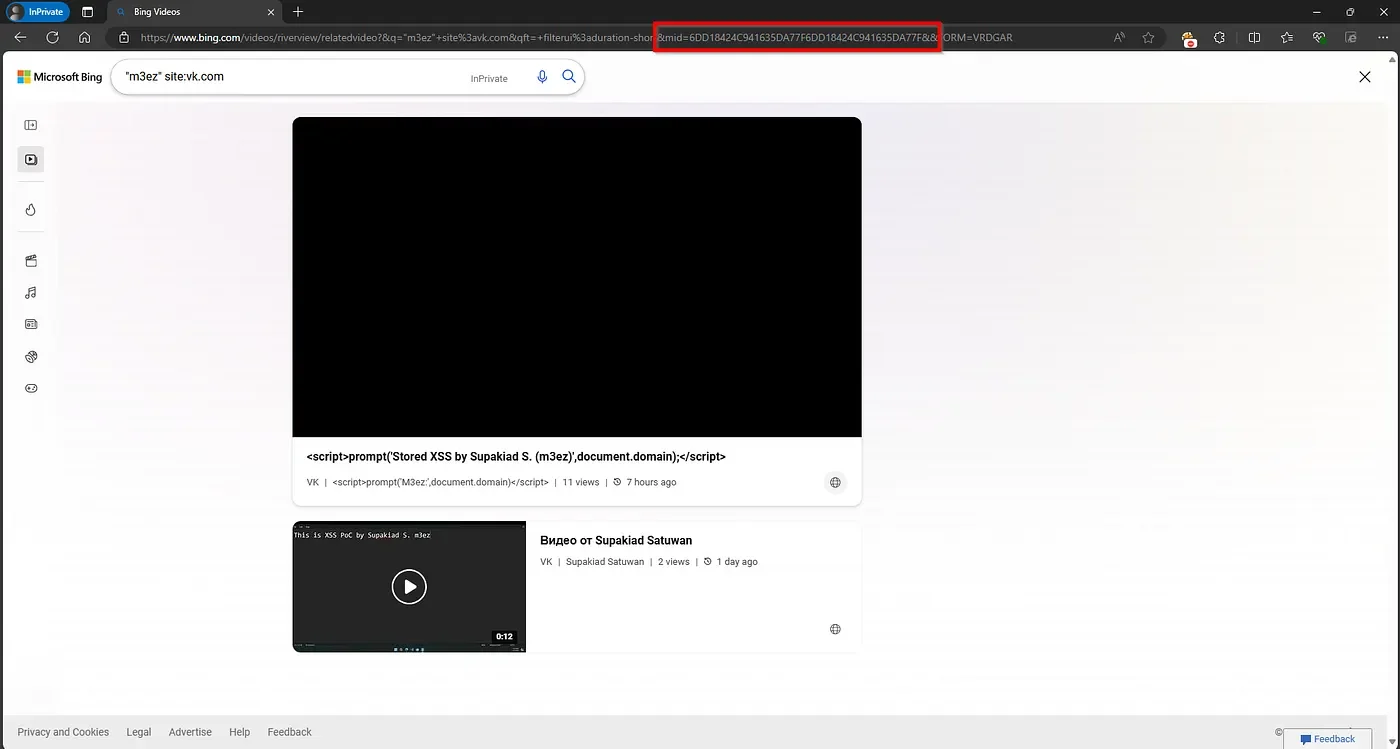
Clicking on the video makes the mid parameter appear in the URL.
Step 5: request the details endpoint with the mid value
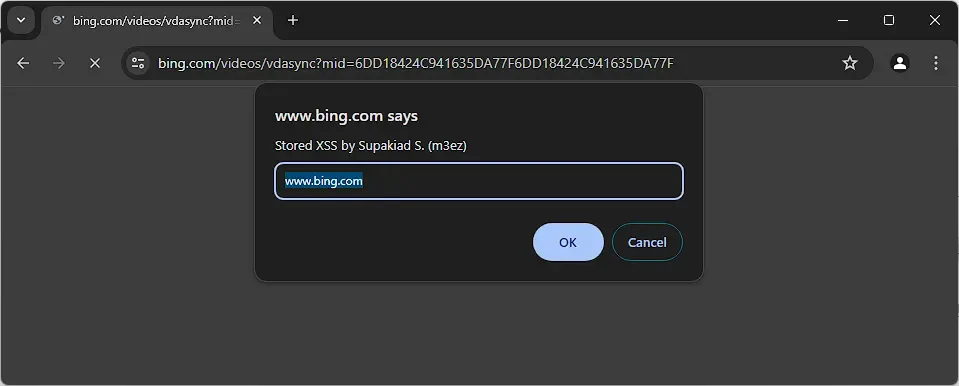
The mid parameter from the previous step is appended to the following URL:
https://www.bing.com/videos/vdasync?mid={mid}
In the proof of concept the resulting URL was:
https://www.bing.com/videos/vdasync?mid=[redacted]
After navigating to that URL, the XSS payload was triggered.
A video proof of concept was also published.
Root cause
Bing retrieves and stores video details such as the title, description and owner name from the internet in an insecure manner. Bingbot indexes this metadata without proper sanitisation, so malicious scripts are preserved in Bing's index. The application stores this data in a JSON pattern, but the content type is set as text/html, so the browser interprets the data as HTML and the scripts embedded in the JSON data run.
The report says the improper content type setting exacerbates the risk by bypassing typical MIME type handling protections. The report attributes the issue to metadata being indexed without proper sanitisation.
Impact
A malicious actor can execute arbitrary JavaScript in the context of Bing's web application. The report lists the possible consequences as cookie theft, session hijacking, defacement and phishing. The vulnerability affects all users who view the infected video details, which the report describes as a significant security risk. The script runs when a user views or interacts with an infected video, because the browser treats the response as HTML.
Fix
Microsoft confirmed the fix, and the MSRC status moved to Pre-Release and Complete on 5 August 2024. The report does not describe the specific change that was made.
Variants to test
- Other crawler-fed detail endpoints. Look for endpoints that render metadata collected by a crawler from third-party sites, and check the
Content-Typeof the response. A positive result is a JSON-shaped body served astext/htmlthat reflects a field you control. - Every metadata field. Test the owner name, title and description separately on a platform that allows angle brackets. A positive result is a field that survives crawling and appears unencoded in the response.
- Platforms that allow angle brackets. The researcher ruled out YouTube, Vimeo and Dailymotion for this reason, so check smaller or less restrictive video hosts. A positive result is a published video whose metadata contains
<>and is later indexed. - Other search verticals. The entry point here was an image search result that turned out to be a video. Check image, news and map results that link to detail views. A positive result is a detail endpoint with the same content type mismatch.
- Identifier parameters. The
midparameter selects the stored record. Try other identifiers and other detail endpoints to see whether the same stored metadata is rendered elsewhere. A positive result is a second endpoint that executes the stored payload.
What happened, in plain words
A security researcher found a way to make Microsoft's search engine, Bing, run code that an attacker wrote. The trick was not to break into Bing directly. Instead, the researcher put a small piece of code inside the information about a video posted on another website, and waited for Bing's automatic web crawler to pick that information up and store it. When anyone later opened that video's details on Bing, the stored code ran inside Bing's own pages.
The Microsoft bounty team awarded 3,000 US dollars for the report, and MSRC confirmed the fix. This article walks through the whole story from the beginning, explaining every technical idea as it comes up, so you can follow it even if you have never studied security.
Some background: what Bing and Bingbot are
Bing is Microsoft's search engine. You type words into it, and it shows you web pages, videos, images and maps that match. To be able to show anything at all, Bing has to know what exists on the internet, and that is where Bingbot comes in.
Bingbot is a web crawler. A crawler is a program that automatically visits web pages, reads them, and follows the links it finds to discover more pages. Think of it like a librarian who walks through every shelf in a huge library, notes down what each book is about, and keeps the catalogue up to date. Bingbot was launched in October 2010, and it does this job for Bing: it follows links, finds new pages, and updates Bing's records when existing pages change.
Everything Bingbot reads is sent back to Bing and stored in what is called the index. The index is Bing's giant catalogue of the web. Bing's ranking programs then look at that catalogue to decide which sites, news articles, images or videos should appear when someone searches for particular words.
The feature at the centre of this story is Bing's video search, and specifically the page that shows the details of a video. When you search for videos on Bing, Bing pulls matching entries from its index. Those entries include information that Bingbot collected from other websites: the video's title, its description, and the name of the person or account that owns it. Bing then shows that information back to you on its own pages. That last point matters a lot, and we will come back to it.
The setup the researcher needed
To test the idea, the researcher needed two things: a way to publish a video on some third-party website that Bingbot would visit, and a way to find that video again through Bing search. The platforms considered were:
- VK:
https://vk.com/video/@club226523289 - TikTok:
https://www.tiktok.com/@m3ez_xss - Instagram:
https://www.instagram.com/m3ez.ss - and other sites
YouTube was deliberately left out. The reason is technical but simple. The page that returns video details on Bing sends its data in a format called JSON, which is just a way of writing structured information as text, like a very tidy list of labelled values. To make a browser run code or treat something as a web page, you need to be able to use the characters < and > (angle brackets), because that is how HTML, the language web pages are written in, marks the start and end of things like scripts. YouTube does not let you put angle brackets into a video's title or description. The same restriction was said to apply to Vimeo and Dailymotion.
No special account, role or tool is described beyond posting a video on VK and searching Bing. The one real precondition was timing. The researcher did not know how long a newly posted video would take to show up in Bing search, and in the end it took a few days for the VK video to appear in Bing's video search.
How the researcher found it
While using Bing normally, the researcher noticed something odd. If you search for an image on Bing image search and the result happens to be a video, clicking to view it takes you to this address:
https://www.bing.com/videos/vdasync
A URL is simply the address of a page or a resource on the internet, the thing you see in your browser's address bar. The part videos/vdasync tells Bing which internal feature is being asked for. Looking at the details showed that this address is what programmers call an API. An API is a way for one piece of software to ask another for data, without any pretty page around it. Think of it as the difference between asking a restaurant's kitchen for a list of ingredients (the API) and being served a plated meal (the normal web page). This particular API returns the information about a video that Bingbot collected from other websites and stored in Bing's search system.
What made it look wrong was the response type. Every response from a web server carries a label, called the content type, that tells the browser what kind of data is inside. The label for this address was:
Content-type: text/html; charset=utf-8
instead of application/json.
Here is why that matters. text/html means "this is a web page, interpret it as HTML". application/json means "this is plain structured data, do not treat it as a web page". The data was stored in a JSON pattern, but it was being served with the label that says "this is a web page". So the browser does what it is told: it reads the data as HTML. And if any script is hidden inside that data, the browser runs it.
That raised the obvious next question: could the researcher control the metadata itself, so that Bingbot would fetch it and store it in Bing's website without cleaning it up first? Cleaning up, in this context, means sanitising or encoding: removing or neutralising dangerous characters so they cannot be interpreted as code. The researcher's reasoning was that if the metadata went in unchecked and came out labelled as a web page, the code inside it would run.
Exploitation, step by step
Step 1: publish a video with a payload in its metadata
The researcher uploaded a video through vk.com and placed a script in the owner's name, the video title, or the description. The payload, meaning the piece of code meant to be executed, was:
<script>prompt('Stored XSS by Supakiad S. (m3ez)',document.domain);</script>
Line by line, in plain words:
<script>is the HTML tag that tells a browser "everything until the closing tag is code, run it".prompt(...)is a built-in browser function that opens a small dialog box with a message and waits for the user to click OK. It is a harmless way to prove that code ran, because if you see the box, the code executed.'Stored XSS by Supakiad S. (m3ez)'is the message shown in that box, a fixed piece of text identifying the test.document.domainasks the browser for the domain of the page the code is running on. This is the important part: it proves which website's context the code is executing in.</script>closes the script tag.
The video post was then published so that anyone could access it, including Bingbot, which allowed the crawler to retrieve the video's metadata.
Step 2: wait for Bingbot to index the metadata
The researcher then waited until Bingbot crawled and retrieved the video from vk.com and saved the details, including the injected script. In this case the video appeared in Bing video search after a few days.
Step 3: find the video in Bing video search
Next, the researcher searched the Microsoft Bing Video web application. The keyword used was:
"m3ez" site:vk.com
This is a search query with two parts. "m3ez" in quotes asks Bing for that exact word. site:vk.com is a special instruction that tells Bing to only show results from the vk.com website. Together they narrow the search down to the researcher's own video on VK, which makes it easy to find among everything else on Bing.
Step 4: obtain the mid parameter
Clicking on the video makes the mid parameter appear in the URL.
A parameter is an extra piece of information attached to a URL, usually after a question mark, that tells the server which specific item you want. The mid value is an identifier: a unique code that points to one particular stored video record. Think of it as a ticket number at a cloakroom. You do not describe your coat; you hand over the number, and the attendant fetches exactly that item.
Step 5: request the details endpoint with the mid value
The mid parameter from the previous step is appended to the following URL:
https://www.bing.com/videos/vdasync?mid={mid}
Here {mid} is a placeholder, standing in for whatever identifier you actually found. In the proof of concept, the resulting URL was:
https://www.bing.com/videos/vdasync?mid=[redacted]
After navigating to that URL, the XSS payload was triggered.
A video proof of concept was also published.
Why it worked
Bing retrieves and stores video details such as the title, description and owner name from the internet in an insecure manner. Bingbot indexes this metadata without proper sanitisation, so malicious scripts are preserved in Bing's index. The application stores this data in a JSON pattern, but the content type is set as text/html, so the browser interprets the data as HTML and the scripts embedded in the JSON data run.
The improper content type setting exacerbates the risk. It bypasses the protection that correct content type handling would otherwise provide, because a response served as application/json would not be parsed as HTML by the browser. The report attributes the issue to metadata being indexed without proper sanitisation.
What the impact could be
A malicious actor can execute arbitrary JavaScript in the context of Bing's web application. JavaScript is the programming language that runs inside your browser and makes web pages interactive. "In the context of Bing's web application" means the code runs as if it were part of Bing itself, with the same access that Bing's own pages have.
The report lists the possible consequences as cookie theft, session hijacking, defacement and phishing. In plain terms:
- A cookie is a small piece of data a website stores in your browser so it can recognise you on your next visit. If an attacker can read your cookies, they may be able to act as you.
- Session hijacking means taking over your logged-in session, the period during which a website already knows who you are, so the attacker does not need your password.
- Defacement means changing what a page shows, for example replacing content with something else.
- Phishing means tricking you into handing over information, such as a password, by pretending to be a trusted party.
The vulnerability affects all users who view the infected video details, which the report describes as a significant security risk. The script runs when a user views or interacts with an infected video, because the browser treats the response as HTML.
The fix
Microsoft confirmed the fix, and the MSRC status moved to Pre-Release and Complete on 5 August 2024. MSRC is Microsoft's Security Response Center, the team that handles security reports. The report does not describe the specific change that was made.
Similar things worth testing
If you want to look for the same kind of problem elsewhere, here are the directions the report points to:
- Other crawler-fed detail endpoints. Look for addresses that show information a crawler collected from third-party sites, and check the
Content-Typeof the response. A positive result is a JSON-shaped body served astext/htmlthat reflects a field you control. - Every metadata field. Test the owner name, title and description separately on a platform that allows angle brackets. A positive result is a field that survives crawling and appears unencoded in the response.
- Platforms that allow angle brackets. YouTube, Vimeo and Dailymotion were ruled out for this reason, so check smaller or less restrictive video hosts. A positive result is a published video whose metadata contains
<>and is later indexed. - Other search verticals. The entry point here was an image search result that turned out to be a video. Check image, news and map results that link to detail views. A positive result is a detail endpoint with the same content type mismatch.
- Identifier parameters. The
midparameter selects the stored record. Try other identifiers and other detail endpoints to see whether the same stored metadata is rendered elsewhere. A positive result is a second endpoint that executes the stored payload.
Timeline
- Jul 1, 2024: Vulnerability discovered.
- Jul 1 to 7, 2024: Initial report and awaiting PoC evidence.
- Jul 8, 2024: Reported through the MSRC portal.
- Jul 9, 2024: Status moved to Review/Repro.
- Jul 15, 2024: Confirmed by MSRC; status moved to Develop. The Microsoft bounty team started reviewing for a possible bounty.
- Jul 17, 2024: Draft blog post sent to MSRC for review.
- Aug 5, 2024: MSRC reviewed the blog post, confirmed the fix, and the status moved to Pre-Release and Complete.
- Aug 6, 2024: The Microsoft bounty team awarded 3,000 US dollars for case 89310.
- Aug 8, 2024: Blog post published.
Glossary
- API: A way for one piece of software to ask another for data, usually returning raw structured information rather than a finished web page.
- Bing: Microsoft's search engine, offering web, video, image and map searches.
- Bingbot: Microsoft's web crawler, launched in October 2010, which follows links to discover pages and keep Bing's index up to date.
- Bounty: A reward paid by a company to someone who reports a security problem to it.
- Content type: A label on a web response that tells the browser what kind of data it contains, such as
text/htmlfor a web page orapplication/jsonfor structured data. - Cookie: A small piece of data a website stores in your browser so it can recognise you on later visits.
- Crawler: A program that automatically visits web pages, reads them and follows links to discover more pages.
- Defacement: Changing what a web page shows, for example replacing its content with something else.
- Encoding: Converting characters into a safe representation so they cannot be interpreted as code.
- HTML: The language web pages are written in, using angle brackets to mark the start and end of elements such as scripts.
- Index: Bing's stored catalogue of the web, built from what Bingbot has read.
- JavaScript: The programming language that runs inside a browser and makes web pages interactive.
- JSON: A way of writing structured information as text, as a tidy list of labelled values.
- Metadata: Information about something, here a video's title, description and owner name.
- mid: The identifier parameter in the URL that selects one particular stored video record.
- MSRC: Microsoft's Security Response Center, the team that handles security reports.
- Parameter: An extra piece of information attached to a URL, usually after a question mark, telling the server which specific item you want.
- Payload: The piece of code an attacker wants to be executed.
- Phishing: Tricking someone into handing over information, such as a password, by pretending to be a trusted party.
- Prompt: A built-in browser function that opens a small dialog box with a message and waits for the user to click OK.
- Sanitising: Removing or neutralising dangerous characters in data so they cannot be interpreted as code.
- Session hijacking: Taking over a user's logged-in session so the attacker can act as that user without needing the password.
- Stored XSS: A cross-site scripting attack where the malicious script is saved on the target's servers and later served to other users.
- URL: The address of a page or resource on the internet, shown in the browser's address bar.
- XSS: Cross-site scripting, a class of vulnerability where an attacker gets code to run inside another website's pages.



