Hacking the Search Bar: The Story of Discovering and Reporting an XSS Vulnerability on Bing.com
An XSS flaw existed in Bing's search bar, but only for users signed in with a Microsoft work or school account. An attacker could inject a script through the search field that executed when the victim clicked the search bar again.
 Published on medium.com
Welcome back to my Medium write-up! I’m thrilled to have you here again, and I’m looking forward to sharing some new and exciting content with you.
The full write-up lives on its author's site
It belongs to its author, so we link to it rather than copy it. The other two tabs are our own rewrites, checked against it.
Context
Bing.com is Microsoft's public search engine, and the search bar on the results page is the feature under test here. The researcher had previously been listed in the Halls of Fame of Google and Apple and had turned to hunting on Microsoft properties. While browsing with Microsoft Edge, he tested the default search engine, Bing.com, for cross-site scripting.
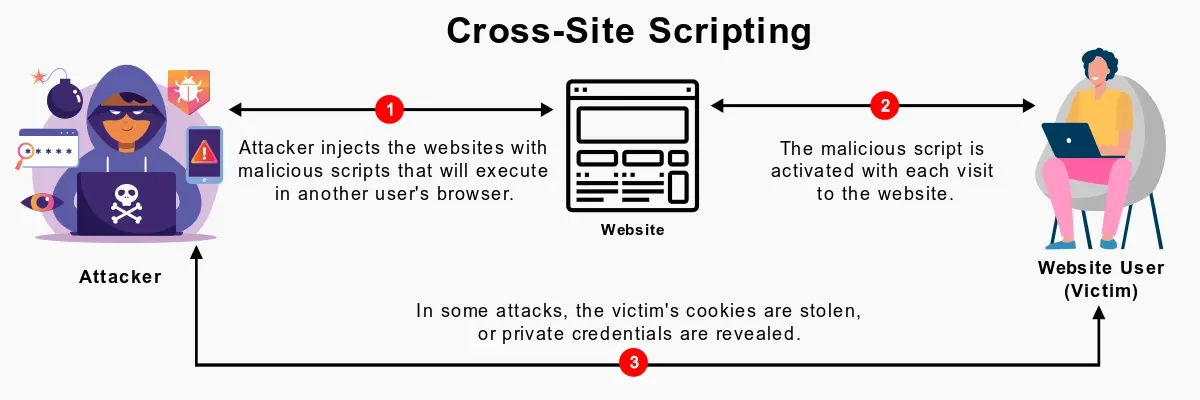
XSS, as the report describes it, occurs when an attacker can inject and execute malicious scripts or code into a web page viewed by other users. The consequence the report names is that the attacker may be able to steal sensitive user information such as login credentials or personal data, or perform actions on the user's behalf, such as making unauthorised transactions or posting unwanted content.
Setup
The preconditions that mattered were the browser and the account type:
- Browser: Microsoft Edge.
- Target: Bing.com, specifically the search field and the search results page.
- Account: a Microsoft Work/School account. The researcher discovered this only after the fact, when he checked which account he was signed into.
No tooling beyond the browser is described. The report gives no payload text, no request or response captures, and no version numbers.
Finding it
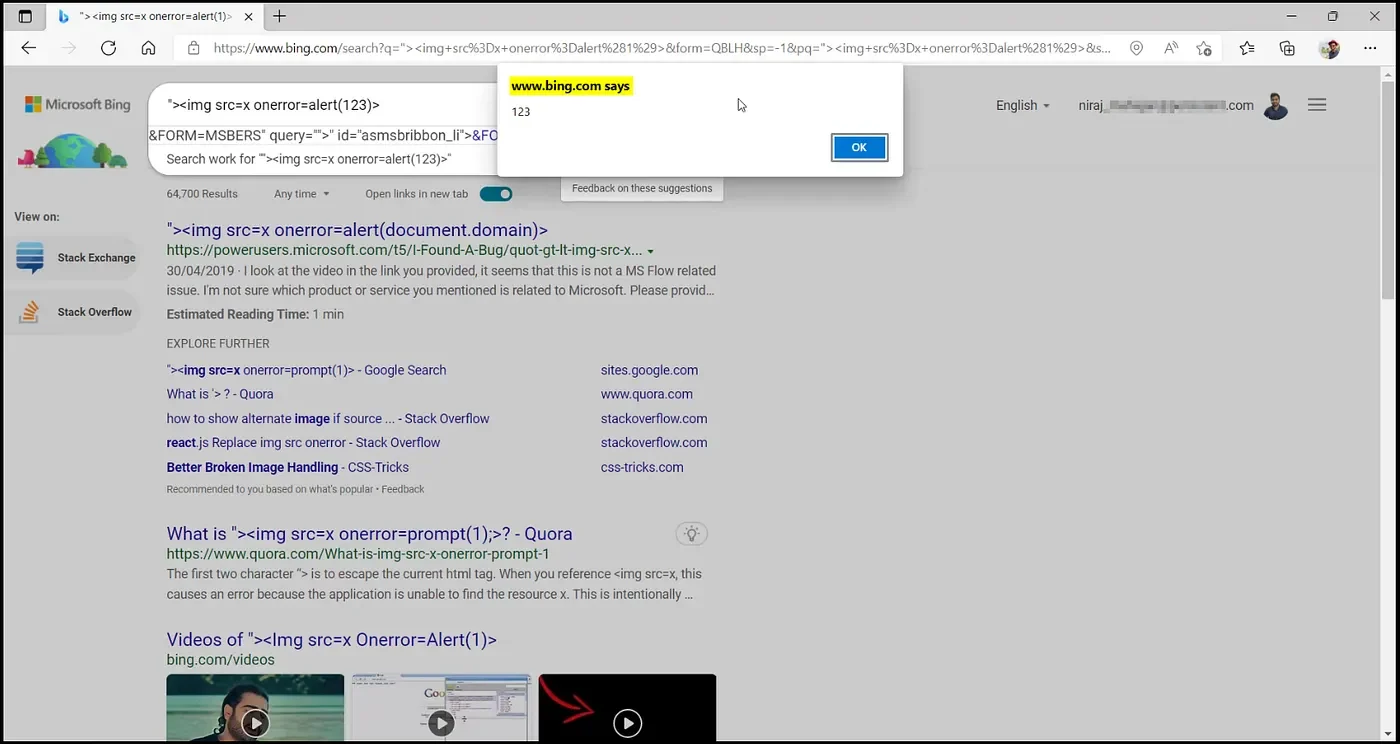
While casually browsing, the researcher entered an XSS payload into the Bing search field. The search results page responded with a pop-up. He knew that a pop-up should not be possible from the main Bing.com search bar, so the behaviour looked wrong and worth verifying.
To check it, he repeated the same scenario in an incognito browser window. The pop-up did not appear there. He then checked which account he was signed into in the normal window and found it was his work account. He repeated the test with his personal account, and again the pop-up did not appear. That narrowed the issue to work and school accounts: the XSS was present only for that account type.
Exploitation
The report gives the reproduction as four steps rather than as raw requests.
Step 1: Open Bing
Go to Bing.com.
Step 2: Sign in with a work or school account
Log in with a Microsoft Work/School Account. This is the condition that separates a vulnerable session from a non-vulnerable one: the same steps in incognito mode or with a personal account did not produce the pop-up.
Step 3: Submit the payload through search
Enter the XSS payload in the Search Field and click on Search. The report does not reproduce the payload itself. What it records is the result: the Bing search results page exhibited a pop-up in response to the payload.
Step 4: Trigger it again from the search bar
Click on the Search Bar again to trigger the XSS. The report does not describe what happens on this second interaction beyond the trigger itself.
Root cause
The report does not analyse the server-side or client-side code, so the precise mistake is not stated. What the behaviour implies is that some part of the search results page handling, reachable only in a work or school account context, rendered the search input in a way that allowed script to execute. Why the account type changes the outcome is not explained in the report; the researcher's own note is only that exploiting with a normal account versus a work/school account may yield different outcomes. Any specific mechanism would be speculation.
Impact
The report frames the general XSS impact: an attacker able to execute script in a victim's page context could steal sensitive user information such as login credentials or personal data, or perform actions on the user's behalf, such as making unauthorised transactions or posting unwanted content. In this case the exposure was limited to users signed in with a Microsoft Work/School account, since the pop-up did not appear in incognito mode or with a personal account. The report does not demonstrate credential theft or any other concrete exploitation beyond the pop-up, and it does not state a severity or CVSS score.
Fix
The report says the vulnerability was promptly addressed and resolved by Microsoft after it was reported to the Microsoft Security Response Center (MSRC). The researcher's practical takeaway is the account-type difference: testing the same input with a normal account and with a work/school account can give different results, so both should be tried.
Variants to test
- Repeat the same search-field test while signed in with each available account type (personal, work/school, and signed out or incognito). A positive result is a pop-up, or any script execution, that appears in one context and not the others.
- Test the search bar on the results page as well as the initial search submission, since the report triggers the issue on a second interaction with the bar.
- Test other Microsoft properties that adapt behaviour by account type, using the same signed-in versus signed-out comparison. A positive result is a context-dependent rendering difference that turns into script execution.
Acknowledgement
The finding earned the researcher a place in Microsoft's Hall of Fame, and as a result he was awarded a spot on Microsoft's Top Security Researchers 2022 Q2 Leaderboard at number 55.

What happened, in plain words
A security researcher was trying out Microsoft products after having been recognised by Google and Apple. While using Microsoft Edge, he typed a special piece of text into the Bing search box. Bing is Microsoft's public search engine, and the search box is the field where you type what you are looking for. The special text was an XSS payload: a short string designed to make the browser run code if the page inserts it without proper care. When the results page loaded, a pop-up appeared. A pop-up is a small window that a web page can open; on a normal Bing search it should not be possible. That unexpected pop-up was the sign of a cross-site scripting (XSS) bug.
He checked the same steps in a private (incognito) window, where the browser does not use his usual signed-in session, and the pop-up did not appear. He then looked at which account he was signed into in the normal window: it was his work account. He tried again with his personal account, and again no pop-up. So the bug only affected people signed in with a Microsoft Work/School account. He reported it to Microsoft's security team, the Microsoft Security Response Center (MSRC), and it was fixed. The finding earned him a place in Microsoft's Hall of Fame, and as a result he was awarded position 55 on Microsoft's Top Security Researchers 2022 Q2 Leaderboard.
What XSS is, from zero
A web page is a document made of HTML, the language that describes what is on the page. When you type something into a search box, the site usually takes your text and puts it back into the page, for example to show "results for: your words". If the site inserts your text as if it were part of the page's own instructions, rather than as plain text to display, then anything that looks like code can run. That is cross-site scripting: an attacker gets their own script into a page that other people view.
The report describes the consequences in general terms: an attacker may be able to steal sensitive user information such as login credentials or personal data, or perform actions on the user's behalf, such as making unauthorised transactions or posting unwanted content. A useful comparison is a noticeboard: if anyone can pin a note that looks like an official instruction, other people may follow it. XSS is the web version of that: your input is treated as an instruction by the browser.
The setup
Only a browser and an account were needed:
- Browser: Microsoft Edge.
- Target: Bing.com, specifically the search field and the search results page.
- Account: a Microsoft Work/School account. The researcher only realised this after the fact, when he checked which account he was signed into.
No other tools are described. The report does not give the payload text, any captured requests or responses, or version numbers.
Finding it
- He was browsing casually and decided to test Bing, the default search engine in Edge, for XSS.
- He entered an XSS payload into the Bing search field and searched.
- The search results page showed a pop-up.
- He knew a pop-up should not be possible from the main Bing search bar, so the behaviour looked wrong and worth checking.
Why this matters: a pop-up is an easy-to-see sign that script ran. If a page that should only display text can open a pop-up, something in the page is treating input as code.
Narrowing down when it happens
To check the finding, he repeated the same steps in an incognito window. Incognito (private browsing) is a mode where the browser starts without your usual signed-in sessions and cookies. A cookie is a small piece of data a site stores in your browser so it can remember who you are between page loads; a session cookie is what keeps you signed in. In incognito, the pop-up did not appear.
He then checked which account he was signed into in the normal window and found it was his work account. He repeated the test with his personal account, and again no pop-up. That narrowed the issue to work and school accounts: the XSS was present only for that account type.
Why this matters: changing one thing at a time (signed in versus not, work account versus personal account) tells you which condition the bug depends on. Without that, a report can be hard to reproduce.
Reproducing it
The report gives four steps rather than raw requests.
Step 1: Open Bing
Go to Bing.com.
This is the starting point: the public search page.
Step 2: Sign in with a work or school account
Log in with a Microsoft Work/School Account.
This is the condition that separates a vulnerable session from a non-vulnerable one. A session is the period during which a site remembers you as signed in. The same steps in incognito mode or with a personal account did not produce the pop-up, so the account type is part of the trigger.
Step 3: Submit the payload through search
Enter the XSS payload in the Search Field and click on Search.
The report does not reproduce the payload itself. What it records is the result: the Bing search results page showed a pop-up in response to the payload. In plain terms, the results page responded to the payload with a pop-up.
Step 4: Trigger it again from the search bar
Click on the Search Bar again to trigger the XSS.
The report does not describe what happens on this second interaction beyond the trigger itself. The point is that the issue is triggered by clicking the search bar again on the results page.
Why it happened
The report does not analyse the server-side or client-side code, so the precise mistake is not stated. What the behaviour implies is that some part of the search results page handling, reachable only in a work or school account context, rendered the search input in a way that allowed script to execute. Why the account type changes the outcome is not explained in the report; the researcher's own note is only that exploiting with a normal account versus a work/school account may yield different outcomes. Any specific mechanism would be speculation.
Impact
The report frames the general XSS impact: an attacker able to execute script in a victim's page context could steal sensitive user information such as login credentials or personal data, or perform actions on the user's behalf, such as making unauthorised transactions or posting unwanted content. In this case the exposure was limited to users signed in with a Microsoft Work/School account, since the pop-up did not appear in incognito mode or with a personal account.
Fix
The report says the vulnerability was promptly addressed and resolved by Microsoft after it was reported to the Microsoft Security Response Center (MSRC). The researcher's practical takeaway is the account-type difference: testing the same input with a normal account and with a work/school account can give different results, so both should be tried.
Variants to test
- Repeat the same search-field test while signed in with each available account type (personal, work/school, and signed out or incognito). A positive result is a pop-up, or any script execution, that appears in one context and not the others.
- Test the search bar on the results page as well as the initial search submission, since the report triggers the issue on a second interaction with the bar.
- Test other Microsoft properties that adapt behaviour by account type, using the same signed-in versus signed-out comparison. A positive result is a context-dependent rendering difference that turns into script execution.
Acknowledgement
The finding earned the researcher a place in Microsoft's Hall of Fame, and as a result he was awarded a spot on Microsoft's Top Security Researchers 2022 Q2 Leaderboard at number 55.
Glossary
- XSS (Cross-Site Scripting): a vulnerability where an attacker can inject and execute malicious scripts or code into a web page viewed by other users.
- Payload: the piece of text or code an attacker sends to try to trigger a vulnerability.
- Pop-up: a small window that a web page can open; here, the visible sign that script ran.
- Incognito (private browsing): a browser mode that starts without your usual signed-in sessions and cookies.
- Cookie: a small piece of data a site stores in your browser so it can remember who you are between page loads.
- Session: the period during which a site remembers you as signed in.
- Microsoft Work/School account: an account type used for work or school, as opposed to a personal account.
- MSRC (Microsoft Security Response Center): Microsoft's team that receives and handles security reports.
- Hall of Fame: a public list of researchers recognised for reporting vulnerabilities.
- Leaderboard: a ranked list of researchers, here Microsoft's Top Security Researchers 2022 Q2 Leaderboard.
- HTML: the language that describes what is on a web page.
- Server-side: code that runs on the website's servers, not in your browser.
- Client-side: code that runs in your browser.
- Rendering: how a browser turns HTML and data into what you see on the page.



