The Discovery
An attacker could send an email containing an iframe with a JavaScript URL that, when opened in Outlook on Android, executed script with access to cookies, tokens and emails. This stored cross-site scripting could let an attacker steal the contents of the victim's inbox just by the victim reading the email.
 Published on f5.com
It all began in December 2018, when I received an email from a friend asking for help with some JavaScript code he was investigating. I wasn’t actively hunting for bugs, but the email formatting on my Android phone looked strange.
The full write-up lives on its author's site
It belongs to its author, so we link to it rather than copy it. The other two tabs are our own rewrites, checked against it.
Context
The target here is the Microsoft Outlook application for Android, specifically the way it renders HTML email. An email client normally takes the HTML it receives, sanitises or escapes it on the server side, and then renders it in a view on the device. The interesting question for a security researcher is what happens between the server escaping the markup and the client displaying it: if the client undoes that escaping, the sanitisation is worthless.
The report describes a stored cross-site scripting (XSS) issue in that rendering path, later tracked as CVE-2019-1105. The author is Bryan Appleby (@bryapp), and the write-up was published on 21 June 2019.
Setup
The researcher was not actively hunting for bugs. The starting point was an ordinary email from a friend asking for help with some JavaScript code, received on an Android phone in December 2018. The device's localisation setting turned out to matter: the author's Android localisation was set to UK. That detail is what made the bug reproducible for him and not for Microsoft's engineers, as described below.
No special accounts, roles or tooling are described in the report. The work was done with the Outlook Android app on the researcher's own phone, plus a laptop for comparison.
Finding it
The email arrived and the formatting on the Android phone looked strange. The screenshot in figure 1, with personal data scrubbed, shows the email as received:
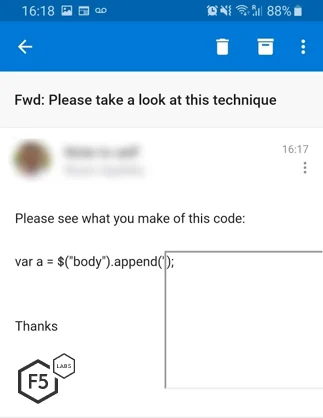
There was a grey box in the message that should not have been there. Looking closer, the JavaScript in the email probably contained HTML for an iframe, which would render normally outside the mobile application. Opening the same email on a laptop displayed the code normally, as shown in figure 2:
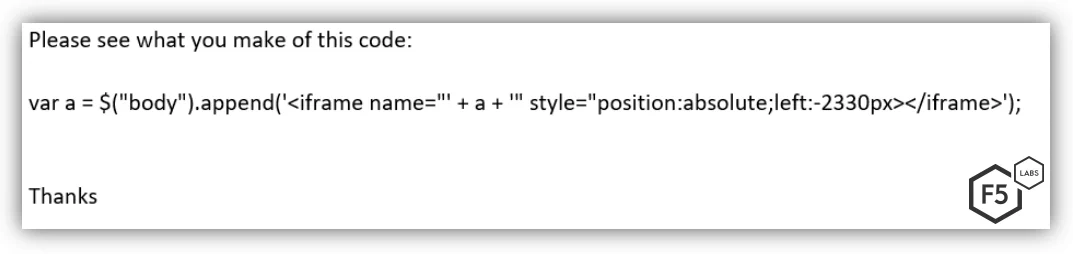
Two things stood out. First, the ability to embed an iframe into an email is already a vulnerability in itself. Second, the iframe was not affected by the block external images setting that normally prevents tracking pixels and web beacons. If an attacker could go further and run JavaScript inside an email, the attack surface would be considerably more dangerous.
Exploitation
Step 1: try a script tag, then a JavaScript URL
The first attempt was to insert a script tag instead of an iframe into an email. That failed, which the author notes is good. He then circumvented the block by using a JavaScript URL in the iframe. That worked, and things became interesting.
Step 2: understand what the iframe JavaScript can reach
In a web browser, JavaScript in an iframe on a separate domain should not have access to the data in the rest of the page. In Outlook on Android there was no such restriction. The iframe JavaScript had full access to cookies, tokens and even some emails, and could send them back out to a remote attacker.
The delivery mechanism is a stored XSS. An attacker sends an email containing JavaScript. The server escapes that JavaScript and does not see it, because it sits inside an iframe. When the mail client delivers the message, it automatically undoes the escaping and the JavaScript runs on the client device. The code can do whatever the attacker wants, up to and including stealing information and sending data back out. Simply reading such an email could let an attacker steal the contents of the inbox.
Step 3: first disclosure to MSRC
Before disclosing, the author built a short proof of concept that ran an arbitrary external script which stole and exfiltrated private data, admittedly with very limited access to email data. He sent it to the Microsoft Security Response Center on 10 December 2018.
At that point he did not know which part of the code caused the bug. He had no access to the Outlook source code and no experience debugging mobile apps, and assumed the app developers could take the POC and find the problem themselves.
Step 4: no repro
The vulnerability did not reproduce for the engineering team. The author sent a video of the bug occurring on 16 January 2019. He later learned that another researcher had reported it too, but neither POC reproduced the bug for the security engineers. He tested different Outlook settings to see whether that explained the discrepancy, without success, and the case went cold.
Step 5: use the bug to read the app's own HTML
A few months later he came back to the problem, thinking about how to extract the rendered HTML from the app. The key was the bug itself: because it let him steal data from the app, he could use it to read and extract the HTML. He constructed a new payload, shown in figure 3:
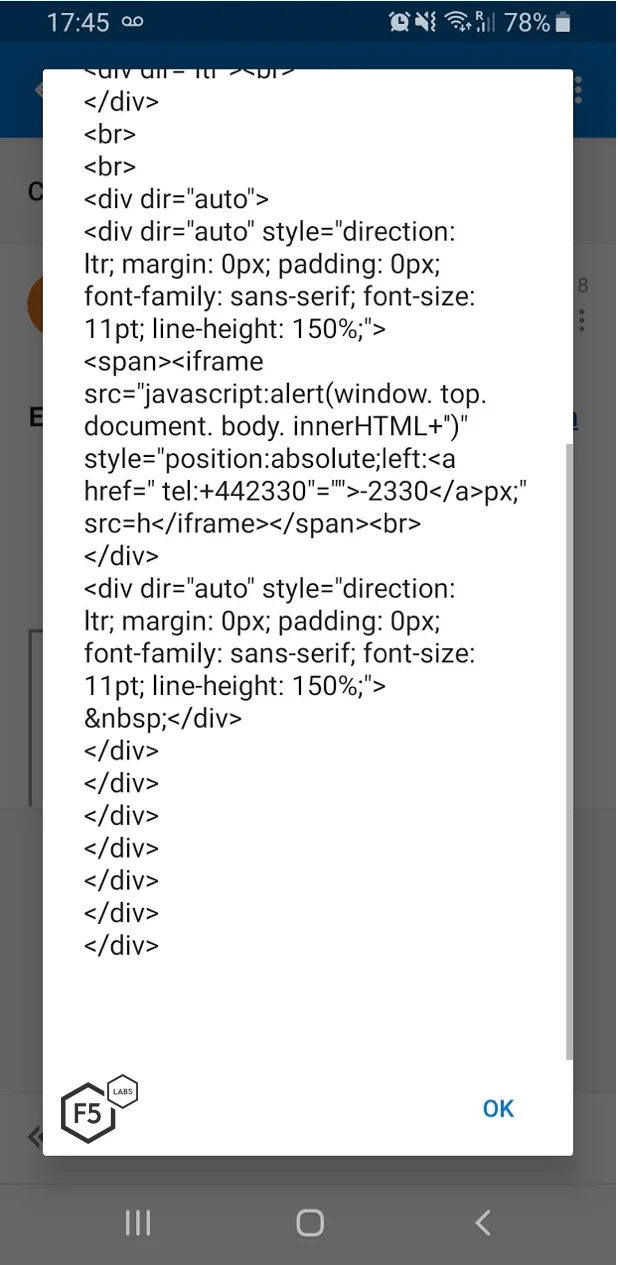
The payload looked like this:
<iframe src="javascript:alert(window. top. document. body. innerHTML+'')"
style="position:absolute;left:-2330px;" src=h
The style attribute positions the iframe off-screen at left:-2330px.
This payload was correctly escaped on the server side with HTML entities. But the escaping was undone on the client, and the payload was converted to:
<iframe src="javascript:alert(window. top. document. body. innerHTML+'')"
style="position:absolute;left:<a href=” tel:+442330”=””>-2330</a>px;" src=h</iframe>
The client-side code had made the phone number clickable, wrapping part of the left value in an anchor. That was the bug. It had not reproduced at first because the author's Android localisation was set to UK, which caused the number to be judged a valid phone number. Other localisations did not detect a phone number, so there was no bug.
Step 6: a universal POC
He rewrote the POC using a full US phone number format, xxx-xxx-xxxx, and tested that it reproduced across localities. He sent this back to Microsoft. On 26 March 2019 Microsoft confirmed the repro and committed to a fix within 90 days of that date.
Root cause
The escaping applied on the server side was undone on the client. The escaping was undone on the client, and the client-side code made the phone number clickable. Because the transformation happened after the server-side sanitisation, the server never saw the resulting markup.
The trigger was the phone number detection: under UK localisation the number was judged a valid phone number and made clickable. Under other localisations no phone number was detected, the rewrite did not happen, and the payload stayed inert. That localisation dependency is why the first POCs did not reproduce for Microsoft's engineers.
Impact
An attacker could send an email containing JavaScript, and simply by the recipient reading it, steal the contents of the inbox. The iframe JavaScript had full access to cookies, tokens and some emails, and could send them to a remote attacker. The author describes the weaponised form as potentially a very nasty piece of malware. The first POC had very limited access to email data; the later payload was built to read and extract the rendered HTML of the app.
Fix
Microsoft released a fix on 20 June 2019. The advisory for CVE-2019-1105 is at https://portal.msrc.microsoft.com/en-US/security-guidance/advisory/CVE-2019-1105. The report does not describe the code change itself. The author's closing advice is to keep applications up to date, on both individual and enterprise devices, to lower the risk of exploitation of known vulnerabilities, and to seek and report security vulnerabilities so products can be made safer.
Variants to test
- Client-side linkification of numbers in markup. Send HTML email containing numeric strings in attributes or style values and see whether the client rewrites them into anchors. A positive result is markup that differs between what the server sent and what the client renders, especially where the rewrite breaks escaping.
- Localisation-dependent rendering. Repeat the same payload with the device set to different locales. A positive result is a payload that is inert in one locale and active in another, which also explains why a report may fail to reproduce on the vendor's test devices.
javascript:URLs in iframesrc. Where a client permits iframes in email, try ajavascript:URL instead of an external URL. A positive result is script execution in the mail view's context.- Iframe access to the top document. If script runs in an iframe, read
window.top.document.body.innerHTMLor cookies and tokens. A positive result is access to data outside the iframe's own document. - Block external images bypass. Check whether content loaded through an iframe is still fetched when the block external images setting is enabled. A positive result is a request going out despite the setting.
- Server-side escaping undone on the client. Compare the raw message source with the rendered DOM. A positive result is HTML entities in the source that appear as live markup in the rendered view.
What happened, in plain words
A security researcher received an ordinary email from a friend on his Android phone. The email contained some JavaScript code, and the way the Outlook app displayed it looked wrong: there was a grey box in the message that should not have been there. That small oddity led him to a serious flaw in the Microsoft Outlook app for Android, a flaw that could let an attacker run their own code inside the app just by getting you to open an email. The bug was later given the official identifier CVE-2019-1105 and fixed by Microsoft on 20 June 2019.
This article walks through the whole story slowly, explaining each idea as it comes up. You do not need any security background to follow it. You only need to know how to use a browser and a computer.
Some background first
What Outlook for Android is
Outlook is Microsoft's email program. The Android version is an app you install on a phone running Google's Android operating system. Like most modern email apps, it can display formatted emails: bold text, colours, images, tables and so on. Those formatted emails are written in a language called HTML, the same language web pages are written in.
What HTML is
HTML is a way of describing a document using tags. A tag is a piece of text in angle brackets, like <b> for bold or <img> for an image. A browser (or an email app) reads the tags and draws the page or message accordingly. When you look at a web page, you are looking at the result of the browser interpreting HTML.
What JavaScript is
JavaScript is a programming language that runs inside browsers and apps. It is what makes web pages interactive: buttons that respond, forms that check what you typed, pages that update without reloading. HTML describes what a page looks like; JavaScript tells it what to do. Because JavaScript is a real programming language, code that runs on your device can read and send data. That is exactly why letting strangers run JavaScript on your device is dangerous.
What an iframe is
An iframe (short for inline frame) is an HTML tag that embeds one document inside another. Think of it as a small window cut into a page, showing a different page through it. A news site might use an iframe to show a weather widget from another company. The tag looks like this: <iframe src="https://example.com"></iframe>, where src means source, the address of the document to show inside the frame.
What a URL is, and the javascript: kind
A URL is an address, like https://example.com/page. The part before the colon, https, is the scheme, which tells the browser how to fetch the address. There is a special scheme called javascript:. When a browser sees a URL starting with javascript:, it does not fetch anything from the network; it runs the text after the colon as JavaScript code. This is a legitimate feature, but it is also a well-known way to sneak code into places that expect only an address.
What a cookie and a token are
When you log in to a website or app, the server needs a way to remember that you are logged in on the next request. It gives your device a small piece of data, called a cookie or a token, which your device sends back with every request. Think of it as a wristband at an event: you show it at the door and you are let in without showing your ID again. Anyone who steals your wristband can pretend to be you. That is why cookies and tokens are valuable to attackers.
What cross-site scripting (XSS) is
Cross-site scripting is a class of vulnerability where an attacker manages to get their own JavaScript code to run inside someone else's application or web page. The name comes from the early days when the code came from a different site, but the essential idea is simpler: untrusted input becomes executable code. If an attacker can make your email app run their script, that script runs with the app's privileges, which means it can read what the app can read.
What stored XSS is
Stored XSS is a variant where the malicious code is saved somewhere first, and then served to victims later. In an email context, the attacker sends an email containing the code. The code sits in the recipient's mailbox. When the recipient opens the message, the code runs. The attacker does not need to be online at that moment; the message waits for the victim.
What escaping and sanitising mean
When a server receives HTML from an untrusted source, such as an email, it usually neutralises the dangerous parts before passing them on. One common technique is escaping: replacing characters that have special meaning in HTML with safe placeholders called entities. For example, the less-than sign < becomes <, and the greater-than sign > becomes >. A browser reading <script> displays the text <script> but does not treat it as a tag. The code is defused.
Sanitising is the broader idea: removing or neutralising anything dangerous. Escaping is one way to sanitise. The important point for this story is that escaping only works if nothing later undoes it.
What a proof of concept (POC) is
A proof of concept is a small demonstration that a vulnerability is real. It is not a full attack tool; it is the minimum needed to show that the problem exists. Security teams need a POC because a report that says "something is wrong" is hard to act on, while a POC that reliably triggers the bug can be tested, confirmed and fixed.
What the Microsoft Security Response Center (MSRC) is
MSRC is the team at Microsoft that receives reports of security vulnerabilities in Microsoft products. Researchers send their findings there, and MSRC coordinates with the engineering teams that maintain the affected products.
What localisation is
Localisation is the process of adapting software to a particular region and language. It affects date formats, number formats, currency, and also things like which strings look like phone numbers. A string that looks like a phone number in one country may look like nonsense in another. This detail turns out to be the key to the whole story.
The discovery
The story starts in December 2018. The researcher, Bryan Appleby, received an email from a friend asking for help with some JavaScript code. He was not actively looking for bugs. But the formatting of the email on his Android phone looked strange. The screenshot in figure 1, with personal information scrubbed out, shows the email as he received it:
There was a grey box in the message. That grey box should not have been there. When he looked closer, it seemed the JavaScript in the email probably contained HTML code for an iframe, which would display normally outside the mobile app. That was odd too. When he opened the same email on a laptop, the code was displayed normally, as shown in figure 2:
So the same email behaved differently in two places. On the laptop, the code was shown as text. On the phone, something was being rendered that should not have been. That difference is the first clue: the phone app was doing something with the HTML that the laptop software was not.
Two things stood out to him. First, the ability to embed an iframe into an email is already a vulnerability in itself. An email is supposed to be a message, not a container for other documents. Second, the iframe was not affected by the block external images setting. That setting exists to stop tracking pixels and web beacons: tiny invisible images that senders use to learn when you opened their message. If an iframe could load content even with that setting on, the setting was not doing its job.
And there was a bigger question. If an attacker could go further and actually run JavaScript inside an email, the attack surface would be much more dangerous. So he tried.
Exploitation
Step 1: try a script tag, then a JavaScript URL
The most direct way to run JavaScript in HTML is the <script> tag. So the first attempt was to insert a script tag instead of an iframe into an email. That failed, which the author notes is good: the app was blocking the obvious route.
He then tried a different route: a JavaScript URL inside the iframe. Instead of pointing the iframe at a web address, he pointed it at a javascript: URL. That worked. Things were getting interesting.
Why does this matter? Because the app was checking for one thing (script tags) and not for another (JavaScript URLs). This is a common pattern in security: a filter that blocks one known technique but not the equivalent technique next door.
Step 2: understand what the iframe JavaScript can reach
In a normal web browser, JavaScript running inside an iframe from a different domain is kept away from the rest of the page. This is a deliberate safety rule called the same-origin policy. Think of it as a glass wall: the iframe can see out, but it cannot reach through and touch the parent page's data. The rule exists so that an advertisement embedded in a page cannot read your bank details from the page around it.
In Outlook on Android, there was no such restriction. The iframe's JavaScript had full access to cookies, tokens and even some emails. Not only that, it could send them back out to a remote attacker. The glass wall was missing.
This is how the stored XSS works in practice. An attacker sends an email containing JavaScript. The server escapes that JavaScript and does not see it as code, because it sits inside an iframe. When the mail client delivers the message, it automatically undoes the escaping, and the JavaScript runs on the client device. The code can do whatever the attacker wants, up to and including stealing information and sending data back out. Simply by reading such an email, a victim could have the contents of their inbox stolen. Weaponised, the author says, this could turn into a very nasty piece of malware.
Step 3: first disclosure to MSRC
This was a big deal, so the researcher needed to tell Microsoft. Before disclosing, he built a short proof of concept that ran an arbitrary external script which stole and exfiltrated private data. He is honest about its limits: it had very limited access to email data. He sent it to the Microsoft Security Response Center on 10 December 2018.
At that point he did not know exactly which part of the code caused the bug. How could he? He did not have access to the Outlook source code, and he had no experience debugging mobile apps. He assumed the app developers could take his POC and find the problem themselves.
Step 4: no repro
The vulnerability did not reproduce for the engineering team. In other words, when Microsoft's engineers tried the POC on their own devices, nothing happened. The bug did not show up.
The researcher sent a video of the bug occurring on 16 January 2019. He later learned that another researcher had reported it too, but neither POC reproduced the bug for the security engineers. He tested different Outlook settings to see whether that explained the discrepancy, without success. The case went cold.
This situation is worth pausing on, because it is extremely common in security work. Every security engineer and developer will tell you that not being able to reproduce a reported bug is a real headache, and their time is a precious and limited resource to the business. An organisation can only spend so much effort trying to reproduce a bug. If they cannot reproduce it, the reasoning goes, then surely an attacker cannot either. So the engineers and developers sit on it, and often put the responsibility back on the researcher to find a way to create a POC that security engineers can easily confirm, triage and hopefully patch.
Step 5: use the bug to read the app's own HTML
He could not let it go. A few months later, he was still thinking about the vulnerability and about the difficulty of creating a POC for Microsoft's security engineers. He remembered the bug and thought about how to extract the rendered HTML from the app. Then he realised something clever: the key was the bug itself. The bug let him steal data from the app, so he could use it to read and extract the HTML. The vulnerability was its own diagnostic tool.
He constructed a new payload, shown in figure 3:
The payload looked like this:
<iframe src="javascript:alert(window. top. document. body. innerHTML+'')"
style="position:absolute;left:-2330px;" src=h
Let us go through it piece by piece.
<iframe ...>opens an inline frame, the embedded window described earlier.src="javascript:alert(...)"sets the frame's source to a JavaScript URL. Instead of loading a page, the app will run the code inside the parentheses.alert(...)is a JavaScript function that pops up a message box showing whatever you give it. It is the simplest way to display a value on screen.window.toprefers to the outermost window, the one at the top of the hierarchy. Inside an iframe,windowis the frame itself, butwindow.topreaches up to the whole app view..documentis the document object, the programmatic representation of the page or view..bodyis the body of that document, the part that holds the visible content..innerHTMLis a property that returns the HTML source of everything inside an element. Sowindow.top.document.body.innerHTMLmeans: give me the HTML of the entire top-level view.+''appends an empty string, a common trick to force the value to be treated as text.style="position:absolute;left:-2330px;"is a CSS style. CSS is the language that controls layout and appearance.position:absolutetakes the element out of the normal flow, andleft:-2330pxpushes it 2330 pixels to the left, off the visible screen. The iframe is there, but you cannot see it.src=hat the end is a secondsrcattribute. When an HTML tag has the same attribute twice, browsers typically use the first one, so this trailing fragment is mostly leftover text.
In short: the payload creates an invisible iframe, runs JavaScript inside it, and uses that JavaScript to read the entire HTML of the app's view and display it in a popup. That is how the researcher could see what the app was actually rendering.
This payload was correctly escaped on the server side with HTML entities. In other words, the server did its job: it turned the dangerous characters into safe placeholders. But the escaping was undone on the client, and the payload was converted to:
<iframe src="javascript:alert(window. top. document. body. innerHTML+'')"
style="position:absolute;left:<a href=” tel:+442330”=””>-2330</a>px;" src=h</iframe>
Look at what changed. The number -2330 inside the left value has been wrapped in an anchor tag: <a href="tel:+442330">-2330</a>. An anchor is a link. The tel: scheme is how a link tells a phone to dial a number. So the client-side code had decided that -2330 was a phone number and had made it clickable.
That was the bug. The escaping was undone on the client, and the client-side code made the phone number clickable. Because the transformation happened after the server-side sanitisation, the server never saw the resulting markup. The server had defused the code; the client re-armed it.
Why had it not reproduced at first? Because the researcher's Android localisation was set to UK, which caused the number to be judged a valid phone number. Other localisations did not detect a phone number, so there was no bug. Microsoft's engineers, testing on devices with different settings, saw nothing. The trigger was the phone number detection: under UK localisation the number was judged a valid phone number and made clickable. Under other localisations no phone number was detected, the rewrite did not happen, and the payload stayed inert.
That localisation dependency is why the first POCs did not reproduce for Microsoft's engineers. It is also a lesson about bug reports in general: a bug that depends on a setting, a region, a version or a device may be invisible on the vendor's test bench.
Step 6: a universal POC
He rewrote the POC using a full US phone number format, xxx-xxx-xxxx, and tested that it reproduced across localities.
He sent this back to Microsoft. On 26 March 2019, Microsoft confirmed the repro and committed to a fix within 90 days of that date.
Root cause
The escaping applied on the server side was undone on the client. The client-side code that turned phone numbers into clickable links rewrote part of the payload, and in doing so broke the escaping that had been applied to the markup.
The trigger was the phone number detection: the string -2330 in the left style value was interpreted as a phone number under UK localisation, and the linkification rewrote it.
In everyday terms: imagine a postal worker who checks every parcel for dangerous contents and seals the safe ones. Then, at the delivery office, a clerk opens the parcel again to add a label, and in doing so lets the dangerous contents out. The first check was real, but it was undone later in the chain.
Impact
An attacker could send an email containing JavaScript, and simply by the recipient reading it, steal the contents of the inbox. The iframe JavaScript had full access to cookies, tokens and some emails, and could send them to a remote attacker. The author describes the weaponised form as potentially a very nasty piece of malware. The first POC had very limited access to email data; the later payload was built to read and extract the rendered HTML of the app.
The victim does not need to click a link or visit a website: simply reading the email could let an attacker steal the contents of the inbox. That is what makes stored XSS in a mail client so serious: the delivery mechanism is the inbox itself.
Fix
Microsoft released a fix on 20 June 2019. The advisory for CVE-2019-1105 is at https://portal.msrc.microsoft.com/en-US/security-guidance/advisory/CVE-2019-1105. The report does not describe the code change itself.
The author's closing advice is to keep applications up to date, on both individual and enterprise devices, to lower the risk of exploitation of known vulnerabilities, and to seek and report security vulnerabilities so products can be made safer. In plain terms: install your updates, and if you find something wrong, tell the people who can fix it.
Timeline of disclosure
- 10 December 2018: first disclosed to MSRC
- 16 January 2019: video screen capture of the vulnerability sent. Microsoft cannot reproduce. Case went cold.
- 26 March 2019: universal POC sent to MSRC
- 26 March 2019: Microsoft confirms repro
- 20 June 2019: fix released
Variants to test
These are the kinds of follow-up checks a researcher might run on similar software. They are described here so you can see how the thinking generalises beyond this one bug.
- Client-side linkification of numbers in markup. Send HTML email containing numeric strings in attributes or style values and see whether the client rewrites them into anchors. A positive result is markup that differs between what the server sent and what the client renders, especially where the rewrite breaks escaping.
- Localisation-dependent rendering. Repeat the same payload with the device set to different locales. A positive result is a payload that is inert in one locale and active in another, which also explains why a report may fail to reproduce on the vendor's test devices.
javascript:URLs in iframesrc. Where a client permits iframes in email, try ajavascript:URL instead of an external URL. A positive result is script execution in the mail view's context.- Iframe access to the top document. If script runs in an iframe, read
window.top.document.body.innerHTMLor cookies and tokens. A positive result is access to data outside the iframe's own document. - Block external images bypass. Check whether content loaded through an iframe is still fetched when the block external images setting is enabled. A positive result is a request going out despite the setting.
- Server-side escaping undone on the client. Compare the raw message source with the rendered DOM. A positive result is HTML entities in the source that appear as live markup in the rendered view.
Glossary
- Anchor: an HTML link element, written
<a>, that points to another address or, withtel:, to a phone number. - Android: Google's operating system for mobile phones and tablets.
- Attribute: a setting inside an HTML tag, such as
srcorstyle, that gives the tag extra information. - Block external images: an email setting that stops the app from loading images hosted on the internet, which are often used to track whether a message was opened.
- Client: the software on the user's device, as opposed to the server.
- Cookie: a small piece of data a site or app stores on your device to remember who you are between requests.
- Cross-site scripting (XSS): a vulnerability where an attacker gets their own JavaScript to run inside someone else's application or page.
- CSS: the language that controls how HTML looks, including position, colour and size.
- CVE: a public identifier for a known security vulnerability, such as CVE-2019-1105.
- DOM: the programmatic representation of a page or view that JavaScript can read and change.
- Escaping: replacing characters that have special meaning in HTML with safe placeholders, so they are displayed as text rather than treated as code.
- Exfiltration: sending stolen data out to an attacker-controlled destination.
- HTML: the language used to describe the structure and content of web pages and formatted emails.
- HTML entity: a safe placeholder for a special character, such as
<for<. - Iframe: an HTML element that embeds one document inside another.
- innerHTML: a JavaScript property that returns or sets the HTML inside an element.
- JavaScript: the programming language that runs inside browsers and apps to make them interactive.
- JavaScript URL: a URL starting with
javascript:that runs the text after the colon as code instead of fetching a page. - Localisation: adapting software to a region and language, affecting formats such as dates, numbers and phone numbers.
- MSRC: the Microsoft Security Response Center, the team that receives vulnerability reports for Microsoft products.
- Outlook: Microsoft's email program, available as a desktop application and a mobile app.
- POC (proof of concept): a small demonstration that a vulnerability is real and can be triggered.
- Reproduce (repro): to make a reported bug happen again on your own system, which is necessary before it can be confirmed and fixed.
- Same-origin policy: a browser safety rule that stops JavaScript in one origin from reading data belonging to another.
- Sanitising: removing or neutralising dangerous content from untrusted input.
- Server: the computer that stores and sends data to clients.
- Stored XSS: XSS where the malicious code is saved first and runs later when a victim opens the content.
- Tag: a piece of HTML in angle brackets, such as
<iframe>or<script>, that tells the renderer what to do. - Token: a piece of data, similar to a cookie, that proves you are logged in.
- Tracking pixel: a tiny invisible image used to detect when a message was opened.
- URL: an address, such as
https://example.com, that identifies something to fetch or run. - Web beacon: another name for a tracking pixel or similar invisible tracking mechanism.
window.top: in JavaScript, a reference to the outermost window of a page, above any iframes.



