Logging Passwords in Plaintext in Azure Arc
The Azure Arc Jumpstart provisioning script logs sensitive credentials, such as service principal and database passwords, in plaintext to a status file accessible by any local user. An attacker with access to the machine could read these credentials and potentially use them to compromise the Azure environment if reused.
 Published on medium.com
Microsoft’s Azure Arc is a management platform designed to bridge multi-cloud and similarly mixed environments together in a convenient way.
The full write-up lives on its author's site
It belongs to its author, so we link to it rather than copy it. The other two tabs are our own rewrites, checked against it.
Context
Azure Arc is Microsoft's management platform for bringing multi-cloud and mixed environments under a single management plane. The Jumpstart environments are demo and learning deployments published for Arc, and the issue described here was found in the ArcBox Fullbox Jumpstart environment.
When the ArcBox-Client machine provisions during first boot, it runs a PowerShell script that is delivered to it through the Microsoft.Compute.CustomScriptExtension plugin, version 1.10.12. That provisioning script handles service principal credentials and Arc database credentials, and it writes its status output to disk.
The flaw is that the Jumpstart environments for Arc do not use the logging utilities common to other Azure services. Sensitive values, including service principal credentials and Arc database credentials, end up logged in plaintext, and the log files holding them are readable by any user on the system. Tenable Research published the finding, and Microsoft patched the issue and updated its documentation to warn users about credential reuse within the Jumpstart environment. No bounty was provided.
Setup
The testing environment is the ArcBox Fullbox Jumpstart environment, with no additional configuration beyond the defaults. No special accounts, roles or tooling are described: the precondition is simply a provisioned ArcBox-Client host, and the finding is that a low privileged user on that host can read the status files.
Finding it
Most scripts the researcher had encountered on other services redact sensitive values when writing to a log file, substituting ***REDACTED*** in place of anything secret. The report gives this example of the pattern:
<PluginSettings> <Plugin name="Microsoft.CPlat.Core.RunCommandLinux" version="1.0.3"> <RuntimeSettings seqNo="0">{ "runtimeSettings": [ { "handlerSettings": { "protectedSettingsCertThumbprint": "[redacted]", "protectedSettings": "*** REDACTED ***", "publicSettings": {} } } ]}</RuntimeSettings>
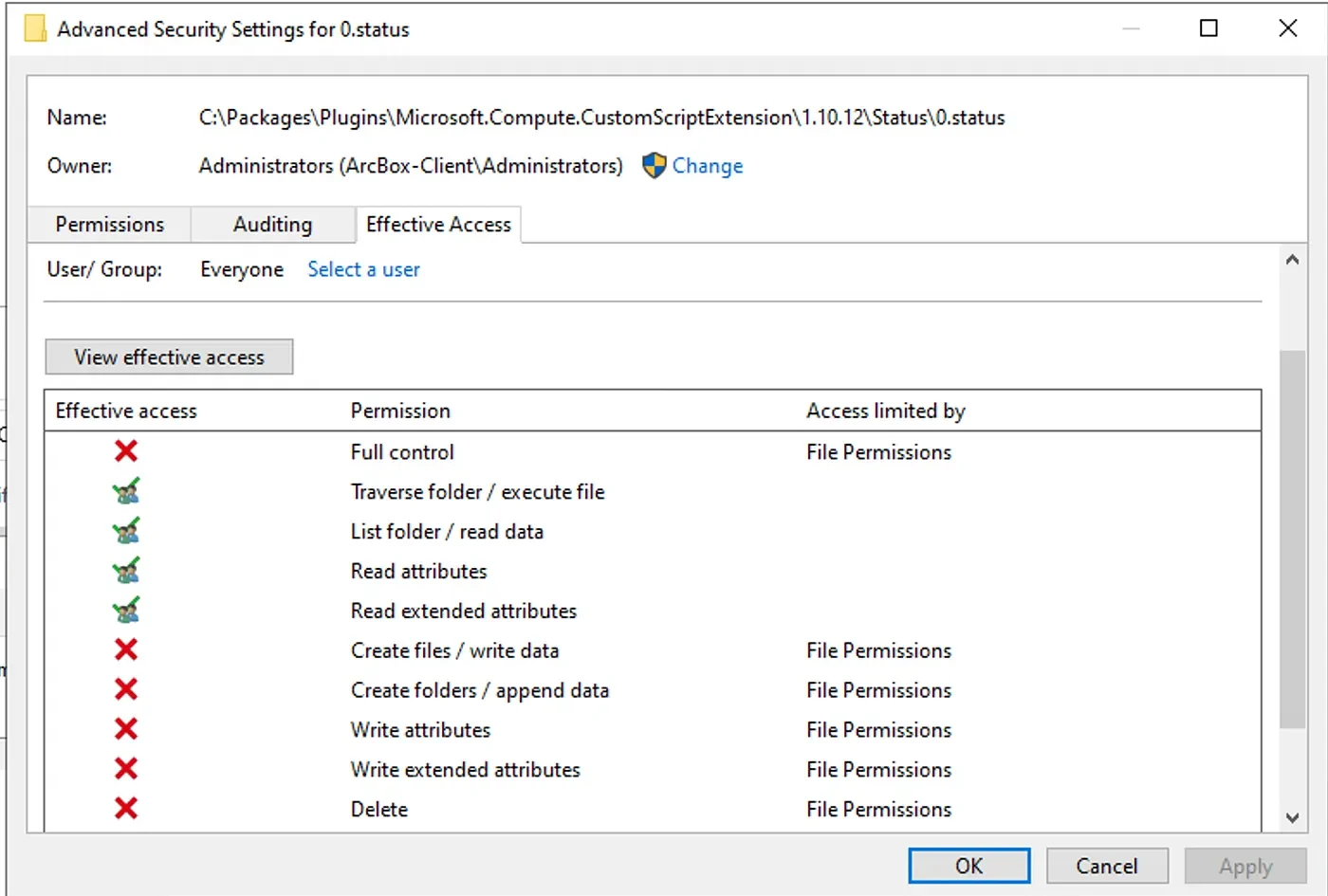
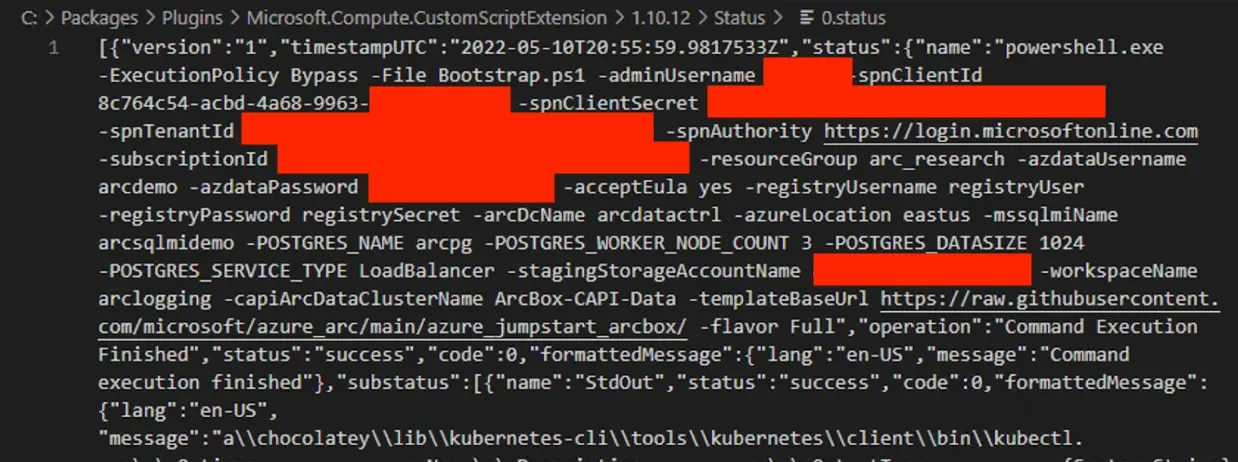
In the provisioning script for the ArcBox host, that sanitising is not done. The status file at C:\Packages\Plugins\Microsoft.Compute.CustomScriptExtension\1.10.12\Status\0.status contains secrets and credentials plainly visible to everyone, including low privileged users.
Exploitation
Step 1: Obtain access to the ArcBox-Client host
The report does not describe a specific route to the machine. The condition is that an actor gains access to the host, at any privilege level, including a low privileged user.
Step 2: Read the plugin status file
The provisioning output is stored at:
C:\Packages\Plugins\Microsoft.Compute.CustomScriptExtension\1.10.12\Status\0.status
Because the file is accessible to any user on the system, reading it requires no elevation. Its contents include the service principal credentials and Arc database credentials used during provisioning, in plaintext.
Step 3: Reuse the credentials
The disclosed accounts and credentials can then be used against the customer's Azure environment, provided those credentials or accounts are reused elsewhere.
Root cause
The provisioning script for the host writes its output without the redaction that other Azure services apply, so secrets land in the 0.status file in plaintext. The log files holding these credentials are accessible by any user on the system. Other services commonly substitute ***REDACTED*** for sensitive values in logs, but this script did not.
Impact
A malicious actor who gains access to the machine can disclose potentially sensitive information from the status file. The accounts revealed could allow the attacker to further compromise a customer's Azure environment if those credentials or accounts are reused elsewhere.
The Arc Jumpstart environment is intended as a demo environment, which ideally lessens the impact of the revealed credentials, provided users have not reused the service principal elsewhere in their environment. That said, it is not uncommon for customers to use these types of Jumpstart environments as a starting point for building out actual production infrastructure. The researcher also notes it may be possible that other services are affected by a similar issue, and that other logging mechanisms elsewhere in the Azure ecosystem could have more dire consequences if present in a production environment.
Fix
Microsoft patched the issue and updated its documentation to warn users about credential reuse within the Jumpstart environment. The report does not describe the code change itself.
Variants to test
- Inspect other Custom Script Extension status files under
C:\Packages\Plugins\on provisioned hosts, looking for plaintext secrets where redaction is expected. - Check the permissions on plugin status and log directories for readability by standard users.
- Review provisioning scripts for other Azure services and Jumpstart environments for the same missing redaction, treating any credential visible in a log as a positive result.
- Where credentials are found, determine whether the same service principal or database account is reused outside the demo environment, since that reuse is what turns local disclosure into broader compromise.
What happened, in plain words
Microsoft makes a service called Azure Arc. Think of it as a single control panel for computers and services that live in lots of different places: some in Microsoft's own cloud (Azure), some in other clouds, some in your own building. Instead of logging into each place separately, you manage them all from one dashboard. That is what "management platform" means here.
To help people learn Azure Arc, Microsoft publishes Jumpstart environments. A Jumpstart environment is a ready-made demo setup: you press a button, it builds a small working system for you, and you can poke at it without having to design anything yourself. It is like a model kitchen in a showroom: fully built, ready to use, and meant for trying things out rather than for cooking dinner for paying customers.
The specific demo used in this research is called ArcBox Fullbox Jumpstart. It builds a machine called ArcBox-Client. When that machine starts up for the very first time (its "first boot"), it runs a PowerShell script. PowerShell is Microsoft's scripting language: a text file full of commands that the computer executes automatically, one after another, without a person typing them.
That script is not sitting on the machine already. It is delivered by a component called the Microsoft.Compute.CustomScriptExtension, version 1.10.12. An "extension" in this context is a small add-on that the cloud platform installs on a machine to do a job. This particular add-on's job is to run a custom script on the machine. The script needs to log in to things, so it handles service principal credentials and Arc database credentials.
A credential is simply a username and password (or a similar secret) that proves who you are. A service principal is a kind of robot account: an identity that belongs to a piece of software rather than to a person, so the software can log in to Azure and do its work. If someone steals a service principal's credentials, they can pretend to be that software.
The problem: when the script ran, it wrote a record of what it did to a file on disk. That record, called a log or status file, included the secret credentials in plaintext, meaning not scrambled, not hidden, not starred out. And the file could be read by any user on the system, including a low privileged user. "Privilege" here means how much power an account has on a computer. An administrator can do almost anything; a low privileged user is an ordinary account that is not allowed to change system settings. If an ordinary account can read your passwords, the passwords are effectively public to anyone who gets onto that machine.
Tenable Research found this and published it. Microsoft fixed the issue and updated its documentation to warn people not to reuse those credentials elsewhere. No bounty was paid. A bug bounty is a programme where companies pay researchers for reporting security problems; here, none was provided.
The flaw
The testing environment was the ArcBox Fullbox Jumpstart environment, with nothing changed from the defaults. No special setup was needed. The only precondition is that the ArcBox-Client machine has been built and has booted once, and the finding is that an ordinary user on that machine can read the status files.
When ArcBox-Client provisions during first boot, it runs a PowerShell script that is sent to it through the Microsoft.Compute.CustomScriptExtension (version 1.10.12) plugin. "Provisions" means the machine is being set up and configured for the first time.
Most scripts the researcher had seen on other Azure services do the sensible thing: when they write to a log file, they replace anything sensitive with the literal text ***REDACTED***. "Redacted" means deliberately blanked out. It is the same idea as a government document released with black bars over the names. The report gives this example of the pattern:
<PluginSettings> <Plugin name="Microsoft.CPlat.Core.RunCommandLinux" version="1.0.3"> <RuntimeSettings seqNo="0">{ "runtimeSettings": [ { "handlerSettings": { "protectedSettingsCertThumbprint": "[redacted]", "protectedSettings": "*** REDACTED ***", "publicSettings": {} } } ]}</RuntimeSettings>
Line by line, in plain words:
<PluginSettings>and</PluginSettings>are an opening and closing tag, like bookends. Everything between them describes the plugin's settings. This is XML, a text format for structured data.<Plugin name="Microsoft.CPlat.Core.RunCommandLinux" version="1.0.3">names the plugin and its version. The name says it runs a command on Linux.<RuntimeSettings seqNo="0">starts the section holding the settings used at run time.seqNo="0"is a sequence number, a counter.{ "runtimeSettings": [ { "handlerSettings": { ... } } ] }is JSON, another text format for structured data, nested inside the XML. The curly braces group things together and the square brackets hold a list."protectedSettingsCertThumbprint": "[redacted]"is a thumbprint: a short fingerprint that identifies a certificate. A certificate is a digital document used to prove identity and to encrypt data."protectedSettings": "*** REDACTED ***"is the important line. This is where the secret settings would go, and instead of the secret we see the words*** REDACTED ***. That is the good behaviour: the secret was replaced before being written down."publicSettings": {}is an empty set of settings that are not secret. The empty braces mean there is nothing in it.
In the provisioning script for the ArcBox host, that sanitising was not done. The status file lives at this path:
C:\Packages\Plugins\Microsoft.Compute.CustomScriptExtension\1.10.12\Status\0.status
Reading that path from left to right: C:\ is the main drive on a Windows machine. Packages\Plugins\ is a folder for installed plugins. Microsoft.Compute.CustomScriptExtension\1.10.12\ is the folder for this specific plugin and its version. Status\ holds status reports, and 0.status is one such report file. The backslashes are simply how Windows separates folder names.
In that file, the secrets and credentials are plainly visible to everyone, including low privileged users.
Exploitation
"Exploitation" means actually using the weakness to get something you should not have. It happens in three steps.
Step 1: Obtain access to the ArcBox-Client host
The report does not describe a specific route onto the machine. The condition is simply that an attacker gains access to the host at any privilege level, including a low privileged user. In everyday terms: the attacker needs some way in, even a modest one. The point of the finding is that once they are in, even with the smallest amount of access, the secrets are waiting for them.
Step 2: Read the plugin status file
The provisioning output is stored at:
C:\Packages\Plugins\Microsoft.Compute.CustomScriptExtension\1.10.12\Status\0.status
This is the same path as before. Because the file is accessible to any user on the system, reading it requires no elevation. "Elevation" means temporarily gaining administrator rights, the way Windows asks you to confirm before installing software. Here, no such confirmation is needed: an ordinary account can just open the file. Its contents include the service principal credentials and Arc database credentials used during provisioning, in plaintext.
Step 3: Reuse the credentials
The disclosed accounts and credentials can then be used against the customer's Azure environment, provided those credentials or accounts are reused elsewhere. This is the part that turns a local problem into a bigger one. If the password found in the demo machine is also the password for something real, the attacker can take that password and log in to the real thing. It is like finding a key in a showroom and discovering it also opens the front door of the office.
Root cause
A root cause is the underlying reason the problem exists, as opposed to its symptoms. Here, the provisioning script for the host writes its output without the redaction that other Azure services apply, so secrets land in the 0.status file in plaintext. The log files holding these credentials are accessible by any user on the system. Other services commonly substitute ***REDACTED*** for sensitive values in logs, but this script did not.
Impact
A malicious actor who gains access to the machine can disclose potentially sensitive information from the status file. The accounts revealed could allow the attacker to further compromise a customer's Azure environment if those credentials or accounts are reused elsewhere.
The Arc Jumpstart environment is intended as a demo environment, which ideally lessens the impact of the revealed credentials, provided users have not reused the service principal elsewhere in their environment. That said, it is not uncommon for customers to use these types of Jumpstart environments as a starting point for building out actual production infrastructure. "Production" means the systems that do real work for real users, as opposed to a demo. The researcher also notes it may be possible that other services are affected by a similar issue, and that other logging mechanisms elsewhere in the Azure ecosystem could have more dire consequences if present in a production environment.
Fix
Microsoft patched the issue and updated its documentation to warn users about credential reuse within the Jumpstart environment. The report does not describe the code change itself.
Variants to test
These are follow-up checks someone could run, based on the same idea:
- Inspect other Custom Script Extension status files under
C:\Packages\Plugins\on provisioned hosts, looking for plaintext secrets where redaction is expected. In other words, look in the same kind of folder on other machines for the same mistake. - Check the permissions on plugin status and log directories for readability by standard users. "Permissions" are the rules saying who may read, write or run a file. If an ordinary account can read a folder full of logs, that is worth knowing.
- Review provisioning scripts for other Azure services and Jumpstart environments for the same missing redaction, treating any credential visible in a log as a positive result. A "positive result" means you found the bug.
- Where credentials are found, determine whether the same service principal or database account is reused outside the demo environment, since that reuse is what turns local disclosure into broader compromise.
Glossary
- Azure: Microsoft's cloud computing platform, where companies rent computers and services over the internet.
- Azure Arc: Microsoft's service for managing machines and services across Azure, other clouds and on-premises locations from one place.
- Jumpstart environment: A ready-made demo setup published by Microsoft for learning a product, built automatically rather than by hand.
- ArcBox Fullbox Jumpstart: The specific Jumpstart demo environment used in this research.
- ArcBox-Client: The machine built by that demo environment, which runs the provisioning script on first boot.
- Provisioning: The automatic process of setting up and configuring a machine for the first time.
- First boot: The first time a machine starts up after being created.
- PowerShell: Microsoft's scripting language and command shell for automating tasks on Windows.
- Script: A text file of commands that a computer runs automatically.
- Plugin / extension: A small add-on installed on a machine to perform a specific job.
- Microsoft.Compute.CustomScriptExtension: The Azure extension, version 1.10.12 here, that delivers and runs a custom script on a machine.
- Credential: A secret such as a username and password that proves an identity.
- Service principal: A robot account belonging to software rather than a person, used so the software can log in to Azure.
- Plaintext: Data stored exactly as it is, with no encryption or masking.
- Log / status file: A file where a program records what it did, for later inspection.
- Redaction: Deliberately replacing sensitive values in a document or log with a placeholder such as
***REDACTED***. - Privilege: The level of power an account has on a computer.
- Low privileged user: An ordinary account without administrator rights.
- Elevation: Temporarily gaining higher rights, such as administrator, to perform an action.
- Permissions: The rules that decide who may read, write or run a file or folder.
- Host: A computer or machine on a network.
- XML: A text format for structured data, using opening and closing tags.
- JSON: A text format for structured data, using curly braces for groups and square brackets for lists.
- Thumbprint: A short fingerprint that identifies a certificate.
- Certificate: A digital document used to prove identity and to encrypt data.
- Root cause: The underlying reason a problem exists, rather than its visible symptoms.
- Exploitation: Actually using a weakness to obtain something you should not have.
- Impact: The harm that results from a weakness being used.
- Production infrastructure: The systems that do real work for real users, as opposed to demos or tests.
- Bug bounty: A programme that pays researchers for reporting security problems.
- Patch: A fix applied to software to close a security hole.




