Microsoft Azure Site Recovery DLL Hijacking
 Published on medium.com
Azure Site Recovery is a suite of tools aimed at providing disaster recovery services for cloud resources. It provides utilities for replication, data recovery, and failover services during outages.
The full write-up lives on its author's site
It belongs to its author, so we link to it rather than copy it. The other two tabs are our own rewrites, checked against it.
Context
Azure Site Recovery is a Microsoft suite of tools for disaster recovery of cloud resources. It provides utilities for replication, data recovery and failover during outages. The component at the centre of this finding is the cxprocessserver service, which runs automatically and with SYSTEM level privileges and is described as the primary service for Azure Site Recovery.
Tenable Research found that the service is vulnerable to a DLL hijacking attack because of incorrect directory permissions. Any low-privileged user on a host where the service is installed can escalate to SYSTEM. Microsoft assigned the issue CVE-2022-33675, rated it Important with a CVSSv3 score of 7.8, and is expected to award a $10,000 bug bounty for the finding.
Setup
The precondition is a host with Azure Site Recovery installed, so that the cxprocessserver service is present and running automatically as SYSTEM. The attacker needs only an arbitrary low-privileged account on that host. The researcher used procmon to observe library loading by the service binary, and created a malicious DLL to demonstrate the hijack. The report does not list further tooling, versions or account details.
Finding it
The flaw is in the permissions on the service's executable directory:
E:\Program Files (x86)\Microsoft Azure Site Recovery\home\svsystems\transport\
Incorrect permissions on that directory allow new files to be created by normal users. The basic permissions show that write access is disabled, but the Special Permissions still incorrectly grant write access to the directory. The report notes that this can be verified by viewing the Effective Access granted to a given user for the directory in question.
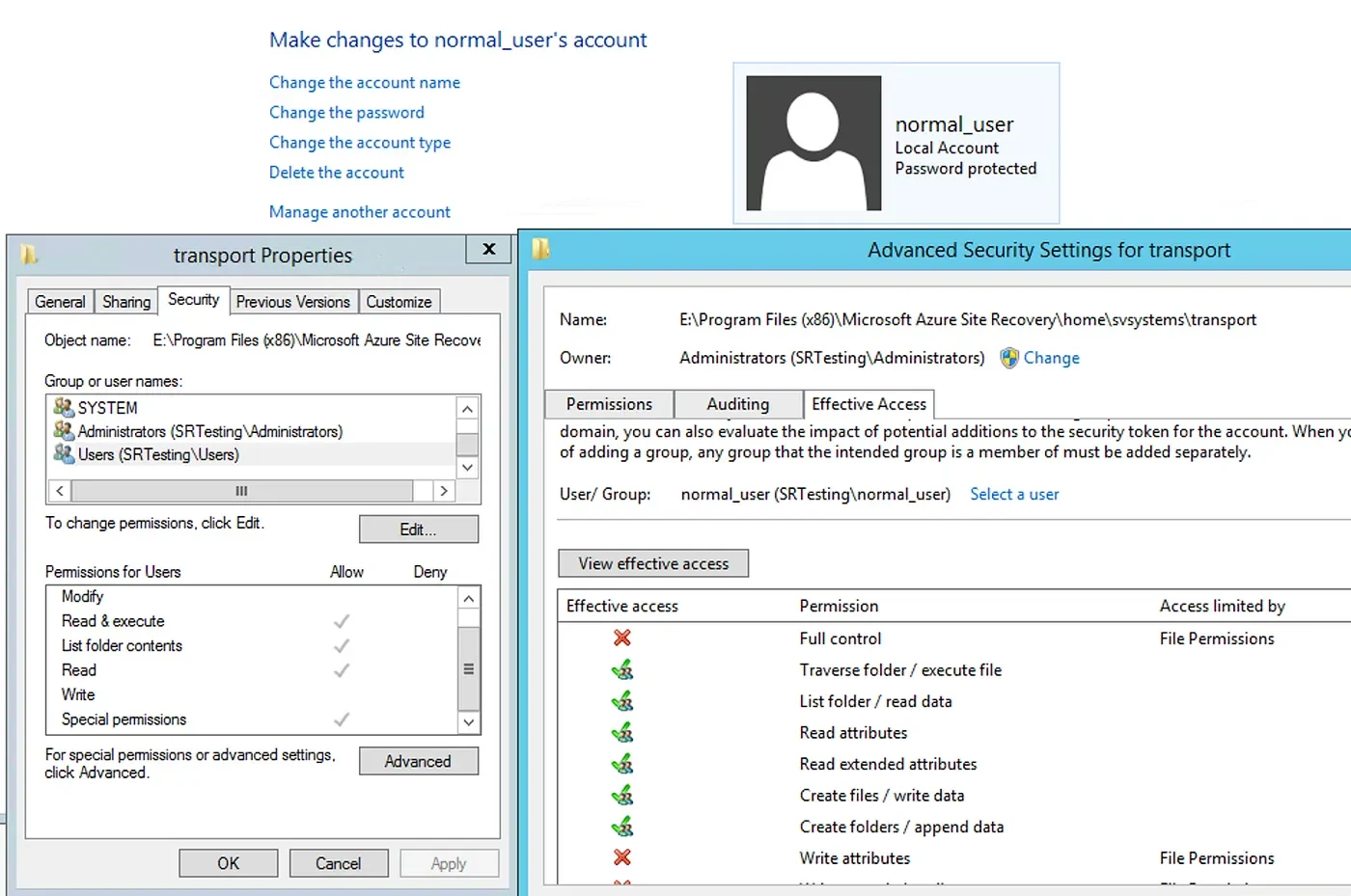
The screenshot shows the Effective Access view for a user on that directory, which is where the incorrect write grant becomes visible despite the basic permissions appearing to deny it. Because normal users can plant files in a directory the SYSTEM service loads libraries from, several libraries used by the service binary become hijack candidates.
Exploitation
Step 1: Confirm the service context
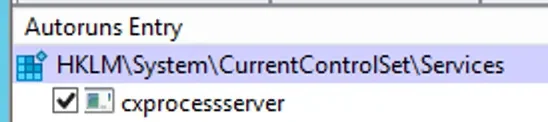
The cxprocessserver service runs automatically and with SYSTEM level privileges. That is what makes a planted library in its executable directory interesting: anything the service loads from there executes at SYSTEM.
Step 2: Verify the effective write access
Check the Effective Access granted to the low-privileged user for the transport directory. The basic permission listing suggests write is disabled, but the special permissions grant it, so the user can create files in the directory.
Step 3: Plant a malicious DLL
Create a malicious DLL and place it in the service's executable directory under a name the service binary will load. The report deliberately omits full exploitation steps, noting that DLL hijacking techniques are extremely well documented elsewhere.
Step 4: Observe the hijack with procmon
Under normal circumstances, the loading of ktmw32.dll looks like the following:
With the planted DLL, the following can be observed:
The report shows procmon captures of the loading of ktmw32.dll under normal circumstances and with the planted DLL.
Step 5: Escalate
With the malicious DLL loaded by the SYSTEM service, the attacker elevates from an arbitrary, low-privileged user to SYSTEM. During the disclosure process Microsoft confirmed this behaviour and created patches accordingly.
Root cause
The mistake is a permissions error on the service's executable directory. The basic permissions show write access as disabled, but the Special Permissions still grant write access, so a normal user can create files in a directory that a SYSTEM service loads libraries from. The service loads libraries such as ktmw32.dll, and a planted DLL can be loaded instead. The existing defence, the apparent write denial in the basic permission view, did not stop it because the effective access was broader than the summary suggested.
Impact
Any low-privileged user on a host with Azure Site Recovery installed can escalate to SYSTEM. The report frames this as crossing a clear security boundary, which is what distinguishes it from the many DLL planting issues whose impact is limited. Because the affected application is used for disaster recovery, the authors note that discovery by malicious actors, notably ransomware groups that target backup files and servers to prevent restoration from clean backups, could have had much wider reaching impact.
Fix
Microsoft confirmed the behaviour and created patches. Microsoft has taken action to correct the issue, so any new deployments should not be affected. The report strongly recommends applying the Microsoft supplied patches as soon as possible to secure existing deployments. The report does not describe the specific permission change made.
Variants to test
- Audit service executable directories for effective write access by non-administrators, especially where the basic permission view shows write disabled. A positive result is an Effective Access entry granting write or create-files to a low-privileged group.
- Enumerate libraries loaded by SYSTEM services from their own directories, as was done here with ktmw32.dll, and check whether any resolve from a user-writable path. A positive result is procmon showing a load from the writable directory.
- Plant a benign test DLL under a candidate name and restart or trigger the service. A positive result is the service loading the planted file at SYSTEM.
- Repeat the permission review on other Azure Site Recovery components and on disaster recovery or backup agents generally, since these run with high privilege and are attractive to ransomware operators. A positive result is the same mismatch between displayed and effective permissions.
What happened, in plain words
Microsoft makes a product called Azure Site Recovery. It is a set of tools that helps a company keep working if its computers or cloud resources fail. Think of it like a spare tyre and a repair kit for a car: if something goes wrong, you can copy your data somewhere else, bring it back, and switch over to a working copy while the broken part is fixed. The report calls these three jobs replication, data recovery and failover.
Inside that product there is a background program called a service. A service is a program that starts by itself when the computer boots and keeps running without anyone logging in and clicking it. This particular service is called cxprocessserver, and the report describes it as the primary service for Azure Site Recovery. It runs automatically and with SYSTEM level privileges. SYSTEM is the most powerful account on a Windows computer. It is above even the administrator account: it can read, change or delete almost anything on the machine. If a normal user could make SYSTEM run their own code, they would effectively become the most powerful user on the box.
That is exactly what the researchers found. The folder that holds the service's program files had the wrong permissions. Permissions are the rules that say who may read, change or add files in a folder. Because of the mistake, an ordinary, low-privileged user could drop a new file into that folder. When the powerful service loaded that file, it ran it, giving the attacker SYSTEM powers. This kind of trick is called DLL hijacking (also called DLL planting).
Microsoft gave the issue the identifier CVE-2022-33675. A CVE is a public catalogue number for a known security flaw, so people around the world can refer to the same bug unambiguously. Microsoft rated it Important with a CVSSv3 score of 7.8. CVSS is a standard scoring system for how serious a vulnerability is; scores run from 0 to 10, and 7.8 is in the high range. The report also says Microsoft is expected to award a $10,000 bug bounty for the finding. A bug bounty is money a company pays a researcher who responsibly reports a flaw instead of abusing it.
The flaw
The cxprocessserver service runs automatically and with SYSTEM level privileges. This is the primary service for Azure Site Recovery.
Now the folder. The service's program lives in this directory:
E:\Program Files (x86)\Microsoft Azure Site Recovery\home\svsystems\transport\
A directory is just another word for a folder. This one is on the E: drive, inside Program Files (x86), which is where Windows normally keeps installed programs. The path ends in transport, a subfolder belonging to Azure Site Recovery.
Incorrect permissions on that directory allow new files to be created by normal users. Here is the subtle part, and it is the heart of the whole report. When you look at the folder's basic permissions, they show that "write" access is disabled. Write access means the ability to add or change files. So at first glance the folder looks locked down. But the Special Permissions still incorrectly grant write access to this directory. Special Permissions are extra, more granular rules that Windows applies on top of the simple ones. The summary view can say "no write" while a hidden special rule quietly says "yes, write".
The report says this can be verified by viewing the Effective Access granted to a given user for the directory in question. Effective Access is a Windows feature that calculates the final answer: after all the rules, basic and special, are combined, what can this particular user actually do? It is like checking a bank balance instead of reading the list of transactions: the list may look one way, but the balance is the truth.
The screenshot shows the Effective Access view for a user on that directory. This is where the incorrect write grant becomes visible even though the basic permissions appear to deny it.
Because normal users can plant files in a folder that a SYSTEM service loads libraries from, several libraries used by the service binary become hijack candidates. A library (on Windows, a DLL, short for Dynamic Link Library) is a reusable bundle of code that a program loads when it needs it, instead of containing everything itself. Think of a recipe book: the main program is the cook, and the DLLs are the reference books it pulls off the shelf while cooking. If someone can swap a book on the shelf for a fake one, the cook follows the fake recipe without noticing. A binary is simply a compiled program file, the thing you double-click or that Windows starts for you.
Proof of concept
A proof of concept is a small demonstration that proves a bug is real, without necessarily being a full weapon. For brevity, the researchers chose to leave full exploitation steps out of the post, since DLL hijacking techniques are extremely well documented elsewhere. That is a common and responsible choice: the goal is to show the flaw exists, not to hand out a ready-made attack.
A malicious DLL was created to demonstrate the successful hijack via procmon. procmon (Process Monitor) is a free Microsoft tool that records, in real time, what programs do with files, folders and the registry. It is like a security camera for a computer's file activity: you press record, use the machine, and then watch exactly which file was opened, by which program, and from where.
Under normal circumstances, the loading of ktmw32.dll looks like the following:
With the planted DLL, the following can be observed:
The report shows procmon captures of the loading of ktmw32.dll under normal circumstances and with the planted DLL.
This allows an attacker to elevate from an arbitrary, low-privileged user to SYSTEM. Privilege escalation means moving from a lower level of access to a higher one. Here it is the difference between a guest who can only use the lobby and someone who now holds the master key to every room. During the disclosure process, Microsoft confirmed this behaviour and created patches accordingly. A patch is an update that fixes a flaw.
Conclusion
DLL hijacking is quite an antiquated technique that the researchers do not often come across these days. When they do, the impact is often quite limited, because no real security boundary is crossed: the attacker usually gains only the same level of access they already had. A security boundary is a line that separates users with different levels of trust, such as a normal user and SYSTEM. MSRC, Microsoft's Security Response Center, lists several examples in a blog post about how it triages issues that use this technique.
In this case, however, the researchers were able to cross a clear security boundary and demonstrated the ability to escalate a user to SYSTEM level permissions. That shows a growing trend: even dated techniques find a new home in the cloud space, because these environments add complexity. More moving parts mean more places for a permission rule to be set incorrectly.
Because the vulnerability was discovered in an application used for disaster recovery, the researchers remind us that if malicious actors had found it first, the impact could have been much wider reaching. They single out ransomware groups. Ransomware is malicious software that locks or steals a victim's data and demands payment to release it. Such groups are known to target backup files and servers, to make sure a victim is forced to pay and cannot restore from clean backups. Attacking the very tool a company relies on to recover would be a serious blow.
The researchers strongly recommend applying the Microsoft-supplied patches as soon as possible to ensure existing deployments are properly secured. Microsoft has taken action to correct the issue, so any new deployments should not be affected by this flaw.
Glossary
- Azure Site Recovery: a Microsoft suite of tools for disaster recovery of cloud resources, providing replication, data recovery and failover during outages.
- Service: a program that starts automatically and runs in the background without a user launching it.
- cxprocessserver: the Azure Site Recovery service at the centre of this finding; it runs automatically with SYSTEM privileges.
- SYSTEM: the most powerful account on a Windows computer, above administrator.
- Privilege escalation: moving from a lower level of access to a higher one, here from a low-privileged user to SYSTEM.
- Permissions: the rules that decide who may read, change or add files in a folder.
- Write access: the ability to add or change files in a folder.
- Special Permissions: extra, granular Windows permission rules that apply on top of the basic ones.
- Effective Access: a Windows view that shows what a given user can actually do after all permission rules are combined.
- Directory: a folder.
- DLL: Dynamic Link Library, a reusable bundle of code that a program loads when needed.
- Binary: a compiled program file.
- DLL hijacking / DLL planting: tricking a program into loading an attacker-supplied library instead of the legitimate one.
- procmon: Microsoft's Process Monitor tool, which records file, folder and registry activity in real time.
- Proof of concept: a small demonstration that proves a bug is real.
- CVE: a public catalogue number for a known security vulnerability, here CVE-2022-33675.
- CVSSv3: a standard scoring system for vulnerability severity, from 0 to 10; this issue scored 7.8.
- Bug bounty: money a company pays a researcher who responsibly reports a flaw.
- Patch: an update that fixes a flaw.
- Security boundary: a line separating users with different levels of trust.
- MSRC: Microsoft's Security Response Center.
- Ransomware: malicious software that locks or steals data and demands payment to release it.


