Exploiting CVE-2023-23397: Microsoft Outlook Elevation of Privilege Vulnerability
Microsoft Outlook contained a vulnerability where a malicious calendar reminder could specify a UNC path, causing Outlook to send NTLM authentication to an attacker-controlled server. An attacker could relay this authentication to another service, such as LDAP, to obtain credentials or escalate privileges.
 Published on mdsec.co.uk
Our best in class red team can deliver a holistic cyber attack simulation to provide a true evaluation of your organisation’s cyber resilience.](https://www.mdsec.co.uk/our-services/adversary-simulation/) - [{{media:1}}
The full write-up lives on its author's site
It belongs to its author, so we link to it rather than copy it. The other two tabs are our own rewrites, checked against it.
Context
On 14th March 2023 Microsoft patched a vulnerability in Microsoft Outlook, described in its advisory as follows:
Microsoft Office Outlook contains a privilege escalation vulnerability that allows for a NTLM Relay attack against another service to authenticate as the user.
No exploitation details were published with the patch. This write-up covers the analysis that followed, starting from the audit tooling Microsoft shipped alongside the fix and ending with a working exploit that relays the victim's incoming authentication to LDAP to obtain a shadow credential.
The property at the centre of it controls which filename the Outlook client plays when the reminder for the mail item is triggered. The filename for that sound is stored in a MAPI property on the item, and Outlook resolves it when the reminder fires.
Setup
The analysis relies on two things:
- The audit script Microsoft published for Exchange administrators, hosted in the CSS-Exchange repository under
docs/Security/CVE-2023-23397.md. It scans mailboxes for items that may be used to exploit the issue and offers to clean them. - The .NET
MsgKitlibrary, used to generate Outlook MSG files (compound files in CFB format) without needing Outlook itself.
No victim-side configuration is described. The exploit is delivered as an email containing a crafted appointment.
Finding it
Reviewing the audit script shows it is specifically looking for the PidLidReminderFileParameter property inside mail items, and offers the option to "clean" it if found:

Looking up that property gives the following definition:
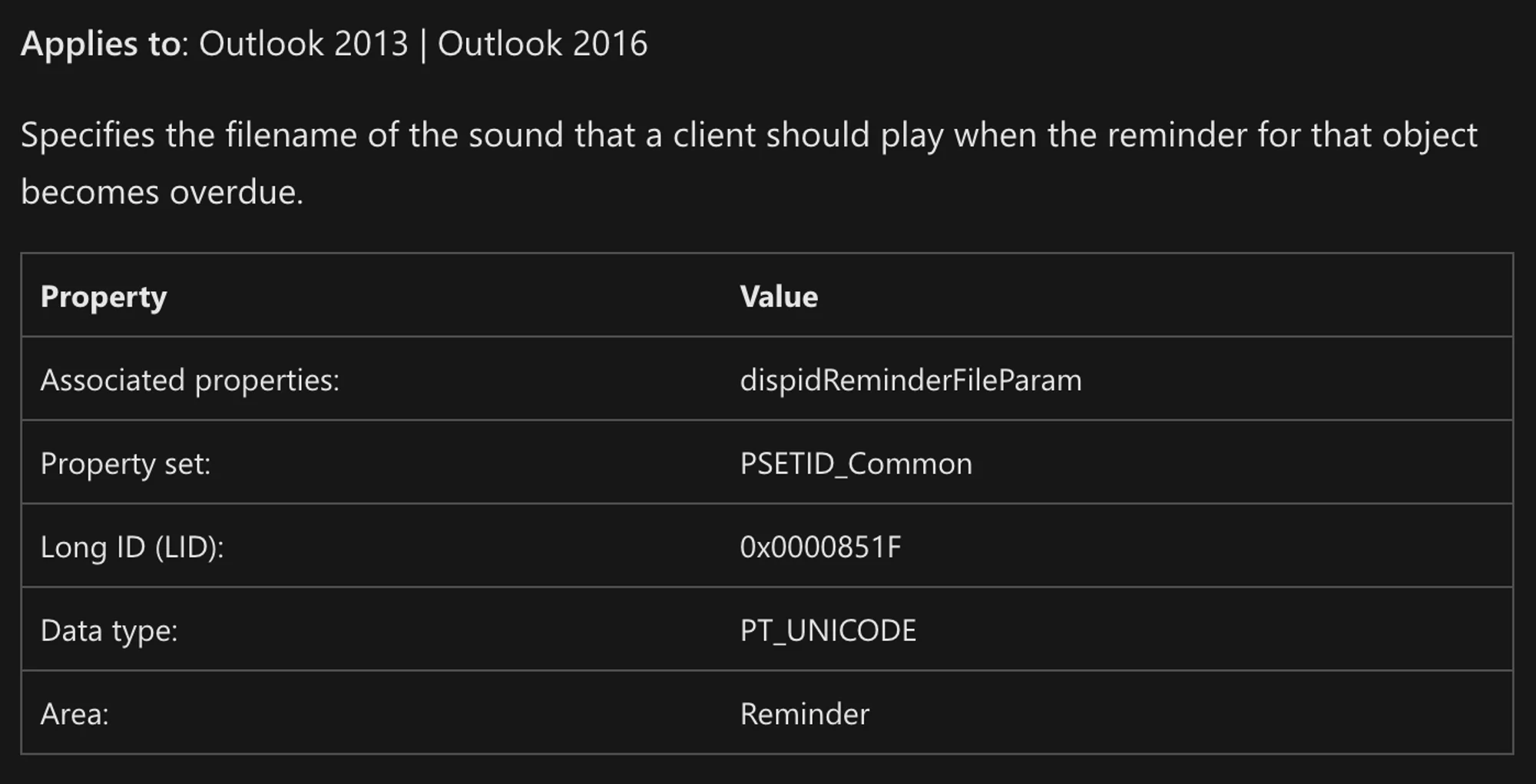
The property controls which filename the Outlook client plays when the reminder for the mail item is triggered. That is the interesting part: the value is a filename, and a filename can be a UNC path. A UNC path pointing at a remote host causes the Windows client to authenticate to that host, which is exactly the NTLM trigger needed for a relay.
Further analysis of the surrounding properties turns up PidLidReminderOverride, described as follows:
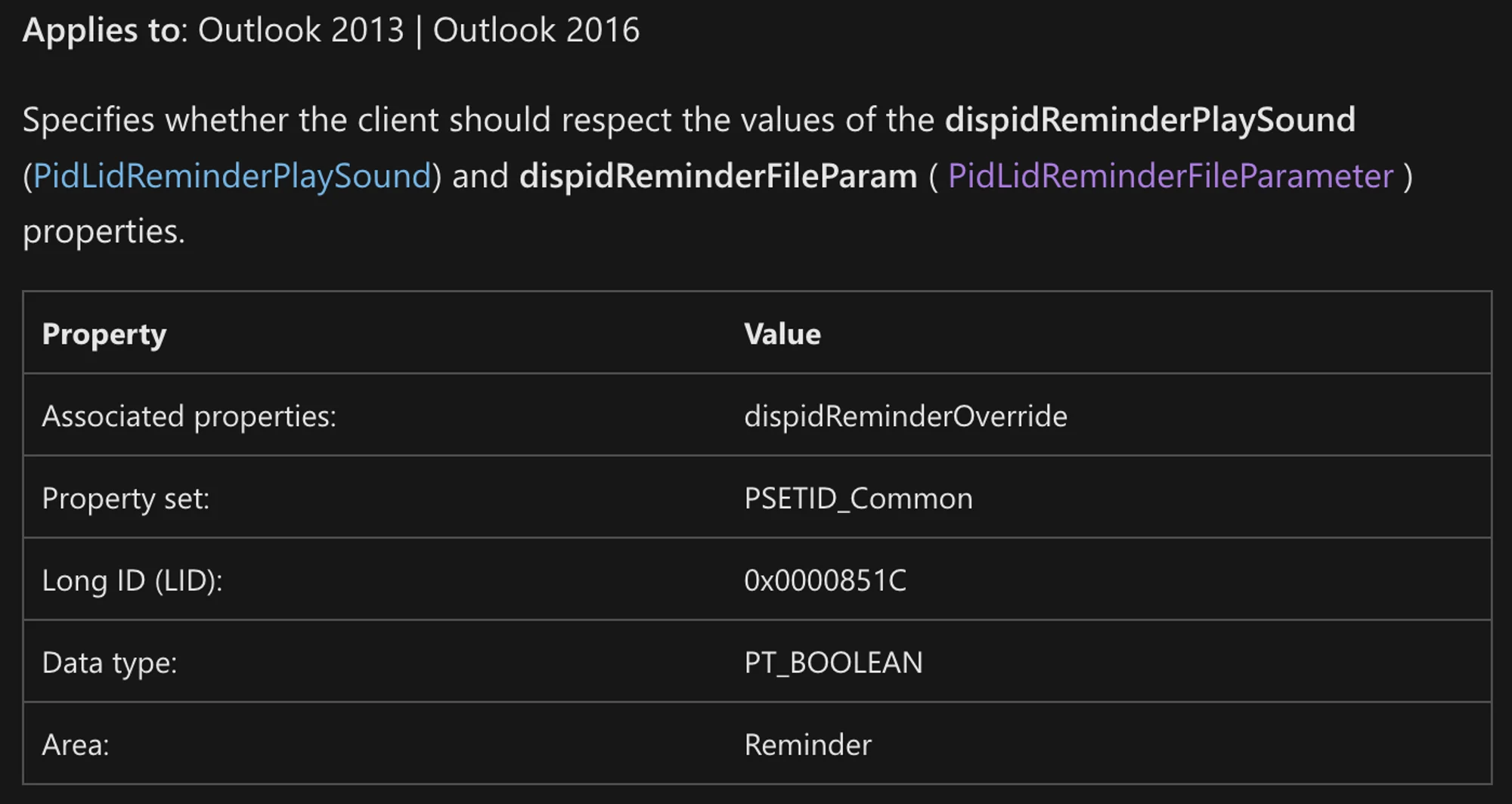
The researcher notes that PidLidReminderOverride should likely be set in order to trigger Outlook to parse the malicious UNC path held in PidLidReminderFileParameter. Both properties therefore need to be present on the crafted item.
Exploitation
Step 1: build a malicious MSG file
The first step is to create an Outlook MSG file. These are compound files in CFB format. To speed up generation, the researcher used the .NET MsgKit library.
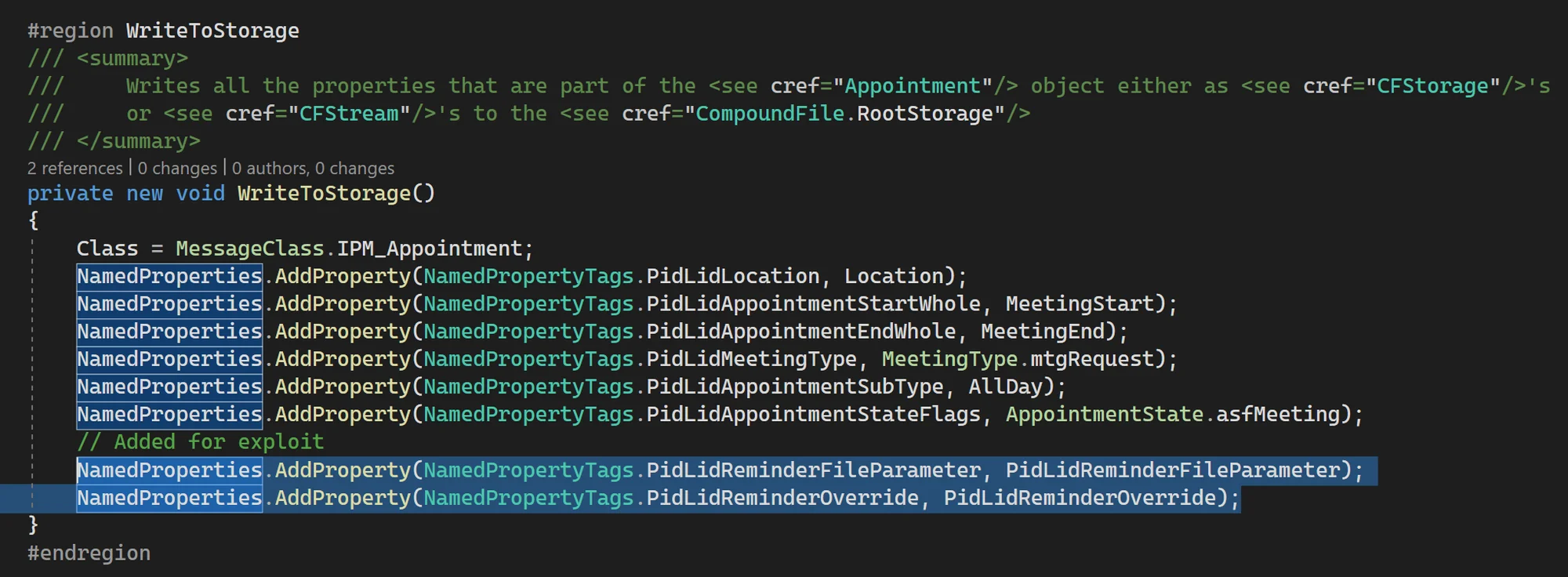
Reviewing MsgKit, the Appointment class defines a number of properties that are added to the mail item before the MSG file is saved:
Step 2: extend the Appointment class
The Appointment class was extended to add the two required properties, PidLidReminderOverride and PidLidReminderFileParameter, as shown above.
Step 3: create, save and send
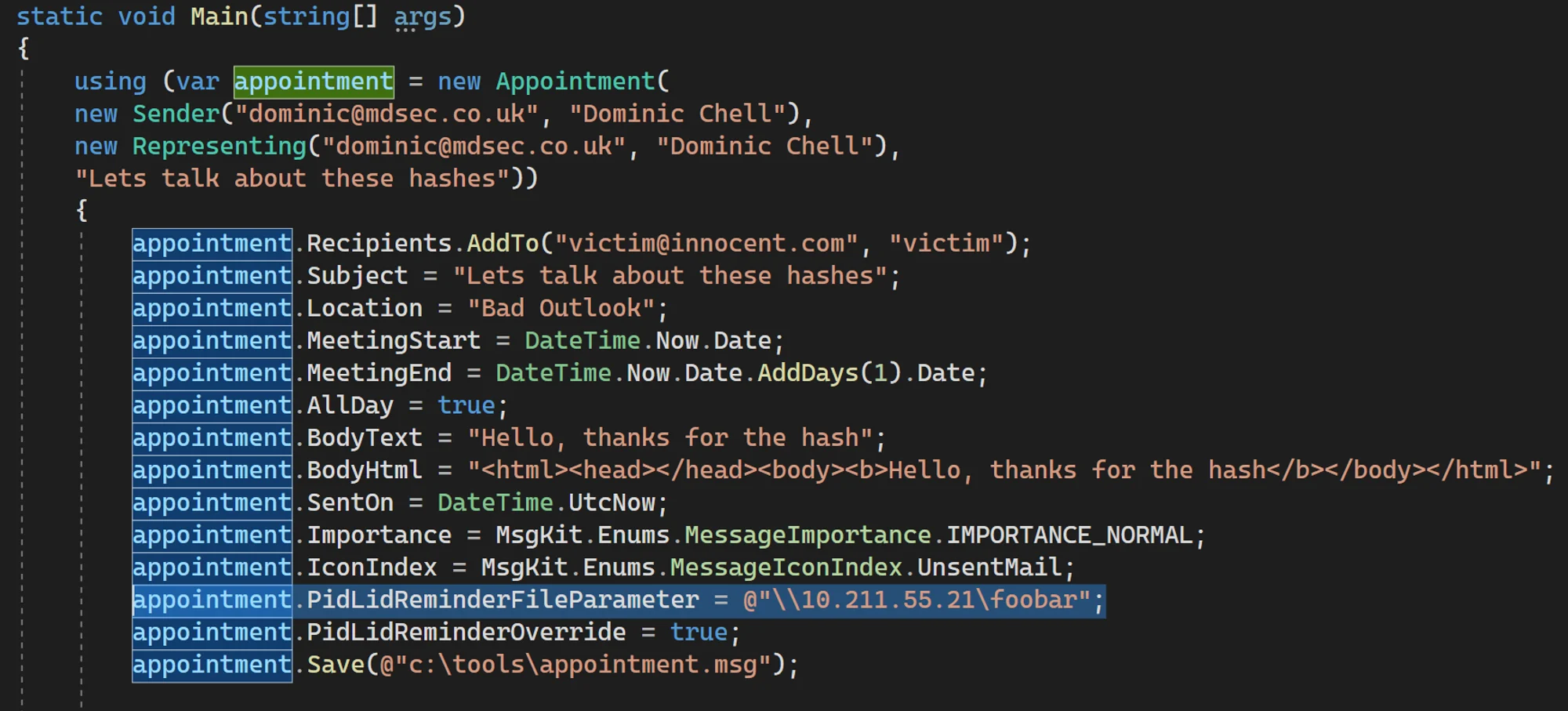
From that point the only remaining work is to create a new appointment and save it, before sending it to the victim:
Step 4: relay the authentication
The demonstration relays the incoming authentication request to LDAP in order to obtain a shadow credential:

Root cause
Outlook resolves the reminder sound filename from PidLidReminderFileParameter and accepts a UNC path there. When the reminder is processed, the client attempts to reach that path, which makes Windows perform NTLM authentication to the remote host named in the path. Because the value is attacker-controlled and travels inside the mail item, the attacker chooses the host that receives the authentication.
The behaviour is worse than a typical remote-resource leak because it triggers NTLM authentication to an IP address, that is, a system outside the Trusted Intranet Zone or Trusted Sites, and it happens immediately on opening the email, irrespective of whether the user has selected the option to load remote images or not. This happens irrespective of whether the user has selected the option to load remote images or not.
Impact
An attacker who can send mail to a victim can cause that victim's Outlook client to authenticate to an attacker-chosen host as soon as the email is opened. The captured authentication can then be relayed to another service, in the demonstrated case LDAP, to obtain a shadow credential. The report notes that the vulnerability is incredibly easy to exploit and will no doubt be adopted by adversaries fast, which is why it is worth patching as a priority.
Fix
On 14th March 2023 Microsoft patched the vulnerability. The advisory describes the issue as a privilege escalation vulnerability allowing an NTLM relay attack against another service to authenticate as the user, but gives no further detail on the code change. Microsoft also published the audit script referenced above, which Exchange administrators can run to find mail items carrying PidLidReminderFileParameter and optionally clean them.
- Other MAPI properties that hold a filename or path and are resolved by the client without user interaction. A positive result is a property whose value can be set to a UNC path and causes an outbound authentication when the item is opened or its reminder fires.
- Items other than appointments, such as plain mail items carrying reminder properties. A positive result is the same immediate authentication on open.
- Reminder-related properties that gate whether the filename is parsed, in the way PidLidReminderOverride does here. A positive result is a property combination that triggers the lookup where a single property alone does not.
- Delivery to clients on hosts outside the Trusted Intranet Zone or Trusted Sites, with remote images disabled. A positive result is authentication still being attempted under those conditions.
What happened, in plain words
On 14th March 2023, Microsoft released a fix for a security hole in Microsoft Outlook, the email and calendar program that comes with Microsoft Office. Microsoft described the hole like this:
Microsoft Office Outlook contains a privilege escalation vulnerability that allows for a NTLM Relay attack against another service to authenticate as the user.
That sentence is dense, so let us unpack it before going further.
- Vulnerability: a mistake in how a program is built that lets someone use it in a way the makers did not intend, usually to their own advantage.
- Privilege escalation: a bug that lets someone gain more power or access than they should have. Think of a hotel key card that is only meant to open your own room but, because of a fault in the lock, also opens the manager's office.
- NTLM: a way Windows computers prove who they are to each other. When one machine wants to talk to another, it can send a kind of cryptographic handshake instead of a password. The receiving machine can then check that handshake with a server that knows the passwords.
- NTLM Relay attack: instead of stealing the password, the attacker catches that handshake as it flies past and immediately passes it on to a different service. The second service thinks the real user is logging in, because the handshake is genuine. It is like someone catching your signed letter to a bank and posting it to a different bank that also accepts your signature.
- Authenticate as the user: the second service ends up believing the request really came from the victim, with all the victim's permissions.
Microsoft published the fix but did not explain how the bug could actually be triggered. This article is the story of working that out, starting from a tool Microsoft shipped alongside the fix and ending with a working demonstration that takes the victim's authentication and passes it to a directory service called LDAP to obtain something called a shadow credential.
The feature at the centre of it all is the Outlook reminder. When you create a calendar appointment or receive a mail item, you can attach a reminder to it. Outlook reminders can be set to play a sound file when they fire. The name of that sound file is stored inside the item as a MAPI property. MAPI is the internal format Outlook uses to store all the details of a mail item: subject, sender, body, and dozens of hidden fields like the reminder sound. A property is simply a named field with a value, like a row in a spreadsheet with a label in one column and data in the next.
Outlook reads that filename when the reminder fires and tries to play it. If the filename can be made to point at another computer instead of a local file, Outlook will reach out to that computer, and reaching out means authenticating. That is the seed of the whole attack.
Setup
The analysis relies on two things.
- The audit script. Microsoft published a script for Exchange administrators, hosted in the CSS-Exchange repository under
docs/Security/CVE-2023-23397.md. Exchange is Microsoft's mail server: the program that stores and delivers mail for an organisation. The script scans mailboxes for items that might be used to exploit the issue and offers to clean them. An audit script is a small program that inspects data and reports what it finds, like a checklist a building inspector runs through. - The .NET MsgKit library. A library is a bundle of ready-made code that programmers can reuse instead of writing everything from scratch, a bit like a box of pre-cut parts for building furniture.
MsgKitis a .NET library (.NETbeing Microsoft's programming platform) that generates Outlook MSG files. An MSG file is the file format Outlook uses to save a single mail item to disk.MsgKitlets you build one without needing Outlook itself installed.
No victim-side configuration is described. The exploit is delivered as an ordinary email containing a crafted appointment. The report's point is that the authentication is triggered immediately on opening the email.
Finding it
Reviewing the audit script shows it is specifically looking for the PidLidReminderFileParameter property inside mail items, and offers the option to "clean" it if found:
The image shows the audit script's logic: it searches mail items for that one property and gives the administrator the choice to remove it. That is a strong hint. If Microsoft's own cleanup tool is hunting for a single property, that property is probably the thing the attacker abuses.
Looking up that property gives the following definition:
The definition explains that the property controls which filename the Outlook client plays when the reminder for the mail item is triggered. That is the interesting part: the value is a filename, and a filename can be a UNC path. A UNC path is a way of writing the address of a file on another computer on a network, in the form \\server\share\file. On Windows, when a program tries to open a UNC path, the operating system first has to prove who it is to the remote machine, and that proof is NTLM authentication. So a filename that points at a remote host causes the Windows client to authenticate to that host, which is exactly the NTLM trigger needed for a relay.
Further analysis of the surrounding properties turns up PidLidReminderOverride, described as follows:
The researcher notes that PidLidReminderOverride should likely be set in order to trigger Outlook to parse the malicious UNC path held in PidLidReminderFileParameter. Both properties therefore need to be present on the crafted item: one holds the address to contact, the other tells Outlook to use it.
Exploitation
Step 1: build a malicious MSG file
The first step is to create an Outlook MSG file. These are compound files in CFB format. CFB stands for Compound File Binary, a container format that works like a filing cabinet inside a single file: it holds many smaller streams and folders, each with its own name. Outlook uses it to store all the properties of a mail item in one file. To speed up generation, the researcher used the .NET MsgKit library.
Reviewing MsgKit, the Appointment class defines a number of properties that are added to the mail item before the MSG file is saved:
A class in programming is a blueprint for an object. The Appointment class is MsgKit's blueprint for a calendar appointment, and it lists the fields that will be written into the file. The image shows those fields, which is how the researcher knew where to add the two extra ones.
Step 2: extend the Appointment class
The Appointment class was extended to add the two required properties, PidLidReminderOverride and PidLidReminderFileParameter, as shown above. Extending a class means taking the existing blueprint and adding your own fields to it, without rewriting the whole thing. The result is an appointment that carries the malicious filename and the switch that makes Outlook use it.
Step 3: create, save and send
From that point the only remaining work is to create a new appointment and save it, before sending it to the victim:
The victim receives what looks like a normal calendar item.
Step 4: relay the authentication
The demonstration relays the incoming authentication request to LDAP in order to obtain a shadow credential:
LDAP is the protocol used to query and modify directory services, the databases that hold user accounts and their permissions in a Windows network. Active Directory is Microsoft's directory service, and LDAP is how programs talk to it. A shadow credential is a special key that can be added to a user account so that the account can be authenticated later without knowing its password. If an attacker can write a shadow credential to a victim's account, they can log in as that user whenever they like.
Root cause
Outlook resolves the reminder sound filename from PidLidReminderFileParameter and accepts a UNC path there. When the reminder is processed, the client attempts to reach that path, which makes Windows perform NTLM authentication to the remote host named in the path. Because the value is attacker-controlled and travels inside the mail item, the attacker chooses the host that receives the authentication.
The behaviour is worse than a typical remote-resource leak because it triggers NTLM authentication to an IP address, that is, a system outside the Trusted Intranet Zone or Trusted Sites. Those are Windows security zones: lists of addresses that the system treats as more trustworthy than the open internet. A typical leak of this kind might only reach hosts inside the trusted zone, where the risk is lower. Here the address can be anything, including a machine the attacker controls on the internet.
It also happens immediately on opening the email, irrespective of whether the user has selected the option to load remote images or not. Outlook has a setting that blocks pictures and other remote content in emails, precisely to stop senders learning that you opened their message. This happens irrespective of whether the user has selected the option to load remote images or not.
Impact
An attacker who can send mail to a victim can cause that victim's Outlook client to authenticate to an attacker-chosen host as soon as the email is opened. The captured authentication can then be relayed to another service, in the demonstrated case LDAP, to obtain a shadow credential. The report notes that the vulnerability is incredibly easy to exploit and will no doubt be adopted by adversaries fast, which is why it is worth patching as a priority.
In everyday terms: anyone who can send you an email can, without you clicking anything, make your computer authenticate to a machine they control, and that authentication can then be relayed to another service.
Fix
Microsoft patched the vulnerability on 14th March 2023. The advisory describes the issue as a privilege escalation vulnerability allowing an NTLM relay attack against another service to authenticate as the user, but gives no further detail on the code change. Microsoft also published the audit script referenced above, which Exchange administrators can run to find mail items carrying PidLidReminderFileParameter and optionally clean them.
Once you understand one bug, it is worth asking where else the same pattern appears. The report lists four directions to explore:
- Other MAPI properties that hold a filename or path and are resolved by the client without user interaction. A positive result is a property whose value can be set to a UNC path and causes an outbound authentication when the item is opened or its reminder fires.
- Items other than appointments, such as plain mail items carrying reminder properties. A positive result is the same immediate authentication on open.
- Reminder-related properties that gate whether the filename is parsed, in the way PidLidReminderOverride does here. A positive result is a property combination that triggers the lookup where a single property alone does not.
- Delivery to clients on hosts outside the Trusted Intranet Zone or Trusted Sites, with remote images disabled. A positive result is authentication still being attempted under those conditions.
Glossary
- Active Directory: Microsoft's directory service, the database that stores user accounts and permissions on a Windows network.
- Audit script: a small program that inspects data and reports what it finds, used here to scan Exchange mailboxes.
- Authenticate: to prove who you are to a computer system.
- CFB (Compound File Binary): a container file format that holds many named streams and folders inside one file, used by Outlook MSG files.
- Class: in programming, a blueprint that describes what fields and behaviour an object will have.
- Compound file: a single file that contains a whole structure of smaller files and folders inside it.
- CSS-Exchange: the Microsoft repository that hosts the audit script for this vulnerability.
- .NET: Microsoft's programming platform, used to build and run applications such as the MsgKit library.
- Exchange: Microsoft's mail server software, which stores and delivers email for an organisation.
- Extend (a class): to take an existing programming blueprint and add your own fields or behaviour to it.
- LDAP: the protocol used to query and modify directory services such as Active Directory.
- Library: a bundle of ready-made code that programmers reuse instead of writing everything themselves.
- MAPI: the internal format Outlook uses to store the details and hidden fields of a mail item.
- MSG file: the file format Outlook uses to save a single mail item to disk.
- MsgKit: a .NET library for generating Outlook MSG files without needing Outlook installed.
- NTLM: a Windows authentication protocol in which a machine proves its identity to another machine using a cryptographic handshake rather than sending a password.
- NTLM Relay attack: an attack that catches a genuine authentication handshake and forwards it to a different service, which then believes the real user is logging in.
- PidLidReminderFileParameter: the MAPI property that stores the filename Outlook plays when a reminder fires.
- PidLidReminderOverride: the MAPI property that tells Outlook to use the custom reminder filename rather than its default.
- Privilege escalation: a bug that lets someone gain more access or power than they should have.
- Property: a named field with a value inside a mail item, like a labelled cell in a spreadsheet.
- Shadow credential: a key that can be added to a user account so the account can be authenticated later without knowing its password.
- Trusted Intranet Zone / Trusted Sites: Windows security zones listing addresses the system treats as more trustworthy than the open internet.
- UNC path: a way of writing the address of a file on another computer on a network, in the form
\\server\share\file. - Vulnerability: a mistake in how a program is built that lets someone use it in unintended ways.



