From One Vulnerability to Another: Outlook Patch Analysis Reveals Important Flaw in Windows API
A Windows API function, MapUrlToZone, incorrectly classified a crafted path as local, allowing an attacker to bypass the fix for the Outlook vulnerability CVE-2023-23397. An unauthenticated attacker could send a specially crafted email that coerces the Outlook client to connect to an attacker-controlled server, leading to NTLM credential theft.
 Published on akamai.com
Client-Side Protection & Compliance
The full write-up lives on its author's site
It belongs to its author, so we link to it rather than copy it. The other two tabs are our own rewrites, checked against it.
Context
In March 2023 Patch Tuesday, Microsoft fixed a critical Outlook vulnerability, CVE-2023-23397. The flaw is triggered when an attacker sends an email that contains a reminder with a custom notification sound. The attacker specifies that sound as a path through the extended MAPI property PidLidReminderFileParameter. By supplying a UNC path, the attacker causes the Outlook client to fetch the sound file from an arbitrary SMB server, and during that connection the Net-NTLMv2 hash is sent in a negotiation message. The attacker can then crack the password offline or relay the hash. The vulnerability is zero-click: it needs no user interaction, and it can be exploited remotely over the internet. Microsoft Threat Intelligence assessed that a Russian threat actor had used it in targeted attacks against organisations in European government, transportation, energy and military sectors for roughly a year.
The March fix added a check: the code now calls MapUrlToZone to verify that the path does not refer to an internet URL. If it does, Outlook falls back to the default reminder sound instead of the attacker-supplied one. MapUrlToZone is a Windows API that returns the zone of a URL, and it is commonly used as a security measure.
While analysing that patch, Ben Barnea found a way to bypass it. The bypass is itself a new vulnerability in an Internet Explorer component, assigned CVE-2023-29324 with a CVSS base score of 6.5. It makes MapUrlToZone incorrectly treat a remote path as a local one. All Windows versions are affected, so all Outlook client versions on Windows are exploitable, subject to the Exchange-side condition described below. The issue was responsibly disclosed to Microsoft and addressed in May 2023 Patch Tuesday.

Setup
The report shows MapUrlToZone being called from a PowerShell session through a helper script, as [IEZones]. The report links a PowerShell script that invokes the function this way. To inspect how paths are converted, the author also uses the ConvertDosPathToNtPath script from James Forshaw's blog post on Win32 to NT path conversion, run as DosToRelativeNT.exe.
The relevant Outlook code flow calls two important functions when loading the custom sound file:
- MapUrlToZone returns the zone of the URL, used to determine that the path is local, intranet or trusted, and not internet.
- CreateFile opens a handle to the sound file.
SearchPath is also called before CreateFile, but it handles the path similarly, so the write-up refers only to CreateFile for clarity.
The stated goal of the bypass is therefore precise: find a path that MapUrlToZone considers local, intranet or trusted, and that CreateFile also treats as an internet domain.
Finding it
The starting point is to confirm that MapUrlToZone is a proper mitigation. Calling it on the same kind of path that triggered the original vulnerability, an absolute UNC path with an internet domain, returns 3, the internet zone, as expected:
  PS C:\Users\research1>[IEZones]::MapUrlToZone('\\Akamai.com\file.wav')
  3
The next attempt tweaks the UNC path into a local device path:
  PS C:\Users\research1>[IEZones]::MapUrlToZone('\\.\UNC\Akamai.com\file.wav')
  3
MapUrlToZone still identifies this as an internet zone, so it would still be blocked, as the fix intended.
Adding one more backslash after the UNC\ changes the result. MapUrlToZone now returns 0, which means a local path:
  PS C:\Users\research1>[IEZones]::MapUrlToZone('\\.\UNC\\Akamai.com\file.wav')
  0
That is the discrepancy: MapUrlToZone concludes the URL is local. The open question is what CreateFile will do with the same string: access a local file, or download through SMB.
Exploitation
Step 1: confirm that CreateFile reaches the network
Simulating a CreateFile call with the UNC path produces a DNS request to resolve Akamai.com. The report shows this in Figure 1.
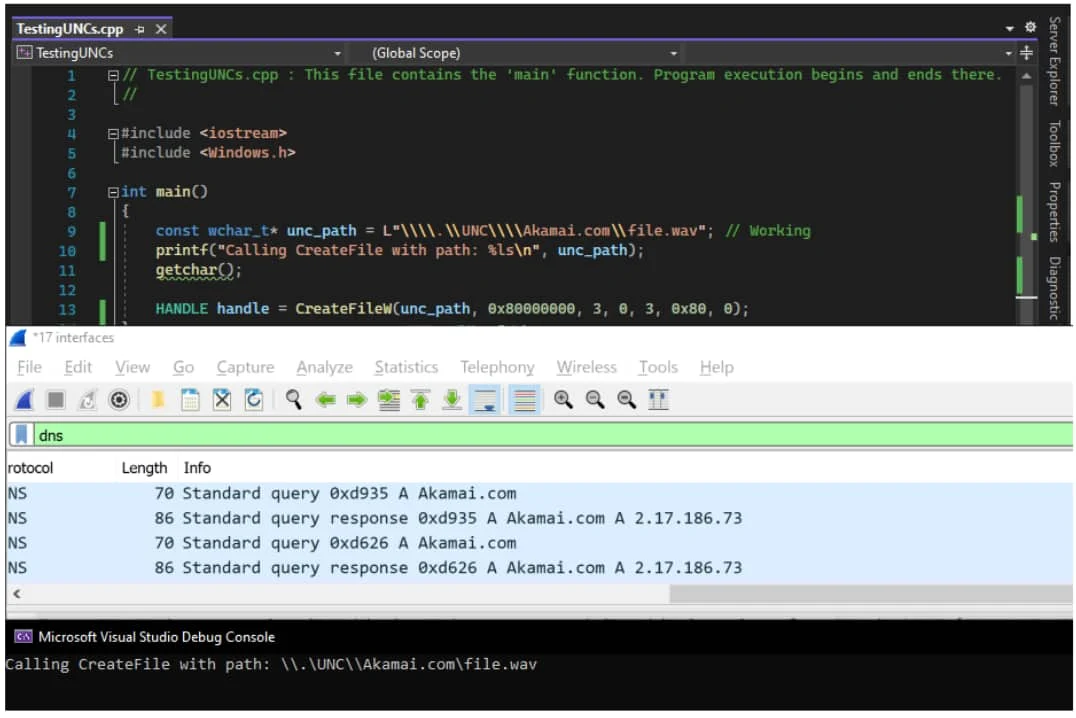
So there is a path that MapUrlToZone concludes is local, yet that makes CreateFile fire a request to the internet.
Step 2: trigger the original Outlook vulnerability with the bypass
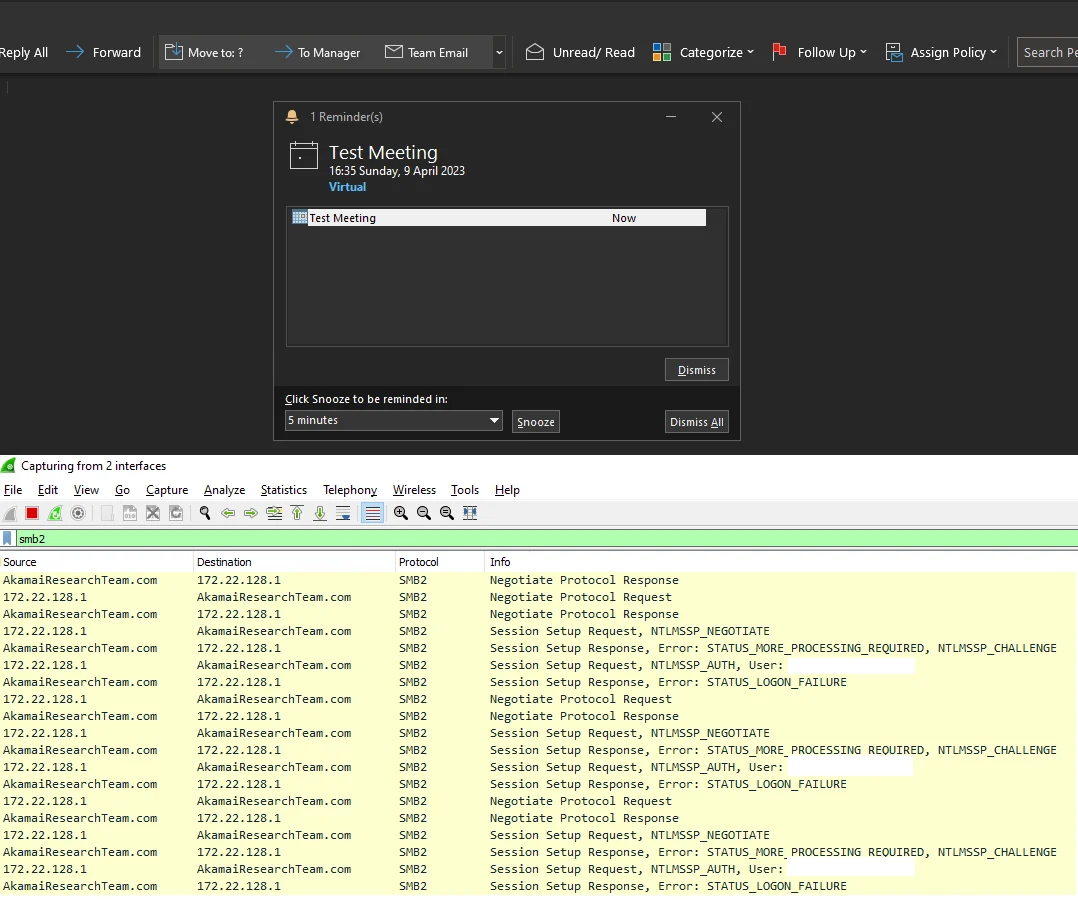
The original vulnerability is then triggered again, this time with the added mitigation bypassed. Once the reminder pops up, Outlook connects to the remote server, leading to NTLM authentication. Figure 2 shows the calendar event being triggered and the NTLM authentication against the remote server.
Step 3: account for the Exchange-side condition
According to Microsoft, Exchange servers with the March software update installed drop the PidLidReminderFileParameter property, which eliminates the custom sound file feature. As a result, only machines running Outlook clients against an unpatched Exchange server are vulnerable to this issue.
Root cause
The report attributes the issue to the complex handling of paths in Windows. MapUrlToZone calls the function CreateUri, which incorrectly converts the path '\\.\UNC\\Akamai.com\file.wav' to '/.//UNC//Akamai.com/file.wav'.
Running the ConvertDosPathToNtPath script on that converted path shows where it points:
  PS C:\Users\research1> ./DosToRelativeNT.exe /.//UNC//Akamai.com/file.wav
  Converting:   '/.//UNC//Akamai.com/file.wav'
  To:           '\??\C:\UNC\Akamai.com\file.wav'
  Type:         RtlPathTypeRooted
  FileName:     file.wav
  FullPathName: 'C:\UNC\Akamai.com\file.wav'
This path points to a directory named UNC on the local C: drive. It is obviously a local directory, and so MapUrlToZone returns 0.
CreateFile takes a different route. It first converts the original path from a DOS path to an NT path by calling RtlpDosPathNameToRelativeNtPathName. The same script shows the output of that conversion:
  PS C:\Users\research1> ./DosToRelativeNT.exe \\.\UNC\\Akamai.com\file.wav
  Converting:   '\\.\UNC\\Akamai.com\file.wav'
  To:           '\??\UNC\Akamai.com\file.wav'
  Type:         RtlPathTypeLocalDevice
  FileName:     file.wav
  FullPathName: '\\.\UNC\Akamai.com\file.wav'
This time the result does not point at a local drive. The resulting path is '\??\UNC\Akamai.com\file.wav'. Access to this NT path causes the object manager to route the IO request to the Multiple UNC Provider (MUP) driver, because the global object directory entry for UNC is a symbolic link to \Device\Mup. Because RtlpDosPathNameToRelativeNtPathName removed or collapsed the extra backslash, the path now contains only the internet domain name.
In short, the two components disagree about the same string: one normalises it into a local path under C:\UNC, the other into a device path that goes to the network. The two components disagree about the same string: one normalises it into a local path under C:\UNC, the other into a device path that goes to the network.
The author believes this kind of confusion can potentially cause vulnerabilities in other programs that use MapUrlToZone on a user-controlled path and then perform a file operation (such as CreateFile or a similar API) on the same path. Other issues arising in programs that call CreateUri cannot be ruled out either.
Impact
An unauthenticated attacker on the internet could use the vulnerability to coerce an Outlook client to connect to an attacker-controlled server, resulting in NTLM credentials theft. It is zero-click, meaning it can be triggered with no user interaction. All Windows versions are affected, and therefore all Outlook client versions on Windows are exploitable. The practical limit is on the server side: according to Microsoft, Exchange servers with the March update omit the vulnerable feature, which prevents vulnerable clients from being exploited. Only machines running Outlook clients with an unpatched Exchange server are vulnerable.
Fix
Microsoft addressed the issue in May 2023 Patch Tuesday. The report does not describe the code change itself. On detection and mitigation, Microsoft published comprehensive guidance for the original Outlook vulnerability, and from the author's observation all the methods specified there apply to the new vulnerability as well, because they do not depend on the URL specified in the PidLidReminderFileParameter property.
Beyond the patch, the author hopes the custom reminder sound feature is fully removed, since it poses more security risks than it provides value: it is a zero-click media parsing attack surface that could potentially contain critical memory corruption vulnerabilities.
Variants to test
- Other MapUrlToZone consumers. Look for programs that call MapUrlToZone on a user-controlled path and then perform a file operation on the same string. A positive result is a path where MapUrlToZone returns 0 (local) while the subsequent file operation produces a DNS lookup or SMB connection to a host you control.
- Other path normalisation mismatches. Try device-path and UNC combinations with extra separators, as in the
\\.\UNC\\case, against any pair of APIs that parse the same input differently. A positive result is a divergence between the two APIs' interpretation of the same string. - CreateUri callers. Test programs that call CreateUri directly with attacker-influenced paths. A positive result is a converted path that resolves somewhere other than where the caller intended, such as a local directory instead of a remote share or vice versa.
- Reminder sound handling. On Outlook clients backed by an Exchange server without the March update, check whether a crafted PidLidReminderFileParameter still causes an outbound connection when the reminder fires. A positive result is an inbound NTLM authentication attempt on your listener after the reminder pops up.
What happened, in plain words
In March 2023, Microsoft fixed a serious security hole in Outlook, the email and calendar client. The hole let a stranger send you an email that quietly made your computer talk to a server the stranger controlled, and in doing so hand over a piece of your Windows login that the stranger could then crack offline or relay. Microsoft gave the hole the name CVE-2023-23397. The fix Microsoft shipped looked reasonable. A researcher at Akamai, Ben Barnea, analysed the patch and found that it could be bypassed by adding one backslash character to a file path. That second problem got its own name, CVE-2023-29324, and Microsoft fixed it in May 2023.
This article walks through the whole story slowly, assuming you have never read a security write-up before. Every technical word is explained the first time it appears, and there is a glossary at the end.

The cast of characters
Before the details, here are the pieces involved, in everyday terms.
- Outlook is the program many offices use for email and calendars. It runs on your own computer (the client) and talks to a central mail server (in most companies, Microsoft Exchange).
- A reminder is the little pop-up Outlook shows before a calendar appointment. Outlook can play a sound when the reminder appears, and that sound is just a file on disk.
- A path is the text that tells Windows where a file lives, for example
C:\Sounds\ding.wav. Paths are the heart of this story, because two different parts of Windows read the same path text and disagree about what it means. - An API (Application Programming Interface) is a function that one program can ask the operating system to perform. Think of it as a labelled button on a machine: you press the button, the machine does a job, and it gives you back a result. Programmers do not write the code behind the button; they just call it.
- A vulnerability is a mistake in software that lets someone make the program do something its authors did not intend, usually something harmful.
- A patch is an update that fixes a vulnerability. Patch Tuesday is the second Tuesday of each month, when Microsoft releases its batch of fixes.
- A bypass is a way to get around a fix. The original hole is closed, but the bypass reopens it through a different route.
- NTLM is an old Windows login mechanism. When your computer connects to another machine that asks who you are, Windows may answer with a value derived from your password, called a hash. A hash is a one-way scramble: you cannot read the password back out of it directly, but an attacker who captures it can try guessing passwords offline until one produces the same hash, or can relay it, meaning forward it to another server to log in as you.
- SMB is the file-sharing protocol Windows uses to open files on other machines over the network. When you open
\\server\share\file, SMB is what fetches it. - UNC path is a path that starts with two backslashes and names a network location, like
\\server\share\file.wav. The double backslash is the signal that this is not a local disk. - DNS is the internet's phone book: it turns a name like
Akamai.cominto a numeric address so a connection can be made. - Zero-click means the attack needs no action from the victim: no link to click, no attachment to open. The mere arrival of the email, and the reminder firing, is enough.
- CVSS is a standard 0 to 10 score for how severe a vulnerability is. Higher is worse.
The original vulnerability, CVE-2023-23397
The March 2023 flaw worked like this. An attacker sends an email that carries a calendar reminder. That reminder is set to play a custom notification sound, and the attacker chooses which file that sound is. Outlook stores this choice in a data field called an extended MAPI property, named PidLidReminderFileParameter. MAPI is simply the format Outlook uses internally to describe emails and appointments; a property is one labelled field inside that description.
The attacker fills that field not with a local file but with a UNC path pointing at a server the attacker runs. When the reminder fires, Outlook tries to fetch the sound file over SMB from that server. To open a file on a remote machine, Windows first has to prove who it is, so it sends the Net-NTLMv2 hash during the connection negotiation. The attacker now holds that hash and can crack it offline or relay it. No click is needed: this is zero-click, and it works over the internet.
Microsoft's threat intelligence team reported that a Russian threat actor had used this against government, transportation, energy and military organisations in Europe for about a year.
The March fix
Microsoft's fix added a check before Outlook uses the attacker-supplied sound. The code now calls a Windows API called MapUrlToZone. This function takes a path or URL and returns a number telling you which zone it belongs to. Zones are Internet Explorer's old way of classifying where content comes from: local machine, local intranet, trusted sites, internet, and so on. The important distinction here is local versus internet. If MapUrlToZone says the path is in the internet zone, Outlook ignores it and plays the default reminder sound instead.
MapUrlToZone is widely used as a security measure, so relying on it was not unreasonable. The question the researcher asked was whether it can be fooled.
The researcher's goal
When Outlook loads the custom sound, two functions matter:
- MapUrlToZone decides whether the path is local, intranet or trusted, and therefore allowed.
- CreateFile actually opens the file. This is the Windows API that turns a path into an open file handle.
A third function, SearchPath, is also called before CreateFile, but it treats the path the same way, so the write-up talks only about CreateFile to keep things simple.
So the goal is precise: find one piece of path text that MapUrlToZone calls local, but that CreateFile treats as a network address. If such a string exists, the check passes and the dangerous fetch still happens.
Setting up the experiment
The researcher used a PowerShell session. PowerShell is Windows' built-in command line: a text box where you type commands instead of clicking. A helper script invokes MapUrlToZone through Component Object Model (COM) so it can be called from PowerShell as [IEZones]. The report links that script. A second helper, DosToRelativeNT.exe, comes from James Forshaw's blog post about how Windows converts paths, and it is used later to see what Windows really does with a path string.
Testing the fix
First, confirm the fix does its job on the original attack. Call MapUrlToZone on the same kind of path the attacker used, an absolute UNC path with an internet domain:
  PS C:\Users\research1>[IEZones]::MapUrlToZone('\\Akamai.com\file.wav')
  3
Line by line:
PS C:\Users\research1>is the PowerShell prompt: the folder the user is in, waiting for a command.[IEZones]::MapUrlToZone(...)calls the Windows function through the helper.'\\Akamai.com\file.wav'is the path being tested. In PowerShell, each backslash inside quotes is written twice, so this is really\\Akamai.com\file.wav, a network path to a file on the machine called Akamai.com.3is the answer: zone 3, the internet zone. The fix would block this, as intended.
Next, try a variation. Windows has a special notation, a local device path, that starts with \\.\ and means "talk to a device directly rather than through a drive letter". The researcher rewrites the UNC path in that form:
  PS C:\Users\research1>[IEZones]::MapUrlToZone('\\.\UNC\Akamai.com\file.wav')
  3
Again the answer is 3, internet zone. Still blocked. So far the fix holds.
Then one more backslash is added after UNC\:
  PS C:\Users\research1>[IEZones]::MapUrlToZone('\\.\UNC\\Akamai.com\file.wav')
  0
Now the answer is 0, which means local. The same function that called the previous path dangerous now calls this one harmless. That is the discrepancy the researcher was hunting for. But MapUrlToZone is only the guard. The real question is what CreateFile will do with the identical string: open a file on the local disk, or reach out to the internet?
Does CreateFile actually go to the network?
The researcher simulated a CreateFile call with that path and watched the network. A DNS request went out to look up the address of Akamai.com. Figure 1 shows those DNS requests being made once the remote URL is accessed.
That settles it: there is a path that MapUrlToZone calls local, yet that makes CreateFile send traffic to the internet. The guard and the worker disagree about the same string.
Triggering the original attack again, with the fix bypassed
With that path in hand, the researcher repeated the original Outlook attack, this time using the bypass. The calendar event fires, the reminder pops up, and Outlook connects to the remote server, which leads to NTLM authentication against it. Figure 2 shows the calendar event being triggered and the NTLM authentication against the remote server.
So the March fix can be bypassed: the same credential theft is possible again, using a path the fix considers safe, subject to the server-side condition below.
One condition on the server side
There is an important limit. According to Microsoft, Exchange servers that have the March update installed drop the PidLidReminderFileParameter property entirely. In plain terms, the server strips out the attacker's custom sound setting before the client ever sees it, which removes the feature that the attack depends on. As a result, only machines whose Outlook client talks to an Exchange server that has not been patched are vulnerable to this bypass.
Why it happens: two readings of one string
The report puts the root cause down to how complicated path handling is in Windows. MapUrlToZone does not read the path itself; it hands it to another function, CreateUri, which turns it into a standard URL form. CreateUri converts the path '\\.\UNC\\Akamai.com\file.wav' into '/.//UNC//Akamai.com/file.wav', with forward slashes.
To see where that converted path points, the researcher runs the conversion script on it:
  PS C:\Users\research1> ./DosToRelativeNT.exe /.//UNC//Akamai.com/file.wav
  Converting:   '/.//UNC//Akamai.com/file.wav'
  To:           '\??\C:\UNC\Akamai.com\file.wav'
  Type:         RtlPathTypeRooted
  FileName:     file.wav
  FullPathName: 'C:\UNC\Akamai.com\file.wav'
Line by line:
- The first line runs the helper program on the converted path.
Converting:echoes the input.To:shows the internal Windows form the path becomes:\??\C:\UNC\Akamai.com\file.wav. The\??\prefix is Windows' internal marker for a path that has already been resolved.Type: RtlPathTypeRootedsays Windows classifies this as a path rooted on a drive.FileName:andFullPathName:show the file name and the full resolved location.
That location is a folder called UNC on the local C: drive. It is plainly a local folder, so MapUrlToZone answers 0. From its point of view, nothing dangerous is happening.
CreateFile takes a different route. It first converts the original path from the older DOS style to the newer NT style by calling a function named RtlpDosPathNameToRelativeNtPathName. The same script shows what that produces:
  PS C:\Users\research1> ./DosToRelativeNT.exe \\.\UNC\\Akamai.com\file.wav
  Converting:   '\\.\UNC\\Akamai.com\file.wav'
  To:           '\??\UNC\Akamai.com\file.wav'
  Type:         RtlPathTypeLocalDevice
  FileName:     file.wav
  FullPathName: '\\.\UNC\Akamai.com\file.wav'
Line by line:
- The helper is run on the original path this time.
To:shows a very different result:\??\UNC\Akamai.com\file.wav, with noC:drive in it.Type: RtlPathTypeLocalDevicesays Windows classifies it as a local device path, not a disk path.
This result does not point at a local drive. When Windows tries to open \??\UNC\Akamai.com\file.wav, the part of the system that dispatches file requests, the object manager, sees the name UNC and follows it. In Windows' internal object directory, UNC is a symbolic link to \Device\Mup, the Multiple UNC Provider driver, which is the component that handles network file paths. So the request is handed to the network stack. And because the conversion function removed or collapsed the extra backslash, what remains is just the internet domain name. That is why an SMB request goes out.
In short, the two components read the same text differently. One normalises it into a local folder under C:\UNC; the other normalises it into a device path that goes to the network. The mitigation trusted the first reading, and for this input the first reading was wrong.
The researcher believes this kind of confusion could cause vulnerabilities in other programs that call MapUrlToZone on a path a user can influence and then perform a file operation, such as CreateFile, on the same path. Problems in other programs that call CreateUri directly cannot be ruled out either.
Who is affected
An unauthenticated attacker on the internet, meaning someone with no account on your systems, could use this to make an Outlook client connect to a server they control, and steal NTLM credentials that way. It is zero-click. Every Windows version is affected, and therefore every Outlook client version running on Windows is exploitable. The practical limit is the server side described above: Exchange servers with the March update strip the vulnerable property, which protects even unpatched clients. Only Outlook clients talking to an unpatched Exchange server are exposed.
The fix and the advice
Microsoft fixed the issue in the May 2023 Patch Tuesday. The report does not describe the code change itself.
On detection and mitigation, Microsoft published comprehensive guidance for the original Outlook vulnerability. From the researcher's observation, every method in that guidance applies to the new vulnerability too, because none of them depend on the particular URL placed in the PidLidReminderFileParameter property.
Beyond the patch, the researcher hopes the custom reminder sound feature is removed altogether. The reasoning is that it carries more security risk than it provides value: it is a zero-click surface for parsing media files, and such surfaces can potentially contain critical memory corruption vulnerabilities. Memory corruption is a class of bug where a program writes data in the wrong place in its memory, which attackers can sometimes turn into running their own code. Given how widely Windows is used, eliminating an attack surface as ripe as this could have some very positive effects.
What to look for next
The write-up ends with directions for further testing:
- Other programs that use MapUrlToZone. Look for software that calls MapUrlToZone on a path a user can influence and then performs a file operation on the same string. A positive result is a path where MapUrlToZone returns 0 (local) while the following file operation produces a DNS lookup or an SMB connection to a host you control.
- Other path normalisation mismatches. Try device-path and UNC combinations with extra separators, like the
\\.\UNC\\case, against any pair of APIs that parse the same input differently. A positive result is a divergence between how the two APIs interpret the same string. - Programs that call CreateUri. Test software that calls CreateUri directly with paths an attacker can influence. A positive result is a converted path that resolves somewhere other than where the caller intended, such as a local folder instead of a remote share, or the reverse.
- Reminder sound handling. On Outlook clients backed by an Exchange server without the March update, check whether a crafted PidLidReminderFileParameter still causes an outbound connection when the reminder fires. A positive result is an inbound NTLM authentication attempt on your listener after the reminder pops up.
Glossary
- API: a function the operating system or another program offers for other code to call, like a labelled button that performs a job and returns a result.
- Bypass: a way to get around a security fix so the original problem becomes exploitable again.
- Client: the program on your own machine that talks to a central server, here Outlook talking to Exchange.
- COM (Component Object Model): a Windows mechanism that lets programs call each other's functions; used here to call MapUrlToZone from PowerShell.
- CreateFile: the Windows API that opens a file or device and returns a handle to it.
- CreateUri: a Windows function that converts a path or URL into a standard URL form; MapUrlToZone uses it internally.
- CVSS: a standard 0 to 10 severity score for vulnerabilities, where higher is worse.
- CVE: a public identifier for a specific vulnerability, such as CVE-2023-23397.
- DNS: the internet's phone book, turning names like Akamai.com into numeric addresses.
- DOS path: the older style of Windows path, such as
C:\folder\fileor\\.\device. - Exchange: Microsoft's mail and calendar server, which Outlook clients connect to.
- Extended MAPI property: a labelled data field inside an Outlook item, such as an email or appointment.
- Hash: a one-way scramble of data, here of login material; it cannot be read back directly but can be cracked by guessing or relayed.
- Local device path: a Windows path beginning
\\.\that addresses a device directly rather than through a drive letter. - MapUrlToZone: a Windows API that returns which security zone (local, intranet, trusted, internet) a path or URL belongs to.
- Memory corruption: a class of bug where a program writes data to the wrong place in memory, which can sometimes be turned into code execution.
- MUP (Multiple UNC Provider): the Windows driver that handles network file paths; internally reached through the name
UNC. - Net-NTLMv2 hash: the value Windows sends to prove its identity during NTLM authentication; capturing it allows offline cracking or relaying.
- NTLM: an older Windows authentication mechanism based on challenge and response.
- Object manager: the Windows component that dispatches requests for named objects, including device paths.
- Patch: an update that fixes a vulnerability.
- Patch Tuesday: the second Tuesday of each month, when Microsoft releases its batch of security fixes.
- Path: the text that tells Windows where a file or device lives.
- PidLidReminderFileParameter: the Outlook property that names the custom sound file for a reminder.
- PowerShell: Windows' built-in command line and scripting environment.
- Relay attack: forwarding captured authentication material to another server to log in as the victim.
- Reminder: the pop-up Outlook shows before an appointment, optionally with a sound.
- RtlpDosPathNameToRelativeNtPathName: the Windows function CreateFile uses to convert a DOS path into an NT path.
- SMB: the Windows protocol for opening files on other machines over a network.
- SearchPath: a Windows function that locates a file by searching a list of locations; called before CreateFile in this flow.
- Symbolic link: a name that points to another name or location, followed automatically by the system.
- UNC path: a network path beginning with two backslashes, naming a server and share.
- Vulnerability: a mistake in software that lets someone make it behave in a harmful way.
- Zero-click: an attack that needs no action from the victim.
- Zone: Internet Explorer's classification of where content comes from, such as local machine, intranet, trusted sites or internet.


