A QUIC Shutdown: DoS Vulnerability in Windows Servers Running SMB over QUIC
A missing size check in the srvnet.sys driver allows an unauthenticated attacker to request an excessively large buffer allocation by splitting the SMB message size across two packets. Repeatedly triggering this can exhaust memory and cause a denial of service on Windows Server 2022 machines running SMB over QUIC.
 Published on akamai.com
Client-Side Protection & Compliance
The full write-up lives on its author's site
It belongs to its author, so we link to it rather than copy it. The other two tabs are our own rewrites, checked against it.
Context
QUIC is a relatively new transport layer protocol, originally designed by Google, with several implementations. Its purpose is to provide a more reliable and secure connection while overcoming common internet problems such as latency and packet loss. It is carried over UDP.
Microsoft's implementation of QUIC is called MsQuic. Windows incorporates QUIC as a transport layer for the SMB protocol, a feature called SMB over QUIC, and with HTTP/3 in IIS. SMB over QUIC is only available in the Windows Server 2022 Azure Edition, while HTTP/3 is available for all IIS deployments running on Windows Server 2022.
The vulnerability discussed here is located in the driver that implements SMB's transport layer, srvnet.sys. It was assigned CVE-2023-24898 with a base score of 7.5, and it lies in a missing check in a buffer allocation in that driver.
Setup
The only precondition for a vulnerable target is a Windows Server 2022 machine that uses SMB over QUIC. Enabling the feature requires the Windows Server 2022 Azure Edition. No account is needed on the attacking side: the vulnerability can be triggered by an unauthenticated attacker over the internet.
Finding it
To keep a connection's state, QUIC uses a connection identifier, which uniquely identifies a connection between the client and the server. A client may create multiple concurrent connections. A QUIC connection is also multiplexed, so a client and a server can exchange data via multiple streams simultaneously over the same connection.
The code for SMB over QUIC is implemented in srvnet.sys. When the server receives new data on a stream, the function SrvNetQuicServerReceiveEvent is called. Its purpose is to read a full SMB message sent by the client. After doing so successfully, it transfers the message to the list of SMB messages for further processing.
To read an SMB message, the code first tries to read the SMB message size, which is represented by a four-byte integer. If it does so successfully, it checks that the size is not larger than the maximum allowed size for an allocation. If the check passes, the code allocates a buffer with this size and tries to read the remaining bytes from the packet into the newly allocated buffer. If it finished reading the whole SMB message, it indicates to the SMB layer that a new SMB message has been received.
The structure of an SMB message is illustrated in Figure 1.
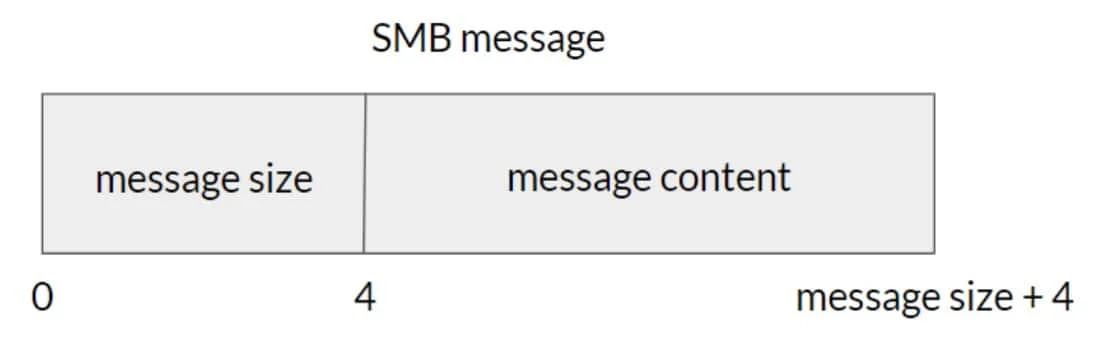
Fig. 1: An SMB message structure in srvnet.sys
The vulnerability happens if fewer than four bytes are received for the SMB message size (Figure 2). In this case, the code will save the X bytes received and will also set PendingMessageSize to 4 minus X, X being the number of bytes received for the message size. The next time a packet is received, it will read the remaining 4 - X bytes needed for the SMB message size.
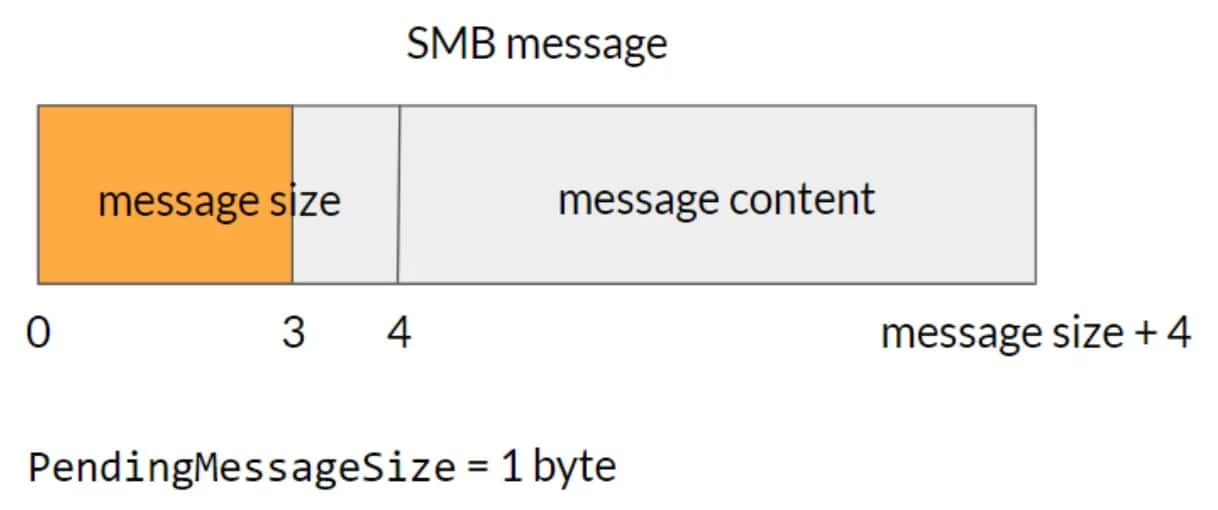
Fig. 2: A malicious packet would have fewer than four bytes for message size
Once the code finishes reading the message size, it immediately allocates an SMB message without performing verification of this size against the maximum allowed size. By sending the size of the SMB message in two packets instead of one, an attacker can therefore bypass the maximum allowed size verification and request an exceptionally large allocation.
Exploitation
To turn this bug into a DoS vulnerability, the attacker needs to continuously send packets that trigger the issue described.
Even with the ability to bypass the maximum allowed size, two restrictions remain:
- SrvNetAllocateBuffer has a hard limit of 16 MB for allocations.
- The number of allowed concurrent unauthenticated connections is limited according to the available RAM on the server. This restriction limits exploitation to servers with up to 32 GB RAM. The report theorises about how this limitation can be bypassed, as described below.
Step 1: split the message size across two packets
The attacker sends the four-byte SMB message size in two packets, so that the first packet carries fewer than four bytes for the size field. The code saves the X bytes received and sets PendingMessageSize to 4 minus X. On the next packet it reads the remaining 4 - X bytes, completes the size, and allocates the SMB message immediately, without verifying the size against the maximum allowed size. The attacker uses this to request an exceptionally large allocation, up to the 16 MB hard limit of SrvNetAllocateBuffer.
Step 2: exhaust memory with repeated allocations
The researcher first tried creating multiple connections and sending two packets each time to cause the server to allocate 16 MB. Repeatedly doing so leads to memory exhaustion. As this vulnerability is in a driver and runs in kernel mode, the whole system becomes unstable and unresponsive.
Step 3 (theorised): reduce the packet count with QUIC frames
This exploitation requires sending many packets. The report believes that by abusing QUIC's features it is possible to reduce the number of packets needed.
While QUIC allows for multiple streams over a single connection, it also enables limiting this number through the initial_max_streams_bidi property. SMB over QUIC limits the number of concurrent streams for a connection to one.
Although the exploit cannot be improved by using multiple concurrent streams, it can be attempted in a different way. Instead of creating multiple concurrent streams, the attacker creates one QUIC packet with multiple frames, so that the following sequence occurs serially and repeatedly:
- Create a stream
- Trigger the 16 MB allocation by sending two DATA frames
- Close the stream
This way the unauthenticated connection limit can also be bypassed. The report leaves this as a challenge to the reader.
Root cause
The mistake is a missing check in a buffer allocation in srvnet.sys. When the SMB message size arrives in fragments, the code stores the partial size and completes it on the next packet, but the completed size is then used for an allocation without being verified against the maximum allowed size. The size verification that exists on the normal path is skipped on this fragmented path, so the maximum allowed size defence does not apply. The only remaining bound is the 16 MB hard limit inside SrvNetAllocateBuffer, which is large enough for repeated allocations to exhaust memory.
Impact
The vulnerability may lead to remote denial-of-service attacks against Windows Server 2022 machines, triggered by an unauthenticated attacker over the internet. Because the flaw is in a kernel-mode driver, memory exhaustion makes the whole system unstable and unresponsive, not just the SMB service. Only servers that use SMB over QUIC are vulnerable, which requires the Windows Server 2022 Azure Edition. The concurrent unauthenticated connection limit restricts the straightforward exploitation to servers with up to 32 GB RAM, though the report theorises that the frame-based approach can bypass that limit.
Fix
The vulnerability was responsibly disclosed to Microsoft and addressed in May's Patch Tuesday 2023. The report recommends patching the Windows Server machine, as there are no other available mitigations or workarounds except turning off the SMB over QUIC feature.
To find a running SMB over QUIC server, Akamai Guardicore Segmentation users can run the following Insight query:
  select * from registry where
path="HKEY_LOCAL_MACHINE\SYSTEM\CurrentControlSet\Services\LanmanServer\Parameters\EnableSMBQUIC" and data=1
Variants to test
QUIC is a relatively new attack surface in Windows and in general. Other than the issue described here, another vulnerability, CVE-2023-23392, was fixed in HTTP/3. The report encourages other researchers to look into the different components that use MsQuic, and into MsQuic itself.

What happened, in plain words
A security researcher named Ben Barnea, working at Akamai, found a flaw in Microsoft Windows Server 2022. The flaw lets anyone on the internet, without logging in, make such a server so busy that it stops responding. Microsoft gave the flaw an identifier, CVE-2023-24898, and a severity score of 7.5 out of 10. The problem was reported to Microsoft privately and fixed in the updates Microsoft released in May 2023.
The flaw only affects servers that have turned on a feature called SMB over QUIC. That feature is only available on one particular edition of Windows Server 2022, the Azure Edition. So the number of affected machines is limited, but for those machines the consequences are serious: the whole computer becomes unstable, not just one service.
To understand the rest of this article you only need a few ideas, explained as we go. The first is what SMB is.
SMB (Server Message Block) is the language Windows computers use to share files and printers over a network. When you open a shared folder on another computer, your machine and the other machine are exchanging SMB messages. Think of it as a postal service: one computer writes a letter (a message), puts a size on the envelope, and the other computer reads the size first so it knows how big a letter to expect.
QUIC is a newer way for two computers to talk over the internet. It was originally designed by Google and has several implementations, meaning several separate pieces of software that speak it. Its purpose is to give a more reliable and secure connection while overcoming common internet problems such as latency (delay) and packet loss (data going missing on the way). QUIC is carried over UDP, which is one of the basic ways computers send small chunks of data, called packets, across a network.
Microsoft's own implementation of QUIC is called MsQuic. Windows uses QUIC in two visible places: as the transport for SMB (the feature called SMB over QUIC), and with HTTP/3 in IIS. IIS is Microsoft's web server software, the program that serves websites; HTTP/3 is the newest version of the protocol browsers use to fetch web pages. SMB over QUIC is only available in the Windows Server 2022 Azure Edition, while HTTP/3 is available for all IIS deployments running on Windows Server 2022.
The flaw discussed here lives in a driver called srvnet.sys. A driver is a piece of software that sits close to the operating system and talks directly to hardware or to low-level network functions. srvnet.sys is the driver that implements SMB's transport layer, that is, the part that moves SMB messages across the network. The flaw is a missing check in a buffer allocation in that driver. A buffer is a reserved chunk of the computer's memory used to hold data while it is being processed; an allocation is the act of reserving that chunk.
Setup
The only precondition for a vulnerable target is a Windows Server 2022 machine that uses SMB over QUIC. Enabling the feature requires the Windows Server 2022 Azure Edition. No account is needed on the attacking side: the vulnerability can be triggered by an unauthenticated attacker over the internet. "Unauthenticated" simply means the attacker never logs in; they do not need a username, a password or any permission on the server.
Finding it
To keep track of a connection's state, QUIC uses a connection identifier, which uniquely identifies a connection between the client and the server. A client may create multiple concurrent connections, that is, several conversations open at the same time. A QUIC connection is also multiplexed: a client and a server can exchange data via multiple streams simultaneously over the same connection. A stream is like a separate lane inside one road; several lanes can carry traffic at once without mixing the cars.
The code for SMB over QUIC is implemented in srvnet.sys. When the server receives new data on a stream, the function SrvNetQuicServerReceiveEvent is called. A function is a named block of code that does one job; when something happens, the program "calls" the function, meaning it runs that block. Its purpose is to read a full SMB message sent by the client. After doing so successfully, it transfers the message to the list of SMB messages for further processing.
To read an SMB message, the code first tries to read the SMB message size, which is represented by a four-byte integer. A byte is a unit of data, roughly one character of text; an integer is a whole number. So the size of the message is written as a number stored in four bytes. If the code reads the size successfully, it checks that the size is not larger than the maximum allowed size for an allocation. This check is a safety limit: it stops a client from asking the server to reserve an absurdly large amount of memory. If the check passes, the code allocates a buffer with this size and tries to read the remaining bytes from the packet into the newly allocated buffer. If it finished reading the whole SMB message, it indicates to the SMB layer that a new SMB message has been received.
The structure of an SMB message is illustrated in Figure 1.
Fig. 1: An SMB message structure in srvnet.sys
The vulnerability happens if fewer than four bytes are received for the SMB message size (Figure 2). In this case, the code will save the X bytes received and will also set PendingMessageSize to 4 minus X, X being the number of bytes received for the message size. The next time a packet is received, it will read the remaining 4 - X bytes needed for the SMB message size.
In everyday terms: the server expects a four-digit number on the envelope. If only two digits arrive in the first delivery, it writes them down and remembers that it is still waiting for two more. When the next delivery arrives, it completes the number. That sounds sensible, and on its own it is. The problem is what happens next.
Fig. 2: A malicious packet would have fewer than four bytes for message size
Once the code finishes reading the message size, it immediately allocates an SMB message without performing verification of this size against the maximum allowed size. By sending the size of the SMB message in two packets instead of one, an attacker can therefore bypass the maximum allowed size verification and request an exceptionally large allocation. The safety check that exists on the normal path is simply skipped on this split path.
Exploitation
To turn this bug into a DoS vulnerability, the attacker needs to continuously send packets that trigger the issue described. DoS stands for denial of service: the goal is not to steal data but to make a service, or in this case a whole machine, stop working for legitimate users.
Even with the ability to bypass the maximum allowed size, two restrictions remain:
- SrvNetAllocateBuffer has a hard limit of 16 MB for allocations. MB means megabyte, a unit of memory size. So even a bypassed check cannot reserve more than 16 MB in one go.
- The number of allowed concurrent unauthenticated connections is limited according to the available RAM on the server. RAM is the computer's working memory, where running programs keep their data. This restriction limits exploitation to servers with up to 32 GB RAM. The report theorises about how this limitation can be bypassed, as described below.
Step 1: split the message size across two packets
The attacker sends the four-byte SMB message size in two packets, so that the first packet carries fewer than four bytes for the size field. The code saves the X bytes received and sets PendingMessageSize to 4 minus X. On the next packet it reads the remaining 4 - X bytes, completes the size, and allocates the SMB message immediately, without verifying the size against the maximum allowed size. The attacker uses this to request an exceptionally large allocation, up to the 16 MB hard limit of SrvNetAllocateBuffer.
Why do it this way? Because the normal, single-packet path is checked, and the split path is not. Splitting the number is the trick that walks the server around its own safety check.
Step 2: exhaust memory with repeated allocations
The researcher first tried creating multiple connections and sending two packets each time to cause the server to allocate 16 MB. Repeatedly doing so leads to memory exhaustion. Memory exhaustion means the machine runs out of free working memory, the way a desk becomes unusable when every square centimetre is covered in paper. As this vulnerability is in a driver and runs in kernel mode, the whole system becomes unstable and unresponsive. Kernel mode is the most privileged level of the operating system; code running there can affect everything, so a problem there is not contained to one program.
Step 3 (theorised): reduce the packet count with QUIC frames
This exploitation requires sending many packets. The report believes that by abusing QUIC's features it is possible to reduce the number of packets needed. Fewer packets means less effort and less traffic for the attacker.
While QUIC allows for multiple streams over a single connection, it also enables limiting this number through the initial_max_streams_bidi property. SMB over QUIC limits the number of concurrent streams for a connection to one. In other words, the server says: one lane only, no overtaking.
Although the exploit cannot be improved by using multiple concurrent streams, it can be attempted in a different way. Instead of creating multiple concurrent streams, the attacker creates one QUIC packet with multiple frames, so that the following sequence occurs serially and repeatedly:
- Create a stream
- Trigger the 16 MB allocation by sending two DATA frames
- Close the stream
A frame is a small labelled piece of data inside a QUIC packet, like a section of a single parcel rather than a separate parcel. Doing the three steps one after another, over and over, means the attacker does not need many connections at once, so the unauthenticated connection limit can also be bypassed. The report leaves this as a challenge to the reader, meaning it does not provide a finished exploit for this part.
Root cause
The mistake is a missing check in a buffer allocation in srvnet.sys. When the SMB message size arrives in fragments, the code stores the partial size and completes it on the next packet, but the completed size is then used for an allocation without being verified against the maximum allowed size. The size verification that exists on the normal path is skipped on this fragmented path, so the maximum allowed size defence does not apply. The only remaining bound is the 16 MB hard limit inside SrvNetAllocateBuffer, which is large enough for repeated allocations to exhaust memory.
A useful comparison is a building with two entrances. The main entrance has a guard who checks every visitor's bag size. The side entrance, used only when a visitor arrives in two halves, has no guard at all. The building still has a rule that no single bag may exceed 16 MB, but nothing stops a crowd from walking in through the side door with many bags of that size.
Impact
The vulnerability may lead to remote denial-of-service attacks against Windows Server 2022 machines, triggered by an unauthenticated attacker over the internet. Because the flaw is in a kernel-mode driver, memory exhaustion makes the whole system unstable and unresponsive, not just the SMB service. Only servers that use SMB over QUIC are vulnerable, which requires the Windows Server 2022 Azure Edition. The concurrent unauthenticated connection limit restricts the straightforward exploitation to servers with up to 32 GB RAM, though the report theorises that the frame-based approach can bypass that limit.
Fix
The vulnerability was responsibly disclosed to Microsoft and addressed in May's Patch Tuesday 2023. Patch Tuesday is Microsoft's regular monthly release of security updates. The report recommends patching the Windows Server machine, as there are no other available mitigations or workarounds except turning off the SMB over QUIC feature. A mitigation is a way to reduce the risk without fixing the underlying flaw; here the only one is to switch the feature off.
To find a running SMB over QUIC server, Akamai Guardicore Segmentation users can run the following Insight query:
  select * from registry where
path="HKEY_LOCAL_MACHINE\SYSTEM\CurrentControlSet\Services\LanmanServer\Parameters\EnableSMBQUIC" and data=1
This is a query written in a small database language. Line by line:
select * from registryasks for every column (*) of every row in a table calledregistry. The registry is the Windows database of settings, and this tool keeps a copy of it that can be searched.wherestarts the filter: only rows matching what follows are returned.path="HKEY_LOCAL_MACHINE\SYSTEM\CurrentControlSet\Services\LanmanServer\Parameters\EnableSMBQUIC"keeps only the row whose path is that registry key. The key is the Windows setting that records whether SMB over QUIC is switched on for the file-sharing service (LanmanServer).and data=1keeps only rows where the stored value is 1, which means the setting is enabled.
So the query lists machines on which the SMB over QUIC feature is turned on, which are the machines that need patching or the feature turned off.
Variants to test
QUIC is a relatively new attack surface in Windows and in general. An attack surface is all the parts of a system that an outsider can reach and try to abuse. Other than the issue described here, another vulnerability, CVE-2023-23392, was fixed in HTTP/3. The report encourages other researchers to look into the different components that use MsQuic, and into MsQuic itself.
Glossary
- Allocation: the act of reserving a chunk of a computer's memory for a particular use.
- Attack surface: all the parts of a system that an outsider can reach and try to abuse.
- Buffer: a reserved area of memory used to hold data while it is being processed.
- Byte: a unit of data, roughly one character of text.
- Connection identifier: a value QUIC uses to uniquely identify a connection between a client and a server.
- CVE: a public identifier given to a known security vulnerability, here CVE-2023-24898.
- DoS (denial of service): an attack whose goal is to make a service or machine stop working for legitimate users, rather than to steal data.
- Driver: software that sits close to the operating system and talks directly to hardware or low-level network functions; srvnet.sys is one.
- Frame: a small labelled piece of data inside a QUIC packet.
- Function: a named block of code that performs one job and is run when called.
- HTTP/3: the newest version of the protocol browsers use to fetch web pages.
- IIS: Microsoft's web server software, the program that serves websites.
- initial_max_streams_bidi: a QUIC property that limits how many streams can be open at once in a connection.
- Insight query: a search written in a small database language, used here to find machines with a particular setting.
- Integer: a whole number.
- Kernel mode: the most privileged level of the operating system, where code can affect the whole machine.
- Latency: delay in data travelling across a network.
- MB / GB: megabyte and gigabyte, units of memory size.
- Memory exhaustion: the state of a machine having no free working memory left.
- Mitigation: a way to reduce risk without fixing the underlying flaw.
- MsQuic: Microsoft's implementation of the QUIC protocol.
- Multiplexed: able to carry several independent streams of data at the same time over one connection.
- Packet: a small chunk of data sent across a network.
- Packet loss: data going missing on its way across a network.
- Patch Tuesday: Microsoft's regular monthly release of security updates.
- PendingMessageSize: the variable in srvnet.sys that records how many bytes of the message size are still expected.
- QUIC: a newer transport protocol, originally designed by Google, carried over UDP, aimed at reliability, security and lower latency.
- RAM: a computer's working memory, where running programs keep their data.
- Registry: the Windows database of settings.
- SMB (Server Message Block): the language Windows computers use to share files and printers over a network.
- SMB over QUIC: a Windows feature that carries SMB traffic over QUIC; only available in the Windows Server 2022 Azure Edition.
- srvnet.sys: the Windows driver that implements SMB's transport layer, where the flaw was found.
- Stream: one independent lane of data inside a QUIC connection.
- UDP: one of the basic ways computers send packets across a network.
- Unauthenticated: acting without logging in or proving any identity.
- Workaround: an alternative way to avoid a flaw when no proper fix is applied.



