Mute the Sound: Chaining Vulnerabilities to Achieve RCE on Outlook: Pt 1
The researcher found a bypass of the fix for CVE-2023-23397, allowing an attacker to send an email with a custom reminder sound path that Outlook would treat as local but would actually download from an attacker-controlled server. Chained with a second vulnerability in the Audio Compression Manager, this could lead to zero-click remote code execution on Outlook clients.
 Published on akamai.com
Client-Side Protection & Compliance
The full write-up lives on its author's site
It belongs to its author, so we link to it rather than copy it. The other two tabs are our own rewrites, checked against it.
Context
Outlook lets a sender attach a reminder to an email, and that reminder can carry a custom notification sound. The sound is specified through the extended MAPI property PidLidReminderFileParameter, which holds a path. When the reminder fires, Outlook resolves that path and plays the file.
Because the property is attacker-controlled and accepts a UNC path, an attacker could point it at an SMB server they control. As part of the connection to the remote SMB server, the client sends its Net-NTLMv2 hash in a negotiation message, which the attacker can crack offline or relay. That was CVE-2023-23397, patched in March 2023 and exploited in the wild by the actor Microsoft calls Forest Blizzard; in December 2023 Microsoft and the Polish Cyber Command (DKWOC) published that they had seen renewed exploitation attempts by the same actor.
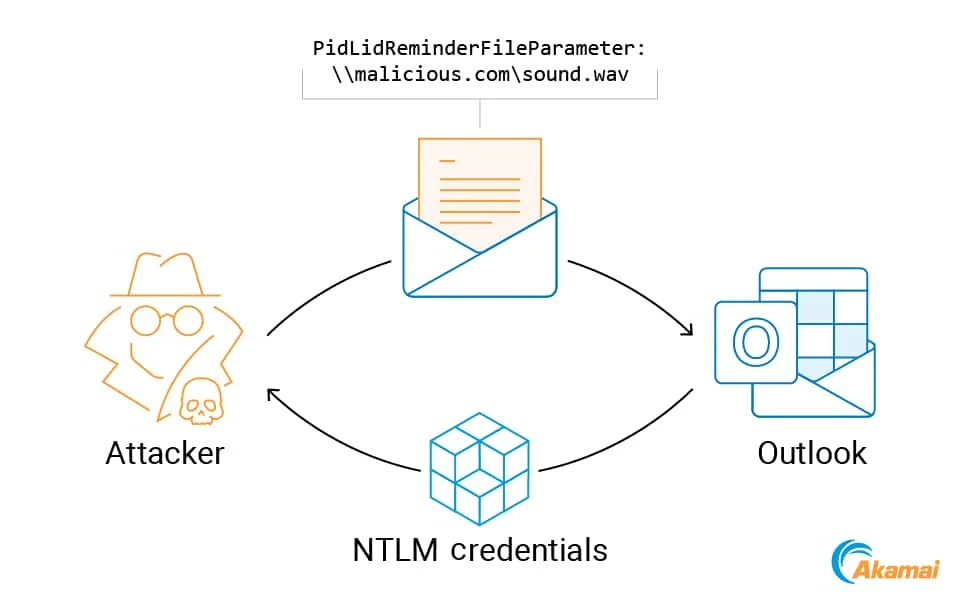
Fig. 1: Coercion of NTLM credentials
The March fix made the code call MapUrlToZone to classify the path as intranet, local or internet. If the URL points to a resource on the internet, the default reminder sound is used instead of the custom one. The feature itself stayed in Outlook, and the author had already found one bypass of the fix, described in an earlier post and fixed in May 2023. This article covers the research that produced two further bypasses, one of them CVE-2023-35384, and the chain that turns them into zero-click RCE when combined with a media-parsing bug, CVE-2023-36710, covered in part 2.
Setup
The relevant functions are CreateFile, which receives a Windows path, and MapUrlToZone, which can be passed either a URL or a path. Neither processes paths itself; both delegate to underlying WinAPI path-parsing routines, and the article uses the two names to refer to those routines.
A bypass, in this context, is a path that passes the locality test and is still used by Outlook to download the sound file from a remote location. Formally: a path that MapUrlToZone considers non-internet but that CreateFile treats as an internet domain.
Finding it
The starting point is a comparison of which path types each function supports.
| CreateFile | MapUrlToZone |
|---|---|
| RtlPathTypeUncAbsolute ✔ | ✔ |
| RtlPathTypeDriveAbsolute ✔ | ✔ |
| RtlPathTypeDriveRelative ✔ | ✔ |
| RtlPathTypeRooted ✔ | ✘ |
| RtlPathTypeRelative ✔ | ✘ |
| RtlPathTypeLocalDevice ✔ | ✔ |
| RtlPathTypeRootLocalDevice ✔ | ✘ |
| Schemes (file://, http://) ✘ | ✔ |
Table 1: Comparison chart of CreateFile and MapUrlToZone path capabilities
Only four path types are supported by both: RtlPathTypeUncAbsolute, RtlPathTypeDriveAbsolute, RtlPathTypeDriveRelative and RtlPathTypeLocalDevice. Those four are the candidate space.
Exploitation
Step 1: absolute UNC path (failed)
The first attempt used an absolute UNC path (RtlPathTypeUncAbsolute).
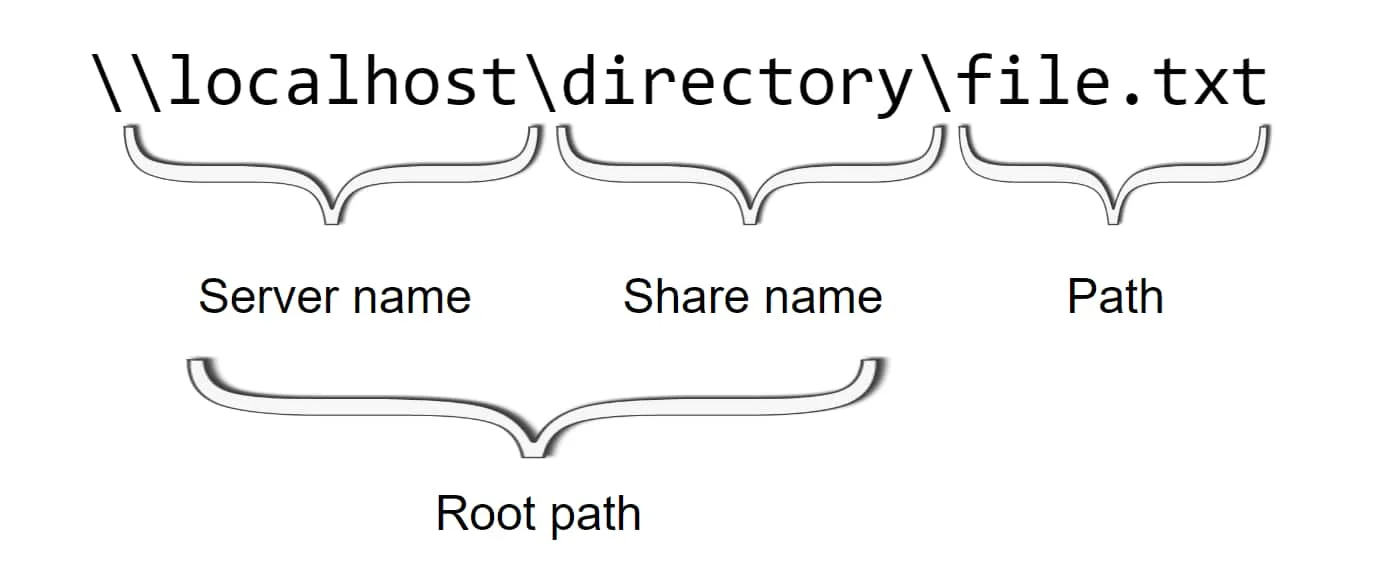
Fig. 2: An absolute UNC path and its components
The relevant parsing code is in RtlGetFullPathName_Ustr:
  case RtlPathTypeUncAbsolute:
  SeperatorsFound = 0;
  for ( CurrentIndex = 2; CurrentIndex < InputPathLength; ++CurrentIndex )
  {
    CurrentChar = InputPathString->Buffer[CurrentIndex];
    if ( CurrentChar == '\\' || CurrentChar == '/' )
    {
      SeperatorsFound++;
      if ( SeperatorsFound == 2 )
      	break;
    }
  }
Table 2: RtlGetFullPathName_Ustr code snippet that is handling the UNC path
The code skips the absolute UNC prefix ("\\") and then assumes the path component begins one character after the second path separator ('' or '/').
Given a path such as "\\localhost..\Akamai.com\dir\file.txt", the processing is:
- "\\" is interpreted as the UNC prefix and the root path component.
- The path component is "localhost..\Akamai.com\dir\file.txt".
Normally no amount of ".." can go above the root path: "\localhost\directory..\file.txt" would result in "\localhost\directory\file.txt". Here the ".." is not part of the root path, so the path is converted to "\\Akamai.com\dir\file.txt". That is a way to tamper with the path by dropping parts of it.
MapUrlToZone handles the same input differently. It first removes the extra backslashes:
- \localhost is the server name
- ..\ is ignored (it cannot go above the server name)
- Akamai.com\dir\file.txt comprises the path component
| Input path: \\\localhost..*Akamai.com**dir**file.txt* | |
|---|---|
| CreateFile | MapUrlToZone |
| \\Akamai.com\dir\file.txt | \localhost\Akamai.com\dir\file.txt |
Table 3: Input paths for CreateFile and MapUrlToZone and the result of their parsing
MapUrlToZone returns 0 (Local) for its output. The bypass does not work, however: the extra slash at the beginning of the path processed by CreateFile marks the server name as empty. When the multiple UNC provider (MUP) queries the different network providers whether they can handle this empty server name, they all return false, so no request is made. The author notes that abusing this difference might need a more complicated solution, such as omitting the additional backslash or finding a parsing mismatch in the MUP code, and leaves that as a suggestion for future research.
Step 2: local device path with an extra separator (CVE-2023-29324)
The next path type supporting UNC is RtlPathTypeLocalDevice. "\.\UNC\Akamai.com\test.wav" is an example: it points to the UNC device name, which is redirected to the MUP driver.
The two functions perform different operations while parsing:
| CreateFile | MapUrlToZone |
|---|---|
| if RtlPathTypeLocalDevice → Advance 4 characters | if RtlPathTypeLocalDevice → Advance 4 characters |
| Skip trailing spaces | |
| Convert '/' to '' | |
| Collapse repeated '' | |
| Remove '.' and '..' components | Remove '.' and '..' components |
Table 4: Different operations completed as part of path parsing
CreateFile does extra work: converting forward slashes to backslashes and collapsing repeated backslashes. A path that exploits this uses an extra path separator. After the code skips the "UNC" prefix:
| Input path: \.\UNC\Akamai.com\test.wav | |
|---|---|
| CreateFile | MapUrlToZone |
| Akamai.com\test.wav | \Akamai.com\test.wav |
Table 5: Resulting paths after skipping UNC/ prefix
The right-hand path begins with a path separator followed by a character that is not a path separator: a rooted path. MapUrlToZone uses IsRootedPath or IsDrivePath to determine whether the root path component is local, and here it is rooted, so MapUrlToZone returns local. CreateFile has no extra separator after the UNC prefix, so it extracts the domain name correctly and accesses the Akamai.com SMB server to retrieve test.wav. This is a path that MapUrlToZone considers local but CreateFile does not, and it reenabled exploitation of CVE-2023-23397.
Microsoft mitigated it by making the two flows more similar: converting forward slashes to backslashes and collapsing repeated path separators were added to the MapUrlToZone parsing flow.
A related observation: after the fix, repeated separators are collapsed, so the component after "\.\UNC" cannot be made rooted, but it can still be made a drive path, for example "\.\UNC\C:Akamai.com/test.wav". That does make MapUrlToZone return 0, but no network provider can handle a path containing a colon, so the confusion is not useful. As with the first attempt, a confusion in MUP parsing could lead to a new vulnerability.
Step 3: path type confusion on the local device prefix (CVE-2023-35384)
After the fix the two functions perform nearly the same operations:
| CreateFile | MapUrlToZone |
|---|---|
| if RtlPathTypeLocalDevice → Advance 4 characters | If RtlPathTypeLocalDevice → Advance 4 characters |
| Skip trailing spaces | |
| Convert '/' to '' | Convert '/' to '' |
| Collapse repeated '' | Collapse repeated '' |
| Remove '.' and '..' components | Remove '.' and '..' components |
Table 6: Operations carried out by CreateFile and MapUrlToZone postfix
The remaining difference is in how each decides the path is a local device path:
CreateFile
  if (IS_PATH_SEPARATOR(Path[0])         &&
    IS_PATH_SEPARATOR(Path[1]) 	   &&
    (Path[2] == '.' || Path[2] == '?') &&
     IS_PATH_SEPERATOR(Path[3])
		return RtlPathTypeLocalDevice;
MapUrlToZone
!strncmp(path, "\\.\", 4) || !strncmp(path, "\\?\", 4)
Table 7: Code snippets that determine path type
For CreateFile a path separator can be a forward slash or a backslash, so "\./" is a local device path. For MapUrlToZone only the exact "\." or "\?" prefixes are local device paths. That is a path type confusion: CreateFile recognises "\./" as a local device path while MapUrlToZone does not, and the two functions then handle the path differently.
Using the confusing component, the input is \./UNC/Akamai.com/file.wav. MapUrlToZone's decision flow is:
- Is the path a local drive or a rooted path? No
- IsLocalDeviceUNC? No
- PathIsUNCW? Yes
PathIsUNCW returns true, so the function marks the path as an absolute UNC path and advances two characters to skip the UNC prefix "\".
| Input path: \./UNC/Akamai.com/file.wav | |
|---|---|
| CreateFile | MapUrlToZone |
| UNC\Akamai.com\file.wav | ./UNC/Akamai.com/file.wav |
Table 8: Paths outputs for CreateFile and MapUrlToZone functions
CreateFile concludes its output is a UNC path with Akamai.com as the hostname. MapUrlToZone concludes:
- Scheme: file://
- Host: . (dot)
- Path: /UNC/Akamai.com/file.wav
- Absolute URI: file://./UNC/Akamai.com/file.wav
When the absolute URI begins with "file://./" (host being "."), the code interprets the sharename as part of the DOS devices namespace, so "file://./UNC/" refers to the UNC namespace.
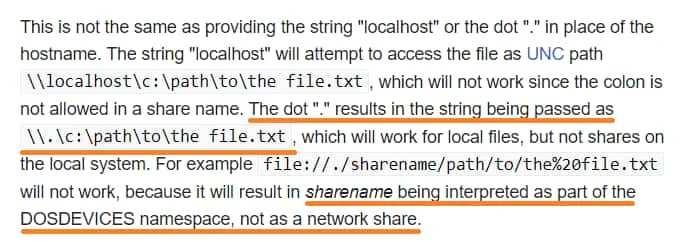
Fig. 3: URL with a dot hostname (https://en.wikipedia.org/wiki/File_URI_scheme)
Both functions now consider the input a UNC path, but of a different type: CreateFile treats it as a Windows local device path, MapUrlToZone as a URL. Without further tricks, MapUrlToZone would still interpret Akamai.com as the hostname, and since that is an internet domain it returns 3, so this alone is not a bypass.
Step 4: abusing SetPath ordering
MapUrlToZone uses an inner function named SetPath to operate on the path component:
| CreateFile | SetPath |
|---|---|
| if RtlPathTypeLocalDevice → Advance 4 characters | |
| Skip trailing spaces | |
| Convert '/' to '' | |
| Collapse repeated '' | |
| Remove '.' and '..' components | Remove '.' and '..' components |
Table 9: Comparison of operations completed between CreateFile and SetPath
Adding an extra slash worked before, so it is tried again; CreateFile simply removes it. With MapUrlToZone, CreateUri returns the absolute URI "file://./UNC//Akamai.com/file.wav", which is passed to GetZoneFromUriInternal and internally leads to another CreateUri call. Because CreateUri received a URL, it converts it back to a Windows path with PathCreateFromUrlW, returning "\.\UNC\Akamai.com\test.wav". The fixed version now removes the extra slash and correctly understands Akamai.com as the hostname.
A more complicated abuse uses two differences at once:
- CreateFile collapses repeated path separators.
- CreateFile removes the '.' and '..' components after collapsing repeated path separators.
The path is \./UNC/C://../Akamai.com/file.wav.
Fig. 4: Flow chart of the path being parsed by the two functions
CreateFile's final path is treated as a UNC path. SetPath's output leads MapUrlToZone to call GetZoneFromUriInternal with the absolute URI file://./UNC/C:/Akamai.com/file.wav. This time PathCreateFromUrlW converts the URL to the Windows path "\.\UNC\C:\Akamai.com\file.wav", which is a local path, so MapUrlToZone returns 0 (local). That is the second bypass.
Root cause
The root cause is a parsing mismatch between the function that classifies a path (MapUrlToZone, via SetPath, CreateUri and PathCreateFromUrlW) and the function that opens it (CreateFile). The security decision is made on one interpretation of the string while the file operation uses another, so a path can be classified as local and still resolve to a remote UNC share.
The first bypass exploited operations present in CreateFile but missing from MapUrlToZone (slash conversion, separator collapsing). The fix added those operations to MapUrlToZone, but the two functions still disagreed on what constitutes a local device prefix: CreateFile accepts any path separator in positions 0, 1 and 3, while MapUrlToZone compares against the literal strings "\." and "\?". The second bypass then exploited the ordering of normalisation: CreateFile collapses separators before removing '.' and '..', and the URL round trip through CreateUri and PathCreateFromUrlW produces a drive path that MapUrlToZone treats as local. The existing defence, a locality check on the attacker-controlled path, failed because it was not performed on the same normalised form that the file open uses.
Impact
An attacker on the internet can chain the bypasses with the ACM sound-parsing vulnerability to create a full, zero-click RCE exploit against Outlook clients. The first vulnerability requires sending a crafted email to an Outlook client, which then downloads a special sound file from an attacker-controlled server; the second is exploited when the downloaded sound file is autoplayed and can lead to code execution on the victim machine. The bypasses on their own restore the original CVE-2023-23397 primitive: coercion of the client to an attacker-controlled server and leakage of Net-NTLMv2 credentials for offline cracking or relay.
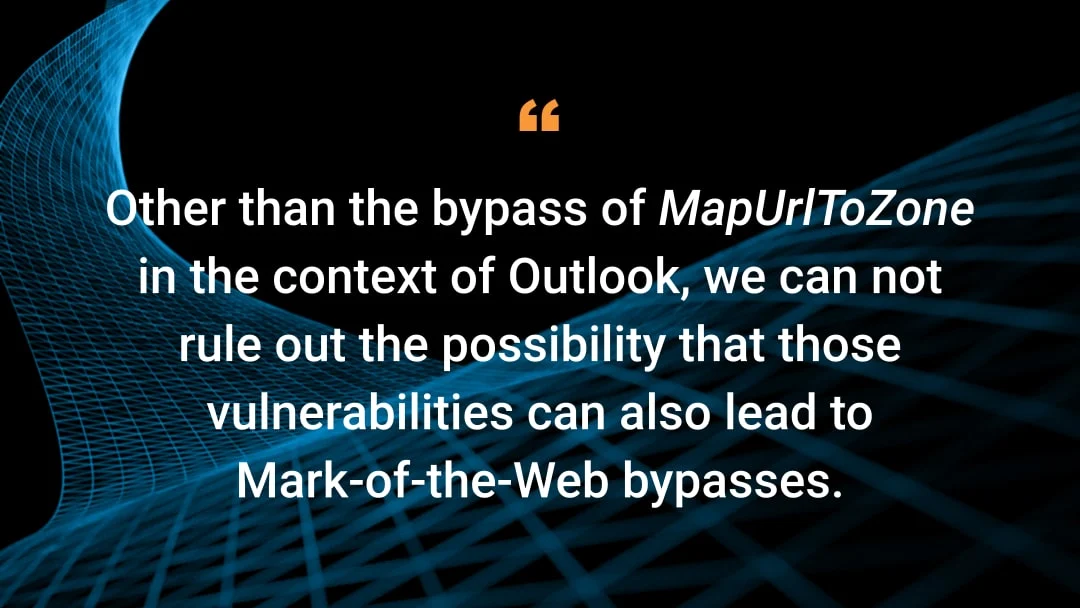
Beyond the Outlook context, the author cannot rule out that these vulnerabilities also lead to Mark-of-the-Web bypasses.
Fix
Microsoft addressed the issues on the August 2023 and October 2023 Patch Tuesdays. Windows machines with the October 2023 update installed are protected, and Outlook clients that use Exchange servers patched with the March 2023 update are protected against the abused feature. For the second bypass, the code now calls NormalizeDosDevicePrefix to convert slashes to backslashes, preventing confusion in the detection of a local device path.
On the defensive side, Microsoft's guidance for detecting and mitigating the original Outlook vulnerability applies to the new one, because the methods do not depend on the URL in PidLidReminderFileParameter. The author recommends microsegmentation to block outgoing SMB connections to remote public IP addresses, and either disabling NTLM or adding users to the Protected Users group, which prevents NTLM being used as an authentication mechanism. Blocking outgoing SMB and disabling NTLM helps against credential theft, but when SMB requests fail Windows falls through to WebDAV if it is enabled. Credential theft cannot be abused through WebDAV, yet downloading the sound file is still possible, which is the second step in the RCE chain.
Variants to test
- Other consumers of MapUrlToZone. Any feature that classifies an attacker-supplied path with MapUrlToZone and later opens it with CreateFile is a candidate. A positive result is a path that MapUrlToZone reports as zone 0 (Local) while the open resolves to a remote host, observable as an outbound SMB or WebDAV connection.
- Separator and prefix confusions. Try mixed separators in the local device prefix ("\./", "//./", "\?/") and extra separators after "UNC". A positive result is a divergence between the classified path and the opened path, for example a rooted or drive path on one side and a UNC host on the other.
- Normalisation ordering. Combine repeated separators with '.' and '..' components, as in the C://../ pattern, so that collapsing and dot removal happen in a different order in the two code paths. A positive result is a URL round trip through CreateUri and PathCreateFromUrlW that yields a local drive path while the file open yields a UNC path.
- MUP parsing. The author suggests that finding a parsing mismatch in the MUP code could lead to a new vulnerability; an empty server name or a colon in the path currently prevents a request. A positive result would be a path that the MUP accepts and routes to a network provider despite the classification.
- Mark-of-the-Web. Test whether the same path confusions let a file be written or opened without the MotW zone, since the author could not rule this out. A positive result is a downloaded file that lacks the Mark-of-the-Web.

Part 2 of the series details the sound-parsing vulnerability in the Audio Compression Manager that completes the chain.
What happened, in plain words
Outlook is Microsoft's email program. One of its features lets the person who sends you an email attach a reminder to it, and that reminder can play a custom sound when it fires. The sender chooses which sound file to play by putting a file path into a hidden field of the email. A path is just an address for a file, like C:\Music\ding.wav on your own computer, or a network address that points at a file stored on another machine.
Because the sender controls that path, an attacker could point it at a server they run themselves. When Outlook tried to play the sound, it would reach out to the attacker's server. In doing so, Outlook would hand over a piece of proof about who the user is, called an NTLM hash, which the attacker could then crack offline or reuse to impersonate the user. That bug was CVE-2023-23397, fixed in March 2023, and Microsoft says a group it calls Forest Blizzard (described as a Russian state-sponsored actor) exploited it in the wild. In December 2023, Microsoft and the Polish Cyber Command (DKWOC) published that they had seen renewed exploitation attempts by the same actor.
Fig. 1: Coercion of NTLM credentials
The March fix added a check: before using the sender's custom sound path, Outlook asks a Windows function called MapUrlToZone whether the path points to the internet, the local network, or the local machine. If it points to the internet, Outlook ignores it and plays the default sound instead. But the feature itself stayed in Outlook, and the researcher had already found one way around the check, described in an earlier post and fixed in May 2023. This article is about the research that found two more ways around it, one of them CVE-2023-35384, and about how those combine with a separate bug in how Windows reads sound files, CVE-2023-36710, to let an attacker run their own code on the victim's machine with no click from the user. That last bug is covered in part 2.
The two functions at the centre of it
Everything here comes down to two Windows functions that look at the same piece of text and disagree about what it means.
- CreateFile is the function that actually opens a file. You give it a path, and it goes and gets the file. If the path names a file on another computer on the network, CreateFile makes the network connection.
- MapUrlToZone is the function that classifies a path or a web address (a URL) into a "zone": local machine, local network (intranet), or internet. It is the security guard. It does not open anything; it just says which zone the address belongs to.
Neither function does the parsing itself. Both hand the text to other, lower-level Windows routines that split the path into pieces. For brevity the article uses the names CreateFile and MapUrlToZone to mean those underlying parsing routines too.
A bypass, in this context, is a path that passes the guard's test and is still used by Outlook to download the sound file from a remote location. Put more formally: a path that MapUrlToZone considers not-internet, but that CreateFile treats as an internet domain. The guard says "safe, local", and the file opener says "OK, connecting to a remote server".
Step 0: which kinds of path does each function understand?
Windows has several flavours of path. A path can start with a drive letter (C:\...), it can be relative to where you currently are, it can start with two backslashes to mean "a share on another computer" (a UNC path), and so on. Each flavour has a name in Windows, such as RtlPathTypeUncAbsolute or RtlPathTypeDriveAbsolute.
The researcher started by comparing which flavours each function accepts.
| CreateFile | MapUrlToZone |
|---|---|
| RtlPathTypeUncAbsolute ✔ | ✔ |
| RtlPathTypeDriveAbsolute ✔ | ✔ |
| RtlPathTypeDriveRelative ✔ | ✔ |
| RtlPathTypeRooted ✔ | ✘ |
| RtlPathTypeRelative ✔ | ✘ |
| RtlPathTypeLocalDevice ✔ | ✔ |
| RtlPathTypeRootLocalDevice ✔ | ✘ |
| Schemes (file://, http://) ✘ | ✔ |
Table 1: Comparison chart of CreateFile and MapUrlToZone path capabilities
Read the table like a checklist: a tick means that function understands that kind of path, a cross means it does not. Only four kinds are understood by both: RtlPathTypeUncAbsolute, RtlPathTypeDriveAbsolute, RtlPathTypeDriveRelative and RtlPathTypeLocalDevice. Those four are the only places a confusion could hide, because a bypass needs a path that both functions will process, each in its own way. That is why the rest of the research only looks at those four.
Step 1: the absolute UNC path attempt (failed)
The first idea was to use an absolute UNC path, the kind that starts with two backslashes and names a share on another computer.
Fig. 2: An absolute UNC path and its components
The code that handles this kind of path lives in a routine called RtlGetFullPathName_Ustr:
  case RtlPathTypeUncAbsolute:
  SeperatorsFound = 0;
  for ( CurrentIndex = 2; CurrentIndex < InputPathLength; ++CurrentIndex )
  {
    CurrentChar = InputPathString->Buffer[CurrentIndex];
    if ( CurrentChar == '\\' || CurrentChar == '/' )
    {
      SeperatorsFound++;
      if ( SeperatorsFound == 2 )
      	break;
    }
  }
Table 2: RtlGetFullPathName_Ustr code snippet that is handling the UNC path
Line by line, in plain words:
case RtlPathTypeUncAbsolute:means "we have already decided this path is an absolute UNC path, so run the code below".SeperatorsFound = 0;starts a counter at zero. A separator is a backslash\or a forward slash/, the characters that divide a path into pieces.for ( CurrentIndex = 2; ... )starts reading the path at position 2, skipping the first two characters. Those first two characters are the opening\\that marks a UNC path.CurrentChar = InputPathString->Buffer[CurrentIndex];picks up the character at the current position.if ( CurrentChar == '\\' || CurrentChar == '/' )asks: is this character a separator?SeperatorsFound++;if yes, add one to the counter.if ( SeperatorsFound == 2 ) break;once two separators have been seen, stop looking.
So the code skips the opening \\, then finds the second separator, and assumes the part of the path that matters (the "path component") begins one character after it.
Now feed it a path like \\\\localhost\..\Akamai.com\dir\file.txt. The processing goes like this:
\\\\is read as the UNC prefix and as the root path component.- The path component is
localhost\..\Akamai.com\dir\file.txt.
Normally, .. means "go up one folder", and no amount of .. can climb above the root. For example, \\localhost\directory\..\file.txt would come out as \\localhost\directory\file.txt. But here the .. is not part of the root, so the path is converted to \\\Akamai.com\dir\file.txt. In other words, the researcher found a way to tamper with the path by making parts of it disappear.
MapUrlToZone handles the same input differently. It first removes the extra backslashes, and then reads the path as:
\\localhostis the server name\..\is ignored (it cannot go above the server name)Akamai.com\dir\file.txtis the path component
Input path: \\\\localhost\..\Akamai.com\dir\file.txt |
|
|---|---|
| CreateFile | MapUrlToZone |
\\\Akamai.com\dir\file.txt |
\\localhost\Akamai.com\dir\file.txt |
Table 3: Input paths for CreateFile and MapUrlToZone and the result of their parsing
MapUrlToZone returns 0 (Local) for its output, which looks like a win. But the bypass does not work. Look at the extra slash at the start of the path that CreateFile produced: it marks the server name as empty. When the multiple UNC provider (MUP), the part of Windows that decides which network protocol should handle a UNC path, asks the different network providers whether they can handle this empty server name, they all say no, so no request is ever made.
The author notes that abusing this difference might need something more complicated, such as finding a way to omit the extra backslash, or finding a parsing mismatch in the MUP code, and leaves that as a suggestion for future research.
Step 2: local device path with an extra separator (CVE-2023-29324)
The next kind of path that can reach a network share is RtlPathTypeLocalDevice. An example is \\.\UNC\Akamai.com\test.wav. This points at the UNC device name, which Windows redirects to the MUP driver. Think of a local device path as a special shortcut name that Windows understands internally, rather than a normal folder.
The two functions do different amounts of tidying up while parsing:
| CreateFile | MapUrlToZone |
|---|---|
| if RtlPathTypeLocalDevice → Advance 4 characters | if RtlPathTypeLocalDevice → Advance 4 characters |
| Skip trailing spaces | |
| Convert '/' to '' | |
| Collapse repeated '' | |
| Remove '.' and '..' components | Remove '.' and '..' components |
Table 4: Different operations completed as part of path parsing
CreateFile does extra work: it turns forward slashes into backslashes and squashes repeated backslashes into one. MapUrlToZone does not. That gap is the opportunity. The path used to exploit it has an extra separator. After the code skips the UNC\ prefix:
Input path: \\.\UNC\\Akamai.com\test.wav |
|
|---|---|
| CreateFile | MapUrlToZone |
Akamai.com\test.wav |
\Akamai.com\test.wav |
Table 5: Resulting paths after skipping UNC/ prefix
Look at the right-hand path. It begins with a separator followed by a character that is not a separator. That pattern has a name: a rooted path. MapUrlToZone uses IsRootedPath or IsDrivePath to decide whether the root part of the path is local, and here it is rooted, so MapUrlToZone says local. CreateFile, meanwhile, has no extra separator after the UNC prefix, so it reads the domain name correctly and goes off to the Akamai.com SMB server to fetch test.wav. SMB is the file-sharing protocol Windows uses to read files from another computer.
This is a path that MapUrlToZone considers local but CreateFile does not, and it brought the original CVE-2023-23397 attack back to life.
Microsoft mitigated it by making the two flows more alike: converting forward slashes to backslashes and collapsing repeated separators were added to the MapUrlToZone parsing flow.
There is a related observation. After the fix, repeated separators are collapsed, so the part after \\.\UNC\ cannot be made rooted any more. But it can still be made into a drive path, for example \\.\UNC\C:Akamai.com/test.wav. That does make MapUrlToZone return 0, but no network provider can handle a path containing a colon, so the confusion is not useful. As with the first attempt, a confusion in MUP parsing could lead to a new vulnerability.
Step 3: confusing the two functions about the local device prefix (CVE-2023-35384)
After the fix, the two functions do nearly the same operations:
| CreateFile | MapUrlToZone |
|---|---|
| if RtlPathTypeLocalDevice → Advance 4 characters | If RtlPathTypeLocalDevice → Advance 4 characters |
| Skip trailing spaces | |
| Convert '/' to '' | Convert '/' to '' |
| Collapse repeated '' | Collapse repeated '' |
| Remove '.' and '..' components | Remove '.' and '..' components |
Table 6: Operations carried out by CreateFile and MapUrlToZone postfix
The remaining difference is in how each one decides that a path is a local device path:
CreateFile
  if (IS_PATH_SEPARATOR(Path[0])         &&
    IS_PATH_SEPARATOR(Path[1]) 	   &&
    (Path[2] == '.' || Path[2] == '?') &&
     IS_PATH_SEPERATOR(Path[3])
		return RtlPathTypeLocalDevice;
MapUrlToZone
!strncmp(path, "\\.\", 4) || !strncmp(path, "\\?\", 4)
Table 7: Code snippets that determine path type
Line by line for the first block:
IS_PATH_SEPARATOR(Path[0])checks whether the first character is a separator.IS_PATH_SEPARATOR(Path[1])checks whether the second character is a separator.(Path[2] == '.' || Path[2] == '?')checks whether the third character is a dot or a question mark.IS_PATH_SEPERATOR(Path[3])checks whether the fourth character is a separator.- If all four are true,
return RtlPathTypeLocalDevice;says "this is a local device path".
Line by line for the second block:
!strncmp(path, "\\.\", 4)compares the first four characters of the path against the literal text\\.\and returns true only if they match exactly.|| !strncmp(path, "\\?\", 4)does the same for the literal text\\?\.- So MapUrlToZone only treats those two exact spellings as a local device path.
For CreateFile, a separator can be a forward slash or a backslash, so \\./ counts as a local device path. For MapUrlToZone, only the exact \\.\ or \\?\ prefixes count. That is a path type confusion: CreateFile recognises \\./ as a local device path while MapUrlToZone does not, and the two functions then handle the same text differently.
Using that confusing piece, the input is \\./UNC/Akamai.com/file.wav. MapUrlToZone's decision flow runs like this:
- Is the path a local drive or a rooted path? No
- IsLocalDeviceUNC? No
- PathIsUNCW? Yes
PathIsUNCW returns true, so the function marks the path as an absolute UNC path and advances two characters to skip the UNC prefix \\.
Input path: \\./UNC/Akamai.com/file.wav |
|
|---|---|
| CreateFile | MapUrlToZone |
UNC\Akamai.com\file.wav |
./UNC/Akamai.com/file.wav |
Table 8: Paths outputs for CreateFile and MapUrlToZone functions
CreateFile concludes that its output is a UNC path with Akamai.com as the hostname. MapUrlToZone concludes something quite different:
- Scheme: file://
- Host: . (dot)
- Path: /UNC/Akamai.com/file.wav
- Absolute URI: file://./UNC/Akamai.com/file.wav
A URI is a web-style address, and a scheme is the part before the colon that says what kind of address it is, such as http:// or file://. When the absolute URI begins with file://./ (with the host being a dot), the code interprets the sharename as part of the DOS devices namespace, so file://./UNC/ refers to the UNC namespace.
Fig. 3: URL with a dot hostname (https://en.wikipedia.org/wiki/File_URI_scheme)
Both functions now consider the input a UNC path, but of a different type: CreateFile treats it as a Windows local device path, MapUrlToZone treats it as a URL. Without further tricks, MapUrlToZone would still read Akamai.com as the hostname, and since that is an internet domain it returns 3, so this alone is not a bypass.
Step 4: abusing the order of operations in SetPath
MapUrlToZone uses an inner function named SetPath to work on the path component:
| CreateFile | SetPath |
|---|---|
| if RtlPathTypeLocalDevice → Advance 4 characters | |
| Skip trailing spaces | |
| Convert '/' to '' | |
| Collapse repeated '' | |
| Remove '.' and '..' components | Remove '.' and '..' components |
Table 9: Comparison of operations completed between CreateFile and SetPath
Adding an extra slash worked before, so it is tried again. CreateFile simply removes it. On the MapUrlToZone side, CreateUri returns the absolute URI file://./UNC//Akamai.com/file.wav, which is passed to GetZoneFromUriInternal and internally leads to another CreateUri call. Because CreateUri received a URL, it converts it back to a Windows path with PathCreateFromUrlW, returning \\.\UNC\\Akamai.com\test.wav. The fixed version now removes the extra slash and correctly understands Akamai.com as the hostname.
So a more complicated abuse is needed, one that uses two differences at once:
- CreateFile collapses repeated path separators.
- CreateFile removes the '.' and '..' components after collapsing repeated path separators.
The path used is \\./UNC/C://../Akamai.com/file.wav.
Fig. 4: Flow chart of the path being parsed by the two functions
CreateFile's final path is treated as a UNC path. SetPath's output leads MapUrlToZone to call GetZoneFromUriInternal with the absolute URI file://./UNC/C:/Akamai.com/file.wav. This time PathCreateFromUrlW converts the URL to the Windows path \\.\UNC\C:\Akamai.com\file.wav, which is a local path, so MapUrlToZone returns 0 (local). That is the second bypass.
Why it works at all
The root cause is a parsing mismatch between the function that classifies a path (MapUrlToZone, via SetPath, CreateUri and PathCreateFromUrlW) and the function that opens it (CreateFile). The security decision is made on one reading of the text while the file operation uses another, so a path can be classified as local and still resolve to a remote UNC share. It is like a bouncer checking a photocopy of an ID while the door staff read the original.
The first bypass exploited operations present in CreateFile but missing from MapUrlToZone (slash conversion, separator collapsing). The fix added those operations to MapUrlToZone, but the two functions still disagreed on what counts as a local device prefix: CreateFile accepts any path separator in positions 0, 1 and 3, while MapUrlToZone compares against the literal strings \\.\ and \\?\. The second bypass then exploited the ordering of normalisation: CreateFile collapses separators before removing '.' and '..', and the URL round trip through CreateUri and PathCreateFromUrlW produces a drive path that MapUrlToZone treats as local. The existing defence, a locality check on the attacker-controlled path, failed because it was not performed on the same normalised form that the file open uses.
What an attacker can do with it
An attacker on the internet can chain the bypasses with the ACM sound-parsing vulnerability to create a full, zero-click RCE exploit against Outlook clients. RCE means remote code execution: the attacker gets their own program running on the victim's computer. Zero-click means the victim does not have to click anything; simply receiving and processing the email is enough.
The first vulnerability requires sending a crafted email to an Outlook client, which then downloads a special sound file from an attacker-controlled server. The second is exploited when the downloaded sound file is autoplayed and can lead to code execution on the victim machine. The bypasses on their own restore the original CVE-2023-23397 primitive: coercion of the client to an attacker-controlled server and leakage of Net-NTLMv2 credentials for offline cracking or relay. Cracking means guessing the password behind the hash by brute force on the attacker's own hardware; relaying means passing the hash to another server to log in as the victim without ever knowing the password.
Beyond the Outlook context, the author cannot rule out that these vulnerabilities also lead to Mark-of-the-Web bypasses. Mark-of-the-Web is a tag Windows puts on files downloaded from the internet so that Office and other programs can treat them with suspicion; a bypass would let a downloaded file lose that tag.
How it was fixed, and how to defend yourself
Microsoft addressed the issues on the August 2023 and October 2023 Patch Tuesdays. Patch Tuesday is Microsoft's monthly day for releasing security updates. Windows machines with the October 2023 update installed are protected, and Outlook clients that use Exchange servers patched with the March 2023 update are protected against the abused feature. Exchange is Microsoft's mail server software. For the second bypass, the code now calls NormalizeDosDevicePrefix to convert slashes to backslashes, preventing confusion in the detection of a local device path.
On the defensive side, Microsoft's guidance for detecting and mitigating the original Outlook vulnerability applies to the new one, because the methods do not depend on the URL in PidLidReminderFileParameter. The author recommends microsegmentation to block outgoing SMB connections to remote public IP addresses, and either disabling NTLM or adding users to the Protected Users group, which prevents NTLM being used as an authentication mechanism. Microsegmentation means splitting a network into small zones with tight rules about what may talk to what, so a workstation cannot open file-sharing connections out to the public internet. Blocking outgoing SMB and disabling NTLM helps against credential theft, but when SMB requests fail Windows falls through to WebDAV if it is enabled. WebDAV is another way of reaching files over the web. Credential theft cannot be abused through WebDAV, yet downloading the sound file is still possible, which is the second step in the RCE chain.
Where to look next
- Other consumers of MapUrlToZone. Any feature that classifies an attacker-supplied path with MapUrlToZone and later opens it with CreateFile is a candidate. A positive result is a path that MapUrlToZone reports as zone 0 (Local) while the open resolves to a remote host, observable as an outbound SMB or WebDAV connection.
- Separator and prefix confusions. Try mixed separators in the local device prefix (
\\./,//./,\\?/) and extra separators afterUNC. A positive result is a divergence between the classified path and the opened path, for example a rooted or drive path on one side and a UNC host on the other. - Normalisation ordering. Combine repeated separators with '.' and '..' components, as in the
C://../pattern, so that collapsing and dot removal happen in a different order in the two code paths. A positive result is a URL round trip through CreateUri and PathCreateFromUrlW that yields a local drive path while the file open yields a UNC path. - MUP parsing. The author suggests that finding a parsing mismatch in the MUP code could lead to a new vulnerability; an empty server name or a colon in the path currently prevents a request. A positive result would be a path that the MUP accepts and routes to a network provider despite the classification.
- Mark-of-the-Web. Test whether the same path confusions let a file be written or opened without the MotW zone, since the author could not rule this out. A positive result is a downloaded file that lacks the Mark-of-the-Web.
Part 2 of the series details the sound-parsing vulnerability in the Audio Compression Manager that completes the chain.
Glossary
- ACM (Audio Compression Manager): the part of Windows that handles reading and playing audio files; the second bug in the chain lives here.
- API: a set of functions one program offers to another so they can talk to each other; here, the Windows functions that programs call to open files or classify paths.
- Bypass: a way of getting past a security check without the check noticing.
- CVE: a public identifier for a known security vulnerability, such as CVE-2023-23397.
- CreateFile: the Windows function that opens a file, including files on other computers over the network.
- CreateUri: a Windows function that builds a URI (web-style address) from its parts.
- DKWOC: the Polish Cyber Command, which co-published the renewed exploitation attempts.
- DOS devices namespace: a set of special internal names in Windows, such as
UNC, that are not ordinary folders. - Drive path: a path that starts with a drive letter, like
C:\.... - Exchange: Microsoft's email server software, which many Outlook clients connect to.
- Forest Blizzard: the name Microsoft uses for a threat actor it identifies as Russian state-sponsored.
- GetZoneFromUriInternal: an internal Windows function that works out which zone a URI belongs to.
- Hash (Net-NTLMv2): a scrambled form of a user's login proof that Windows sends when connecting to a server; an attacker who captures it can try to crack it or relay it.
- IsDrivePath / IsRootedPath: Windows helper functions that decide whether a path starts with a drive letter or with a root separator.
- Local device path: a Windows path beginning with
\\.\or\\?\that names an internal device rather than a normal file. - MapUrlToZone: the Windows function that classifies a path or URL as local, intranet or internet.
- Mark-of-the-Web (MotW): a tag Windows adds to files downloaded from the internet so programs can treat them with suspicion.
- MAPI: the programming interface Outlook uses for mail properties, including the reminder sound setting.
- Microsegmentation: splitting a network into small zones with strict rules about which connections are allowed.
- MUP (multiple UNC provider): the Windows component that decides which network protocol handles a UNC path.
- NTLM: an older Windows authentication mechanism; disabling it or using the Protected Users group stops it being used.
- NormalizeDosDevicePrefix: the Windows function added in the fix to convert slashes to backslashes when detecting a local device path.
- Path component: the part of a path after the server and share names.
- PathCreateFromUrlW: a Windows function that converts a URL back into a Windows file path.
- PathIsUNCW: a Windows function that reports whether a path looks like a UNC path.
- PidLidReminderFileParameter: the Outlook mail property that holds the path of a custom reminder sound.
- Protected Users group: a Windows security group whose members cannot use NTLM to authenticate.
- RCE (remote code execution): a vulnerability that lets an attacker run their own code on someone else's machine.
- Relay attack: passing a captured login hash to another server to log in as the victim without knowing the password.
- Rooted path: a path that starts with a separator followed by a non-separator character.
- RtlGetFullPathName_Ustr: the Windows routine that parses and normalises a path.
- RtlPathType...: Windows names for the different flavours of path, such as RtlPathTypeUncAbsolute or RtlPathTypeLocalDevice.
- Scheme: the part of a URL before the colon, such as
http://orfile://, that says what kind of address it is. - SetPath: an inner function used by MapUrlToZone to work on the path component.
- SMB: the file-sharing protocol Windows uses to read files from another computer.
- UNC path: a path starting with two backslashes that names a share on another computer, like
\\server\share\file. - URI / URL: a web-style address; a URI is the general term, a URL is the common kind used for web and file addresses.
- WebDAV: another way of reaching files over the web, which Windows can fall back to when SMB fails.
- Zero-click: an attack that needs no action from the victim, not even a click.
- Zone: the category MapUrlToZone assigns to an address: local machine, intranet, or internet.


