XSS on Microsoft.com via Angular Js template injection
A reflected cross-site scripting vulnerability existed on flow.microsoft.com because user input was embedded into a page that used AngularJS client-side templates. An attacker could supply a malicious Angular template expression that, when combined with a sandbox escape, would execute arbitrary JavaScript in the victim's browser.
 Published on medium.com
{{media:0}}
The full write-up lives on its author's site
It belongs to its author, so we link to it rather than copy it. The other two tabs are our own rewrites, checked against it.
Context
This write-up describes a reflected cross-site scripting issue found on https://flow.microsoft.com/, a Microsoft site, through AngularJS client-side template injection. The researcher, Pratik Dabhi, says he wrote the post after receiving many requests for the Microsoft proof of concept over Instagram and WhatsApp.
The summary in the report explains the class of bug: client-side template injection arises when an application built on a client-side template framework dynamically embeds user input in a web page. When the page renders, the framework scans it for template expressions and executes any it finds. An attacker who can supply a malicious template expression can therefore launch an XSS attack. As with ordinary XSS, the injected code can steal the victim's session token or login credentials, perform arbitrary actions on the victim's behalf and log keystrokes. The report also notes that browser cross-site scripting filters are typically unable to detect or prevent client-side template injection attacks.


Setup
The report does not describe any accounts, roles or special tooling. The starting point was subdomain enumeration against Microsoft, followed by "some advance recon" on the target that identified which technologies the site uses. The researcher then worked through the site's parameters by hand and read the page source. No versions of AngularJS or of any other component are given, and no specific recon tool is named.
Finding it
After enumerating subdomains, the researcher settled on https://flow.microsoft.com/ and recorded which technologies the site uses.

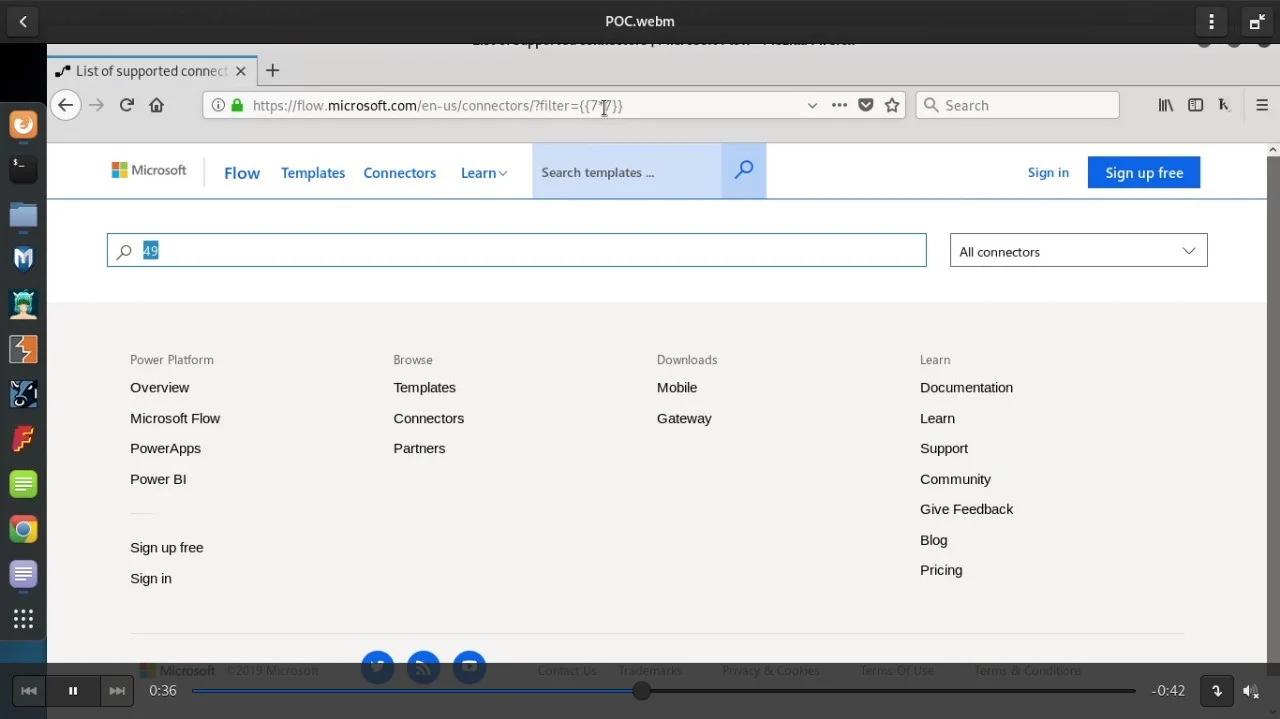
The report then explains how Angular templates work: they can contain expressions, JavaScript-like code snippets inside double curly braces. As a demonstration, the input {{7*7}} is evaluated by Angular and the output 49 is displayed. The conclusion drawn is that anyone able to inject double curly braces can execute Angular expressions. On their own, Angular expressions cannot do much harm, but combined with a sandbox escape they allow arbitrary JavaScript execution.
The researcher then sorted through the site's parameters to find the one named filter. He tried XSS payloads, but none worked. He then manually checked where the values were reflected in the source code and realised, from recon and source code reading, that the site uses an Angular template. He found the version of that template and searched for a payload matching it, and found one.

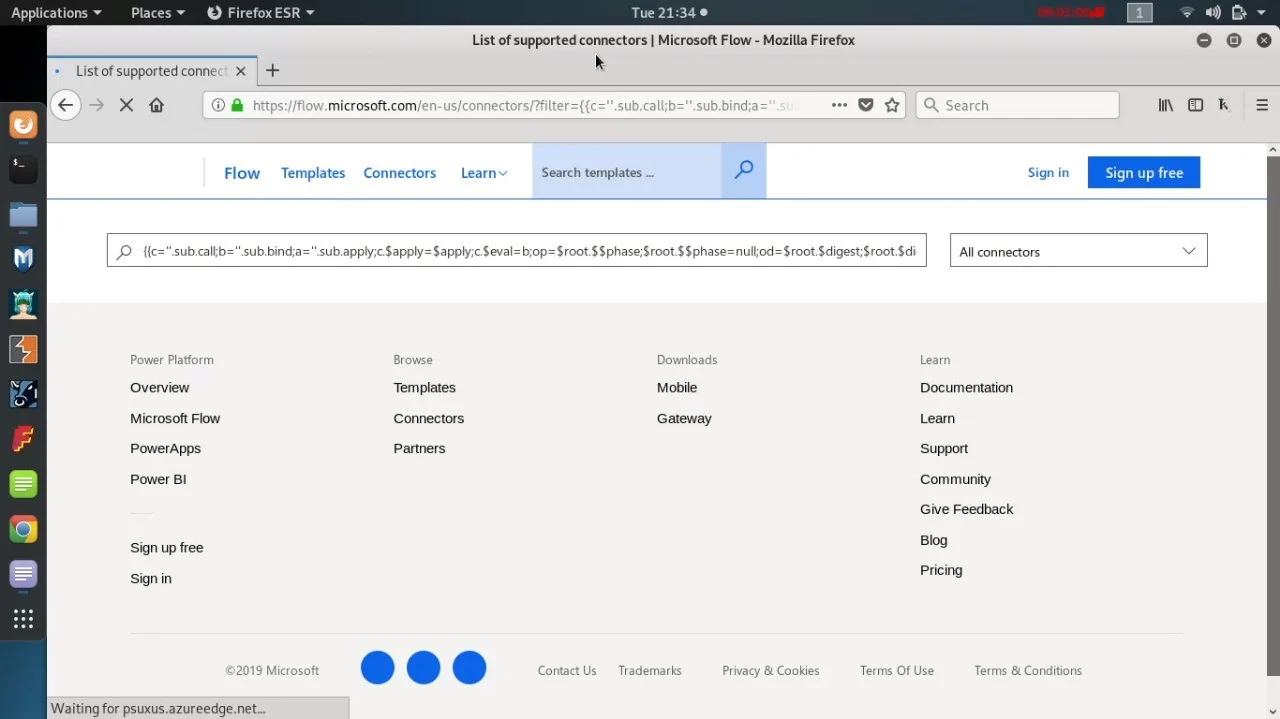
He then searched Google and used the PortSwigger research on XSS without HTML via client-side template injection with AngularJS:
https://portswigger.net/research/xss-without-html-client-side-template-injection-with-angularjs

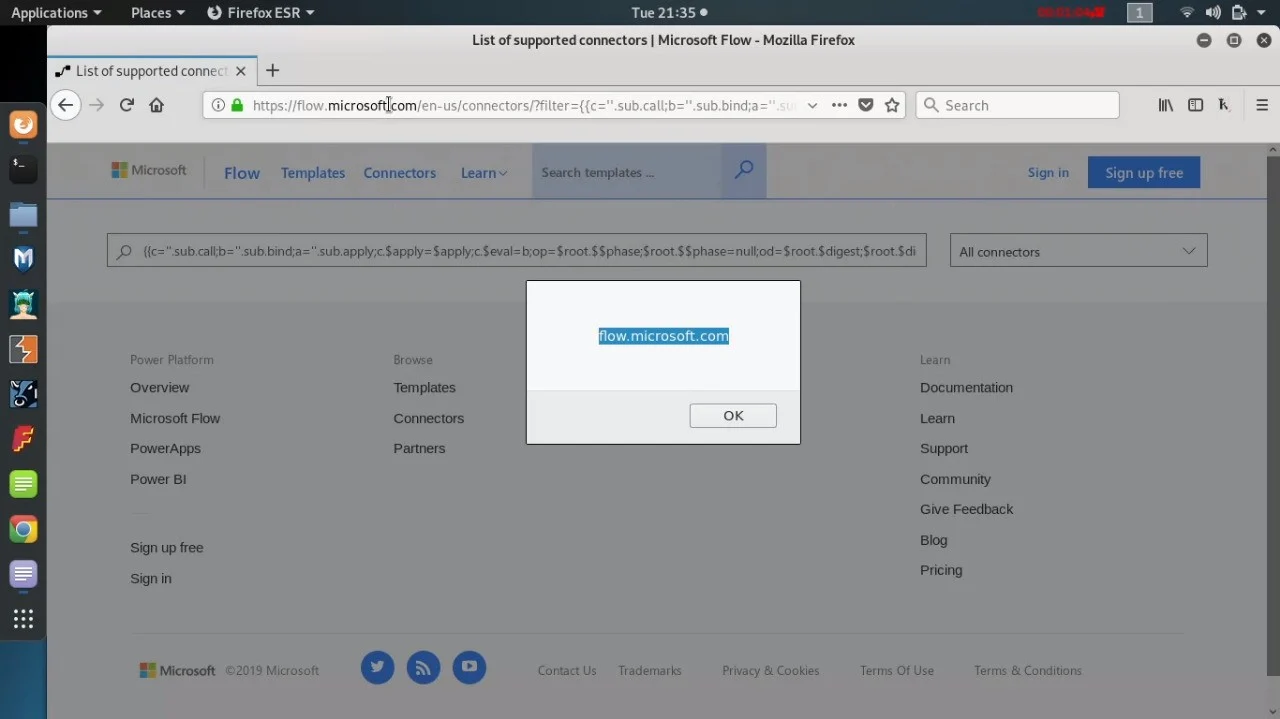
The report does not reproduce the exact payload string that was used, nor the full request and response. What it does establish is the mechanism: a value supplied through the filter parameter was reflected into the page source, and because the page is rendered by Angular, a template expression in that value was evaluated by the framework.
Exploitation
Step 1: confirm the parameter is reflected
The researcher identified filter as the parameter of interest and confirmed by reading the source that its value is reflected into the page. The report does not show the request or the reflected response.
Step 2: confirm Angular evaluates expressions
The behaviour to look for is Angular evaluating a template expression. The report illustrates the principle with the input {{7*7}}, which Angular evaluates and renders as 49. This is the signal that double curly braces in reflected input are being processed by the framework rather than displayed literally.
Step 3: try ordinary XSS payloads
Standard XSS payloads were tried against the parameter and none worked. This is consistent with the report's point that the input is not being placed into an HTML execution context directly, but into a template that Angular processes.
Step 4: match the payload to the Angular version
Having established that the site uses an Angular template, the researcher identified the template version and searched for a payload suited to it, using the PortSwigger research as the reference.
Step 5: record the proof of concept
The result was captured in a video proof of concept:
https://youtu.be/PWIx5a59cKI
Root cause
The application reflects user input from the filter parameter into a page that is rendered by AngularJS. Angular scans the rendered page for template expressions and executes any it encounters, so a value containing a template expression is evaluated as Angular code rather than treated as inert text. Because Angular expressions alone are limited, a sandbox escape is needed to reach arbitrary JavaScript, and the researcher selected a payload matching the Angular version in use.
Browser XSS filters did not help here, as the report notes: they are typically unable to detect or prevent client-side template injection.
Impact
The report describes the impact in general XSS terms: an attacker-supplied template expression that launches XSS can steal the victim's session token or login credentials, perform arbitrary actions on the victim's behalf and log their keystrokes. The report describes the impact in general XSS terms and does not describe how a victim would be reached. The report gives no CVSS score, severity rating or bounty amount.
Fix
The general remediation implied by the root cause is to stop untrusted input from being compiled as an Angular template, for example by escaping or encoding reflected values so that template expressions are not evaluated, or by not passing user-controlled data through the template compiler at all.
Variants to test
- Look for parameters whose values are reflected into pages built with a client-side template framework, and send
{{7*7}}. A positive result is the page rendering49instead of the literal braces. - Where expression evaluation is confirmed, identify the framework version from the source and try a sandbox-escape payload matched to that version, as the researcher did with the PortSwigger reference. A positive result is arbitrary JavaScript execution, for example a dialog or a callback to a host you control.
- Try the same expression probe on other Microsoft subdomains found during enumeration. A positive result is the same evaluation behaviour on a different host.
- Test parameters named or resembling
filter, since that was the vulnerable parameter here. A positive result is reflected input that Angular compiles.
Timeline
- 13-July-2019: report
- 18-July-2019: triaged
- 28-July-2019: valid and fixed
- 20-August-2019: Hall of Fame
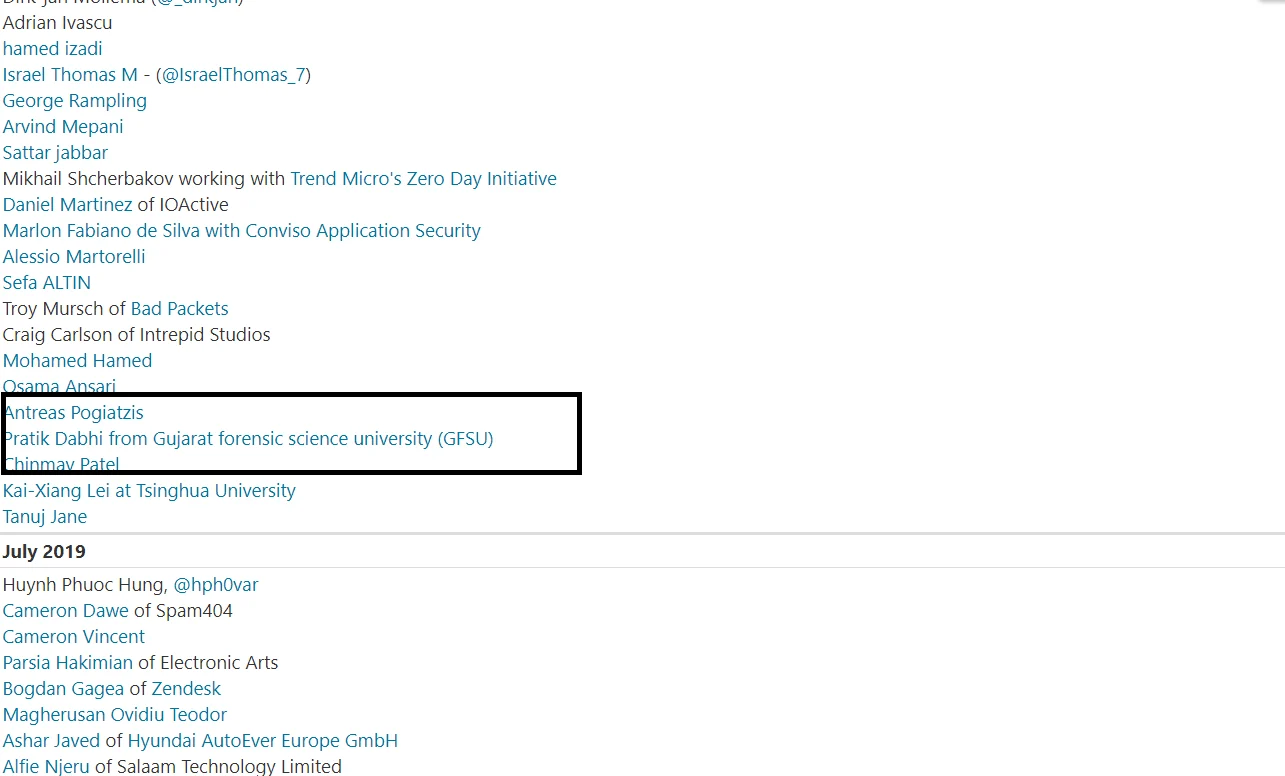
The researcher closes by noting the Microsoft Hall of Fame acknowledgement:
https://portal.msrc.microsoft.com/en-us/security-guidance/researcher-acknowledgments-online-services?rtc=1

What happened, in plain words
A security researcher named Pratik Dabhi found a bug on a Microsoft website, https://flow.microsoft.com/. The bug was a cross-site scripting issue on a Microsoft website, https://flow.microsoft.com/. This kind of bug is called cross-site scripting, usually shortened to XSS.
The particular flavour here is called client-side template injection. To understand it, you need one idea first: some websites are built with a helper library that fills in the page as it is displayed in your browser. That library reads little instructions written between double curly braces, like {{7*7}}, and replaces them with the result, here 49. If a website takes something a visitor typed or put in a link and drops it into the page without cleaning it, the library will treat that visitor input as one of its instructions and run it. That is the bug.
The researcher says he wrote the post because he had received many messages on Instagram and WhatsApp asking for the Microsoft proof of concept. The report gives no severity score, no CVSS rating and no bounty amount.
The idea behind the bug
The report opens with a summary of the vulnerability class, and it is worth going through it slowly because everything else follows from it.
A client-side template framework is a piece of JavaScript that a website loads into your browser. JavaScript is the programming language browsers run; it is what makes pages interactive. A framework is a reusable set of code that saves developers from writing everything by hand. This one works by scanning the page for template expressions, which are small snippets written between double curly braces, and executing them when the page is drawn on screen. The word client-side means the work happens in your browser, on your computer, rather than on the company's server.
Client-side template injection happens when an application built on such a framework dynamically embeds user input in a web page. Dynamically means the page is assembled at the moment it is shown, mixing fixed layout with values that come from outside, such as what you typed in a search box or what is written in the link you clicked. If those outside values are not cleaned, the framework cannot tell them apart from its own instructions, and it executes them.
An attacker who can supply a malicious template expression can therefore launch an XSS attack. XSS means getting your own code to run in someone else's browser while they are viewing a trusted site. As with ordinary XSS, the injected code can steal the victim's session token or login credentials, perform arbitrary actions on the victim's behalf and log their keystrokes.
A session token is a short string that a site gives your browser after you log in, so it can recognise you on the next page without asking for your password again. It is like the wristband you get at an event: show it and you are let back in. If someone copies it, they can act as you. Keystrokes are the individual keys you press, so logging them means recording what you type, passwords included.
The report adds one more point: browser cross-site scripting filters are typically unable to detect or prevent client-side template injection attacks. Modern browsers contain built-in checks that try to spot classic XSS and block it. Those checks look for familiar patterns of script being inserted into a page. A template expression does not look like a script to them, so they let it through.
How the researcher got started
The report does not describe any accounts, roles or special tooling. The starting point was subdomain enumeration against Microsoft, followed by what the researcher calls "some advance recon" on the target that identified which technologies the site uses.
Two terms there. A subdomain is a name that sits under a company's main domain: if the main site is example.com, then shop.example.com and mail.example.com are subdomains. Companies own many of them, and each one is a separate website that may be built and maintained differently, so finding them is a standard first move. Recon, short for reconnaissance, means gathering information about a target before touching it: what software it runs, what addresses it answers on, how it is put together. It is the online equivalent of walking around a building and noting the doors and windows before trying any of them.
He then worked through the site's parameters by hand and read the page source. A parameter is the part of a web address after the question mark that carries a value, as in page?name=value. The page source is the raw text the server sends to your browser, which you can view with the browser's own viewer. Reading it tells you where your input ends up. No versions of AngularJS or of any other component are given in the report, and no specific recon tool is named.
Finding it
After enumerating subdomains, the researcher settled on https://flow.microsoft.com/ and recorded which technologies the site uses.
The report then explains how Angular templates work: they can contain expressions, JavaScript-like code snippets inside double curly braces. As a demonstration, the input {{7*7}} is evaluated by Angular and the output 49 is displayed. The conclusion drawn is that anyone able to inject double curly braces can execute Angular expressions. On their own, Angular expressions cannot do much harm, but combined with a sandbox escape they allow arbitrary JavaScript execution.
A sandbox, in software, is a restricted area. The framework deliberately limits what its expressions can reach, so that a stray expression cannot do anything dangerous. A sandbox escape is a trick that gets around those limits. The report does not spell out the trick; it only says that one is needed to go from harmless arithmetic to running arbitrary JavaScript, meaning any code the attacker wants.
The researcher then sorted through the site's parameters to find the one named filter. He tried XSS payloads, but none worked. A payload is the actual piece of text an attacker sends to trigger a bug. The fact that ordinary XSS payloads failed is itself a clue: it suggests the input is not being placed where a browser would run a script directly, but somewhere a template framework processes it instead.
He then manually checked where the values were reflected in the source code and realised, from recon and source code reading, that the site uses an Angular template. Reflected means the value you sent comes back to you in the page the server returns. He found the version of that template and searched for a payload matching it, and found one. Matching matters because the limits inside the framework, and therefore the way around them, differ between versions.
He then searched Google and used the PortSwigger research on XSS without HTML via client-side template injection with AngularJS:
https://portswigger.net/research/xss-without-html-client-side-template-injection-with-angularjs
That address is a published research article by PortSwigger, a well-known security company, describing how this class of attack works against AngularJS. The researcher used it as a reference for choosing a payload. The report does not reproduce the exact payload string that was used, nor the full request and response. What it does establish is the mechanism: a value supplied through the filter parameter was reflected into the page source, and because the page is rendered by Angular, a template expression in that value was evaluated by the framework.
Exploitation
Step 1: confirm the parameter is reflected
The researcher identified filter as the parameter of interest and confirmed by reading the source that its value is reflected into the page. The report does not show the request or the reflected response. This step matters because a parameter that is never echoed back cannot carry a payload to the page at all; checking the source is how you tell the difference between a value that is ignored and one that comes back.
Step 2: confirm Angular evaluates expressions
The behaviour to look for is Angular evaluating a template expression. The report illustrates the principle with the input {{7*7}}, which Angular evaluates and renders as 49. This is the signal that double curly braces in reflected input are being processed by the framework rather than displayed literally. If the page had shown the text {{7*7}} exactly as typed, the framework would not be touching it and there would be nothing to exploit. Seeing 49 means the page is doing arithmetic on your behalf, which means it is running your input as instructions.
Step 3: try ordinary XSS payloads
Standard XSS payloads were tried against the parameter and none worked. This is consistent with the report's point that the input is not being placed into an HTML execution context directly, but into a template that Angular processes. HTML is the language pages are written in; an HTML execution context is a spot where the browser treats what it finds as markup and can be made to run a script. If the value lands somewhere else, classic payloads have nothing to act on.
Step 4: match the payload to the Angular version
Having established that the site uses an Angular template, the researcher identified the template version and searched for a payload suited to it, using the PortSwigger research as the reference. The reasoning is the same as matching a key to a lock: the restrictions differ between versions, so the way around them differs too.
Step 5: record the proof of concept
The result was captured in a video proof of concept:
https://youtu.be/PWIx5a59cKI
A proof of concept is a demonstration that the bug is real, usually a recording or a set of steps someone else can repeat. It is what turns a claim into evidence a vendor can act on.
Why it worked
The application reflects user input from the filter parameter into a page that is rendered by AngularJS. Angular scans the rendered page for template expressions and executes any it encounters, so a value containing a template expression is evaluated as Angular code rather than treated as inert text. Inert text is just characters on a screen; code is characters the machine acts on. The whole bug is the failure to keep the two apart.
Because Angular expressions alone are limited, a sandbox escape is needed to reach arbitrary JavaScript, and the researcher selected a payload matching the Angular version in use.
The DOM, short for Document Object Model, is the browser's live model of the page: a tree of elements that scripts can read and change. Compiles means the framework processes that part of the tree and acts on any expressions inside it. Escaped means special characters are converted into harmless equivalents so they are displayed rather than interpreted, the way quoting a word in a conversation stops it being taken as a command.
Browser XSS filters did not help here, as the report notes: they are typically unable to detect or prevent client-side template injection.
What an attacker could do
The report describes the impact in general XSS terms: an attacker-supplied template expression that launches XSS can steal the victim's session token or login credentials, perform arbitrary actions on the victim's behalf and log their keystrokes. The report describes the impact in general XSS terms and does not describe how a victim would be reached. In other words, the attacker does not break into the server; they get their code to run in the browser of a logged-in visitor, and from there act as that visitor. The report gives no CVSS score, severity rating or bounty amount.
The fix
The general remediation implied by the root cause is to stop untrusted input from being compiled as an Angular template, for example by escaping or encoding reflected values so that template expressions are not evaluated, or by not passing user-controlled data through the template compiler at all. Untrusted input means anything that came from outside the application, which includes everything in a link a stranger can send.
Other places to look
- Look for parameters whose values are reflected into pages built with a client-side template framework, and send
{{7*7}}. A positive result is the page rendering49instead of the literal braces. - Where expression evaluation is confirmed, identify the framework version from the source and try a sandbox-escape payload matched to that version, as the researcher did with the PortSwigger reference. A positive result is arbitrary JavaScript execution, for example a dialog or a callback to a host you control.
- Try the same expression probe on other Microsoft subdomains found during enumeration. A positive result is the same evaluation behaviour on a different host.
- Test parameters named or resembling
filter, since that was the vulnerable parameter here. A positive result is reflected input that Angular compiles.
Timeline
- 13-July-2019: report
- 18-July-2019: triaged
- 28-July-2019: valid and fixed
- 20-August-2019: Hall of Fame
Triaged means the vendor's security team looked at the report, confirmed it was worth investigating and passed it to the right people. A Hall of Fame is a public page where a company thanks researchers who reported valid issues; it is recognition rather than payment.
The researcher closes by noting the Microsoft Hall of Fame acknowledgement:
https://portal.msrc.microsoft.com/en-us/security-guidance/researcher-acknowledgments-online-services?rtc=1
Glossary
- AngularJS / Angular: a JavaScript framework that builds web pages in the browser and evaluates template expressions found in them.
- Client-side: happening in the visitor's browser rather than on the company's server.
- Client-side template injection (CSTI): a bug where visitor input is treated by a template framework as one of its own instructions and executed.
- Compile: the process by which a framework processes part of a page and acts on the expressions inside it.
- Cross-site scripting (XSS): getting attacker-supplied code to run in another person's browser while they view a trusted site.
- CVSS: a standard scoring system for rating the severity of a security flaw.
- DOM (Document Object Model): the browser's live tree model of the page, which scripts can read and change.
- Escaping / encoding: converting special characters into harmless equivalents so they are displayed rather than interpreted.
- Expression: a short JavaScript-like snippet inside double curly braces that a template framework evaluates.
- Framework: a reusable set of code that provides common building blocks for an application.
- Hall of Fame: a public page where a company thanks researchers who reported valid security issues.
- HTML: the language web pages are written in.
- HTML execution context: a place in a page where the browser treats content as markup and can be made to run a script.
- JavaScript: the programming language browsers run to make pages interactive.
- Keystroke logging: recording the individual keys a person presses, including passwords.
- Parameter: the part of a web address after the question mark that carries a value, as in
page?name=value. - Payload: the actual piece of text an attacker sends to trigger a bug.
- Proof of concept (PoC): a demonstration that a bug is real, repeatable by someone else.
- Recon (reconnaissance): gathering information about a target before attacking it.
- Reflected: describing input that is sent back to the visitor inside the page the server returns.
- Sandbox: a restricted area in software that limits what code can reach.
- Sandbox escape: a trick that gets around those limits.
- Session token: a short string a site gives your browser after login so it can recognise you on later pages; stealing it lets someone act as you.
- Severity rating: a label such as low, medium or high describing how serious a flaw is.
- Source code: the raw text a server sends to your browser, viewable in the browser.
- Subdomain: a name under a company's main domain, such as
shop.example.comunderexample.com. - Template expression: see expression.
- Triaged: reviewed by the vendor's security team and confirmed worth investigating.
- Untrusted input: any data that came from outside the application, including everything in a link a stranger can send.
- XSS filter: a built-in browser check that tries to spot and block classic cross-site scripting.




