Spoofing DNS Records by Abusing DHCP DNS Dynamic Updates
Microsoft DHCP servers with the default DHCP DNS Dynamic Updates feature enabled allow unauthenticated attackers to create or overwrite DNS records in Active Directory Integrated DNS zones. This can lead to spoofing of sensitive records, credential theft, and potentially full domain compromise.

Akamai acquires LayerX, delivering end-to-end security and real-time AI usage control to any browser. Get details
The full write-up lives on its author's site
It belongs to its author, so we link to it rather than copy it. The other two tabs are our own rewrites, checked against it.
Context
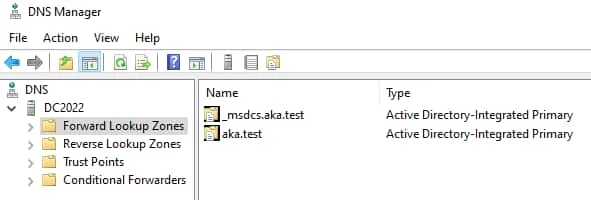
Active Directory depends heavily on DNS. Every domain needs a DNS server hosting a special zone called the Active Directory Integrated DNS (ADIDNS) zone, which holds the DNS records for all domain-joined machines and the services in AD.
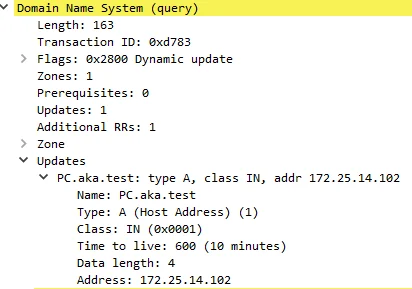
Records in ADI zones are managed through DNS Dynamic Updates. Each client is responsible for its own record: when it needs to create or modify a record, it sends a DNS request containing the data to change, and the DNS server applies it.
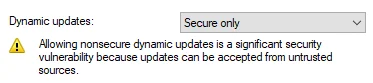
Secure Updates control who may modify each record. Without them the DNS server blindly obeys any update request, which lets attackers overwrite existing records. For ADI zones, only secure updates are accepted by default.
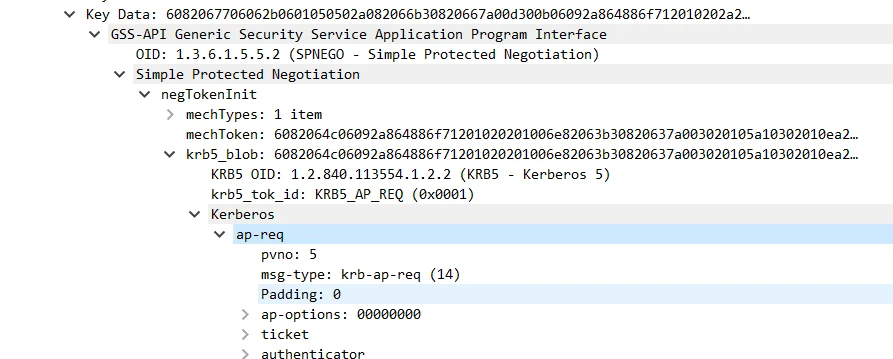
With Secure Updates, every update request is authenticated and authorised, using Kerberos in ADI zones. The update carries a Kerberos ticket used to authenticate the user.
Each DNS record is protected by an access control list (ACL) that determines the rights of each principal. When a client creates a record through a DNS Dynamic Update, the machine account that created it becomes the record owner and gets permissions over it. Normally every DNS client uses its own machine account ticket for DNS updates, and the DNS server authorises an update by checking the record's ACL against the authenticated principal. In the example below, the record for the host PC.aka.test was created by the computer account, so that account can modify it.
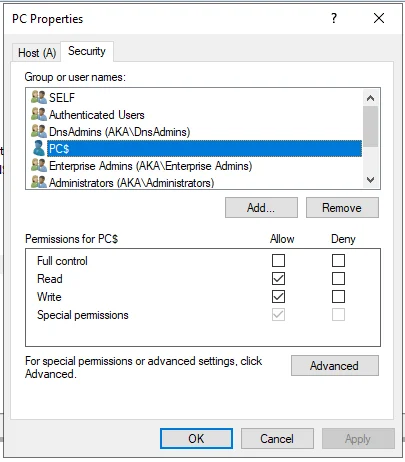
Other principals, apart from some built-in strong groups, should not have permissions over the record. When a different principal tries to modify a record it does not own, the server refuses the update.
Building on Kevin Robertson's earlier ADIDNS research, the author looked at related features and landed on DHCP DNS Dynamic Updates.
DHCP assigns IP addresses and other network options to clients. A client joining a network broadcasts a request, and a DHCP server replies with an assigned IP address. The Microsoft DHCP server is very common: it was observed running in 40% of the data centre networks Akamai monitors.
Modern Windows clients (Windows 2000 and above) normally create their own records with DNS Dynamic Updates, but not always. Records can also be created by the DHCP DNS Dynamic Updates feature, whose purpose is to let a DHCP server register DNS records on behalf of its clients. When a client is given an IP address, the DHCP server can contact the DNS server and update the client's record, using DNS Dynamic Updates to do so.
The two similarly named features are easy to confuse:
| Feature | Protocol | Purpose |
|---|---|---|
| DNS Dynamic Updates | DNS | Allow DNS clients to create or modify DNS records on the DNS server |
| DHCP DNS Dynamic Updates | DHCP | Allow the DHCP server to create or modify DNS records on behalf of its clients, using DNS Dynamic Updates |
The process runs as follows:
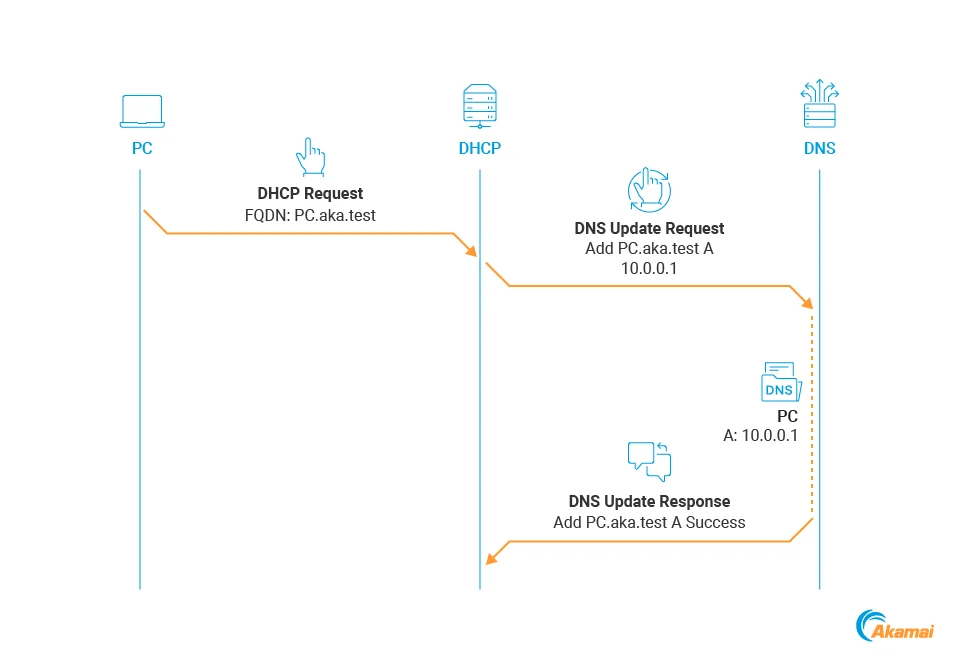
- The DHCP client gets an IP address from the DHCP server and informs it of its FQDN.
- The DHCP server sends a Dynamic Update request to the DNS server.
- The DNS server validates the request, creates the relevant record, and informs the DHCP server of the result in a Dynamic Update response.
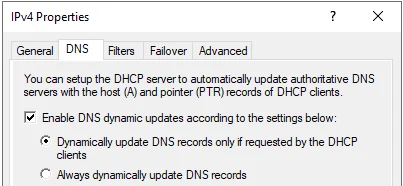
Even with the feature enabled, the default configuration requires the client to explicitly ask for a record to be created on its behalf.
To ask for it, the client sends a dedicated DHCP option. DHCP options are extra fields added to a DHCP packet, used by client and server to exchange information.
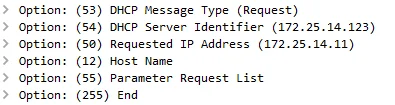
The relevant one is the FQDN option, defined in RFC 4702. It lets the client tell the server its fully qualified domain name and whether the server should register a DNS record for it. The client uses the Server Flag inside the FQDN option: setting it to 1 tells the server to create a record based on the supplied FQDN.
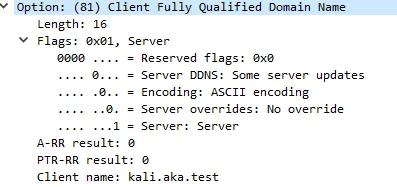
On receiving the request, the DHCP server sends a DNS Dynamic Update and creates the requested record.
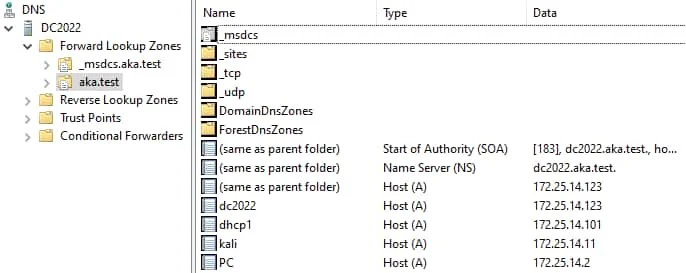
The feature is not commonly used today, since most modern Windows clients create their own records, but Microsoft DHCP servers have it enabled by default: the server will register a DNS record for any client that asks. Crucially, DHCP DNS Dynamic Updates require no authentication from the DHCP client. Anyone on the network can lease an IP from a DHCP server, so an attacker can use the DHCP server to authenticate to the DNS server on their own behalf, gaining access to the ADIDNS zone without any credentials.
Setup
The attacks described work against Active Directory domains that use Microsoft DHCP servers, and they work with the default configuration. No credentials are needed for the DHCP DNS spoofing and overwrite attacks. After spoofing, the attacker runs ntlmrelayx.py and waits for authentication attempts. A PowerShell tool, Invoke-DHCPCheckup, is released for detection, and a later tool, DDSpoof, is announced for implementing the attacks.
Finding it
The starting point is that DHCP DNS Dynamic Updates let an unauthenticated client make the DHCP server send DNS updates for a requested FQDN. Since the DHCP server authenticates to DNS with its own machine account, the attacker can use it to authenticate on their behalf. The question the author then pursued was what happens when the requested FQDN already exists: can an existing record be overwritten?
Exploitation
Step 1: DHCP DNS spoofing of dead hosts
Earlier ADIDNS spoofing weaponised ADIDNS to improve classic LLMNR/NBNS spoofing: after spotting failed name resolution attempts for dead hosts, an attacker registered the name in the ADI zone so future lookups pointed at the attacker. That attack required valid domain credentials. Through the DHCP server the requirement disappears: send a DHCP DNS Dynamic Update for any FQDN that does not exist in the ADI zone and the DHCP server creates it. The author calls this DHCP DNS spoofing; a similar technique was also covered by Hans Lakhan of TrustedSec.
Some obvious candidate names do not work:
- The WPAD hostname is blocked by the global query block list (GQBL) on the DNS server.
- The wildcard record (
*) cannot be created via dynamic DNS updates.
That leaves dead hosts specific to the network, found by sniffing for name resolution broadcasts over LLMNR or NBT-NS. Once a potential dead host is identified, a matching DNS record is created with a DHCP DNS Dynamic Update.
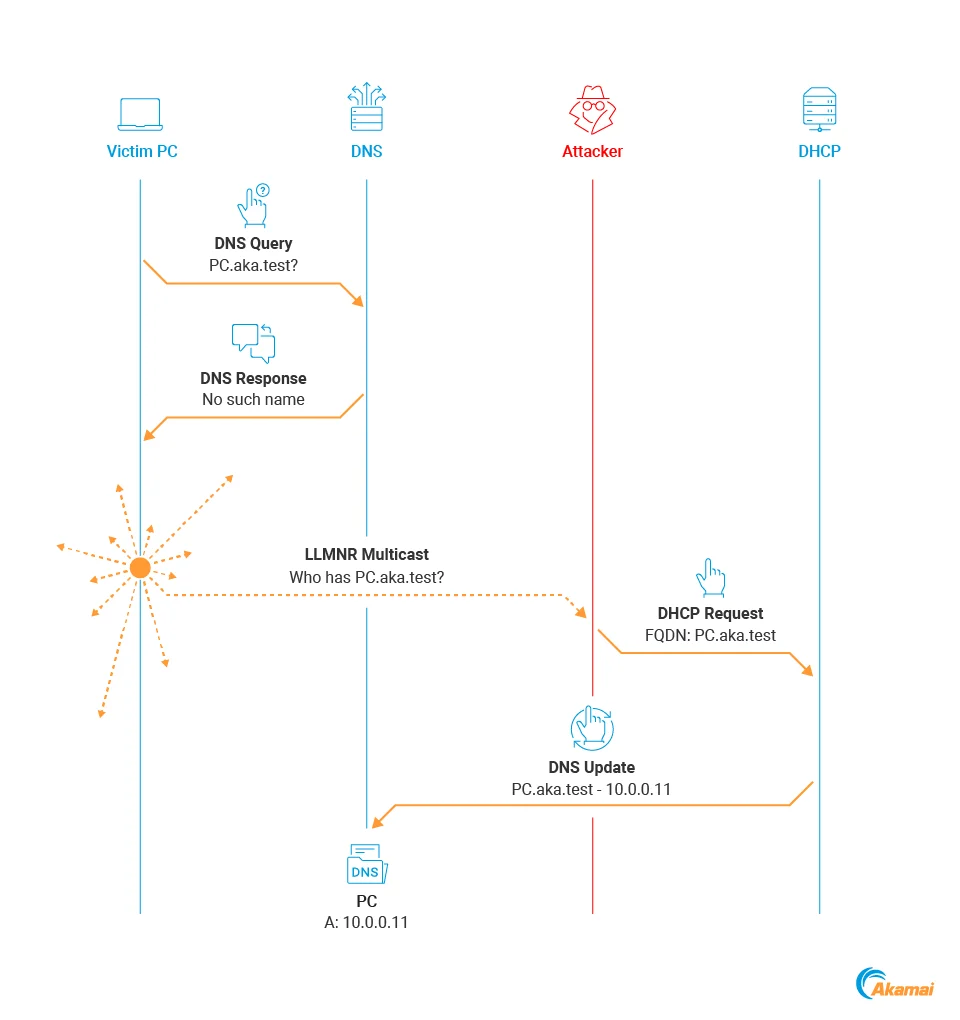
- A host tries to resolve
PC.aka.testand queries the DNS server. - The name is unknown, so the server answers "No such name".
- The host sends an LLMNR multicast to find
PC.aka.teston the LAN. - The attacker sees this and requests an IP lease from the DHCP server with
PC.aka.testas the FQDN. - The server sends a Dynamic Update to the DNS server and the record is created.
From then on, any host resolving PC.aka.test is redirected to the attacker, who only has to run ntlmrelayx.py and wait for authentication attempts.
This beats both earlier approaches. Classic LLMNR/NBNS spoofing needs no authentication but is limited to victims on the same LAN, because those protocols are broadcast-based. ADIDNS spoofing reached victims outside the LAN, since DNS works across subnets, but required an authenticated user. DHCP DNS Dynamic Updates give both: victims outside the LAN and no authentication.
Step 2: Understanding record ownership
To see whether existing records can be overwritten, the author distinguishes two record types:
- Client records: created by Windows clients directly.
- Managed records: created by the DHCP server on behalf of clients.
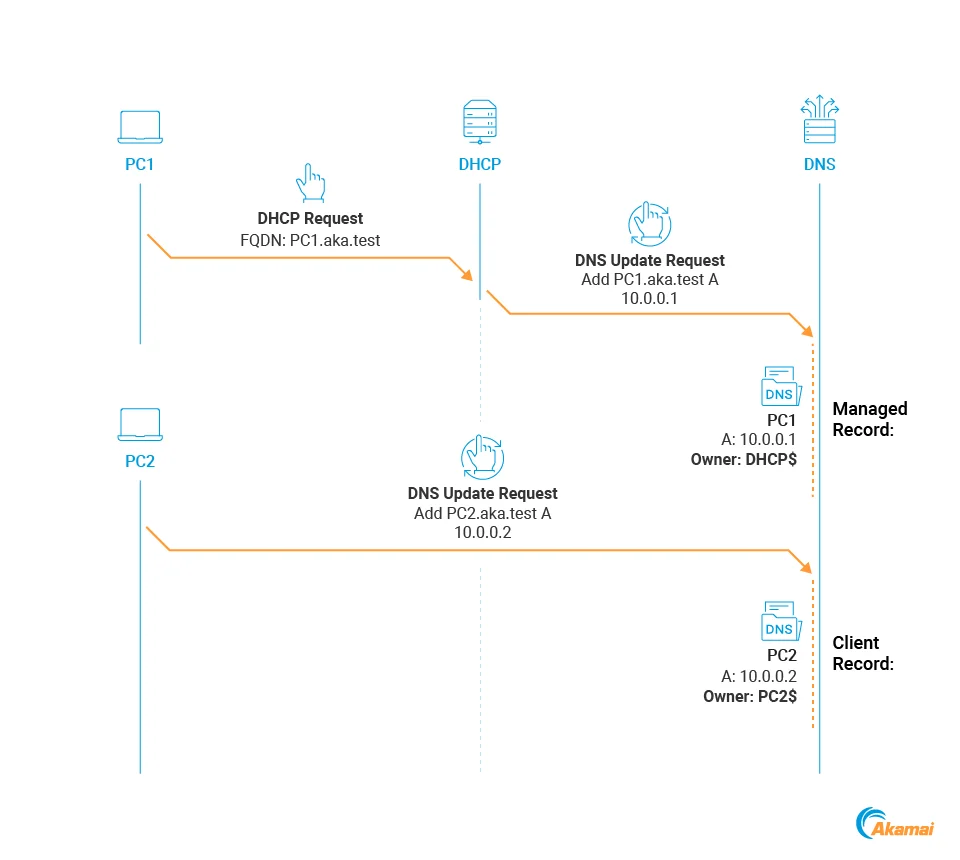
The crucial difference is ownership. A client record is owned by the principal that sent the update, which for a normal Windows client is its machine account. Managed records are not owned by the requesting client: when the DHCP server sends updates on behalf of clients it authenticates with its own machine account, which becomes the owner. In the figure, PC2 is a client record owned by the client and PC1 is a managed record owned by the DHCP server.
Step 3: Overwriting a client record fails
Trying a DHCP DNS Dynamic Update against the existing PC.aka.test record fails. The DHCP server does send a DNS update with the supplied FQDN, but the DNS server refuses it.

PC.aka.test is a client record owned by PC$. The DHCP server authenticates with its own machine account, DHCP$, which has no permissions over the record, so the update is refused.
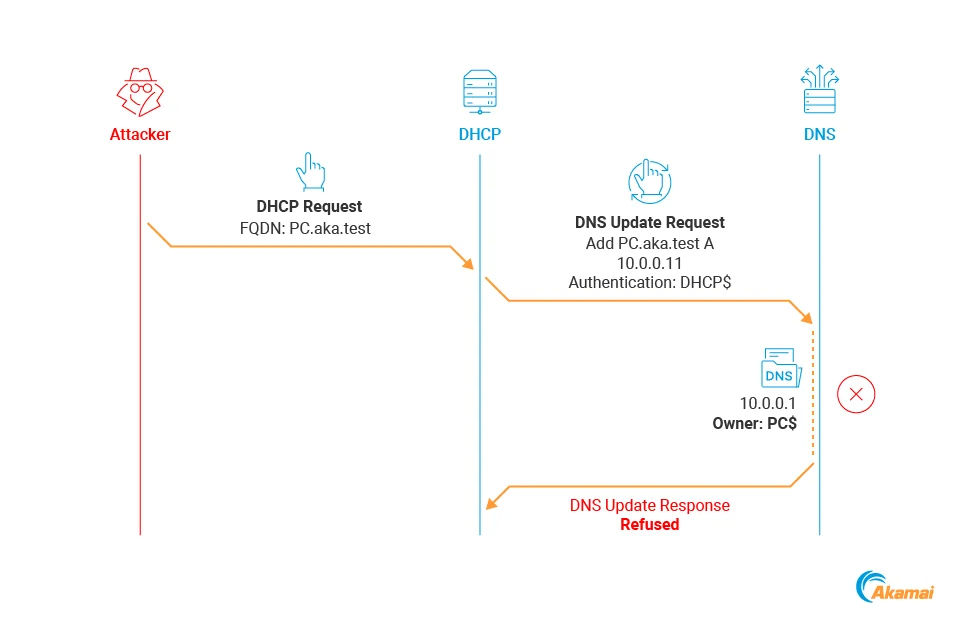
So attackers can make the DHCP server send arbitrary DNS updates, but ACLs should keep existing records safe from overwrites.
Step 4: Overwriting managed records
Overwrites of client records fail because of their ACLs, but overwrites of managed records do work, because the authenticating machine is also the record owner. A DHCP server does not verify DNS record ownership and sends a DNS update for any requested FQDN.
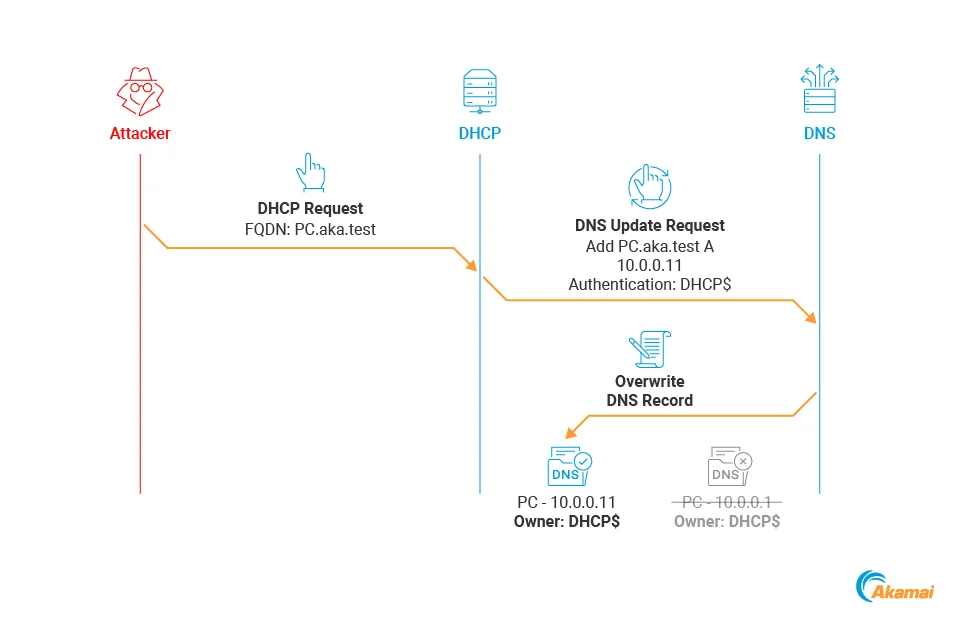
In the example, an Ubuntu server that is not part of the domain cannot register its own DNS record, so it asks the DHCP server to do it.

The resulting record is owned by the DHCP server machine account. The attacker then requests the same FQDN from the DHCP server in the lease process, and the overwrite succeeds: the record now points to the IP just leased to the attacker.

Impact here is limited, since only managed records are affected and they are much less common than client records. They do appear where the client cannot register its own record, such as non-Windows clients, legacy Windows clients, and Windows clients that disabled client DNS updates.
Step 5: DHCP self-overwrite
To reach client records, note that when the DHCP server creates its own DNS record, its machine account is the owner. Supplying the DHCP server's own name as the FQDN makes the DHCP server send a DNS update for its own client record, and that overwrite succeeds.

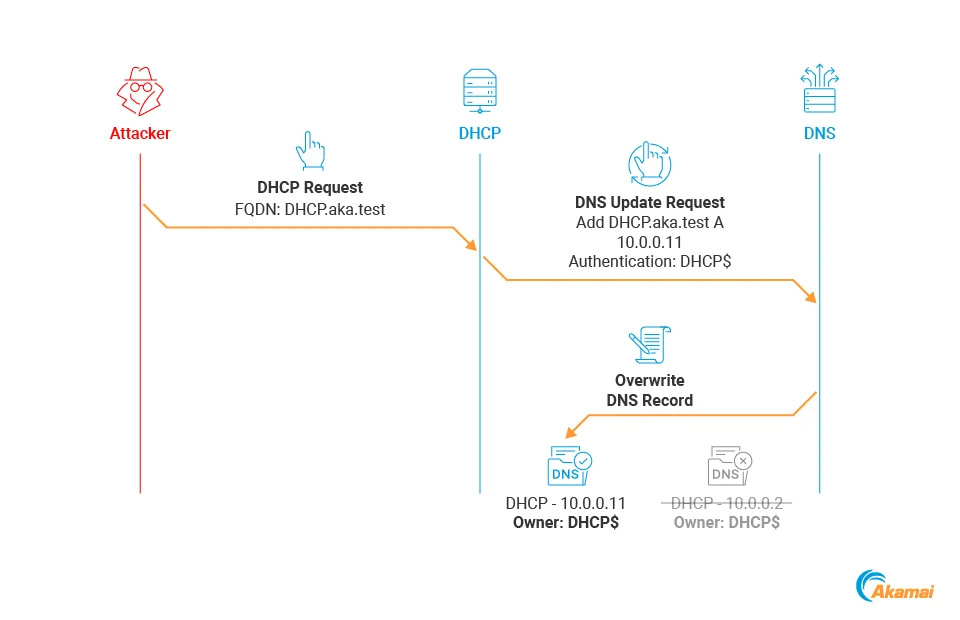
This is more reliable than the managed record case: if a Microsoft DHCP server is present, a matching client record for it is guaranteed, whereas managed records are more rare. The attacker can then intercept any communication destined for the DHCP server. Severity depends on that traffic; in most cases it could be abused to intercept and relay credentials, or to capture sensitive traffic of other services installed on the server.
Step 6: Arbitrary overwrite when the DHCP server is a DC
If the DHCP server runs on a domain controller, the DC's machine account is used for DNS updates. Inspecting the default ACL of an arbitrary DNS record shows that the ENTERPRISE DOMAIN CONTROLLERS principal has write permission over every DNS record in the zone, regardless of who created it.
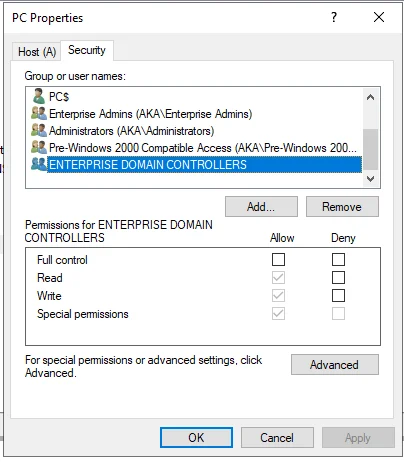
So a DHCP server on a DC has permissions over all records in the zone, and attackers can use it to overwrite any DNS A record inside the ADI zone as an unauthenticated user.
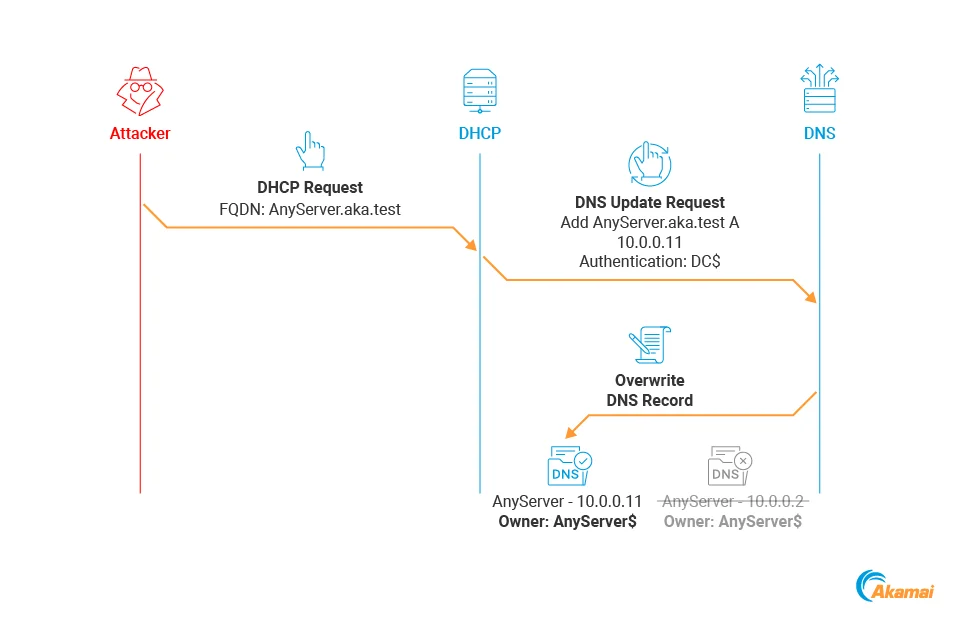
This configuration is common: among the networks observed using Microsoft DHCP server, 57% have a DHCP server installed on a DC, and all those domains are vulnerable by default. Microsoft acknowledges the risk in its documentation, but the author argues awareness of the misconfiguration does not match its potential impact.
Step 7: Bypassing Name Protection with a DHCP Release
Name Protection is meant to stop other clients from requesting the same FQDN and forcing an overwrite. It is implemented with a special DNS record type, DHCID (DHCP client identifier). With Name Protection enabled, every record the DHCP server registers on behalf of a client gets an additional DHCID record.

The DHCID value is Base64-encoded data acting as a unique signature identifying the DHCP client that requested the record. When asked to modify a record, the DHCP server calculates the client's DHCID and sends an update containing the new data plus that value. If the record does not exist, it is created along with the DHCID record. If the A and DHCID records exist, the existing DHCID value is compared with the one sent, and the update happens only if they match. The DHCID record therefore binds a DNS record to its creating client, and only that client can modify it afterwards.
The bypass uses a DHCP Release message, which clients send when they no longer need their leased IP. The DHCP server keeps a lease table with the addresses, their expiration times, and the unique identifier of the client that leased them.

The unique identifier is simply the client's MAC address. On a Release, the server looks up an entry with matching address and ID and deletes it. With DHCP DNS Dynamic Updates enabled, it also sends a DNS Dynamic Update deleting the client's associated DNS record. Sending a Release with a unique ID matching the target's makes the server delete the record, after which the attacker can register it. The only requirement to bypass Name Protection is the victim's MAC address; the attacker's own MAC need not change, since the value is taken from the DHCP header. On the same LAN the MAC is easy to find, for example with an ARP request.
Step 8: Brute forcing DHCID values
Off-LAN, the MAC can be recovered from the DHCID record. RFC 4701 defines the algorithm:
- Concatenate:
- DHCP HTYPE (hardware type); for Ethernet the value is
01. - DHCP Client ID option.
- Record FQDN in DNS wire format.
- DHCP HTYPE (hardware type); for Ethernet the value is
- SHA256 the result.
- Add DHCID data bits (constant in the Windows implementation).
- Encode the result in Base64.
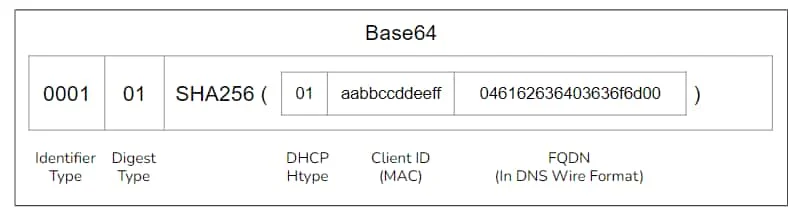
With the FQDN known and the data bits constant, the only variable is the client ID, again the MAC address. DHCID records are normal DNS records, so any client can query their value. Iterating all possible MAC addresses, computing each DHCID and comparing against the target record reveals the MAC on a match. 2^48 possible MAC addresses could be cracked by a modern dedicated computer in a few days, and restricting to common vendor IDs reduces that drastically.
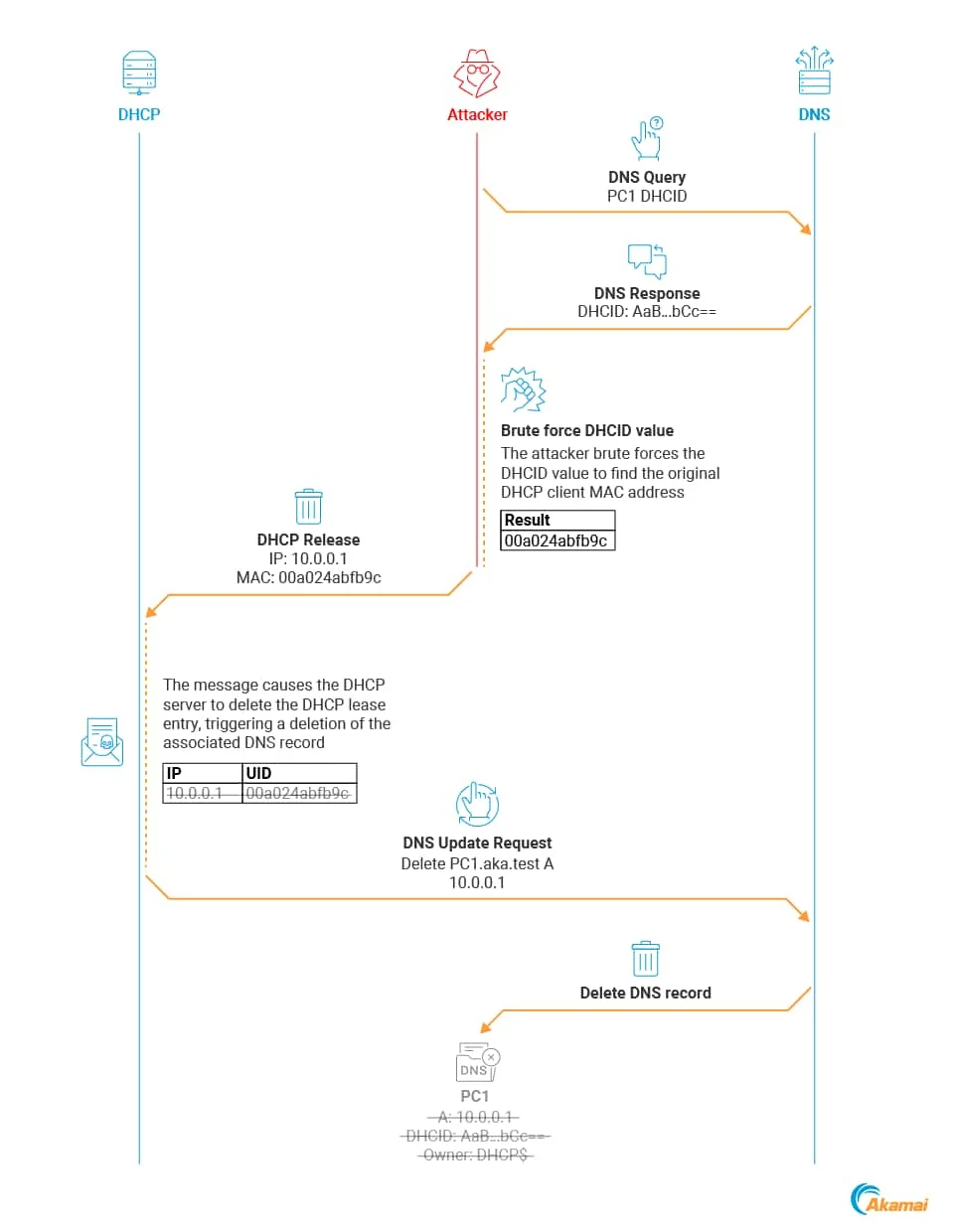
The referenced code can calculate a DHCID value from specified parameters.
Step 9: Name Protection's side effect on client records
Name Protection is meant for managed records, protecting records the DHCP server created from modification by random clients; it has nothing to do with client records. In some cases it still mitigates attacks on client records. With Name Protection enabled, the DHCP server requires a DHCID record to be present. Normal DNS clients do not create DHCID records, so client records have none, and any attempt to update a client record from the DHCP server fails.
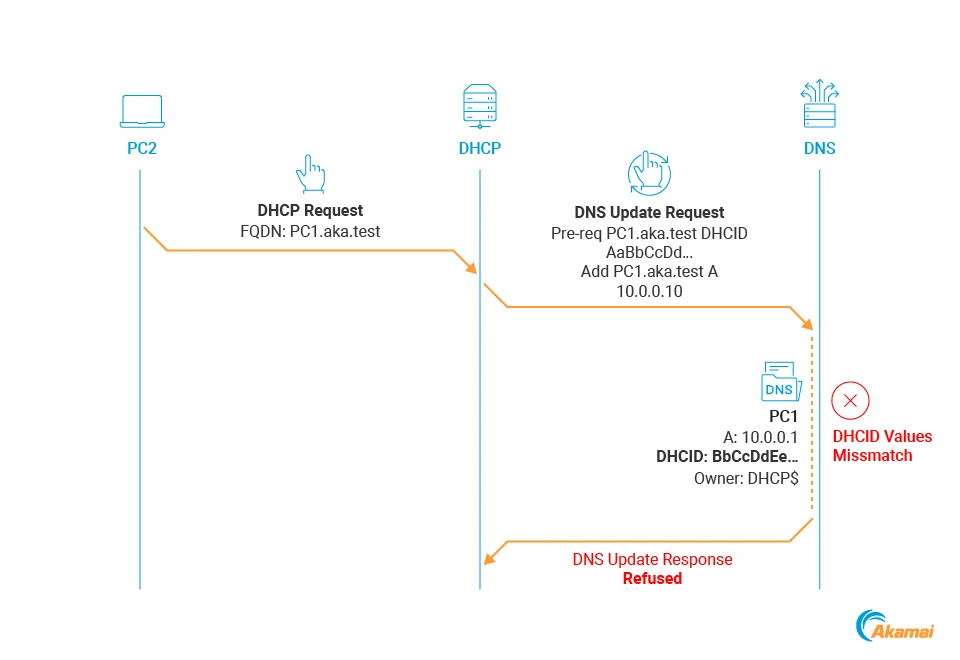
This is because a Name Protection-enabled DHCP server adds a Prerequisites field to its DNS update, specifying conditions that must hold on the DNS server for the update to proceed. The update includes a prerequisite for the DHCID value.
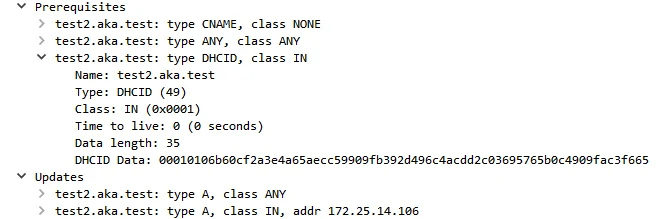
If no matching value exists, the update fails. Since client records should never have a DHCID record, Name Protection should protect them from DHCP DNS overwrites with no bypass. This is a byproduct rather than part of the feature, and even this accidental defence can be bypassed.
Step 10: Leasing from a scope without Name Protection
DHCP servers can define multiple scopes, each a set of IP addresses in a specific subnet that the server can lease.
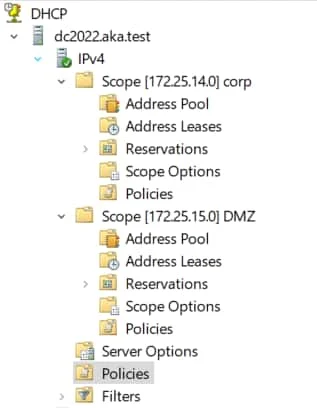
Scopes allow better address management and different policies per subnet. Name Protection is one such policy, enabled at scope level, so different scopes can have different settings. The earlier failed overwrite of a client record came from a lease in a scope with Name Protection. But scope is a DHCP concept: client records are unaware of scopes and are not associated with any. Getting a lease from another scope with Name Protection disabled therefore bypasses the mitigation. How to obtain such a lease is beyond the post's scope, though the DHCP relay option is suggested. A single scope on the server with Name Protection disabled is enough for an attacker to overwrite client records, given one of the misconfigurations discussed earlier.
Step 11: DNS credential
Another setting is DNS credential, which supplies a domain user's credential for the DHCP server to use instead of the machine account when creating and updating records.
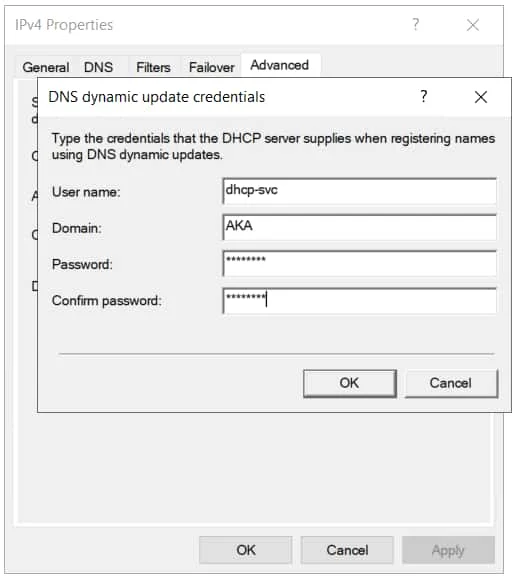
In the DC scenario, the DC machine account has permissions over every record in the zone. With a DNS credential configured, a weak account is used instead and the attack no longer works. Configuring one reduces the attack surface and should mitigate the most severe attacks. Two details matter: the credential must be a weak user (a domain admin would still allow arbitrary overwrites), and records created by the DHCP server are still owned by that credential and remain vulnerable to DHCP DNS overwrite.
Step 12: The DNSUpdateProxy group
The DNSUpdateProxy group is meant to solve two permission problems of managed records: the upgraded client problem and the multiple DHCP server problem.
For the upgraded client problem, a legacy client registers a record through DHCP and is later upgraded to an OS supporting DNS Dynamic Updates. It cannot modify its record directly because the DHCP server owns it. Adding the DHCP server to DNSUpdateProxy has two effects. First, records created by its members get a different ACL: the Authenticated Users group is given write permission, so any client in the domain can modify them.
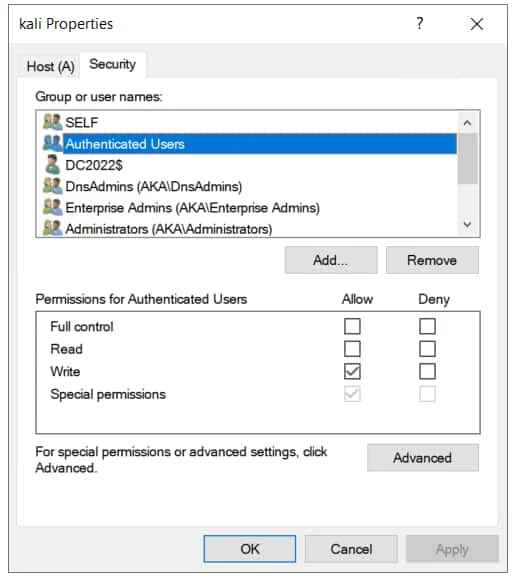
Second, a record takeover feature: the first client to modify a record created by a DNSUpdateProxy member becomes its owner and removes the Authenticated Users write permission, letting clients modify and take over their own record.
For the multiple DHCP server problem, consider DHCP1 and DHCP2 with a client PC1 registering a record through DHCP1. If DHCP1 goes offline and DHCP2 takes over, the client's lease expires and it contacts DHCP2. When DHCP2 leases the new IP and tries to modify the record, it fails because DHCP1 owns it.
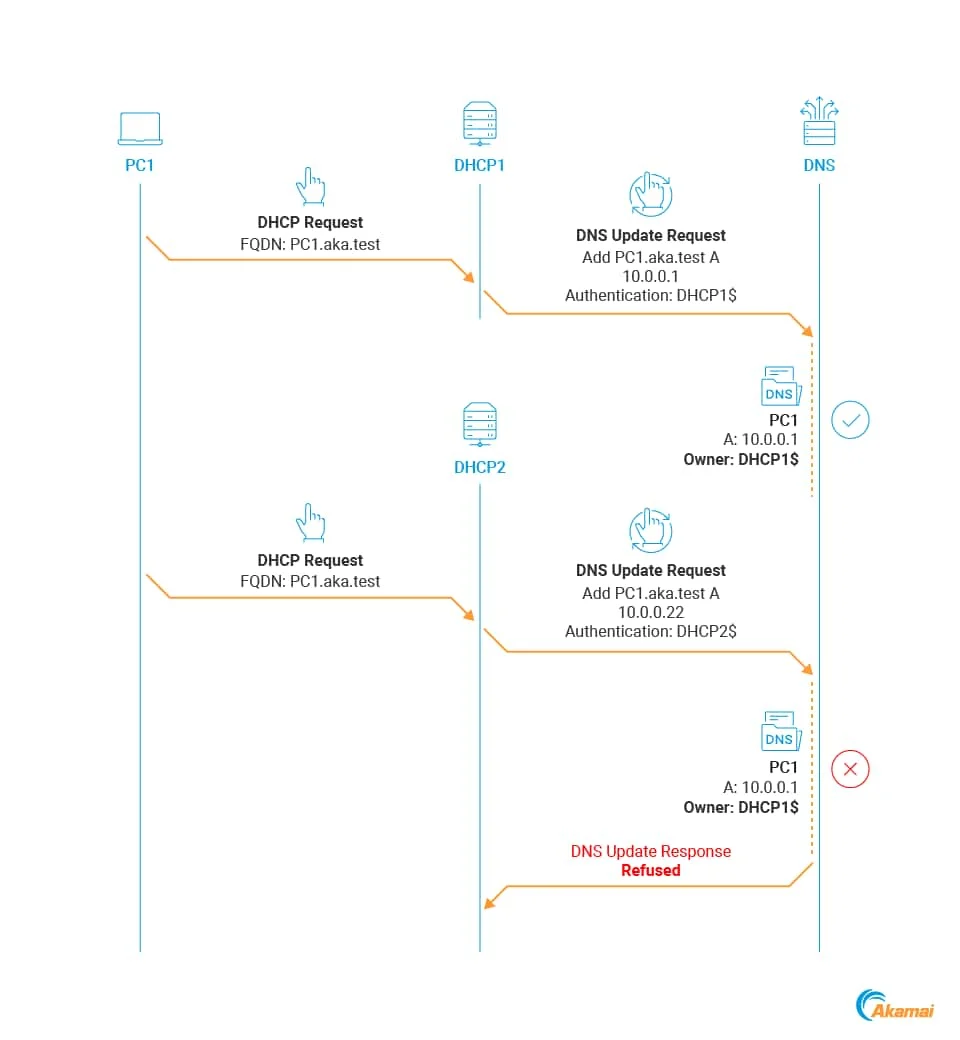
DNSUpdateProxy solves this too: if a member tries to modify a record owned by another member, the update succeeds because of the ACL, but the ACL and ownership do not change, letting multiple servers co-own records.
Step 13: The DNSUpdateProxy bug
The group is a security risk: any record created by its members can be stolen by any authenticated user. That is an abuse of the design, acknowledged by Microsoft, not a vulnerability. Separately, the author found what appears to be a bug: when a member of the group creates its own DNS record, the record gets the same vulnerable ACL, with write permission for authenticated users. In the example, the DHCP server record dhcp1.aka.test initially has a secure ACL.
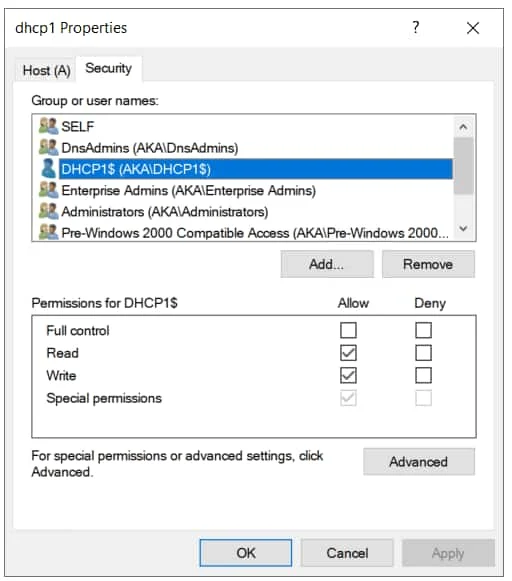
The machine account has permissions and Authenticated Users is absent. After adding the server to DNSUpdateProxy and triggering a recreation of the record, for example by changing the server name, the new ACL is inspected.
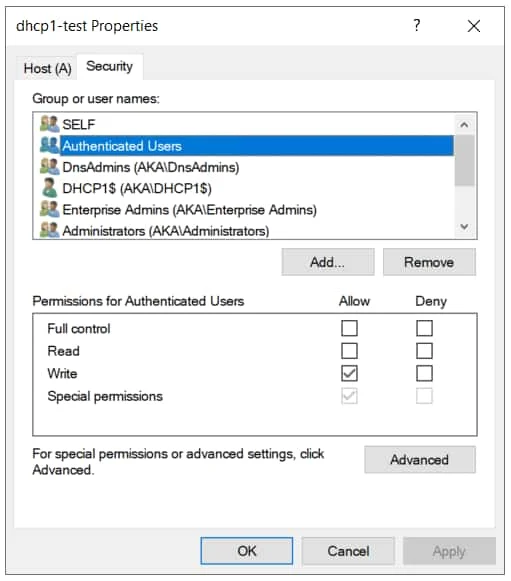
The new record is writable by domain users. Managed records created by the server are meant to have the modified ACL, but the server's own client record should not be affected.
Root cause
DHCP DNS Dynamic Updates let an unauthenticated DHCP client cause the DHCP server to send DNS updates authenticated with the server's machine account, and the server does not verify DNS record ownership before sending an update for any requested FQDN. Authorisation therefore rests entirely on the record ACLs. Managed records are owned by the DHCP server, so it can overwrite them; the server's own client record is likewise owned by it; and when the server runs on a DC, its machine account is ENTERPRISE DOMAIN CONTROLLERS, which has write permission over every record in the zone. Name Protection's protection of client records is a byproduct of its DHCID prerequisite rather than a designed control, and it can be bypassed with a Release message carrying the victim's MAC or by leasing from a scope where it is disabled. The DNSUpdateProxy ACL design grants Authenticated Users write access to records created by members, and the bug extends that ACL to the members' own records.
Impact
The ability to spoof DNS records is appealing to attackers because it can lead to sensitive data exposure, credential compromise and even remote code execution. The attacks require no credentials and work with the default Microsoft DHCP server configuration, though the arbitrary overwrite needs the DHCP server to run on a DC. DHCP DNS spoofing lets an attacker create records for dead hosts and redirect victims outside the LAN, then relay authentication with ntlmrelayx.py. Managed record overwrite affects only managed records. DHCP self-overwrite lets an attacker intercept traffic to the DHCP server, with severity depending on that traffic. When the DHCP server is a DC, an unauthenticated attacker can overwrite any DNS A record in the ADI zone, gaining a machine-in-the-middle position that can expose sensitive information and credentials and enable relay attacks to breach AD domains and escalate privileges. The author reports that Microsoft DHCP server was observed in 40% of the data centre networks Akamai monitors, and that 57% of the networks observed using Microsoft DHCP server have a DHCP server on a DC.
Fix
All findings were reported to Microsoft, which responded that the problems are either by design or not severe enough to receive a fix; no fix is planned. The author's recommended configuration is:
- Disable DHCP DNS Dynamic Updates if not needed.
- Configure a weak user with a strong password as the DNS credential; this is critical if the DHCP server runs on a DC. It does not stop overwrites of managed records.
- Enable Name Protection to make overwrites less trivial, and verify it is enabled at scope level on every scope. Enabling it at server level only makes new scopes default to enabled, not existing ones. If enabled on all scopes, overwrite attacks are mitigated.
- Do not use DNSUpdateProxy; use the same DNS credential across all DHCP servers instead. If it must be used, create a static DNS record for each group member, owned by a creating account different from the servers' machine accounts.
- There is no way to stop unauthenticated creation of nonexistent records other than disabling the feature on all DHCP servers.
- Managed records cannot be protected from spoofing by any configuration; use static DNS records for sensitive non-Windows hosts where possible.
Detection is provided by Invoke-DHCPCheckup, a PowerShell tool that relies on the DHCP server management API and requires a strong user to run, so it is mainly for blue teams.
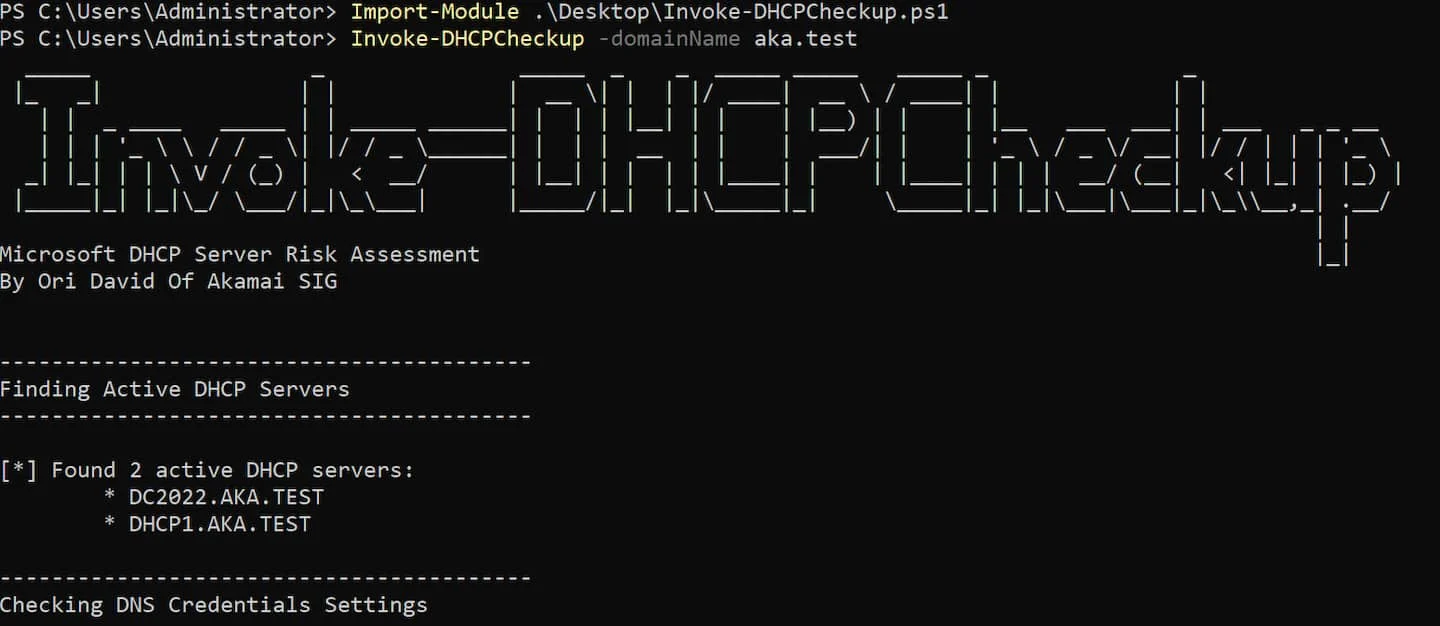
It identifies: DNS credential not configured, or configured with a strong user; Name Protection not enabled on a scope, or not enabled by default on new scopes; DNSUpdateProxy members and whether they are DHCP servers; and weak record ACLs, listing records owned by DHCP servers and records that could be overwritten by authenticated users.
Variants to test
- Dead host spoofing: sniff for LLMNR/NBT-NS lookups of names the DNS server does not know, then lease an IP with that FQDN and Server Flag set to 1. A positive result is the record appearing in the ADI zone and subsequent lookups resolving to your leased address.
- Managed record overwrite: find a record created by the DHCP server (for example for a non-domain host) and request the same FQDN in a lease. A positive result is the record now pointing at your leased IP.
- DHCP server self-overwrite: request a lease using the DHCP server's own name as the FQDN. A positive result is the server's client record pointing at your address.
- DC-hosted DHCP: if the DHCP server is a DC, attempt to overwrite an arbitrary A record in the zone. A positive result is any record in the zone changing to your address without credentials.
- Name Protection bypass by Release: send a DHCP Release with the victim's MAC as the client ID, then re-register the FQDN. A positive result is the record being deleted and then recreated pointing at you.
- Name Protection bypass by DHCID brute force: query the DHCID record, compute candidate values from MAC addresses and compare. A positive result is a matching MAC that lets you perform the Release and re-register.
- Scope hopping: obtain a lease from a scope with Name Protection disabled and retry a client record overwrite. A positive result is the overwrite succeeding where it failed from a protected scope.
- DNSUpdateProxy ACL check: inspect the ACL of records created by DNSUpdateProxy members, including the members' own records. A positive result is Authenticated Users holding write permission on a record that should be secure.

What happened, in plain words
Imagine an office building where everyone has a name badge and a desk number. There is a receptionist (the DHCP server) whose job is to hand out desk numbers to anyone who walks in, no questions asked. There is also a directory board in the lobby (the DNS server) that says which name belongs to which desk. The receptionist is allowed to write on the directory board on behalf of visitors.
A researcher found that a visitor with no badge at all can walk up to the receptionist, give any name they like, and get the receptionist to write that name on the directory board, pointing at the visitor's own desk. Worse, in some setups the visitor can make the receptionist erase or overwrite names that were already on the board, including the receptionist's own name and, if the receptionist sits at a very important desk, almost any name in the building.
In technical terms: a feature of Microsoft's DHCP server called DHCP DNS Dynamic Updates lets an unauthenticated client make the DHCP server send DNS updates on its behalf, and the DNS server trusts the DHCP server's identity. That lets an attacker create fake DNS records, overwrite some existing ones, and in the worst case overwrite any DNS record in the Active Directory zone without any credentials. The researcher reported this to Microsoft, which said the behaviour is either by design or not severe enough to fix. A detection tool was released so administrators can find risky configurations.
Background: the pieces you need to know
Before the attacks make sense, you need a handful of everyday ideas. Each one is explained from zero.
What is DNS
DNS (Domain Name System) is the internet's phone book. When you type a name like www.example.com into a browser, your computer asks a DNS server "what number (IP address) belongs to this name?" and the DNS server answers with something like [redacted]. Your computer then connects to that number. Every device and service on a network has a name and a matching number, and the DNS server is the thing that keeps the mapping.
A DNS record is one line in that phone book: a name, a type (for example an A record, which maps a name to an IPv4 address), and a value. When we say "spoof a DNS record", we mean making the phone book say that a name belongs to the attacker's machine instead of the real one.
What is Active Directory
Active Directory (AD) is Microsoft's system for managing users, computers and permissions in a company network. When you log in to a work laptop with a company username and password, Active Directory is usually the thing checking who you are and what you are allowed to do. It is used in most large organisations.
What is the ADIDNS zone
Active Directory depends heavily on DNS. Every AD domain needs a DNS server that hosts a special zone called the Active Directory Integrated DNS (ADIDNS) zone. A zone is just a section of the phone book that belongs to one domain, for example everything ending in aka.test. The ADIDNS zone holds the DNS records for all domain-joined machines and for the different services in AD. If an attacker can write into that zone, they can redirect traffic inside the company.
What are DNS Dynamic Updates
In the old days, an administrator typed every DNS record by hand. That does not scale, so DNS gained a feature called Dynamic Updates: each client is responsible for its own record. When a computer needs to create or modify its DNS record, it sends a special DNS request that contains the data to be changed, and the DNS server applies it.
Think of it like a shared spreadsheet where each employee is allowed to edit only their own row. The employee sends a change request, and the spreadsheet accepts it.
What are Secure Updates and Kerberos
If anyone could edit any row, the spreadsheet would be useless. So DNS has Secure Updates, a feature designed to control who can modify each DNS record. Without secure updates, the DNS server blindly obeys any update request, which lets attackers easily overwrite existing records. With secure updates, only authenticated and authorised updates are accepted, and for ADI zones this is the default.
Authentication means proving who you are. Authorisation means the server checking whether that identity is allowed to do what it is asking. In ADI zones, authentication is done with Kerberos, a ticket-based login system. When an update is sent to the server, it includes a Kerberos ticket that is used to authenticate the user. A ticket here works like a stamped pass: the server looks at the stamp and knows which account sent the request, without needing the password.
What is an ACL
Each DNS record is protected by an access control list (ACL), which is a list of who may do what with that record. When a client creates a DNS record by sending a DNS Dynamic Update, the account of the machine that created the record is automatically assigned as the record's owner, and is given permissions over it. Normally every DNS client uses its own machine account ticket to perform DNS updates, and the DNS server authorises an update by checking the record's ACL against the authenticated principal.
A principal is just an identity: a user account, a computer account, or a group. A machine account is the account that belongs to a computer rather than a person; on Windows it usually ends with a dollar sign, like PC$.
In the example below, the record for the host PC.aka.test was created by the computer account, so that account can modify it.
Other principals, apart from some built-in strong groups, should not have permissions over the record. When a different principal tries to modify a DNS record it does not own or have permissions over, the server refuses the update. That refusal is the whole defence: if the ACL is right, an outsider cannot change your record.
What is DHCP
DHCP (Dynamic Host Configuration Protocol) is the protocol that hands out network settings automatically. When you connect a laptop to a network, it broadcasts a message asking for configuration, and a DHCP server replies with an IP address and other options. Without DHCP, someone would have to type an IP address into every device by hand.
A DHCP server is the machine running that service. The Microsoft DHCP server is Microsoft's implementation, and it is very common: the researcher observed it running in 40% of the data centre networks Akamai monitors.
What is DHCP DNS Dynamic Updates
Modern Windows clients (Windows 2000 and above) normally create their own DNS records by sending DNS Dynamic Updates, but this is not always the case. DNS records can also be created using a DHCP feature called DHCP DNS Dynamic Updates. The purpose of this feature is to allow a DHCP server to register DNS records on behalf of its clients. Whenever a client is given an IP address by the DHCP server, the latter can contact the DNS server and update the client's DNS record. To perform these updates, the DHCP server uses DNS Dynamic Updates.
The two similarly named features are easy to confuse:
| Feature | Protocol | Purpose |
|---|---|---|
| DNS Dynamic Updates | DNS | Allow DNS clients to create or modify DNS records on the DNS server |
| DHCP DNS Dynamic Updates | DHCP | Allow the DHCP server to create or modify DNS records on behalf of its clients, using DNS Dynamic Updates |
The process runs as follows:
- The DHCP client gets an IP address from the DHCP server and informs it of its FQDN.
- The DHCP server sends a Dynamic Update request to the DNS server.
- The DNS server validates the request, creates the relevant record, and informs the DHCP server of the result in a Dynamic Update response.
An FQDN (fully qualified domain name) is the complete name of a machine, for example PC.aka.test, rather than just PC.
Even with the feature enabled, the default configuration requires the client to explicitly ask for a record to be created on its behalf.
To ask for it, the client sends a dedicated DHCP option. DHCP options are extra fields that can be added to a DHCP packet, used by the client and server to exchange information. Think of the DHCP packet as a form: the address request is the main field, and options are the tick boxes at the bottom.
The relevant one is the FQDN option, defined in RFC 4702. It lets the client tell the server its fully qualified domain name and whether the server should register a DNS record for it. The client uses the Server Flag inside the FQDN option: setting it to 1 tells the server to create a record based on the supplied FQDN.
On receiving the request, the DHCP server sends a DNS Dynamic Update and creates the requested record.
This feature is useful but is not commonly used today, since most modern Windows clients simply create their own records. Despite that, Microsoft DHCP servers have this feature enabled by default, meaning the DHCP server will register a DNS record for any client that requests it.
Here is the crucial point. DHCP DNS Dynamic Updates require no authentication from the DHCP client. Anyone on the network can lease an IP from a DHCP server, so an attacker can use the DHCP server to authenticate to the DNS server on their own behalf. That grants the attacker access to the ADIDNS zone without any credentials. In the office analogy, the receptionist will sign the visitor's name into the directory board because the receptionist has a badge, even though the visitor has none.
Microsoft seems to be aware of the potential risks that this feature poses and acknowledges some of them, but this attack surface is still mostly unknown to attackers and defenders.
The setup used in the research
The attacks described work against Active Directory domains that use Microsoft DHCP servers, and they work with the default configuration. No credentials are needed for the DHCP DNS spoofing and overwrite attacks. After spoofing, the attacker runs ntlmrelayx.py and waits for authentication attempts. A PowerShell tool, Invoke-DHCPCheckup, is released for detection, and a later tool, DDSpoof, is announced for implementing the attacks.
A few of those names deserve a word. Impacket is a collection of Python tools for working with Windows network protocols; ntlmrelayx.py is one of them and is used to relay authentication attempts. PowerShell is Microsoft's scripting language for Windows administration. A relay attack is when an attacker captures a login attempt from a victim and forwards it to another server so that the victim's credentials are used against that server, without the attacker ever learning the password.
Finding it
The starting point is that DHCP DNS Dynamic Updates let an unauthenticated client make the DHCP server send DNS updates for a requested FQDN. Since the DHCP server authenticates to DNS with its own machine account, the attacker can use it to authenticate on their behalf. The question the researcher then pursued was what happens when the requested FQDN already exists: can an existing record be overwritten?
The attacks, step by step
Step 1: DHCP DNS spoofing of dead hosts
Earlier ADIDNS spoofing weaponised ADIDNS to improve classic LLMNR/NBNS spoofing. Let us unpack that. LLMNR (Link-Local Multicast Name Resolution) and NBT-NS (NetBIOS Name Service) are two older Windows protocols for finding a machine by name on the local network. When a computer cannot resolve a name through DNS, it shouts the name onto the local network and waits for someone to answer. An attacker can answer that shout and pretend to be the machine, which is called spoofing. The classic attack works only on the same local network, because those protocols are broadcast-based.
ADIDNS spoofing improved on this: after spotting failed name resolution attempts for dead hosts, an attacker registered the name in the ADI zone so future lookups pointed at the attacker. A dead host is a name that machines still try to reach but that no longer exists. That attack reached victims outside the local network, because DNS works across subnets, but it required valid domain credentials.
Through the DHCP server the requirement disappears: send a DHCP DNS Dynamic Update for any FQDN that does not exist in the ADI zone and the DHCP server creates it. The researcher calls this DHCP DNS spoofing; a similar technique was also covered by Hans Lakhan of TrustedSec.
Some obvious candidate names do not work:
- The WPAD hostname is blocked by the global query block list (GQBL) on the DNS server. WPAD is a name Windows uses to find proxy settings automatically, and it is a classic spoofing target, so Microsoft blocks it by default.
- The wildcard record (
*) cannot be created via dynamic DNS updates.
That leaves dead hosts specific to the network, found by sniffing for name resolution broadcasts over LLMNR or NBT-NS. Sniffing means passively listening to network traffic. Once a potential dead host is identified, a matching DNS record is created with a DHCP DNS Dynamic Update.
- A host tries to resolve
PC.aka.testand queries the DNS server. - The name is unknown, so the server answers "No such name".
- The host sends an LLMNR multicast to find
PC.aka.teston the LAN. - The attacker sees this and requests an IP lease from the DHCP server with
PC.aka.testas the FQDN. - The server sends a Dynamic Update to the DNS server and the record is created.
From then on, any host resolving PC.aka.test is redirected to the attacker, who only has to run ntlmrelayx.py and wait for authentication attempts. When a victim connects to the attacker's machine, Windows tries to log in, and the relay tool forwards that login to a real server.
This beats both earlier approaches. Classic LLMNR/NBNS spoofing needs no authentication but is limited to victims on the same LAN, because those protocols are broadcast-based. ADIDNS spoofing reached victims outside the LAN, since DNS works across subnets, but required an authenticated user. DHCP DNS Dynamic Updates give both: victims outside the LAN and no authentication.
Step 2: Understanding record ownership
To see whether existing records can be overwritten, the researcher distinguishes two record types:
- Client records: created by Windows clients directly.
- Managed records: created by the DHCP server on behalf of clients.
The crucial difference is ownership. A client record is owned by the principal that sent the update, which for a normal Windows client is its machine account. Managed records are not owned by the requesting client: when the DHCP server sends updates on behalf of clients it authenticates with its own machine account, which becomes the owner. In the figure, PC2 is a client record owned by the client and PC1 is a managed record owned by the DHCP server.
Step 3: Overwriting a client record fails
Trying a DHCP DNS Dynamic Update against the existing PC.aka.test record fails. The DHCP server does send a DNS update with the supplied FQDN, but the DNS server refuses it.
PC.aka.test is a client record owned by PC$. The DHCP server authenticates with its own machine account, DHCP$, which has no permissions over the record, so the update is refused.
So attackers can make the DHCP server send arbitrary DNS updates, but ACLs should keep existing records safe from overwrites. This is the defence working as intended: the receptionist can write on the board, but only for names the receptionist owns.
Step 4: Overwriting managed records
Overwrites of client records fail because of their ACLs, but overwrites of managed records do work, because the authenticating machine is also the record owner. A DHCP server does not verify DNS record ownership and sends a DNS update for any requested FQDN.
In the example, an Ubuntu server that is not part of the domain cannot register its own DNS record, so it asks the DHCP server to do it.
The resulting record is owned by the DHCP server machine account. The attacker then requests the same FQDN from the DHCP server in the lease process, and the overwrite succeeds: the record now points to the IP just leased to the attacker.
Impact here is limited, since only managed records are affected and they are much less common than client records. They do appear where the client cannot register its own record, such as non-Windows clients, legacy Windows clients, and Windows clients that disabled client DNS updates.
Step 5: DHCP self-overwrite
To reach client records, note that when the DHCP server creates its own DNS record, its machine account is the owner. Supplying the DHCP server's own name as the FQDN makes the DHCP server send a DNS update for its own client record, and that overwrite succeeds.
This is more reliable than the managed record case: if a Microsoft DHCP server is present, a matching client record for it is guaranteed, whereas managed records are more rare. The attacker can then intercept any communication destined for the DHCP server. Severity depends on that traffic; in most cases it could be abused to intercept and relay credentials, or to capture sensitive traffic of other services installed on the server.
Step 6: Arbitrary overwrite when the DHCP server is a DC
A domain controller (DC) is the server that runs Active Directory and handles logins for the domain. If the DHCP server runs on a domain controller, the DC's machine account is used for DNS updates. Inspecting the default ACL of an arbitrary DNS record shows that the ENTERPRISE DOMAIN CONTROLLERS principal has write permission over every DNS record in the zone, regardless of who created it.
So a DHCP server on a DC has permissions over all records in the zone, and attackers can use it to overwrite any DNS A record inside the ADI zone as an unauthenticated user.
This configuration is common: among the networks observed using Microsoft DHCP server, 57% have a DHCP server installed on a DC, and all those domains are vulnerable by default. Microsoft acknowledges the risk in its documentation, but the researcher argues awareness of the misconfiguration does not match its potential impact.
Step 7: Bypassing Name Protection with a DHCP Release
Name Protection is meant to stop other clients from requesting the same FQDN and forcing an overwrite. It is implemented with a special DNS record type, DHCID (DHCP client identifier). With Name Protection enabled, every record the DHCP server registers on behalf of a client gets an additional DHCID record.
The DHCID value is Base64-encoded data acting as a unique signature identifying the DHCP client that requested the record. Base64 is a way of writing binary data using ordinary letters and digits, so it can be stored in text fields. When asked to modify a record, the DHCP server calculates the client's DHCID and sends an update containing the new data plus that value. If the record does not exist, it is created along with the DHCID record. If the A and DHCID records exist, the existing DHCID value is compared with the one sent, and the update happens only if they match. The DHCID record therefore binds a DNS record to its creating client, and only that client can modify it afterwards.
The bypass uses a DHCP Release message, which clients send when they no longer need their leased IP. The DHCP server keeps a lease table with the addresses, their expiration times, and the unique identifier of the client that leased them.
The unique identifier is simply the client's MAC address, the hardware address burned into every network card. On a Release, the server looks up an entry with matching address and ID and deletes it. With DHCP DNS Dynamic Updates enabled, it also sends a DNS Dynamic Update deleting the client's associated DNS record. Sending a Release with a unique ID matching the target's makes the server delete the record, after which the attacker can register it. The only requirement to bypass Name Protection is the victim's MAC address; the attacker's own MAC need not change, since the value is taken from the DHCP header. On the same LAN the MAC is easy to find, for example with an ARP request, a standard network message that asks "who has this IP address?" and gets the MAC address as the answer.
Step 8: Brute forcing DHCID values
Off-LAN, the MAC can be recovered from the DHCID record. Brute forcing means trying every possible value until one matches. RFC 4701 defines the algorithm:
- Concatenate:
- DHCP HTYPE (hardware type); for Ethernet the value is
01. - DHCP Client ID option.
- Record FQDN in DNS wire format.
- DHCP HTYPE (hardware type); for Ethernet the value is
- SHA256 the result.
- Add DHCID data bits (constant in the Windows implementation).
- Encode the result in Base64.
SHA256 is a hash function: it turns any input into a fixed-length fingerprint, and the same input always gives the same fingerprint. Concatenate means joining pieces of data end to end.
With the FQDN known and the data bits constant, the only variable is the client ID, again the MAC address. DHCID records are normal DNS records, so any client can query their value. Iterating all possible MAC addresses, computing each DHCID and comparing against the target record reveals the MAC on a match. 2^48 possible MAC addresses could be cracked by a modern dedicated computer in a few days, and restricting to common vendor IDs reduces that drastically.
The referenced code can calculate a DHCID value from specified parameters.
Step 9: Name Protection's side effect on client records
Name Protection is meant for managed records, protecting records the DHCP server created from modification by random clients; it has nothing to do with client records. In some cases it still mitigates attacks on client records. With Name Protection enabled, the DHCP server requires a DHCID record to be present. Normal DNS clients do not create DHCID records, so client records have none, and any attempt to update a client record from the DHCP server fails.
This is because a Name Protection-enabled DHCP server adds a Prerequisites field to its DNS update, specifying conditions that must hold on the DNS server for the update to proceed. The update includes a prerequisite for the DHCID value.
If no matching value exists, the update fails. Since client records should never have a DHCID record, Name Protection should protect them from DHCP DNS overwrites with no bypass. This is a byproduct rather than part of the feature, and even this accidental defence can be bypassed.
Step 10: Leasing from a scope without Name Protection
DHCP servers can define multiple scopes, each a set of IP addresses in a specific subnet that the server can lease. A subnet is a range of addresses on one part of a network.
Scopes allow better address management and different policies per subnet. Name Protection is one such policy, enabled at scope level, so different scopes can have different settings. The earlier failed overwrite of a client record came from a lease in a scope with Name Protection. But scope is a DHCP concept: client records are unaware of scopes and are not associated with any. Getting a lease from another scope with Name Protection disabled therefore bypasses the mitigation. How to obtain such a lease is beyond the post's scope, though the DHCP relay option is suggested. A single scope on the server with Name Protection disabled is enough for an attacker to overwrite client records, given one of the misconfigurations discussed earlier.
Step 11: DNS credential
Another setting is DNS credential, which supplies a domain user's credential for the DHCP server to use instead of the machine account when creating and updating records.
In the DC scenario, the DC machine account has permissions over every record in the zone. With a DNS credential configured, a weak account is used instead and the attack no longer works. Configuring one reduces the attack surface and should mitigate the most severe attacks. Two details matter: the credential must be a weak user (a domain admin would still allow arbitrary overwrites), and records created by the DHCP server are still owned by that credential and remain vulnerable to DHCP DNS overwrite.
Step 12: The DNSUpdateProxy group
The DNSUpdateProxy group is meant to solve two permission problems of managed records: the upgraded client problem and the multiple DHCP server problem.
For the upgraded client problem, a legacy client registers a record through DHCP and is later upgraded to an OS supporting DNS Dynamic Updates. It cannot modify its record directly because the DHCP server owns it. Adding the DHCP server to DNSUpdateProxy has two effects. First, records created by its members get a different ACL: the Authenticated Users group is given write permission, so any client in the domain can modify them.
Second, a record takeover feature: the first client to modify a record created by a DNSUpdateProxy member becomes its owner and removes the Authenticated Users write permission, letting clients modify and take over their own record.
For the multiple DHCP server problem, consider DHCP1 and DHCP2 with a client PC1 registering a record through DHCP1. If DHCP1 goes offline and DHCP2 takes over, the client's lease expires and it contacts DHCP2. When DHCP2 leases the new IP and tries to modify the record, it fails because DHCP1 owns it.
DNSUpdateProxy solves this too: if a member tries to modify a record owned by another member, the update succeeds because of the ACL, but the ACL and ownership do not change, letting multiple servers co-own records.
Step 13: The DNSUpdateProxy bug
The group is a security risk: any record created by its members can be stolen by any authenticated user. That is an abuse of the design, acknowledged by Microsoft, not a vulnerability. Separately, the researcher found what appears to be a bug: when a member of the group creates its own DNS record, the record gets the same vulnerable ACL, with write permission for authenticated users. In the example, the DHCP server record dhcp1.aka.test initially has a secure ACL.
The machine account has permissions and Authenticated Users is absent. After adding the server to DNSUpdateProxy and triggering a recreation of the record, for example by changing the server name, the new ACL is inspected.
The new record is writable by domain users. Managed records created by the server are meant to have the modified ACL, but the server's own client record should not be affected.
Why it works at all
DHCP DNS Dynamic Updates let an unauthenticated DHCP client cause the DHCP server to send DNS updates authenticated with the server's machine account, and the server does not verify DNS record ownership before sending an update for any requested FQDN. Authorisation therefore rests entirely on the record ACLs. Managed records are owned by the DHCP server, so it can overwrite them; the server's own client record is likewise owned by it; and when the server runs on a DC, its machine account is ENTERPRISE DOMAIN CONTROLLERS, which has write permission over every record in the zone. Name Protection's protection of client records is a byproduct of its DHCID prerequisite rather than a designed control, and it can be bypassed with a Release message carrying the victim's MAC or by leasing from a scope where it is disabled. The DNSUpdateProxy ACL design grants Authenticated Users write access to records created by members, and the bug extends that ACL to the members' own records.
What an attacker could do with it
The ability to spoof DNS records is appealing to attackers because it can lead to sensitive data exposure, credential compromise and even remote code execution. Remote code execution means running commands on someone else's machine. The attacks require no credentials and work with the default Microsoft DHCP server configuration, though the arbitrary overwrite needs the DHCP server to run on a DC. DHCP DNS spoofing lets an attacker create records for dead hosts and redirect victims outside the LAN, then relay authentication with ntlmrelayx.py. Managed record overwrite affects only managed records. DHCP self-overwrite lets an attacker intercept traffic to the DHCP server, with severity depending on that traffic. When the DHCP server is a DC, an unauthenticated attacker can overwrite any DNS A record in the ADI zone, gaining a machine-in-the-middle position (the attacker sits between two machines and can read or alter their traffic) that can expose sensitive information and credentials and enable relay attacks to breach AD domains and escalate privileges. The researcher reports that Microsoft DHCP server was observed in 40% of the data centre networks Akamai monitors, and that 57% of the networks observed using Microsoft DHCP server have a DHCP server on a DC.
What Microsoft said
All findings were reported to Microsoft, which responded that the problems are either by design or not severe enough to receive a fix; no fix is planned. The researcher's recommended configuration is:
- Disable DHCP DNS Dynamic Updates if not needed.
- Configure a weak user with a strong password as the DNS credential; this is critical if the DHCP server runs on a DC. It does not stop overwrites of managed records.
- Enable Name Protection to make overwrites less trivial, and verify it is enabled at scope level on every scope. Enabling it at server level only makes new scopes default to enabled, not existing ones. If enabled on all scopes, overwrite attacks are mitigated.
- Do not use DNSUpdateProxy; use the same DNS credential across all DHCP servers instead. If it must be used, create a static DNS record for each group member, owned by a creating account different from the servers' machine accounts.
- There is no way to stop unauthenticated creation of nonexistent records other than disabling the feature on all DHCP servers.
- Managed records cannot be protected from spoofing by any configuration; use static DNS records for sensitive non-Windows hosts where possible.
Finding the risky settings yourself
Detection is provided by Invoke-DHCPCheckup, a PowerShell tool that relies on the DHCP server management API and requires a strong user to run, so it is mainly for blue teams (the defenders, as opposed to the attackers). An API (application programming interface) is a defined way for one program to ask another program to do something, like a service counter with a fixed list of requests you can make.
It identifies: DNS credential not configured, or configured with a strong user; Name Protection not enabled on a scope, or not enabled by default on new scopes; DNSUpdateProxy members and whether they are DHCP servers; and weak record ACLs, listing records owned by DHCP servers and records that could be overwritten by authenticated users.
Things to try in a lab
- Dead host spoofing: sniff for LLMNR/NBT-NS lookups of names the DNS server does not know, then lease an IP with that FQDN and Server Flag set to 1. A positive result is the record appearing in the ADI zone and subsequent lookups resolving to your leased address.
- Managed record overwrite: find a record created by the DHCP server (for example for a non-domain host) and request the same FQDN in a lease. A positive result is the record now pointing at your leased IP.
- DHCP server self-overwrite: request a lease using the DHCP server's own name as the FQDN. A positive result is the server's client record pointing at your address.
- DC-hosted DHCP: if the DHCP server is a DC, attempt to overwrite an arbitrary A record in the zone. A positive result is any record in the zone changing to your address without credentials.
- Name Protection bypass by Release: send a DHCP Release with the victim's MAC as the client ID, then re-register the FQDN. A positive result is the record being deleted and then recreated pointing at you.
- Name Protection bypass by DHCID brute force: query the DHCID record, compute candidate values from MAC addresses and compare. A positive result is a matching MAC that lets you perform the Release and re-register.
- Scope hopping: obtain a lease from a scope with Name Protection disabled and retry a client record overwrite. A positive result is the overwrite succeeding where it failed from a protected scope.
- DNSUpdateProxy ACL check: inspect the ACL of records created by DNSUpdateProxy members, including the members' own records. A positive result is Authenticated Users holding write permission on a record that should be secure.
Glossary
- ACL (access control list): a list attached to an object saying which identities may do what with it.
- Active Directory (AD): Microsoft's directory service for managing users, computers and permissions in a company network.
- ADIDNS zone: the Active Directory Integrated DNS zone that holds DNS records for all domain-joined machines and AD services.
- API (application programming interface): a defined way for one program to ask another program to perform actions or return data.
- ARP request: a network message asking which MAC address belongs to a given IP address.
- Authenticated Users: a built-in Windows group containing every account that has logged in to the domain.
- Authentication: proving who you are.
- Authorisation: the server checking whether an identity is allowed to perform an action.
- Base64: an encoding that represents binary data using ordinary letters and digits.
- Blue team: the defenders in a security context.
- Brute forcing: trying every possible value until one matches.
- Client record: a DNS record created directly by a Windows client.
- Concatenate: join pieces of data end to end.
- DC (domain controller): the server that runs Active Directory and handles domain logins.
- Dead host: a machine name that clients still try to resolve but that no longer exists.
- DHCP (Dynamic Host Configuration Protocol): the protocol that automatically assigns IP addresses and network settings to clients.
- DHCP DNS Dynamic Updates: a DHCP feature that lets the DHCP server create or modify DNS records on behalf of its clients, using DNS Dynamic Updates.
- DHCP option: an extra field added to a DHCP packet to exchange information between client and server.
- DHCP Release: a message a client sends to tell the DHCP server it no longer needs its leased IP address.
- DHCID (DHCP client identifier): a special DNS record type used by Name Protection to bind a DNS record to the client that created it.
- DNS (Domain Name System): the system that maps names to IP addresses.
- DNS Dynamic Updates: a DNS feature that lets clients create or modify their own DNS records by sending an update request.
- DNS record: one entry in DNS, mapping a name to a value such as an IP address.
- DNSUpdateProxy: a Windows group whose members' DNS records get a looser ACL, meant to solve permission problems of managed records.
- Domain controller (DC): see DC.
- ENTERPRISE DOMAIN CONTROLLERS: a built-in Windows group containing all domain controllers, with write permission over every DNS record in the zone.
- FQDN (fully qualified domain name): the complete name of a machine, for example
PC.aka.test. - Global query block list (GQBL): a DNS server list of names that are blocked from resolution, including WPAD by default.
- Hash function: a function that turns any input into a fixed-length fingerprint, always the same for the same input.
- Impacket: a collection of Python tools for working with Windows network protocols.
- Kerberos: a ticket-based authentication system used by Active Directory.
- Lease table: the DHCP server's record of which addresses it has leased, to whom, and until when.
- LLMNR (Link-Local Multicast Name Resolution): an older Windows protocol for resolving names by broadcasting on the local network.
- MAC address: the hardware address of a network card.
- Machine account: the account that belongs to a computer rather than a person, usually ending in
$. - Machine-in-the-middle: a position where an attacker sits between two machines and can read or alter their traffic.
- Managed record: a DNS record created by the DHCP server on behalf of a client.
- Name Protection: a DHCP feature that uses DHCID records to stop other clients from overwriting records the DHCP server created.
- NBT-NS (NetBIOS Name Service): an older Windows protocol for resolving names by broadcasting on the local network.
- PowerShell: Microsoft's scripting language for Windows administration.
- Principal: an identity, such as a user account, computer account or group.
- Prerequisites field: a field in a DNS update listing conditions that must hold on the server for the update to proceed.
- Relay attack: capturing a victim's login attempt and forwarding it to another server so the victim's credentials are used there.
- Remote code execution: running commands on someone else's machine.
- Scope: a set of IP addresses in a specific subnet that a DHCP server can lease, with its own policies.
- Secure Updates: a DNS feature that requires update requests to be authenticated and authorised.
- Server Flag: a field inside the DHCP FQDN option that, when set to 1, tells the server to create a DNS record based on the supplied FQDN.
- SHA256: a hash function producing a 256-bit fingerprint.
- Sniffing: passively listening to network traffic.
- Spoofing: pretending to be something or someone you are not.
- Subnet: a range of addresses on one part of a network.
- Ticket: in Kerberos, a stamped pass proving an identity to a server.
- WPAD: a hostname Windows uses to find proxy settings automatically, and a classic spoofing target.
- Zone: a section of the DNS phone book belonging to one domain.



