Vulnerability
A flaw in Windows Troubleshooter's handling of .diagcab files allows an attacker to write arbitrary files to any location before the package's signature is verified. By hosting a malicious WebDAV share that returns filenames containing path traversal sequences, an attacker can drop a file into the Startup folder, leading to code execution when the user logs in.

Recent versions of Windows are equipped with a “Troubleshooting” feature that can be found in the Control Panel or the new Settings application. You might find this tool useful if you have some trouble with your computer as it can quickly fix some common issues in a user-friendly way.
The full write-up lives on its author's site
It belongs to its author, so we link to it rather than copy it. The other two tabs are our own rewrites, checked against it.
Context
Recent versions of Windows ship with a Troubleshooting feature, reachable from the Control Panel or the newer Settings application. It is meant to help a user fix common problems quickly, in a user-friendly way. The technology is flexible: additional diagnostic packages can be downloaded from the internet, and the integrity of those packages is protected so that external tampering is detected. If signature verification fails, the tool refuses to execute the package.
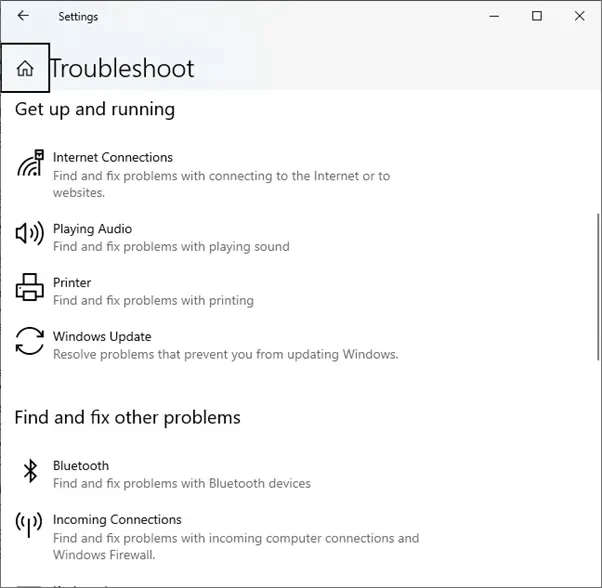
The Troubleshoot menu in the Settings app.
This write-up describes an implementation flaw that can be used to compromise a computer when a crafted diagnostic package is opened. Microsoft initially pushed back on providing a fix for the current versions of Windows, but decided to fix it two years later. Until then, the practical advice is to pay special attention not to open .diagcab files, and mail server operators are recommended to add this file type to their blacklists.
Setup
The researcher tested against Windows 10 version 1903 (OS Build 18362.535); other versions are probably affected as well. No accounts, roles or special tooling are described beyond a Windows machine, a command prompt, and a webdav server of the researcher's own, which was hosted online for demonstration. The attack requires the victim to be running a Microsoft Windows operating system and to interact with the diagnostic file by clicking on it.
Finding it
The Troubleshooters are backed by the Microsoft Support Diagnostics Tool, located at %WINDIR%\System32\msdt.exe. It is associated with the following file types:

File extensions related to Microsoft Support Diagnostics Tool.
Files with the .diagcfg extension are simple XML files that hold a reference to one or more diagnostic packages and provide meta information about them. They are packaged into Microsoft cabinet (.cab) archives and saved with the .diagcab extension. The XML content can look something like this:
<?xml version="1.0" encoding="utf-8"?><PackageConfiguration xmlns="http://www.microsoft.com/schemas/dcm/configuration/2008"><Execution><Package Path="%windir%\diagnostics\system\Audio"><Answers Version="1.0"><Interaction ID="IT_GetDeviceType"><Value>microphone/headset microphone</Value></Interaction></Answers></Package><Name>@%windir%\diagnostics\system\Audio\DiagPackage.dll,-33</Name><Description>@%windir%\diagnostics\system\Audio\DiagPackage.dll,-31</Description><Icon>@%windir%\diagnostics\system\Audio\DiagPackage.dll,-1003</Icon></Execution><Index><Id>AudioRecordingDiagnostic</Id><RequiresAdminPrivileges>true</RequiresAdminPrivileges><PrivacyUrl>http://go.microsoft.com/fwlink/?LinkId=190175</PrivacyUrl><Version>1.0</Version><PublisherName>Microsoft Corporation</PublisherName><Category>@%windir%\system32\DiagCpl.dll,-401</Category><Keyword>@%windir%\system32\DiagCpl.dll,-24</Keyword></Index></PackageConfiguration>
The Path attribute of the referenced packages points to a directory in the file system. Packages under the %WINDIR%\Diagnostics folder are considered valid without any further checking, but anything else is subject to signature verification. That verification is implemented in the helper library sdiageng.dll.
The flaw is in the order of operations. Before verifying the signature, the implementation makes a local copy of the referenced directory to a temporary random destination folder, something like C:\Users\John Doe\AppData\Local\Temp\SDIAG_0636db01-fabd-49ed-bd1d-b3fbbe5fd0ca. That path has a static number of components, which makes the attack deterministic. Because the copy happens before the integrity check, an attacker can save files to arbitrary locations on the file system, within the permissions of the current user, and the check comes too late to matter.
Overwriting existing files is not possible through this vulnerability, because of another security measure. Dropping a new file is enough, though: a file placed in the Windows Startup folder is executed by the operating system the next time the user logs in, which gives code execution.
Exploitation
Step 1: understand the copy routine
The function responsible for the file transfer is SdpCopyDirectory of sdiageng.dll. Its skeleton code looks something like this:
TCHAR attackerControlledSourcePath[MAXPATH]; // this is the "user input" TCHAR tempDirectory[MAXPATH]; GetTempPathW(MAXPATH, tempDirectory); TCHAR allFilesFromAttackerControlledSourcePath[MAXPATH]; StringCchPrintfW(allFilesFromAttackerControlledSourcePath, MAXPATH, L"%s\\*.*", AttackerControlledSourcePath); hFind = FindFirstFile(allFilesFromAttackerControlledSourcePath, &FindFileData); do { TCHAR srcFile[MAXPATH]; TCHAR dstFile[MAXPATH]; StringCchPrintfW(srcFile, MAXPATH, L"%s\\%s", attackerControlledSourcePath, FindFileData.cFileName); StringCchPrintfW(dstFile, MAXPATH, L"%s\\%s", tempDirectory, FindFileData.cFileName); CopyFileW(srcFile, dstFile, TRUE); while (FindNextFile(hFind, &FindFileData) != 0);FindClose(hFind);
The source path comes from the package configuration, so it is attacker controlled. The destination is the temporary directory. Each file name returned by FindFirstFile/FindNextFile is appended to both paths and passed to CopyFileW. The file name returned by the remote file system is appended to the destination path as-is.
Step 2: serve the package from a rogue file system
Since the data source is controlled by the attacker and Windows natively supports network file systems, the pattern can be exploited before the integrity check has a chance to detect the malformed package. A rogue, network-attached file system can gain controlled write access over the destination file system by returning ..\.. components in the file name.
For the proof of concept the researcher chose a webdav server. Webdav is firewall friendly, lightweight and easy to script, but the same attack could probably be mounted with CIFS as well. The UNC path of a webdav share looks something like \\localhost@80\DavWWWRoot.
Step 3: observe the malicious directory listing
An example session of interaction with such a malicious webdav server from the command prompt:
C:\Projects\diagcab>dir \\[redacted]@80\DavWWWRoot\packageVolume in drive \\[redacted]@80\DavWWWRoot has no label.Volume Serial Number is 0000-0000Directory of \\[redacted]@80\DavWWWRoot\package2017. 07. 12. 11:10 <DIR> .2017. 07. 12. 11:10 <DIR> ..2017. 07. 12. 10:48 27 648 ..\..\..\..\AppData\Roaming\Microsoft\Windows\Start Menu\Programs\Startup\calc.exe1 File(s) 27 648 bytes2 Dir(s) 251 292 504 064 bytes free
The listing shows a single file whose name is itself a relative path: ..\..\..\..\AppData\Roaming\Microsoft\Windows\Start Menu\Programs\Startup\calc.exe. When the copy routine appends that name to the temporary directory, the .. components walk up out of the temp folder and the file lands in the user's Startup folder.
Step 4: deliver the crafted .diagcab
Putting this together, the crafted .diagcab file has its package path set to the rogue webdav server. Once the victim opens it, a new file is saved under the Startup directory and is executed by the operating system on the next startup.
Step 5: demo
Diagcab files and a rogue webdav PoC server were hosted online for demonstration, with the note that the server would go down once the free dyno hours at Heroku were exhausted. The exploit can also be tested through a webpage hosted on Github.io.
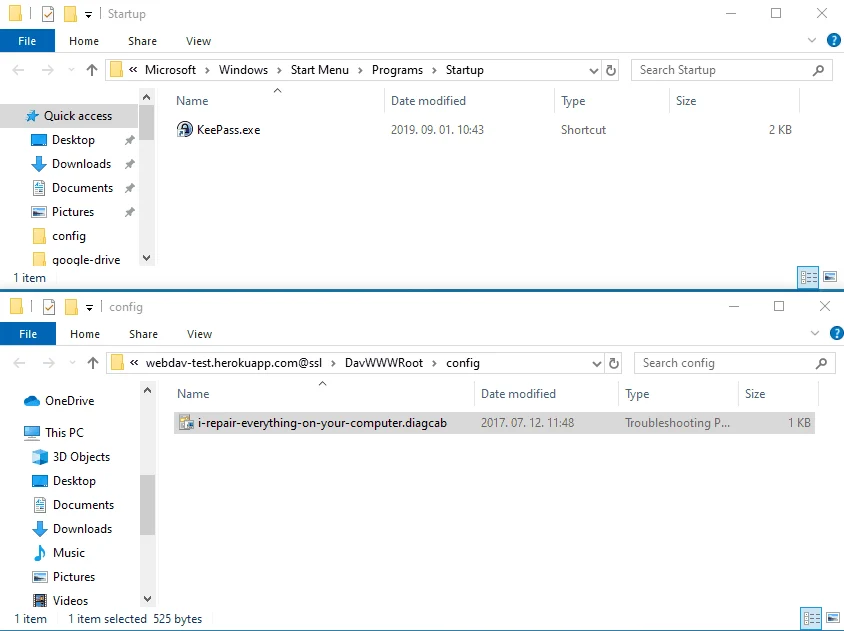
The exploit in work.
The webdav backend server can be inspected by running:
dir \\webdav-test.herokuapp.com@SSL\DavWWWRoot
Executing the diagcab file hosted there configures Windows to launch the calculator at login. To revert the original status of the computer, press CTRL+R, type shell:startup and remove the calc.exe file from the folder. The sources of the webdav server exploit are on Github at https://github.com/irsl/microsoft-diagcab-rce-poc.
Attack vectors and constraints
Threat actors usually distribute malicious files like this by email, through shady websites, or packaged in a torrent. As with every vulnerability, several constraints apply to successful exploitation:
- Email attachments are monitored and scanned by decent email providers, which could detect and reject messages with attachments like this.
- Certain file extensions are blocked by the mail reader or web browser. According to Microsoft, Outlook and Internet Explorer are protected because
.diagcabis blacklisted by these two programs when the file comes from the internet zone. - User interaction is needed to trigger processing of the diagnostic file by clicking on it.
- The user must be running a Microsoft Windows operating system.
During testing, neither Gmail nor Outlook Live blocked .diagcab files at all, so users of these services could be potential targets. The filtering mechanism of some MS Exchange based corporate servers blocked the attachments, but linking to a webdav share circumvented that protection so the diagcab file could be executed in Outlook. Links like that cannot be used ultimately either: they are deactivated by providers like Gmail or Outlook Live and blocked by other security measures of Internet Explorer.
Other popular products such as Google Chrome, Mozilla Firefox or Thunderbird simply pop up the standard open and execute dialog box when they see .diagcab files, and so does Microsoft Edge. Reading email in one of these browsers on a web-based platform is probably the biggest attack vector, especially given that users of those platforms are used to high-quality pre-filtering of the emails they receive.
There is also a Man-in-the-Middle vector: if a .diagcab file is downloaded over a clear-text network channel, such as the plain http links found in vendor support articles, the same attack could be performed by operators of a hostile network, like public Wi-Fi or similar.
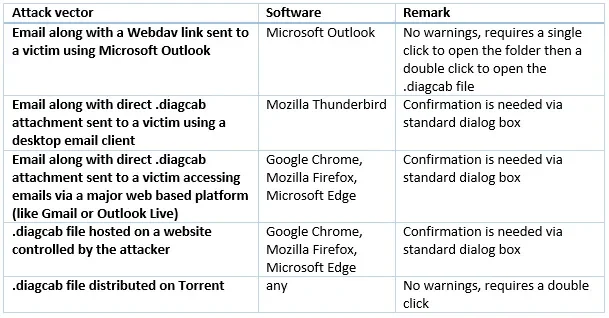
Attack vectors exploiting the .diagcab flaw.
Root cause
The copy of the referenced directory happens before the signature of the package is verified, and a rogue network file system can return ..\.. components in the file name. A name containing ..\.. components is appended to the temporary destination path, so the write escapes the temp directory. The integrity check, based on DiagPackage.cat, runs afterwards, but by then the file has already been written. The static number of components in the temp path makes the attack deterministic.
The researcher's suggested remediation on the Microsoft side is to discard file system entries that have a path separator character in their name. That could be done in the implementation of the FindFirstFile/FindNextFile API calls, which reside in kernel32.dll, so in kernel space. This would protect all applications with a similar vulnerable pattern, regardless of which file system backend returned the nasty entries, covering both local and remote file systems.
Impact
An attacker who convinces a user to open a crafted .diagcab file can write files to any location on the file system, within the permissions of the current user, before the package signature is checked. Overwriting existing files is prevented by another security measure, but dropping a file into the Startup folder leads to code execution at the next login. The victim must click the file, must be on Windows, and the delivery channel must not block the extension; Gmail and Outlook Live did not block it, while Outlook and Internet Explorer do for files from the internet zone.
Fix
Microsoft initially decided not to fix the issue in the current version and closed the case, arguing that no security boundary was bypassed, that the PoC did not escalate permissions, and that the user had to be convinced to download and run a virus-like file. The timeline records the later events:
- 12/22/2019: issue reported
- 12/23/2019: case opened
- 6/1/2020: Microsoft responded that it would not fix the issue
- 9/1/2020: draft of the write-up shared with Microsoft at its request
- 15/1/2020: public advisory
- 7/x/2022: Microsoft block-listed
.diagcabin Edge - 7/29/2022: Google block-listed
.diagcabin Chrome (CVE-2022-2622) - 8/4/2022: Microsoft reassessed the case under its updated Windows bug bar and determined the issue met the criteria for servicing with a security update (CVE-2022-34713)
In the meantime, the researcher does not recommend opening .diagcab files, and advises mail system administrators to tweak the blacklist in their configurations.
Variants to test
- Serve a directory listing whose file names contain
..\components from a webdav share and point a diagnostic package at it. A positive result is a file appearing outside theSDIAG_*temp folder, for example in the Startup folder. - Repeat the same with a CIFS share instead of webdav, since the researcher believed the attack could be mounted that way too. A positive result is the same out-of-tree write.
- Deliver the
.diagcabthrough channels that do not blacklist the extension, such as Gmail or Outlook Live as observed here, or through a browser that only shows the open dialog. A positive result is the file being offered for opening rather than blocked. - Deliver it over plain http so a network attacker can substitute the file. A positive result is a modified package reaching the victim over a clear-text channel.
What happened, in plain words
Windows comes with a built-in helper called Troubleshooting. You can reach it from the Control Panel or from the newer Settings app. Its job is to fix common computer problems for you, quickly and without fuss. The feature is flexible: extra diagnostic packages can be downloaded from the internet, and those packages are protected so that nobody can tamper with them. If the protection check fails, the tool refuses to run the package.
The Troubleshoot menu in the Settings app.
This write-up describes a mistake in how that protection is implemented. The mistake can be used to compromise a computer when a crafted diagnostic package is opened. Microsoft initially pushed back on providing a fix for the current versions of Windows, but two years later reassessed the case and determined it met the criteria for servicing with a security update. Until then, the practical advice is simple: pay special attention not to open .diagcab files, and if you run a mail server, add this file type to your blacklist.
A few words before we start, because this is written for someone who has never read a security report before.
- A vulnerability is a mistake in software that lets someone use the software in a way its makers did not intend, usually to their own advantage.
- Code execution means an attacker gets their own program to run on your computer. It is the worst kind of outcome, because from there the attacker can do most things you can do.
- A package here is a bundle of files that tells the Troubleshooter what to check and how to fix it.
- A signature is a cryptographic stamp that proves a file really came from its claimed author and was not altered on the way. Checking it is like checking the wax seal on an envelope: if the seal is broken, you do not trust the letter.
- A file system is the way your computer organises files into folders. A path is the address of a file, such as
C:\Users\John Doe\Desktop\notes.txt. ..in a path means "go up one folder". So..\..means "go up two folders". This will matter a lot later.
Setup
The researcher tested against Windows 10 version 1903 (OS Build 18362.535); other versions are probably affected as well. No accounts, roles or special tooling are described beyond a Windows machine, a command prompt, and a webdav server of the researcher's own, which was hosted online for demonstration.
A command prompt is the plain text window where you type commands instead of clicking icons. A webdav server is a small web server that behaves like a shared folder: programs can list and download files from it as if it were a network drive. Think of it as a filing cabinet reachable over the internet, where the cabinet itself decides what the list of files looks like.
The attack requires the victim to be running a Microsoft Windows operating system and to interact with the diagnostic file by clicking on it. That last point is important: nothing happens on its own. The victim has to open the file.
Finding it
The Troubleshooters are backed by a program called the Microsoft Support Diagnostics Tool, located at %WINDIR%\System32\msdt.exe. %WINDIR% is a shorthand for the Windows installation folder, usually C:\Windows. It is associated with the following file types:
File extensions related to Microsoft Support Diagnostics Tool.
A file extension is the part after the last dot in a file name, like .txt or .jpg. Windows uses it to decide which program opens the file. Here, the extension .diagcab tells Windows to hand the file to the diagnostics tool.
Files with the .diagcfg extension are simple XML files that hold a reference to one or more diagnostic packages and provide meta information about them. XML is a text format for structured data, a bit like a very formal shopping list with labelled sections. They are packaged into Microsoft cabinet (.cab) archives and saved with the .diagcab extension. A cabinet archive is a single file that holds several files inside it, like a zip file. The XML content can look something like this:
<?xml version="1.0" encoding="utf-8"?><PackageConfiguration xmlns="http://www.microsoft.com/schemas/dcm/configuration/2008"><Execution><Package Path="%windir%\diagnostics\system\Audio"><Answers Version="1.0"><Interaction ID="IT_GetDeviceType"><Value>microphone/headset microphone</Value></Interaction></Answers></Package><Name>@%windir%\diagnostics\system\Audio\DiagPackage.dll,-33</Name><Description>@%windir%\diagnostics\system\Audio\DiagPackage.dll,-31</Description><Icon>@%windir%\diagnostics\system\Audio\DiagPackage.dll,-1003</Icon></Execution><Index><Id>AudioRecordingDiagnostic</Id><RequiresAdminPrivileges>true</RequiresAdminPrivileges><PrivacyUrl>http://go.microsoft.com/fwlink/?LinkId=190175</PrivacyUrl><Version>1.0</Version><PublisherName>Microsoft Corporation</PublisherName><Category>@%windir%\system32\DiagCpl.dll,-401</Category><Keyword>@%windir%\system32\DiagCpl.dll,-24</Keyword></Index></PackageConfiguration>
Line by line, in plain words:
<?xml version="1.0" encoding="utf-8"?>says "this is an XML document, version 1.0, using the UTF-8 character encoding". It is the standard opening line of any XML file.<PackageConfiguration ...>opens the main container. Thexmlnspart is a namespace, a label that says which set of rules this XML follows. It is boilerplate.<Execution>opens the section that describes what should actually run.<Package Path="%windir%\diagnostics\system\Audio">is the key line. It tells the tool where the diagnostic package lives on disk. Here it points at the built-in Audio troubleshooter inside the Windows folder. This is the value an attacker will change.<Answers ...>and<Interaction ...>and<Value>microphone/headset microphone</Value>pre-fill an answer to a question the troubleshooter would otherwise ask the user. It is like filling in a form in advance.<Name>,<Description>and<Icon>point at text and pictures stored inside a.dllfile. A DLL is a library of code and resources that other programs load. The numbers after the comma are resource identifiers, not important here.<Index>opens a section of metadata: an identifier, a flag saying admin rights are required, a privacy link, a version, a publisher name, a category and a keyword. These are labels shown in the interface.- The closing tags mirror the opening ones and end the document.
The Path attribute of the referenced packages points to a directory in the file system. Packages under the %WINDIR%\Diagnostics folder are considered valid without any further checking, but anything else is subject to signature verification. That verification is implemented in the helper library sdiageng.dll. A library here is a file of shared code that the main program calls into; sdiageng.dll is the part that does the checking.
The flaw is in the order of operations. Before verifying the signature, the implementation makes a local copy of the referenced directory to a temporary random destination folder, something like C:\Users\John Doe\AppData\Local\Temp\SDIAG_0636db01-fabd-49ed-bd1d-b3fbbe5fd0ca. That path has a static number of components, which makes the attack deterministic.
Two ideas to unpack there. A temporary folder is a scratch area where programs put files they only need briefly; Windows cleans it up from time to time. "Static number of components" means the path always has the same number of folder levels, so an attacker can count exactly how many .. steps are needed to climb out of it. "Deterministic" means the result is predictable every time, not random.
So the sequence is: copy first, check later. Because the copy happens before the integrity check, an attacker can save files to arbitrary locations on the file system, within the permissions of the current user, and the check comes too late to matter. Permissions are the rules about what your user account is allowed to do; the attack can do anything your own account could do, no more.
Overwriting existing files is not possible through this vulnerability, because of another security measure. Dropping a new file is enough, though: a file placed in the Windows Startup folder is executed by the operating system the next time the user logs in, which gives code execution. The Startup folder is a special folder whose contents Windows launches automatically at login. Putting a program there is like leaving a note on the front door that says "run me when you get home".
Exploitation
Step 1: understand the copy routine
The function responsible for the file transfer is SdpCopyDirectory of sdiageng.dll. A function is a named block of code that does one job; this one copies a folder. Its skeleton code looks something like this:
TCHAR attackerControlledSourcePath[MAXPATH]; // this is the "user input" TCHAR tempDirectory[MAXPATH]; GetTempPathW(MAXPATH, tempDirectory); TCHAR allFilesFromAttackerControlledSourcePath[MAXPATH]; StringCchPrintfW(allFilesFromAttackerControlledSourcePath, MAXPATH, L"%s\\*.*", AttackerControlledSourcePath); hFind = FindFirstFile(allFilesFromAttackerControlledSourcePath, &FindFileData); do { TCHAR srcFile[MAXPATH]; TCHAR dstFile[MAXPATH]; StringCchPrintfW(srcFile, MAXPATH, L"%s\\%s", attackerControlledSourcePath, FindFileData.cFileName); StringCchPrintfW(dstFile, MAXPATH, L"%s\\%s", tempDirectory, FindFileData.cFileName); CopyFileW(srcFile, dstFile, TRUE); while (FindNextFile(hFind, &FindFileData) != 0);FindClose(hFind);
Line by line, in plain words:
TCHAR attackerControlledSourcePath[MAXPATH];declares a text buffer to hold the source path. The comment says it all: this is the "user input", meaning the value comes from the package configuration, which the attacker writes.TCHAR tempDirectory[MAXPATH]; GetTempPathW(MAXPATH, tempDirectory);declares a buffer and asks Windows to fill it with the path of the temporary folder. This is the destination.TCHAR allFilesFromAttackerControlledSourcePath[MAXPATH];declares one more buffer, for a search pattern.StringCchPrintfW(..., L"%s\\*.*", AttackerControlledSourcePath);builds the pattern "everything in the source folder" by gluing\*.*onto the source path.*.*is the wildcard for "all files".hFind = FindFirstFile(...);asks the file system for the first entry matching that pattern.hFindis a handle, a kind of ticket that keeps track of the search.do { ... }starts a loop that runs once per file found.StringCchPrintfW(srcFile, ..., L"%s\\%s", attackerControlledSourcePath, FindFileData.cFileName);builds the full source path by gluing the file's name onto the source folder.StringCchPrintfW(dstFile, ..., L"%s\\%s", tempDirectory, FindFileData.cFileName);builds the full destination path the same way, using the temporary folder.CopyFileW(srcFile, dstFile, TRUE);copies the file. TheTRUEmeans "do not overwrite if the destination already exists".while (FindNextFile(hFind, &FindFileData) != 0);moves to the next file and repeats until there are none left.FindClose(hFind);releases the search handle.
The source path comes from the package configuration, so it is attacker controlled. The destination is the temporary directory. Each file name returned by FindFirstFile/FindNextFile is appended to both paths and passed to CopyFileW. The file name returned by the remote file system is appended to the destination path as-is. A path separator is the backslash \ that divides folder names in a Windows path. If a file name is allowed to contain one, the name stops being just a name and starts being directions.
Step 2: serve the package from a rogue file system
Since the data source is controlled by the attacker and Windows natively supports network file systems, the pattern can be exploited before the integrity check has a chance to detect the malformed package. A rogue, network-attached file system can gain controlled write access over the destination file system by returning ..\.. components in the file name.
In other words: the attacker does not need to break into the victim's computer to control the list of file names. The attacker simply runs the server that hands out that list, and the victim's Windows trusts it. It is like a delivery driver who is told by the sender what the parcels are called; if a parcel is labelled "put me in the kitchen cupboard", the driver follows the label.
For the proof of concept the researcher chose a webdav server. Webdav is firewall friendly, lightweight and easy to script, but the same attack could probably be mounted with CIFS as well. CIFS is the traditional Windows way of sharing folders over a network, the one behind the familiar \\server\share addresses. A firewall is the filter that decides which network traffic is allowed in and out; webdav usually travels over ordinary web ports, which firewalls tend to allow.
The UNC path of a webdav share looks something like \\localhost@80\DavWWWRoot. A UNC path is the Windows address format for a network location, starting with two backslashes. @80 means port 80, the standard web port, and DavWWWRoot is the name Windows gives to the root of a webdav share.
Step 3: observe the malicious directory listing
An example session of interaction with such a malicious webdav server from the command prompt:
C:\Projects\diagcab>dir \\[redacted]@80\DavWWWRoot\packageVolume in drive \\[redacted]@80\DavWWWRoot has no label.Volume Serial Number is 0000-0000Directory of \\[redacted]@80\DavWWWRoot\package2017. 07. 12. 11:10 <DIR> .2017. 07. 12. 11:10 <DIR> ..2017. 07. 12. 10:48 27 648 ..\..\..\..\AppData\Roaming\Microsoft\Windows\Start Menu\Programs\Startup\calc.exe1 File(s) 27 648 bytes2 Dir(s) 251 292 504 064 bytes free
Line by line, in plain words:
C:\Projects\diagcab>dir \\[redacted]@80\DavWWWRoot\packageis the command typed by the researcher.dirmeans "list the contents of a folder". The folder being listed ispackageon the webdav share.[redacted]is the local loopback address, meaning "this same computer", so the researcher is talking to their own test server.Volume in drive ... has no label.andVolume Serial Number is 0000-0000are the usual header lines Windows prints for a drive. The zero serial number is what a fake or network drive often reports.Directory of ...repeats which folder is being listed.2017. 07. 12. 11:10 <DIR> .and the matching..line are the standard entries for "this folder" and "the parent folder". Every listing has them.2017. 07. 12. 10:48 27 648 ..\..\..\..\AppData\Roaming\Microsoft\Windows\Start Menu\Programs\Startup\calc.exeis the interesting line. The date and the size27 648are ordinary file metadata. The name is not a name at all: it is a relative path.calc.exeis the Windows calculator program.1 File(s) 27 648 bytesand2 Dir(s) 251 292 504 064 bytes freeare the summary lines: one file, its total size, two folders, and the free space reported by the server.
The listing shows a single file whose name is itself a relative path: ..\..\..\..\AppData\Roaming\Microsoft\Windows\Start Menu\Programs\Startup\calc.exe. When the copy routine appends that name to the temporary directory, the .. components walk up out of the temp folder and the file lands in the user's Startup folder. The .. components walk up out of the temp folder and the file lands in the user's Startup folder.
Step 4: deliver the crafted .diagcab
Putting this together, the crafted .diagcab file has its package path set to the rogue webdav server. Once the victim opens it, a new file is saved under the Startup directory and is executed by the operating system on the next startup.
Why this order of steps? The attacker needs three things to line up: a package that points somewhere the attacker controls, a server that returns a hostile file name, and a victim who clicks. The first two are entirely in the attacker's hands. The third is the only part that depends on the victim, which is why the delivery channels discussed later matter so much.
Step 5: demo
Diagcab files and a rogue webdav PoC server were hosted online for demonstration, with the note that the server would go down once the free dyno hours at Heroku were exhausted. PoC stands for proof of concept: a small demonstration that the attack really works, not a weaponised tool. The exploit can also be tested through a webpage hosted on Github.io.
The exploit in work.
The webdav backend server can be inspected by running:
dir \\webdav-test.herokuapp.com@SSL\DavWWWRoot
This is the same dir command as before, pointed at the public demonstration server instead of the local one. @SSL tells Windows to use an encrypted connection, the same kind your browser uses for https. Running it lets anyone see the hostile listing for themselves.
Executing the diagcab file hosted there configures Windows to launch the calculator at login. To revert the original status of the computer, press CTRL+R, type shell:startup and remove the calc.exe file from the folder. shell:startup is a shortcut that opens the Startup folder directly, so you do not have to navigate to it by hand. The sources of the webdav server exploit are on Github at https://github.com/irsl/microsoft-diagcab-rce-poc.
Attack vectors and constraints
An attack vector is the route by which an attack reaches its victim: email, a website, a download link. Threat actors usually distribute malicious files like this by email, through shady websites, or packaged in a torrent. As with every vulnerability, several constraints apply to successful exploitation:
- Email attachments are monitored and scanned by decent email providers, which could detect and reject messages with attachments like this.
- Certain file extensions are blocked by the mail reader or web browser. According to Microsoft, Outlook and Internet Explorer are protected because
.diagcabis blacklisted by these two programs when the file comes from the internet zone. The internet zone is a Windows label for files that arrived from outside your machine; Windows treats them with more suspicion. - User interaction is needed to trigger processing of the diagnostic file by clicking on it.
- The user must be running a Microsoft Windows operating system.
During testing, neither Gmail nor Outlook Live blocked .diagcab files at all, so users of these services could be potential targets. The filtering mechanism of some MS Exchange based corporate servers blocked the attachments, but linking to a webdav share circumvented that protection so the diagcab file could be executed in Outlook. MS Exchange is Microsoft's corporate mail server software. Links like that cannot be used ultimately either: they are deactivated by providers like Gmail or Outlook Live and blocked by other security measures of Internet Explorer.
Other popular products such as Google Chrome, Mozilla Firefox or Thunderbird simply pop up the standard open and execute dialog box when they see .diagcab files, and so does Microsoft Edge. Reading email in one of these browsers on a web-based platform is probably the biggest attack vector, especially given that users of those platforms are used to high-quality pre-filtering of the emails they receive. That last point is a human one: people trust their mail provider to filter the bad stuff, so they click more readily.
There is also a Man-in-the-Middle vector: if a .diagcab file is downloaded over a clear-text network channel, such as the plain http links found in vendor support articles, the same attack could be performed by operators of a hostile network, like public Wi-Fi or similar. A Man-in-the-Middle attack is when someone sits between you and the server and can read or change what passes. Clear-text means unencrypted, so anyone on the same network can see and alter it. The write-up links a vendor support article with plain http links as an example.
Attack vectors exploiting the .diagcab flaw.
Root cause
The copy of the referenced directory happens before the signature of the package is verified, and the copy routine trusts the file names returned by the remote file system. A name containing ..\.. components is appended to the temporary destination path, so the write escapes the temp directory. Sanitisation means cleaning input before using it, for example stripping out characters that have special meaning. The integrity check, based on DiagPackage.cat, runs afterwards, but by then the file has already been written. DiagPackage.cat is the catalogue file that holds the signature information. The static number of components in the temp path makes the traversal distance predictable.
The researcher's suggested remediation on the Microsoft side is to discard file system entries that have a path separator character in their name. That could be done in the implementation of the FindFirstFile/FindNextFile API calls, which reside in kernel32.dll, so in kernel space. An API is a set of functions that one piece of software offers to others; think of it as the service counter where programs place requests. FindFirstFile and FindNextFile are the two functions that list folder contents. Kernel space is the privileged core of the operating system, where the most fundamental rules live. Fixing it there would protect all applications with a similar vulnerable pattern, regardless of which file system backend returned the nasty entries, covering both local and remote file systems.
Impact
An attacker who convinces a user to open a crafted .diagcab file can write files to any location on the file system, within the permissions of the current user, before the package signature is checked. Overwriting existing files is prevented by another security measure, but dropping a file into the Startup folder leads to code execution at the next login. The victim must click the file, must be on Windows, and the delivery channel must not block the extension; Gmail and Outlook Live did not block it, while Outlook and Internet Explorer do for files from the internet zone.
Fix
Microsoft initially decided not to fix the issue in the current version and closed the case, arguing that no security boundary was bypassed, that the PoC did not escalate permissions, and that the user had to be convinced to download and run a virus-like file. A security boundary is a line the system promises attackers cannot cross, such as between one user account and another. Microsoft's position was that this attack stays inside the user's own territory. The timeline records the later change of position:
- 12/22/2019: issue reported
- 12/23/2019: case opened
- 6/1/2020: Microsoft responded that it would not fix the issue
- 9/1/2020: draft of the write-up shared with Microsoft at its request
- 15/1/2020: public advisory
- 7/x/2022: Microsoft block-listed
.diagcabin Edge - 7/29/2022: Google block-listed
.diagcabin Chrome (CVE-2022-2622) - 8/4/2022: Microsoft reassessed the case under its updated Windows bug bar and determined the issue met the criteria for servicing with a security update (CVE-2022-34713)
A CVE is a public catalogue number given to a known vulnerability so that everyone can refer to the same thing. A bug bar is the internal threshold a vendor uses to decide whether a reported issue is serious enough to patch.
In the meantime, the researcher does not recommend opening .diagcab files, and advises mail system administrators to tweak the blacklist in their configurations.
Variants to test
- Serve a directory listing whose file names contain
..\components from a webdav share and point a diagnostic package at it. A positive result is a file appearing outside theSDIAG_*temp folder, for example in the Startup folder. - Repeat the same with a CIFS share instead of webdav, since the researcher believed the attack could be mounted that way too. A positive result is the same out-of-tree write.
- Deliver the
.diagcabthrough channels that do not blacklist the extension, such as Gmail or Outlook Live as observed here, or through a browser that only shows the open dialog. A positive result is the file being offered for opening rather than blocked. - Deliver it over plain http so a network attacker can substitute the file. A positive result is a modified package reaching the victim over a clear-text channel.
Glossary
- API: a set of functions one piece of software offers to others, like a service counter where programs place requests.
- Attack vector: the route by which an attack reaches its victim, such as email, a website or a download link.
- Bug bar: a vendor's internal threshold for deciding whether a reported issue is serious enough to patch.
- Cabinet archive: a single file that holds several files inside it, like a zip file.
- CIFS: the traditional Windows way of sharing folders over a network.
- Clear-text: unencrypted, so anyone on the same network can read or alter the traffic.
- Code execution: an attacker getting their own program to run on your computer.
- Command prompt: the plain text window where you type commands instead of clicking icons.
- CVE: a public catalogue number given to a known vulnerability so everyone can refer to the same thing.
- DLL: a library of code and resources that other programs load.
- File extension: the part after the last dot in a file name, which Windows uses to decide which program opens the file.
- File system: the way a computer organises files into folders.
- Firewall: the filter that decides which network traffic is allowed in and out.
- Function: a named block of code that does one job.
- Internet zone: a Windows label for files that arrived from outside your machine, treated with more suspicion.
- Kernel space: the privileged core of the operating system where the most fundamental rules live.
- Library: a file of shared code that a main program calls into.
- Man-in-the-Middle: an attack where someone sits between you and a server and can read or change what passes.
- MS Exchange: Microsoft's corporate mail server software.
- Package: a bundle of files that tells the Troubleshooter what to check and how to fix it.
- Path: the address of a file or folder, such as
C:\Users\John Doe\Desktop\notes.txt. - Path separator: the backslash
\that divides folder names in a Windows path. - Permissions: the rules about what a user account is allowed to do.
- PoC: proof of concept, a small demonstration that an attack really works.
- Sanitisation: cleaning input before using it, for example stripping characters that have special meaning.
- Security boundary: a line the system promises attackers cannot cross, such as between two user accounts.
- Signature: a cryptographic stamp proving a file came from its claimed author and was not altered.
- Startup folder: a special folder whose contents Windows launches automatically at login.
- Temporary folder: a scratch area where programs put files they only need briefly.
- UNC path: the Windows address format for a network location, starting with two backslashes.
- Vulnerability: a mistake in software that lets someone use it in a way its makers did not intend.
- Webdav server: a small web server that behaves like a shared folder, letting programs list and download files as if it were a network drive.
- XML: a text format for structured data, like a very formal shopping list with labelled sections.
..: in a path, means "go up one folder".



