Unrestricted File Upload Lead to Stored XSS at Microsoft main domain
The file upload form on a Microsoft page accepted an SVG file with an embedded script because the server did not properly validate the file type. An attacker could upload such a file and have stored JavaScript execute in the browser of anyone who visited the uploaded file's endpoint.
 Published on medium.com
I am Sokol Çavdarbasha, a 21-year-old Security Researcher from Kosovo. My engagement in the field of cybersecurity is marked by an unyielding dedication to enhance the safety of the digital realm, striving to contribute to a more secure internet environment.
The full write-up lives on its author's site
It belongs to its author, so we link to it rather than copy it. The other two tabs are our own rewrites, checked against it.
Context
Microsoft runs a feedback and concern form on its main domain, at the page https://www.microsoft.com/en-us/concern/bing. The feature lets a visitor attach a file to a message sent to Microsoft, and the report describes it as a file upload form. The researcher, Sokol Çavdarbasha, found that this form accepted a file whose declared type and name were changed in flight, stored it, and served it back from an endpoint in a way that executed script in the browser. The result is a stored cross-site scripting (XSS) issue reached through an unrestricted file upload.
The report frames the general problem first: an unrestricted file upload is a vulnerability where a web application accepts arbitrary files without validating the file type or content during the upload process. When that check is missing, an attacker can upload scripts or executables and potentially compromise the application and its users. The specific risk the researcher focuses on is stored XSS: malicious code is injected into the application, permanently stored on the server, and executed in the browsers of users who later access the affected page.
Setup
The report does not describe any account, role or authentication requirement for the form, and it does not list browser, proxy or tool versions. The only tool named is an intercepting proxy, referred to as the Intercepter, used to modify the upload request before it is sent. The precondition is simply access to the concern form and the ability to submit a file through it.
Finding it
The researcher's reasoning is that the upload form on Microsoft's main domain did not properly restrict what could be uploaded. The steps start with a file with a .jpg extension, and the request that carries it exposes fields the client controls: the name, the filename and the Content-Type. The steps show that changing those client-supplied values to declare an SVG document was enough to have the file stored and served back. SVG is XML and can carry script, so a stored SVG served from the application's own origin becomes stored XSS.
Exploitation
Step 1: Open the concern form
Visit the page that hosts the upload form:
https://www.microsoft.com/en-us/concern/bing
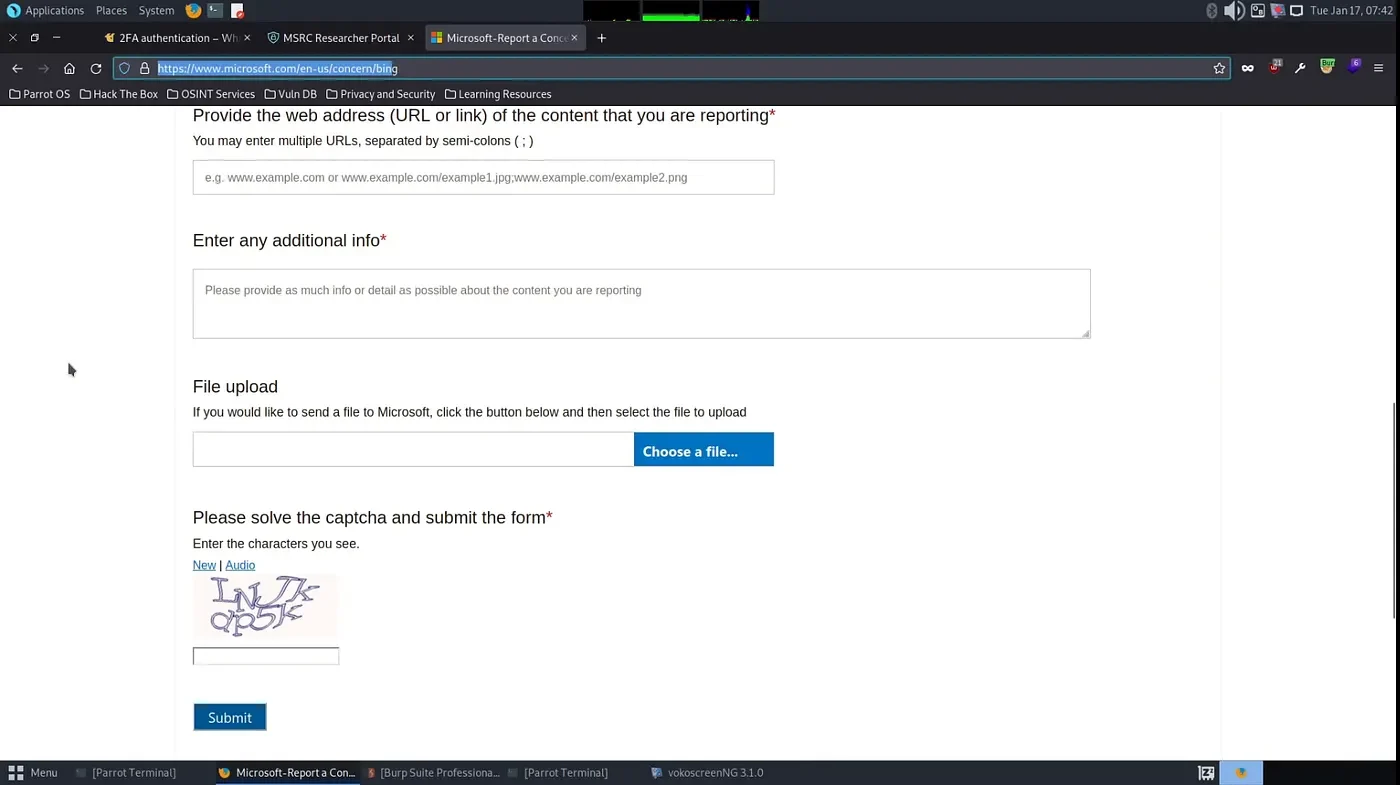
The screenshot shows the concern page with the file upload form that the rest of the steps operate on.
Step 2: Choose a file with a .jpg extension
Select a file with a .jpg extension in the upload form. This is the file the form expects, and it is the starting point for the request that will be modified.
Step 3: Intercept the upload request
Turn on the intercepting proxy and press the Upload button. The request is held before it reaches the server so its fields can be edited.
Step 4: Rewrite the file metadata and content type
In the intercepted request, change the name to test.svg, change the filename to test.svg, and change the Content-Type to image/svg+xml. The uploaded content is SVG code carrying an XSS payload.
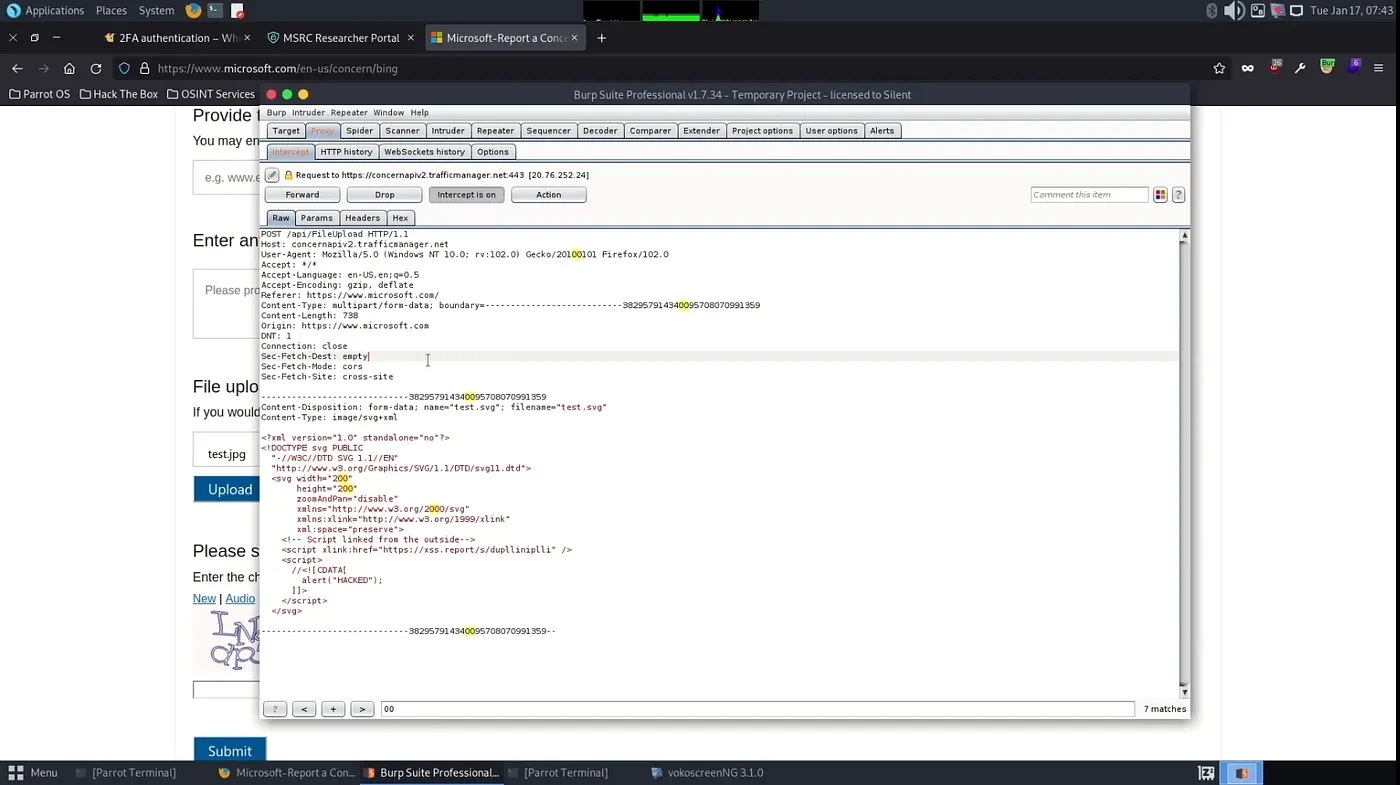
The screenshot shows the intercepted request with the modified name, filename and Content-Type values and the SVG payload in the body.
The three edits were made together: name and filename set to test.svg, and Content-Type set to image/svg+xml. Because the body is SVG, it can contain script, which a JPEG could not.
Step 5: Forward the request and read the stored location
Respond to the request, meaning forward it on, and the response contains the endpoint where the file has been uploaded.
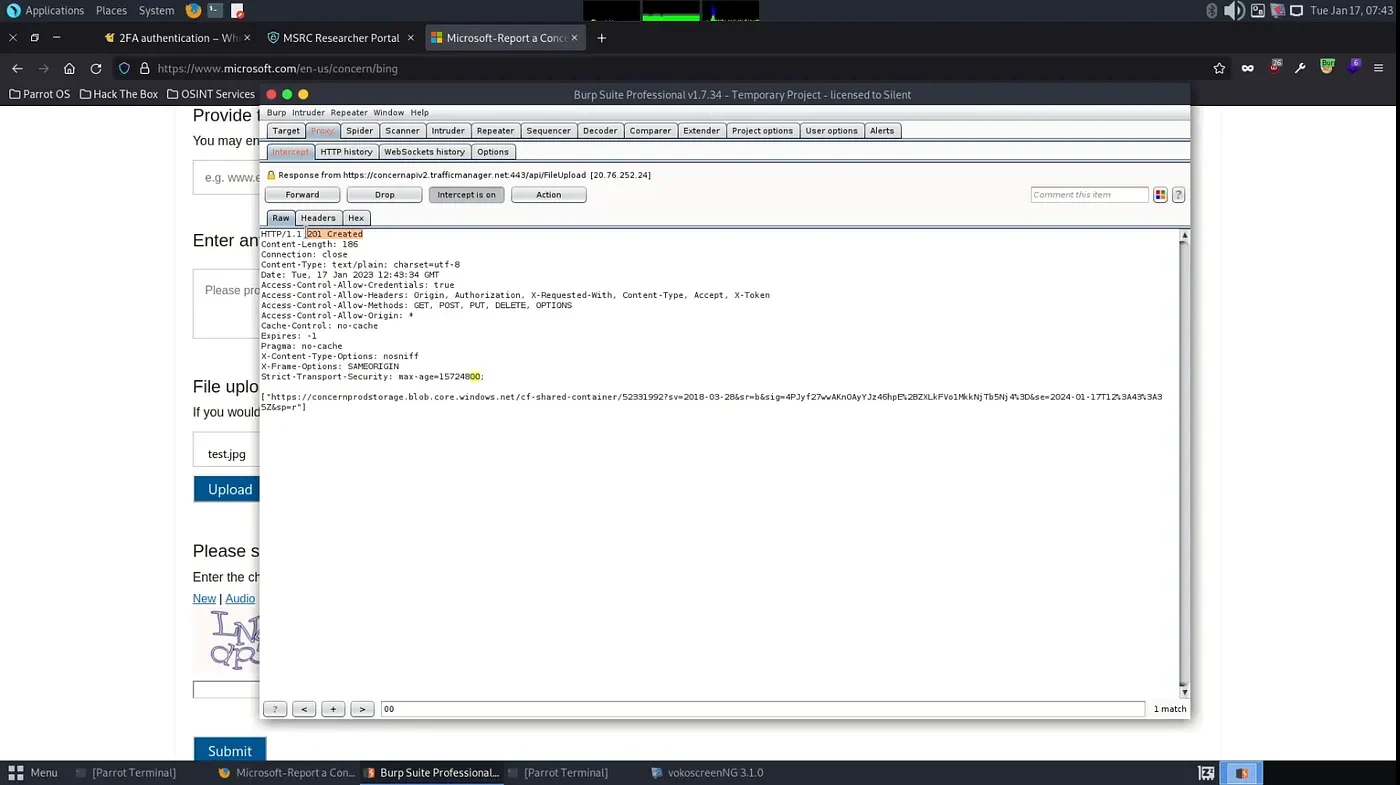
The screenshot shows the response with the endpoint at which the uploaded file is stored.
Step 6: Visit the endpoint
Open the endpoint returned in the previous step and the XSS triggers.
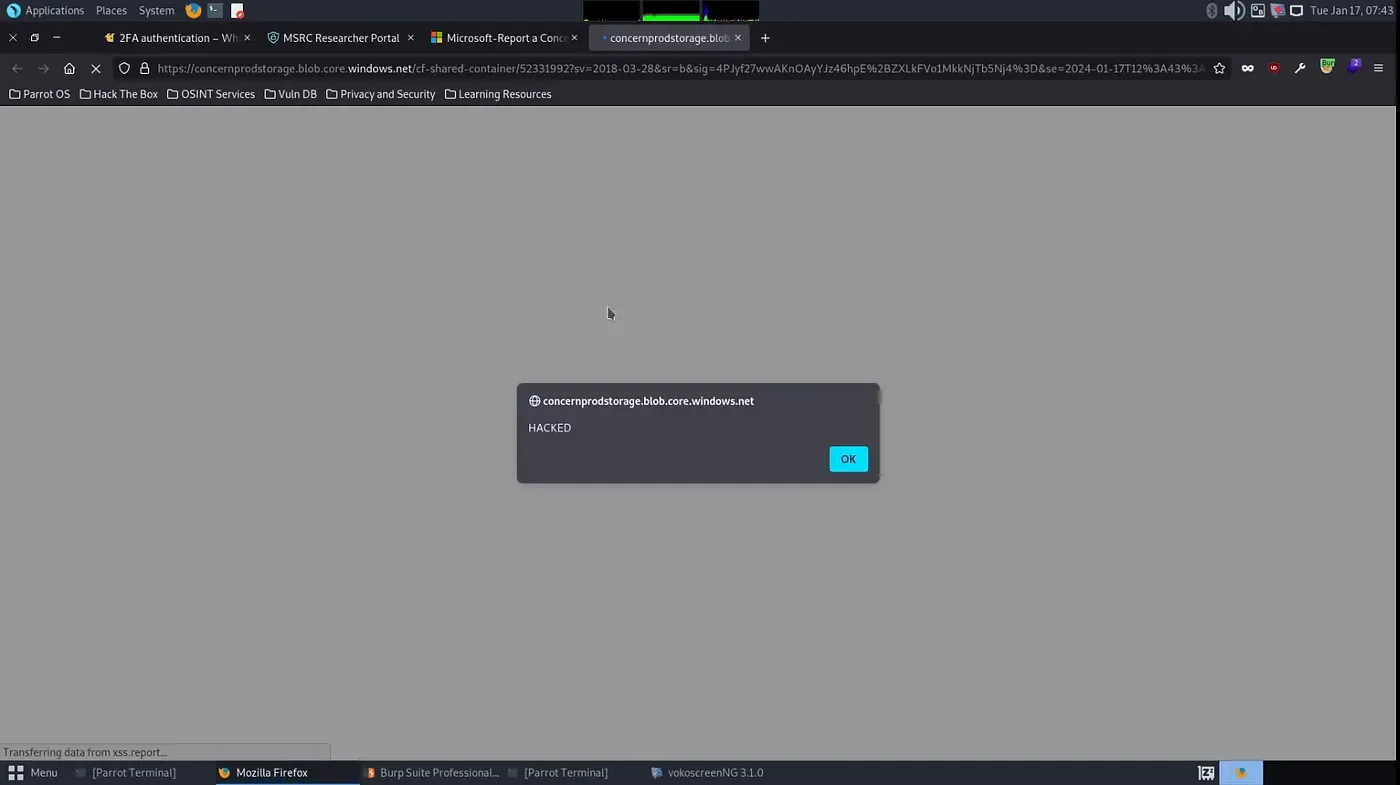
The screenshot shows the stored file being served and the script executing.
The report also includes a proof-of-concept video, titled Stored XSS on Microsoft PoC, which shows the same sequence end to end.
Root cause
The steps show that an SVG document was accepted and stored after the client changed the declared name and type. The client-supplied filename, name and Content-Type were enough to have an SVG document accepted and stored, and the stored file was then served back from an endpoint in a context where the browser executed its script. The steps show that the declared type was enough for the file to be accepted, and that opening the returned endpoint triggered the XSS. The report does not show the server-side code, so the exact validation logic and the response headers of the stored endpoint are not described; the mechanism above is what the steps demonstrate.
Impact
If an attacker exploits the unrestricted file upload, they can upload a file containing malicious code, and that code is executed whenever a user accesses the compromised page. The report lists the possible consequences as sensitive data theft, unauthorised access, or even complete control over the victim's browser. These are the researcher's stated potential impacts; the report does not quantify how many users could reach the stored endpoint or describe any additional conditions beyond a victim visiting it.
Fix
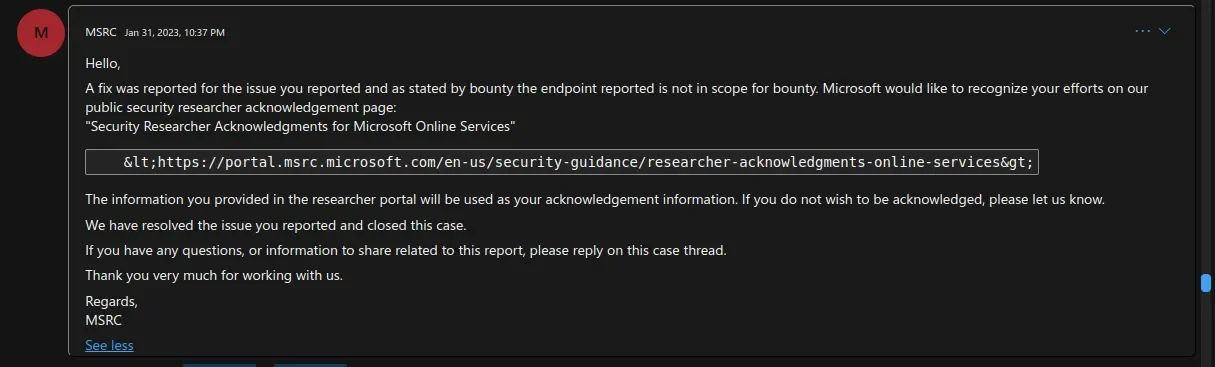
The response from the MSRC team is referenced in the article, but its content is not reproduced in the text available here.
Based on the mechanism shown, the changes that would address it are server-side validation of the actual file content rather than the client-supplied filename and Content-Type, rejection of SVG and other active content in an image upload, and serving stored uploads with headers and from an origin that prevent script execution, for example a separate domain or a download-only response.
Variants to test
- Try other active content types in an image upload field: submit an SVG with a script payload while declaring
image/svg+xml, and check whether the stored endpoint returns it with a content type that lets the browser render it. A positive result is script execution when the returned endpoint is opened. - Try HTML content declared as an image: upload an HTML document with a script payload and a
.jpgor image content type, then open the stored endpoint. A positive result is the browser rendering the HTML and running the script. - Try filename extension confusion: keep the declared content type as an image but change the
filenameto.svgor.html, and check whether the server uses the extension to decide how the stored file is served. A positive result is the stored file being served as active content. - Try content-type confusion in the other direction: send an SVG body with
Content-Type: image/jpegand see whether the server sniffs the content and serves it as SVG. A positive result is the browser treating the response as SVG and executing the payload. - Try the same metadata edits on other upload forms on the same domain, such as attachment fields in feedback or contact forms, and check whether the response discloses a stored endpoint. A positive result is a returned URL that serves the uploaded file with an active content type.
What happened, in plain words
Microsoft has a web page where anyone can send a message to the company about Bing, including attaching a file. A security researcher, Sokol Çavdarbasha, found that this page did not check properly what kind of file was being uploaded. He chose a file with a .jpg extension, then changed the name, filename and Content-Type in the request and uploaded SVG code with an XSS payload. Microsoft's server accepted it, stored it, and later served it back from a web address. When someone opened that address, the script ran in their browser. This kind of problem is called stored cross-site scripting (XSS), and it was made possible by an unrestricted file upload.
The rest of this article explains, step by step, what that means, how the researcher did it, and why it matters, in language that assumes no prior security knowledge.
Introduction
In today's digital world, cybersecurity vulnerabilities continue to pose a significant threat to organizations. One such vulnerability is unrestricted file upload, which can lead to devastating consequences if not properly addressed. In this blog post, we will explore a recent case involving unrestricted file upload at Microsoft's main domain, highlighting the potential risks and impacts of such a security flaw.
Understanding Unrestricted File Upload
Unrestricted file upload refers to a vulnerability that allows an attacker to upload arbitrary files to a web application, without any type of validation or restriction. This vulnerability can occur when the application does not properly check the file type or content during the upload process. As a result, an attacker can upload malicious files, such as scripts or executables, and potentially compromise the security of the application and its users.
Think of a web form that lets you attach a file as a mail slot. If the slot accepts any envelope without checking what is inside, someone can post a letter that, when opened, does something harmful. In web terms, the "envelope" is the file, and the "something harmful" is often a script that runs in a visitor's browser.
The Importance of Security at Microsoft's Main Domain
As one of the leading tech giants, Microsoft plays a critical role in maintaining the world's digital infrastructure. With millions of users accessing their services, security becomes paramount. However, even industry leaders like Microsoft can fall victim to vulnerabilities if not thoroughly assessed and addressed in a timely manner.
The Stored Cross-Site Scripting (XSS) Vulnerability
One of the primary risks associated with unrestricted file upload is the potential for a stored Cross-Site Scripting (XSS) attack. In a stored XSS attack, malicious code is injected into a vulnerable web application and then permanently stored on the server. When other users access the affected page, the malicious code is executed in their browsers, leading to various adverse consequences.
To understand stored XSS, imagine a guestbook in a hotel lobby. If anyone can write anything in it, a prankster could write a note that says "read this and your wallet will be stolen" and every guest who reads it might act on it. In a web page, the "note" is a piece of code (usually JavaScript) that the browser runs automatically when the page is loaded. Because the code is saved on the server, every visitor who views that page runs it. That is why it is called "stored": the harmful content is stored once and served to many.
The Impact of the Vulnerability
In the case of Microsoft's main domain, if an attacker were to exploit the unrestricted file upload vulnerability, they could upload a file containing malicious code. This code could then be executed whenever a user accesses the compromised page, potentially leading to sensitive data theft, unauthorized access, or even complete control over the victim's browser.
Steps To Reproduce
Below are the exact steps the researcher followed. Each step is explained in plain language, including why it was done.
Step 1: Visit the concern page
This is the page that hosts the file upload form. The screenshot shows the form where a visitor can attach a file to a message to Microsoft. The researcher started here because this is the feature that accepts files.
Step 2: Choose a file with a .jpg extension
- Go to File Upload form and choose a file with .jpg extension
A .jpg file is an image format that the form is designed to accept. The researcher picked a file with a .jpg extension, as the step describes.
Step 3: Turn on the intercepter and press Upload
- Turn on the Intercepter and press “Upload” button
An intercepting proxy (here called the Intercepter) is a tool that sits between your browser and the website. It can pause a request before it leaves your computer, let you edit it, and then send it on. The researcher used it to change the upload request after the browser had prepared it but before the server received it. This is necessary because the browser normally fills in the file details automatically and does not let you edit them directly.
Step 4: Change the file details and content type
- Change the “name” to test.svg, the “filename” to test.svg and Content-Type to image/svg+xml and upload your svg code with xss payload on it
In the intercepted request, three fields were changed:
nameandfilenamewere set totest.svg. These fields tell the server what the file is called. Thenameandfilenamewere changed from the original file totest.svg.Content-Typewas set toimage/svg+xml. This header tells the server what kind of data is in the body of the request.image/svg+xmlis the official type for SVG images.- The body of the request was replaced with SVG code that contains a script payload. SVG is a format for drawing vector images, but it is based on XML, which can include script. A JPEG cannot contain script, but an SVG can.
The screenshot shows the intercepted request with these modified values and the SVG payload in the body.
After these changes, the server accepted and stored the file, and the response gave the endpoint where it was uploaded.
Step 5: Forward the request and find the stored location
- Respond the Request and you will get in response the endpoint where that file has been uploaded
"Respond the Request" means to let the request continue to the server (forward it). The server processes the upload and replies with a response. In this case, the response contains a web address (an endpoint) where the uploaded file is now stored. The researcher noted this address because it is the place where the file can be accessed later.
Step 6: Visit the endpoint and trigger the XSS
- Visit the endpoint and you will get XSS triggered.
When the researcher opened the endpoint in a browser, the browser loaded the stored SVG file. Because the SVG contains a script, the browser executed that script. This is the stored XSS: the harmful code was stored on Microsoft's server and ran when the file was viewed. The screenshot shows the script executing.
The PoC Video:
Stored XSS on Microsoft PoC
The report also includes a proof-of-concept video that shows the entire sequence from start to finish.
The Response from MSRC Team
The report references a response from the Microsoft Security Response Center (MSRC), the team that handles security reports for Microsoft. The content of that response is not reproduced in the text available here.
Why this works: the root cause
The steps show that an SVG document was accepted and stored after the client changed the declared name and type. The client-supplied filename, name and Content-Type were enough to have an SVG document accepted and stored, and the stored file was then served back from an endpoint in a context where the browser executed its script. The steps show that the declared type was enough for the file to be accepted, and that opening the returned endpoint triggered the XSS. The report does not show the server-side code, so the exact validation logic and the response headers of the stored endpoint are not described; the mechanism above is what the steps demonstrate.
Impact
If an attacker exploits the unrestricted file upload, they can upload a file containing malicious code, and that code is executed whenever a user accesses the compromised page. The report lists the possible consequences as sensitive data theft, unauthorised access, or even complete control over the victim's browser. These are the researcher's stated potential impacts; the report does not quantify how many users could reach the stored endpoint or describe any additional conditions beyond a victim visiting it.
Fix
The report does not describe the fix that Microsoft applied. The response from the MSRC team is referenced in the article, but its content is not reproduced in the text available here.
Based on the mechanism shown, the changes that would address it are server-side validation of the actual file content rather than the client-supplied filename and Content-Type, rejection of SVG and other active content in an image upload, and serving stored uploads with headers and from an origin that prevent script execution, for example a separate domain or a download-only response.
Variants to test
If you are learning to test for this kind of issue, here are variations that follow the same idea. Each one changes a different detail and checks whether the server still trusts what the client says.
- Try other active content types in an image upload field: submit an SVG with a script payload while declaring
image/svg+xml, and check whether the stored endpoint returns it with a content type that lets the browser render it. A positive result is script execution when the returned endpoint is opened. - Try HTML content declared as an image: upload an HTML document with a script payload and a
.jpgor image content type, then open the stored endpoint. A positive result is the browser rendering the HTML and running the script. - Try filename extension confusion: keep the declared content type as an image but change the
filenameto.svgor.html, and check whether the server uses the extension to decide how the stored file is served. A positive result is the stored file being served as active content. - Try content-type confusion in the other direction: send an SVG body with
Content-Type: image/jpegand see whether the server sniffs the content and serves it as SVG. A positive result is the browser treating the response as SVG and executing the payload. - Try the same metadata edits on other upload forms on the same domain, such as attachment fields in feedback or contact forms, and check whether the response discloses a stored endpoint. A positive result is a returned URL that serves the uploaded file with an active content type.
Glossary
- API: A set of rules that lets one piece of software talk to another. In web terms, it is often a way for a browser to send data to a server and get a response.
- Cookie: A small piece of data that a website stores in your browser, often used to remember who you are or to keep you logged in.
- Cross-Site Scripting (XSS): A vulnerability where an attacker can make a website run their own script in another user's browser. Stored XSS means the script is saved on the server and runs for every visitor who views the affected page.
- Content-Type: A label in an HTTP request or response that tells the receiver what kind of data is being sent, for example
image/jpegfor a JPEG image orimage/svg+xmlfor an SVG image. - Endpoint: A specific web address (URL) where a service can be reached or where a file is stored and can be accessed.
- Executable: A file that contains a program that can run on a computer.
- File upload: A feature on a website that lets you send a file from your computer to the server.
- Filename: The name of a file, including its extension (like
.jpgor.svg), which often hints at the file type. - HTTP request: The message a browser sends to a server to ask for a page or to submit data.
- HTTP response: The message a server sends back to the browser after a request.
- Intercepting proxy: A tool that sits between your browser and a website, letting you pause, inspect, and change requests before they are sent.
- JPEG: A common image file format, often used for photographs. It cannot contain scripts.
- MSRC: Microsoft Security Response Center, the team that handles security reports for Microsoft.
- Payload: The part of an attack that does the harmful action, for example the script code inside a file.
- PoC (Proof of Concept): A demonstration that a vulnerability exists, often a video or a set of steps.
- Script: A small program, often written in JavaScript, that runs in a browser or on a server.
- Stored XSS: See Cross-Site Scripting. The malicious script is stored on the server and served to users later.
- SVG: Scalable Vector Graphics, an image format based on XML that can include script. Because it can contain script, it can be used for XSS if served in a way that the browser executes.
- Unrestricted file upload: A vulnerability where a website accepts files without properly checking their type or content, allowing an attacker to upload harmful files.
- URL: The address of a resource on the web, like
https://www.microsoft.com/en-us/concern/bing. - XML: A markup language used to structure data. SVG is a type of XML.
- XSS: See Cross-Site Scripting.



