CVE-2024-20656 – Local Privilege Escalation in the VSStandardCollectorService150 Service
The VSStandardCollectorService150 service allowed a low-privilege user to redirect a privileged DACL reset to an arbitrary file via a junction point, enabling local privilege escalation to SYSTEM by replacing a binary executed during MSI repair.
 Published on mdsec.co.uk
Our best in class red team can deliver a holistic cyber attack simulation to provide a true evaluation of your organisation’s cyber resilience.](https://www.mdsec.co.uk/our-services/adversary-simulation/) - [{{media:1}}
The full write-up lives on its author's site
It belongs to its author, so we link to it rather than copy it. The other two tabs are our own rewrites, checked against it.
Context
Visual Studio is Microsoft's IDE, and when it is installed with C/C++ support it also installs the VSStandardCollectorService150 service. The service exists for diagnostic purposes: it collects profiling and diagnostic data about processes that are being debugged or profiled from Visual Studio. It runs in NT AUTHORITY\SYSTEM context, which makes its file handling interesting from a red team perspective.
The service is configured to start on demand, which usually means some form of IPC is implemented to trigger it. In this case the trigger was COM.
The write-up explores how the service can be abused to perform an arbitrary file DACL reset and, from there, escalate privileges to SYSTEM.
Setup
The only precondition is a Visual Studio installation with C/C++ support, which creates the service. The researcher confirms the service configuration with sc.exe:
PS C:\Users\doom> sc.exe qc VSStandardCollectorService150
[SC] QueryServiceConfig SUCCESS

SERVICE_NAME: VSStandardCollectorService150
        TYPE               : 10  WIN32_OWN_PROCESS
        START_TYPE         : 3   DEMAND_START
        ERROR_CONTROL      : 0   IGNORE
        BINARY_PATH_NAME   : "C:\Program Files (x86)\Microsoft Visual Studio\Shared\Common\DiagnosticsHub.Collection.Service\StandardCollector.Service.exe"
        LOAD_ORDER_GROUP   :
        TAG                : 0
        DISPLAY_NAME       : Visual Studio Standard Collector Service 150
        DEPENDENCIES       :
        SERVICE_START_NAME : **LocalSystem**
PS C:\Users\doom>
The key line is SERVICE_START_NAME : LocalSystem: the collector binary runs as SYSTEM. START_TYPE : 3 is demand start, consistent with the COM trigger.
Tools used during the research: Sysinternals Procmon for watching the service's file operations, a small C/C++ application to debug (which causes the service to collect data), and the VSDiagnostics.exe command-line tool that ships with Visual Studio.
Finding it
The researcher's stated method for hunting file operation bugs in privileged software is to use the software for its intended purpose first and watch what the privileged services do. Procmon is started with Process Name filtered to StandardCollector.Service.exe.
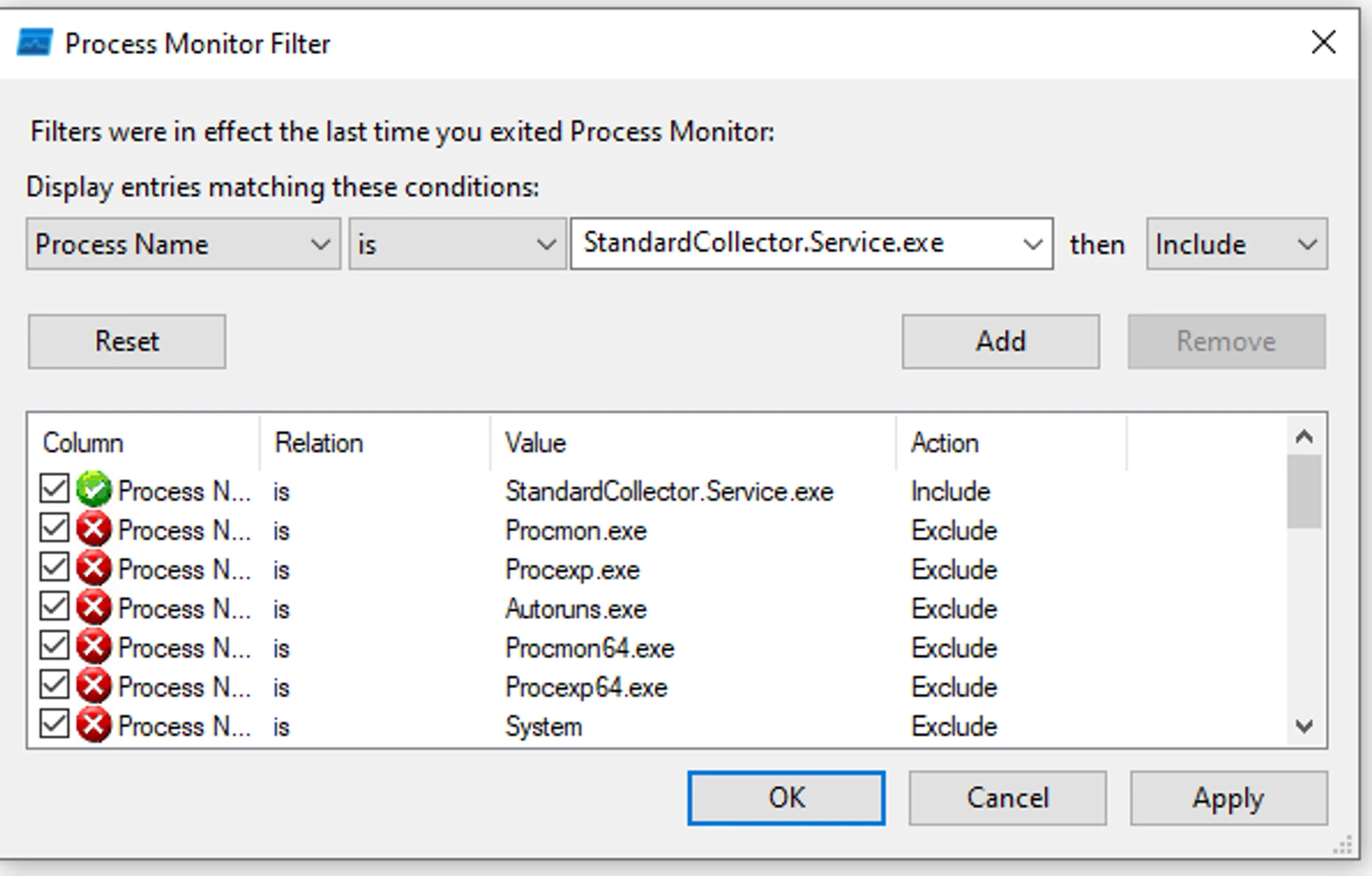
A simple C/C++ application is created and debugged, which triggers the service to collect data about the process being debugged.
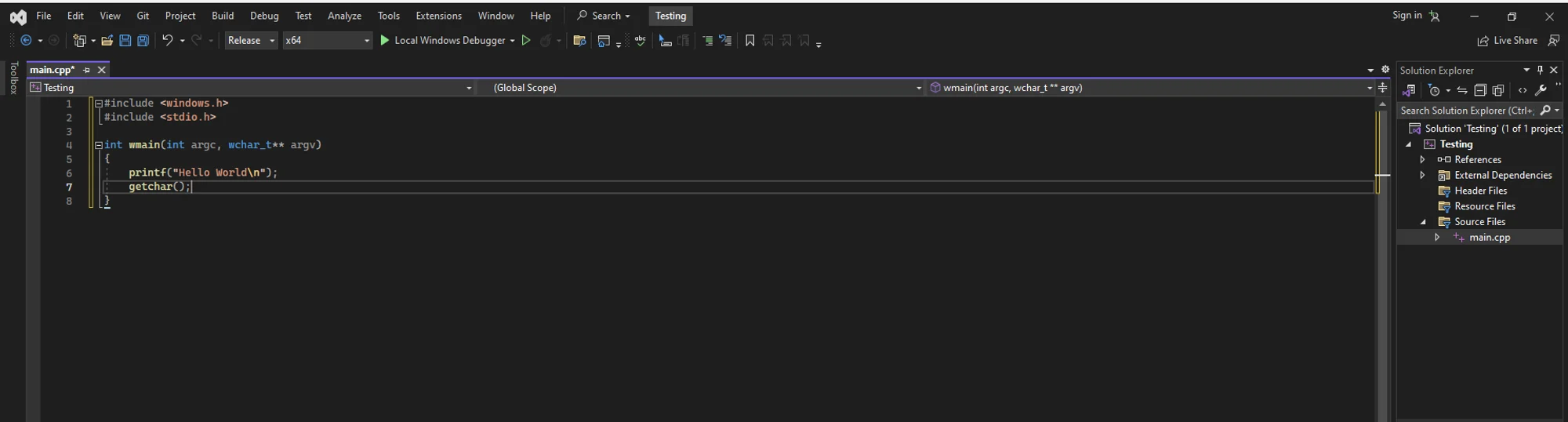
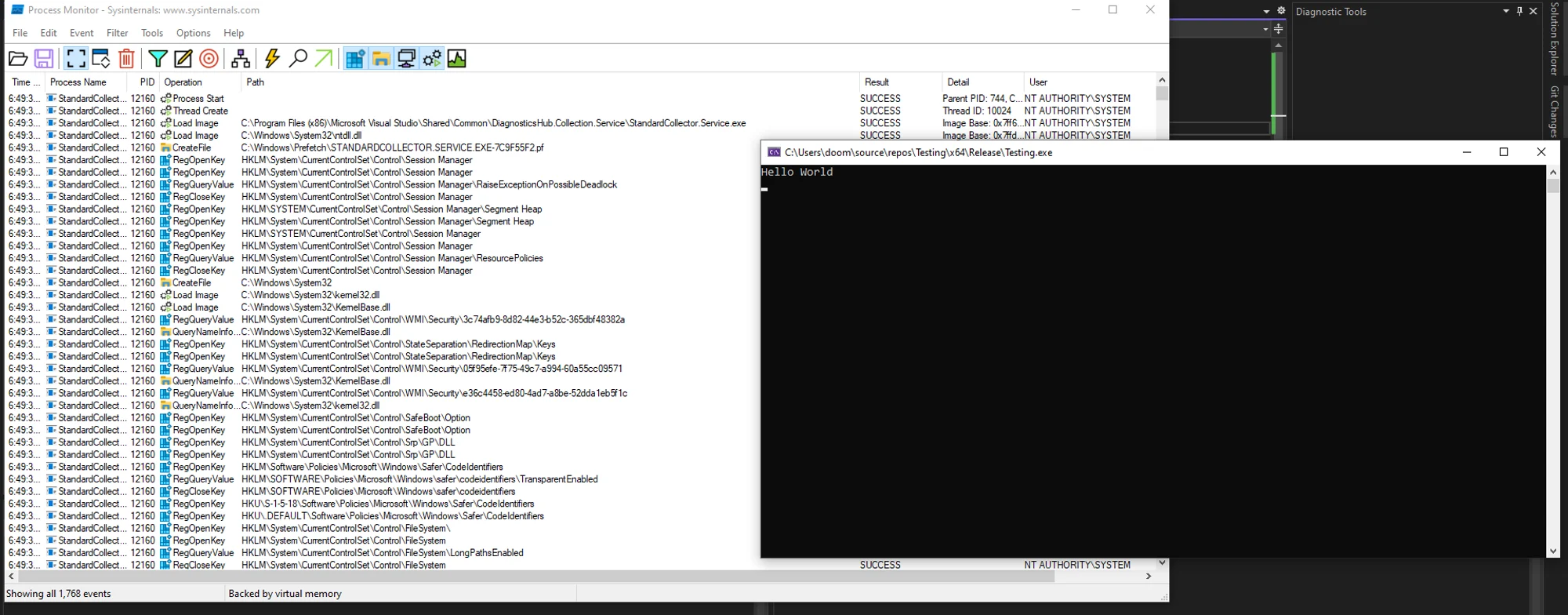
Starting the debug session, either with F5 or through the GUI, starts the VSStandardCollectorService150 service.
As soon as debugging starts, multiple directories and files are created inside C:\Windows\Temp.
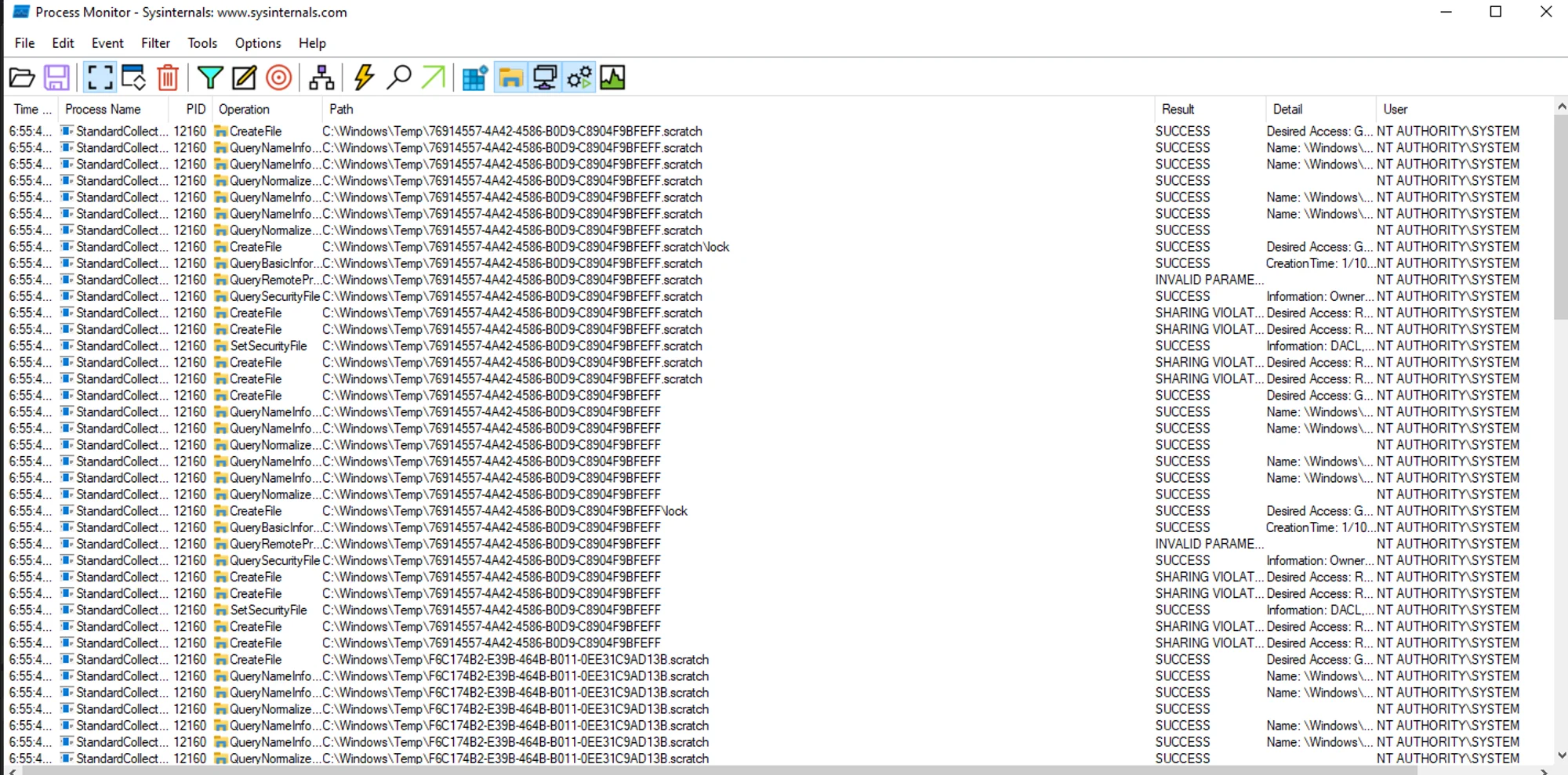
Directories created by a privileged service under c:\windows\temp\ are usually a good sign, because new directories inherit permissions from the parent, which would let a low privilege user create sub-folders, files and, most importantly here, junction folders. In this case the collector service changed the inherited permissions, granting only read access to the user running Visual Studio:
PS C:\Windows\system32> .\cacls.exe C:\Windows\Temp\76914557-4A42-4586-B0D9-C8904F9BFEFF.scratch
C:\Windows\Temp\76914557-4A42-4586-B0D9-C8904F9BFEFF.scratch BUILTIN\Administrators:F
BUILTIN\Administrators:(OI)(CI)(IO)F
NT AUTHORITY\SYSTEM:F
NT AUTHORITY\SYSTEM:(OI)(CI)(IO)F
doompc\doom:(OI)(CI)(special access:)
READ_CONTROL
SYNCHRONIZE
FILE_GENERIC_READ
FILE_READ_DATA
FILE_READ_EA
FILE_READ_ATTRIBUTES
The scratch directory is named after a GUID and the low privilege user only gets read rights on it.
The service adds a second layer of protection: a temporary file that a standard user cannot delete. It is created with the DELETE_ON_CLOSE flag in the CreateFile API and does not share any access with other processes. That prevents other processes from opening a handle on the file, and the file is removed once the handle is closed.
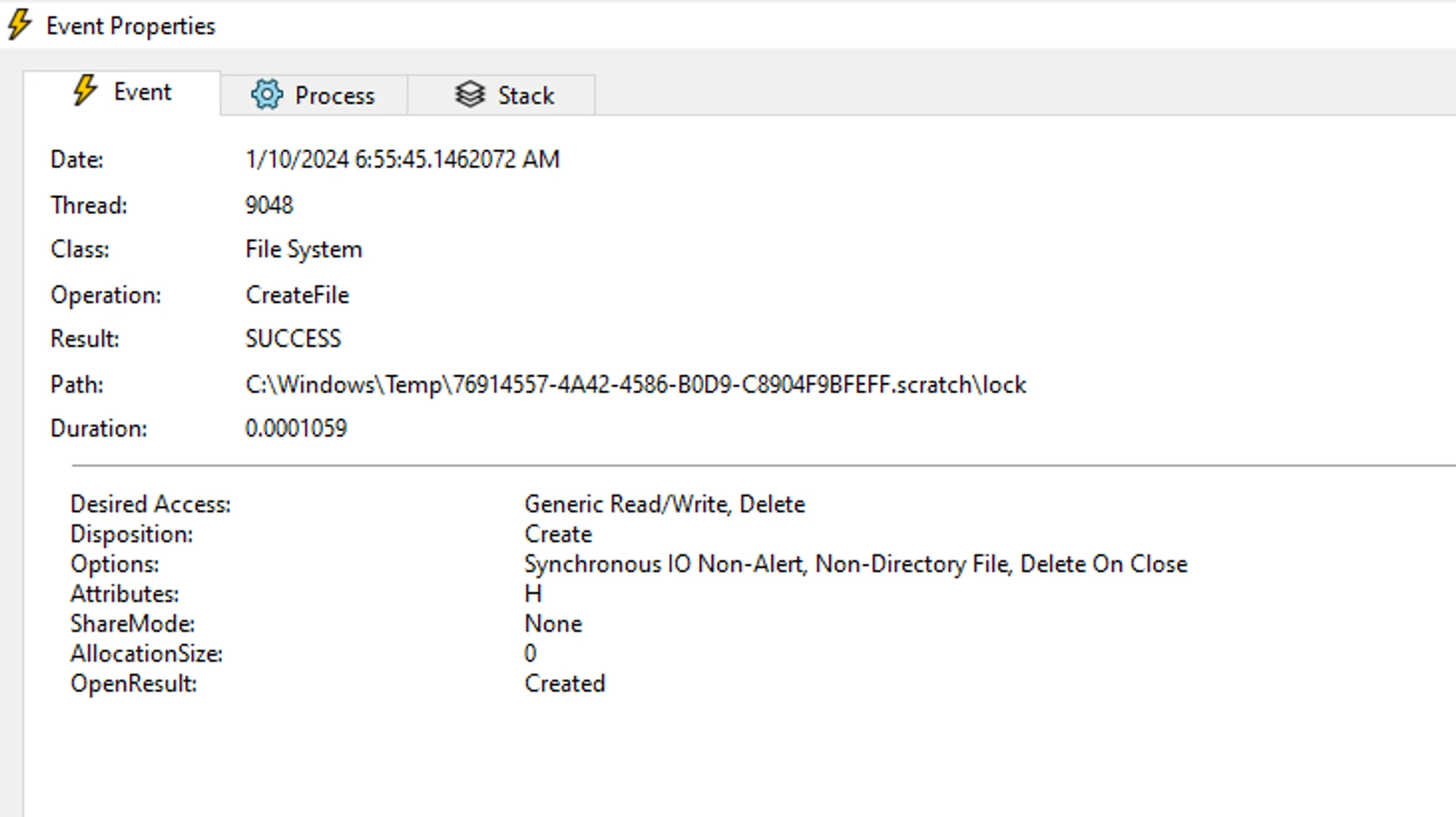
With these protections in place, none of the file operations seen so far could be exploited. The next step was to look at what happens when debugging stops.
After the debugging session ends, a new folder is created that uses the same GUID with the string Report prepended, for example C:\Windows\Temp\Report.76914557-4A42-4586-B0D9-C8904F9BFEFF. A lot of file operations happen inside this folder, including file move, delete and DACL resets.
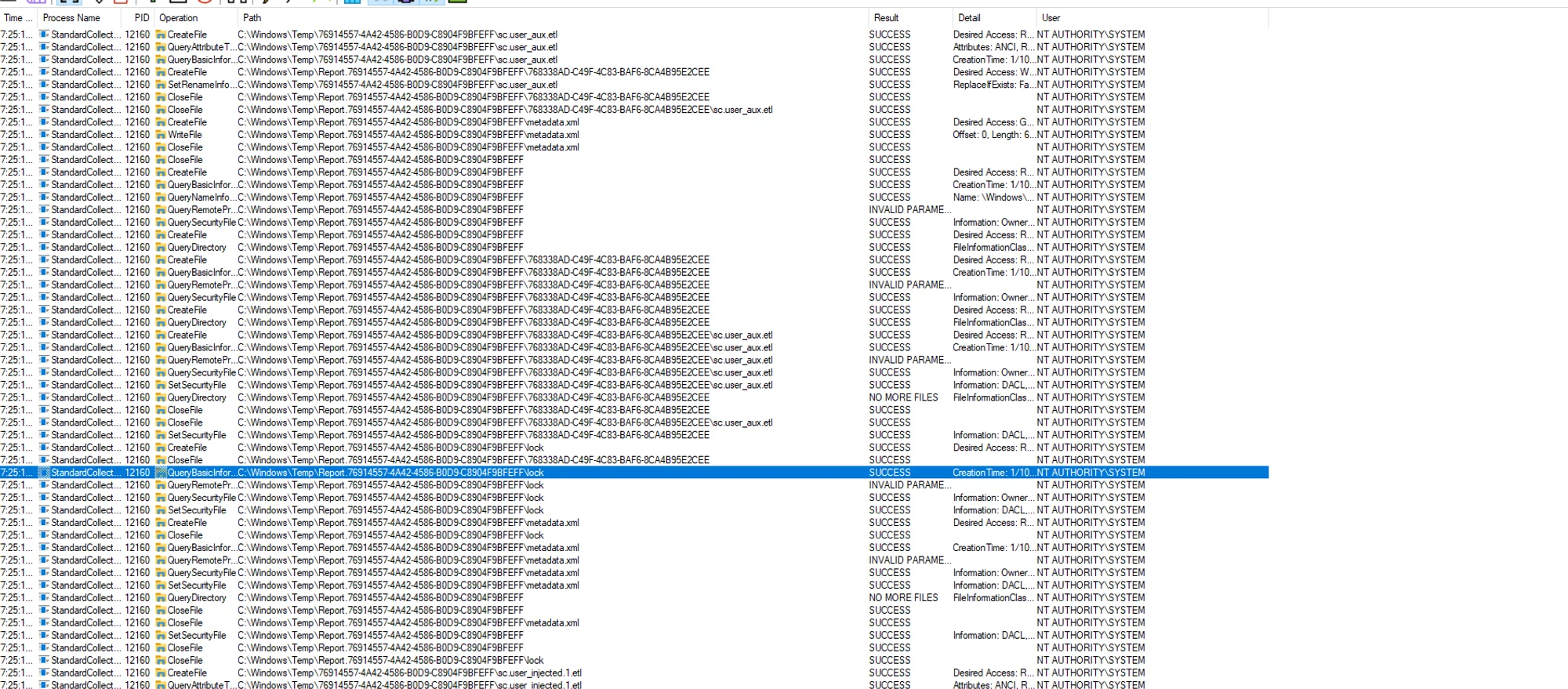
The same protection mechanisms seen earlier prevented exploitation of this behaviour as well.
Digging deeper
While researching the service, the researcher found a Microsoft article describing the VSDiagnostics.exe command-line tool and how it interacts with the collector service. Running the tool gives a help menu with several interesting options:
PS C:\Program Files\Microsoft Visual Studio\2022\Community> & 'C:\Program Files\Microsoft Visual Studio\2022\Community\Team Tools\DiagnosticsHub\Collector\VSDiagnostics.exe'Microsoft (R) VS Standard CollectorFor a detailed description of each command: VSDiagnostics <command> /helpCommands: start <sessionID> [/attach:<pid>[;<pid>;...]] [/launch:<executable> /launchArgs:<executableArgs>] [/loadAgent:<agentCLSID>;<agentName>[;<config>]] [/loadConfig:<configFile>] [/monitor] [/scratchLocation:<folderName>] [/package:[opt | dir]] [/symbolCachePath:<folderName>] Start a collection session update <sessionID> [/attach:<pid>[;<pid>;...]] [/detach:<pid>[;<pid>;...]] [/loadAgent:<agentCLSID>;<agentName>[;<config>] ...] [/lifetimeProcess:<pid>] Update a collection session. This allows addition and removal of target processes and collector agents. stop <sessionID> /output:<fileName> Stop a collection session pause <sessionID> Pause a collection session resume <sessionID> Resume a collection session status <sessionID> Display the status of a collection session postString <sessionID> "<messageString>" /agent:<agentCLSID> Post a string to a collection agent expandDiagSession <diagSession> Expand the DiagSession archive into a subdirectory adjacent to the DiagSession help Print out this help message
Running the start option with /help explains each option:
PS C:\Program Files\Microsoft Visual Studio\2022\Community> & 'C:\Program Files\Microsoft Visual Studio\2022\Community\Team Tools\DiagnosticsHub\Collector\VSDiagnostics.exe' start /help

Microsoft (R) VS Standard Collector

Start a collection session

start <sessionID> [/attach:<pid>[;<pid>;...]] [/launch:<executable> /launchArgs:<executableArgs>] [/loadAgent:<agentCLSID>;<agentName>[;<config>]] [/loadConfig:<configFile>] [/monitor] [/scratchLocation:<folderName>] [/package:[opt | dir]] [/symbolCachePath:<folderName>]

  <sessionID>
      ID of the collection session - this should be a number in the range [0, 255] or a parsable Guid.

  /attach:<pid>[;<pid>;...]
      Semi-colon-delimited list of process IDs to target

  /launch:<executable>
      Path to the executable to launch

  /launchArgs:<executableArgs>
      Arguments for the executable to launch

  /loadAgent:<agentCLSID>;<agentName>[;<config>]
      Agent to be loaded - this option may be specified multiple times to load multiple agents

  /loadConfig:<configFile>
      Loads the agents and their configurations specified in the file

  /monitor
      Monitor the session after it is started - status updates will be displayed and the command will block until the session ends

  /scratchLocation:<folderName>
      Path to the desired output folder

  /package:[opt | dir]
      Options for the package flag: 'opt' - Optimized archive format, 'dir' - Directory format

  /symbolCachePath:<folderName>
      Path to the desired symbol cache folder
The /scratchLocation option specifies where files and folders will be created. Running the tool with it confirmed the assumption that the service creates files in the folder given by that parameter:
PS C:\Program Files\Microsoft Visual Studio\2022\Community> & 'C:\Program Files\Microsoft Visual Studio\2022\Community\Team Tools\DiagnosticsHub\Collector\VSDiagnostics.exe' start 1 /scratchLocation:C:\expl

Microsoft (R) VS Standard Collector

Session 1: {0197e42f-003d-4f91-a845-6404cf289e84}
  Running
PS C:\Program Files\Microsoft Visual Studio\2022\Community>
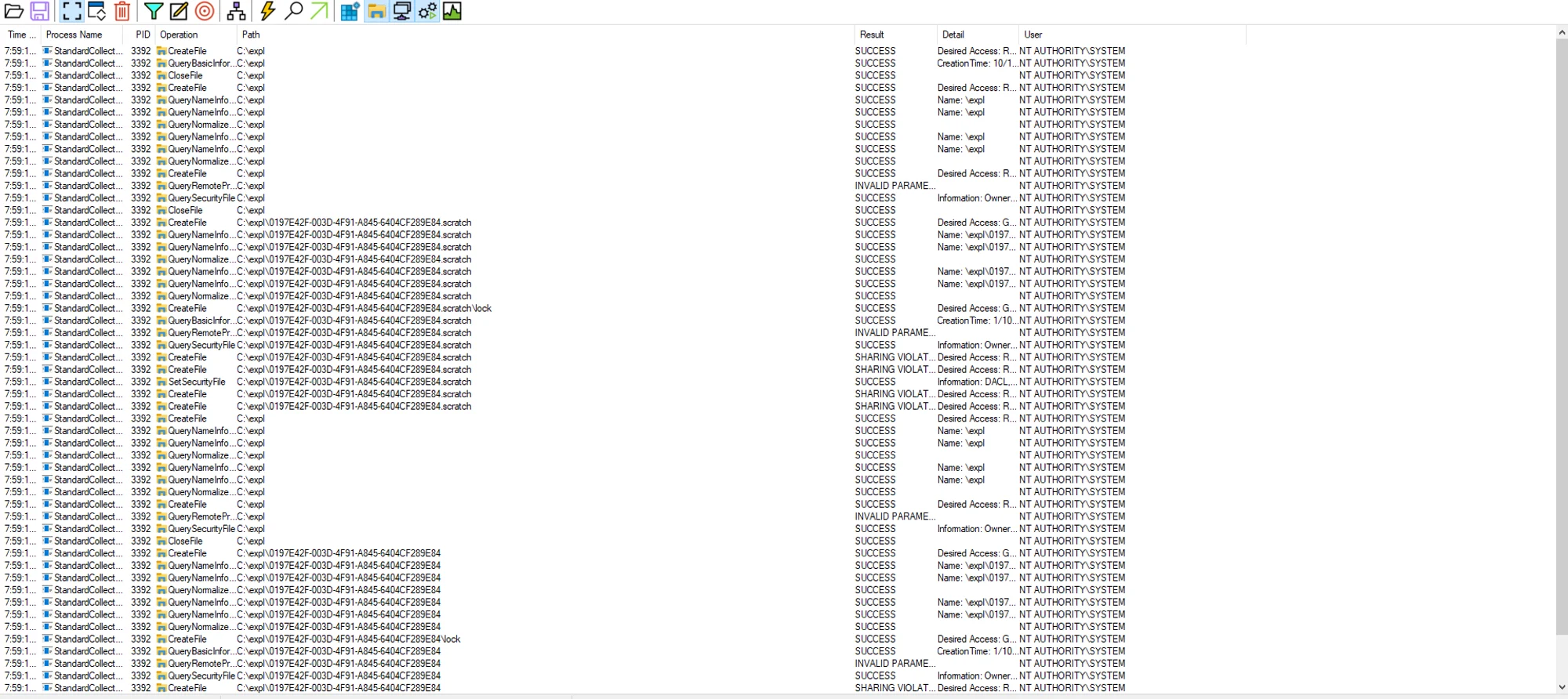
Stopping the diagnostic session revealed another interesting detail: VSDiagnostics.exe uses an optimised archive format as output by default, while Visual Studio used the directory output.
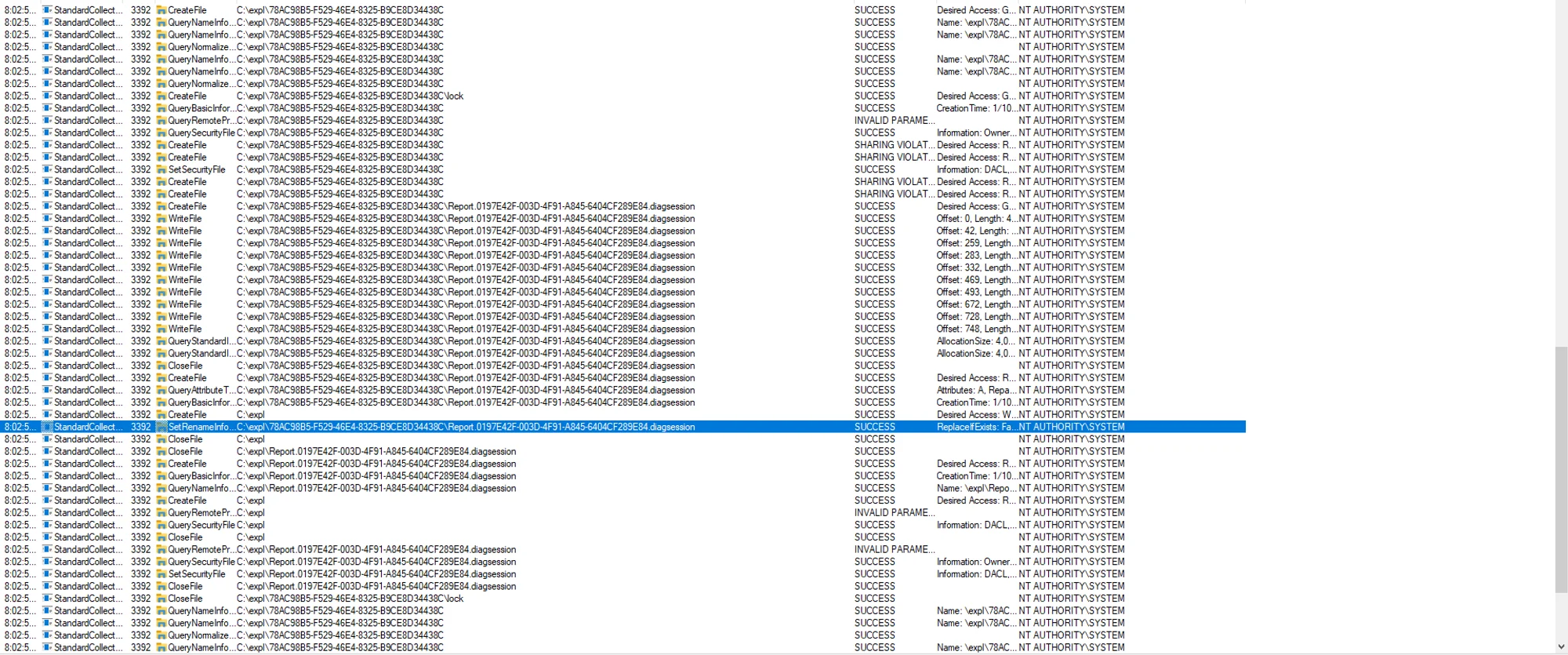
In the trace, the file is first moved from the child directory (created with restrictive permissions) to the parent directory, the folder specified in /scratchLocation, and then the DACL is changed using SetNamedSecurityInfoW().

This matters because the DACL reset happens outside the directory with restrictive DACLs, on a file that has been moved into a folder the attacker controls.
Finding an exploit primitive
At this point the privileged service changes permissions on a file inside a directory the attacker controls. If that directory can be turned into a junction point, SetNamedSecurityInfoW can be redirected to an arbitrary file. The ability to specify scratchLocation is what makes this practical.
If a junction point is created that points to some random folder, and scratchLocation is pointed at the junction, then SetNamedSecurityInfoW should follow it and redirect to an arbitrary file:
PS C:\> cmd /c mklink /j c:\expl c:\expl2
Junction created for c:\expl <<===>> c:\expl2
PS C:\> mkdir C:\expl2

    Directory: C:\

Mode                 LastWriteTime         Length Name
----                 -------------         ------ ----
d-----         1/10/2024   8:38 AM                expl2
Starting a new diagnostic session and stopping it afterwards confirmed the behaviour.
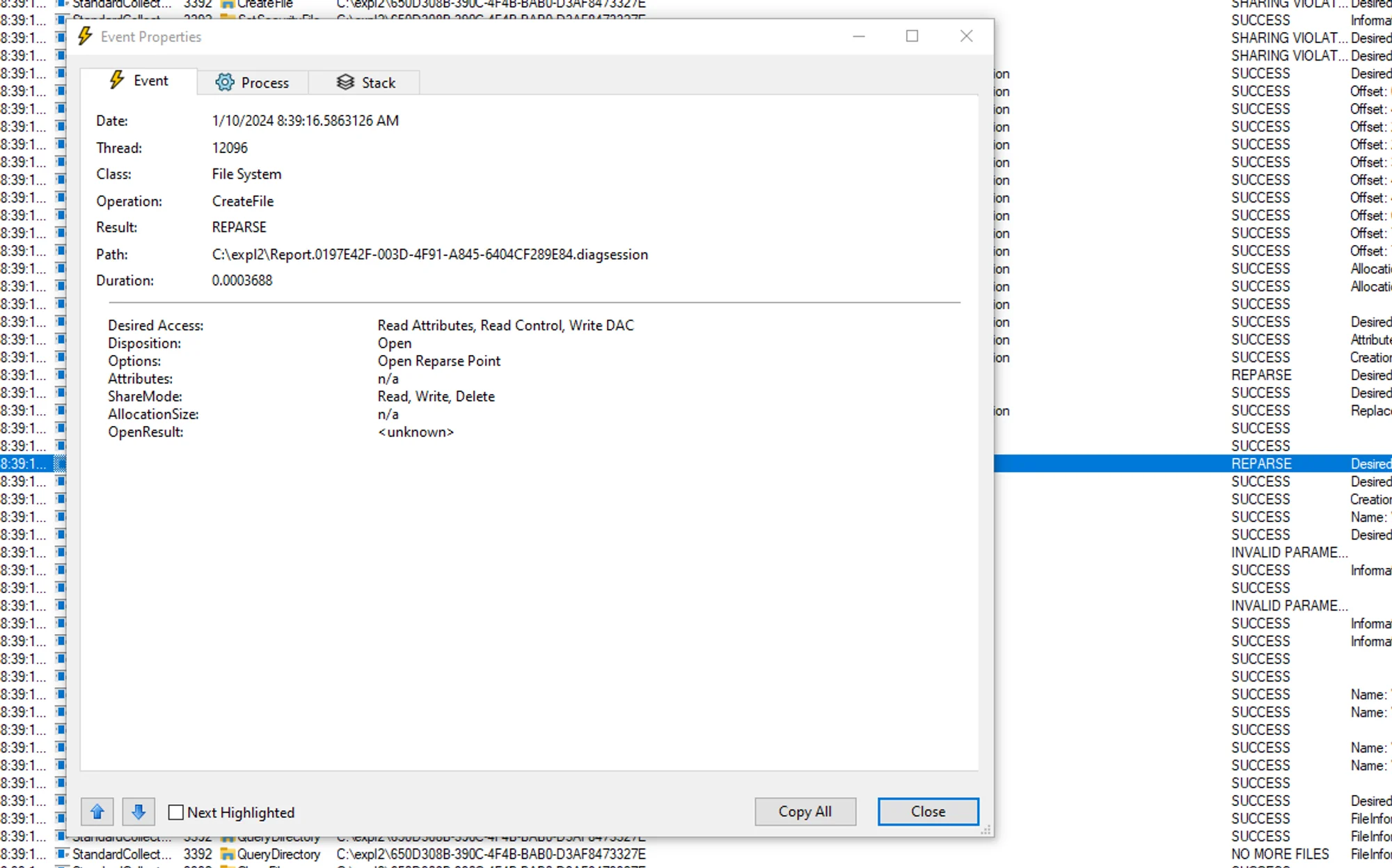
In Procmon, the blue marked line shows the service going through the junction point: the result of the CreateFile API call is REPARSE. That confirmed the redirect to any file on the system.
Building an exploit
With a way to redirect permission changes to arbitrary files, the obvious next step would be to change the permissions of PrintConfig.dll and load it in a privileged service. That does not work, because the call to SetNamedSecurityInfo only propagates the parent folder permissions to the file:
PS C:\> cacls.exe C:\expl2\Report.0197E42F-003D-4F91-A845-6404CF289E84.diagsession
C:\expl2\Report.0197E42F-003D-4F91-A845-6404CF289E84.diagsession BUILTIN\Administrators:(ID)F
NT AUTHORITY\SYSTEM:(ID)F
BUILTIN\Users:(ID)R
NT AUTHORITY\Authenticated Users:(ID)C
This limits the options, because the public techniques for abusing arbitrary DACL resets rely on a DLL located in system32 or its sub-folders. Those cannot be abused here, since the file would receive restrictive DACLs and could not be modified afterwards.
After looking through the file system, the only directory that could be abused in this scenario was c:\programdata, because its parent folder is the C: drive, which grants the Authenticated Users group Modify permissions:
PS C:\> icacls c:\
c:\ BUILTIN\Administrators:(OI)(CI)(F)
    NT AUTHORITY\SYSTEM:(OI)(CI)(F)
    BUILTIN\Users:(OI)(CI)(RX)
    NT AUTHORITY\Authenticated Users:(OI)(CI)(IO)(M)
    NT AUTHORITY\Authenticated Users:(AD)
    S-1-15-3-65536-1888954469-739942743-1668119174-2468466756-4239452838-1296943325-355587736-700089176:(S,RD,X,RA)
    Mandatory Label\High Mandatory Level:(OI)(NP)(IO)(NW)
First attempt: abusing the Windows Error Reporting service
The first attempt to weaponise the vulnerability abused the WER service to create an arbitrary folder that could later be abused by loading SxS assemblies. The technique was documented by @jonaslyk, who abused an arbitrary file delete bug to delete the C:\ProgramData\Microsoft\Windows\WER directory and force the WER service to recreate it, including child folders.
In this case the WER directory could be taken over using the arbitrary file DACL reset: direct it to the junction point, create an object manager symbolic link that allows creating an arbitrary directory (in the first PoC it was the msiexec.[redacted] directory), drop combase.dll inside and load it in the MSIServer service.
The PoC worked locally, but MSRC could not confirm the vulnerability: they were testing on an insider version in which the WER service already had junction protection and could not be abused.
Second attempt: abusing MSI repairs
After MSRC failed to confirm the vulnerability, a different method to abuse the DACL reset was needed.
Visual Studio creates the MofCompiler.exe binary inside C:\ProgramData\Microsoft\VisualStudio\SetupWMI. The binary is related to WMI integration inside Visual Studio, and it is executed with SYSTEM privileges via MSI repairs.
Many programs store their installer package inside C:\windows\installer, and these installers often allow low privilege users to run them in repair mode to repair a broken installation. That was also the case with the Setup WMI Provider installer that comes by default with Visual Studio. The installer has custom actions defined, and that custom action is configured to execute C:\ProgramData\Microsoft\VisualStudio\SetupWMI\MofCompiler.exe.
That gives all the pieces for the exploit. The researcher's summary of the steps:
- Create a dummy directory where VSStandardCollectorService150 will write files.
- Create a junction directory that points to a newly created directory.
- Trigger the VSStandardCollectorService150 service by creating a new diagnostic session.
- Wait for the
<GUID>.scratchdirectory to be created and create a new object manager symbolic linkReport.<GUID>.diagsessionthat points toC:\ProgramData. - Stop the diagnostic session.
- Wait for the
Report.<GUID>.diagsessionfile to be moved to the parent directory and switch the junction directory to point to\\RPC Controlwhere the symbolic link is waiting. - Sleep for 5 seconds (not really important, but left in).
- Switch the junction directory to point to a dummy directory.
- Start a new diagnostic session.
- Wait for the
<GUID>.scratchdirectory to be created and create a new object manager symbolic linkReport.<GUID>.diagsessionthat points toC:\ProgramData\Microsoft. - Stop the diagnostic session.
- After the permissions are changed, delete the
C:\ProgramData\Microsoft\VisualStudio\SetupWMI\MofCompiler.exebinary. - Locate and run the
Setup WMI providerin repair mode. - Wait for the new
MofCompiler.exebinary to be created by the installer and replace it withcmd.exe. - Enjoy a SYSTEM shell.
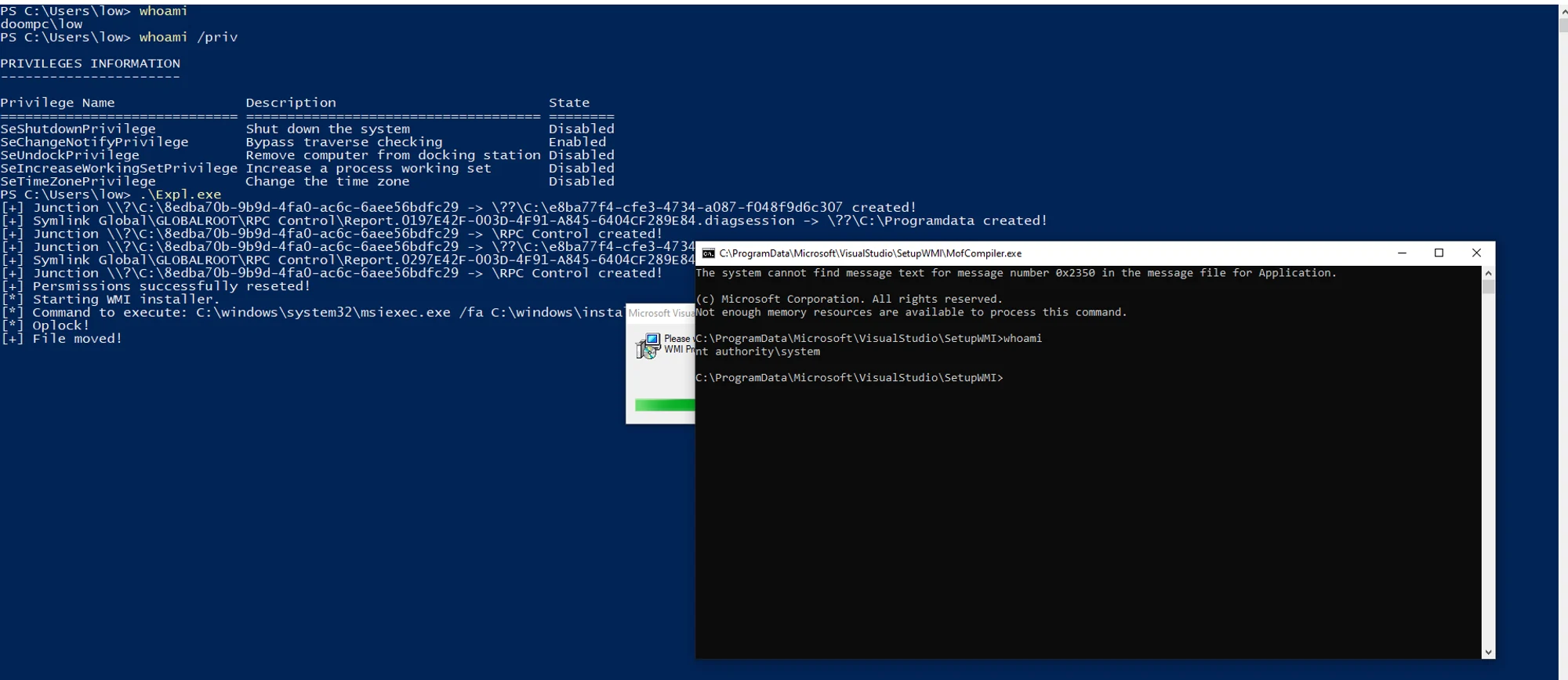
The two diagnostic sessions redirect the DACL reset first to C:\ProgramData and then to C:\ProgramData\Microsoft. Once the installer's custom action binary can be replaced, running the installer in repair mode executes the attacker's binary as SYSTEM.
Root cause
The service moves the output file from the restricted child directory into the parent directory supplied through /scratchLocation and then calls SetNamedSecurityInfoW() on it. Because the parent directory is attacker-controlled, a junction point placed there is followed by the API call, and the DACL reset lands on an arbitrary file. The reset only propagates the parent folder's permissions, so the primitive is limited to files whose parent grants the attacker Modify rights, which in practice meant c:\programdata.
The earlier protections, restrictive DACLs on the scratch directory and the DELETE_ON_CLOSE file with no sharing, did stop the file operations observed during normal debugging.
Impact
A low privilege local user on a machine with Visual Studio installed with C/C++ support could escalate to NT AUTHORITY\SYSTEM using the exploit chain described. The exploit depends on the ability to create a junction point and object manager symbolic links, on the Setup WMI Provider installer being present and runnable in repair mode by a low privilege user, and on the DACL propagation behaviour described above. The first WER-based variant did not work against the insider build MSRC tested, because that build already had junction protection for the WER service.
Fix
After the January 2024 fix, the SetNamedSecurityInfo API call can no longer be redirected, and the DACL reset is performed inside the restricted directory.
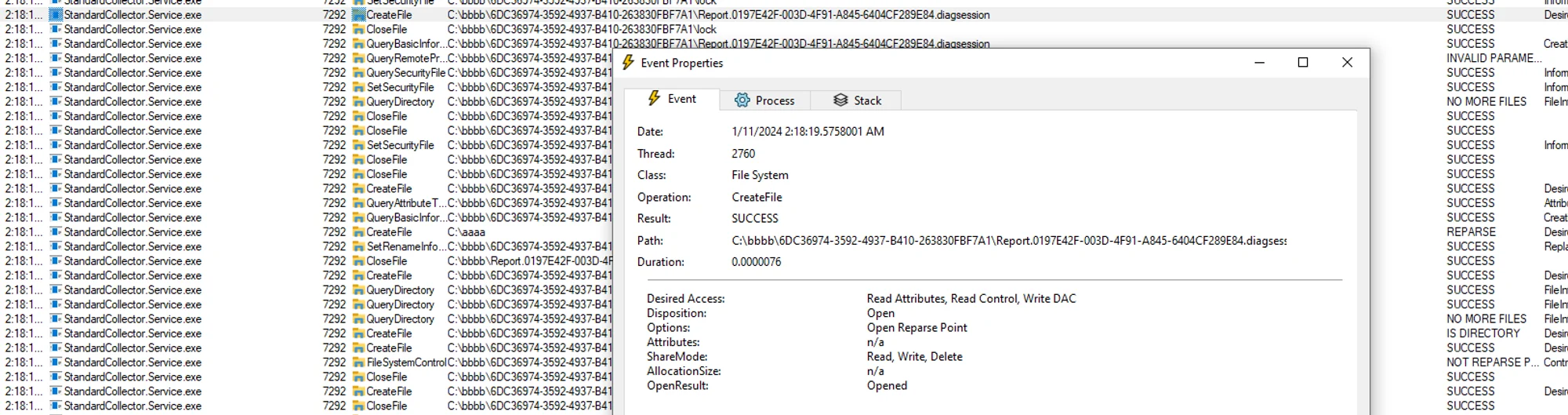
In addition, the file is moved while impersonating the client.
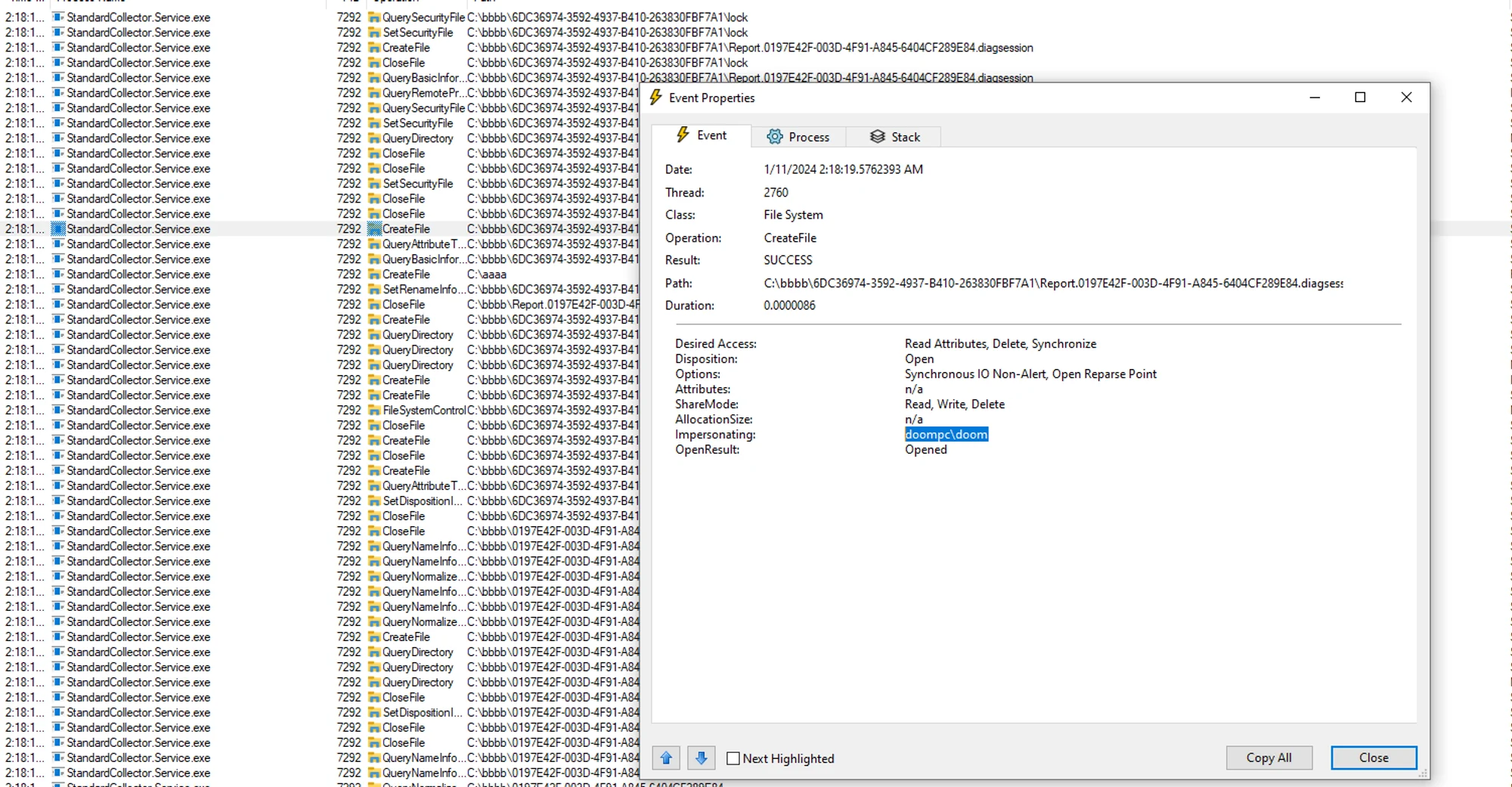
Timeline
| Date | Event |
|---|---|
| 07/20/2023 | Report with PoC sent to MSRC |
| 07/28/2023 | MSRC notifies that they cannot reproduce the vulnerability |
| 07/28/2023 | Additional information regarding the exploit sent |
| 08/14/2023 | MSRC notifies again that they cannot reproduce the vulnerability |
| 08/14/2023 | Second exploit sent, working on later Windows Insider Preview |
| 08/15/2023 | MSRC confirms the vulnerability |
| 08/15/2023 | Bounty awarded |
| 09/08/2023 | MSRC schedules the fix for January 2024 |
| 01/09/2024 | Fix released |

Variants to test
- Look for other privileged services that accept a user-supplied output or scratch directory and then move files into it before resetting DACLs. A positive result is a Procmon trace showing
SetNamedSecurityInfoWon a file inside the supplied directory, followed by aREPARSEresult when that directory is replaced with a junction. - Enumerate installers in
C:\windows\installerthat low privilege users can run in repair mode and whose custom actions execute binaries from writable locations such asC:\ProgramData. A positive result is a repair that recreates a binary in a path the attacker can write to. - Check whether other services that create directories under
C:\Windows\Templeave inherited permissions intact or reset them, and whether the reset happens before or after a move out of the restricted directory. - Test whether the same move-then-reset pattern can be redirected through object manager symbolic links under
\\RPC Control, as done here, against other diagnostic or telemetry collectors. - On patched builds, verify the two changes: the DACL reset stays inside the restricted directory, and the move is performed while impersonating the client. A positive result for a regression is a trace where either condition no longer holds.
What happened, in plain words
Microsoft Visual Studio is a large program that people use to write and test software. When you install it with support for the C and C++ programming languages, the installer also puts a second, hidden program on your computer: a Windows service called VSStandardCollectorService150. A service is a program that runs in the background, usually without any window, and often with far more power than the person sitting at the keyboard.
This particular service exists to collect information while a developer is testing (debugging) a program. The problem was that it ran with the highest level of permission on Windows, an account called NT AUTHORITY\SYSTEM, which is even more powerful than a normal administrator. A security researcher, Filip Dragovic, found that this service could be tricked into resetting the security permissions of files on the machine. From there he could get a SYSTEM-level command prompt, which means full control of the computer.
The bug was reported to Microsoft in July 2023, confirmed in August 2023, and fixed in January 2024. It was given the identifier CVE-2024-20656. The class of bug is local privilege escalation: a normal user on a machine finds a way to become an all-powerful user on that same machine.
Context
Visual Studio is Microsoft's IDE, which stands for Integrated Development Environment. Think of it as a workshop for programmers: one window where you write code, run it, and watch what it does. When it is installed with C/C++ support, it also installs the VSStandardCollectorService150 service.
The service exists for diagnostic purposes: it collects profiling and diagnostic data about processes that are being debugged or profiled from Visual Studio. In everyday terms, while a developer is testing a program, this service quietly writes notes and measurements about what the program is doing, so the developer can later look at performance and behaviour.
It runs in NT AUTHORITY\SYSTEM context. On Windows, every running program runs under some account, and that account decides what the program is allowed to touch. SYSTEM is the most powerful built-in account; it can read, write and change almost anything. That is what makes the service's file handling interesting from a red team perspective. A red team is a group of security professionals who attack systems on purpose, with permission, to find weaknesses before real criminals do.
The service is configured to start on demand, which usually means some form of IPC is implemented to trigger it. IPC means Inter-Process Communication: the ways one program on a computer can send a message to another. If a service is not running all the time, something has to be able to wake it up. In this case the trigger was COM. COM (Component Object Model) is an old Microsoft mechanism that lets programs call each other's features; think of it as a standard plug socket that many Windows programs use to talk to each other.
The write-up explores how the service can be abused to perform an arbitrary file DACL reset and, from there, escalate privileges to SYSTEM. Two terms need unpacking here. A DACL (Discretionary Access Control List) is the list attached to every file and folder on Windows that says who may read it, who may write it, and who may change it. A DACL reset means replacing that list with a different one, which can hand new powers to someone. "Arbitrary file" means the attacker gets to choose which file on the system receives the new list, rather than being limited to the service's own files.
Setup
The only precondition is a Visual Studio installation with C/C++ support, which creates the service. No special configuration, no extra software beyond the tools described below.
The researcher confirms the service configuration with sc.exe. sc.exe is a built-in Windows command-line tool for asking about and controlling services; qc stands for query configuration, so the command asks Windows "tell me how this service is set up".
PS C:\Users\doom> sc.exe qc VSStandardCollectorService150
[SC] QueryServiceConfig SUCCESS

SERVICE_NAME: VSStandardCollectorService150
        TYPE               : 10  WIN32_OWN_PROCESS
        START_TYPE         : 3   DEMAND_START
        ERROR_CONTROL      : 0   IGNORE
        BINARY_PATH_NAME   : "C:\Program Files (x86)\Microsoft Visual Studio\Shared\Common\DiagnosticsHub.Collection.Service\StandardCollector.Service.exe"
        LOAD_ORDER_GROUP   :
        TAG                : 0
        DISPLAY_NAME       : Visual Studio Standard Collector Service 150
        DEPENDENCIES       :
        SERVICE_START_NAME : **LocalSystem**
PS C:\Users\doom>
Line by line:
PS C:\Users\doom>is the prompt of PowerShell, Windows' command shell, showing the current folder and the user name. Everything after it is what the researcher typed.sc.exe qc VSStandardCollectorService150asks Windows for the configuration of the service named VSStandardCollectorService150.[SC] QueryServiceConfig SUCCESSmeans the query worked.SERVICE_NAMEis the internal name of the service.TYPE : 10 WIN32_OWN_PROCESSsays the service runs as its own separate program rather than sharing a host process with other services.START_TYPE : 3 DEMAND_STARTmeans the service does not start with Windows; it starts when something asks for it.ERROR_CONTROL : 0 IGNOREtells Windows not to show an error if the service fails to start.BINARY_PATH_NAMEis the full path of the actual program file that Windows launches for this service.LOAD_ORDER_GROUP,TAGandDEPENDENCIESare bookkeeping fields, empty here.DISPLAY_NAMEis the friendly name shown in Windows tools.SERVICE_START_NAME : LocalSystemis the key line: the collector binary runs as SYSTEM.
START_TYPE : 3 is demand start, consistent with the COM trigger: something has to send a COM message to wake the service up.
Tools used during the research: Sysinternals Procmon for watching the service's file operations, a small C/C++ application to debug (which causes the service to collect data), and the VSDiagnostics.exe command-line tool that ships with Visual Studio. Procmon (Process Monitor) is a free Microsoft tool that records, in real time, every file, registry and network action programs take; it is like a security camera for a computer. A command-line tool is a program you run by typing its name in a terminal instead of clicking an icon.
Finding it
The researcher's stated method for hunting file operation bugs in privileged software is to use the software for its intended purpose first and watch what the privileged services do. This is a deliberate strategy: instead of guessing, you behave like a normal user and let the powerful background programs reveal themselves through their actions. Procmon is started with Process Name filtered to StandardCollector.Service.exe, so the camera only records the collector service and ignores the noise from everything else on the machine.
A simple C/C++ application is created and debugged, which triggers the service to collect data about the process being debugged. The tiny test program is bait: it gives the service a reason to do its job, and therefore something to watch.
Starting the debug session, either with F5 or through the GUI, starts the VSStandardCollectorService150 service. F5 is the standard keyboard shortcut for "run with debugging" in Visual Studio, and the GUI is the graphical interface, the menus and buttons.
As soon as debugging starts, multiple directories and files are created inside C:\Windows\Temp. C:\Windows\Temp is the system-wide scratch area where Windows and programs put temporary files.
Directories created by a privileged service under c:\windows\temp\ are usually a good sign, because new directories inherit permissions from the parent, which would let a low privilege user create sub-folders, files and, most importantly here, junction folders. Inheritance works like a family name: a new folder automatically gets the same access rules as the folder it was created in, unless someone changes them. A junction folder (or junction point) is a special folder that is really a signpost pointing at another location on disk; programs that open it are silently redirected to the place it points to. If an attacker can create one inside a folder a powerful service writes to, the service may end up writing somewhere the attacker chose.
In this case the collector service changed the inherited permissions, granting only read access to the user running Visual Studio. The cacls.exe tool (a built-in Windows command that displays a file's access list) shows this:
PS C:\Windows\system32> .\cacls.exe C:\Windows\Temp\76914557-4A42-4586-B0D9-C8904F9BFEFF.scratch
C:\Windows\Temp\76914557-4A42-4586-B0D9-C8904F9BFEFF.scratch BUILTIN\Administrators:F
BUILTIN\Administrators:(OI)(CI)(IO)F
NT AUTHORITY\SYSTEM:F
NT AUTHORITY\SYSTEM:(OI)(CI)(IO)F
BUILTIN\Administrators:(OI)(CI)(IO)F
NT AUTHORITY\SYSTEM:(OI)(CI)(IO)F
doompc\doom:(OI)(CI)(special access:)
READ_CONTROL
SYNCHRONIZE
FILE_GENERIC_READ
FILE_READ_DATA
FILE_READ_EA
FILE_READ_ATTRIBUTES
Line by line:
- The first line runs
cacls.exeagainst a folder whose name ends in.scratchand begins with a long string of letters and digits. That string is a GUID, a Globally Unique Identifier: a long random-looking label a program generates so that its files do not collide with anyone else's. BUILTIN\Administrators:Fmeans members of the local Administrators group getF, which stands for Full control.BUILTIN\Administrators:(OI)(CI)(IO)Frepeats that for inherited entries:OImeans Object Inherit (files inside get the rule),CImeans Container Inherit (folders inside get it),IOmeans Inherit Only (the rule applies to children, not this folder itself).NT AUTHORITY\SYSTEM:Fgives the SYSTEM account full control.NT AUTHORITY\SYSTEM:(OI)(CI)(IO)Fis the same rule inherited by children.doompc\doom:(OI)(CI)(special access:)is the low privilege user, here calleddoomon a machine calleddoompc, and the wordsspecial accessmean the rights are a hand-picked list rather than a standard bundle.READ_CONTROL,SYNCHRONIZE,FILE_GENERIC_READ,FILE_READ_DATA,FILE_READ_EA,FILE_READ_ATTRIBUTESare the individual rights granted: read the permissions, wait on the file, read its contents, read its extended attributes, read its attributes. In short, read only.
The scratch directory is named after a GUID and the low privilege user only gets read rights on it. So the obvious trick, dropping a junction inside the scratch folder, is blocked.
The service adds a second layer of protection: a temporary file that a standard user cannot delete. It is created with the DELETE_ON_CLOSE flag in the CreateFile API and does not share any access with other processes. An API is an Application Programming Interface: the set of functions a program can call to ask the operating system to do something, like a waiter taking orders to the kitchen. CreateFile is the Windows function for opening or creating a file, and its flags are extra instructions. DELETE_ON_CLOSE means "erase this file automatically the moment the last handle to it is closed". A handle is the ticket Windows gives a program when it opens a file; while the ticket exists, the file is in use. "Does not share any access" means other programs are refused a ticket of their own. That prevents other processes from opening a handle on the file, and the file is removed once the handle is closed.
With these protections in place, none of the file operations seen so far could be exploited. The next step was to look at what happens when debugging stops, because a service often does its most interesting work when cleaning up.
After the debugging session ends, a new folder is created that uses the same GUID with the string Report prepended, for example C:\Windows\Temp\Report.76914557-4A42-4586-B0D9-C8904F9BFEFF. A lot of file operations happen inside this folder, including file move, delete and DACL resets.
The same protection mechanisms seen earlier prevented exploitation of this behaviour as well.
Digging deeper
While researching the service, the researcher found a Microsoft article describing the VSDiagnostics.exe command-line tool and how it interacts with the collector service. This is the same service, but driven from a terminal instead of from Visual Studio's menus.
Running the tool gives a help menu with several interesting options:
PS C:\Program Files\Microsoft Visual Studio\2022\Community> & 'C:\Program Files\Microsoft Visual Studio\2022\Community\Team Tools\DiagnosticsHub\Collector\VSDiagnostics.exe'Microsoft (R) VS Standard CollectorFor a detailed description of each command: VSDiagnostics <command> /helpCommands: start <sessionID> [/attach:<pid>[;<pid>;...]] [/launch:<executable> /launchArgs:<executableArgs>] [/loadAgent:<agentCLSID>;<agentName>[;<config>]] [/loadConfig:<configFile>] [/monitor] [/scratchLocation:<folderName>] [/package:[opt | dir]] [/symbolCachePath:<folderName>] Start a collection session update <sessionID> [/attach:<pid>[;<pid>;...]] [/detach:<pid>[;<pid>;...]] [/loadAgent:<agentCLSID>;<agentName>[;<config>] ...] [/lifetimeProcess:<pid>] Update a collection session. This allows addition and removal of target processes and collector agents. stop <sessionID> /output:<fileName> Stop a collection session pause <sessionID> Pause a collection session resume <sessionID> Resume a collection session status <sessionID> Display the status of a collection session postString <sessionID> "<messageString>" /agent:<agentCLSID> Post a string to a collection agent expandDiagSession <diagSession> Expand the DiagSession archive into a subdirectory adjacent to the DiagSession help Print out this help message
Line by line:
PS C:\Program Files\Microsoft Visual Studio\2022\Community>is the PowerShell prompt, now sitting in the Visual Studio installation folder.&is PowerShell's "run this program" operator, needed because the path contains spaces.- The quoted path points at
VSDiagnostics.exeinside the Visual Studio 2022 Community edition'sTeam Tools\DiagnosticsHub\Collectorfolder. - The help text that follows lists the commands:
startbegins a collection session,updatechanges which processes or agents are attached,stopends the session and writes output to a file,pauseandresumesuspend and continue it,statusreports on it,postStringsends a text message to a collection agent,expandDiagSessionunpacks a saved session archive, andhelpprints the message. - The square brackets in the syntax mean optional parts; the angle brackets mean "put your own value here".
Running the start option with /help explains each option:
PS C:\Program Files\Microsoft Visual Studio\2022\Community> & 'C:\Program Files\Microsoft Visual Studio\2022\Community\Team Tools\DiagnosticsHub\Collector\VSDiagnostics.exe' start /help

Microsoft (R) VS Standard Collector

Start a collection session

start <sessionID> [/attach:<pid>[;<pid>;...]] [/launch:<executable> /launchArgs:<executableArgs>] [/loadAgent:<agentCLSID>;<agentName>[;<config>]] [/loadConfig:<configFile>] [/monitor] [/scratchLocation:<folderName>] [/package:[opt | dir]] [/symbolCachePath:<folderName>]

  <sessionID>
      ID of the collection session - this should be a number in the range [0, 255] or a parsable Guid.

  /attach:<pid>[;<pid>;...]
      Semi-colon-delimited list of process IDs to target

  /launch:<executable>
      Path to the executable to launch

  /launchArgs:<executableArgs>
      Arguments for the executable to launch

  /loadAgent:<agentCLSID>;<agentName>[;<config>]
      Agent to be loaded - this option may be specified multiple times to load multiple agents

  /loadConfig:<configFile>
      Loads the agents and their configurations specified in the file

  /monitor
      Monitor the session after it is started - status updates will be displayed and the command will block until the session ends

  /scratchLocation:<folderName>
      Path to the desired output folder

  /package:[opt | dir]
      Options for the package flag: 'opt' - Optimized archive format, 'dir' - Directory format

  /symbolCachePath:<folderName>
      Path to the desired symbol cache folder
Line by line:
- The command runs
VSDiagnostics.exewith the argumentstart /help, asking for help on thestartcommand specifically. <sessionID>is a label for the collection session: a number from 0 to 255, or a GUID./attach:<pid>takes a list of process IDs, separated by semicolons. A PID is the number Windows assigns to each running program so it can be referred to unambiguously./launch:<executable>and/launchArgs:<executableArgs>tell the tool to start a program itself, with the given arguments./loadAgentloads a collector agent, a plug-in that gathers a particular kind of data; it can be given several times./loadConfigreads agents and their settings from a file./monitorkeeps the command running and prints status updates until the session ends./scratchLocation:<folderName>is the path to the desired output folder, in other words where the collected files should be written./package:[opt | dir]chooses the output format:optfor an optimised archive,dirfor a directory./symbolCachePath:<folderName>sets where debugging symbol files are cached. Symbols are extra files that map machine code back to the programmer's source code, used when reading crash or profiling data.
The /scratchLocation option specifies where files and folders will be created. That is the interesting one: it lets the person running the tool choose a folder, and the powerful service will then write there. Running the tool with it confirmed the assumption that the service creates files in the folder given by that parameter:
PS C:\Program Files\Microsoft Visual Studio\2022\Community> & 'C:\Program Files\Microsoft Visual Studio\2022\Community\Team Tools\DiagnosticsHub\Collector\VSDiagnostics.exe' start 1 /scratchLocation:C:\expl

Microsoft (R) VS Standard Collector

Session 1: {0197e42f-003d-4f91-a845-6404cf289e84}
  Running
PS C:\Program Files\Microsoft Visual Studio\2022\Community>
Line by line:
- The command starts a collection session with ID
1and asks for output inC:\expl, a folder the researcher chose. - The tool prints its banner, then
Session 1: {0197e42f-003d-4f91-a845-6404cf289e84}, meaning session 1 was created and internally labelled with that GUID. Runningmeans the session is active and the service is collecting.
Stopping the diagnostic session revealed another interesting detail: VSDiagnostics.exe uses an optimised archive format as output by default, while Visual Studio used the directory output. In other words, the terminal tool packs its results into a single compressed file, whereas the IDE leaves a folder of loose files.
In the trace, the file is first moved from the child directory (created with restrictive permissions) to the parent directory, the folder specified in /scratchLocation, and then the DACL is changed using SetNamedSecurityInfoW(). SetNamedSecurityInfoW is the Windows API function that rewrites a named object's security information, including its DACL. The W at the end means it takes wide (Unicode) strings, a detail that distinguishes it from older variants of the same function.
This matters because the DACL reset happens outside the directory with restrictive DACLs, on a file that has been moved into a folder the attacker controls. The service's own protection was on the child folder; the moment the file leaves that folder, the protection no longer applies to the place it lands.
Finding an exploit primitive
At this point the privileged service changes permissions on a file inside a directory the attacker controls. If that directory can be turned into a junction point, SetNamedSecurityInfoW can be redirected to an arbitrary file. The ability to specify scratchLocation is what makes this practical: the attacker does not need to guess where the service writes, they tell it.
An exploit primitive is a small, reliable building block of an attack, like a single Lego brick that can be combined with others. Here the brick is "make a SYSTEM service reset the permissions of a file of my choosing".
If a junction point is created that points to some random folder, and scratchLocation is pointed at the junction, then SetNamedSecurityInfoW should follow it and redirect to an arbitrary file:
PS C:\> cmd /c mklink /j c:\expl c:\expl2
Junction created for c:\expl <<===>> c:\expl2
PS C:\> mkdir C:\expl2

    Directory: C:\

Mode                 LastWriteTime         Length Name
----                 -------------         ------ ----
d-----         1/10/2024   8:38 AM                expl2
Line by line:
cmd /c mklink /j c:\expl c:\expl2runs the classic Windows command shell (cmd) with the instruction/cto execute one command and exit. That command ismklink /j, which creates a junction:c:\explbecomes a signpost pointing atc:\expl2.Junction created for c:\expl <<===>> c:\expl2is Windows confirming the link, with the arrows showing which way it points.mkdir C:\expl2creates the real target folder.- The listing that follows is just
mkdirreporting that the folder now exists, with its mode (dfor directory), creation time and name.
Starting a new diagnostic session and stopping it afterwards confirmed the behaviour.
In Procmon, the blue marked line shows the service going through the junction point: the result of the CreateFile API call is REPARSE. A reparse point is Windows' general name for these signposts, and REPARSE in a trace means "the path I was given was a link, so I followed it somewhere else". That confirmed the redirect to any file on the system.
Building an exploit
With a way to redirect permission changes to arbitrary files, the obvious next step would be to change the permissions of PrintConfig.dll and load it in a privileged service. A DLL is a Dynamic Link Library: a file full of code that other programs load and run, like a plug-in cartridge. PrintConfig.dll is a well-known Windows component that a privileged service loads, so if an attacker could rewrite it, they could make the service run their own code. That does not work here, because the call to SetNamedSecurityInfo only propagates the parent folder permissions to the file:
PS C:\> cacls.exe C:\expl2\Report.0197E42F-003D-4F91-A845-6404CF289E84.diagsession
C:\expl2\Report.0197E42F-003D-4F91-A845-6404CF289E84.diagsession BUILTIN\Administrators:(ID)F
NT AUTHORITY\SYSTEM:(ID)F
BUILTIN\Users:(ID)R
NT AUTHORITY\Authenticated Users:(ID)C
Line by line:
- The command displays the access list of the output file that landed in the attacker's folder.
BUILTIN\Administrators:(ID)Fgives administrators full control;(ID)means the entry was inherited from a parent rather than set directly.NT AUTHORITY\SYSTEM:(ID)Fgives SYSTEM full control.BUILTIN\Users:(ID)Rgives ordinary users read access only.NT AUTHORITY\Authenticated Users:(ID)Cgives any logged-in user change access, which is more than read but not full control.
This limits the options, because the public techniques for abusing arbitrary DACL resets rely on a DLL located in system32 or its sub-folders. Those cannot be abused here, since the file would receive restrictive DACLs and could not be modified afterwards. In plain terms: the reset copies whatever the parent folder allows, and system folders are locked down, so the attacker would end up locking themselves out of the very file they wanted to change.
After looking through the file system, the only directory that could be abused in this scenario was c:\programdata, because its parent folder is the C: drive, which grants the Authenticated Users group Modify permissions:
PS C:\> icacls c:\
c:\ BUILTIN\Administrators:(OI)(CI)(F)
    NT AUTHORITY\SYSTEM:(OI)(CI)(F)
    BUILTIN\Users:(OI)(CI)(RX)
    NT AUTHORITY\Authenticated Users:(OI)(CI)(IO)(M)
    NT AUTHORITY\Authenticated Users:(AD)
    S-1-15-3-65536-1888954469-739942743-1668119174-2468466756-4239452838-1296943325-355587736-700089176:(S,RD,X,RA)
    Mandatory Label\High Mandatory Level:(OI)(NP)(IO)(NW)
Line by line:
icacls c:\displays the access list of the root of the C: drive.icaclsis the newer, more detailed version ofcacls.BUILTIN\Administrators:(OI)(CI)(F)gives administrators full control, inherited by files and folders inside.NT AUTHORITY\SYSTEM:(OI)(CI)(F)gives SYSTEM the same.BUILTIN\Users:(OI)(CI)(RX)gives ordinary users read and execute.NT AUTHORITY\Authenticated Users:(OI)(CI)(IO)(M)gives any logged-in user Modify on everything created inside the drive. This is the crucial line: it means folders created directly underC:\are writable by ordinary users.NT AUTHORITY\Authenticated Users:(AD)allows adding subfolders.- The long
S-1-15-3-...entry is a capability security identifier, a special permission label used by Windows apps; the letters in brackets are individual rights such as read data and execute. Mandatory Label\High Mandatory Level:(OI)(NP)(IO)(NW)is part of integrity levels, a second, coarser permission system;NWmeans no write-up, so lower-integrity processes cannot write to higher-integrity objects.
First attempt: abusing the Windows Error Reporting service
The first attempt to weaponise the vulnerability abused the WER service to create an arbitrary folder that could later be abused by loading SxS assemblies. WER is Windows Error Reporting, the feature that pops up "this program has stopped working" and sends crash details to Microsoft. SxS means side-by-side assemblies, a Windows mechanism where a program can ship its own private copy of a DLL in a folder next to itself and have Windows prefer that copy; if an attacker can put a file in that folder, the program loads the attacker's code.
The technique was documented by @jonaslyk, who abused an arbitrary file delete bug to delete the C:\ProgramData\Microsoft\Windows\WER directory and force the WER service to recreate it, including child folders. The idea is that a service which recreates its own folders will happily recreate them inside a place the attacker has redirected.
In this case the WER directory could be taken over using the arbitrary file DACL reset: direct it to the junction point, create an object manager symbolic link that allows creating an arbitrary directory (in the first PoC it was the msiexec.[redacted] directory), drop combase.dll inside and load it in the MSIServer service. An object manager symbolic link is a lower-level Windows link, living in the kernel's internal namespace rather than on disk, which can redirect a file name to another location; \\RPC Control is the part of that namespace where such links are commonly placed. A PoC is a proof of concept, a minimal demonstration that the attack works. MSIServer is the Windows Installer service, which runs as SYSTEM.
The PoC worked locally, but MSRC could not confirm the vulnerability: they were testing on an insider version in which the WER service already had junction protection and could not be abused. MSRC is the Microsoft Security Response Center, the team that receives and investigates reported vulnerabilities. An insider version is a pre-release build of Windows given to testers, which can already contain fixes that are not yet in the public release.
Second attempt: abusing MSI repairs
After MSRC failed to confirm the vulnerability, a different method to abuse the DACL reset was needed.
Visual Studio creates the MofCompiler.exe binary inside C:\ProgramData\Microsoft\VisualStudio\SetupWMI. A binary is simply a compiled program file. The binary is related to WMI integration inside Visual Studio, and it is executed with SYSTEM privileges via MSI repairs. WMI is Windows Management Instrumentation, the part of Windows that lets programs query and manage the system. MSI is the Microsoft Installer format, the standard way Windows software is packaged and installed, and repair mode is a built-in installer option that re-copies missing or damaged files to fix a broken installation.
Many programs store their installer package inside C:\windows\installer, and these installers often allow low privilege users to run them in repair mode to repair a broken installation. That was also the case with the Setup WMI Provider installer that comes by default with Visual Studio. The installer has custom actions defined, and that custom action is configured to execute C:\ProgramData\Microsoft\VisualStudio\SetupWMI\MofCompiler.exe. A custom action is a step an installer is programmed to perform beyond copying files, such as running a helper program; here the helper program lives in a folder that, thanks to the DACL trick, the attacker can influence.
That gives all the pieces for the exploit. The researcher's summary of the steps:
- Create a dummy directory where VSStandardCollectorService150 will write files.
- Create a junction directory that points to a newly created directory.
- Trigger the VSStandardCollectorService150 service by creating a new diagnostic session.
- Wait for the
<GUID>.scratchdirectory to be created and create a new object manager symbolic linkReport.<GUID>.diagsessionthat points toC:\ProgramData. - Stop the diagnostic session.
- Wait for the
Report.<GUID>.diagsessionfile to be moved to the parent directory and switch the junction directory to point to\\RPC Controlwhere the symbolic link is waiting. - Sleep for 5 seconds (not really important, but left in).
- Switch the junction directory to point to a dummy directory.
- Start a new diagnostic session.
- Wait for the
<GUID>.scratchdirectory to be created and create a new object manager symbolic linkReport.<GUID>.diagsessionthat points toC:\ProgramData\Microsoft. - Stop the diagnostic session.
- After the permissions are changed, delete the
C:\ProgramData\Microsoft\VisualStudio\SetupWMI\MofCompiler.exebinary. - Locate and run the
Setup WMI providerin repair mode. - Wait for the new
MofCompiler.exebinary to be created by the installer and replace it withcmd.exe. - Enjoy a SYSTEM shell.
The two diagnostic sessions redirect the DACL reset first to C:\ProgramData and then to C:\ProgramData\Microsoft. Once the installer's custom action binary can be replaced, running the installer in repair mode executes the attacker's binary as SYSTEM. A shell is a command prompt where you type commands; a SYSTEM shell is one running with the highest privileges on the machine.
Root cause
The service moves the output file from the restricted child directory into the parent directory supplied through /scratchLocation and then calls SetNamedSecurityInfoW() on it. Because the parent directory is attacker-controlled, a junction point placed there is followed by the API call, and the DACL reset lands on an arbitrary file. The reset only propagates the parent folder's permissions, so the primitive is limited to files whose parent grants the attacker Modify rights, which in practice meant c:\programdata.
The earlier protections, restrictive DACLs on the scratch directory and the DELETE_ON_CLOSE file with no sharing, did stop the file operations observed during normal debugging.
Impact
A low privilege local user on a machine with Visual Studio installed with C/C++ support could escalate to NT AUTHORITY\SYSTEM using the exploit chain described. The exploit depends on the ability to create a junction point and object manager symbolic links, on the Setup WMI Provider installer being present and runnable in repair mode by a low privilege user, and on the DACL propagation behaviour described above. The first WER-based variant did not work against the insider build MSRC tested, because that build already had junction protection for the WER service.
Fix
After the January 2024 fix, the SetNamedSecurityInfo API call can no longer be redirected, and the DACL reset is performed inside the restricted directory.
In addition, the file is moved while impersonating the client.
Impersonation is a Windows feature where a service temporarily acts as the user who asked for something, instead of as SYSTEM. Moving the file while impersonating the client means the move is done with the caller's own rights rather than as SYSTEM.
Timeline
| Date | Event |
|---|---|
| 07/20/2023 | Report with PoC sent to MSRC |
| 07/28/2023 | MSRC notifies that they cannot reproduce the vulnerability |
| 07/28/2023 | Additional information regarding the exploit sent |
| 08/14/2023 | MSRC notifies again that they cannot reproduce the vulnerability |
| 08/14/2023 | Second exploit sent, working on later Windows Insider Preview |
| 08/15/2023 | MSRC confirms the vulnerability |
| 08/15/2023 | Bounty awarded |
| 09/08/2023 | MSRC schedules the fix for January 2024 |
| 01/09/2024 | Fix released |
A bounty is a cash reward a vendor pays a researcher for a valid, responsibly reported vulnerability.
Variants to test
- Look for other privileged services that accept a user-supplied output or scratch directory and then move files into it before resetting DACLs. A positive result is a Procmon trace showing
SetNamedSecurityInfoWon a file inside the supplied directory, followed by aREPARSEresult when that directory is replaced with a junction. - Enumerate installers in
C:\windows\installerthat low privilege users can run in repair mode and whose custom actions execute binaries from writable locations such asC:\ProgramData. A positive result is a repair that recreates a binary in a path the attacker can write to. - Check whether other services that create directories under
C:\Windows\Templeave inherited permissions intact or reset them, and whether the reset happens before or after a move out of the restricted directory. - Test whether the same move-then-reset pattern can be redirected through object manager symbolic links under
\\RPC Control, as done here, against other diagnostic or telemetry collectors. - On patched builds, verify the two changes: the DACL reset stays inside the restricted directory, and the move is performed while impersonating the client. A positive result for a regression is a trace where either condition no longer holds.
Glossary
- API: Application Programming Interface; the set of functions a program calls to ask the operating system or another program to do something.
- Binary: a compiled program file that the computer can run directly.
- Bounty: a cash reward paid by a vendor for a valid vulnerability report.
- COM: Component Object Model; an old Microsoft mechanism that lets programs call each other's features, used here to wake the service on demand.
- Command-line tool: a program run by typing its name in a terminal rather than clicking an icon.
- Custom action: an extra step an installer performs beyond copying files, such as running a helper program.
- DACL: Discretionary Access Control List; the list on a file or folder saying who may read, write or change it.
- DACL reset: replacing a file's access list with a different one, potentially granting new powers.
- Debugging: running a program under a tool that watches it closely, used by developers to find and fix problems.
- DELETE_ON_CLOSE: a
CreateFileflag meaning the file is erased automatically when the last handle to it is closed. - DLL: Dynamic Link Library; a file of reusable code that other programs load and run.
- Exploit primitive: a small, reliable building block of an attack that can be combined with others.
- GUID: Globally Unique Identifier; a long random-looking label used so names do not collide.
- Handle: the ticket Windows gives a program when it opens a file or other object.
- IDE: Integrated Development Environment; a program that bundles code editing, running and debugging in one window.
- Impersonation: a Windows feature where a service temporarily acts with the rights of the user who made a request instead of its own.
- Inheritance: the rule that a new file or folder automatically receives the access rules of its parent folder.
- Integrity level: a second, coarser Windows permission system that stops lower-trust processes writing to higher-trust objects.
- IPC: Inter-Process Communication; the ways one program on a computer sends messages to another.
- Junction point: a special folder that is really a signpost pointing at another location on disk.
- Local privilege escalation: a bug that lets a normal user on a machine become a more powerful user on that same machine.
- MSI: Microsoft Installer; the standard packaging and installation format for Windows software.
- MSIServer: the Windows Installer service, which runs as SYSTEM.
- MSRC: Microsoft Security Response Center; the team that receives and investigates vulnerability reports.
- NT AUTHORITY\SYSTEM: the most powerful built-in Windows account, able to read, write and change almost anything.
- Object manager symbolic link: a Windows kernel-level link, living in the internal namespace rather than on disk, that redirects a name to another location.
- PID: process ID; the number Windows assigns to each running program.
- PoC: proof of concept; a minimal demonstration that an attack works.
- Procmon: Process Monitor; a free Microsoft tool that records file, registry and network actions in real time.
- Red team: security professionals who attack systems on purpose, with permission, to find weaknesses first.
- Repair mode: an installer option that re-copies missing or damaged files to fix a broken installation.
- Reparse point: Windows' general name for a link or signpost on the file system; a
REPARSEresult in a trace means a link was followed. - Service: a program that runs in the background, usually without a window, often with high privileges.
- SetNamedSecurityInfoW: the Windows API function that rewrites a named object's security information, including its DACL.
- Shell: a command prompt where you type commands; a SYSTEM shell runs with the highest privileges.
- SxS: side-by-side assemblies; a Windows mechanism letting a program use a private copy of a DLL from its own folder.
- Symbols: extra files that map machine code back to source code, used when reading crash or profiling data.
- WER: Windows Error Reporting; the Windows feature that reports crashes.
- WMI: Windows Management Instrumentation; the part of Windows that lets programs query and manage the system.


