Uncovering a Critical Vulnerability in Samsung Mobile Security: A Bug Bounty Journey
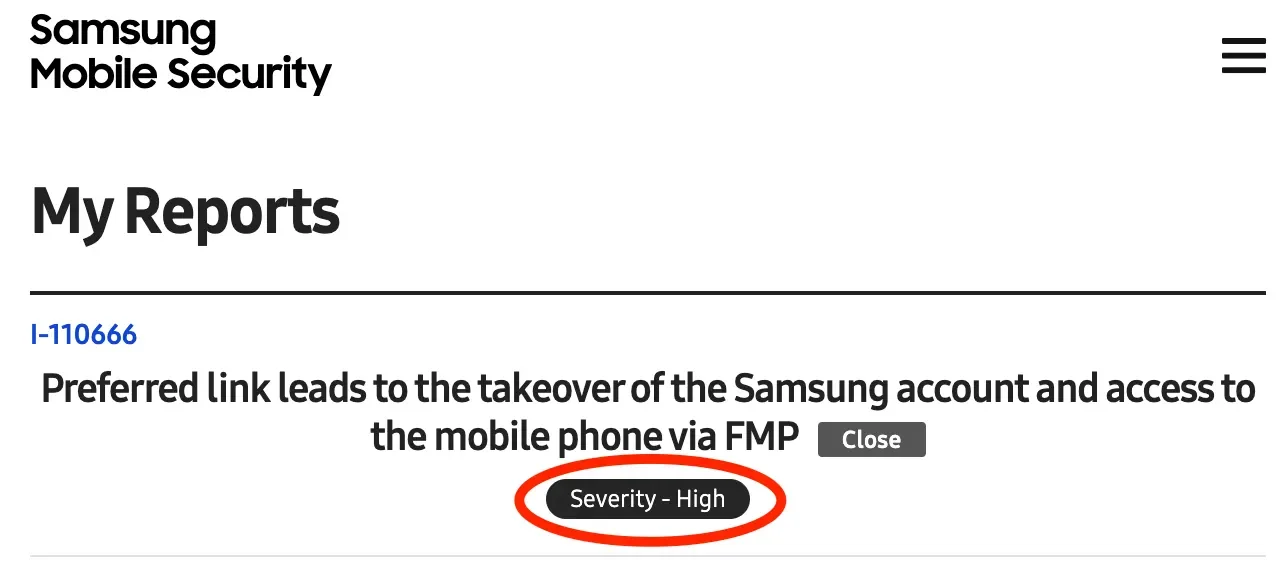
A flaw in Samsung's account sign-in flow let an attacker craft a link that, when a victim clicked OK on a prompt, handed control of the victim's Samsung account to the attacker. The attacker could then access the victim's device location and functionalities.
 Published on medium.com
Mobile security is an ever-evolving landscape that demands constant vigilance. In this article, I’ll delve into a critical security vulnerability I discovered in Samsung’s mobile platform.
The full write-up lives on its author's site
It belongs to its author, so we link to it rather than copy it. The other two tabs are our own rewrites, checked against it.
Context
Samsung's mobile platform includes a Samsung account that underpins services such as FindMyMobile (FMM) and account sign-in. The vulnerability described here let an attacker manipulate a victim's Samsung account, which in turn opened the door to unauthorised control over the user's device location and functionalities. The researcher states that the issue was responsibly disclosed and fixed by Samsung Mobile Security, and that this post is published with Samsung Mobile Security's permission.
Setup
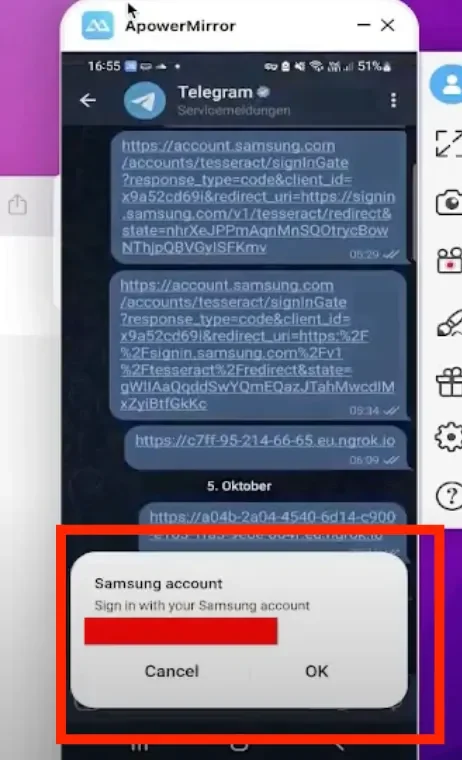
The report does not describe the accounts, roles, tools or versions used. What it does describe is the sequence of HTTP requests the attacker has to perform, and the precondition that the victim clicks OK on a dialogue window that the attacker's link triggers. The dialogue reads, "Do you want to continue with an account?" Clicking OK effectively hands control to the attacker.
Finding it
The researcher frames the issue as an attacker being able to manipulate the user's Samsung account. The attack is delivered as a custom link sent to the victim; the link triggers the account dialogue, and the request sequence completes the takeover once the victim accepts. The report does not describe the moment of discovery or the reasoning that led to it beyond this overview.
Exploitation
The attacker performs a series of crafted HTTP GET and POST requests. The report presents them in four stages.
Stage 1: Initialization and state acquisition
- Send a GET request to
https://account.samsung.com/to obtain theEUAWSWIPSESSIONIDcookie. - Send a GET request to
https://account.samsung.com/mbr-svc/auth/generateState?requiredNewState=trueto get thestateparameter.
The first request establishes the session cookie EUAWSWIPSESSIONID. The second returns a state value, which is carried into the next stage.
Stage 2: Token generation
- Send a GET request to a specified URL with the previously acquired
state, to refresh theEUAWSWIPSESSIONIDcookie. - Send a GET request to
https://account.samsung.com/accounts/v1/FMM2/signInWithQrCodeto get the CSRF token and a key URL. - Send a GET request to the key URL to obtain the
stateparameter needed for the intent URL.
The signInWithQrCode endpoint is the one that yields both the CSRF token and the key URL; the key URL then yields the state used to build the intent URL.
Stage 3: Frontend exposure
- Expose the intent link with a 302 redirect, which makes the link available to the victim.
The report does not include the redirect response or the intent URL itself.
Stage 4: Attack execution
- Wait for the victim. Once the victim clicks OK on the dialogue, the process moves to the next step.
- Check the server response: verify whether the server returns "SUCCESS" in the
rtnCdparameter. If not, repeat the request. - Finalise the process: send a GET request to get the login URL for FindMyMobile or Account.
- Access acquired: the attacker opens the login URL and is redirected to the logged-in page.
If the server does not return "SUCCESS" in rtnCd, the request is repeated.
A demonstration video accompanies these steps in the original post as the proof of concept.
Root cause
The report does not analyse the underlying code or design flaw. What it shows is a chain in which a state value obtained from generateState, a CSRF token and key URL from signInWithQrCode, and a second state from the key URL are combined into an intent link that the victim is asked to accept. The account dialogue is the point where the victim authorises the flow, and the attacker's polling of rtnCd until "SUCCESS" is what confirms the takeover completed. Why the existing defences did not stop the chain is not stated; Why the existing defences did not stop the chain is not stated.
Impact
An attacker who gets the victim to click OK on the dialogue can take control of the victim's Samsung account, and through it the device location and functionalities. The report describes this as a significant infringement on user privacy and security, enabling unauthorised device and location control. The attack requires the victim to accept the dialogue; without that click the chain does not complete.
Fix
The researcher reported the vulnerability to Samsung Mobile Security, who acted promptly to resolve the issue.
Variants to test
- Apply the same state and CSRF acquisition pattern to other Samsung account flows that expose a
generateStateendpoint or a QR sign-in endpoint, and check whether a state obtained by one client can be used to complete a sign-in for another. A positive result is a completed login on the attacker's side after the victim accepts a dialogue. - Test whether the
rtnCdpolling pattern exists on other endpoints: send the completion request repeatedly and watch for a "SUCCESS" value that indicates the victim's acceptance was registered against the attacker's session. - Check whether intent links exposed through a 302 redirect can be pre-generated and delivered to a victim, on other mobile sign-in features. A positive result is a link that, when accepted, logs the attacker into the victim's account.
- Look for other flows where a key URL returned alongside a CSRF token yields a second
statethat is not bound to the requesting session.
What happened, in plain words
A security researcher found a way to take over someone else's Samsung account by getting them to click a link and then tap OK on a pop-up. Once the victim accepted, the attacker could log in as the victim and gain unauthorised control over the victim's device location and functionalities. The researcher reported the issue to Samsung, who fixed it, and published this explanation with Samsung's permission.
The vulnerability: a brief overview
The problem was that an attacker could manipulate the victim's Samsung account. In simple terms, the attacker could trick the victim into accepting a dialogue that gave the attacker access. This opened the door to unauthorised control over the victim's device location and functionalities.
Attack scenario
The attacker sends a custom link to the victim. When the victim opens it, a dialogue window appears that reads, "Do you want to continue with an account?" If the victim clicks OK, control is effectively handed to the attacker.
Technical breakdown
To pull this off, the attacker had to perform a series of carefully crafted HTTP GET and POST requests. HTTP is the language browsers and servers use to talk; a GET request is like asking a server for a page, and a POST request is like submitting a form. The report describes four stages.
Stage 1: Initialization and state acquisition
- Send a GET request to
https://account.samsung.com/to obtain theEUAWSWIPSESSIONIDcookie. - Send a GET request to
https://account.samsung.com/mbr-svc/auth/generateState?requiredNewState=trueto get thestateparameter.
This request is like visiting the Samsung account homepage. The server responds with a cookie named EUAWSWIPSESSIONID. A cookie is a small piece of data that a website asks your browser to store and send back on later requests, so the site can remember who you are. Here, the cookie identifies the attacker's session.
This request asks the server to generate a state value. A state parameter is a random string that websites use to keep track of a specific login attempt and to prevent cross-site request forgery (CSRF), where an attacker tricks a logged-in user's browser into sending a request the user did not intend. The attacker needs this state value for later steps.
Stage 2: Token generation
- Send a GET request to a specified URL with the previously acquired
state, to refresh theEUAWSWIPSESSIONIDcookie. - Send a GET request to
https://account.samsung.com/accounts/v1/FMM2/signInWithQrCodeto get the CSRF token and a key URL. - Send a GET request to the key URL to obtain the
stateparameter needed for the intent URL.
This request goes to a page that handles signing in with a QR code. The server responds with a CSRF token and a key URL. A CSRF token is a secret value that a website includes in forms and requests to verify that the request came from its own pages, not from an attacker's site. The key URL is another address the attacker must visit to get a second state value, which will be used to build an intent URL. An intent URL is a special link that, on mobile devices, can open a specific app and trigger an action, such as starting a login flow.
The report does not give the URL used in the first request of this stage, nor the key URL returned by the second.
Stage 3: Frontend exposure
- Expose the intent link with a 302 redirect, which makes the link available to the victim.
A 302 redirect is a server response that tells the browser to go to a different address. By exposing the intent link with a 302 redirect, the attacker makes the link available to the victim.
Stage 4: Attack execution
- Wait for the victim. Once the victim clicks OK on the dialogue, the process moves to the next step.
- Check the server response: verify whether the server returns "SUCCESS" in the
rtnCdparameter. If not, repeat the request. - Finalise the process: send a GET request to get the login URL for FindMyMobile or Account.
- Access acquired: the attacker opens the login URL and is redirected to the logged-in page.
After the victim clicks OK, the attacker checks the server's response. The rtnCd parameter is a return code; the attacker waits until it says "SUCCESS", which indicates the victim's acceptance has been registered. Then the attacker requests the login URL for FindMyMobile or Account, opens it, and is redirected to the logged-in page, now with access to the victim's account.
The report does not show the request that returns rtnCd, nor the login URL request.
A demonstration video accompanies these steps in the original post as the proof of concept.
The fix
The researcher reported the vulnerability to Samsung Mobile Security, who acted promptly to resolve the issue.
Importance of disclosure
This vulnerability had the potential for significant infringement on user privacy and security, enabling unauthorised device and location control. The researcher disclosed it responsibly and Samsung fixed the problem.
Conclusion
If you have any personal questions regarding the reward or other aspects of this post, feel free to reach out to the author on LinkedIn.
Best Regards, David Albert
Glossary
- HTTP GET request: A type of HTTP request used to retrieve data from a server, like asking for a web page.
- HTTP POST request: A type of HTTP request used to send data to a server, like submitting a form.
- Cookie: A small piece of data stored by the browser and sent with requests to a website, used to remember state or identity.
- Session: A period of interaction between a user and a website, often tracked by a cookie.
- State parameter: A random value used in OAuth and similar flows to maintain state and prevent CSRF attacks.
- CSRF token: A secret value included in requests to prevent cross-site request forgery attacks.
- CSRF (Cross-Site Request Forgery): An attack that tricks a user's browser into sending unwanted requests to a site where the user is authenticated.
- Intent URL: A URL that can launch an app and perform an action on mobile devices.
- 302 redirect: An HTTP response that tells the browser to go to a different URL.
- FindMyMobile (FMM): Samsung's service for locating and controlling a lost device.
- QR code sign-in: A login method where a user scans a QR code with a device to authenticate.
- rtnCd: A parameter in a server response that indicates a return code, such as "SUCCESS".
- Proof of concept: A demonstration that a vulnerability can be exploited.



