Hacking AI: System and Cloud Takeover via MLflow Exploit
MLflow had a local file inclusion flaw in an undocumented model-version artifact API call, letting a remote unauthenticated attacker read any file the server user could access. By reading private SSH keys or cloud credential files, an attacker could log in to the host or cloud account and run code.
 Published on protectai.com
One of the most popular tools in an ML system is MLflow (with over 13 million monthly downloads and increasing) that is used for managing end-to-end machine learning lifecycle.
The full write-up lives on its author's site
It belongs to its author, so we link to it rather than copy it. The other two tabs are our own rewrites, checked against it.
Context
MLflow is an open source tool for managing the end-to-end machine learning lifecycle, with over 13 million monthly downloads at the time of writing. It ships a web UI and a REST API for tracking experiments, runs and artifacts, and for registering models. Artifacts are files produced by a run (models, plots, data), and the UI lets you browse them and download them.
Protect AI tested MLflow and found a combined Local File Inclusion / Remote File Inclusion vulnerability, tracked as CVE-2023-1177, that can lead to a complete system or cloud provider takeover. Version 2.2.1 fixes CVE-2023-1177 and version 2.2.2 fixes CVE-2023-1176. The maintainers responded quickly and shipped fixes in a few weeks. All versions up to 2.1.1 are vulnerable to LFI, and the released exploit tool works on versions from v1.12 to v2.1.1.
Setup
The researchers installed MLflow locally, put BurpSuite in front of it to intercept every API call, ran an example experiment to populate the server with data, and then started the UI server for exploration. The exact commands from the report:
# Download MLflow source to get access to their example runs
git clone https://github.com/mlflow/mlflow
# Create and enter new directory outside the mlflow/ directory
mkdir mlflowui
cd mlflowui
# Copy the example code from the MLflow source into this new directory
cp -r ../mlflow/examples/sklearn_elasticnet_wine .
# Setup a virtual environment for installing requirements
python3 -m venv venv
source venv/bin/activate
# Install mlflow in this virtual environment
pip install mlflow pandas
# Run the example experiment
mlflow run --env-manager=local sklearn_elasticnet_wine -P alpha=0.5
# Run the UI to see the experiment details
mlflow ui --host [redacted]:8000
No account, role or special configuration is needed: the report states that all custom configurations are vulnerable, including an out of the box installation, and that no user interaction or prerequisite knowledge of the environment is required.
Finding it
When creating experiments, MLflow offered the option of specifying a directory that would store the objects. This looked like a configurable file path, as shown by the example experiment the researchers ran.
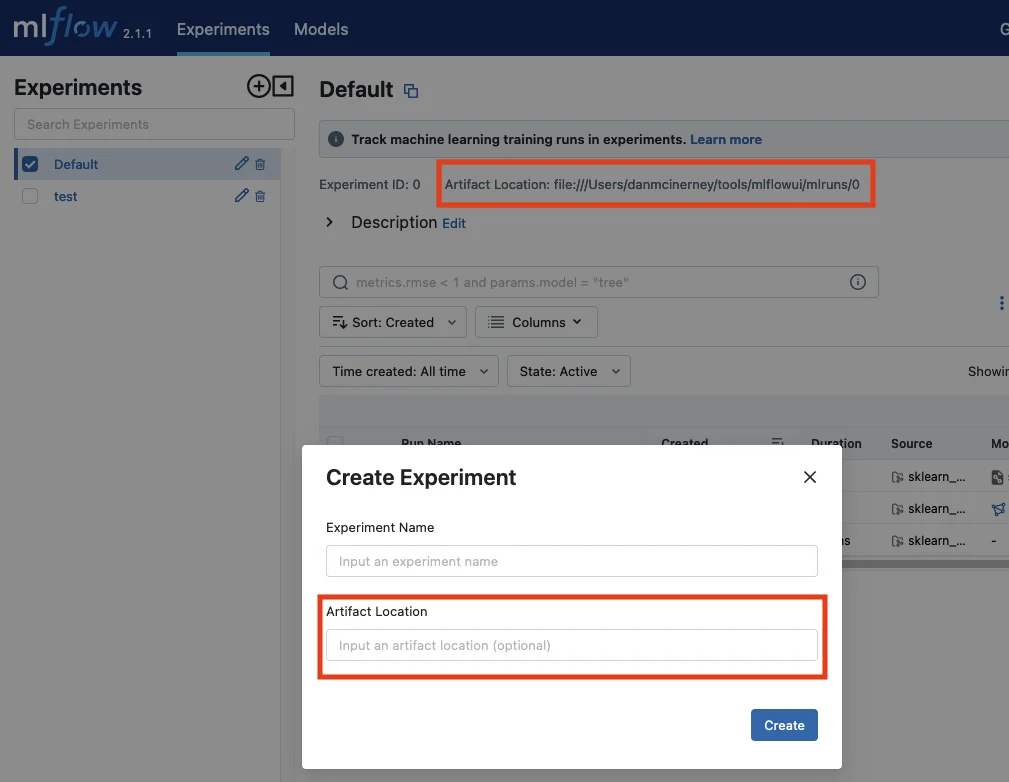
That immediately drew attention, because it would require perfectly implemented filtering to prevent local file inclusion or arbitrary file overwrites. However, an MLflow experiment cannot be run remotely from the UI, and nothing actually happens with the artifact location when an experiment is created through the UI, so there were no security considerations there. The researchers moved on to the individual experiment runs.
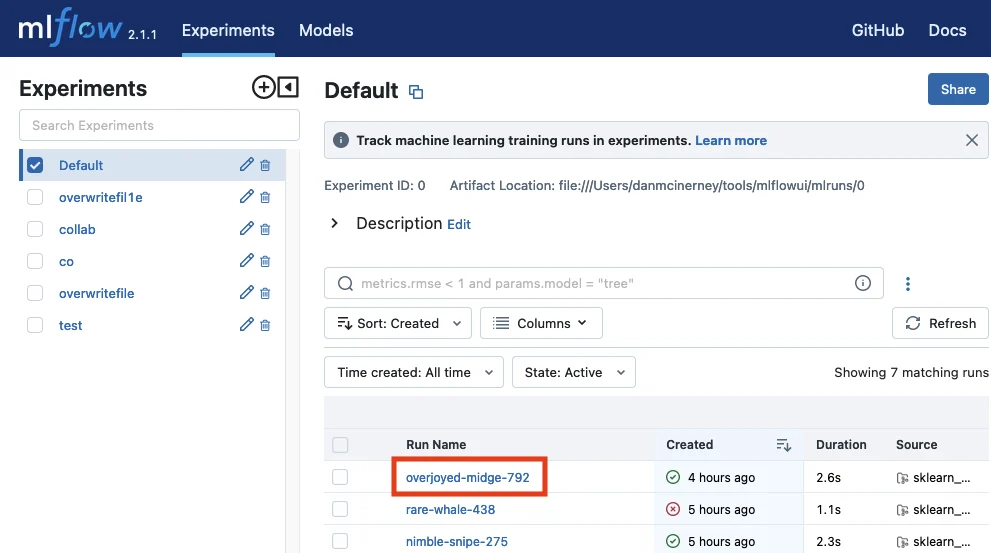
Clicking the run name brought up the run details, where the files involved in the experiment could be seen and downloaded.
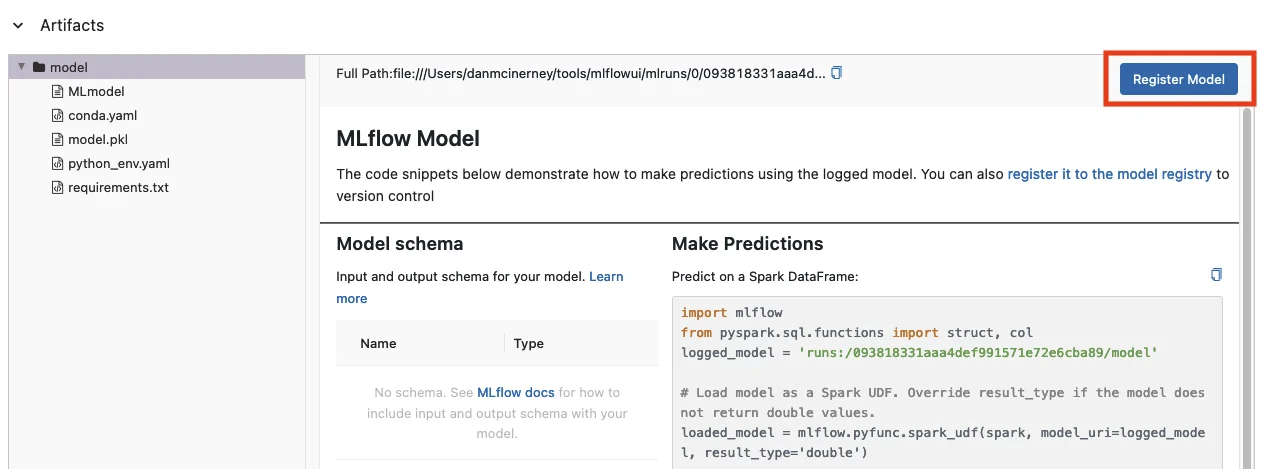
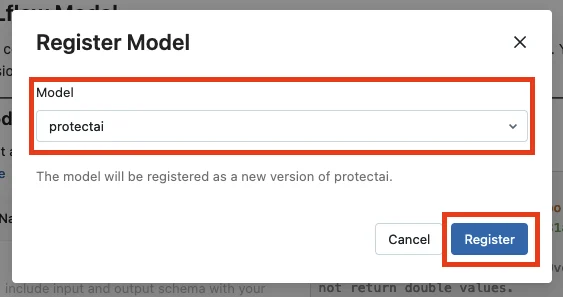
Among the artifact files was a large "Register Model" button. It did not look interesting at first: it pops up a modal that lets you select a model and saves that model's details as "Version 1".
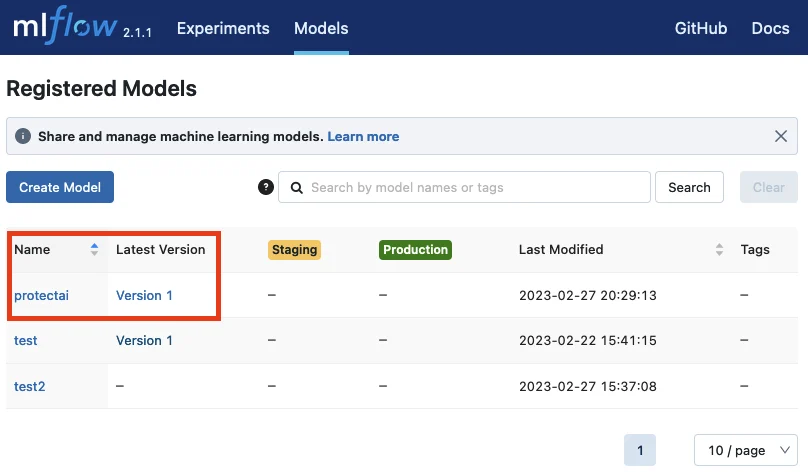
Looking under the hood in BurpSuite revealed more.
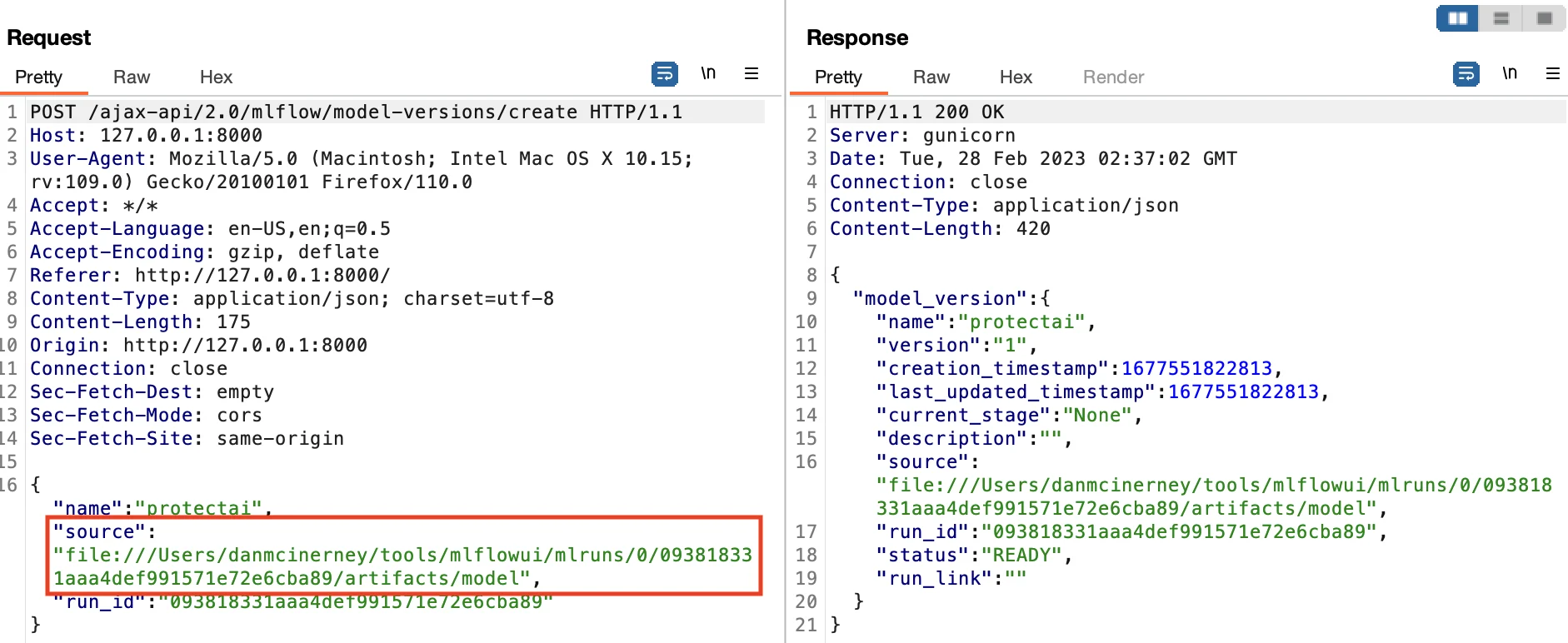
There was another protocol and file path input that the UI never showed. The researchers manually changed it to the user's private SSH key, file:///Users/danmcinerney/.ssh/id_rsa. Access to that file would allow remote login to the MLflow host machine as the user who started the MLflow server.
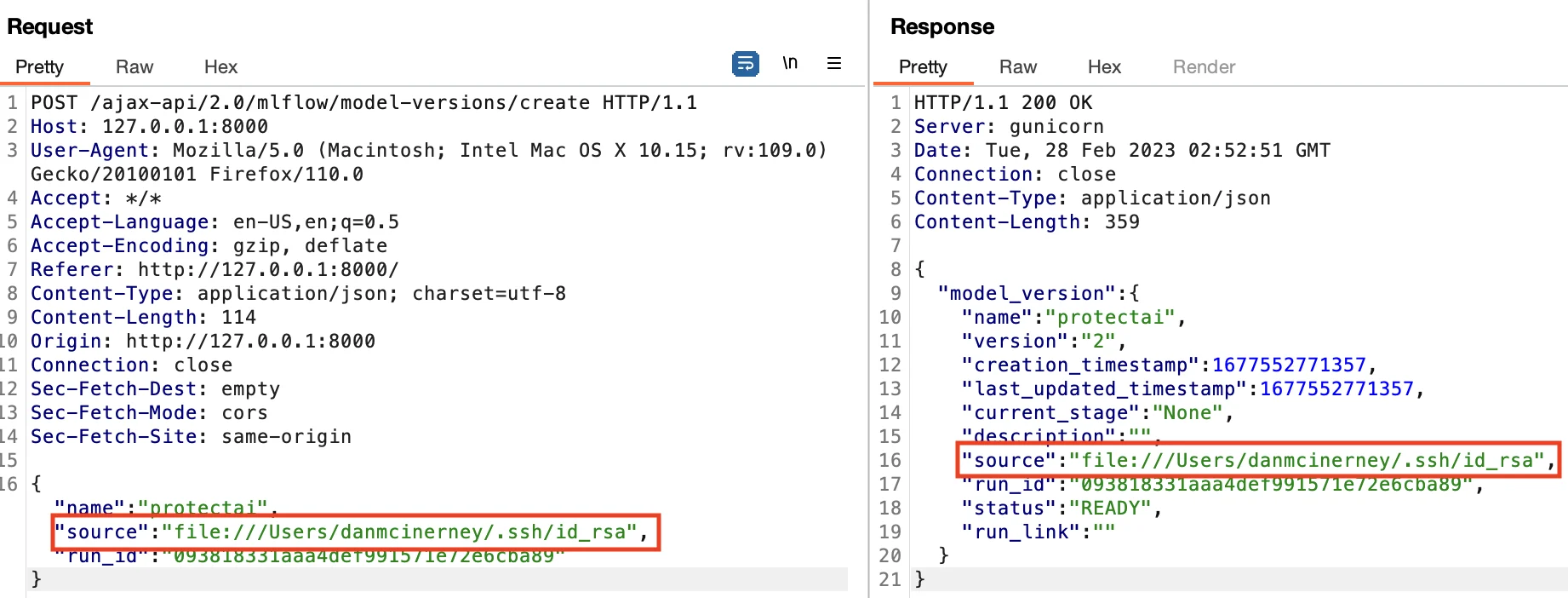
The new source was reflected in the response, which usually indicates a server-side change occurred. Browsing back to the registered model details showed nothing in the experiment run artifacts, the model details or the model version details. It looked like another dead end, similar to pointing the experiment artifact path at an arbitrary location with nothing in the UI to do with it. Then the BurpSuite request and response log showed something interesting.
Exploitation
Step 1: spot the 500 on get-artifact
A 500 Internal Server Error appeared in a get-artifact API call.
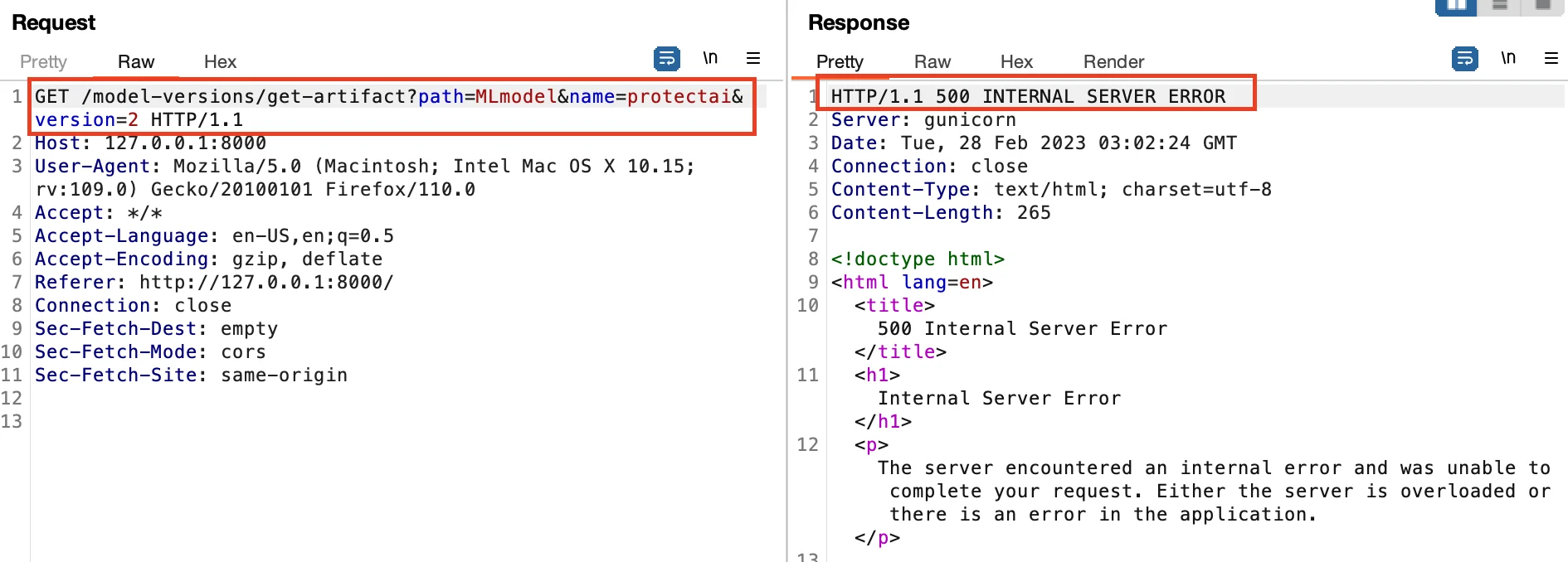
The get-artifact call had been of interest from early in the testing because it is the call that returns file data from the artifact repository: it is how a model is downloaded from an experiment run. The researchers found it was protected with a function that prevented Local File Inclusion vulnerabilities.
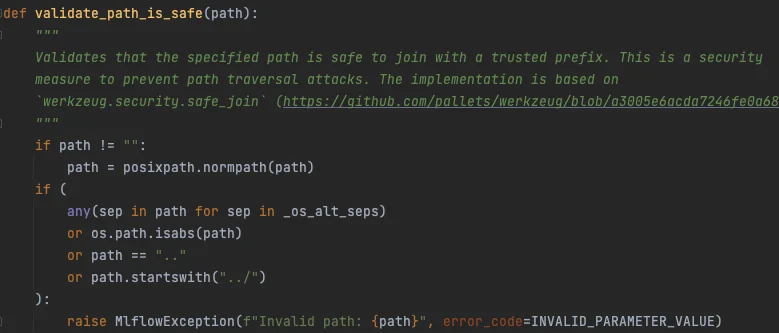
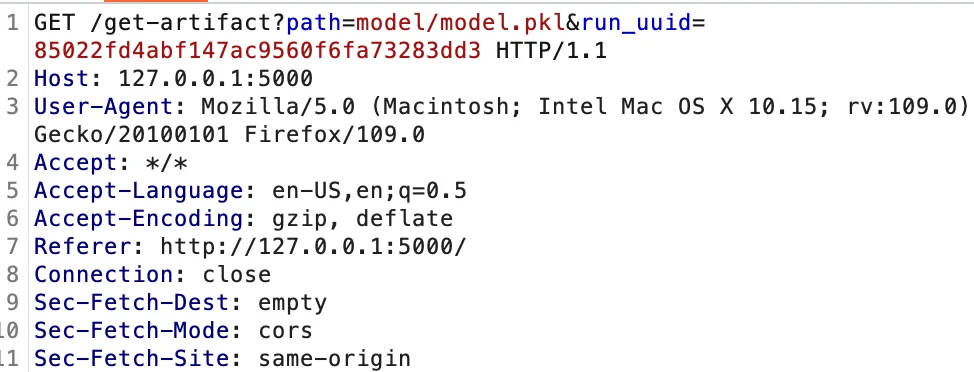
They had spent time trying to bypass that protection without success. The difference in this particular get-artifact call is that it does not try to get a file from a subfolder; it accesses the filename directly. It is also not the same API call. The documented get-artifact REST API call looks like this:
And the comparable model-version/get-artifact call looks like this:
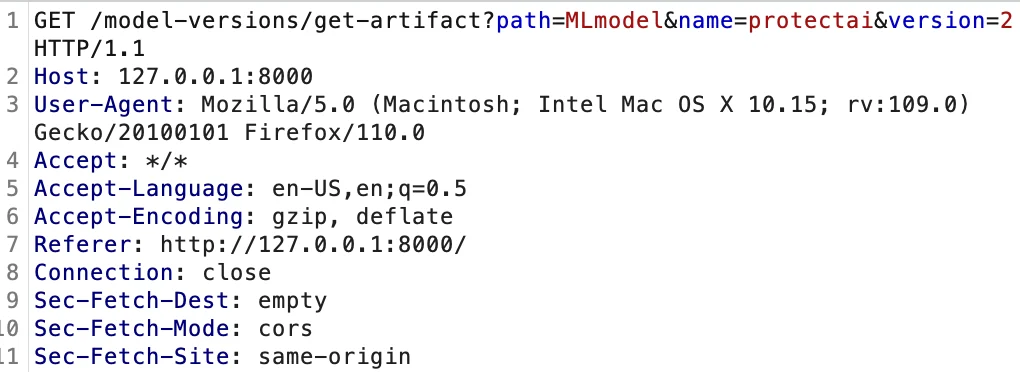
The URL path, parameters and values all differ, so it is clearly not the same API call. This one is not in the documentation. The key difference is that it looks directly for a filename via the path URL parameter, rather than for a relative file path as in the legitimate get-artifact call.
Step 2: control the source folder
Because there is no directory traversal involved, the LFI protection is absent: one only needs to control the source folder location. Earlier, the researchers had tried to set an API request's source path to file:///Users/danmcinerney/.ssh/id_rsa when creating a new model version.
What they should have done was point source at a folder, not a file. They corrected that.
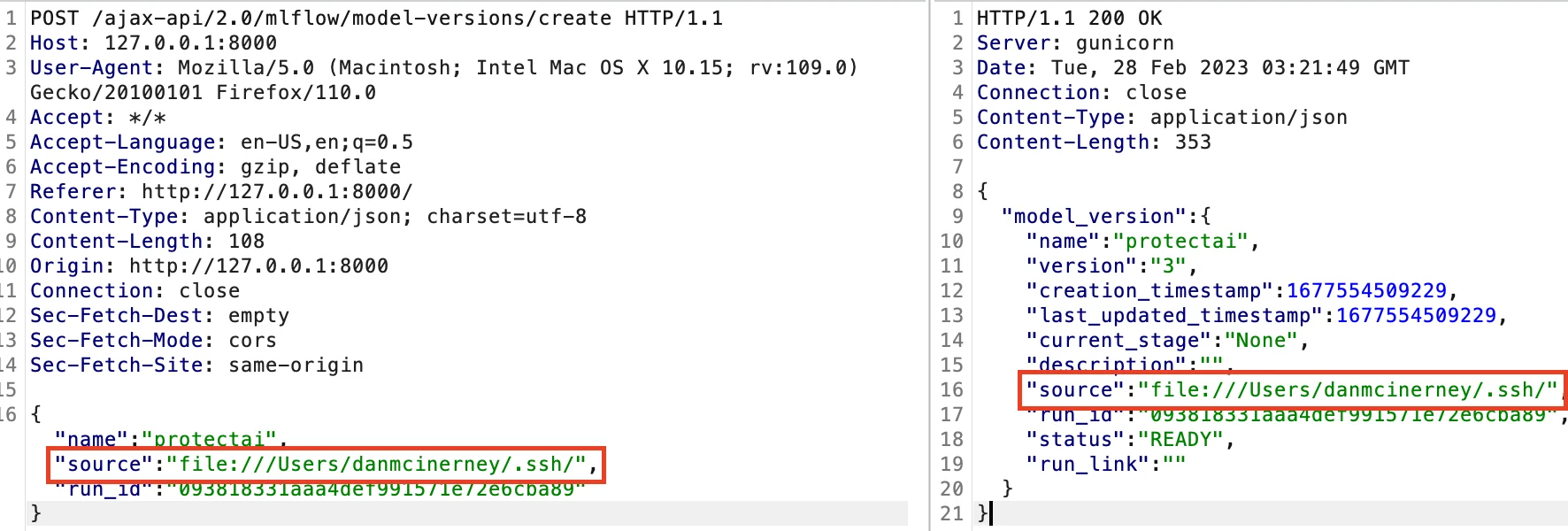
Step 3: read the key through the undocumented call
They resent the undocumented REST API call and pointed it at id_rsa, a file inside the new model version's source location, which holds the private SSH keys that unlock remote login to the server.
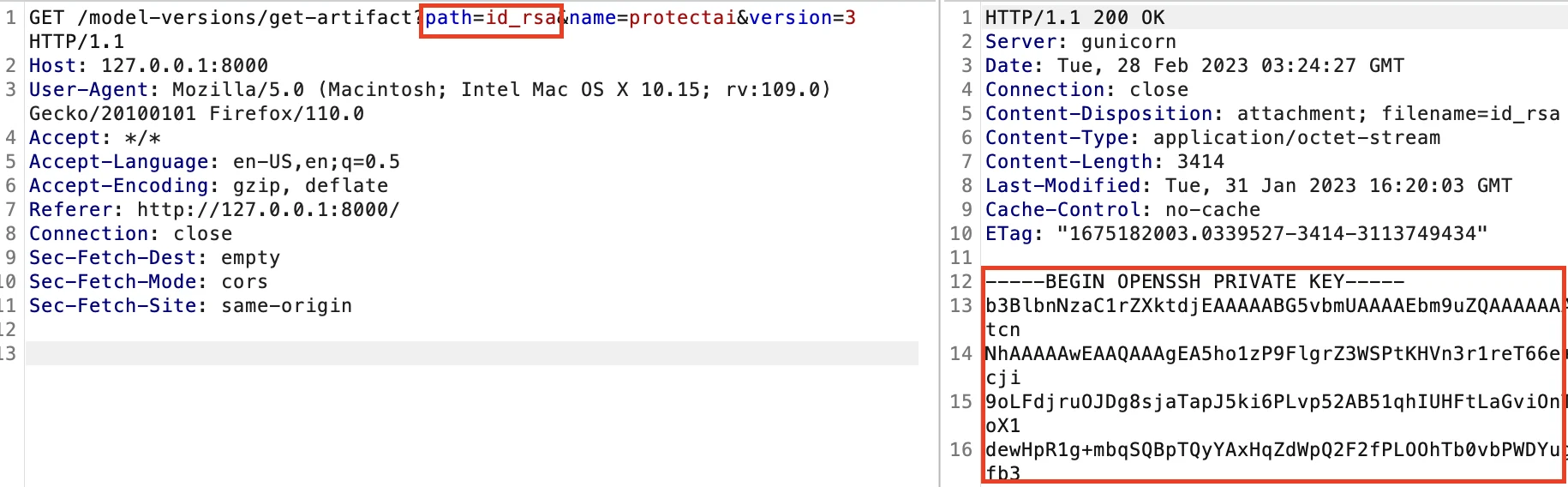
With the retrieved SSH key, terminal access to the host running the MLflow server follows. MLflow is most often configured to use an S3 bucket as its artifact store; in that case another high value target on the machine is ~/.aws/credentials, which stores AWS credentials. Other high value targets include web server SQL configs containing plaintext passwords, and /etc/shadow, which holds all user password hashes that can be cracked with a tool such as hashcat.
Detection tool
The researchers released a scanner, MLFIflow.py (M + LFI + flow), to surface the vulnerability. Installation:
git clone https://github.com/protectai/Snaike-MLflow
cd Snaike-MLflow/MLFIflow
python3 -m venv mlfiflow
source mlfiflow/bin/activate
pip install -r requirements.txt
By default it attempts to read /etc/passwd from the MLflow server and uses the usernames found to search for SSH keys and cloud credential files:
python MLFIflow.py -s http://[redacted]:5000
To specify a custom wordlist of files to download, use the -f flag:
python MLFIflow.py -s http://[redacted]:5000 -f /path/to/wordlist.txt
Root cause
The documented get-artifact call takes a relative file path and is guarded by a function that blocks Local File Inclusion. The undocumented model-version/get-artifact call takes a filename directly through the path URL parameter, and the LFI protection is absent because no directory traversal is required. The attacker only has to control the source folder location of a model version. The two calls differ in URL path, parameters and values, so the protection on one does not cover the other. The report does not show the code of either handler, so the exact implementation gap is not stated.
Impact
A remote unauthenticated attacker can read any file on the server that the user who started the MLflow server can access. Remote code execution follows from grabbing private SSH keys or cloud service provider credentials from the server, which allow remote login to servers or cloud resources and arbitrary code execution under the permissions of the credentials found. No user interaction and no prerequisite knowledge of the environment are required, and all custom configurations, including out of the box installations, are vulnerable. The report notes that many automated patch management systems do not enumerate or identify MLflow, and if they do, may not perform version checks, so patching may be a challenge with traditional tools. Upgrading is critical even for instances that are not in production and are used only in development environments.
Fix
CVE-2023-1177 is fixed in MLflow 2.2.1 and CVE-2023-1176 in 2.2.2; versions after 2.1.1 are no longer vulnerable. The report urges updating to the latest release or at least 2.2.2 immediately. The report does not describe the code change itself.
Variants to test
- Enumerate undocumented API routes next to documented ones. A positive result is a sibling endpoint that takes a filename or path parameter and returns file contents without the traversal guard.
- Look for a field that accepts a
file://or other protocol location and is stored server-side. A positive result is the value being reflected in the response, indicating a server-side change. - Point such a field at a folder rather than a file, then request a known filename inside it through the undocumented call. A positive result is the contents of that file, such as a private key or credentials file.
- Check older MLflow deployments for the simpler pre-2.0 form,
http://<server:port>/get-artifact?path=../../../../../etc/passwd&run_uuid=<run_uuid. A positive result is/etc/passwdcontent returned. - Run the scanner against your own instances to see whether
/etc/passwdcan be read and whether usernames lead to SSH keys or cloud credential files.
What happened, in plain words
MLflow is a free, open source tool that data scientists use to keep track of their machine learning work. A machine learning model is a program that has learned patterns from data, and MLflow helps a team organise the many experiments, files and models that go into building one. At the time of writing it was downloaded more than 13 million times a month. It comes with a web interface (a set of pages you open in a browser) and a REST API, which is a way for programs to talk to it over the network instead of a person clicking buttons.
Security researchers at Protect AI tested MLflow and found a serious flaw. They could make the MLflow server hand over files that sit on the computer running it, files that the person who started the server is allowed to read. This kind of flaw is called Local File Inclusion, or LFI: the server is tricked into "including" (reading and returning) a local file it should never expose. The report describes the issue as a combined Local File Inclusion/Remote File Inclusion vulnerability. The combined issue is tracked as CVE-2023-1177. A CVE is a public catalogue number given to a known security flaw so everyone can refer to the same thing.
The consequence is severe: an attacker who can read any file on the server can often steal the keys and passwords stored there and take over the whole machine, or the cloud account it belongs to. The fix arrived quickly. CVE-2023-1177 is fixed in MLflow 2.2.1, and a second issue, CVE-2023-1176, is fixed in 2.2.2. The report urges anyone running MLflow to upgrade to the latest release, or at least 2.2.2, immediately, even if the instance is only used for development and not in production.
One practical warning from the report: ordinary patch management tools, the software companies use to keep programs up to date, often do not even recognise that MLflow is installed, and when they do they may not check its version. So the usual automatic update machinery may leave you exposed without telling you.
Impact
The flaw lets a remote attacker who has not logged in at all read any file on the server that the user who started the MLflow server can access. "Remote" means over the network, and "unauthenticated" means no username or password is needed.
Reading files becomes remote code execution, usually shortened to RCE, meaning the attacker can run their own commands on a machine. The bridge is credentials: private SSH keys (secret files that prove your identity when logging into a server) or cloud provider credentials (secret keys that let programs act on your cloud account). With those in hand the attacker can log in to the server or the cloud resources and run whatever the stolen credentials allow.
The report lists the conditions:
- No user interaction required: nobody has to click anything.
- No prerequisite knowledge of the environment required: the attacker does not need to know how the victim set things up.
- All custom configurations are vulnerable, including a default, out of the box installation.
- All versions up to 2.1.1 are vulnerable to LFI.
- The released exploit tool works on versions from v1.12 to v2.1.1.
- All versions before v2.0 were vulnerable to a simpler form of the attack:
http://<server:port>/get-artifact?path=../../../../../etc/passwd&run_uuid=<run_uuid
That last URL is worth unpacking for a beginner. get-artifact is the name of an API call, a specific address a program can ask the server for. path=../../../../../etc/passwd is the interesting part: .. means "go up one folder", so a chain of them climbs out of the folder the server intended and lands in the system folder /etc, where passwd is a standard file listing the machine's user accounts. run_uuid identifies a particular experiment run. On old versions, simply asking for that URL returned the file.
Our process of discovery
The researchers did not attack a stranger's server. They installed MLflow on their own machine, put a tool called BurpSuite in front of it, and explored. BurpSuite is an intercepting proxy: it sits between your browser and the server and lets you see, pause and edit every request and response. Think of it as a mail intercept service that opens every letter between you and a company, lets you read it, and lets you reseal it with different words before delivery.
They also ran an example experiment so the server had realistic data to look at, then started the web interface. These are the exact commands from the report:
# Download MLflow source to get access to their example runs
git clone https://github.com/mlflow/mlflow
# Create and enter new directory outside the mlflow/ directory
mkdir mlflowui
cd mlflowui
# Copy the example code from the MLflow source into this new directory
cp -r ../mlflow/examples/sklearn_elasticnet_wine .
# Setup a virtual environment for installing requirements
python3 -m venv venv
source venv/bin/activate
# Install mlflow in this virtual environment
pip install mlflow pandas
# Run the example experiment
mlflow run --env-manager=local sklearn_elasticnet_wine -P alpha=0.5
# Run the UI to see the experiment details
mlflow ui --host [redacted]:8000
Line by line:
git clone https://github.com/mlflow/mlflowdownloads the MLflow source code, which includes example projects to play with.mkdir mlflowuiandcd mlflowuicreate and enter a fresh folder, kept outside the downloaded code so the two do not mix.cp -r ../mlflow/examples/sklearn_elasticnet_wine .copies one example project, a wine-quality prediction model, into that folder.python3 -m venv venvcreates a virtual environment: a private, isolated box of Python packages so this test does not disturb the rest of the computer.source venv/bin/activatesteps into that box.pip install mlflow pandasinstalls MLflow and pandas, a data-handling library the example needs, inside the box.mlflow run --env-manager=local sklearn_elasticnet_wine -P alpha=0.5runs the example experiment locally, with a setting called alpha set to 0.5. This fills the server with a run and its files.mlflow ui --host [redacted]:8000starts the web interface on the local machine at port 8000.[redacted]is the address a computer uses to refer to itself.
Finding it
When creating an experiment, MLflow offered the option of specifying a directory that would store the objects. An experiment here is a named container for a set of runs, and the objects are the files a run produces, called artifacts: models, plots, data. The directory field looked like a configurable file path, as the example experiment showed.
That drew attention straight away. If a user can type a file path and the server uses it, the server needs flawless filtering to stop someone pointing it at a file it should not touch, or overwriting an arbitrary file. But an MLflow experiment cannot be run remotely from the web interface, and nothing actually happens with the artifact location when an experiment is created through it, so there was no security issue there. The researchers moved on to the individual experiment runs.
Clicking the run name opened the run details, where the files involved in the experiment could be seen and downloaded.
Among the artifact files was a large "Register Model" button. Registering a model means saving a particular model as a named, versioned item the team can refer to later. It did not look interesting at first: it pops up a small window (a modal) that lets you select a model and saves that model's details as "Version 1".
But what was happening underneath? They checked BurpSuite.
There was another input, carrying a protocol and a file path, that the web interface never showed. A protocol is the prefix that says how to reach something: http:// for a web address, file:// for a file on the local disk. The researchers manually changed this hidden value to the user's private SSH key, file:///Users/danmcinerney/.ssh/id_rsa. That file is the secret half of an SSH key pair; whoever holds it can log in to the MLflow host machine as the user who started the MLflow server.
The new source value came back in the response, which usually means the server actually stored the change. Curious, they went back to the registered model details. Nothing in the experiment run artifacts, nothing in the model details, nothing in the model version details. It looked like another dead end, much like pointing the experiment artifact path at an arbitrary location with nothing in the interface to do with it. Then the BurpSuite request and response log showed something interesting.
Exploitation
Step 1: spot the 500 on get-artifact
A 500 Internal Server Error appeared in a get-artifact API call. A 500 is the standard web response code for "the server hit an unexpected problem while handling this".
The get-artifact call had interested them from early on, because it is the call that returns file data from the artifact store: it is how a model is downloaded from an experiment run. They found it was protected by a function that prevented Local File Inclusion.
They had spent time trying to get around that protection without success. The difference in this particular get-artifact call is that it does not try to fetch a file from a subfolder; it accesses the filename directly. It is also not the same API call. The documented get-artifact REST API call looks like this:
And the comparable model-version/get-artifact call looks like this:
The URL path, the parameters and the values all differ, so it is clearly a different call. This one is not in the documentation. The key difference is that it looks directly for a filename through the path URL parameter, rather than for a relative file path as the legitimate get-artifact call does. A parameter is simply a named value attached to a request, the part after the ? in a URL.
Step 2: control the source folder
Because there is no directory traversal involved, the LFI protection is absent: the attacker only needs to control the source folder location. Directory traversal is the ../ trick of climbing out of an intended folder, and the guard on the documented call was built to stop exactly that. The undocumented call does not require a traversal, so the LFI protection is absent.
Earlier, the researchers had tried to set an API request's source path to file:///Users/danmcinerney/.ssh/id_rsa when creating a new model version.
What they should have done was point source at a folder, not a file. They corrected that.
Step 3: read the key through the undocumented call
They resent the undocumented REST API call and pointed it at id_rsa, a file inside the new model version's source location. That file holds the private SSH keys that unlock remote login to the server.
With the retrieved SSH key, terminal access to the host running the MLflow server follows: a terminal is the text window where you type commands directly to a machine.
MLflow is most often set up to use an S3 bucket as its artifact store. S3 is Amazon's cloud file storage, and a bucket is a container inside it. In that setup another high value target on the machine is ~/.aws/credentials, the file where AWS credentials are stored. ~ means the current user's home folder. Other valuable targets include web server and SQL configuration files, which often contain plaintext passwords, and /etc/shadow, which holds all user password hashes. A hash is a scrambled form of a password; it cannot be read directly, but weak ones can be cracked with a tool such as hashcat, which tries guesses until one produces the same hash.
Detection tool
The researchers released a scanner, MLFIflow.py (M + LFI + flow), to check whether a server is exposed. Installation:
git clone https://github.com/protectai/Snaike-MLflow
cd Snaike-MLflow/MLFIflow
python3 -m venv mlfiflow
source mlfiflow/bin/activate
pip install -r requirements.txt
Line by line: the first command downloads the tool's code from GitHub, a code hosting site. The second enters the tool's folder. The third creates an isolated Python environment, the fourth activates it, and the fifth installs the tool's dependencies, the extra packages it needs to run, listed in a file called requirements.txt.
By default the scanner tries to read /etc/passwd from the MLflow server and uses the usernames it finds to look for SSH keys and cloud credential files:
python MLFIflow.py -s http://[redacted]:5000
Here -s gives the address of the server to test, and 5000 is the network port MLflow commonly listens on. A port is like a numbered door on a computer; different services listen at different doors.
To specify a custom wordlist of files to download, use the -f flag:
python MLFIflow.py -s http://[redacted]:5000 -f /path/to/wordlist.txt
A wordlist is a text file with one candidate per line, here the file paths to try. The -f flag points the scanner at your own list instead of its built-in choices.
Root cause
The documented get-artifact call takes a relative file path and is guarded by a function that blocks Local File Inclusion. The undocumented model-version/get-artifact call takes a filename directly through the path URL parameter, and the LFI protection is absent because no directory traversal is needed. The attacker only has to control the source folder location of a model version. The two calls differ in URL path, parameters and values, so the protection on one does not cover the other. The report does not show the code of either handler, so the exact implementation gap is not stated.
Fix
CVE-2023-1177 is fixed in MLflow 2.2.1 and CVE-2023-1176 in 2.2.2; versions after 2.1.1 are no longer vulnerable. The report urges updating to the latest release, or at least 2.2.2, immediately. The report does not describe the code change itself.
Variants to test
If you look after an MLflow instance, or any similar tool, these are the checks the report's findings suggest:
- Enumerate undocumented API routes next to documented ones. A positive result is a sibling endpoint that takes a filename or path parameter and returns file contents without the traversal guard.
- Look for a field that accepts a
file://or other protocol location and is stored server-side. A positive result is the value being reflected in the response, indicating a server-side change. - Point such a field at a folder rather than a file, then request a known filename inside it through the undocumented call. A positive result is the contents of that file, such as a private key or credentials file.
- Check older MLflow deployments for the simpler pre-2.0 form,
http://<server:port>/get-artifact?path=../../../../../etc/passwd&run_uuid=<run_uuid. A positive result is/etc/passwdcontent returned. - Run the scanner against your own instances to see whether
/etc/passwdcan be read and whether usernames lead to SSH keys or cloud credential files.
Glossary
- API: a defined way for one program to ask another for something, usually over the network.
- REST API: an API style built around web addresses and standard request types, where each address names a resource.
- Endpoint: one specific address in an API, such as
get-artifact. - Parameter: a named value attached to a request, such as
pathorrun_uuid. - MLflow: an open source tool for managing the machine learning lifecycle, with a web interface and an API.
- Machine learning model: a program that has learned patterns from data and can make predictions.
- Experiment: in MLflow, a named container for a set of runs.
- Run: one execution of a training job, with its own files and results.
- Artifact: a file produced by a run, such as a model, a plot or data.
- Artifact store: the place artifacts are kept, often an S3 bucket.
- Model registration: saving a model as a named, versioned item the team can refer to later.
- LFI (Local File Inclusion): tricking a server into reading and returning a file from its own disk that it should not expose.
- RFI (Remote File Inclusion): tricking a server into pulling in a file from a remote location.
- Directory traversal: using
../in a path to climb out of the intended folder. - RCE (remote code execution): making a machine run commands of the attacker's choosing over the network.
- Unauthenticated: done without logging in or proving an identity.
- CVE: a public catalogue number for a known security flaw.
- BurpSuite: an intercepting proxy that lets you see, pause and edit traffic between a browser and a server.
- Proxy: a go-between that forwards requests and responses.
- Protocol: the prefix in an address that says how to reach something, such as
http://orfile://. - HTTP status code: a number in a response saying how the request went; 500 means the server hit an unexpected problem.
- SSH key: a pair of files used to log in to a server without a password; the private key is the secret half.
- Credentials: secrets such as keys or passwords that prove identity or grant access.
- S3 bucket: a container in Amazon's cloud file storage.
- Hash: a scrambled form of data, such as a password, that cannot be read directly but can be guessed by trying inputs.
- Hashcat: a tool that cracks password hashes by trying guesses.
- Wordlist: a text file of candidate values, one per line, used by a scanner.
- Virtual environment: an isolated box of software packages so a test does not affect the rest of the computer.
- Port: a numbered door on a computer where a service listens.
- Patch management: the process and tooling companies use to keep software up to date.



