Reflected XSS in Backend search
The backend search page reflects the search query into HTML without proper quoting, allowing an attacker to inject an event handler. An attacker could trick a logged-in user into clicking a crafted link, leading to JavaScript execution in the victim's browser.
 Originally disclosed on HackerOne
- Triaged in 13 hours
- Fixed in 6 days
- Paid in 7 days
- Disclosed after 37 days
The backend suffers from a reflected XSS because of missing filtering.
A prerequisite for this vuln is, that you enable the option to view invoices online ( this is just to see the id of the account to craft the payload. Maybe you can also find this number anywhere else... )
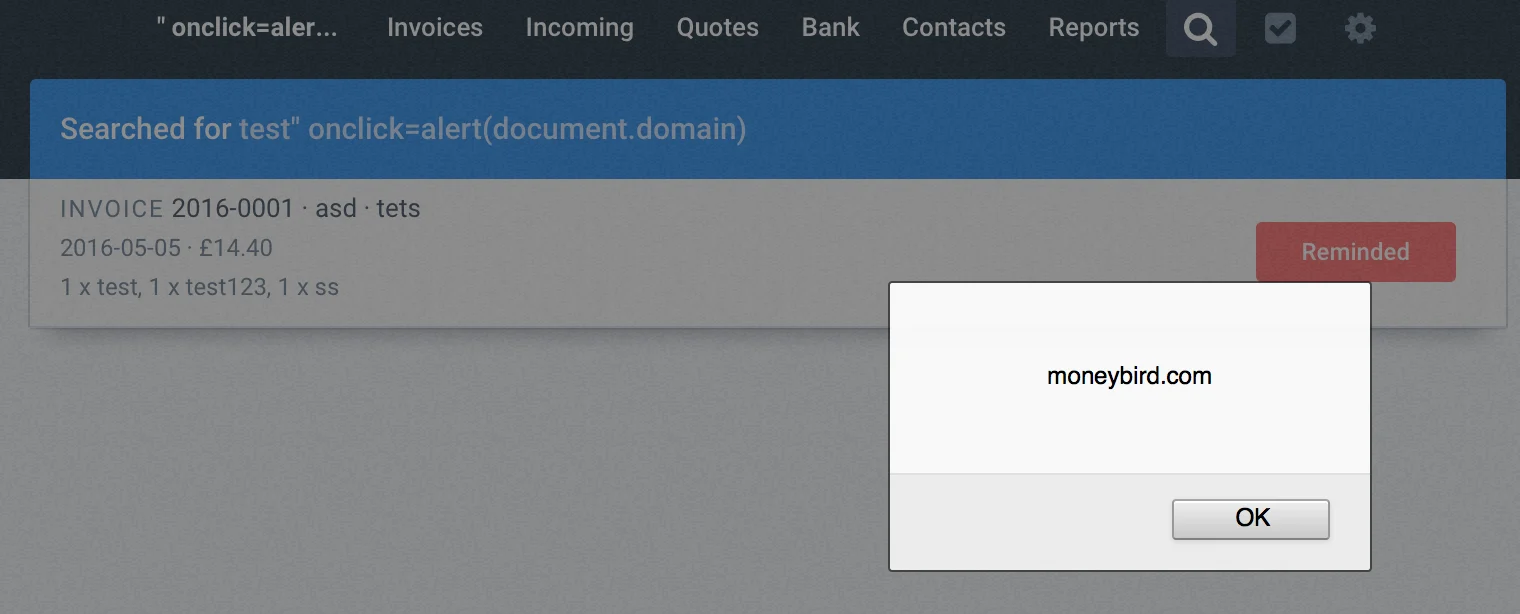
Steps to reproduce: Login Create an invoice Enter the string "test" in the details of the invoice ( this is possible to get a search result back. the attacker later knows what is in his invoice and can use any word from within ) Fill the other required fields with any values Send the invoice to a valid email address When you receive the invoice, there is a link to view it online, like https://moneybird.com/[id]/sales_invoices/29362c563a6eb7bfedad55cc0985d97a77202d65f6089ea54a6718910ce58108/5e5b5ac093069aa9657d87206c38919586b8f235c132175973c3b1a3a86c25fd now copy the [id] ( should be your ID of course ) from the link and paste it into that one: https://moneybird.com/[id]/search?search_query=test%22%20onclick%3Dalert%28document.domain%29 Now call it in any browser You will see the search of moneybird with one result If you click on that result, a javascript popup showing the current domain appears ( see screenshot 1 )
This is possible, because the searchvalue is not enclosed in Quotes ( see screenshot2 ), so it is possible to inject any eventhandler into the html code.
The worst thing that you can do with this vulnerability, is to redirect a moneybird user to a phishing page where he is prompted to enter his login credentials, or an attacker could even add hisself to the admins of the account and take it over completely. He could also mark his own invoice as paid and so do a financial loss to the victim.
Attachments

Not written yet. The AI write-up for this report has not been written yet. The Original tab links to the source.
How it worked
Root cause
Likely the search query parameter is inserted into the HTML page without being enclosed in quotes or properly escaped, allowing an attacker to break out of an attribute and add an event handler.
Impact
An attacker could redirect a user to a phishing page to steal credentials, add themselves as an admin to take over the account, or mark an invoice as paid causing financial loss.
What the attacker needed
Enable online invoice viewing; attacker knows the account ID; victim opens the crafted link and clicks the result
How it was found
- Log in and create an invoice with a unique word in the details.
- Send the invoice to a valid email address and open the online view link to obtain the account ID.
- Copy the account ID from the link and build a search URL with a crafted search_query parameter.
- Open the crafted URL in a browser; the search page shows one result.
- Click the search result to trigger the JavaScript popup.
Explained by bugbounty.wiki with AI from the original and checked against quotes from it; it can still be wrong. Read the original before relying on a detail.
Not written yet. The AI write-up for this report has not been written yet. The Original tab links to the source.
When you type something into a search box, the website often shows it back to you. If the site doesn't clean that text properly, an attacker can put special code in the link so that when you click a search result, your browser runs that code. This is called cross-site scripting (XSS) and can let an attacker do things as you on the site.
What is XSS?
Script an attacker supplies runs in another user's browser, on the target's origin, with that user's session.