Reflective XSS on wholesale.shopify.com
A reflected cross-site scripting flaw existed on wholesale.shopify.com because user input in the URL was placed into a script context without encoding quotes or angle brackets. An attacker could craft a link that, when opened by a victim, executed arbitrary JavaScript in the trusted Shopify domain.
 Originally disclosed on HackerOne
- Triaged in 4 hours
- Fixed in 11 hours
- Paid in 13 hours
- Disclosed after 13 hours
There is a reflected XSS issue on wholesale.shopify.com
Steps to reproduce: Call the following URL in Mozilla Firefox: https://wholesale.shopify.com/asd%27%3Balert%28%27XSS%27%29%3B%27
An alert box with "XSS" appears. This means that an attacker has full control of the scripts, that are executed in the victims browser.
An attack vector would be sending an evil link via e-mail, messenger, etc. As the victim trusts the domain wholesale.shopify.com, it will click the link and could be redirected to a site hosting a browser exploit kit. This abuses the trust of shopify.com
The main problem with that XSS is, that in script context the quotes, double quotes and ">" + "<" are not encoded at all.
I suggest to convert them either to hex values or escape them.
Attachments
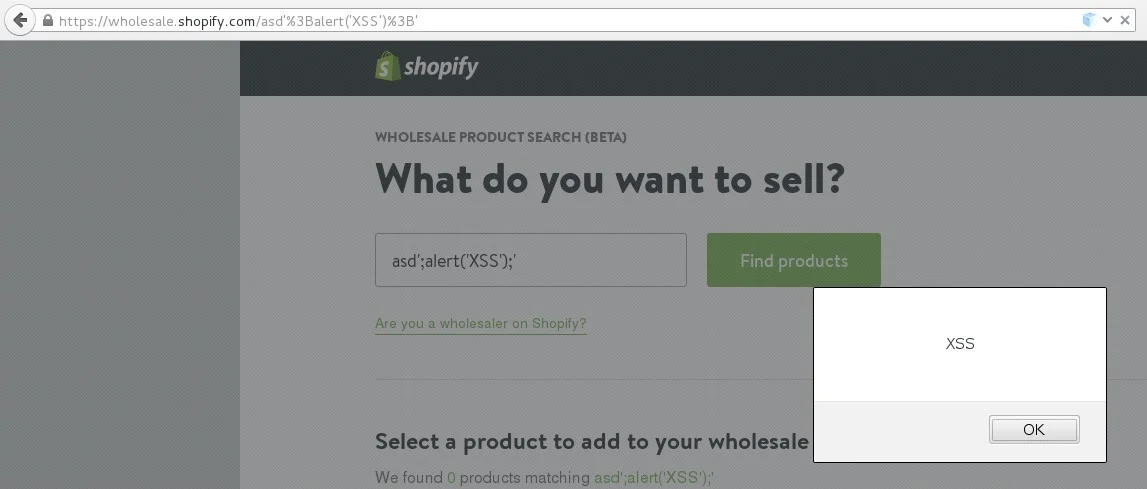
What the report shows
The target is wholesale.shopify.com, a Shopify subdomain. The researcher found a reflected cross-site scripting issue there and reported it through the Shopify programme on HackerOne, which paid a bounty of 500.00 USD. The report was disclosed on 21 December 2015. The weakness is recorded as generic cross-site scripting; the report itself gives no CVSS score or severity rating.
The reproduction is a single step: open the following URL in Mozilla Firefox.
https://wholesale.shopify.com/asd%27%3Balert%28%27XSS%27%29%3B%27
Decoded, the path segment is asd';alert('XSS');'. The researcher reports that an alert box showing "XSS" appears, which means an attacker has full control of the scripts executed in the victim's browser.
The report describes the attack vector as sending a crafted link by email, messenger or similar. Because the victim trusts the domain wholesale.shopify.com, they click it, and the researcher notes they could then be redirected to a site hosting a browser exploit kit. The report frames the issue as an abuse of the trust in shopify.com.
The suggested fix is to convert the offending characters to hex values or to escape them. The report does not describe a vendor response, a fix timeline or a retest.
Root cause
The report states the main problem directly: in script context, single quotes, double quotes and the combination of > and < are not encoded at all. The report states that in script context, single quotes, double quotes and the combination of > and < are not encoded at all, so the input can break out of its context. The report does not identify the exact parameter or the line of code involved; it only shows the path that triggers the behaviour.
Impact
The researcher's stated impact is script execution in the victim's browser under the wholesale.shopify.com origin, with the attacker controlling the script. The described delivery is a link sent through email or a messenger, relying on the victim's trust in the domain. The report hedges the follow-on step: the victim "could be" redirected to a site hosting a browser exploit kit. No data theft, account takeover or other concrete outcome is demonstrated in the text.
How this kind of bug works
Reflected XSS happens when an application takes input from the current request and writes it into an HTML or JavaScript response without context-appropriate encoding. The browser receives a document that the server considers legitimate, so any script in it runs with the origin of the site. That origin is what makes the bug serious: the script can read cookies not marked HttpOnly, act on the user's session, read page content and make same-origin requests.
The context matters. In an HTML body, the dangerous characters are <, > and &; in an attribute, quotes matter; inside a <script> block, a single quote or double quote can terminate a string literal, and </script> can end the block entirely. The report's case is the script context: the quote characters are not encoded, so the input can break out of its context.
Defences are contextual output encoding (HTML entity encoding for HTML, JavaScript string escaping for script blocks, JSON encoding for data passed to scripts), plus a restrictive Content-Security-Policy that blocks inline script. Input validation helps but is not a substitute for encoding at the output point.
How to test for it
- Map every place where request data is reflected: query parameters, path segments, fragment handling, headers such as Referer and User-Agent, and error pages that echo input.
- For each reflection, determine the context by inspecting the surrounding response: HTML text, an attribute value, a script block, a JSON blob, a URL inside a script.
- Send a benign marker first, such as a unique alphanumeric string, and confirm it appears unmodified. This separates reflection from storage or filtering.
- Then send context-breaking characters: a single quote, a double quote,
<and>, and a closing</script>where relevant. Watch whether the characters come back encoded, stripped or intact. - A positive result is a response where the injected characters survive and the browser parses them as markup or code, for example a string literal that closes and a following expression that executes. Confirm in a real browser, not only by reading the response.
Common false positives: characters reflected but HTML-encoded; input reflected inside a JSON response served with a non-script content type; reflection that only appears in a header the browser does not render; and payloads that fire only because of a browser quirk or an extension. Also check whether a WAF or framework rewrites the payload in a way that makes the page safe in practice.
How it is fixed
Apply output encoding that matches the context: HTML entity encoding for HTML text and attributes, JavaScript string escaping for values inside script blocks, and JSON serialisation for data handed to client-side code. Where the value is placed in a URL, use URL encoding. Prefer passing data to scripts through safe mechanisms such as data- attributes or JSON endpoints rather than string interpolation. Add a Content-Security-Policy that disallows inline script and restricts script sources, and set cookies with HttpOnly and Secure where appropriate. Validate input on the server as defence in depth, but treat encoding at the sink as the primary fix.
Hunting notes
Reflected XSS tends to hide in places where developers assume input is harmless: search pages, error and 404 pages, redirect parameters, language and locale switches, and path segments that are echoed into a template. Script contexts are especially fruitful because a single quote is enough, and many frameworks escape HTML but not JavaScript strings.
Recon signals: parameters that appear in the page source, JavaScript that reads location or document.URL, templates that interpolate request data into inline scripts, and endpoints that return the same page with different path values. Comparing the raw response with the rendered DOM helps spot reflections that only appear after client-side processing.
Explain the realistic delivery path and the impact under the site's origin.
What happened, in plain words
A security researcher found a bug on wholesale.shopify.com, a subdomain of Shopify. The bug is called reflected cross-site scripting, or XSS for short. In everyday terms: a website can be tricked into running code that a stranger wrote, and the browser runs it because it believes the code came from the trusted site.
A useful comparison is a shop assistant who reads out whatever is written on a note handed to them. If someone hands over a note that says "shout the word XSS", the assistant shouts it, because they do not check whether the note is a legitimate instruction or a prank. Here, the website placed text into a script context without encoding it, so the browser treated part of that text as a command.
The researcher reported it through the Shopify programme on HackerOne, a platform where companies receive bug reports, and was paid a bounty of 500.00 USD. The report was disclosed on 21 December 2015. The weakness is recorded as generic cross-site scripting. The report gives no severity rating or CVSS score.
Reproducing it
The whole reproduction is one step: open a particular web address in Mozilla Firefox.
https://wholesale.shopify.com/asd%27%3Balert%28%27XSS%27%29%3B%27
That address looks strange because of the % sequences. A web address can only contain a limited set of characters, so other characters are written in a coded form called percent-encoding: %27 is a single quote, %3B is a semicolon, %28 and %29 are round brackets. Decoded, the part after the domain is:
Read it piece by piece:
asdis harmless filler text, standing in for whatever a normal page address might contain.'is a single quote. On the page, this text was being placed in a script context, where a quote is not encoded and can break out of the surrounding code.;ends the current instruction, so whatever follows is treated as a new instruction.alert('XSS')is a built-in browser command that opens a small pop-up box showing the textXSS. It is the standard harmless way to prove that code is running.;ends that instruction, and the final'tidies up the leftover quote so the rest of the page does not break.
The researcher reports that an alert box with "XSS" appears. That pop-up is the proof: the browser did not show the text as plain words, it ran it as a command. The report says this means an attacker has full control of the scripts executed in the victim's browser.
Why it matters
The report describes how such a link would be delivered: by email, messenger or similar. The victim sees a link to wholesale.shopify.com, a domain they trust, and clicks it. The researcher notes the victim could then be redirected to a site hosting a browser exploit kit, which is a page that tries to use flaws in the browser or its plugins to install malware. The report frames the whole issue as an abuse of the trust in shopify.com.
The report does not demonstrate stolen data, account takeover or any other concrete outcome. The claim is kept to what was observed: a pop-up proving that code runs.
The cause
The report states the main problem directly: in script context, single quotes, double quotes and the combination of > and < are not encoded at all. "Script context" means the spot on the page where the value lands is inside a JavaScript block, not ordinary page text. In that spot, a quote is not just a character, it is the marker that ends a piece of text, so an attacker can close it and start writing code.
The suggested fix is to convert those characters to hex values or to escape them. Escaping means replacing a dangerous character with a safe stand-in that the browser displays but never treats as code. The report does not identify the exact parameter or line of code involved, and it does not describe a vendor response, a fix timeline or a retest.
In general, how this kind of bug works
Reflected XSS happens when a site takes something from the current request, such as part of the address, and writes it into the page it sends back without encoding it for the place where it lands. The browser receives a page that the server considers legitimate, so any script in it runs with the origin of the site. The origin is the combination of scheme, domain and port that the browser uses to decide what a page is allowed to touch. That is what makes the bug serious: the script can read cookies not marked HttpOnly (a cookie is a small piece of data a site stores in your browser, often to keep you logged in, and HttpOnly stops scripts from reading it), act on the user's session, read page content and make requests to the same site.
The context matters. In ordinary page text, the dangerous characters are <, > and &; inside an attribute, quotes matter; inside a script block, a single or double quote can end a piece of text, and </script> can end the block entirely. This report's case is the script context.
Defences are encoding that matches the context: HTML entity encoding for page text, JavaScript string escaping inside script blocks, JSON encoding for data handed to scripts, plus a Content-Security-Policy, a header that tells the browser which scripts it may run and can block inline script. Input validation helps but is not a substitute for encoding at the point where the value is written out.
In general, how to test for it
- Map every place where request data comes back in the response: query parameters, path segments, headers such as Referer and User-Agent, and error pages that echo input.
- For each reflection, work out the context by looking at the surrounding response: page text, an attribute value, a script block, a JSON blob, a URL inside a script.
- Send a harmless marker first, such as a unique string of letters and digits, and confirm it appears unchanged. This separates a real reflection from storage or filtering.
- Then send characters that can break the context: a single quote, a double quote,
<and>, and a closing</script>where relevant. Watch whether they come back encoded, stripped or intact. - A positive result is a response where the injected characters survive and the browser parses them as markup or code. Confirm in a real browser, not only by reading the response.
Common false positives: characters reflected but encoded; input reflected inside a JSON response served with a non-script content type; reflection that only appears in a header the browser does not render; and payloads that fire only because of a browser quirk or an extension. Also check whether a filter or framework rewrites the payload in a way that makes the page safe in practice.
In general, how it is fixed
Apply output encoding that matches the context: HTML entity encoding for page text and attributes, JavaScript string escaping for values inside script blocks, and JSON serialisation for data handed to client-side code. Where the value goes into a URL, use URL encoding. Prefer passing data to scripts through safe mechanisms such as data- attributes or JSON endpoints rather than building strings by hand. Add a Content-Security-Policy that disallows inline script and restricts script sources, and set cookies with HttpOnly and Secure where appropriate. Validate input on the server as an extra layer, but treat encoding where the value is written out as the primary fix.
In general, where to look
Reflected XSS tends to hide where developers assume input is harmless: search pages, error and 404 pages, redirect parameters, language and locale switches, and path segments echoed into a template. Script contexts are especially fruitful because a single quote is enough, and many frameworks escape HTML but not JavaScript strings.
Signals to watch for: parameters that appear in the page source, JavaScript that reads location or document.URL, templates that put request data into inline scripts, and endpoints that return the same page with different path values. Comparing the raw response with what the browser actually renders helps spot reflections that only appear after client-side processing.
Explain the realistic delivery path and the impact under the site's origin.
Glossary
- Cross-site scripting (XSS): a bug where a site runs code supplied by an attacker in a victim's browser.
- Reflected XSS: XSS where the attacker's input comes back in the response to the same request, usually via a crafted link.
- Subdomain: a part of a domain, such as
wholesale.shopify.comundershopify.com. - HackerOne: a platform where researchers submit bug reports to companies.
- Bounty: a payment a company makes for a valid security report.
- Disclosure: making a bug report public.
- CVSS: a scoring system for the severity of a vulnerability.
- Percent-encoding: writing characters in a web address as
%plus a code, such as%27for a single quote. - JavaScript: the programming language browsers run.
- Script context: a place in a page where a value lands inside a JavaScript block rather than ordinary text.
- Encoding / escaping: replacing dangerous characters with safe stand-ins so they are shown, not executed.
- Hex value: a number written in base 16, often used as a coded form of a character.
- Origin: the scheme, domain and port that identify a site to the browser and limit what a page may access.
- Cookie: a small piece of data a site stores in the browser, often used to keep a user logged in.
- HttpOnly: a cookie flag that stops scripts from reading the cookie.
- Session: the logged-in state a site keeps for a user across requests.
- Content-Security-Policy: a response header that tells the browser which scripts it may run.
- Exploit kit: a page that tries to use flaws in a browser or its plugins to install malware.
- WAF: a web application firewall, a filter that inspects requests and may block suspicious ones.
- False positive: a result that looks like a bug but is not exploitable in practice.
- DOM: the browser's in-memory model of the page, which scripts can read and change.