How I found Moodle Cross site scripting
A Moodle instance reflected the redirect_uri parameter without proper filtering, so a javascript: URI placed there was reflected back in the response. An attacker could craft a link that runs script in the victim's browser in the context of the site.
 Published on medium.com
ParagBagul
The full write-up lives on its author's site
It belongs to its author, so we link to it rather than copy it. The other two tabs are our own rewrites, checked against it.
Context
Moodle is a learning platform, and the target here is an installation reachable at skillslatviamoodle.viaa.gov.lv, a subdomain of the Latvian government domain gov.lv. The feature involved is the LTI authentication endpoint at /mod/lti/auth.php, which takes a redirect_uri parameter. In normal use that parameter tells the endpoint where to send the user after authentication, so the value is expected to be a URL.
The researcher's goal was cross-site scripting (XSS), which he describes as a website vulnerability that allows attackers to execute JavaScript code on the client and server sides.
Setup
The work was done as an unauthenticated external researcher against public hosts. The tools used were:
subfinderfor subdomain enumerationhttpxfor finding active subdomainswaybackurlsandgaufor URL crawling- Burp Suite, including the proxy for intercepting requests and Repeater for resending them
- A browser for confirming the payload
No accounts, roles or specific product versions are mentioned.
Finding it
The researcher started by roaming around the gov.lv website, looking for XSS, and began with subdomain reconnaissance:
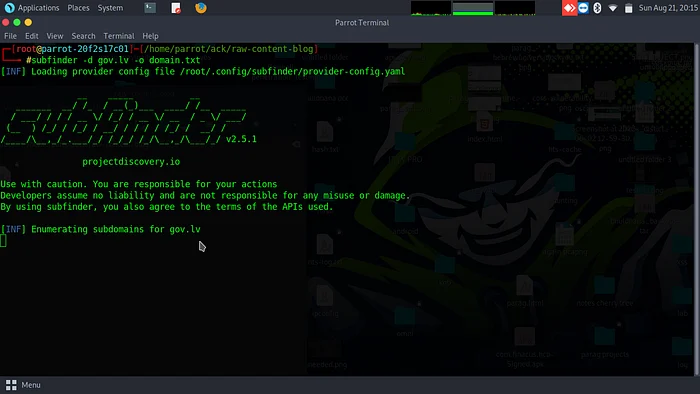
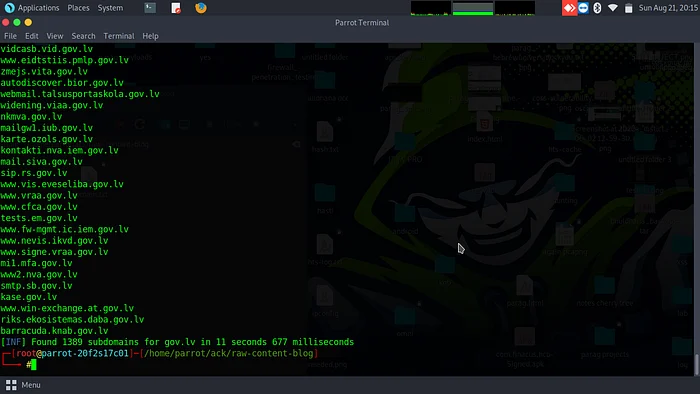
subfinder -d gov.lv -o domain.txt
This finds subdomains of gov.lv and saves them to domain.txt. The run extracted a total of 1389 subdomains.
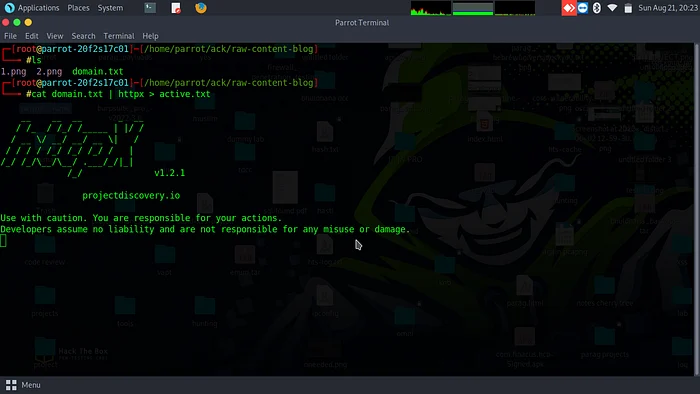
Next, httpx was used to find which of those subdomains were active, saving the active ones to active.txt.
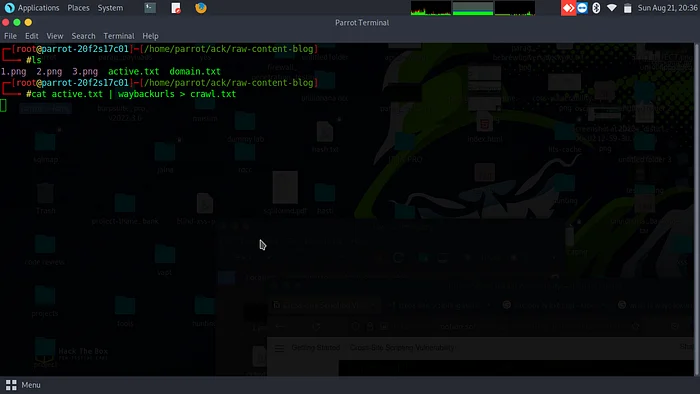
He then ran the waybackurls crawler, which fetches URLs from the Wayback machine, against the active list:
cat active.txt | waybackurls > all-domain-crawl.txt
Some domains had no URLs in the crawl output. He set those aside to test first. One of them was skillslatviamoodle.viaa.gov.lv. Crawling it with waybackurls and gau produced nothing.
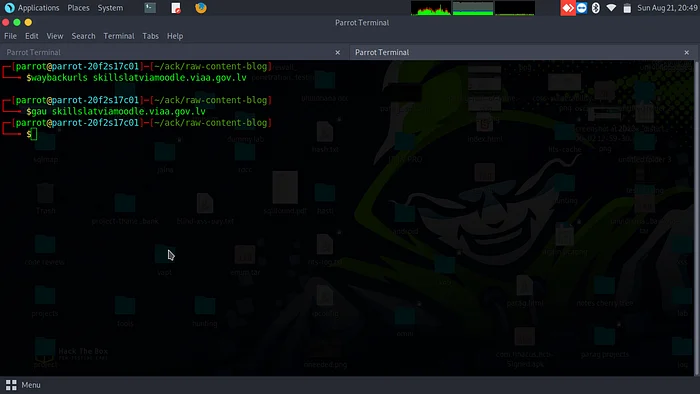
He then moved to crawling through Burp Suite.
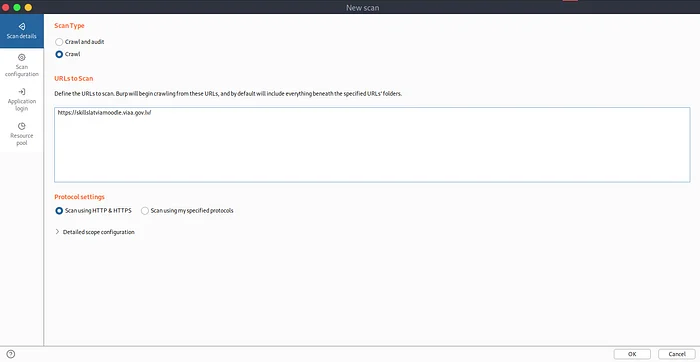
After that he crawled manually, looking at the site's features. During this manual phase he found the following URL:
https://skillslatviamoodle.viaa.gov.lv/mod/lti/auth.php?redirect_uri=https://exampl.com
The presence of a redirect_uri parameter taking a URL is what made him decide to test open redirect and XSS on it.
Exploitation
Step 1: intercept and confirm reflection
He started Burp Suite again and intercepted the request, replacing the parameter value with a marker string:
https://skillslatviamoodle.viaa.gov.lv/mod/lti/auth.php?redirect_uri=HACKER
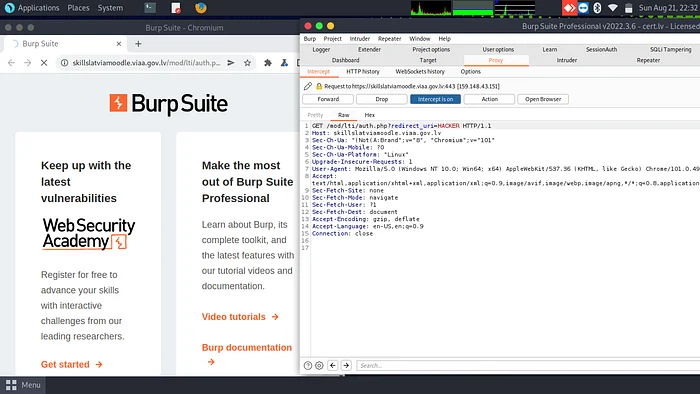
He sent the intercepted request to Repeater and clicked send. The string was reflected in the response.
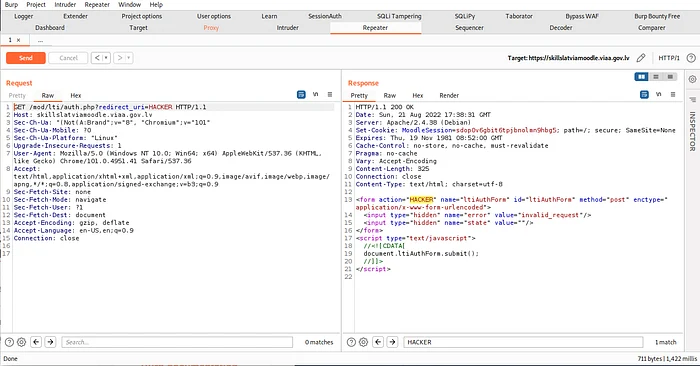
Step 2: test angle brackets
He then tested XSS on the parameter by adding <HACKER> as input. In the response, the HACKER input string was not reflected.
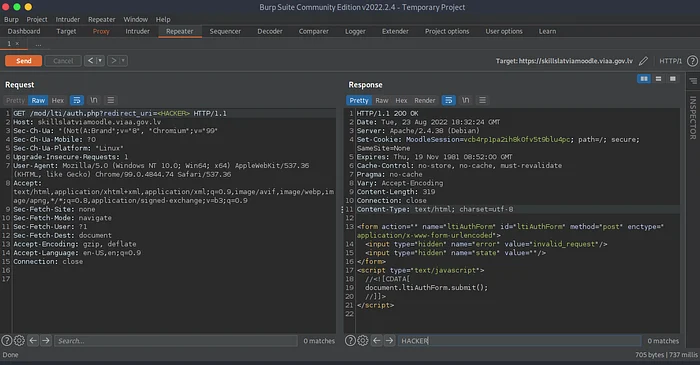
His reading of this was that a filter blocks the less-than and greater-than signs. That ruled out the usual tag-based payloads.
Step 3: research and switch to a javascript: payload
He searched for information on the problem and referred to a HackerOne report of XSS in Moodle, plus a Twitter link, as resources. After reading them he tried a payload that does not need angle brackets:
javascript:alert(1)
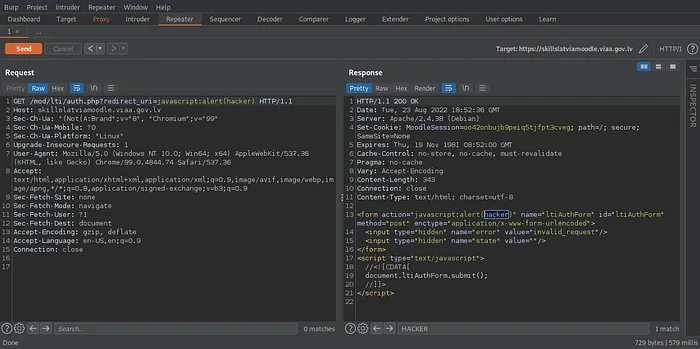
The output was reflected in the response. He then crafted a second payload:
javascript:alert(‘hacked_by_hax_wizard’)
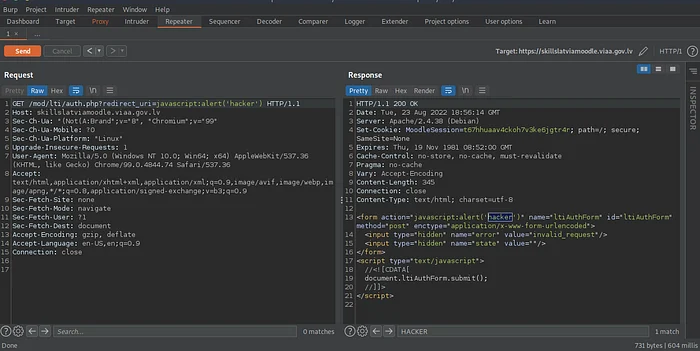
This payload was also reflected in the response.
Step 4: confirm in the browser
He changed the marker string to hacked_by_hax_wizard and opened the same request in the browser.
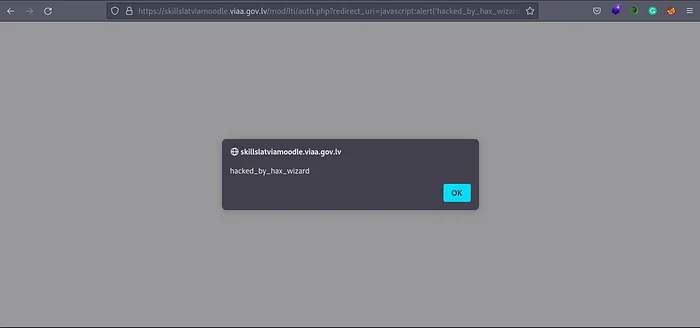
Both payloads worked:
javascript:alert(1)
javascript:alert(‘hacked_by_hax_wizard’)
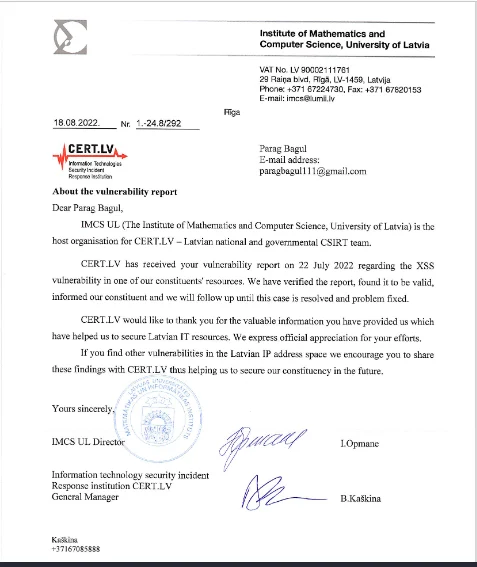
The last image is a letter of appreciation from Latvia CERT.
Root cause
The redirect_uri value is reflected in the response. The report does not show the surrounding HTML or the exact sink, so the precise mechanism is not established. The report does not show the surrounding HTML or the exact sink.
Impact
The researcher demonstrated script execution in his own browser via a crafted link.
Fix
In general terms, the redirect_uri value should be validated against an allowlist of permitted destinations and rejected if it uses a scheme other than https, and any value echoed into the page should be contextually encoded.
Variants to test
- Try other schemes in
redirect_uri, such asdata:orvbscript:, and check whether they are reflected and executed. - Try scheme obfuscation, for example mixed case or embedded whitespace and control characters, to see whether the filter can be bypassed.
- Test other Moodle endpoints that take a URL parameter, such as LTI or login redirect handlers, with the same
javascript:payload and watch for reflection in a URL context. - Check whether the same parameter allows an open redirect to an external host, which would confirm that validation of the destination is missing entirely.
- Repeat the subdomain and crawl workflow on other government domains, prioritising hosts that
waybackurlsandgaureturn nothing for, since those were the ones that led to this finding.
What happened, in plain words
A security researcher was looking at websites belonging to the Latvian government, under the domain gov.lv. He was hunting for a specific kind of bug called cross-site scripting, usually shortened to XSS. In plain terms, XSS is a flaw that lets an attacker slip their own JavaScript code into a page that other people visit, so that the code runs in those visitors' browsers as if the website itself had written it.
He found one on a Moodle site at skillslatviamoodle.viaa.gov.lv. Moodle is a learning platform, the kind of software schools and organisations use to publish courses, quizzes and learning material. The site had a page that accepts a web address as input in a redirect_uri parameter. The page echoed the address back in its response, and a value starting with javascript: produced a pop-up in the browser.
He confirmed it by getting two simple pop-up payloads to fire in his own browser, and later received a letter of appreciation from Latvia CERT, the country's computer emergency response team.
The concepts you need first
Before walking through the steps, here are the ideas that come up, explained from scratch.
- Domain and subdomain. A domain is the main name of a site, like
gov.lv. A subdomain is a name placed in front of it, likeskillslatviamoodle.viaa.gov.lv, and it usually points at a separate machine or service. Think of a domain as a building's street address and subdomains as the individual flats inside it. - Endpoint. An endpoint is a specific address on a server that does one job, for example handling a login or a redirect. It is like a particular counter in a large office: same building, but a different window for a different service.
- Parameter. A parameter is a named value you attach to a web address, after a question mark. In
?redirect_uri=something, the parameter is calledredirect_uriand its value issomething. It is like a form field, but carried in the address itself. - URL. A URL is a web address. It has a scheme at the front, such as
https://for ordinary web pages, and the rest tells the browser where to go. - JavaScript. JavaScript is the programming language that browsers run to make pages interactive. If an attacker can get their own JavaScript to run on a site, they can do things in the visitor's browser that the site's own code could do.
- Cross-site scripting (XSS). The researcher describes it as a website vulnerability that allows attackers to execute any JavaScript code on the client and server sides. In everyday terms, it is like a noticeboard where anyone can pin a note, and the site faithfully copies whatever is pinned onto official letters it sends out. If the note contains instructions, the reader's browser follows them.
- Reflection. When you send a value to a server and the server sends the same value straight back in its reply, that is called reflection. It is the first sign that your input is being placed into the page, and therefore a candidate for XSS.
- Filter. A filter is a check on the server that removes or blocks certain characters. It is like a doorman who refuses anyone carrying a large box, regardless of what is inside.
- Open redirect. An open redirect is a flaw where a site will forward a visitor to any address supplied in a parameter, rather than only to approved destinations. It is like a receptionist who will walk you to any room in the building, including rooms that are not part of the building at all.
- Burp Suite, proxy and Repeater. Burp Suite is a tool that sits between your browser and the website. The proxy part lets you pause a request before it leaves your machine, look at it, change it, and then let it go. Repeater is a part of Burp where you can resend the same request over and over with small edits, which is ideal for testing one parameter carefully.
- Intercept. To intercept a request is to catch it in transit so you can inspect or modify it before it reaches the server.
- Subdomain enumeration. This is the process of discovering which subdomains exist for a domain. You cannot guess them all by hand, so tools query public sources that record names seen on the internet.
- Crawling. Crawling means automatically visiting pages and collecting the links found on them, so you build a list of addresses to test. It is like sending a helper to walk every corridor and write down every door number.
- Wayback machine. An archive of old copies of web pages. A crawler that reads from it can find addresses that used to exist even if they are no longer linked from the live site.
- Command line. A text window where you type commands instead of clicking buttons. The tools below are run there.
The setup
The work was done as an outside researcher with no account on the target. The tools used were:
subfinderfor subdomain enumerationhttpxfor finding which subdomains are activewaybackurlsandgaufor URL crawling- Burp Suite, including the proxy for intercepting requests and Repeater for resending them
- A browser for confirming the payload
No accounts, roles or specific product versions are mentioned.
Finding it
The researcher started by roaming around the gov.lv website, looking for XSS, and began with subdomain reconnaissance. The reason to start here is scale: a single domain can hide dozens or hundreds of separate services, and each one is a separate chance to find a bug. Rather than guessing names, he used a tool that collects them from public records.
subfinder -d gov.lv -o domain.txt
Line by line:
subfinderis the name of the program being run.-d gov.lvtells it which domain to look under, heregov.lv.-o domain.txttells it to write the results into a file calleddomain.txtinstead of only printing them on screen.
This finds subdomains of gov.lv and saves them to domain.txt. The run extracted a total of 1389 subdomains.
Next, httpx was used to find which of those subdomains were active, saving the active ones to active.txt. The reason for this step is that a long list of names is not much use if most of them no longer point at anything. httpx knocks on each door and keeps the ones that answer.
He then ran the waybackurls crawler, which fetches URLs from the Wayback machine, against the active list:
cat active.txt | waybackurls > all-domain-crawl.txt
Line by line:
cat active.txtprints the contents ofactive.txt, the list of active subdomains.- The vertical bar
|is a pipe. It takes whatever the left side printed and hands it to the right side as input, like passing a list of addresses from one worker to the next. waybackurlsis the crawler. It reads those names and looks up archived addresses for each one.> all-domain-crawl.txtsends the output into a file calledall-domain-crawl.txtrather than to the screen.
Some domains had no URLs in the crawl output. He set those aside to test first. The reasoning is that a site with no archived addresses is one that automated crawlers have not mapped, so it is less likely to have been picked over by other researchers. One of them was skillslatviamoodle.viaa.gov.lv. Crawling it with waybackurls and gau produced nothing.
He then moved to crawling through Burp Suite. The proxy records every request the browser makes while you click around, which gives you a list of real addresses the site actually uses, even when the archive has none.
After that he crawled manually, looking at the site's features. Manual crawling means clicking through the site yourself and watching what the address bar and the requests do. During this manual phase he found the following URL:
https://skillslatviamoodle.viaa.gov.lv/mod/lti/auth.php?redirect_uri=https://exampl.com
Line by line:
https://skillslatviamoodle.viaa.gov.lvis the site./mod/lti/auth.phpis the endpoint, a script that handles LTI authentication. LTI is a standard that lets a learning platform accept logins from another system, so this page deals with sending a user onward after they authenticate.?redirect_uri=https://exampl.comis the parameter. It carries a web address, and the nameredirect_urisays plainly that it is the address to redirect to.
The presence of a redirect_uri parameter taking a URL is what made him decide to test open redirect and XSS on it. A parameter that accepts an address is interesting for two reasons: the server may forward the visitor anywhere it is told, and it may also place that address into the page, which is where XSS lives.
Exploitation
Step 1: intercept and confirm reflection
He started Burp Suite again and intercepted the request, replacing the parameter value with a marker string:
https://skillslatviamoodle.viaa.gov.lv/mod/lti/auth.php?redirect_uri=HACKER
Line by line:
- The address is the same endpoint as before.
redirect_uri=HACKERreplaces the real address with the wordHACKER. This is a harmless marker: if the word comes back in the reply, you know your input is being copied into the page.
He sent the intercepted request to Repeater and clicked send. The string was reflected in the response. That is the key first observation: the server is echoing what you give it, so the next question is whether it echoes it safely.
Step 2: test angle brackets
He then tested XSS on the parameter by adding <HACKER> as input. In the response, the HACKER input string was not reflected.
Why angle brackets? In HTML, the language pages are written in, angle brackets mark the start and end of a tag, such as a paragraph or a link. If you can get your own tag into a page, you can often attach code to it. The test is the simplest way to see whether the site lets tags through.
His reading of this was that a filter blocks the less-than and greater-than signs. That ruled out the usual tag-based payloads.
Step 3: research and switch to a javascript: payload
He searched for information on the problem and referred to a HackerOne report of XSS in Moodle, plus a Twitter link, as resources. Reading other people's findings is a normal part of the work: it tells you which tricks have worked on the same software before.
After reading them he tried a payload that does not need angle brackets:
javascript:alert(1)
Line by line:
javascript:is a scheme, the part of an address that tells the browser what kind of thing follows. You have seenhttps:many times;javascript:means the rest is code to run.alert(1)is a built-in browser function that shows a small pop-up with the number 1 in it. It does nothing harmful, which makes it a safe way to prove that code ran.
The idea is that a javascript: value needs no angle brackets, so the filter that blocked them is irrelevant. No angle brackets are needed, so the filter that blocked them is irrelevant.
The output was reflected in the response. He then crafted a second payload:
javascript:alert(‘hacked_by_hax_wizard’)
Line by line:
- The scheme is the same.
- This time the pop-up shows a piece of text,
hacked_by_hax_wizard, instead of a number. Using a distinctive string makes it obvious that the pop-up came from your payload and not from the site.
This payload was also reflected in the response.
Step 4: confirm in the browser
He changed the marker string to hacked_by_hax_wizard and opened the same request in the browser. Reflection in a server reply only proves the text came back; opening it in a browser proves the browser actually treats it as code.
Both payloads worked:
javascript:alert(1)
javascript:alert(‘hacked_by_hax_wizard’)
The last image is a letter of appreciation from Latvia CERT.
Why it works
The redirect_uri value is reflected in the response. Encoding means converting special characters into a safe form so the browser reads them as text rather than as instructions. The report does not show the surrounding HTML or the exact sink, so the precise mechanism is not established. The report does not show the surrounding HTML or the exact sink, so the precise mechanism is likely a URL attribute or redirect handling that accepts the javascript: scheme.
A useful comparison: a bouncer who checks that you are not carrying a weapon but never checks your ticket will still let in anyone who walks up with the right words. Blocking one kind of dangerous input is not the same as validating what the input is supposed to be.
Impact
The researcher demonstrated script execution in his own browser via a crafted link. An attacker who can get a victim to open such a URL could run JavaScript in the context of the Moodle installation.
Fix
In general terms, the redirect_uri value should be validated against an allowlist of permitted destinations and rejected if it uses a scheme other than https, and any value echoed into the page should be contextually encoded. An allowlist is the opposite of a blocklist: instead of naming what is forbidden, you name the few things that are allowed and refuse everything else.
Variants to test
- Try other schemes in
redirect_uri, such asdata:orvbscript:, and check whether they are reflected and executed. - Try scheme obfuscation, for example mixed case or embedded whitespace and control characters, to see whether the filter can be bypassed.
- Test other Moodle endpoints that take a URL parameter, such as LTI or login redirect handlers, with the same
javascript:payload and watch for reflection in a URL context. - Check whether the same parameter allows an open redirect to an external host, which would confirm that validation of the destination is missing entirely.
- Repeat the subdomain and crawl workflow on other government domains, prioritising hosts that
waybackurlsandgaureturn nothing for, since those were the ones that led to this finding.
Glossary
- Allowlist: a list of things that are permitted, with everything else refused by default.
- Burp Suite: a tool that sits between your browser and a website so you can pause, inspect and change requests.
- Client side: code that runs in the visitor's browser rather than on the server.
- Command line: a text interface where you type commands instead of clicking buttons.
- Crawling: automatically visiting pages and collecting the links found on them.
- Cross-site scripting (XSS): a website vulnerability that allows attackers to execute JavaScript code in a victim's browser.
- Domain: the main name of a website, such as
gov.lv. - Encoding: converting special characters into a safe form so they are read as text, not as instructions.
- Endpoint: a specific address on a server that performs one job.
- Filter: a server-side check that removes or blocks certain characters or values.
- gau: a tool that collects known URLs for a domain from public sources.
- httpx: a tool that checks which hosts in a list are active.
- Intercept: to catch a request in transit so it can be inspected or modified.
- JavaScript: the programming language browsers run to make pages interactive.
javascript:scheme: a URL scheme that tells the browser the rest of the address is code to run.- LTI: a standard that lets a learning platform accept logins from another system.
- Moodle: a learning platform used to publish courses and learning material.
- Open redirect: a flaw where a site forwards a visitor to any address supplied in a parameter.
- Parameter: a named value attached to a web address after a question mark.
- Payload: the value an attacker sends to try to trigger a bug.
- Pipe (
|): a command-line symbol that passes the output of one command into another. - Proxy: an intermediary that requests pass through, which can record or alter them.
- Redirect: sending a visitor from one address to another.
- Reflection: when a server sends back a value it was given, unchanged, in its reply.
- Repeater: the part of Burp Suite used to resend the same request repeatedly with edits.
- Scheme: the first part of a URL, such as
https:orjavascript:, that says what kind of address it is. - Server side: code that runs on the server rather than in the browser.
- Subdomain: a name placed in front of a domain, pointing at a separate service.
- Subdomain enumeration: discovering which subdomains exist for a domain.
- subfinder: a tool that collects subdomains for a domain from public sources.
- URL: a web address.
- waybackurls: a tool that fetches URLs for a domain from the Wayback machine.