How I was able to Bypass Philips Authentication
A Philips subdomain ran an exposed Nacos service vulnerable to an authentication bypass, letting an unauthenticated attacker list existing users and create a new account. With that new account the author logged into the Nacos dashboard and gained full admin access.
 Published on medium.com
This article is based on a new finding in which I discovered the nacos authentication bypass vulnerability on Philips website which leads to full nacos dashboard access.
The full write-up lives on its author's site
It belongs to its author, so we link to it rather than copy it. The other two tabs are our own rewrites, checked against it.
Context
During a reconnaissance phase against Philips infrastructure, the researcher found a Nacos service exposed on a Philips subdomain. Nacos is described in the report as an easy-to-use platform designed for dynamic service discovery, configuration and service management, used to build cloud-native applications and microservices platforms. The exposed instance sat at:
https://idpuat.philips.com.cn/nacos
Opening that URL presented a Nacos login panel.
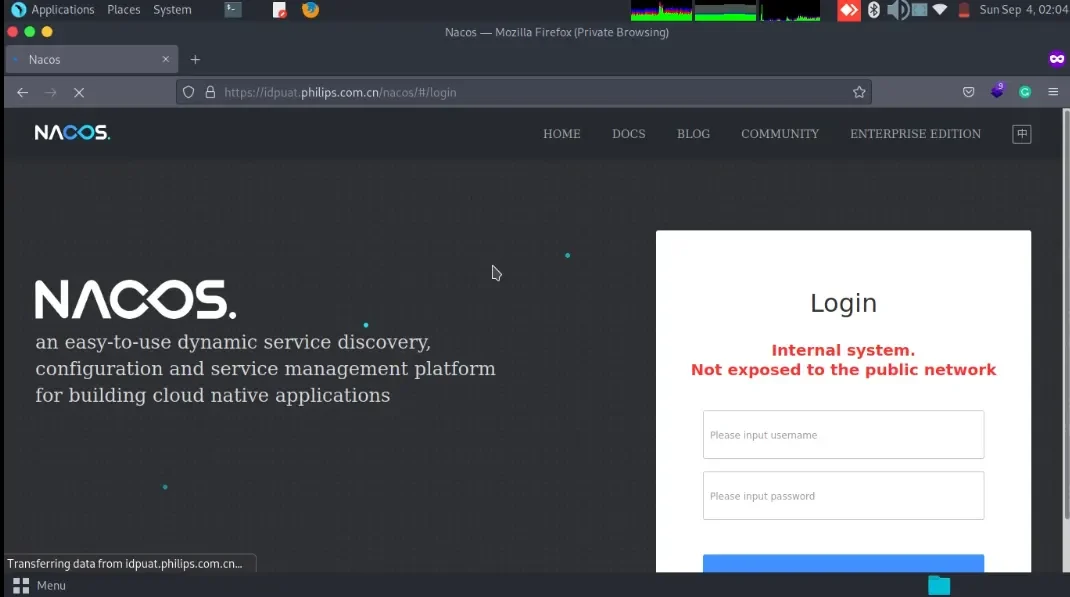
The panel is the normal entry point to the Nacos console, which is where users, configuration and service data are managed. Reaching the dashboard means reaching the control plane of whatever services register with that Nacos instance.
Setup
The researcher used Burp Suite, and in particular the Repeater, to intercept and replay requests. No account was available at the start: the first attempt was a login with default credentials, which failed. The report does not name the credentials tried. The only precondition for the attack was network access to the exposed /nacos path on the subdomain. The Nacos version in use was not known at the time, which is why the researcher went looking for version-specific issues.
Finding it
After the failed default-credential attempt, the researcher researched Nacos itself before attacking it. Searching for known vulnerabilities of Nacos produced a promising result.
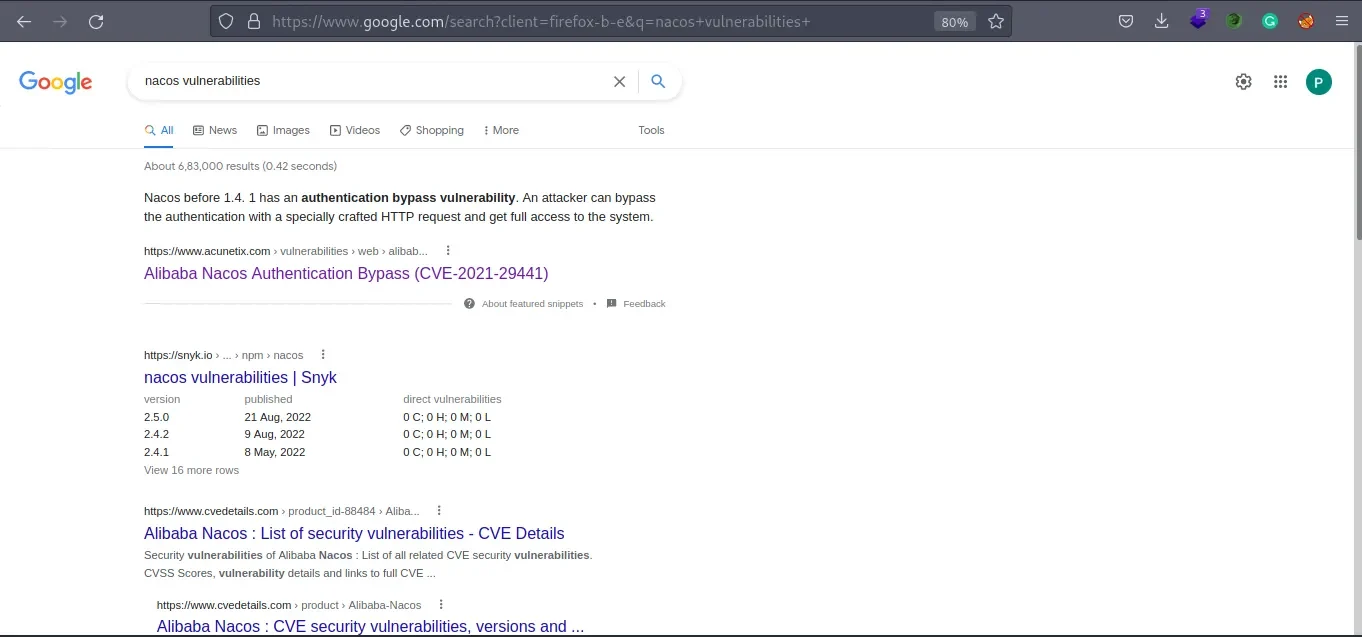
The search pointed to Nacos version 1.4.1 having an authentication bypass, tracked as CVE-2021-29441. The researcher did not know which version the Philips instance ran, but decided to test the behaviour described by the CVE anyway.
As the report explains it, the vulnerability allows an attacker to access the user list interface and add a new user. Nacos uses the AuthFilter servlet filter to enforce authentication, and that filter has a backdoor that lets Nacos servers bypass the filter and therefore skip authentication checks. In other words, a request crafted the way Nacos servers talk to each other is treated as trusted and never reaches the authentication logic.
The researcher rated the impact as critical.
Exploitation
Step 1: request the user list
With Burp Suite running, the researcher intercepted a request to the user list endpoint:
https://idpuat.philips.com.cn/nacos/v1/auth/users/?pageNo=1&pageSize=9
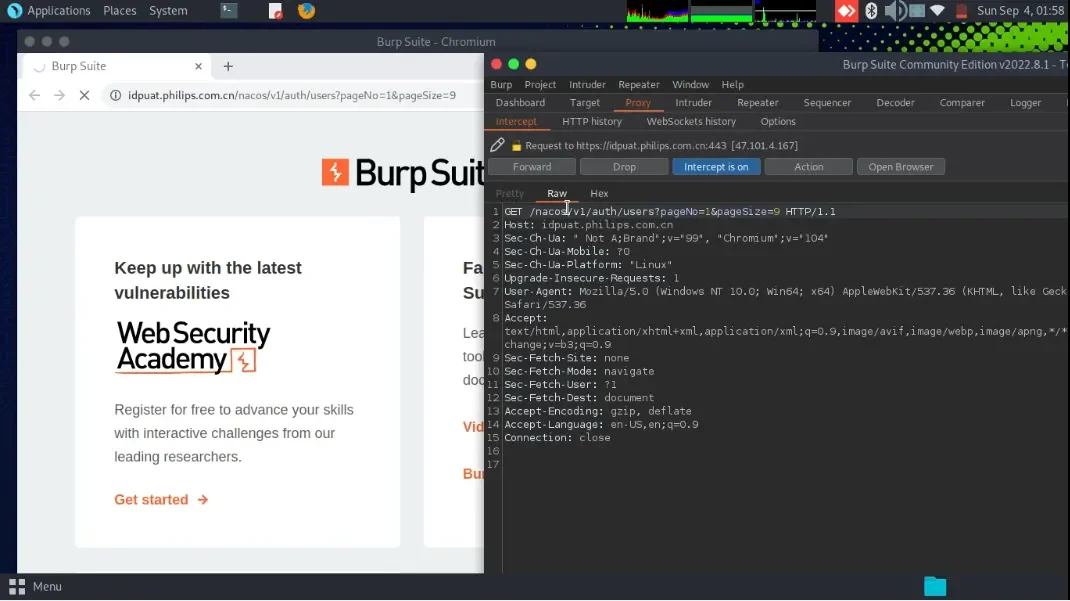
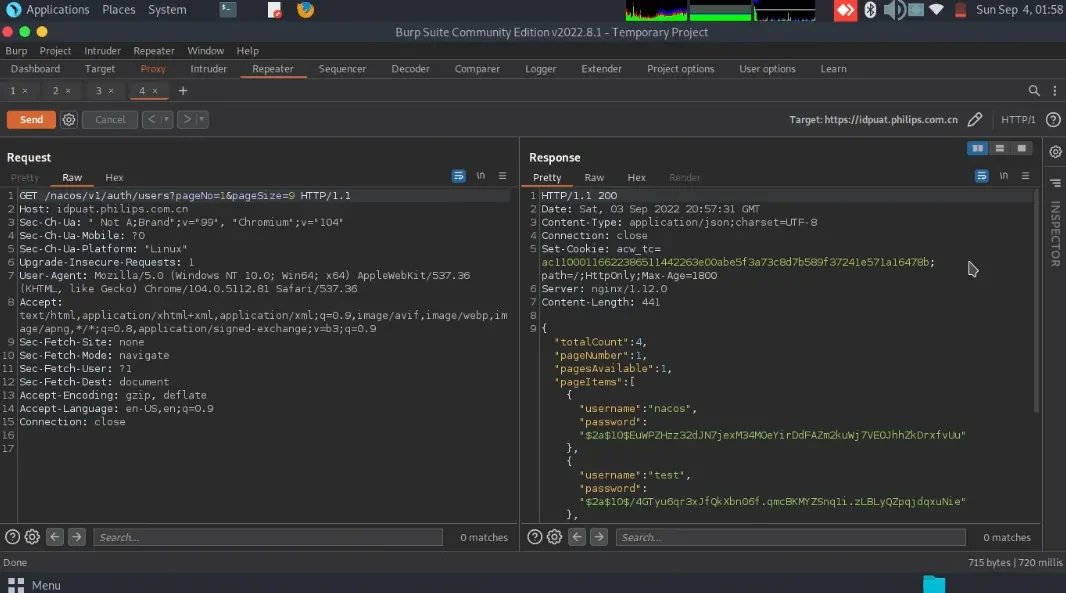
The request was sent to Burp Repeater and replayed. The response leaked the usernames and passwords that exist on the instance.
The report also gives the equivalent curl form:
curl XGET ‘http://vulnerablewebsite.com/nacos/v1/auth/users/?pageNo=1&pageSize=9 — path-as-is’
The pageNo and pageSize parameters paginate the user list.
Step 2: create a new user
The same weakness allows an attacker to create a new user. The researcher created one with the following command:
curl -XPOST ‘http://vulnerablewebsite.com/nacos/v1/auth/users/?username=test&password=test — path-as-is’
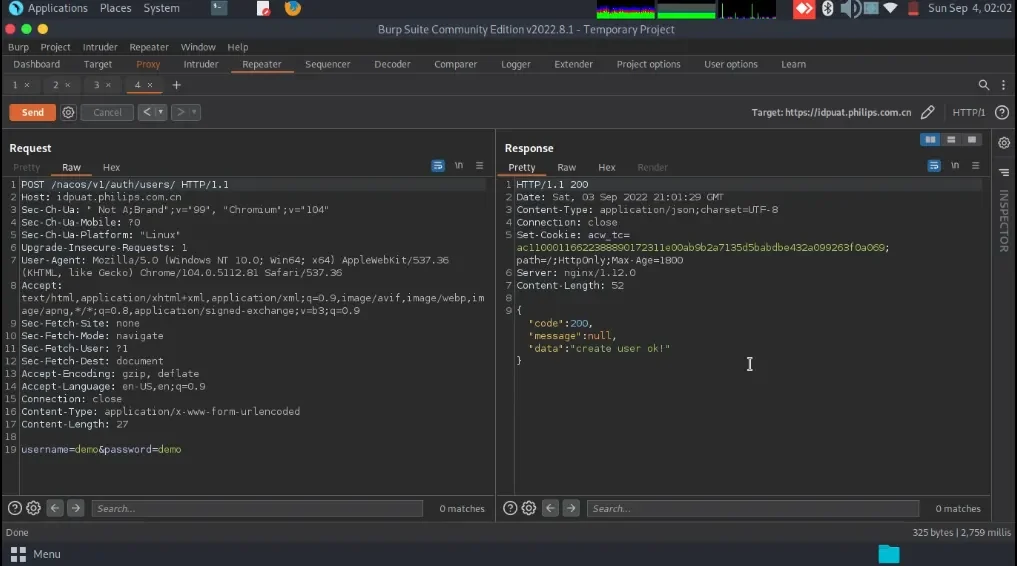
The report notes that any username and password can be supplied in place of test. The command is repeated verbatim in the report:
curl -XPOST ‘http://vulnerablewebsite.com/nacos/v1/auth/users/?username=test&password=test — path-as-is’
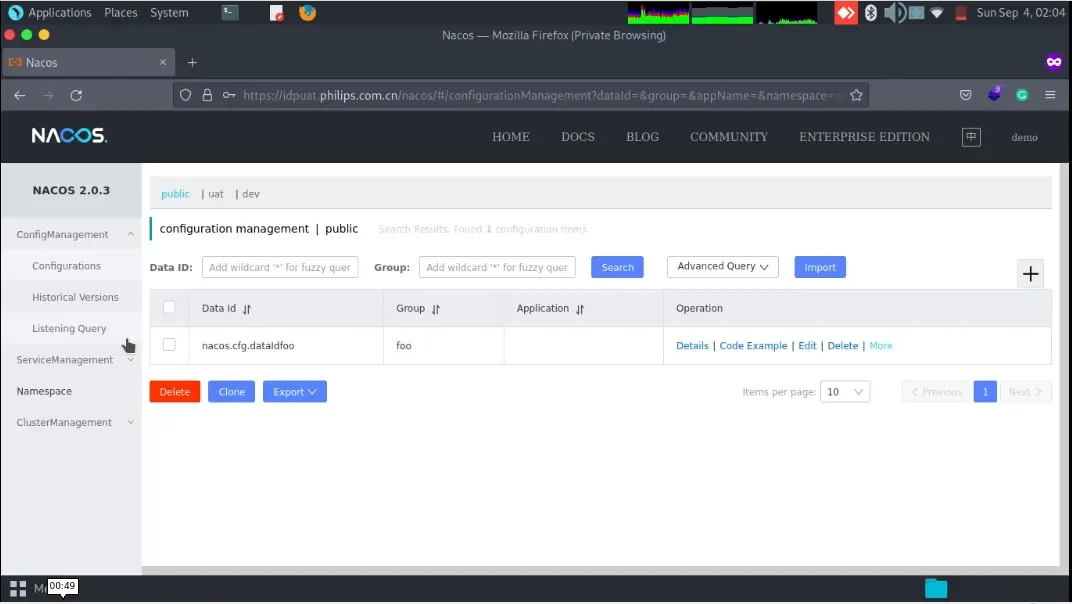
Step 3: log in with the created account
With the account created, the researcher opened the console again:
https://idpuat.philips.com.cn/nacos
and logged in using the username and password demo. The login succeeded, giving full Nacos admin access.
Root cause
The flaw is CVE-2021-29441, an authentication bypass in Nacos. The AuthFilter servlet filter that enforces authentication contains a backdoor that allows Nacos servers to skip the filter and therefore skip authentication checks. A request shaped the way an internal Nacos server would send it is accepted without credentials, so the user list endpoint returns stored users and the user creation endpoint accepts new accounts. The report does not state which Nacos version the Philips instance actually ran, only that version 1.4.1 was the one known to be affected in the search results, and that the researcher tested the behaviour on the target anyway.
Impact
In practice, an unauthenticated attacker could read the existing Nacos users and their passwords, create a new user, and then log in to the console with that account to obtain full Nacos admin access. The researcher obtained full Nacos admin access. The report does not enumerate which downstream systems or data were reachable from the dashboard.
Fix
The researcher reported the vulnerability to Philips's security team, and the report states that the security vulnerability was fixed. The underlying issue is the authentication bypass in the AuthFilter of the affected Nacos version, so the general remediation is to run a Nacos release in which that bypass is corrected, and to avoid exposing the Nacos console and its API to the internet where possible.
Variants to test
- Other Nacos consoles on the same estate. Look for
/nacospaths on other subdomains and request/nacos/v1/auth/users/?pageNo=1&pageSize=9with--path-as-is. A positive result is a user list returned without any session or credentials. - User creation on the same endpoint family. Send a POST to
/nacos/v1/auth/users/withusernameandpasswordparameters using--path-as-is. A positive result is a new account that can then log in to the console. - Version fingerprinting. Where the console is reachable, check whether the instance is on a release affected by CVE-2021-29441 before assuming the bypass applies; the report's own uncertainty about the target version is a reminder that the search result alone is not proof.
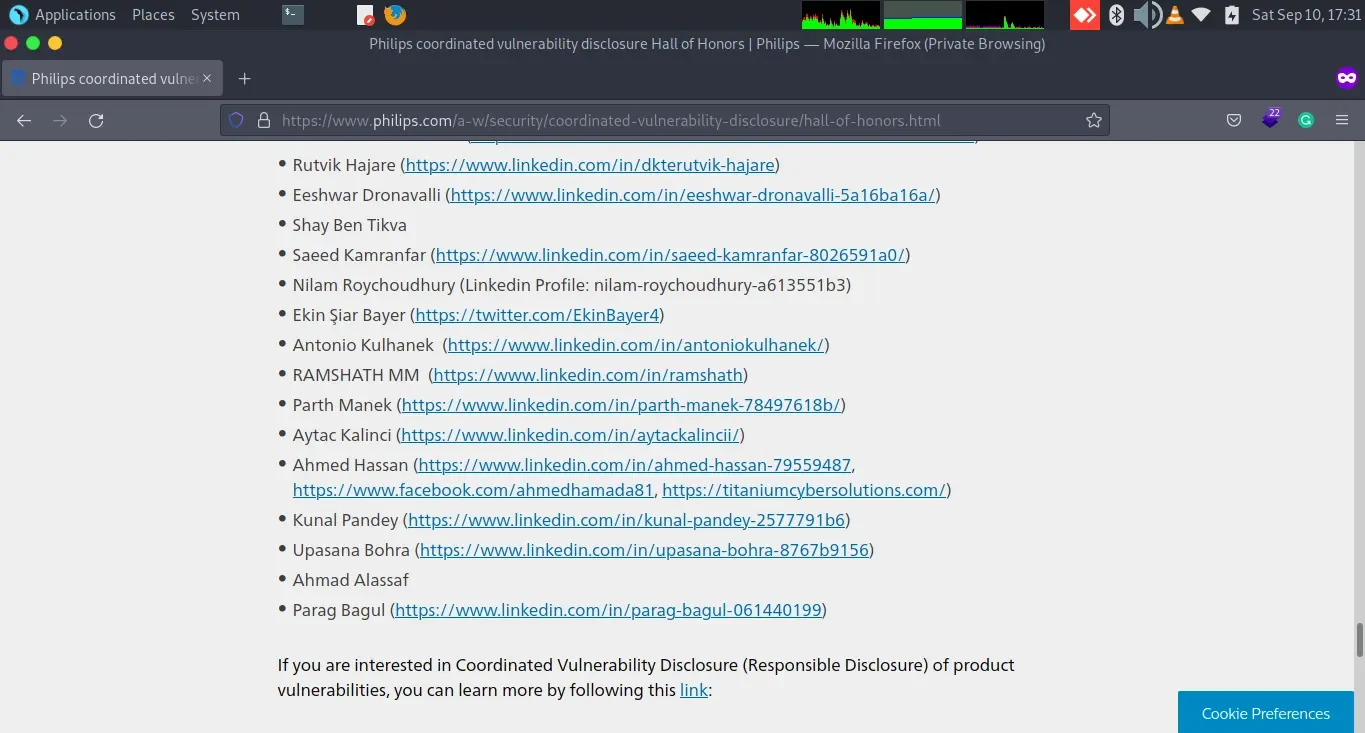
After the fix, the researcher was added to the Philips hall of fame.
A video proof of concept accompanies the write-up:
https://youtu.be/tD033vhLLlQ
What happened, in plain words
A security researcher found a login page for a piece of software called Nacos on a Philips website. He could not log in because he did not have a username or password. He then read about a known flaw in Nacos that lets someone skip the login check entirely. Using that flaw, he was able to see the existing usernames and passwords stored on the site, create his own new account, and log in to the Nacos admin dashboard. He reported it to Philips, the problem was fixed, and he was added to their hall of fame.
This article walks through the same steps for someone who has never done security testing before. You only need a browser and a computer to follow along. Every technical term is explained the first time it appears, and there is a glossary at the end.
Background: what is Nacos and why does it matter?
Nacos is a piece of software that helps run large applications made of many small parts. The report describes it as an easy-to-use platform designed for dynamic service discovery, configuration and service management, used to build cloud-native applications and microservices platforms.
In everyday terms: imagine a big company with hundreds of small services (think of them as separate little programs, each doing one job). Those services need to find each other, share settings, and know which ones are running. Nacos is like a central noticeboard and address book for all of them. If you control Nacos, you control the noticeboard that all those services trust.
That is why finding a Nacos login page on the open internet is interesting to a security researcher. The dashboard behind that login is the control panel for everything that registers with it.
Step 1: finding the login page
During the information gathering phase (the early stage where a researcher looks around a company's websites to see what is exposed), the researcher found a Nacos service on a Philips subdomain. A subdomain is a smaller address under a main domain, like shop.example.com is a subdomain of example.com. The address he found was:
https://idpuat.philips.com.cn/nacos
Opening that URL in a browser showed a Nacos login panel.
The image shows the Nacos login panel. This is the normal front door to the Nacos console, the place where users, configuration and service data are managed. Getting past this door means getting into the control room for whatever services use that Nacos instance.
Step 2: trying the obvious thing first
The researcher first tried logging in with default credentials. Default credentials are the username and password a piece of software ships with out of the box, before anyone changes them, for example admin and admin. Many systems are left with these unchanged, so it is always worth a quick try. In this case it failed. The report does not say which username and password were tried.
At this point the researcher had no account and no way in through the front door. So he did what any careful tester does: he learned about the software before attacking it.
Step 3: learning about Nacos and looking for known problems
Before poking at a system, it helps to understand what it is and whether other people have already found weaknesses in it. The researcher searched for known vulnerabilities of Nacos. A vulnerability is a weakness in software that can be abused to make it do something it should not. The search results were promising.
The search indicated that Nacos version 1.4.1 has an authentication bypass, tracked as CVE-2021-29441.
Two terms to unpack here:
- Authentication is the process of proving who you are, usually with a username and password. An authentication bypass is a flaw that lets you skip that proof entirely, as if a building's receptionist waved you through without checking your badge.
- CVE stands for Common Vulnerabilities and Exposures. It is a public catalogue where each known security flaw gets a unique ID number, so people can talk about the same bug unambiguously. CVE-2021-29441 is simply the catalogue entry for this particular Nacos flaw.
The researcher did not know which version of Nacos the Philips site was running. But he decided to test the behaviour described by the CVE anyway, because trying costs nothing and the result would tell him whether the site was affected.
Step 4: understanding the flaw
As the report explains it, the vulnerability allows an attacker to access the user list interface and add a new user. Nacos uses the AuthFilter servlet filter to enforce authentication, and that filter has a backdoor that lets Nacos servers bypass the filter and therefore skip authentication checks.
Let us break that down for a complete beginner:
- A servlet filter is a small piece of code that runs before a request reaches the main application. Think of it as a security guard at the door of an office: every visitor passes the guard first, and the guard checks your badge before letting you in. In Nacos,
AuthFilteris that guard, and its job is to check whether you are logged in. - A backdoor here means a special path or signal that the guard is programmed to trust without checking. In Nacos, servers talk to each other in a particular way, and the filter was built to let those internal server-to-server requests through without authentication. The problem is that anyone who knows how to shape a request the same way can also get through unchecked.
- An API (Application Programming Interface) is the set of addresses and rules a program uses to talk to another program, as opposed to the pages a human sees in a browser. When you use a website, your browser asks for pages; when software talks to software, it calls API endpoints. Nacos has an API under
/nacos/v1/...that its own tools and other services use.
The researcher rated the impact as critical. Impact is a judgement of how much damage a flaw could cause if abused.
Step 5: exploiting it, request by request
Getting ready: what is Burp Suite?
To exploit the flaw, the researcher used Burp Suite. Burp Suite is a tool that sits between your browser and a website and lets you see, pause, edit and resend the requests your browser makes. It is like being able to intercept a letter, read it, change a word, and post it again. The part called Repeater lets you take one request and send it over and over with small changes, which is perfect for testing a suspected flaw.
Step 1: request the user list
With Burp Suite running, the researcher intercepted a request to the user list endpoint:
https://idpuat.philips.com.cn/nacos/v1/auth/users/?pageNo=1&pageSize=9
The request was then sent to Burp Repeater and replayed. The response leaked the usernames and passwords that exist on the instance.
This is the heart of the attack: an endpoint that is supposed to require a logged-in user returned the list of accounts, including their passwords, to someone who was not logged in at all.
The pageNo and pageSize parameters simply control which page of the user list you get and how many entries per page, like page numbers in a long list.
The report also gives the equivalent curl form:
curl XGET ‘http://vulnerablewebsite.com/nacos/v1/auth/users/?pageNo=1&pageSize=9 — path-as-is’
Line by line:
curlis a command-line tool for sending requests to websites, useful when you want to do the same thing without a browser.XGEThere is how the report writes the request method. The method is the verb of a web request: GET means "give me something", POST means "send something to create or change".- The URL is the same user list endpoint as before, with
pageNo=1&pageSize=9asking for the first page of nine users. --path-as-istells curl not to tidy up or normalise the path before sending it, so the request reaches the server in exactly the form written.
Step 2: create a new user
The same weakness allows an attacker to create a new user. The researcher created one with the following command:
curl -XPOST ‘http://vulnerablewebsite.com/nacos/v1/auth/users/?username=test&password=test — path-as-is’
Line by line:
-XPOSTtells curl to use the POST method, which is the verb for creating something.- The URL points at the same users endpoint, but this time with
username=test&password=testin the query string. The query string is the part after the?, a list ofname=valuepairs. usernameandpasswordcarry the values for the account being created. The report notes that any username and password can be supplied in their place.--path-as-isagain keeps the path exactly as written.
The command is repeated verbatim in the report:
curl -XPOST ‘http://vulnerablewebsite.com/nacos/v1/auth/users/?username=test&password=test — path-as-is’
Creating your own account gives you a known username and password that you control.
Step 3: log in with the created account
With the account created, the researcher opened the console again:
https://idpuat.philips.com.cn/nacos
and logged in using the username and password demo. The login succeeded, giving full Nacos admin access.
This is the payoff: the account created through the bypass was accepted by the normal login form, and the researcher now had the same access as a legitimate administrator.
Why it worked: the root cause
The flaw is CVE-2021-29441, an authentication bypass in Nacos. The AuthFilter servlet filter that enforces authentication contains a backdoor that allows Nacos servers to skip the filter and therefore skip authentication checks. A request shaped the way an internal Nacos server would send it is accepted without credentials, so the user list endpoint returns stored users and the user creation endpoint accepts new accounts.
It does not matter how long or complex the real passwords are, because the guard is not looking at them at all.
The report does not state which Nacos version the Philips instance actually ran. It only says that version 1.4.1 was the one known to be affected in the search results, and that the researcher tested the behaviour on the target anyway.
Impact: what could an attacker do?
In practice, an unauthenticated attacker could read the existing Nacos users and their passwords, create a new user, and then log in to the console with that account to obtain full Nacos admin access.
The researcher obtained full Nacos admin access. Going back to the noticeboard comparison: an attacker who controls the noticeboard can change the addresses services use, alter their settings, or point them somewhere else. The report does not enumerate which downstream systems or data were reachable from the dashboard.
The fix
The researcher reported the vulnerability to Philips's security team, and the report states that the security vulnerability was fixed.
The underlying issue is the authentication bypass in the AuthFilter of the affected Nacos version, so the general remediation is to run a Nacos release in which that bypass is corrected, and to avoid exposing the Nacos console and its API to the internet where possible. In plain terms: update the software to a version without the flaw, and do not leave the admin panel reachable from the public internet if it does not need to be.
Other places to look
If you are learning from this and want to understand where similar problems might hide, here are the same checks applied more broadly:
- Other Nacos consoles on the same estate. Look for
/nacospaths on other subdomains and request/nacos/v1/auth/users/?pageNo=1&pageSize=9with--path-as-is. A positive result is a user list returned without any session or credentials. JSON is a common text format for data exchanged between programs, made of names and values in curly braces. - User creation on the same endpoint family. Send a POST to
/nacos/v1/auth/users/withusernameandpasswordparameters using--path-as-is. A positive result is a new account that can then log in to the console. - Version fingerprinting. Where the console is reachable, check whether the instance is on a release affected by CVE-2021-29441 before assuming the bypass applies. The researcher's own uncertainty about the target version is a reminder that a search result alone is not proof.
After the report
After the fix, the researcher was added to the Philips hall of fame.
A hall of fame is a public thank-you page where companies credit researchers who reported valid security issues.
A video proof of concept accompanies the write-up:
https://youtu.be/tD033vhLLlQ
A proof of concept is a demonstration that a flaw is real, usually a recording or set of steps showing it being triggered.
Glossary
- API (Application Programming Interface): the set of addresses and rules one program uses to talk to another, as opposed to the pages a human sees in a browser.
- Authentication: the process of proving who you are, usually with a username and password.
- Authentication bypass: a flaw that lets someone skip the authentication check entirely, as if a guard waved them through without looking at their badge.
- AuthFilter: the servlet filter in Nacos that is supposed to enforce authentication on incoming requests.
- Backdoor: a special path or signal that a program is built to trust without the normal checks, intended for internal use but abusable by anyone who knows about it.
- Burp Suite: a tool that sits between your browser and a website so you can see, pause, edit and resend requests.
- Burp Repeater: the part of Burp Suite that lets you take one request and send it repeatedly with small changes.
- Cloud-native application: an application built to run across many small services and machines rather than as one big program.
- Critical (impact): a severity rating meaning the flaw could cause severe damage if abused.
- curl: a command-line tool for sending requests to websites.
- CVE (Common Vulnerabilities and Exposures): a public catalogue where each known security flaw gets a unique ID number.
- CVE-2021-29441: the catalogue entry for the Nacos authentication bypass described in this report.
- Default credentials: the username and password a piece of software ships with before anyone changes them.
- Endpoint: a specific address on a server that accepts requests, such as
/nacos/v1/auth/users/. - GET: the request method meaning "give me something".
- Hall of fame: a public page where a company credits researchers who reported valid security issues.
- Impact: a judgement of how much damage a flaw could cause if abused.
- Information gathering: the early stage of security testing where a researcher looks around a company's websites to see what is exposed.
- JSON: a common text format for data exchanged between programs, made of names and values in curly braces.
- Method: the verb of a web request, such as GET (fetch) or POST (create or change).
- Microservices: an approach where an application is built from many small services, each doing one job.
- Nacos: a platform for service discovery, configuration and service management, used to build cloud-native applications and microservices platforms.
--path-as-is: a curl option that stops curl from normalising the path, so the request reaches the server in exactly the form written.- POST: the request method meaning "send something to create or change".
- Proof of concept: a demonstration that a flaw is real, usually a recording or set of steps showing it being triggered.
- Query string: the part of a URL after the
?, a list ofname=valuepairs. - Reconnaissance: see information gathering.
- Servlet filter: a small piece of code that runs before a request reaches the main application, like a security guard at the door.
- Subdomain: a smaller address under a main domain, like
shop.example.comunderexample.com. - Vulnerability: a weakness in software that can be abused to make it do something it should not.