Testing the content:// URI
Firefox for Android saved content:// URIs to a predictable temporary file and redirected to a file:// URI, allowing a malicious page to overwrite that file with another file of the same name and read its contents. An attacker could steal any file the browser could access, including the cookie database.
 Published on medium.com
This is a write up for CVE-2020–15647, explaining how webpages are capable of stealing files from your Android device, including but not limited to cookies from any visited website.
The full write-up lives on its author's site
It belongs to its author, so we link to it rather than copy it. The other two tabs are our own rewrites, checked against it.
Context
This is a write-up for CVE-2020-15647, describing how a webpage could steal files from an Android device through Firefox for Android, including the cookie database of every visited site. The target is Firefox for Android v68.9.0, and the feature at the centre of it is the browser's handling of content:// URIs.
Content URIs in Android identify data inside a content provider and can represent files or database information. Most browsers parse both file:// and content:// schemes; opening a local HTML file in a browser typically goes through a content:// URI created by the file manager that launched it.
Setup
The researcher was reviewing Android browsers for several classes of vulnerability in mid-2020. The version under test was Firefox for Android v68.9.0. The work involved a local test file placed in /sdcard/Download/, the browser's own file content provider, and later a Python server to host the remote proof of concept. No accounts or special roles are described.
Finding it
While testing how Firefox handled content:// URIs, the researcher saw the address bar change during rendering: the browser redirected to a file:// URI. Firefox was saving the content to a file and then redirecting to that file. The file was written to the internal temporary folder /data/data/org.mozilla/firefox/cache/contentUri/.
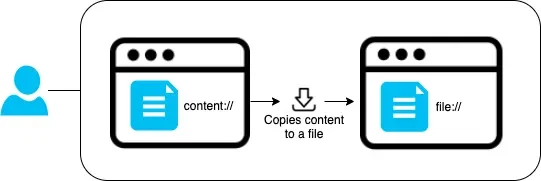
The created file kept the same name as the display name (_display_name) returned by the provider. Firefox did not change the name if the file already existed, so an existing file was overwritten.
Exploitation
Step 1: the over-broad file provider
Applications normally need explicit URI permissions to fetch content from another application's provider, which is what happens when a user picks an app via "Open with" or "Share with". An application does not need that permission when accessing URIs from its own content providers. Firefox shipped a file content provider with the authority org.mozilla.firefox.fileprovider and this configuration:
<paths xmlns:android="http://schemas.android.com/apk/res/android"> <root-path name="root" path="."/></paths>
The root-path entry with path="." was an issue: the researcher could open virtually any file Firefox itself had access to.
Step 2: abusing the same-origin policy for file://
Firefox's handling of cross-domain requests for file:// is documented: a file can read its own contents, for example with new XMLHttpRequest().open("GET", window.location, true), because the origin is the same. If a file can request its own contents and those contents can be replaced, a file can be made to serve another file's contents as long as both share the same name.
The first target was /data/user/0/org.mozilla.firefox/files/mozilla/profiles.ini, which records where the cookie database lives on the device. To read it, the researcher created a file with the same name at /sdcard/Download/profiles.ini, using XMLHttpRequest against window.location to read itself.
/sdcard/Download/profiles.ini
The same file also contains an iframe whose src loads a content:// URI pointing at the file actually being read. Opening a content:// URI makes Firefox copy the file elsewhere and expose it via file://.
/sdcard/Download/profiles.ini
The sequence, as summarised in the report:
- Firefox opens
content://org.mozilla.firefox.fileprovider/root/sdcard/Download/profiles.ini, the content URI representation of/sdcard/Download/profiles.ini. - Firefox fetches the content from its provider and saves it to
/data/data/org.mozilla.firefox/cache/contentUri/profiles.ini. - Firefox redirects the user to that file, prefixed with
file://. - The rendered HTML page has its iframe request the
content://URI in itssrcfield. That URI has the same name as the currently open file but a different location:content://org.mozilla.firefox.fileprovider/root/data/user/0/org.mozilla.firefox/files/mozilla/profiles.ini. - Firefox replaces the contents of the file opened in step 3 with the contents of the file from step 4.
- After a short delay, the page alerts its own contents, which now hold the other file's data.
This is a cross-domain issue: a file:// URI can read contents from another file:// URI when the files share a name. Because the provider uses root-path, the same trick reaches any file on the device that Firefox can access.
Step 3: making it remote with Intent URIs
To turn this into a remotely executable proof of concept, the researcher used android-app Intent URIs, the scheme behind deep linking. A Python server hosts the exploit. The remote page first triggers a download of a file with the same name as the target, in this case the profiles.ini file the researcher created. Once downloaded, the page opens it through a deep-linking content URI, again relying on Firefox moving the downloaded file into its internal directory.
The android-app URI names org.mozilla.firefox and asks it to open content://org.mozilla.firefox.fileprovider/root/sdcard/Download/profiles.ini with action android.intent.action.VIEW. Firefox downloads the contents to /data/data/org.mozilla.firefox/cache/contentUri/profiles.ini and opens it with the file:// URI.
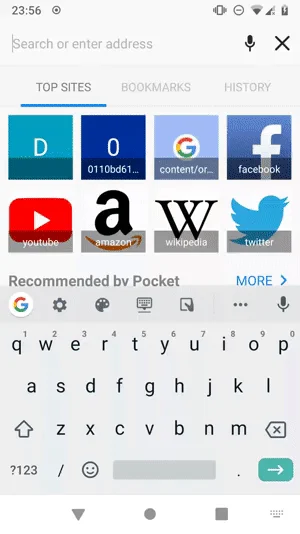
The sensitive file's contents were printed, confirming the remote path worked. The full code is linked from the report as a gist.
Step 4: stealing the cookie database
In the submitted proof of concept, the researcher demonstrated stealing Firefox's cookie database, an sqlite database holding all cookies from visited domains.
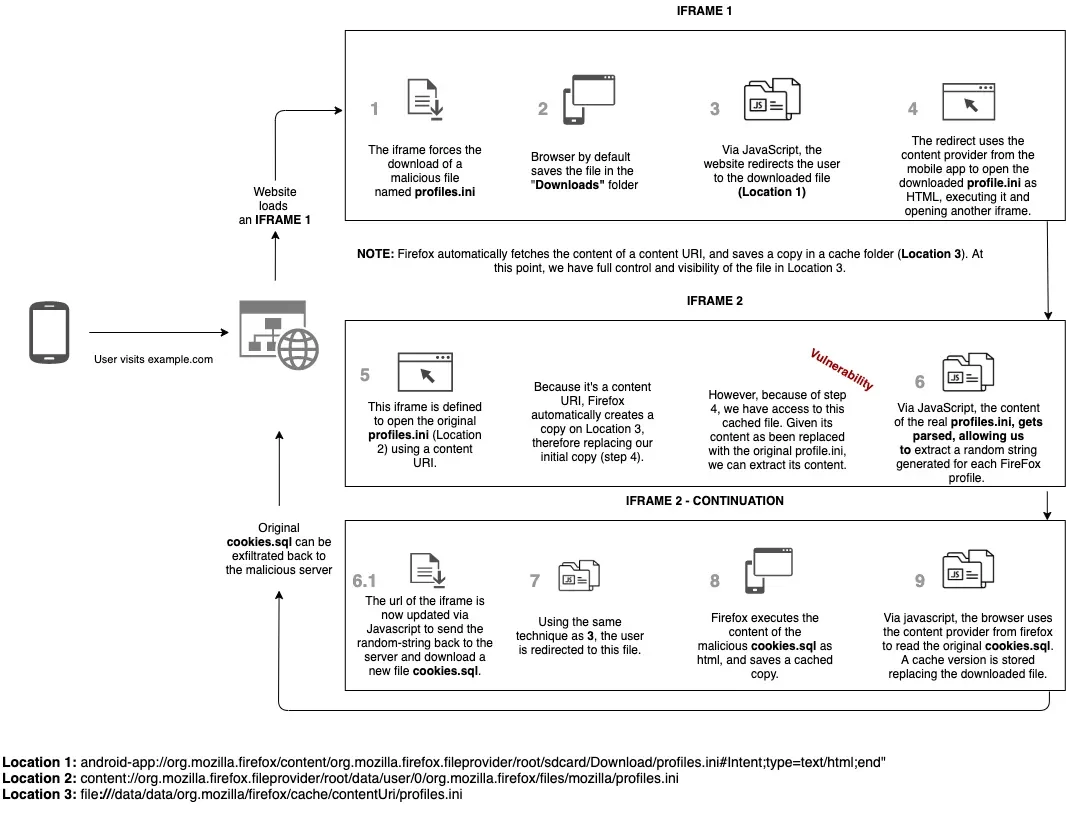
In a real attack, the malicious file would send what it read to an attacker-controlled server instead of showing it in an alert.
Root cause
Two design mistakes combine. First, the file content provider is configured with <root-path name="root" path="."/>, exposing the entire filesystem rather than a narrow directory. Second, Firefox's content:// handling copies the fetched file into /data/data/org.mozilla/firefox/cache/contentUri/ under the provider-supplied _display_name without changing the name and overwrites any existing file with that name. Because a file:// document can read its own contents, and the copied file can be replaced by another file of the same name, a page can swap in the contents of a private file and read them back. A file:// URI can read contents from another file:// URI when the files share a name.
Impact
An attacker could steal files from the victim's device by getting the victim to visit a webpage, limited to files Firefox itself can access. The demonstrated target was the cookie database, which would expose cookies for every visited domain. The report notes that in a real attack the stolen contents would be sent to an attacker-controlled server rather than displayed.
Fix
Firefox considered the issue critical and patched it in a short timespan. The fixed version, v68.10.1, was released on the Play Store on 2020-07-06. The report does not describe the code change itself. Firefox Fennec (v68.9.0) was nearing end-of-life at the time and would have been replaced by Fenix, which was not vulnerable.
Variants to test
- Other Android browsers that handle
content://URIs: check whether opening one redirects to afile://URI in an internal cache directory, and whether the copied file keeps the provider's_display_name. A positive result is afile://redirect to a predictable path whose name you control. - File providers configured with broad paths: look for
<root-path>or wide<files-path>/<cache-path>entries in an app's provider configuration. A positive result is being able to open acontent://URI for a path outside the app's intended sharing directory. - Same-name overwrite behaviour: create a local file with the same name as a private file and load it, then have it request a
content://URI for the private file. A positive result is the local file's contents being replaced by the private file's contents when read back. - Deep-link entry points: try
android-app://Intent URIs that opencontent://URIs withandroid.intent.action.VIEW. A positive result is a remote page causing the browser to fetch and open an internal file without user interaction beyond visiting the page. - Cookie database location: read
profiles.inito find where the cookie database is stored, then apply the same technique to it. A positive result is the sqlite cookie database contents being returned to the page.
What happened, in plain words
A security researcher found a way for an ordinary website to read files stored inside the Firefox browser on an Android phone. The files it could read included the browser's cookie database, which holds the cookies for every site the person had visited. The only thing the victim had to do was open a web page. Mozilla, the company behind Firefox, treated it as a critical problem, fixed it quickly, and paid a 5,000 USD bounty. The bug is tracked as CVE-2020-15647.
This article walks through the whole story from the beginning, assuming you have never looked at a security report before. Every technical word is explained the first time it appears, and there is a glossary at the end.
Some background you need first
What a browser is doing under the hood
When you type an address into a browser, the browser fetches a page from a server and draws it on screen. Behind the scenes it also stores things: your history, your settings, and your cookies. A cookie is a small piece of text that a website asks the browser to keep and send back on every later visit. It is how a site remembers that you are logged in. If someone steals your cookies, they can often pretend to be you on those sites without knowing your password. That is why the cookie database is a valuable target.
What Android is and what a "content provider" is
Android is the operating system on most phones that are not iPhones. On Android, apps are kept apart from each other on purpose. One app cannot normally read another app's files. To let apps share specific pieces of data safely, Android has a concept called a content provider. Think of it as a reception desk: an app puts a desk in front of some of its data, and other apps can ask the desk for a specific item, but only if they are allowed.
What a URI is
A URI (Uniform Resource Identifier) is the general name for an address that points at something. A URL, like https://example.com/page, is one kind of URI. Android uses several kinds:
file://points at a file on the device, for examplefile:///sdcard/Download/note.txt.content://points at an item managed by a content provider. The reception desk idea again: the address names the desk and the item you want.android-app://is used to ask a specific app to do something, which is how deep links work (tapping a link that opens an app instead of a web page).
What the same-origin policy is
Browsers have a safety rule called the same-origin policy. An origin is the combination of scheme, host and port, roughly "which site this is". The rule says a page from one origin cannot read data from another origin. Without it, any website could read your bank's pages while you are logged in. The rule has special cases for file:// addresses, and one of those special cases is central to this story: a local file is allowed to read its own contents, because it counts as the same origin as itself.
What an iframe is
An iframe is a way to embed one web page inside another. The outer page has a box, and inside the box another page is loaded. The outer page controls what address goes in the box.
What XMLHttpRequest is
XMLHttpRequest is a built-in browser tool that lets a page ask for data from a server (or, in this case, from a file) without leaving the page. Programmers call this kind of request an API call. An API is simply a defined way for one piece of software to ask another piece of software to do something, like a menu of allowed requests.
What a proof of concept is
A proof of concept (PoC) is a small demonstration that shows a problem is real, without doing any actual harm. Researchers build one so the company can see the bug for itself.
The discovery
In mid-2020 the researcher was looking at Android browsers for several kinds of security problems. The version under test was Firefox for Android v68.9.0. While testing how Firefox handled content:// addresses, the researcher noticed something odd: the address bar changed while the page was being drawn. Firefox was redirecting to a file:// address.
What was happening: when Firefox was asked to open a content:// address, it fetched the content, saved it as a file, and then sent the browser to that saved file. The saved file went into an internal temporary folder, /data/data/org.mozilla/firefox/cache/contentUri/.
The picture shows that download-and-redirect routine. The researcher also noticed that the saved file kept the same name as the display name (_display_name) that the content provider reported. If a file with that name already existed, Firefox did not pick a new name: it overwrote the existing file.
That overwrite is the seed of the whole bug. Keep it in mind.
The over-broad reception desk
Normally, an app needs explicit permission to fetch data from another app's content provider. That is what happens when you tap "Open with" or "Share with" and pick an app: Android grants that app permission for that one file. But an app does not need permission to use its own content providers. Firefox shipped one of its own, with the authority (its name) org.mozilla.firefox.fileprovider, configured like this:
<paths xmlns:android="http://schemas.android.com/apk/res/android"> <root-path name="root" path="."/></paths>
Line by line:
<paths ...>opens a list of paths that this provider is willing to serve. Thexmlns:android=...part just tells Android where to find the definitions of the words used inside.<root-path name="root" path="."/>is the important line.root-pathmeans "start at the very top of the filesystem".path="."means "the current directory", which at the root is everything. So the provider was willing to hand out any file on the device that Firefox itself could read.</paths>closes the list.
A safe configuration would name one narrow folder. This one used root-path, so the researcher could open virtually any file Firefox had access to. The researcher could therefore open virtually any file Firefox had access to.
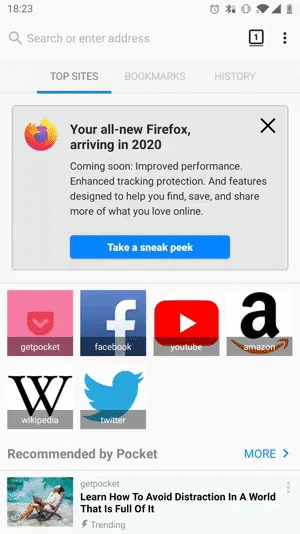
The screenshot shows the contents of a private Firefox file being displayed, which should not have been possible from outside the app.
Turning a file read into a data leak
Being able to open a private file inside the browser is not yet the same as sending its contents to an attacker. The next problem was how to get the contents out.
Firefox's handling of cross-domain requests for file:// addresses is documented. For this exploit, the only fact that matters is that a file can read its own contents, for example with:
new XMLHttpRequest().open("GET", window.location, true)
Line by line:
new XMLHttpRequest()creates the request tool..open("GET", window.location, true)prepares a request."GET"means "fetch this".window.locationmeans "the address of the page I am currently on", so the file asks for itself.truemeans "do this in the background without freezing the page".
Because the file is reading itself, the same-origin policy is satisfied: the origin matches.
Now the researcher's idea: if a file can read its own contents, and those contents can be replaced by something else, then a file can be made to hand over another file's contents, as long as both files have the same name.
The first target: profiles.ini
The first file chosen was /data/user/0/org.mozilla.firefox/files/mozilla/profiles.ini. This is a small settings file that records where the cookie database lives on the device. Reading it is the first step towards reading the cookies themselves.
To read it, the researcher created a file with the same name, /sdcard/Download/profiles.ini, on the phone's shared storage. That file used XMLHttpRequest against window.location to read itself.
/sdcard/Download/profiles.ini
The same file also contained an iframe whose src (the address loaded inside the box) pointed at a content:// address for the file actually being read. Opening a content:// address makes Firefox copy the file somewhere else and expose it through a file:// address, which is exactly the copying behaviour noticed at the start.
/sdcard/Download/profiles.ini
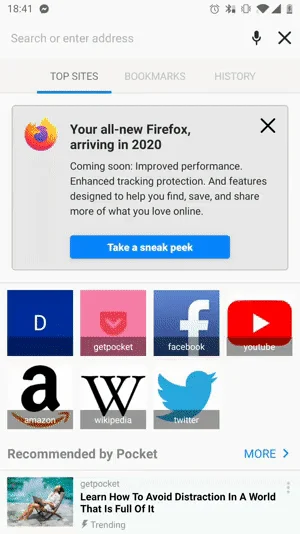
The screenshot shows the contents of /data/user/0/org.mozilla.firefox/files/mozilla/profiles.ini being printed, even though the page that printed it was a harmless file in the Downloads folder.
The report summarises the sequence in six steps:
- Firefox opens
content://org.mozilla.firefox.fileprovider/root/sdcard/Download/profiles.ini, which is thecontent://way of naming the file/sdcard/Download/profiles.ini. - Firefox fetches the content from its provider and saves it to
/data/data/org.mozilla.firefox/cache/contentUri/profiles.ini. - Firefox redirects the user to that saved file, with a
file://address in front. - The page, now drawn, has its iframe request the
content://address in itssrcfield. That address names a file with the same name as the currently open one, but in a different place:content://org.mozilla.firefox.fileprovider/root/data/user/0/org.mozilla.firefox/files/mozilla/profiles.ini. - Firefox replaces the contents of the file opened in step 3 with the contents of the file from step 4. This is the overwrite behaviour from the beginning, now being used deliberately.
- After a short delay, the page shows its own contents in an alert box. Those contents are now the other file's data.
Why does this work? Because a file:// page is allowed to read itself, and the page's own file has been quietly swapped for a private file with the same name. A file:// page can read contents from another file:// page when the files share a name. And because the provider uses root-path, the same trick reaches any file on the device that Firefox can access.
Making it work from a website
So far the attacker needed to place a file on the phone. A real attacker cannot do that. The next question was whether the whole thing could be triggered remotely, just by visiting a web page. The tool for this is android-app Intent URIs, the scheme behind deep linking. A deep link is a link that opens an app rather than a web page, like a link that opens a map app at a particular place.
The researcher set up a Python server to host the remote proof of concept. The remote page first triggers a download of a file with the same name as the target, in this case the profiles.ini file the researcher had created. Once the file is downloaded, the page opens it through a deep-linking content URI, again relying on Firefox moving the downloaded file into its internal directory.
The android-app address names org.mozilla.firefox and asks it to open content://org.mozilla.firefox.fileprovider/root/sdcard/Download/profiles.ini with the action android.intent.action.VIEW. In plain words: "Firefox, please view this item for me." Firefox downloads the contents to /data/data/org.mozilla.firefox/cache/contentUri/profiles.ini and opens it with a file:// address.
The screenshot shows the sensitive file's contents being printed from a remote page, which confirmed that the remote path worked. The full code is linked from the report as a gist.
Stealing the cookie database
In the proof of concept submitted to Mozilla, the researcher demonstrated stealing Firefox's cookie database. This is an sqlite database, meaning a single file that holds structured data in tables, like a small spreadsheet. It contains all cookies from visited domains.
The screenshot shows the contents of the cookie database being read remotely.
The diagram shows the full flow: the victim visits the malicious page, the page causes Firefox to copy a private file into its cache, the page reads the copied file, and the contents are sent to a server controlled by the attacker.
In a real attack, the malicious file would send what it read to an attacker-controlled server instead of showing it in an alert box. The alert is only there so the researcher can see the result on screen.
Why it worked
Two design mistakes combined:
- The file content provider was configured with
<root-path name="root" path="."/>, which exposed the entire filesystem instead of a narrow folder. - Firefox's
content://handling copied the fetched file into/data/data/org.mozilla/firefox/cache/contentUri/under the name supplied by the provider, without changing the name, and overwrote any existing file with that name.
Because a file:// document can read its own contents, and the copied file can be replaced by another file of the same name, a page can swap in the contents of a private file and then read them back.
What the impact was
An attacker could steal files from the victim's device by getting the victim to visit a web page. The reach was limited to files Firefox itself could access. The demonstrated target was the cookie database, which would expose cookies for every visited domain. With those cookies, an attacker could often act as the victim on those sites. The report notes that in a real attack the stolen contents would be sent to an attacker-controlled server rather than displayed.
The fix
Firefox considered the issue critical and patched it in a short timespan. The fixed version, v68.10.1, was released on the Play Store on 2020-07-06. The report does not describe the code change itself. Firefox Fennec (v68.9.0) was nearing end-of-life at the time and would have been replaced by Fenix, which was not vulnerable.
Timeline
| Date | Event |
|---|---|
| 2020-06-20 | Issue reported to Mozilla |
| 2020-06-22 | Internal investigation started |
| 2020-06-25 | Issue confirmed and addressed |
| 2020-07-06 | Fixed version released on Play Store (v68.10.1) |
| 2020-07-07 | Bounty assigned (5,000 USD) |
Things a beginner could test in other browsers
These are checks you can try yourself, written for someone who is learning:
- Other Android browsers that handle
content://addresses. Open one and see whether it redirects to afile://address in an internal cache folder, and whether the copied file keeps the provider's_display_name. A positive result is afile://redirect to a predictable path whose name you control. - File providers configured with broad paths. Look for
<root-path>or wide<files-path>or<cache-path>entries in an app's provider configuration. A positive result is being able to open acontent://address for a path outside the app's intended sharing folder. - Same-name overwrite behaviour. Create a local file with the same name as a private file, load it, then have it request a
content://address for the private file. A positive result is the local file's contents being replaced by the private file's contents when read back. - Deep-link entry points. Try
android-app://Intent URIs that opencontent://addresses withandroid.intent.action.VIEW. A positive result is a remote page causing the browser to fetch and open an internal file with no user action beyond visiting the page. - Cookie database location. Read
profiles.inito find where the cookie database is stored, then apply the same technique to it. A positive result is the sqlite cookie database contents being returned to the page.
Glossary
- Android: the operating system on most non-Apple phones; it keeps apps separated from each other.
- API: a defined way for one piece of software to ask another to do something, like a menu of allowed requests.
- Bounty: a reward a company pays to someone who reports a security problem responsibly.
- Browser: the program you use to view web pages; it also stores cookies, history and settings.
- Content provider: an Android mechanism that lets an app expose specific data to other apps through a controlled interface.
- Cookie: a small piece of text a website asks the browser to keep and send back on later visits, often used to keep you logged in.
- Cookie database: the file where the browser stores all cookies for all visited sites.
- CVE: a public identifier for a known security vulnerability, here CVE-2020-15647.
- Deep link: a link that opens an app rather than a web page, often at a specific place inside the app.
- Fennec: the internal codename for the older Firefox for Android, version 68.x in this story.
- Fenix: the newer Firefox for Android that replaced Fennec and was not vulnerable.
- file://: a URI scheme that points at a file on the device.
- content://: a URI scheme that points at an item managed by a content provider.
- android-app://: a URI scheme used to ask a specific Android app to do something.
- iframe: a box inside a web page that loads another page.
- Intent: Android's message asking an app to perform an action, such as viewing something.
android.intent.action.VIEW: the standard Intent action meaning "show this to the user".- Origin: the combination of scheme, host and port that identifies which site a page belongs to.
- Same-origin policy: the browser rule that a page from one origin cannot read data from another origin.
- Proof of concept (PoC): a small demonstration that shows a problem is real without doing harm.
- Provider authority: the name that identifies a content provider, here
org.mozilla.firefox.fileprovider. _display_name: the name a content provider reports for an item, which Firefox used as the saved file's name.root-path: a provider configuration meaning "serve files starting from the top of the filesystem", which exposes everything.- sqlite: a single-file database format that stores structured data in tables, like a small spreadsheet.
- URI: the general name for an address that points at something; a URL is one kind.
- XMLHttpRequest: a built-in browser tool that lets a page fetch data without leaving the page.
window.location: the address of the page currently open, used here so a file reads itself.profiles.ini: a small Firefox settings file that records where the cookie database lives./sdcard/Download/: the phone's shared storage folder where downloads go./data/data/org.mozilla/firefox/cache/contentUri/: Firefox's internal temporary folder wherecontent://items were copied./data/user/0/org.mozilla.firefox/files/mozilla/: Firefox's private folder on the device, not normally reachable by other apps.




