Blind Time-based SQL injection vulnerability in an Indian government website
A parameter on a government website was vulnerable to blind SQL injection, allowing an attacker to run arbitrary SQL queries against the database. The author confirmed this by observing time delays and then used a tool to dump the database.
 Published on medium.com
Today I will share how I found a blind SQL injection vulnerability in an Indian government website.
The full write-up lives on its author's site
It belongs to its author, so we link to it rather than copy it. The other two tabs are our own rewrites, checked against it.
Context
The target is a Kerala government website, found through a Google dork for gov.in domains; it was the first result. The author does not name it and refers to it throughout as target.gov.in. The vulnerable feature sits on the notifications page, which lets a visitor select a city. Choosing a city produces a request whose URL carries three parameters: flag, mnupath and opt. The mnupath parameter is the one the author found to be vulnerable.
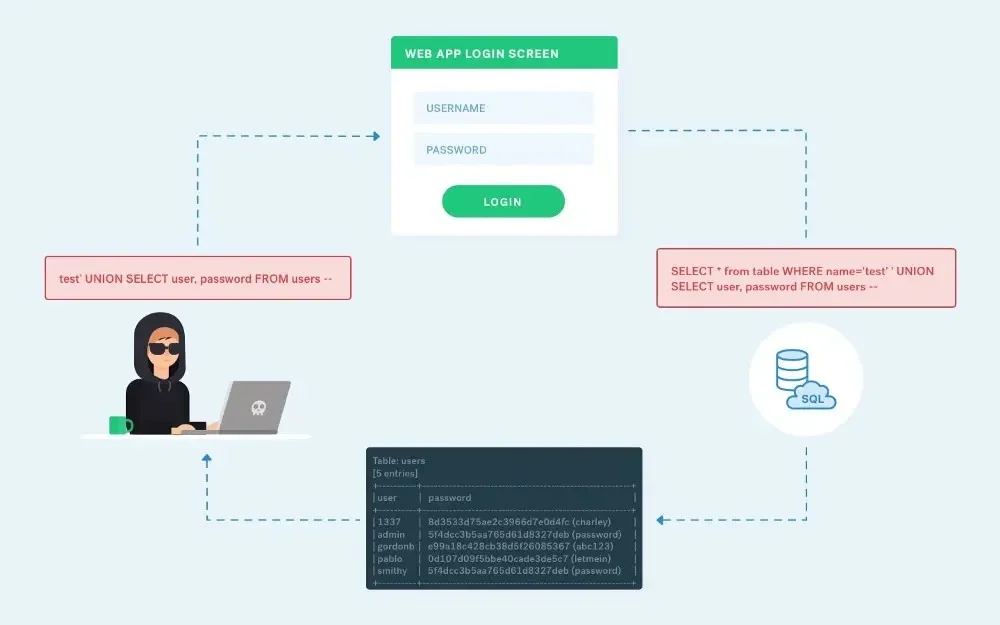
The author opens with the standard definition: SQL injection (SQLi) is an injection attack in which an attacker can execute malicious SQL statements that control a web application's database server.
Setup
No accounts or roles are involved. The only tools mentioned are a browser, Burp Suite (the request is captured and sent to the Repeater), Google dorks to find gov.in sites, and later sqlmap. The precondition for the finding is simply that the notifications page is reachable and that a city can be selected, which is what generates the request containing mnupath.
Finding it
The author first tried basic SQL injection payloads against the login form and the images feature. Nothing came back.

After a two hour break the author went back to exploring the site, clicking every link and button and watching the requests in Burp. On the notifications page, selecting a city produced this parameter set in the URL:
PHP?flag=E&mnupath=xyz&opt=2
That was the point where SQL injection seemed worth testing. Union-based and error-based payloads were tried first, but there were no results from the server side.

Exploitation
Step 1: reach the endpoint
The full URL used for testing is:
https://target.gov.in/xml/xmlcontent.php?flag=E&mnupath=xyz&opt=2
The script is xmlcontent.php under /xml/, and the injectable value is mnupath, which is xyz in the normal request.
Step 2: capture the request
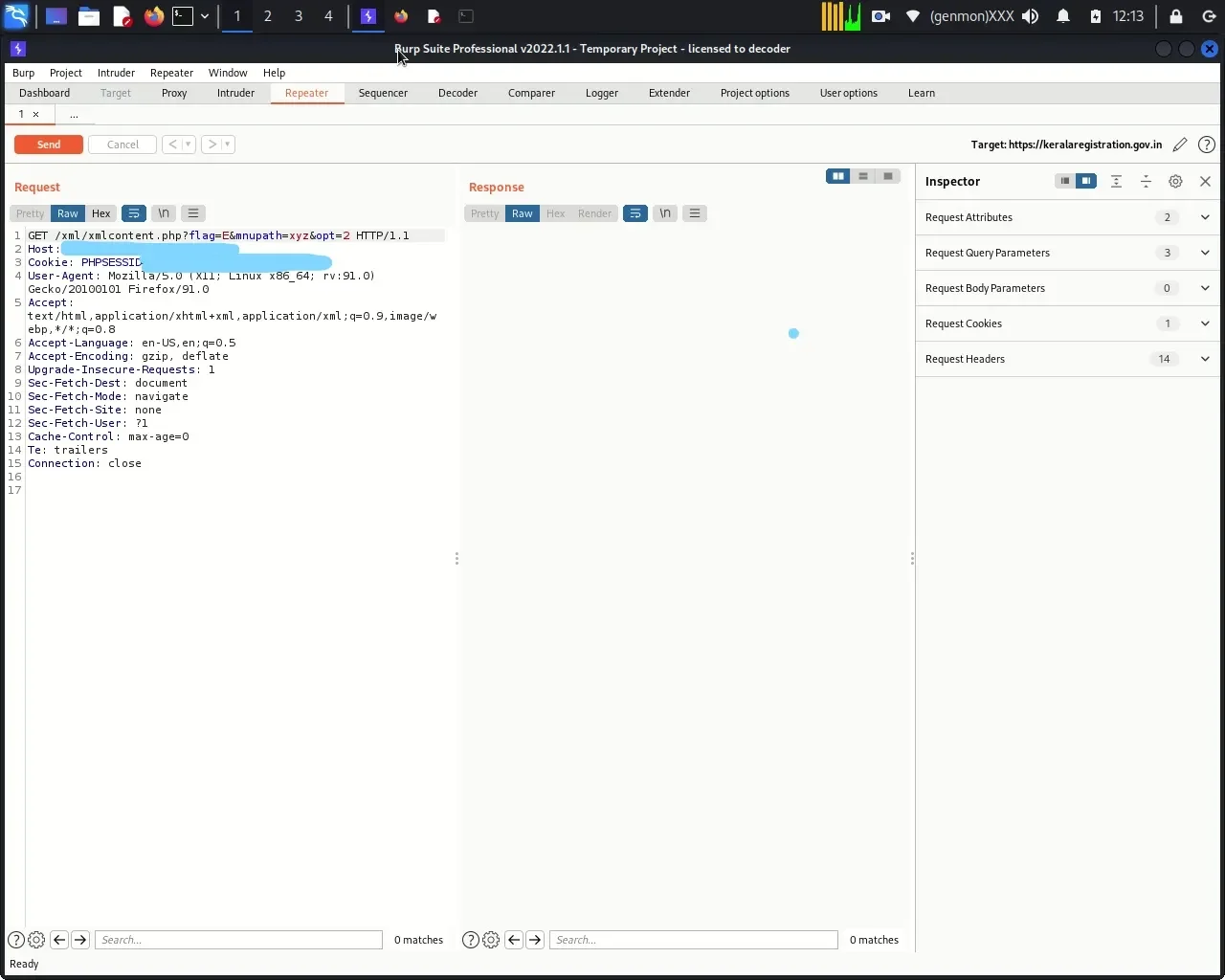
The request is captured in Burp Suite and sent to the Repeater so the mnupath value can be changed and resent repeatedly.
Step 3: confirm with a time-based payload
The first confirmation payload injected into mnupath was:
SELECT+CASE+WHEN+(1=1)+THEN+pg_sleep(20)+END —
The server took a long time to respond. The author initially suspected a slow internet connection, so the delay was raised to 50 seconds, and the server again took 50 seconds to respond. The delay tracking the chosen value convinced the author it was a blind, time-based injection. With the bug confirmed, sqlmap was run and dumped the database.
Step 4: the documented reproduction
The write-up then gives a cleaner reproduction with a 10 second delay. The payload is:
SELECT+CASE+WHEN+(1=1)+THEN+pg_sleep(10)+END —
and the value substituted into the vulnerable mnupath parameter is:
xyz’%3BSELECT+CASE+WHEN+(1=1)+THEN+pg_sleep(10)+END —
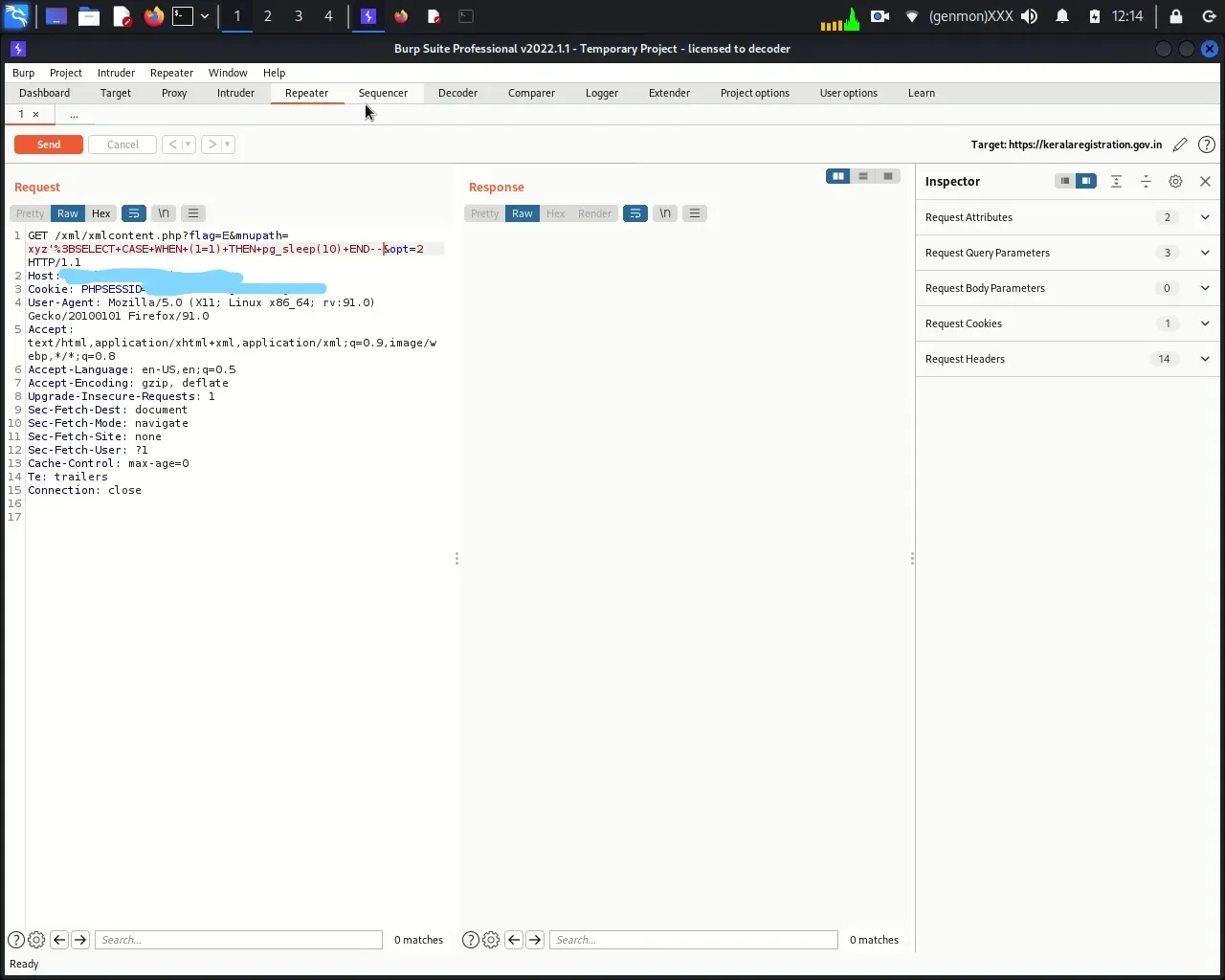
The value is the original xyz with a quote, the encoded semicolon and the SELECT CASE payload appended.
Step 5: read the timing
With the condition true, the response takes 10 seconds. That means the condition is TRUE. If the condition is false, the response comes back in normal time. This difference is the entire oracle: no data is returned in the response, only the delay tells you the answer to a yes/no question.
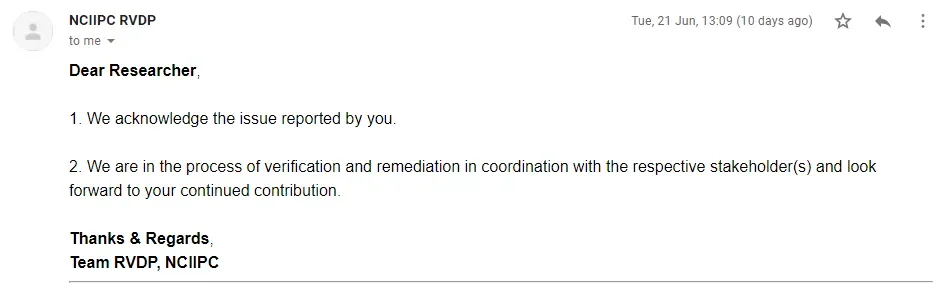
Two days after reporting, the author received mail from NCIIPC.

Root cause
The mnupath value from the query string reaches the database unsafely, which is why the injected payload executes. The payload uses pg_sleep, which is what produced the delay. Union-based and error-based attempts produced nothing from the server side, so the author moved to time-based testing. The report does not describe the query itself or any server-side validation, so the exact construction is not shown.
Impact
As the author puts it, an attacker can use SQL injection to bypass a web application's authentication and authorisation mechanisms and retrieve the contents of an entire database. SQLi can also be used to add, modify and delete records in a database, affecting data integrity. Under the right circumstances, SQLi can also be used by an attacker to execute OS commands, which may then be used to escalate an attack even further. The author says he ran sqlmap and it dumped the database; the report does not show what was retrieved.
Fix
The fix that addresses the root cause is to stop concatenating mnupath into the query and pass it as a bound parameter, so the value can never terminate the string literal or introduce a statement. On top of that, the database account used by the application should have only the privileges the feature needs, and database errors should not be returned to the client.
Variants to test
- Other parameters on the same page. The notifications feature carries
flag,mnupathandopt; try the sameCASE ... pg_sleeppattern on each and look for a response that takes the delay you asked for. - Other pages that build URLs from user selections, such as city, category or menu pickers. A positive result is a response time that tracks the sleep value you set, as happened here when 20 seconds became 50 seconds.
- Stacked statements. The working payload uses
%3Bto end the original statement; on other targets try appending a second statement and see whether the delay still fires. - Back-end fingerprinting through the delay function.
pg_sleephere points to PostgreSQL; on other targets try the equivalent sleep function of the suspected engine and compare timings. - Escalation after confirmation. Once timing is reliable, use a tool such as sqlmap to enumerate and dump, as the author did, and check whether the database account can write or execute beyond reading.
What happened, in plain words
A security researcher went looking for weaknesses in Indian government websites. He found one: a page on a Kerala government site that let him slip extra instructions into the database query the page was quietly running behind the scenes. He could not see any data come back, so he used a trick: he made the database wait when a condition was true and read the answer from the delay. The waiting told him the answer. He reported it to NCIIPC, the Indian government body that handles these reports, and two days later he got a reply.
This article walks through exactly what he did, in the order he did it, explaining every term from scratch. You only need to be comfortable using a browser.
The target and the idea
The researcher started hunting on government websites a few weeks before writing this up. He used Google dorks to find gov.in websites. A Google dork is just a search query built with special operators (like site:gov.in) that narrows results to a particular kind of page; it is the same Google search box you use every day, with a filter typed in. The first website in his search results was the Kerala government's website, so he decided to start his journey there.
He cannot disclose the real name, so throughout the write-up it is called target.gov.in. Think of that as a placeholder, like writing "John Doe" on a form.
Before going further, here is the definition he opens with: SQL injection (SQLi) refers to an injection attack wherein an attacker can execute malicious SQL statements that control a web application's database server.
Let us unpack that. A database is an organised store of information, like a very large, very strict spreadsheet. A web application is the software on a server that answers your browser's requests: when you click a city name, the application runs a query against the database to fetch the matching rows. SQL (Structured Query Language) is the language those queries are written in. An injection attack is when you manage to get your own text treated as part of the query rather than as plain data. The everyday comparison: imagine a form where you write your name, and the clerk reads it out to a colleague as "fetch the file for [your name]". If you write your name as "Bob, and also fetch the confidential file", the clerk reads the whole sentence out and the colleague fetches both files. The clerk could not tell your name from an instruction. That is injection.
Why it matters: impact
The author lists what an attacker could do with this class of bug. An attacker can use SQL injection to bypass a web application's authentication and authorisation mechanisms and retrieve the contents of an entire database. Authentication is the login step (proving who you are); authorisation is the permission step (what you are allowed to do). Bypassing both means getting in and getting rights you should not have. SQLi can also be used to add, modify and delete records in a database, affecting data integrity. Data integrity means the data is correct and has not been tampered with; if someone can quietly change records, you can no longer trust them. Under the right circumstances, SQLi can also be used by an attacker to execute OS commands, which may then be used to escalate an attack even further. OS commands are instructions to the operating system itself, the layer underneath the website; reaching that layer is like getting from the lobby of a building into the machine room.
First attempts
The researcher started digging into the website. First he tried some basic SQL injection payloads on the login form and images features. But got nothing. A payload is simply the text you send to try to trigger the bug; "basic" here means the well-known starter strings that testers try first. He was frustrated.
Why start there? Login forms and upload features are the classic places where user text reaches a database, so they are the natural first guess. Neither responded, which is normal: most places are not vulnerable, and finding the one that is takes patience.
The breakthrough: watching requests
After a two hour break, he again started exploring the web. He was just clicking on every link and button of the website and viewing the requests in Burp. Burp Suite is a tool that sits between your browser and the website and shows you every request your browser sends and every response it gets back. A request is the message your browser sends ("give me this page", "here is my choice"); a response is what the server sends back. Seeing requests matters because the interesting information is often in the URL, not on the visible page.
While clicking on the notifications page, there is a feature to select your city. He clicked on one city and got this parameter in URL:
PHP?flag=E&mnupath=xyz&opt=2
Line by line: PHP is the page or script being requested. The ? marks the start of the query string, the part of a URL that carries extra values. flag=E is one parameter named flag with the value E. & separates parameters. mnupath=xyz is a parameter named mnupath with the value xyz. opt=2 is a parameter named opt with the value 2. A parameter is just a named value passed in the URL, like a field on a form that travels in the address bar. The name mnupath suggests a menu path, which fits a city selector.
He thought to test SQL injection on them. First he tried Union and error-based SQL injections, but there are no results from the server-side. Union-based injection tries to attach a second query to the first so its results appear on the page; error-based injection tries to make the database print an error message that leaks information. Both need the server to show you something. Here it showed nothing.
The timing trick
Then he tried time-based SQL. This is the clever part. If the page will not show you data and will not show you errors, you can still ask questions if you can make the server behave differently depending on the answer. The trick is to make it wait when the answer is yes. You cannot see the answer, but you can use a stopwatch.
He captured the request in Burp and injected this payload into the mnupath variable:
SELECT+CASE+WHEN+(1=1)+THEN+pg_sleep(20)+END —
Line by line: SELECT is the SQL keyword for "fetch something". + signs here stand in for spaces, because spaces in a URL have to be encoded; when the server decodes the URL, + becomes a space. CASE starts a conditional, SQL's version of "if this, then that". WHEN (1=1) is the condition: one equals one, which is always true. THEN pg_sleep(20) is what to do when the condition holds: pg_sleep is a PostgreSQL function that pauses for the number of seconds given, here 20. END closes the conditional. The trailing — is a comment marker: everything after it is ignored by the database, which is useful for discarding whatever the application appends to your input. PostgreSQL is one particular database product; the name pg_sleep is a strong hint that this site uses it.
And that was strange, the server took too much time to respond. First he thought it was his slow internet. This is the right instinct: a slow response could just be a bad connection. So he tested it. When he changed the payload value to 50 seconds, the server again took 50 seconds to respond. That is the proof: the delay tracked the number he chose. A slow connection would not politely wait exactly as long as he asked. Now he was sure that was a blind SQL injection. "Blind" means you get no data back in the response; you infer the answer from behaviour such as timing. He immediately opened up sqlmap and says it dumped the database. sqlmap is a tool that automates SQL injection testing and data extraction.
He reported this bug to NCIIPC and got acknowledgment from the Indian government. NCIIPC is the Indian government body that coordinates reports about critical information infrastructure.
The clean reproduction, step by step
The write-up then gives a tidier version with a 10 second delay, so anyone can follow along.
- go to
https://target.gov.in/xml/xmlcontent.php?flag=E&mnupath=xyz&opt=2
This is the full address of the page. https:// is the secure web protocol. target.gov.in is the placeholder hostname. /xml/xmlcontent.php is the path to the script on the server: a folder called xml and a file called xmlcontent.php. The query string after the ? carries the three parameters. Visiting it in a browser is how you see the normal, unmodified request.
- capture the request in the burp suite, and send it to the repeater.
Capturing means letting Burp record the request your browser makes. The Repeater is a Burp feature that lets you take one captured request, edit it, and send it again and again, seeing each response. This is essential for timing tests: you need to change one value and resend the exact same request many times, which a browser makes awkward.
payload = SELECT+CASE+WHEN+(1=1)+THEN+pg_sleep(10)+END —
here, the mnupath parameter is vuln. This is the same conditional as before, with 10 seconds instead of 20. "vuln" is shorthand for vulnerable: the mnupath value is the one that reaches the database unsafely.
- change mnupath value to
xyz’%3BSELECT+CASE+WHEN+(1=1)+THEN+pg_sleep(10)+END —
Line by line: xyz’ is the original value plus a single quote. %3B is the URL-encoded form of a semicolon. The rest is the same SELECT CASE with pg_sleep(10). The trailing — is a comment marker. In short: close the string, end the statement, add your own statement, comment out the leftovers.
- this will take 10 sec to respond. that means our condition is TRUE.
Because 1=1 is always true, the THEN branch runs, pg_sleep(10) fires, and the server holds the response for ten seconds. You measure the time with a stopwatch (or just watch the Repeater). Ten seconds means yes.
- if the condition is false, then it will take normal time to respond.
If you change the condition to something false, the THEN branch is skipped, no sleep happens, and the page comes back at its usual speed. That difference, ten seconds versus normal, is the entire channel.
after 2 days, i received mail from NCIIPC :)
Why the bug exists
The mnupath value from the query string reaches the database unsafely. "Bound" means handed to the database separately from the query text, so the database treats it purely as a value and never as code. When the value is instead glued into the query text, a quote in the value ends the string literal and lets the rest of the input run as SQL. The payload uses pg_sleep, which is what produced the delay. Union-based and error-based attempts produced nothing from the server side, so he moved to time-based testing. The report does not describe the query itself or any server-side validation, so the exact construction is not shown.
What could have been done about it
The report does not say what was changed after disclosure. The fix that addresses the root cause is to stop concatenating mnupath into the query and pass it as a bound parameter, so the value can never terminate the string literal or introduce a statement. On top of that, the database account used by the application should have only the privileges the feature needs, and database errors should not be returned to the client. The everyday comparison: instead of reading your name out as part of a sentence, the clerk writes it on a separate slip and hands it over as a value, so nothing you write can be mistaken for an instruction.
Other places worth testing
- Other parameters on the same page. The notifications feature carries
flag,mnupathandopt; try the sameCASE ... pg_sleeppattern on each and look for a response that takes the delay you asked for. - Other pages that build URLs from user selections, such as city, category or menu pickers. A positive result is a response time that tracks the sleep value you set, as happened here when 20 seconds became 50 seconds.
- Stacked statements. The working payload uses
%3Bto end the original statement; on other targets try appending a second statement and see whether the delay still fires. - Back-end fingerprinting through the delay function.
pg_sleephere points to PostgreSQL; on other targets try the equivalent sleep function of the suspected engine and compare timings. - Escalation after confirmation. Once timing is reliable, use a tool such as sqlmap to enumerate and dump, as the author did, and check whether the database account can write or execute beyond reading.
Glossary
- API: a defined way for one piece of software to ask another for something; here, the web application asking the database for rows.
- Authentication: proving who you are, usually by logging in.
- Authorisation: what an authenticated user is allowed to do.
- Blind SQL injection: SQL injection where no data or error is returned, so the answer is inferred from behaviour such as response timing.
- Bound parameter: a value passed to the database separately from the query text, so it is always treated as data, never as code.
- Burp Suite: a tool that sits between browser and website, recording and letting you edit requests.
- Comment (SQL): a marker such as
—that makes the database ignore the rest of the line. - Data integrity: the property that data is correct and has not been tampered with.
- Database: an organised store of information that a web application queries.
- Error-based SQL injection: injection that tries to make the database return error messages that leak information.
- Google dork: a Google search using special operators to narrow results to a particular kind of page.
- Injection attack: getting your own text treated as part of a command rather than as plain data.
- NCIIPC: the Indian government body that coordinates reports about critical information infrastructure.
- OS command: an instruction to the operating system underneath the website.
- Parameter: a named value passed in a URL, after the
?and separated by&. - Payload: the text you send to try to trigger a vulnerability.
- pg_sleep: a PostgreSQL function that pauses for a given number of seconds.
- PostgreSQL: a particular database product; the name
pg_sleeppoints to it. - Query string: the part of a URL after the
?that carries parameters. - Repeater: a Burp Suite feature for editing and resending one captured request repeatedly.
- Request: the message a browser sends to a server.
- Response: the message a server sends back.
- SQL: Structured Query Language, the language used to talk to a database.
- SQL injection (SQLi): an injection attack in which an attacker can execute malicious SQL statements that control a web application's database server.
- sqlmap: a tool that automates SQL injection testing and data extraction.
- Time-based SQL injection: injection where the server's response delay is used as a yes/no signal.
- Union-based SQL injection: injection that tries to attach a second query so its results appear on the page.
- URL encoding: writing characters in a URL-safe form, such as
%3Bfor a semicolon and+for a space. - Vulnerable (vuln): a value or feature that can be abused to trigger a bug.



