How I Found XSS In Another Govt. Site :: NCIIPC VDP !!
A publicly reachable CKEditor sample page on a government site accepted user input in its source editor and rendered it without sanitisation, so an attacker could run script in the page. The author demonstrated this with an alert box and reported it to the national CERT.
 Published on medium.com
Let’s say the target is target.gov.in. I have already collected the domains during subdomain enumeration phase.
The full write-up lives on its author's site
It belongs to its author, so we link to it rather than copy it. The other two tabs are our own rewrites, checked against it.
Context
This is a write-up about a cross-site scripting (XSS) finding on a government website, reported through the NCIIPC vulnerability disclosure programme. The author, known as Professor0xx01, does not name the target and refers to it only as target.gov.in. The affected component is the sample pages that ship with CKEditor, the rich text editor framework the site uses. Those sample pages demonstrate editor features such as the HTML writer output.
The author rates the bug as MEDIUM and gives a CVSS score of 5.4 with the vector CVSS:3.1/AV:N/AC:L/PR:L/UI:R/S:C/C:L/I:L/A:N.
Setup
The work starts from a list of domains the author had already collected during a subdomain enumeration phase. The tools used are Wappalyzer, to fingerprint the technology on the sites being browsed, and dirsearch, for directory enumeration. No accounts, roles or special preconditions are described: the finding is made against the public site.
Finding it
While browsing the collected sites and looking at Wappalyzer output, the author noticed that one of them uses CKEditor as its rich text editor framework. The author had tested CKEditor before in another engagement and had already written about it, so the framework was familiar.
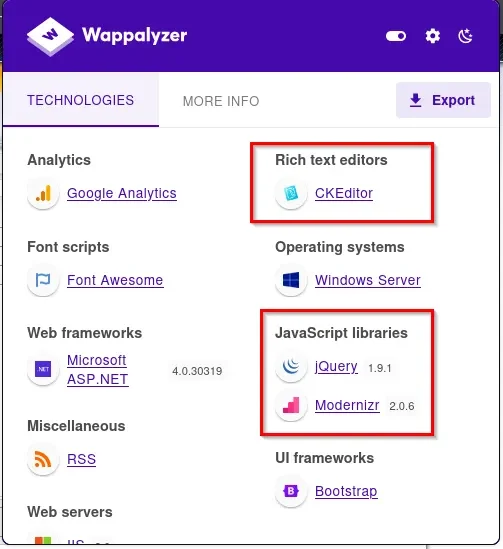
The screenshot shows the Wappalyzer detection of CKEditor on the site.
Recalling the earlier work, the author decided to run a directory enumeration to see whether the same kind of CKEditor sample content was reachable here.
dirsearch -u https://target.com -x 404,403
The command runs dirsearch against the target and excludes responses with status 404 and 403, so that only other status codes are reported. The enumeration returned an endpoint, but not the text editor the author was looking for.
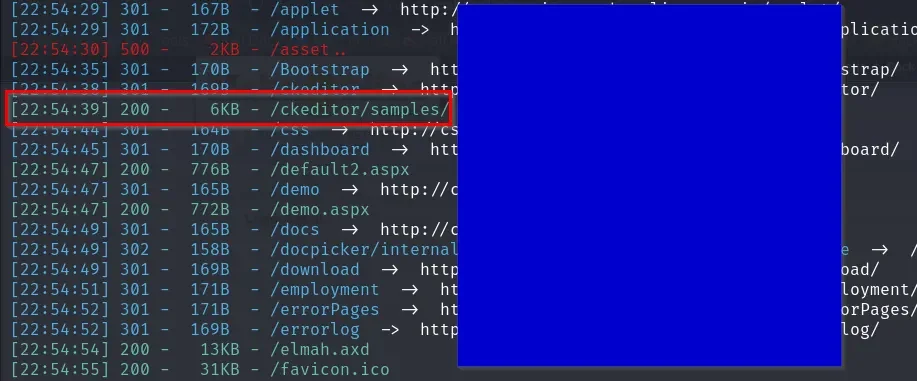
The screenshots show the enumeration output and the endpoint that came back without the editor.
At that point the author went back to the earlier CKEditor write-up and searched for the specific sample path used there, to check whether the CKEditor page actually exists on this host. It did. The author calls it the juicy endpoint:
https://<target>.gov.in/ckeditor/samples/plugins/htmlwriter/outputhtml.html
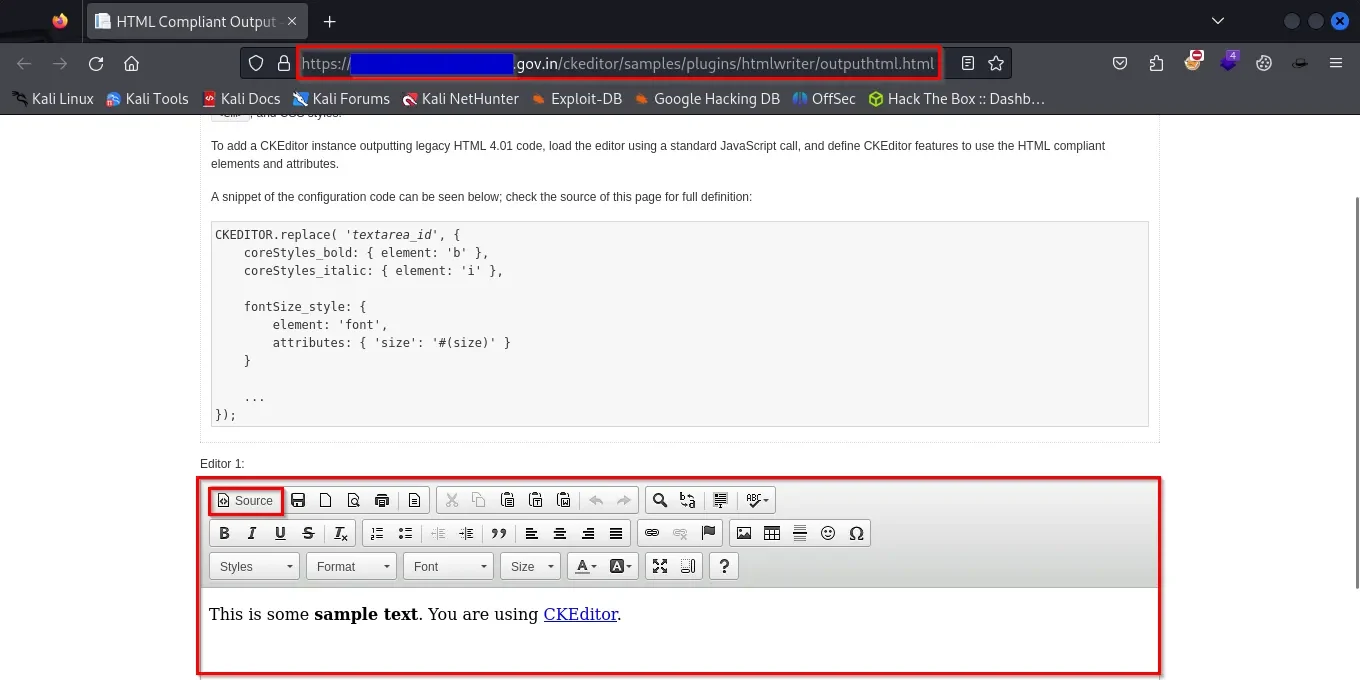
This is the outputhtml.html sample page of the htmlwriter plugin, served from the CKEditor samples directory.
Exploitation
Step 1: open the source view
On the sample page, the author first clicks on the source control, which switches the editor into its HTML source mode.
Step 2: insert the payload
The following payload is entered into the source view:
Xss<!--{cke_protected} --!><img src=x onerror=alert(`Professor0xx01`)> -->Attack
The payload is wrapped in an HTML comment that carries CKEditor's cke_protected marker, followed by an img element whose src is an invalid value (x) and whose onerror handler calls alert with the author's handle. The trailing -->Attack closes the comment and adds text after it. The payload is wrapped in an HTML comment carrying CKEditor's cke_protected marker, followed by an img element whose src is an invalid value (x) and whose onerror handler calls alert with the author's handle.
Step 3: switch back to source
The author clicks the source control again, returning the editor from source mode to its normal view.
Step 4: the alert fires
On switching back, the img fails to load and the onerror handler runs, producing the alert().
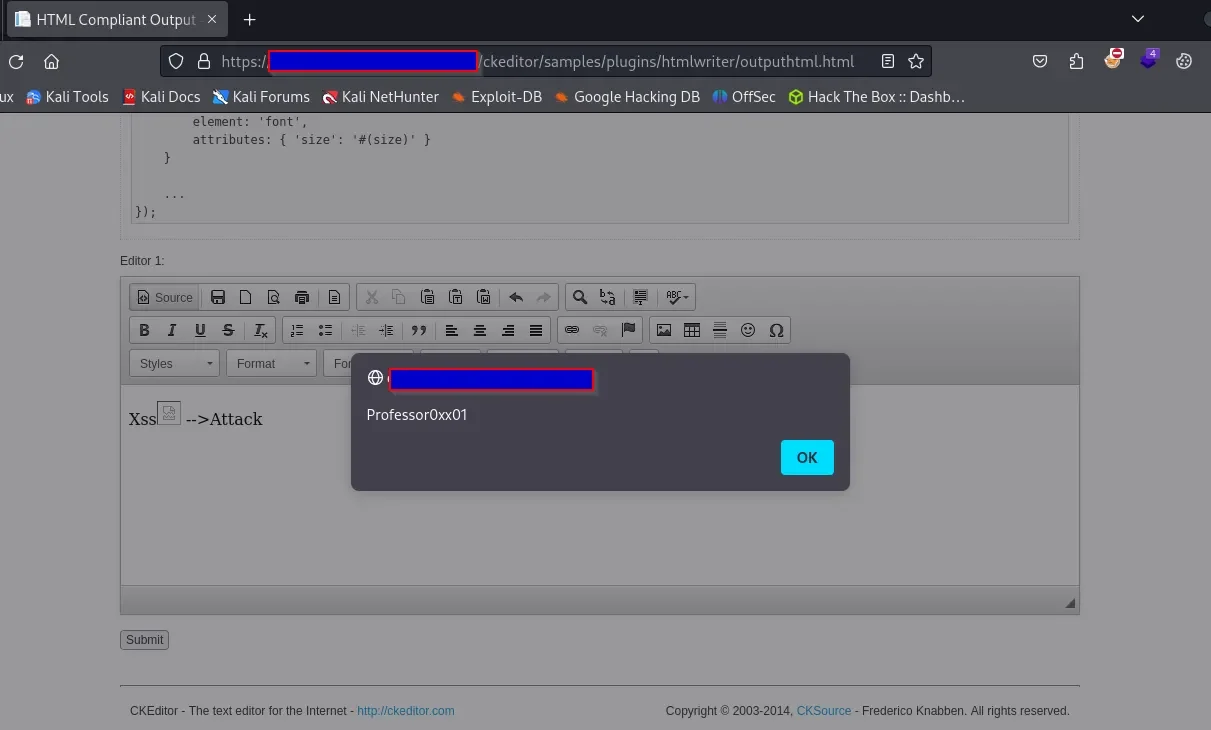
The screenshot shows the alert box triggered on the page.
Root cause
The vulnerable page is a CKEditor sample (samples/plugins/htmlwriter/outputhtml.html) that was left reachable on the production host. After the author switches back from source mode, the alert() fires. The report does not describe the server-side or client-side code that processes the input, so the precise reason the payload survives the editor's filtering is not stated; the cke_protected comment marker is what the author uses to get it through. No output encoding or content sanitisation on the rendered result is described as stopping it.
Impact
The author classifies the issue as MEDIUM with a CVSS score of 5.4. The vector indicates network attack, low complexity, low privileges required, user interaction required, changed scope, and low confidentiality and integrity impact, with no availability impact. The report does not describe any specific victim, data exposed or further exploitation beyond the alert.
Fix
The author only states that a report was written and mailed to the NCIIPC team.
Variants to test
- A positive result is a sample page loading in the browser rather than a 404 or 403.
- A positive result is any sample page that renders editor content.
- A positive result is the handler executing.
- A positive result is the editor or its samples loading from a path outside the expected application route.

That is the whole of the finding: a leftover CKEditor sample page on a government host, a payload that survives the editor's comment handling, and an alert box as proof.
What happened, in plain words
A security researcher was looking at websites belonging to a government. On one of them, he noticed that the site uses a piece of software called CKEditor to let people type and format text in a box, the way you might write a comment or a page in a content management system. CKEditor is a rich text editor: instead of typing raw HTML (the code that describes how a web page looks), you get buttons for bold, italic, links and so on, and the editor turns your clicks into HTML behind the scenes.
CKEditor ships with a folder of demonstration pages, called samples. These pages exist to show off what the editor can do. One of those sample pages turned out to be reachable on the government site, and it accepted a piece of HTML that runs JavaScript. That is cross-site scripting, or XSS: a way of getting your own code to run inside someone else's web page, in the browser of whoever views it.
The researcher proved it with the simplest possible demonstration, an alert() box, which is a small pop-up that JavaScript can show. He then reported it to the NCIIPC team. NCIIPC is the National Critical Information Infrastructure Protection Centre, and it runs a vulnerability disclosure programme, which is a formal way for outsiders to report security problems to an organisation.
The bug in one line
The class of bug is cross-site scripting, rated MEDIUM. The author gives it a CVSS score of 5.4, with the vector CVSS:3.1/AV:N/AC:L/PR:L/UI:R/S:C/C:L/I:L/A:N. CVSS is a standard scoring system for security bugs; the vector is a compact string that spells out how the score was reached. We will unpack it later.
Before the finding: what the researcher already had
The work did not start from nothing. The researcher had already collected a list of domains belonging to the target during a phase called subdomain enumeration. A domain is a name like example.gov.in; a subdomain is a name in front of it, like mail.example.gov.in or portal.example.gov.in. Large organisations have many of them, and finding them is a standard first step because each one is a separate website that might be configured differently. The report does not describe how the list was collected.
Two tools are used in this story:
- Wappalyzer is a browser extension. While you browse a site, it looks at the page and its responses and guesses which technologies the site is built with: which web server, which programming language, which JavaScript libraries, which editors. Think of it as reading the ingredients list on the back of a packet while you eat.
- dirsearch is a command-line tool that tries a long list of common file and folder names against a website and reports which ones exist. If a site has a folder called
adminor a file calledbackup.zipthat nobody meant to expose, dirsearch is one way to stumble on it. It is like walking down a corridor trying every door handle instead of guessing which door is open.
No account, login or special role is needed for any of this. The finding is made against the public site, as any visitor could.
Finding it
While browsing the collected sites and watching what Wappalyzer reported, the researcher noticed that one of them uses CKEditor. He had tested CKEditor before, in an earlier engagement, and had already written about it, so he recognised the name immediately.
The screenshot shows Wappalyzer reporting CKEditor on the site.
Recognising the technology matters because it tells you what to look for next. If a site runs a particular product, the files that product ships with are likely to be somewhere on the server, under their usual names. That is the guess the researcher wanted to test: does this host also carry the CKEditor sample content he had found elsewhere?
To check, he ran a directory enumeration:
dirsearch -u https://target.com -x 404,403
Line by line:
dirsearchis the program being run.-u https://target.comgives it the address to test. In the article the real host is replaced bytarget.comso the site is not named.-x 404,403tells dirsearch to ignore responses with the HTTP status codes 404 and 403. HTTP status codes are the short numbers a web server sends back with every answer.200means "here is the page".404means "no such page here".403means "that exists but you are not allowed to see it". By excluding 404 and 403, the tool only shows you the paths that answered with something else, which cuts down the noise enormously.
The enumeration came back with an endpoint, but not the editor the researcher was hoping for. An endpoint is simply a specific address on a server that responds to requests, such as a particular page or a particular API route. An API, short for application programming interface, is the part of a website that answers requests with data rather than with a finished page; think of the difference between asking a waiter for the menu (a page) and asking the kitchen directly for the list of ingredients (an API).
The screenshots show the enumeration output and the endpoint that came back without the editor.
So the first guess was only partly right. Something was there, but not the thing he wanted. Rather than give up, he went back to his earlier CKEditor write-up and looked up the exact sample path he had used there, then requested that path on this host to see whether the CKEditor page really exists. It did. He calls it the juicy endpoint:
https://<target>.gov.in/ckeditor/samples/plugins/htmlwriter/outputhtml.html
Reading that address from left to right:
https://is the secure version of the protocol browsers use to fetch pages.<target>.gov.inis the site's domain, with the real name replaced by a placeholder. The.gov.inending marks an Indian government domain./ckeditor/is the folder where the editor's files live./samples/is the folder of demonstration pages that ship with the editor./plugins/htmlwriter/is the folder for one particular plugin, a small add-on that gives the editor an extra feature. This one is called htmlwriter.outputhtml.htmlis the demonstration page itself. It shows what the htmlwriter plugin produces.
This page is a leftover. When someone installs CKEditor on a server, they usually copy the whole downloaded folder into the website, samples and all.
Exploitation
Step 1: open the source view
On the sample page, the researcher first clicked the control that switches the editor into source mode. A rich text editor normally hides the HTML from you and shows you formatted text. Source mode is the switch that reveals the raw HTML underneath, so you can edit the code directly. It is the difference between editing a document in a word processor and opening the same document as plain text.
Step 2: insert the payload
The following was typed into the source view:
Xss<!--{cke_protected} --!><img src=x onerror=alert(`Professor0xx01`)> -->Attack
This is the payload, the piece of input crafted to trigger the bug. Breaking it into parts:
Xssis just text. It appears on the page and does nothing.<!--opens an HTML comment. In HTML, anything between<!--and-->is a comment: the browser does not display it and does not treat it as part of the page.{cke_protected}is a marker that CKEditor uses internally. The editor treats content carrying this marker as protected, meaning it should be left alone rather than cleaned up or rewritten.{cke_protected}is a marker that appears in the payload.--!>is a variant of the comment-closing sequence. Browsers are lenient about how a comment can end, and this form is accepted.<img src=x onerror=alert(Professor0xx01)>is the actual attack.imgis the HTML tag for an image.src=xtells the browser to load the image from a location calledx, which does not exist, so the load will fail.onerroris an attribute that names code to run when the image fails to load. That code isalert(Professor0xx01), which shows a pop-up containing the researcher's handle. The backticks are just another way of writing a text string in JavaScript.-->Attackcloses the comment and adds the wordAttackafter it.
The trick is the comment wrapper. If it does, the browser will try to load the broken image, fail, and run the onerror code.
Step 3: switch back to source
The researcher clicked the source control again, returning the editor from source mode to its normal view. If the img tag made it through, the browser now tries to load it.
Step 4: the alert fires
On switching back, the image fails to load, the onerror handler runs, and the alert() appears.
The screenshot shows the alert box on the page.
An alert() box is the standard proof for this kind of bug. It demonstrates that the researcher's JavaScript ran in the page. That is why XSS matters even when the demonstration is a pop-up.
Why it works
The vulnerable page is a CKEditor sample, samples/plugins/htmlwriter/outputhtml.html, left reachable on the production host. After the researcher switches back from source mode, the alert() fires. The report does not describe the server-side or client-side code that processes the input, so the precise reason the payload survives the editor's filtering is not stated; the cke_protected comment marker is what the researcher uses to get it through. Nothing in the report describes output encoding or sanitisation on the rendered result stopping it. Output encoding is the practice of converting special characters into harmless equivalents before showing user input on a page, so that a < typed by a user is displayed as text rather than treated as the start of a tag.
How serious is it
The researcher rates the issue MEDIUM with a CVSS score of 5.4. The vector string breaks down as follows:
| Part | Meaning |
|---|---|
AV:N |
Attack vector: network. The attacker works over the internet, not from the same machine. |
AC:L |
Attack complexity: low. No special conditions are needed. |
PR:L |
Privileges required: low. Some level of access is needed, though the report does not spell out which. |
UI:R |
User interaction: required. Someone has to view or interact with the crafted content. |
S:C |
Scope: changed. The impact can reach beyond the component that was attacked. |
C:L |
Confidentiality: low. Limited information could be exposed. |
I:L |
Integrity: low. Limited changes could be made. |
A:N |
Availability: none. The service is not taken down. |
In plain terms: the vector describes a network attack requiring user interaction, with low confidentiality and integrity impact.
What was done about it
The researcher only states that he wrote a report and mailed it to the NCIIPC team.
Other places to look
- A positive result is a sample page loading in the browser rather than a 404 or 403.
- A positive result is any sample page that renders editor content.
- A positive result is the handler executing.
- A positive result is the editor or its samples loading from a path outside the expected application route.
That is the whole of the finding: a leftover CKEditor sample page on a government host, a payload that survives the editor's comment handling, and an alert box as proof.
Glossary
- API: the part of a website that answers requests with data rather than a finished page, used by other software rather than by a person clicking around.
- CKEditor: a rich text editor, a piece of software that gives you buttons for formatting text and turns them into HTML behind the scenes.
- Cross-site scripting (XSS): a bug where an attacker gets their own code to run inside someone else's web page, in the browser of whoever views it.
- CVSS: a standard scoring system for security bugs, producing a number and a vector string that explains how the number was reached.
- CVSS vector: the compact string, such as
CVSS:3.1/AV:N/AC:L/PR:L/UI:R/S:C/C:L/I:L/A:N, that spells out each factor behind a CVSS score. - Directory enumeration: trying a long list of common file and folder names against a website to discover which ones exist.
- dirsearch: a command-line tool that performs directory enumeration.
- Domain: a name like
example.gov.inthat identifies a website. - Endpoint: a specific address on a server that responds to requests, such as a particular page or API route.
- HTML: the code that describes the structure and content of a web page.
- HTML comment: text between
<!--and-->that the browser does not display and does not treat as part of the page. - HTTP status code: the short number a web server sends back with every answer, such as 200 for success, 404 for not found and 403 for forbidden.
- JavaScript: the programming language that runs in web browsers and makes pages interactive.
- NCIIPC: the National Critical Information Infrastructure Protection Centre, which runs a vulnerability disclosure programme.
- Output encoding: converting special characters in user input into harmless equivalents before showing them on a page, so they are displayed as text rather than treated as code.
- Payload: the piece of input crafted to trigger a bug.
- Plugin: a small add-on that gives a larger piece of software an extra feature.
- Rich text editor: software that lets you format text with buttons instead of typing raw HTML.
- Sanitisation: cleaning user input by removing or neutralising anything dangerous before it is used.
- Source mode: the view in a rich text editor that shows the raw HTML instead of the formatted result.
- Subdomain: a name in front of a domain, such as
portalinportal.example.gov.in, identifying a separate website. - Subdomain enumeration: the process of discovering the subdomains that belong to an organisation.
- Vulnerability disclosure programme: a formal way for outsiders to report security problems to an organisation.
- Wappalyzer: a browser extension that guesses which technologies a website is built with.