NCIIPC VDP Bug : Open Redirection Vulnerability In Govt. Site !!
A government website accepted user-controlled input in a redirect parameter and used it to build the Location header without validation. An attacker could craft a link that sends victims to an arbitrary external site, which could be used for phishing.
 Published on medium.com
Open redirection vulnerabilities arise when an application incorporates user-controllable data into the target of a redirection in an unsafe way. An attacker can construct a URL within the application that causes a redirection to an arbitrary external domain.
The full write-up lives on its author's site
It belongs to its author, so we link to it rather than copy it. The other two tabs are our own rewrites, checked against it.
Context
The target was a website on an Indian Government reserved domain, found during a subdomain enumeration phase across government sites the researcher had already collected. The feature involved is a plain HTTP redirect: the site did not serve content at the URL the researcher visited, it answered with a redirect to a second government URL (taget_2.gov.in in the report's spelling). That redirect target is the part that turned out to be attacker-influenced.
Open redirection, as the report defines it, arises when an application incorporates user-controllable data into the target of a redirection in an unsafe way. An attacker can construct a URL within the application that causes a redirection to an arbitrary external domain, and that behaviour can be leveraged to facilitate phishing attacks against users of the application.

The first image is captioned 301 Moved Permanently.
Setup
No accounts, roles or special privileges were needed. The work was done with a browser and Burp Suite: the researcher browsed the site, then reviewed the Burp history and replayed the request in Repeater to inspect the response. The only precondition was a URL on the target that issues a redirect.
Finding it
While going through the collected government URLs, the researcher hit a web URL (target.gov.in) that redirected instantly to another URL (taget_2.gov.in). Because it redirected every time to a different site, there was no immediate expectation of a vulnerability. The interesting part came from reviewing the Burp history rather than the browser.
Sending the request to Repeater showed that, by default, the response redirected to another URL in the Location header.
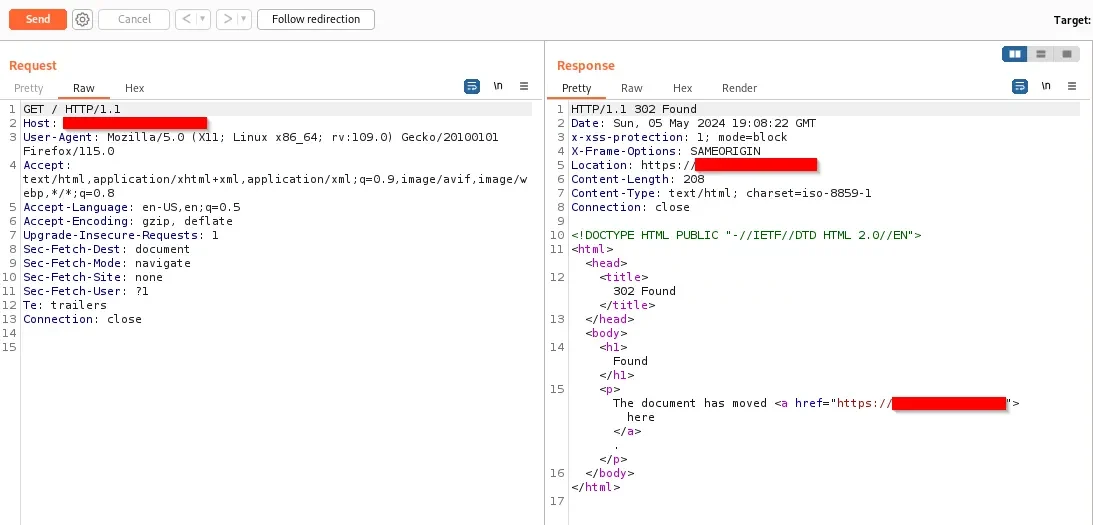
The screenshot shows that default redirect in the response.
Exploitation
Step 1: Confirm the redirect reflects input
Adding any kind of string, for example attacker.professor0xx01, was attached to the redirect URL:
Location: https://target.gov.in.attacker.professor0xx01
That is the signal: the value the researcher supplied is concatenated onto the redirect URL.
Step 2: Find a payload that escapes the intended host
After a few minutes of testing, the researcher found a working payload:
//@evil.com
It was reflected into the HTTP response appended to the default redirect URL, with a 302 Found status:
Location: https://[redacted]
The // starts a protocol-relative reference and the @ makes everything before it user information, so the browser treats evil.com as the host and target.gov.in as the credentials part of the authority.
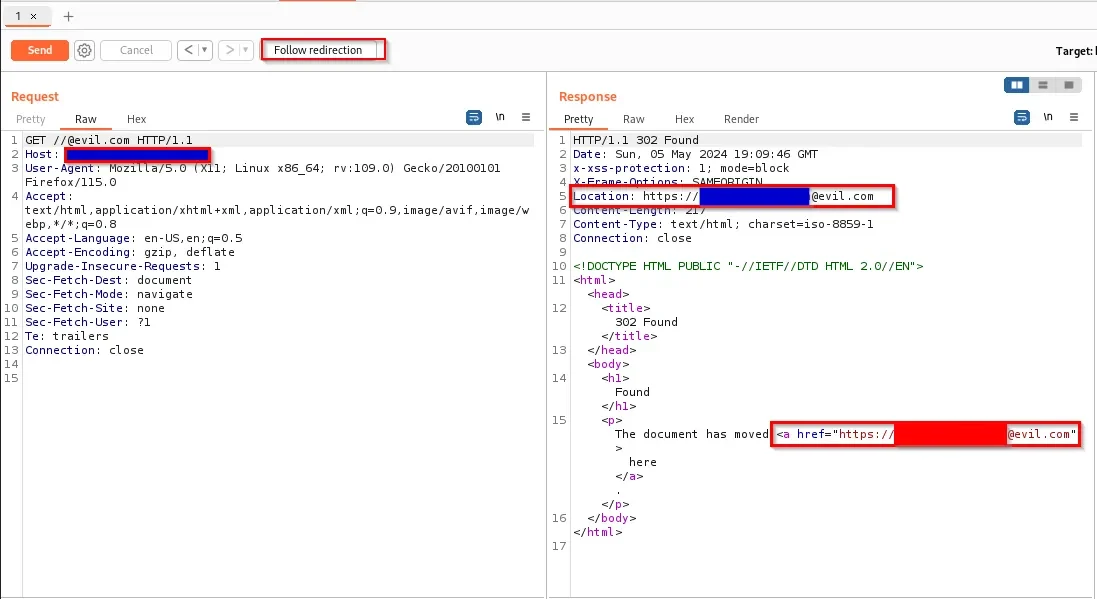
The screenshot shows the payload //@evil.com in the request and the resulting Location header.
Step 3: Follow the redirect
Pressing the Follow Redirection button redirected the researcher to the Evil.com domain, confirming the redirect left the government site.
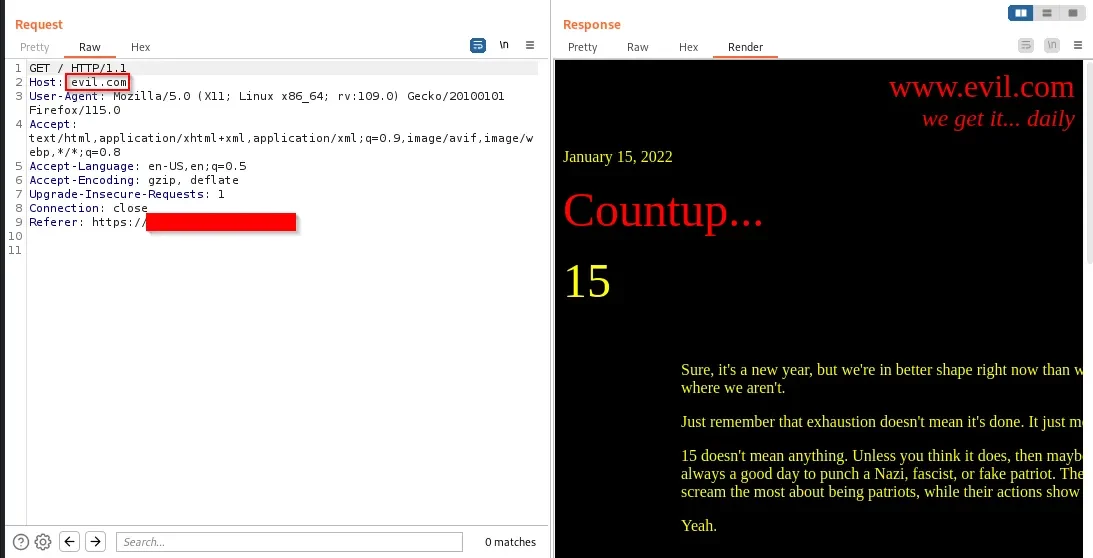
The screenshot shows the redirect to Evil.com succeeding.
The affected URL therefore looks like:
https://<target>.com//@evil.com
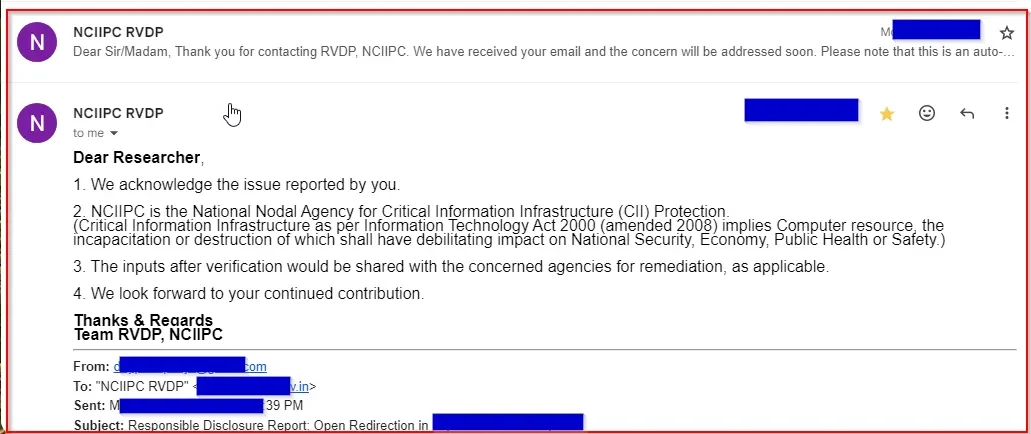
A report was then sent to the NCIIPC Team.
Root cause
The application takes user-controllable data and places it into the target of a redirect without validating it. The default redirect target is a fixed government URL, and the supplied string is appended to it, so the resulting Location value is built by concatenation. Because the value lands in the authority component of the URL, a payload containing // and @ changes which host the browser resolves. The report does not describe any server-side validation that was present and bypassed; the behaviour is consistent with no effective validation of the redirect target.
Impact
An attacker can construct a URL on the government site that redirects a victim to an arbitrary external domain. The report frames the consequence as phishing: unsuspecting users clicking a link on the trusted government domain can be sent to a disguised phishing site, potentially compromising login credentials or other sensitive information. The report does not assign a severity or CVSS score, and it does not show the redirect being combined with any other weakness.
Fix
The standard remediation for this class is to stop building the redirect target by concatenation and to validate the destination against an allowlist of permitted hosts, or to use a server-side mapping from an identifier to a fixed URL so that user input never becomes the redirect target.
Variants to test
When a parameter or path segment ends up in a Location header, try the following and look for a Location value whose host is not the target's:
- Protocol-relative and userinfo tricks:
//@evil.com,//evil.com,https://[redacted]. A positive result is a302whoseLocationhost isevil.com. - Absolute URLs in common parameter names:
next,url,target,rurl,dest,destination,redir,redirect_uri,redirect_url,redirect,out,view,login,to,image_url,go,return,returnTo,return_to,checkout_url,returnUrl,returnUri,locationUrl,goTo,return_uri,ref,referrer,backUrl,successUrl. A positive result is the supplied external URL appearing inLocation. - Path-based redirectors such as
/redirect/cgi-bin/redirect.cgi?{}and/out,/out?,/login?to=. A positive result is the same external host inLocation. - Suffix concatenation, as seen here: supply a plain string and check whether it is appended to the default redirect host. A positive result is
Location: https://target.gov.in.attacker.example, which shows the value is concatenated and may be escapable with the payloads above. - Follow the redirect in the browser or in Burp after each candidate, since a
Locationheader that looks odd may still resolve to the intended host.
What happened, in plain words
A security researcher was looking through a list of Indian Government websites. He visited one of them and noticed that it did not show a page of its own: instead it immediately sent his browser somewhere else, to a second government address. That kind of automatic forwarding is called a redirect, and it is completely normal. Websites use it all the time, for example to send you from an old address to a new one, or from http:// to https://.
The problem was what the website did with the address it was forwarding to. The site built that forwarding address partly out of a string supplied in the request. By putting a specially crafted piece of text into the address, the researcher could make the government site forward visitors to an external domain, evil.com, instead of to the government site. That is an open redirect: the site will redirect to anywhere, not just to places it trusts.
Why does that matter? Because the link a victim clicks starts with the trusted government domain. People trust government addresses. A phishing email that says "click here to log in to the government portal" and whose link really does begin with the government domain looks far more convincing than one pointing at a random site. The victim clicks, gets bounced to a lookalike login page, and types in their credentials there.
The image above is captioned 301 Moved Permanently. 301 is a status code, a short number a web server sends back to tell the browser what happened to the request. 301 means "this page has moved for good, go to this other address instead".
First, the concepts you need
Before walking through the steps, here are the few ideas the rest of the article relies on. None of them require any prior security knowledge.
A URL is the address of something on the web, like https://example.gov.in/page. It has parts. The https part is the scheme, the protocol the browser uses to talk to the server. The example.gov.in part is the host, the name of the machine being contacted. The /page part is the path, which page on that machine you want. There is also an optional part called user information, written as username@, which almost nobody uses today but which browsers still understand.
A request and a response. When you type an address into your browser, the browser sends a request to the server. The server sends back a response. A response has a status code (like 200 for "here is the page", 301 or 302 for "go somewhere else") and a set of headers, which are labelled lines of extra information. One of those headers is called Location, and it is used with redirect status codes: it holds the address the browser should go to next.
A redirect is the server saying "I do not have the page here, go to this other address". The browser obeys automatically, which is why you often do not notice it happening.
An open redirect is when a site lets the visitor influence where that redirect goes, without checking that the destination is a place the site trusts. The report's own definition is worth reading carefully: open redirection vulnerabilities arise when an application incorporates user-controllable data into the target of a redirection in an unsafe way. An attacker can construct a URL within the application that causes a redirection to an arbitrary external domain. This behaviour can be leveraged to facilitate phishing attacks against users of the application.

The image above illustrates that redirect behaviour. The report adds a concrete example of how it can be abused: an attacker could modify the redirect url parameter to point to a malicious website. Unsuspecting users clicking the logout button could be redirected to a cleverly disguised phishing site, potentially compromising their login credentials or other sensitive information.
Phishing is the practice of tricking someone into handing over information, usually a password, by pretending to be a site or person they trust. The disguise is the whole trick, so anything that makes the disguise more believable, such as a link that genuinely starts with a government domain, makes phishing easier.
Burp Suite is a tool security testers use to watch and change the traffic between their browser and a website. Two parts of it matter here. The history is a list of every request and response that passed through it, so you can look back at what happened. Repeater is a panel where you can take one request and send it again and again, changing a little each time, and read the response each time. Think of the history as a recording of a conversation and Repeater as a way to replay one sentence with a different word to see how the other person reacts.
Subdomain enumeration is the process of finding all the smaller addresses that belong to an organisation, such as mail.example.gov.in or portal.example.gov.in when the main site is example.gov.in. Researchers do this to build a list of places worth testing. The researcher had already collected such a list of government sites before this finding.
The setup
Nothing special was needed to find this. No account, no login, no administrator role, no special permission. The researcher used a normal browser plus Burp Suite. He browsed the site, then looked back through the Burp history, then replayed the interesting request in Repeater to read the response properly. The only precondition was finding a URL on the target that issues a redirect in the first place.
Finding it
While going through the government URLs he had collected, the researcher reached one (target.gov.in) that redirected instantly to another URL (taget_2.gov.in, spelled that way in the report). At first this looked like nothing. The site redirected every time to a different site, which is exactly what a well-behaved redirect does, so there was no reason to suspect a vulnerability.
The interesting part came from the Burp history rather than from the browser window. In the browser you only see the final page; in the history you see the actual response the server sent, including the Location header that told the browser where to go. That is where the redirect target becomes visible and editable.
Sending the request to Repeater showed that, by default, the response redirected to another URL in the Location header.
The screenshot shows that default redirect in the response: the server's answer contains a Location header pointing at the second government address.
Exploitation
Step 1: Confirm the redirect reflects input
The researcher added any kind of string to the request, for example attacker.professor0xx01, and watched what came back. The string was attached to the redirect URL:
Location: https://target.gov.in.attacker.professor0xx01
Line by line, this is what that response header means:
Location:is the name of the header. It is the instruction the browser follows when the status code is a redirect.https://is the scheme, telling the browser to use a secure connection.target.gov.inis the government host the site normally redirects to..attacker.professor0xx01is the text the researcher supplied, glued straight onto the end of the government host name.
That is the signal he was looking for. The value he supplied is simply stuck onto the end of the default redirect address. In other words, the site builds the forwarding address by concatenation, joining pieces of text together, rather than by validating the final destination. If you can add text to a host name, the next question is whether you can add text that changes which host the browser actually visits.
Step 2: Find a payload that escapes the intended host
After a few minutes of testing, the researcher found a working payload:
//@evil.com
This is short, so it is worth slowing down. The // at the start is what browsers treat as a protocol-relative reference: it means "use the same scheme as the current page, but here comes a new host". The @ is the separator between user information and the host. Everything before the @ is treated as a username, and everything after it is treated as the host. So a browser reading //@evil.com sees an empty username and the host evil.com.
When that payload was placed into the redirect, it was reflected into the HTTP response appended to the default redirect URL, with a 302 Found status:
Location: https://[redacted]
Line by line:
Location:is again the redirect header.https://is the scheme.target.gov.incomes before the@, so the browser reads it as the user information part, not as the host.@is the separator that ends the user information.evil.comcomes after the@, so the browser reads it as the host, the machine it will actually contact.
The government name is still in the address, which is what makes the link look trustworthy to a person reading it, but the browser ignores it as a destination. 302 Found is the status code meaning "temporarily go to this other address".
The screenshot shows the payload //@evil.com in the request and the resulting Location header in the response.
Step 3: Follow the redirect
Pressing the Follow Redirection button took the researcher to the address in the Location header. It landed on the Evil.com domain, which confirmed that the redirect really does leave the government site and go wherever the attacker points it.
The screenshot shows the redirect to Evil.com succeeding.
The affected URL therefore looks like:
https://<target>.com//@evil.com
Line by line:
https://is the scheme.<target>.comstands for the government site's own address, the part a victim would recognise and trust.//@evil.comis the payload, appended to that address, which changes the host the browser resolves to.
A report was then sent to the NCIIPC Team.
Why it works
The application takes data the visitor can control and places it into the target of a redirect without validating it. The default redirect target is a fixed government URL, and the supplied string is appended to it, so the resulting Location value is built by joining text together. Because the value lands in the part of the URL that decides which host is contacted, a payload containing // and @ changes which host the browser resolves. The report does not describe any server-side validation that was present and bypassed; the behaviour is consistent with no effective validation of the redirect target.
A useful everyday comparison: imagine a receptionist who forwards your calls by reading out whatever extension you give them, without checking it is an internal one. If you say "extension 42, then dial this outside number", the receptionist dials the outside number. The receptionist is not broken; the rule about only forwarding internally is missing.
What an attacker could do with it
An attacker can construct a URL on the government site that redirects a victim to an arbitrary external domain. The report frames the consequence as phishing: unsuspecting users clicking a link on the trusted government domain can be sent to a disguised phishing site, potentially compromising login credentials or other sensitive information.
How to fix it
The standard remediation for this class is to stop building the redirect target by concatenation and to validate the destination against an allowlist of permitted hosts, or to use a server-side mapping from an identifier to a fixed URL so that user input never becomes the redirect target. In plain terms: either check the destination against a list of hosts you trust before redirecting, or never let the visitor's text become the destination at all.
Other things to try
When a parameter or path segment ends up in a Location header, try the following and look for a Location value whose host is not the target's:
- Protocol-relative and userinfo tricks:
//@evil.com,//evil.com,https://[redacted]. A positive result is a302whoseLocationhost isevil.com. - Absolute URLs in common parameter names:
next,url,target,rurl,dest,destination,redir,redirect_uri,redirect_url,redirect,out,view,login,to,image_url,go,return,returnTo,return_to,checkout_url,returnUrl,returnUri,locationUrl,goTo,return_uri,ref,referrer,backUrl,successUrl. A positive result is the supplied external URL appearing inLocation. - Path-based redirectors such as
/redirect/cgi-bin/redirect.cgi?{}and/out,/out?,/login?to=. A positive result is the same external host inLocation. - Suffix concatenation, as seen here: supply a plain string and check whether it is appended to the default redirect host. A positive result is
Location: https://target.gov.in.attacker.example, which shows the value is concatenated and may be escapable with the payloads above. - Follow the redirect in the browser or in Burp after each candidate, since a
Locationheader that looks odd may still resolve to the intended host.
The report also lists a set of parameter names worth checking for this low hanging juicy vulnerability:
/{payload}?next=?url=?target=?rurl=?dest=?destination=?redir=redirect_uri=?redirect_url=?redirect=/redirect/cgi-bin/redirect.cgi?{}/out//out??view=/login?to=?image_url=?go=?return=?returnTo=?return_to=?checkout_url=“go”“return”“r_url”“returnUrl”“returnUri”“locationUrl”“goTo”“return_url”“return_uri”“ref=”“referrer=”“backUrl”“returnTo”“successUrl”
This is a list of names that web applications commonly give to parameters that hold a destination address. If you see any of them in a URL, it is worth checking whether the site uses the value to redirect you somewhere.
Glossary
- 301 Moved Permanently: a status code meaning the requested page has permanently moved to the address in the
Locationheader. - 302 Found: a status code meaning the requested page is temporarily at the address in the
Locationheader. - Allowlist: a list of things that are explicitly permitted; anything not on the list is refused.
- Burp Suite: a tool that sits between a browser and a website so a tester can record, inspect and replay the traffic.
- Concatenation: joining pieces of text end to end to make a longer string.
- CVSS: a scoring system for rating the severity of a security issue.
- Header: a labelled line of extra information sent with a request or response, such as
Location. - Host: the part of a URL that names the machine being contacted, such as
example.gov.in. - HTTP: the protocol browsers and web servers use to exchange requests and responses.
- Location header: the response header that tells the browser which address to go to when the response is a redirect.
- NCIIPC: the Indian government body the report was sent to.
- Open redirect: a redirect whose destination a visitor can influence, so the site can be made to forward people to an arbitrary external domain.
- Parameter: a named value attached to a URL, usually after a
?, that the site uses to decide what to do. - Path: the part of a URL after the host that identifies a page or resource, such as
/page. - Payload: the crafted piece of text an attacker supplies to try to trigger a behaviour.
- Phishing: tricking someone into giving away information, usually credentials, by pretending to be a trusted site or person.
- Protocol-relative reference: a URL starting with
//, meaning "keep the current scheme but use the host that follows". - Redirect: a server response that tells the browser to go to a different address.
- Reflected: said of input that the server copies back into its response.
- Repeater: the Burp Suite panel where a single request can be resent repeatedly with changes, to compare responses.
- Request: the message a browser sends to a server asking for something.
- Response: the message a server sends back to a browser.
- Scheme: the first part of a URL, such as
https, naming the protocol to use. - Status code: a number in a response saying what happened, such as
200,301or302. - Subdomain enumeration: finding the smaller addresses that belong to an organisation's main domain.
- URL: the address of something on the web, made of scheme, host, path and optional other parts.
- User information: the optional
username@part of a URL that comes before the host.